Chapterبەش 2 · Lectureوانە 2.1
Git Basics: Saving the History of Your Codeبنەماکانی Git: پاشەکەوتکردنی مێژووی کۆدەکەت
Why teams use version control and how Git works: a distributed tool where every computer has the whole history. With Bazaar Cart's first files the lesson sets up Git, makes a repository, and follows changes through the working tree, the staging area and the repository with status, add and commit; it reads commits, hashes, git log and git diff, writes good commit messages, keeps generated files and secrets out with .gitignore, and undoes mistakes safely with restore, show and revert, also in VS Code.
بۆچی تیمەکان بەکار دەهێنن و Git چۆن کار دەکات: ئامرازێکی دابەشکراو کە هەموو هەموو مێژووەکەی هەیە. لەگەڵ یەکەم Bazaar Cart، وانەکە Git ئامادە دەکات، دروست دەکات و بە status، add و commit بە دوای گۆڕانکارییەکاندا دەچێت بە ، و ؛ ، ، git log و git diff دەخوێنێتەوە، پەیامی باشی دەنووسێت، بە .gitignore دروستکراو و نهێنییەکان دوور دەخاتەوە و بە restore، show و revert هەڵەکان بە سەلامەتی هەڵدەوەشێنێتەوە، لە VS Codeـیشدا.
What you will learnچی فێر دەبیت
- Explain what version control is and why Git is called distributed.
- Set up Git, make a repository and record commits with status, add and commit.
- Describe the working tree, the staging area and the repository, and read git log and git diff.
- Write clear commit messages and keep generated files and secrets out with .gitignore.
- Undo mistakes safely with restore, show and revert.
- ڕوون بکەیتەوە چییە و بۆچی Git پێی دەوترێت دابەشکراو.
- Git ئامادە بکەیت، دروست بکەیت و بە status، add و commit تۆمار بکەیت.
- ، و وەسف بکەیت و git log و git diff بخوێنیتەوە.
- پەیامی ڕوونی بنووسیت و بە .gitignore دروستکراو و نهێنییەکان دوور بخەیتەوە.
- بە restore، show و revert هەڵەکان بە سەلامەتی هەڵبوەشێنیتەوە.
Saving the history of your codeپاشەکەوتکردنی مێژووی کۆدەکەت
Karwan's prices.py from lesson 1 has grown: it now rounds every line price up to the next 250 IQD (all prices in this lesson are made up). Next he wants to check the grams, but he is afraid of breaking what works. So he copies the file first: prices_v2.py, then prices_final.py, then prices_final_v2_REAL.py. A week later nobody knows which copy is right, who changed the honey price, or what Monday's copy looked like.
prices.pyـی کاروان لە وانەی یەکەم گەورەتر بووە: ئێستا نرخی هەر دێڕێک بەرەو سەرەوە بۆ 250 دیناری دواتر دەکات (هەموو نرخەکانی ئەم وانەیە دەستکردن). دواتر دەیەوێت گرامەکان بپشکنێت، بەڵام دەترسێت ئەوەی کار دەکات تێکی بدات. بۆیە سەرەتا کۆپی دەکات: prices_v2.py، پاشان prices_final.py، پاشان prices_final_v2_REAL.py. دوای هەفتەیەک کەس نازانێت کام کۆپی دروستە، کێ نرخی هەنگوینی گۆڕیوە یان کۆپییەکەی دووشەممە چۆن بوو.
Version control solves this. A version control system keeps one project folder and, inside it, the history of every saved change: who made it, when, and why. You can compare two versions, go back to an old one and work with other people without sending files around. The word itself is practised in Technical English; this lesson shows how it works with Git, the tool almost every software team uses today.
ئەم کێشەیە چارەسەر دەکات. یەک پڕۆژە هەڵدەگرێت و لە ناویدا مێژووی هەموو گۆڕانکارییەکی پاشەکەوتکراو: کێ کردی، کەی و بۆچی. دەتوانیت دوو بەراورد بکەیت، بگەڕێیتەوە بۆ وەشانێکی کۆن و لەگەڵ کەسانی تر کار بکەیت بێ ئەوەی بەم لاو لادا بنێریت. خودی وشەکە لە ئینگلیزیی تەکنیکیـدا ڕاهێنانی لەسەر دەکرێت؛ ئەم وانەیە پیشان دەدات چۆن لەگەڵ Git کار دەکات، ئەو ئامرازەی ئەمڕۆ نزیکەی هەموو تیمێکی بەکاری دەهێنێت.
Git: version control on every computerGit: کۆنترۆڵی وەشان لەسەر هەموو کۆمپیوتەرێک
Git is a free, open-source system for distributed version control. Distributed means that every developer's computer holds a full copy of the repository with its whole history. Older, centralised tools kept the history on one server only: without the network you could not commit, and often could not even look at old versions. With Git almost everything happens on your own computer, so it is fast and works offline: Karwan can commit on the bus to Erbil with no internet and share his work later.
Git سیستەمێکی بێبەرانبەر و بۆ . دابەشکراو واتە هەر کۆپییەکی تەواوی لەگەڵ هەموو مێژووەکەی هەڵدەگرێت. ئامرازە کۆنترەکان کە ناوەندی بوون، مێژوویان تەنیا لەسەر یەک هەڵدەگرت: بێ نەتدەتوانی بکەیت و زۆرجار تەنانەت نەتدەتوانی سەیری وەشانە کۆنەکان بکەیت. لەگەڵ Git نزیکەی هەموو شتێک لەسەر خۆت ڕوو دەدات، بۆیە خێرایە و بێ کار دەکات: کاروان دەتوانێت لە پاسی هەولێردا بێ بکات و دواتر کارەکەی هاوبەش بکات.
Git is not GitHub. Git is the program on your computer. GitHub, GitLab and Codeberg are online services that keep a shared copy of a repository so that a team can work together. You can use Git without any of them; GitHub and teamwork come two lessons later, in GitHub and teamwork.
Git و GitHub یەک شت نین. Git کە لەسەر کار دەکات. GitHub، GitLab و Codeberg خزمەتگوزارییەکی ئۆنلاینن کە کۆپییەکی هاوبەشی هەڵدەگرن بۆ ئەوەی تیمێک پێکەوە کار بکات. دەتوانیت بێ هیچیان Git بەکار بهێنیت؛ GitHub و کاری تیمی دوو وانە دواتر دێن، لە GitHub و کاری تیمی.
Where Git came fromGit لە کوێوە هات
Git was born from a problem. From 2002 the developers of the Linux kernel — one of the biggest open-source projects — managed their code with BitKeeper, a commercial tool they were allowed to use free of charge. In 2005 that arrangement broke down. Linus Torvalds, who created Linux, started his own tool in April 2005, and within days Git was keeping track of its own code. Its goals came from the Linux project: speed, a simple design, strong support for thousands of parallel branches, being fully distributed, and handling a project as big as Linux.
Git لە کێشەیەکەوە لەدایک بوو. لە ساڵی 2002ـەوە گەشەپێدەرانی Linux — کە یەکێکە لە گەورەترین پڕۆژە — کۆدەکەیان بە BitKeeper بەڕێوە دەبرد، ئامرازێکی بازرگانی کە ڕێگەیان پێدرابوو بە بێبەرانبەر بەکاری بهێنن. لە ساڵی 2005 ئەم ڕێککەوتنە تێکچوو. Linus Torvalds، دروستکەری Linux، لە نیسانی 2005 دەستی کرد بە نووسینی ئامرازێکی تایبەت بە خۆیان و لە ماوەی چەند ڕۆژێکدا Git کۆدی خۆی بەڕێوە دەبرد. ئامانجەکانی لە پڕۆژەی Linuxـەوە هاتن: خێرایی، دیزاینێکی سادە، پشتگیرییەکی بەهێز بۆ هەزاران هاوکات، تەواو دابەشکراو بوون و توانای بەڕێوەبردنی پڕۆژەیەکی گەورەی وەک Linux.
- April 2005 — Torvalds starts Git; it manages its own code within days.
- July 2005 — Junio Hamano takes over; he still maintains Git today.
- December 2005 — Git 1.0.
- 2008 — GitHub opens and makes sharing Git repositories easy.
- November 2026 — the newest version is Git 2.56 (September 2026). Git 3.0 is planned, with no date yet: new repositories will use SHA-256 hashes and
mainas the default branch name.
- نیسانی 2005 — Torvalds Git دەست پێدەکات؛ لە چەند ڕۆژێکدا کۆدی خۆی بەڕێوە دەبات.
- تەممووزی 2005 — Junio Hamano کارەکە وەردەگرێت و هێشتاش Git بەڕێوە دەبات.
- کانوونی یەکەمی 2005 — Git 1.0.
- 2008 — GitHub دەکرێتەوە و هاوبەشکردنی Git ئاسان دەکات.
- تشرینی دووەمی 2026 — نوێترین وەشان Git 2.56ـە (ئەیلوولی 2026). Git 3.0 پلانی بۆ دانراوە و هێشتا ڕێکەوتی نییە: نوێ SHA-256 و
mainوەک ناوی بنەڕەتیی بەکار دەهێنێت.
Install Git and tell it who you areGit جێگیر بکە و پێی بڵێ تۆ کێیت
Git works in a terminal (see the command line) and inside most code editors. First check whether it is installed:
Git لە (بڕوانە نێوبەستەی هێڵی فەرمان) و لە ناو زۆربەی دەستکاریکەرەکانی کۆددا کار دەکات. سەرەتا بپشکنە ئایا جێگیر کراوە:
git --versiongit version 2.50.1 (Apple Git-155)
If the terminal says command not found, install it. Windows: Git for Windows from git-scm.com; it adds Git Bash, a terminal where every command of this lesson works. Mac: git --version offers to install Apple's command line tools, or use Homebrew. Linux: your package manager, for example sudo apt install git. Any recent version is fine. Then tell Git your name and e-mail, once per computer:
ئەگەر نووسی command not found، جێگیری بکە. Windows: Git for Windows لە git-scm.com؛ Git Bash زیاد دەکات، کە هەموو ئەم وانەیە تێیدا کار دەکەن. Mac: git --version پێشنیاری جێگیرکردنی ئامرازەکانی هێڵی فەرمانی Apple دەکات، یان Homebrew بەکار بهێنە. Linux: ، بۆ نموونە sudo apt install git. هەر وەشانێکی نوێ گونجاوە. پاشان ناو و بە Git بڵێ، بۆ هەر یەک جار:
git config --global user.name "Karwan"
git config --global user.email "karwan@example.com"
git config --global --listuser.name=Karwan user.email=karwan@example.com
Explain the codeڕوونکردنەوەی کۆدەکە
- Lineدێڕی 1-2
Use your own name and e-mail.
--globalsaves them for every repository on this computer.ناو و خۆت بەکار بهێنە.
--globalبۆ هەموو ئەم پاشەکەوتیان دەکات.- Lineدێڕی 3
Lists your settings, to check them.
لیست دەکات بۆ پشکنین.
Make a repository: git initکۆگایەکی کۆد دروست بکە: git init
A repository (repo) is a project folder that Git keeps a history for. Karwan makes one for Bazaar Cart:
پڕۆژەیەکە کە Git مێژووی بۆ هەڵدەگرێت. کاروان یەکێک بۆ Bazaar Cart دروست دەکات:
mkdir bazaar-cart
cd bazaar-cart
git init -b main
ls -a
git status$ git init -b main Initialized empty Git repository in ~/se/bazaar-cart/.git/ $ ls -a . .. .git $ git status On branch main No commits yet nothing to commit (create/copy files and use "git add" to track)
Explain the codeڕوونکردنەوەی کۆدەکە
- Lineدێڕی 3
Makes the hidden
.gitfolder.-b mainnames the first branchmain.شاراوەی
.gitدروست دەکات.-b mainناوی یەکەم دەنێتmain.- Lineدێڕی 4
-ashows hidden names. Windows PowerShell:ls -Force; Command Prompt:dir /a.-aناوە شاراوەکان پیشان دەدات. PowerShellـی Windows:ls -Force؛ Command Prompt:dir /a.- Lineدێڕی 5
The most useful Git command: what is going on? Run it often.
بەسوودترین Git: چی ڕوو دەدات؟ زۆرجار جێبەجێی بکە.
The .git folder is the repository: every commit, the staging area and the settings live there. Your files stay where they are. -b main names the first branch main (branches are the next lesson); older Git versions used master when you leave it out. Make one repository per project, and never one inside another.
.git خودی : هەموو ، و لەوێن. لە شوێنی خۆیان دەمێنن. -b main ناوی یەکەم دەنێت main ( وانەی داهاتوون)؛ ئەگەر نەینووسیت، وەشانە کۆنەکانی Git ناویان دەنا master. بۆ هەر پڕۆژەیەک یەک دروست بکە و هەرگیز یەکێک لە ناو یەکێکی تردا دامەنێ.
Three areas and three statesسێ ناوچە و سێ دۆخ
Git moves your work through three areas:
Git کارەکەت بە سێ ناوچەدا تێدەپەڕێنێت:
- Working tree — the normal folder you see and edit.
- Staging area (also called the index) — the changes you have chosen for the next commit.
- Repository (
.git) — every commit, kept for good.
- — ئەو ئاساییەی دەیبینیت و دەستکاری دەکەیت.
- (ناوی indexـیشی هەیە) — ئەو گۆڕانکارییانەی بۆ داهاتوو هەڵتبژاردوون.
- (
.git) — هەموو ، بۆ هەمیشە.
So a changed file is in one of three states: modified (changed, not staged yet), staged (chosen for the next commit) or committed (stored in the repository). git add copies a change into the staging area; git commit stores everything staged as one new commit. Because you choose, one commit can hold exactly one idea.
بۆیە گۆڕاو لە یەکێک لەم سێ دۆخەدایە: دەستکاریکراو (گۆڕاوە، هێشتا ئامادە نەکراوە)، ئامادەکراو (بۆ داهاتوو هەڵبژێردراوە) یان (لە هەڵگیراوە). git add گۆڕانکارییەک کۆپی دەکاتە ناو ؛ git commit هەموو ئامادەکراوەکان وەک نوێ هەڵدەگرێت. چونکە خۆت هەڵدەبژێریت، یەک دەتوانێت ڕێک یەک بیرۆکە هەڵبگرێت.
Soran's shelves hold all his goods: that is the working tree. When a customer buys, he puts the chosen bags on the scale tray: the staging area. Only what is on the tray is written in his sales book as one sale: the commit. Yesterday's sales stay in the book; today's sales are new lines, not changes to old ones.
ڕەفەکانی سۆران هەموو کاڵاکانی هەڵدەگرن: ئەوە . کاتێک کڕیارێک دەکڕێت، کیسە هەڵبژێردراوەکان دادەنێتە سەر سینیی تەرازووەکە: ئەوە . تەنیا ئەوەی لەسەر سینییەکەیە وەک یەک فرۆشتن لە دەفتەری فرۆشتنەکەیدا دەنووسرێت: ئەوە . فرۆشتنەکانی دوێنێ لە دەفتەرەکەدا دەمێننەوە؛ فرۆشتنەکانی ئەمڕۆ دێڕی نوێن، نەک گۆڕینی دێڕە کۆنەکان.
Where the analogy stops workingسنووری ئەم نموونەیە
A paper book can be torn or changed in secret; Git checks every commit with a hash, so a changed old commit is noticed at once. And git add puts a copy on the tray: the file also stays in your working tree.
دەفتەری کاغەز دەدڕێت یان بە دزییەوە دەگۆڕدرێت؛ Git هەموو بە دەپشکنێت، بۆیە کۆنی گۆڕاو یەکسەر دەردەکەوێت. هەروەها git add کۆپییەک دادەنێتە سەر سینییەکە: لە دەمێنێت.
Your first commit: status and addیەکەم کۆمیتت: status و add
Karwan saves his improved prices.py in the folder. It knows Soran's prices per kilogram and rule R1: a line price is rounded up to the next 250 IQD.
کاروان prices.pyـە باشترکراوەکەی لە دادەنێت. نرخی هەر کیلۆیەکی کاڵاکانی سۆران و ڕێسای R1 دەزانێت: نرخی هەر دێڕێک بەرەو سەرەوە بۆ 250 دیناری دواتر.
"""Bazaar Cart: prices for Soran's shop (made-up prices in IQD per kg)."""
import math

PRICES = {
    "walnuts": 18000,
    "sumac": 8000,
    "dried figs": 12000,
    "black tea": 14000,
    "honey": 3000,
}


def round_up_250(amount):
    """Round an amount up to the next 250 IQD."""
    return math.ceil(amount / 250) * 250


def line_price(price_per_kg, grams):
    """Price of one order line, rounded up to 250 IQD."""
    return round_up_250(price_per_kg * grams / 1000)


if __name__ == "__main__":
print(line_price(PRICES["sumac"], 350))3000
Explain the codeڕوونکردنەوەی کۆدەکە
- Lineدێڕی 4-10
Made-up prices in IQD per kilogram. Look closely at honey: the next lesson finds a bug here.
نرخی دەستکرد بە دینار بۆ هەر کیلۆیەک. بە وردی سەیری هەنگوین بکە: وانەی داهاتوو لێرە دەدۆزێتەوە.
- Lineدێڕی 13-15
Rule R1: 2,800 IQD becomes 3,000.
ڕێسای R1: 2,800 دینار دەبێت بە 3,000.
- Lineدێڕی 23-24
Runs only when you start this file itself (the main guard): 350 g of sumac.
تەنیا کاتێک جێبەجێ دەبێت کە خودی ئەم دەست پێ بکەیت (main guard): 350 گرام سماق.
Now look, then choose. git status shows the new file as untracked: Git sees it but does not keep its history yet. git add puts it in the staging area:
ئێستا سەیر بکە، پاشان هەڵبژێرە. git status نوێیەکە وەک untracked پیشان دەدات: Git دەیبینێت بەڵام هێشتا مێژووەکەی هەڵناگرێت. git add دەیخاتە :
git status
git add prices.py
git status$ git status On branch main No commits yet Untracked files: (use "git add <file>..." to include in what will be committed) prices.py nothing added to commit but untracked files present (use "git add" to track) $ git add prices.py $ git status On branch main No commits yet Changes to be committed: (use "git rm --cached <file>..." to unstage) new file: prices.py
Explain the codeڕوونکردنەوەی کۆدەکە
- Lineدێڕی 2
git addprints nothing when it works.git add .adds every changed file in the folder — checkgit statusfirst.git addکاتێک سەرکەوتوو دەبێت هیچ ناڵێت.git add .هەموو گۆڕاوی زیاد دەکات — سەرەتاgit statusبپشکنە.
Your first commit: status and addیەکەم کۆمیتت: status و add
git commit: one snapshot in the historygit commit: وێنەیەکی تەواو لە مێژوودا
Now Karwan stores the staged file as a commit. -m gives the commit message:
ئێستا کاروان ئامادەکراوەکە وەک هەڵدەگرێت. -m پەیامی دەدات:
git commit -m "Add line price calculation"[main (root-commit) 08d3d64] Add line price calculation 1 file changed, 24 insertions(+) create mode 100644 prices.py
Explain the codeڕوونکردنەوەی کۆدەکە
- Lineدێڕی 1
(root-commit): the very first commit.08d3d64: its short name.24 insertions(+): 24 new lines. Your hash will be different.(root-commit): یەکەمین .08d3d64: ناوە کورتەکەی.24 insertions(+): 24 دێڕی نوێ. تۆ جیاواز دەبێت.
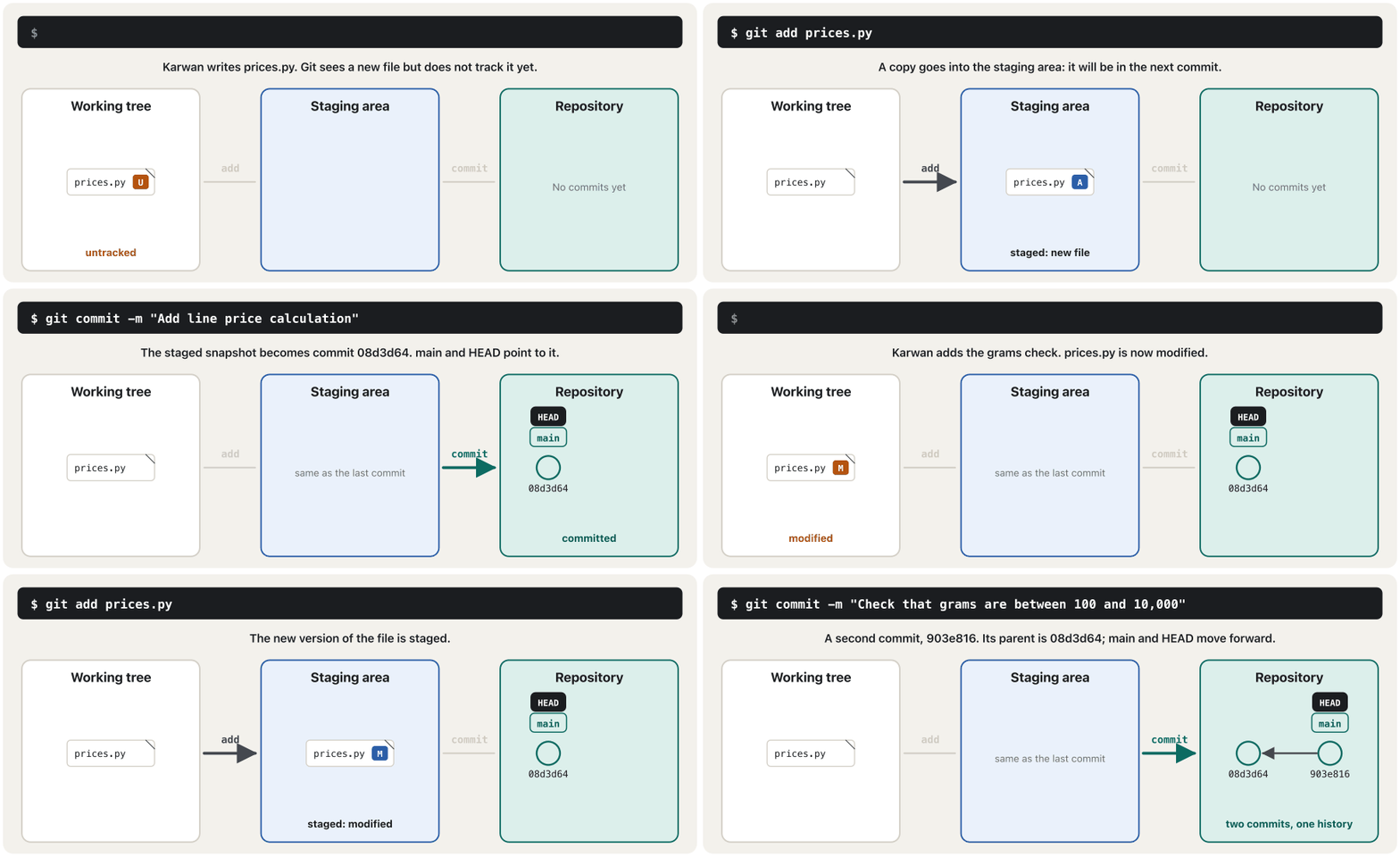
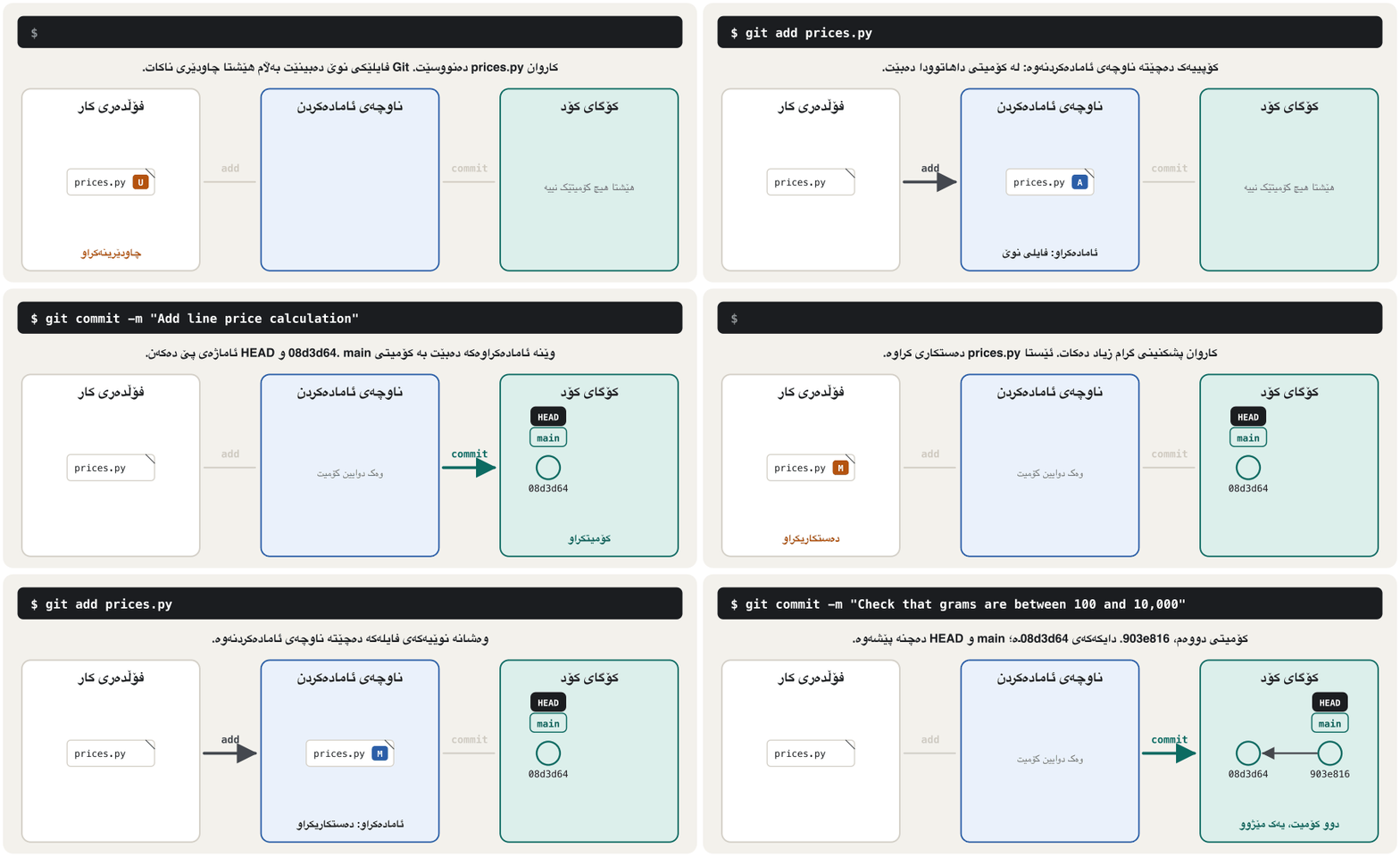
Then he adds rule R2 (100 g to 10,000 g per line) and repeats the same two steps: git add prices.py, git commit -m "…". The animation shows both rounds: the file travels from the working tree to the staging area and into the repository, where each commit points back to the one before it.
پاشان ڕێسای R2 (100 گرام تا 10,000 گرام بۆ هەر دێڕێک) زیاد دەکات و هەمان دوو هەنگاو دووپاتە دەکاتەوە: git add prices.py، git commit -m "…". ئەنیمەیشنەکە هەردوو جارەکە پیشان دەدات: لە دەچێتە و پاشان ناو ، کە تێیدا هەر ئاماژە بە پێشووی خۆی دەکات.
Commits, hashes and git logکۆمیتەکان، هاشی کۆمیت و git log
A commit is not a list of edits: it is a snapshot of all tracked files at that moment (Git stores an unchanged file only once and points to it). Each commit also records the author, the date, the message and its parent, the commit before it. From all of this Git calculates the commit's name, the commit hash: 40 hexadecimal characters (SHA-1 today). Change anything in a commit and the hash changes, so nobody can change the history quietly. git log lists the commits, newest first:
لیستێکی دەستکاری نییە: وێنەیەکی تەواوی هەموو ئەو کە لەو ساتەدا چاودێری دەکرێن (Git نەگۆڕاو تەنیا یەک جار هەڵدەگرێت و ئاماژەی پێ دەکات). هەر هەروەها نووسەر، ڕێکەوت، پەیام و دایکەکەی تۆمار دەکات، واتە پێش خۆی. لە هەموو ئەمانەوە Git ناوی دەژمێرێت، واتە : 40 پیتی (ئێستا بە SHA-1). هەر شتێک لە بگۆڕیت، دەگۆڕێت، بۆیە کەس ناتوانێت بە بێدەنگی مێژووەکە بگۆڕێت. git log لیست دەکات، نوێترین لە سەرەوە:
git log
git log --oneline$ git log
commit 903e8164b0391beee59af75c18f6452fb3a86b9f (HEAD -> main)
Author: Karwan <karwan@example.com>
Date: Mon Nov 2 11:34:00 2026 +0300
Check that grams are between 100 and 10,000
commit 08d3d646ee59518cb0bcb13143cb8012ce68c3a3
Author: Karwan <karwan@example.com>
Date: Mon Nov 2 10:12:00 2026 +0300
Add line price calculation
$ git log --oneline
903e816 (HEAD -> main) Check that grams are between 100 and 10,000
08d3d64 Add line price calculationExplain the codeڕوونکردنەوەی کۆدەکە
- Lineدێڕی 2
--oneline: one line per commit, the short hash and the summary line. If a long log opens and the terminal waits, pressq.--oneline: بۆ هەر یەک دێڕ، کورت و دێڕی پوختە. ئەگەر لۆگێکی درێژ کرایەوە و وەستا،qدابگرە.
(HEAD -> main) means: you are on the branch main, and this is its newest commit. HEAD is Git's marker for where you are now; the next lesson uses it all the time. To look inside one old commit, give its hash: git show 903e816.
(HEAD -> main) واتە: لەسەر mainـیت و ئەمە نوێترین . نیشانەی Gitـە بۆ ئێستا لە کوێیت؛ وانەی داهاتوو هەمیشە بەکاری دەهێنێت. بۆ سەیرکردنی ناوەوەی کۆن، بدە: git show 903e816.
What changed? git diffچی گۆڕا؟ git diff
Before you commit, read your change. Karwan adds rule R2 to line_price(): every line must be between 100 g and 10,000 g, otherwise a ValueError. git diff shows the change line by line: lines starting with + were added, lines with - removed, and lines starting with a space are unchanged context.
پێش ، گۆڕانکارییەکەت بخوێنەرەوە. کاروان ڕێسای R2 بۆ line_price() زیاد دەکات: هەر دێڕێک دەبێت لە نێوان 100 گرام و 10,000 گرامدا بێت، ئەگەرنا ValueError. git diff گۆڕانکارییەکە دێڕ بە دێڕ پیشان دەدات: ئەو دێڕانەی بە + دەست پێدەکەن زیاد کراون، ئەوانەی بە - لابراون و ئەوانەی بە بۆشایی دەست پێدەکەن نەگۆڕاون و تەنیا بۆ تێگەیشتنن.
git diffdiff --git a/prices.py b/prices.py
index 8f0f5e7..719b474 100644
--- a/prices.py
+++ b/prices.py
@@ -17,6 +17,8 @@ def round_up_250(amount):
def line_price(price_per_kg, grams):
"""Price of one order line, rounded up to 250 IQD."""
+ if not 100 <= grams <= 10_000:
+ raise ValueError("grams must be between 100 and 10,000")
return round_up_250(price_per_kg * grams / 1000)
git diff compares the working tree with the staging area. After git add, it prints nothing; git diff --staged then shows what the next commit will contain:
git diff لەگەڵ بەراورد دەکات. دوای git add هیچ پیشان نادات؛ ئەوکات git diff --staged پیشان دەدات داهاتوو چی تێدا دەبێت:
git add prices.py
git diff
git diff --staged
git commit -m "Check that grams are between 100 and 10,000"$ git add prices.py
$ git diff
$ git diff --staged
diff --git a/prices.py b/prices.py
index 8f0f5e7..719b474 100644
--- a/prices.py
+++ b/prices.py
@@ -17,6 +17,8 @@ def round_up_250(amount):

 def line_price(price_per_kg, grams):
     """Price of one order line, rounded up to 250 IQD."""
+    if not 100 <= grams <= 10_000:
+        raise ValueError("grams must be between 100 and 10,000")
     return round_up_250(price_per_kg * grams / 1000)
$ git commit -m "Check that grams are between 100 and 10,000"
On branch main
Changes not staged for commit:
(use "git add <file>..." to update what will be committed)
(use "git restore <file>..." to discard changes in working directory)
modified: prices.py
no changes added to commit (use "git add" and/or "git commit -a")Explain the codeڕوونکردنەوەی کۆدەکە
- Lineدێڕی 2
Prints nothing: nothing is left unstaged.
هیچ پیشان نادات: هیچ شتێکی ئامادەنەکراو نەماوە.
Good commit messagesپەیامی باشی کۆمیت
A commit message is a note to your team, and to yourself six months from now. Pro Git's guidelines, which most teams follow:
پەیامی تێبینییەکە بۆ تیمەکەت و بۆ خۆت دوای شەش مانگ. ڕێنماییەکانی کتێبی Pro Git، کە زۆربەی تیمەکان پەیڕەوی دەکەن:
- A short summary line, about 50 characters, written as an order: Add …, Fix …, Check … — not Added or Fixes. Git writes its own messages the same way (Merge branch …, Revert …).
- A blank line, then the body: why you made the change, in lines of about 72 characters.
git commitwithout-mopens an editor for a longer message. - One change per commit. The R2 check and the new
.gitignoreare two commits, not one. Small commits are easy to read, review and undo.
- دێڕێکی پوختەی کورت، نزیکەی 50 پیت، وەک فەرمان نووسراو: Add …، Fix …، Check … — نەک Added یان Fixes. Git خۆی پەیامەکانی بەم شێوەیە دەنووسێت (Merge branch …، Revert …).
- دێڕێکی بەتاڵ، پاشان ناوەڕۆک: بۆچی گۆڕانکارییەکەت کرد، بە دێڕی نزیکەی 72 پیتی.
git commitبێ-mدەکاتەوە بۆ پەیامێکی درێژتر. - بۆ هەر یەک گۆڕانکاری. پشکنینی R2 و
.gitignoreـی نوێ دوو ، نەک یەک. بچووکەکان ئاسان دەخوێنرێنەوە، پێداچوونەوەیان بۆ دەکرێت و هەڵدەوەشێنرێنەوە.
Messages are usually written in English, even in Kurdish teams, because tools and teammates around the world read them. The language side (imperative verbs, precise words) is practised in Technical English.
پەیامەکان زۆرجار بە ئینگلیزی دەنووسرێن، تەنانەت لە تیمە کوردییەکانیشدا، چونکە ئامرازەکان و هاوکارانی سەرانسەری جیهان دەیانخوێننەوە. لایەنی زمانەکەی (کاری فەرمانی و وشەی ورد) لە ئینگلیزیی تەکنیکیـدا ڕاهێنانی لەسەر دەکرێت.
.gitignore: files Git should not track.gitignore: ئەو فایلانەی Git نابێت چاودێرییان بکات
Karwan writes cart.py, which totals one order. It imports prices.py, so Python makes a __pycache__/ folder with compiled bytecode. He also keeps the key of an SMS service in a file called .env. Now git status lists all of them:
کاروان cart.py دەنووسێت کە کۆی یەک داواکاری دەژمێرێت. prices.py هاوردە دەکات، بۆیە Python __pycache__/ بە ئامادەکراو دروست دەکات. هەروەها کلیلی خزمەتگوزارییەکی لە بە ناوی .env هەڵدەگرێت. ئێستا git status هەموویان لیست دەکات:
"""Bazaar Cart: the total of one order (made-up prices in IQD)."""
from prices import PRICES, line_price

order = [("walnuts", 500), ("sumac", 350), ("black tea", 250)]

total = 0
for product, grams in order:
    price = line_price(PRICES[product], grams)
    print(f"{product:<10} {grams:>5} g {price:>8,} IQD")
    total += price
print(f"{'Goods total':<18} {total:>8,} IQD")walnuts 500 g 9,000 IQD sumac 350 g 3,000 IQD black tea 250 g 3,500 IQD Goods total 15,500 IQD
git statusOn branch main Untracked files: (use "git add <file>..." to include in what will be committed) .env __pycache__/ cart.py nothing added to commit but untracked files present (use "git add" to track)
__pycache__/ is made again on every run, and .env holds a secret: neither may go into the history. A file named .gitignore lists them, one pattern per line. # starts a comment, a name ending in / means a folder, * matches any characters, and ! makes an exception:
__pycache__/ لە هەر جێبەجێکردنێکدا دووپاتە دروست دەبێتەوە و .env نهێنییەکی تێدایە: هیچیان نابێت بچنە ناو مێژووەوە. بە ناوی .gitignore لیستیان دەکات، هەر نموونەیەک لە دێڕێکدا. # دەست پێدەکات، ناوێک کە بە / کۆتایی بێت واتە ، * لەگەڵ هەر پیتێک دەگونجێت و ! هەڵاواردن دروست دەکات:
# Python's cache and virtual environments
__pycache__/
*.pyc
.venv/

# Secrets: passwords and API keys stay on your computer
.envgit statusOn branch main Untracked files: (use "git add <file>..." to include in what will be committed) .gitignore cart.py nothing added to commit but untracked files present (use "git add" to track)
Explain the codeڕوونکردنەوەی کۆدەکە
- Lineدێڕی 1
Only
.gitignoreandcart.pyare left. Karwan commits them as two commits:4fc0f01and2ff6abe.تەنیا
.gitignoreوcart.pyماونەتەوە. کاروان بە دوو تۆماریان دەکات:4fc0f01و2ff6abe.
Commit the .gitignore file itself, so the whole team ignores the same files. On a Mac also add .DS_Store (hidden files); a Flutter project ignores its build/ folder (inside a Flutter project).
خودی .gitignore بکە، بۆ ئەوەی هەموو تیمەکە هەمان پشتگوێ بخەن. لەسەر Mac .DS_Storeـیش زیاد بکە (فایلە شاراوەکان)؛ پڕۆژەیەکی Flutter build/ پشتگوێ دەخات (ناو پڕۆژەیەکی Flutter).
.gitignore: files Git should not track.gitignore: ئەو فایلانەی Git نابێت چاودێرییان بکات
Never commit a secretهەرگیز نهێنی کۆمیت مەکە
Passwords, API keys and tokens never belong in a repository, not even a private one: repositories are copied, shared and published. Keep them in a file such as .env that .gitignore lists, or in the settings of the server that runs your app. Code that contains a password is a known security mistake (hard-coded credentials).
، و تۆکنەکان هەرگیز جێیان لە نییە، تەنانەت لە یەکێکی تایبەتیشدا: کۆپی دەکرێن، هاوبەش دەکرێن و بڵاو دەکرێنەوە. لە وەک .envـدا هەڵیانبگرە کە .gitignore لیستی کردووە، یان لە ئەو جێبەجێ دەکات. کۆدێک کە تێدا بێت هەڵەیەکی ئاسایشیی ناسراوە (تێپەڕەوشەی ناو کۆد).
Undo safely: restore and showبە سەلامەتی هەڵیبوەشێنەوە: restore و show
Git keeps commits safe, so most mistakes are easy to undo. Pick the command by where the mistake is:
Git دەپارێزێت، بۆیە زۆربەی هەڵەکان ئاسان هەڵدەوەشێنرێنەوە. بەپێی شوێنی هەڵەکە هەڵبژێرە:
| Situationدۆخ | Command | What happensچی ڕوو دەدات |
|---|---|---|
| You broke a file and want the last saved version back تێکداوە و دوایین وەشانی هەڵگیراوت دەوێتەوە | git restore prices.py | Your edits to that file are thrown away, for goodدەستکارییەکانت لەو فڕێ دەدرێن، بۆ هەمیشە |
| You staged a file by mistake بە هەڵە ئامادە کردووە | git restore --staged cart.py | It leaves the staging area; your edits stayلە دەردەچێت؛ دەستکارییەکانت دەمێنن |
| You want to look at an old commitدەتەوێت سەیری کۆن بکەیت | git show 903e816 | Shows the commit and its diff; changes nothing و پیشان دەدات؛ هیچ ناگۆڕێت |
| A commit was a bad idea بیرۆکەیەکی خراپ بوو | git revert <hash> | A new commit undoes it; the history stays نوێ هەڵیدەوەشێنێتەوە؛ مێژووەکە دەمێنێت |
Karwan deletes the price list by accident, and later stages a debug line he did not mean to keep. Both are undone:
کاروان بە هەڵە لیستی نرخەکان دەسڕێتەوە و دواتر دێڕێکی تاقیکاری ئامادە دەکات کە نەیدەویست بیهێڵێتەوە. هەردووکیان هەڵدەوەشێنرێنەوە:
git status --short
git diff --stat
git restore prices.py
git status --short
git add cart.py
git restore --staged cart.py
git status --short
git restore cart.py
git status --short$ git status --short M prices.py $ git diff --stat prices.py | 7 ------- 1 file changed, 7 deletions(-) $ git restore prices.py $ git status --short $ git add cart.py $ git restore --staged cart.py $ git status --short M cart.py $ git restore cart.py $ git status --short
Explain the codeڕوونکردنەوەی کۆدەکە
- Lineدێڕی 1
--short: one line per file.M= modified, not staged.--short: بۆ هەر یەک دێڕ.M= دەستکاریکراو، ئامادەنەکراو.- Lineدێڕی 2-3
7 lines were deleted by accident;
git restorebrings back the committedprices.py.7 دێڕ بە هەڵە سڕابوونەوە؛
git restoreprices.pyـی دەگەڕێنێتەوە.- Lineدێڕی 5-7
The debug line was staged by mistake: out of the staging area, but still modified (
M).دێڕە تاقیکارییەکە بە هەڵە ئامادە کرابوو: لە دەرچوو، بەڵام هێشتا دەستکاریکراوە (
M).- Lineدێڕی 8
Now the debug line is thrown away for good.
ئێستا دێڕە تاقیکارییەکە بۆ هەمیشە فڕێ درا.
Undo safely: restore and showبە سەلامەتی هەڵیبوەشێنەوە: restore و show
git revert: undo a commit with a new commitgit revert: هەڵوەشاندنەوەی کۆمیتێک بە کۆمیتێکی نوێ
Karwan commits a change that lists the order lines in alphabetical order. Soran does not like it: customers want to see their order in the order they asked for it. git show displays the commit; git revert makes a new commit that does the opposite:
کاروان گۆڕانکارییەک دەکات کە دێڕەکانی داواکاری بە ڕیزی ئەلفوبێ ڕیز دەکات. سۆران حەزی لێ نییە: کڕیاران دەیانەوێت داواکارییەکەیان بەو ڕیزەی داوایان کردووە ببینن. git show پیشان دەدات؛ git revert نوێ دروست دەکات کە پێچەوانەکەی دەکات:
git show HEAD
git revert --no-edit HEAD
git log --oneline$ git show HEAD
commit 5c71c96a8d713beba45b2525920eff8fe6f985db (HEAD -> main)
Author: Karwan <karwan@example.com>
Date: Tue Nov 3 14:02:00 2026 +0300
List the order lines in alphabetical order
diff --git a/cart.py b/cart.py
index 8a11e13..763ef35 100644
--- a/cart.py
+++ b/cart.py
@@ -4,7 +4,7 @@ from prices import PRICES, line_price
order = [("walnuts", 500), ("sumac", 350), ("black tea", 250)]
total = 0
-for product, grams in order:
+for product, grams in sorted(order):
price = line_price(PRICES[product], grams)
print(f"{product:<10} {grams:>5} g {price:>8,} IQD")
total += price
$ git revert --no-edit HEAD
[main 463271a] Revert "List the order lines in alphabetical order"
Date: Tue Nov 3 14:40:00 2026 +0300
1 file changed, 1 insertion(+), 1 deletion(-)
$ git log --oneline
463271a (HEAD -> main) Revert "List the order lines in alphabetical order"
5c71c96 List the order lines in alphabetical order
2ff6abe Add cart.py to total an order
4fc0f01 Ignore Python cache files, virtual environments and .env
903e816 Check that grams are between 100 and 10,000
08d3d64 Add line price calculationExplain the codeڕوونکردنەوەی کۆدەکە
- Lineدێڕی 1
HEAD= the newest commit of the branch you are on; a hash works too.HEAD= نوێترین ئەو لەسەریتی؛ کار دەکات.- Lineدێڕی 2
--no-editkeeps Git's ready message Revert "…". Without it an editor opens, so you can write why you reverted.--no-editپەیامە ئامادەکەی Git، Revert "…"، دەهێڵێتەوە. بەبێ ئەوە دەکرێتەوە تا بنووسیت بۆچی هەڵتوەشاندەوە.
Nothing was deleted: the bad commit 5c71c96 is still in the history, and 463271a puts the code back. That is why revert is the safe undo even after you have shared your commits with the team. Commands that rewrite history — git reset --hard, git commit --amend — are only for commits nobody else has yet; leave them until you know Git well.
هیچ شتێک نەسڕایەوە: خراپەکە، 5c71c96، هێشتا لە مێژوودایە و 463271a کۆدەکە دەگەڕێنێتەوە. بۆیە revert هەڵوەشاندنەوەی بێ مەترسییە، تەنانەت دوای ئەوەی لەگەڵ تیمەکە هاوبەش کرد. ئەو مێژوو دووپاتە دەنووسنەوە — git reset --hard، git commit --amend — تەنیا بۆ ئەو کە هێشتا کەسی تر نییەتی؛ تا Git باش نەناسیت بەکاریان مەهێنە.
Git in VS CodeGit لە VS Code
You do not have to type every command. VS Code (and Android Studio, PyCharm and others) has Git built in; it uses the Git installed on your computer. Open the project folder, then the Source Control view (Ctrl+Shift+G, on a Mac ⌃⇧G):
پێویست ناکات هەموو بنووسیت. VS Code (و Android Studio، PyCharm و هی تر) Gitـیان تێدایە؛ ئەو Gitـە بەکار دەهێنن کە لەسەر جێگیر کراوە. پڕۆژەکە بکەرەوە، پاشان بەشی Source Control (Ctrl+Shift+G، لەسەر Mac ⌃⇧G):
- Changes lists modified (M) and untracked (U) files; + stages a file, like
git add. - Staged Changes is the staging area; added files show A.
- Type the message in the box and press Commit: that is
git commit -m. - Click a file to see its diff side by side; ↶ throws its edits away, like
git restore.
- Changes دەستکاریکراو (M) و چاودێرینەکراو (U) لیست دەکات؛ + ئامادە دەکات، وەک
git add. - Staged Changes ؛ زیادکراوەکان A پیشان دەدەن.
- پەیامەکە لە خانەکەدا بنووسە و Commit دابگرە: ئەوە
git commit -mـە. - کرتە لە بکە تا لە تەنیشت یەکەوە ببینیت؛ ↶ دەستکارییەکانی فڕێ دەدات، وەک
git restore.
The buttons run the same Git commands, so everything in this lesson still applies — and when something goes wrong, the terminal shows Git's exact message. Flutter developers meet the same panel in Visual Studio Code.
دوگمەکان هەمان Git جێبەجێ دەکەن، بۆیە هەموو شتێکی ئەم وانەیە هەر ڕاستە — و کاتێک شتێک هەڵە دەچێت، پەیامی ورد و ڕاستەقینەی Git پیشان دەدات. گەشەپێدەرانی Flutter هەمان بەش لە Visual Studio Codeـدا دەبینن.
Common mistakesهەڵە باوەکان
git commit -m "Add line price calculation"On branch main Initial commit Untracked files: (use "git add <file>..." to include in what will be committed) prices.py nothing added to commit but untracked files present (use "git add" to track)
git commit -m "Check that grams are between 100 and 10,000"On branch main Changes not staged for commit: (use "git add <file>..." to update what will be committed) (use "git restore <file>..." to discard changes in working directory) modified: prices.py no changes added to commit (use "git add" and/or "git commit -a")
git commit -m "Add a.txt"Author identity unknown *** Please tell me who you are. Run git config --global user.email "you@example.com" git config --global user.name "Your Name" to set your account's default identity. Omit --global to set the identity only in this repository. fatal: no email was given and auto-detection is disabled
- Committing a secret (
.env, a password in the code): revoke the key first, then clean up (Never commit a secret). - One giant commit for a week of work ("changes"): nobody can review or undo one part of it. Commit each change on its own.
- Committing generated files (
__pycache__/,build/,.venv/): they change on every run and fill the history with noise. List them in.gitignore. git add .without looking: it stages every change in the folder, secrets and test files too. Rungit statusfirst.- Deleting the
.gitfolder to "start fresh": the whole history is gone. Usegit restoreorgit revertinstead.
- نهێنی (
.env، لە ناو کۆددا): سەرەتا کلیلەکە هەڵبوەشێنەوە، پاشان پاکی بکەرەوە (هەرگیز نهێنی کۆمیت مەکە). - یەک زەبەلاح بۆ کاری هەفتەیەک ("changes"): کەس ناتوانێت پێداچوونەوە بۆ بەشێکی بکات یان تەنیا بەشێکی هەڵبوەشێنێتەوە. هەر گۆڕانکارییەک بە جیا بکە.
- دروستکراو (
__pycache__/،build/،.venv/): لە هەر جێبەجێکردنێکدا دەگۆڕێن و مێژووەکە پڕ دەکەن لە ژاوەژاو. لە.gitignoreـدا لیستیان بکە. git add .بێ سەیرکردن: هەموو گۆڕانکارییەکی ئامادە دەکات، نهێنی و تاقیکاریش. سەرەتاgit statusجێبەجێ بکە.- سڕینەوەی
.gitبۆ ئەوەی «لە سەرەتاوە دەست پێبکەیتەوە»: هەموو مێژووەکە دەڕوات. لە جیاتی ئەوەgit restoreیانgit revertبەکار بهێنە.
Exercisesڕاهێنانەکان
In a new folder practice, make a repository. Commit a file menu.txt with three dishes of a Kurdish restaurant, then two more commits (add a dish; change a price). Read the history with git log --oneline, then undo the last commit with git revert.
لە نوێدا بە ناوی practice، دروست بکە. menu.txt بە سێ خواردنی چێشتخانەیەکی کوردی بکە، پاشان دوو تر (خواردنێک زیاد بکە؛ نرخێک بگۆڕە). مێژووەکە بە git log --oneline بخوێنەرەوە، پاشان دوایین بە git revert هەڵبوەشێنەوە.
Hintئاماژە
The cycle is always: edit → git status → git add → git commit.
خولەکە هەمیشە ئەمەیە: دەستکاری ← git status ← git add ← git commit.
Show answerوەڵامەکە پیشان بدە
mkdir practice
cd practice
git init -b main
# write menu.txt: Dolma, Kubba, Biryani
git add menu.txt
git commit -m "Add the first three dishes"
# add a line: Kifta
git add menu.txt
git commit -m "Add kifta to the menu"
# change a price
git add menu.txt
git commit -m "Raise the price of biryani"
git log --oneline
git revert HEAD
git log --oneline
The last git log --oneline shows four commits: the three you made and a new Revert "Raise the price of biryani" on top. Your hashes will be different.
دوایین git log --oneline چوار پیشان دەدات: ئەو سێیەی کردت و نوێی Revert "Raise the price of biryani" لە سەرەوە. تۆ جیاواز دەبن.
Look at this real output. (a) Which files are untracked? (b) Which of them must never be committed, and how do you stop that? (c) What do you commit?
سەیری ئەم ڕاستەقینەیە بکە. (a) کام چاودێری ناکرێن؟ (b) کامیان هەرگیز نابێت بکرێن و چۆن ڕێی لێ دەگریت؟ (c) چی دەکەیت؟
git statusOn branch main Untracked files: (use "git add <file>..." to include in what will be committed) .env __pycache__/ cart.py nothing added to commit but untracked files present (use "git add" to track)
Show answerوەڵامەکە پیشان بدە
- (a)
.env,__pycache__/andcart.py. - (b)
.env(a secret) and__pycache__/(made by Python). Add both to.gitignore. - (c)
.gitignoreandcart.py, best as two commits.
- (a)
.env،__pycache__/وcart.py. - (b)
.env(نهێنی) و__pycache__/(Python دروستی دەکات). هەردووکیان بخە ناو.gitignore. - (c)
.gitignoreوcart.py، باشترە وەک دوو .
Match each situation with a command: (1) you want to see what one old commit changed; (2) you broke cart.py and want the committed version back; (3) yesterday's pushed commit was wrong; (4) you staged notes.txt by mistake.
هەر دۆخێک بە ببەستەوە: (1) دەتەوێت ببینیت کۆن چی گۆڕیوە؛ (2) cart.pyـت تێکداوە و وەشانە دەوێتەوە؛ (3) دوێنێ کە هاوبەش کراوە هەڵە بوو؛ (4) notes.txtـت بە هەڵە ئامادە کردووە.
Show answerوەڵامەکە پیشان بدە
- (1)
git show <hash> - (2)
git restore cart.py - (3)
git revert <hash>— safe after sharing - (4)
git restore --staged notes.txt
- (1) بە
git show <hash> - (2) بە
git restore cart.py - (3)
git revert <hash>— دوای هاوبەشکردنیش بێ مەترسییە - (4) بە
git restore --staged notes.txt
Rewrite these summary lines: "fixed", "changes to cart", "Added the thing Soran wanted for big orders".
ئەم دێڕە پوختانە دووپاتە بنووسەرەوە: "fixed"، "changes to cart"، "Added the thing Soran wanted for big orders".
Show answerوەڵامەکە پیشان بدە
Fix the honey price in the price listShow the delivery fee in cart.pyMake delivery free from 50,000 IQD of goods
Fix the honey price in the price listShow the delivery fee in cart.pyMake delivery free from 50,000 IQD of goods
Each says exactly what changed, starts with an order (Fix, Show, Make) and stays short. The why (Soran's request) goes in the body.
هەریەکەیان ڕێک دەڵێت چی گۆڕاوە، بە فەرمانێک دەست پێدەکات (Fix، Show، Make) و کورت دەمێنێتەوە. بۆچیـیەکە (داواکاریی سۆران) دەچێتە ناو ناوەڕۆکەوە.
Summaryپوختە
- Version control keeps the history of a project: who changed what, when and why. Git is distributed: every computer has the whole history. GitHub is a separate online service.
- Once per computer:
git config --global user.nameanduser.email. Per project:git init -b mainmakes the hidden.gitrepository. - Three areas: working tree →
git add→ staging area →git commit→ repository.git statustells you where everything is. - A commit is a snapshot with author, date, message and parent, named by a 40-character hash.
git log --onelinelists them;git showopens one. git diffshows unstaged changes,git diff --stagedwhat the next commit holds:+added,-removed.- Messages: a short summary as an order, a blank line, then why. One change per commit.
.gitignorekeeps generated files and secrets out. A committed secret stays in history: revoke it first.- Undo:
git restore(throw edits away),git restore --staged(unstage),git revert(a new commit that undoes an old one). - Next: branches and merging — working on many things at once.
- مێژووی پڕۆژەیەک هەڵدەگرێت: کێ چی گۆڕیوە، کەی و بۆچی. Git دابەشکراوە: هەموو هەموو مێژووەکەی هەیە. GitHub خزمەتگوزارییەکی ئۆنلاینی جیایە.
- بۆ هەر یەک جار:
git config --global user.nameوuser.email. بۆ هەر پڕۆژەیەک:git init -b mainشاراوەی.gitدروست دەکات. - سێ ناوچە: ←
git add← ←git commit← .git statusپێت دەڵێت هەموو شتێک لە کوێیە. - وێنەیەکی تەواوە لەگەڵ نووسەر، ڕێکەوت، پەیام و دایک، بە (40 پیت) ناو دەنرێت.
git log --onelineلیستیان دەکات؛git showیەکێکیان دەکاتەوە. git diffگۆڕانکارییە ئامادەنەکراوەکان پیشان دەدات وgit diff --stagedئەوەی داهاتوو هەڵیدەگرێت:+زیادکراو،-لابراو.- پەیام: پوختەیەکی کورت وەک فەرمان، دێڕێکی بەتاڵ، پاشان بۆچی. بۆ هەر یەک گۆڕانکاری.
.gitignoreدروستکراو و نهێنییەکان دوور دەخاتەوە. نهێنییەکی لە مێژوودا دەمێنێتەوە: سەرەتا هەڵیبوەشێنەوە.- هەڵوەشاندنەوە:
git restore(دەستکاری فڕێدان)،git restore --staged(دەرهێنان لە )،git revert( نوێ کە کۆنێک هەڵدەوەشێنێتەوە). - دواتر: لقەکان و بەیەککردن — کارکردن لەسەر چەند شتێک لە یەک کاتدا.
Lesson complete!وانەکە تەواو بوو!
Well done. Review the key terms, then go on to the next lesson.دەستخۆش. سەیرێکی زاراوە سەرەکییەکان بکەرەوە، پاشان بڕۆ بۆ وانەی داهاتوو.
Key termsزاراوە سەرەکییەکان
Branches and Merging: Working on Many Things at Onceلقەکان و بەیەککردن: کارکردن لەسەر چەند شتێک لە یەک کاتدا
Related lecturesوانە پەیوەندیدارەکان
- Branches and Merging: Working on Many Things at Onceلقەکان و بەیەککردن: کارکردن لەسەر چەند شتێک لە یەک کاتدا
- Building Softwareدروستکردنی نەرمەواڵە
- Setting Up Flutter and Your First Projectئامادەکردنی Flutter و یەکەم پڕۆژەکەت
- Publishing Your Website: Hosting, Domains and HTTPSبڵاوکردنەوەی تۆڕگەکەت: هۆستینگ، ناوەکانی دۆمەین و HTTPS
- Passwords, MFA and Access Controlتێپەڕەوشەکان، MFA و کۆنترۆڵی دەستڕاگەیشتن
- Modules and importمۆدیوڵەکان و import
- Application Software and File Typesنەرمەواڵەی بەکارهێنان و جۆرەکانی فایل
References and further readingسەرچاوەکان و خوێندنەوەی زیاتر
- Pro Git (2nd ed.), 1.2 A Short History of Git
- Pro Git (2nd ed.), 1.3 What is Git?
- Pro Git (2nd ed.), 2.2 Recording Changes to the Repository
- Pro Git (2nd ed.), 2.4 Undoing Things
- Pro Git (2nd ed.), 5.2 Contributing to a Project: commit guidelines
- Git documentation: git-revert
- Git documentation: Upcoming breaking changes (Git 3.0)
- git-scm.com: latest source release (2.56.0, September 2026)
- Wikipedia: Git (history and dates)
- GitHub Docs: Removing sensitive data from a repository
- GitHub Docs: Setting your commit email address
- Visual Studio Code: Source Control overview
This lecture is a first edition. The Kurdish text and terminology are waiting for review by Kurdish IT teachers.ئەم وانەیە چاپی یەکەمە. دەقە کوردییەکە و زاراوەکانی چاوەڕێی پێداچوونەوەی مامۆستایانی کوردی بواری IT ن.