Chapterبەش 7 · Lectureوانە 7.4
Publishing Your Website: Hosting, Domains and HTTPSبڵاوکردنەوەی تۆڕگەکەت: هۆستینگ، ناوەکانی دۆمەین و HTTPS
How to put a site online today: static hosting or PHP hosting, the head checklist (title, description, favicon, lang, viewport, Open Graph) and a friendly 404 page, the free plans of GitHub Pages, Netlify, Cloudflare Pages and Vercel as of November 2026, GitHub Pages step by step, other ways to upload, renting a domain (including .iq and .krd) and pointing it with DNS records, free HTTPS with Let's Encrypt, mixed content, and the checks to do on the live site.
چۆن ئەمڕۆ بخەیتە سەر ئینتەرنێت: یان ، لیستی پشکنینی (<title>، پێناسە، ، lang، viewport، Open Graph) و لاپەڕەیەکی 404ـی دۆستانە، پلانە بێبەرانبەرەکانی GitHub Pages، Netlify، Cloudflare Pages و Vercel لە تشرینی دووەمی 2026ـدا، GitHub Pages هەنگاو بە هەنگاو، ڕێگەکانی تری ، بە کرێگرتنی دۆمەین (لەوانە .iq و .krd) و ئاڕاستەکردنی بە ، بێبەرانبەر بە Let's Encrypt، ، هەروەها ئەو پشکنینانەی لەسەر زیندووەکە دەکرێن.
What you will learnچی فێر دەبیت
- Choose between static hosting and PHP hosting for a site.
- Prepare every page's head: title, description, favicon, lang, viewport and Open Graph tags, plus a 404 page.
- Compare the free plans of four static hosts and publish a site on GitHub Pages.
- Upload safely with Git, drag and drop, a file manager or SFTP.
- Rent a domain and point it at a host with A, AAAA and CNAME records.
- Explain how a free Let's Encrypt certificate gives HTTPS, avoid mixed content and check the live site.
- بۆ لە نێوان و هەڵبژێریت.
- هەموو لاپەڕەیەک ئامادە بکەیت:
<title>، پێناسە، ،lang، viewport و تاگەکانی Open Graph، لەگەڵ لاپەڕەیەکی 404. - پلانە بێبەرانبەرەکانی چوار بەراورد بکەیت و لەسەر GitHub Pages بڵاو بکەیتەوە.
- بە Git، ، یان SFTP بە سەلامەتی هەڵبار بکەیت.
- دۆمەینێک بە کرێ بگریت و بە تۆمارەکانی A، AAAA و CNAME ئاڕاستەی بکەیت.
- ڕوون بکەیتەوە چۆن بێبەرانبەری Let's Encrypt دەدات، خۆت لە بپارێزیت و زیندووەکە بپشکنیت.
From a folder on your computer to the webلە فۆڵدەرێک لەسەر کۆمپیوتەرەکەتەوە بۆ وێب
While you build a site, it is a folder on your own computer and only you can see it (A website is a folder). Publishing means copying that folder to a that is online day and night — a web host — and giving it an address that people can type (Publishing your website, From your computer to the world). Free hosts give every site an address on their own domain, such as username.github.io; later you can add a domain of your own.
کاتێک دروست دەکەیت، لەسەر خۆت و تەنیا خۆت دەیبینیت (تۆڕگە فۆڵدەرێکە). واتە کۆپیکردنی ئەو بۆ سەر کە شەو و ڕۆژ ئۆنلاینە — — و دانانی ناونیشانێک کە خەڵک بتوانن بینووسن (بڵاوکردنەوەی تۆڕگەکەت، لە کۆمپیوتەرەکەتەوە بۆ جیهان). بێبەرانبەرەکان بە هەموو ناونیشانێک لەسەر دۆمەینی خۆیان دەدەن، وەک username.github.io؛ دواتر دەتوانیت خۆت زیاد بکەیت.
From a folder on your computer to the webلە فۆڵدەرێک لەسەر کۆمپیوتەرەکەتەوە بۆ وێب
Static hosting or PHP hosting?هۆستینگی لاپەڕەتۆڕی نەگۆڕ یان هۆستینگی PHP؟
for sites made only of ready files — HTML, CSS, JavaScript and images — that the server sends as they are, with no PHP or database. It is simple, fast and often free of charge (GitHub Pages, Cloudflare Pages and Netlify as of 2026); a PHP and MySQL site needs other hosting.
بۆ ئەو تەنیا لە فایلی ئامادە دروست بوون — ، ، و وێنە — کە وەک خۆیان دەیاننێرێت، بێ و . سادە و خێرایە و زۆرجار بێبەرانبەرە (GitHub Pages، Cloudflare Pages و Netlify لە ساڵی 2026ـدا)؛ و MySQL تری پێویستە.
A site made only of HTML, CSS, JavaScript and pictures is static: the server sends the files exactly as they are (Static and dynamic websites). Static hosting is simple and fast, and several hosts give it free of charge. A site that runs PHP — a login, a form that saves messages in a database, a shop — needs a host that runs PHP and MySQL, usually shared hosting with a control panel that you pay for each month or year; on your own computer XAMPP plays that role (XAMPP).
کە تەنیا لە ، ، و وێنە پێک هاتبێت نەگۆڕە (): ڕێک وەک خۆیان دەنێرێت (تۆڕگەی نەگۆڕ و داینامیک). سادە و خێرایە و چەند بێبەرانبەر دەیدەن. کە کار پێدەکات — ، کە پەیام لە پاشەکەوت دەکات، فرۆشگایەک — پێویستی بە کە و MySQL کار پێبکات، زۆرجار هاوبەش بە کە مانگانە یان ساڵانە پارەی بۆ دەدەیت؛ لەسەر خۆت XAMPP ئەو ڕۆڵە دەبینێت (XAMPP).
Before you publish: the head checklistپێش بڵاوکردنەوە: لیستی پشکنینی توخمی head
Search engines, browser tabs and link previews read your <head>. Check five lines on every page: a clear, different <title> for each page; a <meta name="description"> of one or two sentences, which search engines often show under the title (Getting found: SEO); a with <link rel="icon">; the language in <html lang="…"> — lang="ckb" dir="rtl" for a Kurdish page (lang and dir); and the viewport line for phones (The viewport meta tag).
، و پێشبینینی <head>ـەکەت دەخوێننەوە. لە هەموو لاپەڕەیەکدا پێنج دێڕ بپشکنە: <title>ـێکی ڕوون و جیاواز بۆ هەر لاپەڕەیەک؛ <meta name="description">ـێک بە یەک یان دوو ڕستە کە زۆرجار لە ژێر ناونیشانەکەدا پیشانی دەدەن (دۆزرانەوە: SEO)؛ بە <link rel="icon">؛ زمانەکە لە <html lang="…">ـدا — lang="ckb" dir="rtl" بۆ لاپەڕەیەکی کوردی (lang و dir)؛ هەروەها دێڕی viewport بۆ مۆبایل (تاگی viewport).
index.html: <head>ـێکی تەواوindex.htmlHTMLRuns in the browserلە ناو تۆڕگەڕ کار دەکات<!DOCTYPE html>
<html lang="en">
<head>
<meta charset="utf-8">
<meta name="viewport" content="width=device-width, initial-scale=1">
<title>Shilan's Bakery – fresh bread in Erbil</title>
<meta name="description" content="Bread and cakes baked every morning in Erbil. Order a cake for your party.">
<link rel="icon" href="favicon.svg" type="image/svg+xml">
<link rel="stylesheet" href="style.css">
</head>
<body>
<h1>Shilan's Bakery</h1>
<p>Fresh bread every morning.</p>
</body>
</html>HTML sent to the browserئەو HTMLـەی دەنێردرێت بۆ تۆڕگەڕ
<!DOCTYPE html>
<html lang="en">
<head>
<meta charset="utf-8">
<meta name="viewport" content="width=device-width, initial-scale=1">
<title>Shilan's Bakery – fresh bread in Erbil</title>
<style>
body { font-family: system-ui, sans-serif; margin: 1rem; max-width: 30rem; color: #1b1d20; background: #fffaf3; }
h1 { font-size: 1.4rem; margin-block: 0 0.75rem; }
a { color: #1f5f99; }
</style>
</head>
<body>
<h1>Shilan's Bakery</h1>
<p>Fresh bread every morning.</p>
</body>
</html>
The page itself looks the same: the title appears in the tab, and the description and favicon in search results and bookmarks.
خودی لاپەڕەکە وەک خۆی دەردەکەوێت: <title> لە دەردەکەوێت و پێناسە و لە ئەنجامەکانی گەڕان و .
Explain the codeڕوونکردنەوەی کۆدەکە
- Lineدێڕی 6
One clear title per page: the page first, then the site.
بۆ هەر لاپەڕەیەک یەک
<title>ـی ڕوون: سەرەتا لاپەڕەکە، پاشان .- Lineدێڕی 7
One or two sentences about this page.
یەک یان دوو ڕستە لەبارەی ئەم لاپەڕەیە.
- Lineدێڕی 8
An SVG favicon; browsers also accept PNG or the old favicon.ico.
SVG؛ PNG یان favicon.icoـی کۆنیش وەردەگرن.
Before you publish: the head checklistپێش بڵاوکردنەوە: لیستی پشکنینی توخمی head
A friendly 404 pageلاپەڕەیەکی 404ـی دۆستانە
When an address does not exist, the server answers with the 404 Not Found (Status codes). Instead of a plain error, show your own page: add a file named 404.html at the top of your site. GitHub Pages, Netlify and Cloudflare Pages all use it. On Cloudflare Pages it matters even more: with no 404.html, every wrong address shows your home page. A good 404 page uses the site's look, says the page was not found and links back to the main pages.
کاتێک ناونیشانێک بوونی نییە، بە 404 Not Found وەڵام دەداتەوە (کۆدەکانی دۆخ). لەجیاتی سادە، لاپەڕەی خۆت پیشان بدە: فایلێک بە ناوی 404.html لە سەرەوەی زیاد بکە. GitHub Pages، Netlify و Cloudflare Pages هەموویان بەکاری دەهێنن. لە Cloudflare Pages گرنگتریشە: بێ 404.html، هەموو ناونیشانێکی هەڵە پیشان دەدات. لاپەڕەیەکی 404ـی باش ڕووخساری بەکار دەهێنێت، دەڵێت لاپەڕەکە نەدۆزرایەوە و بۆ گرنگترین لاپەڕەکان دادەنێت.
404.html لە سەرەوەی تۆڕگەکە404.htmlHTMLRuns in the browserلە ناو تۆڕگەڕ کار دەکات<!DOCTYPE html>
<html lang="en">
<head>
<meta charset="utf-8">
<meta name="viewport" content="width=device-width, initial-scale=1">
<title>Page not found – Shilan's Bakery</title>
<link rel="stylesheet" href="/style.css">
</head>
<body>
<header><a href="/">Shilan's Bakery</a></header>
<main>
<h1>Sorry, we can't find that page</h1>
<p>Maybe the address has a typo. Try one of these:</p>
<ul>
<li><a href="/">Home page</a></li>
<li><a href="/cakes.html">Our cakes</a></li>
<li><a href="/contact.html">Contact us</a></li>
</ul>
</main>
</body>
</html>HTML sent to the browserئەو HTMLـەی دەنێردرێت بۆ تۆڕگەڕ
<!DOCTYPE html>
<html lang="en">
<head>
<meta charset="utf-8">
<meta name="viewport" content="width=device-width, initial-scale=1">
<title>Page not found – Shilan's Bakery</title>
<style>
body { font-family: system-ui, sans-serif; margin: 1rem; max-width: 30rem; color: #1b1d20; background: #fffaf3; }
h1 { font-size: 1.4rem; margin-block: 0 0.75rem; }
a { color: #1f5f99; }
header { background: #0d6b62; padding: 0.6rem 1rem; margin: -1rem -1rem 1rem; }
header a { color: #ffffff; font-weight: 800; text-decoration: none; }
</style>
</head>
<body>
<header><a href="/">Shilan's Bakery</a></header>
<main>
<h1>Sorry, we can't find that page</h1>
<p>Maybe the address has a typo. Try one of these:</p>
<ul>
<li><a href="/">Home page</a></li>
<li><a href="/cakes.html">Our cakes</a></li>
<li><a href="/contact.html">Contact us</a></li>
</ul>
</main>
</body>
</html>
The links start with / because this page can appear at any address, such as /cakes/old/page.html. That works on username.github.io or your own domain; a project site at username.github.io/repository/ needs /repository/ in front.
بە / دەست پێدەکەن، چونکە ئەم لاپەڕەیە لەوانەیە لەسەر هەر ناونیشانێک دەربکەوێت، وەک /cakes/old/page.html. ئەمە لەسەر username.github.io یان دۆمەینی خۆت کار دەکات؛ پڕۆژە لەسەر username.github.io/repository/ پێویستی بە /repository/ لە پێشەوە هەیە.
Free static hosting in November 2026هۆستینگی لاپەڕەتۆڕی نەگۆڕی بێبەرانبەر لە تشرینی دووەمی 2026ـدا
Four well-known hosts give static sites a free plan with HTTPS and a free address, and all of them accept your own domain. Their rules and limits change, so open the host's own pricing or limits page before you choose. As of November 2026:
چوار ناسراو پلانێکی بێبەرانبەر بە و ناونیشانێکی بێبەرانبەرەوە دەدەنە نەگۆڕ و هەموویان خۆشت وەردەگرن. یاسا و سنوورەکانیان دەگۆڕێن، بۆیە پێش هەڵبژاردن لاپەڕەی نرخ یان سنووری خودی بکەرەوە. لە تشرینی دووەمی 2026ـدا:
| Host | Free addressناونیشانی بێبەرانبەر | Free-plan limitsسنوورەکانی پلانی بێبەرانبەر | Good to knowباشە بزانیت |
|---|---|---|---|
| GitHub Pages | username.github.io | 1 GB per site; soft limits of 100 GB of traffic a month and 10 builds an hour1 GB بۆ هەر ؛ سنووری نەرمی 100 GB هاتوچۆ لە مانگێکدا و 10 دروستکردن لە کاتژمێرێکدا | Public repository on GitHub Free. Not for an online shop or business, never for passwords or card numbers گشتی لەسەر GitHub Free. بۆ فرۆشگا یان بازرگانیی ئۆنلاین نییە و هەرگیز بۆ یان ژمارەی کارتی بانک نییە |
| Netlify (Free) | name.netlify.app | 300 credits a month: a production deploy costs 15, 1 GB of traffic 20, 10,000 requests 2300 کرێدیت لە مانگێکدا: هەر بڵاوکردنەوەیەکی سەرەکی 15، 1 GB هاتوچۆ 20، 10,000 داواکاری 2 | Drag a folder onto Netlify Drop; a hard monthly limit on the Free plan ڕابکێشە بۆ سەر Netlify Drop؛ لە پلانی بێبەرانبەردا سنوورێکی توندی مانگانە هەیە |
| Cloudflare Pages | name.pages.dev | 500 builds a month; up to 20,000 files of at most 25 MiB each500 دروستکردن لە مانگێکدا؛ تا 20,000 فایل، هەریەکە تا 25 MiB | Cloudflare now advises Workers for new projects; there, requests for static files are free and unlimitedCloudflare ئێستا Workers بۆ پڕۆژەی نوێ پێشنیار دەکات؛ لەوێ داواکاری بۆ فایلی نەگۆڕ بێبەرانبەر و بێسنوورە |
| Vercel (Hobby) | name.vercel.app | 100 GB of fast data transfer a month and 100 deployments a day100 GB گواستنەوەی خێرای لە مانگێکدا و 100 بڵاوکردنەوە لە ڕۆژێکدا | Personal, non-commercial use only; over a limit you wait 30 daysتەنیا بۆ بەکارهێنانی کەسی و نابازرگانی؛ ئەگەر لە سنوورێک تێپەڕیت 30 ڕۆژ چاوەڕێ دەکەیت |
A PHP and MySQL site needs paid shared hosting (or a server you manage yourself). For a student portfolio or a small shop's information pages, a free static host is plenty. Netlify, Cloudflare and Vercel can also run small pieces of server code, called serverless and edge functions: see Serverless and Edge Functions.
و MySQL پێویستی بە هاوبەشی بە پارەیە (یان کە خۆت بەڕێوەی دەبەیت). بۆ قوتابییەک یان لاپەڕەی زانیاریی دوکانێکی بچووک، بێبەرانبەر بەسە. Netlify، Cloudflare و Vercel دەتوانن پارچە کۆدی بچووکیش لەسەر جێبەجێ بکەن: بڕوانە ژمێرکاریی بێڕاژەکار و کردارەکانی لێوار.
GitHub Pages step by stepGitHub Pages هەنگاو بە هەنگاو
MDN recommends GitHub Pages for beginners. You need a free GitHub account; the steps below follow GitHub's own quickstart (the buttons may move a little over time). GitHub's own command-line tool, gh, is introduced in GitHub and Teamwork.
MDN بۆ دەستپێکەران GitHub Pages پێشنیار دەکات. هەژمارێکی بێبەرانبەری GitHubـت پێویستە؛ ئەم هەنگاوانە دوای quickstartـی خودی GitHub دەکەون ( لەوانەیە بە تێپەڕبوونی کات کەمێک جێگۆڕکێ بکەن). gh، ئامرازی فەرمانیی خودی GitHub بۆ ، لە GitHub و کاری تیمی دەناسێنرێت.
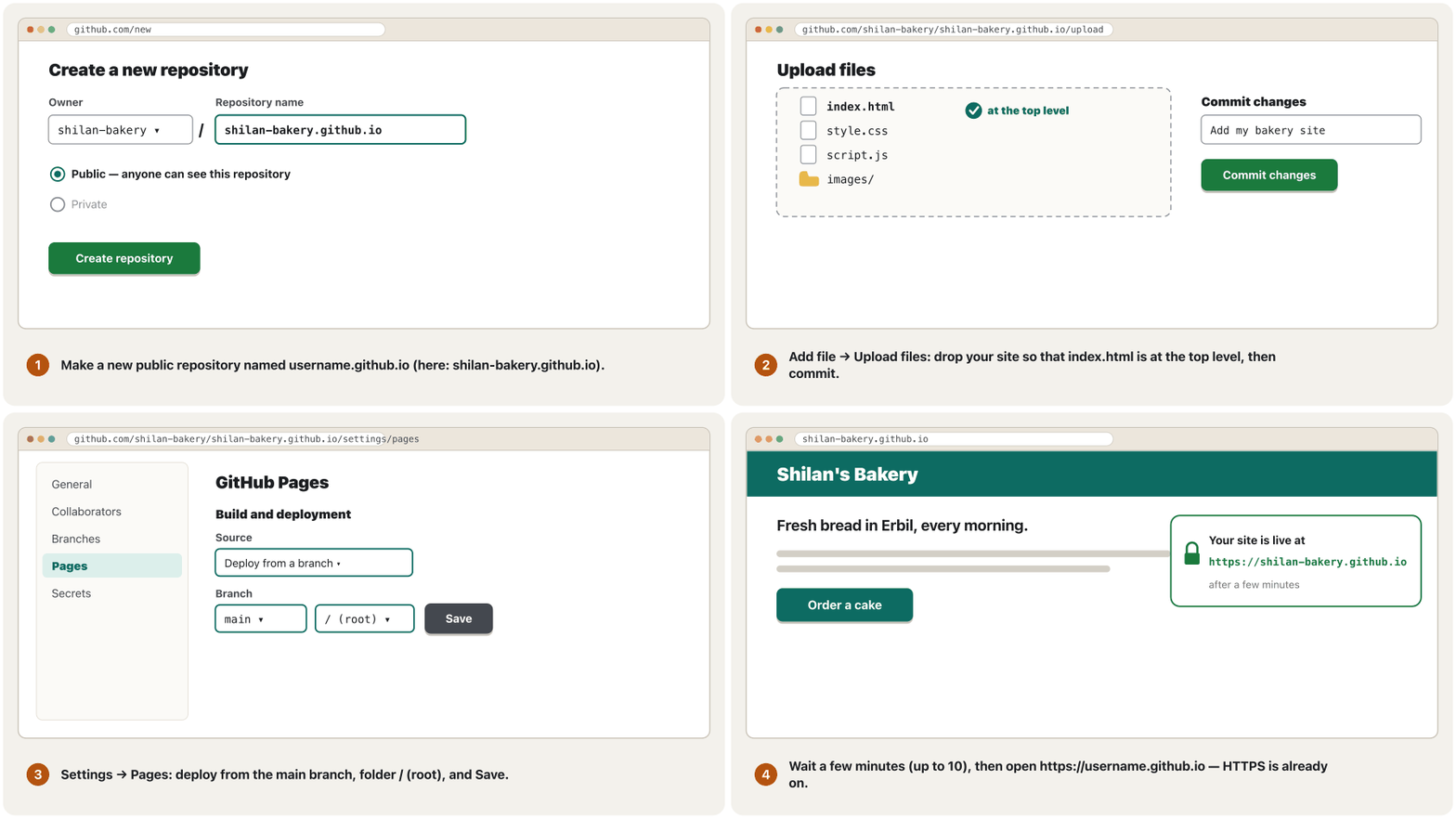
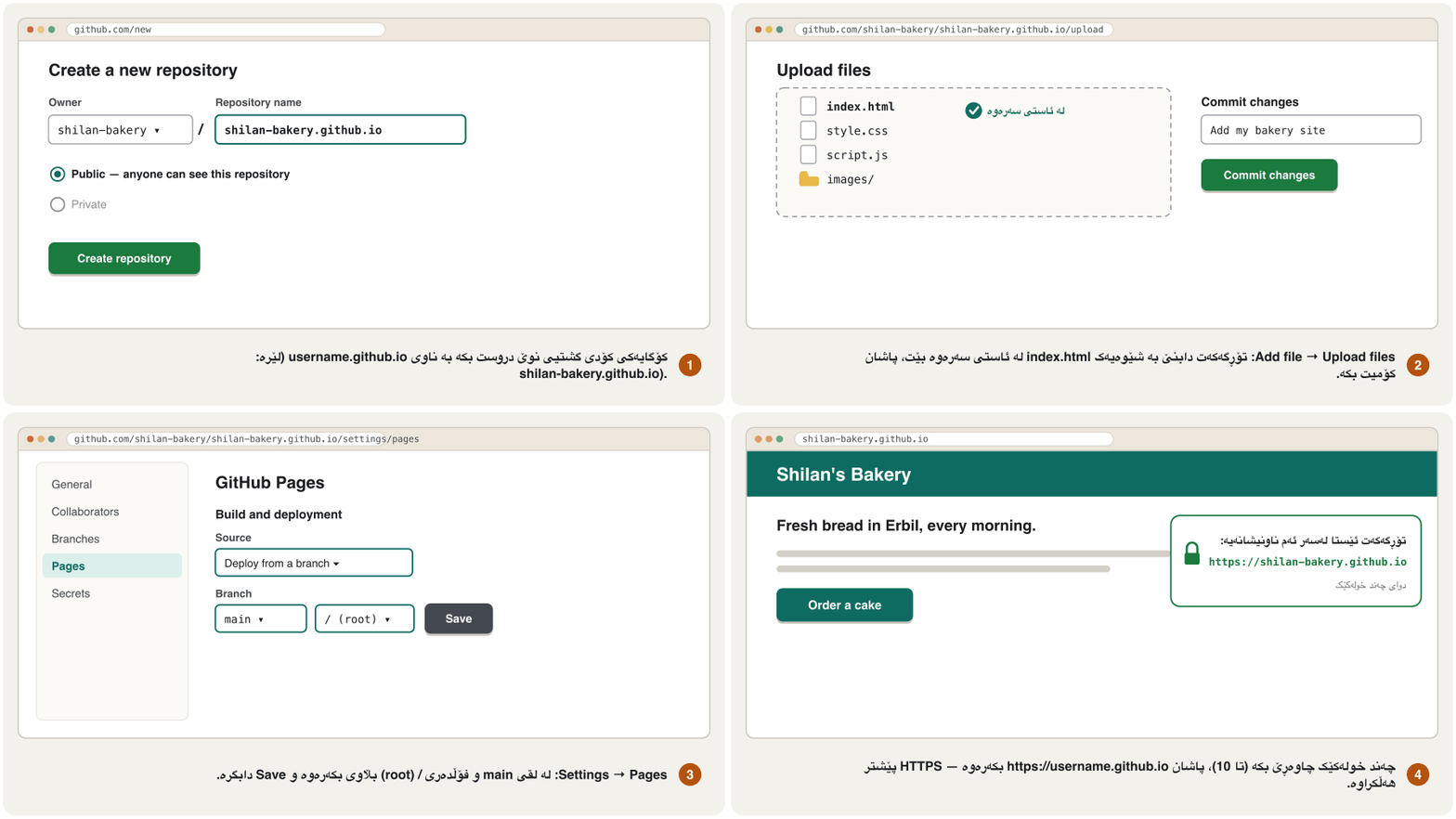
- Make the repositoryکۆگای کۆد دروست بکە
Create a new public repository named exactly
username.github.io, with your own GitHub user name.نوێی گشتی دروست بکە کە ناوەکەی ڕێک
username.github.ioبێت، بە GitHubـی خۆت. - Upload the filesفایلەکان هەڵبار بکە
Choose Add file → Upload files and drag in your site so that
index.htmlis at the top level, not inside a folder. Write a short message such as “Add my bakery site” and press Commit changes.Add file → Upload filesهەڵبژێرە و ڕابکێشە بۆ ناوەوە بە شێوەیەکindex.htmlلە ئاستی سەرەوە بێت، نەک لەناو . پەیامێکی کورت وەک «Add my bakery site» بنووسە و Commit changes دابگرە. - Switch Pages onPages هەڵبکە
Open Settings → Pages. Under Build and deployment choose Deploy from a branch, the branch
mainand the folder/ (root), then Save.Settings → Pages بکەرەوە. لە ژێر Build and deployment Deploy from a branch، لقی
mainو/ (root)هەڵبژێرە، پاشان Save. - Open your siteتۆڕگەکەت بکەرەوە
Wait a few minutes (GitHub says up to 10), then open
https://username.github.io. HTTPS is on automatically.چەند خولەکێک چاوەڕێ بکە (GitHub دەڵێت تا 10)، پاشان
https://username.github.ioبکەرەوە. بە شێوەی خۆکار هەڵکراوە. - Update itنوێی بکەرەوە
Upload the changed files again. Each upload is a new , and GitHub keeps every version — that is .
گۆڕاوەکان دووپاتە هەڵبار بکە. هەر نوێیە و GitHub هەموو وەشانێک دەپارێزێت — ئەمە .
Other ways to uploadڕێگەکانی تری هەڵبارکردن
- Drag and drop. Drop the site folder on Netlify Drop (deploys under 50 MB work best) or on Cloudflare Pages' direct upload (up to 1,000 files of 25 MiB each; such a project cannot switch to Git later).
- The host's file manager or SFTP. Paid PHP hosts give you a file manager in the control panel, or an SFTP address for a program such as FileZilla, WinSCP or Cyberduck. Never plain FTP: it sends your password unencrypted (Three practical skills). How SFTP encrypts the whole transfer is taught in SFTP and FTPS: file transfer with encryption in the Computer Networks course.
- Git. Developers on their own computer and push to GitHub; the host publishes every push by itself, and every version is kept (). Git itself is taught in Git Basics.
- . لەسەر Netlify Drop دابنێ (بڵاوکردنەوەی کەمتر لە 50 MB باشترین کار دەکات) یان لەسەر ڕاستەوخۆی Cloudflare Pages (تا 1,000 فایل، هەریەکە 25 MiB؛ ئەم جۆرە پڕۆژەیە دواتر ناتوانێت بگۆڕێت بۆ Git).
- یان SFTP. بە پارە لە دەداتێ، یان ناونیشانێکی SFTP بۆ وەک FileZilla، WinSCP یان Cyberduck. هەرگیز ئاسایی نا: بێ دەنێرێت (سێ لێهاتوویی کرداری). چۆنیەتی هەموو گواستنەوەکە لە لە SFTP و FTPS: گواستنەوەی فایل بە شفرەکردن لە کۆرسی کۆمپیوتەردا فێر دەبیت.
- Git. لەسەر خۆیان دەکەن و push دەکەن بۆ GitHub؛ خۆی هەموو pushـێک بڵاو دەکاتەوە و هەموو وەشانێک دەپارێزرێت (). خودی Git لە بنەماکانی Git فێر دەبیت.
Your own domain nameناوی دۆمەینی خۆت
A free address works, but your own name, such as shilan-bakery.com, is easier to remember and stays the same when you change hosts. You rent it from a for one or more years: you never own it, and if you forget to renew it, someone else can take it (MDN). Prices are usually a few dollars to about 15 dollars a year, and some endings cost much more. Choose a short, clear name (Choosing a good domain name).
ناونیشانێکی بێبەرانبەر کار دەکات، بەڵام ناوێکی خۆت، وەک shilan-bakery.com، ئاسانتر لەبیر دەمێنێت و کاتێک دەگۆڕیت وەک خۆی دەمێنێتەوە. بۆ ساڵێک یان زیاتر لە بە کرێی دەگریت: هەرگیز نابێتە موڵکی خۆت و ئەگەر نوێکردنەوەی لەبیر بکەیت، کەسێکی تر دەتوانێت بیبات (MDN). نرخەکان زۆرجار لە چەند دۆلارێکەوە تا نزیکەی 15 دۆلارن لە ساڵێکدا و هەندێک کۆتایی زۆر گرانترن. ناوێکی کورت و ڕوون هەڵبژێرە (هەڵبژاردنی ناوێکی دۆمەینی باش).
Every ending () has one manager, and IANA keeps the list. .iq is Iraq's country-code domain, run by the Communications and Media Commission (CMC); its rules and accredited registrars are on the CMC's registry site. .krd is a generic top-level domain for Kurdistan, run by the KRG Department of Information Technology since 18 July 2014. Its registry says anyone may register a .krd name through an accredited registrar, for about 40 dollars a year for a normal name (dot.krd, November 2026).
هەر کۆتاییەک () یەک بەڕێوەبەری هەیە و لیستەکە دەپارێزێت. .iq دۆمەینی کۆدی وڵاتی عێراقە و دەستەی ڕاگەیاندن و پەیوەندییەکان (CMC) بەڕێوەی دەبات؛ یاساکانی و لیستی پەسەندکراو لەسەر تۆماری CMC هەن. .krd دۆمەینێکی گشتیی ئاستی باڵایە بۆ کوردستان و لە 18ی تەممووزی 2014ـەوە فەرمانگەی حکومەتی هەرێمی کوردستان بەڕێوەی دەبات. تۆمارەکەی دەڵێت هەر کەسێک دەتوانێت لە ڕێگەی پەسەندکراوەوە ناوێکی .krd تۆمار بکات، بۆ ناوێکی ئاسایی ساڵانە نزیکەی 40 دۆلار (dot.krd، تشرینی دووەمی 2026).
Your own domain nameناوی دۆمەینی خۆت
Pointing your domain at your host: DNS recordsئاڕاستەکردنی دۆمەینەکەت بۆ هۆستینگەکەت: تۆمارەکانی DNS
Your domain must tell the world where the site lives (DNS: the Internet's phone book; the full story is in DNS: How Names Become Addresses). In the registrar's DNS settings you add : an A record points the name at an IPv4 address, an AAAA record at an IPv6 address, and a CNAME record says that one name stands for another name — only for a such as www. Some hosts ask you instead to hand the whole domain to their own name servers; Cloudflare does this for a bare domain.
دۆمەینەکەت دەبێت بە جیهان بڵێت لە کوێ دەژی (DNS: دەفتەری تەلەفۆنی ئینتەرنێت؛ هەموو چیرۆکەکە لە DNS: ناو چۆن دەبێت بە ناونیشانـدایە). لە ڕێکخستنەکانی DNSـی زیاد دەکەیت: تۆماری A ناوەکە ئاڕاستەی دەکات، تۆماری AAAA ئاڕاستەی و تۆماری CNAME دەڵێت ناوێک لەجیاتی ناوێکی ترە — تەنیا بۆ وەک www. هەندێک لەجیاتی ئەمە داوا دەکەن هەموو دۆمەینەکە بدەیتە دەست خۆیان؛ Cloudflare بۆ دۆمەینی ڕووت ئەمە دەکات.
| Typeجۆر | Nameناو | Value |
|---|---|---|
| A | @ | 185.199.108.153 |
| A | @ | 185.199.109.153 |
| A | @ | 185.199.110.153 |
| A | @ | 185.199.111.153 |
| AAAA | @ | 2606:50c0:8000::153 |
| AAAA | @ | 2606:50c0:8001::153 |
| AAAA | @ | 2606:50c0:8002::153 |
| AAAA | @ | 2606:50c0:8003::153 |
| CNAME | www | shilan-bakery.github.io |
Then type the domain in Settings → Pages → Custom domain and tick Enforce HTTPS. DNS changes can take up to 24 hours to reach everyone. Never add a wildcard record such as *.shilan-bakery.com: GitHub warns that it invites a domain takeover.
پاشان دۆمەینەکە لە Settings → Pages → Custom domainـدا بنووسە و Enforce HTTPS دیاری بکە. گۆڕانکارییەکانی DNS لەوانەیە تا 24 کاتژمێر بخایەنن تا بە هەمووان دەگەن. هەرگیز تۆماری گشتگیری وەک *.shilan-bakery.com زیاد مەکە: GitHub ئاگادار دەکاتەوە کە دەرگا بۆ داگیرکردنی دۆمەینەکە دەکاتەوە.
HTTPS: a free padlockHTTPS: قوفڵێکی بێبەرانبەر
Every page needs HTTPS, not only pages with forms (HTTPS: the secure version). The browser shows the padlock when the site presents a signed by a that the browser already trusts, through a short . Let's Encrypt is a free, automated and open certificate authority run by the non-profit ISRG: the host's software proves that you control the domain (the ACME protocol) and renews the certificate before it runs out. GitHub Pages, Netlify, Cloudflare Pages and Vercel do all of this for you; on GitHub Pages, just tick Enforce HTTPS.
هەموو لاپەڕەیەک پێویستی بە هەیە، نەک تەنیا لاپەڕەکانی (HTTPS: وەشانە پارێزراوەکە). قوفڵەکە پیشان دەدات کاتێک پیشان دەدات کە واژووی کردووە و پێشتر متمانەی پێی هەیە، لە ڕێگەی کورتەوە. Let's Encrypt بێبەرانبەر، خۆکار و کراوەیە کە ڕێکخراوی ناقازانجیی ISRG بەڕێوەی دەبات: دەیسەلمێنێت کە دۆمەینەکە لە ژێر دەستی تۆدایە (پرۆتۆکۆڵی ACME) و پێش بەسەرچوونی نوێی دەکاتەوە. GitHub Pages، Netlify، Cloudflare Pages و Vercel هەموو ئەمانە بۆ تۆ دەکەن؛ لە GitHub Pages تەنیا Enforce HTTPS دیاری بکە.
Certificates are getting shorter lives. As of November 2026 a Let's Encrypt certificate lasts 90 days; from 10 February 2027 the default becomes 64 days, and 45 days in February 2028, because the industry's rules (the CA/Browser Forum) shorten lifetimes to at most 47 days from March 2029. With automatic renewal you will not notice.
تەمەنی کورتتر دەبێتەوە. لە تشرینی دووەمی 2026ـدا Let's Encrypt 90 ڕۆژ دەمێنێت؛ لە 10ی شوباتی 2027ـەوە بنەڕەتەکە دەبێت بە 64 ڕۆژ و لە شوباتی 2028ـدا 45 ڕۆژ، چونکە یاساکانی ئەم بوارە (CA/Browser Forum) لە ئازاری 2029ـەوە تەمەن کورت دەکەنەوە بۆ زۆرترین 47 ڕۆژ. بە نوێکردنەوەی خۆکار هەستی پێ ناکەیت.
HTTPS: a free padlockHTTPS: قوفڵێکی بێبەرانبەر
Mixed content, and an extra: security headersناوەڕۆکی تێکەڵ و زیادەیەک: سەردێڕەکانی HTTPـی ئاسایش
Files that a secure page loads over plain , such as <img src="http://…">. Browsers turn such pictures, audio and video into HTTPS requests by themselves, but they block such scripts, style sheets and frames, and the warns. The fix is to write https:// or a relative path.
ئەو لاپەڕەیەکی پارێزراوی بە ئاسایی باریان دەکات، وەک <img src="http://…">. خۆیان ئەم جۆرە وێنە، دەنگ و ڤیدیۆیانە دەگۆڕن بۆ داواکاریی HTTPS، بەڵام ڕێگە لە ، شێوازنامە و پەنجەرەی لەم جۆرە دەگرن و ئاگادار دەکاتەوە. چارەسەر نووسینی https:// یان ڕێڕەوێکی ڕێژەییە.
After the move to HTTPS, check that nothing on the page still loads over http://. Browsers quietly upgrade such pictures, audio and video to HTTPS, but they block such scripts, style sheets and frames, so a menu or a whole design can disappear. Write https:// or a relative path, and read the console's warnings (MDN).
دوای گواستنەوە بۆ ، بپشکنە هیچ شتێک لە لاپەڕەکەدا هێشتا بە http:// بار نابێت. بە بێدەنگی ئەو جۆرە وێنە، دەنگ و ڤیدیۆیانە دەگۆڕن بۆ ، بەڵام ڕێگە لەو جۆرە ، و دەگرن، بۆیە لەوانەیە یان هەموو دیزاینەکە ون بێت. https:// یان بنووسە و ئاگادارکردنەوەکانی بخوێنەوە (MDN).
_headers (Netlify یان Cloudflare Pages): دوو سەردێڕی HTTPـی بنەڕەتیی ئاسایش بۆ هەموو لاپەڕەیەک_headersTEXT/*
Strict-Transport-Security: max-age=31536000
X-Content-Type-Options: nosniffExplain the codeڕوونکردنەوەی کۆدەکە
- Lineدێڕی 1
/* = every address of the site.
/*= هەموو ناونیشانێکی .- Lineدێڕی 2
max-age=31536000 seconds = one year of HTTPS only.
max-age=31536000چرکە = ساڵێک تەنیا .
After publishing: check the live siteدوای بڵاوکردنەوە: تۆڕگە زیندووەکە بپشکنە
A site that worked on your laptop can still break online. Check the live address, not your files:
کە لەسەر لاپتۆپەکەت کاری دەکرد هێشتا لەوانەیە ئۆنلاین تێکبچێت. ناونیشانە زیندووەکە بپشکنە، نەک :
- Open it on a real phone and in two browsers (Testing a responsive page).
- Click every link and button; file names must match exactly, because Linux servers are .
- Open the console: no red errors and no mixed-content warnings (The console).
- Run Lighthouse in the developer tools for speed, accessibility and SEO, then test by hand too (Testing).
- Share the link with yourself and look at the preview card.
- Add visitor statistics only if you need them, and choose a privacy-friendly tool (After launch).
- Keep a : the repository holds every version, and keep a copy of the folder on your computer too.
- Your final project goes through these same checks (Publish it and share the link).
- لەسەر مۆبایلێکی ڕاستەقینە و لە دوو بیکەرەوە (تاقیکردنەوەی دیزاینی ڕێسپۆنسیڤ).
- کلیک لە هەموو و بکە؛ ناوی دەبێت ڕێک یەک بگرنەوە، چونکە Linux .
- بکەرەوە: نە سوور و نە ئاگادارکردنەوەی (کۆنسۆڵ).
- Lighthouse لە بۆ خێرایی، و جێبەجێ بکە، پاشان بە دەستیش تاقی بکەرەوە (تاقیکردنەوە).
- بۆ خۆت بنێرە و سەیری کارتی پێشبینینەکە بکە.
- ئاماری سەردانیکەران تەنیا ئەگەر پێویستت بوو زیاد بکە و ئامرازێکی ڕێزگر لە هەڵبژێرە (دوای دەستپێکردن).
- بهێڵەرەوە: هەموو وەشانێک هەڵدەگرێت و کۆپییەکی لەسەر بهێڵەرەوە.
- لە پڕۆژەی کۆتاییدا بە هەمان پشکنیندا تێدەپەڕێت (بڵاوی بکەرەوە و بەستەرەکە بنێرە).
Common mistakesهەڵە باوەکان
| Mistakeهەڵە | Betterباشتر |
|---|---|
index.html inside a sub-folder, or named Index.htmlindex.html لەناو ناوەوەدا، یان بە ناوی Index.html | index.html, in lowercase, at the top level of the siteindex.html، بە پیتی بچووک، لە ئاستی سەرەوەی |
Capitals or spaces in file names: About Us.html, Cake.JPGپیتی گەورە یان بۆشایی لە ناوی فایلدا: About Us.html، Cake.JPG | Lowercase letters, digits and hyphens: about-us.html, cake.jpg — Linux hosts are case-sensitiveپیتی بچووک، ژمارە و هێڵی کورت: about-us.html، cake.jpg — Linux |
Links to file:///C:/… or C:\Users\… بۆ file:///C:/… یان C:\Users\… | Relative paths such as images/cake.jpg (relative paths) وەک images/cake.jpg (ڕێڕەوە ڕێژەییەکان) |
http:// pictures, scripts or styles on an https:// pageوێنە، یان http:// لەسەر لاپەڕەیەکی https:// | https:// or relative paths everywhereلە هەموو شوێنێک https:// یان |
| Uploading private files: passwords, ID photos, notes تایبەت: ، وێنەی ناسنامە، تێبینی | Upload only the site; a public repository is readable by everyoneتەنیا هەڵبار بکە؛ گشتی بۆ هەمووان خوێندراوەیە |
| Plain FTP with your password ئاسایی لەگەڵ | SFTP, the host's file manager, Git or drag and dropSFTP، ، Git یان |
No <title>, no description, no faviconبێ <title>، بێ پێناسە، بێ | Go through the head checklist on every pageلیستی پشکنینی لە هەموو لاپەڕەیەکدا تەواو بکە |
| Expecting the change at once and giving upچاوەڕوانکردنی گۆڕانکاری یەکسەر و وازهێنان | Wait a few minutes (DNS up to 24 hours), then reloadچەند خولەکێک چاوەڕێ بکە (DNS تا 24 کاتژمێر)، پاشان دووپاتە باری بکەرەوە |
A wildcard DNS record such as *.example.com گشتگیری وەک *.example.com | Only the records you need: A/AAAA for the bare domain, CNAME for wwwتەنیا ئەو تۆمارانەی پێویستن: A/AAAA بۆ خودی دۆمەینەکە، CNAME بۆ www |
| Forgetting to renew the domainلەبیرکردنی نوێکردنەوەی دۆمەینەکە | Turn on automatic renewal at the registrarنوێکردنەوەی خۆکار لای هەڵبکە |
| A shop with card payments on a free static hostفرۆشگایەک بە پارەدانی کارت لەسەر بێبەرانبەر | An e-commerce host with a payment gateway لەگەڵ |
Exercisesڕاهێنانەکان
Publish your bakery page (from the earlier lessons, or any small page of your own) on GitHub Pages. Write down the address and check it from a phone.
لاپەڕەی نانەواخانەکەت (لە وانەکانی پێشووەوە، یان هەر لاپەڕەیەکی بچووکی خۆت) لەسەر GitHub Pages بڵاو بکەرەوە. ناونیشانەکە بنووسە و لە مۆبایلێکەوە بیپشکنە.
Hintئاماژە
Follow the five steps of GitHub Pages step by step.
پێنج هەنگاوەکەی GitHub Pages هەنگاو بە هەنگاو پەیڕەو بکە.
Show answerوەڵامەکە پیشان بدە
A public repository named
username.github.io(your own user name).گشتی بە ناوی
username.github.io( خۆت).Upload
index.html,style.css,script.jsand theimagesfolder, withindex.htmlat the top level; commit.index.html،style.css،script.jsوimagesهەڵبار بکە، بەindex.htmlلە ئاستی سەرەوە؛ بکە.Settings → Pages → Deploy from a branch →
main,/ (root)→ Save.Settings → Pages → Deploy from a branch →
main،/ (root)→ Save.Open
https://username.github.ioafter a few minutes: the padlock is there, and the page works on the phone.دوای چەند خولەکێک
https://username.github.ioبکەرەوە: قوفڵەکە هەیە و لاپەڕەکە لەسەر مۆبایلەکە کار دەکات.
If you see a 404 page: check that index.html is at the top level and written in lowercase, and wait a few more minutes. In the final project you publish your portfolio the same way (Final Project: Your Portfolio Website).
ئەگەر لاپەڕەی 404 دەبینیت: بپشکنە index.html لە ئاستی سەرەوەیە و بە پیتی بچووک نووسراوە و چەند خولەکێکی تر چاوەڕێ بکە. لە پڕۆژەی کۆتاییدا بە هەمان شێوە بڵاو دەکەیتەوە (پڕۆژەی کۆتایی: پۆرتفۆلیۆی ئۆنلاینەکەت).
Add a favicon and a short description to the head of your home page. How can you check both after publishing?
و پێناسەیەکی کورت بۆ <head>ـی زیاد بکە. چۆن دەتوانیت دوای هەردووکیان بپشکنیت؟
Show answerوەڵامەکە پیشان بدە
<head>index.htmlHTMLRuns in the browserلە ناو تۆڕگەڕ کار دەکات<link rel="icon" href="favicon.svg" type="image/svg+xml">
<meta name="description" content="Fresh bread and cakes in Erbil, baked every morning. Order a cake for your party.">The icon shows in the browser tab and in bookmarks. The description is not on the page: view the page source, or look at the page in search results once a search engine has visited it. Put favicon.svg next to index.html.
لە و لە دەردەکەوێت. پێناسەکە لەسەر لاپەڕەکە نییە: سەیری سەرچاوەی لاپەڕەکە بکە، یان کاتێک سەردانی کرد لە ئەنجامەکانی گەڕاندا سەیری بکە. favicon.svg لە تەنیشت index.html دابنێ.
Shilan rents shilan-bakery.com and wants both shilan-bakery.com and www.shilan-bakery.com to open her GitHub Pages site (user name: shilan-bakery). Which records does she add at her registrar, and what does she do on GitHub?
شیلان shilan-bakery.com بە کرێ دەگرێت و دەیەوێت هەردوو shilan-bakery.com و www.shilan-bakery.com GitHub Pagesـەکەی بکەنەوە (: shilan-bakery). چ تۆمارێک لای زیاد دەکات و لەسەر GitHub چی دەکات؟
Hintئاماژە
A and AAAA for the bare domain, CNAME for www.
A و AAAA بۆ خودی دۆمەینەکە، CNAME بۆ www.
Show answerوەڵامەکە پیشان بدە
- Four A records for
@: 185.199.108.153, 185.199.109.153, 185.199.110.153 and 185.199.111.153 (and, if she can, the four AAAA records). - One CNAME record:
www→shilan-bakery.github.io. - On GitHub: Settings → Pages → Custom domain →
shilan-bakery.com, then tick Enforce HTTPS once the certificate is ready. She waits up to 24 hours for DNS.
- چوار تۆماری A بۆ
@: 185.199.108.153، 185.199.109.153، 185.199.110.153 و 185.199.111.153 (و ئەگەر توانی، چوار تۆماری AAAAـەکە). - یەک تۆماری CNAME:
www←shilan-bakery.github.io. - لەسەر GitHub: لە
Settings → Pages → Custom domainـداshilan-bakery.comدەنووسێت، پاشان کاتێک ئامادە بوو Enforce HTTPS دیاری دەکات. تا 24 کاتژمێر چاوەڕێی DNS دەکات.
Make a 404.html for your site in your own words, in English or Kurdish. What must it contain, and why should its links start with /?
بە وشەی خۆت، بە ئینگلیزی یان کوردی، 404.htmlـێک بۆ دروست بکە. دەبێت چی تێدا بێت و بۆچی دەبێت بە / دەست پێبکەن؟
Show answerوەڵامەکە پیشان بدە
The site's header and look, a clear sentence that the page was not found (no blame), and links to the home page and the main pages. A Kurdish version uses lang="ckb" dir="rtl". The links start with / because the page can appear at any address, so a relative link would point into the wrong folder; test it by opening a made-up address such as /cakez.
سەرپەڕە و ڕووخساری ، ڕستەیەکی ڕوون کە لاپەڕەکە نەدۆزرایەوە (بێ تاوانبارکردن) و بۆ و گرنگترین لاپەڕەکان. وەشانی کوردی lang="ckb" dir="rtl" بەکار دەهێنێت. بە / دەست پێدەکەن چونکە لاپەڕەکە لەوانەیە لەسەر هەر ناونیشانێک دەربکەوێت، بۆیە ڕێژەیی ئاماژە بۆ هەڵە دەکات؛ بە کردنەوەی ناونیشانێکی هەڵبەستراوی وەک /cakez تاقی بکەرەوە.
Your site is online. Which five checks do you do first, and with which tools?
ئۆنلاینە. کام پێنج پشکنین سەرەتا دەکەیت و بە چ ئامرازێک؟
Show answerوەڵامەکە پیشان بدە
- A real phone and a second browser.
- Every link and button — the W3C Link Checker helps.
- The console: no red errors, no mixed-content warnings.
- The padlock and
https://on every page. - Lighthouse for speed, accessibility and SEO, then a keyboard test.
- مۆبایلێکی ڕاستەقینە و دووەم.
- هەموو و — W3C Link Checker یارمەتی دەدات.
- : بێ سوور، بێ ئاگادارکردنەوەی .
- قوفڵەکە و
https://لە هەموو لاپەڕەیەکدا. - Lighthouse بۆ خێرایی، و ، پاشان تاقیکردنەوە بە .
Summaryپوختە
- Publishing = copying your site folder to a web host that is always online, with an address.
- HTML, CSS, JavaScript and pictures need only static hosting, often free; PHP and MySQL need PHP hosting.
- Before publishing: a title, a description, a favicon,
lang, the viewport line, Open Graph tags and a 404.html. - As of November 2026: GitHub Pages, Netlify, Cloudflare Pages and Vercel have free plans, each with its own limits and rules.
- GitHub Pages: a public
username.github.iorepository,index.htmlat the top level, Settings → Pages, wait a few minutes. - Upload with Git, drag and drop, the file manager or SFTP — never plain FTP.
- You rent a domain from a registrar;
.iqis run by the CMC,.krdby the KRG Department of Information Technology; A, AAAA and CNAME records point it at the host. - HTTPS is free with Let's Encrypt and renewed automatically; certificates last 90 days now and are getting shorter; avoid mixed content.
- After publishing, test the live address on a phone, in the console and with Lighthouse, and keep a backup.
- = کۆپیکردنی بۆ کە هەمیشە ئۆنلاینە، لەگەڵ ناونیشانێک.
- ، ، و وێنە تەنیا پێویستیان بە هەیە، زۆرجار بێبەرانبەر؛ و MySQL پێویستیان بە هەیە.
- پێش :
<title>، پێناسە، ،lang، دێڕی viewport، تاگەکانی Open Graph و404.html. - لە تشرینی دووەمی 2026ـدا: GitHub Pages، Netlify، Cloudflare Pages و Vercel پلانی بێبەرانبەریان هەیە، هەریەکە بە سنوور و یاسای خۆی.
- GitHub Pages: گشتیی
username.github.io،index.htmlلە ئاستی سەرەوە، Settings → Pages، چەند خولەکێک چاوەڕێ بکە. - بە Git، ، یان SFTP هەڵباری بکە — هەرگیز ئاسایی نا.
- دۆمەین لە بە کرێ دەگریت؛
.iqلەلایەن CMC و.krdلەلایەن فەرمانگەی حکومەتی هەرێمەوە بەڕێوە دەبرێن؛ تۆمارەکانی A، AAAA و CNAME ئاڕاستەی دەکەن. - بە Let's Encrypt بێبەرانبەرە و بە شێوەی خۆکار نوێ دەکرێتەوە؛ ئێستا 90 ڕۆژ دەمێننەوە و کورتتر دەبنەوە؛ خۆت لە بپارێزە.
- دوای ، ناونیشانە زیندووەکە لەسەر مۆبایل، لە و بە Lighthouse تاقی بکەرەوە و بهێڵەرەوە.
Lesson complete!وانەکە تەواو بوو!
Well done. Review the key terms, then go on to the next lesson.دەستخۆش. سەیرێکی زاراوە سەرەکییەکان بکەرەوە، پاشان بڕۆ بۆ وانەی داهاتوو.
Key termsزاراوە سەرەکییەکان
Final Project: Your Portfolio Websiteپڕۆژەی کۆتایی: پۆرتفۆلیۆی ئۆنلاینی خۆت
Related lecturesوانە پەیوەندیدارەکان
- Welcome to Web Design: What Web Designers Do and Your Toolsبەخێربێیت بۆ دیزاینی وێب: دیزاینەرانی وێب چی دەکەن و ئامرازەکانت
- Static and Dynamic Websites and Website Typesلاپەڕەتۆڕە نەگۆڕەکان، لاپەڕەتۆڕە داینامیکەکان و جۆرەکانی تۆڕگە
- HTTP and the Request–Response CycleHTTP و سووڕی داواکاری و وەڵام
- How Search Engines Workبزوێنەرەکانی گەڕان چۆن کار دەکەن
- The Internet and the Webئینتەرنێت و وێب
- XAMPP: Your Own Local Web ServerXAMPP: ڕاژەکاری وێبی ناوخۆیی خۆت
- Responsive Design: Viewport, Media Queries and Mobile-Firstدیزاینی ڕێسپۆنسیڤ: ناوچەی بینین، پرسەکانی میدیا و مۆبایل لە پێشدا
- Kurdish and Bilingual Websites: Right to Leftتۆڕگەکانی کوردی و دووزمانە: ڕاست بۆ چەپ
- A First Look at JavaScript: Making Pages Interactiveسەرەتایەک بۆ JavaScript: لاپەڕەی کارلێککار
- Web Accessibility: WCAG 2.2 in Practiceدەستڕاگەیشتنی وێب: WCAG 2.2 لە کرداردا
- DNS: How Names Become AddressesDNS: ناو چۆن دەبێتە ناونیشان
- Web and E-mail Protocols: HTTP, HTTPS, SMTP, POP3 and IMAPپرۆتۆکۆڵەکانی وێب و ئیمەیڵ: HTTP، HTTPS، SMTP، POP3 و IMAP
- Final Project: Your Portfolio Websiteپڕۆژەی کۆتایی: پۆرتفۆلیۆی ئۆنلاینی خۆت
References and further readingسەرچاوەکان و خوێندنەوەی زیاتر
- MDN: Publishing your website
- MDN: What is a domain name?
- GitHub Docs: What is GitHub Pages?
- GitHub Docs: Quickstart for GitHub Pages
- GitHub Docs: Creating a GitHub Pages site
- GitHub Docs: GitHub Pages limits
- GitHub Docs: Managing a custom domain for your GitHub Pages site
- GitHub Docs: Securing your GitHub Pages site with HTTPS
- GitHub Docs: Creating a custom 404 page for your GitHub Pages site
- GitHub Docs: Adding a file to a repository
- Netlify: Pricing
- Netlify Docs: Credit-based pricing plans
- Netlify Docs: Deploy from a template (Netlify Drop)
- Netlify Docs: Redirect options (custom 404 page)
- Netlify Docs: Custom headers
- Cloudflare Pages documentation
- Cloudflare Pages: Limits
- Cloudflare Pages: Direct Upload
- Cloudflare Pages: Custom domains
- Cloudflare Pages: Serving Pages (404 behaviour, headers)
- Cloudflare Workers: Static assets billing and limitations
- Vercel: Hobby plan
- Let's Encrypt: How it works
- Let's Encrypt: FAQ
- Let's Encrypt: Certificate lifetime rationale and plans
- Let's Encrypt: Decreasing certificate lifetimes to 45 days (2 December 2025)
- Let's Encrypt: 64-day certificate lifetimes coming February 2027 (7 October 2026)
- Let's Encrypt: Chains of trust
- IANA: Delegation record for .KRD
- IANA: Delegation record for .IQ
- dot.krd: FAQs (the .krd registry)
- The Open Graph protocol
- MDN: HTML attribute rel (icon)
- MDN: Mixed content
- MDN: Strict-Transport-Security
This lecture is a first edition. The Kurdish text and terminology are waiting for review by Kurdish IT teachers.ئەم وانەیە چاپی یەکەمە. دەقە کوردییەکە و زاراوەکانی چاوەڕێی پێداچوونەوەی مامۆستایانی کوردی بواری IT ن.
Before you publish: the head checklistپێش بڵاوکردنەوە: لیستی پشکنینی توخمی head
Link previews: Open Graphپێشبینینی بەستەر: Open Graph
When someone shares your address in a chat app or on a , the app builds a card from Open Graph tags in your
<head>(ogp.me). Four are required —og:title,og:type,og:imageandog:url— andog:descriptionis recommended. Giveog:imagea full address that starts withhttps://, because the app reads it from outside your site. Then two small files help search engines:robots.txtand a sitemap (Guiding the crawler). Finally, go through the checklist before you publish.کاتێک کەسێک ناونیشانەکەت لە ئەپێکی چات یان لە دەنێرێت، ئەپەکە لە تاگەکانی Open Graphـی
<head>ـەکەت کارتێک دروست دەکات (ogp.me). چواریان پێویستن —og:title،og:type،og:imageوog:url— وog:descriptionـیش پێشنیار دەکرێت. ناونیشانێکی تەواو بدە بەog:imageکە بەhttps://دەست پێبکات، چونکە ئەپەکە لە دەرەوەی دەیخوێنێتەوە. پاشان دوو فایلی بچووک یارمەتی دەدەن:robots.txtو (ڕێنماییکردنی خشۆکی وێب). لە کۆتاییدا لیستی پشکنین پێش بڵاوکردنەوە تەواو بکە.<head>index.htmlHTMLRuns in the browserلە ناو تۆڕگەڕ کار دەکاتExplain the codeڕوونکردنەوەی کۆدەکە
A full https:// address, not images/share.jpg.
ناونیشانێکی تەواوی
https://، نەکimages/share.jpg.