Chapterبەش 5 · Lectureوانە 5.2
Application Software and File Typesنەرمەواڵەی بەکارهێنان و جۆرەکانی فایل
The kinds of application software with 2026 examples and what replaced the old ones; suites, web apps and mobile apps; installing, updating and uninstalling apps safely; software licences in short and how organisations choose software; what happens when you install, run and use a program (SSD → RAM → CPU); files, folders and good file names; paths from the root to the file, with an animation; file extensions, default apps and the danger of hidden extensions.
جۆرەکانی بە نموونەی 2026 و ئەوەی شوێنی نموونە کۆنەکانی گرتەوە؛ ، و مۆبایل؛ ، نوێکردنەوە و لابردنی بە سەلامەتی؛ بە کورتی و دامەزراوەکان چۆن هەڵدەبژێرن؛ ئەوەی کاتێک جێگیر دەکەیت، کاری پێدەکەیت و بەکاری دەهێنیت ڕوودەدات (SSD → RAM → )؛ ، و ناوی باش؛ لە ڕەگەوە تا ، بە جوڵەوێنەیەک؛ ، و مەترسیی شاردنەوەی .
What you will learnچی فێر دەبیت
- Name the main kinds of application software and give a current example of each.
- Install, update and remove apps safely, from trusted sources.
- Tell paid, subscription, free and open-source licences apart, and choose software for an organisation with five criteria.
- Explain what happens when a program is installed, run and used.
- Name files well and read and write absolute and relative paths on Windows and macOS.
- Recognise common file extensions, change the default app and spot a disguised program.
- جۆرە سەرەکییەکانی ناو ببەیت و نموونەیەکی ئێستایی بۆ هەریەکەیان بهێنیتەوە.
- بە سەلامەتی و لە سەرچاوەی متمانەپێکراوەوە جێگیر بکەیت، نوێیان بکەیتەوە و لایان ببەیت.
- پارەدار، ، بێبەرانبەر و لە یەک جیا بکەیتەوە و بە پێنج پێوەر بۆ دامەزراوەیەک هەڵبژێریت.
- ڕوون بکەیتەوە کاتێک جێگیر دەکرێت، کاری پێدەکرێت و بەکاردەهێنرێت چی ڕوودەدات.
- بە باشی ناو بنێیت و و لە Windows و macOSـدا بخوێنیتەوە و بنووسیت.
- باوەکان بناسیتەوە، بگۆڕیت و خۆگۆڕیو بناسیتەوە.
Applications: software for your jobsئەپەکان: نەرمەواڵە بۆ کارەکانی تۆ
Application software (an application, or app for short) is a program that helps you do a task: write a report, work out a budget, edit a photo, talk to a friend, watch a lecture. It runs on top of the operating system, which gives it the CPU, memory, files and devices it needs (see Software and Operating Systems).
( بە کورتی) کە یارمەتیی تۆ دەدات کارێک بکەیت: ڕاپۆرتێک بنووسیت، بودجەیەک بژمێریت، وێنەیەک دەستکاری بکەیت، لەگەڵ هاوڕێیەک قسە بکەیت، سەیری وانەیەک بکەیت. لەسەر کار دەکات کە ، ، و ئەو ئامێرانەی پێویستیەتی دەداتێ (سەیری نەرمەواڵە و سیستەمەکانی وەگەڕخەر بکە).
Every application was written by programmers (software developers): people who write the instructions that tell the computer how to turn data into useful information — for example, a payroll app that takes each worker's hours and hourly rate and calculates the pay.
هەموو لەلایەن نووسراوە: ئەو کەسانەی دەنووسن و بە دەڵێن چۆن بکاتە بەسوود — بۆ نموونە ئەپێکی مووچە کە کاتژمێرەکانی کار و نرخی هەر کاتژمێرێکی هەر کرێکارێک وەردەگرێت و مووچەکەی دەژمێرێت.
The English names of everyday applications (word processor, spreadsheet, presentation software…) are practised in Technical English: Applications.
ناوە ئینگلیزییەکانی ڕۆژانەییەکان (word processor، spreadsheet، presentation software…) لە ئینگلیزیی تەکنیکی: ئەپەکاندا ڕاهێنانیان لەسەر دەکرێت.
Kinds of applications in 2026جۆرەکانی ئەپ لە 2026دا
Applications are grouped by the job they do. The course table lists eight kinds; here they are with examples you can use today.
بەپێی ئەو کارەی دەیکەن پۆلێن دەکرێن. خشتەکەی کۆرسەکە هەشت جۆر دەژمێرێت؛ لێرەدا لەگەڵ ئەو نموونانەن کە ئەمڕۆ دەتوانیت بەکاریان بهێنیت.
| Kindجۆر | What it is forبۆ چییە | Examples todayنموونەی ئەمڕۆ |
|---|---|---|
| Typing and formatting documentsنووسین و ڕێکخستنی بەڵگەنامە | Microsoft Word, Google Docs, Apple Pages, LibreOffice Writer, Notepad | |
| Calculating with numbers in rows and columnsژماردن بە ژمارە لە ڕیز و ستووندا | Microsoft Excel, Google Sheets, Apple Numbers, LibreOffice Calc | |
| software | Storing, sorting and searching recordsهەڵگرتن، ڕیزکردن و گەڕان لە تۆمارەکاندا | Microsoft Access, Oracle, MySQL, Claris FileMaker |
| Several related programs sold or offered togetherچەند پەیوەندیدار کە پێکەوە دەفرۆشرێن یان پێشکەش دەکرێن | Microsoft 365, Google Workspace, LibreOffice | |
| Playing and editing sound, video and picturesلێدان و دەستکاریکردنی دەنگ، ڤیدیۆ و وێنە | VLC, Windows Media Player, Spotify, CapCut, Photoshop | |
| Communicationپەیوەندیکردن | Text, voice and video between peopleنووسین، دەنگ و ڤیدیۆ لە نێوان خەڵکدا | WhatsApp, Telegram, Viber, Microsoft Teams, Zoom |
| Opening and viewing websitesکردنەوە و بینینی ماڵپەڕەکان | Google Chrome, Microsoft Edge, Safari, Firefox | |
| Sending and receiving e-mailناردن و وەرگرتنی | Outlook, Gmail, Apple Mail |
Two more kinds you use every week: presentation software (PowerPoint, Google Slides, Keynote) and image editors (Photoshop, GIMP, the Photos app). Many apps now do several jobs at once — a chat app that also makes video calls, or a browser that edits PDF files. Spreadsheets are practised in Spreadsheet Essentials, and how e-mail travels is in How E-mail Works.
دوو جۆری تر کە هەموو هەفتەیەک بەکاریان دەهێنیت: (PowerPoint، Google Slides، Keynote) و (Photoshop، GIMP، ئەپی Photos). زۆر ئێستا چەند کارێک پێکەوە دەکەن — ئەپێکی چات کە پەیوەندیی ڤیدیۆییش دەکات، یان کە PDF دەستکاری دەکات. لە بنەماکانی بەرنامەی خشتەییدا ڕاهێنانی لەسەر دەکرێت و چۆنیەتی گەیشتنی لە ئیمەیڵ چۆن کار دەکاتدایە.
Kinds of applications in 2026جۆرەکانی ئەپ لە 2026دا
Off the shelf or made to measure?ئامادە یان بەپێی داواکاری؟
Applications can also be sorted by who they are made for. General-purpose programs are ready-made for jobs that millions of people share; you buy or download them off the shelf: Word, Excel, Chrome, Photoshop. Application-specific (custom-made) programs are built for one job or one organisation, which usually owns them: a university's student-registration system, a hospital's patient records, a supermarket's checkout system.
بەپێی ئەوەی بۆ کێ دروست کراون پۆلێنیش دەکرێن. گشتی بۆ ئەو کارانە ئامادە کراون کە ملیۆنان کەس هەیانە؛ وەک کاڵایەکی ئامادە دەیانکڕیت یان دایاندەبەزێنیت: Word، Excel، Chrome، Photoshop. تایبەت (بەپێی داواکاری دروستکراو) بۆ یەک کار یان یەک دامەزراوە دروست دەکرێن و زۆرجار هی ئەو دامەزراوەیەن: سیستەمی تۆمارکردنی خوێندکارانی زانکۆیەک، تۆماری نەخۆشانی نەخۆشخانەیەک، سیستەمی پارەدانی سوپەرمارکێتێک.
| General-purposeگشتی | Application-specificتایبەت | |
|---|---|---|
| Costتێچوون | Low: many buyers share the priceکەم: زۆر کڕیار نرخەکە بەش دەکەن | High: one customer pays for all the workزۆر: یەک کڕیار پارەی هەموو کارەکە دەدات |
| Readyئامادەیە | Todayئەمڕۆ | After months of building and testingدوای چەند مانگێک کارکردن و تاقیکردنەوە |
| Fitگونجان | Good for common jobs; you adapt to itبۆ کارە باوەکان باشە؛ تۆ خۆت لەگەڵیدا دەگونجێنیت | Made to fit how the organisation worksبەپێی شێوەی کارکردنی دامەزراوەکە دروست دەکرێت |
Then and now: the course's examplesئەوسا و ئێستا: نموونەکانی کۆرسەکە
Software changes fast. Many examples in the course table were already old in 2021, and some programs no longer exist. Knowing what replaced them helps you read older books and help older users.
خێرا دەگۆڕێت. زۆر لە نموونەکانی خشتەکەی کۆرسەکە لە 2021دا کۆن بوون و هەندێک ئیتر نەماون. زانینی ئەوەی چی شوێنیانی گرتەوە یارمەتیت دەدات کتێبە کۆنەکان بخوێنیتەوە و یارمەتیی بەتەمەنتر بدەیت.
| In the courseلە کۆرسەکەدا | What happenedچی ڕوویدا | Use insteadلە جیاتی ئەوە |
|---|---|---|
| Internet Explorer | Retired on 15 June 2022لە ١٥ی حوزەیرانی 2022 خانەنشین کرا | Microsoft Edge |
| Netscape Navigator | Discontinued long ago (2000s)زۆر لەمەوبەر وەستێنرا (دەیەی 2000) | Firefox, Chrome |
| ICQ | Shut down on 26 June 2024لە ٢٦ی حوزەیرانی 2024 داخرا | WhatsApp, Telegram |
| Yahoo Messenger | Shut down on 17 July 2018لە ١٧ی تەمموزی 2018 داخرا | WhatsApp, Telegram, Viber |
| MS NetMeeting | Dropped from Windows long agoزۆر لەمەوبەر لە Windows لابرا | Microsoft Teams, Zoom |
| WordPad | Removed from Windows 11 (version 24H2, 2024)لە Windows 11 لابرا (وەشانی 24H2، 2024) | Word, Notepad |
| AppleWorks, Quattro Pro | No longer sold or developedئیتر نافرۆشرێن و گەشەیان پێنادرێت | Pages, Numbers, Excel, Google Sheets |
| RealPlayer | Rarely used todayئەمڕۆ کەم بەکاردێت | VLC, the Media Player app |
| OpenOffice | Still exists but is updated rarelyهێشتا هەیە بەڵام کەم جار نوێ دەکرێتەوە | LibreOffice |
Suites, web apps and mobile appsکۆمەڵە بەرنامەکانی ئۆفیس، بەرنامەکانی وێب و ئەپەکانی مۆبایل
An application suite is a collection of related programs sold as one package, such as Microsoft Office or LibreOffice. The programs look alike and share data easily: a chart made in the spreadsheet drops straight into the word processor.
کۆمەڵەیەک پەیوەندیدارە کە وەک یەک پاکێج دەفرۆشرێن، وەک Microsoft Office یان LibreOffice. لە یەک دەچن و بە ئاسانی هاوبەش دەکەن: هێڵکارییەک کە لە دروست دەکرێت ڕاستەوخۆ دەچێتە ناو .
- Desktop apps are installed on the computer and work without the internet (Word, VLC, Photoshop).
- Web apps run inside the browser and keep your files in cloud storage (Google Docs, Word on the web, Canva). Nothing to install; you need the internet.
- Mobile apps come from the phone's app store (see Mobile Apps and App Stores).
- سەر لەسەر جێگیر دەکرێن و بەبێ ئینتەرنێت کار دەکەن (Word، VLC، Photoshop).
- لەناو کار دەکەن و لە هەڵدەگرن (Google Docs، Word لەسەر وێب، Canva). هیچ جێگیرکردنێک نییە؛ ئینتەرنێتت پێویستە.
- مۆبایل لە مۆبایلەکەوە دێن (سەیری ئەپەکانی مۆبایل و فرۆشگاکانی ئەپ بکە).
Many suites are now subscriptions: Microsoft 365 is paid monthly or yearly and includes cloud storage. Others are free: LibreOffice is free and open source, and Google Docs is free with a Google account. Students can often get Microsoft 365 free through their university.
زۆر ئێستا ن: Microsoft 365 مانگانە یان ساڵانە پارەی دەدرێت و تێدایە. هەندێکی تر بێبەرانبەرن: LibreOffice بێبەرانبەر و و Google Docs بە هەژمارێکی Google بێبەرانبەرە. خوێندکاران زۆرجار دەتوانن لە ڕێگەی زانکۆکەیانەوە Microsoft 365 بێبەرانبەر وەربگرن.
Installing and updating apps safelyجێگیرکردن و نوێکردنەوەی ئەپەکان بە سەلامەتی
Installing is setting up software so that it works with the computer, the printer and the other hardware: the installer copies the program's files to the drive, adds it to the Start menu or Applications folder, and registers which files it can open.
دامەزراندنی بە شێوەیەک کە لەگەڵ ، و تردا کار بکات: بەرنامەی دامەزراندن کۆپی دەکات بۆ درایڤەکە، دەیخاتە ناو Start یان فۆڵدەری Applications و تۆمار دەکات کە دەتوانێت کام جۆرە بکاتەوە.
| Where to get itلە کوێ وەریبگریت | Windows | Mac |
|---|---|---|
| The official store (safest) فەرمی (سەلامەتترین) | Microsoft Store | Mac App Store |
| The maker's own websiteماڵپەڕی خودی دروستکەرەکە | e.g. libreoffice.org, videolan.orgبۆ نموونە libreoffice.org، videolan.org | e.g. libreoffice.org, videolan.orgبۆ نموونە libreoffice.org، videolan.org |
| A package manager (typed command) (فەرمانی نووسراو) | winget install VideoLAN.VLC | Homebrew (not built in)Homebrew (لەناو سیستەمدا نییە) |
Installing and updating apps safelyجێگیرکردن و نوێکردنەوەی ئەپەکان بە سەلامەتی
Four habits for safe appsچوار خووی سەلامەت بۆ ئەپەکان
- Download only from the store or the maker's real website. «Free» copies of paid software from other sites often hide malware.
- Read the warnings. macOS's Gatekeeper and Windows SmartScreen warn about apps from unknown developers — stop and check before you click «Open anyway».
- Keep apps updated. Updates close security holes; turn on automatic updates. Get updates from the app itself or the store — never from an e-mail attachment.
- Uninstall what you no longer use (Settings › Apps on Windows; drag to the Bin or use the uninstaller on a Mac). Fewer apps means less to update and less risk.
- تەنها لە یان ماڵپەڕی ڕاستەقینەی دروستکەرەکەوە دایبەزێنە. کۆپیی «بێبەرانبەر»ـی پارەدار لە ماڵپەڕەکانی ترەوە زۆرجار تێدا شاردراوەتەوە.
- ئاگادارکردنەوەکان بخوێنەرەوە. Gatekeeperـی macOS و SmartScreenـی Windows ئاگادارت دەکەنەوە لە گەشەپێدەری نەناسراو — بوەستە و پشکنین بکە پێش ئەوەی کلیک لە «Open anyway» بکەیت.
- نوێ ڕابگرە. کونەکانی دادەخەن؛ خۆکار هەڵبکە. لە خودی یان وەربگرە — هەرگیز لە پاشکۆی نا.
- ئەوەی ئیتر بەکاری ناهێنیت لایبە () (Settings › Apps لە Windowsـدا؛ ڕاکێشان بۆ Bin یان بەکارهێنانی بەرنامەی لابردن لە Macـدا). کەمتر واتە نوێکردنەوەی کەمتر و مەترسیی کەمتر.
Software licences in one screenمۆڵەتەکانی بەکارهێنان لە یەک شاشەدا
Buying or downloading a program does not make it yours: you get a software licence, permission to use it on the maker's terms. You accept those terms in the EULA (end-user licence agreement) — the «I accept» step in every installer. Four kinds you will meet:
کڕین یان دابەزاندنی نایکاتە هی تۆ: وەردەگریت، واتە ڕێگەپێدان بۆ بەکارهێنانی بەپێی مەرجەکانی دروستکەرەکە. ئەو مەرجانە لە EULAـدا (ڕێککەوتننامەی مۆڵەتی بەکارهێنەری کۆتایی) قبووڵ دەکەیت — هەنگاوی «I accept» لە هەموو بەرنامەیەکی دامەزراندندا. چوار جۆر کە دەیانبینیت:
- Paid (proprietary): you buy the right to use it; the code stays secret — Windows, Photoshop.
- Subscription: you pay every month or year and lose it when you stop — Microsoft 365.
- Free (freeware): no price, but closed code that you may not change — Chrome, Acrobat Reader.
- Open source: anyone may use, study, change and share the code — LibreOffice, VLC, Linux, MySQL.
- پارەدار (): مافی بەکارهێنان دەکڕیت؛ کۆدەکە نهێنی دەمێنێتەوە — Windows، Photoshop.
- : هەموو مانگێک یان ساڵێک پارە دەدەیت و کاتێک ڕایدەگریت لەدەستی دەدەیت — Microsoft 365.
- بێبەرانبەر (): بێ نرخ، بەڵام کۆدەکەی داخراوە و ناتوانیت بیگۆڕیت — Chrome، Acrobat Reader.
- : هەر کەسێک دەتوانێت کۆدەکە بەکار بهێنێت، بیخوێنێتەوە، بیگۆڕێت و هاوبەشی بکات — LibreOffice، VLC، Linux، MySQL.
Many apps are cross-platform: the same program runs on Windows, macOS and Linux (LibreOffice, VLC, Firefox), so one school can mix computers. The licence families in detail, the GPL, and why pirated copies are illegal and unsafe are taught in Software licences and Software piracy.
زۆر ن: هەمان لەسەر Windows، macOS و Linux کار دەکات (LibreOffice، VLC، Firefox)، بۆیە قوتابخانەیەک دەتوانێت جۆراوجۆر تێکەڵ بکات. خێزانەکانی مۆڵەت بە وردی، GPL و بۆچی کۆپیی بێمۆڵەت نایاسایی و مەترسیدارە لە مۆڵەتەکانی بەکارهێنان و کۆپیکردنی نایاسایی نەرمەواڵەدا فێر دەکرێن.
Software licences in one screenمۆڵەتەکانی بەکارهێنان لە یەک شاشەدا
Open source: the good and the hard sidesکۆدکراوە: لایەنە باش و قورسەکان
More and more organisations move from proprietary to open-source software. They weigh both sides first:
دامەزراوەکان زیاتر و زیاتر لە دەچن بۆ . سەرەتا هەردوو لا هەڵدەسەنگێنن:
| Good sidesلایەنە باشەکان | Hard sidesلایەنە قورسەکان |
|---|---|
| High quality: many programmers read and improve the codeکوالیتی بەرز: زۆر کۆدەکە دەخوێننەوە و باشتری دەکەن | Support: an organisation without its own experts must buy a support contract from another companyپشتگیری: دامەزراوەیەک کە شارەزای خۆی نییە دەبێت گرێبەستی پشتگیری لە کۆمپانیایەکی تر بکڕێت |
| Reliable: mistakes are found and fixed quickly, in the openجێی متمانە: هەڵەکان بە ئاشکرا و بە خێرایی دەدۆزرێنەوە و چاک دەکرێن | Ease of use: some programs are harder to learnئاسانیی بەکارهێنان: هەندێک فێربوونیان قورسترە |
| Flexible: you may change it to fit your needsنەرم: دەتوانیت بیگۆڕیت تا لەگەڵ پێویستییەکانتدا بگونجێت | Training: users may need time and money to learn itڕاهێنان: لەوانەیە کات و پارەیان بۆ فێربوونی پێویست بێت |
| Low cost: usually no licence feeتێچووی کەم: زۆرجار نرخی مۆڵەتی نییە |
MySQL is an open-source database system. A company is thinking of using it. Give its advantages and disadvantages.
MySQL و . کۆمپانیایەک بیر لە بەکارهێنانی دەکاتەوە. سوود و زیانەکانی بنووسە.
Show answerوەڵامەکە پیشان بدە
- Advantages: high quality, reliable (many people test and fix it), flexible (the company may adapt it), low cost (no licence fee for the Community Edition).
- Disadvantages: without its own database experts the company must buy a support contract (MySQL's maker, Oracle, also sells an Enterprise Edition that includes technical support), and staff may need time and training to use it well.
- MySQL itself is taught in the database course: see What a DBMS does.
- سوودەکان: کوالیتی بەرز، جێی متمانە (زۆر کەس تاقی دەکەنەوە و چاکی دەکەن)، نەرم (کۆمپانیاکە دەتوانێت بیگونجێنێت)، تێچووی کەم (Community Edition نرخی مۆڵەتی نییە).
- زیانەکان: بەبێ شارەزای خۆی، کۆمپانیاکە دەبێت گرێبەستی پشتگیری بکڕێت (Oracle، دروستکەری MySQL، وەشانی Enterpriseـیش دەفرۆشێت کە پشتگیریی تەکنیکیی تێدایە) و کارمەندان لەوانەیە کات و ڕاهێنانیان پێویست بێت بۆ ئەوەی بە باشی بەکاری بهێنن.
- خودی MySQL لە کۆرسی فێر دەکرێت: سەیری سیستەمی بەڕێوەبردنی بنکەدراوە بکە.
Choosing software for an organisationهەڵبژاردنی نەرمەواڵە بۆ دامەزراوەیەک
When a school picks a student-records system, or a company picks a server operating system, it works in two steps: first understand what the organisation needs and turn the needs into criteria; then test each candidate program against those criteria. Five criteria are usually checked:
کاتێک قوتابخانەیەک سیستەمێکی تۆماری خوێندکاران هەڵدەبژێرێت، یان کۆمپانیایەک هەڵدەبژێرێت، بە دوو هەنگاو کار دەکات: یەکەم، پێویستییەکانی دامەزراوەکە تێبگە و بیانکە بە پێوەر؛ دووەم، هەر کە کاندیدە بەو پێوەرانە تاقی بکەرەوە. زۆرجار پێنج پێوەر دەپشکنرێن:
- Users: how many people will use it, and where — one office, or branches in several cities?
- Availability and security: must it run day and night? Who may use it, and can their use be watched and protected?
- Total cost: not only the price, but installation, licences or subscriptions, training, updates and support, year after year. Hardware is mostly bought once; software keeps costing.
- Capabilities: does it do today's jobs, and can it grow with tomorrow's?
- Compatibility: does it work with the computers, software and network the organisation already has?
- : چەند کەس بەکاری دەهێنن و لە کوێ — یەک نووسینگە، یان لقی چەند شارێک؟
- و : دەبێت شەو و ڕۆژ کار بکات؟ کێ بۆی هەیە بەکاری بهێنێت و دەتوانرێت چاودێری و پاراستنی بەکارهێنانەکەیان بکرێت؟
- تێچووی گشتی: نەک تەنها نرخەکە، بەڵکو ، مۆڵەت یان ، ڕاهێنان، و پشتگیری، ساڵ دوای ساڵ. زۆرجار یەک جار دەکڕدرێت؛ بەردەوام تێچووی هەیە.
- توانا: کارەکانی ئەمڕۆ دەکات و دەتوانێت لەگەڵ کارەکانی داهاتوودا گەورە ببێت؟
- : لەگەڵ ئەو ، و دامەزراوەکە هەیەتی کار دەکات؟
For everyday PC software one more question matters: is it easy to use — clear, intuitive and needing little training or manual-reading?
بۆ ڕۆژانەی PC پرسیارێکی تریش گرنگە: ئایا بەکارهێنانی ئاسانە — ڕوون، بێ زەحمەت تێدەگەیت و پێویستی بە ڕاهێنان و خوێندنەوەی ڕێنمایی کەمە؟
Install, run, use: what happens insideجێگیرکردن، کارپێکردن، بەکارهێنان: لەناوەوە چی ڕوودەدات
Using a new program happens in three steps, and each step moves the program to a different part of the computer:
بەکارهێنانی نوێ بە سێ هەنگاو ڕوودەدات و هەر هەنگاوێک دەگوازێتەوە بۆ بەشێکی جیاوازی :
- Installجێگیرکردن
The installer copies the program's files from the internet (or a USB stick) onto the SSD. This happens once. The files stay there when the power is off.
بەرنامەی دامەزراندن لە ئینتەرنێتەوە (یان بیرگەیەکی USB) بۆ سەر SSD کۆپی دەکات. ئەمە یەک جار ڕوودەدات. کاتێک کارەبا نییە لەوێ دەمێننەوە.
- Runکارپێکردن
When you open the program, the operating system copies its instructions from the SSD into RAM, because the CPU can only work with what is in memory.
کاتێک دەکەیتەوە، لە SSDـەوە بۆ ناو RAM کۆپی دەکات، چونکە تەنها دەتوانێت لەگەڵ ئەوەدا کار بکات کە لە .
- Useبەکارهێنان
The CPU executes the instructions one after another, and you see the result: for example, a photo editor lets you crop and brighten a photo.
یەک لە دوای یەک جێبەجێ دەکات و تۆ ئەنجامەکە دەبینیت: بۆ نموونە ڕێگەت پێدەدات وێنەیەک ببڕیت و ڕووناکتری بکەیت.
How the CPU then fetches, decodes and executes each instruction is shown step by step in How a Computer Runs a Program.
پاشان چۆن هەر دەهێنێت، شی دەکاتەوە و جێبەجێی دەکات، هەنگاو بە هەنگاو لە کۆمپیوتەر چۆن بەرنامەیەک جێبەجێ دەکاتدا پیشان دراوە.
Files, folders and good file namesفایلەکان، فۆڵدەرەکان و ناوی باشی فایل
A file is a named collection of data kept on a drive: a document, a photo, a song or a program. Files live in folders (also called directories), and folders can hold other folders, so the drive becomes a tree. You look at the tree with a file manager: File Explorer on Windows (Windows key + E) or Finder on a Mac. Creating, copying, moving and renaming folders in Windows is practised in Using Windows.
کۆمەڵە ناونراوە کە لەسەر درایڤێک هەڵدەگیرێت: بەڵگەنامەیەک، وێنەیەک، گۆرانییەک یان . لەناو دەژین و دەتوانن تریان تێدا بێت، بۆیە درایڤەکە دەبێتە دارێک. بە سەیری دارەکە دەکەیت: File Explorer لە Windowsـدا ( + E) یان Finder لە Macـدا. دروستکردن، کۆپیکردن، گواستنەوە و ناوگۆڕینی لە Windowsـدا لە بەکارهێنانی Windowsدا ڕاهێنانی لەسەر دەکرێت.
A file name has two parts joined by a dot: the base name, which you choose, and the extension, which shows the type: lab-report-week3.docx.
ناوی دوو بەشی هەیە کە بە خاڵێک بەیەکەوە بەستراون: ناوی سەرەکی کە خۆت هەڵیدەبژێریت و کە جۆرەکە پیشان دەدات: lab-report-week3.docx.
Rules on Windows
یاساکان لە Windowsـدا
- These nine characters are not allowed in a name:
< > : " / \ | ? * - These names are reserved for devices and cannot be used:
CON,PRN,AUX,NUL,COM1–COM9,LPT1–LPT9(also notNUL.txt). - A name must not end with a space or a dot.
- Windows (and a Mac, by default) treats
Report.docxandreport.docxas the same name. Linux treats them as two different files.
- ئەم نۆ هێمایە لە ناودا ڕێگەپێدراو نین:
< > : " / \ | ? * - ئەم ناوانە بۆ ئامێرەکان پارێزراون و ناتوانرێن بەکار بهێنرێن:
CON،PRN،AUX،NUL،COM1–COM9،LPT1–LPT9(هەروەهاNUL.txtیش نا). - ناو نابێت بە بۆشایی یان خاڵ کۆتایی بێت.
- Windows (و Macیش، بە شێوەی بنەڕەتی)
Report.docxوreport.docxوەک یەک ناو دەبینێت. Linux وەک دوو جیاواز دەیانبینێت.
Files, folders and good file namesفایلەکان، فۆڵدەرەکان و ناوی باشی فایل
Good habits for file namesخووی باش بۆ ناوی فایلەکان
- Use names that say what is inside:
cv-hana-2026.pdf, notnew document (3).pdf. - Write dates as year-month-day (
2026-10-24) so files sort in the right order. - For files you upload or share online, use Latin letters, numbers,
-and_, without spaces. Kurdish names work on your own computer but can break in some websites and e-mails. - Use version numbers (
essay-v2.docx) instead offinal,final2,really-final.
- ناوێک بەکار بهێنە کە بڵێت چی تێدایە:
cv-hana-2026.pdf، نەکnew document (3).pdf. - بەروار وەک ساڵ-مانگ-ڕۆژ بنووسە (
2026-10-24) تا بە ڕیزی دروست ڕیز ببن. - بۆ ئەو بەرز دەکەیتەوە یان لەسەر ئینتەرنێت هاوبەشیان دەکەیت، پیتی لاتینی، ژمارە،
-و_بەکار بهێنە، بەبێ بۆشایی. ناوی کوردی لەسەر خۆت کار دەکات بەڵام لە هەندێک ماڵپەڕ و تێکدەچێت. - ژمارەی وەشان (
essay-v2.docx) بەکار بهێنە لە جیاتیfinal،final2،really-final.
Paths: a file's full addressڕێڕەو: ناونیشانی تەواوی فایلێک
A path is the address of a file: the list of folders you pass through, from the top of the drive down to the file. The top folder of a drive is the root directory. A path that starts at the root is an absolute path (a full path) and works from anywhere.
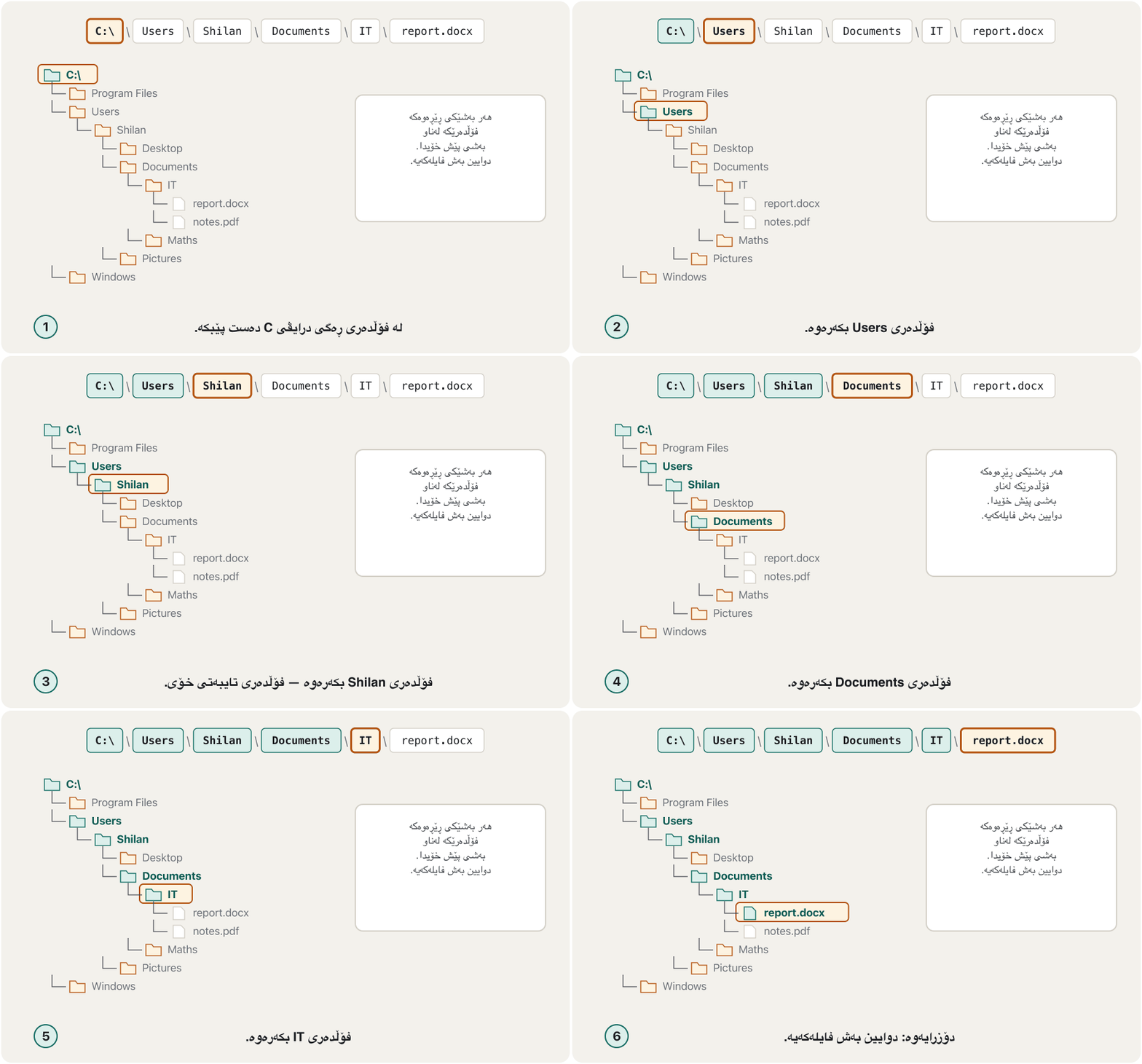
ناونیشانی : لیستی ئەو پێیاندا تێدەپەڕیت، لە سەرەوەی درایڤەکەوە تا . بەرزترین درایڤێک . کە لە ڕەگەوە دەست پێدەکات و لە هەر شوێنێکەوە کار دەکات.
| Partبەش | Windows | macOS and LinuxmacOS و Linux |
|---|---|---|
| Rootڕەگ | C:\ | / |
| Separatorجیاکەرەوە | backslash \ \ | forward slash /هێڵی لار / |
| Exampleنموونە | C:\Users\Shilan\Documents\IT\report.docx | /Users/shilan/Documents/IT/report.docx |
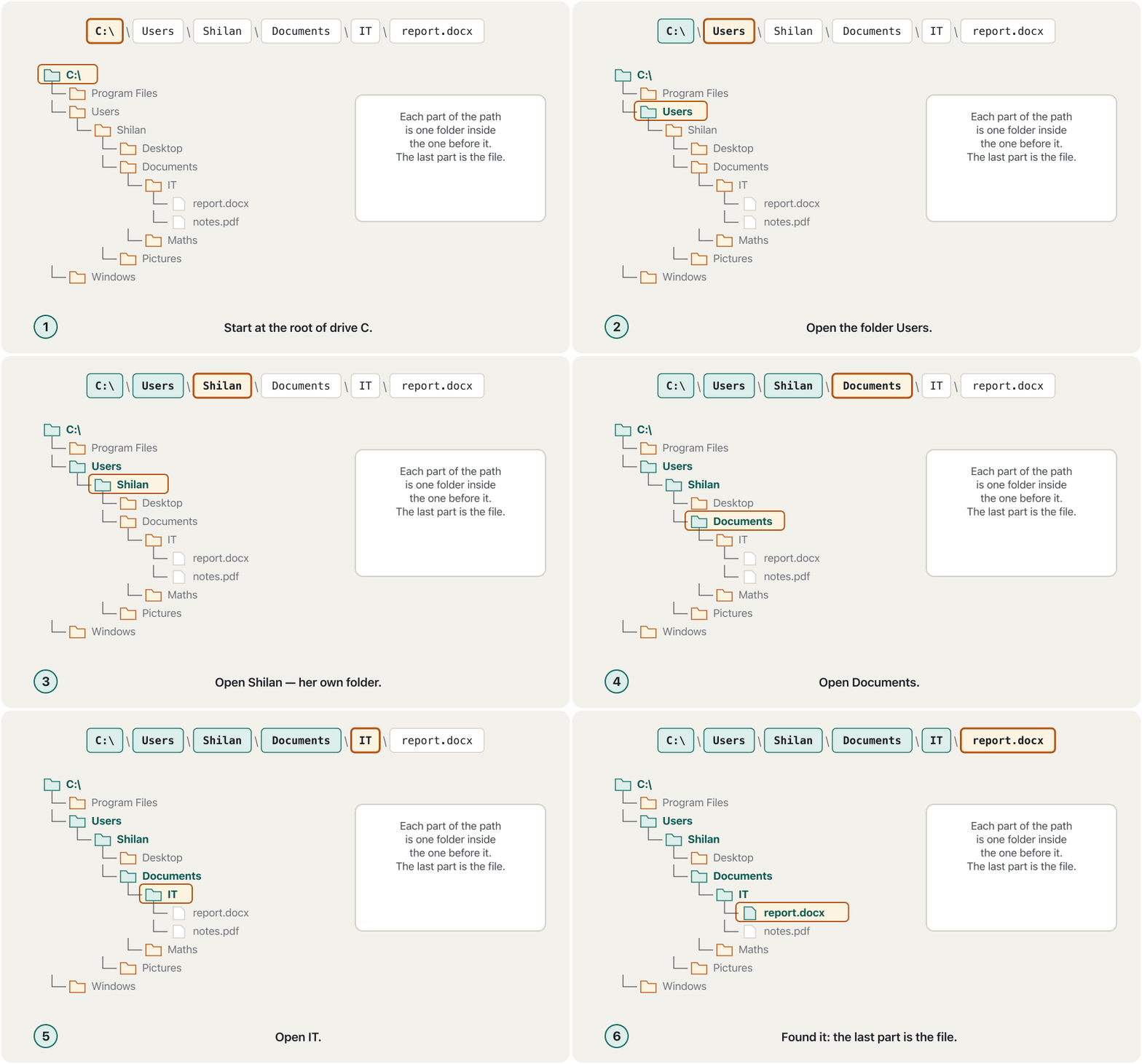
A relative path starts from the folder you are in now. .. means «one folder up». From Documents\IT, the relative path ..\Maths\notes.pdf goes up to Documents, then into Maths. Websites use the same idea in their links. How to say \, /, . and _ in English is practised in Technical English: Storage and Files.
لەو دەست پێدەکات کە ئێستا تێیدایت. .. واتە «یەک بەرەو سەرەوە». لە Documents\ITـەوە، ..\Maths\notes.pdf بەرز دەبێتەوە بۆ Documents، پاشان دەچێتە ناو Maths. ماڵپەڕەکان هەمان بیرۆکە لە بەستەرەکانیاندا بەکار دەهێنن. چۆن \، /، . و _ بە ئینگلیزی بڵێیت لە ئینگلیزیی تەکنیکی: خەزنکردن و فایلەکاندا ڕاهێنانی لەسەر دەکرێت.
The same paths work in typed commands: dir C:\Users\Shilan\Documents lists that folder from wherever you are. See The Command Line.
هەمان لە نووسراویشدا کار دەکەن: dir C:\Users\Shilan\Documents لە هەر شوێنێک بیت ناوەڕۆکی ئەو پیشان دەدات. سەیری ڕووکاری هێڵی فەرمان بکە.
File extensions and file typesپاشگرەکانی فایل و جۆرەکانی فایل
The file extension is the group of letters after the last dot in a file name. It tells the operating system what format the data inside is in, which app should open the file and which icon to show.
ئەو کۆمەڵە پیتەیە کە دوای دوایین خاڵ لە ناوی دێت. بە دەڵێت ناوی بە کام ، کام دەبێت بکاتەوە و کام پیشان بدات.
| Typeجۆر | Common extensionsپاشگرە باوەکان | Opened withبە چی دەکرێتەوە |
|---|---|---|
| Documentsبەڵگەنامە | .docx .doc .odt .rtf .txt .pdf | Word, Google Docs, LibreOffice, Notepad; PDF files: a browser or Acrobat ReaderWord، Google Docs، LibreOffice، Notepad؛ PDF: یان Acrobat Reader |
| Spreadsheets | .xlsx .xls .ods .csv | Excel, Google Sheets, Numbers, LibreOffice Calc |
| Presentationsپێشکەشکردن | .pptx .ppt .key | PowerPoint, Google Slides, Keynote |
| Picturesوێنە | .jpg/.jpeg .png .gif .webp .heic .bmp .svg | Photos, Preview, a browserPhotos، Preview، |
| Soundدەنگ | .mp3 .m4a .aac .wav .flac | Media Player, Music, VLC |
| Videoڤیدیۆ | .mp4 .mov .mkv .webm .avi .wmv | VLC, Media Player, QuickTime |
| Web pagesپەڕەی وێب | .html/.htm .css .js .php .asp | A browser (PHP and ASP run on a web server) (PHP و ASP لەسەر کار دەکەن) |
| Compressedپەستێنراو | .zip .7z .rar | Built into Windows and macOS (.zip); 7-Zipلەناو Windows و macOSـدایە (.zip)؛ 7-Zip |
| Programs and installers و بەرنامەی دامەزراندن | .exe .msi (Windows), .app .dmg (Mac), .apk (Android) | The operating system itselfخودی |
What file extensions tell the computer, how each type gets a default app, and how hidden extensions help malware trick you.
چی بە دەڵێن و هەر جۆرێک چۆن وەردەگرێت؛ هەروەها کە شاراونەتەوە چۆن یارمەتی دەدەن فێڵت لێ بکات.
Plays 0:00-3:36: extensions, default apps, showing extensions and the .txt.vbs trick; stops before the sponsor.
لە 0:00 تا 3:36 پەخش دەبێت: ، ، پیشاندانی و فێڵی .txt.vbs؛ پێش ڕیکلامی سپۆنسەر ڕادەوەستێت.
File extensions and file typesپاشگرەکانی فایل و جۆرەکانی فایل
Old formats and default appsجۆری فایلی کۆن و ئەپە بنەڕەتییەکان
- Every extension has a default app. Double-click
photo.jpgand it opens in Photos because Photos is the default for .jpg. - To choose another app once, right-click › Open with. To change the default: Settings › Apps › Default apps (Windows), or Get Info › Open with › Change All (Mac).
- Renaming does not convert. Changing
essay.docxtoessay.pdfonly breaks the file. To get a PDF, use File › Save As or Export.
- هەر هەیە. دوو کلیک لە
photo.jpgبکە و لە Photosـدا دەکرێتەوە چونکە Photos بۆ.jpg. - بۆ هەڵبژاردنی ئەپێکی تر بۆ یەک جار، کلیکی ڕاست › Open with. بۆ گۆڕینی : Settings › Apps › Default apps (Windows)، یان Get Info › Open with › Change All (Mac).
- گۆڕینی ناو جۆرەکە ناگۆڕێت. گۆڕینی
essay.docxبۆessay.pdfتەنها تێکدەدات. بۆ وەرگرتنی PDF، File › Save As یان Export بەکار بهێنە.
File extensions and file typesپاشگرەکانی فایل و جۆرەکانی فایل
When extensions are hiddenکاتێک پاشگرەکانی فایل دەشاردرێنەوە
Common mistakesهەڵە باوەکان
| Mistakeهەڵە | What is trueڕاستییەکە |
|---|---|
| Renaming a file changes its type.گۆڕینی ناوی جۆرەکەی دەگۆڕێت. | The data stays the same; use Save As or Export to convert. وەک خۆی دەمێنێتەوە؛ بۆ گۆڕین Save As یان Export بەکار بهێنە. |
.docx is only for Word 2007 and 2010..docx تەنها بۆ Word 2007 و 2010ـە. | Every Word since 2007, Microsoft 365 and Google Docs use .docx.هەموو Wordێکی دوای 2007، Microsoft 365 و Google Docs .docx بەکار دەهێنن. |
| An installed app runs from the SSD. جێگیرکراو لە SSDـەوە کار دەکات. | It is stored on the SSD, but it runs from RAM: the OS copies it there each time.لەسەر SSD هەڵگیراوە، بەڵام لە RAMـەوە کار دەکات: هەموو جارێک بۆ ئەوێ کۆپی دەکات. |
| Any site that offers a download is fine.هەر ماڵپەڕێک پێشکەش بکات باشە. | Use the official store or the maker's own site; avoid «cracked» copies. فەرمی یان ماڵپەڕی خودی دروستکەرەکە بەکار بهێنە؛ خۆت لە کۆپیی «شکێنراو» بپارێزە. |
| Internet Explorer and ICQ are good examples of applications.Internet Explorer و ICQ نموونەی باشی . | Both are gone (2022 and 2024); use Edge/Chrome and WhatsApp/Telegram.هەردووکیان نەماون (2022 و 2024)؛ Edge/Chrome و WhatsApp/Telegram بەکار بهێنە. |
/ and \ are the same in a path./ و \ لە وەک یەکن. | Windows paths use \; macOS, Linux and web addresses use /. Windows \ بەکار دەهێنن؛ macOS، Linux و ناونیشانی وێب / بەکار دەهێنن. |
Exercisesڕاهێنانەکان
Replace each old example with a current program of the same kind: (a) Netscape Navigator (b) MS NetMeeting (c) Quattro Pro (d) RealPlayer (e) AppleWorks (f) Yahoo Messenger.
هەر نموونەیەکی کۆن بە ئێستایی هەمان جۆر بگۆڕە: (أ) Netscape Navigator (ب) MS NetMeeting (ج) Quattro Pro (د) RealPlayer (هـ) AppleWorks (و) Yahoo Messenger.
Show answerوەڵامەکە پیشان بدە
- (a) a browser: Edge, Chrome, Firefox or Safari
- (b) video meetings: Teams or Zoom
- (c) a spreadsheet: Excel, Google Sheets, Numbers or LibreOffice Calc
- (d) a media player: VLC or the Media Player app
- (e) a word processor or suite: Pages, Word or LibreOffice
- (f) messaging: WhatsApp, Telegram or Viber
- (أ) : Edge، Chrome، Firefox یان Safari
- (ب) کۆبوونەوەی ڤیدیۆیی: Teams یان Zoom
- (ج) : Excel، Google Sheets، Numbers یان LibreOffice Calc
- (د) : VLC یان ئەپی Media Player
- (هـ) یان : Pages، Word یان LibreOffice
- (و) نامەناردن: WhatsApp، Telegram یان Viber
On Windows, Dilan's user folder is C:\Users\Dilan. Inside it is Documents, inside that University, inside that Logic, and there is the file lab2.pdf. (a) Write the absolute path. (b) Write the same path as it would look on a Mac, where her home folder is /Users/dilan. (c) From the folder University\Logic, write a relative path to University\Maths\exam.docx.
لە Windowsـدا بەکارهێنەریی دیلان C:\Users\Dilanـە. لەناویدا Documents هەیە، لەناو ئەویشدا University، لەناو ئەویشدا Logic و لەوێ lab2.pdf هەیە. (أ) بنووسە. (ب) هەمان بنووسە وەک لەسەر Mac دەردەکەوێت کە فۆڵدەری ماڵەوەی /Users/dilanـە. (ج) لە University\Logicـەوە، بۆ University\Maths\exam.docx بنووسە.
Show answerوەڵامەکە پیشان بدە
- (a)
C:\Users\Dilan\Documents\University\Logic\lab2.pdf - (b)
/Users/dilan/Documents/University/Logic/lab2.pdf - (c)
..\Maths\exam.docx— up one folder toUniversity, then intoMaths.
- (أ)
C:\Users\Dilan\Documents\University\Logic\lab2.pdf - (ب)
/Users/dilan/Documents/University/Logic/lab2.pdf - (ج)
..\Maths\exam.docx— یەک بەرز دەبێتەوە بۆUniversity، پاشان دەچێتە ناوMaths.
Name the kind of file and one app that opens it: (a) budget.xlsx (b) lecture.mp4 (c) index.html (d) photos.zip (e) setup.msi (f) voice.m4a (g) marks.csv.
جۆری و ئەپێک کە دەیکاتەوە بڵێ: (أ) budget.xlsx (ب) lecture.mp4 (ج) index.html (د) photos.zip (هـ) setup.msi (و) voice.m4a (ز) marks.csv.
Show answerوەڵامەکە پیشان بدە
- (a) spreadsheet — Excel or Google Sheets
- (b) video — VLC or Media Player
- (c) web page — a browser
- (d) compressed folder — File Explorer or Finder (built in)
- (e) Windows installer — Windows itself (only if you trust where it came from)
- (f) sound — Music, Media Player or VLC
- (g) plain table of values separated by commas — Excel, Sheets or Notepad
- (أ) — Excel یان Google Sheets
- (ب) ڤیدیۆ — VLC یان Media Player
- (ج) پەڕەی وێب —
- (د) پەستێنراو — File Explorer یان Finder (لەناو سیستەمدا)
- (هـ) بەرنامەی دامەزراندنی Windows — خودی Windows (تەنها ئەگەر متمانەت بە سەرچاوەکەی هەبێت)
- (و) دەنگ — Music، Media Player یان VLC
- (ز) خشتەی سادەی بەها کە بە کۆما جیا کراونەتەوە — Excel، Sheets یان Notepad
You work in IT support. Your company must choose an edition of Windows Server, or Red Hat Enterprise Linux instead, for its new server. Which criteria will you use to evaluate and select it? Say what each one means for this server.
تۆ لە پشتگیریی ITـدا کار دەکەیت. کۆمپانیاکەت دەبێت وەشانێکی Windows Server، یان لەبری ئەوە Red Hat Enterprise Linux، بۆ نوێیەکەی هەڵبژێرێت. بە کام پێوەرانە هەڵیدەسەنگێنیت و هەڵیدەبژێریت؟ بڵێ هەریەکەیان بۆ ئەم چ واتایەکی هەیە.
Show answerوەڵامەکە پیشان بدە
- Users: how many staff and branches will use the server — this decides the edition and how many licences or subscriptions are needed.
- Availability and security: it must run 24/7; decide who may sign in, how use is monitored, and how it is updated and backed up.
- Total cost: the licences (Windows Server) or the yearly subscription with support (Red Hat), plus installation, training and years of maintenance.
- Capabilities: it must run the company's services today (files, database, e-mail) and grow with more users later.
- Compatibility: it must work with the company's PCs, programs and network — and with what the IT staff already know.
- : چەند کارمەند و لق بەکار دەهێنن — ئەمە وەشانەکە و ژمارەی مۆڵەت یان دیاری دەکات.
- و : دەبێت ٢٤/٧ کار بکات؛ دیاری بکە کێ بۆی هەیە بچێتە ژوورەوە، بەکارهێنان چۆن چاودێری دەکرێت و چۆن نوێ دەکرێتەوە و لێ دەگیرێت.
- تێچووی گشتی: مۆڵەتەکان (Windows Server) یان ساڵانە لەگەڵ پشتگیری (Red Hat)، لەگەڵ ، ڕاهێنان و چەندین ساڵ چاودێری.
- توانا: دەبێت ئەمڕۆ خزمەتگوزارییەکانی کۆمپانیاکە (، ، ) بەڕێوە ببات و دواتر لەگەڵ زیاتر گەورە ببێت.
- : دەبێت لەگەڵ PC، و کۆمپانیاکە کار بکات — و لەگەڵ ئەوەی کارمەندانی IT پێشتر دەیزانن.
An exam asked: «What are the characteristics of PC software?» Answer in one or two lines, with an app you find easy as an example.
تاقیکردنەوەیەک پرسی: «تایبەتمەندییەکانی PC چین؟» بە یەک یان دوو دێڕ وەڵام بدەرەوە، بە نموونەی کە بە ئاسانی دەزانیت.
Show answerوەڵامەکە پیشان بدە
Good PC software is user-friendly: easy and intuitive (you can guess what to do), and it needs little training and little documentation. For example, a photo app where you crop a picture by dragging its corners without reading any help.
باشی PC ئاسانە بۆ : سادە و ڕوونە (دەتوانیت بزانیت چی بکەیت) و پێویستی بە ڕاهێنان و کەمە. بۆ نموونە ئەپێکی وێنە کە وێنەیەکی تێدا دەبڕیت بە ڕاکێشانی گۆشەکانی، بێ ئەوەی هیچ ڕێنماییەک بخوێنیتەوە.
Summaryپوختە
- Application software does the user's jobs: word processing, spreadsheets, databases, suites, multimedia, communication, browsers, e-mail.
- Many 2021 examples are gone (Internet Explorer 2022, ICQ 2024, WordPad 2024); learn the kinds, not only the names.
- Install from the official store or the maker's site, keep apps updated, uninstall what you don't use.
- A licence (EULA) sets how you may use a program: paid, subscription, free or open source; details and piracy are in the Cybersecurity course.
- Organisations choose software in two steps, checking users, availability and security, total cost, capabilities and compatibility.
- Install puts the program on the SSD; run copies it into RAM; the CPU executes it.
- A path lists the folders from the root to the file; Windows uses \, macOS and Linux
/. - The extension shows the file type and chooses the default app; show extensions to spot
.exefiles in disguise.
- کارەکانی دەکات: نووسینی دەق، ، ، ، ، پەیوەندیکردن، ، .
- زۆر لە نموونەکانی 2021 نەماون (Internet Explorer 2022، ICQ 2024، WordPad 2024)؛ جۆرەکان فێر ببە، نەک تەنها ناوەکان.
- لە فەرمی یان ماڵپەڕی دروستکەرەکەوە جێگیری بکە، نوێ ڕابگرە، ئەوەی بەکاری ناهێنیت لایبە.
- (EULA) دیاری دەکات چۆن بەکار بهێنیت: پارەدار، ، بێبەرانبەر یان ؛ وردەکاری و لە کۆرسی .
- دامەزراوەکان بە دوو هەنگاو هەڵدەبژێرن و ، و ، تێچووی گشتی، توانا و دەپشکنن.
- جێگیرکردن دەخاتە سەر SSD؛ کارپێکردن بۆ ناو RAM کۆپی دەکات؛ جێبەجێی دەکات.
- لە ڕەگەوە تا دەژمێرێت؛ Windows \ بەکار دەهێنێت، macOS و Linux
/. - جۆری پیشان دەدات و هەڵدەبژێرێت؛ پیشان بدە تا
.exeـی خۆگۆڕیو بناسیتەوە.
What are the three steps from a new program to using it?سێ هەنگاوەکە لە بەرنامەیەکی نوێوە تا بەکارهێنانی چین؟
Install (copy onto the SSD), run (the OS copies it into RAM), use (the CPU executes it).
جێگیرکردن (کۆپی بۆ سەر SSD)، کارپێکردن ( بۆ ناو RAM کۆپی دەکات)، بەکارهێنان ( جێبەجێی دەکات).
What does a file extension tell the operating system?پاشگری فایل چی بە سیستەمی وەگەڕخەر دەڵێت؟
The file's format, which app should open it and which icon to show.
، کام دەبێت بیکاتەوە و کام پیشان بدات.
Why is report.pdf.exe dangerous?بۆچی report.pdf.exe مەترسیدارە؟
Its real extension is .exe, so it is a program; with extensions hidden it looks like a PDF.
ڕاستەقینەی .exeـە، بۆیە ؛ ئەگەر شاردرابنەوە وەک PDF دەردەکەوێت.
Lesson complete!وانەکە تەواو بوو!
Well done. Review the key terms, then go on to the next lesson.دەستخۆش. سەیرێکی زاراوە سەرەکییەکان بکەرەوە، پاشان بڕۆ بۆ وانەی داهاتوو.
Key termsزاراوە سەرەکییەکان
Using Windows: Desktop, Files and Everyday Toolsبەکارهێنانی Windows: ڕوومێز، فایلەکان و ئامرازە ڕۆژانەکان
Related lecturesوانە پەیوەندیدارەکان
- Applicationsئەپەکان
- Storage and Filesخەزنکردن و فایلەکان
- Mobile Apps and App Storesئەپەکانی مۆبایل و فرۆشگاکانی ئەپ
- Keyboard Shortcuts for Windows and Macکورتەڕێکانی کیبۆرد بۆ Windows و Mac
- Storage Versus Memoryخەزنکردن بەرامبەر بیرگە
- How a Computer Runs a Programکۆمپیوتەر چۆن بەرنامەیەک جێبەجێ دەکات
- Using Windows: Desktop, Files and Everyday Toolsبەکارهێنانی Windows: ڕوومێز، فایلەکان و ئامرازە ڕۆژانەکان
- The Command Line: Command Prompt Basicsڕووکاری هێڵی فەرمان: بنەماکانی Command Prompt
- Spreadsheet Essentialsبنەماکانی بەرنامەی خشتەیی
- How E-mail Worksئیمەیڵ چۆن کار دەکات
- Intellectual Property, Plagiarism and Software Licencesموڵکی هزری، دزیی زانستی و مۆڵەتەکانی بەکارهێنان
References and further readingسەرچاوەکان و خوێندنەوەی زیاتر
- Microsoft Learn: Naming Files, Paths, and Namespaces
- Microsoft Support: Common file name extensions in Windows
- Apple Support: Show or hide filename extensions on Mac
- Apple Support: Safely open apps on your Mac (App Store, Gatekeeper, notarization)
- Microsoft Learn: Use WinGet to install and manage applications
- CISA: Understanding Patches and Software Updates
- Microsoft Learn: Features and functionality removed in Windows client (Internet Explorer 11, WordPad)
- Microsoft Learn: Internet Explorer and Microsoft Edge lifecycle FAQ
- Engadget: ICQ is shutting down on June 26 (2024)
- TechCrunch: Yahoo Messenger is shutting down on July 17 (2018)
- MySQL: Community Edition (free, open source under the GPL)
- MySQL: Enterprise Edition (with technical support)
This lecture is a first edition. The Kurdish text and terminology are waiting for review by Kurdish IT teachers.ئەم وانەیە چاپی یەکەمە. دەقە کوردییەکە و زاراوەکانی چاوەڕێی پێداچوونەوەی مامۆستایانی کوردی بواری IT ن.