Chapterبەش 5 · Lectureوانە 5.5
The Command Line: Command Prompt Basicsڕووکاری هێڵی فەرمان: بنەماکانی Command Prompt
Why IT staff still type commands; MS-DOS, Command Prompt, PowerShell and Windows Terminal; reading the prompt; help, help dir and /?; the 15 commands of the course's CMD table — dir (and its output), drives, paths, wildcards, md, cd, rd, copy (files only — xcopy and robocopy for folders), move, ren, del, type, ver, vol, date and time — with real output shapes, a copy con lab animation, PowerShell and macOS/Linux equivalents, and common mistakes.
بۆچی کارمەندانی IT هێشتا دەنووسن؛ MS-DOS، Command Prompt، PowerShell و Windows Terminal؛ خوێندنەوەی ؛ help، help dir و /?؛ 15 خشتەی CMDـی کۆرسەکە — dir (و ئەنجامەکەی)، درایڤەکان، ، ، md، cd، rd، copy (تەنها — xcopy و robocopy بۆ )، move، ren، del، type، ver، vol، date و time — بە شێوەی ئەنجامی ڕاستەقینە، جوڵەوێنەی تاقیگەی copy con، هاوتاکانی PowerShell و macOS/Linux و هەڵە باوەکان.
What you will learnچی فێر دەبیت
- Explain what a shell and a terminal are, and open Command Prompt in Windows 11.
- Read the prompt and get help for any command.
- List, find and move between folders and drives with dir, wildcards and cd.
- Create and remove folders, and copy, move, rename and delete files safely.
- Write and read a text file with copy con and type, and ask Windows for its version, volume, date and time.
- Recognise the same commands in PowerShell, macOS and Linux.
- ڕوون بکەیتەوە و چین و Command Prompt لە Windows 11دا بکەیتەوە.
- بخوێنیتەوە و بۆ هەر یارمەتی وەربگریت.
- بە dir، و cd و درایڤەکان لیست بکەیت، بیاندۆزیتەوە و لە نێوانیاندا بگەڕێیت.
- دروست بکەیت و لایان ببەیت و بە سەلامەتی کۆپی بکەیت، بیانگوازیتەوە، ناویان بگۆڕیت و بیانسڕیتەوە.
- بە copy con و type بنووسیت و بیخوێنیتەوە و وەشان، ، بەروار و کات لە Windows بپرسیت.
- هەمان لە PowerShell، macOS و Linuxـدا بناسیتەوە.
Why type commands?بۆچی فەرمان بنووسین؟
In a graphical user interface (GUI) you point and click. In a command-line interface (CLI) you type a command, press Enter, and the computer answers with text. The two words are defined in Software and Operating Systems; this lesson is the practice.
لە ـدا ئاماژە دەکەیت و دەکەیت. لە ـدا دەنووسیت، Enter دادەگریت و بە دەق وەڵام دەداتەوە. ئەم دوو وشەیە لە نەرمەواڵە و سیستەمەکانی وەگەڕخەردا پێناسە کراون؛ ئەم وانەیە ڕاهێنانەکەیە.
Before Windows, PCs ran MS-DOS (Microsoft Disk Operating System, 1981), where everything was typed. Windows hid the commands behind windows and icons, but IT staff still use them every day:
پێش Windows، MS-DOSـیان کار پێ دەکرد (Microsoft Disk Operating System، 1981)، کە هەموو شتێک تێیدا دەنووسرا. Windows لە پشت و شاردەوە، بەڵام کارمەندانی IT هێشتا هەموو ڕۆژێک بەکاریان دەهێنن:
- Speed: one line can copy every .jpg file from ten folders.
- Repair: when Windows will not start normally, the recovery tools offer a command prompt, not a desktop.
- Servers and remote work: many servers have no desktop at all; you manage them by typing.
- Automation: typed commands can be saved in a script and run again tomorrow.
- خێرایی: یەک دێڕ دەتوانێت هەموو .jpg لە دە کۆپی بکات.
- چاککردنەوە: کاتێک Windows بە ئاسایی دەست پێ ناکات، ئامرازەکانی Recovery Command Prompt پێشکەش دەکەن، نەک .
- و کار لە دوورەوە: زۆر هیچ نییە؛ بە نووسین بەڕێوەیان دەبەیت.
- خۆکارکردن: نووسراوەکان دەتوانرێن لە هەڵبگیرێن و سبەی دووبارە کار بکەنەوە.
Command Prompt, PowerShell and Windows TerminalCommand Prompt، PowerShell و Windows Terminal
The course calls them «DOS commands typed in a command prompt window». Today two different programs work together:
کۆرسەکە پێیان دەڵێت « DOS کە لە command promptـدا دەنووسرێن». ئەمڕۆ دوو جیاواز پێکەوە کار دەکەن:
- A shell reads what you type and runs it. Windows has two: Command Prompt (
cmd.exe), which keeps the old MS-DOS commands such asdirandcopy, and PowerShell, a newer and much stronger shell with its own commands (cmdlets) such asGet-ChildItem. - A terminal is the window that shows the shell. In Windows 11 it is Windows Terminal: each tab can run a different shell — Command Prompt, PowerShell, or Linux through WSL.
- ئەوە دەخوێنێتەوە کە دەینووسیت و جێبەجێی دەکات. Windows دوو هەیە: Command Prompt (
cmd.exe)، کە کۆنەکانی MS-DOS وەکdirوcopyدەپارێزێت و PowerShell، نوێتر و زۆر بەهێزتر بە تایبەتی خۆی (cmdlet) وەکGet-ChildItem. - بریتییە لەو کە پیشان دەدات. لە Windows 11دا بریتییە لە Windows Terminal: هەر تابێک دەتوانێت جیاواز کار پێ بکات — Command Prompt، PowerShell، یان Linux لە ڕێگەی WSLـەوە.
The terminal is the tea house: the room, the tables, the window to the street. The shell is the waiter who understands your order and brings it. One tea house can have several waiters — one tab with Command Prompt, another with PowerShell.
چایخانەکەیە: ژوورەکە، مێزەکان، پەنجەرەکەی سەر شەقام. چایچییەکەیە کە داواکارییەکەت تێدەگات و بۆت دەهێنێت. یەک چایخانە دەتوانێت چەند چایچییەکی هەبێت — تابێک بە Command Prompt و تابێکی تر بە PowerShell.
Where the analogy stops workingسنووری ئەم نموونەیە
A waiter can guess what you mean; a shell cannot. It does exactly what you type — even a mistake.
چایچی دەتوانێت مەبەستت بزانێت؛ ناتوانێت. ڕێک ئەوە دەکات کە دەینووسیت — تەنانەت هەڵەیەکیش.
Since Windows 11 version 22H2, Windows Terminal opens automatically when you start Command Prompt or PowerShell. This lesson uses Command Prompt, because its commands are the ones in the course — with one PowerShell comparison at the end.
لە Windows 11 وەشانی 22H2ـەوە، کاتێک Command Prompt یان PowerShell دەکەیتەوە Windows Terminal خۆکارانە دەکرێتەوە. ئەم وانەیە Command Prompt بەکار دەهێنێت، چونکە هەمان ئەوانەن کە لە کۆرسەکەدان — بە یەک بەراورد لەگەڵ PowerShell لە کۆتاییدا.
Open Command Promptکردنەوەی Command Prompt
Select Start and type cmd (or Command Prompt).
Start هەڵبژێرە و cmd بنووسە (یان Command Prompt).
Select Command Prompt in the results. Windows Terminal opens with a Command Prompt tab.
لە ئەنجامەکاندا Command Prompt هەڵبژێرە. Windows Terminal بە تابێکی Command Promptـەوە دەکرێتەوە.
Other ways: ⊞ + R, type
cmd, Enter; or in an open Windows Terminal, click the ⌄ next to the tabs and choose Command Prompt.ڕێگاکانی تر: ⊞ + R،
cmdبنووسە، Enter؛ یان لە Windows Terminalـێکی کراوەدا، لە ⌄ لە تەنیشت تابەکان بکە و Command Prompt هەڵبژێرە.
The prompt: where am I?دەقی داواکردن: من لە کوێم؟
The text at the start of the line, such as C:\Users\Aram>, is the prompt. Windows prints it by itself to say «I'm ready» — and it tells you where you are: the drive and the current folder. Yours shows your own user name; it may also look like D:\> or C:\Work>.
ئەو دەقەی سەرەتای دێڕەکە، وەک C:\Users\Aram>، ـە. Windows خۆی دەینووسێت بۆ ئەوەی بڵێت «ئامادەم» — و پێت دەڵێت لە کوێیت: درایڤەکە و ئێستا. هی تۆ خۆت پیشان دەدات؛ لەوانەیە وەک D:\> یان C:\Work>ـیش دەربکەوێت.
- Type a command after the prompt and press Enter. Nothing happens until you press Enter.
- Commands are not case-sensitive:
DIR,dirandDiRdo the same. (File names are not case-sensitive on Windows either.) - Press ↑ to bring back the last command, and Tab to complete a long file or folder name.
clsclears the screen;exitcloses the window.
- لە دوای بنووسە و Enter دابگرە. هیچ ڕوو نادات تا Enter دانەگریت.
- نین:
DIR،dirوDiRهەمان کار دەکەن. (ناوی لە Windowsـدا نییە.) - ↑ دابگرە بۆ گەڕاندنەوەی دوایین و Tab بۆ تەواوکردنی ناوێکی درێژی یان .
clsشاشەکە پاک دەکاتەوە؛exitدادەخات.
Ask for help: help, help dir, dir /?داوای یارمەتی: help، help dir، dir /?
You do not have to remember everything. Type help and press Enter: Command Prompt lists its commands with one line about each. The list is long — the top scrolls away, so use the scroll bar or the mouse wheel to read it.
پێویست ناکات هەموو شتێک لەبیر بێت. help بنووسە و Enter دابگرە: Command Prompt بە یەک دێڕ دەربارەی هەریەکەیان لیست دەکات. لیستەکە درێژە — سەرەوەی دەڕوات، بۆیە شریتی لاپەڕەگەڕان یان خڕۆکەی بەکار بهێنە بۆ خوێندنەوەی.
helpFor more information on a specific command, type HELP command-name ASSOC Displays or modifies file extension associations. ATTRIB Displays or changes file attributes. BREAK Sets or clears extended CTRL+C checking. … CD Displays the name of or changes the current directory. … XCOPY Copies files and directory trees.
For one command, type help and its name — help dir — or the command with the option /?: dir /?. Both show what the command does, its syntax (the exact way to write it) and its options.
بۆ یەک ، help و ناوەکەی بنووسە — help dir — یان لەگەڵ ـی /?: dir /?. هەردووکیان پیشان دەدەن چی دەکات، ـەکەی (شێوازی ڕێکی نووسینی) و .
help dirDisplays a list of files and subdirectories in a directory.
DIR [drive:][path][filename] [/A[[:]attributes]] [/B] [/C] [/D] [/L] [/N]
[/O[[:]sortorder]] [/P] [/Q] [/R] [/S] [/T[[:]timefield]] [/W] [/X] [/4]
[drive:][path][filename]
Specifies drive, directory, and/or files to list.
…
/P Pauses after each screenful of information.
/W Uses wide list format.Explain the codeڕوونکردنەوەی کۆدەکە
- Lineدێڕی 1
In the output, square brackets mean «optional»: you may leave those parts out. You never type the brackets themselves.
لە ئەنجامەکەدا، کەوانەی چوارگۆشە واتە «ئارەزوومەندانە»: دەتوانیت ئەو بەشانە نەنووسیت. هەرگیز خودی کەوانەکان نانووسیت.
The 15 commands of this lesson15 فەرمانەکەی ئەم وانەیە
This table is a cleaned-up version of a student's own CMD table from the course. The lesson teaches each line; come back here as a reminder. In the examples, words in angle brackets such as <file name> are placeholders: you type a real name instead, without the brackets.
ئەم خشتەیە وەشانێکی ڕێکخراوی خشتەی CMDـی قوتابییەکە لە کۆرسەکەدا. وانەکە هەر دێڕێکی فێر دەکات؛ وەک بیرخستنەوە بگەڕێوە ئێرە. لە نموونەکاندا، ئەو وشانەی لەناو کەوانەی گۆشەداردان وەک <file name> شوێنگرن: لە جێیان ناوێکی ڕاستەقینە دەنووسیت، بەبێ کەوانەکان.
| Command | Exampleنموونە | What it doesچی دەکات |
|---|---|---|
help | help dir | Lists the commands, or explains one. لیست دەکات، یان یەکێکیان ڕوون دەکاتەوە. |
dir | dir *.txt | Lists the files and folders in a folder. و ناو لیست دەکات. |
cd | cd Documents | Changes the current folder. ئێستا دەگۆڕێت. |
cd.. | cd .. | Goes up to the parent folder.دەچێتە سەرەوە بۆ دایک. |
md | md lab | Makes a new folder. نوێ دروست دەکات. |
rd | rd lab | Removes an empty folder. بەتاڵ لادەبات. |
copy | copy notes.txt D:\ | Copies files (not folders). کۆپی دەکات (نەک ). |
move | move notes.txt Backup | Moves files or folders. یان دەگوازێتەوە. |
ren | ren old.txt new.txt | Renames a file or folder.ناوی یان دەگۆڕێت. |
del | del notes.txt | Deletes files — no Recycle Bin. دەسڕێتەوە — بەبێ . |
type | type notes.txt | Shows what is inside a text file.ناوەڕۆکی پیشان دەدات. |
ver | ver | Shows the Windows version.وەشانی Windows پیشان دەدات. |
vol | vol C: | Shows a drive's label and serial number.ناو و ژمارەی زنجیرەی درایڤێک پیشان دەدات. |
date | date /t | Shows (or sets) the date.بەروار پیشان دەدات (یان دیاری دەکات). |
time | time /t | Shows (or sets) the time.کات پیشان دەدات (یان دیاری دەکات). |
Look around with dirسەیرکردنی دەوروبەر بە dir
In Command Prompt a folder is called a directory — the two words mean exactly the same. dir lists the contents of the current directory: the same files and folders you would see in File Explorer, only as text.
لە Command Promptـدا پێی دەوترێت directory — دوو وشەکە ڕێک یەک واتایان هەیە. dir ناوەڕۆکی ئێستا لیست دەکات: هەمان ئەو و لە File Explorerـدا دەیانبینیت، تەنها وەک دەق.
cd Documents
dirC:\Users\Aram>cd Documents
C:\Users\Aram\Documents>dir
Volume in drive C is Windows
Volume Serial Number is 6A2B-91C4
Directory of C:\Users\Aram\Documents
10/24/2026 09:15 AM <DIR> .
10/24/2026 09:15 AM <DIR> ..
10/22/2026 11:03 AM 48,213 cv-aram.docx
10/23/2026 08:10 PM 0 empty.txt
10/20/2026 06:42 PM <DIR> IT
10/24/2026 09:15 AM 1,204 notes.txt
3 File(s) 49,417 bytes
3 Dir(s) 212,345,679,872 bytes freeExplain the codeڕوونکردنەوەی کۆدەکە
- Lineدێڕی 2
dir with nothing after it lists the folder you are in.
dir بەبێ هیچ شتێک لە دوایدا ئەو لیست دەکات کە تێیدایت.
| Part of the outputبەشێک لە ئەنجامەکە | Meaningواتا |
|---|---|
Volume in drive C is Windows | The drive and its label (name); the serial number below identifies the volume.درایڤەکە و ناوەکەی؛ ژمارەی زنجیرەکەی خوارەوە دەناسێنێت. |
Directory of C:\Users\Aram\Documents | The folder being listed. dir shows one folder at a time.ئەو لیست دەکرێت. dir هەر جارە یەک پیشان دەدات. |
<DIR> | This line is a folder. Lines without <DIR> are files.ئەم دێڕە . دێڕەکانی بێ <DIR> . |
48,213 | The file's size in bytes (about 48 KB). Folders show no size; 0 means an empty file.قەبارەی بە (نزیکەی 48 KB). قەبارە پیشان نادەن؛ 0 واتە بەتاڵ. |
10/22/2026 11:03 AM | When the file or folder was created or last changed (in your region's date format).کەی یان دروست کرا یان دوایین جار گۆڕا (بە شێوەی بەرواری ناوچەکەت). |
. and .. | Two special entries: . is this folder, .. is the folder above it.دوو تۆماری تایبەت: . ئەم ، .. سەرەوەیە. |
3 File(s) … bytes free | How many files and folders, their total size, and the free space left on the drive.چەند و ، کۆی قەبارەیان و شوێنی بەتاڵی سەر درایڤەکە. |
Open File Explorer at the same folder and compare: the names, sizes and dates are the same. The command line and the desktop are two windows onto the same files.
File Explorer لە هەمان بکەرەوە و بەراورد بکە: ناو، قەبارە و بەروارەکان یەکن. و دوو بۆ هەمان .
Command Prompt beside File Explorer: read the prompt, go to the root with cd , list with dir, then rename, move and delete.
Command Prompt لە تەنیشت File Explorer: خوێندنەوەی ، چوون بۆ بە cd، لیستکردن بە dir، پاشان ، گواستنەوە و سڕینەوە.
Plays 0:28-3:16: open CMD, read the prompt, cd to the root, then dir compared with File Explorer.
لە 0:28 تا 3:16 پەخش دەبێت: کردنەوەی CMD، خوێندنەوەی ، چوون بۆ بە cd، پاشان dir بەراورد بە File Explorer.
Look around with dirسەیرکردنی دەوروبەر بە dir
Switch drives: d: and back to c:گۆڕینی درایڤ: d: و گەڕانەوە بۆ c:
To work on another drive, type its drive letter and a colon, with no space, and press Enter: d:. The prompt changes to D:\>, and dir now lists the top folder (the root) of drive D. To come back, type c:. The same works for a USB flash drive, for example e:.
بۆ کارکردن لەسەر درایڤێکی تر، ـەکەی و دوو خاڵ بنووسە، بەبێ بۆشایی و Enter دابگرە: d:. دەگۆڕێت بۆ D:\> و ئێستا dir درایڤی D (root) لیست دەکات. بۆ گەڕانەوە، c: بنووسە. هەمان شت بۆ کار دەکات، بۆ نموونە e:.
d:
dir
c:C:\Users\Aram>d:
D:\>dir
Volume in drive D is Data
Volume Serial Number is 3C1E-07AA
Directory of D:\
10/01/2026 10:20 AM <DIR> Photos
10/05/2026 04:12 PM <DIR> schoolwork
0 File(s) 0 bytes
2 Dir(s) 401,227,055,104 bytes free
D:\>c:
C:\Users\Aram>Look around with dirسەیرکردنی دەوروبەر بە dir
dir with a pathdir لەگەڵ ڕێڕەو
You can list any folder without going there: give dir its path. dir d:\schoolwork\accounting lists the folder accounting, which is inside schoolwork at the root of drive D. A path that starts with the drive or with a backslash is a full (absolute) path; one that starts with a folder name is relative to where you are — the idea is explained in Applications and Files.
دەتوانیت هەر لیست بکەیت بەبێ ئەوەی بچیتە ئەوێ: بدە بە dir. dir d:\schoolwork\accounting accounting لیست دەکات، کە لەناو schoolworkـدایە لە درایڤی D. کە بە درایڤەکە یان بە هێڵی لار دەست پێ دەکات تەواوە (absolute)؛ ئەوەی بە ناوی دەست پێ دەکات پەیوەستە بەوەی تۆ لە کوێیت (relative) — بیرۆکەکە لە ئەپ و فایلەکاندا ڕوون کراوەتەوە.
dir d:\schoolwork\accounting
dir "C:\Users\Aram\My Projects"
Explain the codeڕوونکردنەوەی کۆدەکە
- Lineدێڕی 2
A path with a space in it must be in double quotes.
کە بۆشایی تێدایە دەبێت لەناو دوو جووت کۆتەیشندا بێت.
Wildcards: * and ?هێماکانی جێگرەوە: * و ?
A wildcard stands for other characters, so one command can work on many files — like a joker card in a card game.
لە جێی پیتی تر دادەنرێت، بۆیە یەک دەتوانێت لەسەر زۆر کار بکات — وەک جۆکەر لە یاریی پاسوورەدا.
| Patternشێوە | Matchesڕێک دەکەوێت لەگەڵ |
|---|---|
* | Any characters, any number of them (also none).هەر پیتێک، بە هەر ژمارەیەک (تەنانەت هیچیش). |
? | Exactly one character in that place.ڕێک یەک پیت لەو شوێنەدا. |
dir *.txt | Every file whose extension is .txt.هەموو کە .txtـە. |
dir *.exe | Every program file (.exe). Change exe to doc, jpg, zip, rar… for other types.هەموو (.exe). exe بگۆڕە بۆ doc، jpg، zip، rar… بۆ جۆرەکانی تر. |
dir report*.* | Every file whose name starts with «report», with any extension.هەموو کە ناوەکەی بە «report» دەست پێ دەکات، بە هەر . |
dir lab?.docx | lab1.docx, lab2.docx, labA.docx — but not lab10.docx.lab1.docx، lab2.docx، labA.docx — بەڵام نەک lab10.docx. |
*.* | All files.هەموو . |
Folders: md, cd, cd .. and rdفۆڵدەرەکان: md، cd، cd .. و rd
Four commands move around the folder tree and change it. When they work, md, cd and rd print nothing — only the prompt comes back. No news is good news.
چوار بە درەختی دەگەڕێن و دەیگۆڕن. کاتێک کار دەکەن، md، cd و rd هیچ چاپ ناکەن — تەنها دەگەڕێتەوە. بێدەنگی هەواڵی خۆشە.
| Command | What it doesچی دەکات |
|---|---|
md entertainment | Make directory: creates the folder inside the current one. Run dir to see it.Make directory: لەناو ئێستادا دروست دەکات. dir بەکار بهێنە بۆ بینینی. |
cd entertainment | Change directory: go into it. The prompt changes to ...\entertainment>.Change directory: بچۆ ناوی. دەگۆڕێت بۆ ...\entertainment>. |
cd .. | Go up one level, to the parent folder (cd.. without the space also works in Command Prompt).یەک ئاست بڕۆ سەرەوە، بۆ دایک (cd.. بەبێ بۆشاییش لە Command Promptـدا کار دەکات). |
cd \ | Jump to the root of the drive.باز بدە بۆ درایڤەکە. |
rd entertainment | Remove directory: deletes the folder — only if it is empty.Remove directory: دەسڕێتەوە — تەنها ئەگەر بەتاڵ بێت. |
md entertainment
cd entertainment
cd ..
rd entertainmentC:\Users\Aram>md entertainment C:\Users\Aram>cd entertainment C:\Users\Aram\entertainment>cd .. C:\Users\Aram>rd entertainment C:\Users\Aram>
Explain the codeڕوونکردنەوەی کۆدەکە
- Lineدێڕی 2
The prompt now ends with
\entertainment>— that is the only sign cd worked.ئێستا بە
\entertainment>کۆتایی دێت — ئەمە تاکە نیشانەیە کە cd کاری کرد.- Lineدێڕی 4
rd works here because entertainment is still empty.
rd لێرەدا کار دەکات چونکە entertainment هێشتا بەتاڵە.
Files: copy, move, ren and delفایلەکان: copy، move، ren و del
| Command | What it doesچی دەکات |
|---|---|
copy notes.txt D:\Backup | Copies a file to another folder. Without a new name the copy keeps the old one. Prints «1 file(s) copied.» کۆپی دەکات بۆ تر. بەبێ ناوی نوێ کۆپییەکە ناوە کۆنەکە دەهێڵێتەوە. «1 file(s) copied.» چاپ دەکات. |
copy *.jpg D:\Photos | With a wildcard: copies every .jpg file.لەگەڵ : هەموو .jpg کۆپی دەکات. |
move notes.txt Backup | Moves a file — or a whole folder — to a new place. — یان تەواو — دەگوازێتەوە بۆ شوێنێکی نوێ. |
ren draft.txt final.txt | Renames a file or folder. The new name has no drive or path: ren cannot move.ناوی یان دەگۆڕێت. ناوە نوێیەکە درایڤ یان نییە: ren ناتوانێت بگوازێتەوە. |
del notes.txt | Deletes a file for ever — it does not go to the Recycle Bin. بە یەکجاری دەسڕێتەوە — ناچێتە ناو . |
Check the destination first. copy notes.txt D:\Backup puts the file into the folder D:\Backup only if that folder already exists. If it does not, copy makes a file called Backup — and with a wildcard (copy *.txt D:\Backup) it even joins all the files into that one file. Make the folder first with md D:\Backup.
سەرەتا شوێنی مەبەست بپشکنە. copy notes.txt D:\Backup دەخاتە ناو D:\Backup تەنها ئەگەر ئەو پێشتر هەبێت. ئەگەر نەبێت، copy بە ناوی Backup دروست دەکات — و لەگەڵ (copy *.txt D:\Backup) تەنانەت هەموو تێکەڵی ئەو یەک دەکات. سەرەتا بە md D:\Backup دروست بکە.
Command Prompt beside File Explorer: read the prompt, go to the root with cd , list with dir, then rename, move and delete.
Command Prompt لە تەنیشت File Explorer: خوێندنەوەی ، چوون بۆ بە cd، لیستکردن بە dir، پاشان ، گواستنەوە و سڕینەوە.
Plays 16:30-18:08: ren, move (and how it differs from copy) and del, with File Explorer updating beside it; stops before rd /s /q.
لە 16:30 تا 18:08 پەخش دەبێت: ren، move (و جیاوازییەکەی لەگەڵ copy) و del، لە کاتێکدا File Explorer لە تەنیشتیەوە نوێ دەبێتەوە؛ پێش rd /s /q ڕادەوەستێت.
Files: copy, move, ren and delفایلەکان: copy، move، ren و del
del on a folderdel لەسەر فۆڵدەرێک
del on a folder name does not remove the folder: it deletes the files inside it after asking «Are you sure (Y/N)?», and the empty folder stays. Before using del with a wildcard, run dir with the same pattern to see exactly what will go.
del لەسەر ناوی لانابات: ناوی دەسڕێتەوە دوای پرسیاری «Are you sure (Y/N)?» و بەتاڵەکە دەمێنێتەوە. پێش بەکارهێنانی del لەگەڵ ، dir بە هەمان شێوە کار پێ بکە بۆ ئەوەی ڕێک ببینیت چی دەڕوات.
md aa
copy notes.txt aa
del aa
dir aaC:\Users\Aram>md aa
C:\Users\Aram>copy notes.txt aa
1 file(s) copied.
C:\Users\Aram>del aa
C:\Users\Aram\aa\*, Are you sure (Y/N)? y
C:\Users\Aram>dir aa
Volume in drive C is Windows
Volume Serial Number is 6A2B-91C4
Directory of C:\Users\Aram\aa
10/24/2026 10:02 AM <DIR> .
10/24/2026 10:02 AM <DIR> ..
0 File(s) 0 bytes
2 Dir(s) 212,345,630,720 bytes freeExplain the codeڕوونکردنەوەی کۆدەکە
- Lineدێڕی 3
Windows asks first, because every file in aa will be deleted.
Windows سەرەتا دەپرسێت، چونکە هەموو ناو aa دەسڕدرێنەوە.
- Lineدێڕی 4
aa is still there, now with 0 files. Use rd aa to remove it.
aa هێشتا لە شوێنی خۆیەتی، ئێستا بە 0 . rd aa بەکار بهێنە بۆ لابردنی.
Lab: make and read a text fileتاقیگە: فایلێکی دەقی دروست بکە و بیخوێنەوە
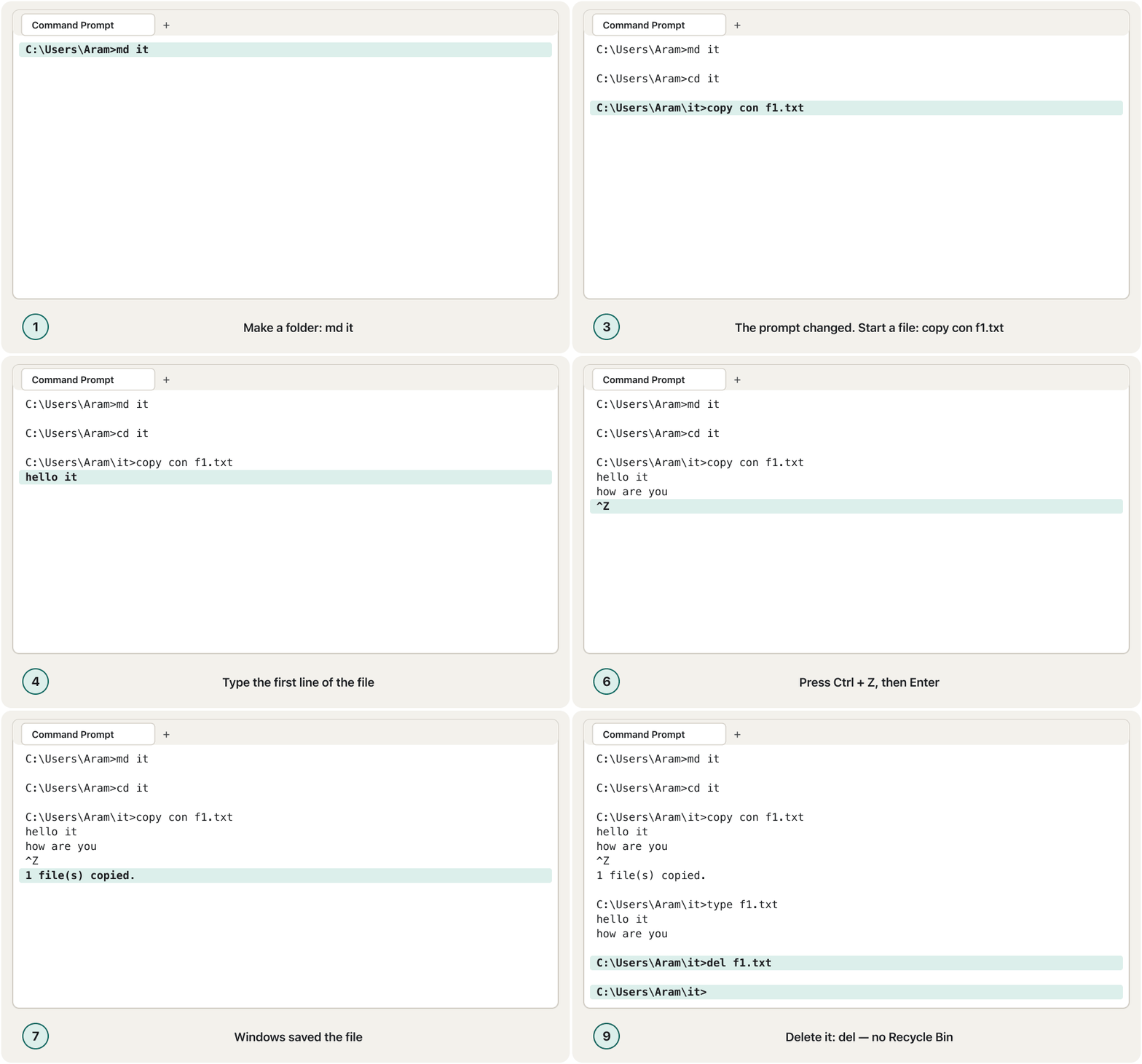
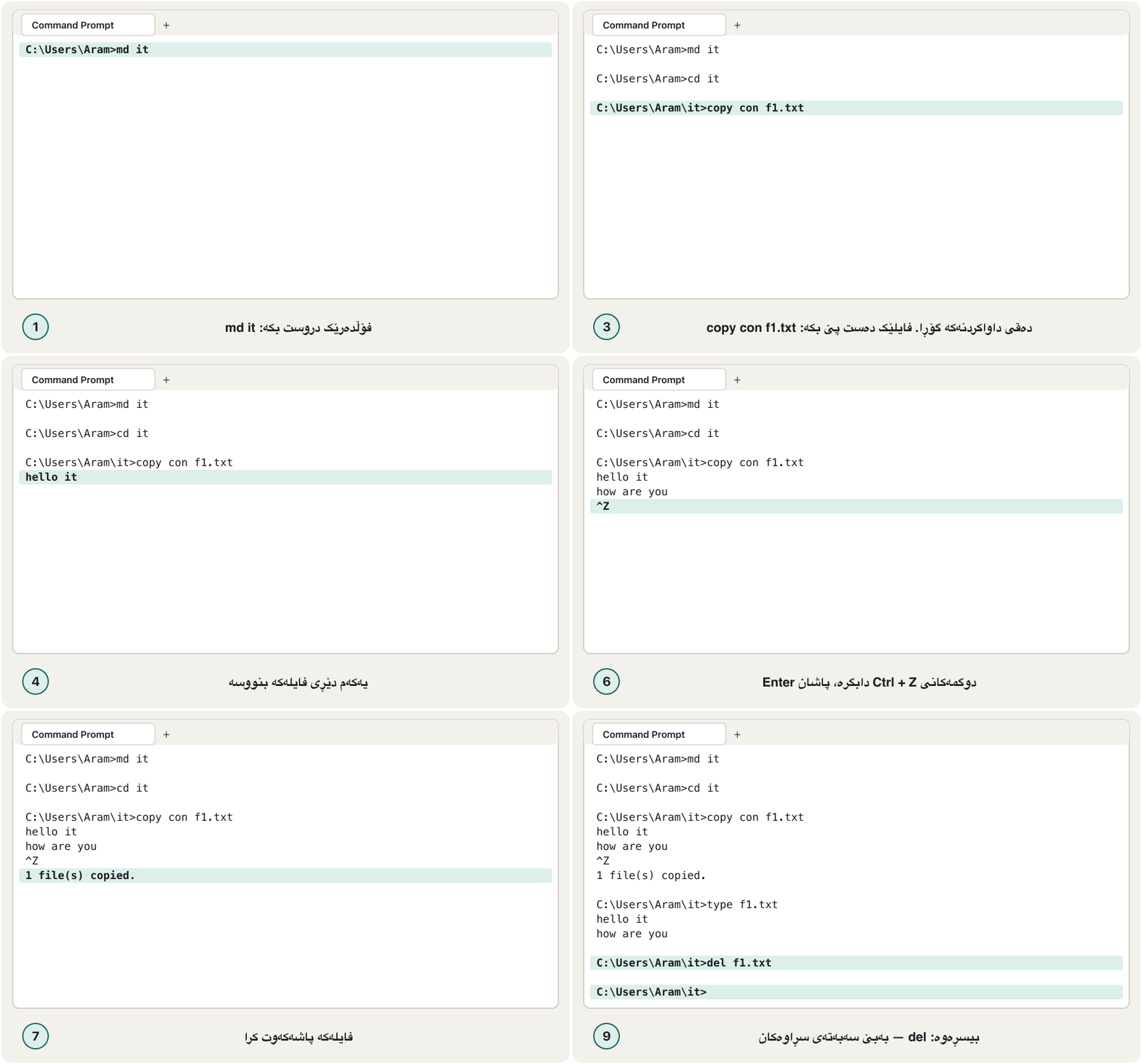
You can write a small text file without any editor. copy con f1.txt means «copy from the console (your keyboard) into f1.txt». Type the lines, then press Ctrl + Z — it appears as ^Z, the old end-of-file mark — and Enter. Windows answers «1 file(s) copied.» Then type shows what is inside.
دەتوانیت بچووک بەبێ هیچ دەستکاریکەرێک بنووسیت. copy con f1.txt واتە «لە console (واتە ) کۆپی بکە بۆ ناو f1.txt». دێڕەکان بنووسە، پاشان Ctrl + Z دابگرە — وەک ^Z دەردەکەوێت، نیشانەی کۆنی کۆتایی — و Enter. Windows وەڵام دەداتەوە «1 file(s) copied.» پاشان type ناوەڕۆکەکەی پیشان دەدات.
md it
cd it
copy con f1.txt
hello it
how are you
^Z
type f1.txt
del f1.txtC:\Users\Aram>md it
C:\Users\Aram>cd it
C:\Users\Aram\it>copy con f1.txt
hello it
how are you
^Z
1 file(s) copied.
C:\Users\Aram\it>type f1.txt
hello it
how are you
C:\Users\Aram\it>del f1.txt
C:\Users\Aram\it>Explain the codeڕوونکردنەوەی کۆدەکە
- Lineدێڕی 3
con is the console: what you type next goes into f1.txt.
con کۆنسۆڵەکەیە: ئەوەی دواتر دەینووسیت دەچێتە ناو f1.txt.
- Lineدێڕی 4-5
These two lines are the file's text, not commands.
ئەم دوو دێڕە دەقی ، نەک .
- Lineدێڕی 6
Press Ctrl + Z, then Enter. Ctrl + C instead would cancel and save nothing.
Ctrl + Z دابگرە، پاشان Enter. Ctrl + C لە جیاتی ئەوە هەڵدەوەشێنێتەوە و هیچ شتێک پاشەکەوت ناکات.
- Lineدێڕی 8
del removes the file again — for ever.
del دووبارە لادەبات — بە یەکجاری.
To edit the file comfortably, type notepad f1.txt: Notepad opens it.
بۆ دەستکاریکردنی بە ئاسانی، notepad f1.txt بنووسە: Notepad دەیکاتەوە.
Ask the computer: ver, vol, date, timeپرسیار لە کۆمپیوتەر: ver، vol، date، time
ver
vol
date /t
time /tC:\Users\Aram>ver Microsoft Windows [Version 10.0.26200.6901] C:\Users\Aram>vol Volume in drive C is Windows Volume Serial Number is 6A2B-91C4 C:\Users\Aram>date /t Sat 10/24/2026 C:\Users\Aram>time /t 02:05 PM
Explain the codeڕوونکردنەوەی کۆدەکە
- Lineدێڕی 1
ver: the Windows version. Windows 11 still says 10.0; a build number of 22000 or more means Windows 11.
ver: وەشانی Windows. Windows 11 هێشتا دەڵێت 10.0؛ ژمارەی buildـی 22000 یان زیاتر واتە Windows 11.
- Lineدێڕی 2
vol: the volume label (here «Windows») and serial number — or «has no label».
vol: ناوی (لێرەدا «Windows») و ژمارەی زنجیرەکەی — یان «has no label».
- Lineدێڕی 3-4
/t prints the date or time and stops. The format follows your region settings.
/t بەروار یان کات چاپ دەکات و دەوەستێت. شێوەکەی بە پێی ڕێکخستنی ناوچەکەتە.
Without /t, date and time show the value and ask for a new one — exactly what the course's screenshot shows. Press Enter to keep it. Changing the clock needs an administrator; a normal window answers «A required privilege is not held by the client.»
بەبێ /t، date و time بەهاکە پیشان دەدەن و داوای بەهایەکی نوێ دەکەن — ڕێک ئەوەی وێنەکەی کۆرسەکە پیشانی دەدات. بۆ هێشتنەوەی Enter دابگرە. گۆڕینی کاتژمێر پێویستی بە بەڕێوەبەرە؛ ئاسایی وەڵام دەداتەوە «A required privilege is not held by the client.»
date
timeC:\Users\Aram>date The current date is: Sat 10/24/2026 Enter the new date: (mm-dd-yy) C:\Users\Aram>time The current time is: 14:05:31.27 Enter the new time: C:\Users\Aram>
PowerShell, Mac and LinuxPowerShell، Mac و Linux
PowerShell understands most of these names too, because it has aliases: dir, cd, copy, del and type are short names for its own commands. Its output looks different:
PowerShell زۆربەی ئەم ناوانەش تێدەگات، چونکە ناوی خوازراوی (alias) هەیە: dir، cd، copy، del و type ناوی کورتن بۆ خۆی. ئەنجامەکەی جیاواز دەردەکەوێت:
Get-ChildItemPS C:\Users\Aram\Documents> Get-ChildItem
Directory: C:\Users\Aram\Documents
Mode LastWriteTime Length Name
---- ------------- ------ ----
d---- 10/20/2026 6:42 PM IT
-a--- 10/22/2026 11:03 AM 48213 cv-aram.docx
-a--- 10/23/2026 8:10 PM 0 empty.txt
-a--- 10/24/2026 9:15 AM 1204 notes.txtExplain the codeڕوونکردنەوەی کۆدەکە
- Lineدێڕی 1
The prompt starts with PS. The d in the Mode column marks a folder, like <DIR> in Command Prompt.
بە PS دەست پێ دەکات. d لە ستوونی Modeـدا نیشان دەدات، وەک <DIR> لە Command Promptـدا.
| Command Promptلە Command Promptـدا | PowerShellلە PowerShellـدا | macOS and Linuxلە macOS و Linuxـدا |
|---|---|---|
dir | Get-ChildItem (dir, ls) | ls |
cd folder | Set-Location (cd) | cd folder |
md folder | New-Item -ItemType Directory (md, mkdir) | mkdir folder |
rd folder | Remove-Item (rd, rmdir) | rmdir folder |
copy a b | Copy-Item (copy, cp) | cp a b |
move a b | Move-Item (move, mv) | mv a b |
ren a b | Rename-Item (ren) | mv a b |
del file | Remove-Item (del, rm) | rm file |
type file | Get-Content (type, cat) | cat file |
cls | Clear-Host (cls, clear) | clear |
dir /? | Get-Help Get-ChildItem | man ls |
How PowerShell differs from Command Prompt: objects instead of text, cmdlets, and aliases that let old commands like dir still work.
PowerShell چ جیاوازییەکی لەگەڵ Command Prompt هەیە: لە جیاتی دەق، cmdletـەکان و ئەو ناوە جێگرەوانەی وا دەکەن کۆنی وەک dir هێشتا کار بکەن.
Plays 0:35-7:18: what differs, PowerShell commands and aliases.
لە 0:35 تا 7:18 پەخش دەبێت: جیاوازییەکان، PowerShell و ناوە جێگرەوەکان (aliases).
Common mistakesهەڵە باوەکان
- Typing the prompt. Type only what comes after
>. If you copy a whole line from a lesson, delete theC:\Users\Aram>part. - Spaces in names without quotes.
dir My Projectslooks for two things, «My» and «Projects». Writedir "My Projects". (cd forgives a missing quote; most commands do not.) - Thinking del is safe. del, rd /s and the command line in general skip the Recycle Bin. Run dir with the same name or wildcard first.
- rd on a full folder. «The directory is not empty.» Delete the files first, or use rd /s — carefully.
- copy for a folder. Use xcopy /s /e /i or robocopy /e.
- Copying to a folder that does not exist. copy then makes a file with that name. Create the folder with md first.
- A typo in the command name. Command Prompt answers «'dri' is not recognized as an internal or external command, operable program or batch file.» Check the spelling and press ↑ to fix the line.
- نووسینی . تەنها ئەوە بنووسە کە دوای
>دێت. ئەگەر دێڕێکی تەواو لە وانەیەکەوە کۆپی دەکەیت، بەشیC:\Users\Aram>بسڕەوە. - بۆشایی لە ناوەکاندا بەبێ کۆتەیشن.
dir My Projectsبەدوای دوو شتدا دەگەڕێت، «My» و «Projects». بنووسەdir "My Projects". (cd لە کۆتەیشنی ونبوو دەبوورێت؛ زۆربەی نابوورن.) - وابزانیت del سەلامەتە. del، rd /s و بە گشتی بەسەر باز دەدەن. سەرەتا dir بە هەمان ناو یان کار پێ بکە.
- rd لەسەر پڕ. «The directory is not empty.» سەرەتا بسڕەوە، یان rd /s بەکار بهێنە — بە ئاگاییەوە.
- copy بۆ . xcopy /s /e /i یان robocopy /e بەکار بهێنە.
- بۆ کە بوونی نییە. ئەو کاتە copy بەو ناوە دروست دەکات. سەرەتا بە md دروست بکە.
- هەڵەی نووسین لە ناوی . Command Prompt وەڵام دەداتەوە «'dri' is not recognized as an internal or external command, operable program or batch file.» ڕێنووسەکە بپشکنە و ↑ دابگرە بۆ چاککردنی دێڕەکە.
Exercisesڕاهێنانەکان
Cover the right-hand column of the command table and say what each command does: help, dir, cd, cd.., md, rd, copy, move, ren, del, type, ver, vol, date, time.
ستوونی ڕاستی خشتەی دابپۆشە و بڵێ هەر چی دەکات: help، dir، cd، cd..، md، rd، copy، move، ren، del، type، ver، vol، date، time.
Show answerوەڵامەکە پیشان بدە
| Command | What it doesچی دەکات |
|---|---|
help | Shows the list of commands, or help for one commandلیستی پیشان دەدات، یان یارمەتی بۆ یەک |
dir | Lists the files and folders of a directory و ناو لیست دەکات |
cd | Changes the current directory ئێستا دەگۆڕێت |
cd.. | Goes to the parent directoryدەچێت بۆ دایک |
md | Makes a directory دروست دەکات |
rd | Removes an empty directory بەتاڵ لادەبات |
copy | Copies files کۆپی دەکات |
move | Moves files or folders یان دەگوازێتەوە |
ren | Renames a file or folderناوی یان دەگۆڕێت |
del | Deletes files (no Recycle Bin) دەسڕێتەوە (بەبێ ) |
type | Shows the contents of a text fileناوەڕۆکی پیشان دەدات |
ver | Shows the Windows versionوەشانی Windows پیشان دەدات |
vol | Shows the volume label and serial numberناو و ژمارەی زنجیرەی پیشان دەدات |
date | Shows (and can set) the dateبەروار پیشان دەدات (و دەتوانێت دیاری بکات) |
time | Shows (and can set) the timeکات پیشان دەدات (و دەتوانێت دیاری بکات) |
In your user folder: make a folder lab2, go into it, create names.txt with copy con containing three names, show it with type, go back up, and remove lab2. What happens if you type rd lab2 while names.txt is still inside?
لە بەکارهێنەرەکەتدا: بە ناوی lab2 دروست بکە، بچۆ ناوی، بە copy con names.txt دروست بکە کە سێ ناوی تێدابێت، بە type پیشانی بدە، بگەڕێوە سەرەوە و lab2 لاببە. ئەگەر rd lab2 بنووسیت لە کاتێکدا names.txt هێشتا لەناویدایە چی ڕوو دەدات؟
Show answerوەڵامەکە پیشان بدە
md lab2
cd lab2
copy con names.txt
Aram
Shilan
Karwan
^Z
type names.txt
cd ..
rd lab2
del lab2\names.txt
rd lab2C:\Users\Aram>md lab2
C:\Users\Aram>cd lab2
C:\Users\Aram\lab2>copy con names.txt
Aram
Shilan
Karwan
^Z
1 file(s) copied.
C:\Users\Aram\lab2>type names.txt
Aram
Shilan
Karwan
C:\Users\Aram\lab2>cd ..
C:\Users\Aram>rd lab2
The directory is not empty.
C:\Users\Aram>del lab2\names.txt
C:\Users\Aram>rd lab2
C:\Users\Aram>Explain the codeڕوونکردنەوەی کۆدەکە
- Lineدێڕی 10
The first rd fails: lab2 still holds names.txt.
یەکەم rd سەرناکەوێت: lab2 هێشتا names.txtـی تێدایە.
- Lineدێڕی 11-12
Delete the file, then rd works. (rd /s lab2 would do both after asking.)
بسڕەوە، پاشان rd کار دەکات. (rd /s lab2 هەردووکیان دەکات دوای پرسیار.)
What does Command Prompt print after each command? (a) md photos (b) dir *.exe in a folder with no .exe files (c) vol (d) date (without /t).
Command Prompt دوای هەر چی چاپ دەکات؟ (أ) md photos (ب) dir *.exe لە کە هیچ .exeـی تێدا نییە (ج) vol (د) date (بەبێ /t).
Show answerوەڵامەکە پیشان بدە
- (a) Nothing — the prompt simply comes back.
- (b) The volume lines, «Directory of …» and then «File Not Found».
- (c) «Volume in drive C is …» (or «has no label») and «Volume Serial Number is …».
- (d) «The current date is: …» and «Enter the new date:» — press Enter to keep it.
- (أ) هیچ — تەنها دەگەڕێتەوە.
- (ب) دێڕەکانی ، «Directory of …» و پاشان «File Not Found».
- (ج) «Volume in drive C is …» (یان «has no label») و «Volume Serial Number is …».
- (د) «The current date is: …» و «Enter the new date:» — بۆ هێشتنەوەی Enter دابگرە.
Write one command for each: (a) list every Word document (.docx) whose name starts with cv; (b) copy every .png file to D:\Pictures; (c) list files named report1 to report9 with any extension.
بۆ هەریەکەیان یەک بنووسە: (أ) هەموو Word (.docx) لیست بکە کە ناوەکەی بە cv دەست پێ دەکات؛ (ب) هەموو .png کۆپی بکە بۆ D:\Pictures؛ (ج) ئەو لیست بکە کە ناویان report1 تا report9ـە بە هەر .
Show answerوەڵامەکە پیشان بدە
dir cv*.docx
copy *.png D:\Pictures
dir report?.*Summaryپوختە
- A shell (Command Prompt or PowerShell) runs typed commands; Windows Terminal is the window that hosts it. MS-DOS was a command-driven interface.
- The prompt
C:\Users\Aram>shows the drive and the current folder. Type after it, press Enter; case does not matter. - help, help dir and dir /? explain commands. dir lists one folder: <DIR> = folder, sizes in bytes, 0 = empty file.
- d: switches drives; dir with a path lists another folder; * and ? are wildcards (
dir *.exe, not*.*.exe). - md, cd, cd ..,
cd \and rd (empty folders only) print nothing when they work. - copy copies files (xcopy or robocopy for folders); move moves files and folders; ren renames; del deletes for ever.
- copy con file, Ctrl + Z, Enter writes a text file; type reads it. ver = Windows version; vol = label and serial (not size); date /t and time /t just show.
- (Command Prompt یان PowerShell) نووسراوەکان جێبەجێ دەکات؛ Windows Terminal بریتییە لەو کە هەڵیدەگرێت. MS-DOS بوو کە بە کاری دەکرد.
-
C:\Users\Aram>درایڤ و ئێستا پیشان دەدات. دوای ئەو بنووسە، Enter دابگرە؛ پیتی گەورە و بچووک گرنگ نییە. - help، help dir و dir /? ڕوون دەکەنەوە. dir یەک لیست دەکات: <DIR> = ، قەبارە بە ، 0 = بەتاڵ.
- d: درایڤ دەگۆڕێت؛ dir لەگەڵ تر لیست دەکات؛ * و ? (
dir *.exe، نەک*.*.exe). - md، cd، cd ..،
cd \و rd (تەنها بەتاڵ) کاتێک کار دەکەن هیچ چاپ ناکەن. - copy کۆپی دەکات (xcopy یان robocopy بۆ )؛ move و دەگوازێتەوە؛ ren ناو دەگۆڕێت؛ del بە یەکجاری دەسڕێتەوە.
- copy con file، Ctrl + Z، Enter دەنووسێت؛ type دەیخوێنێتەوە. ver = وەشانی Windows؛ vol = ناو و ژمارەی زنجیرە (نەک قەبارە)؛ date /t و time /t تەنها پیشان دەدەن.
Lesson complete!وانەکە تەواو بوو!
Well done. Review the key terms, then go on to the next lesson.دەستخۆش. سەیرێکی زاراوە سەرەکییەکان بکەرەوە، پاشان بڕۆ بۆ وانەی داهاتوو.
Key termsزاراوە سەرەکییەکان
Word Processing Essentialsبنەماکانی بەرنامەی نووسینی دەق
Related lecturesوانە پەیوەندیدارەکان
- Keyboard Shortcuts for Windows and Macکورتەڕێکانی کیبۆرد بۆ Windows و Mac
- Operating Systems and the Desktopسیستەمەکانی وەگەڕخەر و ڕوومێز
- IP Addresses and MAC Addressesناونیشانەکانی IP و ناونیشانەکانی MAC
- Welcome to Python: Install and Runبەخێربێیت بۆ Python: جێگیرکردن و جێبەجێکردن
- Installing and Setting Up Windowsجێگیرکردن و ڕێکخستنی Windows
References and further readingسەرچاوەکان و خوێندنەوەی زیاتر
- Microsoft Learn: Windows Commands (cmd and PowerShell; command reference)
- Microsoft Learn: An overview on Windows Terminal
- Microsoft Support: Command Prompt and Windows PowerShell (Windows Terminal is the default host)
- Microsoft Learn: dir
- Microsoft Learn: copy (xcopy for subdirectories; a missing destination folder becomes a file)
- Microsoft Learn: xcopy
- Microsoft Learn: robocopy
- Microsoft Learn: move
- Microsoft Learn: ren
- Microsoft Learn: del
- Microsoft Learn: rmdir
- Microsoft Learn: type
- Microsoft Learn: ver
- Microsoft Learn: vol
- Microsoft Learn: date
- Microsoft Learn: time
- Microsoft Learn: Get-ChildItem (PowerShell; aliases dir, gci, ls)
This lecture is a first edition. The Kurdish text and terminology are waiting for review by Kurdish IT teachers.ئەم وانەیە چاپی یەکەمە. دەقە کوردییەکە و زاراوەکانی چاوەڕێی پێداچوونەوەی مامۆستایانی کوردی بواری IT ن.