Chapterبەش 2 · Lectureوانە 2.3
GitHub and Teamwork: Remotes, Pull Requests and IssuesGitHub و کاری تیمی: کۆگاکانی کۆدی دوور، داواکارییەکانی بەیەککردن و ئیشووەکان
How a team shares one Git repository: remotes and origin, clone, push, fetch and pull (practised with a local bare repository that stands in for GitHub), the rejected push and how to pull, merge and push again, putting a project on GitHub safely (tokens, SSH, age 13+), README in Markdown and licences, issues and good bug reports, pull requests and closing keywords, code review, GitHub flow, forks and upstream, protected branches with required checks, GitHub Pages and the gh tool, and what to do when a secret leaks.
تیمێک چۆن یەک Git بە هاوبەشی بەکار دەهێنێت: و origin، ، ، fetch و (بە ڕووتی ناوخۆیی کە لە جێی GitHub دادەنرێت ڕاهێنانیان لەسەر دەکرێت)، ڕەتکراوە و چۆن ، و دووپاتە بکەیت، خستنە سەر GitHub بە پارێزراوی (، ، تەمەنی 13+)، README بە و ، و ڕاپۆرتی باشی ، و وشەکانی داخستن، ، GitHub flow، و upstream، پارێزراو بە پشکنینی پێویست، GitHub Pages و ئامرازی gh و چی بکەیت کاتێک نهێنییەک دزە دەکات.
What you will learnچی فێر دەبیت
- Connect a repository to a remote, clone it, and move commits with push, fetch and pull.
- Explain a rejected push and fix it by pulling, merging and pushing again.
- Write a good issue and a pull request that closes it, and give a useful code review.
- Follow GitHub flow, use forks and upstream, and explain protected branches.
- Keep a repository safe: tokens instead of passwords, licences, and what to do when a secret leaks.
- بە ببەستیتەوە، بکەیت و بە ، fetch و بگوازیتەوە.
- ڕەتکراوە ڕوون بکەیتەوە و بە ، و دووپاتە چاکی بکەیت.
- باش و کە دایدەخات بنووسیت و بەسوود بکەیت.
- پەیڕەوی GitHub flow بکەیت، و upstream بەکار بهێنیت و پارێزراو ڕوون بکەیتەوە.
- بپارێزیت: لەبری ، و چی بکەیت کاتێک نهێنییەک دزە دەکات.
One laptop is not enoughیەک لاپتۆپ بەس نییە
At the end of Branches and merging, the whole history of Bazaar Cart lives in one folder on Karwan's laptop — one computer played the whole team there. Shilan, Aram and Dilan cannot see those commits from their own laptops, and if the laptop is stolen or breaks, weeks of work are gone. The team needs one shared copy that everyone can reach, day and night: a remote repository.
لە کۆتایی لقەکان و بەیەککردن، هەموو مێژووی Bazaar Cart لە یەک لەسەر لاپتۆپەکەی کاروانە — لەوێ یەک کۆمپیوتەر ڕۆڵی هەموو تیمەکەی دەبینی. شیلان، ئارام و دیلان لە لاپتۆپی خۆیانەوە ئەو نابینن و ئەگەر لاپتۆپەکە بدزرێت یان تێک بچێت، کاری چەند هەفتەیەک ون دەبێت. تیمەکە پێویستی بە یەک کۆپیی هاوبەشە کە هەمووان شەو و ڕۆژ پێی بگەن: .
Websites that keep remote repositories for teams are called code hosting services. GitHub, GitLab, Bitbucket and Codeberg are well known, and all of them use Git, so the commands of this lesson work with each one. GitHub is the biggest: Microsoft has owned it since 2018, and its Octoverse report counted more than 180 million developers and about 630 million repositories in 2025. Keep the two names apart: Git is the tool on your computer (Git basics); GitHub is a website that keeps Git repositories and adds teamwork tools around them.
ئەو بۆ تیمەکان هەڵدەگرن پێیان دەوترێت خزمەتگوزاریی هەڵگرتنی کۆد. GitHub، GitLab، Bitbucket و Codeberg ناسراون و هەموویان Git بەکار دەهێنن، بۆیە ئەم وانەیە لەگەڵ هەر یەکێکیان کار دەکەن. GitHub گەورەترینیانە: لە 2018ـەوە هی Microsoftـە و ڕاپۆرتی Octoverseـی ساڵی 2025 زیاتر لە 180 ملیۆن و نزیکەی 630 ملیۆن ژماردووە. ئەم دوو ناوە تێکەڵ مەکە: Git ئامرازەکەیە لەسەر کۆمپیوتەرەکەت (بنەماکانی Git)؛ GitHub کە Git هەڵدەگرێت و ئامرازی کاری تیمیان بۆ زیاد دەکات.
Remotes: a copy on another computerکۆگای کۆدی دوور: کۆپییەک لەسەر کۆمپیوتەرێکی تر
A remote is another copy of your repository that your Git knows by a short name; the usual name is origin. In this lesson GitHub is played by a folder on your own computer, so you can try every command with no account and no internet. git init --bare makes a bare repository: only the history, with no working files to edit — exactly what a server keeps. Karwan makes one, connects his project to it and sends his commits up — and the tag v0.2.0 from Branches and merging too:
کۆپییەکی ترە لە کە Gitـەکەت بە ناوێکی کورت دەیناسێت؛ ناوە باوەکەی originـە. لەم وانەیەدا لەسەر کۆمپیوتەرەکەی خۆت ڕۆڵی GitHub دەبینێت، بۆیە دەتوانیت هەموو بێ و بێ تاقی بکەیتەوە. git init --bare ڕووت دروست دەکات: تەنیا مێژووەکە، بێ کار بۆ دەستکاریکردن — ڕێک ئەوەی هەڵی دەگرێت. کاروان یەکێک دروست دەکات، پڕۆژەکەی پێیەوە دەبەستێت و خۆی دەنێرێتە سەرەوە — هەروەها v0.2.0 لە لقەکان و بەیەککردن:
$ cd ~/se
$ git init --bare -b main server/bazaar-cart.git
Initialized empty Git repository in ~/se/server/bazaar-cart.git/
$ cd ~/se/karwan/bazaar-cart
$ git remote add origin ~/se/server/bazaar-cart.git
$ git remote -v
origin	~/se/server/bazaar-cart.git (fetch)
origin	~/se/server/bazaar-cart.git (push)
$ git push -u origin main
To ~/se/server/bazaar-cart.git
 * [new branch]      main -> main
branch 'main' set up to track 'origin/main'.
$ git push origin v0.2.0
To ~/se/server/bazaar-cart.git
 * [new tag]         v0.2.0 -> v0.2.0
Explain the codeڕوونکردنەوەی کۆدەکە
- Lineدێڕی 2
-b mainnames the first branchmain, like your project. Without it a new bare repository may point atmaster(see Common mistakes).-b mainناوی یەکەم دەنێتmain، وەک پڕۆژەکەت. بەبێ ئەوە ڕووتی نوێ لەوانەیە ئاماژە بەmasterبکات (بڕوانە هەڵە باوەکان).- Lineدێڕی 5
git remote add <name> <address>saves the address under a short name. On GitHub the address starts withhttps://github.com/.git remote add <ناو> <ناونیشان>ناونیشانەکە بە ناوێکی کورت هەڵدەگرێت. لە GitHub ناونیشانەکە بەhttps://github.com/دەست پێدەکات.- Lineدێڕی 9
-u(upstream) makesmainrememberorigin/main. From now on a plaingit pushorgit pullknows where to go.-u(upstream)mainبەorigin/mainـەوە دەبەستێتەوە و ئەمە لەبیر دەکات. لەمەودواgit pushیانgit pullـی ئاسایی دەزانێت بۆ کوێ بچێت.- Lineدێڕی 13
A normal push does not send tags (Pro Git); push each tag by name, or all of them with
git push origin --tags.ئاسایی نانێرێت (Pro Git)؛ هەر تاگێک بە ناوەکەی بکە، یان هەموویان بە
git push origin --tags.
Remotes: a copy on another computerکۆگای کۆدی دوور: کۆپییەک لەسەر کۆمپیوتەرێکی تر
git clone: get the whole projectgit clone: هەموو پڕۆژەکە وەربگرە
Shilan starts on her own laptop. git clone copies the remote repository — every file, every commit, every branch — and remembers where it came from as origin. Because all three people share one computer in our stand-in, each clone gets its own author name with git config without --global, which changes only this repository:
شیلان لەسەر لاپتۆپەکەی خۆی دەست پێدەکات. git clone کۆپی دەکات — هەموو ، هەموو ، هەموو — و لەبیری دەمێنێت لە کوێوە هاتووە، بە ناوی origin. لەبەر ئەوەی لە جێگرەوەکەماندا هەر سێ کەسەکە یەک کۆمپیوتەر بەکار دەهێنن، هەر ناوی نووسەری تایبەتی خۆی وەردەگرێت بە git config بەبێ --global، کە تەنیا ئەم دەگۆڕێت:
$ cd ~/se/shilan
$ git clone ~/se/server/bazaar-cart.git
Cloning into 'bazaar-cart'...
done.
$ cd bazaar-cart
$ git config user.name "Shilan"
$ git config user.email "shilan@example.com"
$ git log --oneline -4
bf0326b (HEAD -> main, tag: v0.2.0, origin/main, origin/HEAD) Merge branch 'feature/free-delivery'
312fb22 Make delivery free from 50,000 IQD of goods
709b275 Raise the delivery fee to 3,000 IQD
58bc993 Merge branch 'feature/delivery-fee'
$ git branch -a
* main
  remotes/origin/HEAD -> origin/main
  remotes/origin/main
remotes/origin/main is a remote-tracking branch: Git's note of where main was on the remote the last time you talked to it. It moves only when you fetch, pull or push.
remotes/origin/main : تێبینیی Gitـە کە دواجار کە قسەت لەگەڵ کرد main لە کوێ بوو. تەنیا کاتێک دەجووڵێت کە fetch، یان دەکەیت.
origin. کۆپییەکی تەواوە: ، مێژوو و ناونیشانی origin.CêITgit push: send your commits upgit push: کۆمیتەکانت بنێرە سەرەوە
Shilan writes a README.md and commits it. git status now compares her branch with her note of the remote and says she is ahead by 1 commit. git push sends that commit to origin; the line bf0326b..62f2cfe shows the remote main moving from the old commit to the new one.
شیلان README.mdێک دەنووسێت و دەکات. ئێستا git status بەراورد دەکات لەگەڵ تێبینییەکەی لەبارەی و دەڵێت 1 لە پێشە. git push ئەو دەنێرێت بۆ origin؛ دێڕی bf0326b..62f2cfe پیشان دەدات mainـی لە کۆنەکەوە بۆ نوێیەکە دەجووڵێت.
$ git add README.md
$ git commit -m "Add a README"
[main 62f2cfe] Add a README
 1 file changed, 16 insertions(+)
 create mode 100644 README.md
$ git status
On branch main
Your branch is ahead of 'origin/main' by 1 commit.
  (use "git push" to publish your local commits)

nothing to commit, working tree clean
$ git push
To ~/se/server/bazaar-cart.git
bf0326b..62f2cfe main -> maingit push: send your commits upgit push: کۆمیتەکانت بنێرە سەرەوە
git fetch and git pull: bring others’ work downgit fetch و git pull: کاری ئەوانی تر بهێنە خوارەوە
On his laptop Karwan knows nothing yet. git fetch only downloads: it moves his note origin/main forward and leaves his files alone, so he can look first. git pull does a fetch and then merges origin/main into his branch. Here nobody else changed main, so the merge is a simple fast-forward:
کاروان لەسەر لاپتۆپەکەی هێشتا هیچ نازانێت. git fetch تەنیا دادەبەزێنێت: تێبینییەکەی origin/main بەرەو پێش دەبات و بەجێ دەهێڵێت، بۆ ئەوەی سەرەتا سەیر بکات. git pull fetch دەکات و پاشان origin/main لەگەڵ بەیەک دەکات. لێرەدا کەسی تر mainـی نەگۆڕیوە، بۆیە سادەیە: بەیەککردنی بەپێشخستن
$ git fetch
From ~/se/server/bazaar-cart
   bf0326b..62f2cfe  main       -> origin/main
$ git status
On branch main
Your branch is behind 'origin/main' by 1 commit, and can be fast-forwarded.
  (use "git pull" to update your local branch)

nothing to commit, working tree clean
$ git log --oneline main..origin/main
62f2cfe (origin/main, origin/HEAD) Add a README
$ git pull
Updating bf0326b..62f2cfe
Fast-forward
 README.md | 16 ++++++++++++++++
 1 file changed, 16 insertions(+)
 create mode 100644 README.md
Explain the codeڕوونکردنەوەی کۆدەکە
- Lineدێڕی 6
“behind by 1 commit” is the opposite of Shilan's “ahead”.
«behind by 1 commit» پێچەوانەی «ahead»ـەکەی شیلانە.
- Lineدێڕی 10
main..origin/mainlists the commits thatorigin/mainhas andmainhas not.main..origin/mainئەو لیست دەکات کە لەorigin/mainـدا هەن و لەmainـدا نین.
origin/main; pull moves your main too.fetch تەنیا origin/main دەجووڵێنێت؛ mainـەکەی تۆش دەجووڵێنێت.CêITPush rejected: someone was fasterپوش ڕەتکرایەوە: کەسێک خێراتر بوو
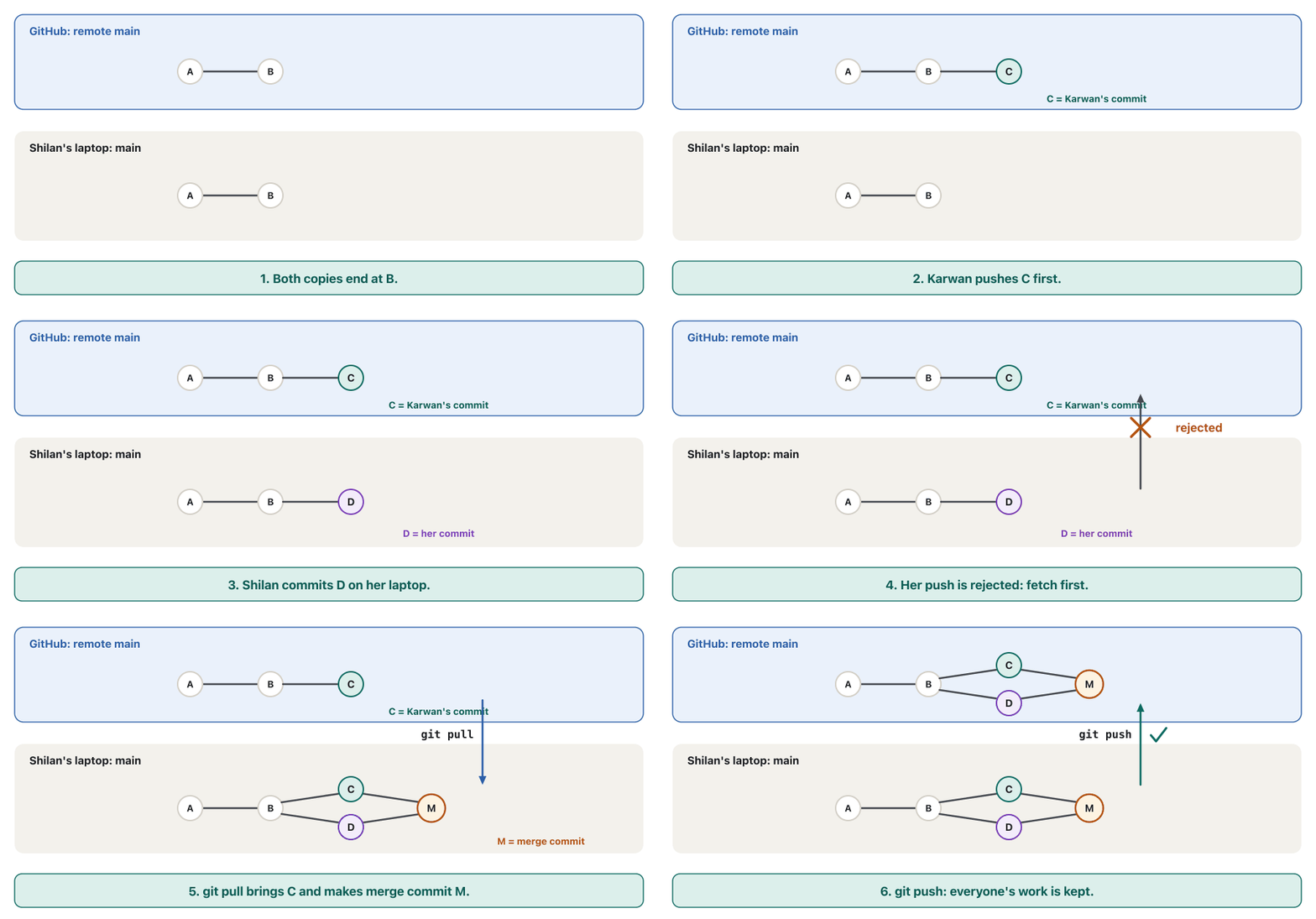
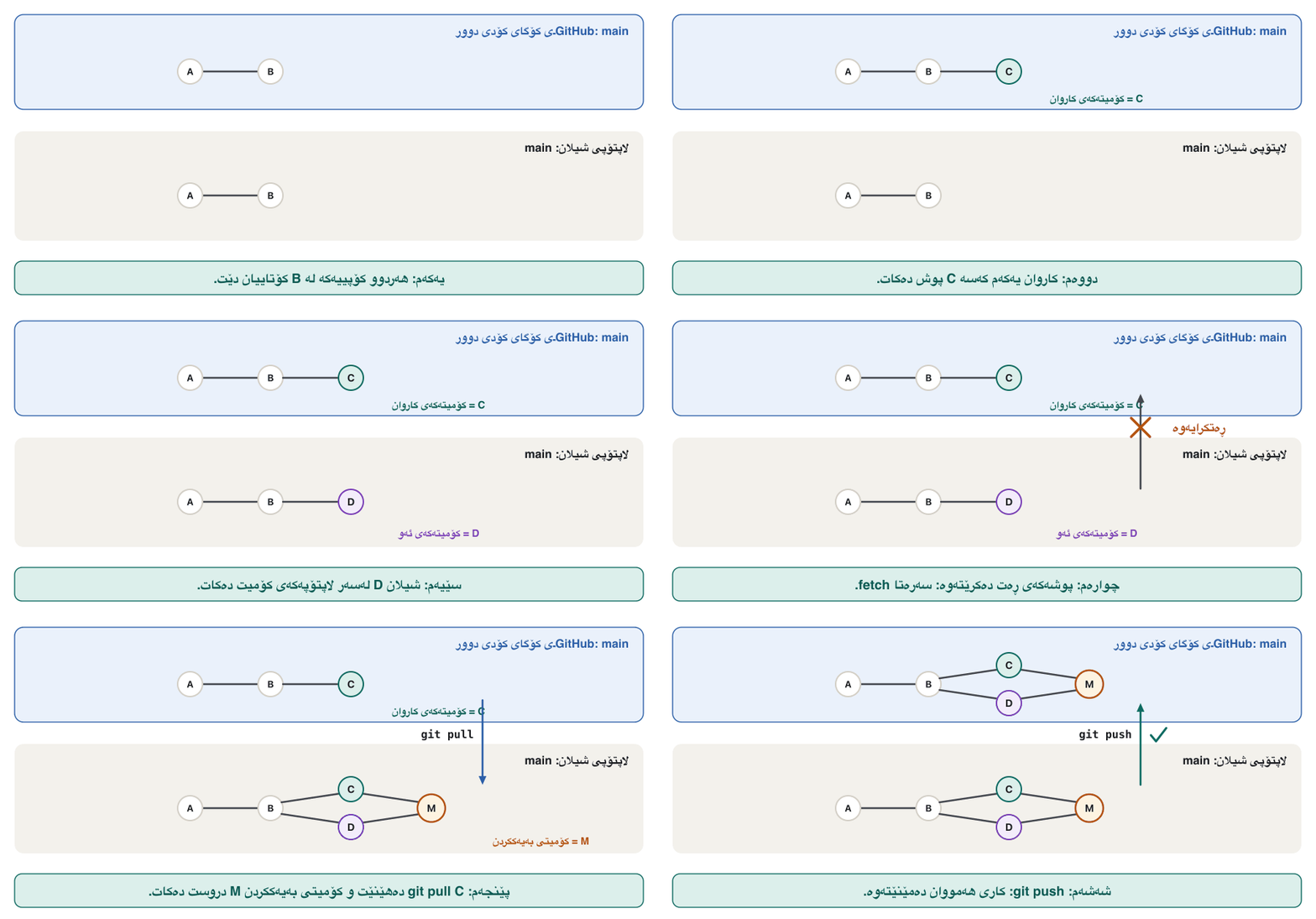
Next morning both work at the same time. Karwan makes cart.py read the order from the command line and pushes first. Shilan, who has not pulled, adds the price rules to the README and pushes a minute later. Git refuses:
بەیانیی دواتر هەردووکیان لە هەمان کاتدا کار دەکەن. کاروان وا لە cart.py دەکات داواکارییەکە لە بخوێنێتەوە و یەکەم کەس دەکات. شیلان، کە نەکردووە، یاساکانی نرخ بۆ README زیاد دەکات و خولەکێک دواتر دەکات. Git ڕەتی دەکاتەوە:
$ git commit -am "Explain the price and delivery rules in the README"
[main c12885a] Explain the price and delivery rules in the README
 1 file changed, 5 insertions(+)
$ git push
To ~/se/server/bazaar-cart.git
 ! [rejected]        main -> main (fetch first)
error: failed to push some refs to '~/se/server/bazaar-cart.git'
hint: Updates were rejected because the remote contains work that you do not
hint: have locally. This is usually caused by another repository pushing to
hint: the same ref. If you want to integrate the remote changes, use
hint: 'git pull' before pushing again.
hint: See the 'Note about fast-forwards' in 'git push --help' for details.
Nothing is broken. The remote main now has Karwan's commit, which Shilan does not have. If Git accepted her push, main would jump to her commit and Karwan's work would fall out of the history. So Git asks her to fetch first, join both lines of work, and push again.
هیچ شتێک تێک نەچووە. ئێستا mainـی کاروانی تێدایە کە شیلان نییەتی. ئەگەر Git ئەوی وەربگرتایە، main بازی دەدا بۆ سەر ئەو و کارەکەی کاروان لە مێژووەکە دەکەوتە دەرەوە. بۆیە Git داوای لێدەکات سەرەتا fetch بکات، هەردوو هێڵی کارەکە بەیەک بکات و پاشان دووپاتە بکات.
Push rejected: someone was fasterپوش ڕەتکرایەوە: کەسێک خێراتر بوو
Pull, merge, push againپوڵ، بەیەککردن، دووپاتە پوش
Shilan runs git pull. The first time, Git 2.50 stops and asks how two lines of work should be joined. This course uses merge, the method from Branches and merging, so she sets it once for all her projects and pulls again:
شیلان git pull جێبەجێ دەکات. یەکەم جار Git 2.50 ڕادەوەستێت و دەپرسێت دوو هێڵی کار چۆن بەیەک بکرێن. ئەم خولە بەکار دەهێنێت، ڕێگەکەی لقەکان و بەیەککردن، بۆیە یەک جار بۆ هەموو پڕۆژەکانی دیاری دەکات و دووپاتە دەکات:
$ git pull
From ~/se/server/bazaar-cart
   62f2cfe..0ac5dfa  main       -> origin/main
hint: You have divergent branches and need to specify how to reconcile them.
hint: You can do so by running one of the following commands sometime before
hint: your next pull:
hint:
hint:   git config pull.rebase false  # merge
hint:   git config pull.rebase true   # rebase
hint:   git config pull.ff only       # fast-forward only
hint:
hint: You can replace "git config" with "git config --global" to set a default
hint: preference for all repositories. You can also pass --rebase, --no-rebase,
hint: or --ff-only on the command line to override the configured default per
hint: invocation.
fatal: Need to specify how to reconcile divergent branches.
$ git config --global pull.rebase false
$ git pull
Merge made by the 'ort' strategy.
 cart.py | 10 ++++++++--
 1 file changed, 8 insertions(+), 2 deletions(-)
$ git log --oneline --graph -4
*   f840e04 (HEAD -> main) Merge branch 'main' of ~/se/server/bazaar-cart
|\
| * 0ac5dfa (origin/main, origin/HEAD) Read the order from the command line
* | c12885a Explain the price and delivery rules in the README
|/
* 62f2cfe Add a README
$ git push
To ~/se/server/bazaar-cart.git
   0ac5dfa..f840e04  main -> main
Explain the codeڕوونکردنەوەی کۆدەکە
- Lineدێڕی 17
Set once:
false= join with a merge commit. (truewould rebase — see the extra note in the branches lesson.)یەک جار دیاری دەکرێت:
false= بەیەککردن بە . (truerebase دەکات — بڕوانە تێبینیی زیادەی وانەی .)- Lineدێڕی 18-21
Different files changed, so Git joins them by itself with the 'ort' strategy and makes a merge commit.
جیاواز گۆڕاون، بۆیە Git خۆی بە ستراتیژی 'ort' بەیەکیان دەکات و دروست دەکات.
The same on GitHubهەمان شت لەسەر GitHub
Everything above works the same with GitHub; only the address changes. A GitHub account is optional in this course: GitHub's Terms of Service (in force since 27 April 2026) say you must be 13 or older, and one person may keep only one free personal account. When the team is ready, Aram, the team lead, presses New repository, types the name, chooses Private, leaves Add a README unticked — Karwan's project already has a history — and invites the team as collaborators. In a real project there is no practice folder: Karwan connects his repository to GitHub and pushes with the commands below. They are a labelled example, not run here:
هەموو ئەوەی سەرەوە بە هەمان شێوە لەگەڵ GitHub کار دەکات؛ تەنیا ناونیشانەکە دەگۆڕێت. GitHub لەم خولەدا ئارەزوومەندانەیە: مەرجەکانی خزمەتگوزاریی GitHub (کە لە 27ی نیسانی 2026ـەوە کاریان پێدەکرێت) دەڵێن دەبێت تەمەنت 13 ساڵ یان زیاتر بێت و هەر کەسێک تەنیا یەک هەژماری کەسیی بێبەرانبەری هەبێت. کاتێک تیمەکە ئامادە بوو، ئارام، سەرۆکی تیمەکە، New repository دادەگرێت، ناوەکە دەنووسێت، Private هەڵدەبژێرێت، Add a README بەتاڵ دەهێڵێتەوە — پڕۆژەکەی کاروان پێشتر مێژووی هەیە — و تیمەکە وەک هاوکار بانگهێشت دەکات. لە پڕۆژەیەکی ڕاستەقینەدا ڕاهێنان نییە: کاروان بە GitHubـەوە دەبەستێت و بەم خوارەوە دەکات. نموونەیەکی ناونووسکراون، لێرە جێبەجێ نەکراون:
git remote add origin https://github.com/aram-example/bazaar-cart.git
git push -u origin main
Git then asks you to sign in. GitHub stopped accepting account passwords for Git on 13 August 2021. Use a personal access token (a long secret you create in your GitHub settings and paste when Git asks for a password), an SSH key, or a helper that signs you in through the browser: Git Credential Manager, GitHub Desktop or the gh tool. A token is as powerful as a password: never put it in code, a chat or a screenshot, and turn on two-factor authentication.
پاشان Git داوات لێدەکات بچیتە ژوورەوە. GitHub لە 13ی ئابی 2021ـەوە چیتر بۆ Git وەرناگرێت. کەسی بەکار بهێنە (نهێنییەکی درێژ کە لە ڕێکخستنەکانی GitHub دروستی دەکەیت و کاتێک Git داوای دەکات دایدەنێیت)، کلیلی ، یان یاریدەدەرێک کە لە ڕێی دەتباتە ژوورەوە: Git Credential Manager، GitHub Desktop یان ئامرازی gh. بە قەد بەهێزە: هەرگیز مەیخەرە ناو کۆد، چات یان و پشتڕاستکردنەوەی دوو قۆناغی هەڵبکە.
README, LICENSE and .gitignoreREADME، LICENSE و .gitignore
GitHub shows a repository's README.md on its front page, so it is the first thing a visitor reads. GitHub suggests it answers five questions: what the project does, why it is useful, how to start, where to get help, and who works on it. It is written in Markdown: plain text with a few symbols — # for a heading, - for a list item, **bold**, and three back-ticks around a block of code.
GitHub README.mdـی هەر لە پەڕەی سەرەکییەکەیدا پیشان دەدات، بۆیە یەکەم شتە کە سەردانکەرێک دەیخوێنێتەوە. GitHub پێشنیار دەکات وەڵامی پێنج پرسیار بداتەوە: پڕۆژەکە چی دەکات، بۆچی بەسوودە، چۆن دەست پێبکەیت، لە کوێ یارمەتی وەربگریت و کێ کاری لەسەر دەکات. بە دەنووسرێت: دەقی سادە لەگەڵ چەند هێمایەک — # بۆ ، - بۆ خاڵێکی لیست، **bold** و سێ back-tick بە دەوری بلۆکێکی کۆددا.
# Bazaar Cart

Bazaar Cart totals the orders of Soran's dried-fruit and spice shop
in the Sulaimani bazaar. Prices are in IQD per kg (made-up prices).

## Run it

```
python3.13 cart.py
```

## Rules

- Each line is rounded **up** to the next 250 IQD.
- Delivery inside Sulaimani costs 3,000 IQD, and is **free** from 50,000 IQD of goods.

## Team

- Aram: team lead
- Shilan and Karwan: developers
- Dilan: tester and designerTwo more files usually sit next to it. A LICENSE file says what others may do with the code; without one, the code is not free to reuse, even in a public repository — choosing a licence is explained in Software licences. A .gitignore keeps caches and secrets out of Git, as in Git basics; GitHub offers ready templates, such as one for Python.
دوو تر زۆرجار لە تەنیشتیەوەن. LICENSE دەڵێت ئەوانی تر چی دەتوانن بە کۆدەکە بکەن؛ بەبێ ئەوە کۆدەکە بۆ دووپاتە بەکارهێنان ئازاد نییە، تەنانەت لە گشتیدا — هەڵبژاردنی لە مۆڵەتەکانی بەکارهێنان ڕوون کراوەتەوە. .gitignore کاش و نهێنییەکان لە Git دوور دەخاتەوە، وەک لە بنەماکانی Git؛ GitHub قاڵبی ئامادە پێشکەش دەکات، وەک یەکێک بۆ Python.
Issues: one place for every bug and ideaئیشووەکان: یەک شوێن بۆ هەموو باگێک و بیرۆکەیەک
Dilan, the team's tester, clones the newest main and tries an order the way Soran types it — with a capital letter:
دیلان، تیمەکە، نوێترین main دەکات و داواکارییەک تاقی دەکاتەوە بەو شێوەیەی سۆران دەینووسێت — بە پیتێکی گەورە:
$ python3.13 cart.py walnuts 500 "black tea" 250
walnuts      500 g    9,000 IQD
black tea    250 g    3,500 IQD
Goods total          12,500 IQD
Delivery              3,000 IQD
To pay               15,500 IQD
$ python3.13 cart.py walnuts 500 Sumac 350
walnuts      500 g    9,000 IQD
Traceback (most recent call last):
  File "~/se/dilan/bazaar-cart/cart.py", line 14, in <module>
    price = line_price(PRICES[product], grams)
                       ~~~~~~^^^^^^^^^
KeyError: 'Sumac'
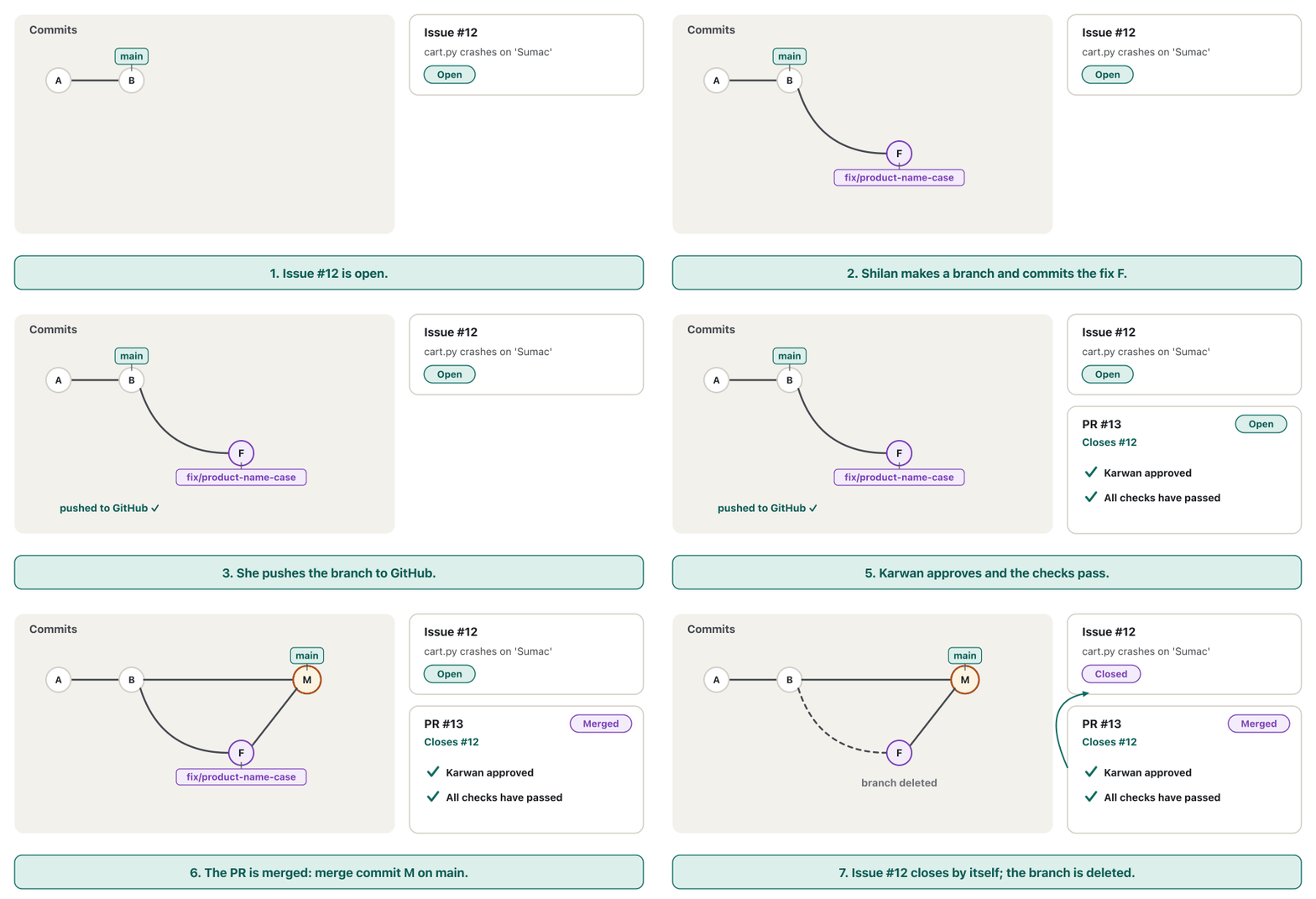
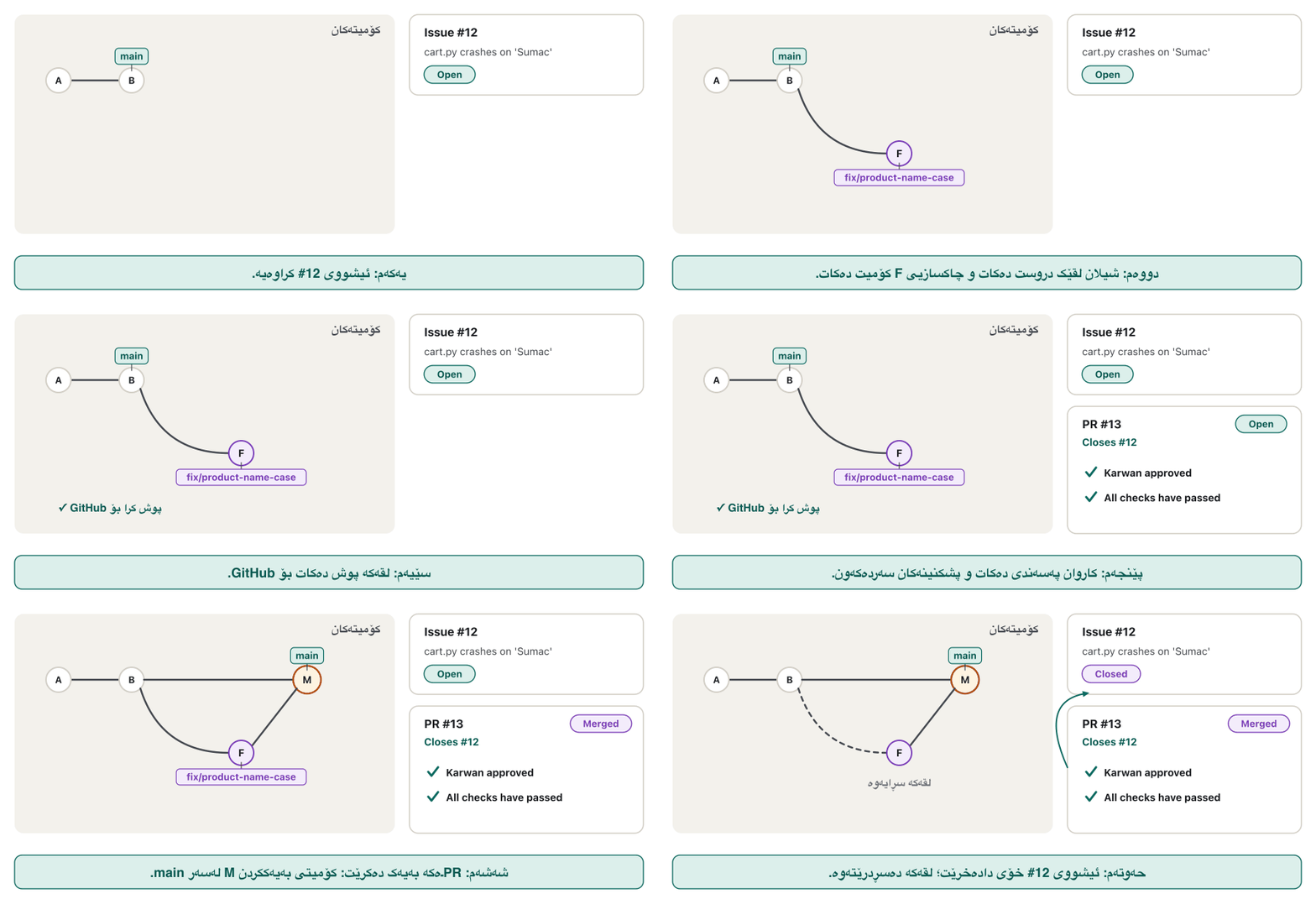
Instead of a message in a chat that gets lost, she opens an issue on GitHub. Every issue gets a number (#12) and a page where people discuss it. A good bug report lets anyone repeat the problem: the version, the steps, what you expected and what actually happened. Labels (bug, enhancement), an assignee (who works on it) and a milestone (for example version 1.0.0) keep a long list in order. Issues hold feature ideas and tasks too, and @Shilan in a comment tells her to look.
لەبری پەیامێک لە چاتدا کە ون دەبێت، لە GitHub دەکاتەوە. هەر ژمارەیەک (#12) و پەڕەیەک وەردەگرێت کە خەڵک تێیدا گفتوگۆی لەسەر دەکەن. ڕاپۆرتێکی باشی ڕێگە دەدات هەر کەسێک کێشەکە دووپاتە بکاتەوە: ، هەنگاوەکان، ئەوەی چاوەڕێت دەکرد و ئەوەی بەڕاستی ڕوویدا. نیشانەکان (bug، enhancement)، کەسی بەرپرس (کێ کاری لەسەر دەکات) و قۆناغ (بۆ نموونە 1.0.0) لیستێکی درێژ ڕێک دەخەن. بیرۆکەی تایبەتمەندیی نوێ و ئەرکیش هەڵدەگرن و @Shilan لە سەرنجێکدا ئاگاداری دەکاتەوە کە سەیری بکات.
Fix it on a branch and push the branchلەسەر لقێک چاکی بکە و لقەکە پوش بکە
Shilan takes issue #12. She never works on main directly: she pulls, starts a feature branch, makes the fix (lower-case the product name) and updates the README example. The first plain git push fails because the new branch has no upstream yet; Git itself prints the right command:
شیلان #12 وەردەگرێت. هەرگیز ڕاستەوخۆ لەسەر main کار ناکات: دەکات، لقێکی تایبەتمەندی دەست پێدەکات، چاکسازییەکە دەکات (ناوی کاڵاکە دەکات بە پیتی بچووک) و نموونەکەی README نوێ دەکاتەوە. یەکەم git pushـی ئاسایی سەرناکەوێت چونکە نوێیەکە هێشتا upstreamـی نییە؛ Git خۆی دروستەکە چاپ دەکات:
$ git switch -c fix/product-name-case
Switched to a new branch 'fix/product-name-case'
$ git diff cart.py
diff --git a/cart.py b/cart.py
index 4eb2837..0640931 100644
--- a/cart.py
+++ b/cart.py
@@ -7,7 +7,7 @@ import sys
 from prices import PRICES, line_price, delivery_fee

 args = sys.argv[1:]
-order = [(args[i], int(args[i + 1])) for i in range(0, len(args), 2)]
+order = [(args[i].lower(), int(args[i + 1])) for i in range(0, len(args), 2)]

 total = 0
 for product, grams in order:
$ python3.13 cart.py walnuts 500 Sumac 350
walnuts      500 g    9,000 IQD
sumac        350 g    3,000 IQD
Goods total          12,000 IQD
Delivery              3,000 IQD
To pay               15,000 IQD
$ git commit -am "Accept product names in any letter case"
[fix/product-name-case 7678924] Accept product names in any letter case
 2 files changed, 2 insertions(+), 2 deletions(-)
$ git push
fatal: The current branch fix/product-name-case has no upstream branch.
To push the current branch and set the remote as upstream, use

    git push --set-upstream origin fix/product-name-case

To have this happen automatically for branches without a tracking
upstream, see 'push.autoSetupRemote' in 'git help config'.
$ git push -u origin fix/product-name-case
To ~/se/server/bazaar-cart.git
 * [new branch]      fix/product-name-case -> fix/product-name-case
branch 'fix/product-name-case' set up to track 'origin/fix/product-name-case'.
Explain the codeڕوونکردنەوەی کۆدەکە
- Lineدێڕی 13
The fix:
.lower()turnsSumacintosumacbefore the price is looked up.چاکسازییەکە:
.lower()پێش گەڕان بەدوای نرخەکەداSumacدەکات بەsumac.- Lineدێڕی 26-33
No upstream yet: use
-uonce for each new branch.هێشتا upstream نییە: بۆ هەر نوێ یەک جار
-uبەکار بهێنە.
Fix it on a branch and push the branchلەسەر لقێک چاکی بکە و لقەکە پوش بکە
Pull requests: asking to mergeداواکارییەکانی بەیەککردن: داوای بەیەککردن
On GitHub a yellow bar now offers Compare & pull request. A pull request (PR) is a page that asks: please merge my branch into yours. It names two branches — the base (where the work should go, main) and the compare branch (Shilan's) — and has four tabs: Conversation (description, comments, reviews), Commits, Checks (automatic tests, next chapter) and Files changed (the diff). Shilan writes what she changed and why, and adds Closes #12.
ئێستا لە GitHub شریتێکی زەرد Compare & pull request پێشکەش دەکات. (PR) پەڕەیەکە کە دەپرسێت: تکایە لەگەڵ هی خۆت بەیەک بکە. دوو ناو دەبات — base (کارەکە دەبێت بچێتە کوێ، main) و compare (هی شیلان) — و چوار تابی هەیە: Conversation (وەسف، سەرنج، )، Commits، Checks (، بەشی داهاتوو) و Files changed (دیف). شیلان دەنووسێت چی گۆڕیوە و بۆچی و Closes #12 زیاد دەکات.
Closes #12 is a closing keyword. GitHub understands close, closes, closed, fix, fixes, fixed, resolve, resolves and resolved, and closes the issue automatically when the PR is merged — but only when the PR targets the default branch (here main). Merged into any other branch, nothing is closed.
Closes #12 وشەی کلیلەیی داخستنـە. GitHub ئەم وشانە تێدەگات: close، closes، closed، fix، fixes، fixed، resolve، resolves و resolved و کاتێک PRـەکە بەیەک دەکرێت خۆکارانە دادەخات — بەڵام تەنیا کاتێک PRـەکە ڕووی لە بنەڕەتییەکە بێت (لێرەدا main). ئەگەر لەگەڵ هەر تر بەیەک بکرێت، هیچ شتێک داناخرێت.
Code review: a second pair of eyesپێداچوونەوەی کۆد: دوو چاوی تر
Karwan reviews the PR on the Files changed tab. Code review is reading a teammate's change before it is merged, to catch problems and to share knowledge. Google's public review guide lists what to look for; in short:
کاروان لە تابی Files changed بۆ PRـەکە دەکات. خوێندنەوەی گۆڕانکاریی هاوکارێکە پێش ئەوەی بەیەک بکرێت، بۆ گرتنی کێشەکان و بۆ هاوبەشکردنی زانیاری. ڕێبەری گشتیی Google بۆ دەڵێت سەیری چی بکەیت؛ بە کورتی:
- Does it work? Think of edge cases:
SUMAC,sumac, a product that does not exist. - Is it simple and clear? Good names, no extra features, comments that explain why.
- Are there tests that would fail if it broke? (Automated testing)
- Is it safe? No passwords or keys, input from users checked.
- AI-written code gets the same review. The author must understand and be able to explain every line, because the author — not the tool — is responsible.
- کار دەکات؟ بیر لە بکەرەوە:
SUMAC،sumac، کاڵایەک کە بوونی نییە. - سادە و ڕوونە؟ ناوی باش، بێ تایبەتمەندیی زیادە، تێبینی کە بۆچی ڕوون دەکاتەوە.
- تاقیکردنەوە هەیە کە ئەگەر تێک بچێت سەرنەکەوێت؟ (تاقیکردنەوەی خۆکار)
- پارێزراوە؟ نە نە کلیل، پشکنراوە.
- کۆدی نووسراو بە هەمان وەردەگرێت. نووسەر دەبێت لە هەموو دێڕێک تێبگات و بتوانێت ڕوونی بکاتەوە، چونکە نووسەر — نەک ئامرازەکە — بەرپرسیارە.
Comments go on single lines of the diff. Be kind and specific, explain why, and mark small wishes with Nit: so they do not block. At the end the reviewer chooses Comment, Approve or Request changes; new commits pushed to the branch appear in the PR automatically.
سەرنجەکان لەسەر تاکە دێڕەکانی دادەنرێن. میهرەبان و ورد بە، بۆچییەکەی ڕوون بکەرەوە و ئارەزووە بچووکەکان بە Nit: نیشان بکە بۆ ئەوەی ڕێگر نەبن. لە کۆتاییدا پێداچووەرەوە Comment، Approve یان Request changes هەڵدەبژێرێت؛ ئەو دواتر دەکرێنە سەر خۆکارانە لە PRـەکەدا دەردەکەون.
GitHub flow in six stepsGitHub flow لە شەش هەنگاودا
The whole loop has a name: GitHub flow. GitHub's guide gives six steps, and the team follows them for every change, small or large:
هەموو ئەم سووڕە ناوێکی هەیە: GitHub flow. ڕێبەرەکەی GitHub شەش هەنگاو دەدات و تیمەکە بۆ هەموو گۆڕانکارییەک، بچووک بێت یان گەورە، پەیڕەویان دەکات:
- Create a branchلقێک دروست بکە
with a short, clear name such as
fix/product-name-case.بە ناوێکی کورت و ڕوون وەک
fix/product-name-case. - Make changesگۆڕانکاری بکە
small commits, each one complete; push the branch.
بچووک، هەریەکە تەواو؛ بکە.
- Open a pull requestداواکارییەکی بەیەککردن بکەرەوە
say what and why, and link the issue (Closes #12).
بڵێ چی و بۆچی و ببەستەوە (Closes #12).
- Answer the reviewوەڵامی پێداچوونەوەی کۆد بدەرەوە
push more commits; the PR updates by itself.
زیاتر بکە؛ PRـەکە خۆی نوێ دەبێتەوە.
- Mergeبەیەککردن بکە
after approval and green checks.
دوای پەسەندکردن و پشکنینی سەوز.
- Delete the branchلقەکە بسڕەوە
the commits and the PR stay in the history.
و PRـەکە لە مێژوودا دەمێننەوە.
GitHub flow in six stepsGitHub flow لە شەش هەنگاودا
After the mergeدوای بەیەککردن
On GitHub the green Merge pull request button makes a merge commit on main. In our stand-in Karwan, who approved the PR, does the same by hand, and then Shilan tidies up — her local branch with git branch -d, the remote one with git push origin --delete:
لە GitHub دوگمە سەوزەکەی Merge pull request لەسەر main دروست دەکات. لە جێگرەوەکەماندا کاروان، کە PRـەکەی پەسەند کرد، هەمان کار بە دەست دەکات و پاشان شیلان پاکی دەکاتەوە — ناوخۆییەکەی بە git branch -d و هی بە git push origin --delete:
$ git pull
From ~/se/server/bazaar-cart
   0ac5dfa..f840e04  main                  -> origin/main
 * [new branch]      fix/product-name-case -> origin/fix/product-name-case
Updating 0ac5dfa..f840e04
Fast-forward
 README.md | 5 +++++
 1 file changed, 5 insertions(+)
$ git log --oneline main..origin/fix/product-name-case
7678924 (origin/fix/product-name-case) Accept product names in any letter case
$ git merge --no-ff --no-edit origin/fix/product-name-case
Merge made by the 'ort' strategy.
 README.md | 2 +-
 cart.py   | 2 +-
 2 files changed, 2 insertions(+), 2 deletions(-)
$ git push
To ~/se/server/bazaar-cart.git
f840e04..d12928a main -> mainmain نوێ بکەرەوە و لقەکە بسڕەوەBASH$ git switch main
Switched to branch 'main'
Your branch is up to date with 'origin/main'.
$ git pull
From ~/se/server/bazaar-cart
f840e04..d12928a main -> origin/main
Updating f840e04..d12928a
Fast-forward
README.md | 2 +-
cart.py | 2 +-
2 files changed, 2 insertions(+), 2 deletions(-)
$ git branch -d fix/product-name-case
Deleted branch fix/product-name-case (was 7678924).
$ git push origin --delete fix/product-name-case
To ~/se/server/bazaar-cart.git
- [deleted] fix/product-name-case
$ git log --oneline --graph -6
* d12928a (HEAD -> main, origin/main, origin/HEAD) Merge remote-tracking branch 'origin/fix/product-name-case'
|\
| * 7678924 Accept product names in any letter case
|/
* f840e04 Merge branch 'main' of ~/se/server/bazaar-cart
|\
| * 0ac5dfa Read the order from the command line
* | c12885a Explain the price and delivery rules in the README
|/
* 62f2cfe Add a READMEForks: helping a project you cannot push toفۆرکەکان: یارمەتیدانی پڕۆژەیەک کە ناتوانیت پوشی بۆ بکەیت
Rebin is not in the team, but he wants to help. He cannot push to the team's repository, so he presses Fork: GitHub makes his own copy under his account. He clones his fork (that is his origin) and adds the team's repository as a second remote, usually called upstream, to stay up to date. When his change is ready he opens a pull request from his fork to the original. This fork and pull model is how most open-source projects accept help; teams like Bazaar Cart use the shared repository model, with branches in one repository. How a fork differs from a riff, a remix and a spin-off is explained in Riff: Building on an Idea.
ڕێبین لە تیمەکەدا نییە، بەڵام دەیەوێت یارمەتی بدات. ناتوانێت بۆ تیمەکە بکات، بۆیە Fork دادەگرێت: GitHub کۆپییەکی تایبەت بە خۆی لە ژێر دروست دەکات. خۆی دەکات (ئەوە originـەکەیەتی) و تیمەکە وەک دووەم زیاد دەکات، زۆرجار بە ناوی upstream، بۆ ئەوەی نوێ بمێنێتەوە. کاتێک گۆڕانکارییەکەی ئامادە بوو، لە بۆ ڕەسەنەکە دەکاتەوە. ئەم مۆدێلی fork و pullـە ڕێگەی زۆربەی پڕۆژەکانی بۆ وەرگرتنی یارمەتی؛ تیمێکی وەک Bazaar Cart مۆدێلی هاوبەش بەکار دەهێنێت، بە چەند لە یەک . جیاوازیی لەگەڵ riff، remix و spin-off لە Riff: بنیاتنان لەسەر بیرۆکەیەک ڕوون کراوەتەوە.
$ git remote add upstream ~/se/server/bazaar-cart.git
$ git remote -v
origin	~/se/server/rebin-bazaar-cart.git (fetch)
origin	~/se/server/rebin-bazaar-cart.git (push)
upstream	~/se/server/bazaar-cart.git (fetch)
upstream	~/se/server/bazaar-cart.git (push)
$ git fetch upstream
From ~/se/server/bazaar-cart
* [new branch] main -> upstream/mainProtecting main: required reviews and checksپاراستنی main: پێداچوونەوە و پشکنینی پێویست
A rule can stop mistakes before they reach main. In the repository settings an owner adds branch protection (or a newer ruleset) for main. Common rules: require a pull request with at least one approval, require status checks to pass — the automatic tests of the next lesson's CI — require conversations to be resolved, and block force pushes and deletion. Then nobody, not even Aram, can push straight to main: every change arrives through a reviewed, green pull request.
یاسایەک دەتوانێت هەڵەکان ڕابگرێت پێش ئەوەی بگەنە main. خاوەنی لە ڕێکخستنەکاندا پاراستنی (یان rulesetـێکی نوێتر) بۆ main زیاد دەکات. یاسا باوەکان: داواکردنی بە لانیکەم یەک پەسەندکردن، داواکردنی سەرکەوتنی پشکنینی دۆخ — CIـی وانەی داهاتوو — داواکردنی چارەسەرکردنی گفتوگۆکان و ڕێگرتن لە force push و سڕینەوە. ئیتر هیچ کەس، تەنانەت ئارامیش، ناتوانێت ڕاستەوخۆ بۆ main بکات: هەموو گۆڕانکارییەک لە ڕێی پێداچوونەوە بۆکراو و سەوزەوە دێت.
GitHub Pages and the gh toolGitHub Pages و ئامرازی gh
Two more GitHub tools you will meet. GitHub Pages publishes a static website straight from a repository; it is explained step by step in Publishing your website. The GitHub CLI, gh, does GitHub's web-page jobs from the terminal. The commands below are labelled examples checked against GitHub's manual, not run here (they need an account and gh auth login):
دوو ئامرازی تری GitHub کە پێیان دەگەیت. GitHub Pages جێگیر ڕاستەوخۆ لە بڵاو دەکاتەوە؛ هەنگاو بە هەنگاو لە بڵاوکردنەوەی تۆڕگەکەت ڕوون کراوەتەوە. GitHub CLI، gh، کارەکانی پەڕە وێبییەکانی GitHub لە تێرمیناڵەوە دەکات. ئەم خوارەوە نموونەی ناونووسکراون کە لەگەڵ ڕێنمایی GitHub بەراورد کراون، لێرە جێبەجێ نەکراون (پێویستیان بە و gh auth login هەیە):
gh repo create --source=. --private --push        # put this folder on GitHub
gh pr create --fill                               # PR from this branch, text from the commits
gh pr create --title "Accept product names in any letter case" --body "Closes #12" --reviewer karwan-example
gh repo fork owner-name/bazaar-cart # fork someone else's project| Jobکار | On the websiteلە | With ghبە gh |
|---|---|---|
| Put a local project on GitHubپڕۆژەیەکی ناوخۆیی بخەرە سەر GitHub | New repository, then git remote add and git push -uNew repository، پاشان git remote add و git push -u | gh repo create --source=. --push |
| Open a pull request بکەرەوە | Compare & pull request | gh pr create |
| Fork a project بکە | Fork buttonدوگمەی Fork | gh repo fork |
Public, private and leaked secretsگشتی، تایبەت و نهێنیی دزەکردوو
A public repository can be read and copied by anyone in the world; a private one only by the people you invite. Bazaar Cart is private: it belongs to Soran's shop. Never put real customers' names or phone numbers in any repository — use made-up test data.
گشتی هەر کەسێک لە جیهاندا دەتوانێت بیخوێنێتەوە و کۆپیی بکات؛ تایبەت تەنیا ئەو کەسانەی بانگهێشتیان دەکەیت. Bazaar Cart تایبەتە: هی دوکانەکەی سۆرانە. هەرگیز ناو یان ژمارەی تەلەفۆنی کڕیاری ڕاستەقینە مەخەرە ناو هیچ — تاقیکردنەوەی دروستکراو بەکار بهێنە.
Now the worst case. Karwan commits an SMS API key by mistake and pushes. In the next commit he deletes the line — but the key is still in the history: anyone with a clone can run git log -p and read it, and forks and old clones keep it too. GitHub's advice is clear: first revoke the key (make it useless) and create a new one; only then clean the history. This is why .env belongs in .gitignore from the first day.
ئێستا خراپترین حاڵەت. کاروان بە هەڵە بۆ ناردنی SMS و دەکات. لە دواتردا دێڕەکە دەسڕێتەوە — بەڵام کلیلەکە هێشتا لە مێژووـدایە: هەر کەسێک هەبێت دەتوانێت git log -p جێبەجێ بکات و بیخوێنێتەوە و و کۆنەکانیش هەڵی دەگرن. ئامۆژگارییەکەی GitHub ڕوونە: سەرەتا کلیلەکە هەڵبوەشێنەوە (بێسوودی بکە) و یەکێکی نوێ دروست بکە؛ تەنیا دوای ئەوە مێژووەکە پاک بکەرەوە. لەبەر ئەمەیە .env لە ڕۆژی یەکەمەوە دەچێتە ناو .gitignore.
Common mistakesهەڵە باوەکان
One more, from our stand-in. A bare repository made without -b main may keep HEAD pointing at master. Push main to it and clone it, and the clone has no files:
یەکێکی تر، لە جێگرەوەکەمانەوە. ڕووت کە بەبێ -b main دروست کرابێت لەوانەیە HEADـی ئاماژە بە master بکات. mainـی بۆ بکە و بکە، هیچ تێدا نابێت:
$ git clone ~/se/server/oops.git
Cloning into 'oops'...
done.
warning: remote HEAD refers to nonexistent ref, unable to checkout
The fix: make bare repositories with git init --bare -b main. (Real hosting services set the default branch for you.)
چاکسازی: ڕووت بە git init --bare -b main دروست بکە. (خزمەتگوزارییە ڕاستەقینەکانی هەڵگرتنی کۆد بنەڕەتییەکە بۆ تۆ دیاری دەکەن.)
Exercisesڕاهێنانەکان
Make a bare repository ~/se/server/notes.git (with -b main). Push an existing repository to it as Karwan, clone it as Shilan, give the clone the author name Shilan, commit and push a change from Shilan, and bring it to Karwan with git fetch and git pull.
ڕووتی ~/se/server/notes.git (بە -b main) دروست بکە. وەک کاروان هەبوو بکە بۆی، وەک شیلان بکە، ناوی نووسەری Shilan بدە بە ، لە شیلانەوە گۆڕانکارییەک و بکە و بە git fetch و git pull بیهێنە بۆ کاروان.
Hintئاماژە
Use git config user.name without --global inside each clone.
لە ناو هەر git config user.name بەبێ --global بەکار بهێنە.
Show answerوەڵامەکە پیشان بدە
One possible run (every line was really run; ~/se is the practice folder):
جێبەجێکردنێکی گونجاو (هەموو دێڕێک بەڕاستی جێبەجێ کراوە؛ ~/se ڕاهێنانە):
$ cd ~/se
$ git init --bare -b main server/bazaar-cart.git
Initialized empty Git repository in ~/se/server/bazaar-cart.git/
$ cd ~/se/karwan/bazaar-cart
$ git remote add origin ~/se/server/bazaar-cart.git
$ git push -u origin main
To ~/se/server/bazaar-cart.git
 * [new branch]      main -> main
branch 'main' set up to track 'origin/main'.
$ cd ~/se/shilan
$ git clone ~/se/server/bazaar-cart.git
Cloning into 'bazaar-cart'...
done.
# … Shilan commits and pushes; Karwan:
$ cd ~/se/karwan/bazaar-cart
$ git fetch
From ~/se/server/bazaar-cart
   bf0326b..62f2cfe  main       -> origin/main
$ git pull
Updating bf0326b..62f2cfe
Fast-forward
 README.md | 16 ++++++++++++++++
 1 file changed, 16 insertions(+)
 create mode 100644 README.md
To see a rejection, commit in both clones before pulling, push from one, then push from the other; pull and push again.
بۆ بینینی ڕەتکردنەوەیەک، پێش لە هەردوو بکە، لە یەکێکیانەوە بکە، پاشان لەوی ترەوە؛ و دووپاتە بکە.
Hana's taxi app Hawler Ride shows a fare of 0 IQD for trips longer than 20 km in version 0.4.0. Write a good issue: title, version, steps, expected, actual, a label and an assignee.
ئەپی تەکسییەکەی هانا، Hawler Ride، لە 0.4.0ـدا بۆ گەشتی درێژتر لە 20 کم کرێی 0 دینار پیشان دەدات. باش بنووسە: ناونیشان، ، هەنگاوەکان، چاوەڕوانکراو، ڕاستەقینە، نیشانەیەک و کەسێکی بەرپرس.
Show answerوەڵامەکە پیشان بدە
Title: Fare shows 0 IQD for trips longer than 20 km

Version: 0.4.0 (Android)
Steps to reproduce:
1. Open Hawler Ride and choose a trip from the citadel to the airport (about 22 km).
2. Press "Price".
Expected: a fare above 0 IQD, as for shorter trips.
Actual: "0 IQD". Trips of 19 km show a normal fare.

Labels: bug    Assignee: Rebin
The 19 km line is useful: it shows where the problem starts, so the developer can look at the 20 km limit first.
دێڕی 19 کم بەسوودە: پیشان دەدات کێشەکە لە کوێ دەست پێدەکات، بۆیە دەتوانێت سەرەتا سەیری سنووری 20 کم بکات.
Karwan's PR changes delivery_fee(). Write two useful review comments.
PRـەکەی کاروان delivery_fee() دەگۆڕێت. دوو سەرنجی بەسوودی بنووسە.
@@ def delivery_fee(goods_total):
-    if goods_total >= FREE_DELIVERY_FROM:
+    if goods_total > 50000:
         return 0
-    return DELIVERY_FEE
+    return 3000  # 2500 or 3000? ask Soran
Show answerوەڵامەکە پیشان بدە
- Line
if goods_total > 50000:— R4 says delivery is free from 50,000 IQD, so an order of exactly 50,000 would still pay. Should it be>=? - Line
return 3000 # 2500 or 3000? ask Soran— the constantDELIVERY_FEEalready exists; please use it, and move the question to an issue so it does not stay hidden in a comment.
- دێڕی
if goods_total > 50000:— یاسای R4 دەڵێت گەیاندن لە 50,000 دینارەوە بێبەرانبەرە، بۆیە داواکارییەکی ڕێک 50,000 هێشتا پارە دەدات. نابێت>=بێت؟ - دێڕی
return 3000 # 2500 or 3000? ask Soran—DELIVERY_FEEپێشتر هەیە؛ تکایە بەکاری بهێنە و پرسیارەکە بگوازەرەوە بۆ بۆ ئەوەی لە ناو تێبینییەکدا ون نەبێت.
For each person, choose fork-and-pull or a branch in the shared repository: (a) Dilan, a member of the Bazaar Cart team; (b) Lana, who found a spelling mistake in the README of a famous open-source Python library; (c) Rebin, invited by Aram as a collaborator for one month.
بۆ هەر کەسێک، fork و pull یان لە هاوبەشدا هەڵبژێرە: (a) دیلان، ئەندامی تیمی Bazaar Cart؛ (b) لانا، کە هەڵەیەکی ڕێنووسی لە READMEـی بەناوبانگی Pythonـدا دۆزیوەتەوە؛ (c) ڕێبین، کە ئارام بۆ ماوەی یەک مانگ وەک هاوکار بانگهێشتی کردووە.
Show answerوەڵامەکە پیشان بدە
(a) A branch in the shared repository: she has write access. (b) Fork and pull: she cannot push to the library's repository. (c) A branch: as a collaborator he has write access while invited.
(a) لە هاوبەشدا: مافی نووسینی هەیە. (b) fork و pull: ناتوانێت بۆ بکات. (c) : وەک هاوکار تا بانگهێشتکراوە مافی نووسینی هەیە.
Summaryپوختە
- A remote is another copy of the repository, usually called
origin; GitHub, GitLab, Bitbucket and Codeberg host remotes for teams. Git ≠ GitHub. git clonecopies everything;git pushsends commits up;git fetchonly downloads intoorigin/main;git pull= fetch + merge.- A rejected push means the remote moved on: pull (merge), fix conflicts, push again. Never force-push a shared branch.
- Sign in to GitHub with a token, SSH key or browser helper — never the account password; GitHub accounts are for ages 13+.
- Issues track bugs and ideas (version, steps, expected, actual). Pull requests ask to merge a branch; Closes #12 closes the issue when merged into the default branch.
- Code review: correctness, clarity, tests, safety — kind and specific; AI-written code too. GitHub flow: branch → commits → PR → review → merge → delete branch.
- Forks let outsiders contribute (origin = fork, upstream = original). Protected
mainneeds approvals and green checks. Secrets in history: revoke first.
- کۆپییەکی ترە لە ، زۆرجار بە ناوی
origin؛ GitHub، GitLab، Bitbucket و Codeberg بۆ تیمەکان هەڵدەگرن. Git ≠ GitHub. git cloneهەموو شتێک کۆپی دەکات؛git pushدەنێرێتە سەرەوە؛git fetchتەنیا دادەبەزێنێتە ناوorigin/main؛git pull= fetch + .- ڕەتکراوە واتە بەرەو پێش چووە: ()، ناکۆکییەکان چاک بکەرەوە، دووپاتە . هەرگیز هاوبەش force-push مەکە.
- بە ، کلیلی یان یاریدەدەری بچۆ ژوورەوەی GitHub — هەرگیز بە ؛ GitHub بۆ تەمەنی 13 ساڵ و سەرەوەن.
- بەدواداچوون بۆ و بیرۆکەکان دەکەن (، هەنگاوەکان، چاوەڕوانکراو، ڕاستەقینە). داوای دەکەن؛ Closes #12 کاتێک لەگەڵ بنەڕەتییەکە بەیەک دەکرێت دادەخات.
- : دروستی، ڕوونی، تاقیکردنەوە، ئاسایش — بە میهرەبانی و وردی؛ کۆدی . GitHub flow: ← ← PR ← ← ← سڕینەوەی .
- ڕێگە بە کەسانی دەرەوە دەدەن بەشداری بکەن (origin = ، upstream = ڕەسەن).
mainـی پارێزراو پەسەندکردن و پشکنینی سەوزی دەوێت. نهێنی لە مێژوودا: سەرەتا هەڵیبوەشێنەوە.
Next: the version numbers on those releases — Versions and builds — and the automatic checks that turn a pull request green — Automated testing.
داهاتوو: ژمارەی و — وەشان و بیلد — و ئەو پشکنینە خۆکارانەی سەوز دەکەن — تاقیکردنەوەی خۆکار.
Lesson complete!وانەکە تەواو بوو!
Well done. Review the key terms, then go on to the next lesson.دەستخۆش. سەیرێکی زاراوە سەرەکییەکان بکەرەوە، پاشان بڕۆ بۆ وانەی داهاتوو.
Key termsزاراوە سەرەکییەکان
Versions and Builds: What 1.0.0 Meansوەشانەکان و بیلدەکان: 1.0.0 واتای چییە
Related lecturesوانە پەیوەندیدارەکان
- Automated Testing: Code That Checks Your Codeتاقیکردنەوەی خۆکار: کۆدێک کە کۆدەکەت دەپشکنێت
- Versions and Builds: What 1.0.0 Meansوەشانەکان و بیلدەکان: 1.0.0 واتای چییە
- Publishing Your Website: Hosting, Domains and HTTPSبڵاوکردنەوەی تۆڕگەکەت: هۆستینگ، ناوەکانی دۆمەین و HTTPS
- Intellectual Property, Plagiarism and Software Licencesموڵکی هزری، دزیی زانستی و مۆڵەتەکانی بەکارهێنان
- Responsible Disclosure and Bug Bountiesئاشکراکردنی بەرپرسیارانە و خەڵاتی دۆزینەوەی باگ
- Passwords, MFA and Access Controlتێپەڕەوشەکان، MFA و کۆنترۆڵی دەستڕاگەیشتن
- Building Softwareدروستکردنی نەرمەواڵە
References and further readingسەرچاوەکان و خوێندنەوەی زیاتر
- Pro Git, 2.5 Git Basics: Working with Remotes
- Pro Git, 2.6 Git Basics: Tagging (tags are pushed only on request)
- GitHub Docs: About pull requests
- GitHub Docs: Linking a pull request to an issue (closing keywords)
- GitHub Docs: About issues
- GitHub Docs: GitHub flow
- GitHub Docs: About pull request reviews
- GitHub Docs: Fork a repository (origin and upstream)
- GitHub Docs: About protected branches
- GitHub Docs: Adding locally hosted code to GitHub
- GitHub Docs: About authentication to GitHub
- GitHub Blog: Token authentication requirements for Git operations (from 13 August 2021)
- GitHub Docs: Removing sensitive data from a repository (revoke first)
- GitHub Docs: Privately reporting a security vulnerability
- GitHub Docs: About READMEs
- GitHub Terms of Service (age 13 or older; effective 27 April 2026)
- GitHub CLI manual: gh pr create
- GitHub Blog: Octoverse 2025 (180 million+ developers, 630 million repositories)
- Microsoft: Microsoft acquires GitHub (2018)
- Google Engineering Practices: What to look for in a code review
This lecture is a first edition. The Kurdish text and terminology are waiting for review by Kurdish IT teachers.ئەم وانەیە چاپی یەکەمە. دەقە کوردییەکە و زاراوەکانی چاوەڕێی پێداچوونەوەی مامۆستایانی کوردی بواری IT ن.