FlutterFlutter · Chapterبەش 4 · Lectureوانە 4.3
Setting Up Flutter and Your First Projectئامادەکردنی Flutter و یەکەم پڕۆژەکەت
Choose an editor, install Flutter on Windows or macOS, check the setup with flutter doctor, prepare an emulator or your own phone, create and run an app, use hot reload and hot restart, open DevTools, and find your way around a project's folders, pubspec.yaml, lint rules and the template test.
هەڵبژاردنی دەستکاریکەر، لەسەر Windows یان macOS، پشکنینی ئامادەکارییەکە بە flutter doctor، ئامادەکردنی یان مۆبایلەکەی خۆت، دروستکردن و کارپێکردنی ، بەکارهێنانی و ، کردنەوەی DevTools و ناسینی پڕۆژە، pubspec.yaml، ڕێساکانی و تاقیکردنەوەی .
What you will learnچی فێر دەبیت
- Explain what an IDE adds to a text editor, and choose an editor with the seven points from the course.
- Install Flutter on Windows or macOS and read the result of
flutter doctor. - Run an app on an emulator, a real phone or Chrome.
- Use hot reload and hot restart and say which one a change needs.
- Describe the folders of a Flutter project, read
pubspec.yamland keep the template test working.
- ڕوونی بکەیتەوە چی بۆ زیاد دەکات و بە حەوت خاڵەکەی وانەکە دەستکاریکەرێک هەڵبژێریت.
- لەسەر Windows یان macOS جێگیر بکەیت و ئەنجامی
flutter doctorبخوێنیتەوە. - لەسەر ، مۆبایلێکی ڕاستەقینە یان Chrome کار پێبکەیت.
- و بەکاربهێنیت و بڵێیت گۆڕانکارییەک پێویستی بە کامیانە.
- پڕۆژەیەکی وەسف بکەیت،
pubspec.yamlبخوێنیتەوە و تاقیکردنەوەی بە کارکردوویی بهێڵیتەوە.
What you needپێویستییەکانت
Before you write your first app, you need three things on your computer. First, the Flutter : the flutter command, the Flutter and the inside it. Second, an editor to write code in. Third, a device to run the app on: an on your computer, your own phone, or simply the Chrome . Flutter also needs Git, the tool, because the SDK is downloaded with it.
پێش ئەوەی یەکەم بنووسیت، پێویستت بە سێ شت هەیە لەسەر کۆمپیوتەرەکەت. یەکەم، : فەرمانی flutter، و لە ناویدان. دووەم، دەستکاریکەرێک بۆ نووسینی کۆد. سێیەم، ئامێرێک بۆ کارپێکردنی : لەسەر کۆمپیوتەرەکەت، مۆبایلەکەی خۆت یان تەنها Chrome. پێویستی بە Gitـیش هەیە، کە ئامرازی ، چونکە بە Git دادەبەزێنرێت.
Editors and IDEsدەستکاریکەر و ژینگە کۆکراوەکانی گەشەپێدان
A is a program for writing and changing text files. An (integrated development environment) is an editor with the tools of the job built in: it colours your code, completes words as you type, shows mistakes, runs the app and helps with . You can write Flutter code in any editor that can work with command-line tools, but an IDE saves you a lot of time.
بۆ نووسین و گۆڕینی دەق. دەستکاریکەرێکە کە ئامرازەکانی کارەکەی تێدایە: کۆدەکەت ڕەنگ دەکات، لە کاتی نووسیندا وشەکان تەواو دەکات، هەڵەکان نیشان دەدات، کار پێدەکات و یارمەتیی دەدات. دەتوانیت کۆدی لە هەر دەستکاریکەرێکدا بنووسیت کە لەگەڵ ئامرازەکانی کار بکات، بەڵام کاتێکی زۆرت بۆ دەپارێزێت.
Good IDEs help in four ways: code completion, debugging, collaboration (for example sharing code through Git) and customisation (themes, extensions, shortcuts). The same idea for Python is in Where to write Python.
باش بە چوار ڕێگە یارمەتیت دەدات: تەواوکردنی کۆد، ، هاوکاری (بۆ نموونە هاوبەشکردنی کۆد بە Git) و گونجاندن (شێوەی ڕەنگەکان، ، ). بۆ ، هەمان بیرۆکە لە بەشی Python لە کوێ بنووسیت ڕوون کراوەتەوە.
Editors and IDEsدەستکاریکەر و ژینگە کۆکراوەکانی گەشەپێدان
The five tools in the notesپێنج ئامرازەکەی تێبینییەکان
The course names five tools. Not all of them are editors:
وانەکە ناوی پێنج ئامراز دەهێنێت. هەموویان دەستکاریکەر نین:
| Toolئامراز | What it really isلە ڕاستیدا چییە |
|---|---|
| Android Studio | Google's IDE for Android. It also installs the Android SDK and the emulator, which Flutter needs for Android apps. Google بۆ ئەندرۆید. ئەندرۆید و جێگیر دەکات، کە بۆ ئەندرۆید پێویستیانە. |
| Visual Studio Code | A light, free code editor by Microsoft. With the Dart and Flutter extensions it works like an IDE. The official quick start uses it.دەستکاریکەرێکی کۆدی سووک و بێبەرانبەری Microsoftـە. لەگەڵ Dart و Flutter وەک کار دەکات. ڕێنمایی خێرای فەرمی ئەوە بەکار دەهێنێت. |
| IntelliJ IDEA | JetBrains' IDE (Android Studio is built on it). Flutter works with it through a plugin. JetBrains (Android Studio لەسەر ئەو دروست کراوە). بە لەگەڵیدا کار دەکات. |
| Emacs | An old, very customisable text editor. It can edit Flutter code with add-ons, but it is not a beginner's choice.یەکێکە لە کۆنترین و دەتوانیت زۆر شتی تێدا بە دڵی خۆت بگۆڕیت. بە زیادکراوەکان دەتوانێت کۆدی دەستکاری بکات، بەڵام بۆ سەرەتاکاران هەڵبژاردەی باش نییە. |
| Codemagic | Not an editor. A CI/CD service: it builds, tests and publishes your app on its own computers each time you push code to Git.دەستکاریکەر نییە. خزمەتگوزارییەکی CI/CDـیە: هەر جارێک کۆد بنێریت بۆ Git، لەسەر کۆمپیوتەرەکانی خۆی بیلد دەکات، تاقی دەکاتەوە و بڵاوی دەکاتەوە. |
Editors and IDEsدەستکاریکەر و ژینگە کۆکراوەکانی گەشەپێدان
How to chooseچۆن هەڵبژێریت
With so many tools it is hard to choose. The course gives seven things to think about. Each one becomes a question you can ask:
ئامراز زۆرن و هەڵبژاردن ئاسان نییە. وانەکە حەوت خاڵ دەدات بۆ بیرکردنەوە. هەر خاڵێک دەبێتە پرسیارێک کە دەتوانیت بیکەیت:
| Pointخاڵ | Ask yourselfلە خۆت بپرسە |
|---|---|
| 1. Features١. تایبەتمەندییەکان | Does it complete code, show errors, debug and hot reload Flutter apps?ئایا کۆد تەواو دەکات، نیشان دەدات، دەکات و بۆ دەکات؟ |
| 2. Ease of use٢. | Can a beginner find the buttons and commands quickly?ئایا سەرەتاکارێک دەتوانێت زوو دوگمە و فەرمانەکان بدۆزێتەوە؟ |
| 3. Platform compatibility٣. لەگەڵ | Does it run on your computer: Windows, macOS or Linux?ئایا لەسەر کۆمپیوتەرەکەت کار دەکات: Windows، macOS یان Linux؟ |
| 4. Community support٤. پشتگیریی کۆمەڵگە | Will you find answers, videos and extensions when you are stuck?کاتێک گیر دەخۆیت، وەڵام، ڤیدیۆ و دەدۆزیتەوە؟ |
| 5. Cost٥. تێچوو | Is it free? VS Code, Android Studio and IntelliJ IDEA Community are free.ئایا بێبەرانبەرە؟ VS Code، Android Studio و IntelliJ IDEA Community بێبەرانبەرن. |
| 6. Integration with other tools٦. یەکگرتن لەگەڵ ئامرازەکانی تر | Does it work with Git, the Flutter SDK, emulators and DevTools?ئایا لەگەڵ Git، ، و DevTools کار دەکات؟ |
| 7. Performance٧. خێرایی | Is it fast on your computer? On a laptop with 8 GB of RAM a light editor helps.ئایا لەسەر کۆمپیوتەرەکەت خێرایە؟ لەسەر بە 8 GB ، دەستکاریکەرێکی سووک یارمەتی دەدات. |
Editors and IDEsدەستکاریکەر و ژینگە کۆکراوەکانی گەشەپێدان
Visual Studio Codeدەستکاریکەری Visual Studio Code
Visual Studio Code (VS Code) is a light and flexible code editor, and it is the most common choice for Flutter. On its own it is a with colours for code, code completion, a debugger and Git built in. The Flutter and Dart extensions turn it into a full Flutter IDE.
Visual Studio Code (VS Code) دەستکاریکەرێکی کۆدی سووک و نەرمە و باوترین هەڵبژاردەیە بۆ . بە تەنها کە ڕەنگکردنی کۆد، تەواوکردنی کۆد، ئامرازی و Git لە ناویدایە. Flutter و Dart دەیکەن بە تەواوی .
- Light and customisable — it starts fast, and you choose themes, settings and shortcuts.
- Flutter-specific extensions — the Flutter extension (it also installs Dart) adds commands such as Flutter: New Project and Flutter: Select Device.
- Code completion and debugging — it suggests widget names and parameters, and you can stop the app at a line to look at its variables.
- Hot reload — saving a file updates the running app in about a second (see Hot reload).
- Git and other tools — you can commit and push code, and open a terminal, without leaving the editor.
- سووک و گونجاو — خێرا دەکرێتەوە و ڕووکار، و خۆت هەڵدەبژێریت.
- تایبەت بە — Flutter (کە Dartـیش جێگیر دەکات) فەرمانی وەک Flutter: New Project و Flutter: Select Device زیاد دەکات.
- تەواوکردنی کۆد و — ناوی و پێشنیار دەکات و دەتوانیت لەسەر دێڕێک ڕابگریت بۆ سەیرکردنی .
- — پاشەکەوتکردنی لە نزیکەی چرکەیەکدا کارپێکراوەکە نوێ دەکاتەوە (سەیری بارکردنەوەی گەرم بکە).
- Git و ئامرازەکانی تر — دەتوانیت کۆد commit و push بکەیت و تێرمیناڵ بکەیتەوە، بەبێ ئەوەی دەستکاریکەرەکە جێبهێڵیت.
The rest of this lesson uses VS Code, as the official Flutter quick start does. If you prefer Android Studio, install its Flutter plugin; the commands have the same names.
ئەم وانەیە لێرە بەدواوە VS Code بەکار دەهێنێت، وەک ڕێنمایی خێرای فەرمیی . ئەگەر Android Studioـت پێ باشترە، Flutterـی بۆ جێگیر بکە؛ فەرمانەکان هەمان ناویان هەیە.
Install Flutter with VS Codeجێگیرکردنی Flutter بە VS Code
The official quick start installs the Flutter SDK from inside VS Code. The steps are the same on Windows and macOS; only Git is installed differently. In October 2026 the stable version is Flutter 3.47.
ڕێنمایی خێرای فەرمی لە ناو VS Codeـەوە جێگیر دەکات. هەنگاوەکان لە Windows و macOS وەک یەکن؛ تەنها Git بە شێوەیەکی جیاواز جێگیر دەکرێت. لە ئۆکتۆبەری 2026دا جێگیری 3.47ـە.
- Install GitGit جێگیر بکە
Windows: download Git for Windows from git-scm.com and run the installer. macOS: open Terminal and run
xcode-select --install, then click Install and Done. This installs Apple's command-line tools, and Git with them. Skip this step if Git is already installed.Windows: Git for Windows لە git-scm.com دابەزێنە و جێگیری بکە. macOS: Terminal بکەرەوە و
xcode-select --installبنووسە، پاشان Install و Done دابگرە. ئەمە ئامرازەکانی Apple جێگیر دەکات و Gitـیش لەگەڵیاندایە. ئەگەر Git پێشتر جێگیر کرابێت، ئەم هەنگاوە تێپەڕێنە. - Install VS CodeVS Code جێگیر بکە
Download Visual Studio Code from code.visualstudio.com and install it.
Visual Studio Code لە code.visualstudio.com دابەزێنە و جێگیری بکە.
- Add the Flutter extensionپاشکۆی Flutter زیاد بکە
In VS Code open Extensions (Ctrl+Shift+X, on a Mac Cmd+Shift+X), search for Flutter and click Install. The Dart extension is installed with it.
لە VS Codeـدا Extensions بکەرەوە (Ctrl+Shift+X، لە Macـدا Cmd+Shift+X)، بە دوای Flutterدا بگەڕێ و Install دابگرە. Dartـیش لەگەڵیدا جێگیر دەبێت.
- Start a new projectپڕۆژەیەکی نوێ دەست پێبکە
Open the Command Palette (Ctrl+Shift+P, on a Mac Cmd+Shift+P), type
flutterand choose Flutter: New Project.Command Palette بکەرەوە (Ctrl+Shift+P، لە Macـدا Cmd+Shift+P)،
flutterبنووسە و Flutter: New Project هەڵبژێرە.
Install Flutter with VS Codeجێگیرکردنی Flutter بە VS Code
Download the SDK and add it to PATHدابەزاندنی SDKـەکە و زیادکردنی بۆ PATH
- Download the SDKSDKـەکە دابەزێنە
VS Code cannot find a Flutter SDK yet, so it asks you. Click Download SDK, choose a folder for it and click Clone Flutter. The download takes a few minutes. If it seems stuck, click Cancel and start again.
VS Code هێشتا نادۆزێتەوە، بۆیە لێت دەپرسێت. Download SDK دابگرە، بۆی هەڵبژێرە و Clone Flutter دابگرە. چەند خولەکێک دەخایەنێت. ئەگەر وەستاو دیار بوو، Cancel دابگرە و دووبارە دەست پێبکەرەوە.
- Add Flutter to the PATHFlutter بۆ
PATHزیاد بکەClick Add SDK to PATH.
PATHis the list of folders where your computer looks for commands; after this step, typingflutterin any terminal works. VS Code says: The Flutter SDK was added to your PATH.Add SDK to PATH دابگرە.
PATHلیستی ئەو کە کۆمپیوتەرەکەت فەرمانەکانی تێدا دەدۆزێتەوە؛ دوای ئەم هەنگاوە، نووسینیflutterلە هەر کار دەکات. VS Code دەڵێت: The Flutter SDK was added to your PATH. - Restartدووبارە بیکەرەوە
Close all terminal windows and restart VS Code. Open windows still remember the old
PATH, so they would not findflutter.هەموو پەنجەرەکانی دابخە و VS Code دووبارە بکەرەوە. پەنجەرە کراوەکان هێشتا
PATHـی کۆنیان لە بیرە، بۆیەflutterنادۆزنەوە.
Check your setup: flutter doctorپشکنینی ئامادەکارییەکەت: flutter doctor
flutter doctor is a check-up for your setup. It looks at the Flutter SDK, the Android tools, Xcode (on a Mac), Chrome, the connected devices and the network, and gives each one a mark. Run it in a terminal, or in VS Code choose Flutter: Run Flutter Doctor in the Command Palette.
flutter doctor پشکنینێکی تەندروستییە بۆ ئامادەکارییەکەت. سەیری ، ئامرازەکانی ئەندرۆید، Xcode (لەسەر Mac)، Chrome، ئامێرە پەیوەستکراوەکان و دەکات و نیشانەیەک بە هەریەکەیان دەدات. لە جێبەجێی بکە، یان لە VS Codeـدا لە Command Palette Flutter: Run Flutter Doctor هەڵبژێرە.
$ flutter doctor
Doctor summary (to see all details, run flutter doctor -v):
[✓] Flutter (Channel stable, 3.44.4, on macOS 26.5.1 25F80 darwin-arm64, locale en-IQ)
[!] Android toolchain - develop for Android devices (Android SDK version 36.0.0)
    ! Some Android licenses not accepted. To resolve this, run: flutter doctor --android-licenses
[✓] Xcode - develop for iOS and macOS (Xcode 26.6)
[✓] Chrome - develop for the web
[✓] Connected device (3 available)
[✓] Network resources

! Doctor found issues in 1 category.
Explain the codeڕوونکردنەوەی کۆدەکە
- Lineدێڕی 3
[✓]means this part is ready.[✓]واتە ئەم بەشە ئامادەیە.- Lineدێڕی 4-5
[!]is a warning with the fix written under it. Here the Android licences were not accepted yet; run the command it shows.[!]و چارەسەرەکەی لە ژێریدا نووسراوە. لێرەدا مۆڵەتەکانی ئەندرۆید هێشتا قبووڵ نەکراون؛ ئەو فەرمانەی نیشانی دەدات جێبەجێ بکە.- Lineدێڕی 11
The summary counts the categories that still have problems.
پوختەکە ئەو بەشانە دەژمێرێت کە هێشتا کێشەیان هەیە.
[✓]— ready.[!]— works partly; read the line under it.[✗]— missing or broken; you cannot build for that platform until you fix it.
[✓]— ئامادەیە.[!]— بە بەشێک کار دەکات؛ ئەو دێڕەی ژێری بخوێنەرەوە.[✗]— نییە یان تێکچووە؛ تا چاکی نەکەیتەوە ناتوانیت بۆ ئەو بیلد بکەیت.
You do not need every line to be green. If you only build Android apps on Windows, a missing Xcode line does not matter (Windows shows Windows Version and Visual Studio lines instead). Run flutter doctor -v to see every detail, such as where each tool is installed.
پێویست ناکات هەموو دێڕەکان سەوز بن. ئەگەر تەنها ئەندرۆید لەسەر Windows بیلد دەکەیت، نەبوونی دێڕی Xcode گرنگ نییە (Windows لە جیاتی ئەوە دێڕەکانی Windows Version و Visual Studio نیشان دەدات). flutter doctor -v جێبەجێ بکە بۆ بینینی هەموو وردەکارییەکان، وەک ئەوەی هەر ئامرازێک لە کوێ جێگیر کراوە.
Set up Androidئامادەکردنی ئەندرۆید
To build Android apps, Flutter needs the Android SDK. The easiest way to get it is Android Studio, even if you write your code in VS Code.
بۆ بیلدکردنی ئەندرۆید، پێویستی بە ئەندرۆید هەیە. ئاسانترین ڕێگە بۆ بەدەستهێنانی Android Studioـیە، تەنانەت ئەگەر کۆدەکەت لە VS Codeـدا بنووسیت.
- Install Android StudioAndroid Studio جێگیر بکە
Download the latest stable version from developer.android.com/studio and install it (Windows, macOS and Linux).
دوایین جێگیر لە developer.android.com/studio دابەزێنە و جێگیری بکە (Windows، macOS و Linux).
- Open the SDK ManagerSDK Manager بکەرەوە
On the welcome screen click More Actions → SDK Manager (inside a project: Tools → SDK Manager).
لە شاشەی بەخێرهاتن More Actions ← SDK Manager دابگرە (لە ناو پڕۆژەیەکدا: Tools ← SDK Manager).
- Choose the platformسەکۆکە هەڵبژێرە
On the SDK Platforms tab tick the first entry with API Level 36 and click Apply.
لە بەشی SDK Platforms یەکەم دێڕ کە API Level 36ـی هەیە دیاری بکە و Apply دابگرە.
- Choose the toolsئامرازەکان هەڵبژێرە
On the SDK Tools tab make sure these are ticked, then Apply: Android SDK Build-Tools, Android SDK Command-line Tools, Android Emulator, Android SDK Platform-Tools, CMake and NDK (Side by side).
لە بەشی SDK Tools دڵنیا بە کە ئەمانە دیاری کراون، پاشان Apply: Android SDK Build-Tools، Android SDK Command-line Tools، Android Emulator، Android SDK Platform-Tools، CMake و NDK (Side by side).
- Accept the licencesمۆڵەتەکان قبووڵ بکە
In a terminal run
flutter doctor --android-licenses, read each licence and typey. At the end you see All SDK package licenses accepted.لە
flutter doctor --android-licensesجێبەجێ بکە، هەر مۆڵەتێک بخوێنەرەوە وyبنووسە. لە کۆتاییدا All SDK package licenses accepted. دەبینیت. - Check againدووبارە بیپشکنە
Run
flutter doctor. The Android toolchain line should now show[✓].flutter doctorجێبەجێ بکە. دێڕی Android toolchain ئێستا دەبێت[✓]نیشان بدات.
Set up Androidئامادەکردنی ئەندرۆید
What an emulator isلاساییکەرەوە چییە
An is a program that pretends to be a phone. It runs a full Android system in a window on your computer, so you can test apps without a real phone.
کە خۆی وەک مۆبایلێک دەردەخات. سیستەمێکی تەواوی ئەندرۆید لە پەنجەرەیەکدا لەسەر کۆمپیوتەرەکەت کار پێدەکات، بۆیە دەتوانیت بەبێ مۆبایلی ڕاستەقینە تاقی بکەیتەوە.
Testing on an emulator is like practising a speech in front of a mirror at home: it is always there and quick to use. Testing on a real phone is like giving the speech in class: slower to arrange, but you see the real reactions — real touch, real speed, the real camera.
تاقیکردنەوە لەسەر وەک ڕاهێنانکردنە لەسەر وتارێک لە بەردەم ئاوێنە لە ماڵەوە: هەمیشە ئامادەیە و بەکارهێنانی خێرایە. تاقیکردنەوە لەسەر مۆبایلێکی ڕاستەقینە وەک پێشکەشکردنی وتارەکەیە لە پۆلدا: ئامادەکردنی کاتی زیاتری دەوێت، بەڵام کاردانەوەی ڕاستەقینە دەبینیت — دەستلێدانی ڕاستەقینە، خێرایی ڕاستەقینە، کامێرای ڕاستەقینە.
Where the analogy stops workingسنووری ئەم نموونەیە
A mirror only shows you; an emulator really runs Android, apps and all. But some hardware (camera, sensors, Bluetooth) is only imitated, so test on a real phone before you publish.
ئاوێنە تەنها خۆت نیشان دەدات؛ بە ڕاستی ئەندرۆید و کار پێدەکات. بەڵام هەندێک (کامێرا، ، ) تەنها لاسایی دەکرێتەوە، بۆیە پێش بڵاوکردنەوە لەسەر مۆبایلێکی ڕاستەقینە تاقی بکەرەوە.
Set up Androidئامادەکردنی ئەندرۆید
Create an Android emulatorدروستکردنی لاساییکەرەوەی ئەندرۆید
Turn on VM acceleration (hardware virtualisation) on your computer. Without it the emulator is very slow. On some Windows PCs you switch it on in the BIOS/UEFI settings; Android's documentation explains how.
VM acceleration ( ) لەسەر کۆمپیوتەرەکەت هەڵبکە. بەبێ ئەوە زۆر هێواشە. لە هەندێک کۆمپیوتەری Windowsـدا لە BIOS/UEFIـدا هەڵیدەکەیت؛ بەڵگەنامەکانی ئەندرۆید ڕێگاکەی ڕوون دەکەنەوە.
In Android Studio open the Device Manager (welcome screen: More Actions → Virtual Device Manager; inside a project: Tools → Device Manager) and click + (Create Virtual Device).
لە Android Studioـدا Device Manager بکەرەوە (شاشەی بەخێرهاتن: More Actions ← Virtual Device Manager؛ لە ناو پڕۆژەدا: Tools ← Device Manager) و + دابگرە (Create Virtual Device).
Choose Phone, pick a device and click Next.
Phone هەڵبژێرە، ئامێرێک دیاری بکە و Next دابگرە.
Pick a system image: x86 images on an Intel or AMD computer, ARM images on an Apple-silicon Mac or another ARM computer. Download it if it shows a download icon.
وێنەیەکی سیستەم هەڵبژێرە: وێنەی x86 لەسەر کۆمپیوتەری Intel یان AMD، وێنەی ARM لەسەر Macـی Apple silicon یان کۆمپیوتەرێکی تری ARM. ئەگەر هێمای لەسەری بوو، دایبەزێنە.
Under Additional settings → Emulated Performance set Graphics acceleration to an option with Hardware, then click Finish.
لە Additional settings ← Emulated Performanceـدا Graphics acceleration بکە بە هەڵبژاردەیەک کە Hardwareـی تێدایە، پاشان Finish دابگرە.
Click Run (▶) next to the new device. A phone appears in a window.
Run (▶) لە تەنیشت ئامێرە نوێیەکە دابگرە. مۆبایلێک لە پەنجەرەیەکدا دەردەکەوێت.
$ flutter emulators      # list the emulators you created
$ flutter devices # list everything an app can run on nowA Kurdish beginner course: what Flutter is, making an Android emulator, creating and running a project in VS Code, Hello World and hot reload.
کۆرسێکی کوردی بۆ سەرەتاییەکان: چییە، دروستکردنی Android، دروستکردن و کارپێکردنی پرۆژەیەک لە VS Codeـدا، Hello World و .
Kurdish, plays 6:14-8:23: creating an Android emulator in Android Studio's Device Manager and running the app on it.
بە کوردی، لە 6:14 تا 8:23 پەخش دەبێت: دروستکردنی Android لە Android Studio (بەشی Device Manager) و کارپێکردنی لەسەری.
Where your app can runئەپەکەت لە کوێ کار دەکات
While you develop, a Flutter app runs on a target device. VS Code shows the chosen device in the at the bottom; click it to choose another one. Here is what each target needs:
لە کاتی گەشەپێداندا، لەسەر ئامێرێکی ئامانج کار دەکات. VS Code ئامێرە هەڵبژێردراوەکە لە خوارەوەدا نیشان دەدات؛ کرتەی لێ بکە بۆ هەڵبژاردنی یەکێکی تر. ئەمە ئەوەیە کە هەر ئامانجێک پێویستیەتی:
| Targetئامانج | You needپێویستت پێیەتی | Your computerکۆمپیوتەرەکەت |
|---|---|---|
| Android emulator ئەندرۆید | Android Studio (SDK and emulator), VM accelerationAndroid Studio ( و )، VM acceleration | Windows, macOS or LinuxWindows، macOS یان Linux |
| Android phoneمۆبایلی ئەندرۆید | A USB cable, Developer options and USB debugging; on Windows also the phone's USB driverکێبڵی ، Developer options و USB debugging؛ لە Windowsـدا مۆبایلەکەش | Windows, macOS or LinuxWindows، macOS یان Linux |
| iOS Simulator iOS | XcodeXcode لەسەر Mac | macOS onlyتەنها macOS |
| iPhoneمۆبایلی iPhone | Xcode, an Apple ID and Developer Mode on the phoneXcode، Apple ID و Developer Mode لەسەر مۆبایلەکە | macOS onlyتەنها macOS |
| Chrome (web)Chrome (وێب) | Only Chromeتەنها Chrome | Anyهەر یەکێک |
| Desktop app کۆمپیوتەر | Windows: Visual Studio with Desktop development with C++; macOS: Xcode; Linux: clang, CMake, ninja and the GTK development filesWindows: Visual Studio لەگەڵ Desktop development with C++؛ macOS: Xcode؛ Linux: clang، CMake، ninja و گەشەپێدانی GTK | The same system as the appهەمان سیستەمی |
Where your app can runئەپەکەت لە کوێ کار دەکات
Run on your own phoneکارپێکردن لەسەر مۆبایلەکەی خۆت
- Turn on Developer optionsDeveloper options هەڵبکە
On the phone open Settings → About phone and tap Build number seven times until you see You are now a developer! (On Samsung phones Build number is under Software information.) Developer options now appears in Settings, often under System.
لەسەر مۆبایلەکە Settings → About phone بکەرەوە و حەوت جار لە Build number بدە تا You are now a developer! دەبینیت. (لە مۆبایلەکانی Samsung، Build number لە ژێر Software informationـدایە.) ئێستا Developer options لە Settingsـدا دەردەکەوێت، زۆرجار لە ژێر System.
- Turn on USB debuggingUSB debugging هەڵبکە
Open Developer options, switch it on and turn on USB debugging.
Developer options بکەرەوە، هەڵیبکە و USB debugging هەڵبکە.
- Windows only: install the USB driverتەنها Windows: درایڤەری ئامێری USB جێگیر بکە
Install your phone maker's USB driver, so Windows can talk to the phone.
کۆمپانیای دروستکەری مۆبایلەکەت جێگیر بکە، بۆ ئەوەی Windows بتوانێت لەگەڵ مۆبایلەکە قسە بکات.
- Connect and allowپەیوەستی بکە و ڕێگە بدە
Connect the phone with a USB cable. The phone asks Allow USB debugging? — tap Allow for your own computer only.
مۆبایلەکە بە کێبڵی پەیوەست بکە. مۆبایلەکە دەپرسێت Allow USB debugging? — تەنها بۆ کۆمپیوتەرەکەی خۆت Allow دابگرە.
- Checkبیپشکنە
Run
flutter devices. Your phone appears in the list, and in the VS Code status bar.flutter devicesجێبەجێ بکە. مۆبایلەکەت لە لیستەکەدا و لە VS Codeـدا دەردەکەوێت.
Newer Android phones can also be connected over Wi-Fi with Wireless debugging in Developer options.
مۆبایلە نوێکانی ئەندرۆید دەتوانن بە Wireless debugging لە Developer optionsـدا بە پەیوەست بکرێن.
Where your app can runئەپەکەت لە کوێ کار دەکات
If you have a Mac: iOSئەگەر Macـت هەیە: iOS
$ sudo sh -c 'xcode-select -s /Applications/Xcode.app/Contents/Developer && xcodebuild -runFirstLaunch'
$ sudo xcodebuild -license
$ xcodebuild -downloadPlatform iOS
$ open -a Simulator
Explain the codeڕوونکردنەوەی کۆدەکە
- Lineدێڕی 1
Point the command-line tools at Xcode and finish its first launch.
ئامرازەکانی ئاڕاستەی Xcode بکە و یەکەم کردنەوەکەی تەواو بکە.
- Lineدێڕی 2
Read and accept Xcode's licence.
مۆڵەتەکەی Xcode بخوێنەرەوە و قبووڵی بکە.
- Lineدێڕی 3
Download iOS support and the simulator system.
پشتگیریی iOS و سیستەمی دابەزێنە.
Create and run your first appدروستکردن و کارپێکردنی یەکەم ئەپەکەت
Open the Command Palette and choose Flutter: New Project, then Application.
Command Palette بکەرەوە و Flutter: New Project هەڵبژێرە، پاشان Application.
Choose the parent folder and click Select a folder to create the project in.
ئەو پڕۆژەکەی تێدا دروست دەبێت هەڵبژێرە و Select a folder to create the project in دابگرە.
Type a name such as
hello_appand press Enter. Wait until VS Code openslib/main.dart.ناوێکی وەک
hello_appبنووسە و Enter دابگرە. چاوەڕێ بکە تا VS Codelib/main.dartدەکاتەوە.Click the device name in the status bar and choose a device (an emulator, your phone or Chrome).
کرتە لە ناوی ئامێرەکە لە بکە و ئامێرێک هەڵبژێرە (، مۆبایلەکەت یان Chrome).
Press F5 (Run → Start Debugging). The first build takes a while; then the counter app appears.
F5 دابگرە (Run ← Start Debugging). یەکەم کەمێک دەخایەنێت؛ پاشان دەردەکەوێت.
The same in a terminal: flutter create makes the project, and flutter run builds it and starts it on a device. This is the real output of flutter create:
هەمان کار لە : flutter create پڕۆژەکە دروست دەکات و flutter run بیلدی دەکات و لەسەر ئامێرێک دەستی پێدەکات. ئەمە ڕاستەقینەی flutter createـە:
$ flutter create hello_app
Creating project hello_app...
Resolving dependencies in `hello_app`...
Downloading packages...
Got dependencies in `hello_app`.
Wrote 131 files.

All done!
...
In order to run your application, type:

  $ cd hello_app
  $ flutter run

Your application code is in hello_app/lib/main.dart.
Explain the codeڕوونکردنەوەی کۆدەکە
- Lineدێڕی 1
Creates the folder
hello_appwith a complete starter app.hello_appلەگەڵ سەرەتایی تەواو دروست دەکات.- Lineدێڕی 3-5
It also downloads the packages the project needs (like
flutter pub get).دادەبەزێنێت کە پڕۆژەکە پێویستیانە (وەک
flutter pub get).- Lineدێڕی 6
131 files: the Dart code, a test and one folder per platform.
131 : کۆدی ، تاقیکردنەوەیەک و بۆ هەر .
When the app runs from a terminal, flutter run waits for keys: r hot reload, R hot restart, h list all commands, d detach (leave the app running), c clear the screen, q quit. In VS Code the same actions are buttons on the debug toolbar, and the status bar turns orange while the app runs.
کاتێک لە کار دەکات، flutter run چاوەڕێی کلیلەکان دەکات: r ، R ، h لیستی هەموو فەرمانەکان، d جیابوونەوە ( بە کارکردوویی دەهێڵێتەوە)، c پاککردنەوەی شاشە، q دەرچوون. لە VS Codeـدا هەمان کارەکان سەر شریتی و لە کاتی کارکردنی پرتەقاڵی دەبێت.
A Kurdish beginner course: what Flutter is, making an Android emulator, creating and running a project in VS Code, Hello World and hot reload.
کۆرسێکی کوردی بۆ سەرەتاییەکان: چییە، دروستکردنی Android، دروستکردن و کارپێکردنی پرۆژەیەک لە VS Codeـدا، Hello World و .
Kurdish, plays 10:02-12:53: a new Flutter project in VS Code, choosing the emulator and running the counter app.
بە کوردی، لە 10:02 تا 12:53 پەخش دەبێت: پرۆژەیەکی نوێی لە VS Codeـدا، هەڵبژاردنی و کارپێکردنی .
Hot reload: change the app while it runsبارکردنەوەی گەرم: گۆڕینی ئەپەکە لە کاتی کارکردنیدا
You met this idea in What Is Flutter?; now you use it. It is the feature most Flutter developers love. Change the code, save, and about a second later the running app shows the change — without starting again. The app keeps its : values such as the counter, the text you typed and the screen you are on stay as they were.
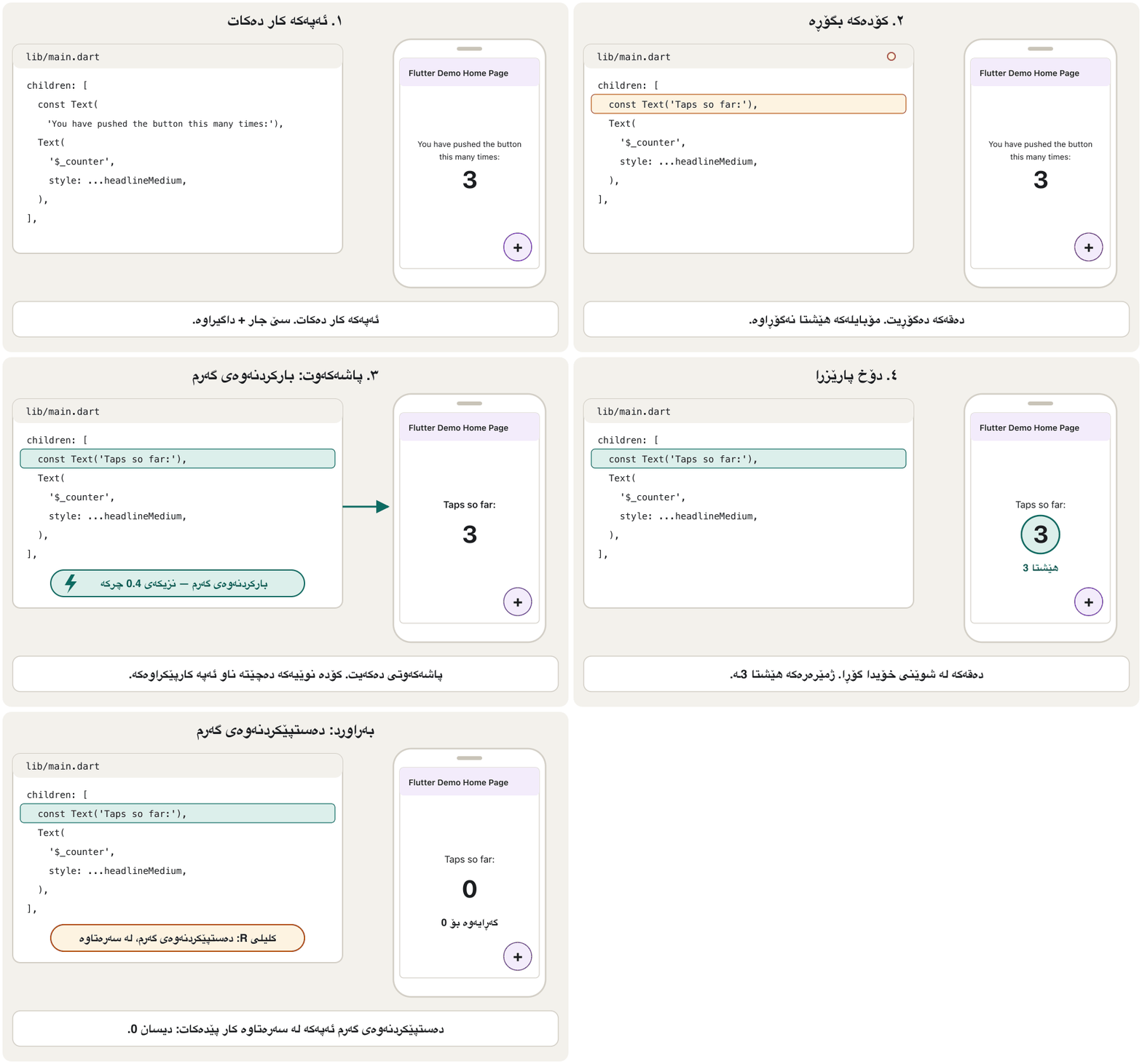
ئەم بیرۆکەیەت لە Flutter چییە؟ ناسی؛ ئێستا بەکاری دەهێنیت. ئەمە ئەو تایبەتمەندییەیە کە زۆربەی گەشەپێدەرانی حەزی لێ دەکەن. کۆدەکە بگۆڕە، پاشەکەوتی بکە و نزیکەی چرکەیەک دواتر کارپێکراوەکە گۆڕانکارییەکە نیشان دەدات — بەبێ دەستپێکردنەوە. دەپارێزێت: وەک ، ئەو دەقەی نووسیوتە و ئەو شاشەیەی لەسەریت وەک خۆیان دەمێننەوە.
Try it with the counter app. Tap + three times. Then find this line in lib/main.dart and change its text:
بە تاقی بکەرەوە. سێ جار + دابگرە. پاشان ئەم دێڕە لە lib/main.dartـدا بدۆزەرەوە و دەقەکەی بگۆڕە:
children: [
  // before: const Text('You have pushed the button this many times:'),
  const Text('Taps so far:'),
  Text(
    '$_counter',
    style: Theme.of(context).textTheme.headlineMedium,
  ),
],
Explain the codeڕوونکردنەوەی کۆدەکە
- Lineدێڕی 3
The new text. Save the file (Ctrl+S, on a Mac Cmd+S): VS Code hot reloads by itself.
دەقە نوێیەکە. پاشەکەوت بکە (Ctrl+S، لە Macـدا Cmd+S): VS Code خۆی دەکات.
- Lineدێڕی 4-7
This
Textshows the counter. Hot reload does not reset_counter, so it still shows 3.ئەم
Textـە نیشان دەدات._counterسفر ناکاتەوە، بۆیە هێشتا 3 نیشان دەدات.
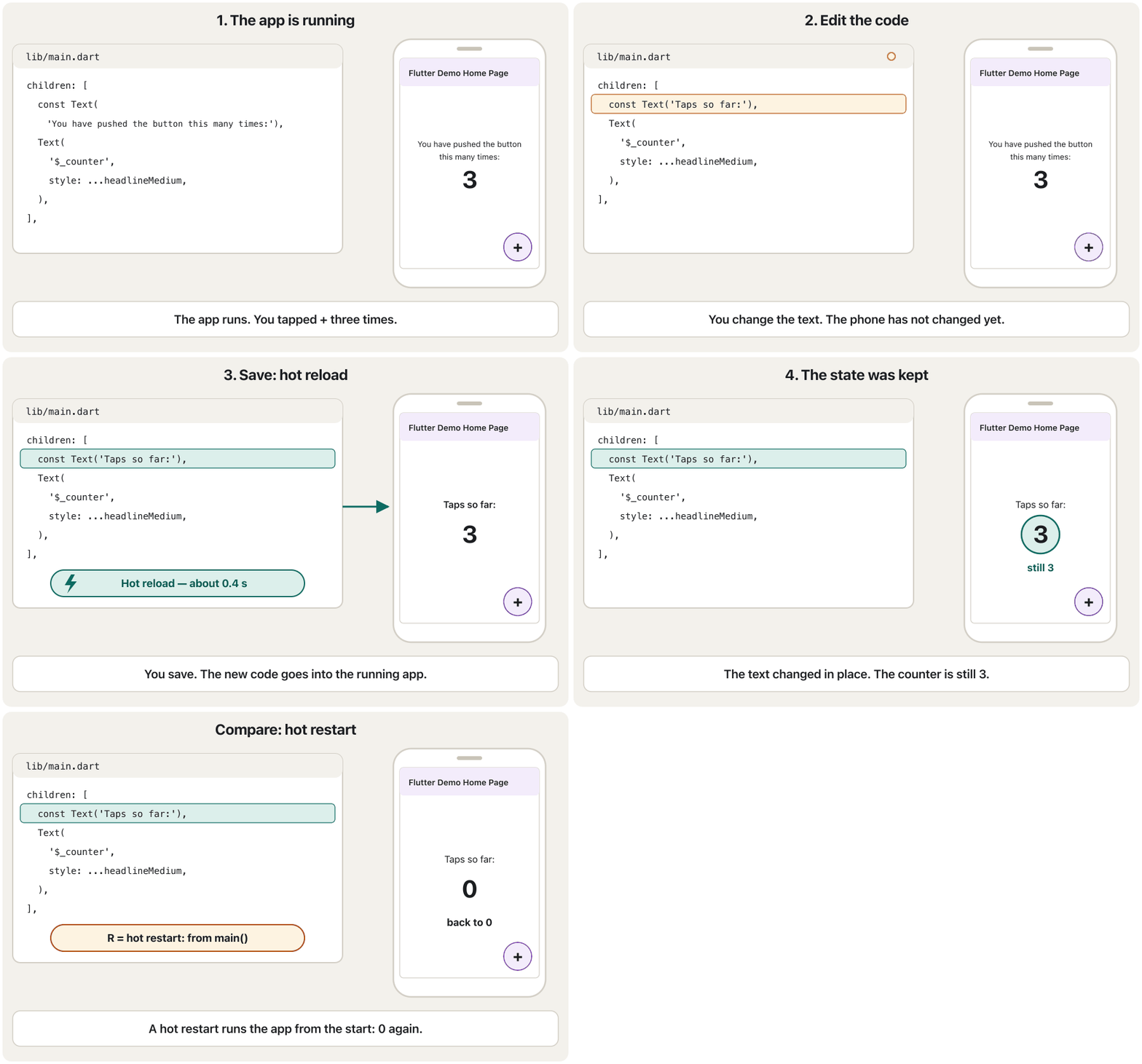
How does it work? While you develop, the app runs in debug mode on the Dart , which uses . On a hot reload, only the changed libraries are recompiled and sent to the running app; Flutter then rebuilds the with the new code. That is why it works only in debug mode — a release app is already compiled ahead of time (see Meet Dart).
چۆن کار دەکات؟ لە کاتی گەشەپێداندا لە دۆخی لەسەر کار دەکات، کە بەکار دەهێنێت. لە تەنها دووبارە کۆمپایل دەکرێن و دەنێردرێن بۆ کارپێکراوەکە؛ پاشان بە کۆدە نوێیەکە دووبارە دروست دەکاتەوە. بۆیە تەنها لە دۆخی کار دەکات — پێشتر بە وەرگێڕدراوە (سەیری ناسینی Dart بکە).
Hot reload: change the app while it runsبارکردنەوەی گەرم: گۆڕینی ئەپەکە لە کاتی کارکردنیدا
Hot restart and full restartدەستپێکردنەوەی گەرم و دەستپێکردنەوەی تەواو
| Questionپرسیار | Hot reload | Hot restart | Full restart تەواو |
|---|---|---|---|
| What happensچی ڕوو دەدات | Sends changed code into the running app and rebuilds the widgetsکۆدی گۆڕاو دەنێرێت بۆ کارپێکراوەکە و دووبارە دروست دەکاتەوە | Loads the new code and runs the app from main() againکۆدە نوێیەکە بار دەکات و دووبارە لە main()ـەوە کار پێدەکات | Stops the app, builds it again (also native code) and starts it ڕادەگرێت، دووبارە بیلدی دەکات (کۆدی ڕەسەنیش) و دەستی پێدەکات |
| State | Keptدەپارێزرێت | Lost (back to the start)لەدەست دەچێت (دەگەڕێتەوە سەرەتا) | Lostلەدەست دەچێت |
| Speedخێرایی | About a secondنزیکەی چرکەیەک | A few secondsچەند چرکەیەک | Slowestهێواشترین |
| Howچۆن | Save, or r, or Ctrl+F5 (Cmd+F5)پاشەکەوتکردن، یان r، یان Ctrl+F5 (Cmd+F5) | R, or Ctrl+Shift+F5 (Cmd+Shift+F5)R، یان Ctrl+Shift+F5 (Cmd+Shift+F5) | Stop and run againڕاگرتن و دووبارە کارپێکردن |
Hot reload does not run the whole program again, so some changes need a hot restart:
هەموو دووبارە کار پێناکات، بۆیە هەندێک گۆڕانکاری پێویستیان بە هەیە:
- changes inside
main()orinitState()(they ran only once, at the start); - a new starting value for a global variable or a static field (it is treated as state);
- turning an
enuminto a class, or changing a generic type such as adding a type parameter; - and a full restart for native Android or iOS code (Kotlin, Java, Swift, Objective-C) and for new plugins.
- گۆڕانکاری لە ناو
main()یانinitState()(تەنها یەک جار، لە سەرەتادا، کاریان کردووە)؛ - سەرەتایی نوێ بۆ گشتی یان خانەیەکی static (وەک سەیر دەکرێت)؛
- گۆڕینی
enumبۆ ، یان گۆڕینی وەک زیادکردنی جۆر؛ - و تەواو بۆ کۆدی ڕەسەنی ئەندرۆید یان iOS (Kotlin، Java، Swift، Objective-C) و بۆ نوێ.
Look inside the app: DevToolsسەیرکردنی ناو ئەپەکە: DevTools
DevTools is a set of tools for Flutter apps that run in debug mode. Its most useful page for beginners is the Flutter inspector, which shows the of the screen — every widget, inside which other widget. (You will learn about widgets and the widget tree in the next chapter, in Widgets and the Widget Tree.)
DevTools کۆمەڵێک ئامرازە بۆ ئەو کە لە دۆخی کار دەکەن. بەسوودترین پەڕەی بۆ سەرەتاکاران Flutter inspectorـە، کە شاشەکە نیشان دەدات — هەموو و لە ناو کام تردایە. (لە بەشی داهاتوودا، لە وانەی ویجێتەکان و داری ویجێتەکان، فێری و دەبیت.)
Start the app with F5.
بە F5 دەست پێبکە.
Open the Command Palette, type
DevToolsand choose one of the Open DevTools commands, for example the Flutter inspector page. It opens inside VS Code (or in the browser).Command Palette بکەرەوە،
DevToolsبنووسە و یەکێک لە فەرمانەکانی Open DevTools هەڵبژێرە، بۆ نموونە پەڕەی Flutter inspector. لە ناو VS Code (یان لە ) دەکرێتەوە.Click Select Widget Mode, then tap something on the phone. The inspector jumps to that widget in the tree and shows its size and constraints.
Select Widget Mode دابگرە، پاشان لە شتێک لەسەر مۆبایلەکە بدە. Inspector دەچێتە سەر ئەو لە دارەکەدا و قەبارە و سنوورەکانی نیشان دەدات.
Select a
RoworColumnto open the Layout Explorer, which shows its main and cross axes and its alignment.RowیانColumnهەڵبژێرە بۆ کردنەوەی Layout Explorer، کە تەوەرە سەرەکی و لاتەنیشتەکانی و ڕیزکردنەکەی نیشان دەدات.
How to open Flutter DevTools and use its inspector to see the widget tree, a widget's size, and how rows and columns are laid out.
چۆن Flutter DevTools بکەیتەوە و بە inspectorـەکەی ، قەبارەی هەر و شێوەی دانانی Row و Column ببینیت.
Plays 0:00-2:01 (official, March 2026): opening DevTools, the Flutter inspector, the Flex Explorer and the inspector's debugging overlays.
لە 0:00 تا 2:01 پەخش دەبێت (فەرمی، ئازاری 2026): کردنەوەی DevTools، Flutter Inspector، Flex Explorer و ئەو هێڵ و نیشانانەی inspector بۆ لەسەر دەیانکێشێت.
Inside a Flutter projectناو پڕۆژەیەکی Flutter
flutter create makes the same set of folders every time. The course's Assignment 2 (a product-catalogue app made as group homework, rebuilt step by step in Project: A Product Catalogue Screen) has exactly this shape: one folder for the Dart code, one for tests, one folder per platform and a few settings files.
flutter create هەموو جارێک هەمان کۆمەڵە دروست دەکات. ئەرکی دووەمی وانەکە ( کاتالۆگی بەرهەم کە وەک ئەرکی ماڵەوەی گرووپی دروست کرا و لە پرۆژە: شاشەی کەتەلۆگی کاڵاکان هەنگاو بە هەنگاو دووبارە دروست دەکرێتەوە) ڕێک ئەم شێوەیەی هەیە: بۆ کۆدی ، یەکێک بۆ تاقیکردنەوەکان، بۆ هەر و چەند .
Inside a Flutter projectناو پڕۆژەیەکی Flutter
A project, folder by folderپڕۆژەیەک، فۆڵدەر بە فۆڵدەر
| Folder or file یان | What it is forبۆ چییە |
|---|---|
lib/ | Your Dart code. lib/main.dart holds main(), where the app starts.کۆدی تۆ. lib/main.dart main()ـی تێدایە، کە لەوێوە دەست پێدەکات. |
test/ | Automatic tests. The template puts one widget test here, widget_test.dart.تاقیکردنەوە خۆکارەکان. یەک تاقیکردنەوەی لێرە دادەنێت، widget_test.dart. |
android/ ios/ | Small native projects that wrap your app for Android (Gradle and Kotlin) and iOS (Xcode). App icons, the app's name and permissions are set here.پڕۆژەی ڕەسەنی بچووک کە بۆ ئەندرۆید (Gradle و Kotlin) و iOS (Xcode) دەپێچنەوە. ، ناوی و لێرە دیاری دەکرێن. |
web/ windows/ macos/ linux/ | The same for the web and the three desktop platforms.هەمان شت بۆ وێب و سێ کۆمپیوتەر. |
pubspec.yaml | The project's ID card: name, version, packages, assets. See the next screen.ناسنامەی پڕۆژەکە: ناو، ، ، . سەیری شاشەی داهاتوو بکە. |
pubspec.lock | The exact package versions that were downloaded. Made by the tools; do not edit it by hand. . ئامرازەکان دروستی دەکەن؛ بە دەست دەستکاریی مەکە. |
analysis_options.yaml | The lint rules used by flutter analyze and the editor.ئەو ڕێسایانەی کە flutter analyze و دەستکاریکەرەکە بەکاریان دەهێنن. |
README.md | A description of the project for people who open it, written in Markdown.وەسفێکی پڕۆژەکە بۆ ئەو کەسانەی دەیکەنەوە، بە Markdown نووسراوە. |
.dart_tool/ build/ | Made by the tools while building. flutter clean deletes them; never put them in Git.ئامرازەکان لە کاتی دروستیان دەکەن. flutter clean دەیانسڕێتەوە؛ هەرگیز مەیانخەرە ناو Git. |
.gitignore .metadata .idea/ *.iml | Settings for Git, for Flutter's own tools and for IntelliJ / Android Studio. بۆ Git، بۆ ئامرازەکانی خودی و بۆ IntelliJ / Android Studio. |
Inside a Flutter projectناو پڕۆژەیەکی Flutter
pubspec.yaml: the project ID cardpubspec.yaml: ناسنامەی پڕۆژەکە
pubspec.yaml is written in , a simple format where indentation with spaces shows what belongs to what. This is the file of the course's Assignment 2, with the long comments removed:
pubspec.yaml بە نووسراوە، شێوازێکی سادە کە تێیدا بۆشایی سەرەتای دێڕ نیشان دەدات چی سەر بە چییە. ئەمە ئەرکی دووەمی وانەکەیە، بەبێ :
name: flutter_application_assignment
description: "A new Flutter project."
publish_to: 'none' # Remove this line if you wish to publish to pub.dev
version: 1.0.0+1
environment:
  sdk: ^3.5.4
dependencies:
  flutter:
    sdk: flutter
  cupertino_icons: ^1.0.8
dev_dependencies:
  flutter_test:
    sdk: flutter
  flutter_lints: ^4.0.0
flutter:
  uses-material-design: true
Explain the codeڕوونکردنەوەی کۆدەکە
- Lineدێڕی 1
The package name: lowercase_with_underscores, like the project name.
ناوی پاکێجەکە: پیتی بچووک و هێڵی ژێرەوە، وەک ناوی پڕۆژەکە.
- Lineدێڕی 3
'none'stops you from publishing the app to pub.dev by mistake. Apps are not packages for other developers.'none'ڕێگەت لێ دەگرێت بە هەڵە لە pub.dev بڵاو بکەیتەوە. نین بۆ گەشەپێدەرانی تر.- Lineدێڕی 4
1.0.0is the version name people see (major.minor.patch).+1is the build number, a whole number that must grow with every upload to a store.1.0.0ناوی کە خەڵک دەیبینن (گەورە.بچووک.چاککردنەوە).+1ژمارەی ، کە دەبێت لەگەڵ هەر بارکردنێک بۆ فرۆشگا گەورەتر ببێت.- Lineدێڕی 5-6
The Dart versions this project accepts:
^3.5.4means 3.5.4 or newer, but below 4.0.0. Any Dart 3 means sound null safety.ئەو کە ئەم پڕۆژەیە قبووڵیان دەکات:
^3.5.4واتە 3.5.4 یان نوێتر، بەڵام لە خوار 4.0.0. هەر 3ـێک واتە تەواو.- Lineدێڕی 7-10
dependencies: packages the app needs when it runs — Flutter itself andcupertino_icons(iOS-style icons).dependencies: پێویست بۆ کارکردنی — خودی وcupertino_icons( شێوەی iOS).- Lineدێڕی 11-14
dev_dependencies: tools only for development —flutter_testfor tests andflutter_lintsfor lint rules. They are not shipped inside the app.dev_dependencies: ئامرازی تەنها بۆ گەشەپێدان —flutter_testبۆ تاقیکردنەوە وflutter_lintsبۆ ڕێساکانی . لە ناو ناڕۆن.- Lineدێڕی 15-16
Flutter's own section.
uses-material-design: trueadds the Material Icons font. Images and fonts (assets) are listed here later.بەشی تایبەتی .
uses-material-design: trueفۆنتی Material Icons زیاد دەکات. وێنە و فۆنتەکان () دواتر لێرە ڕیز دەکرێن.
$ flutter pub add provider   # add a package to dependencies and download it
$ flutter pub get # download everything pubspec.yaml listsInside a Flutter projectناو پڕۆژەیەکی Flutter
Lint rules and the template testڕێساکانی شیکاریی ستاتیکی و تاقیکردنەوەی قاڵب
analysis_options.yaml in the assignment holds one important line, include: package:flutter_lints/flutter.yaml, and an empty linter: rules: section. The lints are small rules about style and likely bugs, such as do not use print in app code (avoid_print) or put the child argument last (sort_child_properties_last). flutter analyze and the editor check your code against them without running it:
analysis_options.yaml لە ئەرکەکەدا یەک دێڕی گرنگی تێدایە، include: package:flutter_lints/flutter.yaml، لەگەڵ بەشێکی بەتاڵی linter: rules:. Lintـەکان ڕێسای بچووکن دەربارەی شێوازی نووسین و ، وەک لە کۆدی print بەکار مەهێنە (avoid_print) یان child لە کۆتاییدا دابنێ (sort_child_properties_last). flutter analyze و دەستکاریکەرەکە کۆدەکەت بەراورد بەم ڕێسایانە دەکەن بەبێ ئەوەی کاری پێبکەن:
$ flutter analyze
Analyzing hello_app...
No issues found! (ran in 64.3s)
The template also adds test/widget_test.dart. It builds MyApp, checks that the counter shows 0, taps + and checks for 1. Assignment 2 replaced the counter app with a product catalogue whose main widget is called MyWidget — but kept this test unchanged:
هەروەها test/widget_test.dart زیاد دەکات. MyApp دروست دەکات، دەپشکنێت کە 0 نیشان دەدات، + دادەگرێت و 1 دەپشکنێت. ئەرکی دووەم گۆڕی بۆ کاتالۆگی بەرهەم کە سەرەکییەکەی ناوی MyWidgetـە — بەڵام ئەم تاقیکردنەوەیەی وەک خۆی هێشتەوە:
// This is a basic Flutter widget test.
//
// To perform an interaction with a widget in your test, use the WidgetTester
// utility in the flutter_test package. For example, you can send tap and scroll
// gestures. You can also use WidgetTester to find child widgets in the widget
// tree, read text, and verify that the values of widget properties are correct.

import 'package:flutter/material.dart';
import 'package:flutter_test/flutter_test.dart';

import 'package:flutter_application_assignment/main.dart';

void main() {
  testWidgets('Counter increments smoke test', (WidgetTester tester) async {
    // Build our app and trigger a frame.
    await tester.pumpWidget(const MyApp());

    // Verify that our counter starts at 0.
    expect(find.text('0'), findsOneWidget);
    expect(find.text('1'), findsNothing);

    // Tap the '+' icon and trigger a frame.
    await tester.tap(find.byIcon(Icons.add));
    await tester.pump();

    // Verify that our counter has incremented.
    expect(find.text('0'), findsNothing);
    expect(find.text('1'), findsOneWidget);
  });
}
Explain the codeڕوونکردنەوەی کۆدەکە
- Lineدێڕی 11
Imports the app's
main.dart.main.dartـی دەهێنێت.- Lineدێڕی 16
Builds
MyApp— but the assignment has noMyAppany more.MyAppدروست دەکات — بەڵام ئەرکەکە ئیترMyAppـی نییە.- Lineدێڕی 18-28
Checks for a counter that the product catalogue does not have.
دەپشکنێت کە کاتالۆگی بەرهەمەکە نییەتی.
We renamed MyApp to MyWidget in a fresh project and ran flutter test. The test cannot even compile:
لە پڕۆژەیەکی نوێدا MyAppمان گۆڕی بۆ MyWidget و flutter testمان جێبەجێ کرد. تاقیکردنەوەکە تەنانەت کۆمپایل ناکرێت:
$ flutter test
test/widget_test.dart:16:35: Error: Couldn't find constructor 'MyApp'.
    await tester.pumpWidget(const MyApp());
                                  ^^^^^
...
00:00 +0 -1: Some tests failed.
The fix: when you replace the template app, update or delete the template test. Make it build the widget your app really starts with, and check things your app really shows. After changing line 16 to await tester.pumpWidget(const MyWidget()); (the renamed counter app still has its counter):
چارەسەر: کاتێک دەگۆڕیت، تاقیکردنەوەی نوێ بکەرەوە یان بیسڕەوە. وای لێ بکە ئەو دروست بکات کە بە ڕاستی پێی دەست پێدەکات و ئەو شتانە بپشکنێت کە بە ڕاستی نیشانیان دەدات. دوای گۆڕینی دێڕی 16 بۆ await tester.pumpWidget(const MyWidget()); ( ناوگۆڕاوەکەی هێشتا هەیە):
$ flutter test
00:00 +0: loading test/widget_test.dart
00:00 +0: Counter increments smoke test
00:00 +1: All tests passed!Common mistakesهەڵە باوەکان
| Mistakeهەڵە | What to do insteadلە جیاتی ئەوە چی بکەیت |
|---|---|
flutter is “not recognised” right after installingflutter دەستبەجێ دوای «نەناسراوە» | Close every terminal and restart VS Code so they read the new PATH; check with flutter --version.هەموو دابخە و VS Code دووبارە بکەرەوە بۆ ئەوەی PATHـی نوێ بخوێننەوە؛ بە flutter --version بیپشکنە. |
The SDK sits in C:\Program Files or a path with spaces لە C:\Program Files یان بۆشاییداردایە | Put it in a simple folder such as %USERPROFILE%\develop (or ~/develop on a Mac).لە سادەی وەک %USERPROFILE%\develop دایبنێ (یان ~/develop لەسەر Mac). |
[!] Android toolchain: licences not accepted[!] Android toolchain: مۆڵەتەکان قبووڵ نەکراون | Run flutter doctor --android-licenses once and accept them.یەک جار flutter doctor --android-licenses جێبەجێ بکە و قبووڵیان بکە. |
| The emulator is painfully slow زۆر هێواشە | Turn on VM acceleration and choose Hardware graphics acceleration.VM acceleration هەڵبکە و Graphics accelerationـی Hardware هەڵبژێرە. |
The phone is missing from flutter devicesمۆبایلەکە لە flutter devicesـدا نییە | Turn on USB debugging, tap Allow on the phone, use a data cable (not a charge-only one) and, on Windows, install the USB driver.USB debugging هەڵبکە، لەسەر مۆبایلەکە Allow دابگرە، کێبڵی دراوە بەکاربهێنە (نەک کێبڵی تەنها بارگاوی) و لە Windowsـدا جێگیر بکە. |
Expecting hot reload to run main() or initState() againچاوەڕوانکردنی ئەوەی main() یان initState() دووبارە کار پێبکات | Use hot restart (R) for those changes.بۆ ئەو گۆڕانکارییانە (R) بەکاربهێنە. |
Naming a project My App or my-appناونانی پڕۆژە بە My App یان my-app | Use lowercase letters and underscores: my_app.پیتی بچووک و هێڵی ژێرەوە بەکاربهێنە: my_app. |
Renaming MyApp but keeping the template testگۆڕینی ناوی MyApp و هێشتنەوەی تاقیکردنەوەی | Update test/widget_test.dart to your real widget, or delete it.test/widget_test.dart بۆ نوێ بکەرەوە، یان بیسڕەوە. |
Editing build/ or pubspec.lock by handدەستکاریکردنی build/ یان pubspec.lock بە دەست | Edit pubspec.yaml; the tools make the other files.pubspec.yaml دەستکاری بکە؛ ئامرازەکان تر دروست دەکەن. |
Tabs or wrong indentation in pubspec.yamlTab یان بۆشایی هەڵە لە سەرەتای دێڕەکانی pubspec.yaml | YAML needs spaces, usually two per level, lined up exactly. پێویستی بە بۆشاییە، زۆرجار دوو بۆشایی بۆ هەر ئاستێک، بە ڕێکی لە ژێر یەکتردا. |
Exercisesڕاهێنانەکان
Run flutter doctor on your computer. For every line, write ready, warning or missing, and what you would do about each warning.
flutter doctor لەسەر کۆمپیوتەرەکەت جێبەجێ بکە. بۆ هەر دێڕێک بنووسە ئامادە، یان نییە و بۆ هەر چی دەکەیت.
Show answerوەڵامەکە پیشان بدە
Every [✓] line is ready. A [!] line always has the fix written under it, for example flutter doctor --android-licenses for unaccepted licences. A [✗] line means a tool is missing; you only need to fix it if you want that platform (Xcode matters only for iOS and macOS apps, on a Mac).
هەموو دێڕێکی [✓] ئامادەیە. دێڕێکی [!] هەمیشە چارەسەرەکەی لە ژێریدا نووسراوە، بۆ نموونە flutter doctor --android-licenses بۆ مۆڵەتی قبووڵنەکراو. دێڕێکی [✗] واتە ئامرازێک نییە؛ تەنها ئەگەر ئەو بوێت پێویستە چاکی بکەیتەوە (Xcode تەنها بۆ iOS و macOS گرنگە، لەسەر Mac).
Create a project called my_first_app and run it on an emulator, your phone or Chrome. Tap + four times. In lib/main.dart change 'Flutter Demo Home Page' to 'My first app' and save. What happens to the title, and what happens to the counter?
پڕۆژەیەک بە ناوی my_first_app دروست بکە و لەسەر ، مۆبایلەکەت یان Chrome کاری پێبکە. چوار جار + دابگرە. لە lib/main.dartـدا 'Flutter Demo Home Page' بگۆڕە بۆ 'My first app' و پاشەکەوتی بکە. چی بەسەر ناونیشانەکە دێت و چی بەسەر ؟
Hintئاماژە
Look for the text in MyApp's build method.
لە buildـی MyAppـدا بە دوای دەقەکەدا بگەڕێ.
Show answerوەڵامەکە پیشان بدە
The title in the app bar changes to My first app within about a second. The counter still shows 4: hot reload rebuilds the widgets with the new code but keeps the app's state.
ناونیشانەکەی سەرەوە لە نزیکەی چرکەیەکدا دەگۆڕێت بۆ My first app. هێشتا 4 نیشان دەدات: بە کۆدە نوێیەکە دووبارە دروست دەکاتەوە، بەڵام دەپارێزێت.
Which way shows each change: (a) the text of a Text widget; (b) the seed colour in ThemeData; (c) a new line inside main(); (d) int _counter = 0; changed to int _counter = 10;; (e) Kotlin code in the android/ folder?
کام ڕێگە هەر گۆڕانکارییەک نیشان دەدات: (أ) دەقی Text؛ (ب) ڕەنگی سەرەکی لە ThemeData؛ (ج) دێڕێکی نوێ لە ناو main()؛ (د) گۆڕینی int _counter = 0; بۆ int _counter = 10;؛ (هـ) کۆدی Kotlin لە android/؟
Show answerوەڵامەکە پیشان بدە
- (a) and (b): hot reload — they are part of a
buildmethod. - (c): hot restart —
main()runs only at the start. - (d): hot restart —
_counteris state that already exists, so a new starting value only appears when the app starts again. - (e): full restart — stop the app and run it again, because native code must be rebuilt.
- (أ) و (ب): — بەشێکن لە
build. - (ج): —
main()تەنها لە سەرەتادا کار دەکات. - (د): —
_counterو پێشتر هەیە، بۆیە سەرەتایی نوێ تەنها کاتێک دەردەکەوێت کە دووبارە دەست پێبکاتەوە. - (هـ): تەواو — ڕابگرە و دووبارە کاری پێبکەرەوە، چونکە کۆدی ڕەسەن دەبێت دووبارە بیلد بکرێتەوە.
A project has version: 1.4.2+9, sdk: ^3.12.0, http under dependencies and flutter_lints under dev_dependencies. (a) What is the version name and the build number? (b) Which package is shipped inside the app? (c) Can the project use Dart 3.13? Dart 4.0?
پڕۆژەیەک version: 1.4.2+9، sdk: ^3.12.0، http لە ژێر dependencies و flutter_lints لە ژێر dev_dependenciesـی هەیە. (أ) ناوی و ژمارەی چین؟ (ب) کام پاکێج لە ناو دەڕوات؟ (ج) ئایا پڕۆژەکە دەتوانێت 3.13 بەکاربهێنێت؟ 4.0؟
Show answerوەڵامەکە پیشان بدە
- (a) Version name
1.4.2, build number9. - (b)
http.flutter_lintsis a development tool only. - (c) Dart 3.13: yes (
^3.12.0allows 3.12.0 up to, but not including, 4.0.0). Dart 4.0: no.
- (أ) ناوی
1.4.2، ژمارەی9. - (ب)
http.flutter_lintsتەنها ئامرازی گەشەپێدانە. - (ج) 3.13: بەڵێ (
^3.12.0ڕێگە بە 3.12.0 دەدات تا 4.0.0، بەبێ خودی 4.0.0). 4.0: نەخێر.
Like Assignment 2, your app no longer has MyApp or a counter. Its main widget is CatalogApp, and the app bar shows the text Products. Rewrite test/widget_test.dart so that flutter test passes.
وەک ئەرکی دووەم، ئیتر MyApp یان نییە. سەرەکییەکەی CatalogAppـە و شریتی سەرەوە دەقی Products نیشان دەدات. test/widget_test.dart دووبارە بنووسەوە بۆ ئەوەی flutter test سەرکەوتوو بێت.
Show answerوەڵامەکە پیشان بدە
import 'package:flutter_test/flutter_test.dart';

import 'package:hello_app/main.dart';

void main() {
  testWidgets('Shows the catalogue title', (WidgetTester tester) async {
    await tester.pumpWidget(const CatalogApp());
    expect(find.text('Products'), findsOneWidget);
  });
}00:00 +0: loading test/widget_test.dart 00:00 +0: Shows the catalogue title 00:01 +1: All tests passed!
The test builds the real widget and checks one thing the app really shows. (The package name in the import is the project's name — hello_app in our test project.)
تاقیکردنەوەکە دروست دەکات و یەک شت دەپشکنێت کە بە ڕاستی نیشانی دەدات. (ناوی پاکێجەکە لە importـدا ناوی پڕۆژەکەیە — hello_app لە پڕۆژەی تاقیکردنەوەکەماندا.)
Karwan has a Windows laptop with 8 GB of RAM, an Android phone and no money for software. He wants to build Android and web apps. Use the seven points from How to choose to suggest his editor and his test devices.
Karwan Windowsـی هەیە بە 8 GB ، مۆبایلێکی ئەندرۆید و پارەی نییە بۆ . دەیەوێت ئەندرۆید و وێب دروست بکات. حەوت خاڵەکەی چۆن هەڵبژێریت بەکاربهێنە بۆ پێشنیارکردنی دەستکاریکەر و ئامێرەکانی تاقیکردنەوەی.
Show answerوەڵامەکە پیشان بدە
VS Code with the Flutter extension: free (cost), light (performance) and runs on Windows (platform compatibility), with a big community. Install Android Studio too, only for the Android SDK and the emulator. Test on his own Android phone (fast even on 8 GB) and in Chrome for the web. iPhone apps are not possible on Windows.
VS Code لەگەڵ Flutter: بێبەرانبەر (تێچوو)، سووک (خێرایی) و لەسەر Windows کار دەکات ( لەگەڵ )، لەگەڵ کۆمەڵگەیەکی گەورە. Android Studioـیش جێگیر بکات، تەنها بۆ ئەندرۆید و . لەسەر مۆبایلە ئەندرۆیدەکەی خۆی تاقی بکاتەوە (تەنانەت بە 8 GBـیش خێرایە) و بۆ وێب لە Chrome. iPhone لەسەر Windows ناکرێت.
Summaryپوختە
- An IDE is an editor plus the tools to build, run and debug. VS Code with the Flutter extension is the usual choice; Android Studio gives you the Android SDK and the emulator. Codemagic is a CI/CD service, not an editor.
- Install: Git, VS Code, the Flutter extension, then Flutter: New Project → Download SDK → Add SDK to PATH, and restart.
flutter doctorchecks the setup:[✓]ready,[!]warning with its fix,[✗]missing.- Apps run on an emulator, a real phone, Chrome or the desktop; iOS needs a Mac.
- Hot reload keeps the state and shows code changes in about a second; hot restart starts again from
main(). - A project has
lib/for Dart code,test/, one folder per platform, andpubspec.yamlfor its name, version and packages. Keep the template test in step with your app.
- دەستکاریکەرێکە لەگەڵ ئامرازەکانی بیلدکردن، کارپێکردن و . VS Code لەگەڵ Flutter هەڵبژاردەی باوە؛ Android Studio ئەندرۆید و پێدەدات. Codemagic خزمەتگوزارییەکی CI/CDـیە، نەک دەستکاریکەر.
- : Git، VS Code، Flutter، پاشان Flutter: New Project ← Download SDK ← Add SDK to PATH و دووبارە کردنەوە.
flutter doctorئامادەکارییەکە دەپشکنێت:[✓]ئامادە،[!]لەگەڵ چارەسەرەکەی،[✗]نییە.- لەسەر ، مۆبایلێکی ڕاستەقینە، Chrome یان کۆمپیوتەر کار دەکەن؛ iOS پێویستی بە Mac هەیە.
- دەپارێزێت و گۆڕانکارییەکانی کۆد لە نزیکەی چرکەیەکدا نیشان دەدات؛ دووبارە لە
main()ـەوە دەست پێدەکاتەوە. - پڕۆژەیەک
lib/ـی بۆ کۆدی ،test/، بۆ هەر وpubspec.yamlـی بۆ ناو، و هەیە. تاقیکردنەوەی لەگەڵ ڕێک بخە.
What is the difference between a text editor and an IDE?جیاوازیی نێوان دەستکاریکەری دەق و ژینگەی کۆکراوەی گەشەپێدان چییە؟
A text editor only edits text files. An IDE adds code completion, error checking, running and debugging.
تەنها دەق دەستکاری دەکات. تەواوکردنی کۆد، پشکنینی ، کارپێکردن و زیاد دەکات.
Why must you restart terminals after adding Flutter to the PATH?بۆچی دەبێت دوای زیادکردنی Flutter بۆ PATH تێرمیناڵەکان دووبارە بکەیتەوە؟
A terminal reads PATH when it opens, so only new terminals know where flutter is.
کاتێک دەکرێتەوە PATH دەخوێنێتەوە، بۆیە تەنها نوێکان دەزانن flutter لە کوێیە.
What does +3 mean in version: 1.0.0+3?+3 لە version: 1.0.0+3ـدا چی دەگەیەنێت؟
The build number. It must grow with every upload to a store.
ژمارەی . دەبێت لەگەڵ هەر بارکردنێک بۆ فرۆشگا گەورەتر ببێت.
When is hot reload not enough?کەی بارکردنەوەی گەرم بەس نییە؟
For changes in main() or initState(), new starting values of global or static variables, enum/class or generic-type changes (hot restart), and native code (full restart).
بۆ گۆڕانکاری لە main() یان initState()، سەرەتایی نوێی گشتی یان static، گۆڕینی enum/ یان () و کۆدی ڕەسەن ( تەواو).
Lesson complete!وانەکە تەواو بوو!
Well done. Review the key terms, then go on to the next lesson.دەستخۆش. سەیرێکی زاراوە سەرەکییەکان بکەرەوە، پاشان بڕۆ بۆ وانەی داهاتوو.
Key termsزاراوە سەرەکییەکان
Meet Dartناسینی Dart
Related lecturesوانە پەیوەندیدارەکان
References and further readingسەرچاوەکان و خوێندنەوەی زیاتر
- Flutter docs: Set up and test drive Flutter (VS Code quick start)
- Flutter docs: Install Flutter manually
- Flutter docs: Set up Android development
- Flutter docs: Set up iOS development
- Flutter docs: Hot reload
- Flutter docs: Visual Studio Code
- Flutter docs: Run DevTools from VS Code
- Flutter docs: The Flutter inspector
- Flutter docs: The flutter command-line tool
- Android Developers: Configure on-device developer options
- Codemagic: Getting started (what Codemagic is)
- Flutter docs: Set up Linux development
This lecture is a first edition. The Kurdish text and terminology are waiting for review by Kurdish IT teachers.ئەم وانەیە چاپی یەکەمە. دەقە کوردییەکە و زاراوەکانی چاوەڕێی پێداچوونەوەی مامۆستایانی کوردی بواری IT ن.