Chapterبەش 8 · Lectureوانە 8.10
ORM: Working with Tables as ObjectsORM: کارکردن لەگەڵ خشتەکان وەک ئۆبجێکتەکان
Why rows and objects do not fit together, what an ORM does (classes and tables, objects and rows, relations), the Active Record and Data Mapper patterns, a small hand-made mapper in PHP with PDO and SQLite that you can run, Eloquent and Doctrine as they look in 2026, safe queries, the N+1 query problem measured, migrations in one screen, and when plain SQL is the better choice.
بۆچی و ڕێک لەگەڵ یەک ناکەون، چی دەکات ( و ، و ، )، هەردوو شێوازی و ، هاوتاکەرێکی بچووکی دەستکرد بە PHP، PDO و SQLite کە خۆت کاری پێ دەکەیت، Eloquent و Doctrine وەک لە 2026ـدا هەن، سەلامەت، بە پێوانەوە، لە یەک شاشەدا و ئەو کاتانەی سادە باشترە.
What you will learnچی فێر دەبیت
- Explain why rows and objects do not fit together: identity, links, types and inheritance.
- Describe what an ORM maps and what it does for you.
- Tell Active Record from Data Mapper, and read Eloquent and Doctrine code.
- Build and use a small mapper with PDO and SQLite, with bound parameters and an allow-list for names.
- Spot the N+1 query problem, fix it with eager loading, and know when plain SQL or a migration is the right tool.
- ڕوونی بکەیتەوە بۆچی و ڕێک ناکەون: ناسنامە، بەستنەوە، جۆر و .
- وەسفی ئەوە بکەیت کە چی هاوتا دەکات و چیت بۆ دەکات.
- لە جیا بکەیتەوە و کۆدی Eloquent و Doctrine بخوێنیتەوە.
- هاوتاکەرێکی بچووک بە PDO و دروست بکەیت و بەکاری بهێنیت، بە بەستراو و بۆ ناوەکان.
- بدۆزیتەوە، بە چارەسەری بکەیت و بزانیت کەی سادە یان ئامرازی دروستە.
Rows in the database, objects in PHPتۆمارەکان لە بنکەدراوەدا، ئۆبجێکتەکان لە PHPـدا
In the CRUD application every page did the same work by hand. To show a student it ran a SELECT, received the row as an array and printed $row['name']. To save a student it listed every column again in an INSERT or an UPDATE. Meanwhile, Classes and Objects showed a better home for data: an object such as $aram, made from a class Student, with properties and methods.
لە بەرنامەی CRUDـدا هەموو هەمان کاری بە دەست دەکرد. بۆ پیشاندانی قوتابییەک SELECTـێکی دەنارد، وەک وەردەگرت و $row['name']ـی چاپ دەکرد. بۆ هەڵگرتنی قوتابییەک، دیسان هەموو لە INSERT یان UPDATEـدا دەنووسییەوە. لە هەمان کاتدا کلاسەکان و ئۆبجێکتەکان شوێنێکی باشتری بۆ پیشان دا: وەک $aram کە لە Student دروست کراوە، بە و .
So in every page that works with a database two worlds meet: the database keeps rows, and your PHP code wants objects. Something must copy between them, every time and in both directions. An ORM (object–relational mapping) is a library that does this copying for you.
کەواتە لە هەموو ئەو کار لەگەڵ دەکەن، دوو جیهان بەیەک دەگەن: هەڵدەگرێت و کۆدی PHPـەکەت دەوێت. شتێک دەبێت هەموو جارێک و بە هەردوو ئاراستەدا لە نێوانیاندا کۆپی بکات. (هاوتاکردنی و پەیوەندی) کە ئەم کۆپیکردنەت بۆ دەکات.
Why rows and objects do not fitبۆچی تۆمار و ئۆبجێکت ڕێک ناکەون
Tables and objects were made for different jobs. Tables keep facts so that many programs can search them; objects keep data and behaviour together inside one program. Programmers call the friction between the two the object–relational impedance mismatch. Four differences cause most of it:
و بۆ دوو کاری جیاواز دروست کراون. ڕاستییەکان هەڵدەگرن بۆ ئەوەی زۆر بتوانن تێیاندا بگەڕێن؛ و ڕەفتار لە ناو یەک پێکەوە کۆ دەکەنەوە. بەرنامەسازان بەم ناکۆکییەی نێوانیان دەڵێن object–relational impedance mismatch. چوار جیاوازی زۆربەی کێشەکە دروست دەکەن:
- Who is it? A row is known by its primary key (
id = 1). In PHP, twoSELECTs of row 1 can give two different objects that both sayid = 1. - Links. A table points to another table with a foreign key (
department_id = 2); an object simply holds the other object ($aram->department). - Types. SQLite stores only
NULL,INTEGER,REAL,TEXTandBLOB: true and false become 1 and 0, and dates become text or numbers. PHP hasint,float,string,bool,null, arrays and objects such asDateTime. - Families.
class Teacher extends Person(inheritance) has no twin in a table, so the ORM must choose how to store it.
- کێیە؟ بە دەناسرێتەوە (
id = 1). لە PHPـدا دووSELECTـی 1 دەتوانن دوو جیاواز بدەن کە هەردووکیان دەڵێنid = 1. - بەستنەوە. بە ئاماژە بە تر دەکات (
department_id = 2)؛ بە سادەیی ترەکە لە خۆیدا هەڵدەگرێت ($aram->department). - جۆرەکان. تەنیا
NULL،INTEGER،REAL،TEXTوBLOBهەڵدەگرێت: true و false دەبن بە 1 و 0 و ڕێکەوتەکان دەبن بە دەق یان ژمارە. PHPint،float،string،bool،null، و وەکDateTimeـی هەیە. - خێزان.
class Teacher extends Person(بۆماوە) هیچ هاوتایەکی لە نییە، بۆیە دەبێت بڕیار بدات چۆن هەڵیبگرێت.
What an ORM doesORM چی دەکات
Object–relational mapping: a that connects the and of a program with the and of a . It writes the for you, so your code loads and saves objects instead of rows.
هاوتاکردنی ئۆبجێکت و پەیوەندی: کە و دەبەستێتەوە بە و . بۆت دەنووسێت، بۆیە کۆدەکەت لەبری دەهێنێت و هەڵدەگرێت.
An ORM keeps a map between the two worlds: each class goes with a table, each object with a row, each property with a column and each object link with a foreign key. With that map it can write the SQL (SELECT, INSERT, UPDATE, DELETE) for you, convert types in both directions, load linked objects when you ask for them, and notice which objects changed so that it saves only those. In a program organised in layers, the ORM belongs to the data access layer: see Layers and Business Logic.
نەخشەیەک لە نێوان هەردوو جیهانەکەدا دەپارێزێت: هەر لەگەڵ ، هەر لەگەڵ ، هەر لەگەڵ و هەر بەستنەوەیەکی لەگەڵ . بەو نەخشەیە دەتوانێت (SELECT، INSERT، UPDATE، DELETE) بۆت بنووسێت، جۆرەکان بە هەردوو ئاراستەدا بگۆڕێت، ئەو بەستراون کاتێک داوایان دەکەیت بهێنێت و بزانێت کام گۆڕاون، بۆ ئەوەی تەنیا ئەوانە هەڵبگرێت. لە کە بە ڕێکخراوە، بەشێکە لە : بڕوانە چینەکان و لۆجیکی کاروبار.
An ORM is like a translator in the bazaar of Erbil, standing between a Kurdish shopkeeper and a visitor who speaks only English. Each of them speaks normally, and the translator turns every sentence into the other language. Your code speaks objects, the database speaks rows and SQL, and the ORM translates.
وەک وەرگێڕێکە لە بازاڕی هەولێر، لە نێوان دوکاندارێکی کورد و میوانێک کە تەنیا ئینگلیزی دەزانێت. هەریەکەیان بە ئاسایی قسە دەکات و وەرگێڕەکە هەموو ڕستەیەک دەکاتە زمانەکەی تر. کۆدەکەت بە قسە دەکات، بە و و وەردەگێڕێت.
Where the analogy stops workingسنووری ئەم نموونەیە
A translator still needs you to understand the deal. When a sentence is long and difficult, such as a big report or a change to thousands of rows, it is often clearer to speak SQL yourself.
وەرگێڕ هێشتا پێویستی بەوەیە کە تۆ لە مامەڵەکە تێبگەیت. کاتێک ڕستەیەک درێژ و قورسە، وەک گەورە یان گۆڕینی هەزاران ، زۆرجار ڕوونترە خۆت بە قسە بکەیت.
A small mapper you can runهاوتاکەرێکی بچووک کە دەتوانیت کاری پێ بکەیت
The best way to see what an ORM does for you is to build a tiny one. It needs nothing new: PDO with SQLite, as in Using SQLite from PHP. Student is a plain class whose constructor uses property promotion. StudentMapper moves students between objects and the students table, so it is a small Data Mapper. Every query uses ? placeholders, so the values are always bound (prepared statements with PDO).
باشترین ڕێگا بۆ بینینی ئەوەی چیت بۆ دەکات ئەوەیە کە یەکێکی بچووک دروست بکەیت. هیچ شتێکی نوێی ناوێت: PDO لەگەڵ ، وەک بەکارهێنانی SQLite لە PHPـەوە. Student سادەیە و بەرزکردنەوەی پارامیتەر بۆ تایبەتمەندی بەکار دەهێنێت. StudentMapper قوتابییەکان لە نێوان و studentsـدا دەگوازێتەوە، بۆیە نموونەیەکی بچووکی . هەموو شوێنی ? بەکار دەهێنێت، بۆیە نرخەکان هەمیشە بە جیا دەنێردرێن (ڕستە ئامادەکراوەکان بە PDO).
<?php
// mapper.php - a tiny hand-made ORM (a Data Mapper): PDO + SQLite, nothing to install

class Student
{
    public ?int $id = null;               // null = not in the database yet

    public function __construct(
        public string $name,
        public int $marks,
    ) {}
}

class StudentMapper
{
    public function __construct(private PDO $db) {}

    // One row (an array) becomes one object
    private function toObject(array $row): Student
    {
        $student = new Student($row['name'], (int) $row['marks']);
        $student->id = (int) $row['id'];
        return $student;
    }

    // Every query goes through here, so we can see the SQL the mapper writes
    private function run(string $sql, array $params = []): PDOStatement
    {
        echo "  SQL> $sql  ", json_encode($params), "\n";
        $stmt = $this->db->prepare($sql);
        $stmt->execute($params);
        return $stmt;
    }

    public function find(int $id): ?Student
    {
        $row = $this->run('SELECT id, name, marks FROM students WHERE id = ?', [$id])
                    ->fetch(PDO::FETCH_ASSOC);
        return $row ? $this->toObject($row) : null;
    }

    /** @return Student[] */
    public function findAll(): array
    {
        $rows = $this->run('SELECT id, name, marks FROM students ORDER BY id')
                     ->fetchAll(PDO::FETCH_ASSOC);
        return array_map(fn(array $row) => $this->toObject($row), $rows);
    }

    // One object becomes one row: INSERT a new object, UPDATE an old one
    public function save(Student $student): void
    {
        if ($student->id === null) {
            $this->run('INSERT INTO students (name, marks) VALUES (?, ?)',
                       [$student->name, $student->marks]);
            $student->id = (int) $this->db->lastInsertId();
        } else {
            $this->run('UPDATE students SET name = ?, marks = ? WHERE id = ?',
                       [$student->name, $student->marks, $student->id]);
        }
    }
}
Explain the codeڕوونکردنەوەی کۆدەکە
- Lineدێڕی 6
?intwith= null: a new object has no id until the database gives it one.?intلەگەڵ= null: نوێ هیچ idـێکی نییە تا یەکێکی پێ دەدات.- Lineدێڕی 19-23
One row (an array) becomes one object: the heart of every ORM.
یەک () دەبێت بە یەک : دڵی هەموو .
- Lineدێڕی 27-32
Every query passes through here: it prints the SQL, then prepares it and binds the values.
هەموو لێرەوە تێدەپەڕێت: چاپ دەکات، پاشان ئامادەی دەکات و نرخەکان دەبەستێتەوە.
- Lineدێڕی 51-59
No id:
INSERT, then read the new id. An id:UPDATEthat row.بێ id:
INSERT، پاشان idـی نوێ دەخوێنێتەوە. بە id:UPDATEی ئەو .
A small mapper you can runهاوتاکەرێکی بچووک کە دەتوانیت کاری پێ بکەیت
Objects in, objects outئۆبجێکت دەچێتە ژوورەوە، ئۆبجێکت دێتە دەرەوە
Now use the mapper. use-mapper.php contains no SQL at all: it creates objects, changes one of them and asks the mapper to save them. The SQL> lines are printed by the mapper's run(), so you can watch the SQL that an ORM normally writes for you in silence.
ئێستا هاوتاکەرەکە بەکار بهێنە. use-mapper.php هیچ تێدا نییە: دروست دەکات، یەکێکیان دەگۆڕێت و داوا لە هاوتاکەرەکە دەکات هەڵیانبگرێت. دێڕەکانی SQL> لەلایەن run()ـی هاوتاکەرەکەوە چاپ دەکرێن، بۆیە دەتوانیت ئەو ببینیت کە بە ئاسایی بە بێدەنگی بۆت دەنووسێت.
<?php
// use-mapper.php - objects in, objects out: no SQL in this file
require __DIR__ . '/mapper.php';

$db = new PDO('sqlite::memory:');                  // a database in memory, for the demo
$db->exec('CREATE TABLE students (
    id    INTEGER PRIMARY KEY,
    name  TEXT    NOT NULL,
    marks INTEGER NOT NULL
)');
$mapper = new StudentMapper($db);

$aram = new Student('Aram', 85);
$mapper->save($aram);                              // new object: INSERT
$mapper->save(new Student('Shilan', 92));
echo "Aram's id is now {$aram->id}\n";

$aram->marks = 88;                                 // change the object...
$mapper->save($aram);                              // ...and save it: UPDATE

foreach ($mapper->findAll() as $s) {
    echo "{$s->id}: {$s->name} has {$s->marks} marks\n";
}
var_dump($mapper->find(9)); // no such row: nullSQL> INSERT INTO students (name, marks) VALUES (?, ?) ["Aram",85] SQL> INSERT INTO students (name, marks) VALUES (?, ?) ["Shilan",92] Aram's id is now 1 SQL> UPDATE students SET name = ?, marks = ? WHERE id = ? ["Aram",88,1] SQL> SELECT id, name, marks FROM students ORDER BY id [] 1: Aram has 88 marks 2: Shilan has 92 marks SQL> SELECT id, name, marks FROM students WHERE id = ? [9] NULL
Output of php use-mapper.php with PHP 8.2, the PHP that comes with XAMPP.
php use-mapper.php بە PHP 8.2، ئەو PHPـەی لەگەڵ XAMPP دێت.
Explain the codeڕوونکردنەوەی کۆدەکە
- Lineدێڕی 5
sqlite::memory:keeps the database in memory for the demo; a file path works the same way.sqlite::memory:بۆ ئەم نموونەیە لە هەڵدەگرێت؛ ڕێڕەوی بە هەمان شێوە کار دەکات.- Lineدێڕی 18-19
Change the object, then save it: the mapper sends an
UPDATE.بگۆڕە، پاشان هەڵیبگرە: هاوتاکەرەکە
UPDATEـێک دەنێرێت.
Read the output from the top: two INSERTs; then an UPDATE, because $aram already had id 1; then the SELECT of findAll(). find(9) gives NULL, not an error, because no row has id 9. A real ORM adds much more (relations, type conversion, change tracking), but this is its core.
لە سەرەوە بخوێنەوە: دوو INSERT؛ پاشان UPDATEـێک، چونکە $aram پێشتر id 1ـی هەبوو؛ پاشان SELECTـی findAll(). find(9) NULL دەداتەوە نەک ، چونکە هیچ idـی 9ـی نییە. ڕاستەقینە زۆر شتی تر زیاد دەکات (، ، شوێنکەوتنی گۆڕانکاری)، بەڵام بیرۆکە سەرەکییەکەی ئەمەیە.
Two designs: Active Record and Data Mapperدوو دیزاین: تۆماری چالاک و هاوتاکەری دراوە
Martin Fowler gave the two common designs their names in his book Patterns of Enterprise Application Architecture (2002).
Martin Fowler لە کتێبی Patterns of Enterprise Application Architecture (2002)ـدا ناوی ئەم دوو دیزاینە باوەی دانا.
- Active Record: each object wraps one row and loads, saves and deletes itself:
$student->save(). The class knows its table. It is quick to learn; Laravel's Eloquent and Ruby on Rails work this way. - Data Mapper: plain objects know nothing about the database, and a separate mapper moves the data both ways:
$mapper->save($student). There are more pieces, but your business rules stay free of SQL and are easy to test. Doctrine works this way, and so does ourStudentMapper.
- : هەر یەک لە خۆ دەگرێت و خۆی دەهێنێت، هەڵدەگرێت و دەسڕێتەوە:
$student->save(). دەناسێت. فێربوونی خێرایە؛ Eloquentـی Laravel و Ruby on Rails بەم شێوەیە کار دەکەن. - : سادەن و هیچ لە نازانن و هاوتاکەرێکی جیا بە هەردوو ئاراستەدا دەگوازێتەوە:
$mapper->save($student). پارچەی زیاترە، بەڵام یاساکانی کارەکەت بێ دەمێننەوە و تاقیکردنەوەیان ئاسانە. Doctrine بەم شێوەیە کار دەکات،StudentMapperـەکەی ئێمەش هەروەها.
Eloquent (Laravel): Active Record in practiceEloquent (Laravel): تۆماری چالاک لە کاردا
Laravel is a popular PHP framework, and Eloquent is its ORM. As of November 2026 the current version is Laravel 13, released on 17 March 2026. It needs PHP 8.3 or newer and is installed with Composer, so it does not run on the PHP 8.2 of this course's XAMPP. The code below is not run here: it follows the official Laravel 13 documentation.
Laravel بەناوبانگی PHPـە و Eloquent . لە تشرینی دووەمی 2026ـدا وەشانی ئێستا Laravel 13ـە کە لە 17ی ئازاری 2026 بڵاو کرایەوە. PHP 8.3 یان نوێتری پێویستە و بە Composer دادەمەزرێت، بۆیە لەسەر PHP 8.2ـی XAMPPـی ئەم کۆرسە کار ناکات. ئەم کۆدەی خوارەوە لێرە جێبەجێ نەکراوە: بەپێی فەرمیی Laravel 13 نووسراوە.
<?php
// app/Models/Student.php - Laravel 13 (not run in this lesson)
namespace App\Models;

use Illuminate\Database\Eloquent\Attributes\Fillable;
use Illuminate\Database\Eloquent\Model;

#[Fillable(['name', 'marks'])]
class Student extends Model
{
    // table "students", primary key "id", created_at and updated_at: all by convention
}
Explain the codeڕوونکردنەوەی کۆدەکە
- Lineدێڕی 8
Fillablelists the only columns thatcreate()may fill. It stops mass assignment: a visitor who addsis_admin=1to a form cannot setis_admin.Fillableتەنیا ئەو لیست دەکات کەcreate()دەتوانێت پڕیان بکاتەوە. ڕێگە لە دەگرێت: سەردانکەرێک کەis_admin=1بۆ زیاد دەکات ناتوانێتis_adminدابنێت.
<?php
// Using the model in Laravel 13 (not run in this lesson)
use App\Models\Student;

$all  = Student::all();                                   // every student
$good = Student::where('marks', '>=', 80)->orderBy('name')->get();
$aram = Student::find(1);                                 // one object, or null

$aram->marks = 88;
$aram->save();                                            // UPDATE ... WHERE id = 1

$hana = Student::create(['name' => 'Hana', 'marks' => 90]); // INSERTDoctrine: Data Mapper in practiceDoctrine: هاوتاکەری دراوە لە کاردا
Doctrine ORM is the other big PHP ORM; the Symfony framework uses it for databases. As of November 2026 the maintained version is Doctrine ORM 3.7, and 4.0 is on the way. Its documentation says it is built on the Data Mapper pattern: your classes, called entities, are plain PHP; attributes such as #[ORM\Column] describe the table; and an EntityManager does the loading and saving. Not run here; it follows Doctrine's Getting Started tutorial.
Doctrine ORM ئەو گەورەکەی تری PHPـە و Symfony بۆ بەکاری دەهێنێت. لە تشرینی دووەمی 2026ـدا وەشانی پشتگیریکراو Doctrine ORM 3.7ـە و 4.0 لە ڕێگادایە. دەڵێت لەسەر دروست کراوە: ، کە پێیان دەوترێت ، PHPـی سادەن؛ ئاتریبیوتەکانی وەک #[ORM\Column] وەسف دەکەن؛ EntityManagerـیش هێنان و هەڵگرتن دەکات. لێرە جێبەجێ نەکراوە؛ بەپێی وانەی Getting Startedـی Doctrine نووسراوە.
<?php
// src/Student.php - Doctrine ORM 3 (not run in this lesson)
use Doctrine\ORM\Mapping as ORM;

#[ORM\Entity]
#[ORM\Table(name: 'students')]
class Student
{
    #[ORM\Id]
    #[ORM\Column(type: 'integer')]
    #[ORM\GeneratedValue]
    private int|null $id = null;

    #[ORM\Column(type: 'string')]
    private string $name;

    #[ORM\Column(type: 'integer')]
    private int $marks;

    // getters and setters: getId(), getName(), setName(), setMarks() ...
}<?php
// Saving and finding with Doctrine (not run in this lesson)
$hana = new Student();
$hana->setName('Hana');
$hana->setMarks(90);
$entityManager->persist($hana); // "remember to save this one": nothing is written yet
$entityManager->flush(); // now the INSERT runs, inside one transaction
$found = $entityManager->find(Student::class, 1); // one object, or null
$all = $entityManager->getRepository(Student::class)->findAll(); // every studentDoctrine remembers every entity it has loaded or been asked to persist; this list is its Unit of Work. flush() works out what changed and writes everything in one transaction, so you do not save objects one by one.
Doctrine هەموو لە بیری دەمێنێت کە هێنابێتی یان داوای persistـی لێ کرابێت؛ ئەم لیستە Unit of Workـەکەیەتی. flush() دەزانێت چی گۆڕاوە و هەموو شتێک لە یەک دەنووسێت، بۆیە یەک یەک هەڵناگریت.
Safe queries: what the ORM protects, and what it does notپرسەکان سەلامەت: ORM چی دەپارێزێت و چی ناپارێزێت
ORMs send values as bound parameters, the same defence you learned with prepared statements. Laravel's documentation says that strings passed to its query builder as bindings need no cleaning. Two things stay your job. First, a ? can only stand for a value, never for a column or a table name (what a ? cannot stand for). Second, every ORM has a door for raw SQL, such as whereRaw() and DB::raw(). Raw SQL glued together from user input is open to SQL injection.
نرخەکان وەک بەستراو دەنێرن، هەمان بەرگری کە لەگەڵ ڕستە ئامادەکراوەکان فێری بوویت. Laravel دەڵێت ئەو وەک بەستنەوە دەدرێنە ئامرازی دروستکردنی پێویستیان بە پاککردنەوە نییە. دوو شت هەر کاری تۆن. یەکەم، ? تەنیا دەتوانێت جێی نرخێک بگرێتەوە، هەرگیز جێی ناوی یان ناگرێتەوە (ئەوەی ? ناتوانێت جێی بگرێتەوە). دووەم، هەموو دەرگایەکی بۆ خاو هەیە، وەک whereRaw() و DB::raw(). خاو کە لە پێکەوە لکێنرابێت بۆ تێخزاندنی SQL کراوەیە.
?؛ ناو دەبێت لە تێبپەڕێت.CêITSafe queries: what the ORM protects, and what it does notپرسەکان سەلامەت: ORM چی دەپارێزێت و چی ناپارێزێت
A common mistake: a column name from the URLهەڵەیەکی باو: ناوی ستوونێک لە URLـەوە
A findBy($column, $value) helper is handy, and many hand-made mappers have one. In the version below the value is bound, but the column name is glued into the SQL. Imagine that both come from the URL:
یارمەتیدەرێکی findBy($column, $value) بەسوودە و زۆر هاوتاکەری دەستکرد یەکێکیان هەیە. لەم وەشانەی خوارەوەدا نرخەکە دەبەسترێتەوە، بەڵام ناوی دەلکێنرێتە . وا دابنێ هەردووکیان لە URLـەوە دێن:
<?php
// find-by.php - a value can be bound; a column NAME cannot
$db = new PDO('sqlite::memory:');
$db->exec('CREATE TABLE students (id INTEGER PRIMARY KEY, name TEXT, marks INTEGER)');
$db->exec("INSERT INTO students (name, marks) VALUES
           ('Aram', 85), ('Shilan', 92), ('Karwan', 78)");

// WRONG: the column name is glued into the SQL text
function findByUnsafe(PDO $db, string $column, string $value): array
{
    $stmt = $db->prepare("SELECT name FROM students WHERE $column = ?");
    $stmt->execute([$value]);
    return $stmt->fetchAll(PDO::FETCH_COLUMN);
}

// RIGHT: only names from an allow-list may become part of the SQL
function findBy(PDO $db, string $column, string $value): array
{
    $allowed = ['name', 'marks'];
    if (!in_array($column, $allowed, true)) {
        throw new InvalidArgumentException("Cannot search by '$column'");
    }
    $stmt = $db->prepare("SELECT name FROM students WHERE $column = ?");
    $stmt->execute([$value]);
    return $stmt->fetchAll(PDO::FETCH_COLUMN);
}

// Imagine both values came from the URL: ?by=...&value=...
$by = "1 = 1 OR name";
$value = "nobody";

echo "Unsafe: ", implode(', ', findByUnsafe($db, $by, $value)), "\n";
try {
    $names = findBy($db, $by, $value);
    echo "Safe:   ", implode(', ', $names), "\n";
} catch (InvalidArgumentException $e) {
    echo "Safe:   refused - ", $e->getMessage(), "\n";
}
echo "Normal: ", implode(', ', findBy($db, 'marks', '92')), "\n";Unsafe: Aram, Shilan, Karwan Safe: refused - Cannot search by '1 = 1 OR name' Normal: Shilan
Output of php find-by.php (PHP 8.2).
php find-by.php (PHP 8.2).
Explain the codeڕوونکردنەوەی کۆدەکە
- Lineدێڕی 11
Wrong: the column name becomes part of the SQL text.
هەڵە: ناوی دەبێتە بەشێک لە دەقی .
- Lineدێڕی 19-21
Right: only names on the allow-list may enter the SQL.
دروست: تەنیا ناوەکانی ناو دەتوانن بچنە ناو .
The unsafe version returned every student, although nobody is called nobody: 1 = 1 OR name = ? is always true. The safe version refused the name before any SQL ran. An ORM cannot do this check for you, because only you know which columns may be searched.
وەشانە ناسەلامەتەکە هەموو قوتابییەکانی گەڕاندەوە، هەرچەندە کەس ناوی nobody نییە: 1 = 1 OR name = ? هەمیشە ڕاستە. وەشانە سەلامەتەکە ناوەکەی ڕەت کردەوە پێش ئەوەی هیچ جێبەجێ بێت. ناتوانێت ئەم پشکنینەت بۆ بکات، چونکە تەنیا تۆ دەزانیت کام دەکرێت بگەڕێندرێن.
The N+1 query problemکێشەی پرسی N+1
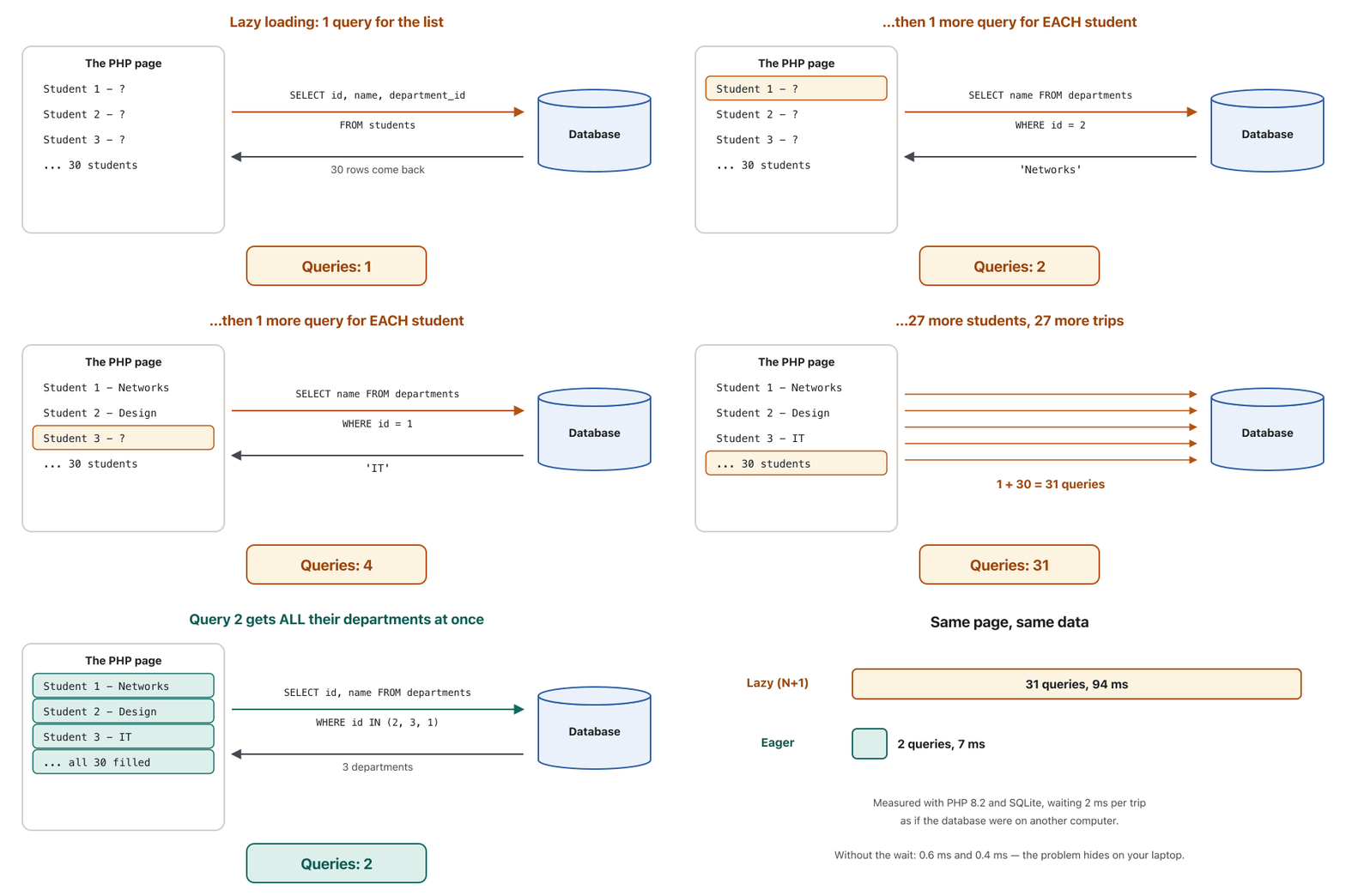
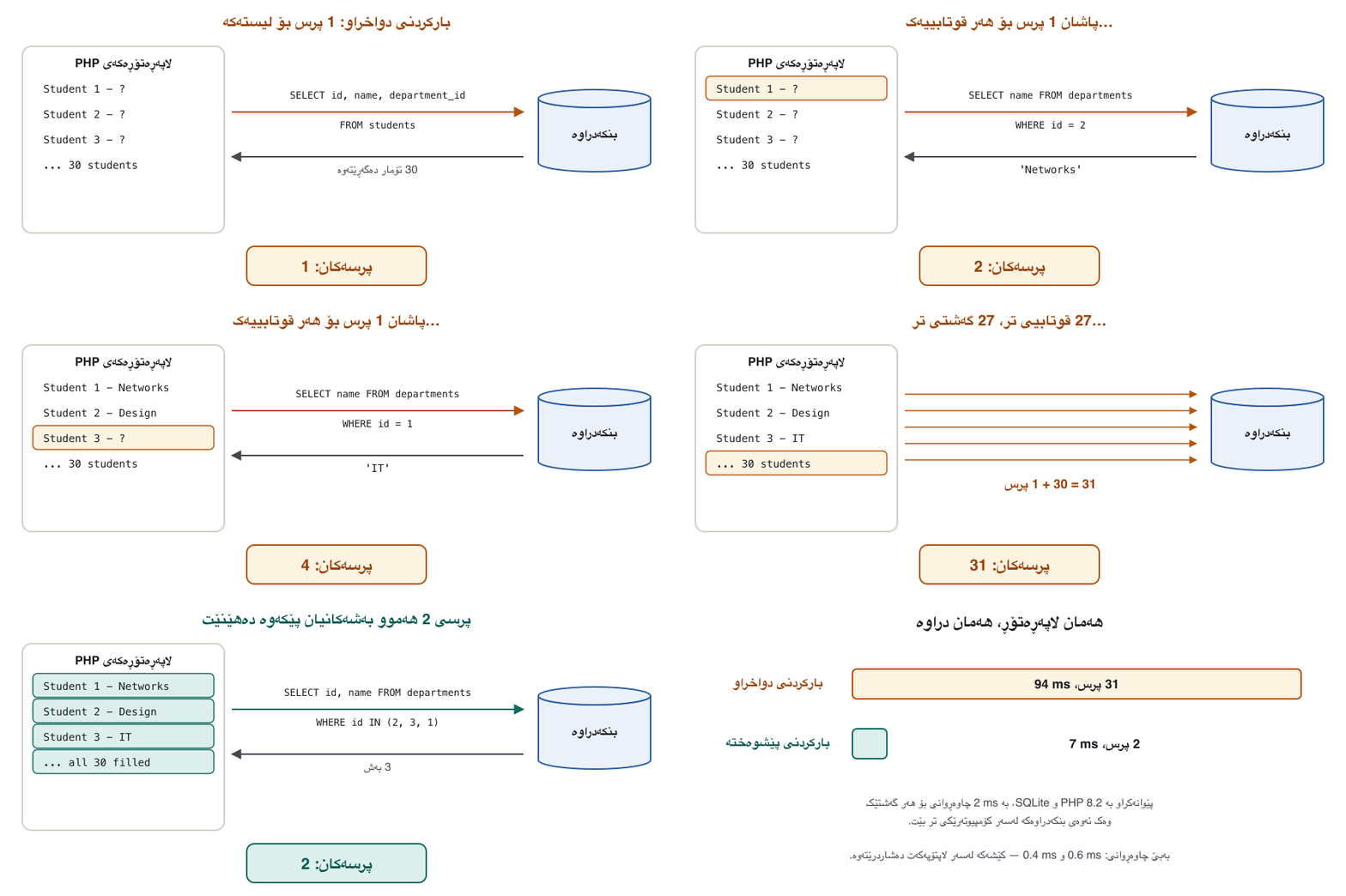
With an ORM, $student->department->name looks like a simple property. Behind it, many ORMs load the linked object only when you first touch it: this is lazy loading. In a loop over 30 students that means 1 query for the list and then 1 more query for each student: 31 queries where 2 would do. This is the N+1 query problem, a very common reason for slow ORM pages. Eager loading fixes it: load all the linked rows at once with WHERE id IN (...).
لە $student->department->name وەک سادە دەردەکەوێت. لە پشتیەوە، زۆر ئەو پێیەوە بەستراوە تەنیا ئەو کاتە دەهێنن کە یەکەم جار دەستی لێ دەدەیت: ئەمە . لە بەسەر 30 قوتابیدا ئەمە واتە 1 بۆ لیستەکە و پاشان 1 تر بۆ هەر قوتابییەک: 31 لە کاتێکدا 2 بەس بوو. ئەمە ـە، هۆکارێکی زۆر باوی خاوبوونی . چارەسەری دەکات: هەموو بەستراوەکان پێکەوە بە WHERE id IN (...) بهێنە.
The N+1 query problemکێشەی پرسی N+1
Measured: 31 queries or 2پێوانەکراو: 31 پرس یان 2
This script runs both versions with plain PDO and SQLite, counts the queries and times them. To behave like a real database on another computer, each query first waits 2 ms, a short trip over the network.
ئەم هەردوو وەشانەکە بە PDOـی سادە و جێبەجێ دەکات، دەژمێرێت و کاتیان دەپێوێت. بۆ ئەوەی وەک ڕاستەقینە لەسەر تر ڕەفتار بکات، هەر سەرەتا 2 ms چاوەڕێ دەکات، گەشتێکی کورت بە .
<?php
// n-plus-one.php - count the queries: lazy loading (N+1) or eager loading (2)

// A tiny database helper that counts every query and waits 2 ms for each one,
// as if the database were another computer on the network.
final class Db
{
    public int $queries = 0;

    public function __construct(private PDO $pdo, private int $delayMicroseconds = 2000) {}

    public function all(string $sql, array $params = []): array
    {
        $this->queries++;
        usleep($this->delayMicroseconds);          // the simulated network trip
        $stmt = $this->pdo->prepare($sql);
        $stmt->execute($params);
        return $stmt->fetchAll(PDO::FETCH_ASSOC);
    }
}

$pdo = new PDO('sqlite::memory:');
$pdo->exec('CREATE TABLE departments (id INTEGER PRIMARY KEY, name TEXT)');
$pdo->exec('CREATE TABLE students (id INTEGER PRIMARY KEY, name TEXT, department_id INTEGER)');
$pdo->exec("INSERT INTO departments (name) VALUES ('IT'), ('Networks'), ('Design')");
$add = $pdo->prepare('INSERT INTO students (name, department_id) VALUES (?, ?)');
for ($i = 1; $i <= 30; $i++) {
    $add->execute(["Student $i", ($i % 3) + 1]);     // 30 students in 3 departments
}

// 1. Lazy loading: one query for the students, then one more for EACH student
$db = new Db($pdo);
$start = hrtime(true);
foreach ($db->all('SELECT id, name, department_id FROM students') as $s) {
    $dep = $db->all('SELECT name FROM departments WHERE id = ?', [$s['department_id']]);
    $line = "{$s['name']} - {$dep[0]['name']}";      // what the page would print
}
printf("Lazy:  %2d queries, %5.1f ms\n", $db->queries, (hrtime(true) - $start) / 1e6);

// 2. Eager loading: the students, then ALL their departments in one query
$db = new Db($pdo);
$start = hrtime(true);
$students = $db->all('SELECT id, name, department_id FROM students');
$ids = array_values(array_unique(array_column($students, 'department_id')));
$marks = implode(', ', array_fill(0, count($ids), '?'));        // "?, ?, ?"
$departments = array_column(
    $db->all("SELECT id, name FROM departments WHERE id IN ($marks)", $ids), 'name', 'id');
foreach ($students as $s) {
    $line = "{$s['name']} - {$departments[$s['department_id']]}";
}
printf("Eager: %2d queries, %5.1f ms\n", $db->queries, (hrtime(true) - $start) / 1e6);
echo "Last line printed: $line\n";Lazy: 31 queries, 93.5 ms Eager: 2 queries, 7.0 ms Last line printed: Student 30 - IT
PHP 8.2 on a laptop. The times change a little from run to run; the counts never do.
PHP 8.2 لەسەر لاپتۆپێک. کاتەکان لە هەر جارێکدا کەمێک دەگۆڕێن، بەڵام ژمارەکان هەرگیز.
Explain the codeڕوونکردنەوەی کۆدەکە
- Lineدێڕی 12-18
Every query is counted and waits 2 ms, like a trip to another computer.
هەموو دەژمێردرێت و 2 ms چاوەڕێ دەکات، وەک گەشتێک بۆ تر.
- Lineدێڕی 34-36
Lazy: one more query inside the loop, for every student.
: زیاتر لە ناو ، بۆ هەر قوتابییەک.
- Lineدێڕی 44-47
Eager: collect the department ids, then one
IN (?, ?, ?)query for all of them.: idـی بەشەکان کۆ بکەرەوە، پاشان یەک
IN (?, ?, ?)بۆ هەموویان.
31 queries took about 94 ms and 2 queries about 7 ms. Without the 2 ms wait, the same script printed 0.6 ms and 0.4 ms: on your own laptop the problem hides, and it appears when the database is on another computer and the list grows.
31 نزیکەی 94 ms و 2 نزیکەی 7 msـی خایاند. بەبێ چاوەڕوانیی 2 ms، هەمان 0.6 ms و 0.4 msـی چاپ کرد: لەسەر لاپتۆپی خۆت کێشەکە دەشاردرێتەوە و کاتێک دەردەکەوێت کە لەسەر تر بێت و لیستەکە گەورە ببێت.
The N+1 query problemکێشەی پرسی N+1
Eager loading in an ORMبارکردنی پێشوەختە لە ORMـدا
ORMs do the same with one call. In Eloquent, a relation is a method on the model, and with() loads that relation for the whole list (not run here; it follows the Laravel 13 documentation):
هەمان کار بە یەک بانگکردن دەکەن. لە Eloquentـدا لەسەر مۆدێلەکە و with() ئەو بۆ هەموو لیستەکە دەهێنێت (لێرە جێبەجێ نەکراوە؛ بەپێی Laravel 13):
<?php
// Laravel 13: a relation and eager loading (not run in this lesson)
class Student extends Model
{
    public function department(): BelongsTo     // students.department_id -> departments.id
    {
        return $this->belongsTo(Department::class);
    }
}

$students = Student::with('department')->get();  // 2 queries, not 31
foreach ($students as $student) {
    echo $student->name, ' - ', $student->department->name, "\n";
}While you develop, Model::preventLazyLoading(), called in the boot() method of AppServiceProvider, turns every forgotten lazy load into an exception, so you find N+1 loops before your users do.
لە کاتی گەشەپێداندا، Model::preventLazyLoading()، کە لە boot()ـی AppServiceProviderـدا بانگ دەکرێت، هەموو لەبیرکراو دەکات بە ، بۆیە N+1 دەدۆزیتەوە پێش ئەوەی بیاندۆزنەوە.
Migrations in one screenمایگرەیشنەکان لە یەک شاشەدا
Tables change as a project grows: a new column, a new table. If each developer changes the tables by hand in phpMyAdmin, the copies on different computers and on the real server drift apart. A migration is a small file that makes one change in up() and undoes it in down(). Migrations run in the order of their names, and a migrations table in the database remembers which ones have run. Laravel's documentation compares them to version control for your database.
لەگەڵ گەشەکردنی پرۆژەدا دەگۆڕێن: نوێ، نوێ. ئەگەر هەر گەشەپێدەرێک بە دەست لە بگۆڕێت، کۆپییەکان لەسەر و لەسەر ڕاستەقینە لە یەکتر دوور دەکەونەوە. بچووکە کە لە up()ـدا یەک گۆڕانکاری دەکات و لە down()ـدا دەیگەڕێنێتەوە. بەپێی ڕیزی ناوەکانیان جێبەجێ دەکرێن و بە ناوی migrations لە لە بیری دەمێنێت کامیان جێبەجێ کراون. Laravel بەراوردیان دەکات بە بۆ .
<?php
// database/migrations/2026_11_01_000001_create_students_table.php
// Laravel 13 (not run in this lesson)
use Illuminate\Database\Migrations\Migration;
use Illuminate\Database\Schema\Blueprint;
use Illuminate\Support\Facades\Schema;

return new class extends Migration
{
    public function up(): void              // one step forward
    {
        Schema::create('students', function (Blueprint $table) {
            $table->id();
            $table->string('name');
            $table->integer('marks');
            $table->timestamps();           // created_at and updated_at
        });
    }

    public function down(): void            // the same step backwards
    {
        Schema::drop('students');
    }
};php artisan make:migration create_students_table # make a new, empty migration file
php artisan migrate # run every migration that has not run yet
php artisan migrate:rollback # undo the last batchWhen plain SQL is betterکەی SQLـی سادە باشترە
An ORM is a tool, not a rule. Martin Fowler, who named the two patterns, wrote in 2012 that an ORM handles most of the mapping work (he guessed 80 to 90 per cent) and that the rest needs someone who knows the database well. That is why every ORM has a door to plain SQL. Write the SQL yourself, through PDO or through that door, when:
ئامرازێکە، نەک یاسایەک. Martin Fowler، کە ناوی ئەو دوو شێوازەی دانا، لە 2012ـدا نووسی کە زۆربەی کاری هاوتاکردن دەکات (مەزەندەی 80 تا 90 لە سەدی کرد) و ئەوەی دەمێنێتەوە کەسێکی پێویستە کە باش بناسێت. بۆیە هەموو دەرگایەکی بۆ سادە هەیە. خۆت بنووسە، بە PDO یان بەو دەرگایە، کاتێک:
- you build a report with
JOIN,GROUP BYandSUM(SQL functions and grouping); - you change thousands of rows: one
UPDATE ... WHEREinstead of loading 10,000 objects and saving them one by one; - a page is slow and you have measured the queries it sends;
- you need a feature that only your database has.
- بە
JOIN،GROUP BYوSUMدروست دەکەیت (کردارەکانی SQL و کۆکردنەوە)؛ - هەزاران دەگۆڕیت: یەک
UPDATE ... WHEREلەبری هێنانی 10,000 و هەڵگرتنیان یەک یەک؛ - خاوە و ئەو دەینێرێت پێوانەت کردوون؛
- پێویستیت بە تایبەتمەندییەکە کە تەنیا هەیەتی.
For a small script, PDO alone, as in SQLite Basics, is often simpler than a whole framework.
بۆ بچووک، تەنیا PDO، وەک لە بنەماکانی SQLiteـدا، زۆرجار لە تەواو سادەترە.
Common mistakesهەڵە باوەکان
<?php
// mistake-id.php - an object that is not saved yet has no id
class Student
{
    public int $id;                        // no "?" and no default value

    public function __construct(public string $name, public int $marks) {}
}

$hana = new Student('Hana', 90);
echo "Hana's id: {$hana->id}\n"; // read before any INSERT gave it an idPHP Fatal error: Uncaught Error: Typed property Student::$id must not be accessed before initialization in …/mistake-id.php:11
Stack trace:
#0 {main}
thrown in …/mistake-id.php on line 11Real output of PHP 8.2 on the command line; the folder path is shortened to ….
ڕاستەقینەی PHP 8.2 لە هێڵی فەرمان؛ ڕێڕەوی بوخچەکە بە … کورت کراوەتەوە.
Explain the codeڕوونکردنەوەی کۆدەکە
- Lineدێڕی 5
intwithout?and without a default: the property has no value at all until something sets it.intبەبێ?و بەبێ : هیچ نرخێکی نییە تا شتێک دایبنێت.
Fix: declare public ?int $id = null;, as StudentMapper does, and check $student->id === null before you use the id.
چارەسەر: public ?int $id = null; بنووسە، وەک ئەوەی StudentMapper دەیکات. پێش بەکارهێنانی id، $student->id === null بپشکنە.
Exercisesڕاهێنانەکان
Rewrite the mapper in the Active Record style. Give Student a static PDO $db, a save() that inserts or updates the object itself and a static find(int $id). Test it: save Karwan with 78 marks, change his marks to 81, save again and find him.
هاوتاکەرەکە بە شێوازی بنووسەوە. Student PDO $dbـێکی static، save()ـێک کە خودی INSERT یان UPDATE دەکات و find(int $id)ـێکی staticـی پێ بدە. تاقیی بکەرەوە: Karwan بە 78 نمرە هەڵبگرە، نمرەکەی بکە بە 81، دیسان هەڵیبگرە و بیدۆزەرەوە.
Hintئاماژە
Move the code of StudentMapper::save() into Student; use self::$db for the connection (static members) and $this for the object.
کۆدی StudentMapper::save() بگوازەرەوە بۆ ناو Student؛ بۆ پەیوەندییەکە self::$db (ئەندامە staticـەکان) و بۆ $this بەکار بهێنە.
Show answerوەڵامەکە پیشان بدە
<?php
// active-record.php - the same job in the Active Record style: the object saves itself

class Student
{
    public static PDO $db;                  // one connection for the whole class
    public ?int $id = null;

    public function __construct(public string $name, public int $marks) {}

    public function save(): void
    {
        if ($this->id === null) {
            $stmt = self::$db->prepare('INSERT INTO students (name, marks) VALUES (?, ?)');
            $stmt->execute([$this->name, $this->marks]);
            $this->id = (int) self::$db->lastInsertId();
        } else {
            $stmt = self::$db->prepare('UPDATE students SET name = ?, marks = ? WHERE id = ?');
            $stmt->execute([$this->name, $this->marks, $this->id]);
        }
    }

    public static function find(int $id): ?Student
    {
        $stmt = self::$db->prepare('SELECT id, name, marks FROM students WHERE id = ?');
        $stmt->execute([$id]);
        $row = $stmt->fetch(PDO::FETCH_ASSOC);
        if (!$row) {
            return null;
        }
        $student = new Student($row['name'], (int) $row['marks']);
        $student->id = (int) $row['id'];
        return $student;
    }
}

Student::$db = new PDO('sqlite::memory:');
Student::$db->exec('CREATE TABLE students (id INTEGER PRIMARY KEY, name TEXT, marks INTEGER)');

$karwan = new Student('Karwan', 78);
$karwan->save();                            // INSERT
$karwan->marks = 81;
$karwan->save();                            // UPDATE

$again = Student::find($karwan->id);
echo "{$again->id}: {$again->name} has {$again->marks} marks\n";1: Karwan has 81 marks
Output of php active-record.php (PHP 8.2).
php active-record.php (PHP 8.2).
Add a method delete(Student $student) to StudentMapper. It should do nothing for an object that was never saved, and it should set the object's id back to null after the DELETE.
delete(Student $student) بۆ StudentMapper زیاد بکە. بۆ کە هەرگیز هەڵنەگیراوە نابێت هیچ بکات و دوای DELETE دەبێت idـی بکاتەوە بە null.
Show answerوەڵامەکە پیشان بدە
    public function delete(Student $student): void
    {
        if ($student->id === null) {
            return;                                // never saved: nothing to delete
        }
        $this->run('DELETE FROM students WHERE id = ?', [$student->id]);
        $student->id = null;                       // the object is "new" again
}<?php
require __DIR__ . '/mapper.php';
$db = new PDO('sqlite::memory:');
$db->exec('CREATE TABLE students (id INTEGER PRIMARY KEY, name TEXT NOT NULL, marks INTEGER NOT NULL)');
$mapper = new StudentMapper($db);
$dilan = new Student('Dilan', 70);
$mapper->save($dilan);
$mapper->delete($dilan);
echo "Rows left: ", $db->query('SELECT COUNT(*) FROM students')->fetchColumn(), "\n";
var_dump($dilan->id);SQL> INSERT INTO students (name, marks) VALUES (?, ?) ["Dilan",70] SQL> DELETE FROM students WHERE id = ? [1] Rows left: 0 NULL
Output with the new method (PHP 8.2).
لەگەڵ نوێیەکە (PHP 8.2).
A shop page lists 40 orders. For each order it prints the customer's name, and the ORM loads the customer lazily. (a) How many queries does the page send? (b) How many with eager loading? (c) If every query costs a 5 ms trip to the database server, how much time does eager loading save?
فرۆشگا 40 داواکاریی کڕین لیست دەکات. بۆ هەر داواکارییەک ناوی کڕیارەکە چاپ دەکات و کڕیارەکە بە دەهێنێت. (أ) چەند دەنێرێت؟ (ب) بە چەند؟ (ج) ئەگەر هەر گەشتێکی 5 msـی بۆ بخایەنێت، چەند کات دەگەڕێنێتەوە؟
Show answerوەڵامەکە پیشان بدە
(a) 1 query for the orders + 40 queries for the customers = 41. (b) 2: the orders, then all their customers with WHERE id IN (...). (c) The saving:
(أ) 1 بۆ داواکارییەکان + 40 بۆ کڕیارەکان = 41. (ب) 2: داواکارییەکان، پاشان هەموو کڕیارەکانیان بە WHERE id IN (...). (ج) کاتی گەڕاوە:
On every visit to the page, before any other work.
لە هەر سەردانێکی ، پێش هەر کارێکی تر.
Active Record or Data Mapper? (a) $order->save(); (b) $em->persist($order); $em->flush(); (c) $orderMapper->insert($order); (d) Order::find(7)->delete();
یان ؟ (أ) $order->save(); (ب) $em->persist($order); $em->flush(); (ج) $orderMapper->insert($order); (د) Order::find(7)->delete();
Show answerوەڵامەکە پیشان بدە
- (a) Active Record: the order saves itself.
- (b) Data Mapper: Doctrine's EntityManager saves it.
- (c) Data Mapper: a separate mapper object.
- (d) Active Record: the class finds and deletes its own row.
- (أ) : داواکارییەکە خۆی هەڵدەگرێت.
- (ب) : EntityManagerـی Doctrine هەڵیدەگرێت.
- (ج) : هاوتاکەری جیا.
- (د) : خۆی دەدۆزێتەوە و دەیسڕێتەوە.
Make this line safe: $rows = $db->query("SELECT name FROM students ORDER BY " . $_GET['sort']);
ئەم دێڕە سەلامەت بکە: $rows = $db->query("SELECT name FROM students ORDER BY " . $_GET['sort']);
Show answerوەڵامەکە پیشان بدە
A column name cannot be a bound ?, so check it against an allow-list and use a safe default. In a page you would call sortedNames($db, $_GET['sort'] ?? '').
ناوی ناتوانێت ?ـی بەستراو بێت، بۆیە بە بیپشکنە و سەلامەت بەکار بهێنە. لە بەم شێوەیە بانگی دەکەیت: sortedNames($db, $_GET['sort'] ?? '').
<?php
// safe-sort.php - the sort column must come from an allow-list
$db = new PDO('sqlite::memory:');
$db->exec('CREATE TABLE students (id INTEGER PRIMARY KEY, name TEXT, marks INTEGER)');
$db->exec("INSERT INTO students (name, marks) VALUES ('Aram', 85), ('Shilan', 92), ('Karwan', 78)");

function sortedNames(PDO $db, string $wanted): string
{
    $allowed = ['name', 'marks'];
    $sort = in_array($wanted, $allowed, true) ? $wanted : 'name';   // unknown: use name
    $rows = $db->query("SELECT name FROM students ORDER BY $sort")->fetchAll(PDO::FETCH_COLUMN);
    return implode(', ', $rows);
}

echo "sort=marks:     ", sortedNames($db, 'marks'), "\n";
echo "sort=(attack):  ", sortedNames($db, "name; DROP TABLE students"), "\n";
echo "Rows still in the table: ", $db->query('SELECT COUNT(*) FROM students')->fetchColumn(), "\n";sort=marks: Karwan, Aram, Shilan sort=(attack): Aram, Karwan, Shilan Rows still in the table: 3
Output of php safe-sort.php (PHP 8.2): the attack text is ignored and the table is still there.
php safe-sort.php (PHP 8.2): دەقی هێرشەکە پشتگوێ دەخرێت و هێشتا ماوە.
Write the up() and down() of a Laravel migration that adds a phone column, which may be empty, to students.
up() و down()ـی Laravel بنووسە کە phone زیاد دەکات بۆ students، کە دەتوانێت بەتاڵ بێت.
Show answerوەڵامەکە پیشان بدە
<?php
// Laravel 13 (not run in this lesson)
public function up(): void
{
    Schema::table('students', function (Blueprint $table) {
        $table->string('phone')->nullable();     // may be empty
    });
}

public function down(): void
{
    Schema::table('students', function (Blueprint $table) {
        $table->dropColumn('phone');
    });
}
Schema::table() changes an existing table, nullable() allows an empty value, and dropColumn() undoes the change.
Schema::table() هەبوو دەگۆڕێت، nullable() ڕێگە بە نرخی بەتاڵ دەدات و dropColumn() گۆڕانکارییەکە دەگەڕێنێتەوە.
Summaryپوختە
- Databases keep rows, PHP code wants objects: identity, links, types and inheritance differ between the two worlds.
- An ORM maps classes to tables, objects to rows, properties to columns and object links to foreign keys, and writes the SQL.
- Active Record: the object saves itself (Eloquent). Data Mapper: a mapper saves plain objects (Doctrine, our
StudentMapper). - ORMs bind values; column names, raw SQL and mass assignment are still your job.
- N+1: lazy loading in a loop sends 1 + N queries (31 instead of 2, measured); eager loading (
with()) fixes it. - Migrations change the schema step by step with
up()anddown(); use plain SQL for reports, bulk changes and measured slow queries.
- هەڵدەگرن و کۆدی PHP دەوێت: ناسنامە، بەستنەوە، جۆر و لە نێوان هەردوو جیهانەکەدا جیاوازن.
- بە ، بە ، بە و بەستنەوەی بە هاوتا دەکات و دەنووسێت.
- : خۆی هەڵدەگرێت (Eloquent). : هاوتاکەرێک سادە هەڵدەگرێت (Doctrine،
StudentMapperـەکەی ئێمە). - نرخەکان دەبەستنەوە؛ ناوی ، خاو و هێشتا کاری تۆن.
- N+1: لە ناو 1 + N دەنێرێت (31 لەبری 2، پێوانەکراو)؛ (
with()) چارەسەری دەکات. - هەنگاو بە هەنگاو بە
up()وdown()دەگۆڕن؛ بۆ ، گۆڕانکاریی بەکۆمەڵ و خاوی پێوانەکراو سادە بەکار بهێنە.
Next: the web remembers its visitors with cookies and sessions.
دواتر: وێب سەردانکەرانی خۆی بە کووکییەکان و سێشنەکان دەناسێتەوە.
Lesson complete!وانەکە تەواو بوو!
Well done. Review the key terms, then go on to the next lesson.دەستخۆش. سەیرێکی زاراوە سەرەکییەکان بکەرەوە، پاشان بڕۆ بۆ وانەی داهاتوو.
Key termsزاراوە سەرەکییەکان
Cookiesکووکییەکان
Related lecturesوانە پەیوەندیدارەکان
- Inheritance, Interfaces and Traitsبۆماوە، نێوبەستەکان و ترەیتەکان
- Building a CRUD Application with PHP and MySQLدروستکردنی بەرنامەیەکی CRUD بە PHP و MySQL
- Securing Data in PHP and MySQLپاراستنی دراوە لە PHP و MySQL
- Injection Attacks: SQL Injection and Cross-Site Scriptingهێرشەکانی تێخزاندن: تێخزاندنی SQL و XSS
- SQL Functions, Aggregates and GROUP BYکردارەکانی SQL، کردارەکانی کۆکردنەوە و GROUP BY
- Databases and SQL basicsبنکەدراوەکان و بنەماکانی SQL
References and further readingسەرچاوەکان و خوێندنەوەی زیاتر
- Martin Fowler, Catalog of Patterns of Enterprise Application Architecture: Active Record
- Martin Fowler, Catalog of Patterns of Enterprise Application Architecture: Data Mapper
- Martin Fowler: OrmHate (8 May 2012)
- PHP Manual: PDOStatement::fetch (fetch modes)
- PHP Manual: PDO errors and error handling (exceptions are the default since PHP 8.0)
- SQLite: Datatypes In SQLite (storage classes, Boolean and dates)
- Laravel 13: Release notes and support policy (Laravel 13, PHP 8.3+)
- Laravel 13: Eloquent, Getting Started (conventions, Fillable, mass assignment)
- Laravel 13: Eloquent Relationships (eager loading, preventing lazy loading)
- Laravel 13: Query Builder (parameter binding, raw expressions, column names)
- Laravel 13: Database Migrations
- Doctrine ORM 3.7: Getting Started with Doctrine (entities, EntityManager, Unit of Work)
- Symfony: Databases and the Doctrine ORM
This lecture is a first edition. The Kurdish text and terminology are waiting for review by Kurdish IT teachers.ئەم وانەیە چاپی یەکەمە. دەقە کوردییەکە و زاراوەکانی چاوەڕێی پێداچوونەوەی مامۆستایانی کوردی بواری IT ن.