Chapterبەش 9 · Lectureوانە 9.3
Better SELECT Queries: Conditions, Ranges, Lists, Patterns and NULLباشترکردنی فەرمانی SELECT: مەرجەکان، ماوەکان، لیست، شێوازی دەق و NULL
Ask a database real questions: compute columns and name them with AS, remove repeats with DISTINCT, filter rows with comparison operators, AND, OR and NOT, BETWEEN, IN and LIKE patterns, handle NULL correctly, and sort the answer with ORDER BY — all on one small shop database, in the MySQL that phpMyAdmin runs.
پرسیاری ڕاستەقینە لە بکە: نوێ بژمێرە و بە AS ناوی لێ بنێ، دووبارەکان بە DISTINCT لابە، بە ، AND، OR و NOT، BETWEEN، IN و شێوازەکانی LIKE بپاڵێوە، NULL بە دروستی بەکار بهێنە و وەڵامەکە بە ڕیز بکە — هەمووی لەسەر بچووکی دوکانێک، بەو MySQLـەی phpMyAdmin جێبەجێی دەکات.
What you will learnچی فێر دەبیت
- Compute new columns in SELECT, name them with AS (backticks when the name has spaces) and remove repeated values with DISTINCT.
- Filter rows with comparison operators on numbers, text and dates, and combine conditions with AND, OR, NOT and brackets.
- Use BETWEEN (both ends included), IN and NOT IN instead of long chains of conditions.
- Match text patterns with LIKE, % and _, and know when capital and small letters count as different in MySQL and SQLite.
- Find missing values with IS NULL and IS NOT NULL, and explain why
= NULLfinds nothing. - Sort a result by several columns or by an alias, and know where NULL values appear.
- نوێ لە SELECT بژمێریت، بە AS ناوی لێ بنێیت (ئەگەر ناوەکە بۆشایی تێدا بوو بە backtick) و نرخە دووبارەکان بە DISTINCT لابەریت.
- بە لەسەر ژمارە، دەق و بەروار بپاڵێویت و بە AND، OR، NOT و کەوانە پێکەوە ببەستیت.
- لە جیاتی زنجیرەیەکی درێژ لە ، BETWEEN (هەردوو سەر لەگەڵیدا)، IN و NOT IN بەکار بهێنیت.
- دەق بە LIKE، % و _ لەگەڵ شێوازێک بەراورد بکەیت و بزانیت کەی پیتی گەورە و بچووک لە MySQL و SQLiteـدا جیاوازن.
- نرخە ونبووەکان بە IS NULL و IS NOT NULL بدۆزیتەوە و ڕوونی بکەیتەوە بۆچی
= NULLهیچ نادۆزێتەوە. - ئەنجامێک بەپێی چەند یان بەپێی ڕیز بکەیت و بزانیت نرخەکانی NULL لە کوێ دەردەکەون.
Asking the database better questionsپرسیاری باشتر لە بنکەدراوە
In Databases and SQL basics you met SELECT … FROM … WHERE, a first short list of operators (=, <>, AND, LIKE …) and ORDER BY. Real questions are richer, and each of those operators has rules worth knowing. Which phones cost less than 300,000 IQD and come from Samsung or Xiaomi? Which customers have no e-mail address? Which names start with S? This lesson gives SELECT the tools for such questions.
لە بنکەدراوەکان و بنەماکانی SQL فێری SELECT … FROM … WHERE، لیستێکی کورتی یەکەمی (=، <>، AND، LIKE …) و ORDER BY بوویت. پرسیاری ڕاستەقینە دەوڵەمەندترە و هەر یەک لەو یاسای خۆی هەیە کە دەبێت بیزانیت: کام مۆبایل لە 300,000 دینار هەرزانترە و هی Samsung یان Xiaomiـیە؟ کام کڕیار نییە؟ کام ناو بە S دەست پێدەکات؟ ئەم وانەیە ئامرازی وەڵامدانەوەی ئەم جۆرە پرسیارانە دەداتە SELECT.
A SELECT does two separate jobs. The list after SELECT chooses — and can compute — the columns of the answer. The chooses the rows: it tests a condition on every row and keeps only the rows where the condition is true.
دوو کاری جیاواز دەکات. ئەو لیستەی دوای SELECT دێت وەڵامەکە هەڵدەبژێرێت — و دەتوانێت بیانژمێرێت. هەڵدەبژێرێت: لەسەر هەموو تاقی دەکاتەوە و تەنها ئەو دەهێڵێتەوە کە تێدا ڕاستە.
Type every example in the SQL tab of phpMyAdmin (Step 6: the SQL tab). All examples are written for — XAMPP actually runs , which behaves the same here. We checked every answer by running it in ; where SQLite or MariaDB gives a different answer, the lesson says so.
هەموو نموونەیەک لە تابی SQLـی phpMyAdmin بنووسە (هەنگاوی 6: تابی SQL). هەموو نموونەکان بۆ نووسراون — XAMPP لە ڕاستیدا کار پێ دەکات کە لێرەدا هەمان ڕەفتاری هەیە. هەموو وەڵامێکمان بە جێبەجێکردنی لە پشکنیوە؛ هەر شوێنێک SQLite یان MariaDB وەڵامێکی جیاواز بدات، وانەکە دەیڵێت.
Our example: a phone and computer shopنموونەکەمان: دوکانێکی مۆبایل و کۆمپیوتەر
Both SQL lessons use one small database: a shop in Sulaimani that sells phones, laptops, chargers and headphones. It has three tables:
هەردوو وانەی SQL یەک بچووک بەکار دەهێنن: دوکانێک لە سلێمانی کە مۆبایل، ، و دەفرۆشێت. سێ هەیە:
products— 12 products with their brand, category, price in Iraqi dinars (price_iqd), how many are in stock and the day they were added.customers— 6 customers in five cities of Kurdistan, with e-mail addresses atexample.com.sales— 20 sales in September and October 2026: which product, which customer, which seller (Rezan or Lana), the date, how many and how it was paid (cash,cardorfib, a payment app).
products— 12 کاڵا لەگەڵ براند، جۆر، قیمەت بە دیناری عێراقی (price_iqd)، ژمارەی بەردەست لە کۆگا و ئەو ڕۆژەی زیاد کران.customers— 6 کڕیار لە پێنج شاری کوردستان، لەگەڵ لەexample.com.sales— 20 فرۆشتن لە مانگەکانی ئەیلوول و تشرینی یەکەمی 2026: کام کاڵا، کام کڕیار، کام فرۆشیار (Rezan یان Lana)، بەروار، چەند دانە و چۆن پارەکەی دراوە (cash،cardیانfibکە بەرنامەیەکی پارەدانە).
The names, prices and sales are invented. Three values are deliberately missing (NULL), because real data always has gaps: the stock of the ThinkPad has not been counted yet, the brand of the power bank is unknown and Soran gave no e-mail address.
ناو، قیمەت و فرۆشتنەکان دروستکراون. سێ نرخ بە ئەنقەست ون کراون (NULL)، چونکە ڕاستەقینە هەمیشە کەلێنی هەیە: ژمارەی ThinkPad لە کۆگا هێشتا نەژمێردراوە، براندی پاوەر بانکەکە نەزانراوە و Soran نەداوە.
-- A phone and computer shop in Sulaimani (invented data, prices in IQD)
CREATE TABLE products (
    product_id INT PRIMARY KEY,
    name       VARCHAR(60) NOT NULL,
    brand      VARCHAR(30),
    category   VARCHAR(30) NOT NULL,
    price_iqd  INT NOT NULL,
    stock      INT,
    added_on   DATE NOT NULL
);

CREATE TABLE customers (
    customer_id INT PRIMARY KEY,
    name        VARCHAR(40) NOT NULL,
    city        VARCHAR(30) NOT NULL,
    email       VARCHAR(80)
);

CREATE TABLE sales (
    sale_id     INT PRIMARY KEY,
    product_id  INT NOT NULL,
    customer_id INT NOT NULL,
    seller      VARCHAR(30) NOT NULL,
    sold_on     DATE NOT NULL,
    quantity    INT NOT NULL,
    payment     VARCHAR(10) NOT NULL,
    FOREIGN KEY (product_id) REFERENCES products (product_id),
    FOREIGN KEY (customer_id) REFERENCES customers (customer_id)
);

INSERT INTO products VALUES
    (1,  'Galaxy A15',          'Samsung', 'phone',      250000,    8, '2026-01-10'),
    (2,  'Redmi 13C',           'Xiaomi',  'phone',      165000,   12, '2026-02-03'),
    (3,  'Redmi Note 13',       'Xiaomi',  'phone',      285000,    6, '2026-03-15'),
    (4,  'iPhone 15',           'Apple',   'phone',     1350000,    2, '2026-04-20'),
    (5,  'IdeaPad Slim 3',      'Lenovo',  'laptop',     610000,    4, '2026-02-18'),
    (6,  'ThinkPad E14',        'Lenovo',  'laptop',     940000, NULL, '2026-08-30'),
    (7,  'VivoBook 15',         'Asus',    'laptop',     600000,    5, '2026-05-07'),
    (8,  'USB-C Charger 25W',   'Samsung', 'charger',     25000,   30, '2026-01-10'),
    (9,  'Fast Charger 33W',    'Xiaomi',  'charger',     18000,   25, '2026-03-15'),
    (10, 'Power Bank 20000mAh', NULL,      'charger',     30000,   15, '2026-06-01'),
    (11, 'Galaxy Buds FE',      'Samsung', 'headphones',  95000,    7, '2026-07-12'),
    (12, 'Wired Earphones',     'Xiaomi',  'headphones',   7500,   40, '2026-06-01');

INSERT INTO customers VALUES
    (1, 'Aram',   'Sulaimani', 'aram@example.com'),
    (2, 'Shilan', 'Erbil',     'shilan.k@example.com'),
    (3, 'Karwan', 'Duhok',     'karwan88@example.com'),
    (4, 'Dilan',  'Sulaimani', 'dilan@example.com'),
    (5, 'Hana',   'Halabja',   'hana.m@example.com'),
    (6, 'Soran',  'Kirkuk',    NULL);

INSERT INTO sales VALUES
    (1,  1,  1, 'Rezan', '2026-09-02', 1, 'cash'),
    (2,  8,  1, 'Rezan', '2026-09-02', 2, 'cash'),
    (3,  2,  3, 'Lana',  '2026-09-05', 1, 'fib'),
    (4,  11, 2, 'Lana',  '2026-09-07', 1, 'card'),
    (5,  9,  4, 'Rezan', '2026-09-10', 3, 'cash'),
    (6,  5,  5, 'Rezan', '2026-09-14', 1, 'fib'),
    (7,  3,  6, 'Lana',  '2026-09-18', 1, 'cash'),
    (8,  10, 3, 'Lana',  '2026-09-21', 2, 'fib'),
    (9,  1,  4, 'Rezan', '2026-09-26', 1, 'fib'),
    (10, 7,  2, 'Lana',  '2026-10-01', 1, 'card'),
    (11, 8,  5, 'Rezan', '2026-10-03', 1, 'cash'),
    (12, 2,  1, 'Rezan', '2026-10-05', 1, 'fib'),
    (13, 4,  6, 'Lana',  '2026-10-09', 1, 'cash'),
    (14, 9,  2, 'Rezan', '2026-10-12', 2, 'cash'),
    (15, 11, 3, 'Lana',  '2026-10-14', 1, 'fib'),
    (16, 3,  4, 'Rezan', '2026-10-17', 1, 'cash'),
    (17, 10, 1, 'Lana',  '2026-10-19', 1, 'fib'),
    (18, 1,  5, 'Rezan', '2026-10-21', 1, 'cash'),
    (19, 8,  3, 'Lana',  '2026-10-23', 3, 'fib'),
    (20, 2,  2, 'Rezan', '2026-10-24', 1, 'cash');
Explain the codeڕوونکردنەوەی کۆدەکە
- Lineدێڕی 4-12
brandandstockmay be empty: they have noNOT NULL. Money is a whole number of dinars, soINTis enough here (IQD has no fils in use); for prices with decimals useDECIMAL(MySQL data types).brandوstockدەکرێت بەتاڵ بن:NOT NULLـیان نییە. پارەکە ژمارەیەکی تەواوی دینارە، بۆیە لێرەINTبەسە (دینار ئێستا فلسی بەکارهاتووی نییە)؛ بۆ قیمەتی کەرتیDECIMALبەکار بهێنە (جۆرەکانی دراوەی SQL لە MySQL).- Lineدێڕی 21-31
Each sale points to a product and a customer with a .
هەر فرۆشتنێک بە ئاماژە بە کاڵایەک و کڕیارێک دەکات.
Our example: a phone and computer shopنموونەکەمان: دوکانێکی مۆبایل و کۆمپیوتەر
The products and the customersکاڵاکان و کڕیارەکان
Keep this screen in mind: almost every answer in the two lessons can be checked against these rows.
ئەم شاشەیە لە بیر بێت: نزیکەی هەموو وەڵامێکی ئەم دوو وانەیە دەتوانرێت بەم بپشکنرێت.
SELECT * FROM products;+------------+---------------------+---------+------------+-----------+-------+------------+ | product_id | name | brand | category | price_iqd | stock | added_on | +------------+---------------------+---------+------------+-----------+-------+------------+ | 1 | Galaxy A15 | Samsung | phone | 250000 | 8 | 2026-01-10 | | 2 | Redmi 13C | Xiaomi | phone | 165000 | 12 | 2026-02-03 | | 3 | Redmi Note 13 | Xiaomi | phone | 285000 | 6 | 2026-03-15 | | 4 | iPhone 15 | Apple | phone | 1350000 | 2 | 2026-04-20 | | 5 | IdeaPad Slim 3 | Lenovo | laptop | 610000 | 4 | 2026-02-18 | | 6 | ThinkPad E14 | Lenovo | laptop | 940000 | NULL | 2026-08-30 | | 7 | VivoBook 15 | Asus | laptop | 600000 | 5 | 2026-05-07 | | 8 | USB-C Charger 25W | Samsung | charger | 25000 | 30 | 2026-01-10 | | 9 | Fast Charger 33W | Xiaomi | charger | 18000 | 25 | 2026-03-15 | | 10 | Power Bank 20000mAh | NULL | charger | 30000 | 15 | 2026-06-01 | | 11 | Galaxy Buds FE | Samsung | headphones | 95000 | 7 | 2026-07-12 | | 12 | Wired Earphones | Xiaomi | headphones | 7500 | 40 | 2026-06-01 | +------------+---------------------+---------+------------+-----------+-------+------------+ 12 rows in set
Run in SQLite 3.51 on our shop database (there is no MySQL server in our test sandbox); MySQL returns the same rows.
لە SQLite 3.51 لەسەر دوکانەکەمان جێبەجێ کرا (لە ژینگەی تاقیکردنەوەماندا MySQL نییە)؛ MySQL هەمان دەگەڕێنێتەوە.
SELECT * FROM customers;+-------------+--------+-----------+----------------------+ | customer_id | name | city | email | +-------------+--------+-----------+----------------------+ | 1 | Aram | Sulaimani | aram@example.com | | 2 | Shilan | Erbil | shilan.k@example.com | | 3 | Karwan | Duhok | karwan88@example.com | | 4 | Dilan | Sulaimani | dilan@example.com | | 5 | Hana | Halabja | hana.m@example.com | | 6 | Soran | Kirkuk | NULL | +-------------+--------+-----------+----------------------+ 6 rows in set
Run in SQLite 3.51 on our shop database (there is no MySQL server in our test sandbox); MySQL returns the same rows.
لە SQLite 3.51 لەسەر دوکانەکەمان جێبەجێ کرا (لە ژینگەی تاقیکردنەوەماندا MySQL نییە)؛ MySQL هەمان دەگەڕێنێتەوە.
Our example: a phone and computer shopنموونەکەمان: دوکانێکی مۆبایل و کۆمپیوتەر
The salesفرۆشتنەکان
Each row of sales is one sale. product_id and customer_id say what was sold and to whom; you can look them up in the two tables on the previous screen. For example, sale 13 is the iPhone 15 (product 4) sold to Soran (customer 6) on 9 October.
هەر sales یەک فرۆشتنە. product_id و customer_id دەڵێن چی فرۆشراوە و بە کێ؛ دەتوانیت لە دوو شاشەی پێشوودا بیاندۆزیتەوە. بۆ نموونە، فرۆشتنی 13 بریتییە لە iPhone 15 (کاڵای 4) کە لە 9ی تشرینی یەکەم بە Soran (کڕیاری 6) فرۆشراوە.
SELECT * FROM sales;+---------+------------+-------------+--------+------------+----------+---------+ | sale_id | product_id | customer_id | seller | sold_on | quantity | payment | +---------+------------+-------------+--------+------------+----------+---------+ | 1 | 1 | 1 | Rezan | 2026-09-02 | 1 | cash | | 2 | 8 | 1 | Rezan | 2026-09-02 | 2 | cash | | 3 | 2 | 3 | Lana | 2026-09-05 | 1 | fib | | 4 | 11 | 2 | Lana | 2026-09-07 | 1 | card | | 5 | 9 | 4 | Rezan | 2026-09-10 | 3 | cash | | 6 | 5 | 5 | Rezan | 2026-09-14 | 1 | fib | | 7 | 3 | 6 | Lana | 2026-09-18 | 1 | cash | | 8 | 10 | 3 | Lana | 2026-09-21 | 2 | fib | | 9 | 1 | 4 | Rezan | 2026-09-26 | 1 | fib | | 10 | 7 | 2 | Lana | 2026-10-01 | 1 | card | | 11 | 8 | 5 | Rezan | 2026-10-03 | 1 | cash | | 12 | 2 | 1 | Rezan | 2026-10-05 | 1 | fib | | 13 | 4 | 6 | Lana | 2026-10-09 | 1 | cash | | 14 | 9 | 2 | Rezan | 2026-10-12 | 2 | cash | | 15 | 11 | 3 | Lana | 2026-10-14 | 1 | fib | | 16 | 3 | 4 | Rezan | 2026-10-17 | 1 | cash | | 17 | 10 | 1 | Lana | 2026-10-19 | 1 | fib | | 18 | 1 | 5 | Rezan | 2026-10-21 | 1 | cash | | 19 | 8 | 3 | Lana | 2026-10-23 | 3 | fib | | 20 | 2 | 2 | Rezan | 2026-10-24 | 1 | cash | +---------+------------+-------------+--------+------------+----------+---------+ 20 rows in set
Run in SQLite 3.51 on our shop database (there is no MySQL server in our test sandbox); MySQL returns the same rows.
لە SQLite 3.51 لەسەر دوکانەکەمان جێبەجێ کرا (لە ژینگەی تاقیکردنەوەماندا MySQL نییە)؛ MySQL هەمان دەگەڕێنێتەوە.
Choosing and computing columnsهەڵبژاردن و ژماردنی ستوونەکان
After SELECT you list the columns you want. You can also write an : arithmetic with +, -, * and / on columns and numbers. The database works it out for every row of the answer. This is a computed column (a ): it appears only in the result — the table itself does not change.
دوای SELECT ئەو دەنووسیت کە دەتەوێن. دەتوانیت بنووسیت: ژماردن بە +، -، * و / لەسەر و ژمارەکان. بۆ هەموو وەڵامەکە دەیژمێرێت. ئەمە ە: تەنها لە ئەنجامەکەدا دەردەکەوێت — خودی ناگۆڕێت.
How much money is on the shelf for each laptop? Multiply the price by the stock:
بۆ هەر چەند پارە لەسەر ڕەفەکەیە؟ قیمەتەکە و ژمارەی کۆگا لێک بدە:
SELECT name, price_iqd, stock, price_iqd * stock
FROM products
WHERE category = 'laptop';+----------------+-----------+-------+-------------------+ | name | price_iqd | stock | price_iqd * stock | +----------------+-----------+-------+-------------------+ | IdeaPad Slim 3 | 610000 | 4 | 2440000 | | ThinkPad E14 | 940000 | NULL | NULL | | VivoBook 15 | 600000 | 5 | 3000000 | +----------------+-----------+-------+-------------------+ 3 rows in set
Run in SQLite 3.51 on our shop database (there is no MySQL server in our test sandbox); MySQL returns the same rows.
لە SQLite 3.51 لەسەر دوکانەکەمان جێبەجێ کرا (لە ژینگەی تاقیکردنەوەماندا MySQL نییە)؛ MySQL هەمان دەگەڕێنێتەوە.
Explain the codeڕوونکردنەوەی کۆدەکە
- Lineدێڕی 1
The fourth column is computed. Its header is simply the expression.
چوارەم ژمێردراوە. سەردێڕەکەی خودی .
The ThinkPad's answer is NULL: its stock is unknown, so the total is unknown too. You will see why in Missing values: NULL.
وەڵامی ThinkPad NULLـە: ژمارەی کۆگاکەی نەزانراوە، بۆیە کۆکەشی نەزانراوە. لە نرخە ونبووەکان: NULL دەبینیت بۆچی.
Mosh's MySQL course chapters: computed columns with AS and DISTINCT, IS NULL, and sorting with ORDER BY and LIMIT.
چەند بەشێکی کۆرسی Mosh: بە AS و DISTINCT، IS NULL و بە و .
Plays 29:30-38:18 (The SELECT clause): arithmetic in SELECT, AS aliases and DISTINCT.
لە 29:30 تا 38:18 پەخش دەبێت (بەشی The SELECT clause): ژماردن لەناو SELECT، بە AS و DISTINCT.
Choosing and computing columnsهەڵبژاردن و ژماردنی ستوونەکان
Naming a column with ASناونانی ستوونێک بە AS
A header such as price_iqd * stock is hard to read, and PHP would have to use it as an array key. Give the column an with AS:
سەردێڕێکی وەک price_iqd * stock خوێندنەوەی قورسە و PHP دەبێت وەک بەکاری بهێنێت. بە AS بدە بە :
SELECT name, price_iqd * stock AS stock_value
FROM products
WHERE category = 'laptop';+----------------+-------------+ | name | stock_value | +----------------+-------------+ | IdeaPad Slim 3 | 2440000 | | ThinkPad E14 | NULL | | VivoBook 15 | 3000000 | +----------------+-------------+ 3 rows in set
Run in SQLite 3.51 on our shop database (there is no MySQL server in our test sandbox); MySQL returns the same rows.
لە SQLite 3.51 لەسەر دوکانەکەمان جێبەجێ کرا (لە ژینگەی تاقیکردنەوەماندا MySQL نییە)؛ MySQL هەمان دەگەڕێنێتەوە.
An alias with a space or a bracket needs quotes. In MySQL use backticks; single or double quotes also work in the SELECT list. Better still, avoid spaces and write stock_value.
کە بۆشایی یان کەوانەی تێدا بێت پێویستی بە کۆتەیشنە. لە MySQLـدا backtick بەکار بهێنە؛ کۆتەیشنی تاک یان جووتیش لە لیستی SELECTـدا کار دەکەن. باشتر وایە بۆشایی بەکار نەهێنیت و stock_value بنووسیت.
SELECT name AS Product,
       price_iqd * stock AS `Stock value (IQD)`
FROM products
WHERE category = 'laptop';+----------------+-------------------+ | Product | Stock value (IQD) | +----------------+-------------------+ | IdeaPad Slim 3 | 2440000 | | ThinkPad E14 | NULL | | VivoBook 15 | 3000000 | +----------------+-------------------+ 3 rows in set
Run in SQLite 3.51 on our shop database (there is no MySQL server in our test sandbox); MySQL returns the same rows.
لە SQLite 3.51 لەسەر دوکانەکەمان جێبەجێ کرا (لە ژینگەی تاقیکردنەوەماندا MySQL نییە)؛ MySQL هەمان دەگەڕێنێتەوە.
| Whereلە کوێ | An alias with spaces is written بۆشاییدار بەم شێوەیە دەنووسرێت |
|---|---|
| MySQL / MariaDB | AS `Stock value` |
| Standard SQL, SQLite (MySQL accepts it too)SQLـی ستاندارد، SQLite (MySQLـیش وەری دەگرێت) | AS "Stock value" |
| Microsoft Access | AS [Stock value] |
Choosing and computing columnsهەڵبژاردن و ژماردنی ستوونەکان
DISTINCT: every value onceDISTINCT: هەر نرخێک یەک جار
SELECT brand FROM products; returns 12 rows, one per product, so Samsung appears three times and Xiaomi four times. DISTINCT removes the repeated rows from the answer:
SELECT brand FROM products; 12 دەگەڕێنێتەوە، یەکێک بۆ هەر کاڵایەک، بۆیە Samsung سێ جار و Xiaomi چوار جار دەردەکەون. DISTINCT لە وەڵامەکە لادەبات:
SELECT DISTINCT brand FROM products;+---------+ | brand | +---------+ | Samsung | | Xiaomi | | Apple | | Lenovo | | Asus | | NULL | +---------+ 6 rows in set
Run in SQLite 3.51 on our shop database (there is no MySQL server in our test sandbox); MySQL returns the same rows.
لە SQLite 3.51 لەسەر دوکانەکەمان جێبەجێ کرا (لە ژینگەی تاقیکردنەوەماندا MySQL نییە)؛ MySQL هەمان دەگەڕێنێتەوە.
Explain the codeڕوونکردنەوەی کۆدەکە
- Lineدێڕی 1
Six different values. The unknown brand (
NULL) is shown once as well.شەش نرخی جیاواز. براندە نەزانراوەکە (
NULL)یش یەک جار پیشان دەدرێت.
DISTINCT looks at the whole row of the answer. With two columns it keeps every different pair: Xiaomi appears three times below, because Xiaomi sells chargers, headphones and phones.
DISTINCT سەیری هەموو وەڵامەکە دەکات. لەگەڵ دوو هەموو جووتێکی جیاواز دەهێڵێتەوە: لە خوارەوە Xiaomi سێ جار دەردەکەوێت، چونکە Xiaomi ، و مۆبایل دەفرۆشێت.
SELECT DISTINCT category, brand
FROM products
ORDER BY category, brand;+------------+---------+ | category | brand | +------------+---------+ | charger | NULL | | charger | Samsung | | charger | Xiaomi | | headphones | Samsung | | headphones | Xiaomi | | laptop | Asus | | laptop | Lenovo | | phone | Apple | | phone | Samsung | | phone | Xiaomi | +------------+---------+ 10 rows in set
Run in SQLite 3.51 on our shop database (there is no MySQL server in our test sandbox); MySQL returns the same rows.
لە SQLite 3.51 لەسەر دوکانەکەمان جێبەجێ کرا (لە ژینگەی تاقیکردنەوەماندا MySQL نییە)؛ MySQL هەمان دەگەڕێنێتەوە.
Comparing values in WHEREبەراوردکردنی نرخەکان لە WHERE
A condition in WHERE usually compares a column with a value. SQL has six . Each test gives true or false for a row, and only the rows where it is true stay in the answer.
لە WHEREـدا زۆرجار لەگەڵ نرخێک بەراورد دەکات. SQL شەش هەیە. هەر تاقیکردنەوەیەک بۆ ڕاست یان هەڵە دەدات و تەنها ئەو تێیاندا ڕاستە لە وەڵامەکەدا دەمێننەوە.
| Operator | Meaningواتا | Example on the shopنموونە لەسەر دوکانەکە | Rows |
|---|---|---|---|
= | equal toیەکسانە بە | brand = 'Lenovo' | 2 |
<> or != | not equal to (both spellings work in MySQL)یەکسان نییە بە (هەردوو شێوەکە لە MySQL کار دەکەن) | category <> 'phone' | 8 |
< | less thanکەمترە لە | price_iqd < 30000 | 3 |
<= | less than or equal toکەمترە یان یەکسانە بە | stock <= 5 | 3 |
> | greater thanزیاترە لە | quantity > 1 | 5 |
>= | greater than or equal toزیاترە یان یەکسانە بە | added_on >= '2026-06-01' | 4 |
SELECT name, price_iqd FROM products WHERE price_iqd < 30000;+-------------------+-----------+ | name | price_iqd | +-------------------+-----------+ | USB-C Charger 25W | 25000 | | Fast Charger 33W | 18000 | | Wired Earphones | 7500 | +-------------------+-----------+ 3 rows in set
Run in SQLite 3.51 on our shop database (there is no MySQL server in our test sandbox); MySQL returns the same rows.
لە SQLite 3.51 لەسەر دوکانەکەمان جێبەجێ کرا (لە ژینگەی تاقیکردنەوەماندا MySQL نییە)؛ MySQL هەمان دەگەڕێنێتەوە.
Write numbers without quotes. Put text and dates in straight single quotes. A date is written year first, '2026-06-01', so comparing dates works like comparing numbers: a later day is greater.
ژمارە بەبێ کۆتەیشن بنووسە. دەق و بەروار لە ناو کۆتەیشنی تاکی ڕاست (' ') دابنێ. بەروار بە ساڵ دەست پێدەکات، '2026-06-01'، بۆیە بەراوردکردنی بەروار وەک بەراوردکردنی ژمارە کار دەکات: ڕۆژێکی دواتر گەورەترە.
SELECT name, added_on FROM products WHERE added_on >= '2026-06-01';+---------------------+------------+ | name | added_on | +---------------------+------------+ | ThinkPad E14 | 2026-08-30 | | Power Bank 20000mAh | 2026-06-01 | | Galaxy Buds FE | 2026-07-12 | | Wired Earphones | 2026-06-01 | +---------------------+------------+ 4 rows in set
Run in SQLite 3.51 on our shop database (there is no MySQL server in our test sandbox); MySQL returns the same rows.
لە SQLite 3.51 لەسەر دوکانەکەمان جێبەجێ کرا (لە ژینگەی تاقیکردنەوەماندا MySQL نییە)؛ MySQL هەمان دەگەڕێنێتەوە.
Text is compared letter by letter, like a dictionary. In MySQL's default capital and small letters count as the same, so brand = 'lenovo' finds the Lenovo rows. SQLite's = is : the same query there finds nothing (upper and lower case in SQLite).
دەق پیت بە پیت بەراورد دەکرێت، وەک فەرهەنگ. لە بنەڕەتیی MySQLـدا پیتی گەورە و بچووک وەک یەک هەژمار دەکرێن، بۆیە brand = 'lenovo' Lenovo دەدۆزێتەوە. =ـی SQLite : هەمان لەوێ هیچ نادۆزێتەوە (پیتی گەورە و بچووک لە SQLite).
SELECT name, brand FROM products WHERE brand = 'lenovo';+----------------+--------+ | name | brand | +----------------+--------+ | IdeaPad Slim 3 | Lenovo | | ThinkPad E14 | Lenovo | +----------------+--------+ 2 rows in set
MySQL's answer (checked in SQLite with a case-insensitive collation). Plain SQLite returns Empty set, because there 'lenovo' and 'Lenovo' are different.
وەڵامی MySQL (لە SQLite بە پشکنراوە کە گەورە و بچووکیی پیت جیا ناکاتەوە). SQLiteـی ئاسایی Empty set دەگەڕێنێتەوە، چونکە لەوێ 'lenovo' و 'Lenovo' جیاوازن.
Comparing values in WHEREبەراوردکردنی نرخەکان لە WHERE
= compares the whole value= هەموو نرخەکە بەراورد دەکات
= is true only when the whole value matches. Two phones are called Redmi …, but neither name is just Redmi, so this query finds nothing:
= تەنها کاتێک ڕاستە کە هەموو نرخەکە یەک بگرێتەوە. ناوی دوو مۆبایل بە Redmi … دەست پێدەکات، بەڵام هیچیان تەنها Redmi نییە، بۆیە ئەم هیچ نادۆزێتەوە:
SELECT name FROM products WHERE name = 'Redmi';Empty set
Run in SQLite 3.51 on our shop database (there is no MySQL server in our test sandbox); MySQL returns the same rows.
لە SQLite 3.51 لەسەر دوکانەکەمان جێبەجێ کرا (لە ژینگەی تاقیکردنەوەماندا MySQL نییە)؛ MySQL هەمان دەگەڕێنێتەوە.
To find values that only start with Redmi, use a pattern with LIKE (explained in Patterns with LIKE):
بۆ دۆزینەوەی ئەو نرخانەی تەنها بە Redmi دەست پێدەکەن، شێوازێک لەگەڵ LIKE بەکار بهێنە (لە شێواز بە LIKE ڕوون کراوەتەوە):
SELECT name FROM products WHERE name LIKE 'Redmi%';+---------------+ | name | +---------------+ | Redmi 13C | | Redmi Note 13 | +---------------+ 2 rows in set
Run in SQLite 3.51 on our shop database (there is no MySQL server in our test sandbox); MySQL returns the same rows.
لە SQLite 3.51 لەسەر دوکانەکەمان جێبەجێ کرا (لە ژینگەی تاقیکردنەوەماندا MySQL نییە)؛ MySQL هەمان دەگەڕێنێتەوە.
Combining conditions: AND, OR, NOTپێکەوەبەستنی مەرجەکان: AND، OR، NOT
Three join conditions: AND is true when both sides are true, OR when at least one side is true, and NOT turns true into false and false into true. They work as in every programming language (truth tables in and, or, not in Python; the same AND as a circuit in the AND gate). Attackers misuse the same OR: a typed ' OR '1'='1 makes the condition true for every row (SQL injection: the classic example).
سێ پێکەوە دەبەستن: AND کاتێک ڕاستە کە هەردوو لا ڕاست بن، OR کاتێک کە لانیکەم یەک لا ڕاست بێت و NOT ڕاست دەکاتە هەڵە و هەڵە دەکاتە ڕاست. وەک هەموو زمانێکی کار دەکەن ( لە and، or، not لە Python؛ هەمان AND وەک لە گەیتی AND). هەمان OR بە خراپی بەکار دەهێنن: نووسینی ' OR '1'='1 وا دەکات بۆ هەموو ڕیزێک ڕاست بێت (تێخزاندنی SQL: نموونە کلاسیکییەکە).
The shop owner asks: phones under 300,000 IQD from Samsung or Xiaomi. Here is a first try:
خاوەنی دوکانەکە دەپرسێت: مۆبایلی Samsung یان Xiaomi کە لە 300,000 دینار کەمتر بن. ئەمە یەکەم هەوڵە:
SELECT name, brand, price_iqd
FROM products
WHERE category = 'phone' AND price_iqd < 300000
AND brand = 'Samsung' OR brand = 'Xiaomi';+------------------+---------+-----------+ | name | brand | price_iqd | +------------------+---------+-----------+ | Galaxy A15 | Samsung | 250000 | | Redmi 13C | Xiaomi | 165000 | | Redmi Note 13 | Xiaomi | 285000 | | Fast Charger 33W | Xiaomi | 18000 | | Wired Earphones | Xiaomi | 7500 | +------------------+---------+-----------+ 5 rows in set
Run in SQLite 3.51 on our shop database (there is no MySQL server in our test sandbox); MySQL returns the same rows.
لە SQLite 3.51 لەسەر دوکانەکەمان جێبەجێ کرا (لە ژینگەی تاقیکردنەوەماندا MySQL نییە)؛ MySQL هەمان دەگەڕێنێتەوە.
Explain the codeڕوونکردنەوەی کۆدەکە
- Lineدێڕی 3-4
A charger and earphones are not phones!
ANDis done beforeOR, so this reads as (phone AND under 300,000 AND Samsung) OR Xiaomi — every Xiaomi product passes.و مۆبایل نین!
ANDپێشORجێبەجێ دەکرێت، بۆیە ئەمە وا دەخوێندرێتەوە: (مۆبایل AND کەمتر لە 300,000 AND Samsung) OR Xiaomi — هەموو کاڵایەکی Xiaomi تێدەپەڕێت.
AND has a higher than OR, just as * comes before + in arithmetic. Brackets say what you mean:
بەپێی ، AND پێش OR جێبەجێ دەکرێت، هەروەک چۆن لە ژماردندا * پێش + دێت. کەوانە ئەوە دەڵێت کە مەبەستتە:
SELECT name, brand, price_iqd
FROM products
WHERE category = 'phone' AND price_iqd < 300000
AND (brand = 'Samsung' OR brand = 'Xiaomi');+---------------+---------+-----------+ | name | brand | price_iqd | +---------------+---------+-----------+ | Galaxy A15 | Samsung | 250000 | | Redmi 13C | Xiaomi | 165000 | | Redmi Note 13 | Xiaomi | 285000 | +---------------+---------+-----------+ 3 rows in set
Run in SQLite 3.51 on our shop database (there is no MySQL server in our test sandbox); MySQL returns the same rows.
لە SQLite 3.51 لەسەر دوکانەکەمان جێبەجێ کرا (لە ژینگەی تاقیکردنەوەماندا MySQL نییە)؛ MySQL هەمان دەگەڕێنێتەوە.
NOT comes first of all three. NOT (A OR B) means neither A nor B: here, products that are not phones and do not cost less than 50,000 IQD.
NOT لە هەر سێکیان یەکەمە. NOT (A OR B) واتە نە A و نە B: لێرەدا ئەو کاڵایانەی مۆبایل نین و لە 50,000 دینار کەمتر نین.
SELECT name, category
FROM products
WHERE NOT (category = 'phone' OR price_iqd < 50000);+----------------+------------+ | name | category | +----------------+------------+ | IdeaPad Slim 3 | laptop | | ThinkPad E14 | laptop | | VivoBook 15 | laptop | | Galaxy Buds FE | headphones | +----------------+------------+ 4 rows in set
Run in SQLite 3.51 on our shop database (there is no MySQL server in our test sandbox); MySQL returns the same rows.
لە SQLite 3.51 لەسەر دوکانەکەمان جێبەجێ کرا (لە ژینگەی تاقیکردنەوەماندا MySQL نییە)؛ MySQL هەمان دەگەڕێنێتەوە.
Ranges with BETWEENماوە بە BETWEEN
BETWEEN low AND high is a short way to write >= low AND <= high. Both ends are included. Products from 250,000 to 600,000 IQD:
BETWEEN low AND high شێوەیەکی کورتە بۆ نووسینی >= low AND <= high. هەردوو سەرەکە لەگەڵیدان. کاڵاکانی نێوان 250,000 تا 600,000 دینار:
SELECT name, price_iqd
FROM products
WHERE price_iqd BETWEEN 250000 AND 600000;+---------------+-----------+ | name | price_iqd | +---------------+-----------+ | Galaxy A15 | 250000 | | Redmi Note 13 | 285000 | | VivoBook 15 | 600000 | +---------------+-----------+ 3 rows in set
Run in SQLite 3.51 on our shop database (there is no MySQL server in our test sandbox); MySQL returns the same rows.
لە SQLite 3.51 لەسەر دوکانەکەمان جێبەجێ کرا (لە ژینگەی تاقیکردنەوەماندا MySQL نییە)؛ MySQL هەمان دەگەڕێنێتەوە.
Explain the codeڕوونکردنەوەی کۆدەکە
- Lineدێڕی 3
The Galaxy A15 costs exactly 250,000 and the VivoBook exactly 600,000: both ends are inside the range.
Galaxy A15 ڕێک 250,000 و VivoBook ڕێک 600,000 دینارە: هەردوو سەرەکە لە ناو .
NOT BETWEEN keeps everything outside the range — here the very cheap and the very expensive products:
NOT BETWEEN هەموو ئەوەی لە دەرەوەی دەهێڵێتەوە — لێرەدا کاڵا زۆر هەرزان و زۆر گرانەکان:
SELECT name, price_iqd
FROM products
WHERE price_iqd NOT BETWEEN 20000 AND 1000000;+------------------+-----------+ | name | price_iqd | +------------------+-----------+ | iPhone 15 | 1350000 | | Fast Charger 33W | 18000 | | Wired Earphones | 7500 | +------------------+-----------+ 3 rows in set
Run in SQLite 3.51 on our shop database (there is no MySQL server in our test sandbox); MySQL returns the same rows.
لە SQLite 3.51 لەسەر دوکانەکەمان جێبەجێ کرا (لە ژینگەی تاقیکردنەوەماندا MySQL نییە)؛ MySQL هەمان دەگەڕێنێتەوە.
BETWEEN works on dates too. The sales of the first nine days of October:
BETWEEN لەسەر بەرواریش کار دەکات. فرۆشتنەکانی نۆ ڕۆژی یەکەمی تشرینی یەکەم:
SELECT sale_id, sold_on, payment
FROM sales
WHERE sold_on BETWEEN '2026-10-01' AND '2026-10-09';+---------+------------+---------+ | sale_id | sold_on | payment | +---------+------------+---------+ | 10 | 2026-10-01 | card | | 11 | 2026-10-03 | cash | | 12 | 2026-10-05 | fib | | 13 | 2026-10-09 | cash | +---------+------------+---------+ 4 rows in set
Run in SQLite 3.51 on our shop database (there is no MySQL server in our test sandbox); MySQL returns the same rows.
لە SQLite 3.51 لەسەر دوکانەکەمان جێبەجێ کرا (لە ژینگەی تاقیکردنەوەماندا MySQL نییە)؛ MySQL هەمان دەگەڕێنێتەوە.
Lists with IN and NOT INلیست بە IN و NOT IN
IN (…) is true when the value is one of the values in the list. It is a short form of several ORs on the same column:
IN (…) کاتێک ڕاستە کە نرخەکە یەکێک بێت لە نرخەکانی ناو لیستەکە. شێوەیەکی کورتە بۆ چەند ORـێک لەسەر هەمان :
SELECT name, brand FROM products
WHERE brand = 'Apple' OR brand = 'Lenovo' OR brand = 'Asus';

SELECT name, brand FROM products
WHERE brand IN ('Apple', 'Lenovo', 'Asus');+----------------+--------+ | name | brand | +----------------+--------+ | iPhone 15 | Apple | | IdeaPad Slim 3 | Lenovo | | ThinkPad E14 | Lenovo | | VivoBook 15 | Asus | +----------------+--------+ 4 rows in set
Run in SQLite 3.51 on our shop database (there is no MySQL server in our test sandbox); MySQL returns the same rows.
لە SQLite 3.51 لەسەر دوکانەکەمان جێبەجێ کرا (لە ژینگەی تاقیکردنەوەماندا MySQL نییە)؛ MySQL هەمان دەگەڕێنێتەوە.
Explain the codeڕوونکردنەوەی کۆدەکە
- Lineدێڕی 1-5
Both queries give the same four rows; the second is shorter and easier to change.
هەردوو هەمان چوار دەدەن؛ دووەمیان کورتترە و گۆڕینی ئاسانترە.
NOT IN keeps the values that are not in the list. Brands other than Samsung and Xiaomi:
NOT IN ئەو نرخانە دەهێڵێتەوە کە لە لیستەکەدا نین. براندەکانی جگە لە Samsung و Xiaomi:
SELECT name, brand FROM products
WHERE brand NOT IN ('Samsung', 'Xiaomi');+----------------+--------+ | name | brand | +----------------+--------+ | iPhone 15 | Apple | | IdeaPad Slim 3 | Lenovo | | ThinkPad E14 | Lenovo | | VivoBook 15 | Asus | +----------------+--------+ 4 rows in set
Run in SQLite 3.51 on our shop database (there is no MySQL server in our test sandbox); MySQL returns the same rows.
لە SQLite 3.51 لەسەر دوکانەکەمان جێبەجێ کرا (لە ژینگەی تاقیکردنەوەماندا MySQL نییە)؛ MySQL هەمان دەگەڕێنێتەوە.
Explain the codeڕوونکردنەوەی کۆدەکە
- Lineدێڕی 2
The power bank is missing! Its brand is
NULL, and SQL cannot say whether an unknown brand is in the list or not, so the row is not kept.پاوەر بانکەکە ون بووە! براندەکەی
NULLـە و SQL ناتوانێت بڵێت براندێکی نەزانراو لە لیستەکەدایە یان نا، بۆیە ناهێڵرێتەوە.
If the power bank belongs in the answer, ask for the NULL rows yourself:
ئەگەر پاوەر بانکەکە دەبێت لە وەڵامەکەدا بێت، خۆت داوای NULL بکە:
SELECT name, brand FROM products
WHERE brand NOT IN ('Samsung', 'Xiaomi') OR brand IS NULL;+---------------------+--------+ | name | brand | +---------------------+--------+ | iPhone 15 | Apple | | IdeaPad Slim 3 | Lenovo | | ThinkPad E14 | Lenovo | | VivoBook 15 | Asus | | Power Bank 20000mAh | NULL | +---------------------+--------+ 5 rows in set
Run in SQLite 3.51 on our shop database (there is no MySQL server in our test sandbox); MySQL returns the same rows.
لە SQLite 3.51 لەسەر دوکانەکەمان جێبەجێ کرا (لە ژینگەی تاقیکردنەوەماندا MySQL نییە)؛ MySQL هەمان دەگەڕێنێتەوە.
Patterns with LIKEشێواز بە LIKE
LIKE compares text with a pattern. A pattern is ordinary text with two in it:
LIKE دەق لەگەڵ شێوازێک بەراورد دەکات. شێواز دەقێکی ئاساییە کە دوو تێدایە:
%stands for any number of characters — many, one or none._(underscore) stands for exactly one character.
%جێی هەر ژمارەیەک دەگرێتەوە — زۆر، یەک یان هیچ._(هێڵی ژێرەوە) جێی ڕێک یەک دەگرێتەوە.
| Patternشێواز | Meansواتا | Query on the shop لەسەر دوکانەکە | Answerوەڵام |
|---|---|---|---|
'Galaxy%' | starts with Galaxyبە Galaxy دەست پێدەکات | name LIKE 'Galaxy%' | Galaxy A15, Galaxy Buds FE |
'%13' | ends with 13بە 13 کۆتایی دێت | name LIKE '%13' | Redmi Note 13 |
'%charger%' | contains charger anywherechargerـی لە هەر شوێنێکدا تێدایە | name LIKE '%charger%' | USB-C Charger 25W, Fast Charger 33W |
'_a%' | the second letter is aپیتی دووەم aـیە | name LIKE '_a%' | Karwan, Hana |
'____' | exactly four charactersڕێک چوار | name LIKE '____' | Aram, Hana |
SELECT name FROM products WHERE name LIKE '%charger%';+-------------------+ | name | +-------------------+ | USB-C Charger 25W | | Fast Charger 33W | +-------------------+ 2 rows in set
Run in SQLite 3.51 on our shop database (there is no MySQL server in our test sandbox); MySQL returns the same rows.
لە SQLite 3.51 لەسەر دوکانەکەمان جێبەجێ کرا (لە ژینگەی تاقیکردنەوەماندا MySQL نییە)؛ MySQL هەمان دەگەڕێنێتەوە.
Explain the codeڕوونکردنەوەی کۆدەکە
- Lineدێڕی 1
The names say Charger with a capital C, the pattern a small c — LIKE still matches (see capital or small letters).
ناوەکان Charger بە Cـی گەورە دەڵێن و شێوازەکە بە cـی بچووک — LIKE هێشتا یەکیان دەگرێتەوە (بڕوانە پیتی گەورە یان بچووک).
Patterns with LIKEشێواز بە LIKE
Worked example: begins with S, ends with N, at least three lettersنموونەی شیکراوە: بە S دەست پێدەکات، بە N کۆتایی دێت، لانیکەم سێ پیت
Which customers have a name that begins with S, ends with N and has at least three letters? Build the pattern piece by piece:
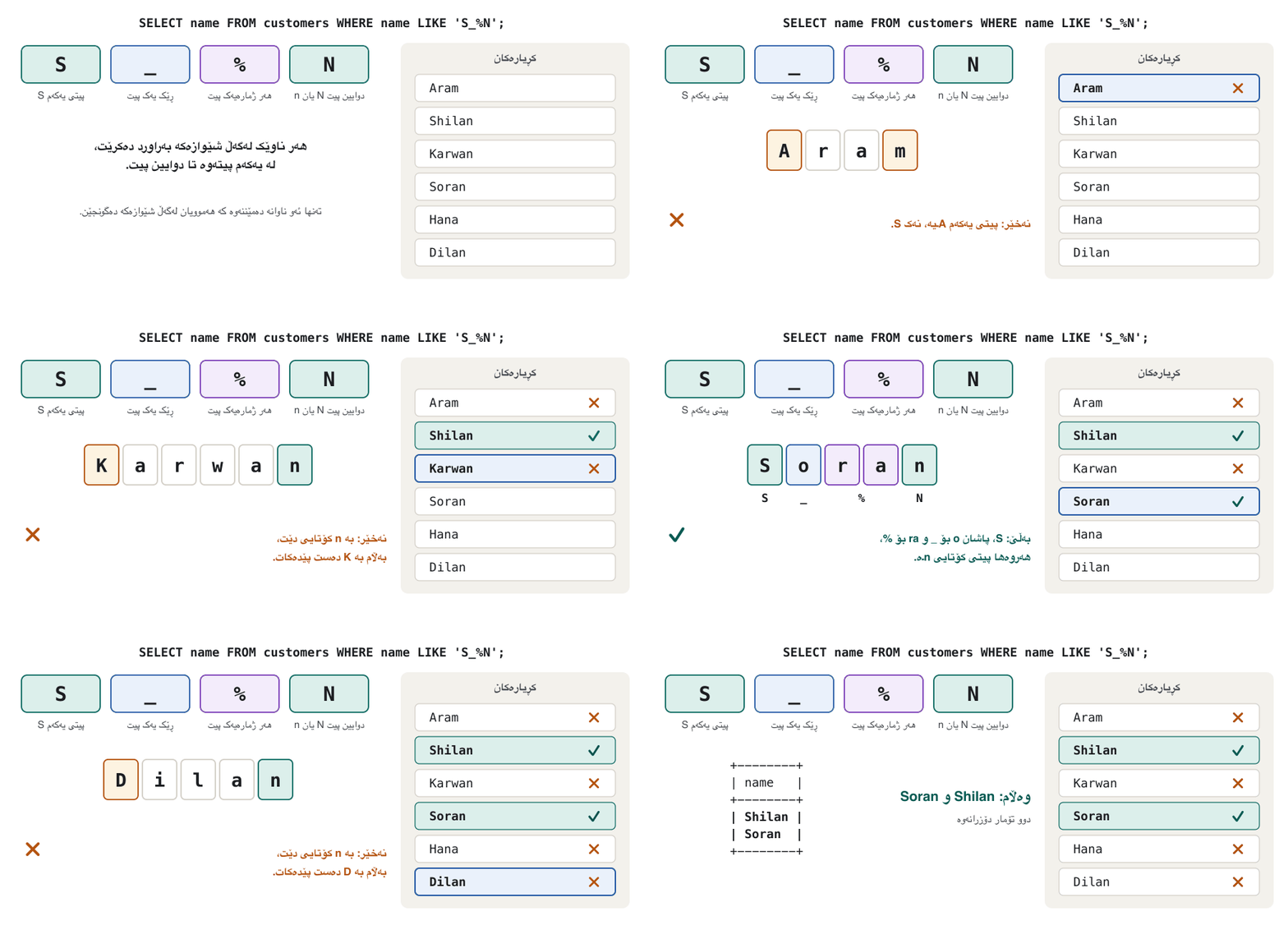
کام کڕیار ناوێکی هەیە کە بە S دەست پێدەکات، بە N کۆتایی دێت و لانیکەم سێ پیتە؟ شێوازەکە پارچە پارچە دروست بکە:
S— the first letter is S.S— پیتی یەکەم Sـە._— then exactly one letter. This makes the name at least three letters long (S + one letter + N)._— پاشان ڕێک یەک پیت. ئەمە وا دەکات ناوەکە لانیکەم سێ پیت بێت (S + یەک پیت + N).%— then any number of letters, also none.%— پاشان هەر ژمارەیەک پیت، تەنانەت هیچ.N— the last letter is N.N— دوایین پیت Nـە.
SELECT name FROM customers WHERE name LIKE 'S_%N';+--------+ | name | +--------+ | Shilan | | Soran | +--------+ 2 rows in set
Run in SQLite 3.51 on our shop database (there is no MySQL server in our test sandbox); MySQL returns the same rows.
لە SQLite 3.51 لەسەر دوکانەکەمان جێبەجێ کرا (لە ژینگەی تاقیکردنەوەماندا MySQL نییە)؛ MySQL هەمان دەگەڕێنێتەوە.
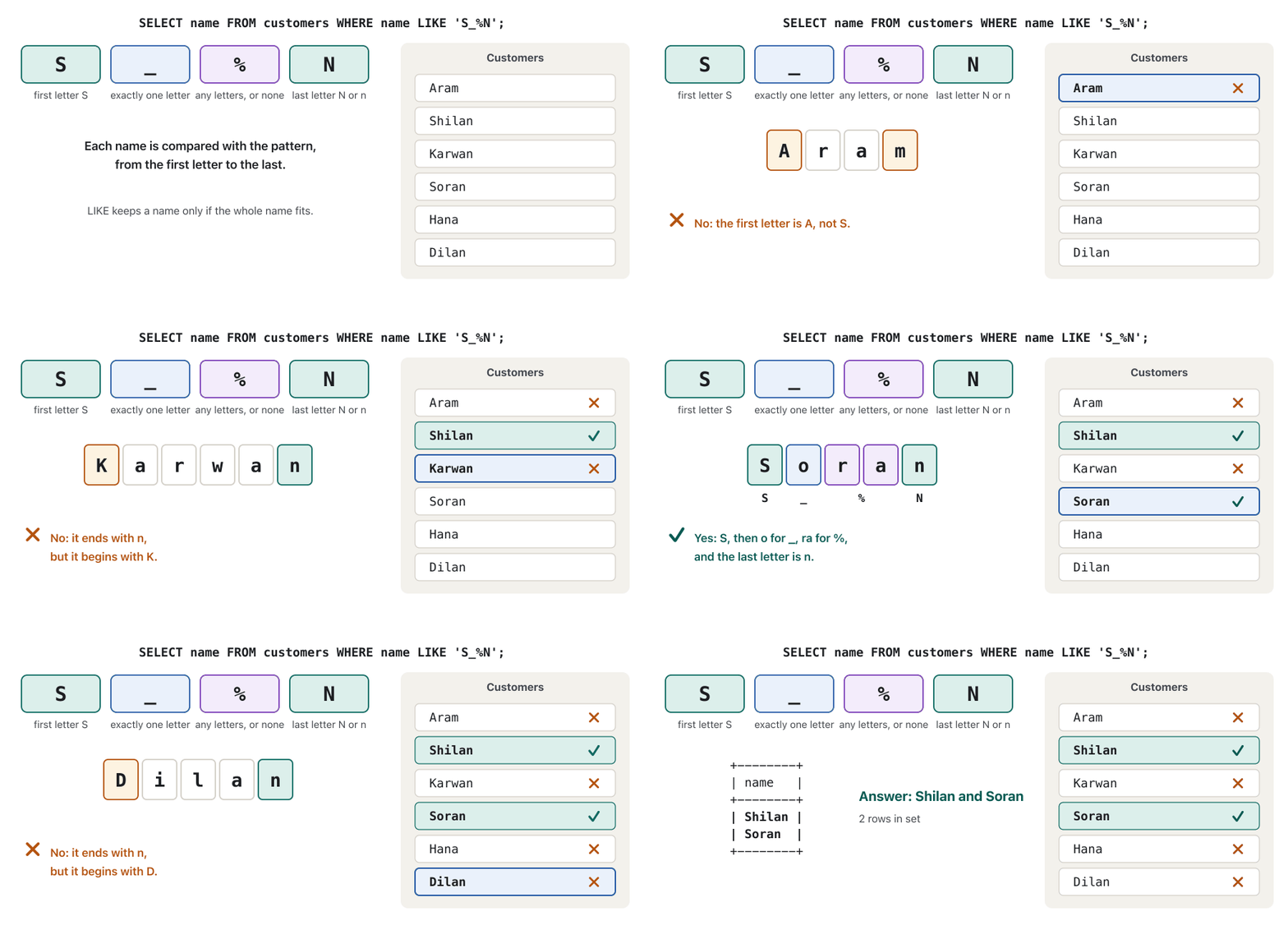
Why the _? Without it, 'S%N' would also accept a two-letter name such as Sn, because % may be empty. With it, at least one letter must stand between S and N:
بۆچی _؟ بەبێ ئەو، 'S%N' ناوێکی دوو پیتی وەک Snیش وەردەگرێت، چونکە % دەکرێت بەتاڵ بێت. لەگەڵ ئەودا دەبێت لانیکەم یەک پیت لە نێوان S و N دابێت:
SELECT 'Sn' LIKE 'S%N', 'Sn' LIKE 'S_%N', 'Shilan' LIKE 'S_%N';+-----------------+------------------+----------------------+ | 'Sn' LIKE 'S%N' | 'Sn' LIKE 'S_%N' | 'Shilan' LIKE 'S_%N' | +-----------------+------------------+----------------------+ | 1 | 0 | 1 | +-----------------+------------------+----------------------+ 1 row in set
Run in SQLite 3.51 on our shop database (there is no MySQL server in our test sandbox); MySQL returns the same rows.
لە SQLite 3.51 لەسەر دوکانەکەمان جێبەجێ کرا (لە ژینگەی تاقیکردنەوەماندا MySQL نییە)؛ MySQL هەمان دەگەڕێنێتەوە.
Explain the codeڕوونکردنەوەی کۆدەکە
- Lineدێڕی 1
LIKEgives 1 for a match and 0 for no match.LIKEبۆ یەکگرتنەوە 1 و بۆ یەکنەگرتنەوە 0 دەدات.
Patterns with LIKEشێواز بە LIKE
Capital or small letters?پیتی گەورە یان بچووک؟
In the worked example, Shilan ends with a small n but the pattern says N — and it still matches. LIKE follows the column's . MySQL's default collations (utf8mb4_0900_ai_ci in MySQL 8.4, utf8mb4_general_ci in phpMyAdmin on XAMPP) end in _ci, case-insensitive: capital and small letters count as the same.
لە نموونە شیکراوەکەدا، Shilan بە nـی بچووک کۆتایی دێت بەڵام شێوازەکە N دەڵێت — و هێشتا یەک دەگرێتەوە. LIKE بەدوای دەڕوات. بنەڕەتییەکانی MySQL (utf8mb4_0900_ai_ci لە MySQL 8.4، utf8mb4_general_ci لە phpMyAdmin لەسەر XAMPP) بە _ci کۆتایی دێن، واتە case-insensitive: پیتی گەورە و بچووک وەک یەک هەژمار دەکرێن.
| Testتاقیکردنەوە | MySQL (default collation)MySQL ( بنەڕەتی) | SQLite |
|---|---|---|
'Shilan' = 'shilan' | 1 — equal1 — یەکسانن | 0 — = is case-sensitive0 — = |
'Shilan' LIKE 'shilan' | 1 | 1 — LIKE ignores case for A–Z1 — LIKE گەورە و بچووکیی A تا Z پشتگوێ دەخات |
'Shilan' LIKE 'shilan' COLLATE utf8mb4_bin | 0 — a binary collation compares the exact bytes0 — binary وەک خۆیان بەراورد دەکات | 1 — SQLite's LIKE ignores the COLLATE; its GLOB 'S*' is case-sensitive1 — LIKEـی SQLite بڕگەی COLLATE پشتگوێ دەخات؛ GLOB 'S*'ـەکەی |
'شیلان' LIKE 'ش%' | 1 | 1 |
- To make a MySQL comparison case-sensitive, add a binary collation:
name LIKE 'S%' COLLATE utf8mb4_bin. (The shortername LIKE BINARY 'S%'also works, but theBINARYoperator is deprecated in MySQL 8.4.) - SQLite's
LIKEignores case only for the English letters A–Z; its=never ignores case (SQLite and letter case). - Kurdish letters have no capital and small forms, so for Kurdish text the question does not arise.
- بۆ ئەوەی بەراوردێکی MySQL بێت، binary زیاد بکە:
name LIKE 'S%' COLLATE utf8mb4_bin. (شێوە کورتەکەیname LIKE BINARY 'S%'ـیش کار دەکات، بەڵامBINARYلە MySQL 8.4ـدا .) LIKEـی SQLite تەنها بۆ پیتە ئینگلیزییەکانی A تا Z گەورە و بچووکیی پیت پشتگوێ دەخات؛=ـەکەی هەرگیز پشتگوێی ناخات (SQLite و گەورە و بچووکیی پیت).- پیتە کوردییەکان شێوەی گەورە و بچووکیان نییە، بۆیە بۆ دەقی کوردی ئەم پرسیارە دروست نابێت.
Patterns with LIKEشێواز بە LIKE
NOT LIKE, a real % sign, and AccessNOT LIKE، نیشانەی %ـی ڕاستەقینە و Access
NOT LIKE keeps the values that do not match. The phones that are not Redmi phones:
NOT LIKE ئەو نرخانە دەهێڵێتەوە کە یەک ناگرنەوە. ئەو مۆبایلانەی Redmi نین:
SELECT name FROM products
WHERE category = 'phone' AND name NOT LIKE 'Redmi%';+------------+ | name | +------------+ | Galaxy A15 | | iPhone 15 | +------------+ 2 rows in set
Run in SQLite 3.51 on our shop database (there is no MySQL server in our test sandbox); MySQL returns the same rows.
لە SQLite 3.51 لەسەر دوکانەکەمان جێبەجێ کرا (لە ژینگەی تاقیکردنەوەماندا MySQL نییە)؛ MySQL هەمان دەگەڕێنێتەوە.
To search for a real % or _, choose an escape character with ESCAPE; the character after it is taken literally. MySQL also treats a backslash as the escape character by default ('%10\%'), but SQLite does not, so ESCAPE is the portable way:
بۆ گەڕان بەدوای % یان _ـی ڕاستەقینە، بە ESCAPE هەڵبژێرە؛ ئەو دوای ئەو دێت وەک خۆی وەردەگیرێت. MySQL بە شێوەی بنەڕەتی backslashـیش بەم کارە دادەنێت ('%10\%')، بەڵام SQLite نا، بۆیە ESCAPE ڕێگەیەکە لە هەردووکیاندا کار دەکات:
SELECT 'Save 10%' LIKE '%10!%' ESCAPE '!',
'Save 100' LIKE '%10!%' ESCAPE '!';+------------------------------------+------------------------------------+ | 'Save 10%' LIKE '%10!%' ESCAPE '!' | 'Save 100' LIKE '%10!%' ESCAPE '!' | +------------------------------------+------------------------------------+ | 1 | 0 | +------------------------------------+------------------------------------+ 1 row in set
Run in SQLite 3.51 on our shop database (there is no MySQL server in our test sandbox); MySQL returns the same rows.
لە SQLite 3.51 لەسەر دوکانەکەمان جێبەجێ کرا (لە ژینگەی تاقیکردنەوەماندا MySQL نییە)؛ MySQL هەمان دەگەڕێنێتەوە.
Explain the codeڕوونکردنەوەی کۆدەکە
- Lineدێڕی 1-2
!%means a real percent sign. The first text ends with 10%, the second with 100.!%واتە نیشانەیەکی سەدیی ڕاستەقینە. دەقی یەکەم بە 10% کۆتایی دێت، دووەمیان بە 100.
Missing values: NULLنرخە ونبووەکان: NULL
NULL means unknown or missing. It is not 0 and it is not an empty text '': the stock of the ThinkPad is not zero, it has simply not been counted yet.
NULL واتە نەزانراو یان ون. 0 نییە و دەقی بەتاڵی ''ـیش نییە: ژمارەی کۆگای ThinkPad سفر نییە، تەنها هێشتا نەژمێردراوە.
A special value meaning "no value". PHP writes it null (or NULL), Java and C# null, Python None; a function that returns nothing gives this value.
نرخێکی تایبەتە بە واتای «هیچ نرخ». PHP بە null (یان NULL) دەینووسێت، Java و C# بە null و Python بە None؛ کە هیچ ناگەڕێنێتەوە ئەم نرخە دەدات.
In SQL, NULL is the mark for a missing value in any column, whatever its type.
لە SQLـدا NULL نیشانەی نرخێکی ونە لە هەر ، جۆرەکەی هەرچییەک بێت.
A first attempt to find it fails:
یەکەم هەوڵ بۆ دۆزینەوەی ئەم کاڵایە سەرکەوتوو نابێت:
SELECT name, stock FROM products WHERE stock = NULL;Empty set
Run in SQLite 3.51 on our shop database (there is no MySQL server in our test sandbox); MySQL returns the same rows.
لە SQLite 3.51 لەسەر دوکانەکەمان جێبەجێ کرا (لە ژینگەی تاقیکردنەوەماندا MySQL نییە)؛ MySQL هەمان دەگەڕێنێتەوە.
Nothing is ever equal to an unknown value — not even another NULL. Any comparison with NULL gives NULL (unknown), and WHERE keeps only the rows where the condition is true. Use IS NULL and IS NOT NULL:
هیچ شتێک هەرگیز یەکسان نییە بە نرخێکی نەزانراو — تەنانەت NULLـێکی تریش. ئەنجامی هەر بەراوردێک لەگەڵ NULL دەبێتە NULL (نەزانراو) و WHERE تەنها ئەو دەهێڵێتەوە کە تێیاندا ڕاستە. IS NULL و IS NOT NULL بەکار بهێنە:
SELECT name, stock FROM products WHERE stock IS NULL;+--------------+-------+ | name | stock | +--------------+-------+ | ThinkPad E14 | NULL | +--------------+-------+ 1 row in set
Run in SQLite 3.51 on our shop database (there is no MySQL server in our test sandbox); MySQL returns the same rows.
لە SQLite 3.51 لەسەر دوکانەکەمان جێبەجێ کرا (لە ژینگەی تاقیکردنەوەماندا MySQL نییە)؛ MySQL هەمان دەگەڕێنێتەوە.
SELECT NULL = NULL, 5 + NULL, NULL IS NULL, 0 IS NULL, '' IS NULL;+-------------+----------+--------------+-----------+------------+ | NULL = NULL | 5 + NULL | NULL IS NULL | 0 IS NULL | '' IS NULL | +-------------+----------+--------------+-----------+------------+ | NULL | NULL | 1 | 0 | 0 | +-------------+----------+--------------+-----------+------------+ 1 row in set
Run in SQLite 3.51 on our shop database (there is no MySQL server in our test sandbox); MySQL returns the same rows.
لە SQLite 3.51 لەسەر دوکانەکەمان جێبەجێ کرا (لە ژینگەی تاقیکردنەوەماندا MySQL نییە)؛ MySQL هەمان دەگەڕێنێتەوە.
Explain the codeڕوونکردنەوەی کۆدەکە
- Lineدێڕی 1
NULL = NULLand5 + NULLare unknown. OnlyIS NULLgives a clear answer: 1 forNULL, 0 for zero and for the empty text.NULL = NULLو5 + NULLنەزانراون. تەنهاIS NULLوەڵامێکی ڕوون دەدات: 1 بۆNULL، 0 بۆ سفر و بۆ دەقی بەتاڵ.
Mosh's MySQL course chapters: computed columns with AS and DISTINCT, IS NULL, and sorting with ORDER BY and LIMIT.
چەند بەشێکی کۆرسی Mosh: بە AS و DISTINCT، IS NULL و بە و .
Plays 1:11:51-1:14:18 (The IS NULL operator): finding missing values with IS NULL and IS NOT NULL.
لە 1:11:51 تا 1:14:18 پەخش دەبێت (بەشی The IS NULL operator): دۆزینەوەی بە IS NULL و IS NOT NULL.
Missing values: NULLنرخە ونبووەکان: NULL
NULL in calculations, and COALESCENULL لە ژماردندا و COALESCE
- Arithmetic with NULL gives NULL. That is why the ThinkPad's
price_iqd * stockwasNULLin Choosing and computing columns. <>skips NULL too.WHERE brand <> 'Samsung'returns 8 rows, not 9: the power bank's unknown brand might be Samsung, so SQL does not keep it.COALESCE(a, b)gives the first value that is not NULL — useful for showing a default in the answer:
- هەر ژماردنێک NULLـی تێدا بێت، ئەنجامەکەی NULLـە. لەبەر ئەوە
price_iqd * stockـی ThinkPad لە هەڵبژاردن و ژماردنی ستوونەکانNULLبوو. <>ـیش NULL پشتگوێ دەخات.WHERE brand <> 'Samsung'8 دەگەڕێنێتەوە، نەک 9: لەوانەیە براندە نەزانراوەکەی پاوەر بانکەکە Samsung بێت، بۆیە SQL نایهێڵێتەوە.COALESCE(a, b)یەکەم نرخ دەدات کە NULL نەبێت — بۆ پیشاندانی لە وەڵامدا بەسوودە:
SELECT name,
       COALESCE(stock, 0) AS stock_or_zero,
       COALESCE(brand, 'no brand') AS brand
FROM products
WHERE stock IS NULL OR brand IS NULL;+---------------------+---------------+----------+ | name | stock_or_zero | brand | +---------------------+---------------+----------+ | ThinkPad E14 | 0 | Lenovo | | Power Bank 20000mAh | 15 | no brand | +---------------------+---------------+----------+ 2 rows in set
Run in SQLite 3.51 on our shop database (there is no MySQL server in our test sandbox); MySQL returns the same rows.
لە SQLite 3.51 لەسەر دوکانەکەمان جێبەجێ کرا (لە ژینگەی تاقیکردنەوەماندا MySQL نییە)؛ MySQL هەمان دەگەڕێنێتەوە.
Think of a school form. A pupil who writes 0 in the box How many brothers? has answered; a pupil who leaves the box empty has not. NULL is the empty box: you cannot say it equals 0, nor that it equals another empty box.
فۆرمێکی قوتابخانە بهێنە پێش چاو. قوتابییەک کە لە خانەی چەند براتان هەیە؟ دەنووسێت 0 وەڵامی داوەتەوە؛ قوتابییەک کە خانەکە بەتاڵ جێدەهێڵێت وەڵامی نەداوەتەوە. NULL خانە بەتاڵەکەیە: ناتوانیت بڵێیت یەکسانە بە 0، یان یەکسانە بە خانەیەکی بەتاڵی تر.
Where the analogy stops workingسنووری ئەم نموونەیە
A blank on paper can mean many things (forgotten, refused, not known). In a database a NULL carries no reason at all, which is one reason designers keep NULLs few (why as few NULLs as possible).
خانەیەکی بەتاڵ لەسەر کاغەز دەکرێت چەند واتایەکی هەبێت (لەبیرچوو، ڕەتکرایەوە، نەزانرا). لە NULL هیچ هۆکارێک لەگەڵ خۆی هەڵناگرێت، ئەمەش یەکێکە لە هۆکارەکانی ئەوەی دیزاینەران NULL کەم دەکەنەوە (بۆچی NULL هێندەی دەکرێت کەم بێت).
Sorting the answerڕیزکردنی وەڵامەکە
Without ORDER BY the rows come back in no promised order. SELECT showed ASC (the default) and DESC, and that each column has its own direction. Here is a two-level sort: categories A→Z, and inside each category the most expensive first.
بەبێ ORDER BY بە هیچ ڕیزبەندییەکی بەڵێندراو ناگەڕێنەوە. SELECT ASC (بنەڕەتی) و DESCـی پیشان دا، هەروەها ئەوەی کە هەر ئاڕاستەی خۆی هەیە. ئەمە دوو ئاستییە: جۆرەکان لە A بۆ Z و لە ناو هەر جۆرێکدا گرانترین یەکەم.
SELECT name, category, price_iqd
FROM products
ORDER BY category, price_iqd DESC;+---------------------+------------+-----------+ | name | category | price_iqd | +---------------------+------------+-----------+ | Power Bank 20000mAh | charger | 30000 | | USB-C Charger 25W | charger | 25000 | | Fast Charger 33W | charger | 18000 | | Galaxy Buds FE | headphones | 95000 | | Wired Earphones | headphones | 7500 | | ThinkPad E14 | laptop | 940000 | | IdeaPad Slim 3 | laptop | 610000 | | VivoBook 15 | laptop | 600000 | | iPhone 15 | phone | 1350000 | | Redmi Note 13 | phone | 285000 | | Galaxy A15 | phone | 250000 | | Redmi 13C | phone | 165000 | +---------------------+------------+-----------+ 12 rows in set
Run in SQLite 3.51 with a case-insensitive collation, which is how MySQL compares and sorts text by default. Plain SQLite treats capital and small letters differently, so its answer can differ (see the text).
لە SQLite 3.51 بە جێبەجێ کرا کە گەورە و بچووکیی پیت جیا ناکاتەوە، هەروەک MySQL بە شێوەی بنەڕەتی دەق بەراورد و ڕیز دەکات. SQLiteـی ئاسایی پیتی گەورە و بچووک جیا دەکاتەوە، بۆیە لەوانەیە وەڵامەکەی جیاواز بێت (بڕوانە دەقەکە).
You can sort by an alias, because ORDER BY is read after the columns are built:
دەتوانیت بەپێی ڕیز بکەیت، چونکە ORDER BY دوای دروستبوونی دەخوێندرێتەوە:
SELECT name, price_iqd * stock AS stock_value
FROM products
WHERE category IN ('laptop', 'charger')
ORDER BY stock_value DESC;+---------------------+-------------+ | name | stock_value | +---------------------+-------------+ | VivoBook 15 | 3000000 | | IdeaPad Slim 3 | 2440000 | | USB-C Charger 25W | 750000 | | Fast Charger 33W | 450000 | | Power Bank 20000mAh | 450000 | | ThinkPad E14 | NULL | +---------------------+-------------+ 6 rows in set
Run in SQLite 3.51 on our shop database (there is no MySQL server in our test sandbox); MySQL returns the same rows.
لە SQLite 3.51 لەسەر دوکانەکەمان جێبەجێ کرا (لە ژینگەی تاقیکردنەوەماندا MySQL نییە)؛ MySQL هەمان دەگەڕێنێتەوە.
Explain the codeڕوونکردنەوەی کۆدەکە
- Lineدێڕی 4
The ThinkPad's unknown value (
NULL) comes last when sorting from high to low.نرخە نەزانراوەکەی ThinkPad (
NULL) لە ڕیزکردنی بەرز بۆ نزمدا دوایین دێت.
Where do NULLs go? In MySQL (and in SQLite) NULL counts as smaller than every value: first with ASC, last with DESC.
NULL بۆ کوێ دەچێت؟ لە MySQL (و لە SQLite) NULL لە هەموو نرخێک بچووکتر هەژمار دەکرێت: لەگەڵ ASC یەکەم، لەگەڵ DESC دوایین.
SELECT name, stock FROM products
WHERE category = 'laptop'
ORDER BY stock;+----------------+-------+ | name | stock | +----------------+-------+ | ThinkPad E14 | NULL | | IdeaPad Slim 3 | 4 | | VivoBook 15 | 5 | +----------------+-------+ 3 rows in set
Run in SQLite 3.51 on our shop database (there is no MySQL server in our test sandbox); MySQL returns the same rows.
لە SQLite 3.51 لەسەر دوکانەکەمان جێبەجێ کرا (لە ژینگەی تاقیکردنەوەماندا MySQL نییە)؛ MySQL هەمان دەگەڕێنێتەوە.
Mosh's MySQL course chapters: computed columns with AS and DISTINCT, IS NULL, and sorting with ORDER BY and LIMIT.
چەند بەشێکی کۆرسی Mosh: بە AS و DISTINCT، IS NULL و بە و .
Plays 1:14:18-1:24:50 (ORDER BY and LIMIT): several columns, DESC, sorting by an alias, LIMIT with an offset.
لە 1:14:18 تا 1:24:50 پەخش دەبێت (بەشی ORDER BY and LIMIT): بە چەند ، DESC، بە و LIMIT لەگەڵ .
Sorting the answerڕیزکردنی وەڵامەکە
Sorting text, quoted aliases and LIMITڕیزکردنی دەق، نازناوەکانی ناو کۆتەیشن و LIMIT
Three more things about sorting: quotes around an alias, the order of text, and LIMIT.
سێ شتی تر دەربارەی : کۆتەیشن بە دەوری ، ڕیزبەندیی دەق و LIMIT.
Text is sorted by the . In MySQL iPhone 15 sits between Galaxy and Redmi, because small and capital letters are equal; plain SQLite compares character codes, where every capital comes before every small letter, and puts iPhone 15 last.
دەق بەپێی ڕیز دەکرێت. لە MySQLـدا iPhone 15 لە نێوان Galaxy و Redmiدایە، چونکە پیتی بچووک و گەورە یەکسانن؛ SQLiteـی ئاسایی کۆدی بەراورد دەکات کە تێیدا هەموو پیتێکی گەورە پێش هەموو پیتێکی بچووک دێت و iPhone 15 دەخاتە کۆتایی.
SELECT name FROM products WHERE category = 'phone' ORDER BY name;+---------------+ | name | +---------------+ | Galaxy A15 | | iPhone 15 | | Redmi 13C | | Redmi Note 13 | +---------------+ 4 rows in set
Run in SQLite 3.51 with a case-insensitive collation, which is how MySQL compares and sorts text by default. Plain SQLite treats capital and small letters differently, so its answer can differ (see the text).
لە SQLite 3.51 بە جێبەجێ کرا کە گەورە و بچووکیی پیت جیا ناکاتەوە، هەروەک MySQL بە شێوەی بنەڕەتی دەق بەراورد و ڕیز دەکات. SQLiteـی ئاسایی پیتی گەورە و بچووک جیا دەکاتەوە، بۆیە لەوانەیە وەڵامەکەی جیاواز بێت (بڕوانە دەقەکە).
For a top 3, sort and add LIMIT. LIMIT and OFFSET (for pages of results) are taught in LIMIT, OFFSET and pagination.
بۆ سێ باشترین، ڕیزی بکە و LIMIT زیاد بکە. LIMIT و OFFSET (بۆ پەڕەکانی ئەنجام) لە LIMIT، OFFSET و پەڕەبەندی فێر دەکرێن.
SELECT name, price_iqd FROM products
ORDER BY price_iqd DESC
LIMIT 3;+----------------+-----------+ | name | price_iqd | +----------------+-----------+ | iPhone 15 | 1350000 | | ThinkPad E14 | 940000 | | IdeaPad Slim 3 | 610000 | +----------------+-----------+ 3 rows in set
Run in SQLite 3.51 on our shop database (there is no MySQL server in our test sandbox); MySQL returns the same rows.
لە SQLite 3.51 لەسەر دوکانەکەمان جێبەجێ کرا (لە ژینگەی تاقیکردنەوەماندا MySQL نییە)؛ MySQL هەمان دەگەڕێنێتەوە.
Exercisesڕاهێنانەکان
Write each query for the shop database, run it in phpMyAdmin, then open the answer. The tasks follow the exercise ideas of the course's textbook chapter, moved to our shop.
هەر بۆ دوکانەکە بنووسە، لە phpMyAdmin جێبەجێی بکە، پاشان وەڵامەکە بکەرەوە. ئەرکەکان بیرۆکەی ڕاهێنانەکانی بەشی کتێبەکەی کۆرسەکەن کە گوازراونەتەوە بۆ دوکانەکەمان.
1. Show all the information about the customers who live in Sulaimani.
1. هەموو زانیارییەکانی ئەو کڕیارانە پیشان بدە کە لە سلێمانی دەژین.
Show answerوەڵامەکە پیشان بدە
SELECT * FROM customers WHERE city = 'Sulaimani';+-------------+-------+-----------+-------------------+ | customer_id | name | city | email | +-------------+-------+-----------+-------------------+ | 1 | Aram | Sulaimani | aram@example.com | | 4 | Dilan | Sulaimani | dilan@example.com | +-------------+-------+-----------+-------------------+ 2 rows in set
Run in SQLite 3.51 on our shop database (there is no MySQL server in our test sandbox); MySQL returns the same rows.
لە SQLite 3.51 لەسەر دوکانەکەمان جێبەجێ کرا (لە ژینگەی تاقیکردنەوەماندا MySQL نییە)؛ MySQL هەمان دەگەڕێنێتەوە.
2. For every phone show the name, the price, the stock and the money on the shelf (price × stock) as a column called Stock value.
2. بۆ هەر مۆبایلێک ناو، قیمەت، ژمارەی کۆگا و ئەو پارەیەی لەسەر ڕەفەکەیە (قیمەت × کۆگا) وەک بە ناوی Stock value پیشان بدە.
Show answerوەڵامەکە پیشان بدە
SELECT name, price_iqd, stock, price_iqd * stock AS `Stock value`
FROM products
WHERE category = 'phone';+---------------+-----------+-------+-------------+ | name | price_iqd | stock | Stock value | +---------------+-----------+-------+-------------+ | Galaxy A15 | 250000 | 8 | 2000000 | | Redmi 13C | 165000 | 12 | 1980000 | | Redmi Note 13 | 285000 | 6 | 1710000 | | iPhone 15 | 1350000 | 2 | 2700000 | +---------------+-----------+-------+-------------+ 4 rows in set
Run in SQLite 3.51 on our shop database (there is no MySQL server in our test sandbox); MySQL returns the same rows.
لە SQLite 3.51 لەسەر دوکانەکەمان جێبەجێ کرا (لە ژینگەی تاقیکردنەوەماندا MySQL نییە)؛ MySQL هەمان دەگەڕێنێتەوە.
3. List the different categories of products, each once.
3. جۆرە جیاوازەکانی کاڵا، هەر یەکەیان یەک جار، پیشان بدە.
Show answerوەڵامەکە پیشان بدە
SELECT DISTINCT category FROM products;+------------+ | category | +------------+ | phone | | laptop | | charger | | headphones | +------------+ 4 rows in set
Run in SQLite 3.51 on our shop database (there is no MySQL server in our test sandbox); MySQL returns the same rows.
لە SQLite 3.51 لەسەر دوکانەکەمان جێبەجێ کرا (لە ژینگەی تاقیکردنەوەماندا MySQL نییە)؛ MySQL هەمان دەگەڕێنێتەوە.
4. During a sale every charger is 5,000 IQD cheaper. Show each charger's name, its price and the price after the discount as after_discount.
4. لە کاتی داشکاندندا هەموو 5,000 دینار هەرزانترە. ناوی هەر ، قیمەتەکەی و قیمەتی دوای داشکاندن وەک after_discount پیشان بدە.
Show answerوەڵامەکە پیشان بدە
SELECT name, price_iqd, price_iqd - 5000 AS after_discount
FROM products
WHERE category = 'charger';+---------------------+-----------+----------------+ | name | price_iqd | after_discount | +---------------------+-----------+----------------+ | USB-C Charger 25W | 25000 | 20000 | | Fast Charger 33W | 18000 | 13000 | | Power Bank 20000mAh | 30000 | 25000 | +---------------------+-----------+----------------+ 3 rows in set
Run in SQLite 3.51 on our shop database (there is no MySQL server in our test sandbox); MySQL returns the same rows.
لە SQLite 3.51 لەسەر دوکانەکەمان جێبەجێ کرا (لە ژینگەی تاقیکردنەوەماندا MySQL نییە)؛ MySQL هەمان دەگەڕێنێتەوە.
5. List the products that cost more than 20,000 and less than 100,000 IQD. Can you write it with BETWEEN?
5. ئەو کاڵایانە پیشان بدە کە زیاتر لە 20,000 و کەمتر لە 100,000 دینارن. دەتوانیت بە BETWEEN بینووسیت؟
Show answerوەڵامەکە پیشان بدە
SELECT name, price_iqd FROM products
WHERE price_iqd > 20000 AND price_iqd < 100000;+---------------------+-----------+ | name | price_iqd | +---------------------+-----------+ | USB-C Charger 25W | 25000 | | Power Bank 20000mAh | 30000 | | Galaxy Buds FE | 95000 | +---------------------+-----------+ 3 rows in set
Run in SQLite 3.51 on our shop database (there is no MySQL server in our test sandbox); MySQL returns the same rows.
لە SQLite 3.51 لەسەر دوکانەکەمان جێبەجێ کرا (لە ژینگەی تاقیکردنەوەماندا MySQL نییە)؛ MySQL هەمان دەگەڕێنێتەوە.
BETWEEN 20000 AND 100000 would include the two end values, which the task excludes. For whole numbers, BETWEEN 20001 AND 99999 gives the same three rows — but the version with > and < says exactly what was asked.
BETWEEN 20000 AND 100000 دوو نرخی سەرەکە دەگرێتەوە کە ئەرکەکە دەریان دەکات. بۆ ، BETWEEN 20001 AND 99999 هەمان سێ دەدات — بەڵام شێوەی > و < ڕێک ئەوە دەڵێت کە داوا کراوە.
6. List the products that are chargers or headphones — once with OR and once with IN.
6. ئەو کاڵایانە پیشان بدە کە یان — جارێک بە OR و جارێک بە IN.
Show answerوەڵامەکە پیشان بدە
SELECT name, category FROM products
WHERE category = 'charger' OR category = 'headphones';

SELECT name, category FROM products
WHERE category IN ('charger', 'headphones');+---------------------+------------+ | name | category | +---------------------+------------+ | USB-C Charger 25W | charger | | Fast Charger 33W | charger | | Power Bank 20000mAh | charger | | Galaxy Buds FE | headphones | | Wired Earphones | headphones | +---------------------+------------+ 5 rows in set
Run in SQLite 3.51 on our shop database (there is no MySQL server in our test sandbox); MySQL returns the same rows.
لە SQLite 3.51 لەسەر دوکانەکەمان جێبەجێ کرا (لە ژینگەی تاقیکردنەوەماندا MySQL نییە)؛ MySQL هەمان دەگەڕێنێتەوە.
7. Which products have a stock that has not been counted yet?
7. ژمارەی کۆگای کام کاڵا هێشتا نەژمێردراوە؟
Show answerوەڵامەکە پیشان بدە
SELECT name, stock FROM products WHERE stock IS NULL;+--------------+-------+ | name | stock | +--------------+-------+ | ThinkPad E14 | NULL | +--------------+-------+ 1 row in set
Run in SQLite 3.51 on our shop database (there is no MySQL server in our test sandbox); MySQL returns the same rows.
لە SQLite 3.51 لەسەر دوکانەکەمان جێبەجێ کرا (لە ژینگەی تاقیکردنەوەماندا MySQL نییە)؛ MySQL هەمان دەگەڕێنێتەوە.
Not stock = NULL, which finds nothing, and not stock = 0, which would be a counted, empty shelf.
نەک stock = NULL کە هیچ نادۆزێتەوە و نەک stock = 0 کە ڕەفێکی بەتاڵی ژمێردراو دەبێت.
8. Show the sales where more than one item was sold and the customer paid with fib.
8. ئەو فرۆشتنانە پیشان بدە کە زیاتر لە یەک دانە فرۆشراوە و کڕیار بە fib پارەی داوە.
Show answerوەڵامەکە پیشان بدە
SELECT sale_id, quantity, payment FROM sales
WHERE quantity > 1 AND payment = 'fib';+---------+----------+---------+ | sale_id | quantity | payment | +---------+----------+---------+ | 8 | 2 | fib | | 19 | 3 | fib | +---------+----------+---------+ 2 rows in set
Run in SQLite 3.51 on our shop database (there is no MySQL server in our test sandbox); MySQL returns the same rows.
لە SQLite 3.51 لەسەر دوکانەکەمان جێبەجێ کرا (لە ژینگەی تاقیکردنەوەماندا MySQL نییە)؛ MySQL هەمان دەگەڕێنێتەوە.
9. Now show the sales where more than one item was sold or the customer paid by card. Why are there more rows than in exercise 8?
9. ئێستا ئەو فرۆشتنانە پیشان بدە کە زیاتر لە یەک دانە فرۆشراوە یان کڕیار بە کارت پارەی داوە. بۆچی لە ڕاهێنانی 8 زیاترن؟
Show answerوەڵامەکە پیشان بدە
SELECT sale_id, quantity, payment FROM sales
WHERE quantity > 1 OR payment = 'card';+---------+----------+---------+ | sale_id | quantity | payment | +---------+----------+---------+ | 2 | 2 | cash | | 4 | 1 | card | | 5 | 3 | cash | | 8 | 2 | fib | | 10 | 1 | card | | 14 | 2 | cash | | 19 | 3 | fib | +---------+----------+---------+ 7 rows in set
Run in SQLite 3.51 on our shop database (there is no MySQL server in our test sandbox); MySQL returns the same rows.
لە SQLite 3.51 لەسەر دوکانەکەمان جێبەجێ کرا (لە ژینگەی تاقیکردنەوەماندا MySQL نییە)؛ MySQL هەمان دەگەڕێنێتەوە.
With OR one true side is enough: sales 4 and 10 are single items paid by card, and the cash sales 2, 5 and 14 have more than one item.
لەگەڵ OR یەک لای ڕاست بەسە: فرۆشتنی 4 و 10 یەک دانەن کە بە کارت پارەیان دراوە و فرۆشتنە نەختینەکانی 2، 5 و 14 زیاتر لە یەک دانەیان هەیە.
10. Show the sales that Lana made not paid with fib.
10. ئەو فرۆشتنانەی Lana پیشان بدە کە بە fib پارەیان نەدراوە.
Show answerوەڵامەکە پیشان بدە
SELECT sale_id, sold_on, payment FROM sales
WHERE seller = 'Lana' AND payment <> 'fib';+---------+------------+---------+ | sale_id | sold_on | payment | +---------+------------+---------+ | 4 | 2026-09-07 | card | | 7 | 2026-09-18 | cash | | 10 | 2026-10-01 | card | | 13 | 2026-10-09 | cash | +---------+------------+---------+ 4 rows in set
Run in SQLite 3.51 on our shop database (there is no MySQL server in our test sandbox); MySQL returns the same rows.
لە SQLite 3.51 لەسەر دوکانەکەمان جێبەجێ کرا (لە ژینگەی تاقیکردنەوەماندا MySQL نییە)؛ MySQL هەمان دەگەڕێنێتەوە.
11. Show Rezan's sales paid by card or with fib. Where do the brackets go, and what happens without them?
11. ئەو فرۆشتنانەی Rezan پیشان بدە کە بە کارت یان بە fib پارەیان دراوە. کەوانەکان لە کوێ دادەنرێن و بەبێ ئەوان چی ڕوودەدات؟
Show answerوەڵامەکە پیشان بدە
SELECT sale_id, seller, payment FROM sales
WHERE seller = 'Rezan' AND (payment = 'card' OR payment = 'fib');+---------+--------+---------+ | sale_id | seller | payment | +---------+--------+---------+ | 6 | Rezan | fib | | 9 | Rezan | fib | | 12 | Rezan | fib | +---------+--------+---------+ 3 rows in set
Run in SQLite 3.51 on our shop database (there is no MySQL server in our test sandbox); MySQL returns the same rows.
لە SQLite 3.51 لەسەر دوکانەکەمان جێبەجێ کرا (لە ژینگەی تاقیکردنەوەماندا MySQL نییە)؛ MySQL هەمان دەگەڕێنێتەوە.
Without brackets, seller = 'Rezan' AND payment = 'card' OR payment = 'fib' would also return Lana's fib sales, because AND is done first. (Rezan happens to have no card sales.)
بەبێ کەوانە، seller = 'Rezan' AND payment = 'card' OR payment = 'fib' فرۆشتنەکانی fibـی Lanaـش دەگەڕێنێتەوە، چونکە AND یەکەم جێبەجێ دەکرێت. (ڕێکەوت وایە Rezan هیچ فرۆشتنێکی بە کارتی نییە.)
12. Show the name and price of the Apple product with the column headers product and price. Then: how would you rename the table customers to clients and its column city to town for real?
12. ناو و قیمەتی کاڵای Apple بە سەردێڕی product و price پیشان بدە. پاشان: چۆن بە ڕاستی ناوی customers دەگۆڕیت بۆ clients و ناوی city بۆ town؟
Show answerوەڵامەکە پیشان بدە
SELECT name AS product, price_iqd AS price
FROM products
WHERE brand = 'Apple';+-----------+---------+ | product | price | +-----------+---------+ | iPhone 15 | 1350000 | +-----------+---------+ 1 row in set
Run in SQLite 3.51 on our shop database (there is no MySQL server in our test sandbox); MySQL returns the same rows.
لە SQLite 3.51 لەسەر دوکانەکەمان جێبەجێ کرا (لە ژینگەی تاقیکردنەوەماندا MySQL نییە)؛ MySQL هەمان دەگەڕێنێتەوە.
AS renames only in the answer. Renaming in the table itself changes the structure, so it is an ALTER/RENAME statement:
AS تەنها لە وەڵامەکەدا ناو دەگۆڕێت. گۆڕینی ناو لە خودی پێکهاتەکە دەگۆڕێت، بۆیە فەرمانێکی ALTER/RENAMEـە:
RENAME TABLE customers TO clients;                 -- MySQL / MariaDB
ALTER TABLE clients RENAME COLUMN city TO town;    -- MySQL 8, MariaDB 10.5.2+, SQLite

-- Old MariaDB 10.4 (XAMPP 8.2 and older) has no RENAME COLUMN; there use instead:
-- ALTER TABLE clients CHANGE city town VARCHAR(30) NOT NULL;Query OK
The ALTER TABLE … RENAME COLUMN and ALTER TABLE customers RENAME TO clients forms were run in SQLite 3.51 (a SELECT afterwards showed the column town); the MySQL and MariaDB forms follow their manuals (today's XAMPP ships MariaDB 10.11, which has RENAME COLUMN).
شێوەکانی ALTER TABLE … RENAME COLUMN و ALTER TABLE customers RENAME TO clients لە SQLite 3.51 جێبەجێ کران (SELECTـێک دوای ئەوە townـی پیشان دا)؛ شێوەکانی MySQL و MariaDB بەپێی ڕێبەرەکانیانن (XAMPPـی ئەمڕۆ MariaDB 10.11 لەگەڵ خۆیدا دەهێنێت کە RENAME COLUMNـی هەیە).
Renaming breaks every PHP page and query that still uses the old names, so do it before the website is built, not after.
گۆڕینی ناو هەموو پەڕەیەکی PHP و تێک دەدات کە هێشتا ناوە کۆنەکان بەکار دەهێنێت، بۆیە پێش دروستکردنی ماڵپەڕەکە ئەنجامی بدە، نەک دوای.
13. List all products by name from Z to A; when two names were equal, the cheaper one should come first.
13. هەموو کاڵاکان بەپێی ناو لە Z بۆ A ڕیز بکە؛ ئەگەر دوو ناو وەک یەک بوون، هەرزانترەکە دەبێت یەکەم بێت.
Show answerوەڵامەکە پیشان بدە
SELECT name, price_iqd FROM products
ORDER BY name DESC, price_iqd;+---------------------+-----------+ | name | price_iqd | +---------------------+-----------+ | Wired Earphones | 7500 | | VivoBook 15 | 600000 | | USB-C Charger 25W | 25000 | | ThinkPad E14 | 940000 | | Redmi Note 13 | 285000 | | Redmi 13C | 165000 | | Power Bank 20000mAh | 30000 | | iPhone 15 | 1350000 | | IdeaPad Slim 3 | 610000 | | Galaxy Buds FE | 95000 | | Galaxy A15 | 250000 | | Fast Charger 33W | 18000 | +---------------------+-----------+ 12 rows in set
Run in SQLite 3.51 with a case-insensitive collation, which is how MySQL compares and sorts text by default. Plain SQLite treats capital and small letters differently, so its answer can differ (see the text).
لە SQLite 3.51 بە جێبەجێ کرا کە گەورە و بچووکیی پیت جیا ناکاتەوە، هەروەک MySQL بە شێوەی بنەڕەتی دەق بەراورد و ڕیز دەکات. SQLiteـی ئاسایی پیتی گەورە و بچووک جیا دەکاتەوە، بۆیە لەوانەیە وەڵامەکەی جیاواز بێت (بڕوانە دەقەکە).
DESC belongs to name only; price_iqd uses the default ASC. In plain SQLite iPhone 15 would come first, because a small i sorts after every capital letter there.
DESC تەنها هی nameـە؛ price_iqd ASCـی بنەڕەتی بەکار دەهێنێت. لە SQLiteـی ئاسایی iPhone 15 یەکەم دەبوو، چونکە لەوێ iـی بچووک دوای هەموو پیتێکی گەورە ڕیز دەکرێت.
Common mistakesهەڵە باوەکان
The basic mistakes — curly quotes, text without quotes (WHERE brand = Samsung), UPDATE or DELETE without WHERE — are in Common mistakes. These are the new ones of this lesson:
هەڵە بنەڕەتییەکان — کۆتەیشنی چەماوە، دەقی بێ کۆتەیشن (WHERE brand = Samsung)، UPDATE یان DELETE بەبێ WHERE — لە هەڵە باوەکاندان. ئەمانە هەڵە نوێکانی ئەم وانەیەن:
| Mistakeهەڵە | What happensچی ڕوودەدات | Fixچارەسەر |
|---|---|---|
WHERE stock = NULL | No rows, never an errorهیچ نایەت و هەڵەش نادات | WHERE stock IS NULL |
… AND brand = 'Samsung' OR brand = 'Xiaomi' | AND is done first; unwanted rows slip inAND یەکەم جێبەجێ دەکرێت؛ دێنە ژوورەوە | … AND (brand = 'Samsung' OR brand = 'Xiaomi') |
BETWEEN 600000 AND 250000 | Empty set: the low value must come firstEmpty set: نرخی نزم دەبێت یەکەم بێت | BETWEEN 250000 AND 600000 |
WHERE name = 'Redmi%' | = treats % as a normal character= % وەک ئاسایی دادەنێت | WHERE name LIKE 'Redmi%' |
WHERE brand NOT IN ('Samsung', 'Xiaomi') | Rows with a NULL brand silently disappear بە براندی NULL بێدەنگ ون دەبن | … OR brand IS NULL |
WHERE stock_value > 2500000 | MySQL: Unknown column — the alias does not exist yetMySQL: Unknown column — هێشتا بوونی نییە | WHERE price_iqd * stock > 2500000 |
ORDER BY 'Stock value' | Sorts by a constant text: no sorting at allبەپێی دەقێکی نەگۆڕ ڕیز دەکات: هیچ ڕیزکردنێک نییە | ORDER BY `Stock value` |
AS Stock value | Syntax error: the space ends the alias: بۆشاییەکە کۆتایی پێدەهێنێت | AS `Stock value` or AS stock_value |
Summary and reviewپوختە و پێداچوونەوە
- The list after
SELECTchooses and computes columns;ASnames them (backticks for spaces in MySQL).DISTINCTremoves repeated rows of the answer. WHEREkeeps the rows where the condition is true:= <> != < <= > >=on numbers, quoted text and quoted dates.=compares the whole value.NOTfirst, thenAND, thenOR— write brackets wheneverANDandORare mixed.BETWEEN a AND bincludes both ends (low value first);IN (…)is a list of ORs;NOT INloses NULL rows, and a NULL in the list makes it return nothing.LIKE:%= any number of characters,_= exactly one. MySQL's default collations and SQLite's LIKE ignore letter case; SQLite's=does not. Access uses*and?.NULLis unknown: test it withIS NULL/IS NOT NULL, never= NULL; arithmetic with NULL gives NULL;COALESCEgives a default.ORDER BYsorts by several columns or by an alias (backticks, not single quotes); NULLs come first withASCand last withDESC;LIMITcuts the list.
- لیستی دوای
SELECTهەڵدەبژێرێت و دەیانژمێرێت؛ASناویان لێ دەنێت (لە MySQLـدا backtick بۆ بۆشایی).DISTINCTوەڵامەکە لادەبات. WHEREئەو دەهێڵێتەوە کە تێیاندا ڕاستە:= <> != < <= > >=لەسەر ژمارە، دەقی ناو کۆتەیشن و بەرواری ناو کۆتەیشن.=هەموو نرخەکە بەراورد دەکات.- یەکەم
NOT، پاشانAND، پاشانOR— هەر کاتێکANDوORتێکەڵ بوون کەوانە بنووسە. BETWEEN a AND bهەردوو سەر دەگرێتەوە (یەکەم نرخی نزم)؛IN (…)لیستێکی ORـە؛NOT INNULL لە دەست دەدات و NULL لە ناو لیستەکەدا وا دەکات هیچ نەگەڕێنێتەوە.LIKE:%= هەر ژمارەیەک ،_= ڕێک یەک. بنەڕەتییەکانی MySQL و LIKEـی SQLite گەورە و بچووکیی پیت پشتگوێ دەخەن؛=ـی SQLite نا. Access*و?بەکار دەهێنێت.NULLنەزانراوە: بەIS NULL/IS NOT NULLتاقی بکەرەوە، هەرگیز بە= NULLنا؛ هەر ژماردنێک NULLـی تێدا بێت ئەنجامەکەی NULLـە؛COALESCEدەدات.ORDER BYبەپێی چەند یان بەپێی ڕیز دەکات (backtick، نەک کۆتەیشنی تاک)؛ NULL لەگەڵASCیەکەم و لەگەڵDESCدوایین دێت؛LIMITلیستەکە کورت دەکاتەوە.
What is the difference between WHERE brand = 'Xiaomi' and WHERE brand LIKE 'X%'?جیاوازیی نێوان WHERE brand = 'Xiaomi' و WHERE brand LIKE 'X%' چییە؟
The first keeps only the brand that is exactly Xiaomi. The second keeps every brand that starts with X, whatever follows.
یەکەمیان تەنها ئەو براندە دەهێڵێتەوە کە ڕێک Xiaomiـە. دووەمیان هەموو براندێک دەهێڵێتەوە کە بە X دەست پێدەکات، دوای ئەوە هەرچی بێت.
Why does WHERE stock = NULL return no rows?بۆچی WHERE stock = NULL هیچ تۆمارێک ناگەڕێنێتەوە؟
Comparing anything with NULL gives NULL (unknown), and WHERE keeps only rows where the condition is true. IS NULL is the test for a missing value.
ئەنجامی بەراوردکردنی هەر شتێک لەگەڵ NULL هەر NULLـە (نەزانراو) و WHERE تەنها ئەو دەهێڵێتەوە کە تێیاندا ڕاستە. IS NULL تاقیکردنەوەی نرخی ونە.
Rewrite price_iqd >= 18000 AND price_iqd <= 30000 with BETWEEN. Which products does it find?price_iqd >= 18000 AND price_iqd <= 30000 بە BETWEEN بنووسەرەوە. کام کاڵا دەدۆزێتەوە؟
price_iqd BETWEEN 18000 AND 30000 — the three chargers (18,000, 25,000 and 30,000 IQD); both ends are included.
price_iqd BETWEEN 18000 AND 30000 — سێ (18,000، 25,000 و 30,000 دینار)؛ هەردوو سەرەکە لەگەڵیدان.
Why can you ORDER BY an alias but not use it in WHERE?بۆچی دەتوانیت ORDER BY بەپێی نازناوێک بکەیت بەڵام لە WHEREـدا بەکاری نەهێنیت؟
SQL works out WHERE before it builds the columns of the answer, and ORDER BY after. When WHERE runs, the alias does not exist yet.
SQL پێش دروستکردنی وەڵامەکە WHERE جێبەجێ دەکات و ORDER BY دوای ئەوە. کاتێک WHERE کار دەکات، هێشتا بوونی نییە.
Videoڤیدیۆ
Watch a videoسەیری ڤیدیۆیەک بکە
A video that viewers liked a lot and praised in their comments, chosen for this lesson.ڤیدیۆیەک کە بینەران زۆریان پێ خۆش بووە و لە کۆمێنتەکانیاندا ستایشیان کردووە، بۆ ئەم وانەیە هەڵبژێردراوە.
Filtering rows with WHERE in MySQL: comparison operators, numbers, text and dates, AND, OR and NOT, and patterns with LIKE using % and _.
بە لە : بۆ ژمارە، دەق و بەروار، AND، OR و NOT، هەروەها LIKE بە % و _.
Whole video, MySQL Workbench: comparison operators 1:08, types 2:58, AND/OR/NOT 4:28, LIKE with % and _ 7:46.
هەموو ڤیدیۆکە، لە Workbench: لە 1:08، لە 2:58، AND/OR/NOT لە 4:28 و LIKE بە % و _ لە 7:46.
Lesson complete!وانەکە تەواو بوو!
Well done. Review the key terms, then go on to the next lesson.دەستخۆش. سەیرێکی زاراوە سەرەکییەکان بکەرەوە، پاشان بڕۆ بۆ وانەی داهاتوو.
Key termsزاراوە سەرەکییەکان
SQL Functions, Aggregates and GROUP BYکردارەکانی SQL، کردارەکانی کۆکردنەوە و GROUP BY
Related lecturesوانە پەیوەندیدارەکان
- SQL Functions, Aggregates and GROUP BYکردارەکانی SQL، کردارەکانی کۆکردنەوە و GROUP BY
- Inserting and selecting data with PHPزیادکردن و هەڵبژاردنی زانیاری بە PHP
- Securing Data in PHP and MySQLپاراستنی دراوە لە PHP و MySQL
- SQLite Basicsبنەماکانی SQLite
- Relational Algebra and Relational Calculusجەبری پەیوەندیدار و ژمێرکاریی پەیوەندیدار
- Queriesپرسەکان
References and further readingسەرچاوەکان و خوێندنەوەی زیاتر
- MySQL 8.4 Reference Manual: Comparison Functions and Operators (BETWEEN, IN, IS NULL, COALESCE)
- MySQL 8.4 Reference Manual: String Comparison Functions and Operators (LIKE, ESCAPE, letter case)
- MySQL 8.4 Reference Manual: SELECT Statement (aliases, ORDER BY, LIMIT, DISTINCT)
- MySQL 8.4 Reference Manual: Schema Object Names (quoting identifiers and aliases)
- MySQL 8.4 Reference Manual: Working with NULL Values
- SQLite: SQL Language Expressions (LIKE, BETWEEN, IN, IS)
- SQLite: The SELECT statement (ORDER BY and NULL values)
This lecture is a first edition. The Kurdish text and terminology are waiting for review by Kurdish IT teachers.ئەم وانەیە چاپی یەکەمە. دەقە کوردییەکە و زاراوەکانی چاوەڕێی پێداچوونەوەی مامۆستایانی کوردی بواری IT ن.