Chapterبەش 6 · Lectureوانە 6.2
Typing Mathematics: Keyboards, Word, LaTeX and Unicodeچۆن بیرکاری بنووسیت: کیبۆرد، Word، LaTeX و Unicode
How to type maths as real text: the keyboard’s stand-ins (x^2, *, <=); the symbol panels of Windows (⊞ + .) and Mac (Fn + E); Insert > Symbol and Alt + X in Word; the equation editor (Alt+=) and one-line typing; LaTeX in Word, Google Docs, Overleaf and CêIT; Unicode code points and look-alike characters (− - –, ∑ Σ, Ω Ω, ∅ Ø); pasting maths into code; and keeping formulas left to right in a Kurdish sentence.
چۆن بیرکاری وەک دەقی ڕاستەقینە بنووسیت: جێگرەوەکانی سەر (x^2، *، <=)؛ پانێڵەکانی لە Windows (⊞ + .) و Mac (Fn + E)؛ Insert > Symbol و Alt + X لە Wordـدا؛ ئامرازی (Alt+=) و نووسینی یەک دێڕی؛ لە Word، Google Docs، Overleaf و CêITـدا؛ و هاوشێوە (− - –، ∑ Σ، Ω Ω، ∅ Ø)؛ لکاندنی بیرکاری لە ناو کۆددا؛ هەروەها هێشتنەوەی بە لە ڕستەیەکی کوردیدا.
What you will learnچی فێر دەبیت
- Type a formula at the right level: keyboard stand-ins, real symbols, or an equation editor and LaTeX.
- Find real symbols with
⊞ + ., the Character Viewer, Insert > Symbol andAlt + X. - Use
Alt+=and the linear format in Word and PowerPoint, and write basic LaTeX for Word, Google Docs, Overleaf and CêIT. - Read a Unicode code point and name, and tell look-alike characters apart (− - –, ∑ Σ, Ω Ω, ∅ Ø).
- Avoid pasted look-alikes in code, and keep number formulas left to right in a Kurdish line with LRM or LRI … PDI.
- لە ئاستی گونجاودا بنووسیت: جێگرەوەی ، ڕاستەقینە یان ئامرازی و .
- ڕاستەقینە بە
⊞ + .، Character Viewer، Insert > Symbol وAlt + Xبدۆزیتەوە. Alt+=و نووسینی یەک دێڕی لە Word و PowerPointـدا بەکار بهێنیت و سەرەتایی بۆ Word، Google Docs، Overleaf و CêIT بنووسیت.- و ناوی بخوێنیتەوە و لە یەک جیا بکەیتەوە (− - –، ∑ Σ، Ω Ω، ∅ Ø).
- خۆت لە هاوشێوە لکێنراوەکان لە کۆددا بپارێزیت و ژمارەیی لە دێڕێکی کوردیدا بە LRM یان LRI … PDI بهێڵیتەوە.
Type maths, do not photograph itبیرکاری بنووسە، وێنەی مەگرە
A photo of the board is quick, but it is a dead picture: nobody can search it, copy a line from it, fix a mistake in it or have it read aloud by a screen reader. Typed maths is text. You can type it at three levels, and the picture shows one formula at all three: plain keyboard signs, real symbols, and the full layout of an equation editor or LaTeX.
وێنەگرتنی تەختەکە خێرایە، بەڵام وێنەیەکی مردووە: کەس ناتوانێت تێیدا بگەڕێت، دێڕێکی لێ کۆپی بکات، هەڵەیەکی تێدا ڕاست بکاتەوە یان بە بیخوێنێتەوە. بیرکاریی نووسراو دەقە. دەتوانیت لە سێ ئاستدا بینووسیت و وێنەکە یەک لە هەر سێ ئاستەکەدا پیشان دەدات: نیشانەی سادەی سەر ، ڕاستەقینە و شێوەی تەواوی چاپ بە ئامرازی یان .
Choose the level by the place: plain signs in a chat, a code file or a spreadsheet; real symbols in a message or on a web page; an equation editor or LaTeX in a report, a handout or a thesis. This lesson shows how to type each one.
ئاستەکە بەپێی شوێنەکە هەڵبژێرە: نیشانەی سادە لە چات، کۆد یان ؛ ڕاستەقینە لە نامەیەکدا یان لەسەر ؛ ئامرازی یان لە ڕاپۆرت، مەلزەمە یان نامەی زانکۆدا. ئەم وانەیە پیشانت دەدات هەریەکەیان چۆن دەنووسرێت.
The keyboard’s stand-ins: ^, *, / and <=جێگرەوەکانی سەر کیبۆرد: ^، *، / و <=
An ordinary keyboard has no , , or , so people use stand-ins. The green keys carry them: ^ for a power, * for times, / for divided by, <= and >= for and , != for (<> in Excel and SQL) and sqrt() for a root. Calculators, Excel, programming languages and chats all understand them, and LaTeX uses ^ and _ too. Formulas need Latin letters and the digits 0 to 9, so first switch the keyboard layout to English: ⊞ + Space on Windows, Control + Space on a Mac (Keyboard shortcuts).
ئاسایی ، ، یان ـی تێدا نییە، بۆیە خەڵک جێگرەوە بەکار دەهێنن. ئەم جێگرەوانەیان لەسەرە: ^ بۆ ، * بۆ جاران، / بۆ دابەش بەسەر، <= و >= بۆ و ، != بۆ (لە Excel و SQLـدا <>) و sqrt() بۆ ڕەگ. ، Excel، و چات هەموویان لێیان تێدەگەن و ^ و _ بەکار دەهێنێت. پیتی لاتینی و 0 تا 9ـیان پێویستە، بۆیە سەرەتا بگۆڕە بۆ ئینگلیزی: لە Windowsـدا ⊞ + Space و لە Macـدا Control + Space (کورتەڕێکانی کیبۆرد).
Stand-ins are fine for quick work, but they differ from tool to tool: ^ is a power in Excel and MATLAB but XOR in Python, which writes powers as ** (Maths signs and code signs). And x is a letter: never type x for . Saying keyboard signs in English (dot, slash, at, hyphen) is practised in Saying the symbols.
جێگرەوەکان بۆ کاری خێرا باشن، بەڵام لە ئامرازێکەوە بۆ ئامرازێکی تر جیاوازن: ^ لە Excel و MATLABـدا ، بەڵام لە Pythonـدا XORـە و Python بە ** دەنووسێت (هێماکانی بیرکاری و هێماکانی کۆد). هەروەها x پیتە: هەرگیز x لەبری مەنووسە. گوتنی نیشانەکانی سەر بە ئینگلیزی (dot، slash، at، hyphen) لە گوتنی هێماکاندا ڕاهێنانی پێ دەکرێت.
Real symbols: the symbol panels of Windows, Mac and Wordهێما ڕاستەقینەکان: پانێڵەکانی Windows، Mac و Word
Every computer can type the real symbols without any codes. On Windows, press ⊞ + . (the Windows key and the full stop) to open the emoji panel, then choose the Symbols tab (Ω) and a group such as Math symbols. On a Mac, press Fn + E (or Globe + E) or choose Edit > Emoji & Symbols; expand the window to the Character Viewer and type a name such as “minus”, or a code, in its search box. In Word and PowerPoint, Insert > Symbol opens a dialog box that shows the Unicode name and code of the symbol you click (Symbols). Phone keyboards keep extra signs on their symbol pages (the 123 or ?123 key). Checked on Microsoft’s and Apple’s help pages in November 2026.
هەموو دەتوانێت بێ هیچ ژمارەیەک بنووسێت. لە Windowsـدا ⊞ + . دابگرە ( Windows و خاڵ) تا پانێڵی بکرێتەوە، پاشان بەشی Symbols (Ω) و گرووپێکی وەک Math symbols هەڵبژێرە. لە Macـدا Fn + E (یان Globe + E) دابگرە یان Edit > Emoji & Symbols هەڵبژێرە؛ پەنجەرەکە گەورە بکە بۆ Character Viewer و لە سندووقی گەڕانەکەیدا ناوێکی وەک «minus» یان بنووسە. لە Word و PowerPointـدا Insert > Symbol دەکاتەوە کە ناوی و ئەو کلیکی لێ دەکەیت پیشان دەدات (هێماکان). مۆبایل زیاتریان لە لاپەڕەکانی هەیە ( 123 یان ?123). لە نۆڤەمبەری 2026ـدا لە لاپەڕەکانی یارمەتیی Microsoft و Apple پشکنراون.
Real symbols: the symbol panels of Windows, Mac and Wordهێما ڕاستەقینەکان: پانێڵەکانی Windows، Mac و Word
Word for Windows: type a code, press Alt + XWordـی Windows: ژمارەی نووسە بنووسە و Alt + X دابگرە
Word for Windows has a fast trick: type a symbol’s code and press Alt + X, and the code turns into the symbol. 2212 then Alt + X gives the real minus sign −; 00D7 gives , 2264 gives and 03C0 gives . It works backwards too: select a symbol and press Alt + X to see its code. The codes are the hexadecimal Unicode code points, typed without “U+” (Unicode: a number and a name). The shortcut belongs to Word for Windows; on a Mac or in Word on the web, use the Character Viewer or Insert > Symbol.
Wordـی Windows فێڵێکی خێرای هەیە: بنووسە و Alt + X دابگرە، دەبێتە . 2212 و پاشان Alt + X نیشانەی ڕاستەقینەی دەدات (−)؛ 00D7 دەبێتە ، 2264 دەبێتە و 03C0 دەبێتە . بە پێچەوانەشەوە کار دەکات: دیاری بکە و Alt + X دابگرە تا ببینیت. ئەم ژمارانە و بەبێ «U+» دەنووسرێن (Unicode: ژمارەیەک و ناوێک). ئەم هی Wordـی Windowsـە؛ لە Mac یان Wordـی سەر وێبدا Character Viewer یان Insert > Symbol بەکار بهێنە.
Equations in Word and PowerPoint: Alt+= and one-line typingهاوکێشەکان لە Word و PowerPointـدا: Alt+= و نووسینی یەک دێڕی
For real formulas, use the equation editor. In Word or PowerPoint press Alt+= (Alt and the equals key): a box appears with “Type equation here.” Type the formula on one line, in what Microsoft calls the linear format, and Word draws it. In the LaTeX format, x^2+\sqrt{y} becomes ; in UnicodeMath, Microsoft’s own format, a/b becomes a fraction. Word offers both formats on the Equation tab. LaTeX input is a feature of Word for Microsoft 365; PowerPoint and the other Office apps use UnicodeMath only (as of November 2026).
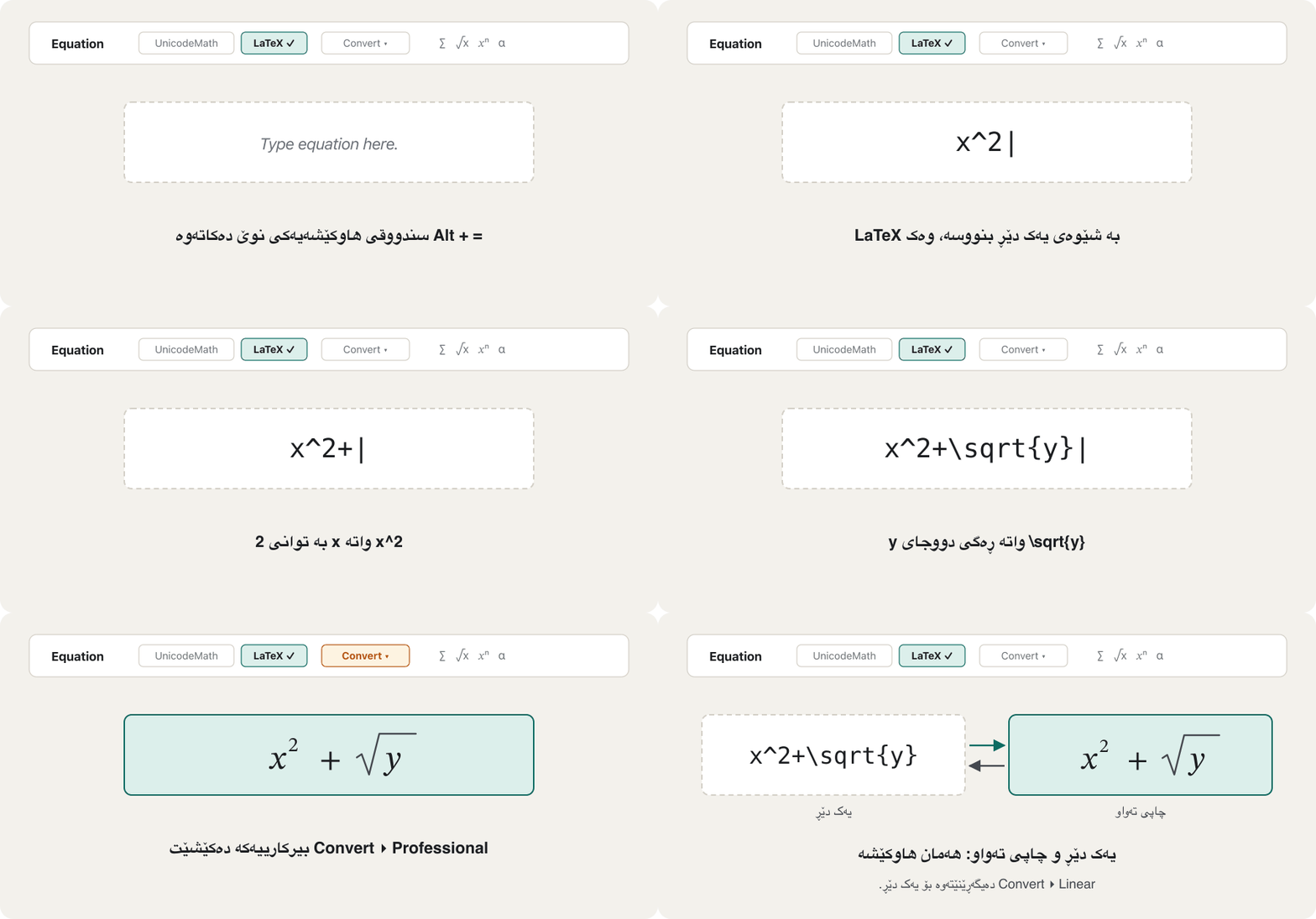
بۆ ڕاستەقینە، ئامرازی بەکار بهێنە. لە Word یان PowerPointـدا Alt+= دابگرە (Alt و یەکسان): سندووقێک دەردەکەوێت کە «Type equation here.»ـی تێدایە. لە یەک دێڕدا بنووسە، کە Microsoft پێی دەڵێت linear format. Word دەیکێشێت. لە شێوەی LaTeXـدا x^2+\sqrt{y} دەبێتە ؛ لە UnicodeMathـدا، کە شێوەی خودی Microsoftـە، a/b دەبێتە . Word هەردوو شێوەکە لە بەشی Equationـدا پێشکەش دەکات. نووسین بە LaTeX تایبەتە بە Wordـی Microsoft 365؛ PowerPoint و تری Office تەنیا UnicodeMath بەکار دەهێنن (تا نۆڤەمبەری 2026).
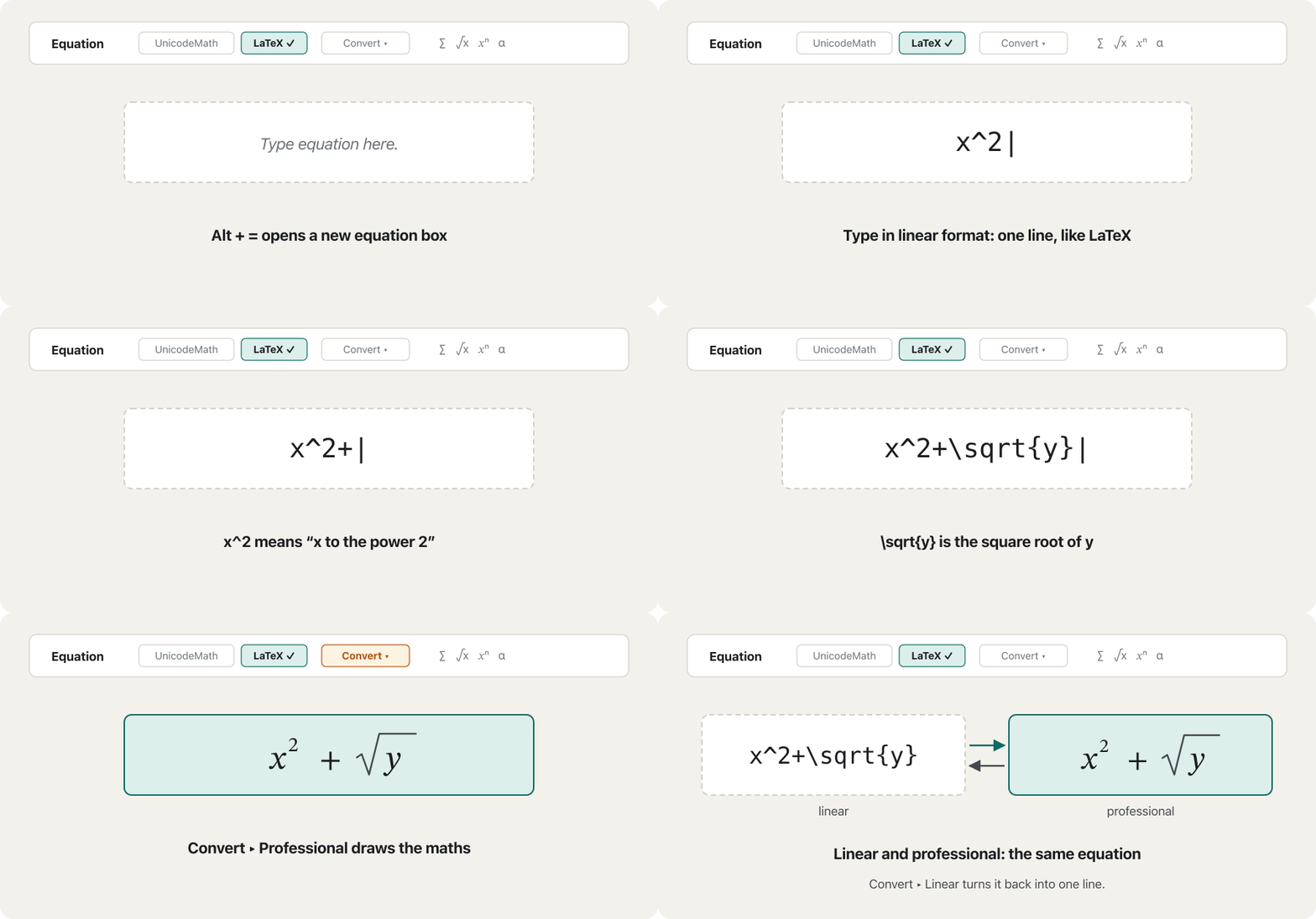
Switch with Convert > Professional (drawn maths) and Convert > Linear (one line again). Word also turns \alpha followed by a space into α, even outside LaTeX. The gallery of ready equations and Ink Equation, where you write by hand, are shown in Equations.
بە Convert > Professional (بیرکاریی کێشراو) و Convert > Linear (دیسان یەک دێڕ) لە نێوانیاندا بگۆڕە. Word هەروەها \alpha و بۆشاییەک دەکات بە α، تەنانەت لە دەرەوەی LaTeXـیش. پێشانگای ئامادە و Ink Equation، کە تێیدا بە دەست دەنووسیت، لە هاوکێشەکاندا پیشان دراون.
LaTeX: the language behind CêIT’s formulasLaTeX: ئەو زمانەی لە پشت فۆرمولەکانی CêITـەوەیە
LaTeX is the typesetting language of maths books and theses. Its commands start with a backslash: \frac{a}{b} is a fraction, \sqrt{x} a root, \alpha the Greek and \le the sign . ^ raises the next character and _ lowers it, and braces group several characters: x^{10} puts the whole 10 up, while x^10 raises only the 1 and gives . Every formula in CêIT is written this way inside the lesson files, so what you learn here works on every page of this site.
زمانی ڕێکخستنی چاپی کتێبەکانی بیرکاری و نامە زانستییەکانە. فەرمانەکانی بە \ دەست پێدەکەن: \frac{a}{b} ، \sqrt{x} ڕەگ، \alpha پیتی یۆنانیی و \le نیشانەی . ^ دواتر بەرز دەکاتەوە و _ نزمی دەکاتەوە، کەوانەی لوولیش چەند پێکەوە کۆ دەکاتەوە: x^{10} هەموو 10ـەکە دەباتە سەرەوە، بەڵام x^10 تەنیا 1ـەکە بەرز دەکاتەوە و دەدات. هەموو CêIT بەم شێوەیە لە وانەکاندا نووسراوە، بۆیە ئەوەی لێرە فێری دەبیت لە هەموو لاپەڕەکانی CêITـدا کار دەکات.
Four habits save trouble. Group with braces whenever more than one character goes up or down: \log_{10} x, not \log_10 x (The parts of a log). Write \{ and \} when the braces of a set must show. Leave a space after a command that is followed by a letter: \pi r, not \pir. And find any symbol’s command in the Symbol dictionary, whose last column is LaTeX.
چوار خوو گرفت کەم دەکەنەوە. هەر کاتێک زیاتر لە بەرز یان نزم دەبێتەوە، بە کەوانەی لوول کۆیان بکەرەوە: \log_{10} x، نەک \log_10 x (بەشەکانی log). کاتێک دەبێت کەوانەکانی دیار بن، \{ و \} بنووسە. لە دوای فەرمانێک کە پیتێکی بەدوادا دێت بۆشایی دابنێ: \pi r، نەک \pir. هەروەها فەرمانی هەر لە فەرهەنگی هێماکاندا بدۆزەوە، کە دوایین ستوونی .
Where you can type LaTeXلە کوێ دەتوانیت LaTeX بنووسیت
The same habits work in many places. Word for Microsoft 365: Alt+=, then choose the LaTeX format. Google Docs: Insert > Symbols > Equation opens an equation box with menus (Greek letters, Miscellaneous operations, Relations, Math operators and Arrows), and typing \ with a symbol’s name and a space, such as \alpha, inserts the symbol. Overleaf is an online LaTeX editor with a free plan (November 2026): write $\frac{a+b}{2}$ inside a sentence and \[ … \] for a formula on its own line. Many Markdown editors accept $…$ too. And CêIT’s lesson files put the same LaTeX inside {{math:…}}.
هەمان خوو لە زۆر شوێندا کار دەکات. Wordـی Microsoft 365: Alt+= و پاشان شێوەی LaTeX هەڵبژێرە. Google Docs: Insert > Symbols > Equation سندووقێکی بە چەند دەکاتەوە (Greek letters، Miscellaneous operations، Relations، Math operators و Arrows) و نووسینی \ لەگەڵ ناوی و بۆشاییەک، وەک \alpha، دادەنێت. Overleaf شوێنێکە بۆ نووسینی لەسەر ، کە پلانێکی بێبەرانبەری هەیە (نۆڤەمبەری 2026): لە ناو ڕستەدا $\frac{a+b}{2}$ و بۆ لە دێڕی خۆیدا \[ … \] بنووسە. زۆر دەستکاریکەری Markdownـیش $…$ وەردەگرن. وانەکانی CêITـیش هەمان دەخەنە ناو {{math:…}}.
Unicode: every symbol has a number and a nameUnicode: هەموو هێمایەک ژمارەیەک و ناوێکی هەیە
Inside a computer every character is a number. Unicode gives each letter, digit and symbol of every writing system its own number, the code point, written as U+ and a hexadecimal number, and an official name in capitals: U+2212 MINUS SIGN, U+00D7 MULTIPLICATION SIGN, U+2264 LESS-THAN OR EQUAL TO. A character encoding such as UTF-8 then stores the number in bytes: the minus sign takes three, E2 88 92. How this works, also for Kurdish letters, is taught in Unicode and UTF-8 and UTF-8: one to four bytes.
لە ناو هەموو ژمارەیە. بە هەموو پیت، و هەموو سیستەمێکی نووسین ژمارەیەکی تایبەتی خۆی دەدات، کە و بە U+ و ژمارەیەکی دەنووسرێت، هەروەها ناوێکی فەرمی بە پیتی گەورە: U+2212 MINUS SIGN، U+00D7 MULTIPLICATION SIGN، U+2264 LESS-THAN OR EQUAL TO. پاشان وەک UTF-8 ژمارەکە لە هەڵدەگرێت: نیشانەی سێ دەگرێت، E2 88 92. ئەمە چۆن کار دەکات، بۆ پیتە کوردییەکانیش، لە Unicode و UTF-8 و UTF-8: یەک تا چوار بایتدا فێر دەکرێت.
Python shows the code point and name of any character, and \N{…} writes a character by its name. The last two lines show that the ohm sign and the Greek omega are two code points, and that Unicode normalization (NFC) turns the ohm sign into omega:
Python و ناوی هەر پیشان دەدات و \N{…} بە ناوەکەی دەنووسێت. دوو دێڕی کۆتایی پیشان دەدەن کە نیشانەی و ئۆمێگای یۆنانی دوو و ڕێکخستنی (NFC) نیشانەی دەکات بە ئۆمێگا:
import unicodedata

for ch in "−-–":                     # minus sign, hyphen-minus, en dash
    print(f"U+{ord(ch):04X}  {unicodedata.name(ch)}")

print("\N{MINUS SIGN}5", "\N{N-ARY SUMMATION}", "\N{GREEK SMALL LETTER PI}")
print("\N{OHM SIGN}" == "Ω")                                # two different code points
print(unicodedata.normalize("NFC", "\N{OHM SIGN}") == "Ω") # NFC turns the ohm sign into omegaU+2212 MINUS SIGN U+002D HYPHEN-MINUS U+2013 EN DASH −5 ∑ π False True
Same look, different charactersهەمان شێوە، نووسەی جیاواز
Many symbols have look-alikes that are different characters. On paper nobody notices; on a computer they break searches, formulas and code. Unicode’s report on mathematics (UTR #25) prefers U+2212 MINUS SIGN for minus and U+2032 PRIME for f′ to the keyboard’s hyphen and apostrophe. It encodes the sum sign ∑ and the product sign ∏ apart from the Greek letters Σ and Π, because they work as operators. It treats the old OHM SIGN as the same character as the Greek Ω, so normalized text turns U+2126 into U+03A9, and it keeps the empty set ∅ apart from the letter Ø.
زۆر هاوشێوەیان هەیە کە جیاوازن. لەسەر کاغەز کەس هەست ناکات؛ بەڵام لە گەڕان، و کۆد تێکدەدەن. ڕاپۆرتی بیرکاریی (UTR #25) بۆ U+2212 MINUS SIGN و بۆ f′ U+2032 PRIME پێ باشترە لە هایفن و ئەپۆسترۆفی سەر . ∑ و ∏ جیا لە پیتە یۆنانییەکانی Σ و Π دەنووسێتەوە، چونکە وەک کار دەکەن. نیشانەی کۆنی OHM SIGN وەک هەمان Ωـی یۆنانی دادەنێت، بۆیە دەقی ڕێکخراو U+2126 دەکات بە U+03A9؛ هەروەها ∅ جیا لە پیتی Ø دادەنێت.
Two practical rules: in text and documents use the true maths character (the green ones); in code use what the language expects, the keyboard’s - and '. How to tell the letters in a formula apart (ε and ∈, Δ and △) is in Look-alikes.
بۆ کاری ڕۆژانە دوو یاسا هەیە: لە دەق و بەڵگەنامەدا ڕاستەقینەی بیرکاری بەکار بهێنە (سەوزەکان)؛ لە کۆددا ئەوە بەکار بهێنە کە زمانەکە چاوەڕوانی دەکات، واتە - و 'ـی سەر . چۆن پیتەکانی لە یەک جیا بکەیتەوە (ε و ∈، Δ و △) لە هاوشێوەکاندا هەیە.
Copying formulas into code and spreadsheetsکۆپیکردنی فۆرمولەکان بۆ ناو کۆد و بەرنامەی خشتەیی
When you copy a formula from a PDF, a web page or a Word file into code or a spreadsheet, the look-alikes come with it. Python stops at a pasted minus sign: y = 10 − 3 gives SyntaxError: invalid character '−' (U+2212) (One minus sign, three jobs). Text that holds numbers fails too, while Eastern digits work:
کاتێک لە ، یان Wordـەوە کۆپی دەکەیت بۆ ناو کۆد یان ، هاوشێوەکانیش لەگەڵیدا دێن. Python لە نیشانەی لکێنراودا دەوەستێت: y = 10 − 3، SyntaxError: invalid character '−' (U+2212) دەدات (یەک نیشانەی لێدەرکردن، سێ کار). دەقێکیش کە ژمارەی تێدایە سەرناکەوێت، لە کاتێکدا کار دەکەن:
x = "−5"                    # copied from a PDF: U+2212, not the keyboard's -
try:
    print(int(x))
except ValueError as e:
    print("Error:", e)

print(int(x.replace("\N{MINUS SIGN}", "-")))   # fix: put the hyphen-minus back
print(int("٤٥٦"), float("٣.٥"))                 # Python reads Eastern digits ...
try:
    print(float("٣٫٥"))                         # ... but not the Arabic decimal sign ٫
except ValueError as e:
print("Error:", e)Error: invalid literal for int() with base 10: '−5' -5 456 3.5 Error: could not convert string to float: '٣٫٥'
Explain the codeڕوونکردنەوەی کۆدەکە
- Lineدێڕی 1-5
int()refuses U+2212: only the keyboard’s-is a minus sign for Python.int()U+2212 ڕەت دەکاتەوە: بۆ Python تەنیا-ـی سەر نیشانەی .- Lineدێڕی 8-12
Python reads ٠–٩ as digits (456), but ٫ is not its decimal point; write a point.
Python ٠–٩ وەک دەخوێنێتەوە (456)، بەڵام ٫ ئەو نییە؛ خاڵ بنووسە.
Formulas inside a Kurdish sentenceفۆرمولە لە ناو ڕستەیەکی کوردیدا
Kurdish runs right to left, numbers and formulas left to right. In a document or a chat, a formula made only of numbers and signs can come out backwards in a Kurdish line: shows as , and the school year 2024–2025 as 2025–2024. The computer is following the rules: its bidirectional algorithm takes digits in Arabic-script text into the right-to-left flow. A formula that starts with a Latin letter, such as , usually survives.
کوردی دەنووسرێت، ژمارە و . لە بەڵگەنامە یان چاتدا، کە تەنیا لە ژمارە و نیشانە پێکهاتبێت، لەوانەیە لە دێڕێکی کوردیدا پێچەوانە دەربکەوێت: وەک دیار دەبێت و ساڵی خوێندنی 2024–2025 وەک 2025–2024. یاساکان جێبەجێ دەکات: لە دەقی پیتی عەرەبیدا دەخاتە ناو ڕەوتی . کە بە پیتێکی لاتینی دەست پێبکات، وەک ، زۆرجار ساغ دەمێنێتەوە.
The fix is an invisible direction character. Put LRM (U+200E, the left-to-right mark) just before the formula, or wrap it between LRI (U+2066) and PDI (U+2069), which isolate it as one left-to-right piece. In Word for Windows type 200E and press Alt + X; on web pages use <bdi> or dir="ltr" (Three classic bugs and their fixes). CêIT does this for you: every formula and number in its Kurdish text is isolated automatically. Reading such lines in books is practised in Reading Maths in Kurdish, Arabic and English Books.
چارەسەرەکە نەبینراوی ئاڕاستەیە. LRM (U+200E، نیشانەی ) ڕێک لە پێش دابنێ، یان بیخە نێوان LRI (U+2066) و PDI (U+2069)، کە وەک یەک پارچەی جیای دەکەنەوە. لە Wordـی Windowsـدا 200E بنووسە و Alt + X دابگرە؛ لە <bdi> یان dir="ltr" بەکار بهێنە (سێ هەڵەی ناسراو و چارەسەرەکانیان). CêIT ئەمە بۆ تۆ دەکات: هەموو و ژمارەیەک لە دەقە کوردییەکانیدا خۆکارانە جیا دەکرێتەوە. خوێندنەوەی ئەم جۆرە دێڕانە لە کتێبەکاندا لە خوێندنەوەی بیرکاری لە کتێبی کوردی، عەرەبی و ئینگلیزیدا ڕاهێنانی پێ دەکرێت.
Common mistakesهەڵە باوەکان
| Mistakeهەڵە | Why it is wrongبۆچی هەڵەیە | Do thisئەمە بکە |
|---|---|---|
| Sending a photo of the board as your answerناردنی وێنەی تەختەکە وەک وەڵام | Nobody can search, copy, correct or read it aloudکەس ناتوانێت تێیدا بگەڕێت، کۆپی بکات، ڕاستی بکاتەوە یان بیخوێنێتەوە | Type it: plain signs, real symbols or an equationبینووسە: نیشانەی سادە، ڕاستەقینە یان |
| Typing x for نووسینی x لەبری | x is a letter: 3x4 is not 3 times 4x پیتە: 3x4، 3 جاران 4 نییە | * in code, × in textلە کۆددا *، لە دەقدا × |
x^10 in LaTeXx^10 لە | ^ raises only the next character: ^ تەنیا دواتر بەرز دەکاتەوە: | x^{10}x^{10} |
| Pasting − or × from a PDF into codeلکاندنی − یان × لە PDFـەوە بۆ ناو کۆد | Python stops: invalid character '−' (U+2212)Python دەوەستێت: invalid character '−' (U+2212) | Retype them as - and *بە - و * دووپاتە بیاننووسەوە |
| Using the letter Ø or φ for the empty setبەکارهێنانی پیتی Ø یان φ بۆ | Different characters: searches and screen readers fail جیاوازن: گەڕان و سەرناکەون | ∅ U+2205, \emptyset∅ U+2205، \emptyset |
| Typing a number formula straight into a Kurdish lineنووسینی ڕاستەوخۆی ژمارەیی لە دێڕێکی کوردیدا | It may show backwards: لەوانەیە پێچەوانە دەربکەوێت: | LRM before it, or LRI … PDI around itLRM لە پێشییەوە، یان LRI … PDI بە دەوریدا |
\frac{1}{2} outside $…$ in Overleaf\frac{1}{2} لە دەرەوەی $…$ لە Overleafـدا | LaTeX maths needs maths modeبیرکاریی پێویستی بە شێوەی بیرکارییە | $\frac{1}{2}$$\frac{1}{2}$ |
Practiceڕاهێنان
Write the LaTeX for: (a) (b) (c) (d) (e) and (f) .
ئەمانە بنووسە: (a) (b) (c) (d) (e) و (f) .
Hintئاماژە
Use the cheat card: braces after \frac, \sqrt and around limits.
کارتی یارمەتییەکە بەکار بهێنە: کەوانەی لوول لە دوای \frac و \sqrt و بە دەوری سنوورەکاندا.
Show answerوەڵامەکە پیشان بدە
(a) x^2 + y^2 = r^2
(b) \frac{a + b}{2}
(c) \sqrt{x + 1}
(d) \sum_{i=1}^{n} x_i
(e) x \le 5   and   x \ne 0
(f) A \cup B = \emptysetFind the code points and Unicode names of , and , and the character called NOT EQUAL TO. Use the Character Viewer, Insert > Symbol, or Python.
و ناوی ، و بدۆزەوە، هەروەها ئەو ناوی NOT EQUAL TOـیە. Character Viewer، Insert > Symbol یان Python بەکار بهێنە.
Show answerوەڵامەکە پیشان بدە
import unicodedata

for ch in "≤∞∈":
    print(f"U+{ord(ch):04X}", unicodedata.name(ch))
print("\N{NOT EQUAL TO}", f"U+{ord(chr(0x2260)):04X}")U+2264 LESS-THAN OR EQUAL TO U+221E INFINITY U+2208 ELEMENT OF ≠ U+2260
(a) In a Kurdish chat, the sentence “we know 3 × 4 = 12 is true” shows the formula as 12 = 4 × 3. How do you fix it? (b) A student pastes area = 3.14 × r^2 into Python. Write a line that runs.
(a) لە چاتێکی کوردیدا ڕستەی «دەزانین 3 × 4 = 12 ڕاستە» وەک 12 = 4 × 3 پیشان دەدات. چۆن چارەسەری دەکەیت؟ (b) خوێندکارێک area = 3.14 × r^2 لە ناو Pythonـدا دەلکێنێت. دێڕێک بنووسە کە کار بکات.
Show answerوەڵامەکە پیشان بدە
- (a) Put an LRM (U+200E) just before 3, or wrap the formula in LRI … PDI (U+2066 … U+2069); in Word for Windows, 200E and
Alt + Xtypes the LRM. - (b)
area = 3.14 * r**2: × becomes*, and Python’s power is**, because^is XOR there (better still:math.pi * r**2).
- (a) LRM (U+200E) ڕێک لە پێش 3ـەوە دابنێ، یان بخە ناو LRI … PDI (U+2066 … U+2069)؛ لە Wordـی Windowsـدا 200E و
Alt + XLRM دەنووسێت. - (b)
area = 3.14 * r**2: × دەبێتە*و Python**ـە، چونکە لەوێ^XORـە (باشتر:math.pi * r**2).
Summaryپوختە
- Type maths, never send a photo of it: plain stand-ins (
x^2,*,<=), real symbols, or an equation editor and LaTeX. - Real symbols:
⊞ + .and the Symbols tab on Windows,Fn + Eand the Character Viewer on a Mac, Insert > Symbol in Word and PowerPoint, and in Word for Windows a code plusAlt + X. Alt+=opens an equation in Word and PowerPoint; type it on one line and convert it. Word for Microsoft 365 accepts LaTeX; PowerPoint uses UnicodeMath.- LaTeX:
\frac{}{},\sqrt{},^,_, braces for groups; it works in Word, Google Docs, Overleaf and CêIT’s{{math:…}}. - Every character has a Unicode code point and name (U+2212 MINUS SIGN); look-alikes such as − - –, ∑ Σ, Ω Ω and ∅ Ø are different characters.
- In code use the keyboard’s
-and*; in a Kurdish line put LRM before a number formula, or LRI … PDI around it. - To look up a symbol by its shape, its name or its code, see How to look up a symbol you do not know in the Symbol dictionary.
- بیرکاری بنووسە، هەرگیز وێنەکەی مەنێرە: جێگرەوەی سادە (
x^2،*،<=)، ڕاستەقینە، یان ئامرازی و . - ڕاستەقینە: لە Windowsـدا
⊞ + .و بەشی Symbols، لە MacـداFn + Eو Character Viewer، لە Word و PowerPointـدا Insert > Symbol و لە Wordـی Windowsـدا وAlt + X. Alt+=لە Word و PowerPointـدا دەکاتەوە؛ لە یەک دێڕدا بینووسە و بیگۆڕە. Wordـی Microsoft 365 وەردەگرێت؛ PowerPoint UnicodeMath بەکار دەهێنێت.- :
\frac{}{}،\sqrt{}،^،_و کەوانەی لوول بۆ گرووپکردن؛ لە Word، Google Docs، Overleaf و{{math:…}}ـی CêITـدا کار دەکات. - هەموو و ناوێکی هەیە (U+2212 MINUS SIGN)؛ هاوشێوەکانی وەک − - –، ∑ Σ، Ω Ω و ∅ Ø جیاوازن.
- لە کۆددا
-و*ـی سەر بەکار بهێنە؛ لە دێڕێکی کوردیدا LRM لە پێش ژمارەییەوە، یان LRI … PDI بە دەوریدا دابنێ. - بۆ دۆزینەوەی بە شێوە، ناو یان ، بڕوانە چۆن هێمایەک بدۆزیتەوە کە نایناسیت لە فەرهەنگی .
How do you type ≤ in Word for Windows without a menu?چۆن لە Wordـی Windowsـدا بەبێ مێنیو دەنووسیت؟
Type 2264 and press Alt + X; in an equation box, type \le and a space.
2264 بنووسە و Alt + X دابگرە؛ لە سندووقی \le و بۆشاییەک بنووسە.
Why does x^10 print x¹0 in LaTeX?بۆچی x^10 لە LaTeXـدا x¹0 چاپ دەکات؟
^ raises only the next character; braces group: x^{10}.
^ تەنیا دواتر بەرز دەکاتەوە؛ کەوانەی لوول کۆی دەکاتەوە: x^{10}.
Is U+2126 OHM SIGN the right character for ohms?ئایا U+2126 OHM SIGN نووسەی ڕاستە بۆ ئۆم؟
Unicode prefers U+03A9, the Greek Ω; normalization turns U+2126 into it.
U+03A9ـی پێ باشترە، واتە Ωـی یۆنانی؛ ڕێکخستن U+2126 دەکات بەو.
Lesson complete!وانەکە تەواو بوو!
Well done. Review the key terms, then go on to the next lesson.دەستخۆش. سەیرێکی زاراوە سەرەکییەکان بکەرەوە، پاشان بڕۆ بۆ وانەی داهاتوو.
Key termsزاراوە سەرەکییەکان
Reading Maths in Kurdish, Arabic and English Booksخوێندنەوەی بیرکاری لە کتێبی کوردی، عەرەبی و ئینگلیزیدا
Related lecturesوانە پەیوەندیدارەکان
- Letters, Subscripts, Superscripts and the Greek Alphabetپیتەکان، ژێرنووسەکان، ژوورنووسەکان و ئەلفوبێی یۆنانی
- Numbers and Digits: ١٢٣ and 123, Decimal Points and Scientific Notationژمارە و تاکژمارەکان: ١٢٣ و 123، فاریزە و شێوازی زانستی
- Plus, Minus, Times, Divide and the Fraction Barکۆ، کەم، جاران، دابەش و هێڵی کەرت
- Notation in Computing: mod, Bases, Big-O and Code Operatorsهێماکان لە کۆمپیوتەردا: mod، بنچینەکان، نیشانەی O-ی گەورە و کارپێکەرەکانی کۆد
- Reading Maths in Kurdish, Arabic and English Booksخوێندنەوەی بیرکاری لە کتێبی کوردی، عەرەبی و ئینگلیزیدا
- The Symbol Dictionaryفەرهەنگی هێماکان
- Links, Symbols and Mediaبەستەرەکان، هێماکان و میدیا
- ASCII and Character CodesASCII و کۆدەکانی نووسە
- Keyboard Shortcuts for Windows and Macکورتەڕێکانی کیبۆرد بۆ Windows و Mac
- The Internet and the Webئینتەرنێت و وێب
- Kurdish and Bilingual Websites: Right to Leftتۆڕگەکانی کوردی و دووزمانە: ڕاست بۆ چەپ
References and further readingسەرچاوەکان و خوێندنەوەی زیاتر
- Microsoft Support: Windows keyboard tips and tricks (Windows key + period opens the emoji panel; Symbols)
- Office Watch: the Windows 11 emoji panel (Symbols groups, including Math symbols; Win + ;)
- Apple Support, Mac User Guide: Use emoji and symbols on Mac (Fn/Globe-E, Edit > Emoji & Symbols, search by name or code)
- Microsoft Support: Keyboard shortcuts in Word (Alt+X converts a Unicode hex code to its character and back, Windows)
- Microsoft Support: Linear format equations using UnicodeMath and LaTeX in Word (Alt+=, Convert > Professional, LaTeX in Word for Microsoft 365)
- Google Docs Editors Help: Use equations in a document (Insert > Symbols > Equation; \ plus a symbol name)
- Overleaf: Mathematical expressions (inline $…$ and \(…\), display \[…\])
- Overleaf: plans and pricing (the Free plan, checked November 2026)
- Unicode Technical Report #25: Unicode Support for Mathematics (minus sign and prime preferred, Greek-derived operators, ohm sign, empty set, bidirectional layout)
This lecture is a first edition. The Kurdish text and terminology are waiting for review by Kurdish IT teachers.ئەم وانەیە چاپی یەکەمە. دەقە کوردییەکە و زاراوەکانی چاوەڕێی پێداچوونەوەی مامۆستایانی کوردی بواری IT ن.