Chapterبەش 5 · Lectureوانە 5.4
Keyboard Shortcuts for Windows and Macکورتەڕێکانی کیبۆرد بۆ Windows و Mac
Why shortcuts save time and where the Kurdish word «قەدبڕ» comes from; how to press a shortcut and how Windows keys map to Mac keys; the shortcuts that matter, grouped by task — everyday editing, windows and desktops (with a snapping animation), screenshots and screen tools, system shortcuts and the browser — every one checked on Windows 11 and current macOS; what changed since the 2022 report; and a mouse-free practice task.
بۆچی کات دەگەڕێننەوە و وشەی «قەدبڕ» لە کوێوە هاتووە؛ چۆن دادەگریت و دوگمەکانی Windows چۆن بەرامبەر دوگمەکانی Mac دەوەستن؛ گرنگترین ، کە بەپێی کار کۆمەڵ کراون — دەستکاریی ڕۆژانە، و (بە جوڵەوێنەی )، و ئامرازەکانی شاشە، سیستەم و — هەموویان لەسەر Windows 11 و macOSـی ئێستا پشکنراون؛ چی گۆڕاوە لە دوای ڕاپۆرتەکەی 2022؛ و ئەرکێکی ڕاهێنان بەبێ .
What you will learnچی فێر دەبیت
- Press shortcuts correctly and translate them between Windows and Mac keys.
- Use the everyday editing shortcuts, including Redo, plain-text paste and clipboard history.
- Arrange windows and virtual desktops with the keyboard.
- Take screenshots and screen recordings on Windows 11 and macOS and know where they are saved.
- Open system tools with shortcuts and explain which shortcuts in the 2022 report have changed.
- بە دروستی داگریت و لە نێوان دوگمەکانی Windows و Macـدا بیانگۆڕیت.
- دەستکاریی ڕۆژانە بەکار بهێنیت، لەوانە ، وەک دەقی ڕووت و مێژووی .
- و بە ڕێک بخەیت.
- و لە Windows 11 و macOSـدا بگریت و بزانیت لە کوێ هەڵدەگیرێن.
- بە ئامرازەکانی سیستەم بکەیتەوە و ڕوون بکەیتەوە کام لە ڕاپۆرتەکەی 2022 گۆڕاون.
Why keyboard shortcuts?بۆچی کورتەڕێکانی کیبۆرد؟
A keyboard shortcut is a key, or a few keys pressed together, that does a job you would normally do with the mouse or a menu. Instead of moving the pointer to the Start button and clicking, you press the Windows key once. Shortcuts save time, keep your hands on the keyboard and make long tasks — typing a report, editing photos, writing code — much faster.
یان چەند دوگمەیەکە کە پێکەوە دادەگیرێن و کارێک دەکەن کە بە ئاسایی بە یان دەیکەیت. لەبری ئەوەی ببەیتە سەر دوگمەی Start و کلیک بکەیت، جارێک دادەگریت. کات دەگەڕێننەوە، دەستەکانت لەسەر دەهێڵنەوە و کاری درێژ — نووسینی ڕاپۆرت، دەستکاریکردنی وێنە، نووسینی کۆد — زۆر خێراتر دەکەن.
A key or group of that you press together to do a command quickly, without using the or a .
دوگمەیەک یان چەند دوگمەیەکە کە پێکەوە دایاندەگریت بۆ ئەوەی فەرمانێک بە خێرایی جێبەجێ بکەیت، بەبێ بەکارهێنانی یان .
On the way to school there is a long road round a field and a narrow path straight across it. Both take you to school, but the path is quicker once you know it. The menus are the long road: easy to find, slow to walk. A shortcut is the path.
لە ڕێی قوتابخانەدا ڕێگایەکی درێژ بە دەوری کێڵگەیەکدا هەیە و ڕێیەکی باریکیش ڕاستەوخۆ بە ناویدا. هەردووکیان دەتگەیەننە قوتابخانە، بەڵام ڕێیە باریکەکە کاتێک فێری بوویت خێراترە. ڕێگا درێژەکەن: ئاسان دەدۆزرێنەوە، هێواش دەڕۆیت. ڕێیە باریکەکەیە.
Where the analogy stops workingسنووری ئەم نموونەیە
A real path is the same for everyone; a shortcut can change from one app to another, and Windows and Mac use different keys.
ڕێیەکی ڕاستەقینە بۆ هەمووان وەک یەکە؛ لە بۆ یەکێکی تر دەگۆڕێت و Windows و Mac دوگمەی جیاواز بەکار دەهێنن.
Why keyboard shortcuts?بۆچی کورتەڕێکانی کیبۆرد؟
Where the Kurdish word comes fromوشە کوردییەکە لە کوێوە هاتووە
How to press a shortcut, on Windows and on Macچۆن کورتەڕێیەکی کیبۆرد داگریت، لە Windows و Macـدا
Most shortcuts start with one or more modifier keys — keys that do nothing alone but change what the next key does. Hold the modifier keys down, press the last key, then release them all. For Ctrl + C: hold Ctrl, press C, let go. You do not press them one after the other.
زۆربەی بە یەک یان چەند دەست پێدەکەن — ئەو دوگمانەی بە تەنها هیچ ناکەن بەڵام کاری دوگمەی دواتر دەگۆڕن. داگرە و ڕایانگرە، دوگمەی کۆتایی دابگرە، پاشان هەموویان بەرەڵا بکە. بۆ Ctrl + C: Ctrl ڕابگرە، C دابگرە، بەریان بدە. یەک لە دوای یەک دایان ناگریت.
How to press a shortcut, on Windows and on Macچۆن کورتەڕێیەکی کیبۆرد داگریت، لە Windows و Macـدا
Windows keys and Mac keysدوگمەکانی Windows و دوگمەکانی Mac
The course report writes the Windows key as ⊞ (the Windows logo), and this lesson does the same: ⊞ + E means hold the Windows key and press E. The arrow keys are written ← → ↑ ↓. Mac keyboards have different modifier keys, but the idea is the same:
ڕاپۆرتەکەی کۆرسەکە بە ⊞ (لۆگۆی Windows) دەنووسێت و ئەم وانەیەش هەمان شت دەکات: ⊞ + E واتە ڕابگرە و E دابگرە. بەم شێوەیە دەنووسرێن: ← → ↑ ↓. Mac جیاوازیان هەیە، بەڵام بیرۆکەکە هەمانە:
| Windows keyدوگمە لە Windows | Mac keyدوگمە لە Mac | Noteتێبینی |
|---|---|---|
Ctrl | Command ⌘ | Most Ctrl shortcuts become Command on a Mac: Ctrl + C → Command + C.زۆربەی Ctrl لە Macـدا دەبنە Command: Ctrl + C ← Command + C. |
Alt | Option ⌥ | Same place on the keyboard; Apple's own page says to press Alt for Option on a PC keyboard.هەمان شوێن لەسەر ؛ پەڕەی Apple خۆی دەڵێت لەسەر PC، Alt لەبری Option دابگرە. |
⊞ (Windows key) | Command ⌘ | Windows-key shortcuts usually have no direct twin; the tables below give the nearest Mac shortcut. زۆرجار جووتێکی ڕاستەوخۆیان نییە؛ خشتەکانی خوارەوە نزیکترین Mac دەدەن. |
Ctrl | Control ⌃ | The Mac also has a Control key, but it is NOT the copy-paste key. It is used in other shortcuts.Macیش دوگمەی Controlـی هەیە، بەڵام دوگمەی و نییە. لە تردا بەکاردێت. |
Fn | Fn / 🌐 | On laptops, Fn turns the top-row media keys back into F1–F12.لەسەر ، Fn دوگمەکانی میدیای ڕیزی سەرەوە دەکاتەوە بە F1–F12. |
How to press a shortcut, on Windows and on Macچۆن کورتەڕێیەکی کیبۆرد داگریت، لە Windows و Macـدا
Checked for Windows 11 and macOSپشکنراو بۆ Windows 11 و macOS
Group 1: everyday editingکۆمەڵەی ١: دەستکاریی ڕۆژانە
These shortcuts work in almost every app: a word processor, a browser, an email, a chat, the file manager. Learn these first.
ئەم لە نزیکەی هەموو کار دەکەن: ، ، ، چات، . سەرەتا ئەمانە فێر ببە.
| Windows 11 | Mac | What it doesچی دەکات |
|---|---|---|
Ctrl + C | Command + C | Copy the selected text or item to the clipboard.: دەقی هەڵبژێردراو یان شتەکە کۆپی دەکات بۆ . |
Ctrl + X | Command + X | Cut: remove the selection and keep it on the clipboard.: هەڵبژاردنەکە لادەبات و لە هەڵیدەگرێت. |
Ctrl + V | Command + V | Paste what is on the clipboard (as many times as you like).: ئەوەی لە دەیلکێنێت (چەند جار بتەوێت). |
Ctrl + Z | Command + Z | Undo the last action.: دوایین کار هەڵدەوەشێنێتەوە. |
Ctrl + Y | Shift + Command + Z | Redo what you undid.: ئەوەی هەڵتوەشاندەوە دەیگەڕێنێتەوە. |
Ctrl + A | Command + A | Select all.هەموو شتێک هەڵدەبژێرێت. |
Ctrl + S | Command + S | Save the document.: بەڵگەنامەکە پاشەکەوت دەکات. |
Ctrl + F | Command + F | Find a word in the document or page.وشەیەک لە بەڵگەنامەکە یان پەڕەکەدا دەدۆزێتەوە. |
Group 1: everyday editingکۆمەڵەی ١: دەستکاریی ڕۆژانە
Plain-text paste, clipboard history and word jumpsلکاندنی دەقی ڕووت، مێژووی بیرگەی کاتی و بازدان بە وشە
| Windows 11 | Mac | What it doesچی دەکات |
|---|---|---|
Ctrl + Shift + V | Option + Shift + Command + V | Paste as plain text (without the copied colours and fonts) — in many apps, not all. On a Mac this is Paste and Match Style; Word for Mac uses Command + Shift + V (Paste text only). وەک دەقی ڕووت (بەبێ ڕەنگ و فۆنتی کۆپیکراو) — لە زۆر ، نەک هەموویان. لە Macـدا ناوی Paste and Match Styleـە؛ Word بۆ Mac Command + Shift + V بەکار دەهێنێت (Paste text only). |
⊞ + V | — (no built-in key)— (دوگمەی ئامادەی نییە) | Clipboard history: the last things you copied. Turn it on the first time you press it.مێژووی : دوایین ئەو شتانەی کۆپیت کردوون. یەکەم جار کە دایدەگریت هەڵی بکە. |
Ctrl + Backspace | Option + Delete | Delete the whole word to the left of the cursor.هەموو وشەکەی لای چەپی دەسڕێتەوە. |
Ctrl + ← / → | Option + ← / → | Jump one word left or right.یەک وشە بۆ چەپ یان ڕاست باز دەدات. |
Group 1: everyday editingکۆمەڵەی ١: دەستکاریی ڕۆژانە
Undo, Redo and the X and V storiesپاشگەزبوونەوە، دووبارەکردنەوە و چیرۆکی X و V
The report calls Ctrl + Z «cancelling something that was done»; in IT the English name is Undo. Undo and Redo work as a pair: Ctrl + Z steps back, Ctrl + Y (Shift + Command + Z on a Mac) steps forward again.
ڕاپۆرتەکە بە Ctrl + Z دەڵێت «پووچکردنەوەی شتێک کە ئەنجام درابێت»؛ ناوی ئینگلیزییەکەی لە ITـدا Undoـیە (). و جووتن: Ctrl + Z هەنگاوێک دەگەڕێتەوە دواوە، Ctrl + Y (لە Macـدا Shift + Command + Z) دووبارە دەچێتە پێشەوە.
Why X for Cut and V for Paste? The popular explanations — and the Word-only shortcuts such as bold, alignment and Find and Replace — are in Word Processing Essentials.
بۆچی X بۆ و V بۆ ؟ ڕوونکردنەوە باوەکان — هەروەها کە تەنها هی Wordن، وەک تۆخکردن، ڕێکخستنی دێڕ و — لە بنەماکانی بەرنامەی نووسینی دەقدان.
Group 2: windows and desktopsکۆمەڵەی ٢: پەنجەرەکان و ڕوومێزەکان
When several apps are open, these shortcuts move, resize and switch windows. The report's favourite is ⊞ + ← / →, which splits the screen 50/50 between two windows — perfect for reading a PDF on one side and writing your notes on the other.
کاتێک چەند کراوەن، ئەم دەجووڵێنن، قەبارەیان دەگۆڕن و لە نێوانیاندا دەگۆڕنەوە. خۆشەویستترینی ڕاپۆرتەکە ⊞ + ← / →ـە کە شاشەکە ٥٠ بە ٥٠ لە نێوان دوو دابەش دەکات — بۆ خوێندنەوەی PDFێک لە لایەک و نووسینی تێبینییەکانت لە لاکەی تر زۆر گونجاوە.
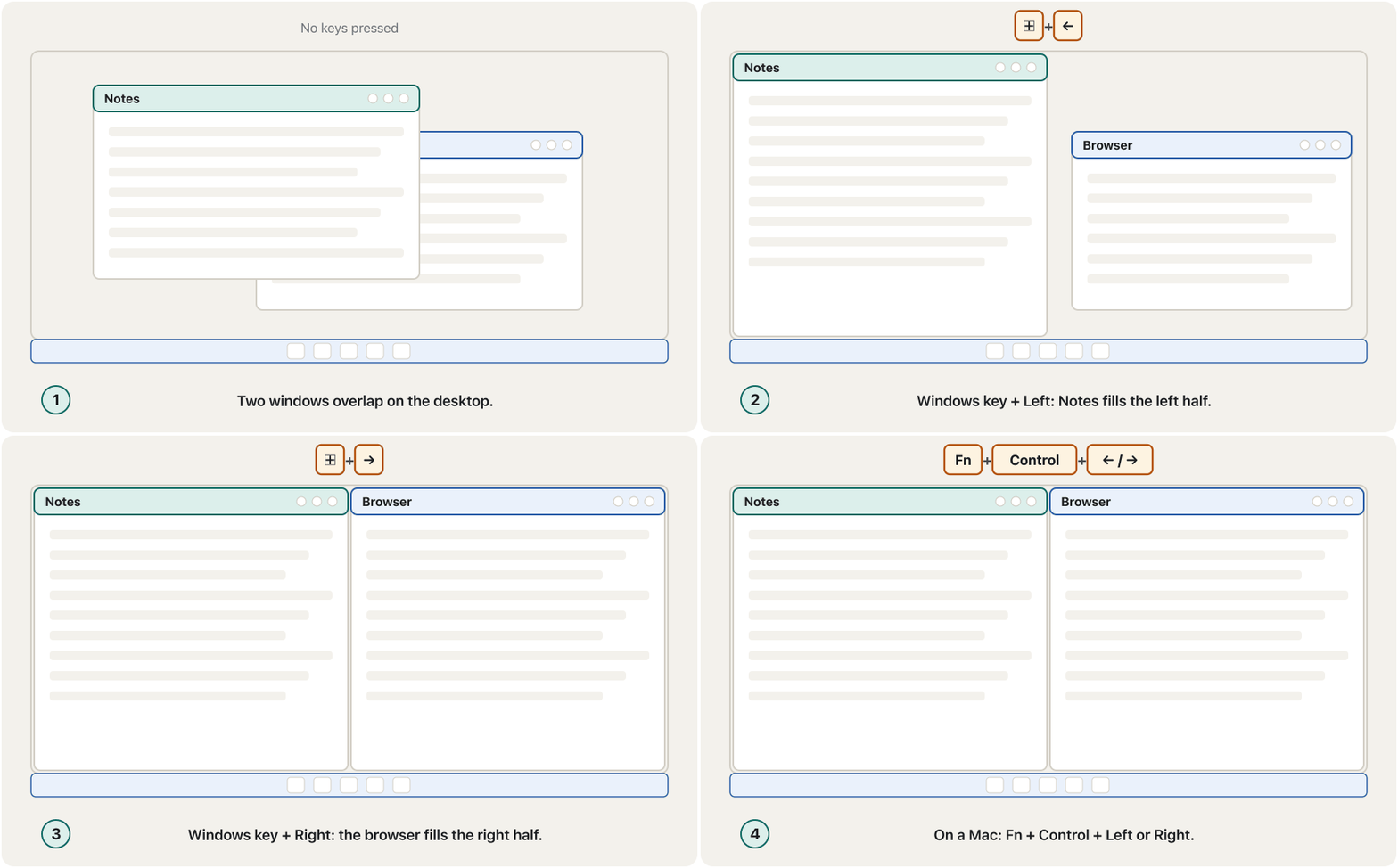
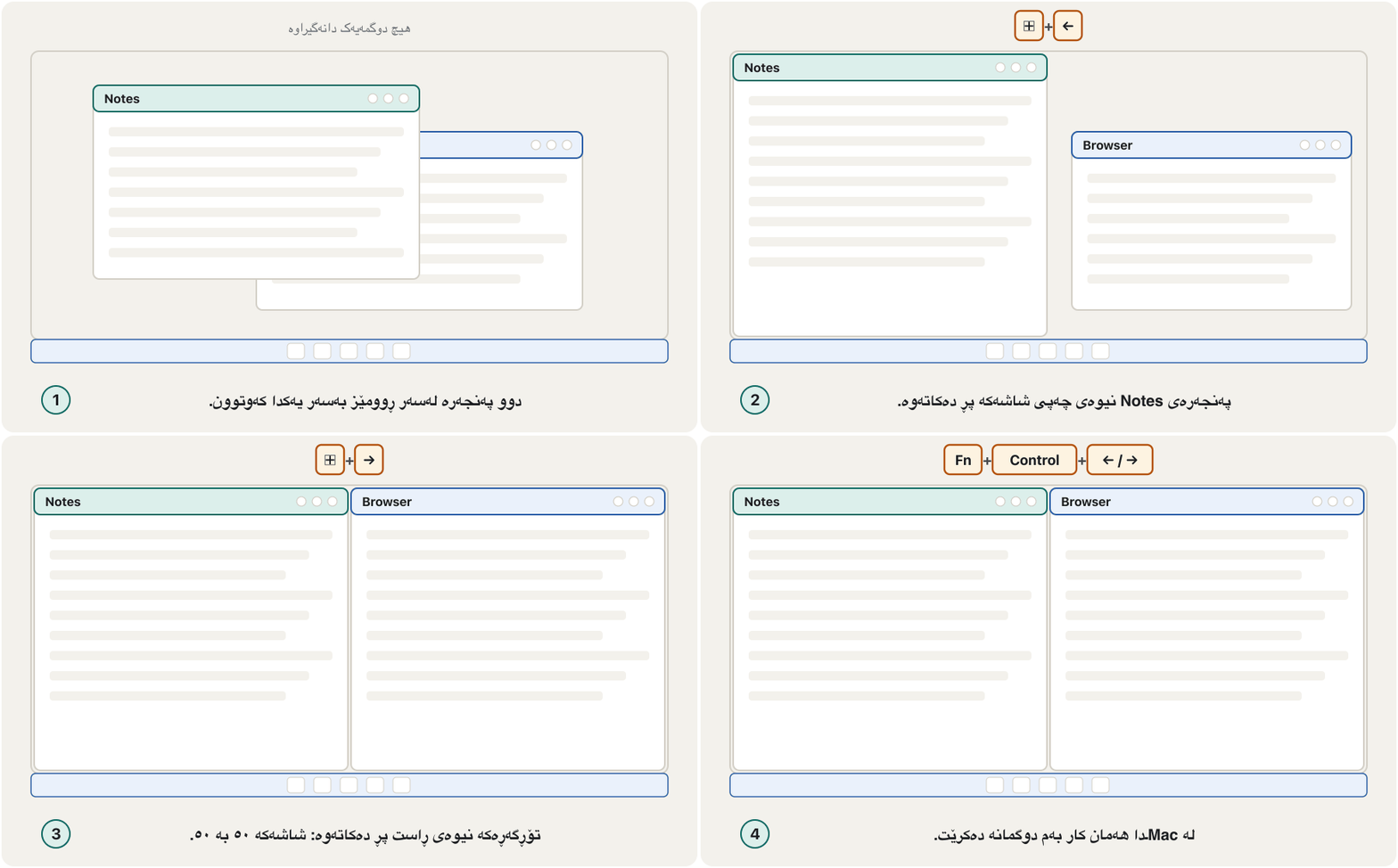
⊞ + ← و ⊞ + →CêITGroup 2: windows and desktopsکۆمەڵەی ٢: پەنجەرەکان و ڕوومێزەکان
Snap and resizeلکاندن و گۆڕینی قەبارە
| Windows 11 | Mac | What it doesچی دەکات |
|---|---|---|
⊞ + ← / ⊞ + → | Fn + Control + ← / → | Snap the window to the left or right half of the screen. دەلکێنێت بە نیوەی چەپ یان ڕاستی شاشەکەوە (). |
⊞ + ↑ | Fn + Control + F | Maximize the window (fill the screen). گەورە دەکاتەوە (): شاشەکە پڕ دەکاتەوە. |
⊞ + ↓ | Command + M | Minimize the active window. بچووک دەکاتەوە (). |
⊞ + Shift + ↓ | Fn + Control + R | Put a snapped or maximized window back to its earlier size. لکێنراو یان گەورەکراو دەگەڕێنێتەوە بۆ قەبارەی پێشووی. |
⊞ + Z | Fn + Control + Shift + ← | Windows: open the snap layouts to choose a layout. Mac: tile two windows left and right.Windows: شێوازەکانی لکاندن دەکاتەوە تا یەکێک هەڵبژێریت. Mac: دوو چەپ و ڕاست ڕیز دەکات. |
Group 2: windows and desktopsکۆمەڵەی ٢: پەنجەرەکان و ڕوومێزەکان
Switch, show and closeگۆڕین، پیشاندان و داخستن
| Windows 11 | Mac | What it doesچی دەکات |
|---|---|---|
⊞ + D | Fn + H | Show or hide the desktop. پیشان دەدات یان دەیشارێتەوە. |
⊞ + M | Option + Command + M | Minimize all windows (on a Mac: all windows of the front app).هەموو بچووک دەکاتەوە (لە Macـدا: هەموو ئەپی پێشەوە). |
⊞ + Shift + M | — (no built-in key)— (دوگمەی ئامادەی نییە) | Bring back the minimized windows. بچووککراوەکان دەگەڕێنێتەوە. |
Alt + Tab | Command + Tab | Switch between open apps. Keep holding Alt and press Tab again to go further.لە نێوان دەگۆڕێتەوە. Alt ڕابگرە و دووبارە Tab دابگرە بۆ ڕۆیشتنی زیاتر. |
⊞ + Tab | Control + ↑ | See all windows and desktops (Task View; Mission Control on a Mac).هەموو و دەبینیت (Task View؛ لە Macـدا Mission Control). |
⊞ + 1 … 9 | — (no built-in key)— (دوگمەی ئامادەی نییە) | Open the app pinned at that place on the taskbar, or switch to it if it is already open.ئەو دەکاتەوە کە لەو شوێنەی دانراوە، یان ئەگەر کراوە بێت دەچێتە سەری. |
Alt + F4 | Command + W / Command + Q | Close the active window. On a Mac, Command + W closes the window and Command + Q quits the whole app. دادەخات. لە Macـدا Command + W دادەخات و Command + Q هەموو دادەخات. |
Group 2: windows and desktopsکۆمەڵەی ٢: پەنجەرەکان و ڕوومێزەکان
Minimize, restore and ⊞ + numberبچووککردنەوە، گەڕاندنەوە و ⊞ + ژمارە
The report gives an example for ⊞ + number: ⊞ + 2 opens the second app on the taskbar, or brings it back if it was minimized.
ڕاپۆرتەکە نموونەیەک بۆ ⊞ + ژمارە دەدات: ⊞ + 2 ئەپی دووەم لەسەر دەکاتەوە، یان ئەگەر بچووک کرابووەوە دەیگەڕێنێتەوە.
Group 2: windows and desktopsکۆمەڵەی ٢: پەنجەرەکان و ڕوومێزەکان
Extra desktops: work, study and play apartڕوومێزە زیادەکان: کار، خوێندن و یاری لە یەک جیا
A virtual desktop is a second (or third…) desktop on the same screen, each with its own open windows. You can keep your university work on one desktop and your music and chats on another. Windows calls them desktops; macOS calls them Spaces.
دووەمە (یان سێیەم…) لەسەر هەمان شاشە، هەریەکەیان کراوەی خۆی هەیە. دەتوانیت کاری زانکۆکەت لەسەر و مۆسیقا و چاتەکانت لەسەر یەکێکی تر دابنێیت. Windows پێیان دەڵێت desktops؛ macOS پێیان دەڵێت Spaces.
| Windows 11 | Mac | What it doesچی دەکات |
|---|---|---|
⊞ + Ctrl + D | — (no built-in key)— (دوگمەی ئامادەی نییە) | Create another desktop (D for Desktop). Mac: open Mission Control (Control + ↑) and click the Add button. تر دروست دەکات (D بۆ Desktop). Mac: Mission Control بکەرەوە (Control + ↑) و کلیک لە دوگمەی زیادکردن بکە. |
⊞ + Ctrl + ← / → | Control + ← / → | Move to the desktop (Space) on the left or right.دەچێتە سەر (Space) لای چەپ یان ڕاست. |
⊞ + Ctrl + F4 | — (no built-in key)— (دوگمەی ئامادەی نییە) | Close the desktop you are using.ئەو بەکاری دەهێنیت دادەخات. |
⊞ + Tab | Control + ↑ | See every desktop (Space) at once.هەموو (Spaces) پێکەوە دەبینیت. |
Group 3: screenshots and screen toolsکۆمەڵەی ٣: وێنەکانی شاشە و ئامرازەکانی شاشە
The report likes the name Print Screen: it «prints» the screen, but into a picture, not onto paper. Windows 11 and macOS now give you several ways to take a screenshot:
ڕاپۆرتەکە ناوی Print Screenـی پێ جوانە: شاشەکە «چاپ» دەکات، بەڵام بۆ ناو وێنەیەک نەک سەر کاغەز. Windows 11 و macOS ئێستا چەند ڕێگەیەکت بۆ گرتنی دەدەنێ:
| Windows 11 | Mac | What it doesچی دەکات |
|---|---|---|
PrtScn | — (no built-in key)— (دوگمەی ئامادەی نییە) | Windows 11: select a part of the screen; the picture goes to the clipboard (the Snipping Tool's selection opens). You can switch this off in Settings › Accessibility › Keyboard.Windows 11: بەشێک لە شاشەکە هەڵدەبژێریت؛ وێنەکە دەچێتە (هەڵبژاردنی Snipping Tool دەکرێتەوە). دەتوانیت ئەمە لە Settings › Accessibility › Keyboard بکوژێنیتەوە. |
⊞ + Shift + S | Shift + Command + 4 | Select a region. Windows puts it on the clipboard; the Mac saves it as a file on the desktop.ناوچەیەک هەڵدەبژێریت. Windows دەیخاتە ؛ Mac وەک لەسەر هەڵیدەگرێت. |
⊞ + PrtScn | Shift + Command + 3 | The whole screen, saved as a file (Windows: Pictures › Screenshots; Mac: the desktop).هەموو شاشەکە، وەک هەڵدەگیرێت (Windows: Pictures › Screenshots؛ Mac: ). |
Alt + PrtScn | Shift + Command + 4, Space | Only the active window (Windows copies it to the clipboard).تەنها (Windows دەیخاتە ). |
⊞ + Shift + R | Shift + Command + 5 | Select a region and record a video of it; the Snipping Tool saves it as an MP4. On a Mac the Screenshot app opens with all options.ناوچەیەک هەڵدەبژێریت و ڤیدیۆی لێ تۆمار دەکەیت ()؛ Snipping Tool وەک MP4 هەڵیدەگرێت. لە Macـدا ئەپی Screenshot بە هەموو هەڵبژاردنەکانەوە دەکرێتەوە. |
How to take a screenshot in Windows 11 with Print Screen, Windows+Shift+S and the Snipping Tool.
چۆن لە Windows 11دا بگریت: بە Print Screen، بە Windows+Shift+S و بە Snipping Tool.
Plays 0:30-2:22: the screenshot shortcuts of Windows 11.
لە 0:30 تا 2:22 پەخش دەبێت: بۆ گرتنی لە Windows 11ـدا.
Group 3: screenshots and screen toolsکۆمەڵەی ٣: وێنەکانی شاشە و ئامرازەکانی شاشە
What PrtScn does todayPrtScn ئەمڕۆ چی دەکات
Group 3: screenshots and screen toolsکۆمەڵەی ٣: وێنەکانی شاشە و ئامرازەکانی شاشە
Magnifier and projectorزەڕەبین و پرۆجێکتەر
| Windows 11 | Mac | What it doesچی دەکات |
|---|---|---|
⊞ + Plus (+) | Option + Command + Plus | Zoom in with the magnifier (Magnifier on Windows, Zoom on a Mac).بە گەورە دەکات (Magnifier لە Windows، Zoom لە Mac). |
⊞ + Minus (−) | Option + Command + Minus | Zoom out.بچووک دەکاتەوە. |
⊞ + Esc | Option + Command + 8 | Windows: close Magnifier. Mac: switch zoom on and off.Windows: دادەخات. Mac: زووم هەڵدەکات و دەیکوژێنێتەوە. |
⊞ + P | Command + Brightness Down | Choose how a projector or second screen is used. On a Mac this key turns mirroring on or off.هەڵدەبژێریت یان شاشەی دووەم چۆن بەکاربێت. لە Macـدا ئەم دوگمەیە ئاوێنەکردنی شاشە هەڵدەکات یان دەیکوژێنێتەوە. |
⊞ + K | — (no built-in key)— (دوگمەی ئامادەی نییە) | Cast the screen without a cable to a wireless display, smart TV or projector (Mac: Screen Mirroring in Control Center).شاشەکە بەبێ کێبڵ دەنێرێتە سەر بێ وایەر، تەلەفزیۆنێکی زیرەک یان (Mac: Screen Mirroring لە Control Centerـدا). |
The Magnifier's name comes from magnify, to make bigger; the report calls it «زەڕەبین», the magnifying glass, which is also CêIT's word: . On a Mac, first turn on Use keyboard shortcuts to zoom in System Settings › Accessibility › Zoom.
ناوی Magnifier لە magnifyـەوە هاتووە، واتە گەورەکردن؛ ڕاپۆرتەکە پێی دەڵێت «زەڕەبین» کە وشەی CêITـیشە: . لە Macـدا سەرەتا Use keyboard shortcuts to zoom لە System Settings › Accessibility › Zoom هەڵبکە.
⊞ + P (P for Projector — in everyday Kurdish the projector is often called «داتاشۆ») opens the report's four choices: PC screen only, Duplicate, Extend and Second screen only. When to use each one, and casting without a cable, are practised in Using Windows.
⊞ + P (P بۆ Projector — لە کوردیی ڕۆژانەدا زۆرجار پێی دەوترێت «داتاشۆ») چوار هەڵبژاردەکەی ڕاپۆرتەکە دەکاتەوە: PC screen only، Duplicate، Extend و Second screen only. کەی هەریەکەیان بەکار بهێنیت و ناردنی شاشە بەبێ کێبڵ لە بەکارهێنانی Windowsدا ڕاهێنانیان لەسەر دەکرێت.
Group 4: system shortcutsکۆمەڵەی ٤: کورتەڕێکانی کیبۆردی سیستەم
These shortcuts open parts of the operating system itself: the file manager, Settings, search, the lock screen and more.
ئەم بەشەکانی خودی دەکەنەوە: ، Settings، گەڕان، و زیاتر.
| Windows 11 | Mac | What it doesچی دەکات |
|---|---|---|
⊞ + E | — (no built-in key)— (دوگمەی ئامادەی نییە) | Open File Explorer. (Mac: no system-wide key; in Finder, Command + N opens a new window.)File Explorer دەکاتەوە. (Mac: دوگمەیەکی گشتی نییە؛ لەناو Finderـدا Command + N نوێ دەکاتەوە.) |
⊞ + I | Command + Comma (,) | Open Settings. (On a Mac this opens the settings of the app in front.)Settings دەکاتەوە. (لە Macـدا ڕێکخستنەکانی ئەو لە پێشەوەیە دەکاتەوە.) |
⊞ + S | Command + Space | Search the computer and the apps (Mac: Spotlight).گەڕان لە و (Mac: Spotlight). |
⊞ + C | — (no built-in key)— (دوگمەی ئامادەی نییە) | Open Microsoft Copilot (if Copilot is not available, it opens Windows search).Microsoft Copilot دەکاتەوە (ئەگەر Copilot بەردەست نەبێت، گەڕانی Windows دەکاتەوە). |
⊞ + . / ⊞ + ; | Control + Command + Space / Fn + E | Open the emoji panel (Mac: the Character Viewer).پانێڵی دەکاتەوە (Mac: Character Viewer). |
⊞ + X | — (no built-in key)— (دوگمەی ئامادەی نییە) | Open the Quick Link menu (the same as right-clicking Start). Quick Link دەکاتەوە (هەمان کلیکی ڕاستە لەسەر Start). |
⊞ + R | — (no built-in key)— (دوگمەی ئامادەی نییە) | Open the Run box to type a program or command name.سندووقی Run دەکاتەوە بۆ نووسینی ناوی یان فەرمانێک. |
Group 4: system shortcutsکۆمەڵەی ٤: کورتەڕێکانی کیبۆردی سیستەم
Lock, Quick Settings and languageقفڵ، Quick Settings و زمان
| Windows 11 | Mac | What it doesچی دەکات |
|---|---|---|
⊞ + L | Control + Command + Q | Lock the computer: your apps keep running, but the password or PIN is needed to come back. قفڵ دەکات: کار دەکەن، بەڵام بۆ گەڕانەوە یان PIN پێویستە. |
⊞ + A | Fn + C | Open Quick Settings, which Microsoft's list calls the Windows 11 action center: Wi-Fi, Bluetooth, volume, brightness (Mac: Control Center).Quick Settings دەکاتەوە، کە لیستەکەی Microsoft پێی دەڵێت Windows 11 action center: ، ، دەنگ، ڕووناکی (Mac: Control Center). |
⊞ + N | Fn + N | Open the notifications (and the calendar on Windows). دەکاتەوە (و ڕۆژژمێر لە Windows). |
⊞ + H | Fn + D | Start voice typing (dictation): speak and the computer types.نووسین بە دەنگ دەست پێدەکات: قسە دەکەیت و دەنووسێت (). |
⊞ + Space | Control + Space | Switch the keyboard language, for example between Kurdish and English.زمانی دەگۆڕێت، بۆ نموونە لە نێوان کوردی و ئینگلیزیدا. |
Ctrl + Shift + Esc | Option + Command + Esc | Open Task Manager (Mac: the Force Quit window) to close a frozen app. دەکاتەوە (Mac: Force Quit) بۆ داخستنی ڕاوەستاو. |
The report explains that ⊞ + L locks the current user account: everything stays open, and nobody can use the computer until you sign in again. Press it every time you leave your laptop in the library or the lab.
ڕاپۆرتەکە ڕوون دەکاتەوە کە ⊞ + L ئێستا قفڵ دەکات: هەموو شتێک کراوە دەمێنێتەوە و کەس ناتوانێت بەکار بهێنێت تا دووبارە نەچیتە ژوورەوە. هەموو جارێک کە لە کتێبخانە یان تاقیگە بەجێدەهێڵیت دایبگرە.
When an app freezes, Task Manager (Ctrl + Shift + Esc) can end it. How to use Task Manager and Activity Monitor is taught in Troubleshooting and Task Manager.
کاتێک ڕادەوەستێت، (Ctrl + Shift + Esc) دەتوانێت دایبخات. چۆنیەتی بەکارهێنانی و Activity Monitor لە چارەسەرکردنی کێشە و بەڕێوەبەری ئەرکەکاندا فێر دەکرێت.
Group 4: system shortcutsکۆمەڵەی ٤: کورتەڕێکانی کیبۆردی سیستەم
What changed since the reportچی گۆڕاوە لە دوای ڕاپۆرتەکەوە
Bonus: browser shortcutsزیادە: کورتەڕێکانی کیبۆردی تۆڕگەڕ
Students spend hours in the browser. These keys work in Edge and Chrome on Windows, and in Safari and Chrome on a Mac.
خوێندکاران چەندین کاتژمێر لە بەسەر دەبەن. ئەم دوگمانە لە Edge و Chromeـی Windows و لە Safari و Chromeـی Macـدا کار دەکەن.
| Windows 11 | Mac | What it doesچی دەکات |
|---|---|---|
Ctrl + T | Command + T | Open a new tab.تابێکی نوێ دەکاتەوە. |
Ctrl + W | Command + W | Close the current tab.تابی ئێستا دادەخات. |
Ctrl + Shift + T | Shift + Command + T | Reopen the tab you closed by mistake.ئەو تابە دەکاتەوە کە بە هەڵە داتخست. |
Ctrl + L | Command + L | Jump to the address bar to type a web address or a search.باز دەداتە بۆ نووسینی ناونیشانی وێب یان گەڕان. |
Ctrl + F | Command + F | Find a word on the page.وشەیەک لە پەڕەکەدا دەدۆزێتەوە. |
Ctrl + R / F5 | Command + R | Reload the page.پەڕەکە نوێ دەکاتەوە. |
Ctrl + Plus / Minus | Command + Plus / Minus | Make the page bigger or smaller.پەڕەکە گەورەتر یان بچووکتر دەکات. |
The report's Kurdish wordsوشە کوردییەکانی ڕاپۆرتەکە
The 2022 report ends with a small glossary. The general computer words in it (process, computer, keyboard, data, mouse) are explained in What Is a Computer?. These are the words that belong to shortcuts:
ڕاپۆرتەکەی 2022 بە فەرهەنگۆکێکی بچووک کۆتایی دێت. وشە گشتییەکانی تێیدا (پرۆسێس، ، ، ، ) لە کۆمپیوتەر چییە؟دا ڕوون کراونەتەوە. ئەمانە ئەو وشانەن کە پەیوەندییان بە هەیە:
| Englishئینگلیزی | CêIT termزاراوەی CêIT | In the reportلە ڕاپۆرتەکەدا |
|---|---|---|
| Desktop | ڕوومێز (the same)ڕوومێز (هەمان وشە) | |
| Window | پەنجەرە (the same)پەنجەرە (هەمان وشە) | |
| Arrow (key) | تیر | |
| Application | بەرنامۆچکە | |
| Key | کلیل | |
| Character | نووسە (the same)نووسە (هەمان وشە) | |
| Text | textدەق | نووسین |
| Automatically | automaticallyبە شێوەی خۆکار | خۆکارانە |
The report's word list was checked in three online Kurdish dictionaries: dict.kitn.net, ferheng.zkurd.org and lex.vejin.net.
لیستی وشەکانی ڕاپۆرتەکە لە سێ فەرهەنگی کوردیی ئۆنلایندا پشکنرا: dict.kitn.net، ferheng.zkurd.org و lex.vejin.net.
Practice: a mouse-free taskڕاهێنان: ئەرکێک بەبێ ماوس
Put the mouse aside and time yourself. On your own computer: (1) open the file manager; (2) open your browser and a new tab; (3) find the word «RAM» on a web page; (4) select a paragraph, copy it and paste it as plain text into a document; (5) save the document; (6) put the browser on the left half of the screen and the document on the right; (7) take a screenshot of one region; (8) switch the keyboard to Kurdish and type your name, then back to English; (9) undo your last change; (10) lock the computer. Write the keys you used.
لابە و کات بۆ خۆت بگرە. لەسەر خۆت: (١) بکەرەوە؛ (٢) و تابێکی نوێ بکەرەوە؛ (٣) وشەی «RAM» لە پەڕەیەکی وێبدا بدۆزەرەوە؛ (٤) پەرەگرافێک هەڵبژێرە، کۆپی بکە و وەک دەقی ڕووت لە بەڵگەنامەیەکدا بیلکێنە؛ (٥) بەڵگەنامەکە پاشەکەوت بکە؛ (٦) بخە نیوەی چەپی شاشەکە و بەڵگەنامەکە نیوەی ڕاست؛ (٧) لە ناوچەیەک بگرە؛ (٨) زمانی بکە بە کوردی و ناوەکەت بنووسە، پاشان بیگەڕێنەوە بۆ ئینگلیزی؛ (٩) دوایین گۆڕانکاریت هەڵبوەشێنەوە؛ (١٠) قفڵ بکە. ئەو دوگمانە بنووسە کە بەکارت هێنان.
Hintئاماژە
Use the four group tables of this lesson. On a Mac, Command does most of Ctrl's jobs.
خشتەی چوار کۆمەڵەکەی ئەم وانەیە بەکار بهێنە. لە Macـدا Command زۆربەی کارەکانی Ctrl دەکات.
Show answerوەڵامەکە پیشان بدە
| Windows 11 | Mac | What it doesچی دەکات |
|---|---|---|
⊞ + E | — (no built-in key)— (دوگمەی ئامادەی نییە) | 1 — file manager (Mac: click Finder in the Dock, then Command + N)١ — (Mac: کلیک لە Finder لە Dock بکە، پاشان Command + N) |
Ctrl + T | Command + T | 2 — new tab (open the browser first from the taskbar: ⊞ + its number)٢ — تابی نوێ (سەرەتا لە بکەرەوە: ⊞ + ژمارەکەی) |
Ctrl + F | Command + F | 3 — find on the page٣ — دۆزینەوە لە پەڕەکەدا |
Ctrl + C, Ctrl + Shift + V | Command + C, Option + Shift + Command + V | 4 — copy, paste as plain text٤ — ، وەک دەقی ڕووت |
Ctrl + S | Command + S | 5 — save٥ — |
⊞ + ←, ⊞ + → | Fn + Control + ← / → | 6 — snap left and right٦ — لکاندن بە چەپ و ڕاستەوە |
⊞ + Shift + S | Shift + Command + 4 | 7 — region screenshot٧ — ناوچەیەک |
⊞ + Space | Control + Space | 8 — switch keyboard language٨ — گۆڕینی زمانی |
Ctrl + Z | Command + Z | 9 — undo٩ — |
⊞ + L | Control + Command + Q | 10 — lock١٠ — قفڵکردن |
Each line below is from the 2022 report. Write what is true on Windows 11 today. (a) «⊞ + C opens Cortana.» (b) «⊞ + A opens the Action/Notification Center.» (c) «⊞ + PrtScn copies the screen so you can paste it into Paint.» (d) «⊞ + F opens Find in Windows Explorer.» (e) «⊞ + ↓ makes the window smaller, and again minimizes it.»
هەر دێڕێکی خوارەوە لە ڕاپۆرتەکەی 2022ـەوەیە. بنووسە ئەمڕۆ لە Windows 11ـدا چی ڕاستە. (أ) «⊞ + C Cortana دەکاتەوە.» (ب) «⊞ + A ناوەندی Action/Notification دەکاتەوە.» (ج) «⊞ + PrtScn شاشەکە کۆپی دەکات تا لە Paintـدا بیلکێنیت.» (د) «⊞ + F Find لە Windows Explorerـدا دەکاتەوە.» (هـ) «⊞ + ↓ بچووکتر دەکات و جاری دووەم دەیشارێتەوە.»
Show answerوەڵامەکە پیشان بدە
- (a) ⊞ + C opens Microsoft Copilot (or Windows search if Copilot is off).
- (b) ⊞ + A opens Quick Settings; notifications are ⊞ + N.
- (c) ⊞ + PrtScn saves a file in Pictures › Screenshots; PrtScn alone opens the Snipping Tool selection.
- (d) ⊞ + F opens the Feedback Hub; search files with Ctrl + E or Ctrl + F in File Explorer, or ⊞ + S.
- (e) ⊞ + ↓ minimizes the active window; ⊞ + Shift + ↓ restores a snapped or maximized one.
- (أ)
⊞ + CMicrosoft Copilot دەکاتەوە (یان گەڕانی Windows ئەگەر Copilot کوژێندرابێتەوە). - (ب)
⊞ + AQuick Settings دەکاتەوە؛⊞ + Nن. - (ج)
⊞ + PrtScnلە Pictures › Screenshots پاشەکەوت دەکات؛ PrtScn بە تەنها هەڵبژاردنی Snipping Tool دەکاتەوە. - (د)
⊞ + FFeedback Hub دەکاتەوە؛ بەCtrl + EیانCtrl + Fلە File Explorerـدا یان بە⊞ + Sبەدوای بگەڕێ. - (هـ)
⊞ + ↓بچووک دەکاتەوە؛⊞ + Shift + ↓پەنجەرەیەکی لکێنراو یان گەورەکراو دەگەڕێنێتەوە.
Ten useful Windows keyboard shortcuts, such as Windows+V and Windows+L, that do jobs faster than the mouse.
دە بەسوودی Windows، وەک Windows+V و Windows+L، کە کارەکان لە خێراتر ئەنجام دەدەن.
Whole video (5:00): ten mouse-free Windows shortcuts from every group of this lesson — a quick review before the practice task.
هەموو ڤیدیۆکە (5:00): دە Windows بێ ، لە هەموو گرووپەکانی ئەم وانەیە؛ پێداچوونەوەیەکی خێرا پێش ئەرکی ڕاهێنانەکە.
Common mistakesهەڵە باوەکان
| Mistakeهەڵە | What is trueڕاستییەکە |
|---|---|
| Pressing the keys one after another.داگرتنی دوگمەکان یەک لە دوای یەک. | Hold the modifier keys, press the last key, then let go of all. ڕابگرە، دوگمەی کۆتایی دابگرە، پاشان هەموویان بەرەڵا بکە. |
| Using Control for copy on a Mac.بەکارهێنانی Control بۆ لە Macـدا. | On a Mac, copy, paste and save use Command ⌘.لە Macـدا ، و Command ⌘ بەکار دەهێنن. |
⊞ + C opens Cortana (or Teams).⊞ + C Cortana (یان Teams) دەکاتەوە. | Windows 11 lists it as Open Microsoft Copilot.Windows 11 بە کردنەوەی Microsoft Copilot دەیناسێنێت. |
| PrtScn does nothing visible.PrtScn هیچ شتێکی دیار ناکات. | In Windows 11 it opens the Snipping Tool to select a region; ⊞ + PrtScn saves a file.لە Windows 11ـدا Snipping Tool دەکاتەوە بۆ هەڵبژاردنی ناوچەیەک؛ ⊞ + PrtScn پاشەکەوت دەکات. |
Ctrl + Y is a second Undo.Ctrl + Y دووەمە. | Ctrl + Y is Redo: it brings back what Ctrl + Z undid.Ctrl + Y : ئەوەی Ctrl + Z هەڵیوەشاندەوە دەیگەڕێنێتەوە. |
| A keyboard shortcut and a desktop shortcut are the same thing. و shortcut لەسەر یەک شتن. | A desktop shortcut is an icon that points to a file or app; a keyboard shortcut is a key combination.shortcut لەسەر کە ئاماژە بە یان دەکات؛ تێکەڵەیەکی دوگمەیە. |
Summaryپوختە
- A shortcut is a key combination that replaces a mouse or menu action: hold the modifiers, press the last key, release.
- On a Mac, Command ⌘ does most of Ctrl's jobs; Option ⌥ is in Alt's place.
- Editing: C, X, V, Z, Y, A, S, F with Ctrl (Command); ⊞ + V for clipboard history.
- Windows: ⊞ + arrows snap and resize, ⊞ + D desktop, Alt + Tab switch, ⊞ + Ctrl + D a new desktop.
- Screenshots: PrtScn or ⊞ + Shift + S (region), ⊞ + PrtScn (saved file); Mac Shift + Command + 3 / 4 / 5. ⊞ + P chooses projector modes; ⊞ + K casts the screen.
- System: ⊞ + E, ⊞ + I, ⊞ + L, ⊞ + A (Quick Settings), ⊞ + N, ⊞ + S, ⊞ + Space; the 2022 report's ⊞ + C, ⊞ + A, ⊞ + F and ⊞ + PrtScn lines have changed.
- تێکەڵەیەکی دوگمەیە کە جێی کارێکی یان دەگرێتەوە: ڕابگرە، دوگمەی کۆتایی دابگرە، بەرەڵای بکە.
- لە Macـدا Command ⌘ زۆربەی کارەکانی Ctrl دەکات؛ Option ⌥ لە شوێنی Altـدایە.
- دەستکاری: C، X، V، Z، Y، A، S، F لەگەڵ Ctrl (Command)؛
⊞ + Vبۆ مێژووی . - :
⊞ +دەلکێنن و قەبارە دەگۆڕن،⊞ + D،Alt + Tabگۆڕین،⊞ + Ctrl + Dنوێ. - : PrtScn یان
⊞ + Shift + S(ناوچە)،⊞ + PrtScn( پاشەکەوتکراو)؛ MacShift + Command + 3 / 4 / 5.⊞ + Pشێوازی هەڵدەبژێرێت؛⊞ + Kشاشەکە بێ کێبڵ دەنێرێت. - سیستەم:
⊞ + E،⊞ + I،⊞ + L،⊞ + A(Quick Settings)،⊞ + N،⊞ + S،⊞ + Space؛ دێڕەکانی⊞ + C،⊞ + A،⊞ + Fو⊞ + PrtScnی ڕاپۆرتەکەی 2022 گۆڕاون.
Which key replaces the Windows Ctrl key in most Mac shortcuts?لە زۆربەی کورتەڕێکانی کیبۆردی Macـدا کام دوگمە جێی Ctrlـی Windows دەگرێتەوە؟
Command ⌘.
دوگمەی Command ⌘.
How do you put two windows side by side on Windows 11?لە Windows 11ـدا چۆن دوو پەنجەرە لە تەنیشت یەک دادەنێیت؟
⊞ + ← on one window and ⊞ + → on the other (or ⊞ + Z for snap layouts).
⊞ + ← لەسەر و ⊞ + → لەسەر ئەوی تر (یان ⊞ + Z بۆ شێوازەکانی لکاندن).
What does ⊞ + V do, and what must you do the first time?⊞ + V چی دەکات و یەکەم جار دەبێت چی بکەیت؟
It opens the clipboard history; the first time you must turn the history on.
مێژووی دەکاتەوە؛ یەکەم جار دەبێت مێژووەکە هەڵبکەیت.
Videoڤیدیۆ
Watch a videoسەیری ڤیدیۆیەک بکە
A video that viewers liked a lot and praised in their comments, chosen for this lesson.ڤیدیۆیەک کە بینەران زۆریان پێ خۆش بووە و لە کۆمێنتەکانیاندا ستایشیان کردووە، بۆ ئەم وانەیە هەڵبژێردراوە.
In Kurdish: several useful Windows 11 keyboard shortcuts shown on a real Windows 11 PC.
بە کوردی: چەند بەسوودی Windows 11 لەسەر ڕاستەقینە پیشان دەدرێن.
Kurdish (Sorani) lesson video, plays 0:00–2:06: Windows 11 shortcuts on the desktop. It stops before 2:06, where a warning bar of unlicensed Office appears.
ڤیدیۆی وانەیەکی کوردیی سۆرانی، لە 0:00 تا 2:06 پەخش دەبێت: Windows 11 لەسەر . پێش 2:06 ڕادەوەستێت، کە شریتی ئاگادارکردنەوەی Officeـێکی بێ دەردەکەوێت.
Lesson complete!وانەکە تەواو بوو!
Well done. Review the key terms, then go on to the next lesson.دەستخۆش. سەیرێکی زاراوە سەرەکییەکان بکەرەوە، پاشان بڕۆ بۆ وانەی داهاتوو.
Key termsزاراوە سەرەکییەکان
The Command Line: Command Prompt Basicsڕووکاری هێڵی فەرمان: بنەماکانی Command Prompt
Related lecturesوانە پەیوەندیدارەکان
- Input Devicesئامێرەکانی نێوخستە
- Application Software and File Typesنەرمەواڵەی بەکارهێنان و جۆرەکانی فایل
- Word Processing Essentialsبنەماکانی بەرنامەی نووسینی دەق
- Presenting Your Showپێشکەشکردنی سلایدشۆکە
- Troubleshooting and Task Managerچارەسەرکردنی کێشە و بەڕێوەبەری ئەرکەکان
- Using Windows: Desktop, Files and Everyday Toolsبەکارهێنانی Windows: ڕوومێز، فایلەکان و ئامرازە ڕۆژانەکان
- The Command Line: Command Prompt Basicsڕووکاری هێڵی فەرمان: بنەماکانی Command Prompt
References and further readingسەرچاوەکان و خوێندنەوەی زیاتر
- Microsoft Support: Keyboard shortcuts in Windows (Windows 11 tab)
- Microsoft Support: Use Snipping Tool to capture screenshots
- Microsoft Support: Customize the taskbar in Windows (Quick Settings, notification center)
- Microsoft Support: Keyboard shortcuts in Microsoft Edge
- Apple Support: Mac keyboard shortcuts (published 14 September 2026)
- Apple Support: Take a screenshot on Mac
- Apple Mac User Guide: Tile windows on Mac
- Apple Mac User Guide: Work in multiple spaces on Mac
- Apple Mac User Guide: Zoom in on what's on the screen
- Apple Safari User Guide: Keyboard and other shortcuts
- Microsoft: Windows 10 end of support
- Microsoft Support: Keyboard shortcuts in Word (macOS: Cmd+Shift+V Paste text only)
- Microsoft Support: How to use multiple monitors in Windows (⊞ + P; ⊞ + K opens Cast)
This lecture is a first edition. The Kurdish text and terminology are waiting for review by Kurdish IT teachers.ئەم وانەیە چاپی یەکەمە. دەقە کوردییەکە و زاراوەکانی چاوەڕێی پێداچوونەوەی مامۆستایانی کوردی بواری IT ن.