JavaJava · Chapterبەش 9 · Lectureوانە 9.2
ArrayList and Wrapper ClassesArrayList و کلاسە پێچەرەوەکان
A list that grows: ArrayList<E> with add, get, set, remove, size and clear, loops (and removing safely inside them), IndexOutOfBoundsException and ConcurrentModificationException, wrapper classes such as Integer with autoboxing and unboxing, parseInt, the remove(int) versus remove(Object) trap, Collections.sort, the List interface, and when to choose an array or an ArrayList.
کە گەورە دەبێت: ArrayList<E> بە add، get، set، remove، size و clear، (و لابردنی سەلامەت لە ناویاندا)، IndexOutOfBoundsException و ConcurrentModificationException، وەک Integer بە و کردنەوە، parseInt، تەڵەی remove(int) بەرامبەر remove(Object)، Collections.sort، List و کەی یان ArrayList هەڵبژێریت.
What you will learnچی فێر دەبیت
- Create an ArrayList and use add, get, set, remove, size, contains and clear.
- Loop over a list and remove elements without skipping any or stopping the program.
- Explain wrapper classes, autoboxing and unboxing, and their traps with null and ==.
- Convert text to numbers with parseInt and tell remove(int) from remove(Object).
- Sort lists with Collections.sort, declare them with List, and choose between an array and an ArrayList.
- ArrayListـێک دروست بکەیت و add، get، set، remove، size، contains و clear بەکار بهێنیت.
- بەسەر بسووڕێیتەوە و لاببەیت بەبێ بازدان بەسەر هیچیاندا یان وەستاندنی .
- ، و کردنەوە و تەڵەکانیان لەگەڵ null و == ڕوون بکەیتەوە.
- بە parseInt دەق بکەیت بە ژمارە و remove(int) لە remove(Object) جیا بکەیتەوە.
- بە Collections.sort ڕیز بکەیت، بە List بیانناسێنیت و لە نێوان و ArrayListـدا هەڵبژێریت.
An array cannot grow; an ArrayList canڕیزەک گەورە نابێت؛ ArrayList دەبێت
An array's length is fixed when it is made (new and default values). A class of three students gets a fourth one, and the array has no place for her:
درێژیی لە کاتی دروستکردنیدا جێگیر دەبێت (new و نرخە بنەڕەتییەکان). پۆلێکی سێ قوتابی قوتابییەکی چوارەمی بۆ دێت و هیچ شوێنێکی بۆی نییە:
public class FullArray {
    public static void main(String[] args) {
        String[] names = new String[3];
        names[0] = "Aram";
        names[1] = "Shilan";
        names[2] = "Karwan";
        names[3] = "Dilan";               // a fourth student arrives
    }
}$ java FullArray Exception in thread "main" java.lang.ArrayIndexOutOfBoundsException: Index 3 out of bounds for length 3 at FullArray.main(FullArray.java:7)
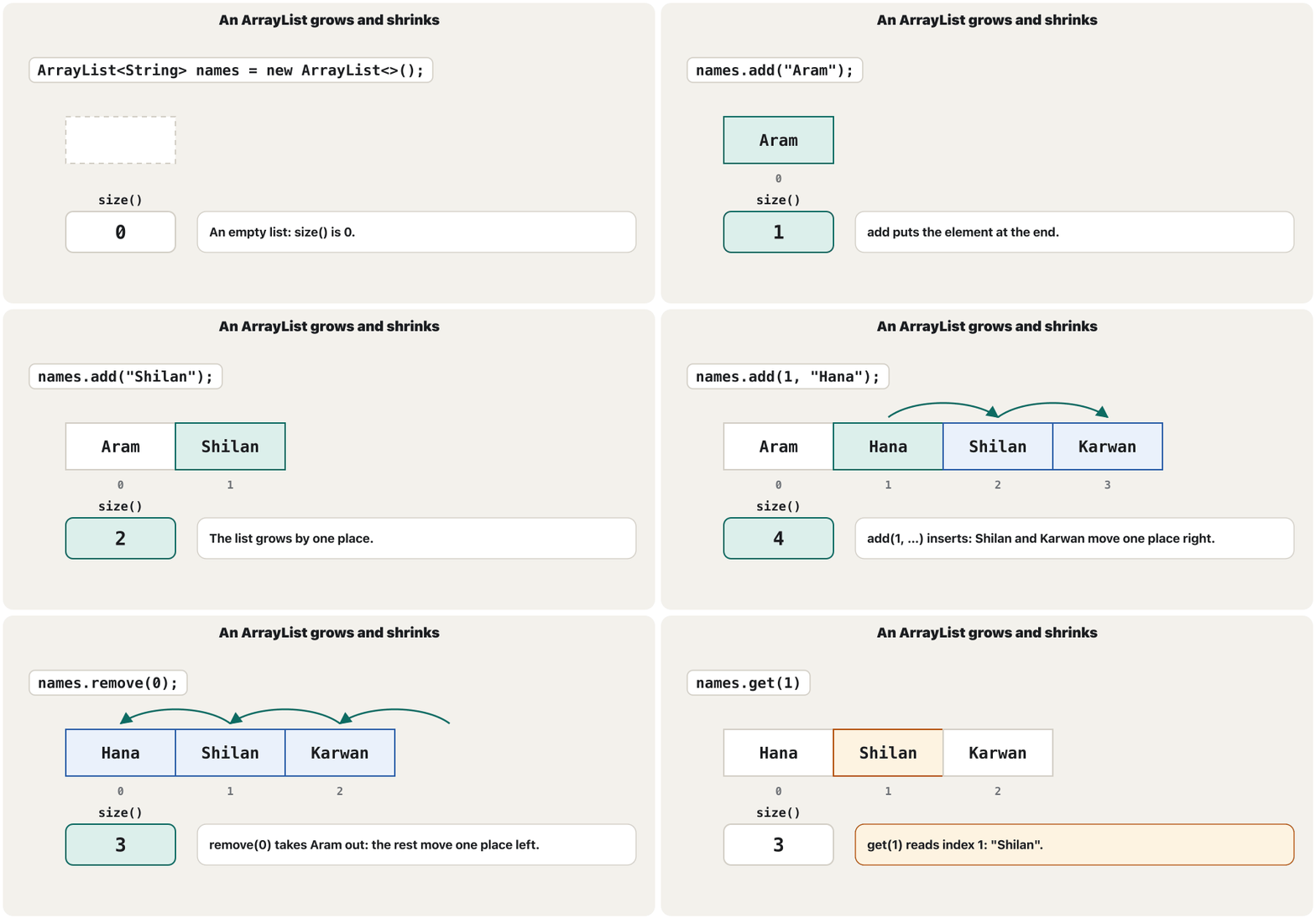
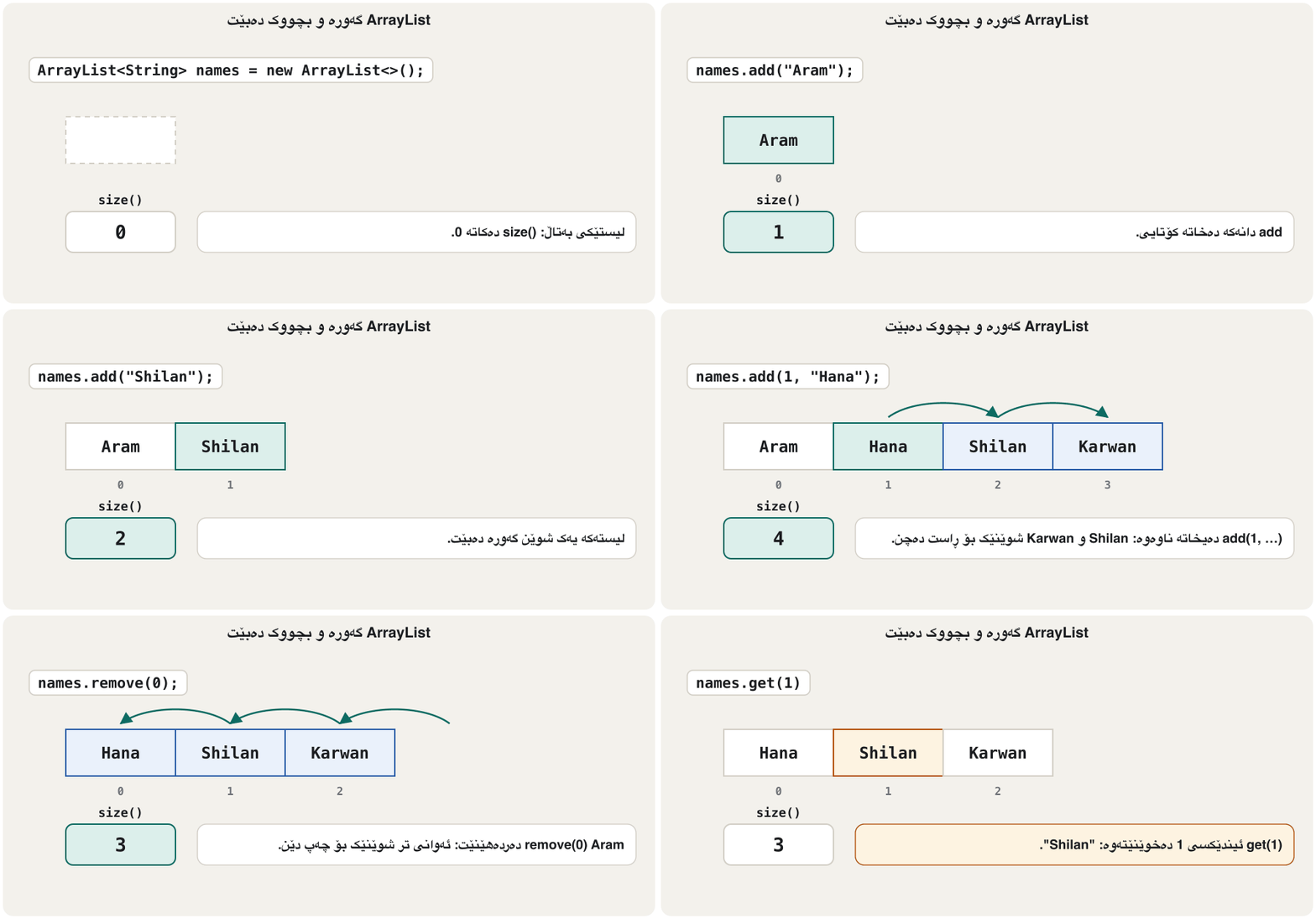
An ArrayList is a that grows and shrinks as you add and remove elements. Inside it keeps an array; when the array is full it copies everything into a bigger one, the job you did by hand with Arrays.copyOf.
ArrayList کە لە کاتی زیادکردن و لابردنی گەورە و بچووک دەبێت. لە ناوەوە هەڵدەگرێت؛ کاتێک پڕ دەبێت هەموو شتێک کۆپی دەکات بۆ یەکێکی گەورەتر، ئەو کارەی خۆت بە Arrays.copyOf دەتکرد.
Creating an ArrayList: add, get, sizeدروستکردنی ArrayList: add، get، size
ArrayList is in java.util (import). In angle brackets you say what the list holds: ArrayList<String> is a list of strings. add appends at the end, get(i) reads index i, size() counts the elements, and println prints the whole list:
ArrayList لە java.utilـدایە (import). لە ناو کەوانەی < >ـدا دەڵێیت چی هەڵدەگرێت: ArrayList<String> لە . add لە کۆتاییدا زیاد دەکات، get(i) i دەخوێنێتەوە، size() دەژمێرێت و println هەموو چاپ دەکات:
import java.util.ArrayList;

public class FirstList {
    public static void main(String[] args) {
        ArrayList<String> names = new ArrayList<>();
        names.add("Aram");
        names.add("Shilan");
        names.add("Karwan");
        System.out.println(names);
        System.out.println("Size: " + names.size());
        System.out.println("First: " + names.get(0));
        names.add("Dilan");               // the list simply grows
        System.out.println(names + " size " + names.size());
    }
}$ java FirstList [Aram, Shilan, Karwan] Size: 3 First: Aram [Aram, Shilan, Karwan, Dilan] size 4
The type in angle brackets makes ArrayList a : one class that works for any element type. After new ArrayList the empty <> (the diamond) tells javac to use the same type again. Unlike an array, the list prints its elements directly: [Aram, Shilan, Karwan].
جۆرەکەی ناو کەوانەی < > ArrayList دەکاتە : یەک کە بۆ هەر جۆرێکی کار دەکات. لە دوای new ArrayList، <>ـی بەتاڵ (diamond) بە javac دەڵێت هەمان جۆر دووپاتە بەکار بهێنە. بە پێچەوانەی ، ڕاستەوخۆ چاپ دەکات: [Aram, Shilan, Karwan].
Adding, inserting and findingزیادکردن، خستنە ناوەوە و دۆزینەوە
add(element) appends; add(index, element) inserts at a position and moves the rest one place right. contains asks whether an element is in the list, and indexOf gives its index, or -1 when it is missing:
add(element) لە کۆتاییدا زیاد دەکات؛ add(index, element) لە شوێنێکدا دەیخاتە ناوەوە و ئەوانی تر شوێنێک بۆ ڕاست دەجووڵێنێت. contains دەپرسێت ئایا لە و indexOf دەدات، یان -1 کاتێک نییە:
import java.util.ArrayList;

public class AddAt {
    public static void main(String[] args) {
        ArrayList<String> queue = new ArrayList<>();
        queue.add("Aram");
        queue.add("Shilan");
        queue.add("Karwan");
        queue.add(1, "Hana");             // Hana goes in at index 1; the others move right
        System.out.println(queue);
        System.out.println("Is Karwan here? " + queue.contains("Karwan"));
        System.out.println("Where is Karwan? " + queue.indexOf("Karwan"));
        System.out.println("Where is Soran? " + queue.indexOf("Soran"));
    }
}$ java AddAt [Aram, Hana, Shilan, Karwan] Is Karwan here? true Where is Karwan? 3 Where is Soran? -1
Adding, inserting and findingزیادکردن، خستنە ناوەوە و دۆزینەوە
Outside the list: IndexOutOfBoundsExceptionدەرەوەی لیستەکە: IndexOutOfBoundsException
A list has the indexes 0 to size() - 1. get with any other index throws an IndexOutOfBoundsException. The message is like the array's; the stack trace also lists the methods inside ArrayList that checked the index, and the last line points to your code (Reading a stack trace):
0 تا size() - 1ـی هەیە. get بە هەر تر IndexOutOfBoundsException فڕێ دەدات. پەیامەکە وەک هی وایە؛ ئەو ناو ArrayList ڕیز دەکات کە پشکنی و دوایین دێڕ ئاماژە بە کۆدی خۆت دەکات (خوێندنەوەی ڕێچکەیەکی هەڵە):
import java.util.ArrayList;

public class BadGet {
    public static void main(String[] args) {
        ArrayList<String> names = new ArrayList<>();
        names.add("Aram");
        names.add("Shilan");
        names.add("Karwan");
        System.out.println(names.get(3));
    }
}$ java BadGet Exception in thread "main" java.lang.IndexOutOfBoundsException: Index 3 out of bounds for length 3 at java.base/jdk.internal.util.Preconditions.outOfBounds(Preconditions.java:64) at java.base/jdk.internal.util.Preconditions.outOfBoundsCheckIndex(Preconditions.java:70) at java.base/jdk.internal.util.Preconditions.checkIndex(Preconditions.java:266) at java.base/java.util.Objects.checkIndex(Objects.java:361) at java.base/java.util.ArrayList.get(ArrayList.java:427) at BadGet.main(BadGet.java:9)
set, remove, clearset، remove، clear
set(index, element) replaces one element and returns the old one. remove(index) takes an element out and closes the gap (an array cannot do that: it needs a new, shorter array); remove(element) removes the first equal element and returns true if it found one. clear() empties the list, and isEmpty() asks whether it is empty:
set(index, element) یەک دەگۆڕێتەوە و کۆنەکە دەگەڕێنێتەوە. remove(index) دەردەهێنێت و شوێنە چۆڵەکە دادەخات ( ناتوانێت ئەمە بکات: پێویستی بە ڕیزەکێکی نوێی کورتتر هەیە)؛ remove(element) یەکەم یەکسان لادەبات و ئەگەر دۆزییەوە true دەگەڕێنێتەوە. clear() بەتاڵ دەکاتەوە و isEmpty() دەپرسێت ئایا بەتاڵە:
import java.util.ArrayList;

public class ChangeList {
    public static void main(String[] args) {
        ArrayList<String> names = new ArrayList<>();
        names.add("Aram");
        names.add("Shilan");
        names.add("Karwan");
        names.add("Dilan");
        String old = names.set(0, "Hana");     // replace, and get the old element back
        System.out.println(old + " was replaced: " + names);
        names.remove(1);                       // remove by index: Shilan
        System.out.println(names);
        boolean found = names.remove("Dilan"); // remove by value
        System.out.println(found + " " + names + " size " + names.size());
        names.clear();
        System.out.println(names + " empty? " + names.isEmpty());
    }
}$ java ChangeList Aram was replaced: [Hana, Shilan, Karwan, Dilan] [Hana, Karwan, Dilan] true [Hana, Karwan] size 2 [] empty? true
Looping over a listسووڕانەوە بەسەر لیستێکدا
Both loops of arrays work. A counting for uses size() and get(i), handy when you need the position; the gives each element in turn (for-each):
هەردوو کار دەکەن. forـی ژماردن size() و get(i) بەکار دەهێنێت، کە بە کەڵکە کاتێک پێویستت بە شوێن هەیە؛ هەر بە نۆرە دەدات (خولی foreach):
import java.util.ArrayList;

public class LoopList {
    public static void main(String[] args) {
        ArrayList<String> names = new ArrayList<>();
        names.add("Aram");
        names.add("Shilan");
        names.add("Karwan");
        for (int i = 0; i < names.size(); i++) {
            System.out.println((i + 1) + ". " + names.get(i));
        }
        for (String name : names) {
            System.out.println("Hello, " + name);
        }
    }
}$ java LoopList 1. Aram 2. Shilan 3. Karwan Hello, Aram Hello, Shilan Hello, Karwan
For an array the loop condition is i < a.length, for a list i < list.size(): arrays have a length field, lists a size() method. Mixing them up is one of the common mistakes at the end of this lesson.
بۆ i < a.lengthـە و بۆ i < list.size(): خانەی lengthیان هەیە و size(). تێکەڵکردنیان یەکێکە لە هەڵە باوەکانی کۆتایی ئەم وانەیە.
Looping over a listسووڕانەوە بەسەر لیستێکدا
Removing elements inside a loopلابردنی دانەکان لە ناو خولێکدا
Removing while a for-each loop is running stops the program: the loop notices that the list changed under it and throws a ConcurrentModificationException:
لابردن لە کاتی کارکردنی دەوەستێنێت: هەست دەکات کە لە ژێریدا گۆڕاوە و ConcurrentModificationException فڕێ دەدات:
import java.util.ArrayList;

public class RemoveInLoop {
    public static void main(String[] args) {
        ArrayList<String> names = new ArrayList<>();
        names.add("Aram");
        names.add("Karwan");
        names.add("Shilan");
        names.add("Dilan");
        for (String name : names) {
            if (name.startsWith("K")) {
                names.remove(name);
            }
        }
        System.out.println(names);
    }
}$ java RemoveInLoop Exception in thread "main" java.util.ConcurrentModificationException at java.base/java.util.ArrayList$Itr.checkForComodification(ArrayList.java:1013) at java.base/java.util.ArrayList$Itr.next(ArrayList.java:967) at RemoveInLoop.main(RemoveInLoop.java:10)
A counting loop forwards does not crash, but it skips the element that slides into the gap (real result: [90, 30, 75]). Count backwards instead:
ژماردن بەرەو پێش تێک ناشکێت، بەڵام بازی بەسەر ئەو دەدات کە دێتە ناو شوێنە چۆڵەکە (ئەنجامی ڕاستەقینە: [90, 30, 75]). لە جیاتی ئەوە بە پاشەوە بژمێرە:
import java.util.ArrayList;

public class RemoveBackwards {
    public static void main(String[] args) {
        ArrayList<Integer> marks = new ArrayList<>();
        marks.add(90);
        marks.add(45);
        marks.add(30);
        marks.add(75);
        for (int i = marks.size() - 1; i >= 0; i--) {    // from the end to the start
            if (marks.get(i) < 50) {
                marks.remove(i);
            }
        }
        System.out.println(marks);
    }
}$ java RemoveBackwards [90, 75]
Numbers in a list: wrapper classesژمارە لە لیستێکدا: کلاسە پێچەرەوەکان
A list holds only objects, so ArrayList<int> is refused: the type argument must be a reference type, not a (The eight primitive types):
تەنیا هەڵدەگرێت، بۆیە ArrayList<int> ڕەت دەکرێتەوە: جۆری ناو کەوانەکە دەبێت بێت، نەک (هەشت جۆرە سەرەتاییەکە):
import java.util.ArrayList;

public class IntList {
    public static void main(String[] args) {
        ArrayList<int> marks = new ArrayList<>();
        marks.add(90);
    }
}$ javac IntList.java
IntList.java:5: error: unexpected type
ArrayList<int> marks = new ArrayList<>();
^
required: reference
found: int
1 errorFor each primitive type Java has a in java.lang: an object that holds one value. Write ArrayList<Integer>, ArrayList<Double>, ArrayList<Character> or ArrayList<Boolean>. Note the two irregular names, Integer and Character. A list can also hold objects of your own classes (Many objects in an ArrayList).
Java بۆ هەر لە java.langـدا هەیە: کە یەک هەڵدەگرێت. بنووسە ArrayList<Integer>، ArrayList<Double>، ArrayList<Character> یان ArrayList<Boolean>. سەرنجی دوو ناوە ناڕێکەکە بدە: Integer و Character. دەتوانێت خۆشت هەڵبگرێت (چەندین ئۆبجێکت لە لیستێکدا).
Numbers in a list: wrapper classesژمارە لە لیستێکدا: کلاسە پێچەرەوەکان
Autoboxing and unboxingپێچانەوەی خۆکار و کردنەوە
You never wrap numbers by hand. marks.add(90) turns the int 90 into an Integer object by itself: . Reading it back as an int unwraps it again (unboxing), so you can calculate with the elements as usual:
هەرگیز ژمارە بە دەست ناپێچیتەوە. marks.add(90) خۆی intـی 90 دەکات بە Integer: . خوێندنەوەی وەک int دووپاتە دەیکاتەوە (unboxing)، بۆیە دەتوانیت وەک هەمیشە بە ژمێرکاری بکەیت:
import java.util.ArrayList;

public class IntegerList {
    public static void main(String[] args) {
        ArrayList<Integer> marks = new ArrayList<>();
        marks.add(90);                    // the int 90 is boxed into an Integer
        marks.add(75);
        marks.add(88);
        int sum = 0;
        for (int mark : marks) {          // each Integer is unboxed into an int
            sum += mark;
        }
        System.out.println(marks + " sum " + sum + " average " + (double) sum / marks.size());
        int first = marks.get(0);         // unboxing again
        System.out.println(first + 10);
    }
}$ java IntegerList [90, 75, 88] sum 253 average 84.33333333333333 100
Numbers in a list: wrapper classesژمارە لە لیستێکدا: کلاسە پێچەرەوەکان
Wrapper traps: null and ==تەڵەکانی کلاسە پێچەرەوەکان: null و ==
A wrapper variable can be null, and an unfilled Integer[] is full of null (An empty slot). Unboxing null stops the program:
پێچەرەوە دەتوانێت null بێت و Integer[]ـێکی پڕنەکراوە پڕە لە null (شوێنی چۆڵ). کردنەوەی null دەوەستێنێت:
public class UnboxNull {
    public static void main(String[] args) {
        Integer[] counts = new Integer[3];        // three empty places: null, null, null
        System.out.println(counts[0]);
        int total = counts[0] + 1;               // unboxing null
        System.out.println(total);
    }
}$ java UnboxNull null Exception in thread "main" java.lang.NullPointerException: Cannot invoke "java.lang.Integer.intValue()" because "<local1>[0]" is null at UnboxNull.main(UnboxNull.java:5)
Wrappers are objects, so compare their values with equals (or as int), not with ==, which asks whether two variables refer to the same object, as with strings (Comparing strings).
پێچەرەوەکان ، بۆیە بە equals بەراورد بکە (یان وەک int)، نەک بە ==، کە دەپرسێت ئایا دوو ئاماژە بە هەمان دەکەن، وەک (بەراوردکردنی زنجیرەنووسەکان).
Useful wrapper methods: parseInt and friendsمیتۆدەکانی بەسوودی پێچەرەوەکان: parseInt و هاوڕێکانی
The wrapper classes also hold static helper methods. Integer.parseInt turns text into an int and Double.parseDouble into a double (, not a cast: Type casting); MAX_VALUE and MIN_VALUE give the range, and Character can test single characters:
یارمەتیدەریشیان هەیە. Integer.parseInt دەق دەکات بە int و Double.parseDouble بە double (، نەک کاست: کاستکردن)؛ MAX_VALUE و MIN_VALUE گەورەترین و بچووکترین ژمارەی ئەو جۆرە دەدەن و Character دەتوانێت یەک بە یەک تاقی بکاتەوە:
public class Wrappers {
    public static void main(String[] args) {
        int age = Integer.parseInt("21");           // text -> int
        double price = Double.parseDouble("2.5");   // text -> double
        System.out.println(age + 1);
        System.out.println(price * 2);
        System.out.println(Integer.MAX_VALUE + " " + Integer.MIN_VALUE);
        System.out.println(Character.isDigit('7') + " " + Character.isLetter('7'));
        System.out.println(Character.toUpperCase('k'));
        System.out.println(Boolean.parseBoolean("true"));
        String text = Integer.toString(250);        // int -> text
        System.out.println(text.length());
    }
}$ java Wrappers 22 5.0 2147483647 -2147483648 true false K true 3
Text that is not a number stops the program with a NumberFormatException that quotes the text. Check the input first, or catch the exception (Exceptions):
دەقێک کە ژمارە نەبێت بە NumberFormatException دەوەستێنێت کە دەقەکە دەگێڕێتەوە. سەرەتا بپشکنە، یان بگرە (هەڵاوێردەکان):
public class BadNumber {
    public static void main(String[] args) {
        int n = Integer.parseInt("twenty");
        System.out.println(n);
    }
}$ java BadNumber Exception in thread "main" java.lang.NumberFormatException: For input string: "twenty" at java.base/java.lang.NumberFormatException.forInputString(NumberFormatException.java:67) at java.base/java.lang.Integer.parseInt(Integer.java:668) at java.base/java.lang.Integer.parseInt(Integer.java:786) at BadNumber.main(BadNumber.java:3)
remove(1): index or value?remove(1): ئیندێکس یان نرخ؟
ArrayList has two remove methods: remove(int index) and remove(Object element) (overloading). With a list of Integer, remove(1) passes an int, so Java chooses the index version. To remove the value, pass an Integer object:
ArrayList دوو removeـی هەیە: remove(int index) و remove(Object element) (فرەپێناسەکردنی میتۆد). لەگەڵ Integer، remove(1) intـێک دەنێرێت، بۆیە Java وەشانی هەڵدەبژێرێت. بۆ لابردنی ، Integer بنێرە:
import java.util.ArrayList;

public class RemoveTrap {
    public static void main(String[] args) {
        ArrayList<Integer> numbers = new ArrayList<>();
        numbers.add(10);
        numbers.add(20);
        numbers.add(30);
        numbers.remove(1);                        // an int: remove the element at INDEX 1
        System.out.println(numbers);
        numbers.remove(Integer.valueOf(10));      // an Integer object: remove the VALUE 10
        System.out.println(numbers);
        numbers.remove(30);                       // index 30 does not exist
    }
}$ java RemoveTrap [10, 30] [30] Exception in thread "main" java.lang.IndexOutOfBoundsException: Index 30 out of bounds for length 1 at java.base/jdk.internal.util.Preconditions.outOfBounds(Preconditions.java:64) at java.base/jdk.internal.util.Preconditions.outOfBoundsCheckIndex(Preconditions.java:70) at java.base/jdk.internal.util.Preconditions.checkIndex(Preconditions.java:266) at java.base/java.util.Objects.checkIndex(Objects.java:361) at java.base/java.util.ArrayList.remove(ArrayList.java:504) at RemoveTrap.main(RemoveTrap.java:13)
Sorting a list: Collections.sortڕیزکردنی لیستێک: Collections.sort
The class Collections (with an s, in java.util) does for lists what Arrays does for arrays. Collections.sort(list) sorts in ; with Collections.reverseOrder() it sorts in . Collections.max and Collections.min find the largest and smallest element:
Collections (بە sـەوە، لە java.utilـدا) بۆ ئەوە دەکات کە Arrays بۆ دەیکات. Collections.sort(list) بە ڕیز دەکات؛ بە Collections.reverseOrder() بە . Collections.max و Collections.min گەورەترین و بچووکترین دەدۆزنەوە:
import java.util.ArrayList;
import java.util.Collections;

public class SortList {
    public static void main(String[] args) {
        ArrayList<String> names = new ArrayList<>();
        names.add("Shilan");
        names.add("Aram");
        names.add("Karwan");
        names.add("Dilan");
        Collections.sort(names);
        System.out.println(names);
        ArrayList<Integer> marks = new ArrayList<>();
        marks.add(75);
        marks.add(90);
        marks.add(62);
        marks.add(88);
        Collections.sort(marks);
        System.out.println(marks);
        Collections.sort(marks, Collections.reverseOrder());
        System.out.println(marks);
        System.out.println("Highest: " + Collections.max(marks) + ", lowest: " + Collections.min(marks));
    }
}$ java SortList [Aram, Dilan, Karwan, Shilan] [62, 75, 88, 90] [90, 88, 75, 62] Highest: 90, lowest: 62
Like Arrays.sort, it sorts strings by character codes, capitals first. Sorting by your own rule (by length, by a mark inside an object) needs a comparator: Comparator. Python's sort() and sorted() are in sort and sorted.
وەک Arrays.sort، بەپێی کۆدی ڕیز دەکات، پیتی گەورە یەکەم. بەپێی یاسای خۆت (بە درێژی، بە نمرەیەک لە ناو ) comparatorـێکی پێویستە: Comparator. sort() و sorted()ـی Python لە sort و sortedـدان.
The List interfaceنێوبەستەی List
Programmers often declare the variable with the type List and create an ArrayList: List<String> cities = new ArrayList<>();. List is an : a list of methods that a list promises (add, get, size …). ArrayList is one class that keeps the promise, LinkedList another (One method for both: the List interface). Why an interface can be the type of a variable is explained in An interface is also a type.
بەرنامەسازان زۆر جار بە جۆری List دەناسێنن و ArrayListـێک دروست دەکەن: List<String> cities = new ArrayList<>();. List : لیستێک لە کە بەڵێنیان دەدات (add، get، size …). ArrayList کە بەڵێنەکە دەباتە سەر و LinkedListـیش یەکێکی ترە (یەک میتۆد بۆ هەردووکیان: نێوبەستەی List). بۆچی دەتوانێت جۆری بێت لە نێوبەستە جۆریشەـدا ڕوون کراوەتەوە.
import java.util.ArrayList;
import java.util.List;

public class Cities {
    public static void main(String[] args) {
        List<String> cities = new ArrayList<>();
        cities.add("Hawler");
        cities.add("Duhok");
        cities.add("Halabja");
        System.out.println(cities + " " + cities.size());
    }
}$ java Cities [Hawler, Duhok, Halabja] 3
Array or ArrayList?ڕیزەک یان ArrayList؟
| Whatچی | Array | ArrayList (ArrayList) |
|---|---|---|
| lengthدرێژی | fixed: a.lengthجێگیر: a.length | grows: list.size()گەورە دەبێت: list.size() |
| read / changeخوێندنەوە / گۆڕین | a[i] a[i] = x | list.get(i) list.set(i, x) |
| element typesجۆری | primitives and objects: int[]سەرەتایی و : int[] | objects only: ArrayList<Integer>تەنیا : ArrayList<Integer> |
| add, removeزیادکردن، لابردن | no (copy into a new array)نا ( نوێ کۆپی بکە) | add(x) remove(i) |
| printingچاپکردن | Arrays.toString(a) | System.out.println(list) |
| helpersیارمەتیدەر | Arrays.sort Arrays.fill | Collections.sort Collections.max |
Use an array when the number of elements is known and fixed (the seven days, a board) or for primitive values in large amounts; use an ArrayList when elements come and go. Python's list is like an ArrayList (ArrayList: Java's growing list). To look values up by a key, or to keep each value only once, see ArrayList, HashMap or HashSet?
کاتێک ژمارەی زانراو و جێگیرە (حەوت ڕۆژەکە، تەختەیەکی ) یان بۆ سەرەتایی بە بڕی زۆر بەکار بهێنە؛ کاتێک دێن و دەڕۆن ArrayList بەکار بهێنە. Python وەک ArrayList وایە (ArrayList: لیستی گەورەبووی Java). بۆ دۆزینەوەی بە ، یان هەڵگرتنی هەر تەنیا یەک جار، ArrayList، HashMap یان HashSet؟ ببینە.
A program: the shopping listبەرنامەیەک: لیستی بازاڕ
The user types items until done (a : Read until 0). The program skips an item that is already in the list, sorts the list and prints it with numbers:
کاڵاکان دەنووسێت تا done (: تا 0 بخوێنەوە). ئەو کاڵایەی پێشتر لە بەجێ دەهێڵێت، ڕیز دەکات و بە ژمارەوە چاپی دەکات:
import java.util.ArrayList;
import java.util.Collections;
import java.util.Scanner;

public class ShoppingList {
    public static void main(String[] args) {
        Scanner input = new Scanner(System.in);
        ArrayList<String> items = new ArrayList<>();
        System.out.println("Type the items, one per line. Type done to finish.");
        while (true) {
            System.out.print("> ");
            String item = input.nextLine();
            if (item.equals("done")) {
                break;
            }
            if (!items.contains(item)) {          // no item twice
                items.add(item);
            }
        }
        Collections.sort(items);
        System.out.println("Your list (" + items.size() + " items):");
        for (int i = 0; i < items.size(); i++) {
            System.out.println((i + 1) + ". " + items.get(i));
        }
    }
}$ java ShoppingList Type the items, one per line. Type done to finish. > tea > bread > sugar > tea > cheese > done Your list (4 items): 1. bread 2. cheese 3. sugar 4. tea
Common mistakesهەڵە باوەکان
| You wroteنووسیت | javac or the run saysjavac یان جێبەجێکردن دەڵێت | Fixچارەسەر |
|---|---|---|
ArrayList<int> | unexpected type required: reference found: int | ArrayList<Integer>.ArrayList<Integer>. |
no import java.util.ArrayList;هیچ import java.util.ArrayList;ـێک نییە | cannot find symbol symbol: class ArrayList | Add the import.importـەکە زیاد بکە. |
names.length | cannot find symbol symbol: variable length | names.size().names.size(). |
names[0] | array required, but ArrayList<String> found | names.get(0).names.get(0). |
names.size | size has private access in ArrayList | names.size() with brackets.names.size() بە کەوانەوە. |
names.get(names.size()) | IndexOutOfBoundsException: Index 3 out of bounds for length 3 | The last index is size() - 1.دوایین size() - 1ـە. |
remove(1) on ArrayList<Integer> to remove the value 1remove(1) لەسەر ArrayList<Integer> بۆ لابردنی 1 | removes index 1 1 لادەبات | remove(Integer.valueOf(1)).remove(Integer.valueOf(1)). |
list.remove(x) inside for-eachlist.remove(x) لە ناو | ConcurrentModificationException | Count backwards, or removeIf.بە پاشەوە بژمێرە، یان removeIf. |
Integer a = 128, b = 128; a == b | falsefalse | a.equals(b).a.equals(b). |
unboxing a null Integerکردنەوەی Integerـێکی null | NullPointerException ... intValue() | Give the element a value first.سەرەتا بدە بە . |
Three of these messages in full, as javac prints them:
سێ لەم پەیامانە بە تەواوی، وەک javac چاپیان دەکات:
$ javac ListMistakes.java
ListMistakes.java:7: error: cannot find symbol
        System.out.println(names.length);
                                ^
  symbol:   variable length
  location: variable names of type ArrayList<String>
ListMistakes.java:8: error: array required, but ArrayList<String> found
        System.out.println(names[0]);
                                ^
ListMistakes.java:9: error: size has private access in ArrayList
        System.out.println(names.size);
                                ^
3 errorsPracticeڕاهێنان
Read a number n, then n lines of a name and a mark. Keep the names in one list and the marks in another, then print how many students there are and who has the best mark.
ژمارەیەکی n بخوێنەوە، پاشان n دێڕی ناو و نمرە. ناوەکان لە و نمرەکان لە یەکێکی تردا هەڵبگرە، پاشان چاپ بکە چەند قوتابی هەن و کێ باشترین نمرەی هەیە.
Show answerوەڵامەکە پیشان بدە
import java.util.ArrayList;
import java.util.Scanner;

public class Register {
    public static void main(String[] args) {
        Scanner input = new Scanner(System.in);
        ArrayList<String> present = new ArrayList<>();
        ArrayList<Integer> marks = new ArrayList<>();
        int n = input.nextInt();                  // how many students
        for (int i = 0; i < n; i++) {
            present.add(input.next());
            marks.add(input.nextInt());
        }
        int best = 0;
        for (int i = 1; i < marks.size(); i++) {
            if (marks.get(i) > marks.get(best)) {
                best = i;
            }
        }
        System.out.println(present.size() + " students: " + present);
        System.out.println("Best: " + present.get(best) + " with " + marks.get(best));
    }
}$ java Register 4 Aram 82 Shilan 95 Karwan 77 Dilan 90 4 students: [Aram, Shilan, Karwan, Dilan] Best: Shilan with 95
The same index joins the two lists, as with two arrays: present.get(best) belongs to marks.get(best).
هەمان هەردوو دەبەستێتەوە، وەک دوو : present.get(best) هی marks.get(best)ـە.
Copy the elements of String[] fixed = {"Aram", "Shilan", "Karwan"}; into an ArrayList<String>, add "Dilan" and print the list and its size.
String[] fixed = {"Aram", "Shilan", "Karwan"}; کۆپی بکە بۆ ناو ArrayList<String>ـێک، "Dilan" زیاد بکە و و قەبارەکەی چاپ بکە.
Show answerوەڵامەکە پیشان بدە
import java.util.ArrayList;
import java.util.Arrays;

public class FromArray {
    public static void main(String[] args) {
        String[] fixed = {"Aram", "Shilan", "Karwan"};
        ArrayList<String> list = new ArrayList<>();
        for (String name : fixed) {
            list.add(name);
        }
        list.add("Dilan");
        System.out.println(list + " " + list.size());
        ArrayList<String> quick = new ArrayList<>(Arrays.asList(fixed));   // the same in one line
        System.out.println(quick);
    }
}$ java FromArray [Aram, Shilan, Karwan, Dilan] 4 [Aram, Shilan, Karwan]
new ArrayList<>(Arrays.asList(fixed)) does the same in one line. (Arrays.asList alone gives a list that cannot grow, which is why it is wrapped in new ArrayList<>.)
new ArrayList<>(Arrays.asList(fixed)) هەمان کار لە یەک دێڕدا دەکات. (Arrays.asList بە تەنیا دەدات کە گەورە نابێت، بۆیە لە ناو new ArrayList<>ـدا دادەنرێت.)
Fill an ArrayList<Integer> with the squares of 1 to 5, reverse it with Collections.reverse, and print the list and its last element.
ArrayList<Integer>ـێک بە دووجای 1 تا 5 پڕ بکەرەوە، بە Collections.reverse پێچەوانەی بکەرەوە و و دوایین چاپ بکە.
Show answerوەڵامەکە پیشان بدە
import java.util.ArrayList;
import java.util.Collections;

public class ReverseList {
    public static void main(String[] args) {
        ArrayList<Integer> numbers = new ArrayList<>();
        for (int i = 1; i <= 5; i++) {
            numbers.add(i * i);
        }
        System.out.println(numbers);
        Collections.reverse(numbers);
        System.out.println(numbers);
        System.out.println("Last: " + numbers.get(numbers.size() - 1));
    }
}$ java ReverseList [1, 4, 9, 16, 25] [25, 16, 9, 4, 1] Last: 1
Split the sentence "Java keeps every program safe from wrong indexes" into words and collect the words of 5 letters or more, in capitals, in a list.
ڕستەی "Java keeps every program safe from wrong indexes" بکە بە وشە و ئەو وشانەی 5 پیت یان زیاترن، بە پیتی گەورە، لە کۆ بکەرەوە.
Show answerوەڵامەکە پیشان بدە
import java.util.ArrayList;

public class CountLong {
    public static void main(String[] args) {
        String sentence = "Java keeps every program safe from wrong indexes";
        ArrayList<String> longWords = new ArrayList<>();
        for (String word : sentence.split(" ")) {
            if (word.length() >= 5) {
                longWords.add(word.toUpperCase());
            }
        }
        System.out.println(longWords + " " + longWords.size());
    }
}$ java CountLong [KEEPS, EVERY, PROGRAM, WRONG, INDEXES] 5
Remove every mark below 50 from a list [90, 45, 30, 75] without an exception and without skipping any mark.
هەموو نمرەیەکی خوار 50 لە [90, 45, 30, 75] لاببە، بەبێ و بەبێ ئەوەی بازی بەسەر هیچ نمرەیەکدا بدەیت.
Show answerوەڵامەکە پیشان بدە
Count backwards (shown above in Removing elements inside a loop), or use marks.removeIf(m -> m < 50);. Both give [90, 75].
بە پاشەوە بژمێرە (لە سەرەوە لە لابردنی دانەکان لە ناو خولێکدا نیشان درا)، یان marks.removeIf(m -> m < 50); بەکار بهێنە. هەردووکیان [90, 75] دەدەن.
Summaryکورتە
ArrayList<E>(java.util) is a list that grows:add,add(i, x),get,set,remove,size,contains,indexOf,clear,isEmpty.- Indexes run from 0 to
size() - 1; others throw IndexOutOfBoundsException. - Loop with
get(i)or for-each; remove inside a loop only when counting backwards (or withremoveIf). - Lists hold objects: wrapper classes (
Integer,Double,Character,Boolean…) with autoboxing and unboxing; bewarenulland==. Integer.parseIntreads numbers from text;remove(1)removes index 1,remove(Integer.valueOf(1))the value 1.Collections.sort(also withreverseOrder()),max,min,reverse; declare withList<E>when you like.
ArrayList<E>(java.util) کە گەورە دەبێت:add،add(i, x)،get،set،remove،size،contains،indexOf،clear،isEmpty.- لە 0ـەوە تا
size() - 1دەڕۆن؛ ئەوانی تر IndexOutOfBoundsException فڕێ دەدەن. - بە
get(i)یان بسووڕێوە؛ لە ناو تەنیا بە ژماردن بە پاشەوە لاببە (یان بەremoveIf). - هەڵدەگرن: (
Integer،Double،Character،Boolean…) بە و کردنەوە؛ ئاگاداریnullو==بە. Integer.parseIntژمارە لە دەقەوە دەخوێنێتەوە؛remove(1)1 لادەبات وremove(Integer.valueOf(1))1.Collections.sort(هەروەها بەreverseOrder())،max،min،reverse؛ ئەگەر دەتەوێت بەList<E>بیناسێنە.
Why can't you write ArrayList<int>?بۆچی ناتوانیت ArrayList<int> بنووسیت؟
A list holds objects only; int is a primitive type. Use its wrapper class: ArrayList<Integer>.
تەنیا هەڵدەگرێت؛ int . بەکار بهێنە: ArrayList<Integer>.
What is the difference between set(1, x) and add(1, x)?جیاوازیی نێوان set(1, x) و add(1, x) چییە؟
set replaces the element at index 1 (the size stays); add inserts x there and moves the rest right (the size grows by 1).
set 1 دەگۆڕێتەوە (قەبارە وەک خۆی دەمێنێت)؛ add x لەوێ دەخاتە ناوەوە و ئەوانی تر بۆ ڕاست دەجووڵێنێت (قەبارە 1 زیاد دەکات).
A list of Integer is [10, 20, 30]. What does remove(1) leave?لیستێکی Integer دەکاتە [10, 20, 30]. remove(1) چی دەهێڵێتەوە؟
[10, 30]: the int 1 is an index.
[10, 30]: intـی 1 .
Lesson complete!وانەکە تەواو بوو!
Well done. Review the key terms, then go on to the next lesson.دەستخۆش. سەیرێکی زاراوە سەرەکییەکان بکەرەوە، پاشان بڕۆ بۆ وانەی داهاتوو.
Key termsزاراوە سەرەکییەکان
Classes and Objects: Attributes and Methodsکلاسەکان و ئۆبجێکتەکان: تایبەتمەندییەکان و میتۆدەکان
Related lecturesوانە پەیوەندیدارەکان
- Python Next to JavaPython لە تەنیشت Javaـەوە
- LinkedList, Iterators, Stacks and QueuesLinkedList، خولپێکەرەکان، ستاکەکان و کیووەکان
- HashMap and HashSetHashMap و HashSet
- Sorting, Searching and Lambda Expressionsڕیزکردن، گەڕان و کردارە بێناوەکان
- Packages, import and the Java APIپاکێجەکان، import و APIـی Java
- Primitive Data Typesجۆرە سەرەتاییەکان
- Lists: Creating and Indexingلیستەکان: دروستکردن و ئیندێکسەکان
- sum, max, min and Sortingsum، max، min و ڕیزکردن
References and further readingسەرچاوەکان و خوێندنەوەی زیاتر
- W3Schools: Java ArrayList
- W3Schools: Java Wrapper Classes
- W3Schools: Java List Sorting
- Java SE 17 API: java.util.ArrayList
- Java SE 17 API: java.util.Collections
- Java SE 17 API: java.lang.Integer (valueOf caching, parseInt)
- Java Language Specification (Java SE 17), §5.1.7 Boxing and §5.1.8 Unboxing Conversion
This lecture is a first edition. The Kurdish text and terminology are waiting for review by Kurdish IT teachers.ئەم وانەیە چاپی یەکەمە. دەقە کوردییەکە و زاراوەکانی چاوەڕێی پێداچوونەوەی مامۆستایانی کوردی بواری IT ن.