PythonPython · Chapterبەش 10 · Lectureوانە 10.4
Moving in a File and Saving Python Objectsجووڵە لەناو فایلێکدا و هەڵگرتنی ئۆبجێکتەکانی Python
The file position: tell() and seek() with their text-mode limits, writing and reading through one file object, and saving Python objects with pickle (records until EOFError, never untrusted files) or, more safely, JSON.
شوێن لە : tell() و seek() لەگەڵ سنوورەکانیان لە دۆخی دەقدا، نووسین و خوێندنەوە بە یەک و هەڵگرتنی بە pickle ( تا EOFError، هەرگیز نەناسراو) یان، بە بێمەترسیتر، JSON.
What you will learnچی فێر دەبیت
- Read the file position with
tell()and move it withseek(), from the start, the current position or the end. - Say which moves text mode allows and why binary mode allows every move.
- Write and read through one file object with
w+andr+. - Save and load Python objects with
pickle, read many records untilEOFError, and explain why untrusted pickles are dangerous. - Choose JSON for simple data that people or other languages must read.
- شوێنی بە
tell()بزانیت و بەseek()بیجووڵێنیت، لە سەرەتاوە، لە شوێنی ئێستاوە یان لە کۆتاییەوە. - بڵێیت دۆخی دەق ڕێگە بە کام جووڵانە دەدات و بۆچی دۆخی دووانی ڕێگە بە هەموو جووڵەیەک دەدات.
- بە
w+وr+لە ڕێگەی یەک بنووسیت و بخوێنیتەوە. - بە
pickleهەڵبگریت و بیانگەڕێنیتەوە، چەندین تاEOFErrorبخوێنیتەوە و ڕوون بکەیتەوە بۆچی pickleـی نەناسراو مەترسیدارە. - JSON بۆ سادە هەڵبژێریت کە خەڵک یان زمانەکانی تر دەبێت بیخوێننەوە.
Where the next read happensخوێندنەوەی داهاتوو لە کوێ دەبێت
In Reading and Writing Files every program read a file from the start to the end, or wrote it in one go. This lesson adds two skills. First, a file object remembers a position, and you can move it to read or write anywhere in the file. Second, you can save whole Python objects, such as a list of shop items, and load them back later with pickle or JSON.
لە وانەی خوێندنەوە و نووسینی فایلەکان هەموو لە سەرەتاوە تا کۆتایی دەخوێندەوە، یان بە یەک جار دەینووسی. ئەم وانەیە دوو توانا زیاد دەکات. یەکەم، شوێنێک لە بیر دەگرێت و دەتوانیت بیجووڵێنیت بۆ ئەوەی لە هەر جێیەکی بخوێنیتەوە یان بنووسیت. دووەم، دەتوانیت ، وەک کاڵاکانی دوکانێک، بە تەواوی هەڵبگریت و دواتر بە pickle یان JSON بیانگەڕێنیتەوە.
The file position: tell() and seek()شوێن لە فایلدا: tell() و seek()
A file object remembers a position: the place where the next read or write happens. Every read(), readline() and write() moves it on. tell() reports the position, and seek() moves it to another place, so a program can jump instead of always reading from the start to the end:
شوێنێک لە بیر دەگرێت: ئەو جێگایەی خوێندنەوە یان نووسینی داهاتوو تێیدا ڕوو دەدات. هەموو read()، readline() و write()ـێک دەیباتە پێشەوە. tell() شوێنەکە ڕادەگەیەنێت و seek() دەیگوازێتەوە بۆ جێگایەکی تر، بۆیە دەتوانێت باز بدات لەبری ئەوەی هەمیشە لە سەرەتاوە تا کۆتایی بخوێنێتەوە:
with open("marks.txt", encoding="utf-8") as f:
    print("start:", f.tell())
    print(repr(f.readline()), "-> now at", f.tell())
    print(repr(f.readline()), "-> now at", f.tell())
    f.seek(0)                          # back to the start
    print("after seek(0):", f.tell())
print(repr(f.readline()))start: 0 'Aram 17\n' -> now at 8 'Shilan 19\n' -> now at 18 after seek(0): 0 'Aram 17\n'
Explain the codeڕوونکردنەوەی کۆدەکە
- Lineدێڕی 3
'Aram 17\n'is 8 characters, so the position moves from 0 to 8.'Aram 17\n'8 ، بۆیە شوێنەکە لە 0ـەوە دەچێتە 8.- Lineدێڕی 5
seek(0)jumps back to the start of the file.seek(0)باز دەداتەوە بۆ سەرەتای .
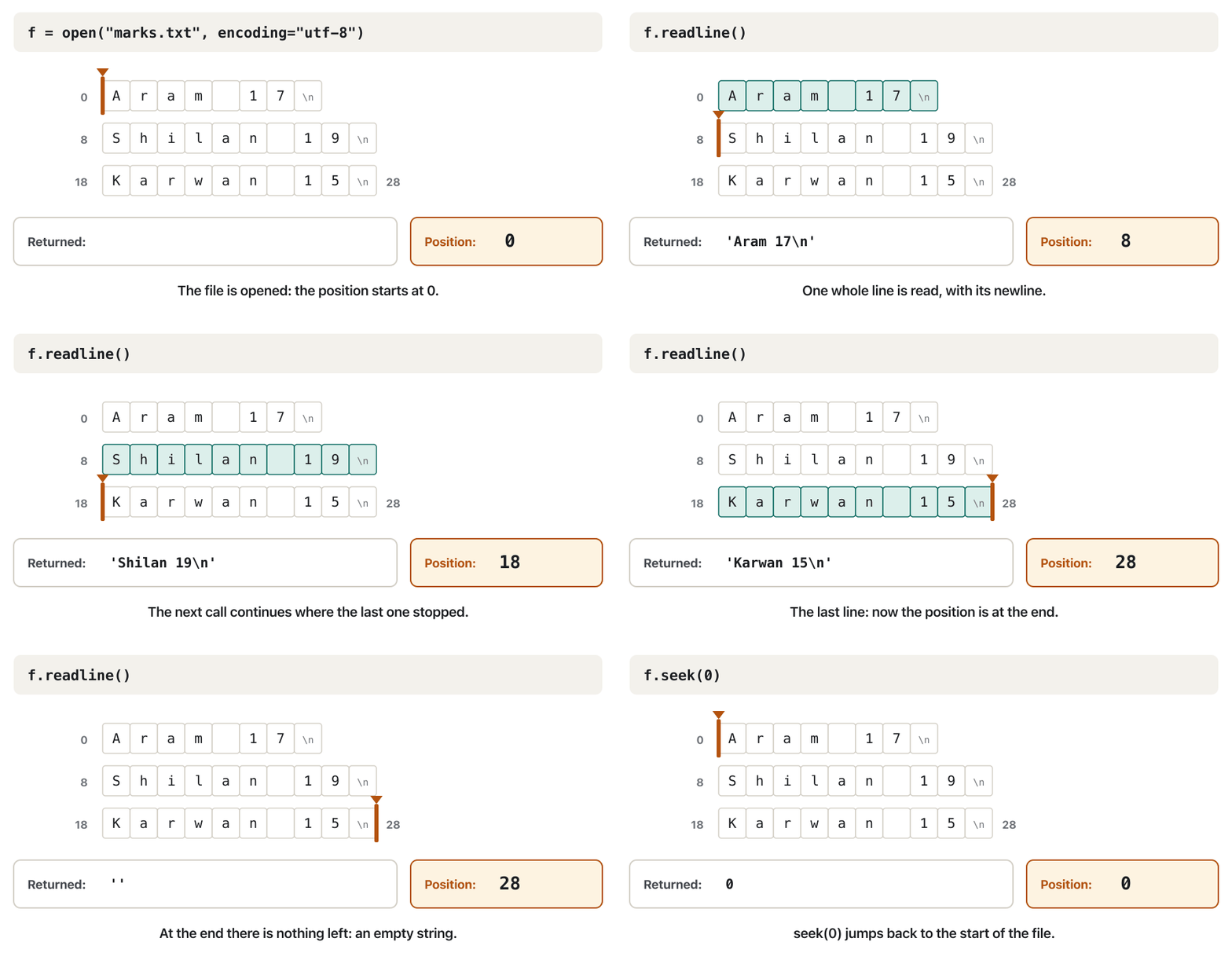
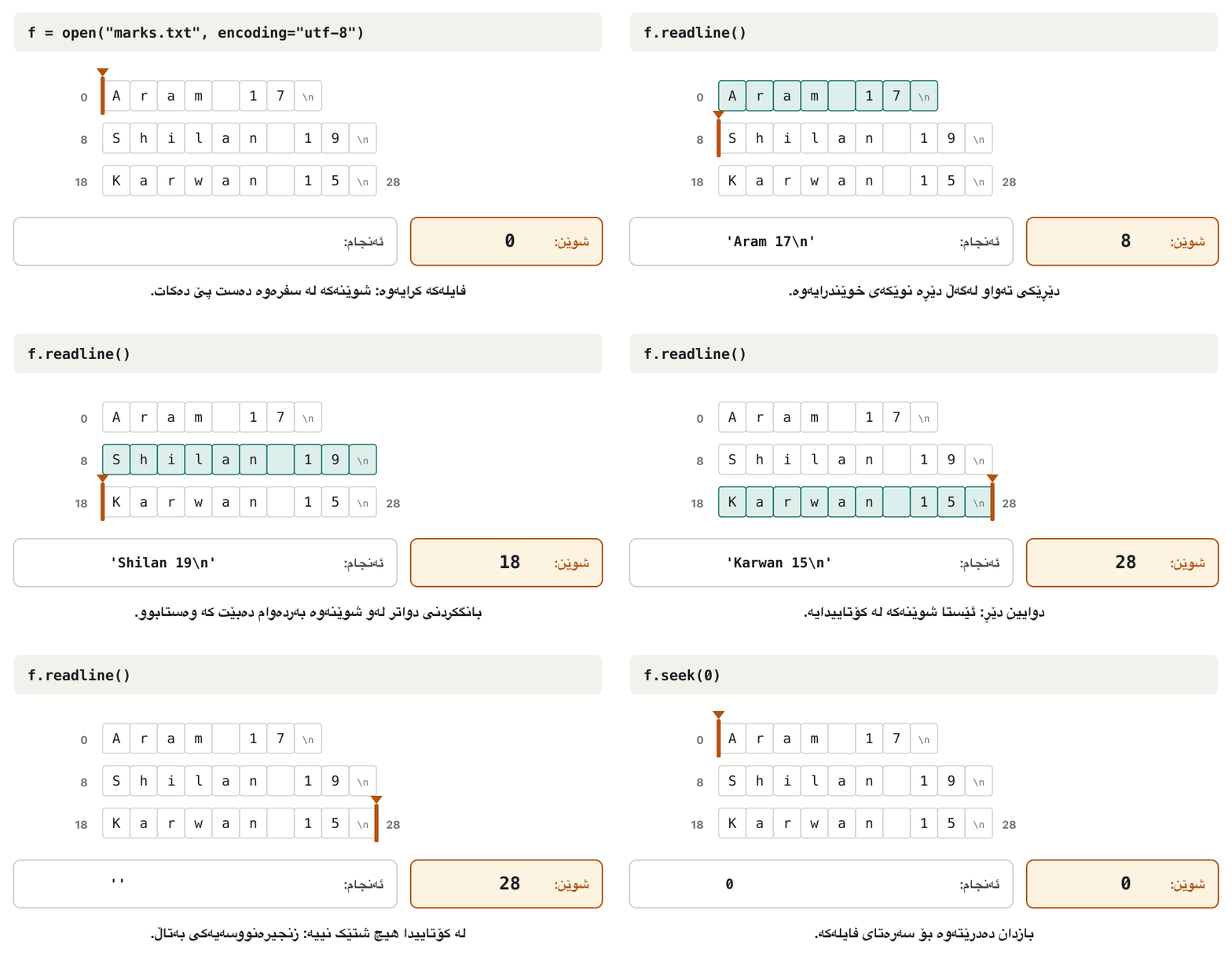
seek(offset, whence) counts the offset from one of three reference points (whence): 0 = the start of the file (the default), 1 = the current position, 2 = the end of the file. A common use is a bookmark: remember a place with tell() and come back to it later with seek():
seek(offset, whence) ژمارەی offset لە یەکێک لە سێ خاڵی سەرچاوە (whence) دەژمێرێت: 0 = سەرەتای (بنەڕەت)، 1 = شوێنی ئێستا، 2 = کۆتایی . بەکارهێنانێکی باو نیشانەی پەڕەیە: شوێنێک بە tell() لە بیر بگرە و دواتر بە seek() بگەڕێوە بۆی:
with open("marks.txt", encoding="utf-8") as f:
    f.readline()
    place = f.tell()                   # remember this place
    print(repr(f.readline()))
    print(repr(f.readline()))
    f.seek(place)                      # jump back to the remembered place
print(repr(f.readline()))'Shilan 19\n' 'Karwan 15\n' 'Shilan 19\n'
The file position: tell() and seek()شوێن لە فایلدا: tell() و seek()
seek() in text mode: only a few movesseek() لە دۆخی دەقدا: تەنها چەند جووڵەیەک
In text mode Python allows only these moves: seek(0) (the start), seek(0, 2) (the end), seek(0, 1) (stay) and seek(p) with a number p that tell() gave you. Moving from the current position or from the end by any other number is not allowed:
لە دۆخی دەقدا تەنها ڕێگە بەم جووڵانە دەدات: seek(0) (سەرەتا)، seek(0, 2) (کۆتایی)، seek(0, 1) (لە شوێنی خۆی) و seek(p) بە ژمارەیەکی p کە tell() پێی داویت. جووڵە لە شوێنی ئێستاوە یان لە کۆتاییەوە بە هەر ژمارەیەکی تر ڕێگەپێدراو نییە:
with open("marks.txt", encoding="utf-8") as f:
f.seek(3, 1) # 3 forward from here, in text modeTraceback (most recent call last):
File "seek_text_error.py", line 2, in <module>
f.seek(3, 1) # 3 forward from here, in text mode
^^^^^^^^^^^^
io.UnsupportedOperation: can't do nonzero cur-relative seeksYou can see it with Kurdish text: the first line has 5 characters, but tell() says 9, because it counts the bytes of the four two-byte letters and the newline:
لە دەقی کوردیدا دەیبینیت: دێڕی یەکەم 5 هەیە، بەڵام tell() دەڵێت 9، چونکە چوار پیتە دوو بایتییەکە و دێڕە نوێکە دەژمێرێت:
with open("greeting.txt", "w", encoding="utf-8") as f:
    f.write("سڵاو\nHello\n")

with open("greeting.txt", encoding="utf-8") as f:
    line = f.readline()
    print(repr(line), len(line), "characters")
print("tell():", f.tell())'سڵاو\n' 5 characters tell(): 9
The file position: tell() and seek()شوێن لە فایلدا: tell() و seek()
seek() in binary mode: every move worksseek() لە دۆخی دووانیدا: هەموو جووڵەیەک کار دەکات
In binary mode positions are plain byte numbers and every move works, also from the current position and from the end:
لە دۆخی دووانیدا شوێنەکان تەنها ژمارەی و هەموو جووڵەیەک کار دەکات، لە شوێنی ئێستا و لە کۆتاییشەوە:
with open("marks.txt", "rb") as f:     # binary mode: positions are bytes
    f.seek(5)                          # 5 bytes from the start (reference 0)
    print(f.read(2))
    f.seek(1, 1)                       # 1 byte on from here (reference 1)
    print(f.read(6))
    f.seek(-3, 2)                      # 3 bytes back from the end (reference 2)
    print(f.read())
print("now at", f.tell())b'17' b'Shilan' b'15\n' now at 28
Explain the codeڕوونکردنەوەی کۆدەکە
- Lineدێڕی 2-3
Byte 5 is where
17starts inAram 17.5 ئەو شوێنەیە کە
17لەAram 17ـدا دەست پێ دەکات.- Lineدێڕی 4-5
One byte on skips the newline; the next 6 bytes are
Shilan.یەک بۆ پێشەوە بازی بەسەر دێڕە نوێکەدا دەدات؛ 6 داهاتوو
Shilanـن.- Lineدێڕی 6-7
3 bytes back from the end:
15and the last newline.3 بۆ دواوە لە کۆتاییەوە:
15و دوایین دێڕی نوێ.
| Callبانگکردن | Meaningمانا | Text modeدۆخی دەق | Binary modeدۆخی دووانی |
|---|---|---|---|
f.seek(0) | back to the startگەڕانەوە بۆ سەرەتا | ✓ | ✓ |
f.seek(p) | to p, a number from tell()بۆ p، ژمارەیەک لە tell()ـەوە | ✓ | ✓ |
f.seek(0, 2) | to the endبۆ کۆتایی | ✓ | ✓ |
f.seek(5) | to byte 5بۆ 5 | only if 5 came from tell()تەنها ئەگەر 5 لە tell()ـەوە هاتبێت | ✓ |
f.seek(3, 1) | 3 on from here3 بۆ پێشەوە لێرەوە | ✗ | ✓ |
f.seek(-3, 2) | 3 back from the end3 بۆ دواوە لە کۆتاییەوە | ✗ | ✓ |
The file position: tell() and seek()شوێن لە فایلدا: tell() و seek()
Writing and reading with one file objectنووسین و خوێندنەوە بە یەک ئۆبجێکتی فایل
Modes with + read and write through one file object, but there is only one position. After writing, the position is at the end, so reading gives nothing:
دۆخەکانی + لە ڕێگەی یەک دەخوێننەوە و دەنووسن، بەڵام تەنها یەک شوێن هەیە. دوای نووسین شوێنەکە لە کۆتاییدایە، بۆیە خوێندنەوە هیچ نادات:
with open("report.txt", "w+", encoding="utf-8") as f:
    f.write("Aram: 3 teas\n")
print(repr(f.read())) # reads from the end: nothing''
Move back to the start with seek(0) before reading:
پێش خوێندنەوە بە seek(0) بگەڕێوە بۆ سەرەتا:
with open("report.txt", "w+", encoding="utf-8") as f:
    f.write("Aram: 3 teas\n")
    f.write("Shilan: 2 coffees\n")
    print("Position after writing:", f.tell())
    f.seek(0)                          # go back before reading
print(f.read(), end="")Position after writing: 31 Aram: 3 teas Shilan: 2 coffees
Explain the codeڕوونکردنەوەی کۆدەکە
- Lineدێڕی 4
characters written so far.
کە تا ئێستا نووسراون.
- Lineدێڕی 5
Without this line,
read()would return''.بەبێ ئەم دێڕە،
read()''دەگەڕێنێتەوە.
r+ keeps the old content and starts at the beginning. If you read everything first, the position is at the end, so a following write() adds a line there:
r+ ناوەڕۆکی کۆن دەهێڵێتەوە و لە سەرەتاوە دەست پێ دەکات. ئەگەر سەرەتا هەمووی بخوێنیتەوە، شوێنەکە لە کۆتاییدایە، بۆیە write()ـی دواتر دێڕێک لەوێ زیاد دەکات:
with open("marks.txt", "r+", encoding="utf-8") as f:
    print(f.read(), end="")            # read first: now we are at the end
    f.write("Hana 20\n")               # so the new line goes at the end
    f.seek(0)
    print("---")
print(f.read(), end="")Aram 17 Shilan 19 Karwan 15 --- Aram 17 Shilan 19 Karwan 15 Hana 20
Saving Python objects: pickleهەڵگرتنی ئۆبجێکتەکانی Python: pickle
Text files store strings. But a program's data are often lists and dictionaries: a shop's items, a game's level and score. Turning such an object into a row of bytes (or text) that can be saved in a file or sent over a network is called ; turning it back into an object is deserialization. Python's pickle module does both for almost any Python object. Python calls it pickling and unpickling.
هەڵدەگرن. بەڵام زۆرجار و : کاڵاکانی دوکانێک، ئاست و خاڵەکانی یارییەک. گۆڕینی لەو جۆرە بۆ ڕیزێک (یان دەق) کە بتوانرێت لە هەڵبگیرێت یان بە بنێردرێت پێی دەوترێت ؛ گەڕاندنەوەشی بۆ پێچەوانەکەیەتی. pickleـی هەردووکیان بۆ نزیکەی هەموو دەکات. پێی دەڵێت pickling و unpickling.
In autumn a family puts vegetables into jars as pickles («تورشی») and opens them months later, still good. pickle.dump() puts a Python object into a file in the same way, and pickle.load() takes it out again, the same list or dictionary as before.
لە پاییزدا خێزانێک سەوزە دەکەنە ناو شووشە وەک تورشی و چەند مانگێک دواتر دەیکەنەوە، هێشتا باشە. pickle.dump() بە هەمان شێوە دەخاتە ناو و pickle.load() دیسان دەریدەهێنێتەوە، هەمان یان وەک پێشتر.
Where the analogy stops workingسنووری ئەم نموونەیە
A jar of pickles is safe to open. A pickle file from a stranger is not: see the warning below.
کردنەوەی شووشەیەک تورشی بێ مەترسییە. pickle لە کەسێکی نەناسراوەوە وا نییە: ئاگادارکردنەوەکەی خوارەوە ببینە.
import pickle

item = {"code": 101, "name": "tea glass", "quantity": 48, "price": 750}

with open("item.dat", "wb") as f:      # pickle needs binary mode
    pickle.dump(item, f)

with open("item.dat", "rb") as f:
    print(f.read()[:24])               # not text a person can read

with open("item.dat", "rb") as f:
    copy = pickle.load(f)
print(copy)
print(type(copy), copy["price"] * copy["quantity"])b'\x80\x04\x959\x00\x00\x00\x00\x00\x00\x00}\x94(\x8c\x04code\x94Ke\x8c'
{'code': 101, 'name': 'tea glass', 'quantity': 48, 'price': 750}
<class 'dict'> 36000Explain the codeڕوونکردنەوەی کۆدەکە
- Lineدێڕی 5-6
pickle.dump(object, file)needs a file opened for binary writing:"wb".pickle.dump(object, file)پێویستی بە هەیە کە بۆ نووسینی دووانی کرابێتەوە:"wb".- Lineدێڕی 8-9
The file holds bytes, not readable text.
هەڵدەگرێت، نەک دەقی خوێندراوە.
- Lineدێڕی 11-12
pickle.load(file)with"rb"gives back a real dictionary.pickle.load(file)بە"rb"ڕاستەقینە دەگەڕێنێتەوە.
Why JSON cannot save every Python object, how pickle.dump() and pickle.load() save and load one, and why unpickling untrusted files is dangerous.
بۆچی ناتوانێت هەموو پاشەکەوت بکات، pickle.dump() و pickle.load() چۆن پاشەکەوت و باری دەکەن و بۆچی بارکردنی pickle لە سەرچاوەی نەناسراو مەترسیدارە.
Whole video (9:31): saving to JSON (2:03) and its limits (3:48), pickle dump (5:05) and load (5:54), security risks (7:24).
هەموو ڤیدیۆکە (9:31): بە (2:03) و سنوورەکانی (3:48)، pickle.dump (5:05) و pickle.load (5:54) و مەترسییە ئەمنییەکان (7:24).
Saving Python objects: pickleهەڵگرتنی ئۆبجێکتەکانی Python: pickle
Many records in one fileچەندین تۆمار لە یەک فایلدا
One dump() writes one object, so a file can hold many records one after another. load() reads them back one at a time, in the same order. When no record is left, load() raises EOFError (End Of File): the signal to stop. This shop program first asks how many items to save, saves their records and then lists them with their value in IQD:
هەر dump()ـێک یەک دەنووسێت، بۆیە دەتوانێت چەندین یەک لە دوای یەک هەڵبگرێت. load() یەک یەک و بە هەمان ڕیزبەندی دەیانخوێنێتەوە. کاتێک هیچ نەما، load() EOFError (End Of File) دروست دەکات: نیشانەی وەستان. ئەم دوکان سەرەتا دەپرسێت چەند کاڵا هەڵبگیرێت، ئەو کاڵایانە هەڵدەگرێت و پاشان لەگەڵ بەهاکەیان بە دیناری عێراقی (IQD) نیشانیان دەدات:
import pickle

# 1. Save records: each one is a list [code, name, quantity, price]
count = int(input("How many items? "))
with open("items.dat", "ab") as f:     # ab: add to the end, binary
    for i in range(count):
        code = int(input("Item code: "))
        name = input("Name: ")
        quantity = int(input("Quantity: "))
        price = int(input("Price per item (IQD): "))
        pickle.dump([code, name, quantity, price], f)

# 2. Read them back, one load() for each record, until the end
print()
with open("items.dat", "rb") as f:
    while True:
        try:
            code, name, quantity, price = pickle.load(f)
        except EOFError:               # no more records
            break
print(f"Item {code}: {name}, {quantity} × {price} IQD = {quantity * price} IQD")How many items? 2 Item code: 101 Name: tea glass Quantity: 48 Price per item (IQD): 750 Item code: 102 Name: سەماوەر Quantity: 3 Price per item (IQD): 45000 Item 101: tea glass, 48 × 750 IQD = 36000 IQD Item 102: سەماوەر, 3 × 45000 IQD = 135000 IQD
Explain the codeڕوونکردنەوەی کۆدەکە
- Lineدێڕی 4
The user says first how many records to enter.
سەرەتا دەڵێت چەند دەنووسێت.
- Lineدێڕی 5
"ab": add to the end of a binary file, so earlier records are kept."ab": زیادکردن بۆ کۆتایی ، بۆیە پێشوو دەمێننەوە.- Lineدێڕی 11
One
dump()for each record.یەک
dump()بۆ هەر .- Lineدێڕی 16-20
Keep loading until
EOFErrorsays the file is finished.بەردەوام بە
load()بخوێنەوە تاEOFErrorدەڵێت تەواو بوو.- Lineدێڕی 21
The amount,
quantity * price, is worked out when reading, so it is never stored twice.بڕی پارەکە،
quantity * price، لە کاتی خوێندنەوەدا دەژمێردرێت، بۆیە هەرگیز دوو جار هەڵناگیرێت.
Saving Python objects: pickleهەڵگرتنی ئۆبجێکتەکانی Python: pickle
Never unpickle data you do not trustهەرگیز دراوەیەک کە متمانەت پێی نییە unpickle مەکە
This is a kind of : data that a program only meant to read becomes code that runs. Pickle files also work only in Python: a program in another language cannot read them.
ئەمە جۆرێکە لە : ئەو تەنها ویستی بیخوێنێتەوە دەبێتە کۆدێک کە جێبەجێ دەبێت. pickle هەروەها تەنها لە کار دەکەن: بە زمانێکی تر ناتوانێت بیانخوێنێتەوە.
Saving Python objects: pickleهەڵگرتنی ئۆبجێکتەکانی Python: pickle
JSON: the safer text formatJSON: جۆرە دەقییە بێمەترسیترەکە
For simple data, such as numbers, strings, lists, dictionaries, True/False and None, JSON is usually the better choice. It is a text format: people can read it, programs in every language can read it (JSON: the language of APIs) and loading JSON never runs code. The json module has the same pair of functions:
بۆ سادە، وەک ژمارە، ، ، ، True/False و None، زۆرجار هەڵبژاردنی باشترە. جۆرێکی دەقییە: مرۆڤ دەتوانێت بیخوێنێتەوە، بە هەموو زمانێک دەتوانن بیخوێننەوە (JSON: زمانی APIـەکان) و بارکردنی JSON هەرگیز کۆد جێبەجێ ناکات. json هەمان جووتە هەیە:
import json

items = [{"code": 101, "name": "tea glass", "quantity": 48, "price": 750},
         {"code": 102, "name": "سەماوەر", "quantity": 3, "price": 45000}]

with open("items.json", "w", encoding="utf-8") as f:
    json.dump(items, f, ensure_ascii=False, indent=2)

with open("items.json", encoding="utf-8") as f:
    print(f.read())

with open("items.json", encoding="utf-8") as f:
    loaded = json.load(f)
print(loaded[1]["name"], loaded[1]["quantity"] * loaded[1]["price"])[
{
"code": 101,
"name": "tea glass",
"quantity": 48,
"price": 750
},
{
"code": 102,
"name": "سەماوەر",
"quantity": 3,
"price": 45000
}
]
سەماوەر 135000Explain the codeڕوونکردنەوەی کۆدەکە
- Lineدێڕی 6
A JSON file is a text file:
"w"withencoding="utf-8".JSON :
"w"لەگەڵencoding="utf-8".- Lineدێڕی 7
ensure_ascii=Falsekeeps Kurdish letters readable;indent=2puts each value on its own line.ensure_ascii=Falseپیتە کوردییەکان خوێندراوە دەهێڵێتەوە؛indent=2هەر لە دێڕی خۆیدا دادەنێت.- Lineدێڕی 13
json.load()gives back a list of dictionaries.json.load()لە دەگەڕێنێتەوە.
JSON knows fewer types than Python. A tuple comes back as a list, and dates or your own classes need extra work:
JSON جۆری کەمتر لە دەناسێت. وەک دەگەڕێتەوە و بەروار یان خۆت کاری زیاتریان پێویستە:
import json

saved = {"place": ("Erbil", "Citadel"), "open": True, "phone": None}
text = json.dumps(saved)
print(text)
print(json.loads(text)) # the tuple comes back as a list{"place": ["Erbil", "Citadel"], "open": true, "phone": null}
{'place': ['Erbil', 'Citadel'], 'open': True, 'phone': None}| Compareبەراورد | picklepickle | JSON |
|---|---|---|
| Formatجۆر | binaryدووانی | textدەقی |
| Who can read itکێ دەتوانێت بیخوێنێتەوە | Python onlyتەنها | people and every languageمرۆڤ و هەموو زمانێک |
| Typesجۆرەکان | almost any Python objectنزیکەی هەموو | dict, list, str, int, float, bool, Nonedict، list، str، int، float، bool، None |
| Safe with files from others?لەگەڵ خەڵکی تر بێمەترسییە؟ | no: loading can run codeنەخێر: بارکردن دەتوانێت کۆد جێبەجێ بکات | yes: it is only dataبەڵێ: تەنها |
| Modesدۆخەکان | "wb" / "rb" | "w" / "r", encoding="utf-8" |
What JSON is and how json.dump() and json.load() write Python data to a text file and read it back.
چییە و json.dump() و json.load() چۆن لە دەنووسن و دووبارە دەیخوێننەوە.
Whole video (6:11): JSON defined, loading and creating JSON strings, reading (3:46) and writing (4:51) JSON files.
هەموو ڤیدیۆکە (6:11): پێناسەی ، بارکردن و دروستکردنی ، پاشان خوێندنەوەی (3:46) و نووسینی (4:51) .
Common mistakesهەڵە باوەکان
| Mistakeهەڵە | What happensچی ڕوو دەدات | Fixچارەسەر |
|---|---|---|
Reading straight after writing in w+ or r+خوێندنەوە ڕاستەوخۆ دوای نووسین لە w+ یان r+ | read() returns ''read() '' دەگەڕێنێتەوە | f.seek(0) |
f.seek(3, 1) or f.seek(-3, 2) in text modef.seek(3, 1) یان f.seek(-3, 2) لە دۆخی دەقدا | io.UnsupportedOperation | binary mode, or only seek(0), seek(0, 2) and values from tell()دۆخی دووانی، یان تەنها seek(0)، seek(0, 2) و ژمارەکانی tell() |
Using tell() in text mode to count charactersبەکارهێنانی tell() لە دۆخی دەقدا بۆ ژماردنی | wrong numbers with Kurdish text: tell() is an opaque number, not a countژمارەی هەڵە لەگەڵ دەقی کوردی: tell() ژمارەیەکی ناڕوونە، نەک ژماردن | len() of the text you read; tell() only to come back with seek()len()ـی ئەو دەقەی خوێندووتەتەوە؛ tell() تەنها بۆ گەڕانەوە بە seek() |
pickle.dump() into a file opened with "w"pickle.dump() بۆ کە بە "w" کراوەتەوە | TypeError: write() argument must be str, not bytes | "wb" to write and "rb" to read a pickle file"wb" بۆ نووسین و "rb" بۆ خوێندنەوەی pickle |
| Unpickling a file from someone elseunpickleکردنی لە کەسێکی ترەوە | hidden code can run on your computerکۆدی شاراوە دەتوانێت لەسەر جێبەجێ بێت | JSON or CSV for shared dataJSON یان CSV بۆ هاوبەش |
A fixed number of pickle.load() callsژمارەیەکی جێگیر لە بانگکردنی pickle.load() | EOFError when the file holds fewer records than expectedEOFError کاتێک کەمتری تێدایە لەوەی چاوەڕێ دەکرا | load in a loop until EOFErrorلە load() بکە تا EOFError |
Exercisesڕاهێنانەکان
Write the use and the syntax of open(), read(), seek() and pickle.dump(). (The first two come from Reading and Writing Files.)
بەکارهێنان و شێوەی نووسینی open()، read()، seek() و pickle.dump() بنووسە. (دووانی یەکەم لە وانەی خوێندنەوە و نووسینی فایلەکان فێر بوویت.)
Show answerوەڵامەکە پیشان بدە
f = open(name, mode, encoding="utf-8"): opens a file and returns its file object.text = f.read(n): reads n characters, or with no number the rest of the file;''at the end.f.seek(offset, whence): moves the file position;whence0 = start, 1 = current position, 2 = end (in text mode onlyseek(0),seek(0, 2)andtell()values).pickle.dump(obj, f): writes a Python object to a file opened with"wb"or"ab".
f = open(name, mode, encoding="utf-8"): دەکاتەوە و دەگەڕێنێتەوە.text = f.read(n): n دەخوێنێتەوە، یان بەبێ ژمارە پاشماوەی ؛ لە کۆتاییدا''.f.seek(offset, whence): شوێنی دەگوازێتەوە؛whence0 = سەرەتا، 1 = شوێنی ئێستا، 2 = کۆتایی (لە دۆخی دەقدا تەنهاseek(0)،seek(0, 2)و ژمارەکانیtell()).pickle.dump(obj, f): دەنووسێت بۆ کە بە"wb"یان"ab"کراوەتەوە.
Define pickling. Explain serialization and deserialization of a Python object.
pickling پێناسە بکە. و پێچەوانەکەی بۆ ڕوون بکەرەوە.
Show answerوەڵامەکە پیشان بدە
Serialization turns an object in memory (a list, a dictionary, a game state) into a stream of bytes or text that can be saved in a file, stored in a database or sent over a network. Deserialization turns that stream back into the same object. Pickling is Python's name for serializing with the pickle module (pickle.dump() into a "wb" file); unpickling is pickle.load() from an "rb" file. Only unpickle files you trust.
لە (، ، دۆخی یارییەک) دەگۆڕێت بۆ زنجیرەیەک یان دەق کە دەکرێت لە هەڵبگیرێت، لە خەزن بکرێت یان بە بنێردرێت. پێچەوانەکەی ئەو زنجیرەیە دەگەڕێنێتەوە بۆ هەمان . Pickling ناوی بۆ بە pickle (pickle.dump() بۆ بە "wb")؛ unpickling بریتییە لە pickle.load() لە بە "rb". تەنها ئەو unpickle بکە کە متمانەت پێیانە.
items.dat holds item records [code, name, quantity, price] written with pickle.dump(), as in Many records in one file. Write a program that reads all of them and prints how many items there are and their total value in IQD (quantity * price, added up).
items.dat کاڵا [code, name, quantity, price] هەڵدەگرێت کە بە pickle.dump() نووسراون، وەک لە چەندین تۆمار لە یەک فایلدا. بنووسە کە هەموویان دەخوێنێتەوە و چاپ دەکات چەند کاڵا هەیە و کۆی بەهاکەیان بە IQD (quantity * price، کۆکراوە) چەندە.
Show answerوەڵامەکە پیشان بدە
import pickle

grand_total = 0
count = 0
with open("items.dat", "rb") as f:
    while True:
        try:
            code, name, quantity, price = pickle.load(f)
        except EOFError:
            break
        grand_total += quantity * price
        count += 1
print(count, "items, worth", grand_total, "IQD in total")3 items, worth 186000 IQD in total
With three records in the file: , and .
بە سێ لە : ، و .
Summaryپوختە
- A file object remembers a position.
tell()reports it;seek(offset, whence)moves it from the start (0), the current position (1) or the end (2). - In text mode only
seek(0),seek(0, 2)and values fromtell()work, andtell()is not a character count; binary mode allows every move. +modes read and write through one position: callseek(0)before reading what you wrote.pickle.dump()andpickle.load()save and load Python objects in binary files ("wb","rb"); read many records untilEOFError.- Never unpickle a file you do not trust: loading can run hidden code. For simple data shared with people or other languages, use JSON (
json.dump(),json.load()).
- شوێنێک لە بیر دەگرێت.
tell()ڕایدەگەیەنێت؛seek(offset, whence)لە سەرەتاوە (0)، لە شوێنی ئێستاوە (1) یان لە کۆتاییەوە (2) دەیجووڵێنێت. - لە دۆخی دەقدا تەنها
seek(0)،seek(0, 2)و ژمارەکانیtell()کار دەکەن وtell()ژماردنی نییە؛ دۆخی دووانی ڕێگە بە هەموو جووڵەیەک دەدات. - دۆخەکانی
+لە ڕێگەی یەک شوێنەوە دەخوێننەوە و دەنووسن: پێش خوێندنەوەی ئەوەی نووسیوتەseek(0)بانگ بکە. pickle.dump()وpickle.load()لە هەڵدەگرن و دەیانگەڕێننەوە ("wb"،"rb")؛ چەندین تاEOFErrorبخوێنەوە.- هەرگیز کە متمانەت پێی نییە unpickle مەکە: بارکردن دەتوانێت کۆدی شاراوە جێبەجێ بکات. بۆ سادە کە لەگەڵ خەڵک یان زمانەکانی تر هاوبەش دەکرێت JSON بەکار بهێنە (
json.dump()،json.load()).
This lesson ends the chapter. The next chapter, on data structures and algorithms, starts with Stacks.
ئەم وانەیە کۆتایی بەشەکەیە. بەشی داهاتوو، دەربارەی و ، بە ستاکەکان دەست پێ دەکات.
Why does f.seek(3, 1) fail in text mode?بۆچی f.seek(3, 1) لە دۆخی دەقدا سەرناکەوێت؟
In text mode one character can be several bytes, so Python allows only seek(0), seek(0, 2) and positions from tell(). Relative moves need binary mode.
لە دۆخی دەقدا یەک دەکرێت چەند بێت، بۆیە تەنها ڕێگە بە seek(0)، seek(0, 2) و شوێنەکانی tell() دەدات. جووڵەی ڕێژەیی پێویستی بە دۆخی دووانی هەیە.
What does f.read() return straight after writing in "w+" mode?f.read() ڕاستەوخۆ دوای نووسین لە دۆخی "w+"ـدا چی دەگەڕێنێتەوە؟
'': the position is at the end. Call f.seek(0) first.
'': شوێنەکە لە کۆتاییدایە. سەرەتا f.seek(0) بانگ بکە.
Why must a program reading items.dat with pickle catch EOFError?بۆچی بەرنامەیەک کە items.dat بە pickle دەخوێنێتەوە دەبێت EOFError بگرێت؟
pickle.load() raises it when no object is left; it is the signal to stop reading.
pickle.load() کاتێک هیچ نەما دروستی دەکات؛ نیشانەی وەستانی خوێندنەوەیە.
Why is JSON safer than pickle for data from other people?بۆچی JSON بۆ دراوەیەک لە خەڵکی ترەوە لە pickle بێمەترسیترە؟
Loading JSON only builds lists, dictionaries, strings and numbers; loading a pickle can run hidden code.
بارکردنی JSON تەنها ، ، و ژمارە دروست دەکات؛ بارکردنی pickle دەتوانێت کۆدی شاراوە جێبەجێ بکات.
Lesson complete!وانەکە تەواو بوو!
Well done. Review the key terms, then go on to the next lesson.دەستخۆش. سەیرێکی زاراوە سەرەکییەکان بکەرەوە، پاشان بڕۆ بۆ وانەی داهاتوو.
Key termsزاراوە سەرەکییەکان
Stacks: Last In, First Outستاکەکان: دوایین هاتوو، یەکەم دەرچوو
Related lecturesوانە پەیوەندیدارەکان
References and further readingسەرچاوەکان و خوێندنەوەی زیاتر
- Python Tutorial 7.2: Reading and Writing Files (modes, with, file methods, seek/tell in text mode, json, pickle note)
- Python Library: built-in function open() (modes table, encoding, newline, IOError alias)
- Python Library: io — TextIOBase.seek() and tell() (text-mode limits, opaque positions, UnsupportedOperation)
- Python Library: built-in exceptions — OS exceptions (FileNotFoundError, PermissionError, IsADirectoryError, EOFError)
- Python Library: pickle (security warning, dump/load, comparison with json)
- Python Library: json (dump, load, ensure_ascii, indent, type conversion)
This lecture is a first edition. The Kurdish text and terminology are waiting for review by Kurdish IT teachers.ئەم وانەیە چاپی یەکەمە. دەقە کوردییەکە و زاراوەکانی چاوەڕێی پێداچوونەوەی مامۆستایانی کوردی بواری IT ن.