MATLABMATLAB · Chapterبەش 6 · Lectureوانە 6.1
Function Files and Anonymous Functionsفایلەکانی کردار و کردارە بێناوەکان
Write your own MATLAB functions: the function file and its header, the file-name rule, several inputs and outputs, nargin defaults and return, the function's private workspace (and why global is a bad idea), where functions may live in MATLAB and Octave, anonymous functions and function handles passed to fplot, fzero and integral, why to avoid eval, and timing code with tic and toc.
MATLABـی خۆت بنووسە: و ، یاسای ناوی ، چەند و ، بە nargin و return، تایبەتی (و بۆچی global بیرۆکەیەکی خراپە)، لە MATLAB و Octaveـدا لە کوێ دەژین، و کە دەدرێن بە fplot، fzero و integral، بۆچی خۆت لە eval بپارێزیت و کاتپێوانی کۆد بە tic و toc.
What you will learnچی فێر دەبیت
- Write a function file with a correct header, save it under the function's name, and call it from the Command Window and from scripts.
- Return several outputs, give defaults with nargin, and leave early with return.
- Explain the difference between a script's shared Workspace and a function's private workspace.
- Write anonymous functions with element-wise operators and pass function handles to fplot, fzero and integral.
- Time code with tic and toc and know why eval, global and clock are avoided today.
- بە دروست بنووسیت، بە ناوی پاشەکەوتی بکەیت و لە Command Window و بانگی بکەیت.
- چەند بگەڕێنیتەوە، بە nargin بدەیت و بە return زوو دەربچیت.
- جیاوازیی نێوان هاوبەشی و تایبەتی ڕوون بکەیتەوە.
- بە بنووسیت و بدەیت بە fplot، fzero و integral.
- کاتی کۆد بە tic و toc بپێویت و بزانیت بۆچی ئەمڕۆ خۆ لە eval، global و clock دەپارێزرێت.
Why write your own functions?بۆچی کردارەکانی خۆت بنووسیت؟
You have used MATLAB's from the start: sqrt(49), sum(v), factorial(5) (calling a function). You give a value, a result comes back, and you never see the code inside. A gives you the same thing for your own calculations. Three reasons to write one:
لە سەرەتاوە MATLABـت بەکار هێناوە: sqrt(49)، sum(v)، factorial(5) (بانگکردنی کردارێک). دەدەیت، ئەنجامێک دەگەڕێتەوە و هەرگیز کۆدی ناوەوەی نابینیت. هەمان شت بۆ هەژمارەکانی خۆت دەدات. سێ هۆکار بۆ نووسینی:
- Reuse. Write the area formula once and call it a hundred times, from the Command Window, from scripts and from other functions.
- Testing small pieces. A short function with clear inputs and outputs is easy to check by itself before a big program uses it.
- A name for a job.
x = quad_roots(1, -3, 2)says what happens; twenty lines of formula do not.
- دووبارە بەکارهێنانەوە. فۆرموولەی ڕووبەر یەک جار بنووسە و سەد جار بانگی بکە، لە Command Window، لە و لە ترەوە.
- تاقیکردنەوەی پارچەی بچووک. کورت بە و ڕوون بە ئاسانی بە تەنها دەپشکنرێت پێش ئەوەی گەورە بەکاری بهێنێت.
- ناوێک بۆ کارێک.
x = quad_roots(1, -3, 2)دەڵێت چی ڕوو دەدات؛ بیست دێڕ فۆرموولە نایڵێت.
Why write your own functions?بۆچی کردارەکانی خۆت بنووسیت؟
Functions in mathematics and in MATLABنەخشە لە بیرکاریدا و کردار لە MATLABـدا
In mathematics a function is a rule that gives one output for each input; a programming function is a named block of code and may also print, read input or use random numbers. Functions in mathematics and in programs compares the two. The course's Kurdish guide says that numerical methods in MATLAB are written as function files — this lesson teaches how, and every file here also runs in GNU Octave (free) and in the free version of MATLAB Online.
لە بیرکاریدا یاسایەکە کە بۆ هەر یەک دەدات؛ بلۆکێکی ناونراوی کۆدە و دەشێت چاپ بکات، بخوێنێتەوە یان بەکار بهێنێت. نەخشە لە بیرکاریدا و کردار لە بەرنامەکاندا هەردووکیان بەراورد دەکات. ڕێبەرە کوردییەکەی کۆرسەکە دەڵێت لە MATLABـدا وەک دەنووسرێن — ئەم وانەیە چۆنییەتییەکەی فێر دەکات و هەموو ئێرە لە GNU Octave (بەخۆڕایی) و وەشانی بەخۆڕایی MATLAB Onlineـیشدا کار دەکەن.
At the post office you hand a parcel and an address through the window, and a receipt comes back. You do not walk behind the counter or move their shelves. A function is that counter: inputs go in through the window, outputs come back, and the work inside stays inside.
لە پۆستەخانە پاکەتێک و ناونیشانێک لە پەنجەرەکەوە دەدەیت و پسوولەیەک دەگەڕێتەوە. ناچیتە پشت مێزەکە و ڕەفەکانیان ناجوڵێنیت. ئەو پەنجەرەیە: لە پەنجەرەکەوە دەچنە ژوورەوە، دەگەڕێنەوە و کاری ناوەوە لە ناوەوە دەمێنێتەوە.
Where the analogy stops workingسنووری ئەم نموونەیە
A post office remembers your parcel after you leave. A MATLAB function forgets its own variables as soon as it finishes; the next call starts fresh.
پۆستەخانە دوای ڕۆیشتنت پاکەتەکەت لە بیر دەمێنێت. MATLAB هەر کە تەواو بوو خۆی لە بیر دەکات؛ بانگکردنی داهاتوو لە سەرەتاوە دەست پێدەکات.
A function fileفایلی کردار
A function lives in its own .m file. The first line is the : the keyword function, the output, =, the function's name and its inputs in round brackets. The lines below are the , and end closes it. Create the file with New ▸ Function, or type edit circle_area in the Command Window, and save it as circle_area.m:
لە .mـی خۆیدا دەژی. یەکەم دێڕ ـە: function، ، =، ناوی و لەناو کەوانەی بازنەییدا. دێڕەکانی خوارەوە ـن و end دایدەخات. بە New ▸ Function دروست بکە، یان لە Command Window بنووسە edit circle_area و بە ناوی circle_area.m هەڵیبگرە:
function a = circle_area(r)
%CIRCLE_AREA  Area of a circle with radius r.
a = pi*r.^2;
end
Explain the codeڕوونکردنەوەی کۆدەکە
- Lineدێڕی 1
The header: output
a, namecircle_area, inputr.:
a، ناوcircle_area،r.- Lineدێڕی 2
A comment right under the header is the help text:
help circle_areashows it.ڕاستەوخۆ لە ژێر دەقی یارمەتییە:
help circle_areaپیشانی دەدات.- Lineدێڕی 3
The body must give the output variable
aa value..^letsrbe a whole vector.جەستەکە دەبێت بە
aبدات..^ڕێگە دەداتrتەواو بێت.
Now call it exactly like a built-in function — from the Command Window, a script or another function. The file must be in the current folder (the Files panel) or on MATLAB's search :
ئێستا ڕێک وەک بانگی بکە — لە Command Window، لە یان لە ترەوە. دەبێت لە ئێستادا بێت (پانێڵی Files) یان لەسەر گەڕانی MATLAB:
a = circle_area(2)
areas = circle_area([1 2 3])a =
12.5664
areas =
3.1416 12.5664 28.2743How to write a MATLAB function file: the function line with inputs and outputs, saving it under the function's name, calling it, and local variables.
نووسینی لە MATLABـدا: بە و ، بە ناوی ، بانگکردنی و .
0:00-10:44: syntax (0:30), the hypotenuse function, saving the file under the function's name (5:07), calling it and local variables (7:00). The two-output example after 10:44 belongs to a later screen.
لە 0:00 تا 10:44: (0:30)، کە ژێی سێگۆشەیەکی ڕاستگۆشە (hypotenuse) دەدۆزێتەوە، بە ناوی (5:07)، بانگکردنی و (7:00). نموونەی دوو دوای 10:44 هی بەشێکی دواتری وانەکەیە.
A function fileفایلی کردار
Names and the file-name ruleناوەکان و یاسای ناوی فایل
A function name follows the rules for variable names: it starts with a letter and uses only letters, digits and _. MATLAB connects your code with the file name, not with the name written in the header. If circle_area is saved as area.m, you must call area(2) and MATLAB's Editor warns about the mismatch — so always keep the two names the same. Avoid names MATLAB already uses (sum.m, input.m), for the same reason as with script names.
ناوی پەیڕەوی یاساکانی ناوی گۆڕاو دەکات: بە پیت دەست پێدەکات و تەنها پیت، و _ بەکار دەهێنێت. MATLAB کۆدەکەت بە ناوی ـەوە دەبەستێتەوە، نەک بەو ناوەی لە نووسراوە. ئەگەر circle_area بە ناوی area.m پاشەکەوت بکرێت، دەبێت area(2) بانگ بکەیت و Editorـی MATLAB ئاگادارت دەکاتەوە کە ناوەکان یەک ناگرنەوە — بۆیە هەمیشە هەردوو ناوەکە وەک یەک بهێڵەوە. خۆت لەو ناوانە بپارێزە کە MATLAB پێشتر بەکاری دەهێنێت (sum.m، input.m)، بە هەمان هۆکاری ناوی دەسنووسەکان.
In MATLAB you cannot type a function definition at the >> prompt; it must be saved in a file. (Octave does allow it at its prompt, but this track always saves functions in files, so the code works in both.)
لە MATLABـدا ناتوانیت پێناسەی لە دوای >> بنووسیت؛ دەبێت لە پاشەکەوت بکرێت. (Octave ڕێگە دەدات لە دوای >>ـی خۆیشی بنووسرێت، بەڵام ئەم بەشە هەمیشە لە پاشەکەوت دەکات، بۆ ئەوەی کۆدەکە لە هەردووکیاندا کار بکات.)
A function fileفایلی کردار
What happens during a callلە کاتی بانگکردندا چی ڕوو دەدات
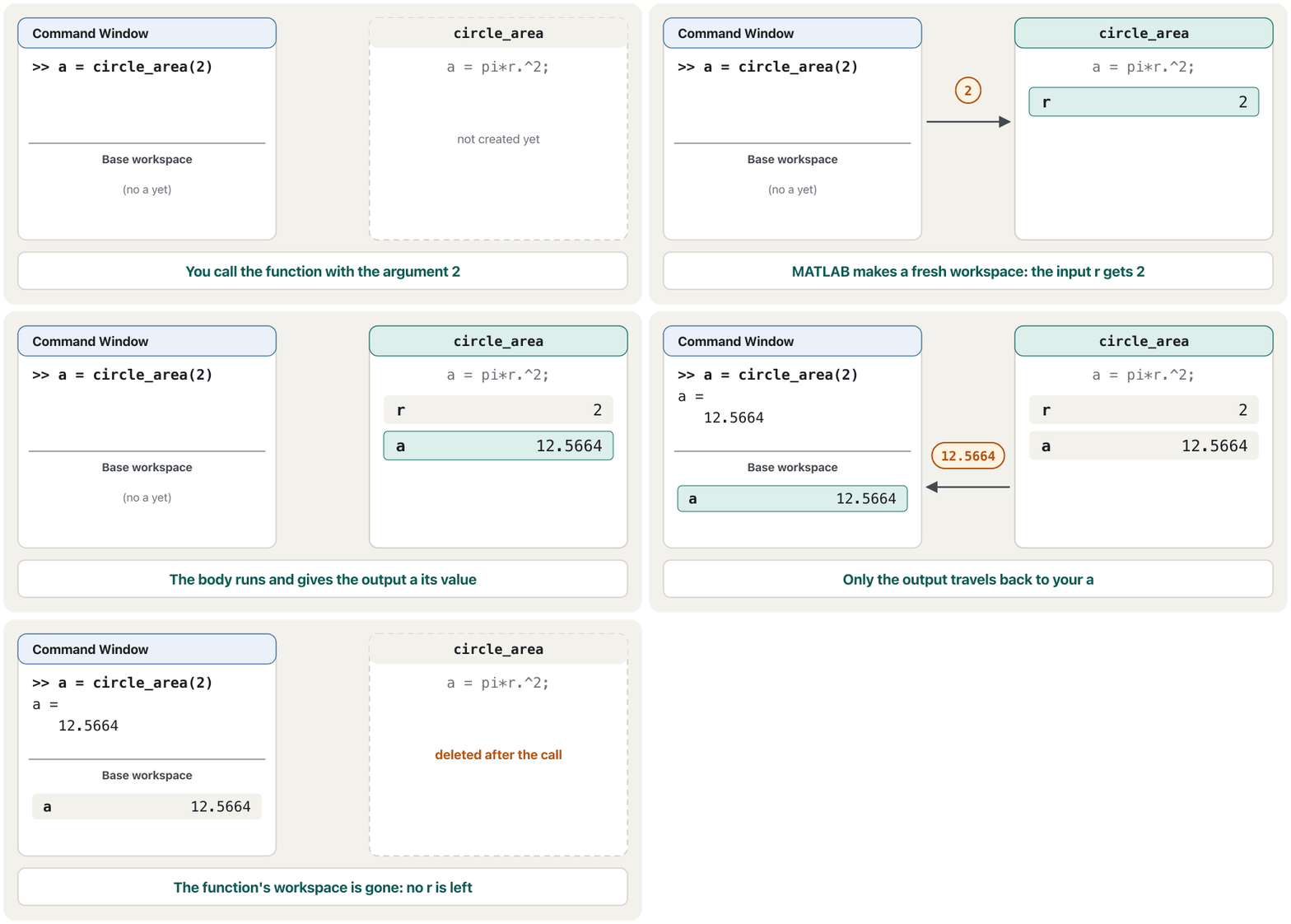
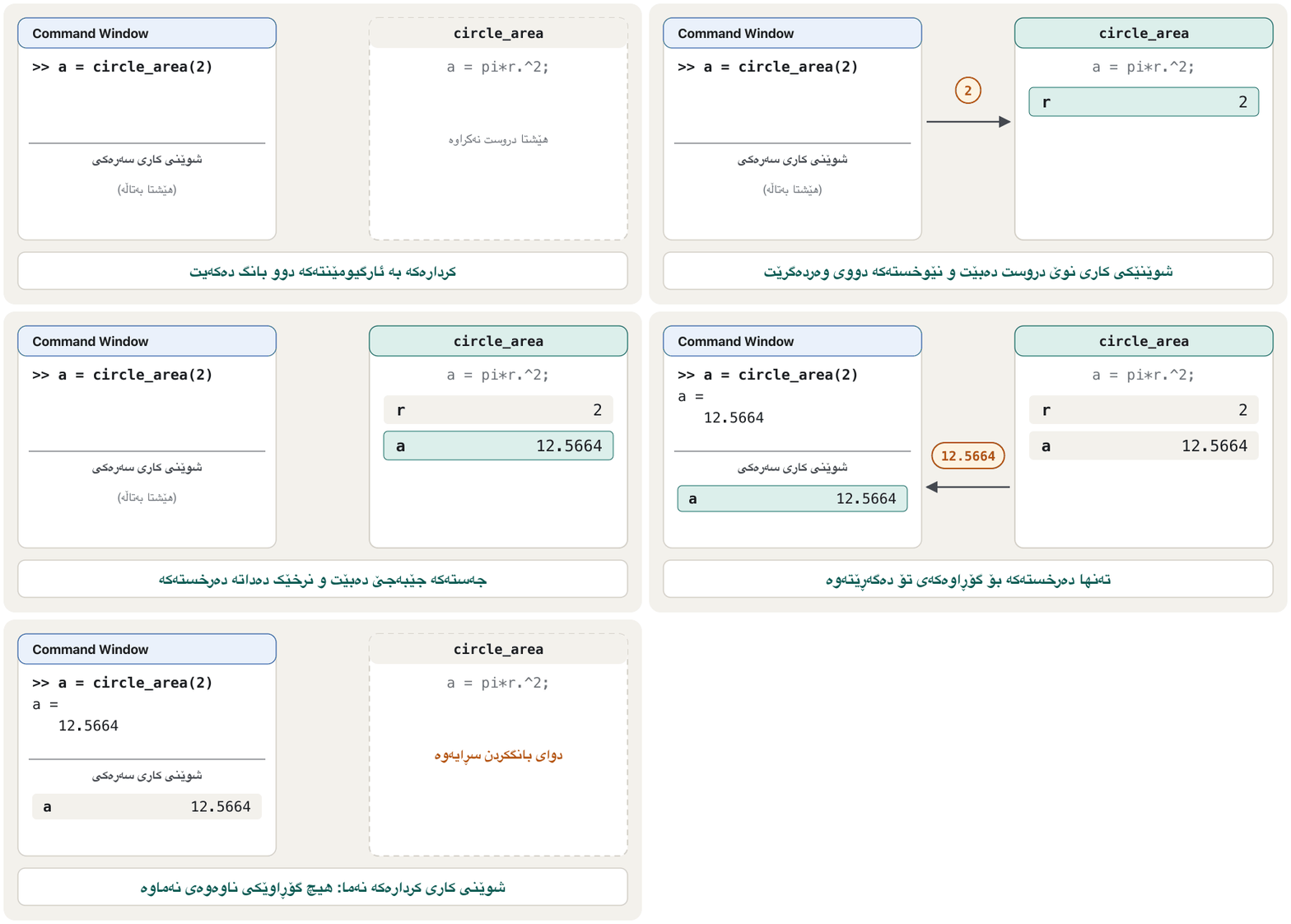
When you type a = circle_area(2), MATLAB finds circle_area.m, creates a fresh, empty workspace for the function, copies the 2 into the input variable r, runs the body, and copies the output variable a back to your a. Then the function's workspace is thrown away.
کاتێک دەنووسیت a = circle_area(2)، MATLAB circle_area.m دەدۆزێتەوە، نوێ و بەتاڵ بۆ دروست دەکات، 2 لە rـدا کۆپی دەکات، جەستەکە جێبەجێ دەکات و a بۆ aـی خۆت دەگەڕێنێتەوە. پاشان فڕێ دەدرێت.
Several inputs and several outputsچەند نێوخستە و چەند دەرخستە
Separate several inputs with commas. Several outputs go in square brackets in the header, and the caller collects them the same way:
چەند بە کۆما لێک جیا بکەرەوە. چەند لە دەچنە ناو کەوانەی چوارگۆشە و بە هەمان شێوە وەریان دەگرێتەوە:
function [s, p] = sum_and_product(a, b)
s = a + b;
p = a*b;
end[s, p] = sum_and_product(3, 4)
x = sum_and_product(3, 4)s =
7
p =
12
x =
7Explain the codeڕوونکردنەوەی کۆدەکە
- Lineدێڕی 1
Two names in brackets receive both outputs, in order.
دوو ناو لەناو کەوانەدا هەردوو بە ڕیز وەردەگرن.
- Lineدێڕی 2
With one name you get only the first output;
pis computed but not returned.بە یەک ناو تەنها یەکەم وەردەگریت؛
pهەژمار دەکرێت بەڵام ناگەڕێتەوە.
A function may also have no output — function show_bill(price, count) that only prints — and then the header has no = at all. Calling a function without saving its result puts the first output in ans, like any other expression.
دەشێت هیچ نەبێت — function show_bill(price, count) کە تەنها چاپ دەکات — ئەو کاتە هیچ =ـێکی تێدا نییە. بانگکردنی بەبێ هەڵگرتنی ئەنجامەکەی یەکەم دەخاتە ansـەوە، وەک هەر تر.
Several inputs and several outputsچەند نێوخستە و چەند دەرخستە
Optional inputs with narginنێوخستەی ئارەزوومەندانە بە nargin
Inside a function, nargin tells how many inputs the caller really gave, and nargout how many outputs were asked for (both are on the course's commands list). With nargin you can give a missing input a :
لەناو nargin دەڵێت بەڕاستی چەند داوە و nargout چەند داوا کراوە (هەردووکیان لە لیستی کۆرسەکەدان). بە nargin دەتوانیت بدەیت بە ونبوو:
function v = cylinder_volume(r, h)
if nargin < 2
    h = 1;          % default height
end
v = pi*r^2*h;
endv = cylinder_volume(3, 10)
v = cylinder_volume(3)v = 282.7433 v = 28.2743
Several inputs and several outputsچەند نێوخستە و چەند دەرخستە
Leaving early with returnزوو دەرچوون بە return
return ends the function at once and goes back to the caller — the function's version of break (break leaves a loop). Give the outputs their values before you return:
return یەکسەر کۆتایی پێ دەهێنێت و دەگەڕێتەوە بۆ — وەشانی breakـە بۆ (break خول جێدەهێڵێت). پێش گەڕانەوە بدە بە :
function result = pass_or_fail(mark)
if mark < 0 || mark > 100
    result = 'invalid';
    return                 % nothing below runs
end
if mark >= 50
    result = 'pass';
else
    result = 'fail';
end
enddisp(pass_or_fail(120))
disp(pass_or_fail(64))invalid pass
A function has its own workspaceکردار شوێنی کاری تایبەتی خۆی هەیە
A script shares the Workspace with the Command Window. A function does not: every call gets its own, private workspace, and the variables made there are . MathWorks' page on function files says it plainly — variables inside a function are kept separate from the base workspace. That protects you: a function cannot accidentally change the r you were using, and it does not depend on what happens to be lying in the Workspace.
دەسنووسێک شوێنی کار لەگەڵ Command Window بەش دەکات. وا ناکات: هەر بانگکردنێک تایبەت و داخراوی خۆی وەردەگرێت و لەوێ دروست دەبن . پەڕەی MathWorks دەربارەی بە ڕوونی دەیڵێت — ناو لە سەرەکی جیا دەهێڵرێنەوە. ئەمە دەتپارێزێت: ناتوانێت بە هەڵە ئەو rـە بگۆڕێت کە بەکارت دەهێنا و پشت بەوە نابەستێت کە بە ڕێکەوت لە هەیە.
r = 5;
a = circle_area(2);
rr =
5Explain the codeڕوونکردنەوەی کۆدەکە
- Lineدێڕی 3
Inside the call,
rwas 2 — but that was the function's ownr.لەناو بانگکردنەکەدا
r2 بوو — بەڵام ئەوەrـی تایبەتی بوو.
The other side: a function cannot see your Workspace either. If the body uses a name that is neither an input nor made inside the function, MATLAB stops with Unrecognized function or variable — even if a variable with that name exists in the Command Window. Pass everything the function needs as an argument.
لایەنەکەی تر: تۆش نابینێت. ئەگەر جەستەکە ناوێک بەکار بهێنێت کە نە و نە لەناو دروست کراوە، MATLAB بە Unrecognized function or variable دەوەستێت — تەنانەت ئەگەر بەو ناوە لە Command Windowـدا هەبێت. هەموو ئەو شتانەی پێویستی پێیانە وەک بنێرە.
| Featureتایبەتمەندی | Script | Function file |
|---|---|---|
| First word of the fileیەکەم وشەی | anythingهەر شتێک | function |
| Inputs and outputs و | none; it uses the Workspaceنییە؛ بەکار دەهێنێت | arguments in, outputs back دەچنە ژوورەوە، دەگەڕێنەوە |
| Variables | shared with the Command Window, they stayلەگەڵ Command Window بەش دەکرێن و دەمێننەوە | private; gone after the callتایبەتن؛ دوای بانگکردن نامێنن |
| How you run itچۆن جێبەجێی دەکەیت | type its name or press Runناوەکەی بنووسە یان Run دابگرە | call it with arguments: circle_area(2)بە بانگی بکە: circle_area(2) |
| Good forباشە بۆ | a quick experiment, a lab taskتاقیکردنەوەیەکی خێرا، ئەرکێکی تاقیگە | a tool you reuse and testئامرازێک کە دووبارە بەکاری دەهێنیتەوە و تاقیی دەکەیتەوە |
Where functions may liveکردارەکان لە کوێ دەتوانن بژین
This track's rule is simple: one function per .m file, with the same name. That works everywhere, in MATLAB and in Octave. You will still meet two other places in other people's code:
یاسای ئەم بەشە سادەیە: یەک بۆ هەر .m، بە هەمان ناو. ئەمە لە هەموو شوێنێک کار دەکات، لە MATLAB و Octaveـیشدا. لەگەڵ ئەوەشدا لە کۆدی کەسانی تردا دوو شوێنی تر دەبینیت:
- in a function file. After the main function, the same file may hold helper functions that only that file can call.
- Local functions in a script. MATLAB lets a script end with function definitions; before release R2024a they had to come after the last line of script code.
- لە . دوای ، هەمان دەتوانێت هەڵبگرێت کە تەنها ئەو دەتوانێت بانگیان بکات.
- لە . MATLAB ڕێگە دەدات بە پێناسەی کۆتایی بێت؛ پێش وەشانی R2024a دەبوو دوای دوایین دێڕی کۆدی بێن.
% shop_bill.m - a script with a local function (MATLAB)
prices = [1500 2750 900];
fprintf('Total: %d IQD\n', add_tax(sum(prices)))

function t = add_tax(x)
t = round(1.05*x);
endTotal: 5408 IQD
Explain the codeڕوونکردنەوەی کۆدەکە
- Lineدێڕی 5-7
Only
shop_bill.mcan calladd_tax.تەنها
shop_bill.mدەتوانێتadd_taxبانگ بکات.
Octave treats such files differently. It decides by the first word: a file that starts with function is a function file. A script that defines functions must therefore start with something else — its manual uses a harmless 1; as the first line — and Octave defines a script's functions as it reaches them, so they must stand before the lines that call them. The MATLAB layout above (functions at the end) fails in Octave. One function per file avoids all of this.
Octave بە شێوەیەکی تر مامەڵە لەگەڵ ئەم جۆرە دەکات. بە یەکەم وشە بڕیار دەدات: کە بە function دەست پێبکات . بۆیە کە پێناسە دەکات دەبێت بە شتێکی تر دەست پێبکات — ڕێبەرەکەی 1;ـێکی بێزیان وەک یەکەم دێڕ بەکار دەهێنێت — و Octave کاتێک دەگاتە سەریان پێناسە دەکات، بۆیە دەبێت پێش ئەو دێڕانە بن کە بانگیان دەکەن. ڕێکخستنەکەی سەرەوەی MATLAB ( لە کۆتاییدا) لە Octaveـدا سەرناکەوێت. یەک بۆ هەر هەموو ئەمانە لادەبات.
Anonymous functions: a function in one lineکردارە بێناوەکان: کردارێک لە یەک دێڕدا
For a short formula a whole file is too much. An is written straight into a variable: @, the inputs in brackets, then one expression. The guide's example function is this cubic:
بۆ فۆرموولەیەکی کورت تەواو زۆرە. ڕاستەوخۆ لەناو دەنووسرێت: @، لەناو کەوانەدا، پاشان یەک . نموونەی ڕێبەرەکە ئەم سێپلەییەیە:
f = @(x) x.^3 - 3*x - 1;
f(2)
f([-2 0 2])
fare = @(km, rate) 3000 + rate*km;
fare(5, 750)ans =
1
ans =
-3 -1 1
ans =
6750Explain the codeڕوونکردنەوەی کۆدەکە
- Lineدێڕی 1
fnow holds a — a value that stands for a function. Its type isfunction_handle.ئێستا
fهەڵدەگرێت — کە نوێنەرایەتیی دەکات. جۆرەکەیfunction_handleـە.- Lineدێڕی 3
.^makesfwork on a whole vector at once..^وا دەکاتfلەسەر تەواو بە یەکجار کار بکات.- Lineدێڕی 4-5
Several inputs are separated by commas: a taxi fare of 3000 IQD plus 750 per km.
چەند بە کۆما جیا دەکرێنەوە: کرێی تاکسی 3000 دینار و 750 بۆ هەر کیلۆمەترێک.
Rules to remember: only one expression (no if, no loop inside), one output, and no file. @sin makes a handle to an existing function — h = @sin; h(pi/2) gives 1. Anonymous functions are written the same way in Octave.
ئەم یاسایانە لە بیرت بێت: تەنها یەک (نە if، نە لە ناویدا)، یەک و پێویستی بە نییە. @sin بۆ ئامادە دروست دەکات — h = @sin; h(pi/2) 1 دەدات. لە Octaveـیشدا بە هەمان شێوە دەنووسرێن.
A MATLAB beginner course by Phil Parisi: the Command Window, variables, vectors and matrices, indexing, scripts, sections and naming rules, each in short parts.
کۆرسێکی سەرەتایی MATLAB لەلایەن Phil Parisi: Command Window، ، و ، ، ، بەشەکان و یاساکانی ناونان، هەر یەکەیان بە بەشێکی کورت.
Chapter 'Anonymous Functions' (45:09-47:57): y = @(x) (-(x-3).^2)+10 turns a formula into a handle, called as y(20.2).
بەشی Anonymous Functions (لە 45:09 تا 47:57): y = @(x) (-(x-3).^2)+10 دەکاتە کە وەک y(20.2) بانگ دەکرێت.
Anonymous functions: a function in one lineکردارە بێناوەکان: کردارێک لە یەک دێڕدا
Values are captured when the handle is madeنرخەکان لە کاتی دروستکردنی ئاماژەی کردارەکەدا دەگیرێن
An anonymous function may use variables that are not inputs. It takes a copy of their values at the moment it is created; changing the variable later does not change the handle:
دەتوانێت بەکار بهێنێت کە نین. کۆپییەکی لە ساتی دروستبوونیدا وەردەگرێت؛ گۆڕینی دواتر ناگۆڕێت:
rate = 750;
fare = @(km) 3000 + rate*km;
rate = 1000;      % change rate afterwards...
fare(5) % ...the handle still uses 750ans =
6750Functions that take functionsکردارەکان کە کردار وەردەگرن
A function handle is a value, so you can pass it to another function. Several MATLAB tools work this way — you give them the function itself, and they decide where to evaluate it:
، بۆیە دەتوانیت بیدەیت بە تر. چەند ئامرازێکی MATLAB بەم شێوەیە کار دەکەن — خودی یان دەدەیتێ و خۆیان بڕیار دەدەن لە کوێ هەژماری بکەن:
f = @(x) x.^3 - 3*x - 1;
fplot(f, [-2 2])                      % draws the curve
r = fzero(f, [1 2])                   % a root between 1 and 2
q = integral(@(x) exp(-x.^2), 0, 1)   % area under a curve
feval(f, 2) % the same as f(2)r =
1.8794
q =
0.7468
ans =
1Explain the codeڕوونکردنەوەی کۆدەکە
- Lineدێڕی 2
fplotevaluatesfat many points and draws it — see plotting a function handle.fplotfلە زۆر خاڵدا هەژمار دەکات و دەیکێشێت — بڕوانە کێشانی ئاماژەیەکی کردار.- Lineدێڕی 3
fzerosearches the interval for a point wherefchanges sign — the whole method is the root-finding project.fzeroلە بەدوای خاڵێکدا دەگەڕێت کە هێمایfتێیدا دەگۆڕێت — هەموو ڕێگاکە پڕۆژەی دۆزینەوەی ڕەگە.- Lineدێڕی 4
integralneeds a handle written with.*,./,.^, because it evaluates many x values at once. There is no formula for this area; MATLAB finds 0.7468.integralپێویستی بە هەیە کە بە.*،./،.^نووسرابێت، چونکە زۆر x بە یەکجار هەژمار دەکات. فۆرموولە بۆ ئەم ڕووبەرە نییە؛ MATLAB 0.7468 دەدۆزێتەوە.- Lineدێڕی 5
fevalis listed in the commands list. With a handle you can simply writef(2).fevalلە لیستی . بە دەتوانیت بە سادەیی بنووسیتf(2).
integral is the current name for numerical integration in MATLAB and Octave; the old quad and quadl are no longer recommended in MATLAB (more in the numerical methods project). The area idea itself belongs to calculus: the .
integral ناوی ئێستای ژمارەییە لە MATLAB و Octaveـدا؛ quad و quadlـی کۆن چیتر لە MATLABـدا پێشنیار ناکرێن (زیاتر لە پڕۆژەی ڕێگە ژمارەییەکان). بیرۆکەی ڕووبەرەکە خۆی هی ژمێرکارییە: .
Timing your code: tic and tocکاتپێوانی کۆدەکەت: tic و toc
The commands list names three timing tools: tic/toc, cputime and clock. tic starts a stopwatch and toc prints the time since tic. Here a loop and a one-line vector sum compute the same total, :
لیستی سێ ئامرازی کاتپێوان ناو دەبات: tic/toc، cputime و clock. tic وەک کاتپێوی پێشبڕکێ دەست بە پێوانی کات دەکات و toc ئەو کاتە چاپ دەکات کە لە ticـەوە تێپەڕیوە. لێرەدا و کۆکردنەوەیەکی یەک دێڕیی هەمان کۆ هەژمار دەکەن، :
tic
total = 0;
for k = 1:1000000
    total = total + 1/k^2;
end
toc
fprintf('loop:   %.6f\n', total)
tic
total2 = sum(1./(1:1000000).^2);
toc
fprintf('vector: %.6f\n', total2)Elapsed time is 0.0… seconds. loop: 1.644933 Elapsed time is 0.0… seconds. vector: 1.644933
The two sums were computed with Python. The times depend on your computer and MATLAB release, so they are not printed here: run the code and compare your own numbers.
هەردوو کۆکە بە Python هەژمار کراون. کاتەکان بەستراون بە کۆمپیوتەرەکەت و وەشانی MATLAB، بۆیە لێرەدا چاپ نەکراون: کۆدەکە جێبەجێ بکە و ژمارەکانی خۆت بەراورد بکە.
Explain the codeڕوونکردنەوەی کۆدەکە
- Lineدێڕی 9
1./(1:1000000).^2builds all one million terms at once with element-wise operators (element-wise operations).1./(1:1000000).^2هەموو یەک ملیۆن بڕگە بە یەکجار بە دروست دەکات (کارەکانی توخم بە توخم).
Both give 1.644933 (close to ). Modern MATLAB runs simple loops quickly, so the difference may be smaller than you expect; time short code several times, or use timeit. About the other two: cputime measures the processor time MATLAB has used, and its own page recommends tic/toc or timeit for measuring performance; clock returns the date and time as six numbers and is no longer recommended — new code uses datetime.
هەردووکیان 1.644933 دەدەن (نزیک لە ). MATLABـی نوێ سادە بە خێرایی جێبەجێ دەکات، بۆیە لەوانەیە جیاوازییەکە لەوەی چاوەڕێی دەکەیت بچووکتر بێت؛ کۆدی کورت چەند جار کاتپێوان بکە، یان timeit بەکار بهێنە. دەربارەی دووانەکەی تر: cputime ئەو کاتەی پرۆسێسەر دەپێوێت کە MATLAB بەکاری هێناوە و پەڕەی خۆی بۆ پێوانی کارایی tic/toc یان timeit پێشنیار دەکات؛ clock بەروار و کات وەک شەش ژمارە دەگەڕێنێتەوە و چیتر پێشنیار ناکرێت — کۆدی نوێ datetime بەکار دەهێنێت.
A MATLAB beginner course by Phil Parisi: the Command Window, variables, vectors and matrices, indexing, scripts, sections and naming rules, each in short parts.
کۆرسێکی سەرەتایی MATLAB لەلایەن Phil Parisi: Command Window، ، و ، ، ، بەشەکان و یاساکانی ناونان، هەر یەکەیان بە بەشێکی کورت.
Chapter 'Calculation Time' (1:40:09-1:42:57): tic and toc time sum(A == 3) against a for loop on ten million numbers.
بەشی Calculation Time (لە 1:40:09 تا 1:42:57): tic و toc کاتی sum(A == 3) و کاتی لەسەر دە ملیۆن ژمارە دەپێون و بەراوردیان دەکەن.
Common mistakesهەڵە باوەکان
| Mistakeهەڵە | What happensچی ڕوو دەدات | Fixچاککردن |
|---|---|---|
File name ≠ function name (circle_area saved as area.m)ناوی ≠ ناوی (circle_area بە ناوی area.m) | circle_area(2) is unknown; MATLAB knows the function as areacircle_area(2) نەناسراوە؛ MATLAB بە ناوی area دەناسێت | give the file the function's nameناوی بدە بە |
| The file is not in the current folder لە ئێستادا نییە | Unrecognized function or variable: Unrecognized function or variable | change folder (Files panel or cd) or add the folder to the path بگۆڕە (پانێڵی Files یان cd) یان زیاد بکە بۆ |
Calling a script with arguments: myscript(3)بانگکردنی بە : myscript(3) | an error: a script takes no inputs: هیچ وەرناگرێت | turn it into a function file with a headerبیکە بە بە |
@(x) x^3 given a vector@(x) x^3 و | a matrix-power error, or a warning from fplot توانی ، یان ئاگادارییەک لە fplotـەوە | write x.^3, .*, ./x.^3، .*، ./ بنووسە |
| Forgetting to give the output a valueلەبیرچوونی دانانی بۆ | an error saying the output was not assigned کە دەڵێت پێ نەدراوە | set every output on every path, also before returnلە هەموو ڕێگایەکدا بدە بە هەموو ، پێش returnـیش |
| Expecting the function to see Workspace variablesچاوەڕوانیی ئەوەی ببینێت | Unrecognized function or variable: Unrecognized function or variable | pass them as argumentsوەک بیاننێرە |
| Collecting one output from a two-output functionوەرگرتنی یەک لە کە دوو هەیە | you silently get only the firstبە بێدەنگی تەنها یەکەمیان وەردەگریت | [s, p] = …[s, p] = … |
Writing eval with textنووسینی eval لەگەڵ دەق | slow, unclear, unsafeهێواش، ناڕوون، ناسەلامەت | use a handle or feval یان feval بەکار بهێنە |
Practiceڕاهێنان
Write hypotenuse.m: c = hypotenuse(a, b) returns and works on vectors too. Test hypotenuse(3, 4) and hypotenuse([3 5], [4 12]).
hypotenuse.m بنووسە: c = hypotenuse(a, b) دەگەڕێنێتەوە و لەسەر کار دەکات. hypotenuse(3, 4) و hypotenuse([3 5], [4 12]) تاقی بکەرەوە.
Show answerوەڵامەکە پیشان بدە
function c = hypotenuse(a, b)
c = sqrt(a.^2 + b.^2);
endhypotenuse(3, 4)
hypotenuse([3 5], [4 12])ans =
5
ans =
5 13A clamp keeps a value inside [lo, hi]: below lo it gives lo, above hi it gives hi, otherwise the value itself — a piecewise function. Write y = clamp(x, lo, hi) so it also works on vectors. Test with clamp([-3 4.5 12], 0, 10).
clamp لەناو [lo, hi]ـدا دەهێڵێتەوە: لە خوار lo دەبێتە lo، لە سەرووی hi دەبێتە hi، ئەگینا خودی — نەخشەیەکی پارچەپارچە. y = clamp(x, lo, hi) بنووسە بە شێوەیەک کە لەسەر کار بکات. بە clamp([-3 4.5 12], 0, 10) تاقیی بکەرەوە.
Hintئاماژە
max and min with two arguments compare element by element.
max و min بە دوو بە بەراورد دەکەن.
Show answerوەڵامەکە پیشان بدە
function y = clamp(x, lo, hi)
y = min(max(x, lo), hi);
endclamp([-3 4.5 12], 0, 10)ans =
0 4.5000 10.0000max(x, lo) lifts everything below lo; min(…, hi) cuts everything above hi — element by element, so no if is needed.
max(x, lo) هەموو ئەوەی لە خوار loـیە بەرز دەکاتەوە؛ min(…, hi) هەموو ئەوەی لە سەرووی hiـیە دەبڕێت — بە ، بۆیە پێویست بە if ناکات.
Turn the corrected quadratic solver into [x1, x2] = quad_roots(a, b, c) for . Test , and .
چارەسەرکەری چاککراوی هاوکێشەی پلەدوو بکە بە [x1, x2] = quad_roots(a, b, c) بۆ . ، و تاقی بکەرەوە.
Show answerوەڵامەکە پیشان بدە
function [x1, x2] = quad_roots(a, b, c)
d = b^2 - 4*a*c;           % sqrt of a negative d gives complex roots
x1 = (-b + sqrt(d))/(2*a);
x2 = (-b - sqrt(d))/(2*a);
end[x1, x2] = quad_roots(1, -3, 2)
[x1, x2] = quad_roots(2, -7, 3)
[x1, x2] = quad_roots(1, 2, 5)x1 =
2
x2 =
1
x1 =
3
x2 =
0.5000
x1 =
-1.0000 + 2.0000i
x2 =
-1.0000 - 2.0000iMake an anonymous function c2f that turns °C into °F () and apply it to the vector [0 25 40] in one call.
بە ناوی c2f دروست بکە کە °C دەکات بە °F () و لە یەک بانگکردندا لەسەر [0 25 40] جێبەجێی بکە.
Show answerوەڵامەکە پیشان بدە
c2f = @(c) 9/5*c + 32;
c2f([0 25 40])ans =
32 77 104Write [m, hi, lo] = mark_stats(marks) that returns the mean, the highest and the lowest mark. Test with Shilan's marks [72 88 95 60].
[m, hi, lo] = mark_stats(marks) بنووسە کە ، بەرزترین و نزمترین نمرە بگەڕێنێتەوە. بە نمرەکانی شیلان [72 88 95 60] تاقیی بکەرەوە.
Show answerوەڵامەکە پیشان بدە
function [m, hi, lo] = mark_stats(marks)
m = mean(marks);
hi = max(marks);
lo = min(marks);
end[m, hi, lo] = mark_stats([72 88 95 60])m =
78.7500
hi =
95
lo =
60What does this print, and why? a = 3; f = @(x) a + x; a = 100; disp(f(1))
ئەمە چی چاپ دەکات و بۆچی؟ a = 3; f = @(x) a + x; a = 100; disp(f(1))
Show answerوەڵامەکە پیشان بدە
It prints 4. The handle captured a = 3 when it was created; the later a = 100 does not reach it.
4 چاپ دەکات. کاتێک دروست کرا a = 3ـی گرت؛ a = 100ـی دواتر ناگاتە ناوی.
Summaryپوختە
- A function file starts with
function [outputs] = name(inputs), ends withend, and is saved asname.min the current folder or on the path. - Call it like a built-in; several outputs come back with
[a, b] = …, in header order.nargingives defaults;returnleaves early. - A function has its own workspace: only arguments go in and only outputs come out. Scripts share the Workspace. Avoid
global. - One function per file runs in MATLAB and Octave; local functions in scripts are MATLAB's layout (Octave needs them first, after
1;). f = @(x) x.^3 - 3*x - 1is an anonymous function;fis a function handle that captures values when made and can be passed tofplot,fzero,integral,feval. Nevereval.tic … toctimes code;cputimeandclockare older tools (timeit,datetimetoday).
- بە
function [outputs] = name(inputs)دەست پێدەکات، بەendکۆتایی دێت و بە ناویname.mلە ئێستا یان لەسەر پاشەکەوت دەکرێت. - وەک بانگی بکە؛ چەند بە
[a, b] = …و بە ڕیزبەندیی دەگەڕێنەوە.narginدەدات؛returnزوو دەردەچێت. - تایبەتی خۆی هەیە: تەنها دەچنە ژوورەوە و تەنها دێنە دەرەوە. بەش دەکەن. خۆت لە
globalبپارێزە. - یەک بۆ هەر لە MATLAB و Octaveـدا کار دەکات؛ لە ڕێکخستنی MATLABـن (Octave پێویستی پێیانە لە سەرەتادا بن، دوای
1;). f = @(x) x.^3 - 3*x - 1؛fکە لە کاتی دروستبووندا دەگرێت و دەتوانرێت بدرێت بەfplot،fzero،integral،feval. هەرگیزevalنا.tic … tocکاتی کۆد دەپێوێت؛cputimeوclockئامرازی کۆنترن (ئەمڕۆtimeit،datetime).
If you know Python: def name(inputs): … return value there, the output names in the header here; Python returns several values as a tuple, MATLAB as named outputs — see the anatomy of a function and several return values.
ئەگەر Python دەزانیت: لەوێ def name(inputs): … return value، لێرە ناوی لە ؛ Python چەند وەک tuple دەگەڕێنێتەوە، MATLAB وەک — بڕوانە پێکهاتەی کردارێک و چەند نرخی گەڕاوە.
What is the difference between a script and a function file?جیاوازیی نێوان دەسنووس و فایلی کردار چییە؟
A function file starts with function, takes arguments, returns outputs and has its own workspace; a script has no inputs or outputs and shares the Workspace.
بە function دەست پێدەکات، وەردەگرێت، دەگەڕێنێتەوە و خۆی هەیە؛ نە و نە هەیە و بەش دەکات.
When is an anonymous function enough?کەی کردارێکی بێناو بەسە؟
When the job is one expression with one output, such as a formula to plot or to pass to fzero.
کاتێک کارەکە یەک بە یەک ، وەک فۆرموولەیەک بۆ کێشان یان ناردن بۆ fzero.
Why does circle_area use .^?بۆچی circle_area .^ بەکار دەهێنێت؟
So that circle_area([1 2 3]) squares each radius; ^ would try a matrix power and fail on a vector.
بۆ ئەوەی circle_area([1 2 3]) هەر نیوەتیرەیەک دووجا بکات؛ ^ هەوڵی توانی دەدات و لەسەر سەرناکەوێت.
Lesson complete!وانەکە تەواو بوو!
Well done. Review the key terms, then go on to the next lesson.دەستخۆش. سەیرێکی زاراوە سەرەکییەکان بکەرەوە، پاشان بڕۆ بۆ وانەی داهاتوو.
Key termsزاراوە سەرەکییەکان
Plotting Graphsکێشانی هێڵکارییەکان
Related lecturesوانە پەیوەندیدارەکان
- What Is a Function?نەخشە چییە؟
- while Loops, break and continueخولەکانی while، break و continue
- Plotting Graphsکێشانی هێڵکارییەکان
- Project: Finding Roots Numericallyپڕۆژە: دۆزینەوەی ڕەگ بە ڕێگە ژمارەییەکان
- MATLAB as a Calculator: Operators, Variables and FormatsMATLAB وەک حاسیبە: کارپێکەرەکان، گۆڕاوەکان و شێوەکانی پیشاندان
- Defining and Calling Functionsناساندن و بانگکردنی کردارەکان
- Return Values and Noneنرخە گەڕاوەکان و None
- Variable Scope: Local and Globalمەودای گۆڕاوەکان: ناوخۆیی و گشتی
References and further readingسەرچاوەکان و خوێندنەوەی زیاتر
- MathWorks: Create Functions in Files
- MathWorks: Anonymous Functions
- MathWorks: integral
- MathWorks: nargin
- MathWorks: global (advice on global variables)
- MathWorks: feval
- MathWorks: eval (why to replace it)
- MathWorks: tic
- MathWorks: cputime (use timeit or tic/toc for performance)
- MathWorks: clock (not recommended, use datetime)
- GNU Octave manual: Script Files (the 1; trick, script scope)
- GNU Octave manual: Anonymous Functions
- GNU Octave manual: Functions of One Variable (integral)
This lecture is a first edition. The Kurdish text and terminology are waiting for review by Kurdish IT teachers.ئەم وانەیە چاپی یەکەمە. دەقە کوردییەکە و زاراوەکانی چاوەڕێی پێداچوونەوەی مامۆستایانی کوردی بواری IT ن.