MATLABMATLAB · Chapterبەش 4 · Lectureوانە 4.1
Vectors and Rangesئاڕاستەبڕەکان و زنجیرەکان
Store a list of numbers under one name: row and column vectors in square brackets, equally spaced ranges with the colon m:q:n (which include the end, unlike Python's range), linspace for a fixed number of points, elements written as expressions, the transpose ' from row to column, and a step mistake to spot.
لیستێکی ژمارە لەژێر یەک ناودا هەڵبگرە: ڕیز و ستوون لەناو کەوانەی چوارگۆشەدا، زنجیرەی بە هەنگاوی یەکسان بە دوو خاڵ m:q:n (کە بە پێچەوانەی rangeـی Python سەری کۆتایی دەگرێتەوە)، linspace بۆ ژمارەیەکی دیاریکراو خاڵ، کە وەک دەنووسرێن، ' لە ڕیزەوە بۆ ستوون، هەروەها هەڵەیەکی هەنگاو کە دەبێت بیدۆزیتەوە.
What you will learnچی فێر دەبیت
- Create row vectors and column vectors with square brackets, spaces, commas and semicolons.
- Build equally spaced vectors with
m:q:nand predict their elements, including ranges that stop short or are empty. - Use linspace for a fixed number of points and explain when it is safer than the colon.
- Write elements as expressions and read a common scale factor such as
1.0e+03 *. - Turn a row into a column with ' and find a wrong step in a range.
- ڕیز و ستوون بە کەوانەی چوارگۆشە، ، کۆما و دروست بکەیت.
- بە هەنگاوی یەکسان بە
m:q:nدروست بکەیت و پێشبینی بکەیت، زنجیرەی کورتهاتوو و بەتاڵیشەوە. - linspace بۆ ژمارەیەکی دیاریکراو خاڵ بەکار بهێنیت و ڕوونی بکەیتەوە کەی لە دوو خاڵ سەلامەتترە.
- وەک بنووسیت و هۆکاری پێوانەی هاوبەشی وەک
1.0e+03 *بخوێنیتەوە. - بە ' ڕیز بکەیت بە ستوون و هەنگاوێکی هەڵە لە زنجیرەیەکدا بدۆزیتەوە.
Why vectors?بۆچی ئاڕاستەبڕەکان؟
Seven temperatures for a week in Erbil, the marks of a class, the prices in a shop: real data comes in lists. Giving each number its own variable (t1, t2, …) would be slow and clumsy. A keeps the whole list under one name. In MATLAB a vector is simply an with one row or one column — a or (see linear algebra and matrices; the calculus lesson vectors and matrices shows row and column vectors at work in a shopping bill).
حەوت پلەی گەرمیی هەفتەیەک لە هەولێر، نمرەکانی پۆلێک، نرخەکانی دووکانێک: ڕاستەقینە وەک لیست دێن. دانانی جیا بۆ هەر ژمارەیەک (t1، t2، …) هێواش و ناڕێکە. هەموو لیستەکە لەژێر یەک ناودا هەڵدەگرێت. لە MATLABـدا تەنها بە یەک ڕیز یان یەک ستوون — یان (بڕوانە جەبری هێڵی و ماتریکسەکان؛ وانەی کالکولەسی ئاڕاستەبڕەکان و ماتریکسەکان ڕیز و ستوون لە پسوولەیەکی کڕیندا پیشان دەدات).
Think of a shelf in a spice shop in the bazaar. The shelf has one name, and the jars stand on it in order: first, second, third… A vector is that shelf: one name, many values in a fixed order.
ڕەفەیەکی دووکانی بەهارات لە بازاڕ بهێنە پێش چاوت. ڕەفەکە یەک ناوی هەیە و دەفرەکان بە ڕیز لەسەری وەستاون: یەکەم، دووەم، سێیەم… ئەو ڕەفەیەیە: یەک ناو، چەندین بە ڕیزبەندییەکی جێگیر.
Where the analogy stops workingسنووری ئەم نموونەیە
On a real shelf the jars can be very different. In a numeric vector every element is a number of the same type, and you will learn to reach one jar by its position in the lesson on indexing.
لەسەر ڕەفەیەکی ڕاستەقینە دەفرەکان دەکرێت زۆر جیاواز بن. لە ژمارەییدا هەموو ژمارەیەکی هەمان جۆرە و لە وانەی ئیندێکسەکان فێر دەبیت چۆن بە شوێنەکەی بگەیتە یەک دەفر.
Row vectors and column vectorsئاڕاستەبڕەکانی ڕیز و ستوون
Type the elements inside square brackets [ ]. Separate them with spaces or commas to get a row vector. Separate them with semicolons — or press Enter after each element — to get a column vector. All the vector commands of this lesson work the same in GNU Octave and in the free version of MATLAB Online.
لەناو کەوانەی چوارگۆشە [ ]ـدا بنووسە. بە یان کۆما لێکیان جیا بکەرەوە بۆ وەرگرتنی ڕیز. بە لێکیان جیا بکەرەوە — یان دوای هەر Enter دابگرە — بۆ وەرگرتنی ستوون. هەموو لەم وانەیەدا لە GNU Octave و وەشانی بێبەرانبەری MATLAB Onlineـیشدا بە هەمان شێوە کار دەکەن.
temps = [21 24 19 27 30 28 25]
marks = [78; 85; 62; 91]
point = [3, -1, 4]
heights = [152
167
171]temps =
21 24 19 27 30 28 25
marks =
78
85
62
91
point =
3 -1 4
heights =
152
167
171Explain the codeڕوونکردنەوەی کۆدەکە
- Lineدێڕی 1
A week of temperatures in °C: a row, separated by spaces.
پلەی گەرمیی هەفتەیەک بە °C: ڕیزێک، بە جیاکراوەتەوە.
- Lineدێڕی 2
Four marks: semicolons make a column.
چوار نمرە: ستوونێک دروست دەکەن.
- Lineدێڕی 3
The coordinates of a point: commas also make a row.
پێکهاتەکانی خاڵێک: کۆماش ڕیز دروست دەکات.
- Lineدێڕی 4-6
Pressing Enter after each element also makes a column; MATLAB waits for the closing
].داگرتنی Enter دوای هەر ستوونیش دروست دەکات؛ MATLAB چاوەڕێی
]ـی داخستن دەکات.
Equal steps with the colon: m:q:nهەنگاوی یەکسان بە دوو خاڵ: m:q:n
Many vectors go up or down in equal steps: 2, 5, 8, 11 … MATLAB builds them with the colon operator m:q:n:
زۆر بە هەنگاوی یەکسان بەرز یان نزم دەبنەوە: 2، 5، 8، 11 … MATLAB بە دوو خاڵ m:q:n دروستیان دەکات:
mis the first element;qis the step (the spacing) — it may be negative or a fraction, and if you leave it out, it is 1;nis the limit: the last element is the last value that does not passn.
mیەکەم ؛qهەنگاوەکەیە (دووریی نێوان دوو ) — دەکرێت سالب یان بێت و ئەگەر نەینووسیت، 1ـە؛nسنوورەکەیە: دوایین دوایین کە لەnتێناپەڕێت.
m:q:n, shown with 1:3:12بەشەکانی m:q:n، بە 1:3:12 پیشان دراوەCêITx = 2:3:20
y = 0.5:0.25:1.5
z = -4:3
w = 30:-5:5
k = 3:-0.5:1x =
2 5 8 11 14 17 20
y =
0.5000 0.7500 1.0000 1.2500 1.5000
z =
-4 -3 -2 -1 0 1 2 3
w =
30 25 20 15 10 5
k =
3.0000 2.5000 2.0000 1.5000 1.0000Explain the codeڕوونکردنەوەی کۆدەکە
- Lineدێڕی 1
From 2 in steps of 3; 20 is reached exactly.
لە 2ـەوە بە هەنگاوی 3؛ 20 ڕێک دەگیرێت.
- Lineدێڕی 2
The step can be a fraction.
هەنگاوەکە دەکرێت بێت.
- Lineدێڕی 3
No step written, so the step is 1.
هەنگاو نەنووسراوە، بۆیە هەنگاوەکە 1ـە.
- Lineدێڕی 4-5
A negative step counts down. You may also write brackets,
[30:-5:5]; they change nothing.هەنگاوی سالب بەرەو خوار دەژمێرێت. دەتوانیت کەوانەش بنووسیت،
[30:-5:5]؛ هیچ ناگۆڕن.
If you know Python: range(1, 10) there stops before 10, but 1:10 in MATLAB includes 10 (Python's range). Ranges can also fill the rows of a matrix, as in [1:4; 5:8] — that comes in the lesson on creating matrices.
ئەگەر Python دەزانیت: range(1, 10) لەوێ پێش 10 دەوەستێت، بەڵام 1:10 لە MATLABـدا 10 دەگرێتەوە (rangeـی Python). زنجیرەکان دەتوانن ڕیزەکانی پڕ بکەنەوە، وەک [1:4; 5:8] — ئەوە لە وانەی دروستکردنی ماتریکسەکان دێت.
Equal steps with the colon: m:q:nهەنگاوی یەکسان بە دوو خاڵ: m:q:n
Ranges that stop short, and empty rangesزنجیرەی کورتهاتوو و زنجیرەی بەتاڵ
The limit n is not always an element. 1:3:12 gives 1 4 7 10, because the next step, 13, would pass 12. And if the step goes the wrong way, there is nothing to list: 5:1 and 1:-1:5 are empty (no elements at all).
سنووری n هەمیشە نییە. 1:3:12 ئەمانە دەدات: 1 4 7 10، چونکە هەنگاوی دواتر، 13، لە 12 تێدەپەڕێت. هەروەها ئەگەر هەنگاوەکە بە ئاڕاستەی هەڵەدا بڕوات، هیچ شتێک نییە بۆ لیستکردن: 5:1 و 1:-1:5 بەتاڵن (هیچ نییە).
u = 1:3:12
e = 5:1u =
1 4 7 10
e =
1×0 empty double row vectorExplain the codeڕوونکردنەوەی کۆدەکە
- Lineدێڕی 2
MATLAB reports an empty row vector (size ). Octave shows it as
e = [](1x0).MATLAB ڕیزی بەتاڵ ڕادەگەیەنێت (قەبارەی ). Octave وەک
e = [](1x0)پیشانی دەدات.
You can count the elements before you type: a range m:q:n has
دەتوانیت پێش نووسین بژمێریت: زنجیرەی m:q:n ئەم ژمارەیە هەیە:
For 1:3:12: elements. ( is the floor function: round down.) MATLAB can also count them for you: numel(1:3:12) gives 4 (measuring arrays).
بۆ 1:3:12: . ( .) MATLAB خۆی دەتوانێت بیانژمێرێت: numel(1:3:12) دەکاتە 4 (پێوانەکردنی ڕیزەکەکان).
A MATLAB beginner course by Phil Parisi: the Command Window, variables, vectors and matrices, indexing, scripts, sections and naming rules, each in short parts.
کۆرسێکی سەرەتایی MATLAB لەلایەن Phil Parisi: Command Window، ، و ، ، ، بەشەکان و یاساکانی ناونان، هەر یەکەیان بە بەشێکی کورت.
Watch 24:06-24:50: 1:2:10 counts 1 3 5 7 9 and stops at 9, because the next step would pass 10.
لە 24:06 تا 24:50 سەیر بکە: 1:2:10 دەژمێرێت 1 3 5 7 9 و لە 9 دەوەستێت، چونکە هەنگاوی دواتر لە 10 تێدەپەڕێت.
A fixed number of points: linspaceژمارەیەکی دیاریکراو خاڵ: linspace
linspace(a, b, n) makes a row vector of exactly n equally spaced points from a to b. Both ends are always included, and the spacing is . Without n you get 100 points.
linspace(a, b, n) ڕیز دروست دەکات بە ڕێک n خاڵ بە دووریی یەکسان لە a تا b. هەردوو سەرەکە هەمیشە دەگیرێنەوە و دووریی نێوان دوو خاڵ ـە. بێ n، 100 خاڵ وەردەگریت.
linspace(0, 1, 5)
p = 0:0.5:2
q = linspace(0, 2, 5)
r = linspace(0, 2, 4)ans =
0 0.2500 0.5000 0.7500 1.0000
p =
0 0.5000 1.0000 1.5000 2.0000
q =
0 0.5000 1.0000 1.5000 2.0000
r =
0 0.6667 1.3333 2.0000Explain the codeڕوونکردنەوەی کۆدەکە
- Lineدێڕی 1
Five points from 0 to 1: the spacing is .
پێنج خاڵ لە 0 تا 1: دووریی نێوانیان ـە.
- Lineدێڕی 2-3
The same five values two ways: with the colon you choose the step, with
linspaceyou choose how many points.هەمان پێنج بە دوو ڕێگە: بە دوو خاڵ هەنگاوەکە هەڵدەبژێریت، بە
linspaceچەند خاڵ.- Lineدێڕی 4
Four points force a step of , which you would not want to type yourself. An exact 0 is shown as
0without decimals.چوار خاڵ هەنگاوی دەسەپێنن، کە ناتەوێت خۆت بینووسیت. سفری ڕێک وەک
0بێ ژمارەی دوای پیشان دەدرێت.
Matrices in MATLAB with clear examples: typing a matrix, matrix versus element-wise multiplication, submatrices, transpose, joining, zeros/ones/eye/rand, linspace and size.
لە MATLABـدا بە نموونە: نووسینی ، لێکدانی بەرامبەر ، بەشێک لە ، ، ، zeros/ones/eye/rand، linspace و size.
Watch 25:01-27:29: 3:0.25:6 with a step, then linspace(3,6,5) and linspace(3,6,15): you give the number of points and MATLAB finds the spacing.
لە 25:01 تا 27:29 سەیر بکە: 3:0.25:6 بە هەنگاو، پاشان linspace(3,6,5) و linspace(3,6,15): تۆ ژمارەی خاڵەکان دەدەیت و MATLAB دووریی نێوانیان دەدۆزێتەوە.
Elements can be expressionsتوخمەکان دەتوانن دەربڕین بن
An element does not have to be a plain number: any or is allowed. The course's problem sheet asks for vectors like the two below (here with new numbers), and the answers in the course use exactly this style.
پێویست ناکات ژمارەیەکی ئاسایی بێت: هەر یان ڕێگەپێدراوە. پەڕەی پرسیارەکانی وانەکە داوای وەک ئەم دووانەی خوارەوە دەکات (لێرە بە ژمارەی نوێ) و وەڵامەکانی ناو وانەکە ڕێک بەم شێوەیە نووسراون.
Create a row vector with the elements 9, , , 44, , and 0.35.
ڕیز دروست بکە کە بریتی بن لە: 9، ، ، 44، ، و 0.35.
Show answerوەڵامەکە پیشان بدە
a = [9 15/4 6*2.5 44 tand(70) sqrt(38) 0.35]a =
9.0000 3.7500 15.0000 44.0000 2.7475 6.1644 0.3500Explain the codeڕوونکردنەوەی کۆدەکە
- Lineدێڕی 1
tandbecause the angle is in degrees;sqrtfor the root. Once one element has decimals, MATLAB shows all of them with four decimals.tandچونکە گۆشەکە بە ؛sqrtبۆ ڕەگەکە. هەر کە یەک ژمارەی دوای هەبێت، MATLAB هەموویان بە چوار ژمارەی دوای پیشان دەدات.
Create a row vector with , , , , 145 and .
ڕیز دروست بکە بەمانە: ، ، ، ، 145 و .
Show answerوەڵامەکە پیشان بدە
c = cos(pi/12);
b = [sqrt(12)*10^3, 30/(10-5^2), log(40)/0.5^3, sind(50)/cosd(75), 145, c^2]b =
1.0e+03 *
3.4641 -0.0020 0.0295 0.0030 0.1450 0.0009Explain the codeڕوونکردنەوەی کۆدەکە
- Lineدێڕی 1
As in the course's own answer, the cosine is first stored in a helper variable, then squared inside the vector.
وەک وەڵامی ناو وانەکە، سەرەتا لە یارمەتیدەردا هەڵدەگیرێت، پاشان لەناو بەرز دەکرێتەوە بۆ دوو.
- Lineدێڕی 2
10-5^2needs its brackets in the denominator;logis ;sind/cosdbecause the angles are in degrees.10-5^2لە خوارەوەی پێویستی بە کەوانەکەیەتی؛logواتە ؛sind/cosdچونکە گۆشەکان بە .
Read the output carefully. 1.0e+03 * is a common scale factor: every number below it must be multiplied by 1000. So the elements are 3464.1, , 29.511, 2.9598, 145 and 0.93301 — but the small ones lose digits in this view ( hides 0.93301). Type format shortG to see each element with five significant digits, and format default to go back (display formats).
بە وردی بخوێنەوە. 1.0e+03 * هۆکارێکی پێوانەی هاوبەشە: هەموو ژمارەیەکی خوارەوەی دەبێت لە 1000 بدرێت. کەواتە بریتین لە 3464.1، ، 29.511، 2.9598، 145 و 0.93301 — بەڵام بچووکەکان لەم پیشاندانەدا ژمارە لەدەست دەدەن ( ژمارەی 0.93301 دەشارێتەوە). format shortG بنووسە بۆ بینینی هەر بە پێنج ژمارەی گرنگ؛ format default بۆ گەڕانەوەیە (شێوەکانی پیشاندان).
From row to column: 'لە ڕیزەوە بۆ ستوون: '
A single quote ' after a vector turns a row into a column (and a column into a row). This is the in its simplest form. It is handy when a long column is easier to build as a row first — for example from a range.
کۆتەیشنێکی تاک ' لە دوای ڕیز دەکات بە ستوون (و ستوون بە ڕیز). ئەمە ساکارترین شێوەی . بەسوودە کاتێک ستوونێکی درێژ ئاسانترە سەرەتا وەک ڕیز دروست بکرێت — بۆ نموونە لە زنجیرەیەکەوە.
temps = [21 24 19 27 30 28 25];
temps'
col = (1:3)'ans =
21
24
19
27
30
28
25
col =
1
2
3Explain the codeڕوونکردنەوەی کۆدەکە
- Lineدێڕی 3
Put a range in round brackets before the
':1:3'would transpose only the 3.زنجیرەکە بخە ناو کەوانەی بازنەییەوە پێش
':1:3'تەنها 3 دەگۆڕێت.
The full transpose of matrices, and why complex numbers need .' instead of ', come in the lesson on creating matrices. Reaching single elements, and a vector that grows when you assign past its end (v(5) = 7), come in the lesson on indexing.
جێگۆڕکێی ماتریکس بۆ هەموو ماتریکسێک، هەروەها ئەوەی بۆچی ژمارە ئاوێتەکان لە جیاتی ' پێویستیان بە .'ـە، لە وانەی دروستکردنی دێن. گەیشتن بە تاکە ، هەروەها کە گەورە دەبێت کاتێک لە دوای کۆتاییەکەی دادەنێیت (v(5) = 7)، لە وانەی ئیندێکسەکان دێن.
Spot the mistakeهەڵەکە بدۆزەرەوە
A problem from the course: make a column vector whose first element is 26, which decreases in steps of 3.6, and whose last element is (hint: make a row and transpose it). Here is an answer that was handed in. Read it and look for the mistake before you scroll on.
پرسیارێک لە وانەکە: ستوون دروست بکە کە یەکەم 26 بێت، بە هەنگاوی 3.6 کەم ببێتەوە و دوایین بێت (ڕێنمایی: ڕیزێک دروست بکە و بکە). ئەمە وەڵامێکە کە پێشکەش کراوە. بیخوێنەوە و پێش ئەوەی بچیتە خوارەوە بە دوای هەڵەکەدا بگەڕێ.
format bank
a=[26:-3:-10;];
a'ans =
26.00
23.00
20.00
17.00
14.00
11.00
8.00
5.00
2.00
-1.00
-4.00
-7.00
-10.00Explain the codeڕوونکردنەوەی کۆدەکە
- Lineدێڕی 1
format bankonly shows two decimals; it does not change any value.format bankتەنها دوو ژمارەی دوای پیشان دەدات؛ هیچ ناگۆڕێت.- Lineدێڕی 2
The mistake: the step is
-3, not-3.6. The;before]and the square brackets are harmless but unnecessary.هەڵەکە: هەنگاوەکە
-3ـە، نەک-3.6.;ـی پێش]و کەوانە چوارگۆشەکان زیانیان نییە، بەڵام پێویست نین.
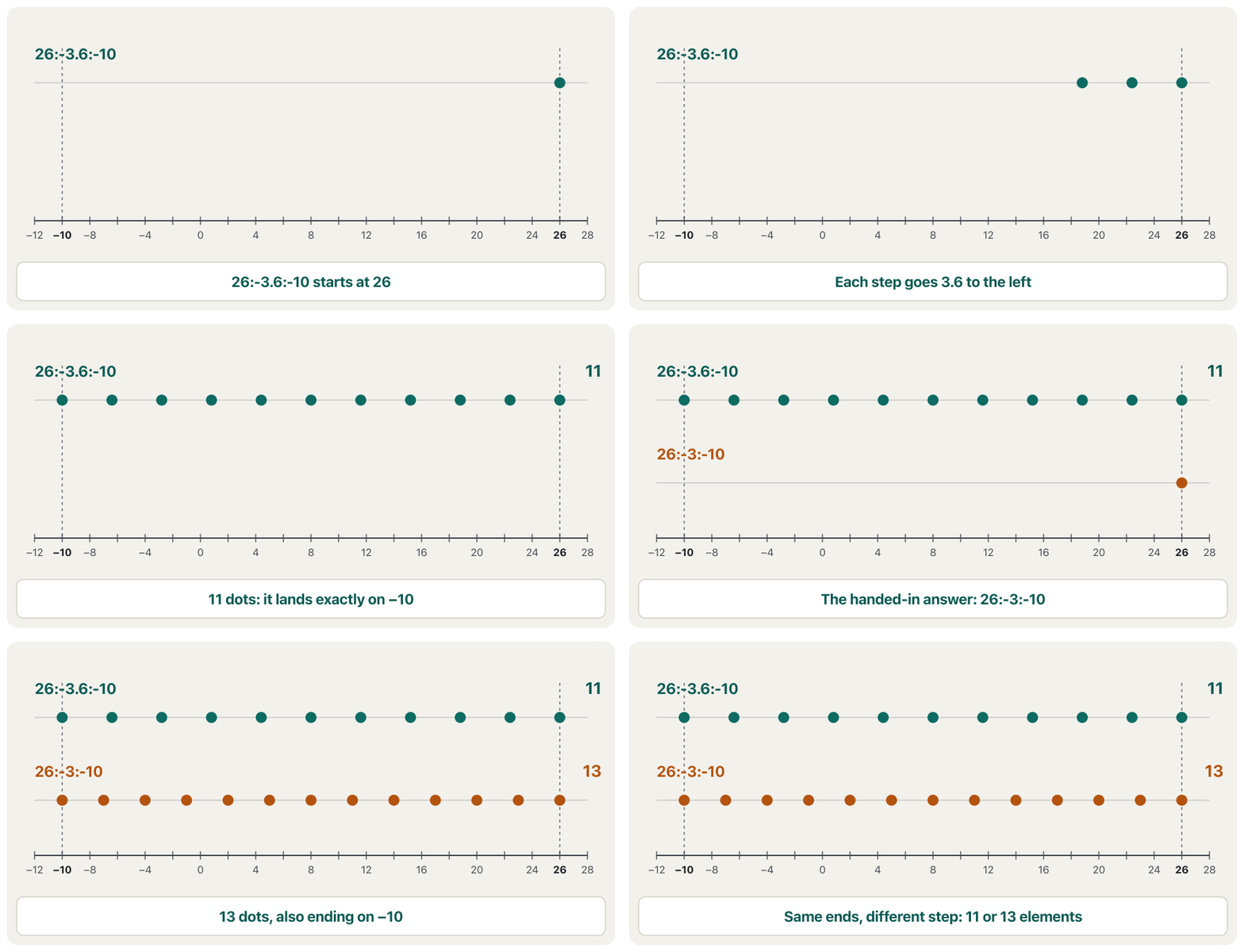
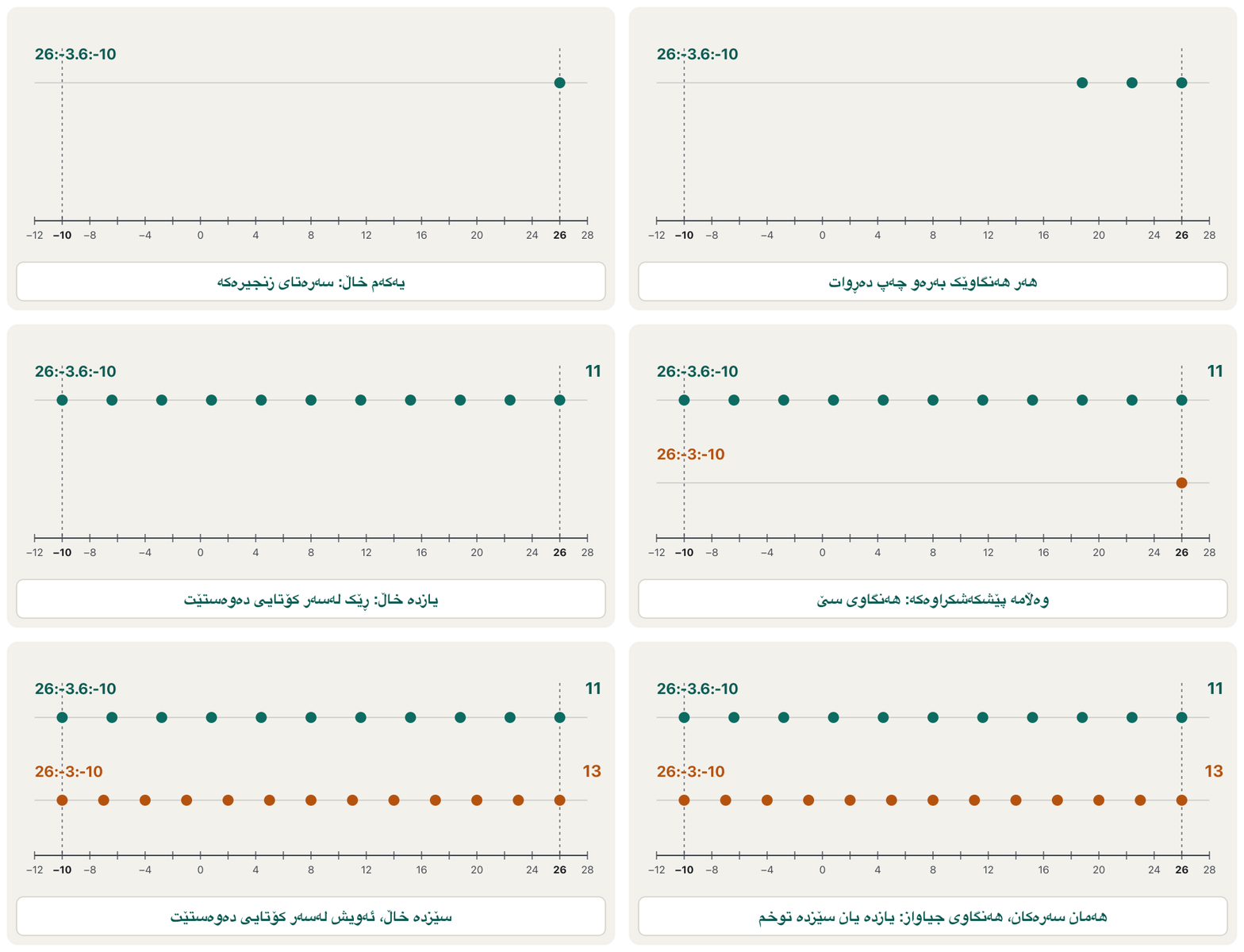
With the right step, the column has 11 elements: . The answer above has — same first and last element, but every value in between is wrong.
بە هەنگاوە ڕاستەکە، ستوونەکە 11 هەیە: . وەڵامەکەی سەرەوە ـی هەیە — هەمان یەکەم و دوایین ، بەڵام هەموو لە نێوانیاندا هەڵەیە.
format default
a = (26:-3.6:-10)'a =
26.0000
22.4000
18.8000
15.2000
11.6000
8.0000
4.4000
0.8000
-2.8000
-6.4000
-10.0000Explain the codeڕوونکردنەوەی کۆدەکە
- Lineدێڕی 2
The range in round brackets, then
'. It lands exactly on : steps.زنجیرەکە لەناو کەوانەی بازنەییدا، پاشان
'. ڕێک لەسەر دەوەستێت: هەنگاو.
Common mistakesهەڵە باوەکان
| Mistakeهەڵە | What happensچی ڕوودەدات | Fixچارەسەر |
|---|---|---|
Expecting 1:10 to stop at 9, as Python's range(1, 10) doesچاوەڕوانیی ئەوەی 1:10 لە 9 بوەستێت، وەک range(1, 10)ـی Python | 10 is included10 دەگیرێتەوە | Write 1:9 if you want to stop at 9.ئەگەر دەتەوێت لە 9 بوەستێت 1:9 بنووسە. |
A negative step when the first value is smaller than the last: 1:-1:5هەنگاوی سالب کاتێک یەکەم بچووکترە لە دوایین: 1:-1:5 | An empty vector بەتاڵ | Count down from the bigger number: 5:-1:1.لە ژمارە گەورەکەوە بەرەو خوار بژمێرە: 5:-1:1. |
Commas where semicolons were meant: [1, 2, 3] for a columnکۆما لە جیاتی : [1, 2, 3] بۆ ستوون | A row, not a columnڕیز، نەک ستوون | [1; 2; 3] or [1 2 3]'[1; 2; 3] یان [1 2 3]' |
A space before a minus sign: [1 -2] vs [1 - 2] پێش نیشانەی کەم: [1 -2] بەرامبەر [1 - 2] | [1 -2] has two elements (1 and ); [1 - 2] has one ()[1 -2] دوو هەیە (1 و )؛ [1 - 2] یەکێکی هەیە () | Use commas between elements when signs are involved: [1, -2].کاتێک نیشانە هەن، کۆما لە نێوان بەکار بهێنە: [1, -2]. |
Expecting the limit to be reached: 1:3:12چاوەڕوانیی گەیشتن بە سنوورەکە: 1:3:12 | It stops at 10لە 10 دەوەستێت | Check the count: .ژمارەکە بپشکنە: . |
A fractional step where the end matters: 0:0.1:1هەنگاوی کاتێک سەری کۆتایی گرنگە: 0:0.1:1 | Round-off may decide whether the end is includedلەوانەیە بڕیار بدات سەری کۆتایی دەگیرێتەوە یان نا | linspace(0, 1, 11) or (0:10)/10linspace(0, 1, 11) یان (0:10)/10 |
1:3' for a column1:3' بۆ ستوون | Only the 3 is transposed: the result is still the row 1 2 3تەنها 3 دەگۆڕدرێت: ئەنجامەکە هەر ڕیزی 1 2 3ـە | (1:3)'(1:3)' |
Practiceڕاهێنان
Lana writes down the price of bread in five bakeries in Duhok: 1000, 1250, 750, 1000 and 1500 IQD. Store them in a row vector, then in a column vector.
لانا نرخی نان لە پێنج نانەواخانەی دهۆک دەنووسێت: 1000، 1250، 750، 1000 و 1500 دینار. لە ڕیزدا هەڵیانبگرە، پاشان لە ستووندا.
Show answerوەڵامەکە پیشان بدە
bread = [1000 1250 750 1000 1500];
bread_col = [1000; 1250; 750; 1000; 1500];
Spaces (or commas) give a row; semicolons give a column. bread' would also give the column.
(یان کۆما) ڕیز دەدات؛ ستوون دەدەن. bread'ـیش ستوونەکە دەدات.
Write down the elements of each range and how many there are, then check in MATLAB: 5:4:30, 100:-15:0, 7:2.
هەر زنجیرەیەک و ژمارەیان بنووسە، پاشان لە MATLAB بیپشکنە: 5:4:30، 100:-15:0، 7:2.
Show answerوەڵامەکە پیشان بدە
5:4:30
100:-15:0
7:2ans =
5 9 13 17 21 25 29
ans =
100 85 70 55 40 25 10
ans =
1×0 empty double row vectorExplain the codeڕوونکردنەوەی کۆدەکە
- Lineدێڕی 1
7 elements: 33 would pass 30.
7 : 33 لە 30 تێدەپەڕێت.
- Lineدێڕی 2
7 elements: the next value, , would pass 0.
7 : دواتر، ، لە 0 تێدەپەڕێت.
- Lineدێڕی 3
Empty: with step 1 you cannot go from 7 down to 2.
بەتاڵ: بە هەنگاوی 1 ناتوانیت لە 7ـەوە بۆ 2 دابەزیت.
Make six equally spaced points from 1 to 2 in two ways: with linspace and with the colon.
شەش خاڵی بە دووریی یەکسان لە 1 تا 2 بە دوو ڕێگە دروست بکە: بە linspace و بە دوو خاڵ.
Show answerوەڵامەکە پیشان بدە
linspace(1, 2, 6)
1:0.2:2ans =
1.0000 1.2000 1.4000 1.6000 1.8000 2.0000
ans =
1.0000 1.2000 1.4000 1.6000 1.8000 2.0000Explain the codeڕوونکردنەوەی کۆدەکە
- Lineدێڕی 1-2
Six points mean five gaps, so the step is .
linspaceis the safer choice because it always includes both ends.شەش خاڵ واتە پێنج بۆشایی، بۆیە هەنگاوەکە ـە.
linspaceهەڵبژاردنی سەلامەتترە چونکە هەمیشە هەردوو سەرەکە دەگرێتەوە.
Make a column vector whose first element is 40, which decreases in steps of 4.5, and whose last element is 4. How many elements does it have?
ستوون دروست بکە کە یەکەم 40 بێت، بە هەنگاوی 4.5 کەم ببێتەوە و دوایین 4 بێت. چەند هەیە؟
Show answerوەڵامەکە پیشان بدە
v = (40:-4.5:4)'v =
40.0000
35.5000
31.0000
26.5000
22.0000
17.5000
13.0000
8.5000
4.0000Explain the codeڕوونکردنەوەی کۆدەکە
- Lineدێڕی 1
elements. The step must be negative because the values fall.
. هەنگاوەکە دەبێت سالب بێت چونکە دادەبەزن.
MATLAB shows 1.0e+03 * and then 2.5000 0.0040 0.0310 for a vector w. Write the three real values. Which command shows them without the common factor?
MATLAB بۆ بە ناوی w، 1.0e+03 * و پاشان 2.5000 0.0040 0.0310 پیشان دەدات. سێ ڕاستەقینەکە بنووسە. کام بێ هۆکارە هاوبەشەکە پیشانیان دەدات؟
Show answerوەڵامەکە پیشان بدە
2500, 4 and 31 (each number times 1000). format shortG (or format longG) shows each element on its own scale; format default goes back.
2500، 4 و 31 (هەر ژمارەیەک جارانی 1000). format shortG (یان format longG) هەر بە پێوانەی خۆی پیشان دەدات؛ format default دەیگەڕێنێتەوە.
Summaryپوختە
- A vector is a (row) or (column) array: one name for a list of numbers.
- Row:
[a b c]or[a, b, c]. Column:[a; b; c]or Enter between elements, or a row followed by'. m:q:nstarts at m, steps by q (default 1) and stops at the last value that does not pass n — unlike Python's range, n itself is included when it is reached. A step in the wrong direction gives an empty vector.linspace(a, b, n): exactly n points, both ends included (100 by default). Prefer it for fractional steps.- Elements can be expressions and function calls;
1.0e+03 *above a vector is a common scale factor. - The worked “spot the mistake”:
26:-3:-10(13 elements) is not26:-3.6:-10(11 elements).
- (ڕیز) یان (ستوون)ـە: یەک ناو بۆ لیستێکی ژمارە.
- ڕیز:
[a b c]یان[a, b, c]. ستوون:[a; b; c]یان Enter لە نێوان ، یان ڕیزێک و پاشان'. m:q:nلە m دەست پێدەکات، بە q هەنگاو دەنێت (بنەڕەتی 1) و لە دوایین دەوەستێت کە لە n تێناپەڕێت — بە پێچەوانەی rangeـی Python، n خۆی دەگیرێتەوە کاتێک پێی دەگات. هەنگاو بە ئاڕاستەی هەڵەدا بەتاڵ دەدات.linspace(a, b, n): ڕێک n خاڵ، هەردوو سەرەکە دەگیرێنەوە (بە شێوەی بنەڕەتی 100). بۆ هەنگاوی ئەوە باشترە.- دەتوانن و بن؛
1.0e+03 *لە سەرووی هۆکارێکی پێوانەی هاوبەشە. - «هەڵەکە بدۆزەرەوە»:
26:-3:-10(13 ) وەک26:-3.6:-10(11 ) نییە.
What is the difference between [2 4 6] and [2; 4; 6]?جیاوازیی نێوان [2 4 6] و [2; 4; 6] چییە؟
The first is a row vector (), the second a column vector ().
یەکەمیان ڕیزە ()، دووەمیان ستوون ().
When do you use linspace instead of the colon?کەی linspace لە جیاتی دوو خاڵ بەکار دەهێنیت؟
When you know how many points you need, or when the step is a fraction and both ends must be included.
کاتێک دەزانیت چەند خاڵت پێویستە، یان کاتێک هەنگاوەکە کەرتە و دەبێت هەردوو سەرەکە بگیرێنەوە.
Why is 5:1 empty?بۆچی 5:1 بەتاڵە؟
The default step is +1, and you cannot go up from 5 to 1. Write 5:-1:1 to count down.
هەنگاوی بنەڕەتی +1ـە و ناتوانیت لە 5ـەوە بەرەو سەرەوە بگەیتە 1. بۆ ژماردن بەرەو خوار بنووسە 5:-1:1.
Videoڤیدیۆ
Watch a videoسەیری ڤیدیۆیەک بکە
A video that viewers liked a lot and praised in their comments, chosen for this lesson.ڤیدیۆیەک کە بینەران زۆریان پێ خۆش بووە و لە کۆمێنتەکانیاندا ستایشیان کردووە، بۆ ئەم وانەیە هەڵبژێردراوە.
A MATLAB beginner course by Phil Parisi: the Command Window, variables, vectors and matrices, indexing, scripts, sections and naming rules, each in short parts.
کۆرسێکی سەرەتایی MATLAB لەلایەن Phil Parisi: Command Window، ، و ، ، ، بەشەکان و یاساکانی ناونان، هەر یەکەیان بە بەشێکی کورت.
Watch 14:15-18:43: x = 1:10, the transpose ' that turns a row into a column, linspace with 2 or 3 arguments (100 points by default) and vectors typed in [ ] with spaces or commas.
لە 14:15 تا 18:43 سەیر بکە: x = 1:10، بە ' کە ڕیز دەکات بە ستوون، linspace بە 2 یان 3 (بە شێوەی بنەڕەتی 100 خاڵ) و کە لەناو [ ] بە یان کۆما دەنووسرێن.
Lesson complete!وانەکە تەواو بوو!
Well done. Review the key terms, then go on to the next lesson.دەستخۆش. سەیرێکی زاراوە سەرەکییەکان بکەرەوە، پاشان بڕۆ بۆ وانەی داهاتوو.
Key termsزاراوە سەرەکییەکان
Creating Matricesدروستکردنی ماتریکسەکان
Related lecturesوانە پەیوەندیدارەکان
- Algebra, Boolean Logic and Matrices Inside the Computerجەبر، لۆجیکی بوول و ماتریکسەکان لەناو کۆمپیوتەردا
- Multiplying Matricesلێکدانی ماتریکسەکان
- Matrix Notation and Special Matricesنووسینی ماتریکس و جۆرە تایبەتەکانی
- The for Loop and range()خولی for و
range() - Welcome to MATLAB (and Octave)بەخێربێیت بۆ MATLAB (و Octave)
References and further readingسەرچاوەکان و خوێندنەوەی زیاتر
This lecture is a first edition. The Kurdish text and terminology are waiting for review by Kurdish IT teachers.ئەم وانەیە چاپی یەکەمە. دەقە کوردییەکە و زاراوەکانی چاوەڕێی پێداچوونەوەی مامۆستایانی کوردی بواری IT ن.