JavaJava · Chapterبەش 11 · Lectureوانە 11.3
Files: Create, Write, Read and Deleteفایلەکان: دروستکردن، نووسین، خوێندنەوە و سڕینەوە
Keep data after the program ends: absolute and relative paths, the File class, createNewFile, writing with FileWriter (overwrite or append, and why it must be closed), reading line by line with Scanner(File), numbers from a file, deleting files and folders, the modern Path and Files (writeString, readAllLines, exists, delete) with errors that say why, which toolbox to prefer, Kurdish text with UTF-8, and a program that saves and loads a HashMap.
دوای کۆتایی بپارێزە: و ، File، createNewFile، نووسین بە FileWriter (نووسینەوە بەسەریدا یان زیادکردن و بۆچی دەبێت دابخرێت)، خوێندنەوەی دێڕ بە دێڕ بە Scanner(File)، ژمارە لە ، سڕینەوەی و ، Path و Filesـی نوێ (writeString، readAllLines، exists، delete) بە هەڵەی هۆکاردار، کام سندووقی ئامراز باشترە، دەقی کوردی بە UTF-8 و کە HashMapـێک هەڵدەگرێت و دەیگەڕێنێتەوە.
What you will learnچی فێر دەبیت
- Explain why programs use files and tell an absolute path from a relative one.
- Create, write, append, read and delete files with File, FileWriter and Scanner(File).
- Do the same jobs with Path and Files, and explain which toolbox to prefer and why.
- Handle IOException and its subclasses, and close writers with try-with-resources.
- Write and read Kurdish text safely with UTF-8.
- ڕوونی بکەیتەوە بۆچی بەکار دەهێنن و لە جیا بکەیتەوە.
- بە File، FileWriter و Scanner(File) دروست بکەیت، بنووسیت، زیاد بکەیت، بخوێنیتەوە و بسڕیتەوە.
- هەمان کارەکان بە Path و Files بکەیت و ڕوونی بکەیتەوە کام سندووقی ئامراز باشترە و بۆچی.
- مامەڵە لەگەڵ IOException و بکەیت و بە نووسەرەکان دابخەیت.
- بە UTF-8 دەقی کوردی بە سەلامەتی بنووسیت و بخوێنیتەوە.
Why files? Variables forgetبۆچی فایل؟ گۆڕاوەکان لەبیریان دەچێت
A variable lives in memory only while the program runs. When the program ends, the memory is freed and every value is gone. This counter counts visits, but every run starts at 0 again:
تەنیا لە کاتی کارکردنی لە دەژیت. کاتێک کۆتایی دێت، ئازاد دەکرێت و هەموو نامێنێت. ئەم سەردانەکان دەژمێرێت، بەڵام هەموو جێبەجێکردنێک دووپاتە لە 0ـەوە دەست پێ دەکات:
public class VisitCounter {
    public static void main(String[] args) {
        int visits = 0;
        visits++;
        System.out.println("Visit number " + visits);
    }
}$ java VisitCounter Visit number 1 $ java VisitCounter Visit number 1 $ java VisitCounter Visit number 1
A lives on the disk, in , so it is still there next time (Why files? tells the same story in Python). This lesson writes and reads : files of characters and lines, such as .txt and .csv files.
لەسەر دیسک دەژیت، لە ، بۆیە جاری داهاتوو هێشتا هەیە (بۆچی فایل؟ هەمان چیرۆک بە Python دەگێڕێتەوە). ئەم وانەیە دەنووسێت و دەخوێنێتەوە: و دێڕ، وەک .txt و .csv.
Why files? Variables forgetبۆچی فایل؟ گۆڕاوەکان لەبیریان دەچێت
A counter that remembersژمێرەرێک کە لەبیری دەمێنێت
The same counter with a file. Do not worry about each method yet; all of them are explained later in this lesson (Path and Files). The number now lives in visits.txt between runs:
هەمان بە . هێشتا خەمی هەر مەخۆ؛ هەموویان دواتر لەم وانەیەدا ڕوون دەکرێنەوە (Path و Files). ژمارەکە ئێستا لە نێوان جێبەجێکردنەکاندا لە visits.txtـدا دەژیت:
import java.io.IOException;
import java.nio.file.Files;
import java.nio.file.Path;

public class RememberVisits {
    public static void main(String[] args) throws IOException {
        Path file = Path.of("visits.txt");
        int visits = 0;
        if (Files.exists(file)) {
            visits = Integer.parseInt(Files.readString(file).trim());
        }
        visits++;
        Files.writeString(file, String.valueOf(visits));
        System.out.println("Visit number " + visits);
    }
}$ java RememberVisits Visit number 1 $ java RememberVisits Visit number 2 $ java RememberVisits Visit number 3 $ cat visits.txt 3
Explain the codeڕوونکردنەوەی کۆدەکە
- Lineدێڕی 9-11
Read the old number, if the file is already there.
ژمارە کۆنەکە بخوێنەوە، ئەگەر پێشتر هەبێت.
- Lineدێڕی 12-13
Add 1 and write the new number back into the file.
1 زیاد بکە و ژمارە نوێیەکە بنووسەوە ناو .
Each run reads the old number from visits.txt, adds 1 and writes it back. Delete the file, and the count starts again at 1.
هەر جێبەجێکردنێک ژمارە کۆنەکە لە visits.txt دەخوێنێتەوە، 1 زیاد دەکات و دەینووسێتەوە. بسڕەوە و ژماردنەکە دووپاتە لە 1ـەوە دەست پێ دەکات.
Where is the file? Pathsفایلەکە لە کوێیە؟ ڕێڕەوەکان
A file is found by its . An starts at the top of the drive, the : C:\Users\Aram\java\data\marks.txt on Windows, /home/aram/java/data/marks.txt on Linux. A such as data/marks.txt, or just marks.txt, starts in the working folder: the folder in which you typed java ... (Paths):
بە دەدۆزرێتەوە. لە سەرەوەی درایڤەکە دەست پێ دەکات، : C:\Users\Aram\java\data\marks.txt لە Windows و /home/aram/java/data/marks.txt لە Linux. وەک data/marks.txt، یان تەنیا marks.txt، لە کارـەوە دەست پێ دەکات: ئەو java ...ـت تێدا نووسی (ڕێڕەوەکان):
import java.io.File;

public class PathParts {
    public static void main(String[] args) {
        File relative = new File("data/marks.txt");
        System.out.println(relative.getName());
        System.out.println(relative.getParent());
        System.out.println(relative.isAbsolute());
        File absolute = new File("/home/aram/java/data/marks.txt");
        System.out.println(absolute.isAbsolute());
    }
}$ java PathParts marks.txt data false true
We ran it on macOS. On Windows the last line prints false, because an absolute path there begins with a drive letter, such as C:\. Keep data files in the working folder or below it and use relative paths: the program then works on any computer.
لە macOS جێبەجێمان کرد. لە Windows دوایین دێڕ false چاپ دەکات، چونکە لەوێ بە دەست پێ دەکات، وەک C:\. لە کار یان لە خوارییەوە دابنێ و بەکار بهێنە: ئەوکاتە لە هەر کۆمپیوتەرێکدا کار دەکات.
The File class: a name for a fileکلاسی File: ناوێک بۆ فایلێک
java.io.File is the classic class for a file name. Making a File object does not create a file; it only names one. Its methods ask about the file or act on it:
java.io.File کۆنی ناوی . دروستکردنی File دروست ناکات؛ تەنیا ناوی دەنێت. پرسیار لەبارەی دەکەن یان کاری لەسەر دەکەن:
| Method | Givesدەدات | What it doesچی دەکات |
|---|---|---|
exists() | boolean | is the file there?ئایا هەیە؟ |
getName() | String | the name without foldersناوەکە بەبێ |
getAbsolutePath() | String | the full path تەواو |
length() | long | the size in bytesقەبارە بە |
canRead() / canWrite() | boolean | may the program read / write it?ئایا دەتوانێت بیخوێنێتەوە / بینووسێت؟ |
createNewFile() | boolean | make an empty file بەتاڵ دروست بکە |
delete() | boolean | delete the file or an empty folder یان بەتاڵ بسڕەوە |
mkdir() | boolean | make a folder دروست بکە |
list() | String[] | the names inside a folderناوەکانی ناو |
import java.io.File;

public class FileInfo {
    public static void main(String[] args) {
        File file = new File("marks.txt");
        System.out.println("Name: " + file.getName());
        System.out.println("Exists: " + file.exists());
        System.out.println("Absolute path? " + file.isAbsolute());
        String full = file.getAbsolutePath();
        String expected = System.getProperty("user.dir") + File.separator + "marks.txt";
        System.out.println("Working folder + name? " + full.equals(expected));
        if (file.exists()) {
            System.out.println("Size: " + file.length() + " bytes");
            System.out.println("Readable: " + file.canRead() + ", writable: " + file.canWrite());
        }
    }
}$ java FileInfo Name: marks.txt Exists: false Absolute path? false Working folder + name? true $ printf 'Aram 85\nShilan 92\n' > marks.txt $ java FileInfo Name: marks.txt Exists: true Absolute path? false Working folder + name? true Size: 18 bytes Readable: true, writable: true
Explain the codeڕوونکردنەوەی کۆدەکە
- Lineدێڕی 9-10
System.getProperty("user.dir")is the working folder, andFile.separatoris/on macOS and Linux,\on Windows.System.getProperty("user.dir")کارە وFile.separatorلە macOS و Linux/ـە و لە Windows\.
The program compares getAbsolutePath() with the working folder instead of printing it, because the start of the path is different on every computer: on Aram's Windows computer it could be C:\Users\Aram\java\marks.txt.
getAbsolutePath() لەگەڵ کار بەراورد دەکات لە جیاتی چاپکردنی، چونکە سەرەتای لە هەر کۆمپیوتەرێکدا جیاوازە: لە کۆمپیوتەری Windowsـی Aramـدا دەکرێت C:\Users\Aram\java\marks.txt بێت.
Creating a file: createNewFileدروستکردنی فایلێک: createNewFile
createNewFile() makes an empty file and returns true, or returns false when the file is already there. It can throw IOException, a checked exception, so the call goes in a try (Checked exceptions). The file name comes from the command line (String[] args):
createNewFile() بەتاڵ دروست دەکات و true دەگەڕێنێتەوە، یان ئەگەر پێشتر هەبێت false. دەتوانێت IOException فڕێ بدات، کە ، بۆیە بانگکردنەکە دەچێتە ناو tryـەوە (هەڵاوێردە پشکنراوەکان). ناوی لە دێت (String[] args):
import java.io.File;
import java.io.IOException;

public class CreateFile {
    public static void main(String[] args) {
        File file = new File(args[0]);
        try {
            if (file.createNewFile()) {
                System.out.println("Created " + file.getName());
            } else {
                System.out.println(file.getName() + " already exists");
            }
        } catch (IOException e) {
            System.out.println("Could not create " + file.getPath() + ": " + e.getMessage());
        }
    }
}$ java CreateFile marks.txt
Created marks.txt
$ wc -c marks.txt
0 marks.txt
$ java CreateFile marks.txt
marks.txt already exists
$ java CreateFile reports/marks.txt
Could not create reports/marks.txt: No such file or directoryWriting text: FileWriterنووسینی دەق: FileWriter
A FileWriter writes characters into a file. write adds text, and a line ends only where you write \n. Open the writer in a try-with-resources, so that it is closed at the end (try-with-resources):
FileWriter دەنووسێتە ناو . write دەق زیاد دەکات و دێڕێک تەنیا لەو شوێنە کۆتایی دێت کە \nـت نووسیوە. نووسەرەکە لە بکەرەوە، تا لە کۆتاییدا دابخرێت (ڕستەی try-with-resources):
import java.io.FileWriter;
import java.io.IOException;

public class WriteMarks {
    public static void main(String[] args) {
        try (FileWriter writer = new FileWriter("marks.txt")) {
            writer.write("Aram 85\n");
            writer.write("Shilan 92\n");
            writer.write("Karwan 78\n");
            System.out.println("Saved 3 lines");
        } catch (IOException e) {
            System.out.println("Could not write: " + e.getMessage());
        }
    }
}$ java WriteMarks Saved 3 lines $ cat marks.txt Aram 85 Shilan 92 Karwan 78
Writing text: FileWriterنووسینی دەق: FileWriter
Overwrite or appendنووسینەوە بەسەریدا یان زیادکردن لە کۆتاییدا
new FileWriter("name") empties the file first. To add to the end instead, pass true as the second argument. Each program ran three times:
new FileWriter("name") سەرەتا بەتاڵ دەکاتەوە. بۆ ئەوەی لە جیاتی ئەوە لە کۆتاییدا زیاد بکات، true وەک دووەم بنێرە. هەر سێ جار جێبەجێ کرا:
import java.io.FileWriter;
import java.io.IOException;

public class Overwrite {
    public static void main(String[] args) throws IOException {
        try (FileWriter writer = new FileWriter("overwrite.txt")) {
            writer.write("Aram logged in\n");
        }
    }
}import java.io.FileWriter;
import java.io.IOException;
public class Append {
public static void main(String[] args) throws IOException {
try (FileWriter writer = new FileWriter("append.txt", true)) { // true: add to the end
writer.write("Aram logged in\n");
}
}
}$ java Overwrite $ java Overwrite $ java Overwrite $ cat overwrite.txt Aram logged in $ java Append $ java Append $ java Append $ cat append.txt Aram logged in Aram logged in Aram logged in
Explain the codeڕوونکردنەوەی کۆدەکە
- Lineدێڕی 6
true: append to the end; the file is created if it is missing.true: لە کۆتاییدا زیاد بکە؛ ئەگەر نەبێت دروست دەکرێت.
Reading line by line: Scanner(File)خوێندنەوەی دێڕ بە دێڕ: Scanner(File)
The Scanner you know from the keyboard can read a file too: new Scanner(new File("marks.txt")). hasNextLine() asks whether another line is waiting and nextLine() takes it. If the file is missing, the constructor throws FileNotFoundException:
ئەو Scannerـەی لە دەیناسیت دەتوانێت بخوێنێتەوە: new Scanner(new File("marks.txt")). hasNextLine() دەپرسێت ئایا دێڕێکی تر چاوەڕێیە و nextLine() وەریدەگرێت. ئەگەر نەبێت، FileNotFoundException فڕێ دەدرێت:
import java.io.File;
import java.io.FileNotFoundException;
import java.util.Scanner;

public class ReadMarks {
    public static void main(String[] args) {
        try (Scanner reader = new Scanner(new File("marks.txt"))) {
            int lineNumber = 1;
            while (reader.hasNextLine()) {
                String line = reader.nextLine();
                System.out.println(lineNumber + ": " + line);
                lineNumber++;
            }
        } catch (FileNotFoundException e) {
            System.out.println("No file: " + e.getMessage());
        }
    }
}$ java ReadMarks No file: marks.txt (No such file or directory) $ printf 'Aram 85\nShilan 92\nKarwan 78\n' > marks.txt $ java ReadMarks 1: Aram 85 2: Shilan 92 3: Karwan 78
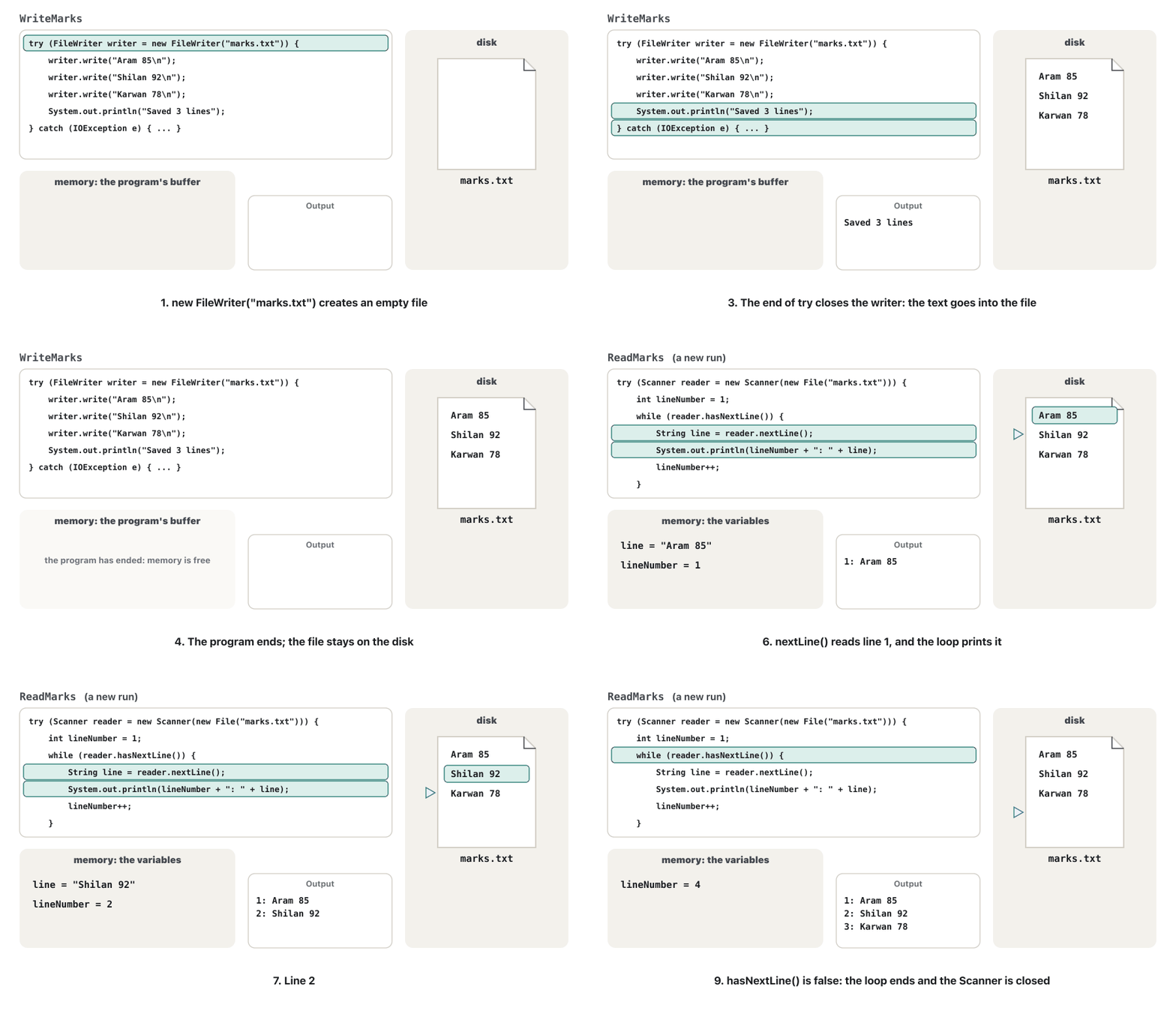
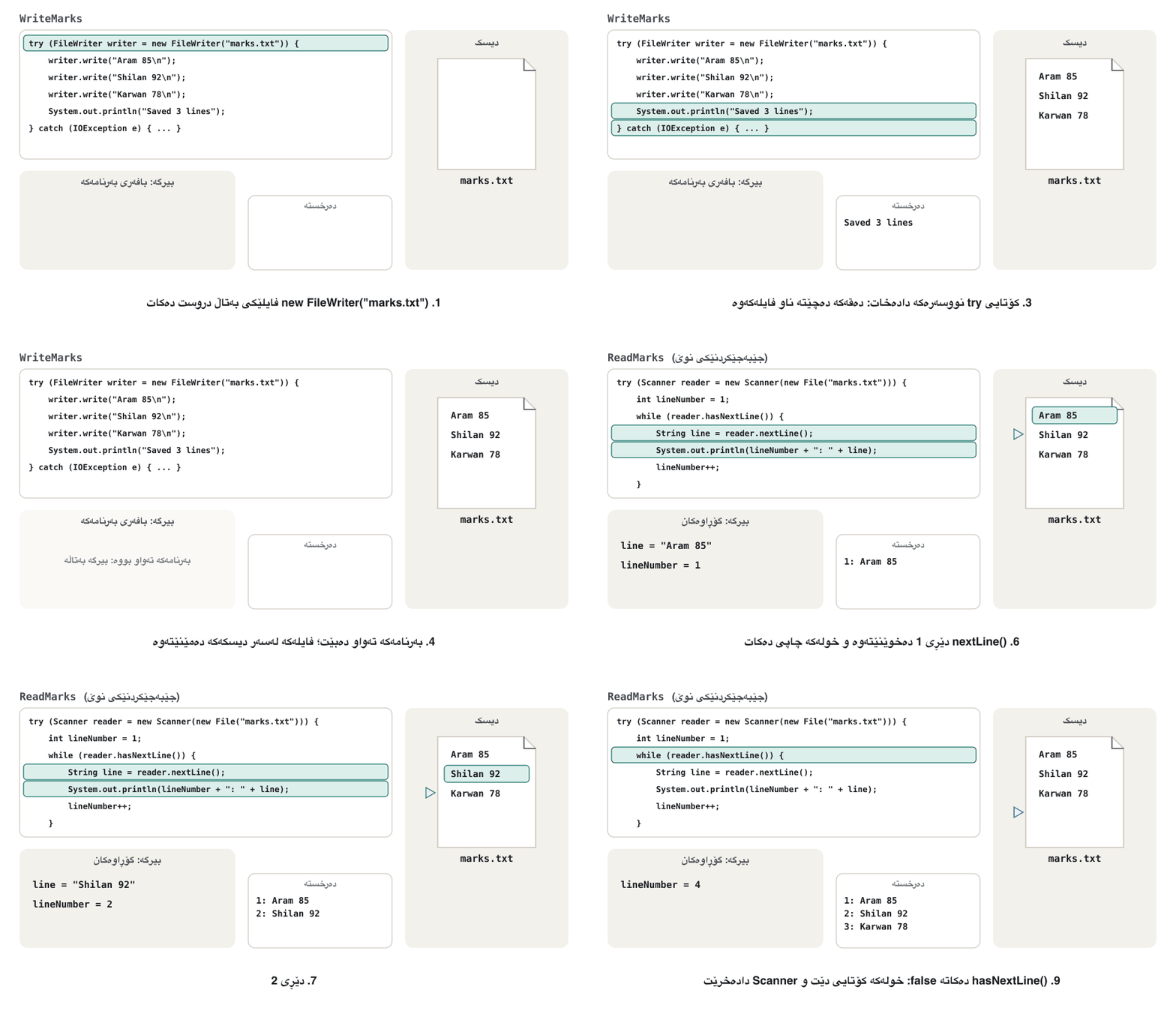
Reading line by line: Scanner(File)خوێندنەوەی دێڕ بە دێڕ: Scanner(File)
Numbers in a fileژمارە لە فایلێکدا
A line is text. To calculate, cut it into parts with split (split) and turn the number part into an int with Integer.parseInt (parseInt). A bad line throws NumberFormatException; catch it inside the loop, so that one bad line does not stop the program:
دێڕێک دەقە. بۆ ژمێرکاری، بە split بیکە بە پارچە (split) و بەشە ژمارەییەکە بە Integer.parseInt بکە بە int (parseInt). دێڕێکی خراپ NumberFormatException فڕێ دەدات؛ لە ناو بیگرە، تا دێڕێکی خراپ نەوەستێنێت:
import java.io.File;
import java.io.FileNotFoundException;
import java.util.Scanner;

public class AverageMark {
    public static void main(String[] args) throws FileNotFoundException {
        int total = 0;
        int count = 0;
        try (Scanner reader = new Scanner(new File("marks.txt"))) {
            while (reader.hasNextLine()) {
                String[] parts = reader.nextLine().split(" ");
                try {
                    total += Integer.parseInt(parts[1]);
                    count++;
                } catch (NumberFormatException | ArrayIndexOutOfBoundsException e) {
                    System.out.println("Skipped a bad line: " + e.getMessage());
                }
            }
        }
        System.out.println(count + " marks, average " + (double) total / count);
    }
}$ printf 'Aram 85\nShilan 92\nKarwan eighty\nDilan 70\n' > marks.txt $ java AverageMark Skipped a bad line: For input string: "eighty" 3 marks, average 82.33333333333333
Deleting files and foldersسڕینەوەی فایلەکان و فۆڵدەرەکان
delete() removes a file and returns true, or returns false when it could not. A folder can be deleted only when it is empty; mkdir() makes one:
delete() لادەبات و true دەگەڕێنێتەوە، یان ئەگەر نەیتوانی false. تەنیا کاتێک دەسڕدرێتەوە کە بەتاڵ بێت؛ mkdir() یەکێک دروست دەکات:
import java.io.File;

public class DeleteFile {
    public static void main(String[] args) {
        File file = new File("old-marks.txt");
        if (file.delete()) {
            System.out.println("Deleted " + file.getName());
        } else {
            System.out.println("Could not delete " + file.getName());
        }
    }
}$ printf 'Aram 85\n' > old-marks.txt $ java DeleteFile Deleted old-marks.txt $ java DeleteFile Could not delete old-marks.txt
import java.io.File;
import java.io.IOException;

public class FolderDelete {
    public static void main(String[] args) throws IOException {
        File folder = new File("reports");
        System.out.println("mkdir: " + folder.mkdir());
        File inside = new File("reports/june.txt");
        System.out.println("createNewFile: " + inside.createNewFile());
        System.out.println("Delete the folder: " + folder.delete());   // the folder is not empty
        System.out.println("Delete the file: " + inside.delete());
        System.out.println("Delete the folder: " + folder.delete());
    }
}$ java FolderDelete mkdir: true createNewFile: true Delete the folder: false Delete the file: true Delete the folder: true
false does not say why: a missing file, a full folder, or no permission? The modern API answers that (Errors that say why).
false ناڵێت بۆچی: نەبوو، پڕ، یان بێ مۆڵەت؟ APIـی نوێ وەڵامی ئەمە دەداتەوە (هەڵەکان کە هۆکار دەڵێن).
The modern way: Path and Filesڕێگەی نوێ: Path و Files
Since Java 7, the package java.nio.file has a newer toolbox: a Path names a file, and the class Files does the work, often in one line. Path.of("marks.txt"), writeString and readString arrived in Java 11 (older code writes Paths.get("marks.txt")):
لە Java 7ـەوە، java.nio.file سندووقێکی ئامرازی نوێتری هەیە: Path ناوی دەنێت و Files کارەکە دەکات، زۆرجار بە یەک دێڕ. Path.of("marks.txt")، writeString و readString لە Java 11ـدا هاتن (کۆدی کۆن Paths.get("marks.txt") دەنووسێت):
import java.io.IOException;
import java.nio.file.Files;
import java.nio.file.Path;
import java.util.List;

public class FilesWay {
    public static void main(String[] args) throws IOException {
        Path file = Path.of("marks.txt");
        Files.writeString(file, "Aram 85\nShilan 92\nKarwan 78\n");   // create or overwrite, then write
        System.out.println("Exists: " + Files.exists(file));
        System.out.println("Size: " + Files.size(file) + " bytes");
        List<String> lines = Files.readAllLines(file);                    // every line, in a List
        System.out.println(lines.size() + " lines: " + lines);
        Files.delete(file);
        System.out.println("Exists after delete: " + Files.exists(file));
    }
}$ java FilesWay Exists: true Size: 28 bytes 3 lines: [Aram 85, Shilan 92, Karwan 78] Exists after delete: false
Two differences matter at once: every Files method uses UTF-8 unless you name another charset, and it throws an exception that says what went wrong. readAllLines reads the whole file into memory: right for the small files of this course, while very large files are read with Files.newBufferedReader instead.
دوو جیاوازی یەکسەر گرنگن: هەموو Files UTF-8 بەکار دەهێنێت مەگەر تر بنووسیت و فڕێ دەدات کە دەڵێت چی هەڵە چوو. readAllLines هەموو دەخوێنێتەوە ناو : بۆ بچووکی ئەم کۆرسە گونجاوە، بەڵام زۆر گەورە لە جیاتی ئەوە بە Files.newBufferedReader دەخوێنرێنەوە.
The modern way: Path and Filesڕێگەی نوێ: Path و Files
Appending and writing lines with Filesزیادکردن و نووسینی دێڕەکان بە Files
writeString with StandardOpenOption.APPEND adds to the end of a file, and Files.write(file, lines) writes a List of strings, each followed by a line break. readString gives the whole file as one string:
writeString بە StandardOpenOption.APPEND لە کۆتایی زیاد دەکات و Files.write(file, lines) Listـێک لە دەنووسێت، هەر یەکەیان بە شکاندنی دێڕێکەوە. readString هەموو وەک یەک دەدات:
import java.io.IOException;
import java.nio.file.Files;
import java.nio.file.Path;
import java.nio.file.StandardOpenOption;
import java.util.List;

public class FilesAppend {
    public static void main(String[] args) throws IOException {
        Path log = Path.of("log.txt");
        Files.writeString(log, "first line\n");
        Files.writeString(log, "second line\n", StandardOpenOption.APPEND);
        Files.write(log, List.of("third line", "fourth line"), StandardOpenOption.APPEND);
        System.out.print(Files.readString(log));
    }
}$ java FilesAppend first line second line third line fourth line
APPEND alone expects the file to exist. To create it when it is missing, add StandardOpenOption.CREATE as well (the diary exercise does that).
APPEND بە تەنیا چاوەڕێ دەکات هەبێت. بۆ دروستکردنی کاتێک نییە، StandardOpenOption.CREATEیش زیاد بکە (ڕاهێنانی دەفتەری ڕۆژانە ئەوە دەکات).
The modern way: Path and Filesڕێگەی نوێ: Path و Files
Errors that say whyهەڵەکان کە هۆکار دەڵێن
Where File.delete() only says false, Files.delete throws an exception that names the problem: NoSuchFileException for a missing file and DirectoryNotEmptyException for a full folder. deleteIfExists returns false instead of throwing:
لە کاتێکدا File.delete() تەنیا دەڵێت false، Files.delete فڕێ دەدات کە ناوی کێشەکە دەهێنێت: NoSuchFileException بۆ نەبوو و DirectoryNotEmptyException بۆ پڕ. deleteIfExists لە جیاتی فڕێدان false دەگەڕێنێتەوە:
import java.io.IOException;
import java.nio.file.DirectoryNotEmptyException;
import java.nio.file.Files;
import java.nio.file.NoSuchFileException;
import java.nio.file.Path;

public class DeleteWithReason {
    static void delete(String name) {
        try {
            Files.delete(Path.of(name));
            System.out.println("Deleted " + name);
        } catch (NoSuchFileException e) {
            System.out.println("No such file: " + e.getMessage());
        } catch (DirectoryNotEmptyException e) {
            System.out.println("Folder not empty: " + e.getMessage());
        } catch (IOException e) {
            System.out.println("Could not delete: " + e);
        }
    }

    public static void main(String[] args) throws IOException {
        Files.writeString(Path.of("old-marks.txt"), "Aram 85\n");
        Files.createDirectories(Path.of("reports"));
        Files.writeString(Path.of("reports/june.txt"), "Shilan 92\n");
        delete("old-marks.txt");
        delete("old-marks.txt");
        delete("reports");
        System.out.println("deleteIfExists: " + Files.deleteIfExists(Path.of("old-marks.txt")));
    }
}$ java DeleteWithReason Deleted old-marks.txt No such file: old-marks.txt Folder not empty: reports deleteIfExists: false
Reading a missing file with Files throws NoSuchFileException too. The stack trace is long because the error is found deep inside Java's library; the last line is your line (Reading a stack trace):
خوێندنەوەی نەبوو بە Filesیش NoSuchFileException فڕێ دەدات. درێژە چونکە هەڵەکە لە قووڵایی Javaـدا دەدۆزرێتەوە؛ دوایین دێڕ دێڕەکەی خۆتە (خوێندنەوەی ڕێچکەی هەڵە):
$ java ReadMissing
Exception in thread "main" java.nio.file.NoSuchFileException: marks.txt
	at java.base/sun.nio.fs.UnixException.translateToIOException(UnixException.java:92)
	at java.base/sun.nio.fs.UnixException.rethrowAsIOException(UnixException.java:106)
	at java.base/sun.nio.fs.UnixException.rethrowAsIOException(UnixException.java:111)
	at java.base/sun.nio.fs.UnixFileSystemProvider.newByteChannel(UnixFileSystemProvider.java:218)
	at java.base/java.nio.file.Files.newByteChannel(Files.java:380)
	at java.base/java.nio.file.Files.newByteChannel(Files.java:432)
	at java.base/java.nio.file.spi.FileSystemProvider.newInputStream(FileSystemProvider.java:422)
	at java.base/java.nio.file.Files.newInputStream(Files.java:160)
	at java.base/java.nio.file.Files.newBufferedReader(Files.java:2922)
	at java.base/java.nio.file.Files.readAllLines(Files.java:3412)
	at java.base/java.nio.file.Files.readAllLines(Files.java:3453)
	at ReadMissing.main(ReadMissing.java:7)
Which toolbox should you use?کام سندووقی ئامراز بەکار بهێنیت؟
| Jobکار | java.io (classic)java.io (کۆن) | java.nio.file (modern)java.nio.file (نوێ) |
|---|---|---|
| name a fileناونانی | new File("marks.txt") | Path.of("marks.txt") |
| write textنووسینی دەق | try (FileWriter w = new FileWriter(f)) { w.write(...); } | Files.writeString(p, text) |
| appendزیادکردن | new FileWriter(f, true) | Files.writeString(p, text, APPEND) |
| read linesخوێندنەوەی دێڕەکان | Scanner(File) + hasNextLine() | Files.readAllLines(p) |
| exists / deleteهەیە / سڕینەوە | f.exists() / f.delete() | Files.exists(p) / Files.delete(p) |
| charset on Java 17 لە Java 17 | the computer's defaultبنەڕەتی کۆمپیوتەرەکە | always UTF-8هەمیشە UTF-8 |
| when it failsکاتێک سەرناگرێت | often only falseزۆرجار تەنیا false | an exception that says why کە هۆکارەکە دەڵێت |
Use Path and Files in new programs. Learn the classic classes too: older code, many tutorials and W3Schools use them, and Scanner(File) is handy for reading words and numbers. file.toPath() and path.toFile() convert between the two (The Java Tutorials: legacy file I/O).
لە نوێدا Path و Files بەکار بهێنە. کۆنیش فێر ببە: کۆدی کۆن، زۆر فێرکاری و W3Schools بەکاریان دەهێنن و Scanner(File) بۆ خوێندنەوەی وشە و ژمارە بەسوودە. file.toPath() و path.toFile() لە نێوان هەردووکیاندا دەگۆڕن (The Java Tutorials: legacy file I/O).
Kurdish text: say UTF-8دەقی کوردی: بڵێ UTF-8
On Java 17, FileWriter and Scanner(File) use the computer's default charset unless you name one. On macOS and Linux that is usually UTF-8, but on Windows it is an old code page such as windows-1252 or windows-1256 (JEP 400). Kurdish letters that the code page does not have are lost. To see every case on one computer, this program names the charsets itself:
لەسەر Java 17، FileWriter و Scanner(File) بنەڕەتی کۆمپیوتەرەکە بەکار دەهێنن مەگەر یەکێک بنووسیت. لە macOS و Linux زۆرجار UTF-8ـە، بەڵام لە Windows code pageـێکی کۆنە وەک windows-1252 یان windows-1256 (JEP 400). ئەو پیتە کوردییانەی code pageـەکە نییەتی ون دەبن. بۆ بینینی هەموو حاڵەتەکان لەسەر یەک کۆمپیوتەر، ئەم خۆی ناوی دەنووسێت:
import java.io.File;
import java.io.FileWriter;
import java.io.IOException;
import java.nio.charset.Charset;
import java.nio.charset.StandardCharsets;
import java.util.Scanner;

public class KurdishFile {
    static void saveAndRead(String fileName, Charset charset) throws IOException {
        try (FileWriter writer = new FileWriter(fileName, charset)) {
            writer.write("سڵاو لە هەولێر\n");
        }
        try (Scanner reader = new Scanner(new File(fileName), charset)) {
            System.out.println(charset + ": " + reader.nextLine());
        }
    }

    public static void main(String[] args) throws IOException {
        saveAndRead("utf8.txt", StandardCharsets.UTF_8);
        saveAndRead("windows.txt", Charset.forName("windows-1256"));
    }
}$ java KurdishFile
UTF-8: سڵاو لە هەولێر
windows-1256: س?او ل? ه?ول?ر
$ wc -c utf8.txt windows.txt
27 utf8.txt
15 windows.txt
42 totalExplain the codeڕوونکردنەوەی کۆدەکە
- Lineدێڕی 20
windows-1256 is the code page of Windows set to Arabic; it lacks ڵ, ە and ێ.
windows-1256 code pageـی Windowsـە کاتێک زمانەکەی عەرەبی بێت؛ ڵ، ە و ێـی تێدا نییە.
Kurdish text: say UTF-8دەقی کوردی: بڵێ UTF-8
Kurdish out and back in, unchangedدەقی کوردی دەچێتە دەرەوە و وەک خۆی دەگەڕێتەوە
With Files, which always uses UTF-8, Kurdish lines go out and come back unchanged. A Kurdish letter takes two bytes in UTF-8 (Unicode and UTF-8):
بە Files، کە هەمیشە UTF-8 بەکار دەهێنێت، دێڕە کوردییەکان دەچنە دەرەوە و وەک خۆیان دەگەڕێنەوە. پیتێکی کوردی لە UTF-8دا دوو دەگرێت (Unicode و UTF-8):
import java.io.IOException;
import java.nio.file.Files;
import java.nio.file.Path;
import java.util.List;

public class KurdishLines {
    public static void main(String[] args) throws IOException {
        Path file = Path.of("kurdish.txt");
        List<String> lines = List.of("سڵاو لە هەولێر", "کتێبخانەی زانکۆ");
        Files.write(file, lines);                        // UTF-8, one line each
        List<String> back = Files.readAllLines(file);    // UTF-8 again
        System.out.println(back);
        System.out.println("The same text: " + back.equals(lines));
        System.out.println(lines.get(0).length() + " characters, "
            + lines.get(0).getBytes(java.nio.charset.StandardCharsets.UTF_8).length + " bytes in UTF-8");
    }
}$ java KurdishLines
[سڵاو لە هەولێر, کتێبخانەی زانکۆ]
The same text: true
14 characters, 26 bytes in UTF-8
$ cat kurdish.txt
سڵاو لە هەولێر
کتێبخانەی زانکۆ
$ wc -c kurdish.txt
57 kurdish.txtThe 14 characters of the first line took 26 bytes: 12 letters of two bytes and two spaces of one byte. With the classic classes, name UTF-8 yourself: new FileWriter(name, StandardCharsets.UTF_8) and new Scanner(file, StandardCharsets.UTF_8) (FileWriter with a charset since Java 11, Scanner since Java 10).
14 دێڕی یەکەم 26 گرت: 12 پیت بە دوو و دوو بە یەک . بە کۆن خۆت UTF-8 بنووسە: new FileWriter(name, StandardCharsets.UTF_8) و new Scanner(file, StandardCharsets.UTF_8) (FileWriter بە لە Java 11ـەوە، Scanner لە Java 10ـەوە).
A program: save marks and load them againبەرنامەیەک: نمرەکان هەڵبگرە و دووپاتە بیانهێنەرەوە
SaveMarks writes a HashMap (HashMap and HashSet) to marks.csv, one name,mark line per pair. LoadMarks, a separate program, builds the map again from the file:
SaveMarks HashMapـێک (HashMap و HashSet) دەنووسێتە ناو marks.csv، بۆ هەر جووتێک یەک دێڕی name,mark. LoadMarks، جیا، HashMapـەکە لە دووپاتە دروست دەکاتەوە:
import java.io.IOException;
import java.nio.file.Files;
import java.nio.file.Path;
import java.util.ArrayList;
import java.util.HashMap;
import java.util.List;
import java.util.Map;

public class SaveMarks {
    public static void main(String[] args) throws IOException {
        HashMap<String, Integer> marks = new HashMap<>();
        marks.put("Aram", 85);
        marks.put("Shilan", 92);
        marks.put("Karwan", 78);
        List<String> lines = new ArrayList<>();
        for (Map.Entry<String, Integer> e : marks.entrySet()) {
            lines.add(e.getKey() + "," + e.getValue());          // one line per student: name,mark
        }
        Files.write(Path.of("marks.csv"), lines);
        System.out.println("Saved " + lines.size() + " students");
    }
}import java.io.IOException;
import java.nio.file.Files;
import java.nio.file.Path;
import java.util.HashMap;
public class LoadMarks {
public static void main(String[] args) throws IOException {
HashMap<String, Integer> marks = new HashMap<>();
for (String line : Files.readAllLines(Path.of("marks.csv"))) {
String[] parts = line.split(",");
marks.put(parts[0], Integer.parseInt(parts[1]));
}
System.out.println("Loaded: " + marks);
System.out.println("Shilan has " + marks.get("Shilan"));
}
}$ java SaveMarks
Saved 3 students
$ cat marks.csv
Aram,85
Shilan,92
Karwan,78
$ java LoadMarks
Loaded: {Aram=85, Shilan=92, Karwan=78}
Shilan has 92Every program that remembers works like this: turn the data into lines, write them, read the lines, turn them back. The project at the end of the track builds a complete program on it (Saving and loading in the marks project).
هەموو کە شت لەبیر دەهێڵێتەوە بەم شێوەیە کار دەکات: بکە بە دێڕ، بیاننووسە، دێڕەکان بخوێنەوە، بیانگەڕێنەوە. پڕۆژەکەی کۆتایی بەشی Javaـی ئەم کۆرسە تەواوی لەسەر دروست دەکات (پاشەکەوتکردن و بارکردن لە پڕۆژەی نمرەکاندا).
Common mistakesهەڵە باوەکان
| You wroteنووسیت | What happensچی ڕوو دەدات | Fixچارەسەر |
|---|---|---|
| A FileWriter that is never closedFileWriterـێک کە هەرگیز دانەخرا | the file stays empty (0 bytes) بەتاڵ دەمێنێتەوە (0 ) | try-with-resources.. |
new FileWriter(name) when you meant to addnew FileWriter(name) کاتێک مەبەستت زیادکردن بوو | the old lines are goneدێڕە کۆنەکان نەمان | new FileWriter(name, true) or APPEND.new FileWriter(name, true) یان APPEND. |
| A relative path, run from another folder، کە لە ترەوە جێبەجێ کراوە | FileNotFoundException: marks.txt (No such file or directory) | Run from the folder of the data, or check the path.لە جێبەجێی بکە، یان بپشکنە. |
"C:\Users\Aram\marks.txt" | error: illegal escape character | "C:\\Users\\Aram\\marks.txt" or "C:/Users/Aram/marks.txt"."C:\\Users\\Aram\\marks.txt" یان "C:/Users/Aram/marks.txt". |
Files.readAllLines(...) with no try or throwsFiles.readAllLines(...) بەبێ try یان throws | error: unreported exception IOException; must be caught or declared to be thrown | try/catch, or throws IOException.try/catch، یان throws IOException. |
| Kurdish written with the default charset on Windowsکوردی بە بنەڕەتی لە Windows نووسراوە | letters become ? or garbageپیتەکان دەبنە ? یان تێکچوو | Name UTF-8, or use Files.UTF-8 بنووسە، یان Files بەکار بهێنە. |
Files.readAllLines on a file that is not UTF-8Files.readAllLines لەسەر کە UTF-8 نییە | MalformedInputException: Input length = 1 | Read it with its real charset: readAllLines(p, charset).بە ڕاستەقینەی خۆی بیخوێنەوە: readAllLines(p, charset). |
delete() on a folder that still holds filesdelete() لەسەر کە هێشتا تێدایە | false, or DirectoryNotEmptyException with Filesfalse، یان DirectoryNotEmptyException بە Files | Delete the files inside first.سەرەتا ناوی بسڕەوە. |
Two of them in full. A Windows path with single backslashes does not compile, and \n inside a path is a newline, not a folder:
دوانیان بە تەواوی. Windows بە تاک کۆمپایل نابێت و \n لە ناو ، نەک :
$ javac WindowsPath.java
WindowsPath.java:3: error: illegal escape character
        String path = "C:\Users\Aram\marks.txt";
                          ^
WindowsPath.java:3: error: illegal escape character
        String path = "C:\Users\Aram\marks.txt";
                                ^
WindowsPath.java:3: error: illegal escape character
        String path = "C:\Users\Aram\marks.txt";
                                     ^
3 errorspublic class NewFolder {
public static void main(String[] args) {
System.out.println("C:\new.txt");
System.out.println("C:\\new.txt");
System.out.println("C:/new.txt");
}
}$ java NewFolder C: ew.txt C:\new.txt C:/new.txt
And reading a file that is not UTF-8 with Files:
هەروەها خوێندنەوەی کە UTF-8 نییە بە Files:
$ java OldFile
Exception in thread "main" java.nio.charset.MalformedInputException: Input length = 1
	at java.base/java.nio.charset.CoderResult.throwException(CoderResult.java:274)
	at java.base/sun.nio.cs.StreamDecoder.implRead(StreamDecoder.java:342)
	at java.base/sun.nio.cs.StreamDecoder.read(StreamDecoder.java:190)
	at java.base/java.io.InputStreamReader.read(InputStreamReader.java:177)
	at java.base/java.io.BufferedReader.fill(BufferedReader.java:162)
	at java.base/java.io.BufferedReader.readLine(BufferedReader.java:329)
	at java.base/java.io.BufferedReader.readLine(BufferedReader.java:396)
	at java.base/java.nio.file.Files.readAllLines(Files.java:3415)
	at java.base/java.nio.file.Files.readAllLines(Files.java:3453)
	at OldFile.main(OldFile.java:12)
Practiceڕاهێنان
Write a program that adds the text given on the command line to diary.txt (creating the file the first time), then prints the whole diary with line numbers.
بنووسە کە ئەو تێبینییەی لە دێت بۆ diary.txt زیاد بکات (جاری یەکەم دروست بکات)، پاشان هەموو دەفتەرەکە بە ژمارەی دێڕەوە چاپ بکات.
Hintئاماژە
Files.writeString with two StandardOpenOption values, then Files.readAllLines.
Files.writeString بە دوو StandardOpenOption، پاشان Files.readAllLines.
Show answerوەڵامەکە پیشان بدە
import java.io.IOException;
import java.nio.file.Files;
import java.nio.file.Path;
import java.nio.file.StandardOpenOption;

public class Diary {
    public static void main(String[] args) throws IOException {
        Path diary = Path.of("diary.txt");
        Files.writeString(diary, args[0] + "\n", StandardOpenOption.CREATE, StandardOpenOption.APPEND);
        int number = 1;
        for (String line : Files.readAllLines(diary)) {
            System.out.println(number + ". " + line);
            number++;
        }
    }
}$ java Diary "Learned HashMap" 1. Learned HashMap $ java Diary "Learned exceptions" 1. Learned HashMap 2. Learned exceptions
CREATE and APPEND together: create when missing, otherwise add to the end.
CREATE و APPEND پێکەوە: ئەگەر نەبوو دروستی بکە، ئەگەر نا لە کۆتاییدا زیاد بکە.
Count the lines and the words of poem.txt. Blank lines count as lines but have no words, and several spaces between words count as one.
دێڕ و وشەکانی poem.txt بژمێرە. دێڕی بەتاڵ وەک دێڕ دەژمێردرێت بەڵام وشەی تێدا نییە و چەند لە نێوان وشەکاندا وەک یەک دەژمێردرێن.
Show answerوەڵامەکە پیشان بدە
import java.io.IOException;
import java.nio.file.Files;
import java.nio.file.Path;
import java.util.List;

public class CountFile {
    public static void main(String[] args) throws IOException {
        List<String> lines = Files.readAllLines(Path.of("poem.txt"));
        int words = 0;
        for (String line : lines) {
            if (!line.isBlank()) {
                words += line.trim().split(" +").length;
            }
        }
        System.out.println(lines.size() + " lines, " + words + " words");
    }
}$ printf 'Snow on the mountain\n\nSun on the river\nTea in the glass\n' > poem.txt $ java CountFile 4 lines, 12 words
split(" +") cuts at one or more spaces; isBlank() skips the empty line.
split(" +") لە یەک یان زیاتر دەیبڕێت؛ isBlank() دێڕە بەتاڵەکە تێدەپەڕێنێت.
words.txt holds one Kurdish word per line. Write numbered.txt with 1. before the first word, 2. before the second, and so on. The Kurdish must survive.
words.txt لە هەر دێڕێکدا وشەیەکی کوردی تێدایە. numbered.txt بنووسە بە 1. پێش وشەی یەکەم، 2. پێش دووەم و هەروەها. دەقە کوردییەکە دەبێت سەلامەت بمێنێت.
Show answerوەڵامەکە پیشان بدە
import java.io.IOException;
import java.nio.file.Files;
import java.nio.file.Path;
import java.util.ArrayList;
import java.util.List;

public class NumberLines {
    public static void main(String[] args) throws IOException {
        List<String> lines = Files.readAllLines(Path.of("words.txt"));
        List<String> numbered = new ArrayList<>();
        for (int i = 0; i < lines.size(); i++) {
            numbered.add((i + 1) + ". " + lines.get(i));
        }
        Files.write(Path.of("numbered.txt"), numbered);
    }
}$ printf 'کتێب\nقوتابخانە\nمامۆستا\n' > words.txt $ java NumberLines $ cat numbered.txt 1. کتێب 2. قوتابخانە 3. مامۆستا
readAllLines and write both use UTF-8, so the Kurdish words come out unchanged.
readAllLines و write هەردووکیان UTF-8 بەکار دەهێنن، بۆیە وشە کوردییەکان وەک خۆیان دەردەچن.
marks.txt holds lines such as Aram 85. Print the name with the highest mark.
marks.txt دێڕی وەک Aram 85ـی تێدایە. ناوی خاوەنی بەرزترین نمرە چاپ بکە.
Show answerوەڵامەکە پیشان بدە
import java.io.IOException;
import java.nio.file.Files;
import java.nio.file.Path;

public class BestMark {
    public static void main(String[] args) throws IOException {
        String bestName = "";
        int best = -1;
        for (String line : Files.readAllLines(Path.of("marks.txt"))) {
            String[] parts = line.split(" ");
            int mark = Integer.parseInt(parts[1]);
            if (mark > best) {
                best = mark;
                bestName = parts[0];
            }
        }
        System.out.println("Best: " + bestName + " with " + best);
    }
}$ printf 'Aram 85\nShilan 92\nKarwan 78\nDilan 90\n' > marks.txt $ java BestMark Best: Shilan with 92
Delete the file named on the command line. Say There is no ... to delete when it is missing.
ئەو لە ناوی هاتووە بیسڕەوە. ئەگەر نەبوو بڵێ There is no ... to delete.
Show answerوەڵامەکە پیشان بدە
import java.io.IOException;
import java.nio.file.Files;
import java.nio.file.NoSuchFileException;
import java.nio.file.Path;

public class SafeDelete {
    public static void main(String[] args) {
        Path file = Path.of(args[0]);
        try {
            Files.delete(file);
            System.out.println("Deleted " + file);
        } catch (NoSuchFileException e) {
            System.out.println("There is no " + file + " to delete");
        } catch (IOException e) {
            System.out.println("Could not delete " + file + ": " + e);
        }
    }
}$ printf 'x\n' > draft.txt $ java SafeDelete draft.txt Deleted draft.txt $ java SafeDelete draft.txt There is no draft.txt to delete
Summaryکورتە
- Variables vanish when a program ends; a file on the disk keeps data for the next run.
- An absolute path starts at the root; a relative path starts in the working folder.
- Classic:
File(exists, createNewFile, delete, mkdir),FileWriter(trueappends),Scanner(File)withhasNextLine/nextLine; IOException is checked. - Always close writers: use try-with-resources, or the text can stay in the buffer.
- Modern:
Path.ofandFiles(writeString, readString, readAllLines, write, exists, size, delete): one line per job, UTF-8, exceptions that say why. - For Kurdish text, name UTF-8 or use Files; on Java 17 FileWriter and Scanner(File) follow the computer's default.
- لە کۆتایی نامێنن؛ لەسەر دیسک بۆ جێبەجێکردنی داهاتوو دەپارێزێت.
- لە ڕەگەوە دەست پێ دەکات؛ لە کارەوە.
- کۆن:
File(exists، createNewFile، delete، mkdir)،FileWriter(trueزیاد دەکات)،Scanner(File)بەhasNextLine/nextLine؛ IOException پشکنراوە. - هەمیشە نووسەرەکان دابخە: بەکار بهێنە، ئەگەر نا دەقەکە لە دەمێنێتەوە.
- نوێ:
Path.ofوFiles(writeString، readString، readAllLines، write، exists، size، delete): یەک دێڕ بۆ هەر کارێک، UTF-8، کە هۆکار دەڵێن. - بۆ دەقی کوردی، UTF-8 بنووسە یان Files بەکار بهێنە؛ لەسەر Java 17 FileWriter و Scanner(File) شوێن بنەڕەتی کۆمپیوتەرەکە دەکەون.
Does new File("a.txt") create a file?ئایا new File("a.txt") فایلێک دروست دەکات؟
No. It only names one; createNewFile() or a writer creates it.
نەخێر. تەنیا ناوی دەنێت؛ createNewFile() یان نووسەرێک دروستی دەکات.
Why can a written file be empty?بۆچی دەکرێت فایلێکی نووسراو بەتاڵ بێت؟
The writer was not closed, so the buffered text never reached the disk.
نووسەرەکە دانەخرا، بۆیە دەقی ناو هەرگیز نەگەیشتە دیسکەکە.
Which toolbox for new code, and why?بۆ کۆدی نوێ کام سندووقی ئامراز باشترە؟ بۆچی؟
Path and Files: shorter, always UTF-8, and errors that name the problem.
Path و Files: کورتتر، هەمیشە UTF-8 و هەڵەکانیان ناوی کێشەکە دەهێنن.
Lesson complete!وانەکە تەواو بوو!
Well done. Review the key terms, then go on to the next lesson.دەستخۆش. سەیرێکی زاراوە سەرەکییەکان بکەرەوە، پاشان بڕۆ بۆ وانەی داهاتوو.
Key termsزاراوە سەرەکییەکان
LinkedList, Iterators, Stacks and QueuesLinkedList، خولپێکەرەکان، ستاکەکان و کیووەکان
Related lecturesوانە پەیوەندیدارەکان
- Reading and Writing Filesخوێندنەوە و نووسینی فایلەکان
- Moving in a File and Saving Python Objectsجووڵە لەناو فایلێکدا و هەڵگرتنی ئۆبجێکتەکانی Python
- Application Software and File Typesنەرمەواڵەی بەکارهێنان و جۆرەکانی فایل
- HashMap and HashSetHashMap و HashSet
- Strings and String Methodsزنجیرەنووسەکان و میتۆدەکانی String
- ASCII and Character CodesASCII و کۆدەکانی نووسە
- Project: A Student Marks Managerپڕۆژیلە: بەڕێوەبەری نمرەی قوتابیان
References and further readingسەرچاوەکان و خوێندنەوەی زیاتر
- W3Schools: Java Files
- W3Schools: Java Create Files
- W3Schools: Java Write To Files
- W3Schools: Java Read Files
- W3Schools: Java Delete Files
- Java SE 17 API: java.nio.file.Files
- Java SE 17 API: java.io.FileWriter
- Java SE 17 API: java.util.Scanner (Scanner(File), Scanner(File, Charset))
- The Java Tutorials: What Is a Path?
- The Java Tutorials: Reading, Writing, and Creating Files
- The Java Tutorials: Legacy File I/O Code
- JEP 400: UTF-8 by Default (Java 18)
This lecture is a first edition. The Kurdish text and terminology are waiting for review by Kurdish IT teachers.ئەم وانەیە چاپی یەکەمە. دەقە کوردییەکە و زاراوەکانی چاوەڕێی پێداچوونەوەی مامۆستایانی کوردی بواری IT ن.