MATLABMATLAB · Chapterبەش 3 · Lectureوانە 3.1
Welcome to MATLAB (and Octave)بەخێربێیت بۆ MATLAB (و Octave)
What MATLAB is and why its name means “matrix laboratory”, what engineers and scientists do with it, the free ways to practise (MATLAB Online and GNU Octave), today's MATLAB desktop, and your first commands at the >> prompt with ans and the semicolon.
MATLAB چییە و بۆچی ناوەکەی واتای «تاقیگەی » دەدات، ئەندازیاران و زانایان چی پێ دەکەن، ڕێگە بێبەرانبەرەکانی ڕاهێنان (MATLAB Online و GNU Octave)، ڕووکاری ئەمڕۆی MATLAB و یەکەم لە دوای >> لەگەڵ ans و .
What you will learnچی فێر دەبیت
- Explain what MATLAB is, what its name means and why every value in it is an array.
- Name typical uses of MATLAB in universities and industry, and say what a toolbox is.
- Choose a free way to practise: the free version of MATLAB Online or GNU Octave.
- Find the Command Window, the Workspace and Files panels, the Editor and the toolstrip on today's desktop.
- Type commands at the >> prompt, read ans, and use a semicolon to hide output.
- ڕوونی بکەیتەوە MATLAB چییە، ناوەکەی چ واتایەکی هەیە و بۆچی هەموو تێیدا .
- بەکارهێنانە باوەکانی MATLAB لە زانکۆ و پیشەسازیدا ناو ببەیت و بڵێیت toolbox چییە.
- ڕێگەیەکی بێبەرانبەر بۆ ڕاهێنان هەڵبژێریت: وەشانی بێبەرانبەری MATLAB Online یان GNU Octave.
- Command Window، پانێڵەکانی Workspace و Files، Editor و Toolstrip لەسەر ڕووکاری ئەمڕۆ بدۆزیتەوە.
- لە دوای >> بنووسیت، ans بخوێنیتەوە و بۆ شاردنەوەی بەکار بهێنیت.
What is MATLAB?MATLAB چییە؟
MATLAB is a programming language and a desktop program for technical computing: the maths, science and engineering work that is done with numbers. Its maker, the company MathWorks, describes it as “a programming and numeric computation environment”. You type a , MATLAB works it out at once, and later you can save your commands as programs.
MATLAB و هەروەها سەر ڕوومێزە بۆ ژمێرکاریی تەکنیکی: ئەو کارانەی بیرکاری، زانست و ئەندازیاری کە بە ژمارە دەکرێن. کۆمپانیای MathWorks، کە دروستی دەکات، بە «ژینگەیەکی و ژمێرکاریی ژمارەیی» وەسفی دەکات. تۆ دەنووسیت، MATLAB یەکسەر ئەنجامەکەی دەدۆزێتەوە و دواتر دەتوانیت وەک پاشەکەوت بکەیت.
The name is short for MATrix LABoratory. A is a table of numbers in rows and columns (see what a matrix is). MATLAB was built around matrices, so its basic kind of data is the : a list or a table of values. Even one number is stored as a matrix, and a week of temperatures is a matrix.
ناوەکە کورتکراوەی MATrix LABoratoryـیە، واتە «تاقیگەی ». خشتەیەکی ژمارەیە لە ڕیز و ستووندا (بڕوانە ماتریکس چییە). MATLAB لەسەر بنیات نراوە، بۆیە لە MATLABـدا هەموو لە شێوەی هەڵدەگیرێت: لیستێک یان خشتەیەک لە . تەنانەت یەک ژمارەش وەک هەڵدەگیرێت و پلەی گەرمیی حەوت ڕۆژ ـە.
What is MATLAB?MATLAB چییە؟
Every value is an arrayهەموو نرخێک ڕیزەکێکە
Why does this matter? Because one command can work on a whole array at once. Below, temps holds four temperatures. temps + 2 adds 2 to every — no loop is needed. You will build arrays like this in Vectors and ranges.
بۆچی ئەمە گرنگە؟ چونکە یەک دەتوانێت بە یەکجار لەسەر هەموو کار بکات. لە خوارەوە، temps چوار پلەی گەرمی هەڵدەگرێت. temps + 2 ژمارە 2 بۆ هەموو زیاد دەکات — هیچ پێویست نییە. لە وانەی ئاڕاستەبڕەکان و زنجیرەکان لەم جۆرە دروست دەکەیت.
temps = [21 24 19 27];
temps + 2ans =
23 26 21 29Explain the codeڕوونکردنەوەی کۆدەکە
- Lineدێڕی 1
Square brackets make a list of four numbers;
;stops MATLAB from repeating it.کەوانەی چوارگۆشە لیستێکی چوار ژمارەیی دروست دەکات؛
;ڕێ لە MATLAB دەگرێت دووبارەی بکاتەوە.- Lineدێڕی 2
The
+ 2is applied to each element.+ 2لەسەر هەر جێبەجێ دەکرێت.
What people do with MATLABخەڵک چی بە MATLAB دەکەن؟
MATLAB is used for many kinds of number work. The typical uses are:
MATLAB بۆ زۆر جۆری کاری ژمارەیی بەکار دەهێنرێت. بەکارهێنانە باوەکانی ئەمانەن:
- Maths and computation: solving equations, working with matrices, statistics.
- Developing : trying out a method step by step before it goes into a product.
- Modelling, simulation and prototyping: testing a design on the computer before anyone builds it.
- Data analysis, exploration and visualisation: reading measurements, finding patterns, drawing graphs.
- Scientific and engineering graphics: 2-D and 3-D pictures of results.
- Application development: programs with a — windows, buttons and sliders.
- بیرکاری و ژمێرکاری: چارەسەرکردنی ، کارکردن لەگەڵ ، ئامار.
- گەشەپێدانی : تاقیکردنەوەی ڕێگەیەک هەنگاو بە هەنگاو پێش ئەوەی بچێتە ناو بەرهەمێکەوە.
- دروستکردنی مۆدێل، لاساییکردنەوە (simulation) و نموونەی سەرەتایی: تاقیکردنەوەی دیزاینێک لەسەر پێش ئەوەی کەس دروستی بکات.
- شیکردنەوە، گەڕان و پیشاندانی : خوێندنەوەی پێوانەکان، دۆزینەوەی شێوازەکان، کێشانی .
- گرافیکی زانستی و ئەندازیاری: وێنەی دووڕەهەند و سێڕەهەندی ئەنجامەکان.
- دروستکردنی ئەپ: بە — ، دوگمە و خلیسکێنەر.
It is widely used in universities — in maths and science courses and above all in engineering — and in industry for research, development and design. MathWorks' product page today also lists artificial intelligence, robotics, signal and image processing, control systems and wireless communications.
لە زانکۆکاندا زۆر بەکار دەهێنرێت — لە وانەکانی بیرکاری و زانست و بەتایبەتی ئەندازیاری — هەروەها لە پیشەسازیدا بۆ توێژینەوە، گەشەپێدان و دیزاین. ئەمڕۆ پەڕەی بەرهەمی MathWorks هەروەها ، ڕۆبۆتیک، شیکردنەوەی سیگناڵ و وێنە، سیستەمەکانی کۆنترۆڵ و پەیوەندیی بێتەل دەژمێرێت.
- An engineering student in Sulaymaniyah checks the load table of a small bridge with a few lines of MATLAB.
- A greenhouse near Erbil records its temperature every hour; MATLAB draws a week of readings as one graph.
- A telecom engineer removes noise from a recorded signal before studying it.
- قوتابییەکی ئەندازیاری لە سلێمانی بە چەند دێڕێکی MATLAB خشتەی بارگەی پردێکی بچووک دەپشکنێت.
- خانوویەکی شووشەیی لە نزیک هەولێر هەموو کاتژمێرێک پلەی گەرمی تۆمار دەکات؛ MATLAB خوێندنەوەی هەفتەیەک وەک یەک دەکێشێت.
- ئەندازیارێکی پەیوەندییەکان پێش لێکۆڵینەوە دەنگەدەنگ لە سیگناڵێکی تۆمارکراو لادەبات.
What people do with MATLABخەڵک چی بە MATLAB دەکەن؟
Built-in functions and toolboxesکردارە ئامادەکان و toolboxـەکان
Standard MATLAB comes with thousands of ready-made , such as sqrt for a square root. Toolboxes are optional collections of extra functions for one field, for example signal processing, symbolic maths (algebra with letters) and control systems. A toolbox is a separate product, so it may need its own licence.
MATLABـی ئاسایی هەزاران لەگەڵ خۆیدا دێنێت، وەک sqrt بۆ . Toolboxـەکان کۆمەڵێک زیادەن بۆ یەک بوار، بۆ نموونە شیکردنەوەی سیگناڵ، بیرکاریی هێمایی (جەبر بە پیت) و سیستەمەکانی کۆنترۆڵ. Toolbox بەرهەمێکی جیایە، بۆیە لەوانەیە تایبەتی پێویست بێت.
Think of a well-equipped workshop in the bazaar. The tools on the wall — hammer, saw, screwdrivers — are always there: these are MATLAB's built-in functions. When a job needs a special trade, such as car electrics, the owner brings in a whole kit for that trade: that is a toolbox.
کارگەیەکی تەواو لە بازاڕدا بهێنە پێش چاوت. ئامرازەکانی سەر دیوار — چەکوش، مشار، دەرنەفیس — هەمیشە ئامادەن: ئەمانە MATLABـن. کاتێک کارێک پیشەیەکی تایبەتی پێویست بێت، وەک کارەبای ئۆتۆمبێل، خاوەنەکەی جانتایەکی تەواوی ئەو پیشەیە دەهێنێت: ئەوە toolboxـە.
Where the analogy stops workingسنووری ئەم نموونەیە
A toolbox is software: adding one gives you new functions, not new hardware, and a function you never call costs nothing while you work.
Toolbox نەرمەکاڵایە: زیادکردنی toolboxـێک نوێت پێدەدات نەک ئامێری نوێ. کە هەرگیز بانگی ناکەیت لە کاتی کارکردندا هیچ بارێکی نییە.
Where MATLAB fits among languagesMATLAB لە نێوان زمانەکانی بەرنامەسازیدا
There are many programming languages, each strong at some jobs. MATLAB is a : you write sqrt(81), not instructions for the processor (see levels of languages).
زۆر زمانی بەرنامەسازی هەن و هەریەکەیان لە هەندێک کاردا بەهێزە. MATLAB : sqrt(81) دەنووسیت، نەک فەرمان بۆ پرۆسێسەر (بڕوانە ئاستەکانی زمان).
You usually use MATLAB interactively: each line you type runs as soon as you press Enter, and the answer appears at once. This is how an works (see the interpreter); behind the scenes, today's engines also prepare code to run faster, as interpreted languages today explains.
زۆرجار MATLAB بە شێوەی کارلێک بەکار دەهێنیت: هەر دێڕێک کە دەینووسیت هەر کە Enter دابگریت جێبەجێ دەکرێت و وەڵامەکە یەکسەر دەردەکەوێت. بەم شێوەیە کار دەکات (بڕوانە ئینتەرپرێتەر)؛ لە پشتەوە بزوێنەرەکانی ئەمڕۆ کۆدەکەش ئامادە دەکەن تا خێراتر کار بکات، وەک وانەی زمانە ئینتەرپرێتەرییەکانی ئەمڕۆ ڕوونی دەکاتەوە.
MATLAB is at its best with numbers in arrays: maths, engineering, measurements and graphs. For a phone app or a website you would choose another language.
MATLAB لە کارکردن لەگەڵ ژمارە لەناو لە هەموو شتێک باشترە: بیرکاری، ئەندازیاری، پێوانەکان و . بۆ ئەپی مۆبایل یان زمانێکی تر هەڵدەبژێریت.
Getting MATLAB, or a free alternativeبەدەستهێنانی MATLAB یان جێگرەوەیەکی بێبەرانبەر
MATLAB is commercial software from MathWorks: to use the full desktop program you need a , bought by you or by your university. You do not need to buy anything to follow this track. There are two free ways to practise:
MATLAB نەرمەکاڵایەکی بازرگانیی کۆمپانیای MathWorksـە: بۆ بەکارهێنانی تەواوی بەرنامەکە لەسەر ڕوومێز پێویستە، کە خۆت یان زانکۆکەت دەیکڕێت. بۆ خوێندنی ئەم بەشە پێویست ناکات هیچ بکڕیت. دوو ڕێگەی بێبەرانبەر بۆ ڕاهێنان هەن:
- MATLAB Online, free version — real MATLAB inside a , with nothing to . You sign in with a free MathWorks account, and the free version gives you 5 GB of in MATLAB Drive (a licence raises it to 20 GB).
- GNU Octave — free software under the , for Windows, macOS and Linux. Its website calls it “drop-in compatible with many Matlab scripts”: most code in this track runs there unchanged. Windows has a 64-bit installer, macOS users install it with Homebrew or MacPorts, and Linux has packages. The newest version in October 2026 is 11.3.0.
- MATLAB Online، وەشانی بێبەرانبەر — MATLABـی ڕاستەقینە لەناو ، بێ ئەوەی هیچ شتێک جێگیر بکەیت. بە بێبەرانبەری MathWorks دەچیتە ژوورەوە و وەشانە بێبەرانبەرەکە 5 GB لە MATLAB Driveـدا پێدەدات (مۆڵەت دەیکات بە 20 GB).
- GNU Octave — نەرمەکاڵایەکی بێبەرانبەرە (مۆڵەتی ) بۆ Windows، macOS و Linux. دەڵێت «لەگەڵ زۆر Matlab ڕاستەوخۆ دەگونجێت»: زۆربەی کۆدەکانی ئەم بەشە بێ گۆڕین لەوێ کار دەکەن. بۆ Windows Installerـی 64 بیتی هەیە، بەکارهێنەرانی macOS بە Homebrew یان MacPorts جێگیری دەکەن و Linux پاکێجی هەیە. نوێترین وەشان لە تشرینی یەکەمی 2026دا 11.3.0ـە.
Getting MATLAB, or a free alternativeبەدەستهێنانی MATLAB یان جێگرەوەیەکی بێبەرانبەر
MATLAB and Octave side by sideMATLAB و Octave لە تەنیشت یەکەوە
Octave follows MATLAB's language closely. In this first chapter you will notice only a few differences:
Octave زۆر لە نزیکەوە زمانی MATLAB دەگرێتە بەر. لەم بەشی یەکەمەدا تەنها چەند جیاوازییەک دەبینیت:
| Topicبابەت | MATLABلە MATLAB | GNU Octaveلە GNU Octave |
|---|---|---|
| Costنرخ | Paid licence; MATLAB Online has a free versionمۆڵەتی پارەدار؛ MATLAB Online وەشانێکی بێبەرانبەری هەیە | Free ()بێبەرانبەر () |
How x = 5 is shownx = 5 چۆن پیشان دەدرێت | x = and the 5 on the next linex = و 5 لە دێڕی دواتردا | x = 5 on one linex = 5 لە یەک دێڕدا |
| The number e | Write exp(1)exp(1) بنووسە | exp(1) works; e also existsexp(1) کار دەکات؛ eـیش هەیە |
%% | % or #% یان # | |
| “Not equal”«یەکسان نییە» | ~=~= | ~= or !=~= یان != |
The safe rule: write the MATLAB form (%, ~=, exp(1)). It works in both programs.
یاسای سەلامەت: شێوەی MATLAB بنووسە (%، ~=، exp(1)). لە هەردوو بەرنامەکەدا کار دەکات.
The MATLAB desktop todayڕووکاری MATLAB لە ئەمڕۆدا
When MATLAB starts, it opens its desktop: one big with several parts. MathWorks changes the look from release to release, so this picture follows its “Get Started” page for the current release (R2026b). The same parts exist in MATLAB Online.
کاتێک MATLAB دەکرێتەوە، ڕووکارەکەی دەکاتەوە: گەورە بە چەند بەشێکەوە. MathWorks لە هەر وەشانێکدا شێوەکەی دەگۆڕێت، بۆیە ئەم وێنەیە پەڕەی «Get Started»ـی وەشانی ئێستا (R2026b) دەگرێتە بەر. هەمان بەشەکان لە MATLAB Onlineـیشدا هەن.
| Partبەش | What it is forبۆ چییە |
|---|---|
| Command Windowبەشی Command Window | Type commands at the >> prompt; answers appear here. It is MATLAB's . لە دوای >> دەنووسیت و وەڵامەکان لێرە دەردەکەون. MATLABـە. |
| Workspace panelپانێڵی Workspace | Lists every you have made, with its value. Together these variables are the .هەموو کە دروستت کردووە لەگەڵ لیست دەکات. پێکەوە پێک دەهێنن. |
| Files panelپانێڵی Files | Shows the files of the current folder, such as your .m scripts. Older releases call it Current Folder. ئێستا پیشان دەدات، وەک .mـی خۆت. لە وەشانە کۆنەکاندا ناوی Current Folderـە. |
| Editorبەشی Editor () | Opens when you click New Script or type edit name. Here you write and save programs (scripts) as .m files.کاتێک کلیک لە New Script دەکەیت یان edit name دەنووسیت دەکرێتەوە. لێرە () دەنووسیت و وەک فایلی .m پاشەکەوتیان دەکەیت. |
| Toolstripبەشی Toolstrip () | The at the top with tabs such as Home, Plots and Apps (and Editor while a script is open). لە سەرەوە بە وەک Home، Plots و Apps (و Editor کاتێک کراوەیە). |
| Command historyمێژووی | Press ↑ in the Command Window to bring back an earlier command; type its first letters, then ↑, to find a particular one. Older releases also show a Command History window.لە Command Windowـدا ↑ دابگرە بۆ گەڕاندنەوەی پێشوو؛ بۆ دۆزینەوەی یەکێکی دیاریکراو یەکەم پیتەکانی بنووسە، پاشان ↑. وەشانە کۆنەکان Command Historyـیش پیشان دەدەن. |
| Helpیارمەتی | The search box and the ? button open the .سندووقی گەڕان و دوگمەی ? دەکەنەوە. |
The MATLAB desktop todayڕووکاری MATLAB لە ئەمڕۆدا
Older pictures, and Octave's windowوێنە کۆنەکان و پەنجەرەی Octave
Octave's is built the same way: it has a Command Window, a Workspace, a File Browser, a Command History and an Editor.
Octave بە هەمان شێوە دروست کراوە: Command Window، Workspace، File Browser، Command History و Editorـی هەیە.
Your first commandsیەکەم فەرمانەکانت
Click in the Command Window. The >> means “MATLAB is ready”. Type an and press Enter. MATLAB works it out and shows the result. If you do not give the result a name, MATLAB stores it in a called ans (short for answer).
کلیک لەناو Command Window بکە. >> واتە «MATLAB ئامادەیە». بنووسە و Enter دابگرە. MATLAB ئەنجامەکەی دەدۆزێتەوە و پیشانی دەدات. ئەگەر ناوێک نەدەیت بە ئەنجامەکە، MATLAB لە بە ناوی ans (کورتکراوەی answer، واتە وەڵام) هەڵیدەگرێت.
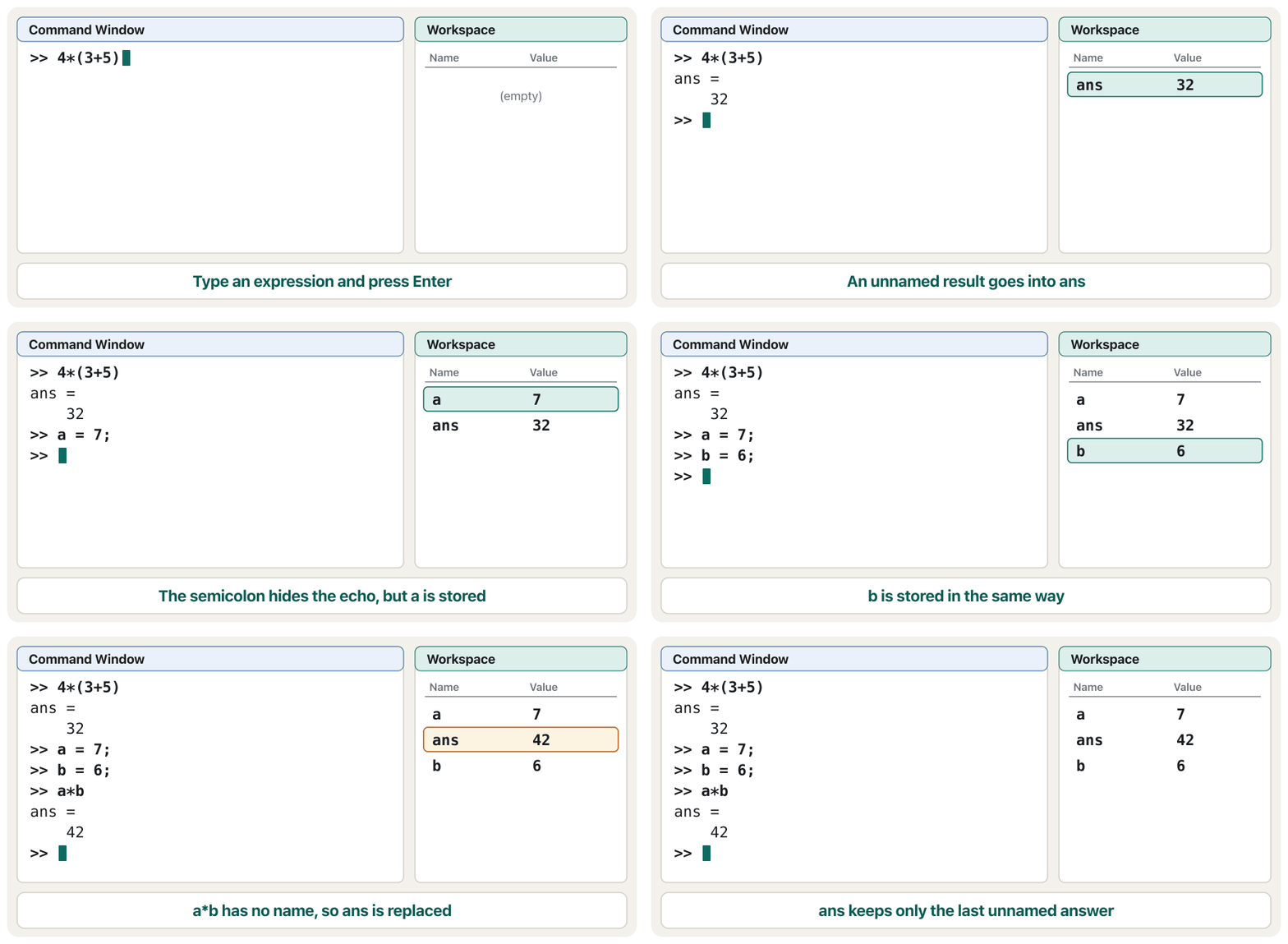
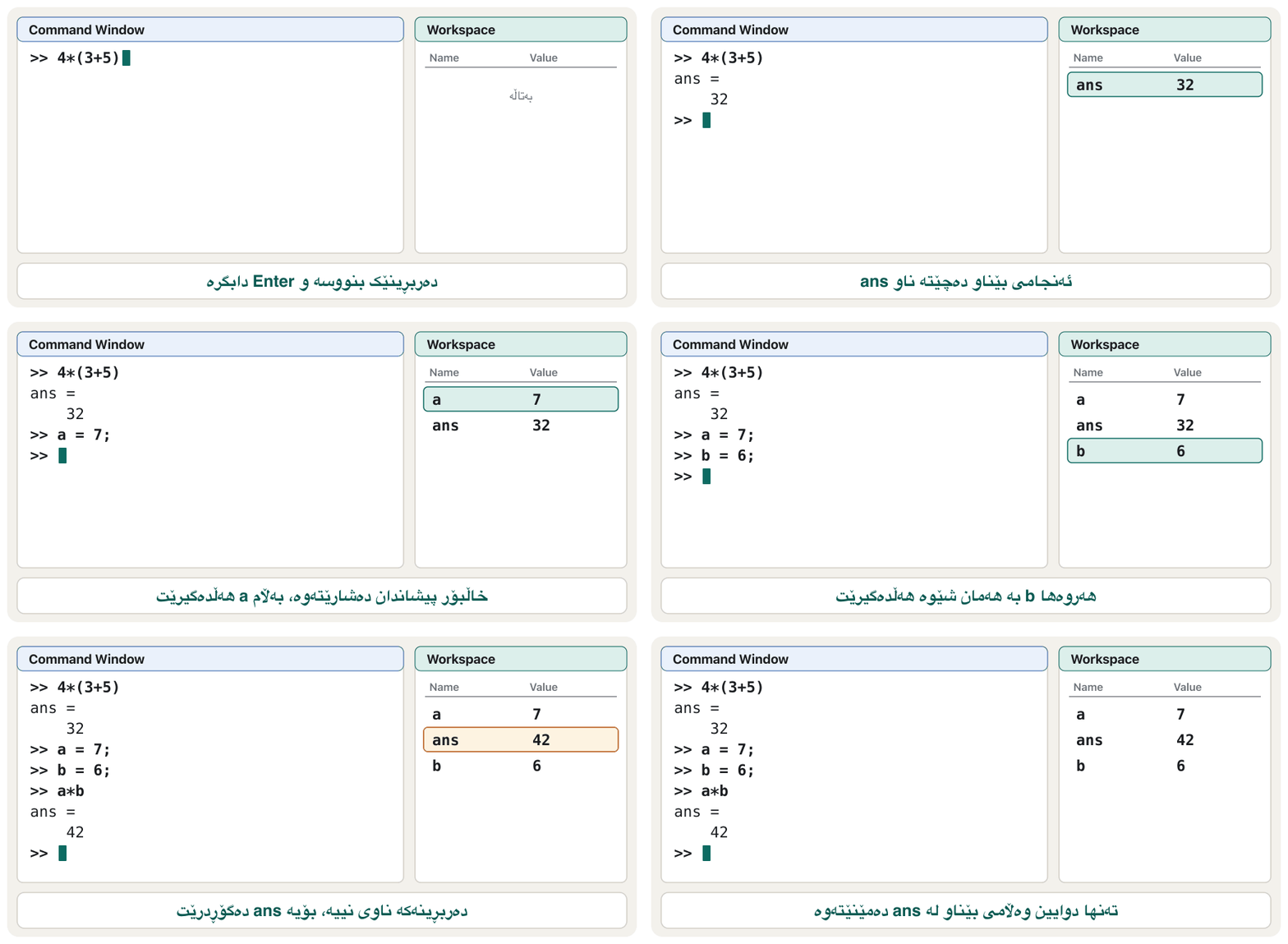
>> 4*(3+5)
ans =
    32
>> a = 7;
>> b = 6;
>> a*b
ans =
    42
>>
Explain the codeڕوونکردنەوەی کۆدەکە
- Lineدێڕی 1-3
An expression with no name: the answer goes into
ans. The brackets are worked out first: , then .بێ ناو: وەڵامەکە دەچێتە ناو
ans. سەرەتا ناو کەوانەکە: ، پاشان .- Lineدێڕی 4-5
a = 7;stores 7 ina. The at the end hides the echo, so nothing is printed — butanow exists.a = 7;ژمارە 7 لەaـدا هەڵدەگرێت. لە کۆتاییدا دووبارەکردنەوەکە دەشارێتەوە، بۆیە هیچ چاپ ناکرێت — بەڵامaئێستا هەیە.- Lineدێڕی 6-8
a*bhas no name, soansis replaced: it now holds 42, and 32 is gone.a*bناوی نییە، بۆیەansدەگۆڕدرێت: ئێستا 42 هەڵدەگرێت و 32 نەما.- Lineدێڕی 9
The prompt is back: MATLAB waits for the next command.
گەڕایەوە: MATLAB چاوەڕێی داهاتوو دەکات.
Without the semicolon, MATLAB repeats the assignment back to you: typing a = 7 prints a = and 7. With the semicolon the value is stored silently. Either way, the Workspace panel now lists a, b and ans. If you know Python, the Command Window is MATLAB's version of Python's interactive shell — but Python's prompt is >>>, MATLAB's is >>.
بێ ، MATLAB بۆت دووبارە دەکاتەوە: نووسینی a = 7 ئەمانە چاپ دەکات: a = و 7. بە ، بە بێدەنگی هەڵدەگیرێت. لە هەردوو حاڵەتدا پانێڵی Workspace ئێستا a، b و ans لیست دەکات. ئەگەر Python دەزانیت: Command Window وەک شێڵی کارلێکی Python وایە، بەڵام Python >>>ـە و هی MATLAB >>.
A MATLAB beginner course by Phil Parisi: the Command Window, variables, vectors and matrices, indexing, scripts, sections and naming rules, each in short parts.
کۆرسێکی سەرەتایی MATLAB لەلایەن Phil Parisi: Command Window، ، و ، ، ، بەشەکان و یاساکانی ناونان، هەر یەکەیان بە بەشێکی کورت.
Watch 0:27-2:47: the Command Window as a calculator, the ans variable, clc to clear the screen and clearvars to empty the Workspace. The desktop is the 2022 layout.
لە 0:27 تا 2:47 سەیر بکە: Command Window وەک ، ans، clc بۆ پاککردنەوەی Command Window و clearvars بۆ بەتاڵکردنی . هی ساڵی 2022ـە و کەمێک لە ئێستا جیاوازە.
Your first commandsیەکەم فەرمانەکانت
ans: the last answerans: دوایین وەڵام
ans is an ordinary variable that MATLAB fills for you. You can use it in the next command — and the next unnamed result replaces it. So keep anything you need in a variable with your own name.
ans ئاساییە کە MATLAB بۆت پڕی دەکاتەوە. دەتوانیت لە دواتردا بەکاری بهێنیت — و ئەنجامی بێناوی دواتر جێگەی دەگرێتەوە. بۆیە هەر شتێک پێویستت پێیەتی لە بە ناوی خۆت هەڵبگرە.
ans, then a name of your ownبەکارهێنانی ans، پاشان ناوێکی خۆتMATLABType in a terminalلە تێرمیناڵدا بینووسە5^2
ans + 1
area = 4*(3+5)ans =
25
ans =
26
area =
32Explain the codeڕوونکردنەوەی کۆدەکە
- Lineدێڕی 1
^is the power: 5 squared.^: 5 بە 2.- Lineدێڕی 2
answas 25, so the newansis 26.ans25 بوو، بۆیەansـی نوێ 26ـە.- Lineدێڕی 3
A named result does not touch
ans;areakeeps 32 until you change it.ئەنجامێکی ناودار دەست لە
ansنادات؛area32 دەهێڵێتەوە تا خۆت دەیگۆڕیت.
Getting help and learning moreیارمەتی وەرگرتن و زیاتر فێربوون
Every MATLAB has a page in the with its rules and examples. Use the search box at the top right, or type doc and a function name: doc sqrt opens the page of sqrt. A short help text inside the Command Window (help sqrt) and the other session commands are taught in the next lesson.
هەموو لە MATLABـدا پەڕەیەکی لە هەیە بە یاسا و نموونەکانییەوە. سندووقی گەڕان لە سەرەوەی لای ڕاست بەکار بهێنە، یان doc و ناوی بنووسە: doc sqrt پەڕەی sqrt دەکاتەوە. دەقێکی کورتی یارمەتی لەناو Command Window (help sqrt) و تری دانیشتن لە وانەی داهاتوودا دەخوێنیت.
MATLAB Onramp is MathWorks' self-paced introduction. MathWorks' training FAQ says Onramp courses are free for everyone; you need a MathWorks account and a web browser. Its modules cover commands, the desktop and Editor, vectors and matrices, indexing, array calculations, function calls, the documentation, plots, importing data, logical arrays and programming, and end with a final project.
MATLAB Onramp کۆرسی دەستپێکی MathWorksـە کە بە خێرایی خۆت دەیخوێنیت. پرسیارە باوەکانی ڕاهێنانی MathWorks دەڵێن کۆرسەکانی Onramp بۆ هەموو کەس بێبەرانبەرن؛ MathWorks و پێویستە. بەشەکانی باسی ، ڕووکار و Editor، و ، ، هەژمارکردن لەسەر ، ، ، ، هێنانی ، لۆجیکی و دەکەن و بە پرۆژەیەکی کۆتایی تەواو دەبێت.
For Octave, the manual is at docs.octave.org, and help sqrt works in Octave's Command Window too.
بۆ Octave، ڕێبەرەکەی لە docs.octave.orgـە و help sqrt لە Command Windowـی Octaveـیشدا کار دەکات.
A MATLAB beginner course by Phil Parisi: the Command Window, variables, vectors and matrices, indexing, scripts, sections and naming rules, each in short parts.
کۆرسێکی سەرەتایی MATLAB لەلایەن Phil Parisi: Command Window، ، و ، ، ، بەشەکان و یاساکانی ناونان، هەر یەکەیان بە بەشێکی کورت.
Watch 38:32-40:32: finding a function with the fx button, help min in the Command Window, doc min for the online documentation and the search bar.
لە 38:32 تا 40:32 سەیر بکە: دۆزینەوەی بە fx، help min لە Command Window، doc min بۆ ئۆنلاین و شریتی گەڕان.
Common mistakesهەڵە باوەکان
| Mistakeهەڵە | What happensچی ڕوودەدات | Fixچارەسەر |
|---|---|---|
Typing the >> yourself, for example when copying a line from a book: >> 4*(3+5)نووسینی >> بە دەستی خۆت، بۆ نموونە کاتێک دێڕێک لە کتێبێک کۆپی دەکەیت: >> 4*(3+5) | MATLAB shows an error: the extra >> is not part of the language.MATLAB پیشان دەدات: >>ـی زیادە بەشێک نییە لە زمانەکە. | Type only what comes after the prompt.تەنها ئەوە بنووسە کە لە دوای دێت. |
Expecting x = 3*4; to print the answerچاوەڕوانیی ئەوەی x = 3*4; وەڵامەکە چاپ بکات | Nothing appears.هیچ دەرناکەوێت. | Leave out the ;, or type x on its own to see the value.; لابدە، یان تەنها x بنووسە بۆ بینینی . |
Writing Python's prompt >>> in notes and screenshotsنووسینی Python >>> لە تێبینی و وێنەکاندا | Readers think the code is Python.خوێنەران وا دەزانن کۆدەکە Pythonـە. | MATLAB's prompt has two arrows: >>. MATLAB دوو تیری هەیە: >>. |
Counting on ans to keep an old resultپشتبەستن بە ans بۆ هێشتنەوەی ئەنجامێکی کۆن | The next unnamed result replaces it.ئەنجامی بێناوی دواتر جێگەی دەگرێتەوە. | Give results your own names: area = 4*(3+5).ناوی خۆت بدە بە ئەنجامەکان: area = 4*(3+5). |
| Looking for the windows of an old pictureگەڕان بە دوای وێنەیەکی کۆندا | “Current Folder” or “Command History” seems to be missing.وا دیارە «Current Folder» یان «Command History» نییە. | Look for the jobs: the Files panel, the Workspace panel, the ↑ key.بە دوای ئەرکەکاندا بگەڕێ: پانێڵی Files، پانێڵی Workspace، دوگمەی ↑. |
Practiceڕاهێنان
In MATLAB Online or Octave, type (12 + 8)/4 and press Enter. Then type ans*3. What do you see each time, and why?
لە MATLAB Online یان Octave، (12 + 8)/4 بنووسە و Enter دابگرە. پاشان ans*3 بنووسە. هەر جارێک چی دەبینیت و بۆچی؟
Show answerوەڵامەکە پیشان بدە
(12 + 8)/4
ans*3ans =
5
ans =
15Explain the codeڕوونکردنەوەی کۆدەکە
- Lineدێڕی 1
The brackets go first: , stored in
ans.سەرەتا کەوانەکە: ، کە لە
ansـدا هەڵدەگیرێت.- Lineدێڕی 2
answas 5, so becomes the newans.ans5 بوو، بۆیە دەبێتەansـی نوێ.
Predict what MATLAB prints for these three lines, and what the Workspace panel lists afterwards. Then check.
x = 10;
y = 4
x - y
پێشبینی بکە MATLAB بۆ ئەم سێ دێڕە چی چاپ دەکات و پانێڵی Workspace دواتر چی لیست دەکات. پاشان بیپشکنە.
x = 10;
y = 4
x - y
Show answerوەڵامەکە پیشان بدە
x = 10;
y = 4
x - yy =
4
ans =
6Line 1 prints nothing because of the semicolon. Line 2 echoes y. Line 3 has no name, so the answer goes into ans. The Workspace lists ans, x and y.
دێڕی 1 بەهۆی هیچ چاپ ناکات. دێڕی 2 y دووبارە دەکاتەوە. دێڕی 3 ناوی نییە، بۆیە وەڵامەکە دەچێتە ناو ans. Workspace ئەمانە لیست دەکات: ans، x و y.
Explain in two sentences what MATLAB stands for and how MATLAB stores the single number 3.
بە دوو ڕستە ڕوونی بکەرەوە MATLAB کورتکراوەی چییە و MATLAB ژمارەی تاکی 3 چۆن هەڵدەگرێت.
Show answerوەڵامەکە پیشان بدە
MATLAB means MATrix LABoratory, because its basic kind of data is a matrix (an array). The number 3 is stored as a matrix: an array with one row and one column.
MATLAB واتە MATrix LABoratory، چونکە جۆرە بنەڕەتییەکەی تێیدا ()ـە. ژمارە 3 وەک هەڵدەگیرێت: بە یەک ڕیز و یەک ستوون.
Open MATLAB Online (free version) or install GNU Octave. Type 4*(3+5) and compare what you see with the session in this lesson. If you use Octave, what is different?
MATLAB Online (وەشانی بێبەرانبەر) بکەرەوە یان GNU Octave جێگیر بکە. 4*(3+5) بنووسە و ئەوەی دەیبینیت لەگەڵ دانیشتنەکەی ئەم وانەیە بەراورد بکە. ئەگەر Octave بەکار دەهێنیت، چی جیاوازە؟
Show answerوەڵامەکە پیشان بدە
MATLAB shows ans = and then 32 on the next line (with blank lines around it unless you typed format compact). Octave shows ans = 32 on one line. The value is the same.
MATLAB ans = پیشان دەدات و پاشان 32 لە دێڕی دواتردا (بە دێڕی بەتاڵ لە دەوریدا، مەگەر format compactـت نووسیبێت). Octave لە یەک دێڕدا ans = 32 پیشان دەدات. هەمان شتە.
Which part of the MATLAB desktop do you use to (a) type a single command, (b) see the value of a variable, (c) write a program you want to save, (d) find your .m files?
کام بەشی ڕووکاری MATLAB بەکار دەهێنیت بۆ (أ) نووسینی تاک، (ب) بینینی ، (ج) نووسینی کە دەتەوێت پاشەکەوتی بکەیت، (د) دۆزینەوەی فایلە .mـەکانت؟
Show answerوەڵامەکە پیشان بدە
- (a) the Command Window, (b) the Workspace panel, (c) the Editor, (d) the Files panel (Current Folder in older releases).
- (أ) Command Window، (ب) پانێڵی Workspace، (ج) Editor، (د) پانێڵی Files (لە وەشانە کۆنەکاندا Current Folder).
Summaryپوختە
- MATLAB (MATrix LABoratory) is a language and desktop for technical computing. Every value is an array; one number is a matrix.
- It is used for maths, algorithms, modelling and simulation, data analysis and graphs, and apps with a GUI — in universities (especially engineering) and industry. Toolboxes add functions for special fields.
- MATLAB is paid. Free ways to practise: MATLAB Online (free version, 5 GB MATLAB Drive) and GNU Octave (free, GPL).
- The desktop: Command Window (
>>), Workspace panel (variables), Files panel, Editor (scripts), toolstrip (Home, Plots, Apps). - An unnamed result goes into
ans, which the next unnamed result replaces. A;at the end hides the output but the command still runs.
- MATLAB (MATrix LABoratory) زمان و ڕووکارێکە بۆ ژمێرکاریی تەکنیکی. هەموو ؛ یەک ژمارە ـە.
- بۆ بیرکاری، ، مۆدێل و لاساییکردنەوە، شیکردنەوەی و ، هەروەها ئەپ بە بەکار دەهێنرێت — لە زانکۆ (بەتایبەتی ئەندازیاری) و پیشەسازیدا. Toolboxـەکان بۆ بوارە تایبەتەکان زیاد دەکەن.
- MATLAB بە پارەیە. ڕێگە بێبەرانبەرەکانی ڕاهێنان: MATLAB Online (وەشانی بێبەرانبەر، 5 GB لە MATLAB Drive) و GNU Octave (بێبەرانبەر، GPL).
- ڕووکار: Command Window (
>>)، پانێڵی Workspace ()، پانێڵی Files، Editor ()، Toolstrip (Home، Plots، Apps). - ئەنجامی بێناو دەچێتە ناو
ansو ئەنجامی بێناوی دواتر جێگەی دەگرێتەوە.;لە کۆتاییدا دەشارێتەوە، بەڵام هەر جێبەجێ دەکرێت.
What is stored in ans after a = 7; b = 6; a*b?دوای a = 7; b = 6; a*b چی لە ansـدا هەڵگیراوە؟
42 — the result of a*b, which has no name of its own.
42 — ئەنجامی a*b، کە ناوی تایبەتی خۆی نییە.
Name two free ways to run MATLAB code.دوو ڕێگەی بێبەرانبەر بۆ جێبەجێکردنی کۆدی MATLAB ناو ببە.
The free version of MATLAB Online (in a web browser) and GNU Octave (installed on your computer).
وەشانی بێبەرانبەری MATLAB Online (لەناو ) و GNU Octave (لەسەر جێگیر دەکرێت).
Why is MATLAB good at engineering calculations?بۆچی MATLAB لە هەژمارکردنی ئەندازیاریدا باشە؟
It is built around arrays, so one command can work on a whole list or table of numbers, and it has many built-in maths functions and toolboxes.
لەسەر بنیات نراوە، بۆیە یەک دەتوانێت لەسەر هەموو لیستێک یان خشتەیەکی ژمارە کار بکات. هەروەها زۆر بیرکاری و toolboxـی هەیە.
Videoڤیدیۆ
Watch a videoسەیری ڤیدیۆیەک بکە
A video that viewers liked a lot and praised in their comments, chosen for this lesson.ڤیدیۆیەک کە بینەران زۆریان پێ خۆش بووە و لە کۆمێنتەکانیاندا ستایشیان کردووە، بۆ ئەم وانەیە هەڵبژێردراوە.
A calm MATLAB overview: what MATLAB is, the desktop, arithmetic, variables, display formats, clearing variables, built-in constants and functions.
پێداچوونەوەیەکی هێمنی MATLAB: MATLAB چییە، ، ، ، شێوازەکانی پیشاندانی ژمارە، سڕینەوەی ، و .
Watch 1:49-4:58: what MATLAB is (matrix laboratory by MathWorks, live editor, apps, toolboxes) and a tour of the desktop: tabs, current folder, Command Window, Workspace and quitting.
لە 1:49 تا 4:58 سەیر بکە: MATLAB چییە (matrix laboratory، بەرهەمی MathWorks، Live Editor، و toolboxـەکان) و گەشتێک بە ناو : ، ئێستا، Command Window، و داخستنی MATLAB.
Lesson complete!وانەکە تەواو بوو!
Well done. Review the key terms, then go on to the next lesson.دەستخۆش. سەیرێکی زاراوە سەرەکییەکان بکەرەوە، پاشان بڕۆ بۆ وانەی داهاتوو.
Key termsزاراوە سەرەکییەکان
MATLAB as a Calculator: Operators, Variables and FormatsMATLAB وەک حاسیبە: کارپێکەرەکان، گۆڕاوەکان و شێوەکانی پیشاندان
Related lecturesوانە پەیوەندیدارەکان
- Programming Languagesزمانەکانی بەرنامەسازی
- MATLAB as a Calculator: Operators, Variables and FormatsMATLAB وەک حاسیبە: کارپێکەرەکان، گۆڕاوەکان و شێوەکانی پیشاندان
- Welcome to Python: Install and Runبەخێربێیت بۆ Python: جێگیرکردن و جێبەجێکردن
- Algebra, Boolean Logic and Matrices Inside the Computerجەبر، لۆجیکی بوول و ماتریکسەکان لەناو کۆمپیوتەردا
References and further readingسەرچاوەکان و خوێندنەوەی زیاتر
- MathWorks: Desktop Basics (Get Started with MATLAB, R2026b)
- MathWorks: MATLAB product page
- MathWorks: MATLAB Online (free version, MATLAB Drive)
- MathWorks: MATLAB Onramp
- MathWorks: Online Training Courses FAQ (Onramp courses are free)
- MathWorks: Create Scripts (New Script, edit, Run)
- MathWorks: Format Output (loose and compact line spacing)
- GNU Octave: home page
- GNU Octave: Download
- GNU Octave manual: Octave Workspace Windows
This lecture is a first edition. The Kurdish text and terminology are waiting for review by Kurdish IT teachers.ئەم وانەیە چاپی یەکەمە. دەقە کوردییەکە و زاراوەکانی چاوەڕێی پێداچوونەوەی مامۆستایانی کوردی بواری IT ن.