MATLABMATLAB · Chapterبەش 3 · Lectureوانە 3.2
MATLAB as a Calculator: Operators, Variables and FormatsMATLAB وەک حاسیبە: کارپێکەرەکان، گۆڕاوەکان و شێوەکانی پیشاندان
Use the Command Window as a calculator: the six arithmetic operators, the order of precedence and its traps (8^1/3, -2^2, 2^3^2), long commands, variables and their names, special values such as pi, eps, Inf and NaN, display formats, data types and round-off, and the commands that manage your session.
Command Window وەک بەکار بهێنە: شەش ، و تەڵەکانی (8^1/3، -2^2، 2^3^2)، درێژ، و ناوەکانیان، ناوە تایبەتەکانی وەک pi، eps، Inf و NaN، شێوەکانی پیشاندان، و ، هەروەها بەڕێوەبردنی دانیشتن.
What you will learnچی فێر دەبیت
- Calculate with
+ - * / \ ^and explain left division. - Predict results using MATLAB's order of precedence, including the power and unary-minus traps.
- Create variables with valid names, and show or hide results with commas and semicolons.
- Choose a display format and explain that it never changes the stored value.
- Name MATLAB's main data types and explain round-off in doubles.
- Manage the session with clc, clear, who, whos, exist and help.
- بە
+ - * / \ ^هەژمار بکەیت و چەپ ڕوون بکەیتەوە. - ئەنجامەکان بە پێی لە MATLABـدا پێشبینی بکەیت، تەڵەکانی و نیشانەی سالبیشەوە.
- بە ناوی دروست دروست بکەیت و بە کۆما و ئەنجامەکان پیشان بدەیت یان بیانشاریتەوە.
- شێوەیەکی پیشاندان هەڵبژێریت و ڕوونی بکەیتەوە کە هەرگیز هەڵگیراو ناگۆڕێت.
- سەرەکی لە MATLABـدا ناو ببەیت و لە
doubleـدا ڕوون بکەیتەوە. - دانیشتنەکە بە clc، clear، who، whos، exist و help بەڕێوە ببەیت.
The arithmetic operatorsکارپێکەرە ژمێرەییەکان
At the >> prompt MATLAB works like a scientific calculator — and so do GNU Octave and the free version of MATLAB Online, where every example of this lesson runs too. It has six :
لە دوای >>، MATLAB وەک زانستی کار دەکات؛ GNU Octave و وەشانی بێبەرانبەری MATLAB Onlineـیش بە هەمان شێوەن و هەموو نموونەکانی ئەم وانەیە لەوانیشدا کار دەکەن. شەش بەکار دەهێنێت:
| Operationکار | Symbolهێما | Exampleنموونە | Resultئەنجام |
|---|---|---|---|
| Additionکۆکردنەوە | + | 9 + 4 | 13 |
| Subtractionلێدەرکردن | - | 9 - 4 | 5 |
| Multiplicationلێکدان | * | 9 * 4 | 36 |
| Right division (ئاسایی) | / | 8 / 5 | 1.6000 |
| Left division چەپ | \ | 5 \ 8 | 1.6000 |
| Power | ^ | 2 ^ 5 | 32 |
Two of them need a closer look. Left division a\b means b divided by a: the number on the side the backslash leans towards is divided into the other one. So 5\8 is . For single numbers you will rarely need it, but for matrices it solves systems of equations — that use comes in the lesson on matrix operations. Power is ^: 2^5 is .
دوانیان پێویستیان بە سەرنجی زیاترە. چەپ a\b واتە b دابەش بە a: ئەو ژمارەیەی هێڵە لارەکە بەرەو لای ئەو دەچەمێتەوە، دەبێتە دابەشکەر. کەواتە 5\8 واتە . بۆ ژمارەی تاک کەم پێویستت پێی دەبێت، بەڵام بۆ پێکەوە چارەسەر دەکات — ئەو بەکارهێنانە لە وانەی کارەکانی ماتریکس دێت. بە ^ دەنووسرێت: 2^5 دەکاتە .
9 + 4
8 / 5
5 \ 8
2 ^ 5ans =
13
ans =
1.6000
ans =
1.6000
ans =
32Explain the codeڕوونکردنەوەی کۆدەکە
- Lineدێڕی 2-3
8/5and5\8give the same 1.6000: both divide 8 by 5.8/5و5\8هەمان 1.6000 دەدەن: هەردووکیان 8 بە 5 دابەش دەکەن.- Lineدێڕی 4
Whole-number answers are shown without decimals; others get four decimals (more about this in Display formats).
وەڵامی بێ ژمارەی دوای پیشان دەدرێت؛ ئەوانی تر چوار ژمارەی دوای وەردەگرن (زیاتر لە شێوەکانی پیشاندان).
In Kurdish: using MATLAB as a calculator with + - * / ^ and ans, then radians versus degrees with sin, sind, cos and cosd.
بە کوردی: بەکارهێنانی MATLAB وەک بە + - * / ^ و ans، پاشان بەرامبەر بە sin، sind، cos و cosd.
Kurdish (Sorani). Watch 0:00-5:40: + - * / ^ and ans in the Command Window: 4-5, 2340745, ans300, ans+10, 3^67 (shown as 9.2709e+31) and 2/3.
ڤیدیۆیەکی کوردی (سۆرانی)، لە 0:00 تا 5:40 سەیر بکە: + - * / ^ و ans لە Command Window: 4-5، 2340*745، ans*300، ans+10، 3^67 (کە وەک 9.2709e+31 پیشان دەدرێت) و 2/3.
The arithmetic operatorsکارپێکەرە ژمێرەییەکان
Working like a calculatorکارکردن وەک حاسیبە
Here are six calculations of the kind the course notes practise, with new numbers. Read each line and predict the answer before you look.
ئەمە شەش هەژمارکردنە لەو جۆرەی تێبینییەکانی وانەکە ڕاهێنانی پێدەکەن، بە ژمارەی نوێ. هەر دێڕێک بخوێنەوە و پێش سەیرکردن وەڵامەکە پێشبینی بکە.
6 + 9/3
(6 + 9)/3
5 + 7/4 + 1
4^3/2
8^(1/3) + 81^0.25
8^1/3 + 81^0.25ans =
9
ans =
5
ans =
7.7500
ans =
32
ans =
5
ans =
5.6667Explain the codeڕوونکردنەوەی کۆدەکە
- Lineدێڕی 1-2
Division goes before addition, unless brackets say otherwise: , but .
پێش کۆکردنەوە دەکرێت، مەگەر کەوانە شتێکی تر بڵێت: ، بەڵام .
- Lineدێڕی 3
first, then .
سەرەتا ، پاشان .
- Lineدێڕی 4
The power first: , then .
سەرەتا : ، پاشان .
- Lineدێڕی 5
8^(1/3)is the cube root of 8, which is 2;81^0.25is the fourth root of 81, which is 3.8^(1/3)واتە و81^0.25واتە .- Lineدێڕی 6
Without brackets: , then . A very different answer!
بێ کەوانە: ، پاشان . وەڵامێکی زۆر جیاواز!
Order of precedenceپێشینەیی کارپێکەرەکان
When a line has several operators, MATLAB does not simply go from left to right. It follows an order of precedence — the same idea as in school maths, with one detail to remember:
کاتێک دێڕێک چەند تێدایە، MATLAB تەنها لە چەپەوە بۆ ڕاست ناڕوات. ڕیزبەندیی دەگرێتە بەر — هەمان بیرۆکەی بیرکاریی قوتابخانە، بە یەک وردەکاری کە دەبێت لەبیرت بێت:
- Brackets
( )first — the innermost pair first. - Power
^. - Unary minus — a minus sign in front of a number, as in
-2. - Multiplication and division
* / \. - Addition and subtraction
+ -.
- کەوانە
( )یەکەم — سەرەتا ناوەوەترین جووت. - ، واتە
^. - نیشانەی سالب — نیشانەی کەم لە پێش ژمارەیەک، وەک
-2. - لێکدان و
* / \. - کۆکردنەوە و لێدەرکردن
+ -.
Operators on the same level are worked out from left to right. When you are not sure, add brackets: they cost nothing and make the meaning clear to every reader.
لە هەمان ئاست لە چەپەوە بۆ ڕاست ئەنجام دەدرێن. کاتێک دڵنیا نیت، کەوانە زیاد بکە: هیچیان تێناچێت و واتاکە بۆ هەموو خوێنەرێک ڕوون دەکەنەوە.
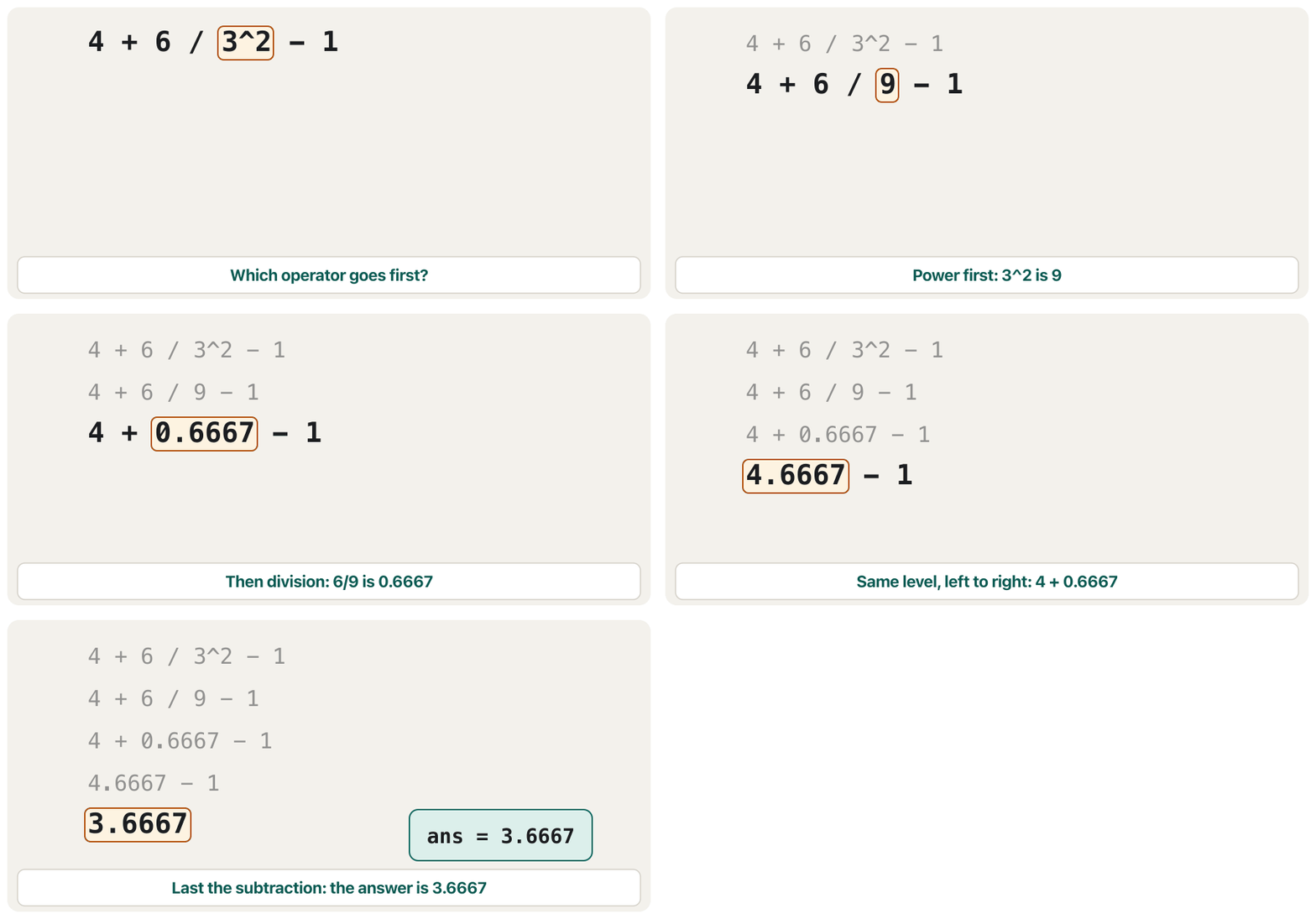
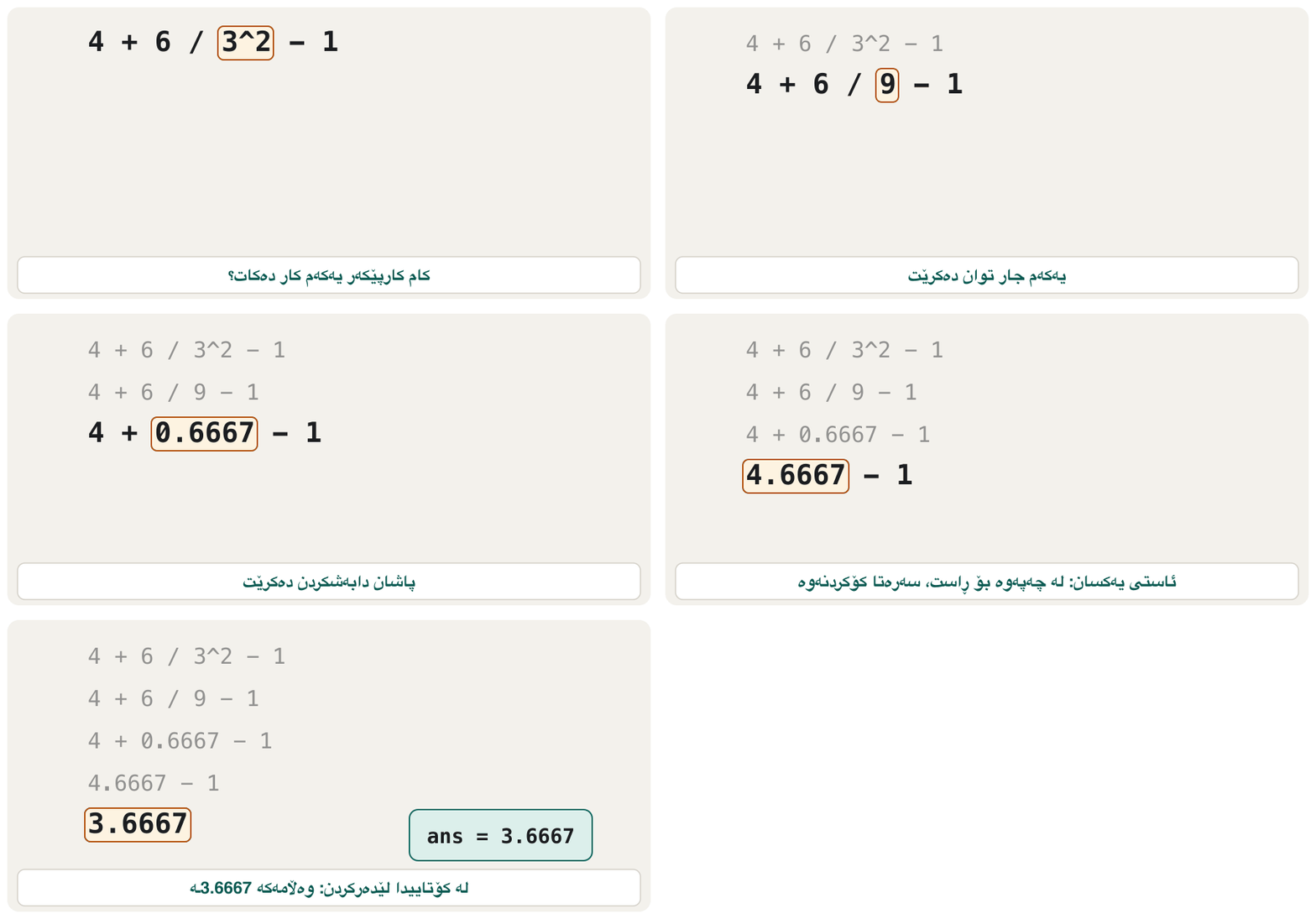
Order of precedenceپێشینەیی کارپێکەرەکان
Three precedence trapsسێ تەڵەی پێشینەیی
Three results surprise almost every beginner. Each one follows from the ladder above.
سێ ئەنجام نزیکەی هەموو سەرەتاکارێک سەرسام دەکەن. هەریەکەیان لە پەیژەکەی سەرەوە دەردەچێت.
8^1/3
8^(1/3)
-2^2
(-2)^2
2^3^2
2^(3^2)ans =
2.6667
ans =
2
ans =
-4
ans =
4
ans =
64
ans =
512Explain the codeڕوونکردنەوەی کۆدەکە
- Lineدێڕی 1-2
Trap 1. The power comes before the division, so
8^1/3is(8^1)/3. To take a root, put the fraction in brackets.تەڵەی 1. پێش دەکرێت، بۆیە
8^1/3واتە(8^1)/3. بۆ ڕەگ دەرهێنان، بخە ناو کەوانەوە.- Lineدێڕی 3-4
Trap 2. The power comes before the unary minus, so
-2^2is . Only(-2)^2squares .تەڵەی 2. پێش نیشانەی سالب دەکرێت، بۆیە
-2^2واتە . تەنها(-2)^2ژمارە بەرز دەکاتەوە بۆ 2.- Lineدێڕی 5-6
Trap 3. Two powers are worked from left to right in MATLAB: . In maths books means — write the brackets to get that.
تەڵەی 3. دوو لە MATLABـدا لە چەپەوە بۆ ڕاست ئەنجام دەدرێن: . لە کتێبی بیرکاریدا واتە — بۆ ئەوە کەوانەکە بنووسە.
If you know Python: Python writes the power as ** (Python's power operator), also puts it above the unary minus (-2**2 is there too), but works 2**3**2 from the right and gets 512 (Python's precedence).
ئەگەر Python دەزانیت: Python بە ** دەنووسێت (کارپێکەری توان لە Python) و ئەویش لە سەرووی نیشانەی سالبەوە دایدەنێت (-2**2 لەوێش ـە)، بەڵام 2**3**2 لە ڕاستەوە ئەنجام دەدات و 512 دەدات (پێشینەیی کارپێکەرەکان لە Python).
Long commands: ...فەرمانەکانی درێژ: ...
A command can be too long for one line. Type three dots ... at the end of the line, press Enter, and go on typing: MATLAB reads both lines as one command.
لەوانەیە بۆ یەک دێڕ زۆر درێژ بێت. سێ خاڵ ... لە کۆتایی دێڕەکەدا بنووسە، Enter دابگرە و بەردەوام بە لە نووسین: MATLAB هەردوو دێڕەکە وەک یەک دەخوێنێتەوە.
The course notes use this to add up the first four terms of a famous series for the sine. With a new angle, (that is ):
تێبینییەکانی وانەکە ئەمە بەکار دەهێنن بۆ کۆکردنەوەی چوار زاراوەی یەکەمی زنجیرەیەکی بەناوبانگ بۆ . بە گۆشەیەکی نوێ، (واتە ):
The first four terms of the sine series ( in radians).
چوار زاراوەی یەکەمی زنجیرەی ( بە ).
0.5236 - 0.5236^3/(1*2*3) + 0.5236^5/(1*2*3*4*5) ...
    - 0.5236^7/(1*2*3*4*5*6*7)
sin(pi/6)ans =
0.5000
ans =
0.5000Explain the codeڕوونکردنەوەی کۆدەکە
- Lineدێڕی 1-2
The
...joins the two lines. The factorials are written as products such as1*2*3....دوو دێڕەکە پێکەوە دەلکێنێت. وەک لێکدان نووسراون، وەک1*2*3.- Lineدێڕی 3
MATLAB's own sine function gives the same 0.5000 to four decimals. You will meet
sinin Built-in maths functions.خودی MATLAB هەمان 0.5000 تا چوار ژمارەی دوای دەدات.
sinلە کردارە ئامادەکانی بیرکاری دەناسیت.
Variables: giving a value a nameگۆڕاوەکان: ناو دان بە نرخێک
A is a name for a value kept in . You create one with name = expression. The = is the operator: it means “work out the right side, then store the result in the name on the left”. It is not an equation — see “=” in algebra and in programming. That is why x = x + 1 makes sense: take the old x, add 1, and store the result back in x.
ناوێکە بۆ کە لە هەڵدەگیرێت. بە name = expression دروستی دەکەیت. = : واتە «لای ڕاست ئەنجام بدە، پاشان ئەنجامەکە لەو ناوەدا هەڵبگرە کە لە لای چەپە». ئەمە نییە — بڕوانە «=» لە جەبر و لە بەرنامەسازیدا. بۆیە x = x + 1 واتای هەیە: xـی کۆن وەربگرە، 1ی بۆ زیاد بکە و ئەنجامەکە دیسان لە xـدا هەڵبگرە.
width = 4;
len = 5;
area = width*len
x = 5;
x = x + 1area =
20
x =
6Explain the codeڕوونکردنەوەی کۆدەکە
- Lineدێڕی 1-3
A room 4 m wide and 5 m long has an area of . The names say what the numbers mean.
ژوورێک بە پانیی 4 m و درێژیی 5 m ڕووبەری ـە. ناوەکان دەڵێن ژمارەکان چ واتایەکیان هەیە.
- Lineدێڕی 4-5
The right side
x + 1is 6; then 6 is stored inx, replacing 5.لای ڕاست
x + 1دەکاتە 6؛ پاشان 6 لەxـدا هەڵدەگیرێت و جێگەی 5 دەگرێتەوە.
A variable must exist before you use it. If you type height*2 before giving height a value, MATLAB stops with an saying it does not recognise the name height.
دەبێت پێش بەکارهێنان هەبێت. ئەگەر پێش ئەوەی بدەیت بە height، height*2 بنووسیت، MATLAB بە دەوەستێت کە دەڵێت ناوی height ناناسێتەوە.
Variables: giving a value a nameگۆڕاوەکان: ناو دان بە نرخێک
Rules for variable namesیاساکانی ناونانی گۆڕاوەکان
- A name starts with a letter.
- After that it may have letters, digits and the
_— no spaces, no-, no!. - It must not be a such as
if,fororend(iskeywordlists them all). - It can be long:
namelengthmaxgives the limit — 2048 characters since MATLAB R2025a (older releases allowed 63). Short, clear names are best anyway.
- ناو بە پیتێک دەست پێدەکات.
- دوای ئەوە دەتوانێت پیت، ژمارە و
_ـی تێدا بێت — بێ ، بێ-، بێ!. - نابێت بێت وەک
if،forیانend(iskeywordهەموویان لیست دەکات). - دەتوانێت درێژ بێت:
namelengthmaxسنوورەکە دەدات — 2048 لە MATLAB R2025aـەوە (وەشانە کۆنەکان 63یان ڕێگە پێدەدا). ناوی کورت و ڕوون هەر باشترن.
| Nameناو | Valid?دروستە؟ | Whyبۆچی |
|---|---|---|
room_area | yesبەڵێ | letters and an underscoreپیت و |
x6 | yesبەڵێ | starts with a letterبە پیت دەست پێدەکات |
totalMarks | yesبەڵێ | capital letters are allowed inside a nameپیتی گەورە لەناو ناودا ڕێگەپێدراوە |
6x | noنەخێر | starts with a digitبە ژمارە دەست پێدەکات |
room-area | noنەخێر | - is the minus operator- کەمکردنەوەیە |
my area | noنەخێر | a space splits it into two names دەیکات بە دوو ناو |
end | noنەخێر | a keyword |
A MATLAB beginner course by Phil Parisi: the Command Window, variables, vectors and matrices, indexing, scripts, sections and naming rules, each in short parts.
کۆرسێکی سەرەتایی MATLAB لەلایەن Phil Parisi: Command Window، ، و ، ، ، بەشەکان و یاساکانی ناونان، هەر یەکەیان بە بەشێکی کورت.
Watch 1:42:57-1:45:09: good variable names (camelCase or underscores), no keywords such as for, no function names such as sum, and no digit at the start.
لە 1:42:57 تا 1:45:09 سەیر بکە: ناوی باش بۆ ( یان )، نە وەک for، نە ناوی وەک sum و نە لە سەرەتادا.
Variables: giving a value a nameگۆڕاوەکان: ناو دان بە نرخێک
Capital letters matterپیتی گەورە و بچووک جیاوازن
MATLAB is : a and A are two different variables, and the same holds for : sqrt(9) works, Sqrt(9) does not. Avoid names that MATLAB already uses — sum, max, i, pi, ans. A variable named like a function hides that function until you clear the variable. exist name tells you whether a name is free (it answers 0).
MATLAB : a و A دوو جیاوازن و هەمان شت بۆ ڕاستە: sqrt(9) کار دەکات، Sqrt(9) کار ناکات. خۆت لەو ناوانە بپارێزە کە MATLAB پێشتر بەکاریان دەهێنێت — sum، max، i، pi، ans. کە ناوی هەبێت، ئەو دەشارێتەوە تا بە clear لادەبەیت. exist name پێت دەڵێت ئایا ناوێک ئازادە (وەڵامی 0 دەداتەوە).
Variables: giving a value a nameگۆڕاوەکان: ناو دان بە نرخێک
Several commands on one lineچەند فەرمانێک لە یەک دێڕدا
You may put several commands on one line. A comma separates them and shows the result; a separates them and hides it.
دەتوانیت چەند لە یەک دێڕدا دابنێیت. کۆما لێکیان جیا دەکاتەوە و ئەنجامەکە پیشان دەدات؛ لێکیان جیا دەکاتەوە و دەیشارێتەوە.
p = 15, Q = 3; R = (p - Q) + 20 - p/Q*4p =
15
R =
12Explain the codeڕوونکردنەوەی کۆدەکە
- Lineدێڕی 1
p = 15,is shown.Q = 3;is stored but not shown.Rhas nothing after it, so it is shown.p = 15,پیشان دەدرێت.Q = 3;هەڵدەگیرێت بەڵام پیشان نادرێت. لە دوایRهیچ نییە، بۆیە پیشان دەدرێت.- Lineدێڕی 1
. The division and the multiplication are on the same level, so left to right: , then . So .
. و لێکدان لە هەمان ئاستدان، بۆیە لە چەپەوە بۆ ڕاست: ، پاشان . کەواتە .
Note that p and Q are written in different cases. That is allowed, but remember they are different names: q would be a third variable.
سەرنج بدە کە p و Q بە دوو قەبارەی جیاوازی پیت نووسراون. ئەمە ڕێگەپێدراوە، بەڵام لەبیرت بێت کە دوو ناوی جیاوازن: q دەبێتە سێیەم.
Special valuesناوە تایبەتەکان و نرخەکانیان
Some names already have a value when MATLAB starts. You use them often, so learn them now:
هەندێک ناو کاتێک MATLAB دەکرێتەوە پێشتر هەیە. زۆر بەکاریان دەهێنیت، بۆیە ئێستا فێریان بە:
| Nameناو | Meaningواتا | Exampleنموونە |
|---|---|---|
ans | The last unnamed resultدوایین ئەنجامی بێناو | ans |
pi | The number ژمارەی | 2*pi |
eps | The gap between 1 and the next larger stored number: 2.2204e-16. It shows how precise numbers are (see Round-off).بۆشایی نێوان 1 و گەورەترین ژمارەی هەڵگیراوی دوای ئەو: 2.2204e-16. پیشان دەدات ژمارەکان چەند وردن (بڕوانە هەڵەی نزیککردنەوە). | eps |
i, j | The , (see the imaginary unit). MathWorks advises writing 1i in calculations.، (بڕوانە یەکەی خەیاڵی). MathWorks ئامۆژگاری دەکات لە هەژمارکردندا 1i بنووسیت. | 3 + 4i |
Inf | : a result too large to store, such as 1/0 (and -Inf): ئەنجامێک کە زۆر گەورەیە بۆ هەڵگرتن، وەک 1/0 (و -Inf) | 1/0 |
NaN | “Not a Number”: a result with no meaning, such as 0/0«Not a Number»، واتە ژمارە نییە: ئەنجامێکی بێواتا، وەک 0/0 | 0/0 |
1/0
-1/0
0/0
pi
epsans =
Inf
ans =
-Inf
ans =
NaN
ans =
3.1416
ans =
2.2204e-16Explain the codeڕوونکردنەوەی کۆدەکە
- Lineدێڕی 1-3
Dividing by zero does not stop MATLAB: it answers
Inf,-InforNaN, and the calculation goes on with that value.دابەشکردن بەسەر سفردا MATLAB ناوەستێنێت:
Inf،-InfیانNaNدەداتەوە و هەژمارکردنەکە بەو بەردەوام دەبێت.- Lineدێڕی 5
Very small numbers are shown in :
2.2204e-16means .ژمارەی زۆر بچووک بە پیشان دەدرێن:
2.2204e-16واتە .
Display formatsشێوەکانی پیشاندانی ژمارە
MATLAB stores every number with about 16 significant digits, but by default it shows only four decimals. The format command changes how numbers are shown. It never changes the stored value: MathWorks' documentation says formats affect only how numbers appear, not how MATLAB computes or saves them.
MATLAB هەموو ژمارەیەک بە نزیکەی 16 ژمارەی گرنگ هەڵدەگرێت، بەڵام بە شێوەی بنەڕەتی تەنها چوار ژمارەی دوای پیشان دەدات. format شێوەی پیشاندانی ژمارەکان دەگۆڕێت. هەرگیز هەڵگیراوەکە ناگۆڕێت: MathWorks دەڵێت شێوەکان تەنها کار لە دەرکەوتنی ژمارەکان دەکەن، نەک لە هەژمارکردن یان پاشەکەوتکردنیان.
| Commandشێوەی پیشاندان | 250/7 is shown as250/7 بەم شێوەیە پیشان دەدرێت | What you getچی وەردەگریت |
|---|---|---|
format short | 35.7143 | Four decimals — the defaultچوار ژمارەی دوای — بنەڕەتییە |
format long | 35.714285714285715 | 15 decimalsپازدە ژمارەی دوای |
format shortE | 3.5714e+01 | with 4 decimals: e+01 means بە چوار ژمارەی دوای : e+01 واتە |
format longE | 3.571428571428572e+01 | with 15 decimals بە پازدە ژمارەی دوای |
format shortG | 35.714 | Fixed or scientific, whichever is shorter; 5 digitsئاسایی یان زانستی، کامیان کورتتر بێت؛ پێنج ژمارە |
format longG | 35.7142857142857 | The same with 15 digitsهەمان شت بە پازدە ژمارە |
format bank | 35.71 | Two decimals, as for moneyدوو ژمارەی دوای ، وەک بۆ پارە |
format rational | 250/7 | A fraction close to the value کە نزیکە لە |
A format stays until you change it. format default brings back the default display (short, with the default line spacing).
شێوەیەک دەمێنێتەوە تا خۆت دەیگۆڕیت. format default پیشاندانە بنەڕەتییەکە دەگەڕێنێتەوە (short، بە بۆشایی بنەڕەتیی نێوان دێڕەکان).
x = 250/7;
format long
x
format shortE
x
format default
xx = 35.714285714285715 x = 3.5714e+01 x = 35.7143
Explain the codeڕوونکردنەوەی کۆدەکە
- Lineدێڕی 1
xis stored once, with all its digits.xیەک جار هەڵدەگیرێت، بە هەموو ژمارەکانییەوە.- Lineدێڕی 2-7
Each
formatchanges only what you see the next timexis shown.هەر
formatـێک تەنها ئەوە دەگۆڕێت کە جاری داهاتوو کاتێکxپیشان دەدرێت دەیبینیت.
Display formatsشێوەکانی پیشاندانی ژمارە
Format names, then and nowناوی شێوەکان، کۆن و ئێستا
Data types: what kind of value?جۆرەکانی دراوە: چ جۆرە نرخێک؟
Every value in MATLAB has a class — its . Numbers are double unless you ask for something else. Double means double precision: each number takes 64 = 8 of memory (see bytes) and keeps about 16 significant digits. The function class tells you the class of any value.
هەموو لە MATLABـدا classـێکی هەیە — واتە . ژمارەکان doubleـن مەگەر شتێکی تر داوا بکەیت. Double واتە وردیی دووقات: هەر ژمارەیەک 64 = 8 لە دەگرێت (بڕوانە بایتەکان) و نزیکەی 16 ژمارەی گرنگ دەپارێزێت. class هەر پێت دەڵێت.
x = 7;
class(x)
c = 'a';
class(c)
t = true;
class(t)
p = uint8(200);
class(p)ans =
'double'
ans =
'char'
ans =
'logical'
ans =
'uint8'Explain the codeڕوونکردنەوەی کۆدەکە
- Lineدێڕی 1-2
A plain number is a
double.ژمارەیەکی ئاسایی
doubleـە.- Lineدێڕی 3-4
Text in single quotes is a
char(a row of ). Text in double quotes,"a", would be astring.دەق لەناو کۆتەیشنی تاک
charـە (ڕیزێک لە ). دەق لەناو کۆتەیشنی جووت،"a"، دەبێتەstring.- Lineدێڕی 5-6
trueandfalsearelogicalvalues, shown as 1 and 0 ().trueوfalselogicalـن و وەک 1 و 0 پیشان دەدرێن ().- Lineدێڕی 7-8
uint8is an stored in 8 bits.uint8کە لە 8 هەڵدەگیرێت.
Why would anyone want uint8? Eight bits have patterns (how many patterns), so a uint8 holds the whole numbers 0 to 255 in one byte instead of eight. The brightness of each in a photo is stored like this. A uint8 cannot go outside those limits: uint8(300) gives 255, uint8(-5) gives 0, and uint8(12.6) rounds to 13.
بۆچی کەسێک uint8ـی دەوێت؟ هەشت شێوەیان هەیە (چەند شێوە)، بۆیە uint8 لە 0 تا 255 لە یەک هەڵدەگرێت لە جیاتی هەشت. ڕووناکیی هەر لە وێنەیەکدا بەم شێوەیە هەڵدەگیرێت. uint8 ناتوانێت لە نێوان ئەو دوو سنوورە دەربچێت: uint8(300) دەکاتە 255، uint8(-5) دەکاتە 0 و uint8(12.6) بۆ 13 نزیک دەکرێتەوە.
whos: sizes, bytes and classes of the workspacewhos: قەبارە، بایت و classـی شوێنی کاریMATLABType in a terminalلە تێرمیناڵدا بینووسەwhosName Size Bytes Class Attributes ans 1x5 10 char c 1x1 2 char p 1x1 1 uint8 t 1x1 1 logical x 1x1 8 double
Explain the codeڕوونکردنەوەی کۆدەکە
- Lineدێڕی 1
Run after the block above.
whoslists every variable with its size (1x1= one value), its memory in bytes and its class. Adoubletakes 8 bytes, achar2 bytes per character,uint8andlogical1 byte.دوای بلۆکی سەرەوە جێبەجێی بکە.
whosهەموو لەگەڵ قەبارەکەی (1x1= یەک )، بە و classـەکەی لیست دەکات.double8 دەگرێت،charبۆ هەر 2 ،uint8وlogical1 .
Other classes are only named here: single (4 bytes, fewer digits), the integer types int8 … int64 and uint8 … uint64, string, struct (a record with named fields, such as img.width = 120), cell and function_handle.
classـەکانی تر لێرە تەنها ناو دەبرێن: single (4 ، ژمارەی کەمتر)، جۆرەکانی int8 … int64 و uint8 … uint64، string، struct (تۆمارێک بە خانەی ناودار، وەک img.width = 120)، cell و function_handle.
A MATLAB beginner course by Phil Parisi: the Command Window, variables, vectors and matrices, indexing, scripts, sections and naming rules, each in short parts.
کۆرسێکی سەرەتایی MATLAB لەلایەن Phil Parisi: Command Window، ، و ، ، ، بەشەکان و یاساکانی ناونان، هەر یەکەیان بە بەشێکی کورت.
Watch 3:17-5:00: whos shows the class of each variable; numbers are double, 'new' in single quotes is a char and "York" in double quotes is a string.
لە 3:17 تا 5:00 سەیر بکە: whos هەر پیشان دەدات؛ ژمارەکان doubleـن، 'new' (بە ') charـە و "York" (بە ") stringـە.
Data types: what kind of value?جۆرەکانی دراوە: چ جۆرە نرخێک؟
Round-off: why is not exactly هەڵەی نزیککردنەوە: بۆچی ڕێک نییە
A double keeps about 16 digits in binary. Most decimal fractions, such as 0.1, have no exact binary form, so the computer stores the nearest value it can (why this happens). The tiny difference is called a . You can see it in MATLAB:
double نزیکەی 16 ژمارە بە دوانی هەڵدەگرێت. زۆربەی کەرتە دەییەکان، وەک 0.1، شێوەیەکی دوانیی ڕێکیان نییە، بۆیە نزیکترین هەڵدەگرێت کە دەتوانێت (بۆچی ئەمە ڕوودەدات). جیاوازییە زۆر بچووکەکە پێی دەوترێت . لە MATLABـدا دەیبینیت:
0.1 + 0.2 == 0.3
1 - 3*(4/3 - 1)
eps
64^(1/3)ans =
logical
0
ans =
2.2204e-16
ans =
2.2204e-16
ans =
4.0000Explain the codeڕوونکردنەوەی کۆدەکە
- Lineدێڕی 1
==asks “are these equal?” and answers 1 (true) or 0 (false). The answer is 0, because is stored as 0.30000000000000004. Comparisons come in the lesson on conditions, which also shows another comparison trap (0 < x < 10).==دەپرسێت «ئایا ئەمانە یەکسانن؟» و 1 (ڕاست) یان 0 (هەڵە) دەداتەوە. وەڵامەکە 0ـە، چونکە وەک 0.30000000000000004 هەڵدەگیرێت. بەراوردکردن لە وانەی مەرجەکان دێت، کە تەڵەیەکی تری بەراوردکردنیش پیشان دەدات (0 < x < 10).- Lineدێڕی 2-3
MathWorks' own example: cannot be stored exactly, so the result is not 0 but exactly
eps, the gap between 1 and the next double.نموونەی خودی MathWorks: ناتوانرێت ڕێک هەڵبگیرێت، بۆیە ئەنجامەکە 0 نییە بەڵکو ڕێک
epsـە، بۆشایی نێوان 1 وdoubleـی دوای ئەو.- Lineدێڕی 4
The decimals in
4.0000are a warning sign: a whole number would be shown as4. The stored value is 3.9999999999999996, because is not exact.nthroot(64,3)gives exactly 4 (see roots and powers).ژمارەکانی دوای لە
4.0000ـدا نیشانەی ئاگادارکردنەوەن: وەک4پیشان دەدرێت. هەڵگیراو 3.9999999999999996ـە، چونکە ڕێک نییە.nthroot(64,3)ڕێک 4 دەدات (بڕوانە ڕەگ و توان).
Managing your sessionبەڕێوەبردنی دانیشتنەکەت
These session commands keep your Command Window and your tidy and help you find information:
دانیشتن Command Window و ڕێکوپێک دەهێڵنەوە و یارمەتیت دەدەن زانیاری بدۆزیتەوە:
| Commandناوی | What it doesچی دەکات |
|---|---|
clc | Clears the Command Window screen. Your variables stay. Command Window پاک دەکاتەوە. دەمێنن. |
clear x y | Removes the variables x and y from the workspace. Names are separated by spaces. x و y لە لادەبات. ناوەکان بە جیا دەکرێنەوە. |
clear | Removes all variables from the workspace.هەموو لە لادەبات. |
clear all | Also removes functions kept in memory. MathWorks: it “decreases code performance, and is usually unnecessary”.هەروەها لادەبات کە لە هەڵگیراون. MathWorks دەڵێت «کارایی کۆد کەم دەکاتەوە و زۆرجار پێویست نییە». |
who | Lists the names of your variables.ناوی لیست دەکات. |
whos | Lists them with size, bytes and class.لەگەڵ قەبارە، و class لیستیان دەکات. |
exist('x') | 1 if x is a variable, 0 if the name is unused (other numbers for files and functions).1 ئەگەر x بێت، 0 ئەگەر ناوەکە بەکار نەهاتبێت (ژمارەی تر بۆ و ). |
help sqrt | Prints a short help text for sqrt in the Command Window.دەقێکی کورتی یارمەتی بۆ sqrt لە Command Window چاپ دەکات. |
doc sqrt | Opens the documentation page of sqrt.پەڕەی sqrt دەکاتەوە. |
lookfor root | Searches the one-line summaries of functions for a word (here “root”).لە پوختە یەک دێڕییەکانی بە دوای وشەیەکدا دەگەڕێت (لێرەدا «root»). |
quit | Closes MATLAB (exit does the same).MATLAB دادەخات (exitـیش هەمان کار دەکات). |
global | Declares a variable shared by several functions. You will meet it, and why MathWorks advises against it, with function files later in the track. ڕادەگەیەنێت کە لە نێوان چەند هاوبەشە. دواتر لەم بەشەدا لەگەڵ فایلی کردار دەیبینیت و دەزانیت بۆچی MathWorks ئامۆژگاری دەکات بەکاری نەهێنیت. |
a = 3; b = 8; c = a*b;
who
clear a b
who
exist('a')
exist('c')Your variables are:
a b c
Your variables are:
c
ans =
0
ans =
1Explain the codeڕوونکردنەوەی کۆدەکە
- Lineدێڕی 2
wholistsa,bandc.whoئەمانە لیست دەکات:a،bوc.- Lineدێڕی 3-4
After
clear a bonlycis left.دوای
clear a bتەنهاcدەمێنێتەوە.- Lineدێڕی 5-6
exist('a')is 0: the name is free again.exist('c')is 1:cis a variable.exist('a')0ـە: ناوەکە دیسان ئازادە.exist('c')1ـە:c.
Managing your sessionبەڕێوەبردنی دانیشتنەکەت
Using clear correctlyبەکارهێنانی دروستی clear
Comments and other special charactersلێدوانەکان و هێما تایبەتەکانی تر
A % starts a : MATLAB ignores everything from % to the end of the line. Comments explain your code to people.
% دەست پێدەکات: MATLAB هەموو شتێک لە %ـەوە تا کۆتایی دێڕەکە پشتگوێ دەخات. کۆدەکەت بۆ خەڵک ڕوون دەکەنەوە.
% area of a room
area = 4*5 % square metresarea =
20Explain the codeڕوونکردنەوەی کۆدەکە
- Lineدێڕی 1-2
Both comments are skipped; only
area = 4*5runs.هەردوو پشتگوێ دەخرێن؛ تەنها
area = 4*5جێبەجێ دەکرێت.
The commands list of the course names every special character of MATLAB. You have met some of them; the others come in the next lessons:
لیستی وانەکە هەموو هێما تایبەتەکانی MATLAB ناو دەبات. هەندێکیانت بینیوە؛ ئەوانی تر لە وانەکانی داهاتوودا دێن:
| Charactersهێماکان | Meaningواتا | Whereلە کوێ |
|---|---|---|
+ - * / \ ^ | Arithmeticژمێرکاری | This lessonئەم وانەیە |
= | This lessonئەم وانەیە | |
( ) | Grouping, and the arguments of a functionکۆکردنەوەی بەشەکان، هەروەها | This lesson; maths functionsئەم وانەیە؛ کردارەکانی بیرکاری |
, ; | Separate commands (show / hide); inside [ ] they separate elements and rows لێک جیا دەکەنەوە (پیشاندان / شاردنەوە)؛ لەناو [ ]ـدا و ڕیزەکان لێک جیا دەکەنەوە | This lesson; vectorsئەم وانەیە؛ ئاڕاستەبڕەکان |
... | Continue a command on the next lineبەردەوامکردنی لە دێڕی دواتردا | This lessonئەم وانەیە |
% | Comment | This lessonئەم وانەیە |
[ ] | Build a vector or matrixدروستکردنی یان | Vectors and rangesئاڕاستەبڕەکان و زنجیرەکان |
: | Ranges such as 1:10زنجیرەی وەک 1:10 | Colon rangesزنجیرە بە دوو خاڵ |
' | Transpose (row ↔ column) (ڕیز ↔ ستوون) | Vectors, then matrices (' on complex numbers)ئاڕاستەبڕەکان، پاشان ماتریکسەکان (' بۆ ژمارە ئاوێتەکان) |
.* ./ .\ .^ .' | Element-by-element versions of * / \ ^ 'شێوەی بە * / \ ^ ' | Element-wise operations (why the dot matters)کارەکانی توخم بە توخم (بۆچی خاڵەکە گرنگە) |
. | Decimal point (2.5), and a named part of a struct (img.width) (2.5)، هەروەها بەشێکی ناوداری struct (img.width) | This lesson (data types)ئەم وانەیە (جۆرەکانی دراوە) |
Common mistakesهەڵە باوەکان
| Mistakeهەڵە | What happensچی ڕوودەدات | Fixچارەسەر |
|---|---|---|
Capital letters: Sqrt(16), Clear xپیتی گەورە: Sqrt(16)، Clear x | An error: MATLAB does not know the name.: MATLAB ناوەکە ناناسێت. | Lower case: sqrt(16), clear x.پیتی بچووک: sqrt(16)، clear x. |
clear x,yنووسینی clear x,y | Only x is removed; y is printed.تەنها x لادەبرێت؛ y چاپ دەکرێت. | clear x yبنووسە clear x y |
27^1/3 for a cube root27^1/3 بۆ | 9, not 3: the power is done first.9، نەک 3: سەرەتا دەکرێت. | 27^(1/3) or nthroot(27,3)27^(1/3) یان nthroot(27,3) |
-2^2 expecting 4چاوەڕوانیی 4 لە -2^2 | : the power comes before the minus.: پێش نیشانەی کەم دێت. | (-2)^2بنووسە (-2)^2 |
2^3^2 expecting 512چاوەڕوانیی 512 لە 2^3^2 | 64: MATLAB works left to right.64: MATLAB لە چەپەوە بۆ ڕاست ئەنجام دەدات. | 2^(3^2)بنووسە 2^(3^2) |
pi = 3 (or i = 2, sum = 0)pi = 3 (یان i = 2، sum = 0) | Later formulas silently use your value. دواتر بە بێدەنگی تۆ بەکار دەهێنن. | Choose other names; clear pi repairs it.ناوی تر هەڵبژێرە؛ clear pi چاکی دەکاتەوە. |
Python's power 2**3 Python، واتە 2**3 | An error: ** is not a MATLAB operator.: ** MATLAB نییە. | 2^3بنووسە 2^3 |
0.1 + 0.2 == 0.3 expecting trueچاوەڕوانیی ڕاست لە 0.1 + 0.2 == 0.3 | 0 (false) because of round-off.0 (هەڵە) بەهۆی . | abs(a - b) < 1e-10بنووسە abs(a - b) < 1e-10 |
Thinking format long makes results more accurateوا بزانیت format long ئەنجامەکان وردتر دەکات | Nothing changes except the display.جگە لە پیشاندان هیچ ناگۆڕێت. | Formats are for reading; the stored value is always full.شێوەکان بۆ خوێندنەوەن؛ هەڵگیراو هەمیشە تەواوە. |
Practiceڕاهێنان
Work out each line on paper, then type it in MATLAB or Octave:
(15 + 9)/4 - 2^3
15 + 9/4 - 2^3
-3^2 + (-3)^2
2^2^3
هەر دێڕێک لەسەر کاغەز ئەنجام بدە، پاشان لە MATLAB یان Octave بینووسە:
(15 + 9)/4 - 2^3
15 + 9/4 - 2^3
-3^2 + (-3)^2
2^2^3
Show answerوەڵامەکە پیشان بدە
(15 + 9)/4 - 2^3
15 + 9/4 - 2^3
-3^2 + (-3)^2
2^2^3ans =
-2
ans =
9.2500
ans =
0
ans =
64Explain the codeڕوونکردنەوەی کۆدەکە
- Lineدێڕی 1
, , .
، ، .
- Lineدێڕی 2
Only 9 is divided by 4: .
تەنها 9 دابەش بە 4 دەکرێت: .
- Lineدێڕی 3
.
واتە .
- Lineدێڕی 4
Left to right: .
لە چەپەوە بۆ ڕاست: .
Write one MATLAB line for each expression and find its value:
بۆ هەر یەک دێڕی MATLAB بنووسە و بدۆزەرەوە:
Show answerوەڵامەکە پیشان بدە
(5^3 + 7)/(4*3)
125^(1/3) + 2^(-1)ans =
11
ans =
5.5000Explain the codeڕوونکردنەوەی کۆدەکە
- Lineدێڕی 1
The whole top and the whole bottom need brackets: .
هەموو سەرەوە و هەموو خوارەوە پێویستیان بە کەوانەیە: .
- Lineدێڕی 2
The root's fraction needs brackets, and so does the negative power: .
ڕەگەکە کەوانەی پێویستە، هەروەها توانە سالبەکەش: .
Hana buys 3 notebooks at 1.5 thousand IQD each and 2 pens at 0.5 thousand IQD each. Store the numbers in variables with clear names (hide them with ;) and compute the total in thousand IQD.
هانا 3 دەفتەر دەکڕێت کە هەریەکەیان 1.5 هەزار دینارە، هەروەها 2 پێنووس کە هەریەکەیان 0.5 هەزار دینارە. ژمارەکان لە بە ناوی ڕوون هەڵبگرە (بە ; بیانشارەوە) و کۆی گشتی بە هەزار دینار هەژمار بکە.
Show answerوەڵامەکە پیشان بدە
notebooks = 3;
pens = 2;
notebook_price = 1.5;
pen_price = 0.5;
total = notebooks*notebook_price + pens*pen_pricetotal =
5.5000Explain the codeڕوونکردنەوەی کۆدەکە
- Lineدێڕی 5
Multiplication before addition: thousand IQD, that is 5,500 dinars.
لێکدان پێش کۆکردنەوە: هەزار دینار، واتە 5500 دینار.
Store x = 22/7 and show it with format short, format long, format shortE, format bank and format rational. Finish with format default.
x = 22/7 هەڵبگرە و بە format short، format long، format shortE، format bank و format rational پیشانی بدە. بە format default کۆتایی پێبهێنە.
Show answerوەڵامەکە پیشان بدە
| Formatشێوە | Shown asپیشاندان |
|---|---|
short | 3.1429 |
long | 3.142857142857143 |
shortE | 3.1429e+00 |
bank | 3.14 |
rational | 22/7 |
The stored value never changed; only the display did.
هەڵگیراو هەرگیز نەگۆڕا؛ تەنها پیشاندانەکە گۆڕا.
Which of these are valid variable names? speed2, 2speed, top_speed, top speed, for, Speed.
کام لەمانە ناوی دروستی ؟ speed2، 2speed، top_speed، top speed، for، Speed.
Show answerوەڵامەکە پیشان بدە
Valid: speed2, top_speed, Speed (but Speed is a different variable from speed). Not valid: 2speed (starts with a digit), top speed (space), for (keyword).
دروست: speed2، top_speed، Speed (بەڵام Speed جیایە لە speed). نادروست: 2speed (بە ژمارە دەست پێدەکات)، top speed ()، for ().
You have the variables a, b and c. Remove only b and c, check what is left, and clean the screen.
a، b و cـت هەیە. تەنها b و c لاببە، بپشکنە چی ماوەتەوە و پاک بکەرەوە.
Show answerوەڵامەکە پیشان بدە
clear b c
who
clcYour variables are: a
Explain the codeڕوونکردنەوەی کۆدەکە
- Lineدێڕی 1
Spaces, not commas, between the names.
، نەک کۆما، لە نێوان ناوەکاندا.
- Lineدێڕی 3
clccleans the screen;ais still in the workspace.clcپاک دەکاتەوە؛aهێشتا لە .
What do you expect 1 - 0.9 - 0.1 to give? Type it and explain the answer.
چاوەڕێ دەکەیت 1 - 0.9 - 0.1 چی بدات؟ بینووسە و وەڵامەکە ڕوون بکەرەوە.
Show answerوەڵامەکە پیشان بدە
1 - 0.9 - 0.1ans = -2.7756e-17
In exact maths the answer is 0. Neither 0.9 nor 0.1 can be stored exactly in binary, so a tiny error of about is left. It is far smaller than eps and harmless in most work — but it is why you should not compare doubles with ==.
لە بیرکاریی ڕێکدا وەڵامەکە 0ـە. نە 0.9 و نە 0.1 ناتوانرێن ڕێک بە دوانی هەڵبگیرێن، بۆیە زۆر بچووک بە نزیکەی دەمێنێتەوە. لە eps زۆر بچووکترە و لە زۆربەی کارەکاندا زیانی نییە — بەڵام بەهۆی ئەمەوەیە کە نابێت doubleـەکان بە == بەراورد بکەیت.
Summaryپوختە
- Operators:
+ - * / \ ^;a\bmeans . - Precedence: brackets →
^→ unary minus →* / \→+ -; equal levels left to right, so8^1/3gives 2.6667,-2^2gives and2^3^2gives 64. Use brackets when in doubt. ...continues a command;,shows and;hides a result;%starts a comment.- Variables:
name = expression; names start with a letter, use letters, digits and_; MATLAB is case-sensitive. - Special values:
ans,pi,eps,i/j,Inf,NaN— never reuse them as names. format short/long/shortE/longE/shortG/longG/bank/rationalchanges only the display;format defaultresets it.- Numbers are
double(8 bytes, about 16 digits); round-off makes0.1 + 0.2 == 0.3false. - Session:
clc(screen),clear x y(variables),who,whos,exist,help,doc,lookfor,quit.
- :
+ - * / \ ^؛a\bواتە . - : کەوانە ←
^← نیشانەی سالب ←* / \←+ -؛ ئاستە یەکسانەکان لە چەپەوە بۆ ڕاست، بۆیە8^1/3دەکاتە 2.6667،-2^2دەکاتە و2^3^2دەکاتە 64. کاتێک دڵنیا نیت کەوانە بەکار بهێنە. ...بەردەوام دەکات؛,ئەنجام پیشان دەدات و;دەیشارێتەوە؛%دەست پێدەکات.- :
name = expression؛ ناو بە پیت دەست پێدەکات و پیت، ژمارە و_بەکار دەهێنێت؛ MATLAB . - ناوە تایبەتەکان:
ans،pi،eps،i/j،Inf،NaN— هەرگیز وەک ناو دووبارە بەکاریان مەهێنە. format short/long/shortE/longE/shortG/longG/bank/rationalتەنها پیشاندان دەگۆڕێت؛format defaultدەیگەڕێنێتەوە.- ژمارەکان
doubleـن (8 ، نزیکەی 16 ژمارە)؛ وا دەکات0.1 + 0.2 == 0.3هەڵە بێت. - دانیشتن:
clc()،clear x y()،who،whos،exist،help،doc،lookfor،quit.
Why is 8^1/3 not the cube root of 8?بۆچی 8^1/3 ڕەگی سێجای 8 نییە؟
Because ^ is done before /: it computes . Write 8^(1/3).
چونکە ^ پێش / دەکرێت: هەژمار دەکات. بنووسە 8^(1/3).
What is the difference between clc and clear?جیاوازیی نێوان clc و clear چییە؟
clc only cleans the Command Window; clear deletes variables from the workspace.
clc تەنها Command Window پاک دەکاتەوە؛ clear لە دەسڕێتەوە.
Does format long change the result of a calculation?ئایا format long ئەنجامی هەژمارکردنێک دەگۆڕێت؟
No. It only shows more digits of the value that was already stored.
نەخێر. تەنها ژمارەی زیاتر لەو پیشان دەدات کە پێشتر هەڵگیرابوو.
Why should you not name a variable pi?بۆچی نابێت ناوی گۆڕاوێک بنێیت pi؟
It hides MATLAB's , so every later formula that uses pi gets your value instead.
ـی MATLAB دەشارێتەوە، بۆیە هەموو دواتر کە pi بەکار دەهێنێت تۆ وەردەگرێت.
Videoڤیدیۆ
Watch a videoسەیری ڤیدیۆیەک بکە
A video that viewers liked a lot and praised in their comments, chosen for this lesson.ڤیدیۆیەک کە بینەران زۆریان پێ خۆش بووە و لە کۆمێنتەکانیاندا ستایشیان کردووە، بۆ ئەم وانەیە هەڵبژێردراوە.
A calm MATLAB overview: what MATLAB is, the desktop, arithmetic, variables, display formats, clearing variables, built-in constants and functions.
پێداچوونەوەیەکی هێمنی MATLAB: MATLAB چییە، ، ، ، شێوازەکانی پیشاندانی ژمارە، سڕینەوەی ، و .
Watch 4:58-13:24: arithmetic and ans, brackets and precedence, ; to hide output, variables with useful names, format short/long, help format, clear x and clear x*, who/whos, several commands on a line, pi, Inf, NaN and i.
لە 4:58 تا 13:24 سەیر بکە: و ans، کەوانە و ، ; بۆ شاردنەوەی ، بە ناوی بەسوود، format short/long، help format، clear x و clear x*، who/whos، چەند لە یەک دێڕدا، pi، Inf، NaN و i.
Lesson complete!وانەکە تەواو بوو!
Well done. Review the key terms, then go on to the next lesson.دەستخۆش. سەیرێکی زاراوە سەرەکییەکان بکەرەوە، پاشان بڕۆ بۆ وانەی داهاتوو.
Key termsزاراوە سەرەکییەکان
Built-in Maths Functionsکردارە ئامادەکانی بیرکاری
Related lecturesوانە پەیوەندیدارەکان
- Built-in Maths Functionsکردارە ئامادەکانی بیرکاری
- Operators and Expressionsکارپێکەرەکان و دەربڕینەکان
- What Computers Do Well and Where They Fall Shortکۆمپیوتەرەکان لە چیدا باشن و لە کوێدا کەم دەهێنن
- Algebra, Boolean Logic and Matrices Inside the Computerجەبر، لۆجیکی بوول و ماتریکسەکان لەناو کۆمپیوتەردا
References and further readingسەرچاوەکان و خوێندنەوەی زیاتر
- MathWorks: Operator Precedence
- MathWorks: Floating-Point Numbers (double, eps, round-off)
- MathWorks: Fundamental MATLAB Classes
- MathWorks: format (set output display format)
- MathWorks: Format Output
- MathWorks: clear
- MathWorks: whos
- MathWorks: Variable Names
- MathWorks: namelengthmax (2048 since R2025a)
- MathWorks: lookfor
- MathWorks: i (imaginary unit; use 1i)
- GNU Octave manual: Terminal Output (format)
This lecture is a first edition. The Kurdish text and terminology are waiting for review by Kurdish IT teachers.ئەم وانەیە چاپی یەکەمە. دەقە کوردییەکە و زاراوەکانی چاوەڕێی پێداچوونەوەی مامۆستایانی کوردی بواری IT ن.