MATLABMATLAB · Chapterبەش 5 · Lectureوانە 5.1
Script Files, input, disp and fprintfفایلەکانی دەسنووس، input، disp و fprintf
Turn typed commands into a program: write and run .m script files, name them well, manage files and folders from MATLAB, ask the user with input (and why it evaluates what is typed), and show results with disp, num2str and fprintf — conversion codes, width, precision and a format that repeats over a whole vector.
نووسراو بکە بە : .m بنووسە و جێبەجێیان بکە، ناوی باشیان لێ بنێ، لەناو MATLABـەوە و بەڕێوە ببە، بە input پرسیار لە بکە (و بۆچی ئەوەی نووسراوە هەژمار دەکات) و ئەنجامەکان بە disp، num2str و fprintf پیشان بدە — ، پانی، وردی و فۆرماتێک کە بۆ هەموو دووبارە دەبێتەوە.
What you will learnچی فێر دەبیت
- Create, save and run a script file, and explain why its variables stay in the shared Workspace.
- Choose valid file names that do not hide built-in functions.
- Use pwd, cd, dir, type, mkdir, copyfile, movefile, delete, save, load and diary.
- Read numbers with input and text with input(prompt, 's'), and explain why input evaluates.
- Show results with disp, num2str and fprintf, using conversion codes, width, precision and n.
- دروست بکەیت، هەڵیبگریت و جێبەجێی بکەیت و ڕوونی بکەیتەوە بۆچی لە هاوبەشدا دەمێننەوە.
- ناوی دروست بۆ هەڵبژێریت کە نەشارنەوە.
- pwd، cd، dir، type، mkdir، copyfile، movefile، delete، save، load و diary بەکار بهێنیت.
- ژمارە بە input و دەق بە input(prompt, 's') بخوێنیتەوە و ڕوونی بکەیتەوە بۆچی input هەژمار دەکات.
- ئەنجامەکان بە disp، num2str و fprintf پیشان بدەیت، بە بەکارهێنانی ، پانی، وردی و n.
From commands to a script fileلە فەرمانەکانەوە بۆ فایلی دەسنووس
Until now you typed one command at a time at the >> prompt. That is fine for a quick sum, but the commands are gone when you close MATLAB, and to change one number you must type everything again. A solves this: it is a plain text file with the extension .m that holds a list of MATLAB commands. When you run it, MATLAB carries out the commands from top to bottom, exactly as if you had typed them one after another.
تا ئێستا لە دوای >> هەر جارێک دەنووسیت. ئەمە بۆ کۆکردنەوەیەکی خێرا باشە، بەڵام کاتێک MATLAB دادەخەیت نامێنن و بۆ گۆڕینی تەنها یەک ژمارە دەبێت هەموویان دووبارە بنووسیتەوە. ئەم کێشەیە چارەسەر دەکات: بە .m کە لیستێک لە MATLAB هەڵدەگرێت. کاتێک جێبەجێی دەکەیت، MATLAB لە سەرەوە بۆ خوارەوە ئەنجام دەدات، ڕێک وەک ئەوەی یەک لە دوای یەک بە خۆت نووسیبێتت.
- Createدروستکردن
On the Home tab click New Script, or type
edit circlein the Command Window. The Editor opens (you met it in the desktop).لە تابی Home کلیک لە New Script بکە، یان لە Command Window بنووسە
edit circle. Editor دەکرێتەوە (لە ڕووکاری MATLAB ناسیت). - Writeنووسین
Type the commands, one per line.
بنووسە، هەر یەکەیان لە دێڕێکدا.
- Saveپاشەکەوتکردن
Save with Ctrl+S. The file name becomes the script's name:
circle.m.بە Ctrl+S هەڵیبگرە. ناوی دەبێتە ناوی :
circle.m. - Runجێبەجێکردن
Type the name without
.mat the prompt (circle) and press Enter, or press the Run button in the Editor (F5).ناوەکە بێ
.mلە دوای بنووسە (circle) و Enter دابگرە، یان دوگمەی Run لە Editor دابگرە (F5).
% circle.m - area and circumference of a circle
r = 2.5;
area = pi*r^2
circ = 2*pi*rarea = 19.6350 circ = 15.7080
Explain the codeڕوونکردنەوەی کۆدەکە
- Lineدێڕی 1
A line: MATLAB skips it. It tells people what the file does.
دێڕی : MATLAB پشتگوێی دەخات. بە خەڵک دەڵێت چی دەکات.
- Lineدێڕی 3-4
No semicolon, so MATLAB shows each result when the script runs.
نییە، بۆیە کاتێک جێبەجێ دەبێت MATLAB هەر ئەنجامێک پیشان دەدات.
A MATLAB beginner course by Phil Parisi: the Command Window, variables, vectors and matrices, indexing, scripts, sections and naming rules, each in short parts.
کۆرسێکی سەرەتایی MATLAB لەلایەن Phil Parisi: Command Window، ، و ، ، ، بەشەکان و یاساکانی ناونان، هەر یەکەیان بە بەشێکی کورت.
Watch 10:04-13:24: New Script, save the .m file, run it with Run or Ctrl+Enter, then add % comments on their own line or at the end of a line.
لە 10:04 تا 13:24 سەیر بکە: New Script، .m، جێبەجێکردنی بە Run یان Ctrl+Enter، پاشان نووسینی بە % لەسەر دێڕی خۆیان یان لە کۆتایی دێڕێکدا.
From commands to a script fileلە فەرمانەکانەوە بۆ فایلی دەسنووس
Choosing a good file nameهەڵبژاردنی ناوێکی باش بۆ فایل
You run a script by its file name, so the name must be a valid MATLAB name: the same rules as for variables. It starts with a letter, then uses only letters, digits and the _ — no spaces, no -, no dots except the one before m. MATLAB is : Circle.m and circle.m are different names.
بە ناوی جێبەجێ دەکەیت، بۆیە ناوەکە دەبێت ناوێکی دروستی MATLAB بێت: هەمان یاساکانی ناوی گۆڕاوەکان. بە پیت دەست پێدەکات، پاشان تەنها پیت، ژمارە و _ بەکار دەهێنێت — و - نا، خاڵیش نا جگە لەوەی پێش m. MATLAB : Circle.m و circle.m دوو ناوی جیاوازن.
| File nameناوی | Can you run it?دەتوانیت جێبەجێی بکەیت؟ | Whyبۆچی |
|---|---|---|
circle_area.m | yesبەڵێ | letters and _پیت و _ |
lab2_q1.m | yesبەڵێ | digits are fine after the first letterژمارە دوای پیتی یەکەم ڕێگەپێدراوە |
circle area.m | noنەخێر | MATLAB reads circle and area.m as two wordsMATLAB circle و area.m وەک دوو وشە دەخوێنێتەوە |
2nd_try.m | noنەخێر | starts with a digitبە ژمارە دەست پێدەکات |
lab-2.m | noنەخێر | lab-2 means lab minus 2lab-2 واتە lab کەم 2 |
sum.m | yes, but never do itبەڵێ، بەڵام هەرگیز مەیکە | it hides MATLAB's own sum function sumـی خودی MATLAB دەشارێتەوە |
Also avoid a name that is already used — by a built-in function (sum.m, input.m, disp.m) or by a variable in your workspace. If a variable called circle exists, typing circle shows the variable instead of running your script. exist circle tells you what a name already means (0 = unused, 1 = a variable, 2 = a file).
هەروەها خۆت لە ناوێک بپارێزە کە پێشتر بەکارهاتووە — لەلایەن (sum.m، input.m، disp.m) یان لە . ئەگەر بە ناوی circle هەبێت، نووسینی circle لە جیاتی جێبەجێکردنی پیشان دەدات. exist circle پێت دەڵێت ناوێک پێشتر چ واتایەکی هەیە (0 = بەکارنەهاتووە، 1 = ، 2 = ).
A MATLAB beginner course by Phil Parisi: the Command Window, variables, vectors and matrices, indexing, scripts, sections and naming rules, each in short parts.
کۆرسێکی سەرەتایی MATLAB لەلایەن Phil Parisi: Command Window، ، و ، ، ، بەشەکان و یاساکانی ناونان، هەر یەکەیان بە بەشێکی کورت.
Watch 1:45:09-1:45:54: a script needs the .m extension, and MATLAB refuses a file name that starts with a digit.
لە 1:45:09 تا 1:45:54 سەیر بکە: پێویستی بە .m هەیە و MATLAB ناوی کە بە دەست پێبکات قبووڵ ناکات.
From commands to a script fileلە فەرمانەکانەوە بۆ فایلی دەسنووس
Comments and sections in a scriptلێدوانەکان و بەشەکان لە دەسنووسدا
A % starts a (comments). In a script, comments are worth more than at the prompt: put a few comment lines at the very top that say what the script does. MATLAB then shows those lines as help: help circle prints them.
% دەست پێدەکات (لێدوانەکان). لە لە Command Window بەنرختترن: چەند دێڕێکی لە سەرەوەی دابنێ کە بڵێن چی دەکات. MATLAB ئەو دێڕانە وەک یارمەتی پیشان دەدات: help circle چاپیان دەکات.
A line that starts with two percent signs, %%, begins a section. In MATLAB's Editor you can run just the section where the cursor is (Run Section, Ctrl+Enter) — useful for a lab sheet with several questions in one file. In Octave a %% line is simply a comment, so the file still runs from top to bottom there.
دێڕێک کە بە دوو نیشانەی سەدی %% دەست پێبکات، بەشێک دەست پێدەکات. لە Editorـی MATLABـدا دەتوانیت تەنها ئەو بەشە جێبەجێ بکەیت کە تێدایە (Run Section، Ctrl+Enter) — بۆ پەڕەیەکی تاقیگە کە چەند پرسیارێکی لە یەک هەیە بەسوودە. لە Octaveـدا دێڕی %% تەنها ، بۆیە لەوێ هەر لە سەرەوە بۆ خوارەوە جێبەجێ دەبێت.
%% Question 1: area of a rectangle
w = 4; len = 6;
area1 = w*len

%% Question 2: area of a circle
r = 3;
area2 = pi*r^2area1 =
24
area2 =
28.2743A MATLAB beginner course by Phil Parisi: the Command Window, variables, vectors and matrices, indexing, scripts, sections and naming rules, each in short parts.
کۆرسێکی سەرەتایی MATLAB لەلایەن Phil Parisi: Command Window، ، و ، ، ، بەشەکان و یاساکانی ناونان، هەر یەکەیان بە بەشێکی کورت.
Watch 1:26:01-1:28:19: %% starts a section; Run Section (Ctrl+Enter) runs only the section with the cursor, Run runs the whole script.
لە 1:26:01 تا 1:28:19 سەیر بکە: %% بەشێک دەست پێدەکات؛ Run Section (Ctrl+Enter) تەنها ئەو بەشە جێبەجێ دەکات کە تێدایە، Run هەموو جێبەجێ دەکات.
Files and folders from MATLABفایلەکان و فۆڵدەرەکان لەناو MATLABـدا
MATLAB looks for your scripts in the current folder (the Files panel shows it) and then in a list of other folders called the search path. A few commands let you manage files without leaving the Command Window. They are the same ideas as files and folders in Windows and the command line:
MATLAB سەرەتا لە ئێستا (پانێڵی Files پیشانی دەدات) بەدوای دەگەڕێت، پاشان لە لیستێکی تری کە پێی دەڵێن search path. چەند ڕێگەت پێدەدەن بێ ئەوەی Command Window جێبهێڵیت بەڕێوە ببەیت. هەمان بیرۆکەکانی فایلەکان و فۆڵدەرەکان لە Windowsـدا و هێڵی فەرمانن:
| Command | What it doesچی دەکات |
|---|---|
pwd | Shows the current folder (print working directory). ئێستا پیشان دەدات (print working directory). |
cd labs | Changes the current folder to labs; cd .. goes up one level. ئێستا دەکات بە labs؛ cd .. ئاستێک سەردەکەوێت. |
dir | Lists the files and folders in the current folder (ls works too). و ئێستا لیست دەکات (lsـیش کار دەکات). |
what | Lists only the MATLAB files: .m and .mat.تەنها MATLAB لیست دەکات: .m و .mat. |
type circle.m | Prints the text of a file in the Command Window.دەقی لە Command Window چاپ دەکات. |
mkdir labs | Makes a new folder. نوێ دروست دەکات. |
copyfile a.m b.m | Copies a file. کۆپی دەکات. |
movefile b.m old | Moves (or renames) a file. دەگوازێتەوە (یان ناوی دەگۆڕێت). |
delete b.m | Deletes a file. Be careful: check the name first. دەسڕێتەوە. ئاگاداربە: سەرەتا ناوەکە بپشکنە. |
save lab1.mat x name | Keeps the variables x and name in a .mat file (all variables if you list none). x و name لە .matـدا هەڵدەگرێت (ئەگەر هیچ ناوێک نەنووسیت، هەموو ). |
load lab1.mat | Brings the saved variables back into the workspace. دەگەڕێنێتەوە بۆ . |
diary session.txt | Records everything you type and see into a text file, until diary off.هەموو ئەوەی دەینووسیت و دەیبینیت لە تۆمار دەکات، تا diary off. |
path | Lists the folders of the search path. search path لیست دەکات. |
date | Today's date as text, for example '24-Oct-2026'.بەرواری ئەمڕۆ وەک دەق، بۆ نموونە '24-Oct-2026'. |
Files and folders from MATLABفایلەکان و فۆڵدەرەکان لەناو MATLABـدا
Keeping variables: save and loadهەڵگرتنی گۆڕاوەکان: save و load
Two commands of the list keep your work between sessions: save writes variables into a .mat file and load brings them back into the workspace. A .mat file holds the variables themselves (names and values), not the commands that made them — that is what a script is for:
دوو لە لیستەکە کارەکەت لە نێوان دوو دانیشتندا دەپارێزن: save لە .matـدا دەنووسێت و load دەیانگەڕێنێتەوە بۆ . .mat خودی هەڵدەگرێت (ناو و )، نەک ئەو دروستیان کردوون — ئەوە کاری :
x = 7; name = 'Hana';
save lab1.mat x name
clear
load lab1.mat
xx =
7Explain the codeڕوونکردنەوەی کۆدەکە
- Lineدێڕی 2
Writes
xandnameintolab1.matin the current folder.xوnameلەlab1.matـدا لە ئێستا دەنووسێت.- Lineدێڕی 3
The workspace is now empty.
ئێستا بەتاڵە.
- Lineدێڕی 4-5
loadbrings both variables back, soxis 7 again.loadهەردوو دەگەڕێنێتەوە، بۆیەxدووبارە 7ـە.
Asking the user: inputپرسیار لە بەکارهێنەر: input
A script with a fixed radius always gives the same answer. To let the person at the keyboard choose, use input. It prints a , waits, and gives back what was typed: r = input('Radius: ') shows Radius: , waits for you to type and press Enter, and stores the answer in r. Every lab program in this track starts this way.
بە نیوەتیرەیەکی جێگیر هەمیشە هەمان وەڵام دەدات. بۆ ئەوەی ئەو کەسەی بەکار دەهێنێت هەڵبژێرێت، input بەکار بهێنە. چاپ دەکات، چاوەڕێ دەکات و ئەوەی نووسراوە دەیگەڕێنێتەوە: r = input('Radius: ') نووسینی Radius: پیشان دەدات، چاوەڕێ دەکات تا بنووسیت و Enter دابگریت، پاشان وەڵامەکە لە rـدا هەڵدەگرێت. هەموو تاقیگە لەم بەشەدا بەم شێوەیە دەست پێدەکەن.
Here is the important part: input evaluates what you type, exactly as the >> prompt would. MathWorks' page says you can type expressions such as pi/4 or rand(3) and even use variables from the workspace. So 2.5, pi/4, 3*2 and [1 2 3] are all fine answers.
ئەمەش خاڵە گرنگەکەیە: input ئەوەی دەینووسیت وەک هەژمار دەکات، ڕێک وەک >>. پەڕەی MathWorks دەڵێت دەتوانیت وەک pi/4 یان rand(3) بنووسیت و تەنانەت ناو بەکار بهێنیت. بۆیە 2.5، pi/4، 3*2 و [1 2 3] هەموویان وەڵامی دروستن.
>> r = input('Radius: ')
>> r = input('Radius: ')
>> name = input('Your name: ', 's')
>> x = input('Number: ')>> r = input('Radius: ')
Radius: 2.5
r =
2.5000
>> r = input('Radius: ')
Radius: pi/4
r =
0.7854
>> name = input('Your name: ', 's')
Your name: Shilan
name =
'Shilan'
>> x = input('Number: ')
Number:
x =
[]Explain the codeڕوونکردنەوەی کۆدەکە
- Lineدێڕی 1
Typed
2.5: a number.نووسرا
2.5: ژمارەیەک.- Lineدێڕی 2
Typed
pi/4: MATLAB works it out and stores 0.7854.نووسرا
pi/4: MATLAB هەژماری دەکات و 0.7854 هەڵدەگرێت.- Lineدێڕی 3
With
's'the answer is kept as text, exactly as typed.بە
's'وەڵامەکە وەک دەق هەڵدەگیرێت، ڕێک وەک نووسراوە.- Lineدێڕی 4
Only Enter was pressed:
inputgives an empty array[].تەنها Enter داگیرا:
inputبەتاڵ[]دەدات.
Asking the user: inputپرسیار لە بەکارهێنەر: input
Reading text: the 's' optionخوێندنەوەی دەق: هەڵبژاردەی 's'
What if you ask for a name and the user types Shilan? Because input evaluates, MATLAB looks for a variable or function called Shilan, finds none, shows an and asks again. For any answer that is text — a name, a city, a yes/no answer — add 's' as a second argument: name = input('Your name: ', 's'). Then MATLAB evaluates nothing and gives back the characters exactly as typed. If the user just presses Enter, the result is empty text ''.
ئەگەر ناو بپرسیت و بنووسێت Shilan چی دەبێت؟ لەبەر ئەوەی input هەژمار دەکات، MATLAB بەدوای یان بە ناوی Shilanدا دەگەڕێت، هیچ نادۆزێتەوە، پیشان دەدات و دووبارە دەپرسێتەوە. بۆ هەر وەڵامێک کە دەق بێت — ناو، شار، بەڵێ/نەخێر — 's' وەک دووەم زیاد بکە: name = input('Your name: ', 's'). ئەوکات MATLAB هیچ هەژمار ناکات و ڕێک وەک نووسراون دەگەڕێنێتەوە. ئەگەر تەنها Enter دابگرێت، ئەنجامەکە دەقێکی بەتاڵی ''ـە.
Asking the user: inputپرسیار لە بەکارهێنەر: input
Why evaluating input is riskyبۆچی هەژمارکردنی نێوخستە مەترسیدارە
Evaluating is convenient in a lab — you can type pi/4 — but it also means the typed text runs as MATLAB code. Whoever sits at the keyboard can type any expression, including ones that call functions with side effects. Use plain input only in your own small programs. When other people type, read text with 's' and turn it into a number yourself with str2double, which gives NaN (not a number) when the text is not a number:
هەژمارکردن لە تاقیگەدا ئاسانکارییە — دەتوانیت pi/4 بنووسیت — بەڵام واتای ئەوەشە کە دەقی نووسراو وەک کۆدی MATLAB جێبەجێ دەبێت. هەر کەسێک بەکار بهێنێت دەتوانێت هەر بنووسێت، لەوانەش ئەوانەی بانگ دەکەن کە کاریگەرییان هەیە. inputـی ئاسایی تەنها لە بچووکی خۆتدا بەکار بهێنە. کاتێک خەڵکی تر دەنووسن، دەق بە 's' بخوێنەوە و خۆت بە str2double بیکە بە ژمارە، کە ئەگەر دەقەکە ژمارە نەبێت NaN (ژمارە نییە) دەدات:
txt = input('Age: ', 's');
age = str2double(txt)>> txt = input('Age: ', 's');
Age: 19
>> age = str2double(txt)
age =
19
>> txt = input('Age: ', 's');
Age: nineteen
>> age = str2double(txt)
age =
NaNExplain the codeڕوونکردنەوەی کۆدەکە
- Lineدێڕی 2
str2doubleonly converts; it never runs the text as code. Test the result withisnan(age)(next lesson).str2doubleتەنها دەیگۆڕێت؛ هەرگیز دەقەکە وەک کۆد جێبەجێ ناکات. ئەنجامەکە بەisnan(age)بپشکنە (وانەی داهاتوو).
If you know Python: there input() always returns text and the Python lessons never evaluate it (input is text, never use eval). MATLAB's plain input evaluates — fine for a lab, but it means: type numbers, not text.
ئەگەر Python دەزانیت: لەوێ input() هەمیشە دەق دەگەڕێنێتەوە و وانەکانی Python هەرگیز هەژماری ناکەن (نێوخستە دەقە، هەرگیز eval بەکار مەهێنە). inputـی ئاسایی MATLAB هەژمار دەکات — بۆ تاقیگە باشە، بەڵام واتای ئەوەیە: ژمارە بنووسە، نەک دەق.
Showing results: disp and num2strپیشاندانی ئەنجام: disp و num2str
There are three ways to show a value. Typing a name without ; shows the name and the value (A = …). disp(A) shows only the value, with no name — tidier in a program. And to show text and numbers on one line, join pieces of text with square brackets [ ], after turning the number into text with num2str:
سێ ڕێگە بۆ پیشاندانی هەن. نووسینی ناوێک بێ ; ناو و پیشان دەدات (A = …). disp(A) تەنها پیشان دەدات، بێ ناو — لە ڕێکترە. بۆ پیشاندانی دەق و ژمارە لە یەک دێڕدا، پارچە دەقەکان بە کەوانەی چوارگۆشە [ ] پێکەوە ببەستە، دوای ئەوەی ژمارەکە بە num2str کردە دەق:
A = pi*2.5^2;
A
disp(A)
disp('Circle area')
disp(['Area = ', num2str(A)])A = 19.6350 19.6350 Circle area Area = 19.635
Explain the codeڕوونکردنەوەی کۆدەکە
- Lineدێڕی 2
The name and the value.
ناو و .
- Lineدێڕی 3
Only the value.
تەنها .
- Lineدێڕی 5
num2str(A)gives the text'19.635': for a number like this it keeps four digits after the decimal point and drops the last zero.[ ]joins it to'Area = '.num2str(A)دەقی'19.635'دەدات: بۆ ژمارەیەکی وەک ئەمە چوار ژمارەی دوای دەهێڵێتەوە و سفری کۆتایی لادەبات.[ ]دەیلکێنێت بە'Area = 'ـەوە.
Why is num2str needed? Text in single quotes is a row of , and [ ] joins rows. A number placed inside [ ] with text is turned into the character with that code number, not into digits: ['Mark: ', 65] gives Mark: A, because 65 is the code of the letter A. disp of an empty array prints nothing at all.
بۆچی num2str پێویستە؟ دەقی ناو تاک ڕیزێکە لە و [ ] ڕیزەکان پێکەوە دەلکێنێت. ژمارەیەک کە لەگەڵ دەق لەناو [ ] دابنرێت دەبێتە ئەو کە ئەو ژمارەیە کۆدەکەیەتی، نەک ببێتە ژمارە: ['Mark: ', 65] ئەنجامی Mark: A دەدات، چونکە 65 کۆدی پیتی Aـیە. dispـی بەتاڵ هیچ چاپ ناکات.
Showing results: disp and num2strپیشاندانی ئەنجام: disp و num2str
Text in MATLAB: quotes and comparingدەق لە MATLABـدا: نیشانەکانی گوتە و بەراوردکردن
MATLAB has two kinds of text. 'Hello' in single quotes is a character vector: a whose are characters, so length('Hello') is 5. "Hello" in double quotes is a string object, which modern MATLAB recommends for larger programs. Octave treats double-quoted text differently (as characters in which \n is already a new line). So this track writes text in single quotes — it means the same thing in MATLAB and Octave. To put an apostrophe inside, type it twice: 'Aram''s mark' is the text Aram's mark.
MATLAB دوو جۆر دەقی هەیە. 'Hello' لەناو تاکدا character vectorـە: کە ، بۆیە length('Hello') دەکاتە 5. "Hello" لەناو جووتدا ئۆبجێکتی stringـە، کە MATLABـی نوێ بۆ گەورەتر پێشنیاری دەکات. Octave دەقی ناو جووت بە شێوەیەکی تر مامەڵە دەکات (وەک کە \n تێیاندا پێشتر دێڕی نوێیە). بۆیە ئەم بەشە دەق لەناو تاکدا دەنووسێت — لە MATLAB و Octaveـدا هەمان واتای هەیە. بۆ دانانی ئاپۆسترۆف لەناویدا، دوو جار بینووسە: 'Aram''s mark' دەقی Aram's markـە.
To ask whether two pieces of text are equal, use strcmp(a, b): it answers 1 (true) or 0 (false). Do not use == for text: it compares letter by letter and stops with an error when the lengths differ ('yes' == 'no'). To look for text inside text use contains (true or false) or strfind (the positions) — the old findstr is no longer recommended (more families of functions). lower and upper change the case, so strcmp(lower(answer), 'yes') accepts Yes and YES too.
بۆ پرسینی ئەوەی ئایا دوو پارچە دەق یەکسانن، strcmp(a, b) بەکار بهێنە: 1 (ڕاست) یان 0 (هەڵە) دەداتەوە. بۆ دەق == بەکار مەهێنە: پیت بە پیت بەراورد دەکات و کاتێک درێژییەکان جیاواز بن بە دەوەستێت ('yes' == 'no'). بۆ گەڕان بەدوای دەقێک لەناو دەقدا contains (ڕاست یان هەڵە) یان strfind (شوێنەکان) بەکار بهێنە — findstrـی کۆن ئیتر پێشنیار ناکرێت (خێزانی تری کردارەکان). lower و upper قەبارەی پیت دەگۆڕن، بۆیە strcmp(lower(answer), 'yes') Yes و YESـیش قبووڵ دەکات.
strcmp('Erbil', 'Erbil')
strcmp('Erbil', 'erbil')
strcmp(lower('YES'), 'yes')
contains('Sulaymaniyah', 'mani')ans = logical 1 ans = logical 0 ans = logical 1 ans = logical 1
Explain the codeڕوونکردنەوەی کۆدەکە
- Lineدێڕی 2
Text comparison is :
Eandediffer.بەراوردی دەق :
Eوeجیاوازن.
Printing with fprintfچاپکردن بە fprintf
fprintf gives you full control over a line of output. Its first is a format: text with gaps. Each gap is a that starts with % and says how to write one value; the values follow, separated by commas. Unlike disp, fprintf never starts a new line by itself: you end the line with \n.
fprintf کۆنترۆڵی تەواوت دەداتێ بەسەر دێڕێکی . یەکەم فۆرماتێکە: دەقێک کە چەند شوێنێکی بەتاڵی تێدایە. هەر شوێنێکی بەتاڵ کە بە % دەست پێدەکات و دەڵێت یەک چۆن بنووسرێت؛ بە کۆما جیاکراوە دوای ئەو دێن. بە پێچەوانەی disp، fprintf هەرگیز خۆی دێڕی نوێ دەست پێناکات: دێڕەکە بە \n کۆتایی پێدەهێنیت.
| Codeکۆد | Writesچی دەنووسێت | Exampleنموونە | Output |
|---|---|---|---|
%d | a whole number | fprintf('%d\n', 42) | 42 |
%f | a number with 6 decimals (fixed point)ژمارەیەک بە شەش ژمارەی دوای | fprintf('%f\n', pi) | 3.141593 |
%.2f | the same with 2 decimalsهەمان شت بە دوو ژمارەی دوای | fprintf('%.2f\n', pi) | 3.14 |
%e | fprintf('%e\n', 123456) | 1.234560e+05 | |
%g | the shorter of %f and %e, no extra zerosکورتترینی %f و %e، بێ سفری زیادە | fprintf('%g\n', 1234567) | 1.23457e+06 |
%s | textدەق | fprintf('%s has %d marks\n', 'Hana', 3) | Hana has 3 marks |
%c | one characterیەک | fprintf('%c\n', 'K') | K |
| Specialتایبەت | Meaningواتا |
|---|---|
\n | new lineدێڕی نوێ |
\t | tab (jump to the next column)تاب (بازدان بۆ ستوونی دواتر) |
%% | a percent signنیشانەی سەدی |
'' | a single quote inside the format تاک لەناو فۆرماتەکەدا |
\\ | a backslashباکسلاش |
fprintf('Pass rate: %d%%\n', 85)
fprintf('Name\tMark\n')
fprintf('Lana\t%d\n', 91)Pass rate: 85% Name Mark Lana 91
Printing with fprintfچاپکردن بە fprintf
Width, precision and flagsپانی، وردی و نیشانەکان
Between % and the letter you can add a width and a precision: %8.2f means at least 8 characters wide, 2 decimals. A number shorter than the width is padded with spaces on the left, so numbers in several lines line up on the right. Flags change the padding: - pads on the right (left-justified), + always shows the sign, 0 pads with zeros. The square brackets below only show where each field starts and ends:
لە نێوان % و پیتەکەدا دەتوانیت پانی و وردی زیاد بکەیت: %8.2f واتە پانیی لانیکەم هەشت ، دوو ژمارە دوای . ژمارەیەک کە لە پانییەکە کورتتر بێت لە لای چەپەوە بە پڕ دەکرێتەوە، بۆیە ژمارەکانی چەند دێڕێک لە لای ڕاستەوە ڕێک دەبنەوە. نیشانەکان شێوەی پڕکردنەوە دەگۆڕن: - لە لای ڕاستەوە پڕ دەکاتەوە (ڕێکخستن بە لای چەپدا)، + هەمیشە نیشانەی ژمارە پیشان دەدات، 0 بە سفر پڕ دەکاتەوە. کەوانە چوارگۆشەکانی خوارەوە تەنها پیشان دەدەن هەر خانەیەک لە کوێ دەست پێدەکات و لە کوێ کۆتایی دێت:
fprintf('[%6.2f]\n', pi)
fprintf('[%-6.2f]\n', pi)
fprintf('[%+d]\n', 5)
fprintf('[%05d]\n', 42)
fprintf('[%8s]\n', 'Erbil')[ 3.14] [3.14 ] [+5] [00042] [ Erbil]
Explain the codeڕوونکردنەوەی کۆدەکە
- Lineدێڕی 1
6 characters: two spaces, then 3.14.
شەش : دوو ، پاشان 3.14.
- Lineدێڕی 5
Width works for text too:
Erbilis padded to 8 characters.پانی بۆ دەقیش کار دەکات:
Erbilتا هەشت پڕ دەکرێتەوە.
Printing with fprintfچاپکردن بە fprintf
The format repeats over a vectorفۆرمات بۆ هەموو توخمەکانی ئاڕاستەبڕێک دووبارە دەبێتەوە
If you give fprintf more values than gaps, it uses the format again for the next values, until all are used. MathWorks' page says the format is applied to all elements of the arrays, in column order. That gives you a whole table in one line. Put the columns of your table as the rows of a matrix: MATLAB reads a matrix column by column, so each column of [C; F] (one Celsius value and its Fahrenheit value) fills one line.
ئەگەر لە شوێنە بەتاڵەکان زیاتر بدەیت بە fprintf، فۆرماتەکە دووبارە بەکار دەهێنێتەوە بۆ دواتر، تا هەموویان بەکار دێن. پەڕەی MathWorks دەڵێت فۆرماتەکە بەسەر هەموو جێبەجێ دەکرێت، ستوون بە ستوون. بەمە خشتەیەکی تەواو لە یەک دێڕدا دەنووسیت. ستوونەکانی خشتەکەت وەک ڕیزەکانی دابنێ: MATLAB ستوون بە ستوون دەخوێنێتەوە، بۆیە هەر ستوونێکی [C; F] (یەک پلەی سیلیزی و پلەی فەهرەنهایتی بەرامبەری) یەک دێڕ پڕ دەکاتەوە.
C = [0 10 20 30 40];
F = C*1.8 + 32;
fprintf('%3d C = %5.1f F\n', [C; F])0 C = 32.0 F 10 C = 50.0 F 20 C = 68.0 F 30 C = 86.0 F 40 C = 104.0 F
Explain the codeڕوونکردنەوەی کۆدەکە
- Lineدێڕی 2
Multiplying a vector by a number multiplies every element (a number with an array).
لێکدانی لە ژمارەیەک هەموو لێک دەدات (ژمارەیەک لەگەڵ ڕیزەکێک).
- Lineدێڕی 3
[C; F]is a matrix (joining); its 10 numbers are used two at a time, column by column.[C; F]ـە (پێکەوەلکاندن)؛ دە ژمارەکەی دوو دوو بەکار دێن، ستوون بە ستوون.
fprintf('%d ', [4 9 -1])
fprintf('\n')4 9 -1
Printing with fprintfچاپکردن بە fprintf
More display optionsهەڵبژاردەی تری پیشاندان
The format command changes how MATLAB shows results that you do not print yourself; display formats covers short, long, shortE, bank, rational and the rest. The commands list names three more options:
format شێوەی پیشاندانی ئەو ئەنجامانە دەگۆڕێت کە خۆت چاپیان ناکەیت؛ شێوەکانی پیشاندان short، long، shortE، bank، rational و ئەوانی تر ڕوون دەکاتەوە. لیستی سێ هەڵبژاردەی تر ناو دەبات:
| Command | Effectکاریگەری |
|---|---|
format compact | Leaves out the blank lines around each result — the look used in this track's outputs.دێڕە بەتاڵەکانی دەوری هەر ئەنجامێک لادەبات — ئەو شێوەیەی لە ئەم بەشەدا بەکارهاتووە. |
format loose | Puts the blank lines back (MATLAB's default spacing).دێڕە بەتاڵەکان دەگەڕێنێتەوە (شێوەی بنەڕەتیی MATLAB). |
format + | Shows only the sign of each element: +, -, or a blank for zero. Handy for seeing the pattern of signs in a big matrix.تەنها نیشانەی هەر پیشان دەدات: +، -، یان بۆ سفر. بۆ بینینی نەخشەی نیشانەکان لە گەورەدا بەسوودە. |
None of these changes a stored value, and format default brings everything back. fprintf is not affected by format at all: its codes decide the look.
هیچ یەکێک لەمانە هەڵگیراو ناگۆڕێت و format default هەموو شتێک دەگەڕێنێتەوە. fprintf هیچ کاریگەرییەکی formatـی لەسەر نییە: کۆدەکانی خۆی شێوەکە دیاری دەکەن.
A whole program: input, processing, outputبەرنامەیەکی تەواو: نێوخستە، پرۆسێس، دەرخستە
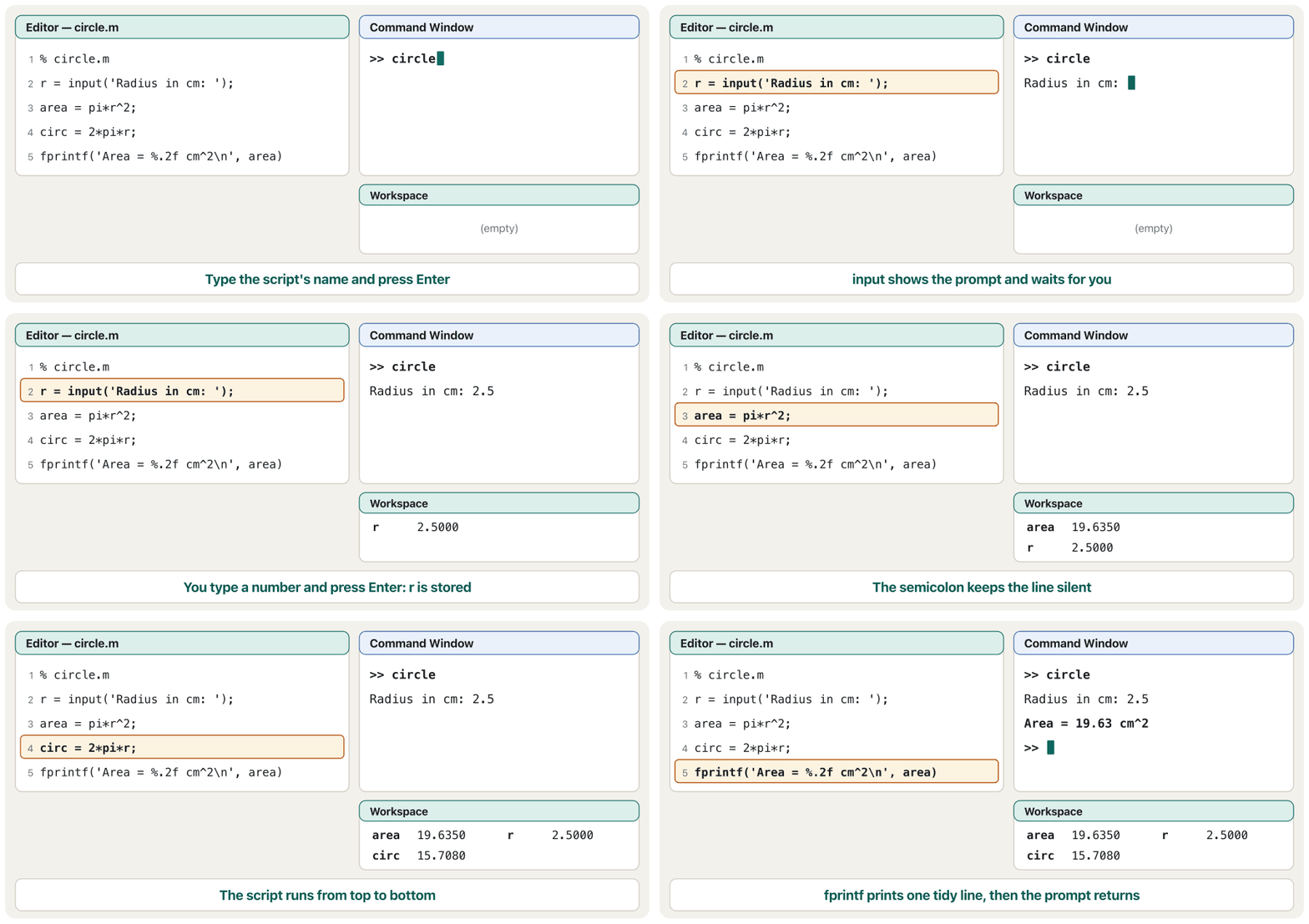
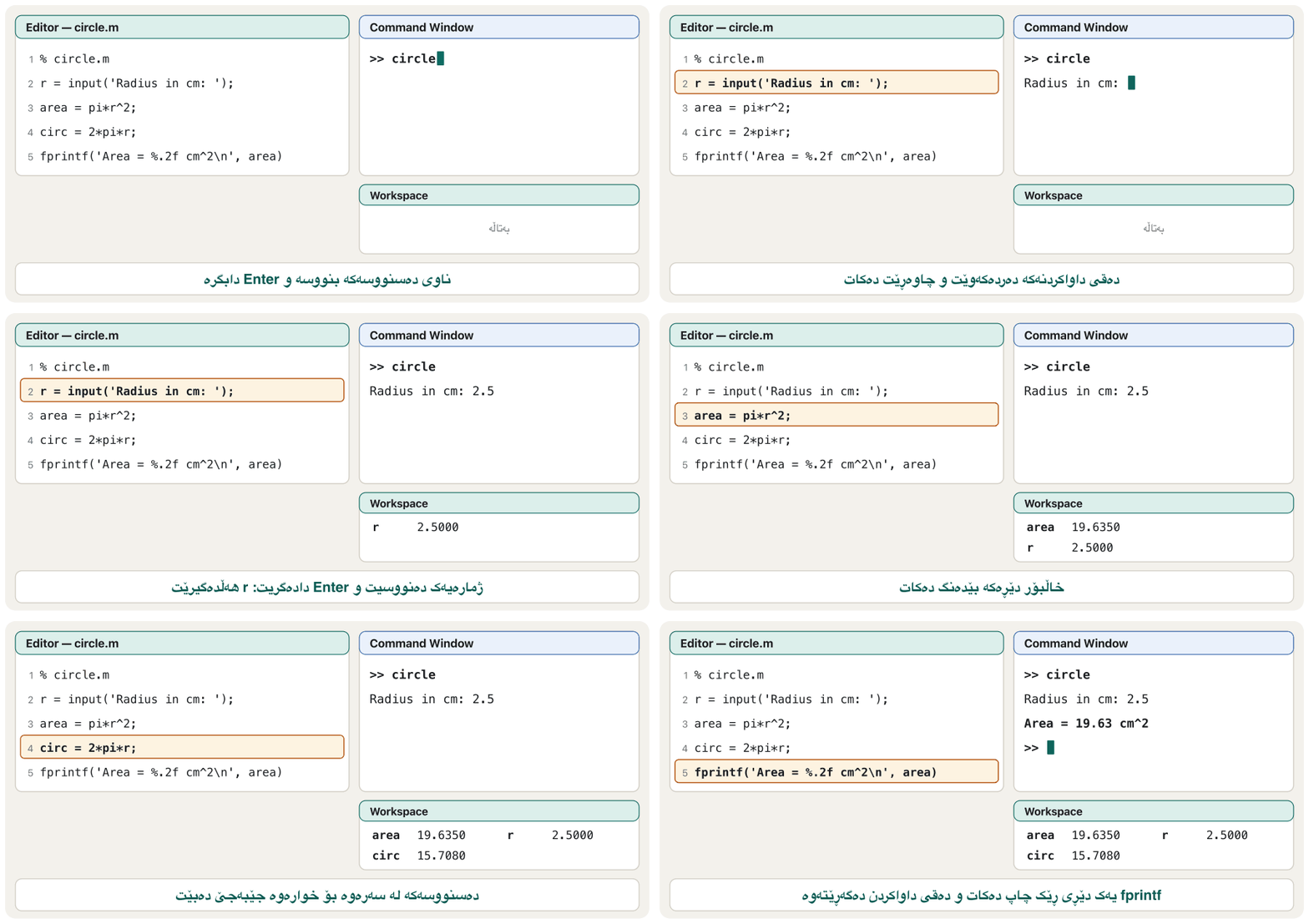
Now put the pieces together. Almost every program takes input, processes it and gives output: here the input is a radius, the processing is two formulas, and the output is one tidy line. Planning first — what comes in, what is computed, what goes out — is the project method of the shared lessons.
ئێستا پارچەکان پێکەوە دابنێ. نزیکەی هەموو نێوخستە وەردەگرێت، پرۆسێسی دەکات و دەرخستە دەدات: لێرەدا نیوەتیرەیەکە، پرۆسێسەکە بریتییە لە دوو و یەک دێڕی ڕێکوپێکە. پلاندانان لە پێشدا — چی دێتە ژوورەوە، چی هەژمار دەکرێت، چی دەچێتە دەرەوە — ڕێگای پڕۆژەی وانە هاوبەشەکانە.
% circle.m - area and circumference of a circle
r = input('Radius in cm: ');
area = pi*r^2;
circ = 2*pi*r;
fprintf('Area = %.2f cm^2, circumference = %.2f cm\n', area, circ)Radius in cm: 2.5 Area = 19.63 cm^2, circumference = 15.71 cm
Explain the codeڕوونکردنەوەی کۆدەکە
- Lineدێڕی 2
Input: the user types the radius (a number, so no
's').: نیوەتیرە دەنووسێت (ژمارەیە، بۆیە
's'نییە).- Lineدێڕی 3-4
Processing: two formulas, silent because of the semicolons.
پرۆسێس: دوو ، بێدەنگ بەهۆی .
- Lineدێڕی 5
Output: two gaps, two values, one line ending with
\n.: دوو شوێنی بەتاڵ، دوو ، یەک دێڕ کە بە
\nکۆتایی دێت.
Watch a slightly shorter version of the same script run line by line. Notice the order: nothing is computed until you answer the prompt, and the Workspace fills up as the lines run.
سەیری وەشانێکی کەمێک کورتتری هەمان بکە کە دێڕ بە دێڕ جێبەجێ دەبێت. سەرنجی ڕیزبەندییەکە بدە: تا وەڵامی نەدەیتەوە هیچ هەژمار ناکرێت و بە جێبەجێبوونی دێڕەکان پڕ دەبێت.
When a script stopsکاتێک دەسنووسێک دەوەستێت
If a line has a mistake, MATLAB stops at that line and prints a red that names the problem and the line, for example Error in circle (line 5). The lines before it have already run, so their variables are in the workspace — useful when you look for the cause. Here the last line of circle.m was typed as ferintf (a typo the course's Kurdish guide also has):
ئەگەر دێڕێک هەڵەی تێدا بێت، MATLAB لەو دێڕەدا دەوەستێت و سوور چاپ دەکات کە کێشەکە و دێڕەکە ناو دەبات، بۆ نموونە Error in circle (line 5). دێڕەکانی پێش ئەو پێشتر جێبەجێ بوون، بۆیە لە — کاتێک بەدوای هۆکارەکەدا دەگەڕێیت بەسوودە. لێرەدا دوایین دێڕی circle.m بە ferintf نووسراوە (هەڵەیەکی نووسین کە ڕێبەرە کوردییەکەی وانەکەش هەیەتی):
ferintf('Area = %.2f cm^2\n', area)Radius in cm: 2.5 Unrecognized function or variable 'ferintf'. Error in circle (line 5)
Octave words it differently: 'ferintf' undefined.
Octave بە شێوەیەکی تر دەینووسێت: 'ferintf' undefined.
A script can also seem to hang: it waits at an input prompt you did not notice, or a loop never ends. Press Ctrl+C in the Command Window to stop it — a to remember. Then fix the cause and run again.
دەشێت وا دەربکەوێت کە گیرابێت: لە دوای inputـێک چاوەڕێ دەکات کە سەرنجت نەداوە، یان خولێک هەرگیز کۆتایی نایەت. لە Command Window Ctrl+C دابگرە بۆ وەستاندنی — کە دەبێت لە بیرت بێت. پاشان هۆکارەکە چاک بکە و دووبارە جێبەجێی بکەرەوە.
Common mistakesهەڵە باوەکان
| Mistakeهەڵە | What happensچی ڕوودەدات | Fixچارەسەر |
|---|---|---|
A script named like a variable or built-in function (sum.m, input.m, a script x.m while x is a variable) بە ناوی یان (sum.m، input.m، بە ناوی x.m کاتێک x ) | The built-in function is hidden, or typing the name shows the variable instead of running the script. دەشاردرێتەوە، یان نووسینی ناوەکە لە جیاتی جێبەجێکردنی پیشان دەدات. | Choose a clear, unused name: circle_area.m. Check with exist name.ناوێکی ڕوون و بەکارنەهاتوو هەڵبژێرە: circle_area.m. بە exist name بیپشکنە. |
Spaces or - in the file name (lab 2.m, lab-2.m) یان - لە ناوی (lab 2.m، lab-2.m) | The script cannot be run by its name. بە ناوەکەی جێبەجێ ناکرێت. | Use letters, digits and _: lab_2.m.پیت، ژمارە و _ بەکار بهێنە: lab_2.m. |
Forgetting \n at the end of an fprintf formatلەبیرچوونی \n لە کۆتایی فۆرماتی fprintf | The next output or the >> prompt sticks to the end of the line: Area = 19.63>> دواتر یان >> بە کۆتایی دێڕەکەوە دەنووسێت: Area = 19.63>> | End every line with \n.هەموو دێڕێک بە \n کۆتایی پێبهێنە. |
input without 's' for a nameinput بێ 's' بۆ ناو | MATLAB tries to evaluate the name, shows an error and asks again.MATLAB هەوڵ دەدات ناوەکە هەژمار بکات، پیشان دەدات و دووبارە دەپرسێتەوە. | name = input('Name: ', 's')name = input('Name: ', 's') |
ferintf, fprint, Disp (typos and capitals)ferintf، fprint، Disp (هەڵەی نووسین و پیتی گەورە) | Unrecognized function or variable and the script stops.Unrecognized function or variable و دەوەستێت. | Type fprintf, disp exactly, in lower case.fprintf و disp ڕێک و بە پیتی بچووک بنووسە. |
A number inside [ ] with text: ['Age: ', 19]ژمارەیەک لەگەڵ دەق لەناو [ ]: ['Age: ', 19] | A strange character instead of the digits. سەیر لە جیاتی ژمارەکان. | ['Age: ', num2str(19)] or fprintf('Age: %d\n', 19)['Age: ', num2str(19)] یان fprintf('Age: %d\n', 19) |
Comparing text with ==بەراوردکردنی دەق بە == | An error when the lengths differ. کاتێک درێژییەکان جیاوازن. | strcmp(a, b)strcmp(a, b) |
Using %d for a number with decimalsبەکارهێنانی %d بۆ | MATLAB switches to another format, such as 2.500000e+00.MATLAB دەچێتە سەر فۆرماتێکی تر، وەک 2.500000e+00. | %f, %.2f or %g%f، %.2f یان %g |
Practiceڕاهێنان
Write a script temperature.m that asks for a temperature in Celsius and prints it in Fahrenheit with one decimal (). Test it with 37.5.
بە ناوی temperature.m بنووسە کە پلەی گەرمی بە سیلیزی دەپرسێت و بە فەهرەنهایت بە یەک ژمارەی دوای چاپی دەکات (). بە 37.5 تاقیی بکەرەوە.
Hintئاماژە
A number is read with plain input; one fprintf with two gaps prints both values.
ژمارە بە inputـی ئاسایی دەخوێندرێتەوە؛ یەک fprintf بە دوو شوێنی بەتاڵ هەردوو چاپ دەکات.
Show answerوەڵامەکە پیشان بدە
% temperature.m - Celsius to Fahrenheit
c = input('Temperature in C: ');
f = 1.8*c + 32;
fprintf('%.1f C is %.1f F\n', c, f)Temperature in C: 37.5 37.5 C is 99.5 F
Ask for a name (text) and a year of birth (a number), then print Hello Karwan! In 2026 you turn 20. with the user's own name and age.
ناوێک (دەق) و ساڵی لەدایکبوون (ژمارە) بپرسە، پاشان بە ناو و تەمەنی خودی چاپ بکە: Hello Karwan! In 2026 you turn 20.
Hintئاماژە
The name needs 's'; the year does not. %s writes text.
ناوەکە پێویستی بە 's'ـە؛ ساڵەکە نا. %s دەق دەنووسێت.
Show answerوەڵامەکە پیشان بدە
name = input('Your name: ', 's');
year = input('Year of birth: ');
fprintf('Hello %s! In 2026 you turn %d.\n', name, 2026 - year)Your name: Karwan Year of birth: 2006 Hello Karwan! In 2026 you turn 20.
Without MATLAB, write down exactly what these three lines print:
fprintf('%d-%d\n', [1 2 3 4])
fprintf('%5.1f|\n', 2.36)
fprintf('%s\n', 'OK')
بێ MATLAB، ڕێک ئەوە بنووسە کە ئەم سێ دێڕە چاپی دەکەن:
fprintf('%d-%d\n', [1 2 3 4])
fprintf('%5.1f|\n', 2.36)
fprintf('%s\n', 'OK')
Show answerوەڵامەکە پیشان بدە
fprintf('%d-%d\n', [1 2 3 4])
fprintf('%5.1f|\n', 2.36)
fprintf('%s\n', 'OK')1-2 3-4 2.4| OK
Explain the codeڕوونکردنەوەی کۆدەکە
- Lineدێڕی 1
The format is used twice.
فۆرماتەکە دوو جار بەکار دێت.
- Lineدێڕی 2
2.4has 3 characters, so two spaces make the width 5.2.4سێ ، بۆیە دوو پانییەکە دەکەن بە پێنج.
Aram buys 3 teas at 1500 IQD and 4 kulichas at 750 IQD. Print a receipt with the item name left-justified in 8 characters, the quantity in 3, the price in 5 and the line total in 6, then the total. Use one fprintf per line.
ئارام سێ چا بە 1500 دینار و چوار کولێچە بە 750 دینار دەکڕێت. پسوولەیەک چاپ بکە کە ناوی شتەکە لە هەشت بە لای چەپدا ڕێک بخات، ژمارەکە لە سێ، نرخەکە لە پێنج و کۆی دێڕەکە لە شەشدا، پاشان کۆی گشتی. بۆ هەر دێڕێک یەک fprintf بەکار بهێنە.
Hintئاماژە
%-8s = text, left-justified, 8 wide. Count the characters of one finished line to place the total.
%-8s = دەق، بە لای چەپدا ڕێکخراو، پانیی هەشت. دێڕێکی تەواو بژمێرە بۆ دانانی کۆی گشتی.
Show answerوەڵامەکە پیشان بدە
fprintf('%-8s %3d x %5d = %6d IQD\n', 'Tea', 3, 1500, 3*1500)
fprintf('%-8s %3d x %5d = %6d IQD\n', 'Kulicha', 4, 750, 4*750)
fprintf('%-8s %20d IQD\n', 'Total', 3*1500 + 4*750)Tea 3 x 1500 = 4500 IQD Kulicha 4 x 750 = 3000 IQD Total 7500 IQD
Explain the codeڕوونکردنەوەی کۆدەکە
- Lineدێڕی 1-2
%-8spads the name on the right, so the numbers line up.%-8sناوەکە لە لای ڕاستەوە پڕ دەکاتەوە، بۆیە ژمارەکان ڕێک دەبنەوە.- Lineدێڕی 3
%20dmakes the total end in the same column as the line totals.%20dوا دەکات کۆی گشتی لە هەمان ستووندا کۆتایی بێت.
This script should ask for a student's name and mark and print one line. Find the four mistakes:
name = input('Name: ');
mark = input('Mark: ')
ferintf('%s got %d\n' name, mark)
Disp('Done')
ئەم دەبێت ناو و نمرەی قوتابییەک بپرسێت و یەک دێڕ چاپ بکات. چوار هەڵەکە بدۆزەرەوە:
name = input('Name: ');
mark = input('Mark: ')
ferintf('%s got %d\n' name, mark)
Disp('Done')
Show answerوەڵامەکە پیشان بدە
- Line 1: a name is text, so add
's'. - Line 2: no mistake for MATLAB, but without
;it echoesmark = …; add;for a tidy output. - Line 3:
ferintf→fprintf, and a comma is missing after the format. - Line 4:
Disp→disp(MATLAB is case-sensitive).
- دێڕی 1: ناو دەقە، بۆیە
's'زیاد بکە. - دێڕی 2: بۆ MATLAB هەڵە نییە، بەڵام بێ
;دەنووسێتەوەmark = …؛ بۆ ڕێک;زیاد بکە. - دێڕی 3:
ferintfبکە بەfprintf، هەروەها کۆمایەک دوای فۆرماتەکە کەمە. - دێڕی 4:
Dispبکە بەdisp(MATLAB ).
name = input('Name: ', 's');
mark = input('Mark: ');
fprintf('%s got %d\n', name, mark)
disp('Done')Name: Dilan Mark: 88 Dilan got 88 Done
Make a folder labs, go into it, create x = 5 and y = 12, save only y in week1.mat, clear the workspace, load the file and show what is in the workspace.
بە ناوی labs دروست بکە، بچۆ ناوی، x = 5 و y = 12 دروست بکە، تەنها y لە week1.matـدا هەڵبگرە، پاک بکەرەوە، بار بکەرەوە و پیشان بدە چی لە .
Hintئاماژە
save file.mat name keeps only the variables you list; who lists the names in the workspace.
save file.mat name تەنها ئەو هەڵدەگرێت کە ناویان دەنووسیت؛ who ناوەکانی ناو لیست دەکات.
Show answerوەڵامەکە پیشان بدە
mkdir labs
cd labs
x = 5; y = 12;
save week1.mat y
clear
load week1.mat
whoYour variables are: y
Summaryکورتە
- A script is a
.mtext file of commands that run top to bottom; create it with New Script oredit name, run it by typing its name or pressing Run. - Script variables stay in the shared Workspace; file names follow the variable-name rules and must not reuse built-in names.
pwd,cd,dir,what,type,mkdir,copyfile,movefile,delete,save/load,diarymanage files from MATLAB.input(prompt)evaluates what is typed;input(prompt, 's')keeps text; Enter alone gives an empty result.dispshows a value without its name; join text and numbers with[ ]andnum2str.fprintfuses%d %f %e %g %s %c, width and precision (%8.2f),\n,\t,%%, and repeats its format over all values.- Write text in single quotes; compare text with
strcmp, search it withcontains/strfind.
-
.mـە کە کۆمەڵێک هەڵدەگرێت؛ ئەو لە سەرەوە بۆ خوارەوە جێبەجێ دەبن؛ بە New Script یانedit nameدروستی بکە و بە نووسینی ناوەکەی یان داگرتنی Run جێبەجێی بکە. - لە هاوبەشدا دەمێننەوە؛ ناوی یاساکانی ناوی دەگرنە بەر و نابێت ناوی دووبارە بکەنەوە.
pwd،cd،dir،what،type،mkdir،copyfile،movefile،delete،save/loadوdiaryلەناو MATLABـەوە بەڕێوە دەبەن.input(prompt)ئەوەی نووسراوە هەژمار دەکات؛input(prompt, 's')دەق دەهێڵێتەوە؛ تەنها Enter ئەنجامێکی بەتاڵ دەدات.dispبێ ناوەکەی پیشان دەدات؛ دەق و ژمارە بە[ ]وnum2strپێکەوە ببەستە.fprintfکۆدەکانی%d %f %e %g %s %c، پانی و وردی (%8.2f)،\n،\tو%%بەکار دەهێنێت و فۆرماتەکەی بۆ هەموو دووبارە دەکاتەوە.- دەق لەناو تاکدا بنووسە؛ دەق بە
strcmpبەراورد بکە و بەcontains/strfindتێیدا بگەڕێ.
Why does input('Name: ') fail when you type Shilan?بۆچی input('Name: ') سەرناکەوێت کاتێک Shilan دەنووسیت؟
It evaluates the answer, so MATLAB looks for a variable or function called Shilan. Add 's' to keep the text.
وەڵامەکە هەژمار دەکات، بۆیە MATLAB بەدوای یان بە ناوی Shilanدا دەگەڕێت. بۆ هێشتنەوەی دەقەکە 's' زیاد بکە.
What is the difference between disp(x) and fprintf('%g\n', x)?جیاوازیی disp(x) و fprintf('%g\n', x) چییە؟
disp uses MATLAB's display format; fprintf writes exactly what the format says and needs \n for a new line.
disp شێوەی پیشاندانی MATLAB بەکار دەهێنێت؛ fprintf ڕێک ئەوە دەنووسێت کە فۆرماتەکە دەیڵێت و بۆ دێڕی نوێ پێویستی بە \nـە.
A script uses r but never sets it. What can go wrong?دەسنووسێک r بەکار دەهێنێت بەڵام هەرگیز نرخ نادات بە r. چی هەڵە دەچێت؟
It silently uses an old r left in the shared Workspace, or stops with an error if there is none.
بە بێدەنگی rـێکی کۆن بەکار دەهێنێت کە لە هاوبەشدا ماوەتەوە، یان ئەگەر نەبێت بە دەوەستێت.
Lesson complete!وانەکە تەواو بوو!
Well done. Review the key terms, then go on to the next lesson.دەستخۆش. سەیرێکی زاراوە سەرەکییەکان بکەرەوە، پاشان بڕۆ بۆ وانەی داهاتوو.
Key termsزاراوە سەرەکییەکان
Making Decisions: Relational Operators and if / elseif / elseبڕیاردان: کارپێکەرەکانی بەراوردکردن و if / elseif / else
Related lecturesوانە پەیوەندیدارەکان
- What Is Programming?بەرنامەسازی چییە؟
- Algorithms, Pseudocode and Flowchartsئەلگۆریزمەکان، نیمچەکۆد و هێڵکارییەکانی ڕەوت
- Welcome to MATLAB (and Octave)بەخێربێیت بۆ MATLAB (و Octave)
- Built-in Maths Functionsکردارە ئامادەکانی بیرکاری
- Making Decisions: Relational Operators and if / elseif / elseبڕیاردان: کارپێکەرەکانی بەراوردکردن و if / elseif / else
- while Loops, break and continueخولەکانی while، break و continue
- Input and Outputنێوخستە و دەرخستە
- Application Software and File Typesنەرمەواڵەی بەکارهێنان و جۆرەکانی فایل
References and further readingسەرچاوەکان و خوێندنەوەی زیاتر
- MathWorks: Create Scripts (New Script, edit, run, shared workspace)
- MathWorks: input (evaluates the response; 's' returns text; empty on Return)
- MathWorks: disp (value without the name; joining text and num2str)
- MathWorks: fprintf (conversions, width, precision, flags, column order)
- MathWorks: sprintf (a value that does not fit the conversion may be overridden)
- MathWorks: Represent Text with Character and String Arrays
- GNU Octave manual: Script Files (same scope as the command line)
- GNU Octave manual: Terminal Input (input and the "s" option)
- Octave wiki: Differences between Octave and Matlab (quotes, comments, end)
This lecture is a first edition. The Kurdish text and terminology are waiting for review by Kurdish IT teachers.ئەم وانەیە چاپی یەکەمە. دەقە کوردییەکە و زاراوەکانی چاوەڕێی پێداچوونەوەی مامۆستایانی کوردی بواری IT ن.