JavaJava · Chapterبەش 3 · Lectureوانە 3.1
Welcome to Java: the JDK, the JRE and the JVMبەخێربێیت بۆ Java: JDK، JRE و JVM
What Java is good at and how it keeps programs safe today, the rules of the language (the JLS), the three parts every Java programmer meets — the JVM that runs bytecode, the JRE and the JDK with its tools — Java's editions and versions, and how to install a JDK and choose an editor.
لە چیدا باشە و ئەمڕۆ چۆن سەلامەت دەهێڵێتەوە، یاساکانی زمانەکە (JLS)، ئەو سێ بەشەی هەموو Java دەیانبینێت — کە جێبەجێ دەکات، و لەگەڵ ئامرازەکانی — جۆر و Java، هەروەها چۆن جێگیر بکەیت و دەستکاریکەرێک هەڵبژێریت.
What you will learnچی فێر دەبیت
- Explain Java's main strengths and the real reasons Java programs are safe and fast.
- Describe the jobs of the JVM, the JRE and the JDK and how they fit inside each other.
- Name Java's editions and its long-term support versions, and choose a version to install.
- Install a JDK, check it with
java -versionandjavac -version, and pick an editor.
- خاڵە بەهێزەکانی و هۆکارە ڕاستەقینەکانی سەلامەتی و خێرایی Java ڕوون بکەیتەوە.
- کارەکانی ، و و چۆنیەتی جێگرتنیان لە ناو یەکتردا وەسف بکەیت.
- جۆرەکانی و بناسیت و بۆ هەڵبژێریت.
- جێگیر بکەیت، بە
java -versionوjavac -versionبیپشکنیت و یان هەڵبژێریت.
Java in a nutshellJava بە کورتی
Java is a high-level programming language that Sun Microsystems released in 1995. Oracle bought Sun in 2010 and leads Java today. Its big promise is write once, run anywhere: you translate your program once, and the same file runs on Windows, macOS and Linux. Where the name comes from, its history and where Java is used today are in Programming languages; this lesson starts from there.
کە کۆمپانیای Sun Microsystems لە ساڵی 1995 بڵاوی کردەوە. Oracle لە 2010 کۆمپانیای Sunـی کڕی و ئەمڕۆ سەرپەرشتیی Java دەکات. بەڵێنە گەورەکەی یەکجار بنووسە، لە هەموو شوێنێک جێبەجێی بکەیە: یەکجار وەردەگێڕیت و هەمان فایل لەسەر Windows، macOS و Linux کار دەکات. ناوەکەی لە کوێوە هاتووە، مێژووەکەی و ئەمڕۆ لە کوێ بەکار دێت لە زمانەکانی بەرنامەسازی باس کراون؛ ئەم وانەیە لەوێوە دەست پێ دەکات.
In this track you write real Java programs, from one line of output to classes, objects and files. Ideas that are the same in every language — what a program is, algorithms, compilers and interpreters — are in the shared chapters, and the Java lessons link to them instead of repeating them. If you already know Python, Python next to Java compares the two languages line by line.
لەم ڕێڕەوەدا ڕاستەقینەی Java دەنووسیت، لە چاپکردنی یەک دێڕەوە تا ، و . ئەو بیرۆکانەی لە هەموو زمانێکدا وەک یەکن — چییە، ، و — لە بەشە هاوبەشەکاندان و وانەکانی Java لە جیاتی دووپاتەکردنەوەیان بەستەریان پێوە دەدەن. ئەگەر پێشتر Python دەزانیت، Python لە تەنیشت Java دێڕ بە دێڕ هەردوو زمانەکە بەراورد دەکات.
Why Java is so widely usedبۆچی Java ئەوەندە بەکار دێت
Java has stayed among the most used languages for thirty years. Five strengths explain why:
سی ساڵە لە نێو بەکارهاتووترین زمانەکاندا ماوەتەوە. پێنج خاڵی بەهێز هۆکارەکەی ڕوون دەکەنەوە:
- Platform independent. A compiled Java program runs on any platform that has a Java Virtual Machine: Windows, macOS, Linux and most servers (next screen).
- Powerful and clear. Every variable has a fixed type that the compiler checks (), the syntax is close to C, C++ and C#, and thousands of ready-made classes — in the JDK and in free libraries — cover almost every field.
- Safe by design. Many mistakes are caught before or while the program runs, so they cannot quietly damage memory (two screens on).
- Fast. The JVM has been improved for decades. With just-in-time compilation it turns the busiest parts of a program into machine code while the program runs (how JIT works).
- Networking built in. Classes for internet addresses, connections and web requests come with Java (for example
java.net.http.HttpClient, since Java 11), so programs that talk over a network are easy to start.
- سەربەخۆ لە . Javaـی کۆمپایلکراو لەسەر هەر کار دەکات کە لەسەر بێت: Windows، macOS، Linux و زۆربەی (شاشەی داهاتوو).
- بەهێز و ڕوون. هەر جێگیری هەیە کە دەیپشکنێت ()، لە C، C++ و C# نزیکە و هەزاران ئامادە — لە ناو و لە بێبەرانبەردا — نزیکەی هەموو بوارێک دەگرنەوە.
- سەلامەت لە بنەڕەتەوە. زۆر هەڵە پێش جێبەجێکردن یان لە دەگیرێن، بۆیە ناتوانن بە بێدەنگی تێک بدەن (دوو شاشە دواتر).
- خێرا. بە دەیان ساڵ باشتر کراوە. بە بەشە زۆر بەکارهاتووەکانی لە کاتی کارکردندا دەکات بە (JIT چۆن کار دەکات).
- پشتگیریی لە ناوەوەیدایە. تایبەت بە ناونیشانی ، پەیوەندی و داواکاریی وێب لەگەڵ Java دێن (بۆ نموونە
java.net.http.HttpClientلە Java 11ـەوە)، بۆیە دەستپێکردنی ئەو لە ڕێگەی قسە دەکەن ئاسانە.
Why Java is so widely usedبۆچی Java ئەوەندە بەکار دێت
Write once, run anywhereیەکجار بنووسە، لە هەموو شوێنێک جێبەجێی بکە
Platform independence works in two steps. The compiler javac turns your source code into bytecode: a .class file of instructions for no real CPU. Then a Java Virtual Machine (JVM) on each computer runs that bytecode. The bytecode is the same everywhere; the JVM is not. Windows, macOS and Linux each need a JVM built for them and for their kind of CPU.
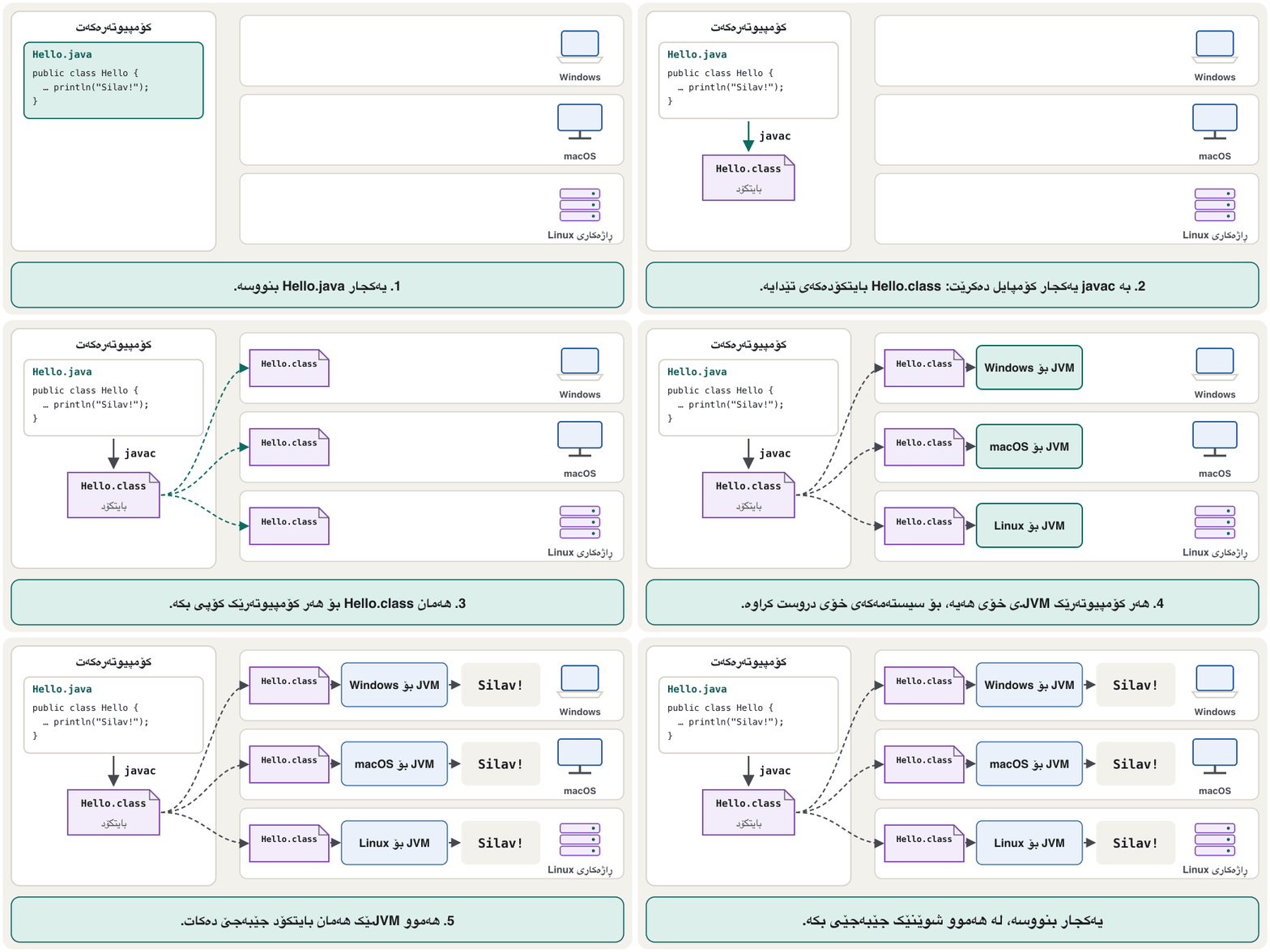
سەربەخۆیی لە بە دوو هەنگاو کار دەکات. javac دەگۆڕێت بۆ : فایلێکی .class کە بۆ هیچ ڕاستەقینە نین. پاشان (JVM) لەسەر هەر ئەو جێبەجێ دەکات. لە هەموو شوێنێک وەک یەکە، بەڵام وا نییە. Windows، macOS و Linux هەریەکەیان JVMـێکی تایبەت بە خۆیان و بە جۆری پێویستە.
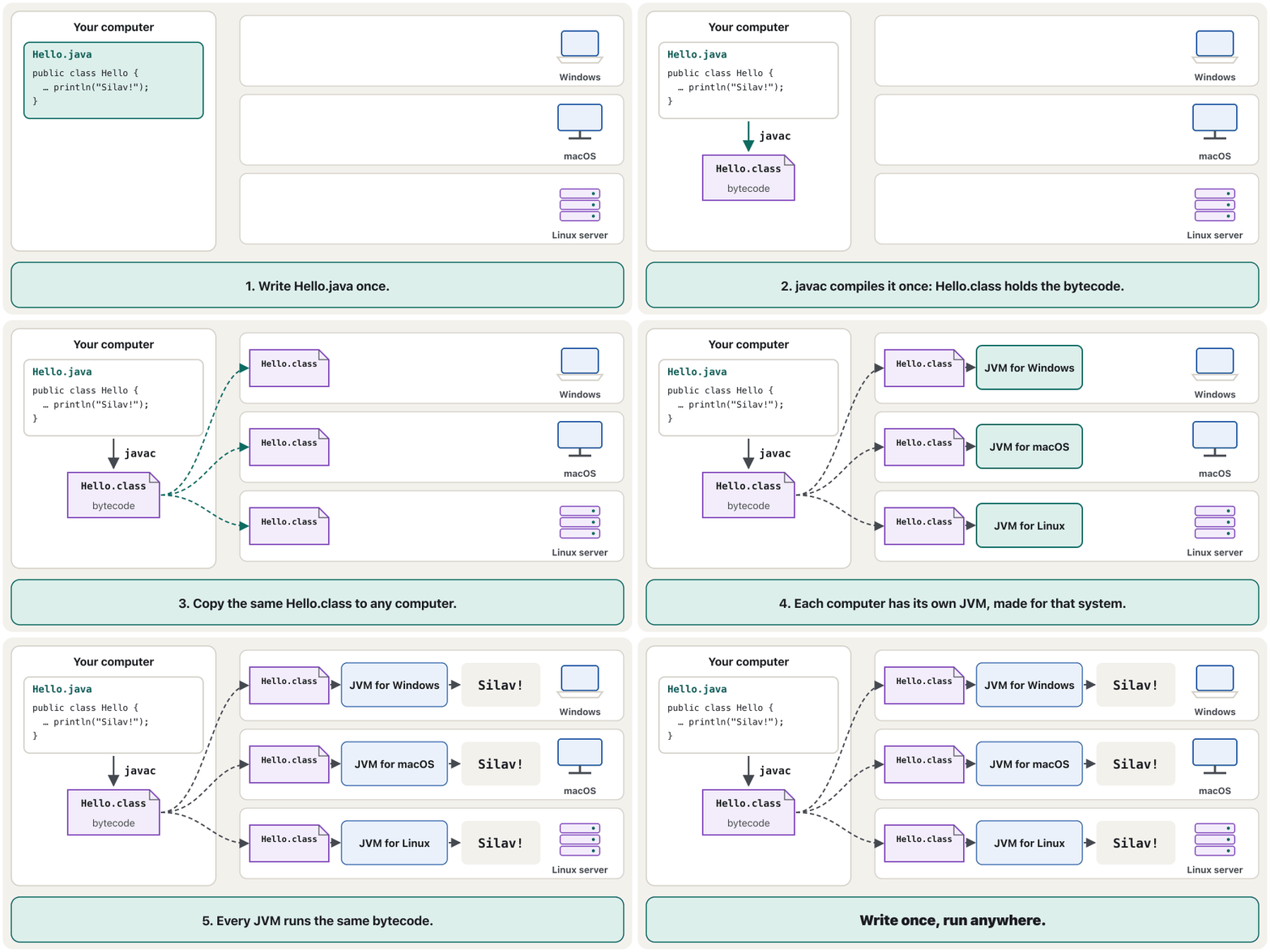
So the JVM depends on the platform, but the bytecode does not. That is why the .class file you make on your computer also runs on a friend's computer with another operating system.
کەواتە بەندە بە ، بەڵام نا. هەر بۆیە ئەو فایلە .classـەی لەسەر دروستی دەکەیت، لەسەر هاوڕێیەکت کە تری هەیە کاریش دەکات.
How Java keeps programs safeJava چۆن بەرنامەکان سەلامەت دەهێڵێتەوە
No programming language can stop viruses by itself, and Java does not try to. Its safety comes from layers of checks that catch whole groups of mistakes before they can damage memory or data:
هیچ بە تەنیا خۆی ناتوانێت ڕابگرێت و هەوڵی ئەوەش نادات. سەلامەتییەکەی لە چەند چینێک پشکنینەوە دێت کە کۆمەڵێک هەڵە دەگرن پێش ئەوەی بتوانن یان تێک بدەن:
- Type checks. The compiler refuses
int age = "twenty";before anything runs:incompatible types: String cannot be converted to int. - No memory addresses. Java code cannot calculate with memory addresses, so it cannot reach memory that is not its own. In languages where memory is freed by hand, three classic mistakes happen: Memory While a Program Runs.
- The bytecode verifier checks every class the JVM loads (Compiling and running).
- Run-time checks stop a program that uses a position outside an array or an object that does not exist (next screen).
- Garbage collection frees memory that nothing uses any more, so a program never uses memory that was already given back (Objects nobody can reach).
- Updates. JDK updates with security fixes come out four times a year, in January, April, July and October; as of November 2026 the newest update of Java 17 is 17.0.21 (October 2026). Keep yours up to date.
- پشکنینی جۆر. پێش ئەوەی هیچ شتێک جێبەجێ بێت
int age = "twenty";ڕەت دەکاتەوە:incompatible types: String cannot be converted to int. - ناونیشانی نییە. کۆدی Java ناتوانێت ژمێرکاری بە ناونیشانی بکات، بۆیە ناتوانێت بگاتە ئەو هی خۆی نییە. لەو زمانانەی بە دەست ئازاد دەکرێتەوە، سێ هەڵەی کلاسیکی ڕوو دەدەن: بیرگە لە کاتی کارکردنی بەرنامەدا.
- هەموو دەپشکنێت کە باری دەکات (کۆمپایلکردن و جێبەجێکردن).
- پشکنینەکانی ئەو ڕادەگرن کە شوێنێکی دەرەوەی یان نەبوو بەکار دەهێنێت (شاشەی داهاتوو).
- ئەو ئازاد دەکات کە چیتر هیچ شتێک بەکاری ناهێنێت، بۆیە هەرگیز ئەو بەکار ناهێنێت کە پێشتر گەڕێندراوەتەوە (ئەو ئۆبجێکتانەی کەس پێیان ناگات).
- . کە چاککردنی ئاسایشیان تێدایە ساڵانە چوار جار دەردەچن، لە کانوونی دووەم، نیسان، تەممووز و تشرینی یەکەمدا؛ تا تشرینی دووەمی 2026 نوێترین Java 17 17.0.21ـە (تشرینی یەکەمی 2026). هی خۆت نوێ بهێڵەرەوە.
How Java keeps programs safeJava چۆن بەرنامەکان سەلامەت دەهێڵێتەوە
A mistake stops the program, it does not damage memoryهەڵە بەرنامەکە ڕادەگرێت، بیرگە تێک نادات
Here is one run-time check in action. The program below asks for position 5 in an array with room for only three values. (Arrays get their own lesson later in the track; just watch what Java does.) Java stops at once with an exception that names the problem and the line (how to read it):
ئێستا یەکێک لە پشکنینەکانی بە کردەوە ببینە. خوارەوە داوای شوێنی 5 لە دەکات کە تەنیا جێی سێ تێدایە. ( دواتر لەم ڕێڕەوەدا وانەی تایبەتی خۆیان هەیە؛ تەنیا سەیر بکە Java چی دەکات.) یەکسەر دەوەستێت بە کە ناوی کێشەکە و دێڕەکە دەڵێت (چۆن بیخوێنیتەوە):
public class Marks {
    public static void main(String[] args) {
        int[] marks = new int[3];   // room for 3 marks: positions 0, 1, 2
        marks[5] = 90;              // position 5 does not exist
        System.out.println("This line never runs.");
    }
}Exception in thread "main" java.lang.ArrayIndexOutOfBoundsException: Index 5 out of bounds for length 3 at Marks.main(Marks.java:4)
In languages without this check, such as C, the same mistake can quietly overwrite other data — one of the oldest ways attackers break into programs.
لەو زمانانەی ئەم پشکنینەیان نییە، وەک C، هەمان هەڵە دەتوانێت بە بێدەنگی تر تێک بدات — ئەمە یەکێکە لە کۆنترین ڕێگاکانی هێرشبەران بۆ چوونە ناو .
The rules of Java: the Java Language Specificationیاساکانی Java: Java Language Specification
A computer cannot guess what you mean. Every programming language has strict rules, and a program that breaks them is not accepted at all.
ناتوانێت مەبەستەکەت بزانێت. هەر یاسای توندی هەیە و ئەو بیانشکێنێت هەرگیز وەرناگیرێت.
Java's rules are written in the Java Language Specification (JLS): an exact technical description of Java's syntax (how code must be written) and its meaning (what each piece of code does). Every Java version has its own edition; the programs in this track follow JLS 17. A second document, the Java Virtual Machine Specification, describes .class files and bytecode. Because both are public, different companies can build compilers and JVMs that all work together.
یاساکانی لە Java Language Specification (JLS)ـدا نووسراون: وەسفێکی تەکنیکیی وردی ـی Java (کۆد دەبێت چۆن بنووسرێت) و واتاکەی (هەر پارچە کۆدێک چی دەکات). هەر Java چاپی خۆی هەیە؛ ئەم ڕێڕەوە پەیڕەوی JLS 17 دەکەن. بەڵگەنامەیەکی دووەم، Java Virtual Machine Specification، فایلەکانی .class و وەسف دەکات. چونکە هەردووکیان گشتین، کۆمپانیای جیاواز دەتوانن و JVMـی وا دروست بکەن کە هەموویان پێکەوە کار بکەن.
The JLS is like the official Laws of the Game in football: referees in every country apply the same rule book. javac is the referee. It checks your program against the rules before the match starts.
JLS وەک یاسا فەرمییەکانی یاریی تۆپی پێیە: دادوەرەکان لە هەموو وڵاتێک هەمان یاسانامە جێبەجێ دەکەن. javac دادوەرەکەیە. پێش دەستپێکردنی یارییەکە بەراورد بە یاساکان دەپشکنێت.
Where the analogy stops workingسنووری ئەم نموونەیە
A referee may let a small foul go; javac never does. One missing ; and no .class file is made.
دادوەر لەوانەیە چاو لە هەڵەیەکی بچووک بپۆشێت؛ javac هەرگیز وا ناکات. تەنیا یەک ; کەم بێت، هیچ فایلێکی .class دروست ناکرێت.
The JVM: the engine that runs bytecodeئامێری گریمانەیی Java: ئەو بزوێنەرەی بایتکۆد جێبەجێ دەکات
The Java Virtual Machine is a program whose main job is to give bytecode a place to run: a runtime environment. Each JVM is made for one platform — there are JVMs for Windows, macOS and Linux, on Intel, AMD and ARM chips. When you run a program, the JVM:
کە کارە سەرەکییەکەی دابینکردنی شوێنێکە بۆ جێبەجێکردنی : ژینگەیەکی جێبەجێکردن. هەر JVMـێک بۆ یەک دروست کراوە — JVM بۆ Windows، macOS و Linux هەیە، لەسەر چیپی Intel، AMD و ARM. کاتێک جێبەجێ دەکەیت، :
- loads the code: it reads the
.classfiles the program needs; - verifies the code: it checks that the bytecode follows Java's rules;
- executes the code: it interprets the bytecode and compiles busy parts to machine code (JIT);
- provides the runtime environment: memory and garbage collection, and the link to the operating system's files, screen and network.
- کۆدەکە بار دەکات: ئەو فایلانەی
.classدەخوێنێتەوە کە پێویستیەتی؛ - کۆدەکە دەپشکنێت: دڵنیا دەبێتەوە کە پەیڕەوی یاساکانی Java دەکات؛
- کۆدەکە جێبەجێ دەکات: وەردەگێڕێت و بەشە زۆر بەکارهاتووەکان دەکات بە (JIT)؛
- ژینگەی جێبەجێکردن دابین دەکات: و ، هەروەها بەستنەوە بە ، شاشە و .
Compiling and running shows these steps on a real program.
کۆمپایلکردن و جێبەجێکردن ئەم هەنگاوانە لەسەر ڕاستەقینە پیشان دەدات.
The JRE and the JDKژینگەی جێبەجێکردنی Java و کەرەستەی گەشەپێدانی Java
A JVM alone cannot run real programs: they also need Java's class library (the standard library) — thousands of ready-made classes such as String, System and Scanner. The JVM together with the class library is the Java Runtime Environment (JRE): everything needed to run Java programs, but no compiler. Like the JVM, it is built separately for each platform.
JVM بە تەنیا ناتوانێت ڕاستەقینە جێبەجێ بکات: ئەوان Javaـشیان پێویستە — هەزاران ئامادەی وەک String، System و Scanner. JVM لەگەڵ ئەو کتێبخانەیە (JRE): هەموو ئەوەی بۆ جێبەجێکردنی Java پێویستە، بەڵام تێدا نییە. وەک JVM، بۆ هەر بە جیا دروست دەکرێت.
The Java Development Kit (JDK) is what programmers install. It contains everything in the JRE plus the development tools: the compiler javac, the launcher java, the archiver jar, the documentation generator javadoc and more. Together these tools let you build, run and share Java programs.
(JDK) ئەوەیە کە جێگیری دەکەن. هەموو ئەوەی لە JRE هەیە لەگەڵ ئامرازەکانی گەشەپێدان لەخۆ دەگرێت: javac، دەستپێکەری java، ئەرشیڤکەری jar، دروستکەری javadoc و زیاتر. ئەم ئامرازانە پێکەوە ڕێگەت دەدەن Java دروست بکەیت، جێبەجێیان بکەیت و بڵاویان بکەیتەوە.
The JRE and the JDKژینگەی جێبەجێکردنی Java و کەرەستەی گەشەپێدانی Java
Do I still need a JRE?ئایا هێشتا JREـم پێویستە؟
The three boxes are still the right way to think about Java, but what you download has changed:
سێ چوارچێوەکە هێشتا ڕێگای دروستی بیرکردنەوەن لە Java، بەڵام ئەوەی داباری دەکەیت گۆڕاوە:
- Since Java 11 (2018), Oracle no longer offers a separate JRE download. You install a JDK, which can both build and run programs. (Some free builds, such as Eclipse Temurin, still offer a JRE package for computers that only run programs.)
- Since Java 9 (2017), the class library is no longer one big
rt.jarfile. It is split into modules (java.baseand about 70 others) stored together in the JDK'slib/modulesfile, and a JDK has nojrefolder inside it any more. - A program can carry its own small runtime: the JDK tool
jlinkbuilds one that holds only the modules the program needs.
- لە Java 11ـەوە (2018)، Oracle چیتر جیای JRE پێشکەش ناکات. جێگیر دەکەیت کە هەم دروست دەکات و هەم جێبەجێیان دەکات. (هەندێک وەشانی بێبەرانبەر، وەک Eclipse Temurin، هێشتا پاکێجێکی JRE بۆ ئەو پێشکەش دەکەن کە تەنیا جێبەجێ دەکەن.)
- لە Java 9ـەوە (2017)، چیتر یەک فایلی گەورەی
rt.jarنییە. دابەش کراوە بۆ چەند بەشێک بە ناوی modules (java.baseو نزیکەی 70ـی تر) کە پێکەوە لە فایلیlib/modulesـی JDKـدا هەڵگیراون و JDK چیترjreـی تێدا نییە. - دەتوانێت ژینگەی جێبەجێکردنی بچووکی خۆی لەگەڵ خۆیدا ببات: ئامرازی
jlinkـی JDK یەکێک دروست دەکات کە تەنیا ئەو modulesـانەی تێدایە کە پێویستیەتی.
The JDK's toolboxسندوقی ئامرازەکانی کەرەستەی گەشەپێدانی Java
A JDK is a folder. Its bin folder holds the tools you start from a terminal, and its lib folder holds the class library:
JDK . binـی ئەو ئامرازانەی تێدایە کە لە دەستیان پێ دەکەیت و libـی تێدایە:
| Toolئامراز | What it doesچی دەکات | Where you meet itلە کوێ دەیبینیت |
|---|---|---|
javac | The compiler: .java source code → .class bytecode: .java ← .class | Compiling and runningکۆمپایلکردن و جێبەجێکردن |
java | The launcher: starts a JVM and runs a classدەستپێکەرەکە: JVMـێک دەست پێ دەکات و جێبەجێ دەکات | Compiling and runningکۆمپایلکردن و جێبەجێکردن |
jar | Packs many .class files into one .jar fileزۆر فایلی .class دەپێچێتەوە لە یەک فایلی .jarـدا | When you share a bigger programکاتێک گەورەتر بڵاو دەکەیتەوە |
javadoc | Makes web pages from documentation commentsلە لاپەڕەی وێب دروست دەکات | Your first programیەکەم بەرنامەکەت |
jshell | Runs Java one line at a time (JShell)Java هەر جارە یەک دێڕ جێبەجێ دەکات (JShell) | Compiling and runningکۆمپایلکردن و جێبەجێکردن |
javap | Shows the bytecode inside a .class file ناو فایلێکی .class پیشان دەدات | Compiling and runningکۆمپایلکردن و جێبەجێکردن |
jlink | Builds a small runtime for one programژینگەیەکی جێبەجێکردنی بچووک بۆ یەک دروست دەکات | Later, when you ship programsدواتر، کاتێک دەنێریت |
Java editions: SE, Jakarta EE, ME and Java Cardجۆرەکانی سەکۆی Java: SE، Jakarta EE، ME و Java Card
The Java Platform — the language, a JVM and a class library — comes in editions for different kinds of devices:
— زمانەکە، JVMـێک و — چەند جۆرێکی هەیە بۆ جۆرە جیاوازەکانی ئامێر:
| Editionجۆر | Made forبۆ | Todayئەمڕۆ |
|---|---|---|
| Java SE (Standard Edition) | Computers and servers و | The base of all Java; this course uses itبنەمای هەموو Javaـیە؛ ئەم کۆرسە بەکاری دەهێنێت |
| Jakarta EE (once Java EE)Jakarta EE (پێشتر Java EE) | Large web and business servers گەورەی وێب و بازرگانی | Extra libraries on top of Java SE, run by the Eclipse Foundation; Jakarta EE 11 is the newest (November 2026) زیادە لەسەر Java SE کە دەزگای Eclipse بەڕێوەیان دەبات؛ تا تشرینی دووەمی 2026 Jakarta EE 11 نوێترینە |
| Java ME (Micro Edition) | Small devicesئامێری بچووک | Ran games and apps on millions of keypad phones in the 2000s; little used for new workلە ساڵانی 2000دا یاری و ئەپی لەسەر ملیۆنان مۆبایلی دوگمەدار جێبەجێ دەکرد؛ ئێستا کەم بۆ کاری نوێ بەکار دێت |
| Java Card | Smart cards | Runs small programs on SIM cards, bank cards and ID cards بچووک لەسەر سیمکارت، کارتی بانک و ناسنامە جێبەجێ دەکات |
Java versions and long-term supportوەشانەکانی Java و پشتگیریی درێژخایەن
Java 1.0 came out on 23 January 1996. Since 2018 a new version arrives every six months, in March and September. Most versions are only updated until the next one arrives, but every two years one becomes a long-term support (LTS) version that gets fixes for many years. Schools and companies usually stay on an LTS version.
Java 1.0 لە 23ـی کانوونی دووەمی 1996 دەرچوو. لە 2018ـەوە هەر شەش مانگ جارێک نوێ دێت، لە ئازار و ئەیلوولدا. زۆربەی تەنیا تا هاتنی داهاتوو نوێ دەکرێنەوە، بەڵام هەر دوو ساڵ جارێک یەکێکیان دەبێتە (LTS) کە بۆ چەندین ساڵ چاککردنەوە وەردەگرێت. قوتابخانە و کۆمپانیاکان زۆرجار لەسەر LTS دەمێننەوە.
- LTS versions: 8 (2014), 11 (2018), 17 (2021), 21 (2023) and 25 (2025).
- As of November 2026 the newest version is JDK 27, released on 15 September 2026 (its first update, 27.0.1, came in October); JDK 28 is expected in March 2027.
- Newer versions still run older programs: every program in this track is written for Java 17 and also runs on 21, 25 and 27.
- A version number such as
17.0.20means version 17, update 20: security and bug fixes, no new language features. Other numbering schemes, such as semantic and calendar versioning, are compared in Versions and Builds.
- LTS: 8 (2014)، 11 (2018)، 17 (2021)، 21 (2023) و 25 (2025).
- تا تشرینی دووەمی 2026، نوێترین JDK 27ـە کە لە 15ـی ئەیلوولی 2026 دەرچوو (یەکەم ، 27.0.1، لە تشرینی یەکەمدا هات)؛ چاوەڕوان دەکرێت JDK 28 لە ئازاری 2027دا دەربچێت.
- نوێتر هێشتا کۆنتر جێبەجێ دەکەن: هەموو ئەم ڕێڕەوە بۆ Java 17 نووسراوە و لەسەر 21، 25 و 27ـیش کار دەکات.
- ژمارەی وەک
17.0.20واتە 17، 20: چاککردنی ئاسایش و هەڵەکان، بێ تایبەتمەندیی نوێی زمان. شێوازەکانی تری ژمارەدانان، وەک و ژمارەدانان بەپێی ڕێکەوت، لە وەشانەکان و بیلدەکان بەراورد کراون.
Install a JDKکەرەستەیەکی گەشەپێدانی Java جێگیر بکە
Choose a current LTS version — JDK 25 in 2026 — from a free OpenJDK build such as Eclipse Temurin (adoptium.net), or Oracle's own JDK. Any JDK 17 or newer runs every program in this track. Pick the installer for your system and your kind of processor:
LTSـی ئێستا هەڵبژێرە — JDK 25 لە 2026دا — لە وەشانێکی بێبەرانبەری OpenJDK وەک Eclipse Temurin (adoptium.net)، یان JDKـی خودی Oracle. هەر JDK 17 یان نوێتر هەموو ئەم ڕێڕەوە جێبەجێ دەکات. فایلی گونجاو بۆ سیستەمەکەت و جۆری هەڵبژێرە:
- Windowsلەسەر Windows
Download the
.msiinstaller and run it. Keep the option that adds Java to thePATH(the list of folders where the system looks for commands).فایلی
.msiدابار بکە و کاری پێ بکە. ئەو هەڵبژاردنە بهێڵەرەوە کە Java دەخاتە ناوPATH(لیستی ئەو سیستەمەکە تێدا دەگەڕێت). - macOSلەسەر macOS
Download the
.pkginstaller and open it, or install a JDK with Homebrew.فایلی
.pkgدابار بکە و بیکەرەوە، یان بە Homebrew جێگیر بکە. - Linuxلەسەر Linux
Use your system's package manager, for example
sudo apt install default-jdkon Ubuntu or Debian.سیستەمەکەت بەکار بهێنە، بۆ نموونە
sudo apt install default-jdkلەسەر Ubuntu یان Debian. - Thenپاشان
Close every terminal window and open a new one, so it sees the new
PATH.هەموو پەنجەرەکانی دابخە و یەکێکی نوێ بکەرەوە، بۆ ئەوەی
PATHـە نوێیەکە ببینێت.
Install a JDKکەرەستەیەکی گەشەپێدانی Java جێگیر بکە
Check your JDKکەرەستەی گەشەپێدانی Javaـەکەت بپشکنە
Open Command Prompt (Windows) or Terminal (macOS, Linux) and ask both tools for their version:
Command Prompt (Windows) یان Terminal (macOS، Linux) بکەرەوە و ژمارەی هەردوو ئامرازەکە بپرسە:
java -versionopenjdk version "17.0.20" 2026-07-21 OpenJDK Runtime Environment Homebrew (build 17.0.20+0) OpenJDK 64-Bit Server VM Homebrew (build 17.0.20+0, mixed mode, sharing)
javac -versionjavac 17.0.20
The first line shows the version (here 17.0.20). The other lines name who built this JDK — here Homebrew; yours may say Temurin or Oracle. If javac answers too, you have a full JDK, not just a runtime.
دێڕی یەکەم ژمارەی پیشان دەدات (لێرەدا 17.0.20). دێڕەکانی تر دەڵێن کێ ئەم JDKـەی دروست کردووە — لێرەدا Homebrew؛ هی تۆ لەوانەیە Temurin یان Oracle بڵێت. ئەگەر javacـیش وەڵام بداتەوە، JDKـی تەواوت هەیە، نەک تەنیا ژینگەی جێبەجێکردن.
javac چۆن javac دەدۆزێتەوەCêITIf the terminal answers 'javac' is not recognized as an internal or external command (Windows) or command not found: javac (macOS, Linux), no folder in your PATH contains the JDK's bin folder. Run the installer again with the PATH option, or open a new terminal.
ئەگەر وەڵام بداتەوە 'javac' is not recognized as an internal or external command (Windows) یان command not found: javac (macOS، Linux)، هیچ لە PATHـەکەتدا binـی JDK نییە. فایلی دووپاتە بە هەڵبژاردەی PATH جێبەجێ بکەرەوە، یان نوێ بکەرەوە.
Where to write JavaJava لە کوێ بنووسیت
Any plain-text editor can hold Java code, but an IDE (integrated development environment) also colours the code, marks mistakes while you type and runs the program with one click. Free choices in 2026:
هەر دەتوانێت کۆدی Java هەڵبگرێت، بەڵام (IDE) کۆدەکە ڕەنگ دەکات، لە کاتی نووسیندا هەڵەکان نیشانە دەکات و بە یەک کرتە جێبەجێ دەکات. هەڵبژاردە بێبەرانبەرەکان لە 2026دا:
| Editorدەستکاریکەر | Good forباشە بۆ | Noteتێبینی |
|---|---|---|
| VS Code + Extension Pack for Java | A light editor for many languagesدەستکاریکەرێکی سووک بۆ زۆر زمان | Free; needs a JDK installedبێبەرانبەرە؛ JDKـی جێگیرکراوی پێویستە |
| IntelliJ IDEA | A full Java IDE تەواوی Java | Since version 2025.3 one product whose core Java features are free (older versions: Community Edition); it can download a JDK for youلە 2025.3ـەوە یەک بەرهەمە و تایبەتمەندییە سەرەکییەکانی Java تێیدا بێبەرانبەرن (وەشانە کۆنەکان: Community Edition)؛ دەتوانێت JDK بۆت دابار بکات |
| Eclipse, Apache NetBeansEclipse، Apache NetBeans | Full Java IDEs تەواوی Java | Free and open sourceبێبەرانبەر و |
| BlueJ | First steps with classes and objectsیەکەم هەنگاوەکان لەگەڵ و | Free; made for teachingبێبەرانبەرە؛ بۆ فێرکردن دروست کراوە |
| Java Playground (learn.java) | Trying a few lines in a browser, even on a phoneتاقیکردنەوەی چەند دێڕێک لە ، تەنانەت لەسەر مۆبایل | Nothing to install, no computer needed; short pieces onlyنە جێگیرکردنی دەوێت نە ؛ تەنیا پارچەی کورت |
Common mistakesهەڵە باوەکان
| Mistakeهەڵە | What really happensبە ڕاستی چی ڕوو دەدات | Fixچارەسەر |
|---|---|---|
| Installing only a JRE, or Java from java.com, to write programs تەنیا JRE، یان Java لە java.com، بۆ نووسینی | There is no javac, so nothing can be compiled.javac نییە، بۆیە هیچ شتێک کۆمپایل ناکرێت. | Install a JDK. جێگیر بکە. |
Thinking the JVM runs .java filesوا بزانیت فایلەکانی .java جێبەجێ دەکات | The JVM runs bytecode; javac makes it first. (java Hello.java compiles in memory first.) جێبەجێ دەکات؛ javac سەرەتا دروستی دەکات. (java Hello.java سەرەتا لە کۆمپایل دەکات.) | Compile, then run.کۆمپایل بکە، پاشان جێبەجێ بکە. |
| Thinking one JVM fits every computerوا بزانیت یەک JVM بۆ هەموو دەگونجێت | The bytecode is the same everywhere; each JVM is built for one system and CPU. لە هەموو شوێنێک وەک یەکە؛ هەر JVMـێک بۆ یەک سیستەم و CPU دروست کراوە. | Download the JDK for your system and processor.JDKـی سیستەم و دابار بکە. |
| Mixing up Java and JavaScriptتێکەڵکردنی Java و | Two different languages that only share part of a name.دوو زمانی جیاوازن کە تەنیا بەشێک لە ناویان هاوبەشە. | JavaScript runs mostly in web browsers; Java runs on a JVM.JavaScript زۆرتر لە کار دەکات؛ Java لەسەر JVM. |
Two JDKs: java -version and javac -version show different numbersدوو JDK: java -version و javac -version دوو ژمارەی جیاواز پیشان دەدەن | The PATH finds the two tools in different folders.PATH دوو ئامرازەکە لە دوو جیاوازدا دەدۆزێتەوە. | Keep one JDK first in the PATH.یەک JDK لە سەرەتای PATHـدا بهێڵەرەوە. |
| Following an old tutorial that installs Java 8پەیڕەوکردنی فێرکارییەکی کۆن کە Java 8 جێگیر دەکات | You miss ten years of features and updates.دە ساڵ تایبەتمەندی و لە دەست دەچێت. | Install a current LTS, such as JDK 25.LTSـێکی ئێستا جێگیر بکە، وەک JDK 25. |
Practiceڕاهێنان
Install a JDK (or use the one at school). Run java -version and javac -version and write down three things: the version number, who built the JDK, and whether both commands answered.
جێگیر بکە (یان ئەوەی قوتابخانە بەکار بهێنە). java -version و javac -version جێبەجێ بکە و سێ شت بنووسە: ژمارەی ، کێ JDKـەکەی دروست کردووە و ئایا هەردوو وەڵامیان دایەوە.
Show answerوەڵامەکە پیشان بدە
A sample answer from a computer with JDK 17: version 17.0.20; built by Homebrew (yours may say Temurin or Oracle); both commands answered, so a full JDK is ready. If only java answers, see Check your JDK.
وەڵامێکی نموونە لە کە JDK 17ـی هەیە: 17.0.20؛ دروستکەر Homebrew (هی تۆ لەوانەیە Temurin یان Oracle بێت)؛ هەردوو وەڵامیان دایەوە، بۆیە JDKـی تەواو ئامادەیە. ئەگەر تەنیا java وەڵام بداتەوە، بڕوانە کەرەستەی گەشەپێدانی Javaـەکەت بپشکنە.
Sort these into the boxes JDK, JRE and JVM (put each in the smallest box that holds it): javac, the class library, the bytecode verifier, javadoc, jshell, garbage collection.
ئەمانە بەسەر چوارچێوەکانی JDK، JRE و JVMـدا دابەش بکە (هەریەکەیان بخەرە بچووکترین چوارچێوە کە لەخۆی دەگرێت): javac، ، ، javadoc، jshell، .
Show answerوەڵامەکە پیشان بدە
- JDK only (development tools):
javac,javadoc,jshell. - JRE (outside the JVM): the class library.
- JVM: the bytecode verifier and garbage collection.
- Remember the nesting: whatever is in the JVM is also in the JRE and in the JDK.
- تەنیا JDK (ئامرازەکانی گەشەپێدان):
javac،javadoc،jshell. - JRE (لە دەرەوەی JVM): .
- JVM: و .
- لە بیرت بێت چوارچێوەکان لە ناو یەکدان: هەرچی لە JVMـدا هەیە، لە JRE و JDKـیشدا هەیە.
Name the Java edition for each: (a) a desktop program on a laptop; (b) the chip of a SIM card; (c) a large online-shop server built with Jakarta libraries; (d) a game on a 2006 keypad phone.
جۆری Java بۆ هەریەکەیان بنووسە: (a) سەر مێز لەسەر ؛ (b) چیپی سیمکارتێک؛ (c) گەورەی فرۆشگای سەرهێڵ کە بە Jakarta دروست کراوە؛ (d) یارییەک لەسەر مۆبایلێکی دوگمەداری ساڵی 2006.
Show answerوەڵامەکە پیشان بدە
(a) Java SE; (b) Java Card; (c) Jakarta EE (which runs on top of Java SE); (d) Java ME.
(a) Java SE؛ (b) Java Card؛ (c) Jakarta EE (کە لەسەر Java SE کار دەکات)؛ (d) Java ME.
(a) Java's design stops every virus. (b) Bytecode compiled on Windows runs on Linux. (c) Java 22 is an LTS version. (d) Since Java 11 Oracle offers a separate JRE download. (e) The JVM is the same program on every operating system.
(a) دیزاینی Java هەموو ڕادەگرێت. (b) کە لەسەر Windows کۆمپایل کراوە لەسەر Linux کار دەکات. (c) Java 22 LTSـە. (d) لە Java 11ـەوە Oracle جیای JRE پێشکەش دەکات. (e) JVM لەسەر هەموو هەمان .
Show answerوەڵامەکە پیشان بدە
- (a) False: no language stops viruses; Java prevents whole groups of memory mistakes, and updates fix security holes.
- (b) True: bytecode is platform-independent.
- (c) False: the LTS versions are 8, 11, 17, 21 and 25.
- (d) False: since Java 11 you install a JDK.
- (e) False: each operating system and CPU has its own JVM.
- (a) هەڵە: هیچ زمانێک ڕاناگرێت؛ Java ڕێ لە کۆمەڵێک هەڵەی دەگرێت و کونە ئاسایشییەکان چاک دەکەن.
- (b) ڕاست: سەربەخۆیە لە .
- (c) هەڵە: LTS بریتین لە 8، 11، 17، 21 و 25.
- (d) هەڵە: لە Java 11ـەوە جێگیر دەکەیت.
- (e) هەڵە: هەر و CPUـێک JVMـی خۆی هەیە.
Summaryپوختە
- Java compiles once to bytecode, and a JVM on each platform runs it: write once, run anywhere.
- Its strengths: platform independence, static types and a huge library, layered safety checks, speed through JIT compilation, and networking built in.
- The JLS is Java's official rule book;
javacchecks your code against it. - The JVM loads, verifies and executes bytecode and gives it a runtime environment. JVM + class library = JRE; JRE + development tools = JDK.
- Today you install a JDK (no separate JRE since Java 11). Editions: SE, Jakarta EE, ME and Java Card. LTS versions: 8, 11, 17, 21 and 25; the newest is JDK 27.
- Check with
java -versionandjavac -version; write code in VS Code, IntelliJ IDEA or another editor.
- یەکجار بۆ کۆمپایل دەکرێت و JVMـێک لەسەر هەر جێبەجێی دەکات: یەکجار بنووسە، لە هەموو شوێنێک جێبەجێی بکە.
- خاڵە بەهێزەکانی: سەربەخۆیی لە ، و زۆر گەورە، چینەکانی پشکنینی سەلامەتی، خێرایی بە و لە ناوەوەیدا.
- JLS یاسانامە فەرمییەکەی Javaـیە؛
javacکۆدەکەت بەراورد بەوە دەپشکنێت. - بار دەکات، دەیپشکنێت، جێبەجێی دەکات و ژینگەی جێبەجێکردنی بۆ دابین دەکات. JVM + = JRE؛ JRE + ئامرازەکانی گەشەپێدان = JDK.
- ئەمڕۆ جێگیر دەکەیت (لە Java 11ـەوە JREـی جیا نییە). جۆرەکان: SE، Jakarta EE، ME و Java Card. LTS: 8، 11، 17، 21 و 25؛ نوێترینیان JDK 27ـە.
- بە
java -versionوjavac -versionبیپشکنە؛ کۆد لە VS Code، IntelliJ IDEA یان تر بنووسە.
Why does Java need a JVM for every platform?بۆچی Java بۆ هەر سەکۆیەک JVMـێکی پێویستە؟
Bytecode is not machine code for any real CPU. Each platform needs a JVM that turns the same bytecode into actions on its own system.
هیچ ڕاستەقینە نییە. هەر JVMـێکی پێویستە کە هەمان لەسەر سیستەمی خۆی جێبەجێ بکات.
What is the difference between the JRE and the JDK?جیاوازیی نێوان JRE و JDK چییە؟
The JRE (JVM + class library) can only run programs; the JDK adds the tools for writing them, such as javac.
JRE (JVM + ) تەنیا دەتوانێت جێبەجێ بکات؛ JDK ئامرازەکانی نووسینیشیان زیاد دەکات، وەک javac.
What makes Java programs safe if not a security manager?ئەگەر Security Manager نەبێت، چی بەرنامەکانی Java سەلامەت دەکات؟
Type checks by the compiler, no memory addresses in the code, the bytecode verifier, run-time checks, garbage collection and regular updates.
پشکنینی جۆر لەلایەن ، نەبوونی ناونیشانی لە کۆددا، ، پشکنینەکانی ، و بەردەوام.
Which Java version should you install in 2026?لە 2026دا کام وەشانی Java جێگیر بکەیت؟
A current LTS version, JDK 25. Any JDK 17 or newer runs the programs of this track.
LTSـی ئێستا، JDK 25. هەر JDK 17 یان نوێتر ئەم ڕێڕەوە جێبەجێ دەکات.
Lesson complete!وانەکە تەواو بوو!
Well done. Review the key terms, then go on to the next lesson.دەستخۆش. سەیرێکی زاراوە سەرەکییەکان بکەرەوە، پاشان بڕۆ بۆ وانەی داهاتوو.
Key termsزاراوە سەرەکییەکان
Your First Java Program: Output and Commentsیەکەم بەرنامەی Javaـت: دەرخستە و لێدوانەکان
Related lecturesوانە پەیوەندیدارەکان
- Your First Java Program: Output and Commentsیەکەم بەرنامەی Javaـت: دەرخستە و لێدوانەکان
- Compiling and Running: javac, Bytecode and the JVMکۆمپایلکردن و جێبەجێکردن: javac، بایتکۆد و ئامێری گریمانەیی Java
- Python Next to JavaPython لە تەنیشت Javaـەوە
- Welcome to Python: Install and Runبەخێربێیت بۆ Python: جێگیرکردن و جێبەجێکردن
References and further readingسەرچاوەکان و خوێندنەوەی زیاتر
- W3Schools: Java Introduction
- W3Schools: Java Getting Started (java -version, javac, java)
- OpenJDK: JDK project (releases and GA dates, JDK 27 GA 2026-09-15)
- Eclipse Adoptium API: available releases (27 newest, 25 LTS; Temurin 17.0.21 and 25.0.5, October 2026)
- jdk.java.net: OpenJDK JDK 27.0.1 builds (GNU GPL version 2 with the Classpath Exception)
- Oracle Java SE Licensing FAQ (JDK 25 under the No-Fee Terms and Conditions until September 2028; later JDK 17 and 21 updates under the OTN licence)
- Java version history (LTS versions, JDK 1.0 on 23 January 1996)
- JEP 486: Permanently Disable the Security Manager (JDK 24)
- JEP 220: Modular Run-Time Images (no rt.jar, no jre folder, JDK 9)
- Oracle: Significant Changes in JDK 11 (no separate JRE download)
- The Java Language Specification, Java SE 17 (chapter 12: execution)
- Jakarta EE FAQ
- Jakarta EE releases (Jakarta EE 11, 26 June 2025, newest; Jakarta EE 12 under development)
- Java Card (SIM, bank and ID cards)
- Java Platform, Micro Edition
- Java SE 17 API: java.net.http.HttpClient (since 11)
- Eclipse Adoptium: Temurin (free OpenJDK builds)
- Visual Studio Code: Getting Started with Java
- JetBrains: IntelliJ IDEA as a single distribution (2025.3)
- learn.java: Java Playground
- TextPad (Windows text editor)
This lecture is a first edition. The Kurdish text and terminology are waiting for review by Kurdish IT teachers.ئەم وانەیە چاپی یەکەمە. دەقە کوردییەکە و زاراوەکانی چاوەڕێی پێداچوونەوەی مامۆستایانی کوردی بواری IT ن.