PythonPython · Chapterبەش 3 · Lectureوانە 3.1
Welcome to Python: Install and Runبەخێربێیت بۆ Python: جێگیرکردن و جێبەجێکردن
What Python is and why it is so popular, where its name comes from, which version to use, how to install it on Windows, macOS and Linux, and two ways to run code: the interactive shell and script files, in IDLE, Thonny, VS Code or an online editor.
چییە و بۆچی ئەوەندە بەناوبانگە، ناوەکەی لە کوێوە هاتووە، کام وەشان بەکار بهێنیت، چۆن لەسەر Windows، macOS و Linux جێگیری بکەیت و دوو ڕێگای جێبەجێکردنی کۆد: و فایلی ، لە IDLE، Thonny، VS Code یان دەستکاریکەرێکی سەرهێڵدا.
What you will learnچی فێر دەبیت
- Describe Python in your own words: high-level, interpreted, object-oriented and dynamically typed.
- Install a current Python 3 on Windows, macOS or Linux and check its version.
- Use the interactive shell and run a
.pyscript from IDLE and from the terminal. - Choose a suitable editor (IDLE, Thonny, VS Code or an online editor) and know its limits.
- Python بە وشەی خۆت وەسف بکەیت: ئاستبەرز، بە جێبەجێکراو، و .
- Python 3ـی ئێستا لەسەر Windows، macOS یان Linux جێگیر بکەیت و وەشانەکەی بپشکنیت.
- بەکار بهێنیت و
.pyلە IDLE و لە جێبەجێ بکەیت. - دەستکاریکەرێکی گونجاو هەڵبژێریت (IDLE، Thonny، VS Code یان دەستکاریکەرێکی سەرهێڵ) و سنوورەکانی بزانیت.
What is Python?Python چییە؟
Python is a programming language: a set of words and rules for writing instructions that a computer can follow. It is free, it runs on Windows, macOS and Linux, and it is one of the most used languages in the world.
: کۆمەڵێک وشە و یاسا بۆ نووسینی ئەو فەرمانانەی دەتوانێت جێبەجێیان بکات. بەخۆڕاییە، لەسەر Windows، macOS و Linux کار دەکات و یەکێکە لە بەکارهاتووترین زمانەکانی جیهان.
In Kurdish: a short introduction to Python, what it is and why it is worth learning.
بە کوردی: ناساندنێکی کورتی ، کە چییە و بۆچی شایەنی فێربوونە.
Kurdish video: what Python is and why it matters.
ڤیدیۆیەکی کوردی: چییە و بۆچی گرنگە.
What is Python?Python چییە؟
Four big ideasچوار بیرۆکە گەورەکە
Python's official website describes it in one sentence with four big ideas: Python is high-level, interpreted, object-oriented, and it has dynamic rules for types. The table explains what each idea means for you as a beginner.
ماڵپەڕی فەرمیی Python بە یەک ڕستە و چوار بیرۆکەی گەورە وەسفی دەکات: Python ، بە جێبەجێ دەکرێت، پشتگیری دەکات و یاساکانی جۆری ناجێگیرن. خشتەکە ڕوونی دەکاتەوە هەر بیرۆکەیەک بۆ تۆی سەرەتاکار چ واتایەکی هەیە.
| Ideaبیرۆکە | What it means for youبۆ تۆ چ واتایەکی هەیە | Learn moreزیاتر |
|---|---|---|
| High-level | You write words close to English, such as print, if and while, not the 0s and 1s of the processor. Python looks after details such as where values are kept in memory.وشەی نزیک لە ئینگلیزی دەنووسیت، وەک print، if و while، نەک سفر و یەکەکانی پرۆسێسەر. Python خۆی ئاگای لە وردەکارییەکانە، وەک ئەوەی لە کوێی هەڵدەگیرێن. | Programming languagesوانەی زمانەکانی بەرنامەسازی |
| Interpreted | You do not build a separate program file first. A program called the Python interpreter reads your code and runs it. (Behind the scenes it first turns your code into .)پێویست ناکات سەرەتا فایلێکی جیای دروست بکەیت. بە ناوی Python کۆدەکەت دەخوێنێتەوە و جێبەجێی دەکات. (لە پشتەوە سەرەتا کۆدەکەت دەکات بە .) | How code becomes a running programوانەی کۆد چۆن دەبێتە بەرنامەی کارا |
| Object-oriented | Every value in Python, such as a number, a piece of text or a list, is an : it knows its own type and what it can do.هەموو لە Pythonـدا، وەک ژمارەیەک، پارچە دەقێک یان ، : جۆری خۆی دەزانێت و دەزانێت چی پێ دەکرێت. | Classes in the AI courseکلاسەکان لە کۆرسی ژیریی دەستکرددا |
| Dynamic typing | You never write the type of a variable. Python finds the type of each value while the program runs, and a name can later hold a value of another type.هەرگیز جۆری نانووسیت. Python لە کاتی جێبەجێبوونی جۆری هەر دەدۆزێتەوە و ناوێک دەتوانێت دواتر لە جۆرێکی تر هەڵبگرێت. | Variables and data typesوانەی گۆڕاوەکان و جۆرەکانی دراوە |
Why so many people choose Pythonبۆچی خەڵکێکی زۆر Python هەڵدەبژێرن
Python's designers made a few choices that explain its popularity:
دیزاینەرانی Python چەند بڕیارێکیان دا کە ناوبانگی ئەم زمانە ڕوون دەکەنەوە:
- Easy to read. The rules () are simple and the code looks clean. Programmers read code far more often than they write it, so readable code is cheaper to fix and to change later. Keeping a program working and up to date is called maintenance.
- Fast to build with. Python comes with ready-made ways to store many values, such as lists and dictionaries, and you never declare types. So you can build a working program quickly and improve it step by step. This style is called rapid application development.
- Good glue. Python is often used as a scripting or glue language: a short Python program connects tools and programs that already exist, for example it takes data from one program, changes it and gives it to another.
- خوێندنەوەی ئاسانە. یاساکانی () سادەن و کۆدەکە پاک دەردەکەوێت. زۆر زیاتر لەوەی کۆد بنووسن کۆد دەخوێننەوە، بۆیە چاککردن و گۆڕینی کۆدی ڕوون دواتر هەرزانترە. ئەم کارەی ئاگاداربوون لە و نوێکردنەوەی پێی دەڵێن چاودێری و پاراستن (maintenance).
- دروستکردن پێی خێرایە. Python ڕێگای ئامادەی هەیە بۆ هەڵگرتنی چەندین ، وەک و ، هەروەها هەرگیز جۆر ناناسێنیت. بۆیە دەتوانیت بە خێرایی دروست بکەیت کە کار بکات و هەنگاو بە هەنگاو باشتری بکەیت. ئەم شێوازە پێی دەڵێن گەشەپێدانی خێرای بەرنامە (rapid application development).
- چەسپێکی باشە. Python زۆرجار وەک یان زمانی چەسپ (glue language) بەکار دێت: کورتی Python ئەو ئامراز و بەرنامانە بە یەکەوە دەبەستێتەوە کە پێشتر هەن، بۆ نموونە لە بەرنامەیەکەوە وەردەگرێت، دەیگۆڕێت و دەیدات بە بەرنامەیەکی تر.
Why so many people choose Pythonبۆچی خەڵکێکی زۆر Python هەڵدەبژێرن
Python at workPython لە کاردا
Here is a tiny program. You will learn every part of it in later lessons; for now, notice how close to plain English it reads.
ئەمە زۆر بچووکە. هەموو بەشێکی لە وانەکانی داهاتوودا فێر دەبیت؛ ئێستا تەنها سەرنج بدە چەند لە ئینگلیزیی ئاسایی نزیکە.
for name in ["Aram", "Shilan", "Karwan"]:
print("Welcome,", name)Welcome, Aram Welcome, Shilan Welcome, Karwan
Python is used for websites (the part that runs on the server), data analysis and science, and , small scripts that automate boring work, teaching, and small devices. The Programming languages lesson compares it with other languages and explains why this course starts with it.
Python بۆ ئەم کارانە بەکار دێت: (ئەو بەشەی لەسەر کار دەکات)، شیکردنەوەی و زانست، و ، کە کاری بێتام بە خۆکاری دەکەن، فێرکردن و ئامێرە بچووکەکان. وانەی زمانەکانی بەرنامەسازی بەراوردی دەکات لەگەڵ زمانەکانی تر و ڕوونی دەکاتەوە بۆچی ئەم کۆرسە بەم زمانە دەست پێ دەکات.
As a glue language, Python is like a translator at the bazaar between a seller who speaks only Arabic and a buyer who speaks only Kurdish. The translator does not make the goods, but without him the sale would not happen.
وەک زمانی چەسپ، Python وەک وەرگێڕێکە لە بازاڕدا لە نێوان فرۆشیارێک کە تەنها عەرەبی دەزانێت و کڕیارێک کە تەنها کوردی دەزانێت. وەرگێڕەکە کاڵاکە دروست ناکات، بەڵام بەبێ ئەو فرۆشتنەکە نابێت.
Where the analogy stops workingسنووری ئەم نموونەیە
Python is not only a helper between other programs: you can also write a whole program in Python alone.
Python تەنها یارمەتیدەرێک نییە لە نێوان بەرنامەکانی تردا: دەتوانیت تەواو تەنها بە Python بنووسیت.
Where the name comes fromناوەکە لە کوێوە هاتووە
The name has nothing to do with the snake. Python was started by Guido van Rossum at a research institute in the Netherlands during the Christmas holidays of 1989, and the first public version came out in February 1991.
ناوەکە هیچ پەیوەندییەکی بە مارەکەوە نییە. Guido van Rossum لە پشووی کریسمسی 1989دا، لە پەیمانگایەکی توێژینەوە لە هۆڵەندا، دەستی بە دروستکردنی Python کرد. یەکەم وەشانی گشتیی لە شوباتی 1991دا بڵاو کرایەوە.
At that time he was reading the scripts of a famous British comedy show from the 1970s, the BBC's Monty Python's Flying Circus. He wanted a name that was short, unique and a little mysterious, so he chose Python.
ئەو کاتە سیناریۆکانی بەرنامەیەکی کۆمیدیی بەناوبانگی BBCـی دەخوێندەوە کە لە ساڵانی 1970دا پەخش دەکرا: Monty Python's Flying Circus. ناوێکی دەویست کە کورت، تایبەت و کەمێک نهێنیئامێز بێت، بۆیە ناوی Pythonـی هەڵبژارد.
Today Python is : anyone may use it, share it and read its source code for free. A non-profit group, the Python Software Foundation, looks after it.
ئەمڕۆ Python : هەر کەسێک دەتوانێت بەخۆڕایی بەکاری بهێنێت، بڵاوی بکاتەوە و بخوێنێتەوە. ڕێکخراوێکی ناقازانج بە ناوی Python Software Foundation چاودێریی دەکات.
Python versions: always Python 3وەشانەکانی Python: هەمیشە Python 3
There were two big families of Python. Python 2 was officially retired on 1 January 2020; its last release came out in April 2020 and it gets no more fixes. Python 3 is the Python of today. Always install and learn Python 3.
Python دوو خێزانی گەورەی هەبوو. Python 2 لە 1ی کانوونی دووەمی 2020 بە فەرمی وەستێنرا؛ دوایین وەشانی لە نیسانی 2020 دەرچوو و ئیتر هیچ چاککردنێک وەرناگرێت. Python 3 Pythonـی ئەمڕۆیە. هەمیشە Python 3 جێگیر بکە و فێری ببە.
A version number such as 3.15.1 has three parts: 3 is the big family, 15 is the yearly version and 1 is a small fix release. A new yearly version comes out every October. Each one gets about two years of bug fixes and then three more years of security fixes only: about five years in total.
ژمارەی وەک 3.15.1 سێ بەشی هەیە: 3 خێزانە گەورەکەیە، 15 وەشانی ساڵانەیە و 1 وەشانێکی بچووکی چاککردنە. هەموو تشرینی یەکەمێک وەشانێکی ساڵانەی نوێ دەردەچێت. هەر یەکێکیان نزیکەی دوو ساڵ چاککردنی وەردەگرێت و پاشان سێ ساڵی تر تەنها چاککردنی ئاسایش: بە گشتی نزیکەی پێنج ساڵ.
| Version | Releasedدەرچوون | State in October 2026دۆخ لە تشرینی یەکەمی 2026 | Support ends |
|---|---|---|---|
| 3.15 | Oct 2026تشرینی یەکەمی 2026 | newest: bug fixesنوێترین: چاککردنی | 2031-10 |
| 3.14 | Oct 2025تشرینی یەکەمی 2025 | bug fixesچاککردنی | 2030-10 |
| 3.13 | Oct 2024تشرینی یەکەمی 2024 | security fixes onlyتەنها چاککردنی ئاسایش | 2029-10 |
| 3.12 | Oct 2023تشرینی یەکەمی 2023 | security fixes onlyتەنها چاککردنی ئاسایش | 2028-10 |
| 3.11 | Oct 2022تشرینی یەکەمی 2022 | security fixes onlyتەنها چاککردنی ئاسایش | 2027-10 |
| 3.10 | Oct 2021تشرینی یەکەمی 2021 | endedکۆتایی هاتووە | 2026-10 |
| 2.7 | 2010 | retired (Python 2)وەستێنراوە (Python 2) | 2020-01 |
Installing Pythonجێگیرکردنی Python
To write and run Python on your own computer, you install the Python interpreter: the program that runs your code. It is free from python.org, the official home of Python. Download it only from python.org (or the official Microsoft Store page), never from unknown websites.
بۆ ئەوەی Python لەسەر خۆت بنووسیت و کاری پێ بکەیت، Python جێگیر دەکەیت: ئەو کۆدەکەت جێبەجێ دەکات. لە python.org، ماڵی فەرمیی Python، بەخۆڕایی بەردەستە. تەنها لە python.org (یان لاپەڕەی فەرمیی Microsoft Store) دایبەزێنە، هەرگیز لە .
Choose the screen for your system: Windows, macOS or Linux. On a phone you can use an online editor instead (see Online editors).
شاشەی سیستەمەکەی خۆت هەڵبژێرە: Windows، macOS یان Linux. لەسەر مۆبایل دەتوانیت لە جیاتی ئەوە دەستکاریکەرێکی سەرهێڵ بەکار بهێنیت (بڕوانە دەستکاریکەرە سەرهێڵەکان).
Installing Pythonجێگیرکردنی Python
Installing on Windowsجێگیرکردن لەسەر Windows
On Windows, Python now comes through a small program called the Python Install Manager. It installs Python versions, keeps them up to date and gives you the python and py commands. The older full “.exe installer” is deprecated since Python 3.14 and will not be made for 3.16 and later.
لەسەر Windows، ئێستا Python لە ڕێگەی بەرنامەیەکی بچووکەوە دێت بە ناوی Python Install Manager. وەشانەکانی Python جێگیر دەکات، نوێیان دەکاتەوە و python و pyت پێ دەدات. «.exe installer»ـە تەواوە کۆنەکە لە Python 3.14ـەوە بەکارنەهێنراو (deprecated) ڕاگەیەنراوە و بۆ 3.16 و دواتر دروست ناکرێت.
- Get the install managerInstall Manager وەربگرە
Open python.org/downloads in your web browser and choose Download Python install manager. The same program is in the Microsoft Store as Python Install Manager; both are identical.
python.org/downloads لە بکەرەوە و Download Python install manager هەڵبژێرە. هەمان بەرنامە لە Microsoft Storeـیشدا هەیە بە ناوی Python Install Manager؛ هەردووکیان وەک یەکن.
- Install itجێگیری بکە
Open the downloaded file and follow the screens. When it asks whether to add its folder to
PATH, you may say yes: then extra commands such aspython3.15also work. It is optional;pythonandpywork either way.فایلە دابەزێنراوەکە بکەرەوە و شاشەکان پەیڕەو بکە. کاتێک دەپرسێت ئایا بۆ
PATHزیاد بکات، دەتوانیت بڵێیت بەڵێ: ئەو کاتە زیادەی وەکpython3.15ـیش کار دەکەن. ئارەزوومەندانەیە؛pythonوpyلە هەردوو حاڵەتدا کار دەکەن. - Install a Python versionوەشانێکی Python جێگیر بکە
Open PowerShell or Command Prompt (press Start and type its name; see Open Command Prompt). Type
py install 3.15, or simply typepython: if no Python is installed yet, the install manager downloads the newest version and starts it.PowerShell یان Command Prompt بکەرەوە (Start دابگرە و ناوەکەی بنووسە؛ بڕوانە کردنەوەی Command Prompt). بنووسە
py install 3.15، یان تەنها بنووسەpython: ئەگەر هێشتا هیچ Pythonـێک جێگیر نەکرابێت، Install Manager نوێترین وەشان دادەبەزێنێت و دەیکاتەوە. - Check itبیپشکنە
Type
python --version. You should see a number that starts with 3, such asPython 3.15.1. To open IDLE (see below), runpython -m idlelib, or look for IDLE in the Start menu.بنووسە
python --version. دەبێت ژمارەیەک ببینیت کە بە 3 دەست پێ دەکات، وەکPython 3.15.1. بۆ کردنەوەی IDLE (لە خوارەوە باسی دەکەین)،python -m idlelibجێبەجێ بکە، یان لە مێنیوی Start بەدوای IDLEـدا بگەڕێ.
Installing Pythonجێگیرکردنی Python
Installing on macOSجێگیرکردن لەسەر macOS
- Download the installerInstaller دابەزێنە
Open python.org/downloads and choose Download Python 3.15.x for macOS. You get a
.pkgfile that works on both Apple-silicon and Intel Macs.python.org/downloads بکەرەوە و Download Python 3.15.x بۆ macOS هەڵبژێرە. فایلێکی
.pkgوەردەگریت کە لەسەر Macـی Apple silicon و Intel هەردووکیان کار دەکات. - Run itکاری پێ بکە
Double-click the
.pkgfile, click Continue, Agree to the licence and Install. Your Mac asks for its because Python is installed for every user of the computer.دوو جار کرتە لە فایلی
.pkgبکە، Continue دابگرە، بە مۆڵەتەکە Agree بکە و Install دابگرە. Macـەکەت داوای دەکات، چونکە Python بۆ هەموو جێگیر دەکرێت. - Install the certificatesبڕوانامەکان جێگیر بکە
At the end, open the folder Applications › Python 3.15 and double-click Install Certificates.command. This lets Python check secure websites. The same folder holds IDLE.
لە کۆتاییدا Applications › Python 3.15 بکەرەوە و دوو جار کرتە لە Install Certificates.command بکە. ئەمە ڕێگە بە Python دەدات بپشکنێت. هەمان IDLEـیشی تێدایە.
- Check itبیپشکنە
Open the Terminal app and type
python3 --version. On a Mac the command ispython3, notpython.ئەپی Terminal بکەرەوە و بنووسە
python3 --version. لەسەر Macpython3ـە، نەکpython.
Installing Pythonجێگیرکردنی Python
Installing on Linuxجێگیرکردن لەسەر Linux
Most Linux systems already have Python 3. Open a terminal and type python3 --version. If it is missing or too old, install it with your system's package manager. IDLE is often a separate package. New to the terminal? The Command Line shows how to open one on Windows, and PowerShell, Mac and Linux gives the Linux names of its commands.
زۆربەی سیستەمەکانی Linux خۆیان Python 3ـیان تێدایە. بکەرەوە و بنووسە python3 --version. ئەگەر نەبوو یان زۆر کۆن بوو، بە سیستەمەکەت جێگیری بکە. IDLE زۆرجار پاکێجێکی جیایە. بۆت نوێیە؟ ڕووکاری هێڵی فەرمان پیشان دەدات لەسەر Windows چۆن یەکێک بکەیتەوە و PowerShell، Mac و Linux ناوی Linuxـی دەدات.
# Debian and Ubuntu
sudo apt update
sudo apt install python3 idle

# Fedora
sudo dnf install python3 python3-idleYour first conversation with Pythonیەکەم گفتوگۆت لەگەڵ Python
Open a terminal (PowerShell on Windows, Terminal on macOS or Linux; The Command Line shows how to open one on Windows) and type python on Windows or python3 on macOS and Linux. Python starts its : it prints its version and then waits at the >>>.
بکەرەوە (لەسەر Windows PowerShell، لەسەر macOS یان Linux Terminal؛ ڕووکاری هێڵی فەرمان پیشان دەدات لەسەر Windows چۆن یەکێک بکەیتەوە) و لەسەر Windows بنووسە python یان لەسەر macOS و Linux بنووسە python3. Python دەکاتەوە: وەشانەکەی خۆی چاپ دەکات و پاشان لەسەر >>> چاوەڕێ دەکات.
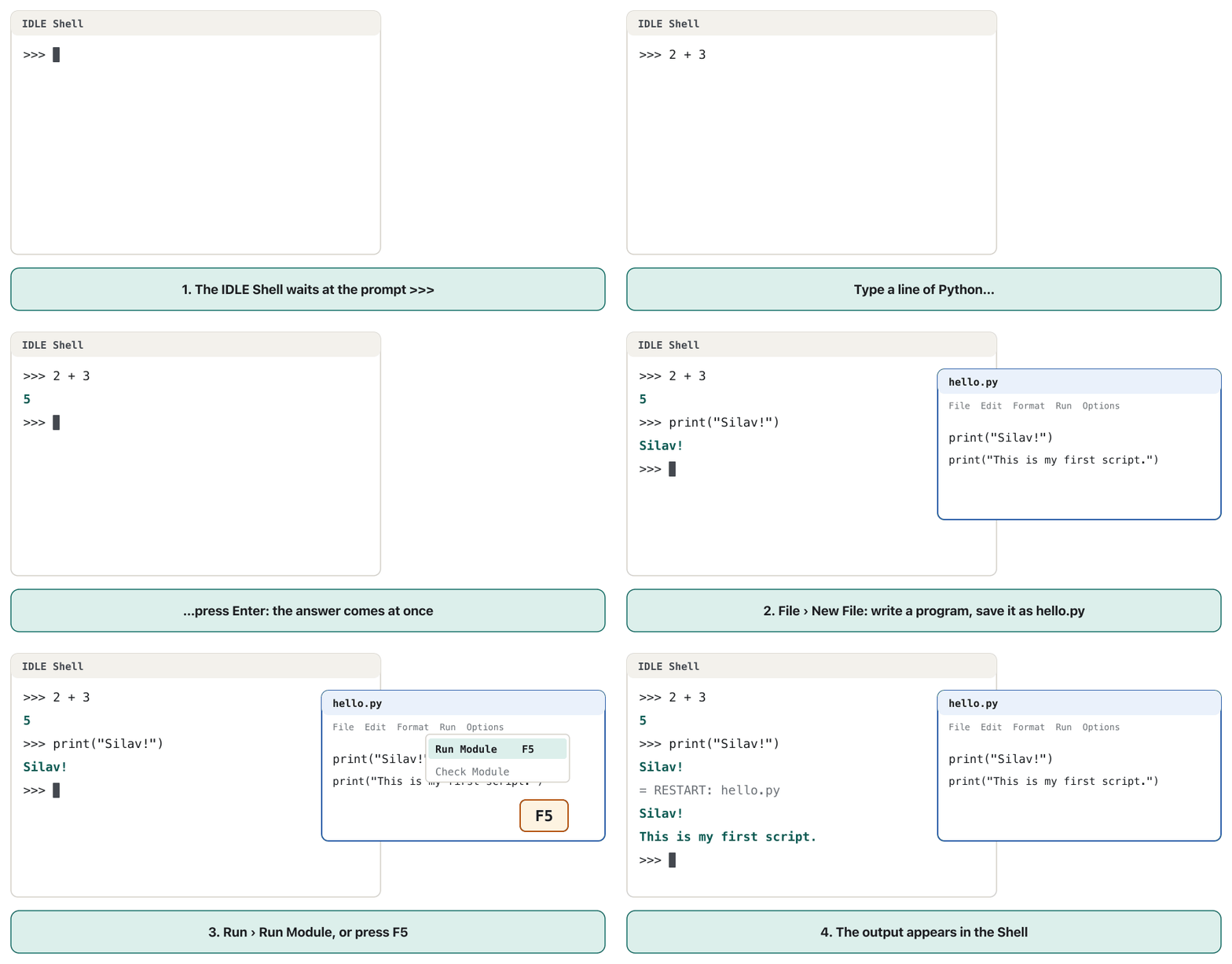
>>> means “type a line of Python”. Type it, press Enter, and Python answers at once. Then the prompt comes back for the next line.
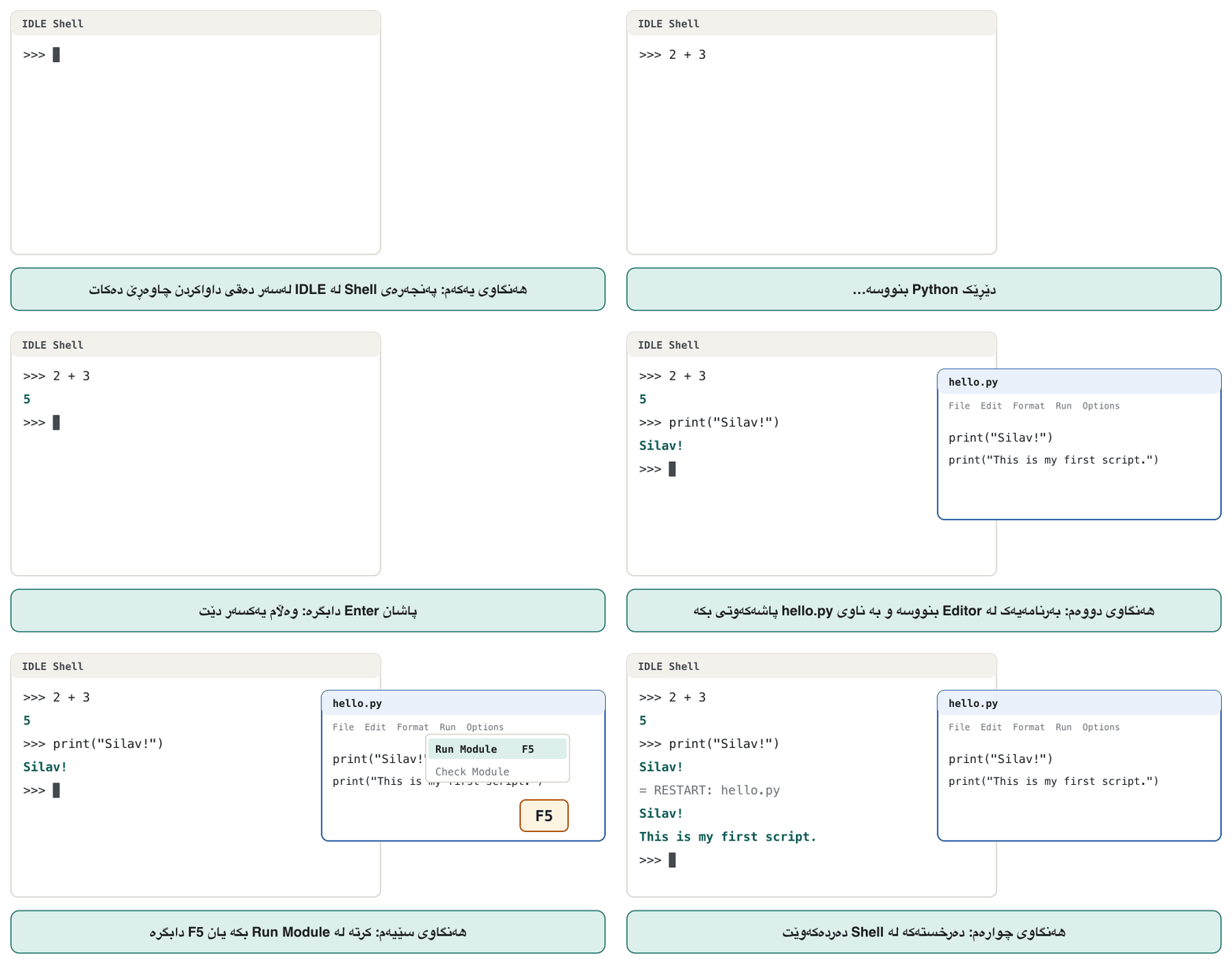
>>> واتە «دێڕێک Python بنووسە». بینووسە، Enter دابگرە و Python یەکسەر وەڵام دەداتەوە. پاشان دەگەڕێتەوە بۆ دێڕی دواتر.
Python 3.12.14 (main, Aug 14 2026, 15:24:41) [Clang 22.1.3 ] on darwin
Type "help", "copyright", "credits" or "license" for more information.
>>> 2 + 3
5
>>> print("Silav!")
Silav!
>>> exit()
Explain the codeڕوونکردنەوەی کۆدەکە
- Lineدێڕی 1
The first two lines show the version. On Windows they mention win32; with a newer Python the number is newer.
دوو دێڕی یەکەم وەشانەکە پیشان دەدەن. لەسەر Windows باسی win32 دەکەن؛ بە Pythonـێکی نوێتر ژمارەکەش نوێترە.
- Lineدێڕی 3-4
You type
2 + 3; Python works it out and shows5.تۆ دەنووسیت
2 + 3؛ Python دەیژمێرێت و5پیشان دەدات.- Lineدێڕی 5-6
print()shows text on the screen. You will meet it properly in the next lesson.print()دەق لەسەر شاشە پیشان دەدات. لە وانەی داهاتوودا بە باشی دەیناسیت.- Lineدێڕی 7
exit()closes the shell. Ctrl+Z then Enter (Windows) or Ctrl+D (macOS, Linux) also work.exit()دادەخات. Ctrl+Z پاشان Enter (Windows) یان Ctrl+D (macOS، Linux)ـیش کار دەکەن.
Two ways to run Python: shell and scriptدوو ڕێگا بۆ جێبەجێکردنی Python: شێڵی کارلێک و دەسنووس
You can give Python your code in two ways. In the you type one line at a time and see the answer at once. In a you write the whole program in a .py file, save it, and run the file as often as you like.
دەتوانیت بە دوو ڕێگا کۆدەکەت بدەیت بە Python. لە هەر جارە یەک دێڕ دەنووسیت و یەکسەر وەڵامەکە دەبینیت. لە هەموو لە فایلێکی .pyـدا دەنووسیت، پاشەکەوتی دەکەیت و هەر چەند جار بتەوێت فایلەکە جێبەجێ دەکەیت.
One difference surprises beginners. The shell shows the value of every expression you type. A script does not: it shows only what you print().
جیاوازییەک سەرەتاکاران سەرسام دەکات. هەموو کە دەینووسیت پیشان دەدات. وا ناکات: تەنها ئەوە پیشان دەدات کە بە print() چاپی دەکەیت.
7 * 6
print(7 * 6)42
Explain the codeڕوونکردنەوەی کۆدەکە
- Lineدێڕی 1
Python calculates 42, but in a script nobody asked to show it, so nothing appears.
Python 42 دەژمێرێت، بەڵام لە کەس داوای پیشاندانی نەکردووە، بۆیە هیچ دەرناکەوێت.
- Lineدێڕی 2
print()shows the value: this is the only output line.print()پیشان دەدات: ئەمە تاکە دێڕی .
Two ways to run Python: shell and scriptدوو ڕێگا بۆ جێبەجێکردنی Python: شێڵی کارلێک و دەسنووس
Running a script fileجێبەجێکردنی فایلێکی دەسنووس
A real program lives in a file whose name ends in .py, for example hello.py. Type these two lines in an editor and save them as hello.py:
ڕاستەقینە لە فایلێکدا دەژی کە ناوەکەی بە .py کۆتایی دێت، بۆ نموونە hello.py. ئەم دوو دێڕە لە بنووسە و بە ناوی hello.py پاشەکەوتی بکە:
print("Silav! This is my first Python script.")
print("Python is running it line by line.")Silav! This is my first Python script. Python is running it line by line.
Then, in the terminal, go to the folder of the file with cd and give the file name to Python:
پاشان لە بە cd بڕۆ بۆ فایلەکە و ناوی فایلەکە بدە بە Python:
# Windows
python hello.py
py hello.py

# macOS and Linux
python3 hello.py
One more thing appears only in the shell: when a line needs more lines after it (such as an if), the prompt changes to ... until you press Enter on an empty line. In a file you simply write all the lines.
شتێکی تر تەنها لە دەردەکەوێت: کاتێک دێڕێک دێڕی تری لە دوای خۆیدا پێویستە (وەک if)، دەبێت بە ... تا Enter لەسەر دێڕێکی بەتاڵ دادەگریت. لە فایلدا بە سادەیی هەموو دێڕەکان دەنووسیت.
Where to write PythonPython لە کوێ بنووسیت
You can write Python in any plain , but an editor made for programming helps a lot: it colours the code, indents lines for you, shows errors and runs the program with one key. Such an editor with built-in tools is called an .
دەتوانیت Python لە هەر سادەدا بنووسیت، بەڵام دەستکاریکەرێک کە بۆ دروست کرابێت زۆر یارمەتیدەرە: کۆدەکە ڕەنگ دەکات، دێڕەکان بۆت دەباتە ناوەوە، هەڵەکان پیشان دەدات و بە یەک دوگمە جێبەجێ دەکات. دەستکاریکەرێکی لەم شێوەیە لەگەڵ ئامرازە ناوخۆییەکانیدا پێی دەڵێن .
Where to write PythonPython لە کوێ بنووسیت
IDLE: Python's own editorIDLE: دەستکاریکەری خودی Python
IDLE is a small that comes with Python from python.org. It has two kinds of window: the Shell window (the interactive shell with >>>) and Editor windows, where you write and save .py files.
IDLE بچووکە کە لەگەڵ Pythonـی python.org دێت. دوو جۆر پەنجەرەی هەیە: پەنجەرەی Shell ( لەگەڵ >>>) و پەنجەرەکانی Editor، کە تێیاندا فایلی .py دەنووسیت و پاشەکەوتیان دەکەیت.
Open IDLE. The Shell window appears with
>>>.IDLE بکەرەوە. پەنجەرەی Shell لەگەڵ
>>>دەردەکەوێت.Choose File › New File. An empty Editor window opens.
File › New File هەڵبژێرە. پەنجەرەیەکی بەتاڵی Editor دەکرێتەوە.
Type your program and save it with File › Save as
hello.py. A*around the title means there are unsaved changes.بنووسە و بە File › Save بە ناوی
hello.pyپاشەکەوتی بکە.*لە دەوری ناونیشانەکە واتە گۆڕانکاریی پاشەکەوتنەکراو هەیە.Choose Run › Run Module or press F5. IDLE first checks the ; if it is correct, it restarts the shell and runs the file. The output appears in the Shell window after a
RESTARTline.Run › Run Module هەڵبژێرە یان F5 دابگرە. IDLE سەرەتا دەپشکنێت؛ ئەگەر ڕاست بوو، شێڵەکە نوێ دەکاتەوە و فایلەکە جێبەجێ دەکات. لە پەنجەرەی Shell دوای دێڕێکی
RESTARTدەردەکەوێت.
Where to write PythonPython لە کوێ بنووسیت
Thonny, VS Code and othersThonny، VS Code و ئەوانی تر
| Toolئامراز | Good forباشە بۆ | Notesتێبینی |
|---|---|---|
| IDLE | First steps; it is already thereیەکەم هەنگاوەکان؛ پێشتر هەیە | Comes with python.org Python. Shell + editor + F5.لەگەڵ Pythonـی python.org دێت. شێڵ + دەستکاریکەر + F5. |
| Thonny | Beginnersسەرەتاکاران | Free; its installer already contains Python. View › Variables shows your variables, and it can run a program step by step so you watch each line.بەخۆڕاییە؛ Installerـەکەی خۆی Pythonـی تێدایە. View › Variables پیشان دەدات و دەتوانێت هەنگاو بە هەنگاو جێبەجێ بکات بۆ ئەوەی سەیری هەر دێڕێک بکەیت. |
| VS Code | Bigger projects; many languagesپڕۆژەی گەورەتر؛ چەندین زمان | Free editor from Microsoft. Install Python first, then the Python extension; choose your interpreter, then press the ▷ Run Python File button. Output appears in its terminal.دەستکاریکەرێکی بەخۆڕایی Microsoftـە. سەرەتا Python جێگیر بکە، پاشان Python؛ هەڵبژێرە و پاشان دوگمەی ▷ Run Python File دابگرە. لە دەردەکەوێت. |
| PyCharm | Large Python projectsپڕۆژە گەورەکانی Python | A powerful Python IDE; it has a free version. بەهێزی Pythonـە؛ وەشانێکی بەخۆڕاییشی هەیە. |
Any of them is fine for this course. They all use the same Python interpreter underneath, so your programs give the same output everywhere.
هەر کامێکیان بۆ ئەم کۆرسە باشە. هەموویان لە ژێرەوە هەمان Python بەکار دەهێنن، بۆیە لە هەموو شوێنێک هەمان دەدەن.
Setting up the PyCharm IDE, making a project and a .py file, and running a first print().
ئامادەکردنی PyCharm، کە ، دروستکردنی پڕۆژەیەک و .py، پاشان جێبەجێکردنی یەکەم print().
Watch 1:28-5:49: install PyCharm, make a project and main.py, run print().
لە 1:28 تا 5:49 سەیر بکە: PyCharm، دروستکردنی پڕۆژەیەک و main.py و جێبەجێکردنی print().
Python on a phone: online editorsPython لەسەر مۆبایل: دەستکاریکەرە سەرهێڵەکان
You do not need your own computer to start. An online editor is a where you type Python and press Run; the code runs on the site's and the output comes back to your screen. Students in the original class solved their first loop lab this way on their phones, with programiz.com's Python Online Compiler, without installing anything.
بۆ دەستپێکردن پێویستت بە خۆت نییە. دەستکاریکەری سەرهێڵ کە تێیدا Python دەنووسیت و Run دادەگریت؛ کۆدەکە لەسەر تۆڕگەکە جێبەجێ دەکرێت و دەگەڕێتەوە بۆ شاشەکەت. قوتابیانی پۆلە ڕەسەنەکە یەکەم تاقیگەیان، کە دەربارەی بوو، بەم شێوەیە لەسەر مۆبایلەکانیان چارەسەر کرد، بە Python Online Compilerـی programiz.com، بەبێ ئەوەی هیچ شتێک جێگیر بکەن.
- Good: nothing to install; works on a phone, a tablet or a lab computer.
- Limits: you need the internet; your code is sent to someone else's server, so never type passwords or private data;
input()and files may behave a little differently; copy your code somewhere safe, or it may be lost. - Next step: for longer work, install Python and use IDLE, Thonny or VS Code.
- باشی: هیچ شتێک جێگیر ناکرێت؛ لەسەر مۆبایل، یان تاقیگە کار دەکات.
- سنوور: پێویستە؛ کۆدەکەت دەنێردرێت بۆ کەسێکی تر، بۆیە هەرگیز یان تایبەت مەنووسە؛
input()و فایلەکان لەوانەیە کەمێک جیاواز کار بکەن؛ کۆدەکەت لە شوێنێکی پارێزراو کۆپی بکە، دەنا لەوانەیە ون بێت. - هەنگاوی دواتر: بۆ کاری درێژتر، Python جێگیر بکە و IDLE، Thonny یان VS Code بەکار بهێنە.
Common mistakesهەڵە باوەکان
| Mistakeهەڵە | What you seeئەوەی دەیبینیت | Fixچارەسەر |
|---|---|---|
Typing a terminal command inside the Python shell: >>> python hello.pyنووسینی لەناو Python: >>> python hello.py | SyntaxError: invalid syntax | Leave the shell with exit() first. Commands such as python hello.py belong in the terminal; Python code belongs after >>>.سەرەتا بە exit() لە شێڵەکە بچۆ دەرەوە. وەک python hello.py شوێنیان لە ؛ کۆدی Python شوێنی دوای >>>ـە. |
Typing python on macOS or Linuxنووسینی python لەسەر macOS یان Linux | command not found: python | Use python3 there.لەوێ python3 بەکار بهێنە. |
Typing python on Windows and getting the Microsoft Store, or “command not found”نووسینی python لەسەر Windows و کرانەوەی Microsoft Store، یان «فەرمانەکە نەدۆزرایەوە» | The Store opens, or python is not recognisedStore دەکرێتەوە، یان python ناناسرێتەوە | Press Start, open Manage app execution aliases and switch the Python aliases on (off and on again if they already are).Start دابگرە، Manage app execution aliases بکەرەوە و ناوە جێگرەوەکانی Python هەڵبکە (ئەگەر هەڵکرابوون، بیانکوژێنەوە و دووبارە هەڵیان بکەرەوە). |
Running a file from the wrong folder, or a file saved as hello.py.txtجێبەجێکردنی فایلێک لە هەڵەوە، یان فایلێک کە بە hello.py.txt پاشەکەوت کراوە | can't open file '…/hello.py': [Errno 2] No such file or directory | cd into the file's folder; check the real file name and its extension.بە cd بچۆ ناو فایلەکە؛ ناوی ڕاستەقینەی فایلەکە و بپشکنە. |
Copying Python 2 code from an old tutorial: print "Hi"کۆپیکردنی کۆدی Python 2 لە ڕێبەرێکی کۆن: print "Hi" | SyntaxError: Missing parentheses in call to 'print'. Did you mean print(...)? | Use Python 3 material: print("Hi").سەرچاوەی Python 3 بەکار بهێنە: print("Hi"). |
| Expecting a script to show values like the shell doesچاوەڕوانیی ئەوەی وەک پیشان بدات | Nothing is printed.هیچ چاپ ناکرێت. | Use print() in scripts.لە print() بەکار بهێنە. |
Naming your own file after a Python module, such as random.py or math.pyناونانی فایلی خۆت بە ناوی Python، وەک random.py یان math.py | Strange errors later, when a program imports that moduleدواتر هەڵەی سەیر، کاتێک ئەو مۆدیوڵە هاوردە دەکات | Give files your own names, such as dice_game.py.ناوی تایبەتی خۆت بدە بە فایلەکان، وەک dice_game.py. |
The first, fifth and sixth rows were tested with Python 3.12. The real error lines look like this:
ڕیزەکانی یەکەم، پێنجەم و شەشەم بە Python 3.12 تاقی کرانەوە. دێڕە ڕاستەقینەکانی هەڵە بەم شێوەیەن:
>>> python hello.py
  File "<stdin>", line 1
    python hello.py
           ^^^^^
SyntaxError: invalid syntax
>>> print "Hi"
  File "<stdin>", line 1
    print "Hi"
    ^^^^^^^^^^
SyntaxError: Missing parentheses in call to 'print'. Did you mean print(...)?Practiceڕاهێنان
Install Python 3 on your computer (or open an online editor). In a terminal, find out which version you have.
Python 3 لەسەر جێگیر بکە (یان دەستکاریکەرێکی سەرهێڵ بکەرەوە). لە بزانە کام وەشانت هەیە.
Show answerوەڵامەکە پیشان بدە
Type python --version (Windows) or python3 --version (macOS, Linux). Any number from 3.12 up is fine; a fresh install in October 2026 shows Python 3.15.1 or newer. Our test computer printed:
بنووسە python --version (Windows) یان python3 --version (macOS، Linux). هەر ژمارەیەک لە 3.12 بەرەو سەرەوە باشە؛ نوێ لە تشرینی یەکەمی 2026دا Python 3.15.1 یان نوێتر پیشان دەدات. تاقیکردنەوەکەمان ئەمەی چاپ کرد:
python3 --versionPython 3.12.14
If you see Python 2.7…, you started an old Python 2: use python3, or install Python 3.
ئەگەر Python 2.7… دەبینیت، Pythonـی کۆنی 2ت کردووەتەوە: python3 بەکار بهێنە، یان Python 3 جێگیر بکە.
Open the interactive shell. How many hours are in a year of 365 days? How many minutes are in one day? What is 17 × 23? (In Python, × is written *.)
بکەرەوە. ساڵێکی 365 ڕۆژی چەند کاتژمێرە؟ ڕۆژێک چەند خولەکە؟ 17 × 23 چەندە؟ (لە Pythonـدا × بە * دەنووسرێت.)
Hintئاماژە
Type the calculation after >>> and press Enter. You do not need print() in the shell.
حیسابەکە دوای >>> بنووسە و Enter دابگرە. لە شێڵدا پێویستت بە print() نییە.
Show answerوەڵامەکە پیشان بدە
>>> 365 * 24
8760
>>> 24 * 60
1440
>>> 17 * 23
391Create a file about_me.py that prints two lines: your (or a made-up) name, and that you are learning Python. Run it once with F5 in IDLE and once from the terminal.
فایلێکی about_me.py دروست بکە کە دوو دێڕ چاپ بکات: ناوی خۆت (یان ناوێکی دەستکرد) و ئەوەی فێری Python دەبیت. جارێک بە F5 لە IDLE و جارێک لە جێبەجێی بکە.
Show answerوەڵامەکە پیشان بدە
print("My name is Rezan.")
print("I am learning Python.")My name is Rezan. I am learning Python.
From the terminal: python about_me.py (Windows) or python3 about_me.py. In IDLE the same two lines appear in the Shell after the RESTART line.
لە : python about_me.py (Windows) یان python3 about_me.py. لە IDLE هەمان دوو دێڕ لە Shell دوای دێڕی RESTART دەردەکەون.
Choose the shell or a script for each job: (a) checking what 17 * 23 gives; (b) a homework program you must hand in; (c) trying what print("a", "b") prints; (d) a program you will run every morning.
بۆ هەر کارێک شێڵ یان هەڵبژێرە: (أ) پشکنینی ئەوەی 17 * 23 چی دەدات؛ (ب) ئەرکی ماڵەوە کە دەبێت ڕادەستی بکەیت؛ (ج) تاقیکردنەوەی ئەوەی print("a", "b") چی چاپ دەکات؛ (د) کە هەموو بەیانییەک جێبەجێی دەکەیت.
Show answerوەڵامەکە پیشان بدە
- (a) shell, (c) shell: quick tries that you do not need to keep.
- (b) script, (d) script: programs that must be saved and run again.
- (أ) شێڵ، (ج) شێڵ: تاقیکردنەوەی خێرا کە پێویست ناکات هەڵیانبگریت.
- (ب) ، (د) : کە دەبێت پاشەکەوت بکرێن و دووبارە جێبەجێ بکرێنەوە.
Summaryپوختە
- Python is a free, high-level, interpreted language with dynamic typing. Its readable syntax makes programs cheaper to maintain, and it is quick to build with and good as glue between programs.
- The name comes from the comedy show Monty Python's Flying Circus, not from the snake.
- Use Python 3 (3.15 is the newest in October 2026; this course needs 3.12 or newer). Python 2 was retired in 2020.
- Windows: the Python Install Manager (
python,py). macOS: the python.org installer (python3). Linux: usually there already (python3). - The shell (
>>>) runs one line at a time and shows values; a script (.pyfile) keeps a whole program and shows only what youprint(). - IDLE comes with Python (F5 runs the file); Thonny and VS Code are good alternatives; online editors work on a phone.
- Python زمانێکی بەخۆڕایی و ئاستبەرزە، بە جێبەجێ دەکرێت و بەکار دەهێنێت. پاراستنی هەرزانتر دەکات، دروستکردن پێی خێرایە و وەک چەسپ لە نێوان بەرنامەکاندا باشە.
- ناوەکە لە بەرنامە کۆمیدییەکەی Monty Python's Flying Circusـەوە هاتووە، نەک لە مار.
- Python 3 بەکار بهێنە (لە تشرینی یەکەمی 2026دا 3.15 نوێترینە؛ ئەم کۆرسە 3.12 یان نوێتری پێویستە). Python 2 لە 2020دا وەستێنرا.
- Windows: Python Install Manager (
python،py). macOS: Installerـی python.org (python3). Linux: زۆرجار پێشتر هەیە (python3). - (
>>>) هەر جارە یەک دێڕ جێبەجێ دەکات و پیشان دەدات؛ (فایلی.py) هەموو هەڵدەگرێت و تەنها ئەوە پیشان دەدات کەprint()ـی دەکەیت. - IDLE لەگەڵ Python دێت (F5 فایلەکە جێبەجێ دەکات)؛ Thonny و VS Code جێگرەوەی باشن؛ دەستکاریکەرە سەرهێڵەکان لەسەر مۆبایل کار دەکەن.
What are the two ways to run Python code?دوو ڕێگاکەی جێبەجێکردنی کۆدی Python چین؟
Type it line by line in the interactive shell, or save it in a .py script file and run the file (python hello.py, F5 in IDLE).
دێڕ بە دێڕ لە بینووسە، یان لە فایلێکی .pyـدا پاشەکەوتی بکە و فایلەکە جێبەجێ بکە (python hello.py، F5 لە IDLE).
Which command shows the Python version on macOS?کام فەرمان وەشانی Python لەسەر macOS پیشان دەدات؟
python3 --version.
python3 --version.
Why does a script with only the line 7 * 6 print nothing?بۆچی دەسنووسێک کە تەنها دێڕی 7 * 6ی تێدایە هیچ چاپ ناکات؟
Only the shell shows values automatically; a script shows only what you pass to print().
تەنها بە خۆکاری پیشان دەدات؛ تەنها ئەوە پیشان دەدات کە دەیدەیت بە print().
What is the difference between an editor and the interpreter?جیاوازیی نێوان دەستکاریکەر و ئینتەرپرێتەر چییە؟
The editor is where you write and save code; the interpreter is the program that runs it.
دەستکاریکەر ئەو شوێنەیە کە کۆدی تێدا دەنووسیت و پاشەکەوتی دەکەیت؛ ئەو کە جێبەجێی دەکات.
Videoڤیدیۆ
Watch a videoسەیری ڤیدیۆیەک بکە
A video that viewers liked a lot and praised in their comments, chosen for this lesson.ڤیدیۆیەک کە بینەران زۆریان پێ خۆش بووە و لە کۆمێنتەکانیاندا ستایشیان کردووە، بۆ ئەم وانەیە هەڵبژێردراوە.
What Python is, what people use it for (including AI and machine learning), and why its simple code makes it popular.
چییە، خەڵک بۆ چی بەکاری دەهێنن (لەوانە و ) و بۆچی کۆدە سادەکەی وای لێ کردووە ئەوەندە بەناوبانگ بێت.
Whole video (4:07): what Python does (0:15) and why it is so popular (1:40).
هەموو ڤیدیۆکە (4:07): چی دەکات (0:15) و بۆچی ئەوەندە بەناوبانگە (1:40).
Lesson complete!وانەکە تەواو بوو!
Well done. Review the key terms, then go on to the next lesson.دەستخۆش. سەیرێکی زاراوە سەرەکییەکان بکەرەوە، پاشان بڕۆ بۆ وانەی داهاتوو.
Key termsزاراوە سەرەکییەکان
Your First Program: print() and Commentsیەکەم بەرنامە: print() و لێدوانەکان
Related lecturesوانە پەیوەندیدارەکان
References and further readingسەرچاوەکان و خوێندنەوەی زیاتر
- Python FAQ: General Python FAQ (what Python is, why it is called Python)
- python.org: Download Python (current releases and support dates)
- Python documentation: Using Python on Windows (Python Install Manager)
- PEP 773: A Python Installation Manager for Windows
- Python documentation: Using Python on macOS
- Python documentation: Using Python on Unix platforms
- Python tutorial 2: Using the Python Interpreter
- Python documentation: IDLE
- python.org: Sunsetting Python 2
- PEP 602: Annual Release Cycle for Python
- Thonny: Python IDE for beginners
- Visual Studio Code: Getting started with Python
- Harvard CS50P, lecture 0 notes (writing and running hello.py)
- Liang, Introduction to Programming Using Python: table of contents (chapter 1)
This lecture is a first edition. The Kurdish text and terminology are waiting for review by Kurdish IT teachers.ئەم وانەیە چاپی یەکەمە. دەقە کوردییەکە و زاراوەکانی چاوەڕێی پێداچوونەوەی مامۆستایانی کوردی بواری IT ن.