JavaJava · Chapterبەش 3 · Lectureوانە 3.2
Your First Java Program: Output and Commentsیەکەم بەرنامەی Javaـت: دەرخستە و لێدوانەکان
Write and understand your first Java program: the class and the file name, the main method and the boilerplate frame around your code, System.out.println and print, special characters, printing text and calculations, joining with +, escape sequences such as \n and \", and the three kinds of comments.
یەکەم Java بنووسە و تێی بگە: و ناوی ، و چوارچێوەی boilerplate لە دەوری کۆدەکەت، System.out.println و print، نیشانە تایبەتەکان، چاپکردنی دەق و ژمێرکاری، لکاندن بە +، وەک \n و \"، هەروەها سێ جۆرەکەی .
What you will learnچی فێر دەبیت
- Write, save and run a Java program whose public class matches its file name.
- Explain the parts of a program: class, main method, statement, string, semicolon and blocks, and recognise the boilerplate frame every program repeats.
- Print text and calculations with
printlnandprint, join values with+and use escape sequences. - Write line, block and documentation comments, and explain why the compiler skips them.
- Java بنووسیت، پاشەکەوتی بکەیت و جێبەجێی بکەیت کە publicـەکەی لەگەڵ ناوی بگونجێت.
- بەشەکانی ڕوون بکەیتەوە: ، ، ، ، و بلۆکەکان، هەروەها ئەو چوارچێوە boilerplateـە بناسیتەوە کە هەموو دووپاتەی دەکاتەوە.
- دەق و ژمێرکاری بە
printlnوprintچاپ بکەیت، بە+بلکێنیت و بەکار بهێنیت. - دێڕی، بلۆکی و بنووسیت و ڕوونی بکەیتەوە بۆچی تێیان دەپەڕێنێت.
Your first Java programیەکەم بەرنامەی Javaـت
A Hello, World! program shows the words Hello, World! on the screen. Because it is so small, programmers have used it as the first program in a new language since the 1970s. Here it is in Java:
Hello, World! وشەکانی Hello, World! لەسەر شاشە پیشان دەدات. چونکە ئەوەندە بچووکە، لە ساڵانی 1970ـەوە وەک یەکەم لە زمانێکی نوێدا بەکاری دەهێنن. ئەمە وەشانی Javaـیەتی:
public class HelloWorld {
    public static void main(String[] args) {
        System.out.println("Hello, World!");
    }
}Hello, World!
Save it as HelloWorld.java — the file name must match the class name — and run it with your editor's Run button, or with javac HelloWorld.java and then java HelloWorld in a terminal. Compiling and running explains these two commands step by step.
بە ناوی HelloWorld.java پاشەکەوتی بکە — ناوی دەبێت وەک ناوی بێت — و بە دوگمەی Runـی دەستکاریکەرەکەت، یان بە javac HelloWorld.java و پاشان java HelloWorld لە جێبەجێی بکە. کۆمپایلکردن و جێبەجێکردن ئەم دوو هەنگاو بە هەنگاو ڕوون دەکاتەوە.
The parts of a Java programبەشەکانی بەرنامەیەکی Java
Every line of a Java program has a job. Here is the same kind of program with another message, saved as Welcome.java:
هەموو دێڕێکی Java کارێکی هەیە. ئەمە هەمان جۆرە بە پەیامێکی ترەوە، بە ناوی Welcome.java پاشەکەوت کراوە:
public class Welcome {
    public static void main(String[] args) {
        System.out.println("Welcome to Java!");
    }
}Welcome to Java!
The next screens look at the parts one by one: the class, the file name, the main method and the printing statement.
شاشەکانی داهاتوو یەک بە یەک سەیری بەشەکان دەکەن: ، ناوی ، و چاپکردن.
The parts of a Java programبەشەکانی بەرنامەیەکی Java
The class: a named containerکلاس: دەفرێک بە ناوێکەوە
public class Welcome declares a class called Welcome. Every Java program is made of one or more classes — they are the building blocks of Java — and every class has a name. Everything else lives inside the class's curly braces: the main method, and inside it the statements.
public class Welcome بە ناوی Welcome دەناسێنێت. هەموو Java لە یەک یان چەند پێک دێت — ئەوان خشتی بنیاتنانی Javaـن — و هەر ناوێکی هەیە. هەموو شتێکی تر لە ناو { }ـی : و لە ناو ئەویشدا .
The word public means that code everywhere may use the class. It is one of Java's access modifiers, which the classes chapter explains (Constructors and encapsulation).
وشەی public واتە هەموو کۆدێک بۆی هەیە ئەم بەکار بهێنێت. یەکێکە لە Java، کە بەشی ڕوونی دەکاتەوە (دروستکەرەکان و کەپسوولکردن).
The parts of a Java programبەشەکانی بەرنامەیەکی Java
One public class, named like the fileیەک کلاسی public، بە ناوی فایلەکەوە
- A source file may contain at most one public class.
- The public class must have exactly the same name as the file:
public class Welcomelives inWelcome.java— same spelling, same capital letters. - By convention, a class name starts with a capital letter, and so does each new word inside it:
HelloWorld,ComputeExpression. This style is called .
- دەتوانێت لە یەک public زیاتری تێدا نەبێت.
- publicـەکە دەبێت ڕێک هەمان ناوی هەبێت:
public class WelcomeلەWelcome.javaـدایە — هەمان ڕێنووس و هەمان پیتە گەورەکان. - بە نەریت، ناوی بە پیتی گەورە دەست پێ دەکات و هەر وشەیەکی نوێی ناویشی هەروا:
HelloWorld،ComputeExpression. ئەم شێوازە پێی دەڵێن .
public class HelloWorld {
    public static void main(String[] args) {
        System.out.println("Hello, World!");
    }
}Greeting.java:1: error: class HelloWorld is public, should be declared in a file named HelloWorld.java
public class HelloWorld {
^
1 errorThe parts of a Java programبەشەکانی بەرنامەیەکی Java
The main method: where the program startsکرداری main: شوێنی دەستپێکردنی بەرنامەکە
public static void main(String[] args) defines the main method. A class may contain several methods, but when you run a program the JVM looks for this one and starts with its first statement: it is the program's entry point. Every Java application needs one, written exactly like this. This first line is the method's signature.
public static void main(String[] args) دەناسێنێت. دەتوانێت چەند هەبێت، بەڵام کاتێک جێبەجێ دەکەیت، JVM بە دوای ئەمەدا دەگەڕێت و بە یەکەم دەست پێ دەکات: ئەمە خاڵی چوونەژوورەوەی . هەموو Java یەکێکی پێویستە، ڕێک بەم شێوەیە نووسراو. ئەم دێڕە یەکەمە واژۆی .
You do not need every word yet; later lessons explain static, void and arrays. One fact matters now: javac only translates the program. The JVM — started by the java command — is what runs it, beginning at main.
هێشتا پێویستت بە هەموو وشەیەک نییە؛ وانەکانی داهاتوو static، void و ڕوون دەکەنەوە. یەک ڕاستی ئێستا گرنگە: javac تەنیا وەردەگێڕێت. JVM — کە java دەستی پێ دەکات — ئەوەیە کە جێبەجێی دەکات، لە mainـەوە.
The parts of a Java programبەشەکانی بەرنامەیەکی Java
main is not Mainmain وەک Main نییە
Java is case-sensitive: main and Main are different names. If you write Main, the file still compiles — it is simply another method — but java cannot find the entry point and stops:
Java : main و Main دوو ناوی جیاوازن. ئەگەر Main بنووسیت، هێشتا کۆمپایل دەبێت — تەنیا ترە — بەڵام java خاڵی چوونەژوورەوە نادۆزێتەوە و دەوەستێت:
public class Welcome {
    public static void Main(String[] args) {
        System.out.println("Welcome to Java!");
    }
}Error: Main method not found in class Welcome, please define the main method as: public static void main(String[] args) or a JavaFX application class must extend javafx.application.Application
The same happens if you leave out static: javac is happy, but java answers Error: Main method is not static in class Welcome. Copy the first line of main exactly.
هەمان شت ڕوو دەدات ئەگەر static لاببەیت: javac ڕازییە، بەڵام java وەڵام دەداتەوە Error: Main method is not static in class Welcome. یەکەم دێڕی main ڕێک وەک خۆی بنووسە.
The parts of a Java programبەشەکانی بەرنامەیەکی Java
Printing a line: System.out.printlnچاپکردنی دێڕێک: System.out.println
System.out.println("Welcome to Java!"); is a statement: one complete instruction. It displays the text on the console (the terminal window) and then moves to a new line. It sits inside the main method, which sits inside the class.
System.out.println("Welcome to Java!"); : یەک فەرمانی تەواو. دەقەکە لەسەر پیشان دەدات و پاشان دەچێتە دێڕێکی نوێ. لە ناو و ئەویش لە ناو .
- The text between double quotation marks is a string: a sequence of characters. The quotes are not printed.
- Every statement ends with a semicolon
;, the statement terminator. - A pair of curly braces
{ }forms a block that groups parts of the program: the class has a block, and so does the main method.
- ئەو دەقەی لە نێوان : زنجیرەیەک لە . چاپ ناکرێن.
- هەموو بە
;کۆتایی دێت، کە کۆتاییهێنەری . - جووتێک
{ }پێک دەهێنێت کە بەشەکانی کۆ دەکاتەوە: بلۆکێکی هەیە و هەروا.
The parts of a Java programبەشەکانی بەرنامەیەکی Java
Boilerplate: the frame every program repeatsکۆدی boilerplate: ئەو چوارچێوەیەی هەموو بەرنامەیەک دووپاتەی دەکاتەوە
Put HelloWorld and Welcome side by side: only the class name and the line inside main differ. The class line, the main line and the closing braces are the same in every program. Set-up code like this, repeated almost unchanged wherever it is needed, is called boilerplate code. Java needs it as the program's frame; your program's own job is in the lines you write inside main.
HelloWorld و Welcome لە تەنیشت یەکتر دابنێ: تەنیا ناوی و ئەو دێڕەی ناو main جیاوازن. دێڕی ، دێڕی main و }ـە داخەرەکان لە هەموو وەک یەکن. کۆدی ئامادەکاری لەم جۆرە، کە لە هەر شوێنێک پێویست بێت بە نزیکەیی بێ گۆڕان دووپاتە دەبێتەوە، پێی دەڵێن boilerplate code. Java وەک چوارچێوەی پێویستی پێیەتی؛ کاری تایبەتی لەو دێڕانەدایە کە خۆت لە ناو mainـدا دەینووسیت.
The name comes from printing. Boilerplate was the rolled steel used to build steam boilers. Newspapers later bought ready-made stories that arrived as metal printing plates looking much like it, so text that is copied without change got the same name. The French word cliché has the same story: once a printing plate, today a phrase used too often.
ناوەکە لە جیهانی چاپەوە هاتووە. boiler واتە گیزەر یان قازانی هەڵم و boilerplate ئەو پلێتە پۆڵایانە بوون کە قازانی هەڵمیان لێ دروست دەکرد. دواتر ڕۆژنامەکان چیرۆکی ئامادەیان دەکڕی کە وەک پلێتی کانزایی چاپ دەگەیشتن و زۆر لەو پلێتانە دەچوون، بۆیە ئەو دەقەی بێ گۆڕان کۆپی دەکرێت هەمان ناوی وەرگرت. وشەی «کڵێشە»ش هەمان چیرۆکی هەیە: لە ڕێگەی عەرەبییەوە لە وشەی فەڕەنسیی clichéـەوە هاتووە، کە پلێتێکی چاپ بوو و ئەمڕۆ بە واتای قسەیەکی زۆر دووپاتەکراوە دێت.
Other languages have boilerplate too: almost every web page starts with the same HTML skeleton (The structure of an HTML document), and flutter create gives every new Flutter project the same starter files (Create and run your first app). Since Java 25, a small program may leave most of Java's frame out (Newer Java).
زمانەکانی تریش کۆدی boilerplateـیان هەیە: نزیکەی هەموو بە هەمان ئێسکەپەیکەری HTML دەست پێ دەکات (پێکهاتەی بەڵگەنامەیەکی HTML) و flutter create هەمان سەرەتایی دەداتە هەموو پڕۆژەیەکی نوێی Flutter (دروستکردن و جێبەجێکردنی یەکەم ئەپ). لە Java 25ـەوە، بچووک دەتوانێت زۆربەی چوارچێوەکەی Java لاببات (Javaـی نوێتر).
Special characters in Javaنیشانە تایبەتەکانی Java
These characters appear in almost every Java program. Learn their names: error messages use them.
ئەم نیشانانە لە نزیکەی هەموو Javaـدا دەردەکەون. ناوەکانیان فێر بە: بەکاریان دەهێنن.
| Characterنیشانە | Nameناو | Used forبۆ |
|---|---|---|
{ } | opening and closing bracesکەوانەی لووتدار (کردنەوە و داخستن) | mark a block of statements لە دیاری دەکەن |
( ) | opening and closing parenthesesکەوانەی ئاسایی | used with methods: println( … )لەگەڵ بەکار دێن: println( … ) |
[ ] | opening and closing bracketsکەوانەی چوارگۆشە | mark an array: String[] args (Arrays) دیاری دەکەن: String[] args (ڕیزەکەکان) |
// | double slashesدوو هێڵی لار | start a comment that runs to the end of the line دەست پێ دەکەن کە تا کۆتایی دێڕەکە دەڕوات |
" " | quotation marks | enclose a string دەگرنە ناو خۆیان |
; | semicolon | ends a statement تەواو دەکات |
print and printlnprint و println
println means print line: it prints its text and then moves to the next line. print prints the text and stays where it is, so the next output continues on the same line. An empty System.out.println(); prints only a line break, which gives an empty line.
println واتە چاپکردنی دێڕ: دەقەکەی چاپ دەکات و پاشان دەچێتە دێڕی داهاتوو. print دەقەکە چاپ دەکات و لە شوێنی خۆی دەمێنێتەوە، بۆیە داهاتوو لەسەر هەمان دێڕ بەردەوام دەبێت. System.out.println();ـی بەتاڵ تەنیا چاپ دەکات، کە دێڕێکی بەتاڵ دەدات.
public class Order {
    public static void main(String[] args) {
        System.out.print("Two teas");
        System.out.print(", please");
        System.out.println("!");
        System.out.println("One with sugar.");
        System.out.println();
        System.out.println("Thank you!");
    }
}Two teas, please! One with sugar. Thank you!
Explain the codeڕوونکردنەوەی کۆدەکە
- Lineدێڕی 3-5
Three pieces on one line: only the third call ends the line.
سێ پارچە لەسەر یەک دێڕ: تەنیا بانگکردنی سێیەم دێڕەکە تەواو دەکات.
- Lineدێڕی 7
An empty
println()prints an empty line.println()ـی بەتاڵ دێڕێکی بەتاڵ چاپ دەکات.
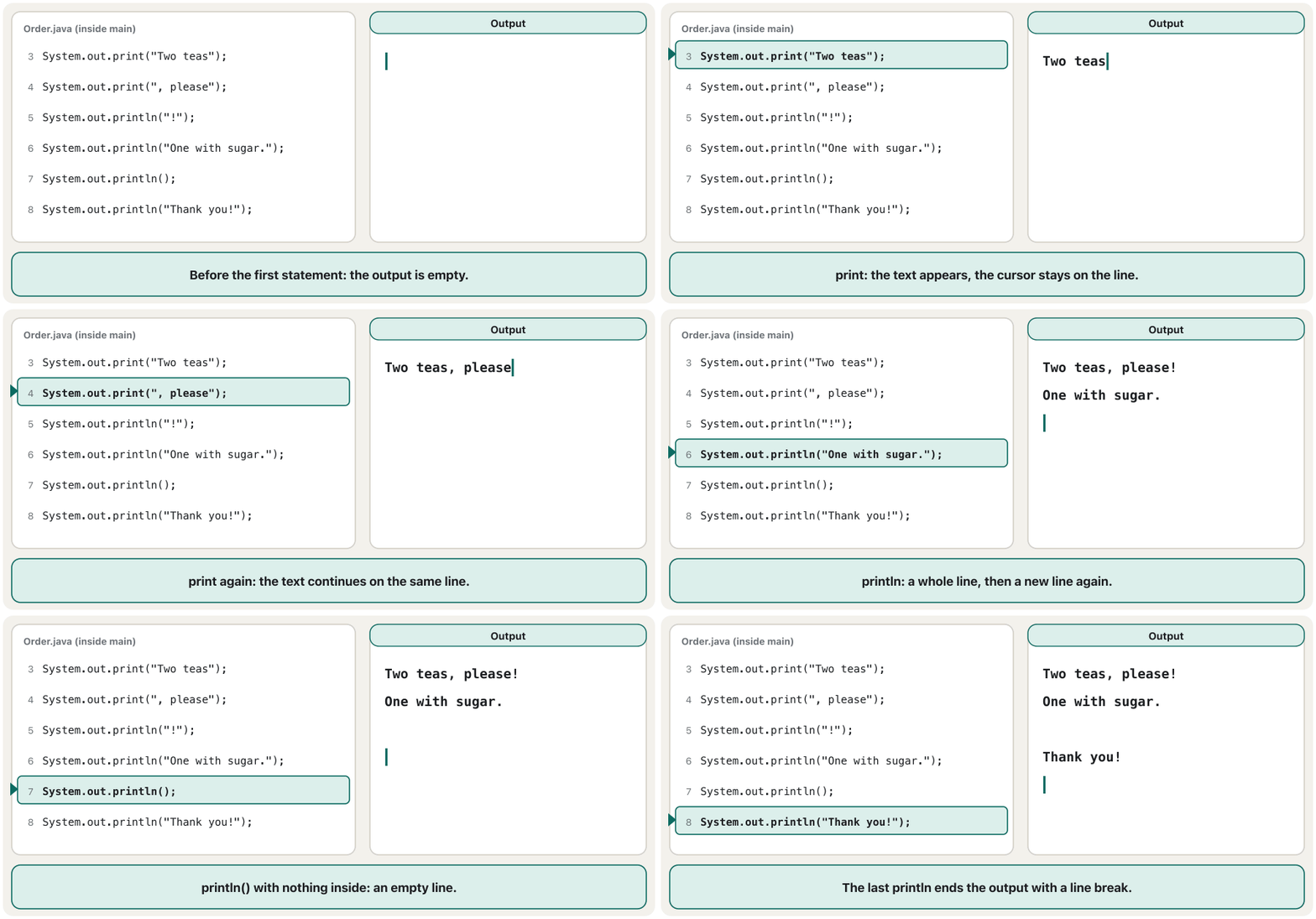
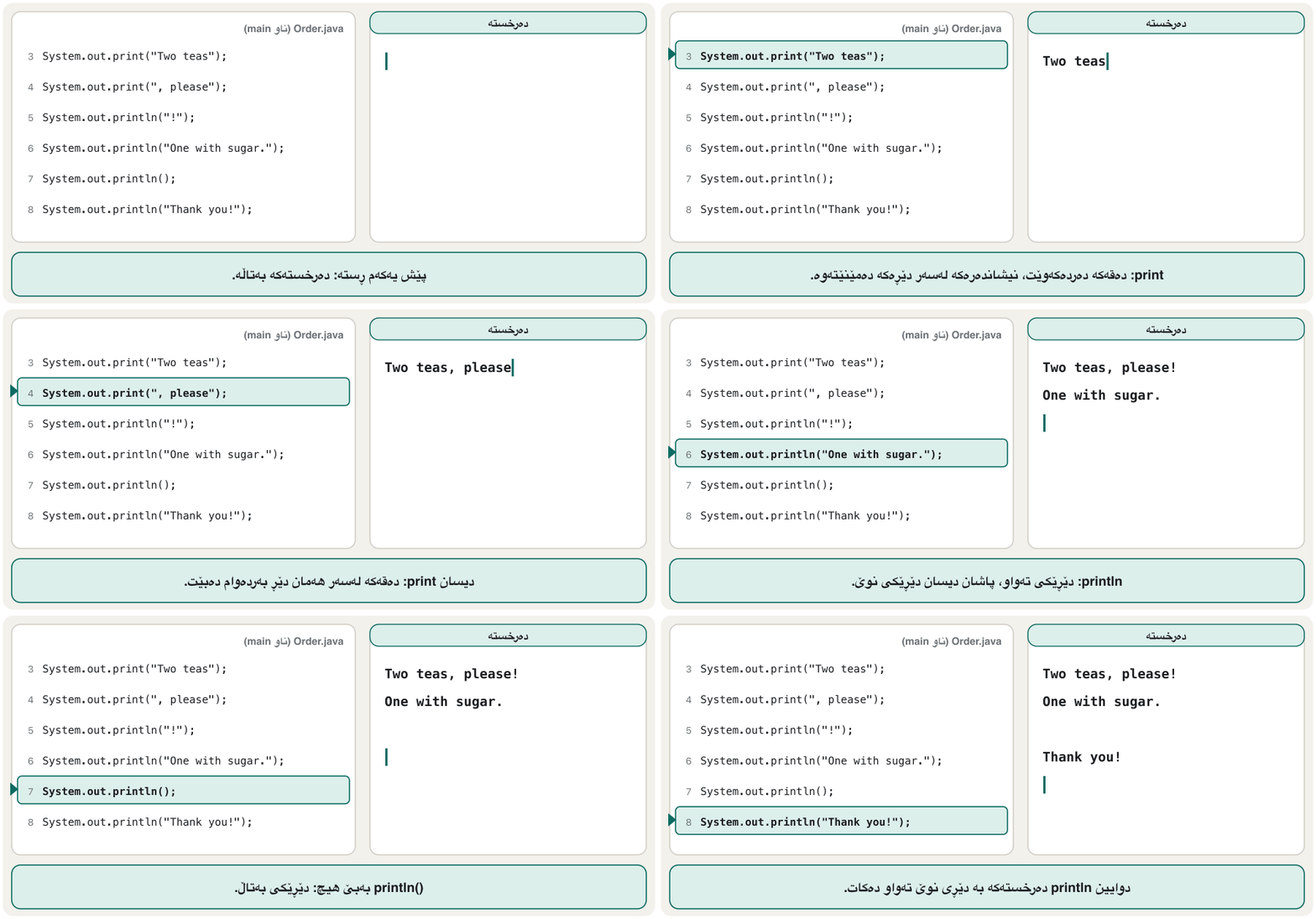
print keeps the cursor on the line; println moves it downprint نیشاندەرەکە لەسەر دێڕەکە دەهێڵێتەوە؛ println دەیباتە خوارەوەCêITText or number?دەق یان ژمارە؟
Quotation marks decide what Java does. Text inside quotes is printed exactly as it is written. Without quotes, Java first works out the value of the expression and prints the result:
بڕیار دەدەن Java چی بکات. دەقی ناو ڕێک وەک نووسراوە چاپ دەکرێت. بەبێ ، Java سەرەتا دەدۆزێتەوە و ئەنجامەکە چاپ دەکات:
public class Test {
    public static void main(String[] args) {
        System.out.println("39 + 3");
        System.out.println(39 + 3);
    }
}39 + 3 42
Joining text with +پێکەوەلکاندنی دەق بە +
When a string stands on either side of +, the + joins instead of adding: "Silav " + "Aram" becomes Silav Aram. This is called concatenation. Java works from left to right, so the order of the parts decides the result:
کاتێک لە هەر لایەکی + بێت، + لە جیاتی کۆکردنەوە پێکەوەیان دەلکێنێت: "Silav " + "Aram" دەبێتە Silav Aram. ئەمە پێی دەڵێن . Java لە چەپەوە بۆ ڕاست کار دەکات، بۆیە ڕیزبەندیی بەشەکان ئەنجامەکە دیاری دەکات:
public class Joining {
public static void main(String[] args) {
System.out.println("39 + 3 = " + 39 + 3);
System.out.println("39 + 3 = " + (39 + 3));
System.out.println(39 + 3 + " is the answer");
System.out.println("Tea: " + 2 * 750 + " dinars");
}
}39 + 3 = 393 39 + 3 = 42 42 is the answer Tea: 1500 dinars
Explain the codeڕوونکردنەوەی کۆدەکە
- Lineدێڕی 3
Text first: 39 is joined, then 3 is joined, giving 393.
سەرەتا دەق: 39 دەلکێنرێت، پاشان 3، کە دەبێتە 393.
- Lineدێڕی 4
The brackets are worked out first: 39 + 3 = 42.
سەرەتا ناو کەوانەکە دەژمێردرێت: 39 + 3 = 42.
- Lineدێڕی 5
Numbers first: 39 + 3 = 42, then the text is joined.
سەرەتا ژمارەکان: 39 + 3 = 42، پاشان دەقەکە دەلکێنرێت.
- Lineدێڕی 6
*is done before+, so 2 * 750 = 1500 is joined as a number.*پێش+ئەنجام دەدرێت، بۆیە 2 * 750 = 1500 وەک ژمارە دەلکێنرێت.
+ joinsلە چەپەوە بۆ ڕاست: کاتێک دەق تێکەڵ بوو، + دەلکێنێتCêITThis left-to-right order comes back in Operators, and Strings says more about mixing numbers with text.
ئەم ڕیزبەندییە لە چەپەوە بۆ ڕاست لە کارپێکەرەکاندا دووپاتە دێتەوە و زنجیرەنووسەکان زیاتر لەسەر تێکەڵکردنی ژمارە و دەق دەڵێت.
println takes one valueprintln تەنیا یەک نرخ وەردەگرێت
Can println print two strings separated by a comma? Try it: the program does not compile. (Only the first lines of javac's long message are shown.)
ئایا println دەتوانێت دوو چاپ بکات کە بە کۆما لێک جیا کراونەتەوە؟ تاقی بکەرەوە: کۆمپایل نابێت. (تەنیا یەکەم دێڕەکانی پەیامە درێژەکەی javac پیشان دراون.)
public class Test {
public static void main(String[] args) {
System.out.println("Hello", "World!");
}
}Test.java:3: error: no suitable method found for println(String,String)
System.out.println("Hello", "World!");
^
method PrintStream.println() is not applicable
(actual and formal argument lists differ in length)
…
1 errorjavac then lists all ten versions of println (why there are ten): one with no value and nine that take one value each (text, a number, a character…). None takes two. To print both words, join them into one string:
پاشان javac یەک بە یەک ناوی هەر دە وەشانەکەی println دەهێنێت (بۆچی دە دانەن): یەکێکیان بێ و نۆیان هەریەکە یەک وەردەگرێت (دەق، ژمارە، …). هیچیان دوو وەرناگرێت. بۆ چاپکردنی هەردوو وشەکە، پێکەوەیان بلکێنە و بیانکە بە یەک :
public class Test {
public static void main(String[] args) {
System.out.println("Hello" + " " + "World!");
}
}Hello World!
Printing the result of a calculationچاپکردنی ئەنجامی ژمێرکارییەک
Java can calculate and print in one statement. This program works out:
Java دەتوانێت لە یەک بژمێرێت و چاپ بکات. ئەم ئەمە دەژمێرێت:
public class ComputeExpression {
public static void main(String[] args) {
System.out.println((10.5 + 2 * 3) / (45 - 3.5));
}
}0.39759036144578314
In Java the multiplication sign is * and division is /. The fraction bar groups the top and the bottom, so each needs its own brackets; Java always works out what is inside brackets first.
لە Javaـدا نیشانەی لێکدان *ـە و دابەشکردن /ـە. هێڵی کەرت سەرەوە و خوارەوە کۆ دەکاتەوە، بۆیە هەریەکەیان کەوانەی خۆی پێویستە؛ Java هەمیشە سەرەتا ناو کەوانەکان دەژمێرێت.
Special characters inside strings: escape sequencesهێما تایبەتەکان لە ناو زنجیرەنووسەدا
How do you print a quotation mark, when a quotation mark ends the string? Inside a string, a backslash \ starts an escape sequence: the backslash and the next character together stand for one special character.
چۆن چاپ دەکەیت، کاتێک کۆتایی پێ دەهێنێت؟ لە ناو ، \ دەست پێ دەکات: و دوای ئەو پێکەوە جێگەی یەک تایبەت دەگرنەوە.
| Writeبنووسە | You getدەردەچێت |
|---|---|
\n | a new lineدێڕێکی نوێ () |
\t | a tab (a jump to the next column)تاب (بازدان بۆ ستوونی داهاتوو) |
\" | a double quote: " دووانە: " |
\' | a single quote: ' تاک: ' |
\\ | one backslash: \یەک : \ |
public class Escapes {
public static void main(String[] args) {
System.out.println("Line 1\nLine 2");
System.out.println("Name:\tDilan");
System.out.println("She said \"Silav\" to us.");
System.out.println("Folder: C:\\examples");
}
}Line 1 Line 2 Name: Dilan She said "Silav" to us. Folder: C:\examples
You meet these special characters again when you work with text in Strings.
کاتێک لە زنجیرەنووسەکاندا کار لەسەر دەق دەکەیت، دووپاتە ئەم نیشانە تایبەتانە دەبینیتەوە.
Comments: notes for peopleلێدوانەکان: تێبینی بۆ مرۆڤ
A comment is a note for people who read the code. The compiler skips comments completely: they never reach the bytecode and never run. Comments can explain a variable, a method, a class or any statement.
تێبینییەکە بۆ ئەو کەسانەی کۆدەکە دەخوێننەوە. بە تەواوی تێدەپەڕێنێت: هەرگیز ناگەنە و هەرگیز جێبەجێ ناکرێن. دەتوانن ، ، یان هەر ڕوون بکەنەوە.
- You can go back to code you wrote days or months ago and quickly see what each part does.
- Other people understand your logic by reading the comments instead of every line.
- As a project grows, the comments become part of its documentation, which keeps it manageable.
- دەتوانیت بگەڕێیتەوە بۆ ئەو کۆدەی ڕۆژان یان مانگان پێش ئێستا نووسیوتە و بە خێرایی ببینیت هەر بەشێکی چی دەکات.
- خەڵکی تر بە خوێندنەوەی لە جیاتی هەموو دێڕێک لۆجیکەکەت تێدەگەن.
- کاتێک پڕۆژەیەک گەورە دەبێت، دەبنە بەشێک لە و بەڕێوەبردنی ئاسان دەهێڵنەوە.
Comments: notes for peopleلێدوانەکان: تێبینی بۆ مرۆڤ
Line comments and block commentsلێدوانەکانی دێڕی و بلۆکی
A line comment starts with // and runs to the end of that line, so it can follow code on the same line:
دێڕی بە // دەست پێ دەکات و تا کۆتایی ئەو دێڕە دەڕوات، بۆیە دەتوانێت لەسەر هەمان دێڕ دوای کۆد بێت:
public class CommentExample1 {
public static void main(String[] args) {
int i = 10; // Here, i is a variable
System.out.println(i);
}
}10
A block comment starts with /* and ends with */, on one line or across several:
بلۆکی بە /* دەست پێ دەکات و بە */ کۆتایی دێت، لەسەر یەک دێڕ یان چەند دێڕێک:
public class CommentExample2 {
public static void main(String[] args) {
/* Let's declare a variable
and print it. */
int i = 10;
System.out.println(i);
}
}10
(int i = 10; creates a variable that holds the number 10; Variables explains it.) Comment marks inside a string are just text: System.out.println("// this is text, not a comment"); prints // this is text, not a comment.
(int i = 10; دروست دەکات کە ژمارەی 10 هەڵدەگرێت؛ گۆڕاوەکان ڕوونی دەکاتەوە.) نیشانەکانی لە ناو تەنیا دەقن: System.out.println("// this is text, not a comment"); دەقی // this is text, not a comment چاپ دەکات.
Comments: notes for peopleلێدوانەکان: تێبینی بۆ مرۆڤ
Documentation comments and javadocلێدوانەکانی بەڵگەنامە و javadoc
Java has a third kind: a documentation comment starts with /** and ends with */. You write it just above a class or a method to explain it. The JDK tool javadoc collects these comments and makes web pages from them — the same kind of pages as the official Java API documentation (Reading the API documentation).
Java جۆرێکی سێیەمیشی هەیە: بە /** دەست پێ دەکات و بە */ کۆتایی دێت. ڕێک لە سەرووی یان دەینووسیت بۆ ڕوونکردنەوەی. ئامرازی javadocـی JDK ئەم کۆ دەکاتەوە و لاپەڕەی وێبیان لێ دروست دەکات — هەمان جۆری لاپەڕەکانی فەرمیی Java (خوێندنەوەی بەڵگەنامەی API).
/**
* Prints a short greeting for the tea house.
* The javadoc tool turns this comment into a web page.
*/
public class Greeter {
/**
* Starts the program.
* @param args not used in this program
*/
public static void main(String[] args) {
// Show one line of text
System.out.println("Silav! Welcome to our tea house.");
}
}Silav! Welcome to our tea house.
javadoc -d docs Greeter.javaLoading source file Greeter.java... Constructing Javadoc information... Creating destination directory: "docs/" Building index for all the packages and classes... Standard Doclet version 17.0.20+0 Building tree for all the packages and classes... Generating docs/Greeter.html... … Generating docs/index.html... Generating docs/help-doc.html...
javadoc turns documentation comments into web pagesjavadoc دەکات بە لاپەڕەی وێبCêITComments: notes for peopleلێدوانەکان: تێبینی بۆ مرۆڤ
Writing good commentsنووسینی لێدوانێکی باش
- Say why, not what. The code already shows what happens; a good comment adds the reason.
- Keep comments true: when you change the code, change its comment too.
- To switch a line off for a moment, put
//in front of it (commenting out); delete such lines once you are sure you do not need them. - Start each class with a
/** … */comment that says what it is for.
- بۆچی بڵێ، نەک چی. کۆدەکە خۆی پیشان دەدات چی ڕوو دەدات؛ باش هۆکارەکە زیاد دەکات.
- ڕاست بهێڵەرەوە: کاتێک کۆدەکە دەگۆڕیت، بگۆڕە.
- بۆ ئەوەی دێڕێک بۆ ماوەیەک بکوژێنیتەوە،
//بخەرە پێشی؛ کاتێک دڵنیا بوویت پێویستت پێیان نییە، ئەو دێڕانە بسڕەوە. - هەر بە
/** … */دەست پێ بکە کە بڵێت بۆ چییە.
/**
* Prints the bill for a tea-house order.
*/
public class TeaOrder {
public static void main(String[] args) {
// 3 teas at 750 dinars each; the price list changed in 2026
System.out.println("Teas: " + 3 * 750 + " dinars");
/* The cake is free today, so it is not on the bill.
System.out.println("Cake: 2000 dinars"); */
System.out.println("Thank you!");
}
}Teas: 2250 dinars Thank you!
Explain the codeڕوونکردنەوەی کۆدەکە
- Lineدێڕی 6
A why comment: where the numbers come from.
بۆچی: ژمارەکان لە کوێوە هاتوون.
- Lineدێڕی 8-9
A commented-out line with the reason it is switched off.
دێڕێکی کوژێنراوە لەگەڵ هۆکاری کوژاندنەوەکەی.
Common mistakesهەڵە باوەکان
Every message below is the real output of javac 17. The first line of a javac message names the file and the line number; fix the first error first, then compile again.
هەموو پەیامێکی خوارەوە ڕاستەقینەی javac 17ـە. یەکەم دێڕی پەیامێکی javac ناوی و ژمارەی دێڕەکە دەڵێت؛ سەرەتا یەکەم هەڵە چاک بکە، پاشان دووپاتە کۆمپایل بکەرەوە.
| You wroteنووسیت | javac saysjavac دەڵێت | Fixچارەسەر |
|---|---|---|
System.out.println("Hi") | error: ';' expected | Add ; at the end of the statement.; لە کۆتایی زیاد بکە. |
system.out.println("Hi"); | error: package system does not exist | Write System with a capital S.System بە Sـی گەورە بنووسە. |
System.out.Println("Hi"); | error: cannot find symbol
symbol: method Println(String) | Write println in small letters.println بە پیتی بچووک بنووسە. |
System.out.printIn("Hi"); | error: cannot find symbol
symbol: method printIn(String) | It is println with a small L (line), not a capital I.printlnـە بە Lـی بچووک (line)، نەک Iـی گەورە. |
System.out.println("Hi); | error: unclosed string literal | Close the string with ". بە " دابخە. |
System.out.println('Hi'); | error: unclosed character literal | Strings need double quotes: "Hi". دووانەی پێویستە: "Hi". |
System.out.println(“Hi”); | error: illegal character: '\u201c' | Curly quotes from a word processor: retype them as straight quotes ". : بە " بیاننووسەرەوە. |
(45 – 3.5) | error: illegal character: '\u2013' | A dash copied from a PDF looks like a minus: type - yourself.داشێک کە لە PDFـەوە کۆپی کراوە وەک نیشانەی کەم دەردەکەوێت: - خۆت بنووسە. |
System.out.println(Hi); | error: cannot find symbol
symbol: variable Hi | Text needs quotes: "Hi".دەق پێویستە: "Hi". |
A missing last }دوایین } کەمە | error: reached end of file while parsing | Every { needs its }.هەر {ـێک }ـی خۆی پێویستە. |
main(string[] args) | error: cannot find symbol
symbol: class string | Write String with a capital S.String بە Sـی گەورە بنووسە. |
/* a /* b */ c */ | error: illegal start of expression | Block comments do not nest: the first */ ends the comment. بلۆکی لە ناو یەکدا دانانرێن: یەکەم */ تەواو دەکات. |
Two mistakes compile but stop at run time: Main instead of main gives Main method not found, and a missing static gives Main method is not static (see main is not Main). Errors and debugging teaches how to read any error message, and why copied code often fails (Copy-paste traps).
دوو هەڵە کۆمپایل دەبن بەڵام لە دەوەستن: Main لە جیاتی main دەبێتە Main method not found و نەبوونی static دەبێتە Main method is not static (بڕوانە main وەک Main نییە). هەڵەکان و کرمەکوژی فێرت دەکات چۆن هەر بخوێنیتەوە و بۆچی کۆدی کۆپیکراو زۆرجار کار ناکات (داوەکانی کۆپیکردن).
Practiceڕاهێنان
Without running them, write down exactly what each line prints. Then run them and compare.
بەبێ جێبەجێکردن، بە وردی بنووسە هەر دێڕێک چی چاپ دەکات. پاشان جێبەجێیان بکە و بەراوردیان بکە.
System.out.println("39 + 3");
System.out.println(39 + 3);
System.out.print("Hello");
System.out.println("World");
System.out.println((80 + 90) / 2.0);
System.out.println(80 + 90 / 2.0);Show answerوەڵامەکە پیشان بدە
39 + 3 42 HelloWorld 85.0 125.0
Line 1 is text in quotes; line 2 is a sum. print keeps Hello and World on one line. In line 5 the brackets come first: 170 / 2.0 = 85.0. In line 6 division comes before addition: 80 + 45.0 = 125.0.
دێڕی 1 دەقێکە لە ناو ؛ دێڕی 2 کۆکردنەوەیە. print Hello و World لەسەر یەک دێڕ دەهێڵێتەوە. لە دێڕی 5دا کەوانەکان یەکەمن: 170 / 2.0 = 85.0. لە دێڕی 6دا دابەشکردن پێش کۆکردنەوە دێت: 80 + 45.0 = 125.0.
Write a program that prints the word HI in big letters, and a second program that prints this little house. Use one println per line. Hint for the house: every backslash must be written as \\.
بنووسە کە وشەی HI بە پیتی گەورە چاپ بکات و دووەم کە ئەم خانووە بچووکە چاپ بکات. بۆ هەر دێڕێک یەک println بەکار بهێنە. ئاماژە بۆ خانووەکە: هەموو دەبێت وەک \\ بنووسرێت.
    /\
   /  \
  /    \
 /______\
 |  __  |
 | |  | |
 |_|__|_|
Hintئاماژە
Copy each line of the picture into a string. In Java code, \\ prints one backslash.
هەر دێڕێکی وێنەکە بخەرە ناو . لە کۆدی Javaـدا \\ یەک چاپ دەکات.
Show answerوەڵامەکە پیشان بدە
public class Hi {
    public static void main(String[] args) {
        System.out.println("H   H   III");
        System.out.println("H   H    I");
        System.out.println("HHHHH    I");
        System.out.println("H   H    I");
        System.out.println("H   H   III");
    }
}H H III H H I HHHHH I H H I H H III
public class House {
    public static void main(String[] args) {
        System.out.println("    /\\");
        System.out.println("   /  \\");
        System.out.println("  /    \\");
        System.out.println(" /______\\");
        System.out.println(" |  __  |");
        System.out.println(" | |  | |");
        System.out.println(" |_|__|_|");
    }
}/\ / \ / \ /______\ | __ | | | | | |_|__|_|
Print this sign exactly, quotes and backslashes included:
ئەم تابلۆیە ڕێک وەک خۆی چاپ بکە، لەگەڵ و :
+----------------+
|  "Silav!"      |
|  C:\Tea\Shop   |
+----------------+
Show answerوەڵامەکە پیشان بدە
public class Sign {
    public static void main(String[] args) {
        System.out.println("+----------------+");
        System.out.println("|  \"Silav!\"      |");
        System.out.println("|  C:\\Tea\\Shop   |");
        System.out.println("+----------------+");
    }
}+----------------+ | "Silav!" | | C:\Tea\Shop | +----------------+
Write a program that displays the result of this formula. Work it out by hand too.
بنووسە کە ئەنجامی ئەم هاوکێشەیە پیشان بدات. بە دەستیش بیژمێرە.
Show answerوەڵامەکە پیشان بدە
public class Task4 {
    public static void main(String[] args) {
        System.out.println((9.5 * 4.5 - 2.5 * 3) / (45.5 - 3.5));
    }
}0.8392857142857143
Display your name vertically, one letter per line. Do it twice: once with one println per letter, and once with a single println and \n.
ناوەکەت بە ستوونی پیشان بدە، لە هەر دێڕێکدا یەک پیت. دوو جار بیکە: جارێک بە یەک println بۆ هەر پیتێک و جارێک بە تەنیا یەک println و \n.
Show answerوەڵامەکە پیشان بدە
public class Vertical {
    public static void main(String[] args) {
        System.out.println("D\ni\nl\na\nn");
    }
}D i l a n
With one println per letter you write System.out.println("D");, System.out.println("i"); and so on. After the loops chapter you can let a loop print any name.
بە یەک println بۆ هەر پیتێک دەنووسیت System.out.println("D");، System.out.println("i"); و بەم شێوەیە. دوای بەشی دەتوانیت ڕێگە بدەیت هەر ناوێک چاپ بکات.
Summaryپوختە
- A Java program is made of classes. The public class has the same name as its file:
public class Welcome→Welcome.java. public static void main(String[] args)is the entry point; the JVM starts running there. Java is case-sensitive:main, notMain.- The class line, the
mainline and the braces are boilerplate code: the same frame in every program; your own work is the lines insidemain. - Statements end with
;, blocks sit in{ }, strings sit in double quotes. printlnprints and ends the line;printstays on the line.printlntakes one value: join text with+, left to right.- Without quotes Java calculates: brackets first,
*and/before+and-. - Escape sequences put special characters in strings:
\n,\t,\",\',\\. - Comments are for people and are skipped by the compiler:
//line,/* */block,/** */documentation for javadoc.
- Java لە پێک دێت. publicـەکە هەمان ناوی هەیە:
public class Welcome←Welcome.java. public static void main(String[] args)خاڵی چوونەژوورەوەیە؛ JVM لەوێوە دەست بە جێبەجێکردن دەکات. Java :main، نەکMain.- دێڕی ، دێڕی
mainو کەوانەکان boilerplate codeـن: هەمان چوارچێوە لە هەموو ؛ کاری خۆت ئەو دێڕانەن کە لە ناوmainـدان. - بە
;کۆتایی دێن، بلۆکەکان لە ناو{ }ـدان و لە ناو دووانەدان. printlnچاپ دەکات و دێڕەکە تەواو دەکات؛printلەسەر دێڕەکە دەمێنێتەوە.printlnیەک وەردەگرێت: دەق بە+بلکێنە، لە چەپەوە بۆ ڕاست.- بەبێ Java دەژمێرێت: سەرەتا کەوانەکان،
*و/پێش+و-. - تایبەت دەخەنە ناو :
\n،\t،\"،\'،\\. - بۆ مرۆڤن و تێیان دەپەڕێنێت:
//دێڕی،/* */بلۆکی،/** */بۆ javadoc.
Why does public class Shop in shop.java fail?بۆچی public class Shop لە shop.javaـدا سەرکەوتوو نابێت؟
A public class must sit in a file with exactly its name, capital letters included: Shop.java.
public دەبێت لە فایلێکدا بێت کە ڕێک ناوی خۆی هەبێت، پیتە گەورەکانیشەوە: Shop.java.
What is the difference between print and println?جیاوازیی print و println چییە؟
println ends the line after printing; print does not.
println دوای چاپکردن دێڕەکە تەواو دەکات؛ print وا ناکات.
What does "5" + 5 give, and what does 5 + 5?"5" + 5 چی دەدات و 5 + 5 چی؟
"5" + 5 joins to the text 55; 5 + 5 adds to the number 10.
"5" + 5 دەلکێت و دەبێتە دەقی 55؛ 5 + 5 کۆ دەکرێتەوە و دەبێتە ژمارەی 10.
Do comments make a program slower?ئایا لێدوانەکان بەرنامەیەک هێواشتر دەکەن؟
No. The compiler skips them, so they are not in the bytecode at all.
نەخێر. تێیان دەپەڕێنێت، بۆیە هەر لە نین.
Lesson complete!وانەکە تەواو بوو!
Well done. Review the key terms, then go on to the next lesson.دەستخۆش. سەیرێکی زاراوە سەرەکییەکان بکەرەوە، پاشان بڕۆ بۆ وانەی داهاتوو.
Key termsزاراوە سەرەکییەکان
Compiling and Running: javac, Bytecode and the JVMکۆمپایلکردن و جێبەجێکردن: javac، بایتکۆد و ئامێری گریمانەیی Java
Related lecturesوانە پەیوەندیدارەکان
- Compiling and Running: javac, Bytecode and the JVMکۆمپایلکردن و جێبەجێکردن: javac، بایتکۆد و ئامێری گریمانەیی Java
- Errors and Debugging: Syntax, Runtime and Logic Errorsهەڵەکان و کرمەکوژی: هەڵەی داڕستن، هەڵەی کاتی جێبەجێکردن و هەڵەی لۆجیکی
- Your First Program: print() and Commentsیەکەم بەرنامە:
print()و لێدوانەکان - Python Next to JavaPython لە تەنیشت Javaـەوە
References and further readingسەرچاوەکان و خوێندنەوەی زیاتر
- W3Schools: Java Syntax
- W3Schools: Java Output (println and print)
- W3Schools: Java Comments
- W3Schools: Java Strings — Special Characters
- The Java Language Specification, Java SE 17 — chapter 3: comments (3.7) and escape sequences (3.10.7)
- The Java Language Specification, Java SE 17 — chapter 12: virtual machine startup and main
- Oracle: the javadoc command (JDK 17)
- JEP 512: Compact Source Files and Instance Main Methods (JDK 25)
This lecture is a first edition. The Kurdish text and terminology are waiting for review by Kurdish IT teachers.ئەم وانەیە چاپی یەکەمە. دەقە کوردییەکە و زاراوەکانی چاوەڕێی پێداچوونەوەی مامۆستایانی کوردی بواری IT ن.