JavaJava · Chapterبەش 4 · Lectureوانە 4.6
Keyboard Input with Scanner and Formatted Outputنێوخستە لە کیبۆردەوە بە Scanner و دەرخستەی ڕێکخراو
Reading the keyboard with Scanner: the import, new Scanner(System.in), nextInt, nextDouble, nextBoolean, next and nextLine, tokens and the Enter that nextInt leaves behind, wrong input and the end of input, hasNextInt, and input from a pipe; formatted output with printf and String.format (%d, %f, %.2f, %s, %n, widths and the , flag); and why a computer set to Kurdish or Arabic number formats can stop a program, with the Locale.ROOT fix.
خوێندنەوەی بە Scanner: import، new Scanner(System.in)، nextInt، nextDouble، nextBoolean، next و nextLine، پارچەکانی و ئەو Enterـەی nextInt بەجێی دەهێڵێت، هەڵە و کۆتایی ، hasNextInt و لە pipeـەوە؛ ڕێکخراو بە printf و String.format (%d، %f، %.2f، %s، %n، پانی و نیشانەی ,)؛ و بۆچی کە بۆ ژمارەی کوردی یان عەرەبی ڕێکخراوە دەتوانێت بوەستێنێت، لەگەڵ چارەسەرەکەی بە Locale.ROOT.
What you will learnچی فێر دەبیت
- Read numbers, words, whole lines and booleans from the keyboard with a
Scanner, after a clear prompt. - Explain tokens and the newline that
nextIntleaves behind, and avoid thenextLinetrap. - Recognise
InputMismatchExceptionandNoSuchElementException, and check input first withhasNextInt. - Format output with
printfandString.format: decimal places, widths, grouping and%n, also on computers with Kurdish or Arabic number formats.
- بە
Scannerژمارە، وشە، دێڕی تەواو و لە بخوێنیتەوە، لە دوای ڕوون. - پارچەکانی و ئەو
nextIntبەجێی دەهێڵێت ڕوون بکەیتەوە و خۆت لە تەڵەیnextLineبپارێزیت. InputMismatchExceptionوNoSuchElementExceptionبناسیتەوە و سەرەتا بەhasNextIntبپشکنیت.- بە
printfوString.formatڕێک بخەیت: ، پانی، گرووپکردن و%n، هەروەها لەسەر ئەو فۆرماتی ژمارەیان کوردی یان عەرەبییە.
Programs that ask and answerبەرنامەیەک کە پرسیار دەکات و وەڵام دەداتەوە
So far every value was written inside the program, so it gave the same answer every time it ran. Reading from the keyboard lets one program work with any value: it asks, the user types, and it answers. Java reads the keyboard through System.in, the , and prints through System.out, the (Input, processing, output).
تا ئێستا هەموو لەناو نووسرابوون، بۆیە هەر جارێک جێبەجێ دەکرا هەمان وەڵامی دەدایەوە. خوێندنەوەی لە وا دەکات یەک لەگەڵ هەر کار بکات: پرسیار دەکات، دەنووسێت و وەڵام دەداتەوە. Java لە ڕێگەی System.inـەوە دەخوێنێتەوە، کە . لە ڕێگەی System.outـیشەوە چاپ دەکات، کە (سووڕی چارەسەرکردنی زانیاری).
Python does the same job with one function, input(), which always gives text (Reading what the user types). Java uses an object of the class Scanner, which can also turn the text into a number for you.
Python هەمان کار بە یەک دەکات، input()، کە هەمیشە دەق دەداتەوە (خوێندنەوەی ئەوەی بەکارهێنەرەکە دەینووسێت). Java Scanner بەکار دەهێنێت، کە دەتوانێت دەقەکە بۆت بکات بە ژمارەش.
Two lines get a Scanner readyدوو دێڕ Scanner ئامادە دەکەن
Scanner is a in the java.util, so the file starts with import java.util.Scanner;, above the class (import). Inside main, Scanner input = new Scanner(System.in); creates a new of the type Scanner and connects it to System.in. input is just a variable name: keyboard or sc work as well.
Scanner لە java.utilـدا، بۆیە فایلەکە بە import java.util.Scanner; دەست پێ دەکات، لە سەرووی (import). لەناو mainـدا، Scanner input = new Scanner(System.in); نوێی جۆری Scanner دروست دەکات و بە System.inـەوە دەیبەستێتەوە. input تەنیا ناوی : keyboard یان scـیش کار دەکەن.
An object can do jobs: its . Calling a method on an object asks the object to do that job. double radius = input.nextDouble(); asks input to read a number from the keyboard and stores it in radius. Classes and objects of your own come in Classes and objects.
دەتوانێت کار بکات: . بانگکردنی لەسەر داوا لە دەکات ئەو کارە بکات. double radius = input.nextDouble(); داوا لە input دەکات ژمارەیەک لە بخوێنێتەوە و لە radiusـدا هەڵیدەگرێت. و خۆت لە کلاسەکان و ئۆبجێکتەکانـدا دێن.
A first input program: the area of a circleیەکەم بەرنامە بە نێوخستە: ڕووبەری بازنە
This program asks for the radius of a circle and prints its area. Follow it line by line: the prompt, the read, the computation, the answer. Here it ran twice:
ئەم نیوەتیرەی بازنەیەک دەپرسێت و ڕووبەرەکەی چاپ دەکات. دێڕ بە دێڕ بەدوایدا بڕۆ: ، خوێندنەوە، ژماردن، وەڵام. لێرەدا دوو جار جێبەجێ کرا:
import java.util.Scanner;

public class ComputeAreaWithConsoleInput {
    public static void main(String[] args) {
        Scanner input = new Scanner(System.in);
        System.out.print("Enter a number for radius: ");
        double radius = input.nextDouble();
        double area = radius * radius * 3.14159;
        System.out.println("The area for the circle of radius " + radius + " is " + area);
    }
}$ java ComputeAreaWithConsoleInput Enter a number for radius: 2.5 The area for the circle of radius 2.5 is 19.6349375 $ java ComputeAreaWithConsoleInput Enter a number for radius: 4 The area for the circle of radius 4.0 is 50.26544
Explain the codeڕوونکردنەوەی کۆدەکە
- Lineدێڕی 5
Create the Scanner once, at the start.
Scanner یەک جار دروست بکە، لە سەرەتادا.
- Lineدێڕی 6
The prompt:
print, so the answer is typed on the same line.:
print، بۆیە وەڵامەکە لە هەمان دێڕدا دەنووسرێت.- Lineدێڕی 7
The program waits here until the user types a number and presses Enter.
لێرەدا چاوەڕێ دەکات تا ژمارەیەک دەنووسێت و Enter دادەگرێت.
The prompt uses print, not println, so the cursor waits right after Enter a number for radius: (print and println). The typed 4 is printed as 4.0, because radius is a double.
print بەکار دەهێنێت، نەک println، بۆیە ڕاستەوخۆ لە دوای Enter a number for radius: چاوەڕێ دەکات (print و println). ئەو 4ـەی نووسرا وەک 4.0 چاپ دەکرێت، چونکە radius جۆری doubleـە.
A first input program: the area of a circleیەکەم بەرنامە بە نێوخستە: ڕووبەری بازنە
Input without typing: a pipeنێوخستە بەبێ نووسین: pipe
Typing the same test values again and again is slow. In a terminal, a pipe | sends the output of one command into the of a program, which reads it as if it were typed. In bash and zsh, a here-string <<< does the same. The typed value no longer appears, so the answer follows the prompt on the same line:
نووسینی هەمان تاقیکردنەوە جار لە دوای جار هێواشە. لە ، pipe ـی | دەنێرێتە ناو ، کە وەک ئەوەی نووسرابێت دەیخوێنێتەوە. لە bash و zshـدا، here-string ـی <<< هەمان کار دەکات. ئیتر دەرناکەوێت، بۆیە وەڵامەکە لە هەمان دێڕی دێت:
echo 2.5 | java ComputeAreaWithConsoleInput
java AskAge <<< 41$ echo 2.5 | java ComputeAreaWithConsoleInput Enter a number for radius: The area for the circle of radius 2.5 is 19.6349375 $ java AskAge <<< 41 Age: Next year you will be 42
printf (the shell command, not Java's) can send several lines: printf '20\nShilan\n' | java NextLineTrap. The pipe also works in Windows PowerShell and Command Prompt; <<< is a bash and zsh feature.
printf ( شێڵ، نەک هی Java) دەتوانێت چەند دێڕێک بنێرێت: printf '20\nShilan\n' | java NextLineTrap. pipe لە PowerShell و Command Promptـی Windowsـیشدا کار دەکات؛ <<< تایبەتمەندییەکی bash و zshـە.
One reading method for each typeیەک میتۆدی خوێندنەوە بۆ هەر جۆرێک
A Scanner has a reading method for each kind of value. Each one reads what the user typed and gives it back as a value of its type:
Scanner بۆ هەر جۆرە خوێندنەوەی هەیە. هەریەکەیان ئەوەی نووسیویەتی دەخوێنێتەوە و وەک جۆری خۆی دەیداتەوە:
| Method | Gives backدەیداتەوە | Example inputنموونەی |
|---|---|---|
nextByte() | byte | 127 |
nextShort() | short | 2020 |
nextInt() | int | 100000 |
nextLong() | long | 15000000000 |
nextFloat() | float | 5.75 |
nextDouble() | double | 2.5 |
nextBoolean() | boolean | true |
next() | String | one word: Aramیەک وشە: Aram |
nextLine() | String | the rest of the line: Aram Kawaئەوەی لە دێڕەکەدا ماوەتەوە: Aram Kawa |
There is no nextChar(): read a word and take its first character, input.next().charAt(0) (A word or a whole line).
nextChar() بوونی نییە: وشەیەک بخوێنەوە و یەکەم وەربگرە، input.next().charAt(0) (وشەیەک یان هەموو دێڕێک).
One reading method for each typeیەک میتۆدی خوێندنەوە بۆ هەر جۆرێک
Reading five kinds of numbersخوێندنەوەی پێنج جۆری ژمارە
This program reads one value of each whole-number type and a float, then prints them on one line. The empty System.out.println(); prints a blank line first. The second run typed 128 at the first prompt:
ئەم لە هەر جۆرێکی و floatـێک دەخوێنێتەوە، پاشان لە یەک دێڕدا چاپیان دەکات. System.out.println();ـی بەتاڵ سەرەتا دێڕێکی بەتاڵ چاپ دەکات. جێبەجێکردنی دووەم لە یەکەم 128ـی نووسی:
import java.util.Scanner;

public class ReadNumbers {
    public static void main(String[] args) {
        Scanner input = new Scanner(System.in);
        System.out.print("Enter a byte value: ");
        byte byteValue = input.nextByte();

        System.out.print("Enter a short value: ");
        short shortValue = input.nextShort();

        System.out.print("Enter an int value: ");
        int intValue = input.nextInt();

        System.out.print("Enter a long value: ");
        long longValue = input.nextLong();

        System.out.print("Enter a float value: ");
        float floatValue = input.nextFloat();
        System.out.println();
        System.out.println(byteValue + " " + shortValue + " " + intValue + " " + longValue + " " + floatValue);
    }
}$ java ReadNumbers Enter a byte value: 127 Enter a short value: 2020 Enter an int value: 100000 Enter a long value: 15000000000 Enter a float value: 5.75 127 2020 100000 15000000000 5.75 $ java ReadNumbers Enter a byte value: 128 Exception in thread "main" java.util.InputMismatchException: Value out of range. Value:"128" Radix:10 at java.base/java.util.Scanner.nextByte(Scanner.java:2008) at java.base/java.util.Scanner.nextByte(Scanner.java:1956) at ReadNumbers.main(ReadNumbers.java:7)
A byte holds only −128 to 127, so 128 is out of range: the program stops with an InputMismatchException and the message Value out of range. A value with the wrong format, such as a word for a number, stops it in the same way. Both are : Wrong input.
byte تەنیا −128 تا 127 هەڵدەگرێت، بۆیە 128 لە سنوورەکەی دەردەچێت: بە InputMismatchException و پەیامی Value out of range دەوەستێت. بە شێوەی هەڵە، وەک وشەیەک لە جیاتی ژمارە، بە هەمان شێوە دەیوەستێنێت. هەردووکیان : نێوخستەی هەڵە.
One reading method for each typeیەک میتۆدی خوێندنەوە بۆ هەر جۆرێک
Reading true or falseخوێندنەوەی true یان false
A form often needs text, numbers and a yes/no answer. nextBoolean() reads true or false and ignores letter case, so TRUE works too; any other word stops the program:
فۆرمێک زۆرجار پێویستی بە دەق، ژمارە و وەڵامی بەڵێ/نەخێر هەیە. nextBoolean() true یان false دەخوێنێتەوە و گوێ بە پیتی گەورە و بچووک نادات، بۆیە TRUEـیش کار دەکات؛ هەر وشەیەکی تر دەوەستێنێت:
import java.util.Scanner;

public class StudentCard {
    public static void main(String[] args) {
        Scanner input = new Scanner(System.in);
        System.out.print("Name: ");
        String name = input.nextLine();
        System.out.print("Age: ");
        int age = input.nextInt();
        System.out.print("Height in metres: ");
        double height = input.nextDouble();
        System.out.print("Library card (true/false): ");
        boolean hasCard = input.nextBoolean();
        System.out.println(name + ", " + age + " years, " + height + " m, card: " + hasCard);
    }
}$ java StudentCard Name: Lana Karim Age: 19 Height in metres: 1.62 Library card (true/false): true Lana Karim, 19 years, 1.62 m, card: true $ java StudentCard Name: Lana Karim Age: 19 Height in metres: 1.62 Library card (true/false): yes Exception in thread "main" java.util.InputMismatchException at java.base/java.util.Scanner.throwFor(Scanner.java:939) at java.base/java.util.Scanner.next(Scanner.java:1594) at java.base/java.util.Scanner.nextBoolean(Scanner.java:1893) at StudentCard.main(StudentCard.java:13)
The name is read first with nextLine(), before the numbers; the Enter that nextInt() leaves behind shows why that order matters. (With the input TRUE the last line also ends card: true.)
ناوەکە سەرەتا بە nextLine() دەخوێنرێتەوە، پێش ژمارەکان؛ ئەو Enterـەی nextInt بەجێی دەهێڵێت پیشانی دەدات بۆچی ئەم ڕیزبەندییە گرنگە. (بە TRUE، دێڕی کۆتاییش بە card: true تەواو دەبێت.)
How Scanner reads: token by tokenScanner چۆن دەخوێنێتەوە: پارچە بە پارچە
What you type waits in an input until a method takes it. Scanner cuts the text into pieces called tokens at : spaces, tabs and line breaks (). nextInt, nextDouble, nextBoolean and next skip whitespace, then take one token. nextLine is different: it takes the rest of the current line, spaces included, and removes the newline at its end.
ئەوەی دەینووسیت لە چاوەڕێ دەکات تا وەریدەگرێت. Scanner دەقەکە لە دەکات بە پارچە (tokens): بۆشایی، تاب و . nextInt، nextDouble، nextBoolean و next تێدەپەڕێنن، پاشان یەک پارچە وەردەگرن. nextLine جیاوازە: ئەوەی لە دێڕی ئێستادا ماوەتەوە وەردەگرێت، بۆشاییەکانیشی تێدایە، پاشان ئەو لە کۆتاییدایە لادەبات.
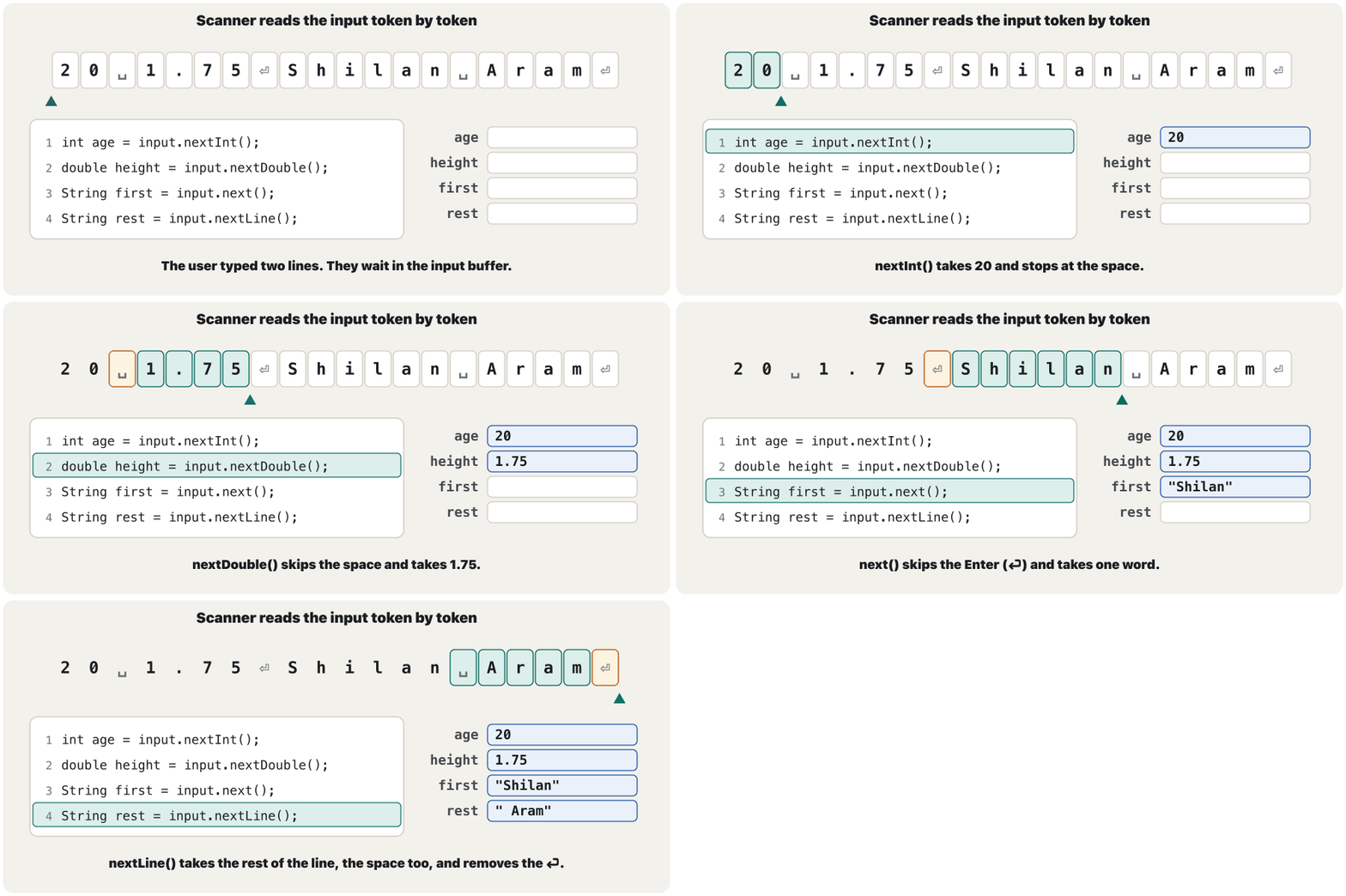
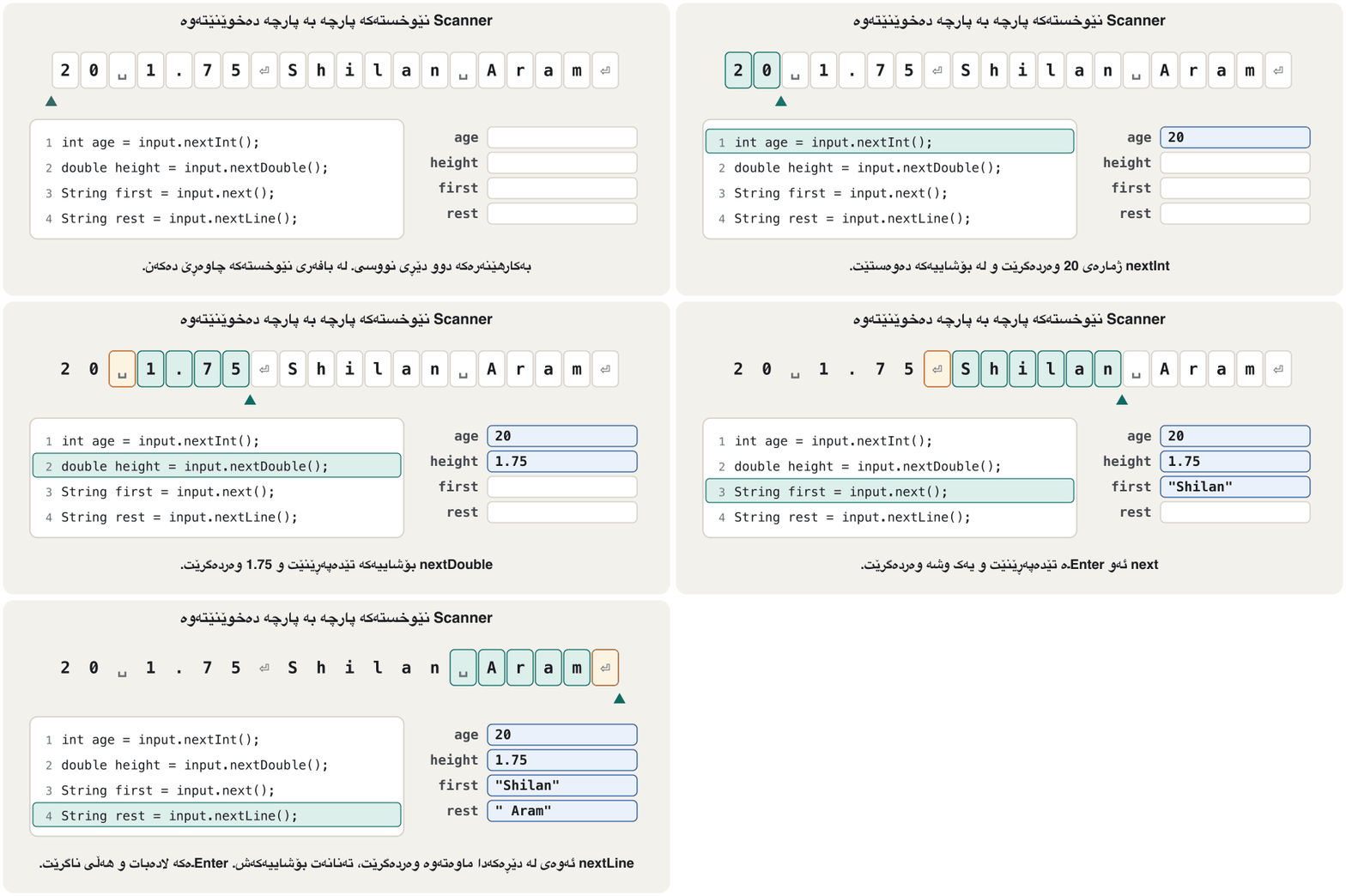
import java.util.Scanner;

public class Tokens {
    public static void main(String[] args) {
        Scanner input = new Scanner(System.in);
        int age = input.nextInt();
        double height = input.nextDouble();
        String first = input.next();
        String rest = input.nextLine();
        System.out.println("age    = " + age);
        System.out.println("height = " + height);
        System.out.println("first  = [" + first + "]");
        System.out.println("rest   = [" + rest + "]");
    }
}$ java Tokens 20 1.75 Shilan Aram age = 20 height = 1.75 first = [Shilan] rest = [ Aram]
Typed on three lines (20, 1.75, Shilan Aram) or with extra spaces ( 20 1.75 Shilan Aram), the program printed the same four values: for the number methods an Enter is just more whitespace.
کە لە سێ دێڕدا نووسرا (20، 1.75، Shilan Aram) یان بە بۆشایی زیادەوە ( 20 1.75 Shilan Aram)، هەمان چوار چاپ کرد: بۆ ژمارە، Enter تەنیا زیاترە.
A word or a whole line: next() and nextLine()وشەیەک یان هەموو دێڕێک: next و nextLine
next() stops at the first space, so a full name loses its second word. nextLine() reads up to the end of the line. The same input, Aram Kawa, in two programs:
next() لە یەکەم بۆشاییدا دەوەستێت، بۆیە ناوێکی تەواو وشەی دووەمی ون دەکات. nextLine() تا کۆتایی دێڕەکە دەخوێنێتەوە. هەمان ، Aram Kawa، لە دوو :
import java.util.Scanner;

public class FirstWord {
    public static void main(String[] args) {
        Scanner input = new Scanner(System.in);
        System.out.print("Your full name: ");
        String name = input.next();
        System.out.println("Hello, " + name + "!");
    }
}$ java FirstWord Your full name: Aram Kawa Hello, Aram!
import java.util.Scanner;

public class WholeLine {
    public static void main(String[] args) {
        Scanner input = new Scanner(System.in);
        System.out.print("Your full name: ");
        String name = input.nextLine();
        System.out.println("Hello, " + name + "!");
    }
}$ java WholeLine Your full name: Aram Kawa Hello, Aram Kawa!
The Enter that nextInt() leaves behindئەو Enterـەی nextInt بەجێی دەهێڵێت
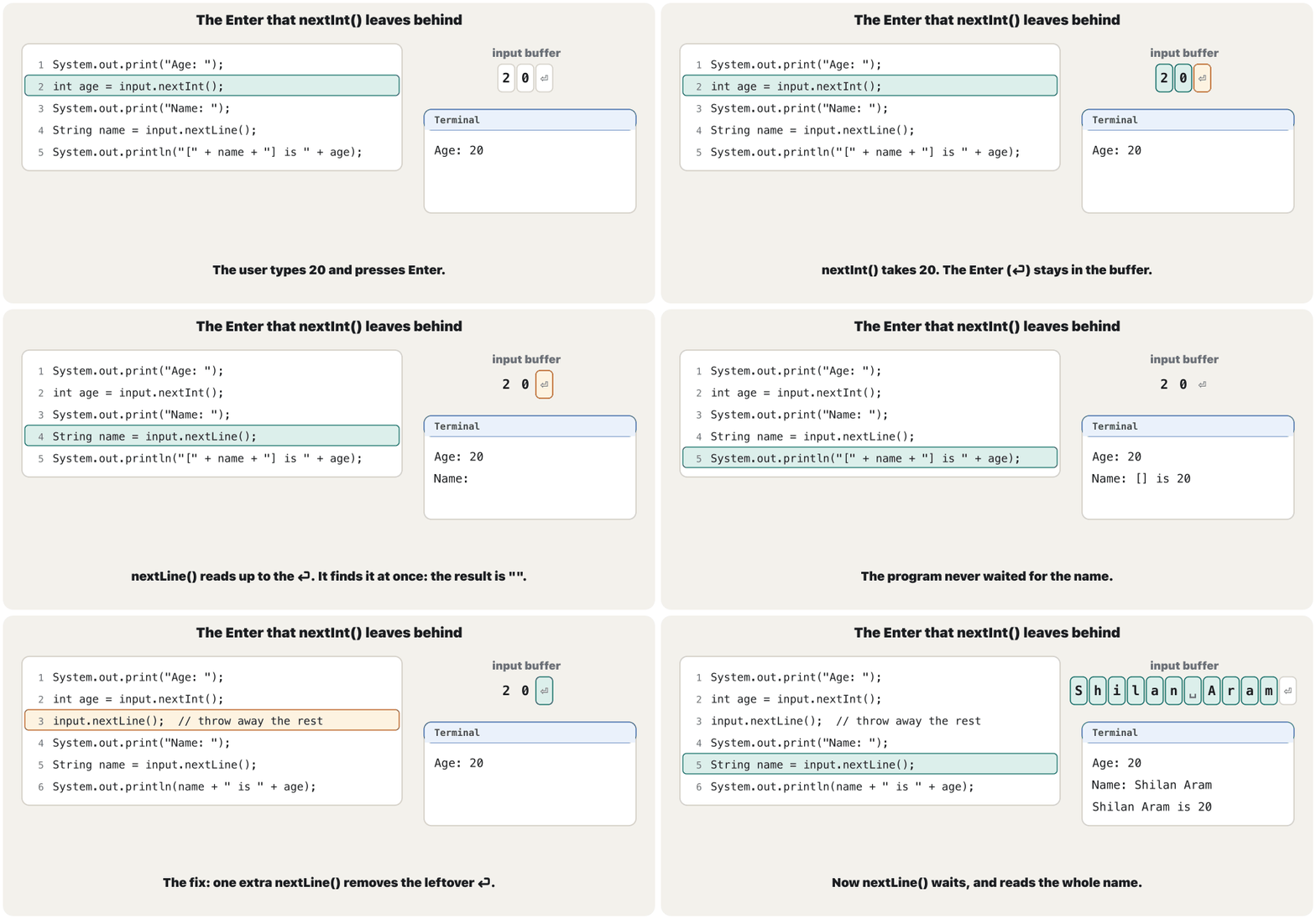
This program reads a number, then a name. It never waits for the name:
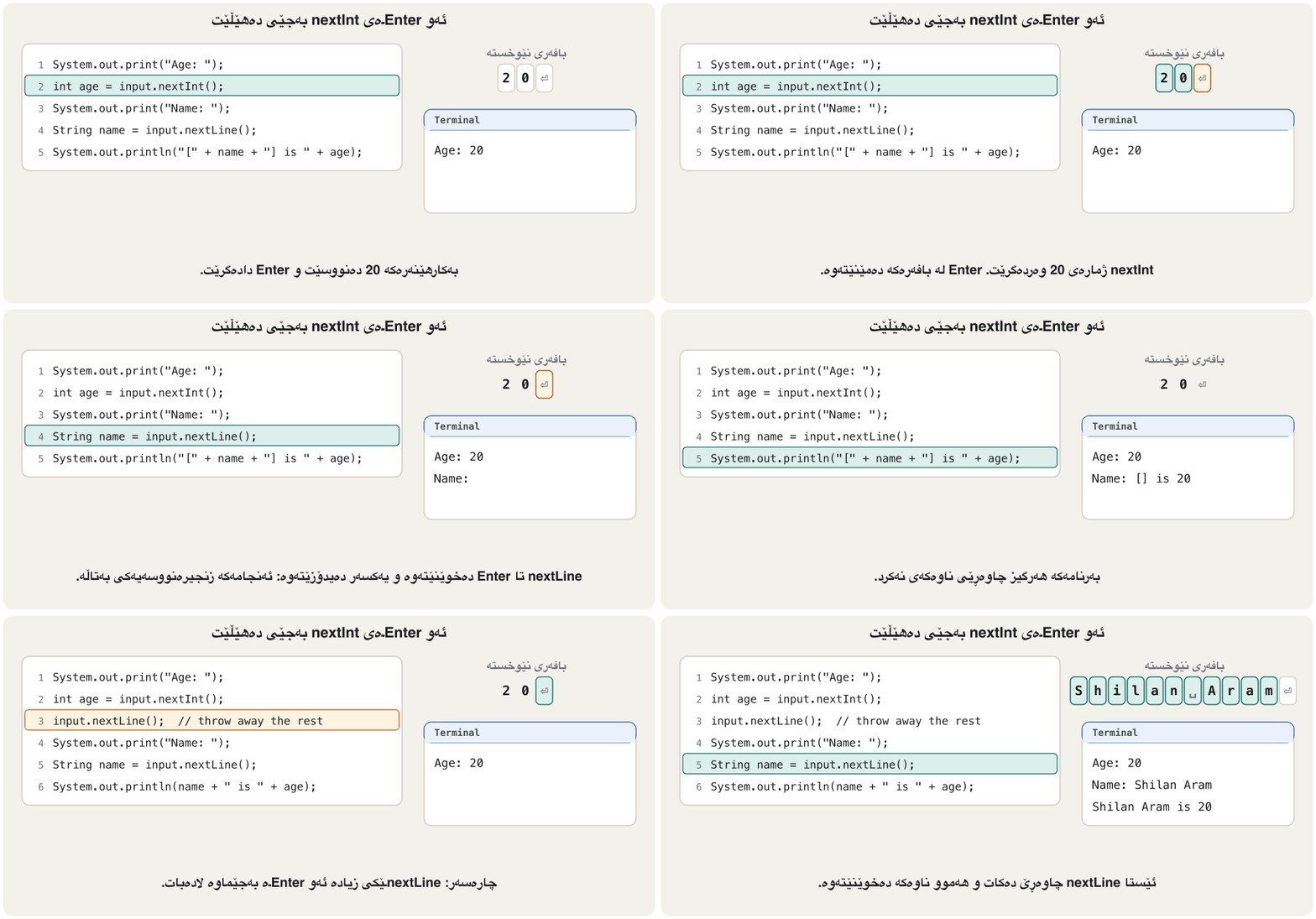
ئەم ژمارەیەک دەخوێنێتەوە، پاشان ناوێک. هەرگیز چاوەڕێی ناوەکە ناکات:
import java.util.Scanner;

public class NextLineTrap {
    public static void main(String[] args) {
        Scanner input = new Scanner(System.in);
        System.out.print("Age: ");
        int age = input.nextInt();
        System.out.print("Name: ");
        String name = input.nextLine();
        System.out.println("[" + name + "] is " + age);
    }
}$ java NextLineTrap Age: 20 Name: [] is 20
nextInt() takes 20 but leaves the newline of that line in the buffer. nextLine() reads up to the next newline, finds it at once and returns an empty string "": the brackets in the output are empty. The same happens with nextDouble(), next() or nextBoolean() followed by nextLine().
nextInt() ژمارەی 20 وەردەگرێت بەڵام ئەو دێڕە لە جێدەهێڵێت. nextLine() تا داهاتوو دەخوێنێتەوە، یەکسەر دەیدۆزێتەوە و بەتاڵ "" دەگەڕێنێتەوە: کەوانەکانی بەتاڵن. هەمان شت ڕوو دەدات کاتێک nextDouble()، next() یان nextBoolean() بە nextLine() بەدوادا بێت.
The Enter that nextInt() leaves behindئەو Enterـەی nextInt بەجێی دەهێڵێت
Two ways to avoid the trapدوو ڕێگا بۆ خۆپاراستن لە تەڵەکە
Fix 1: after reading the number, call nextLine() once more and ignore its result. It removes the rest of the number's line:
چارەسەری 1: لە دوای خوێندنەوەی ژمارەکە، جارێکی تر nextLine() بانگ بکە و ئەنجامەکەی فەرامۆش بکە. ئەوەی لە دێڕی ژمارەکەدا ماوەتەوە لادەبات:
import java.util.Scanner;

public class NextLineFixed {
    public static void main(String[] args) {
        Scanner input = new Scanner(System.in);
        System.out.print("Age: ");
        int age = input.nextInt();
        input.nextLine();                  // throw away the rest of the age line
        System.out.print("Name: ");
        String name = input.nextLine();
        System.out.println(name + " is " + age);
    }
}$ java NextLineFixed Age: 20 Name: Shilan Aram Shilan Aram is 20
Fix 2: read every line with nextLine() and turn the text into a number yourself with Integer.parseInt (trim() removes stray spaces). Text that is not a whole number then stops the program with a NumberFormatException instead:
چارەسەری 2: هەموو دێڕێک بە nextLine() بخوێنەوە و خۆت دەقەکە بە Integer.parseInt بکە بە ژمارە (trim() بۆشاییە زیادەکان لادەبات). ئەو دەقەی نییە ئەوسا بە NumberFormatException دەوەستێنێت:
import java.util.Scanner;

public class LinesOnly {
    public static void main(String[] args) {
        Scanner input = new Scanner(System.in);
        System.out.print("Age: ");
        int age = Integer.parseInt(input.nextLine().trim());
        System.out.print("Name: ");
        String name = input.nextLine();
        System.out.println(name + " is " + age);
    }
}$ java LinesOnly Age: 20 Name: Shilan Aram Shilan Aram is 20 $ java LinesOnly Age: abc Exception in thread "main" java.lang.NumberFormatException: For input string: "abc" at java.base/java.lang.NumberFormatException.forInputString(NumberFormatException.java:67) at java.base/java.lang.Integer.parseInt(Integer.java:668) at java.base/java.lang.Integer.parseInt(Integer.java:786) at LinesOnly.main(LinesOnly.java:7)
A third habit avoids the problem completely: read the text first and the numbers after it, as the shop receipt does.
خووی سێیەم بە تەواوی ڕێگە لە کێشەکە دەگرێت: سەرەتا دەقەکە بخوێنەوە و پاشان ژمارەکان، وەک پسوولەی دوکان دەیکات.
Wrong input, and no input at allنێوخستەی هەڵە و هیچ نێوخستەیەک
A Scanner cannot turn every text into every type. When the next token does not fit the method, the program stops with an InputMismatchException. When the input has ended (Ctrl+D on macOS and Linux, Ctrl+Z then Enter on Windows, or the end of a pipe), it stops with a NoSuchElementException. Three runs of a program that asks for an age with nextInt(); in the last one Ctrl+D was pressed at the prompt:
Scanner ناتوانێت هەموو دەقێک بکات بە هەموو جۆرێک. کاتێک پارچەی داهاتوو لەگەڵ ناگونجێت، بە InputMismatchException دەوەستێت. کاتێک کۆتایی هاتووە (Ctrl+D لە macOS و Linuxـدا، Ctrl+Z پاشان Enter لە Windowsـدا، یان کۆتایی pipe)، بە NoSuchElementException دەوەستێت. سێ جێبەجێکردنی کە بە nextInt() تەمەن دەپرسێت؛ لە دوایینیاندا لە Ctrl+D داگیرا:
import java.util.Scanner;

public class AskAge {
    public static void main(String[] args) {
        Scanner input = new Scanner(System.in);
        System.out.print("Age: ");
        int age = input.nextInt();
        System.out.println("Next year you will be " + (age + 1));
    }
}$ java AskAge Age: 20 Next year you will be 21 $ java AskAge Age: abc Exception in thread "main" java.util.InputMismatchException at java.base/java.util.Scanner.throwFor(Scanner.java:939) at java.base/java.util.Scanner.next(Scanner.java:1594) at java.base/java.util.Scanner.nextInt(Scanner.java:2258) at java.base/java.util.Scanner.nextInt(Scanner.java:2212) at AskAge.main(AskAge.java:7) $ java AskAge Age: Exception in thread "main" java.util.NoSuchElementException at java.base/java.util.Scanner.throwFor(Scanner.java:937) at java.base/java.util.Scanner.next(Scanner.java:1594) at java.base/java.util.Scanner.nextInt(Scanner.java:2258) at java.base/java.util.Scanner.nextInt(Scanner.java:2212) at AskAge.main(AskAge.java:7)
20.5 stops nextInt() too (a run with that input gave the same InputMismatchException). Read the stack trace from the top: the exception's name, then the at lines; the last one, AskAge.java:7, is your line (Reading a stack trace). To catch the error and ask again instead of stopping, see A safe input loop; it uses the while (true) loop of break and continue.
20.5ـیش nextInt() دەوەستێنێت (جێبەجێکردنێک بەو هەمان InputMismatchExceptionـی دا). لە سەرەوە بخوێنەوە: ناوی ، پاشان دێڕەکانی at؛ دوایینیان، AskAge.java:7، دێڕی خۆتە (خوێندنەوەی ڕێچکەی هەڵە). بۆ گرتنی هەڵەکە و پرسینەوە لە جیاتی وەستان، بڕوانە خولێکی سەلامەتی نێوخستە؛ ئەو شێوەی while (true)ـی break و continue بەکار دەهێنێت.
Wrong input, and no input at allنێوخستەی هەڵە و هیچ نێوخستەیەک
Look before you take: hasNextInt()سەیرکردن پێش وەرگرتن: hasNextInt
hasNextInt() looks at the next token and answers true if nextInt() could read it. It does not take the token, so the token is still there for the next read. There are hasNextDouble(), hasNextBoolean(), hasNextLine() and hasNext() too.
hasNextInt() سەیری پارچەی داهاتوو دەکات و true دەداتەوە ئەگەر nextInt() بتوانێت بیخوێنێتەوە. پارچەکە وەرناگرێت، بۆیە بۆ خوێندنەوەی دواتر هێشتا ماوە. hasNextDouble()، hasNextBoolean()، hasNextLine() و hasNext()ـیش هەن.
import java.util.Scanner;

public class PeekFirst {
    public static void main(String[] args) {
        Scanner input = new Scanner(System.in);
        System.out.print("Number: ");
        boolean isWholeNumber = input.hasNextInt();   // looks, does not take
        System.out.println("hasNextInt() gives " + isWholeNumber);
        String token = input.next();                   // the token is still waiting
        System.out.println("next() gives " + token);
    }
}$ java PeekFirst Number: 42 hasNextInt() gives true next() gives 42 $ java PeekFirst Number: abc hasNextInt() gives false next() gives abc
Because it gives a boolean, hasNextInt() can be the condition of an if: read the number, or explain what to type (Check the input before reading it).
چونکە دەداتەوە، hasNextInt() دەتوانێت ifـێک بێت: ژمارەکە بخوێنەوە، یان ڕوونی بکەرەوە چی بنووسرێت (پشکنینی نێوخستە پێش خوێندنەوە).
Formatted output: printfدەرخستەی ڕێکخراو: printf
When you print the result of a computation, you often want to control how it looks. A price of 1.2159624413145538 dollars per liter should appear as 1.22. System.out.printf prints a format string in which every , starting with %, is a gap; the values after the string fill the gaps in order:
کاتێک ئەنجامی ژماردنێک چاپ دەکەیت، زۆرجار دەتەوێت شێوەکەی کۆنترۆڵ بکەیت. نرخی 1.2159624413145538 دۆلار بۆ هەر لیترێک دەبێت وەک 1.22 دەربکەوێت. System.out.printf فۆرمات چاپ دەکات کە تێیدا هەر ، کە بە % دەست پێ دەکات، شوێنێکی چۆڵە؛ ئەو لە دوای دێن بە ڕیز شوێنە چۆڵەکان پڕ دەکەنەوە:
public class PricePerLiter {
    public static void main(String[] args) {
        double cost = 25.90;      // dollars
        double liters = 21.3;
        double price = cost / liters;
        System.out.println("Price per liter: " + price);
        System.out.printf("Price per liter: %.2f%n", price);
    }
}$ java PricePerLiter Price per liter: 1.2159624413145538 Price per liter: 1.22
%.2f prints a number with exactly two digits after the decimal point, and %n ends the line. Python writes the same specifier inside an f-string: f"{price:.2f}" (Format specifiers).
%.2f ژمارەیەک بە ڕێک دوو لە دوای چاپ دەکات و %n دێڕەکە تەواو دەکات. Python هەمان لەناو f-stringـێکدا دەنووسێت: f"{price:.2f}" (دیاریکەرەکانی فۆرمات).
Formatted output: printfدەرخستەی ڕێکخراو: printf
Two decimal places, roundedدوو خانەی دەیی، نزیککراوە
The .2 counts : digits after the point. It does not count significant digits: 1.22 has two decimal places but three significant digits. The printed value is rounded half up, and the variable itself does not change, only the printed text:
.2 دەژمێرێت: دوای . گرنگ ناژمێرێت: 1.22 دوو و سێ گرنگی هەیە. بە نزیک دەکرێتەوە و خودی ناگۆڕێت، تەنیا دەقە چاپکراوەکە:
public class PrintfDemo {
    public static void main(String[] args) {
        System.out.printf("%.2f%n", 2.345);
        System.out.printf("%.2f%n", 1.215962441314554);
        System.out.printf("%.0f%n", 2.5);
        System.out.printf("%8.3f|%n", Math.PI);
        System.out.printf("%d items, %s%n", 3, "done");
    }
}$ java PrintfDemo 2.35 1.22 3 3.142| 3 items, done
printf never ends the line by itself, so finish a format string with %n. %n writes the line ending of the computer's ; \n also works, as in println text (Escape sequences).
printf هەرگیز خۆی دێڕەکە تەواو ناکات، بۆیە فۆرمات بە %n تەواو بکە. %n کۆتایی دێڕی دەنووسێت؛ \nـیش کار دەکات، وەک لە دەقی printlnـدا (هێما تایبەتەکان).
More specifiers: %d, %f, %s, %c, %b, %%دیاریکەرەکانی فۆرماتی زیاتر: %d، %f، %s، %c، %b، %%
Each specifier has a conversion letter for one kind of value. Using the wrong one is an error at run time (see Common mistakes). The real output of the program below:
هەر پیتێکی گۆڕینی هەیە بۆ یەک جۆر . بەکارهێنانی پیتی هەڵە هەڵەیەکە لە کاتی جێبەجێکردندا (بڕوانە هەڵە باوەکان). ڕاستەقینەی ئەم خوارەوە:
| Specifier | Forبۆ | Exampleنموونە | Printsچاپ دەکات |
|---|---|---|---|
%d | a whole number | 42 | 42 |
%f | a decimal number, 6 places، 6 | 3.14159 | 3.141590 |
%.1f | 1 decimal place1 | 3.14159 | 3.1 |
%s | text (any value)دەق (هەر ) | "Duhok" | Duhok |
%c | one characterیەک | 'A' | A |
%b | a boolean | 5 > 3 | true |
%% | a percent signنیشانەی سەدی | 75 | 75% |
%n | a line endingکۆتایی دێڕ |
public class Specifiers {
    public static void main(String[] args) {
        System.out.printf("[%d]%n", 42);
        System.out.printf("[%5d]%n", 42);
        System.out.printf("[%-5d]%n", 42);
        System.out.printf("[%05d]%n", 42);
        System.out.printf("[%,d]%n", 1250000);
        System.out.printf("[%f]%n", 3.14159);
        System.out.printf("[%.1f]%n", 3.14159);
        System.out.printf("[%8.2f]%n", 3.14159);
        System.out.printf("[%-8.2f]%n", 3.14159);
        System.out.printf("[%,.2f]%n", 1234567.891);
        System.out.printf("[%s]%n", "Duhok");
        System.out.printf("[%10s]%n", "Duhok");
        System.out.printf("[%-10s]%n", "Duhok");
        System.out.printf("[%c]%n", 'A');
        System.out.printf("[%b]%n", 5 > 3);
        System.out.printf("[%d%%]%n", 75);
    }
}$ java Specifiers [42] [ 42] [42 ] [00042] [1,250,000] [3.141590] [3.1] [ 3.14] [3.14 ] [1,234,567.89] [Duhok] [ Duhok] [Duhok ] [A] [true] [75%]
More specifiers: %d, %f, %s, %c, %b, %%دیاریکەرەکانی فۆرماتی زیاتر: %d، %f، %s، %c، %b، %%
Width and flags: lining values upپانی و نیشانەکان: ڕێکخستنی نرخەکان
A number between % and the letter is a width: the least number of character places. Numbers are pushed to the right of the field. Flags change that: - puts the value on the left, 0 fills with zeros, and , adds the locale's . Precision comes after a point: %8.2f is 8 places wide with 2 decimal places.
ژمارەیەک لە نێوان % و پیتەکەدا پانیـیە: کەمترین ژمارەی شوێنی . ژمارەکان دەخرێنە لای ڕاستی خانەکە. نیشانەکان ئەمە دەگۆڕن: - دەخاتە لای چەپ، 0 بە سفر پڕی دەکاتەوە و , زیاد دەکات. وردی لە دوای خاڵێک دێت: %8.2f پانییەکەی 8 شوێنە و 2 هەیە.
Widths make columns: every row printed with the same format string has the same layout, as in the shop receipt. Python's widths work the same way (Neat numbers and columns).
پانی ستوون دروست دەکات: هەر ڕیزێک بە هەمان فۆرمات چاپ بکرێت هەمان ڕێکخستنی دەبێت، وەک لە پسوولەی دوکانـدا. پانی لە Pythonـیشدا بە هەمان شێوە کار دەکات (ژمارە و ستوونی ڕێک).
More specifiers: %d, %f, %s, %c, %b, %%دیاریکەرەکانی فۆرماتی زیاتر: %d، %f، %s، %c، %b، %%
String.format: format without printingString.format: فۆرماتکردن بەبێ چاپکردن
String.format takes the same format string and values but returns the text instead of printing it, so you can store it, join it or print it later. Since Java 15 a string can also format itself with formatted(…):
String.format هەمان فۆرمات و وەردەگرێت، بەڵام لە جیاتی چاپکردن دەقەکە دەگەڕێنێتەوە، بۆیە دەتوانیت هەڵیبگریت، بیبەستیت یان دواتر چاپی بکەیت. لە Java 15ـەوە دەتوانێت بە formatted(…) خۆی فۆرمات بکات:
public class FormatToText {
    public static void main(String[] args) {
        double price = 1.215962441314554;
        String text = String.format("%.2f", price);   // made, not printed
        System.out.println("Stored text: " + text);
        String row = String.format("%-8s|%6.1f|", "Duhok", 21.456);
        System.out.println(row);
        System.out.println("%.3f".formatted(price));     // Java 15 and later
    }
}$ java FormatToText Stored text: 1.22 Duhok | 21.5| 1.216
printf is a short way to write System.out.print(String.format(…)). Building whole texts with it is taught in Building text.
printf ڕێگایەکی کورتە بۆ نووسینی System.out.print(String.format(…)). دروستکردنی دەقی تەواو پێی لە دروستکردنی دەقـدا دەخوێنرێت.
Computers set to Kurdish or Arabicئەو کۆمپیوتەرانەی بە کوردی یان عەرەبی ڕێکخراون
Java takes its default number format, the format , from the 's region settings. Scanner reads numbers in that format and printf writes them in it. In Central Kurdish (Iraq), ckb_IQ, and Arabic (Iraq), ar_IQ, the decimal point is ٫ and the digits are ٠–٩ (Point, comma or ٫). If your computer's region format is one of them, Java may use it. Any computer can test this with the options -Duser.language and -Duser.country:
Java فۆرماتی بنەڕەتیی ژمارە، واتە فۆرمات، لە ڕێکخستنەکانی ناوچەی وەردەگرێت. Scanner ژمارەکان بەو فۆرماتە دەخوێنێتەوە و printf بەو فۆرماتە دەیاننووسێت. لە کوردیی ناوەندی (عێراق) ckb_IQ و عەرەبی (عێراق) ar_IQـدا، ٫ـە و ٠–٩ن (خاڵ، کۆما یان ٫). ئەگەر فۆرماتی ناوچەی یەکێک لەمانە بێت، ڕەنگە Java بەکاری بهێنێت. هەر دەتوانێت بە بژاردەکانی -Duser.language و -Duser.country ئەمە تاقی بکاتەوە:
import java.util.Locale;
import java.util.Scanner;

public class LocaleDemo {
    public static void main(String[] args) {
        System.out.println("Format locale: " + Locale.getDefault(Locale.Category.FORMAT));
        Scanner input = new Scanner(System.in);
        System.out.print("Radius: ");
        double radius = input.nextDouble();
        double area = Math.PI * radius * radius;
        System.out.printf("Area: %.2f%n", area);
        System.out.printf("Students: %,d%n", 1250000);
        System.out.println("println: " + area);
    }
}java -Duser.language=en -Duser.country=US LocaleDemo
java -Duser.language=ckb -Duser.country=IQ LocaleDemo
java -Duser.language=ckb -Duser.country=IQ LocaleDemo$ java -Duser.language=en -Duser.country=US LocaleDemo Format locale: en_US Radius: 2.5 Area: 19.63 Students: 1,250,000 println: 19.634954084936208 $ java -Duser.language=ckb -Duser.country=IQ LocaleDemo Format locale: ckb_IQ Radius: 2.5 Exception in thread "main" java.util.InputMismatchException at java.base/java.util.Scanner.throwFor(Scanner.java:939) at java.base/java.util.Scanner.next(Scanner.java:1594) at java.base/java.util.Scanner.nextDouble(Scanner.java:2564) at LocaleDemo.main(LocaleDemo.java:9) $ java -Duser.language=ckb -Duser.country=IQ LocaleDemo Format locale: ckb_IQ Radius: ٢٫٥ Area: ١٩٫٦٣ Students: ١٬٢٥٠٬٠٠٠ println: 19.634954084936208
Under ckb_IQ, 2.5 stopped the program, while ٢٫٥ worked and printed ١٩٫٦٣ and ١٬٢٥٠٬٠٠٠. Arabic (Iraq) gave the same output, and German (de_DE) wanted 2,5. println printed 19.634954084936208 every time: it never uses the locale.
لە ژێر ckb_IQـدا، 2.5 وەستاند، لە کاتێکدا ٢٫٥ کاری کرد و ١٩٫٦٣ و ١٬٢٥٠٬٠٠٠ـی چاپ کرد. عەرەبی (عێراق) هەمان دا و ئەڵمانی (de_DE) 2,5ـی دەویست. println هەموو جارێک 19.634954084936208ـی چاپ کرد: هەرگیز بەکار ناهێنێت.
Computers set to Kurdish or Arabicئەو کۆمپیوتەرانەی بە کوردی یان عەرەبی ڕێکخراون
The fix: Locale.ROOTچارەسەر: Locale.ROOT
When a program must read and print 2.5 on every computer, fix the locale in the code: new Scanner(System.in).useLocale(Locale.ROOT) for input and printf(Locale.ROOT, …) for output. Locale.ROOT is a neutral locale with . and , and the digits 0–9; it needs import java.util.Locale;.
کاتێک دەبێت لەسەر هەموو 2.5 بخوێنێتەوە و چاپ بکات، لە کۆددا دیاری بکە: new Scanner(System.in).useLocale(Locale.ROOT) بۆ و printf(Locale.ROOT, …) بۆ . Locale.ROOT بێلایەنە بە . و , و 0–9؛ پێویستی بە import java.util.Locale; هەیە.
import java.util.Locale;
import java.util.Scanner;

public class LocaleFix {
    public static void main(String[] args) {
        Scanner input = new Scanner(System.in).useLocale(Locale.ROOT);
        System.out.print("Radius: ");
        double radius = input.nextDouble();
        double area = Math.PI * radius * radius;
        System.out.printf(Locale.ROOT, "Area: %.2f%n", area);
        System.out.printf(Locale.ROOT, "Students: %,d%n", 1250000);
    }
}$ java -Duser.language=ckb -Duser.country=IQ LocaleFix Radius: 2.5 Area: 19.63 Students: 1,250,000 $ java -Duser.language=ar -Duser.country=IQ LocaleFix Radius: 2.5 Area: 19.63 Students: 1,250,000
The other side: with Locale.ROOT the Scanner refuses ٢٫٥, even on a ckb_IQ computer (InputMismatchException). Tell the user which form to type.
ڕووی تری پرسەکە: بە Locale.ROOT، Scanner ٢٫٥ ڕەت دەکاتەوە، تەنانەت لەسەر ckb_IQـیش (InputMismatchException). بە بڵێ کام شێوە بنووسێت.
Use Locale.ROOT for numbers that other programs read back. To show numbers the way a Kurdish reader expects, a Kurdish locale is right: String.format(Locale.forLanguageTag("ckb-IQ"), "%,.2f", x) gave ١٢٬٣٤٥٫٦٨ (Grouping thousands). The locale also changes capital letters (Capitals and the computer's language) and month names (Month names).
Locale.ROOT بۆ ئەو ژمارانە بەکار بهێنە کە تر دەیانخوێننەوە. بۆ پیشاندانی ژمارە بەو شێوەیەی خوێنەرێکی کورد چاوەڕێی دەکات، کوردی دروستە: String.format(Locale.forLanguageTag("ckb-IQ"), "%,.2f", x) ١٢٬٣٤٥٫٦٨ـی دا (گرووپکردنی هەزاران). پیتی گەورە (پیتی گەورە و زمانی کۆمپیوتەر) و ناوی مانگەکانیش دەگۆڕێت (ناوی مانگەکان).
A complete program: a shop receiptبەرنامەیەکی تەواو: پسوولەی دوکان
This program puts the lesson together. It reads the customer's name first, a whole line, so no leftover newline can spoil it, then two whole numbers. The prices are named constants. %-10s puts text on the left of ten places; %5d and %,9d push numbers to the right, the second with thousands separators; %.2f rounds the average:
ئەم وانەکە کۆ دەکاتەوە. سەرەتا ناوی کڕیارەکە دەخوێنێتەوە، دێڕێکی تەواو، بۆیە هیچ بەجێماو تێکی نادات، پاشان دوو . نرخەکان . %-10s دەق لە لای چەپی دە شوێن دادەنێت؛ %5d و %,9d ژمارەکان دەبەنە لای ڕاست، دووەمیان بە ؛ %.2f تێکڕاکە نزیک دەکاتەوە:
import java.util.Scanner;

public class Receipt {
    public static void main(String[] args) {
        final int NOTEBOOK_PRICE = 1500;   // dinars
        final int PEN_PRICE = 250;
        Scanner input = new Scanner(System.in);
        System.out.print("Customer: ");
        String customer = input.nextLine();
        System.out.print("Notebooks: ");
        int notebooks = input.nextInt();
        System.out.print("Pens: ");
        int pens = input.nextInt();

        int notebookTotal = notebooks * NOTEBOOK_PRICE;
        int penTotal = pens * PEN_PRICE;
        int total = notebookTotal + penTotal;
        double average = (double) total / (notebooks + pens);

        System.out.println();
        System.out.println("Receipt for " + customer);
        System.out.printf("%-10s%5s%9s%9s%n", "Item", "Qty", "Price", "Total");
        System.out.printf("%-10s%5d%,9d%,9d%n", "Notebook", notebooks, NOTEBOOK_PRICE, notebookTotal);
        System.out.printf("%-10s%5d%,9d%,9d%n", "Pen", pens, PEN_PRICE, penTotal);
        System.out.printf("%-24s%,9d IQD%n", "Total", total);
        System.out.printf("Average per item: %.2f IQD%n", average);
    }
}$ java Receipt Customer: Shilan Aram Notebooks: 3 Pens: 4 Receipt for Shilan Aram Item Qty Price Total Notebook 3 1,500 4,500 Pen 4 250 1,000 Total 5,500 IQD Average per item: 785.71 IQD
Explain the codeڕوونکردنەوەی کۆدەکە
- Lineدێڕی 9
Text first, numbers after: no nextLine trap.
سەرەتا دەق، پاشان ژمارە: تەڵەی nextLine نییە.
- Lineدێڕی 22-25
One format string per kind of row keeps the columns straight.
یەک فۆرمات بۆ هەر جۆرە ڕیزێک ستوونەکان ڕێک دەهێڵێتەوە.
Common mistakesهەڵە باوەکان
| You wroteنووسیت | What happensچی ڕوو دەدات | Fixچارەسەر |
|---|---|---|
no import java.util.Scanner;بێ import java.util.Scanner; | cannot find symbol ... class Scanner (2 errors) | Add the import above the class.import لە سەرووی زیاد بکە. |
new Scanner() | no suitable constructor found for Scanner(no arguments) | Give it the source: new Scanner(System.in).سەرچاوەکەی پێ بدە: new Scanner(System.in). |
nextLine() right after nextInt()nextLine() ڕاستەوخۆ لە دوای nextInt() | returns """" دەگەڕێنێتەوە | An extra nextLine(), or read only lines.nextLine()ـێکی زیادە، یان تەنیا دێڕ بخوێنەوە. |
nextInt() and the user types abcnextInt() و abc دەنووسێت | InputMismatchException | Check with hasNextInt(), or catch the exception.بە hasNextInt() بپشکنە، یان بگرە. |
printf("%d", 2.5) | IllegalFormatConversionException: d != java.lang.Double | %f or %.2f for decimals%f یان %.2f بۆ |
printf("%d + %d = %d%n", 2, 3) | MissingFormatArgumentException: Format specifier '%d' | One value for every specifier.بۆ هەر . |
printf("Total: %.2f", x) twiceprintf("Total: %.2f", x) دوو جار | Total: 12.50Total: 3.00 | End the format string with %n. فۆرمات بە %n تەواو بکە. |
"…of radius" + radius | …of radius2.5 is … | A space inside the quotes.بۆشاییەک لەناو . |
close() on a Scanner, then a new Scanner on System.inclose() لەسەر Scanner، پاشان Scannerـێکی نوێ لەسەر System.in | NoSuchElementException | Use one Scanner for the whole program.یەک Scanner بۆ هەموو بەکار بهێنە. |
2.5 on a ckb_IQ computer2.5 لەسەر ckb_IQ | InputMismatchException | useLocale(Locale.ROOT)useLocale(Locale.ROOT) |
Practiceڕاهێنان
Read two whole numbers and print their sum, difference, product and quotient, the quotient with two decimal places.
دوو بخوێنەوە و کۆ، جیاوازی، لێکدان و دابەشکردنیان چاپ بکە؛ دابەشکردنەکە بە دوو .
Hintئاماژە
Use %d for the ints and %.2f for the quotient.
%d بۆ intـەکان و %.2f بۆ دابەشکردنەکە بەکار بهێنە.
Show answerوەڵامەکە پیشان بدە
import java.util.Scanner;

public class FourOperations {
    public static void main(String[] args) {
        Scanner input = new Scanner(System.in);
        System.out.print("First whole number: ");
        int a = input.nextInt();
        System.out.print("Second whole number: ");
        int b = input.nextInt();
        System.out.printf("%d + %d = %d%n", a, b, a + b);
        System.out.printf("%d - %d = %d%n", a, b, a - b);
        System.out.printf("%d * %d = %d%n", a, b, a * b);
        System.out.printf("%d / %d = %.2f%n", a, b, (double) a / b);
    }
}$ java FourOperations First whole number: 7 Second whole number: 2 7 + 2 = 9 7 - 2 = 5 7 * 2 = 14 7 / 2 = 3.50
(double) a / b divides as decimals; a / b alone would give 3 (Integer division).
(double) a / b بە شێوەی دەیی دابەش دەکات؛ a / b بە تەنیا 3ی دەدا (دابەشکردنی ژمارەی تەواو).
Read a temperature in °C and print it in °F with one decimal place: .
پلەی گەرمییەک بە °C بخوێنەوە و بە °F بە یەک چاپی بکە: .
Show answerوەڵامەکە پیشان بدە
import java.util.Scanner;

public class CelsiusToFahrenheit {
    public static void main(String[] args) {
        Scanner input = new Scanner(System.in);
        System.out.print("Temperature in Celsius: ");
        double celsius = input.nextDouble();
        double fahrenheit = celsius * 9 / 5 + 32;
        System.out.printf("%.1f C = %.1f F%n", celsius, fahrenheit);
    }
}$ java CelsiusToFahrenheit Temperature in Celsius: 36.6 36.6 C = 97.9 F $ java CelsiusToFahrenheit Temperature in Celsius: -40 -40.0 C = -40.0 F
Test with values you know: −40 °C is −40 °F (Test with answers you know).
بە چەند تاقی بکەرەوە کە وەڵامەکانیان دەزانیت: −40 °C دەکاتە −40 °F (تاقیکردنەوە بە وەڵامی ناسراو).
Ask for a full name and an age, then print <name> will be <age + 1> next year. Make sure the full name is read.
ناوێکی تەواو و تەمەنێک بپرسە، پاشان <name> will be <age + 1> next year. چاپ بکە. دڵنیا بە کە هەموو ناوەکە دەخوێنرێتەوە.
Show answerوەڵامەکە پیشان بدە
import java.util.Scanner;

public class NextYear {
    public static void main(String[] args) {
        Scanner input = new Scanner(System.in);
        System.out.print("Full name: ");
        String name = input.nextLine();
        System.out.print("Age: ");
        int age = input.nextInt();
        System.out.println(name + " will be " + (age + 1) + " next year.");
    }
}$ java NextYear Full name: Aram Kawa Age: 20 Aram Kawa will be 21 next year.
Reading the name first with nextLine() avoids the leftover-newline trap.
خوێندنەوەی ناوەکە بە nextLine() لە سەرەتادا ڕێگە لە تەڵەی بەجێماو دەگرێت.
What does each line print? [%6.2f] with 3.14159 · [%-6d] with 42 · [%06d] with 42 · [%,d] with 2026000 · [%.0f] with 7.5 · [%s|%s] with "Hawler" and 7
هەر دێڕێک چی چاپ دەکات؟ [%6.2f] بە 3.14159 · [%-6d] بە 42 · [%06d] بە 42 · [%,d] بە 2026000 · [%.0f] بە 7.5 · [%s|%s] بە "Hawler" و 7
Show answerوەڵامەکە پیشان بدە
public class Predict {
    public static void main(String[] args) {
        System.out.printf("[%6.2f]%n", 3.14159);
        System.out.printf("[%-6d]%n", 42);
        System.out.printf("[%06d]%n", 42);
        System.out.printf("[%,d]%n", 2026000);
        System.out.printf("[%.0f]%n", 7.5);
        System.out.printf("[%s|%s]%n", "Hawler", 7);
    }
}$ java Predict [ 3.14] [42 ] [000042] [2,026,000] [8] [Hawler|7]
%.0f rounds half up, so 7.5 becomes 8; %s prints any value, even a number.
%.0f نیوە بەرەو سەرەوە نزیک دەکاتەوە، بۆیە 7.5 دەبێتە 8؛ %s هەر چاپ دەکات، تەنانەت ژمارەش.
Read the kilos of grapes (a decimal) and the price of one kilo in dinars (a whole number), then print the cost with thousands separators and two decimal places.
کیلۆی تری () و نرخی یەک کیلۆ بە دینار () بخوێنەوە، پاشان تێچووەکە بە و دوو چاپ بکە.
Show answerوەڵامەکە پیشان بدە
import java.util.Scanner;

public class FruitShop {
    public static void main(String[] args) {
        Scanner input = new Scanner(System.in);
        System.out.print("Kilos of grapes: ");
        double kilos = input.nextDouble();
        System.out.print("Price of 1 kilo (dinars): ");
        int pricePerKilo = input.nextInt();
        double cost = kilos * pricePerKilo;
        System.out.printf("%.2f kg x %,d = %,.2f dinars%n", kilos, pricePerKilo, cost);
    }
}$ java FruitShop Kilos of grapes: 2.75 Price of 1 kilo (dinars): 1750 2.75 kg x 1,750 = 4,812.50 dinars
%,.2f combines the comma flag and the precision.
%,.2f نیشانەی کۆما و وردی پێکەوە کۆ دەکاتەوە.
Summaryکورتە
import java.util.Scanner;andScanner input = new Scanner(System.in);get a Scanner ready; create one for the whole program.nextInt,nextDouble,nextBoolean,nexttake one token;nextLinetakes the rest of the line.- After
nextInt()the newline stays: add an extranextLine()before reading a line. - Wrong input:
InputMismatchException; no input:NoSuchElementException;hasNextInt()checks first. printf/String.format:%d %f %.2f %s %c %b %% %n, widths (%5d) and flags (-,0,,).- Scanner and printf follow the format locale;
Locale.ROOTkeeps2.5and19.63on every computer.
import java.util.Scanner;وScanner input = new Scanner(System.in);Scanner ئامادە دەکەن؛ یەکێک بۆ هەموو دروست بکە.nextInt،nextDouble،nextBoolean،nextیەک پارچە وەردەگرن؛nextLineئەوەی لە دێڕەکەدا ماوەتەوە وەردەگرێت.- لە دوای
nextInt()دەمێنێتەوە: پێش خوێندنەوەی دێڕێکnextLine()ـێکی زیادە دابنێ. - هەڵە:
InputMismatchException؛ بێ :NoSuchElementException؛hasNextInt()سەرەتا دەپشکنێت. printf/String.format:%d %f %.2f %s %c %b %% %n، پانی (%5d) و نیشانەکان (-،0،,).- Scanner و printf شوێن فۆرمات دەکەون؛
Locale.ROOT2.5و19.63لەسەر هەموو دەهێڵێتەوە.
Why does nextLine() sometimes return an empty string?بۆچی nextLine() هەندێک جار زنجیرەنووسەیەکی بەتاڵ دەگەڕێنێتەوە؟
Because an earlier nextInt() (or nextDouble(), next()) left the newline of its line in the buffer.
چونکە nextInt()ـێکی پێشوو (یان nextDouble()، next()) دێڕەکەی لە جێهێشتووە.
What does %.2f count: decimal places or significant digits?%.2f چی دەژمێرێت: خانەی دەیی یان تاکژمارەی گرنگ؟
Decimal places: digits after the point. 1.22 has two of them.
: دوای . 1.22 دوانی هەیە.
A program prints ١٩٫٦٣ on one computer and 19.63 on another. Why?بەرنامەیەک لەسەر کۆمپیوتەرێک ١٩٫٦٣ و لەسەر یەکێکی تر 19.63 چاپ دەکات. بۆچی؟
printf uses the computer's format locale; printf(Locale.ROOT, …) makes the output the same everywhere.
printf فۆرماتی بەکار دەهێنێت؛ printf(Locale.ROOT, …) لە هەموو شوێنێک وەک یەک دەکات.
Lesson complete!وانەکە تەواو بوو!
Well done. Review the key terms, then go on to the next lesson.دەستخۆش. سەیرێکی زاراوە سەرەکییەکان بکەرەوە، پاشان بڕۆ بۆ وانەی داهاتوو.
Key termsزاراوە سەرەکییەکان
Comparisons, Booleans and if…elseبەراوردکردن، بوولیانەکان و if…else
Related lecturesوانە پەیوەندیدارەکان
- Errors and Debugging: Syntax, Runtime and Logic Errorsهەڵەکان و کرمەکوژی: هەڵەی داڕستن، هەڵەی کاتی جێبەجێکردن و هەڵەی لۆجیکی
- Comparisons, Booleans and if…elseبەراوردکردن، بوولیانەکان و if…else
- Exceptions: try, catch and finallyهەڵاوێردەکان: try، catch و finally
- Strings and String Methodsزنجیرەنووسەکان و میتۆدەکانی String
- Input and Outputنێوخستە و دەرخستە
- Numbers and Digits: ١٢٣ and 123, Decimal Points and Scientific Notationژمارە و تاکژمارەکان: ١٢٣ و 123، فاریزە و شێوازی زانستی
References and further readingسەرچاوەکان و خوێندنەوەی زیاتر
This lecture is a first edition. The Kurdish text and terminology are waiting for review by Kurdish IT teachers.ئەم وانەیە چاپی یەکەمە. دەقە کوردییەکە و زاراوەکانی چاوەڕێی پێداچوونەوەی مامۆستایانی کوردی بواری IT ن.