Chapterبەش 2 · Lectureوانە 2.2
Visual Programming: Coding with Blocksبەرنامەسازیی دیدەیی: کۆدنووسین بە بلۆک
What block-based programming is and why it helps beginners; block shapes and categories; Scratch, Blockly, MIT App Inventor and Code.org (now CodeAI) as of 2026; sprites, events and messages; one algorithm as blocks, a flowchart and pseudocode; loops and decisions; how Blockly's code generators turn blocks into real code; a traffic-light project step by step; the limits of blocks and the move to text code; and node-based tools such as Unreal Engine Blueprints, Node-RED and LabVIEW.
بەرنامەسازی بە چییە و بۆچی یارمەتیی نوێکاران دەدات؛ شێوە و پۆلەکانی ؛ Scratch، Blockly، MIT App Inventor و Code.org (ئێستا CodeAI) وەک 2026؛ ، و پەیامەکان؛ یەک بە ، و ؛ و بڕیارەکان؛ Blockly چۆن دەکەن بە کۆدی ڕاستەقینە؛ پڕۆژەی گڵۆپی هاتوچۆ هەنگاو بە هەنگاو؛ سنووری و چوونە سەر کۆدی نووسراو؛ و ئامرازە نۆدییەکان وەک Unreal Engine Blueprints، Node-RED و LabVIEW.
What you will learnچی فێر دەبیت
- Explain what block-based programming is and why it helps beginners.
- Name the block shapes and categories and say where each block fits.
- Describe Scratch, Blockly, MIT App Inventor and Code.org/CodeAI as of 2026.
- Write the same algorithm as blocks, a flowchart and pseudocode, with events, loops and decisions.
- Explain how blocks become text code, build a small block project and know when to move on to text code.
- ڕوونی بکەیتەوە بەرنامەسازی بە چییە و بۆچی یارمەتیی نوێکاران دەدات.
- شێوە و پۆلەکانی ناو ببەیت و بڵێیت هەر لە کوێ جێی دەبێتەوە.
- Scratch، Blockly، MIT App Inventor و Code.org/CodeAI وەک 2026 وەسف بکەیت.
- هەمان بە ، و بنووسیت، لەگەڵ ، و بڕیار.
- ڕوونی بکەیتەوە چۆن دەبن بە کۆدی نووسراو، پڕۆژەیەکی بچووکی بلۆکی دروست بکەیت و بزانیت کەی بچیتە سەر کۆدی نووسراو.
Programs made of blocksبەرنامە لە بلۆک دروست دەکرێت
In visual programming you build a program from pictures instead of typing text. The most common kind is block-based programming: every command is a coloured block, and you drag blocks from a palette and snap them together like puzzle pieces. Many children and beginners write their first programs this way.
لە لە جیاتی نووسینی دەق، لە وێنە دروست دەکەیت. باوترین جۆری بەرنامەسازی بە ـە: هەر ڕەنگاوڕەنگە و لە سندوقی بلۆکەکانەوە ڕادەکێشیت و وەک پارچەی پازڵ بە یەکەوە دەیانلکێنیت. زۆر منداڵ و نوێکار یەکەم خۆیان بەم شێوەیە دەنووسن.
Blocks remove the hardest part of the first week: typing. You cannot misspell a block or forget a bracket, so there are no syntax errors. A block's shape shows where it fits, and a wrong piece simply does not snap. All the blocks are on show, so you pick a command you can see instead of remembering its name. The ideas are exactly those of text code: sequence, decisions, loops, variables and functions.
قورسترین بەشی هەفتەی یەکەم لادەبەن: نووسین. ناتوانیت بە هەڵە بنووسیت یان کەوانەیەک لەبیر بکەیت، بۆیە هەڵەی نییە. شێوەی پیشان دەدات لە کوێ جێی دەبێتەوە و پارچەیەکی هەڵە هەر نالکێت. هەموو لە بەرچاون، بۆیە هەڵدەبژێریت کە دەیبینیت، لە جیاتی ئەوەی ناوەکەی لەبیر بێت. بیرۆکەکان ڕێک هی کۆدی نووسراون: زنجیرە، بڕیار، ، و .
Block shapes: the shape shows where a block fitsشێوەی بلۆکەکان: شێوەکە پیشان دەدات لە کوێ جێی دەبێتەوە
Block tools use a few shapes, and each shape has a job. The names below are Scratch's; Blockly and App Inventor use the same ideas with their own looks.
ئامرازەکانی بلۆک چەند شێوەیەک بەکار دەهێنن و هەر شێوەیەک کارێکی هەیە. ناوەکانی خوارەوە هی Scratchـن؛ Blockly و App Inventor هەمان بیرۆکە بە شێوەی خۆیان بەکار دەهێنن.
- Hat: a round top. It starts a script when an event happens, such as
when green flag clicked. Nothing fits above it. - Stack (command): a notch on top and a bump below; one action, such as
move (10) steps. Stacked blocks run from top to bottom. - C block: wraps other blocks in its mouth, for loops (
repeat (10),forever) and decisions (if < > then). - Reporter: round ends. It gives a value, a number or text, such as
(x position)or(answer). - Boolean: pointed ends. It answers true or false, such as
<touching (edge)?>, and fits only in pointed slots, like the condition ofif. - Cap: a flat bottom. It ends a script, such as
stop [all], so nothing can go under it.
- کڵاو: سەرێکی خڕی هەیە. کاتێک ڕوو دەدات بەشێک دەست پێ دەکات، وەک
when green flag clicked. هیچ شتێک لە سەرییەوە جێی نابێتەوە. - فەرمان: چاڵێکی لە سەرەوە و دەرپەڕێکی لە خوارەوە هەیە؛ یەک کار، وەک
move (10) steps. لەسەر یەک لە سەرەوە بۆ خوارەوە جێبەجێ دەبن. - بلۆکی C: تر لە ناو دەمیدا دەگرێت، بۆ (
repeat (10)،forever) و بڕیار (if < > then). - ڕاپۆرتەر: سەرەکانی خڕن. نرخێک دەدات، ژمارە یان دەق، وەک
(x position)یان(answer). - : سەرەکانی تیژن. وەڵامی ڕاست یان هەڵە دەداتەوە، وەک
<touching (edge)?>و تەنیا لە شوێنی تیژدا جێی دەبێتەوە، وەکif. - کۆتایی: بنێکی ڕاستی هەیە. بەشێک کۆتایی پێ دەهێنێت، وەک
stop [all]، بۆیە هیچ شتێک ناچێتە ژێرییەوە.
Block categoriesپۆلەکانی بلۆکەکان
The palette sorts blocks into categories, each with its own colour, so you can find them fast. Scratch 3.0 has these nine; extensions add more, such as pen, music or robot kits.
سندوقەکە دابەش دەکات بۆ چەند پۆلێک، هەر یەکە بە ڕەنگی خۆی، بۆ ئەوەی بە خێرایی بیاندۆزیتەوە. Scratch 3.0 ئەم نۆ پۆلەی هەیە؛ پاشکۆکان پۆلی زیاتر زیاد دەکەن، وەک قەڵەم، مۆسیقا یان .
| Categoryپۆل | What its blocks do چی دەکەن | Exampleنموونە |
|---|---|---|
| Motion | Move and turn a sprite دەجووڵێنن و دەیسووڕێنن | move (10) steps |
| Looks | Change costume and size, show speechجل و قەبارە دەگۆڕن، قسە پیشان دەدەن | say [Hello!] |
| Sound | Play soundsدەنگ لێدەدەن | play sound [pop] |
| Events | Start scripts when something happensکاتێک شتێک ڕوو دەدات بەشەکان دەست پێ دەکەن | when green flag clicked |
| Control | Wait, repeat, decideچاوەڕێ دەکەن، دووپاتە دەکەنەوە، بڕیار دەدەن | repeat (10) |
| Sensing | Ask and check thingsدەپرسن و شتەکان دەپشکنن | <touching (edge)?> |
| Operators | Maths, comparisons, and/or/not, joining textبیرکاری، بەراوردکردن، and/or/not، پێکەوەلکاندنی دەق | ((a) + (b)) |
| Variables | Store values and listsنرخ و لیست هەڵدەگرن | set [score] to (0) |
| My Blocks | Make your own blocks, like functions خۆت دروست دەکەیت، وەک | define jump |
Block tools in 2026ئامرازەکانی بلۆک لە 2026دا
Four names you will meet, as of November 2026:
چوار ناو کە پێیان دەگەیت، وەک تشرینی دووەمی 2026:
| Toolئامراز | Who makes itکێ دروستی دەکات | What it is forبۆ چییە |
|---|---|---|
| Scratch | Scratch Foundation, a non-profit; first made at the MIT Media Lab (2007)دامەزراوەی Scratch، ڕێکخراوێکی ناقازانج؛ یەکەم جار لە MIT Media Lab دروست کرا (2007) | Games, stories and animations in the browser; freeیاری، چیرۆک و لە ؛ بێبەرانبەر |
| Blockly | Raspberry Pi Foundation since 10 November 2025; started at Google (2011)دامەزراوەی Raspberry Pi لە 10ی تشرینی دووەمی 2025ـەوە؛ لە Google دەستی پێ کرد (2011) | A library that developers use to build block editors; open source کە گەشەپێدەران بۆ دروستکردنی دەستکاریکەری بلۆک بەکاری دەهێنن؛ |
| MIT App Inventor | MIT; first built by Google (public in 2010)MIT؛ یەکەم جار Google دروستی کرد (لە 2010 بڵاو کرایەوە) | Real apps for Android phones and iPhones; free ڕاستەقینە بۆ مۆبایلی Android و iPhone؛ بێبەرانبەر |
| Code.org, now CodeAI | A non-profit founded in 2013; renamed CodeAI on 2 June 2026ڕێکخراوێکی ناقازانج کە لە 2013 دامەزرا؛ لە 2ی حوزەیرانی 2026 ناوی بوو بە CodeAI | Free school courses, many with Blockly block puzzles; its Hour of Code is now the Hour of AIخولی بێبەرانبەری قوتابخانە، زۆریان بە مەتەڵی بلۆکی Blockly؛ Hour of Codeـەکەی ئێستا Hour of AIـە |
Block tools in 2026ئامرازەکانی بلۆک لە 2026دا
Scratch: sprites on a stageScratch: سپرایتەکان لەسەر شانۆ
Scratch was made by the Lifelong Kindergarten group at the MIT Media Lab and released in 2007. Since 2019 it has been run by the Scratch Foundation. It is free, it is aimed mainly at ages 8 to 16, and the foundation says about 200 million young people have created on it, with over a billion projects. Its editor, Scratch 3.0 (January 2019), runs in a web browser and on tablets.
Scratch لەلایەن گرووپی Lifelong Kindergarten لە MIT Media Lab دروست کرا و لە 2007 بڵاو کرایەوە. لە 2019ـەوە دامەزراوەی Scratch بەڕێوەی دەبات. بێبەرانبەرە، بە تایبەتی بۆ تەمەنی 8 تا 16 ساڵە و دامەزراوەکە دەڵێت نزیکەی 200 ملیۆن گەنج پڕۆژەیان تێدا دروست کردووە، زیاتر لە ملیارێک پڕۆژە. دەستکاریکەرەکەی، Scratch 3.0 (کانوونی دووەمی 2019)، لە و کار دەکات.
A Scratch project has a stage, the background where everything happens, and sprites: characters or objects, each with its own costumes, sounds and scripts. The editor has three parts: the block palette on the left, the script area in the middle, where you snap blocks together, and the stage on the right.
پڕۆژەیەکی Scratch شانۆیەکی هەیە، ئەو پاشبنەمایەی هەموو شتێکی تێدا ڕوو دەدات و : کارەکتەر یان شت، هەر یەکە بە جل، دەنگ و بەشە کۆدی خۆی. دەستکاریکەرەکە سێ بەشی هەیە: سندوقی بلۆکەکان لە چەپ، ناوچەی کۆد لە ناوەڕاست کە تێدا بە یەکەوە دەلکێنیت و شانۆکە لە ڕاست.
Block tools in 2026ئامرازەکانی بلۆک لە 2026دا
Blockly, App Inventor and CodeAIBlockly، App Inventor و CodeAI
Blockly is the engine behind many block tools. A developer adds it to a web page or app, chooses which blocks to offer and writes what code each block becomes. Scratch 3.0, MIT App Inventor, Microsoft MakeCode and Code.org all build on it. Google started Blockly in 2011; on 10 November 2025 it moved to the Raspberry Pi Foundation, and it stays free and open source (Apache 2.0).
Blockly بزوێنەری پشت زۆر ئامرازی بلۆکە. گەشەپێدەرێک دەیخاتە ناو پەڕەیەکی وێب یان ، دیاری دەکات کام پیشان بدرێن و دەنووسێت هەر دەبێت بە چ کۆدێک. Scratch 3.0، MIT App Inventor، Microsoft MakeCode و Code.org هەموویان لەسەری بنیات نراون. Google لە 2011 Blocklyـی دەست پێ کرد؛ لە 10ی تشرینی دووەمی 2025 چووە دامەزراوەی Raspberry Pi و هێشتا بێبەرانبەر و (Apache 2.0).
MIT App Inventor builds real phone apps: you place buttons, labels and images on the screen in a Designer view, then program what they do in a Blocks view. MIT reports over 24 million learners in 195 countries and over 100 million apps. Code.org, renamed CodeAI in June 2026, offers free school courses with block puzzles; its yearly Hour of Code became the Hour of AI.
MIT App Inventor ڕاستەقینەی مۆبایل دروست دەکات: لە بەشی Designerـدا ، نووسین و وێنە لەسەر شاشەکە دادەنێیت، پاشان لە بەشی Blocksـدا دیاری دەکەیت چی بکەن. MIT دەڵێت زیاتر لە 24 ملیۆن فێرخواز لە 195 وڵاتدا بەکاری دەهێنن و زیاتر لە 100 ملیۆن دروست کراوە. Code.org کە لە حوزەیرانی 2026 ناوی بوو بە CodeAI، خولی بێبەرانبەری قوتابخانە بە مەتەڵی بلۆکی پێشکەش دەکات؛ Hour of Codeـی ساڵانەی بوو بە Hour of AI.
Events: scripts that waitڕووداوەکان: بەشە کۆدی چاوەڕوان
Block programs are event-driven. A script does not simply run from the top of a file; it waits under its hat block until its event happens: the green flag is clicked, a key is pressed, the sprite is clicked, or a message arrives. One sprite can have several scripts, and they can run at the same time.
هەر بلۆکی بە کار دەکات. بەشێک هەروا لە سەری فایلێکەوە جێبەجێ نابێت؛ لە ژێر کڵاوەکەیدا چاوەڕێ دەکات تا ڕوو دەدات: کلیک لە ئاڵا سەوزەکە دەکرێت، دادەگیرێت، کلیک لە دەکرێت، یان پەیامێک دەگات. یەک دەتوانێت چەند بەشێکی هەبێت و دەتوانن لە یەک کاتدا کار بکەن.
Sprites talk to each other with messages: broadcast [game over] sends a message, and every script that starts with when I receive [game over] runs. The same idea, code that waits for an event, is how every button in every app works (listeners).
بە پەیام قسە لەگەڵ یەکتر دەکەن: broadcast [game over] پەیامێک دەنێرێت و هەر بەشێک کە بە when I receive [game over] دەست پێ دەکات جێبەجێ دەبێت. هەمان بیرۆکە، کۆدێک کە چاوەڕێی دەکات، ئەوەیە کە هەموو لە هەموو پێی کار دەکات (گوێگرەکان).
One algorithm, three waysیەک ئەلگۆریزم، سێ شێوە
Blocks are one more way to write an algorithm. Here is a countdown — count from 10 down to 1, then say “Go!” — as blocks, as a flowchart (flowchart symbols) and as pseudocode. Each block matches one shape of the flowchart and one line of the pseudocode.
ڕێگایەکی ترن بۆ نووسینی . ئەمە ژماردنێکی پێچەوانەیە — لە 10ـەوە بۆ 1 بژمێرە، پاشان بڵێ «Go!» — بە ، بە (هێماکانی هێڵکاریی ڕەوت) و بە . هەر لەگەڵ یەک شێوەی و یەک دێڕی یەک دەگرێتەوە.
START
count ← 10
REPEAT UNTIL count = 0
    OUTPUT count
    WAIT 1 SECOND
    count ← count − 1
END REPEAT
OUTPUT "Go!"
END10 9 8 7 6 5 4 3 2 1 Go!
Explain the codeڕوونکردنەوەی کۆدەکە
- Lineدێڕی 3
repeat until <(count) = (0)>checks first and stops as soon as the condition is true.repeat until <(count) = (0)>سەرەتا دەپشکنێت و هەر کە ڕاست بوو دەوەستێت.- Lineدێڕی 6
change [count] by (-1): without it the loop would never end.change [count] by (-1): بەبێ ئەمە هەرگیز کۆتایی نایەت.
Loops and decisions in blocksخولەکان و بڕیار بە بلۆک
C blocks hold other blocks. Scratch has three loops, repeat (10), forever and repeat until < >, and two decisions, if < > then and if < > then … else. The pointed slot takes a condition made with operators: comparisons such as <(score) > (10)> and the logic blocks and, or and not. C blocks can be put inside each other, a loop in a loop or an if in a loop, just like indented code.
C تر دەگرن. Scratch سێ هەیە، repeat (10)، forever و repeat until < > و دوو بڕیار، if < > then و if < > then … else. شوێنە تیژەکە وەردەگرێت کە بە دروست کراوە: بەراوردکردن وەک <(score) > (10)> و لۆجیکیی and، or و not. دەتوانیت C بخەیتە ناو یەکترەوە، لە ناو یان ifـێک لە ناو ، ڕێک وەک کۆدی بۆشاییدار.
| Block | Pseudocode |
|---|---|
repeat (10) | REPEAT 10 TIMES |
forever | REPEAT FOREVER |
repeat until <done> | REPEAT UNTIL done |
if <c> then | IF c THEN … END IF |
if <c> then … else | IF c THEN … ELSE … END IF |
How blocks become real codeبلۆکەکان چۆن دەبن بە کۆدی ڕاستەقینە
Behind each block there is text code. In Blockly every block has a small code generator: a function that returns that block's piece of code as text, and Blockly joins the pieces into a whole program. Blockly has five built-in generators, for JavaScript, Python, PHP, Lua and Dart, so the same blocks can become a program in any of them. Scratch works differently: it runs the blocks itself and never shows text code.
لە پشت هەر کۆدی نووسراو هەیە. لە Blocklyـدا هەر خۆی هەیە: بچووک کە پارچە کۆدی ئەو وەک دەق دەگەڕێنێتەوە و Blockly پارچەکان بە یەکەوە دەلکێنێت بۆ تەواو. Blockly پێنج ئامادەی هەیە، بۆ JavaScript، Python، PHP، Lua و Dart، بۆیە هەمان دەتوانن ببن بە بە هەر یەکێکیان. Scratch جیاوازە: خۆی جێبەجێ دەکات و هەرگیز کۆدی نووسراو پیشان نادات.
You can watch this idea in CêIT's visual programming lab: every block you snap becomes one line of Python under the board, and that line lights up while the robot runs it. Solve a level there, then read the code your blocks wrote.
دەتوانیت ئەم بیرۆکەیە لە تاقیگەی بەرنامەسازیی دیدەیی CêIT ببینیت: هەر کە دەیلکێنیت دەبێت بە دێڕێک لە ژێر تەختەکەوە و ئەو دێڕە لە کاتێکدا جێبەجێی دەکات ڕووناک دەبێتەوە. ئاستێک لەوێ چارەسەر بکە، پاشان ئەو کۆدە بخوێنەرەوە کە نووسیویانە.
Project: a traffic lightپڕۆژە: گڵۆپی هاتوچۆ
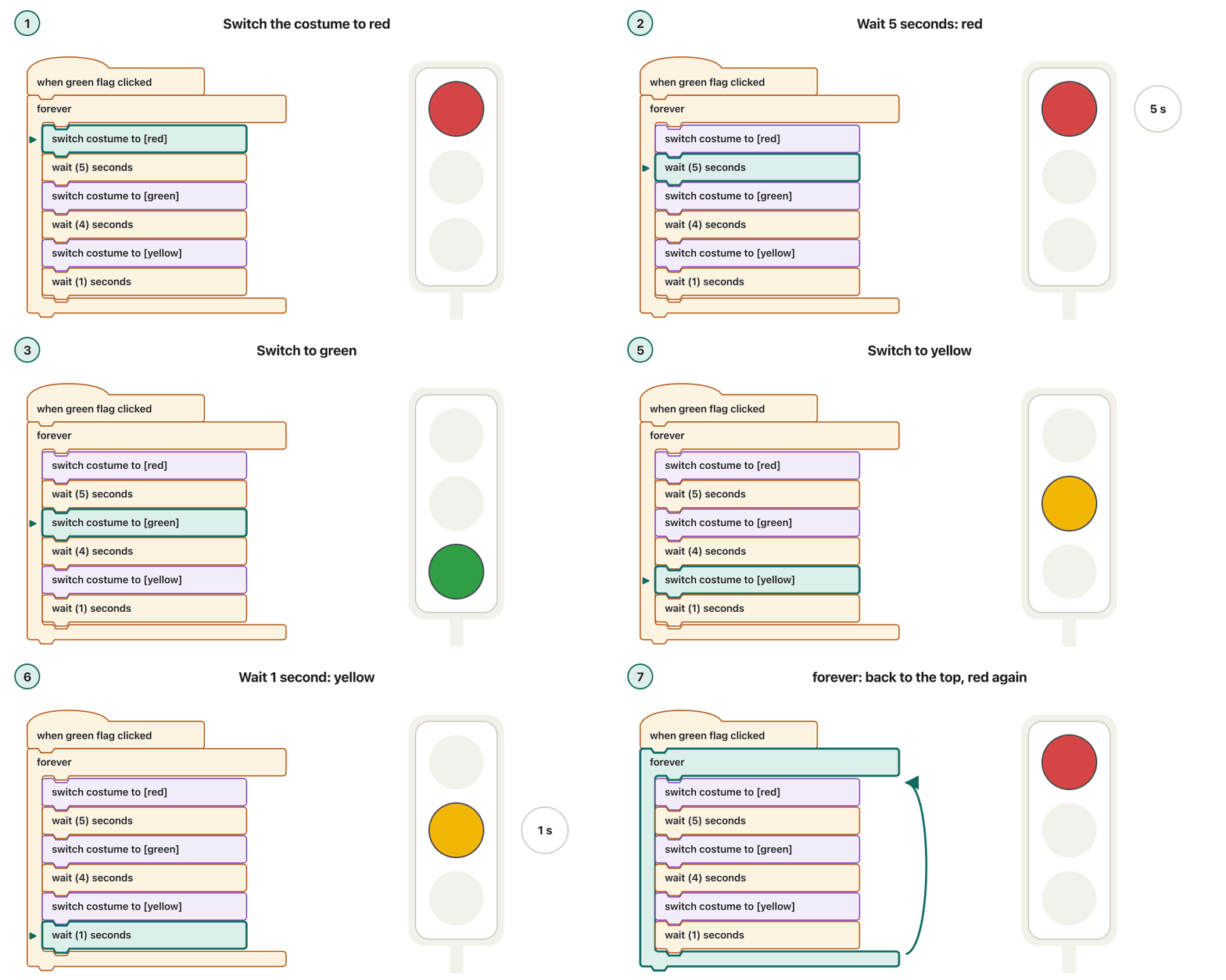
Build a traffic light like the one at a crossroads in town: red, then green, then yellow, and again, without end. You can do it in Scratch with one sprite, or in any block tool.
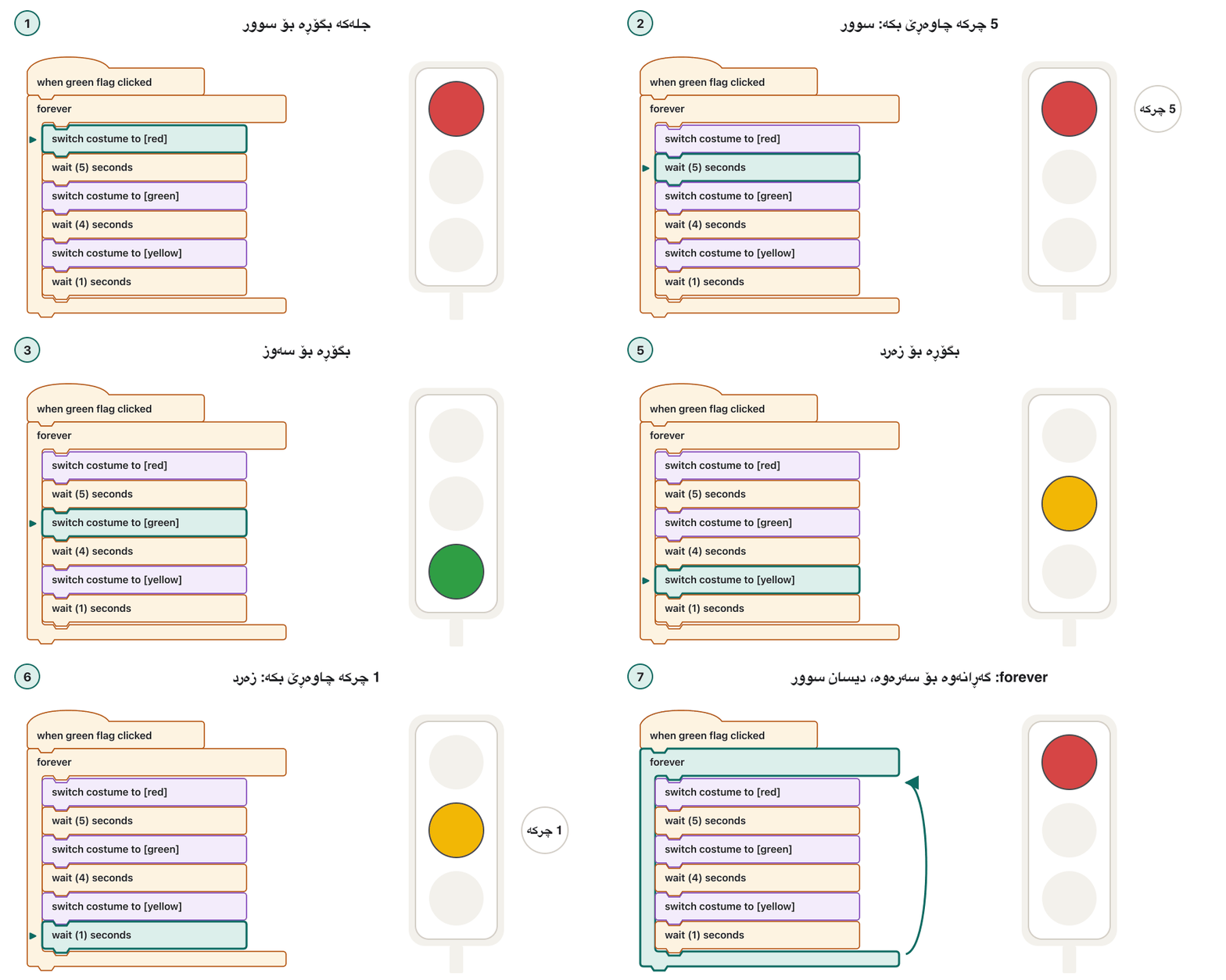
گڵۆپێکی هاتوچۆ دروست بکە وەک ئەوەی لە چوارڕیانێکی شاردا هەیە: سوور، پاشان سەوز، پاشان زەرد و دیسان، بێ کۆتایی. دەتوانیت لە Scratchـدا بە یەک یان لە هەر ئامرازێکی بلۆکدا بیکەیت.
- Planپلان
Write the algorithm in words first: show red for 5 seconds, green for 4 seconds, yellow for 1 second, and repeat for ever.
سەرەتا بە وشە بنووسە: سوور بۆ 5 چرکە پیشان بدە، سەوز بۆ 4 چرکە، زەرد بۆ 1 چرکە و بۆ هەمیشە دووپاتەی بکەرەوە.
- Make the spriteسپرایتەکە دروست بکە
Draw one sprite, Light, with three costumes: red, green and yellow.
بە ناوی Light بکێشە بە سێ جل: سوور، سەوز و زەرد.
- Start on the green flagبە ئاڵا سەوزەکە دەست پێ بکە
Drag
when green flag clickedinto the script area.when green flag clickedڕابکێشە بۆ ناو ناوچەی کۆد. - Add the loopخولەکە زیاد بکە
Under it, snap a
foreverblock: a traffic light never stops by itself.لە ژێرییەوە
foreverبلکێنە: گڵۆپی هاتوچۆ هەرگیز خۆی ناوەستێت. - Fill the loopخولەکە پڕ بکەرەوە
Inside
forever, snap six blocks:switch costume to [red],wait (5) seconds,switch costume to [green],wait (4) seconds,switch costume to [yellow],wait (1) seconds.لە ناو
foreverـدا شەش بلکێنە:switch costume to [red]،wait (5) seconds،switch costume to [green]،wait (4) seconds،switch costume to [yellow]،wait (1) seconds. - Testتاقی بکەرەوە
Click the green flag and time each colour with a clock. Is the order right? Does it start again with red?
کلیک لە ئاڵا سەوزەکە بکە و کاتی هەر ڕەنگێک بە کاتژمێرێک بپێوە. ئایا ڕیزبەندییەکە دروستە؟ ئایا دیسان بە سوور دەست پێ دەکاتەوە؟
Project: a traffic lightپڕۆژە: گڵۆپی هاتوچۆ
Extend it: a sign for people on footفراوانکردن: نیشانەیەک بۆ ڕێبواران
Add a second sprite, Walk sign, with two costumes, a walking person and a standing person. Blocks move only their own sprite, so the light must tell the sign when to change, with messages. In the Light's loop, add broadcast [walk] right after switch costume to [red], and broadcast [stop] right after switch costume to [green]. The Walk sign gets two scripts: when I receive [walk] → switch costume to [walking], and when I receive [stop] → switch costume to [standing].
دووەم زیاد بکە، Walk sign، بە دوو جل: کەسێکی ڕۆیشتوو و کەسێکی وەستاو. تەنیا خۆیان دەجووڵێنن، بۆیە گڵۆپەکە دەبێت بە پەیام بە نیشانەکە بڵێت کەی بگۆڕێت. لە Lightـدا، ڕاستەوخۆ دوای switch costume to [red]، broadcast [walk] زیاد بکە و ڕاستەوخۆ دوای switch costume to [green]، broadcast [stop]. Walk sign دوو بەشی دەبێت: when I receive [walk] ← switch costume to [walking] و when I receive [stop] ← switch costume to [standing].
Limits of blocks, and moving on to textسنووری بلۆکەکان و چوونە سەر کۆدی نووسراو
- Big programs grow huge. Hundreds of blocks fill the screen and are hard to read, search and reorganise.
- Dragging is slower than typing once you know a language.
- Harder to share and compare. Teams compare versions of text files line by line; block projects do not fit those tools well.
- Fewer libraries and less control. Servers, phone apps and data science rely on the huge libraries of text languages.
- گەورە زۆر گەورە دەبێت. سەدان شاشەکە پڕ دەکەنەوە و خوێندنەوە، گەڕان و ڕێکخستنەوەیان قورسە.
- ڕاکێشان لە نووسین خاوترە هەر کە زمانێک فێر بوویت.
- هاوبەشکردن و بەراوردکردنیان قورسترە. تیمەکان وەشانەکانی دەقی دێڕ بە دێڕ بەراورد دەکەن؛ پڕۆژەی بلۆکی بە باشی لەگەڵ ئەو ئامرازانەدا ناگونجێن.
- کەمتر و کۆنترۆڵی کەمتر. ، مۆبایل و زانستی پشت بە زمانە نووسراوەکان دەبەستن.
Moving on is easier than it looks, because the ideas stay the same. In a study in two high-school classes, students began with either a block or a text version of the same tool for five weeks and then moved to Java; ten weeks later the differences between the two groups had faded (Weintrop and Wilensky, 2019). The CêIT lab helps the move by showing each block's line of Python. When you are ready, go on with the Python or Java track.
چوونە پێشەوە لەوە ئاسانترە کە دەردەکەوێت، چونکە بیرۆکەکان وەک خۆیان دەمێننەوە. لە توێژینەوەیەکدا لە دوو پۆلی ئامادەیی، خوێندکاران بۆ پێنج هەفتە بە وەشانی بلۆکی یان وەشانی نووسراوی هەمان ئامراز دەستیان پێ کرد و پاشان چوونە سەر Java؛ دە هەفتە دواتر جیاوازییەکانی نێوان دوو گرووپەکە کاڵ ببوونەوە (Weintrop و Wilensky، 2019). تاقیگەی CêIT بە پیشاندانی دێڕی هەر یارمەتیی ئەم گواستنەوەیە دەدات. کاتێک ئامادە بوویت، لە بەشی Python یان Java بەردەوام بە.
Other kinds of visual programmingجۆرەکانی تری بەرنامەسازیی دیدەیی
Blocks are not the only visual way to program. In node-based tools a program is a graph: boxes, called nodes, joined by wires, and data or the order of the steps flows along the wires from node to node.
تاکە ڕێگای دیدەیی بەرنامەسازی نین. لە ئامرازەکانی گرافێکە: چوارگۆشەگەلێک بە ناوی ، کە بە وایەر بە یەکەوە بەستراون و یان ڕیزبەندیی هەنگاوەکان بە درێژایی وایەرەکان لە بۆ تر دەڕوات.
- Unreal Engine Blueprints (Epic Games): a node-based way to build gameplay inside the Unreal Editor, so that designers can use ideas that are usually left to programmers (documentation for Unreal Engine 5.9).
- Node-RED: “low-code programming for event-driven applications”, built on Node.js and started at IBM in 2013. You wire nodes together in the browser to collect, change and show data, often from IoT devices on a Raspberry Pi; the flows are saved as JSON.
- LabVIEW (NI, now part of Emerson): engineers draw programs in the graphical language G, which runs as dataflow, to control instruments and build automated test systems.
- Unreal Engine Blueprints (Epic Games): ڕێگایەکی نۆدی بۆ دروستکردنی یاری لە ناو Unreal Editorـدا، بۆ ئەوەی دیزاینەران ئەو بیرۆکانە بەکار بهێنن کە زۆرجار تەنیا بەرنامەسازان بەکاری دەهێنن (بەڵگەنامەکانی Unreal Engine 5.9).
- Node-RED: «بەرنامەسازیی کەمکۆد بۆ ڕووداوخواز»، لەسەر Node.js دروست کراوە و لە 2013 لە IBM دەستی پێ کرد. لە بە وایەر دەبەستیتەوە بۆ کۆکردنەوە، گۆڕین و پیشاندانی ، زۆرجار لە ئامێرەکانی لەسەر Raspberry Pi؛ ڕەوتەکان وەک هەڵدەگیرێن.
- LabVIEW (NI، کە ئێستا بەشێکە لە Emerson): ئەندازیاران بە زمانی وێنەیی G دەکێشن، کە وەک ڕەوتی کار دەکات، بۆ کۆنترۆڵکردنی ئامێرەکانی پێوان و دروستکردنی سیستەمی پشکنینی خۆکار.
Common mistakesهەڵە باوەکان
| Mistakeهەڵە | What to doچی بکەیت |
|---|---|
| “Blocks are not real programming.”« بەرنامەسازیی ڕاستەقینە نین.» | They teach the same ideas as text code: sequence, decisions, loops, variables, events and functions. Only the way of writing differs.هەمان بیرۆکەکانی کۆدی نووسراو فێر دەکەن: زنجیرە، بڕیار، ، ، و . تەنیا شێوەی نووسینەکە جیاوازە. |
| A block meant to repeat sits under the C block, not in its mouth: it runs only once, after the loop. کە دەبێت دووپاتە ببێتەوە لە ژێر Cـەوەیە، نەک لە ناو دەمیدا: تەنیا یەک جار، دوای ، جێبەجێ دەبێت. | Drag it into the mouth of the loop.ڕایبکێشە بۆ ناو دەمی . |
| A script with no hat block never starts.بەشێک کە کڵاوی نییە هەرگیز دەست پێ ناکات. | Put an event block such as when green flag clicked on top. وەک when green flag clicked لە سەرەوە دابنێ. |
forever used where the program must stop.بەکارهێنانی forever لە شوێنێکدا کە دەبێت بوەستێت. | Use repeat until < > with the stop condition.repeat until < > بە وەستانەوە بەکار بهێنە. |
Costume changes with no wait: you see only the last one.گۆڕینی جل بێ wait: تەنیا دواییەکەیان دەبینیت. | Add wait (…) seconds between the changes.wait (…) seconds لە نێوان گۆڕانکارییەکاندا زیاد بکە. |
| Trying to move another sprite with your sprite's blocks.هەوڵدان بۆ جووڵاندنی تر بە خۆت. | Blocks act on their own sprite; send a message with broadcast. لەسەر خۆیان کار دەکەن؛ بە broadcast پەیامێک بنێرە. |
Exercisesڕاهێنانەکان
Write this block script in pseudocode. What does it calculate?
ئەم بەشە بلۆکییە بە بنووسە. چی حیساب دەکات؟
when green flag clicked
set [total] to (0)
repeat (5)
    ask [Mark?] and wait
    change [total] by (answer)
end
say ((total) / (5))
Show answerوەڵامەکە پیشان بدە
START
total ← 0
REPEAT 5 TIMES
    INPUT mark
    total ← total + mark
END REPEAT
OUTPUT total ÷ 5
END
It reads five marks and outputs their average, the same algorithm as the average of five marks. ask [Mark?] and wait is the input and (answer) is the value typed in.
پێنج نمرە دەخوێنێتەوە و تێکڕاکەیان پیشان دەدات، هەمان وەک تێکڕای پێنج نمرە. ask [Mark?] and wait و (answer) ئەو نرخەیە کە نووسراوە.
Dilan wants a sprite to walk in a ring: ten short steps, turning a little after each one. Instead, it walks in a straight line and turns once at the end. Why, and how do you fix it?
Dilan دەیەوێت بە بازنەیەکدا بڕوات: دە هەنگاوی کورت و دوای هەر یەکێک کەمێک بسووڕێتەوە. لە جیاتی ئەوە، بە هێڵێکی ڕاستدا دەڕوات و لە کۆتاییدا یەک جار دەسووڕێتەوە. بۆچی و چۆن چاکی دەکەیتەوە؟
when green flag clicked
repeat (10)
    move (20) steps
end
turn (36) degrees
Show answerوەڵامەکە پیشان بدە
turn (36) degrees is under the C block, not inside it, so it runs once after the ten steps. Drag it into the mouth of repeat (10), under move (20) steps. Then each pass moves and turns, and ten turns of 36° make a full ring of 360°.
turn (36) degrees لە ژێر Cـەوەیە، نەک لە ناویدا، بۆیە دوای دە هەنگاوەکە یەک جار جێبەجێ دەبێت. ڕایبکێشە بۆ ناو دەمی repeat (10)، لە ژێر move (20) steps. ئەو کاتە هەر خولێک دەڕوات و دەسووڕێتەوە و دە سووڕانەوەی 36° بازنەیەکی تەواوی 360° دروست دەکەن.
In a quiz game, the Teacher sprite asks a question. When the answer is right, a Score board sprite must add 1 to the score. Write the scripts of both sprites in block text.
لە یارییەکی پرسیار و وەڵامدا، Teacher پرسیارێک دەکات. کاتێک وەڵامەکە ڕاست بێت، Score board دەبێت 1 بۆ خاڵەکە زیاد بکات. بەشەکانی هەردوو بە دەقی بلۆک بنووسە.
Hintئاماژە
Use broadcast in one sprite and when I receive in the other.
لە broadcast و لە ئەویتردا when I receive بەکار بهێنە.
Show answerوەڵامەکە پیشان بدە
// Teacher
when green flag clicked
ask [5 + 7 = ?] and wait
if <(answer) = (12)> then
    say [Right!]
    broadcast [correct]
else
    say [Try again]
end

// Score board
when green flag clicked
set [score] to (0)

when I receive [correct]
change [score] by (1)
The Teacher does not touch the score; it only announces correct. The Score board owns the variable and reacts to the message.
Teacher دەست لە خاڵەکە نادات؛ تەنیا correct ڕادەگەیەنێت. Score board خاوەنی و وەڵامی پەیامەکە دەداتەوە.
Which tool fits each job: Scratch, MIT App Inventor, Blockly or Node-RED? (a) A 10-year-old's first animated story. (b) A shop owner's simple Android app that lists prices. (c) A company adding a block editor to its robot-kit website. (d) Sending an alert from a Raspberry Pi when a greenhouse is hotter than 35 °C.
کام ئامراز بۆ هەر کارێک گونجاوە: Scratch، MIT App Inventor، Blockly یان Node-RED؟ (a) یەکەم چیرۆکی جووڵاوی منداڵێکی 10 ساڵان. (b) سادەی Android بۆ خاوەن دووکانێک کە نرخەکان پیشان دەدات. (c) کۆمپانیایەک کە دەستکاریکەرێکی بلۆک دەخاتە سەر کەرەستەی . (d) ناردنی ئاگادارکردنەوە لە Raspberry Piـیەکەوە کاتێک خانووی شووشە لە 35 °C گەرمتر دەبێت.
Show answerوەڵامەکە پیشان بدە
- (a) Scratch: sprites, costumes and sounds for stories.
- (b) MIT App Inventor: real phone apps from blocks.
- (c) Blockly: a library for putting a block editor into their own site.
- (d) Node-RED: wire a sensor node to a check node and an alert node.
- (a) Scratch: ، جل و دەنگ بۆ چیرۆک.
- (b) MIT App Inventor: ڕاستەقینەی مۆبایل بە .
- (c) Blockly: بۆ دانانی دەستکاریکەرێکی بلۆک لە خۆیاندا.
- (d) Node-RED: بە پشکنین و ئاگادارکردنەوە ببەستەرەوە.
Open the visual programming lab and solve level 3 with as few blocks as you can. Then write your solution in pseudocode, and match each block to a line of the Python the lab shows.
تاقیگەی بەرنامەسازیی دیدەیی بکەرەوە و ئاستی 3 بە کەمترین کە دەتوانیت چارەسەر بکە. پاشان چارەسەرەکەت بە بنووسە و هەر لەگەڵ دێڕێک لەو تاقیگەکە پیشانی دەدات یەک بخەرەوە.
Show answerوەڵامەکە پیشان بدە
REPEAT 6 TIMES
    MOVE FORWARD
END REPEAT
Two blocks are enough: the robot stands six squares from the flag, facing it. The repeat block becomes the loop line of the Python view and move forward becomes the indented line inside it, which is exactly one line per block.
دوو بەسە: شەش خانە لە ئاڵاکەوە دوورە و ڕووی تێیەتی. repeat دەبێت بە دێڕی لە بەشی و move forward دەبێت بە دێڕە بۆشاییدارەکەی ناویدا، کە ڕێک یەک دێڕە بۆ هەر .
Summaryپوختە
- Visual programming builds programs from pictures; block-based tools snap command blocks together, so there are no syntax errors.
- Shapes show where a block fits: hat, stack, C, reporter, boolean, cap. Categories and colours group them.
- Scratch (Scratch Foundation), Blockly (Raspberry Pi Foundation since November 2025), MIT App Inventor and Code.org, now CodeAI, are the best-known tools in 2026.
- Block programs are event-driven: hat blocks wait for events, and sprites cooperate through messages.
- Blocks, flowcharts and pseudocode can show the same algorithm; Blockly's code generators turn blocks into JavaScript, Python, PHP, Lua or Dart.
- Blocks reach their limits with big programs; the ideas carry over to text languages. Node-based tools (Blueprints, Node-RED, LabVIEW) are another kind of visual programming.
- لە وێنە دروست دەکات؛ ئامرازەکانی بلۆک فەرمان بە یەکەوە دەلکێنن، بۆیە هەڵەی نییە.
- شێوەکان پیشان دەدەن لە کوێ جێی دەبێتەوە: کڵاو، فەرمان، C، ڕاپۆرتەر، ، کۆتایی. پۆل و ڕەنگەکان کۆیان دەکەنەوە.
- Scratch (دامەزراوەی Scratch)، Blockly (دامەزراوەی Raspberry Pi لە تشرینی دووەمی 2025ـەوە)، MIT App Inventor و Code.org کە ئێستا CodeAIـە، ناسراوترین ئامرازەکانن لە 2026دا.
- هەر بلۆکی بە کار دەکات: کڵاو چاوەڕێی دەکەن و بە پەیام هاوکاری دەکەن.
- ، و دەتوانن هەمان پیشان بدەن؛ Blockly دەکەن بە JavaScript، Python، PHP، Lua یان Dart.
- لەگەڵ گەورەدا دەگەنە سنووری خۆیان؛ بیرۆکەکان دەگوازرێنەوە بۆ زمانە نووسراوەکان. ئامرازەکانی (Blueprints، Node-RED، LabVIEW) جۆرێکی تری .
Why do block tools help beginners?بۆچی ئامرازەکانی بلۆک یارمەتیی نوێکاران دەدەن؟
Nothing has to be typed or remembered: every command is visible, and shapes stop wrong combinations, so beginners can focus on the logic.
هیچ شتێک پێویست ناکات بنووسرێت یان لەبیر بێت: هەموو دیارە و شێوەکان ڕێگە لە تێکەڵکردنی هەڵە دەگرن، بۆیە نوێکاران دەتوانن سەرنج بخەنە سەر لۆجیکەکە.
How does a block become code in Blockly?لە Blocklyـدا بلۆکێک چۆن دەبێت بە کۆد؟
Each block type has a code generator for each language, a function that returns its piece of code; Blockly joins the pieces.
هەر جۆرە بۆ هەر زمانێک هەیە، کە پارچە کۆدەکەی دەگەڕێنێتەوە؛ Blockly پارچەکان بە یەکەوە دەلکێنێت.
Practise in the visual programming lab, then start a language track: Python or Java.
لە تاقیگەی بەرنامەسازیی دیدەییدا ڕاهێنان بکە، پاشان دەست بە بەشێکی زمان بکە: Python یان Java.
Lesson complete!وانەکە تەواو بوو!
Well done. Review the key terms, then go on to the next lesson.دەستخۆش. سەیرێکی زاراوە سەرەکییەکان بکەرەوە، پاشان بڕۆ بۆ وانەی داهاتوو.
Key termsزاراوە سەرەکییەکان
Related lecturesوانە پەیوەندیدارەکان
- Programming Languagesزمانەکانی بەرنامەسازی
- How Code Becomes a Running Program: Compilers and Interpretersچۆن کۆد دەبێت بە بەرنامەیەک کە کار دەکات: کۆمپایلەرەکان و ئینتەرپرێتەرەکان
- Welcome to Python: Install and Runبەخێربێیت بۆ Python: جێگیرکردن و جێبەجێکردن
- Welcome to Java: the JDK, the JRE and the JVMبەخێربێیت بۆ Java: JDK، JRE و JVM
- The while Loopخولی while
- The for Loop and range()خولی for و
range() - Making Decisions: if, elif, elseبڕیاردان:
if،elifوelse
References and further readingسەرچاوەکان و خوێندنەوەی زیاتر
- Scratch Foundation: about Scratch (free, block-based, MIT Media Lab 2007, Scratch Foundation since 2019, 200 million kids)
- Scratch Wiki: Blocks (hat, stack, boolean, reporter, C and cap blocks; categories)
- Scratch Wiki: Scratch 3.0 (released 2 January 2019; HTML5/JavaScript; tablets)
- Scratch Wiki: Events Blocks and Control Blocks (broadcast, when I receive, repeat, forever, if, repeat until)
- Blockly documentation: What is Blockly? and code generation (five built-in generators: JavaScript, Python, Lua, Dart, PHP)
- Raspberry Pi Foundation blog: The new home for Blockly (from Google, 2011; moved 10 November 2025)
- MIT App Inventor: About us (visual programming for Android and iPhone apps; learners and apps)
- CodeAI (formerly Code.org): Code.org is now CodeAI (2 June 2026; Hour of Code became Hour of AI)
- Weintrop, D. and Wilensky, U. (2019). Transitioning from introductory block-based and text-based environments to professional programming languages in high school computer science classrooms. Computers & Education 142, 103646
- Epic Games: Blueprints Visual Scripting in Unreal Engine (Unreal Engine 5.9 documentation)
- Node-RED: Low-code programming for event-driven applications, and About (IBM, 2013; flows stored as JSON)
- NI: LabVIEW (graphical programming with G, dataflow; NI is now part of Emerson)
This lecture is a first edition. The Kurdish text and terminology are waiting for review by Kurdish IT teachers.ئەم وانەیە چاپی یەکەمە. دەقە کوردییەکە و زاراوەکانی چاوەڕێی پێداچوونەوەی مامۆستایانی کوردی بواری IT ن.