MATLABMATLAB · Chapterبەش 6 · Lectureوانە 6.2
Plotting Graphsکێشانی هێڵکارییەکان
Draw graphs in MATLAB and Octave: a plot in three steps and why more points give a smoother curve, titles, axis labels, grid and axis limits, colours, markers and line styles with legend and hold on, fplot for function handles, several graphs with subplot (and MATLAB's tiledlayout), bar charts and histograms, other chart types, 3-D surfaces with meshgrid and surf, saving figures, and practice with the calculus course's graphs.
لە MATLAB و Octaveـدا بکێشە: لە سێ هەنگاودا و بۆچی خاڵی زیاتر چەماوەیەکی لووستر دەدات، ناونیشان، ناوی ، تۆڕ و سنووری ، ڕەنگ، نیشانە و شێوەی هێڵ لەگەڵ و hold on، fplot بۆ ، چەند بە subplot (و tiledlayoutـی MATLAB)، و ، جۆرەکانی تری ، ڕووکاری سێ ڕەهەندی بە meshgrid و surf، پاشەکەوتکردنی figure و ڕاهێنان لەسەر کۆرسی ژمێرکاری.
What you will learnچی فێر دەبیت
- Plot y against x in three steps and choose enough points for a smooth curve.
- Add a title, axis labels, a grid and axis limits, and style lines with LineSpec, legend and hold on.
- Draw a function handle with fplot and arrange several graphs with subplot.
- Choose bar, histogram (MATLAB) or hist (Octave) and the other chart types correctly.
- Draw a 3-D surface with meshgrid and surf and save a figure as a picture file.
- y بەرامبەر x لە سێ هەنگاودا بکێشیت و خاڵی پێویست بۆ چەماوەیەکی لووس هەڵبژێریت.
- ناونیشان، ناوی ، تۆڕ و سنووری زیاد بکەیت و هێڵەکان بە LineSpec، legend و hold on ڕێک بخەیت.
- بە fplot بکێشیت و چەند بە subplot ڕێک بخەیت.
- bar، histogram (MATLAB) یان hist (Octave) و جۆرەکانی تری بە دروستی هەڵبژێریت.
- ڕووکارێکی سێ ڕەهەندی بە meshgrid و surf بکێشیت و figureـێک وەک وێنە پاشەکەوت بکەیت.
A plot in three stepsهێڵکارییەک لە سێ هەنگاودا
Numbers in a table are hard to read; a picture shows the pattern at once. MATLAB draws a graph in three steps: (1) make the x values, usually a range or linspace (vectors and ranges); (2) compute the y values from them; (3) call plot(x, y). What the graph of a function means is in drawing a graph. All the plotting commands in this lesson also work in GNU Octave (free) and in the free version of MATLAB Online, except where a box says otherwise.
ژمارەکانی ناو خشتەیەک بە ئاستەم دەخوێنرێنەوە؛ وێنەیەک یەکسەر شێوازەکە پیشان دەدات. MATLAB لە سێ هەنگاودا دەکێشێت: (1) x دروست بکە، زۆرجار زنجیرەیەک یان linspace (ئاڕاستەبڕەکان و زنجیرەکان)؛ (2) y لەوانەوە هەژمار بکە؛ (3) plot(x, y) بانگ بکە. واتای لە کێشانی هێڵکارییەکی نەخشەدایە. هەموو کێشانی ئەم وانەیە لە GNU Octave (بەخۆڕایی) و وەشانی بەخۆڕایی MATLAB Onlineـیشدا کار دەکەن، جگە لەو شوێنانەی سندووقێک شتێکی تر دەڵێت.
km = 0:2:20;              % step 1: the x values
fare = 3000 + 750*km;     % step 2: the y values
plot(km, fare)            % step 3: draw
Explain the codeڕوونکردنەوەی کۆدەکە
- Lineدێڕی 1
Eleven x values: 0, 2, 4, …, 20 km.
یازدە x: 0، 2، 4، …، 20 کیلۆمەتر.
- Lineدێڕی 3
plotopens a figure window and draws the points joined by lines.plotfigure دەکاتەوە و خاڵەکان بە هێڵ بەیەکەوە دەبەستێت.
plot does not know the formula — it only receives the points and joins neighbours with straight lines. A straight-line rule needs few points, but a curve needs many. For a parabola with new numbers, x = -6:0.5:6; y = x.^2 - 4; plot(x, y) uses 25 points; note .^, which squares each element (element-wise operations).
plot فۆرموولەکە نازانێت — تەنها خاڵەکان وەردەگرێت و دراوسێکان بە هێڵی ڕاست بەیەکەوە دەبەستێت. یاسایەکی هێڵی ڕاست پێویستی بە خاڵی کەمە، بەڵام چەماوەیەک پێویستی بە زۆرە. بۆ بە ژمارەی نوێ، x = -6:0.5:6; y = x.^2 - 4; plot(x, y) 25 خاڵ بەکار دەهێنێت؛ سەرنجی .^ بدە کە هەر دووجا دەکات (کارەکانی توخم بە توخم).
A plot in three stepsهێڵکارییەک لە سێ هەنگاودا
More points, smoother curveخاڵی زیاتر، چەماوەی لووستر
Watch sin(x) on drawn with 5, 9, 17, 50 and 200 points. With 5 points the 'curve' is a zig-zag of four straight pieces; by 200 points the pieces are too short to see. linspace(a, b, n) is the easy way to choose the number of points.
سەیری sin(x) بکە لەسەر کە بە 5، 9، 17، 50 و 200 خاڵ کێشراوە. بە 5 خاڵ «چەماوەکە» زیگزاگێکە لە چوار پارچە هێڵی ڕاست؛ تا 200 خاڵ پارچەکان ئەوەندە کورت دەبن کە نابینرێن. linspace(a, b, n) ڕێگای ئاسانی هەڵبژاردنی ژمارەی خاڵەکانە.
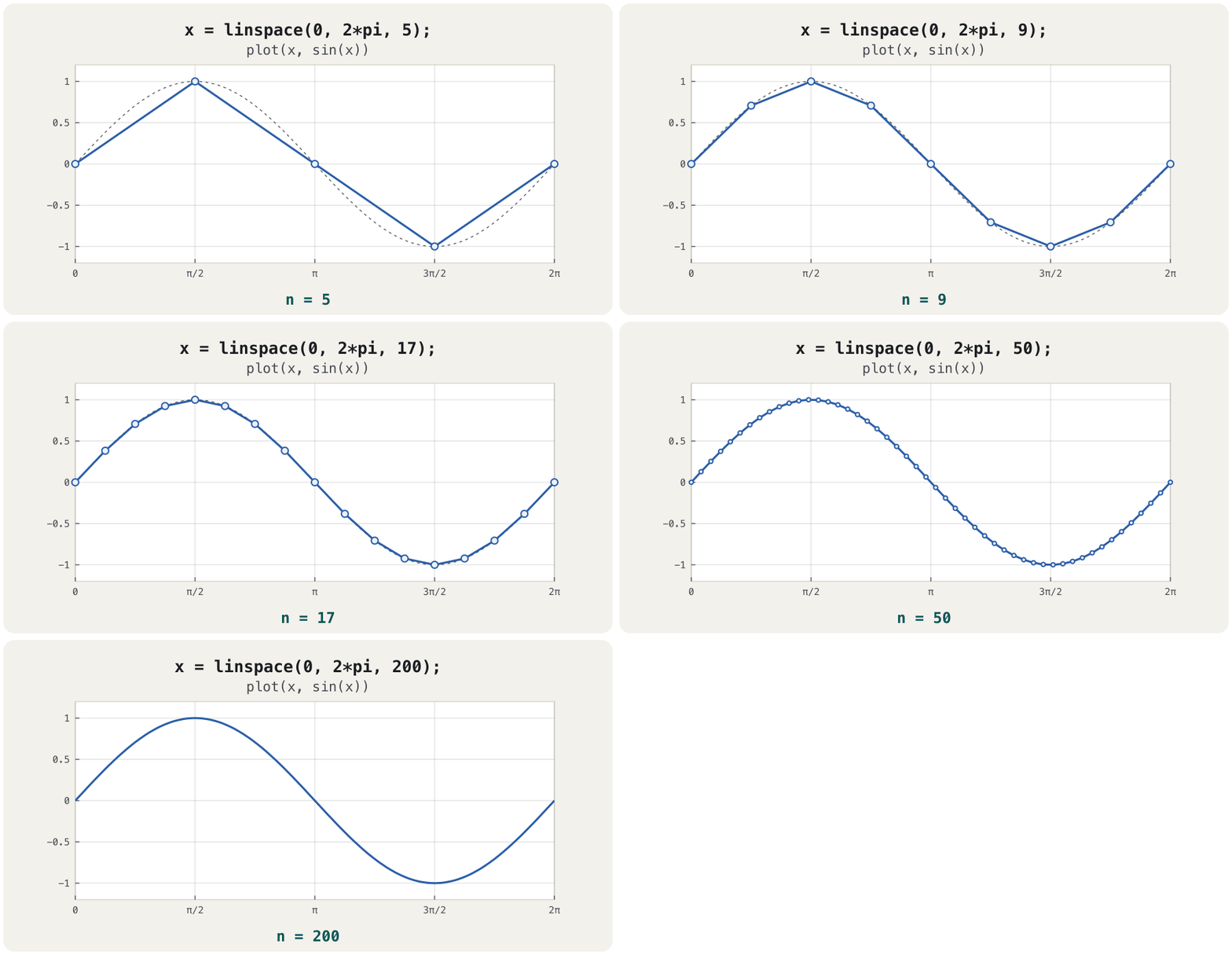
plot joins points with straight lines: more points, smoother curveplot خاڵەکان بە هێڵی ڕاست دەبەستێتەوە: خاڵی زیاتر، چەماوەی لووسترCêITTitles, labels, grid and axis limitsناونیشان، ناوی تەوەرەکان، تۆڕ و سنووری تەوەرەکان
A graph without labels is a puzzle. After plot, add the words and the layout you want:
بەبێ ناو مەتەڵێکە. دوای plot، ئەو وشە و ڕێکخستنەی دەتەوێت زیادی بکە:
x = linspace(-2*pi, 2*pi, 400);
y = sin(x);
plot(x, y)
title('The sine curve')
xlabel('x')
ylabel('sin(x)')
grid on
axis([-2*pi 2*pi -1.5 1.5])
Explain the codeڕوونکردنەوەی کۆدەکە
- Lineدێڕی 4-6
title,xlabelandylabeltake text in single quotes.title،xlabelوylabelدەقێک لەناو'…'ـدا وەردەگرن.- Lineدێڕی 7
grid ondraws light grid lines;grid offremoves them.grid onهێڵی تۆڕی کاڵ دەکێشێت؛grid offلایان دەبات.- Lineدێڕی 8
axis([xmin xmax ymin ymax])fixes the visible ranges of both axes.axis([xmin xmax ymin ymax])سنووری بینراوی هەردوو جێگیر دەکات.
Two more layout commands from the guide and the commands list: axis equal makes one unit equally long on both axes, so a circle looks round; axis auto goes back to automatic limits. Several commands may share one line when commas separate them: plot(x, y), grid on, axis equal. In titles and labels MATLAB reads ^ and _ as superscript and subscript, so title('y = x^2') shows a small raised 2.
دوو تری ڕێکخستن لە ڕێبەرەکە و لیستی : axis equal یەکەیەک لەسەر هەردوو بە یەک درێژی دادەنێت، بۆیە بازنەیەک خڕ دەردەکەوێت؛ axis auto سنوورەکان دەگەڕێنێتەوە بۆ خۆکار. چەند دەتوانن یەک دێڕ بەش بکەن ئەگەر کۆما لێکیان جیا بکاتەوە: plot(x, y), grid on, axis equal. لە ناونیشان و ناوەکاندا MATLAB ^ و _ وەک نووسینی سەرەوە و خوارەوە دەخوێنێتەوە، بۆیە title('y = x^2') 2ـێکی بچووکی بەرز پیشان دەدات.
Colours, markers and line stylesڕەنگ، نیشانە و شێوەی هێڵ
A third argument, the line specification (MathWorks calls it LineSpec), sets the colour, the marker and the line style in one short text: plot(x, y, 'r--o') draws a red dashed line with circles. The symbols may come in any order, and you may leave any of them out.
سێیەم، دیاریکردنی هێڵ (MathWorks پێی دەڵێت LineSpec)، ڕەنگ، نیشانە و شێوەی هێڵ لە یەک دەقی کورتدا دادەنێت: plot(x, y, 'r--o') هێڵێکی سووری پچڕپچڕ بە بازنە دەکێشێت. هێماکان دەتوانن بە هەر ڕیزبەندییەک بێن و دەتوانیت هەر یەکێکیان نەنووسیت.
| Kindجۆر | Symbolsهێماکان | Meaningواتا |
|---|---|---|
| Colourڕەنگ | y m c r g b w k | yellow, magenta, cyan, red, green, blue, white, blackزەرد، ئەرخەوانی، شینی ئاسمانی، سوور، سەوز، شین، سپی، ڕەش |
| Markerنیشانە | . o x + * s d v ^ < > p h | point, circle, cross, plus, star, square, diamond, triangles (down, up, left, right), pentagram, hexagramخاڵ، بازنە، خاچی لار، کۆ، ئەستێرە، چوارگۆشە، ئەڵماس، سێگۆشەکان (خوار، سەر، چەپ، ڕاست)، پێنجگۆشەی ئەستێرەیی، شەشگۆشەی ئەستێرەیی |
| Line styleشێوەی هێڵ | - -- : -. | solid, dashed, dotted, dash-dotپتەو، پچڕپچڕ، خاڵخاڵ، پچڕ-خاڵ |
To draw several lines, give plot several x–y pairs, each with its own LineSpec, and name them with legend — the (the guide's example idea, with new functions):
بۆ کێشانی چەند هێڵێک، چەند جووتێکی x–y بدە بە plot، هەریەکە بە LineSpecـی خۆی و بە legend ناویان لێ بنێ — (بیرۆکەی نموونەکەی ڕێبەرەکە، بە نوێ):
x = linspace(0, 2*pi, 100);
plot(x, sin(x), 'b-', x, sin(2*x), 'r--')
legend('sin(x)', 'sin(2x)')
title('Two waves'), xlabel('x'), ylabel('y'), grid on
Explain the codeڕوونکردنەوەی کۆدەکە
- Lineدێڕی 2
Blue solid for sin x, red dashed for sin 2x.
شینی پتەو بۆ sin x، سووری پچڕپچڕ بۆ sin 2x.
- Lineدێڕی 3
legendtakes one label per line, in the same order.legendبۆ هەر هێڵێک یەک ناو وەردەگرێت، بە هەمان ڕیزبەندی.
The other way is hold on: it keeps the current lines so the next plot adds to them instead of replacing them; hold off returns to the normal behaviour. plot(x, sin(x), 'b-'), hold on, plot(x, sin(2*x), 'r--'), hold off gives the same picture. Without a LineSpec, MATLAB chooses the colours itself from its colour order.
ڕێگای تر hold onـە: هێڵەکانی ئێستا دەهێڵێتەوە بۆ ئەوەی plotـی داهاتوو زیادیان بکات نەک جێیان بگرێتەوە؛ hold off دەگەڕێتەوە بۆ ڕەفتاری ئاسایی. plot(x, sin(x), 'b-'), hold on, plot(x, sin(2*x), 'r--'), hold off هەمان وێنە دەدات. بەبێ LineSpec، MATLAB خۆی ڕەنگەکان لە ڕیزبەندیی ڕەنگەکانی هەڵدەبژێرێت.
Colours, markers and line stylesڕەنگ، نیشانە و شێوەی هێڵ
Markers for measured dataنیشانە بۆ دراوەی پێوراو
Measured values are single points, so show each one with a marker. A bakery in Duhok counts the loaves it sells in one week (made-up numbers):
خاڵی تاکن، بۆیە هەریەکەیان بە نیشانەیەک پیشان بدە. نانەواخانەیەک لە دهۆک ئەو نانانە دەژمێرێت کە لە هەفتەیەکدا دەیفرۆشێت (ژمارەی دروستکراو):
day = 1:7;
loaves = [120 135 128 150 170 210 190];
plot(day, loaves, 'g-o')
title('Loaves sold'), xlabel('day'), ylabel('loaves'), grid on'g-o' (MATLAB's own green is brighter than the colour used here). Drawn by CêIT from values computed with Python: it shows what the MATLAB code produces (MATLAB's own window looks slightly different).فرۆشی هەفتەیەک بە 'g-o' (سەوزی خودی MATLAB لەو ڕەنگەی لێرە بەکارهاتووە گەشترە). CêIT کێشاویەتی لە بە Python هەژمار کراون: ئەوە پیشان دەدات کە کۆدی MATLAB دروستی دەکات (پەنجەرەی خودی MATLAB کەمێک جیاوازە).CêITfplot: plotting a function handlefplot: کێشانی ئاماژەیەکی کردار
When you have the function itself as a handle (anonymous functions), fplot(f, [a b]) draws it on the interval [a, b] and chooses the points itself. Without an interval it uses [−5, 5]. Write the handle with .^, .*, ./ — MathWorks' page asks for element-wise operators to avoid a warning.
کاتێک خودی وەک هەیە (کردارە بێناوەکان)، fplot(f, [a b]) لەسەر [a, b] دەیکێشێت و خۆی خاڵەکان هەڵدەبژێرێت. بەبێ [−5, 5] بەکار دەهێنێت. بە .^، .*، ./ بنووسە — پەڕەی MathWorks بۆ ئەوەی ئاگاداری نەیەت داوای دەکات.
f = @(x) x.^3 - 3*x - 1;
fplot(f, [-2 2])
grid onfplot(f, [-2 2]) for ; the three zero crossings are found in the root-finding project. Drawn by CêIT from values computed with Python: it shows what the MATLAB code produces (MATLAB's own window looks slightly different).fplot(f, [-2 2]) بۆ ؛ سێ خاڵی بڕینی سفر لە پڕۆژەی دۆزینەوەی ڕەگدا دەدۆزرێنەوە. CêIT کێشاویەتی لە بە Python هەژمار کراون: ئەوە پیشان دەدات کە کۆدی MATLAB دروستی دەکات (پەنجەرەی خودی MATLAB کەمێک جیاوازە).CêITSeveral graphs in one figure: subplotچەند هێڵکاری لە یەک figureـدا: subplot
subplot(m, n, p) splits the figure into a grid of m rows and n columns of axes (plot areas) and makes number p the current one; the next plot draws there. The places are counted along the rows, left to right, then the next row — both MathWorks' and Octave's manuals say so.
subplot(m, n, p) figure دابەش دەکات بۆ تۆڕێکی m ڕیز و n ستوون لە و ژمارە p دەکات بە ئێستایی؛ plotـی داهاتوو لەوێ دەکێشێت. شوێنەکان بە درێژایی ڕیزەکان دەژمێردرێن، لە چەپەوە بۆ ڕاست، پاشان ڕیزی داهاتوو — ڕێبەری MathWorks و Octave هەردووکیان وا دەڵێن.
subplot(2, 3, p): p counts along the rowssubplot(2, 3, p): p بە درێژایی ڕیزەکان دەژمێردرێتCêITSeveral graphs in one figure: subplotچەند هێڵکاری لە یەک figureـدا: subplot
Two damped waves side by sideدوو شەپۆلی کپبوو لە تەنیشت یەک
The guide compares two sine waves that die away at different speeds. Here is the same idea with new constants, and , in one row of two graphs:
ڕێبەرەکە دوو شەپۆلی سینەس بەراورد دەکات کە بە دوو خێرایی جیاواز کز دەبن. ئەمە هەمان بیرۆکەیە بە نەگۆڕی نوێ، و ، لە یەک ڕیزی دوو :
x = 0:0.01:4;
subplot(1, 2, 1)
plot(x, exp(-x).*sin(6*x)), xlabel('x'), ylabel('exp(-x).*sin(6*x)'), axis([0 4 -1 1])
subplot(1, 2, 2)
plot(x, exp(-2.5*x).*sin(6*x)), xlabel('x'), ylabel('exp(-2.5*x).*sin(6*x)'), axis([0 4 -1 1])
Explain the codeڕوونکردنەوەی کۆدەکە
- Lineدێڕی 3
.*multiplies the two vectors element by element..*دوو بە لێک دەدات.- Lineدێڕی 3,5
The same
axislimits make the two graphs easy to compare.هەمان سنووری
axisبەراوردکردنی دوو ئاسان دەکات.
subplot(1, 2, p). Drawn by CêIT from values computed with Python: it shows what the MATLAB code produces (MATLAB's own window looks slightly different).دوو شەپۆلی کپبوو بە subplot(1, 2, p). CêIT کێشاویەتی لە بە Python هەژمار کراون: ئەوە پیشان دەدات کە کۆدی MATLAB دروستی دەکات (پەنجەرەی خودی MATLAB کەمێک جیاوازە).CêITSeveral graphs in one figure: subplotچەند هێڵکاری لە یەک figureـدا: subplot
tiledlayout, and other figure commandstiledlayout و فەرمانەکانی تری figure
MATLAB's documentation now recommends tiledlayout over subplot for new MATLAB code, because the tiles can be spaced and resized more flexibly. Octave's manual documents only subplot, so this track uses subplot when the code must run in both. The MATLAB-only form of the same picture:
بەڵگەنامەکانی MATLAB ئێستا بۆ کۆدی نوێی MATLAB لە جیاتی subplot، tiledlayout پێشنیار دەکەن، چونکە پارچەکان بە نەرمییەکی زیاتر دوور دەخرێنەوە و قەبارەیان دەگۆڕدرێت. ڕێبەری Octave تەنها subplot ڕوون دەکاتەوە، بۆیە ئەم بەشە subplot بەکار دەهێنێت کاتێک کۆدەکە دەبێت لە هەردووکیاندا کار بکات. شێوەی تەنها-MATLABـی هەمان وێنە:
tiledlayout(1, 2)
nexttile
plot(x, exp(-x).*sin(6*x))
nexttile
plot(x, exp(-2.5*x).*sin(6*x))| Command | What it doesچی دەکات |
|---|---|
figure | opens a new, empty figure window (so the next plot does not replace the old one) نوێ و بەتاڵی figure دەکاتەوە (بۆ ئەوەی داهاتوو جێی کۆنەکە نەگرێتەوە) |
axes | makes a new plot area (axes) in the current figure; plot and subplot usually make it for youناوچەیەکی کێشانی نوێ (axes) لە figureـی ئێستادا دروست دەکات؛ plot و subplot زۆرجار خۆیان دروستی دەکەن |
close / close all | closes the current figure / every figurefigureـی ئێستا / هەموو figureـەکان دادەخات |
text(x, y, 'note') | writes text at the point (x, y) of the axesدەق لە خاڵی (x, y)ی دەنووسێت |
gtext('note') | waits for a mouse click and writes the text thereچاوەڕێی کلیکی ماوس دەکات و دەقەکە لەوێ دەنووسێت |
hold on / hold off | keep / stop keeping the lines already drawnهێڵە کێشراوەکان بهێڵەوە / مەیانهێڵەوە |
set(gca, 'FontSize', 14) | changes a property of a graphics object — here the font size of the current axesتایبەتمەندییەکی تەنێکی گرافیکی دەگۆڕێت — لێرەدا قەبارەی فۆنتی axesـی ئێستا |
refresh | redraws the current figurefigureـی ئێستا دووبارە دەکێشێتەوە |
Other charts: bar charts and histogramsهێڵکارییەکانی تر: هێڵکارییە ستوونییەکان و هیستۆگرامەکان
bar(x, y) draws one bar per value instead of a line — right for separate things such as students or months. What a bar chart means, and when to choose it, is in bar and pie charts. Ten students' mid-term marks (new marks, the guide's idea):
bar(x, y) لە جیاتی هێڵ بۆ هەر ستوونێک دەکێشێت — گونجاوە بۆ شتی جیاجیا وەک قوتابی یان مانگ. واتای و کەی هەڵیبژێریت لە هێڵکارییە ستوونییەکان و هێڵکارییە بازنەییەکاندایە. نمرەی ناوەڕاستی وەرزی دە قوتابی (نمرەی نوێ، بیرۆکەی ڕێبەرەکە):
student = 1:10;
marks = [64 81 47 92 73 58 88 69 95 76];
bar(student, marks)
title('Mid-term marks'), xlabel('student'), ylabel('mark')bar(student, marks). Drawn by CêIT from values computed with Python: it shows what the MATLAB code produces (MATLAB's own window looks slightly different).bar(student, marks). CêIT کێشاویەتی لە بە Python هەژمار کراون: ئەوە پیشان دەدات کە کۆدی MATLAB دروستی دەکات (پەنجەرەی خودی MATLAB کەمێک جیاوازە).CêITOther charts: bar charts and histogramsهێڵکارییەکانی تر: هێڵکارییە ستوونییەکان و هیستۆگرامەکان
Histograms: histogram in MATLAB, hist in Octaveهیستۆگرامەکان: histogram لە MATLAB، hist لە Octave
A counts how many values fall into each class and draws touching bars (histograms in statistics). For 30 marks in the classes 40–50, 50–60, …, 90–100:
دەژمێرێت چەند دەکەونە ناو هەر و ستوونی بەیەکەوەلکاو دەکێشێت (هیستۆگرامەکان لە ئاماردا). بۆ 30 نمرە لە 40–50، 50–60، …، 90–100:
marks = [67 72 55 81 94 63 77 58 86 71 49 66 73 88 91 ...
         62 75 57 84 69 78 53 96 68 74 83 61 79 87 65];
histogram(marks, 40:10:100)          % MATLAB
title('30 marks'), xlabel('mark'), ylabel('number of students')
counts = histcounts(marks, 40:10:100)  % MATLAB: the numbers only
% Octave: hist(marks, 45:10:95) draws the same bars (45, 55, ... are the class centres)counts =
1 4 8 8 6 3Explain the codeڕوونکردنەوەی کۆدەکە
- Lineدێڕی 1-2
...continues a long line (long commands)....دێڕێکی درێژ بەردەوام دەکات (فەرمانەکانی درێژ).- Lineدێڕی 3
The second argument gives the class edges 40, 50, …, 100.
دووەم سنوورەکانی دەدات 40، 50، …، 100.
histogram(marks, 40:10:100). Drawn by CêIT from values computed with Python: it shows what the MATLAB code produces (MATLAB's own window looks slightly different).histogram(marks, 40:10:100). CêIT کێشاویەتی لە بە Python هەژمار کراون: ئەوە پیشان دەدات کە کۆدی MATLAB دروستی دەکات (پەنجەرەی خودی MATLAB کەمێک جیاوازە).CêITOther charts: bar charts and histogramsهێڵکارییەکانی تر: هێڵکارییە ستوونییەکان و هیستۆگرامەکان
More chart types from the commands listجۆری زیاتری هێڵکاری لە لیستی فەرمانەکان
| Command | Drawsچی دەکێشێت | Use it forبۆ چی |
|---|---|---|
stairs(x, y) | a staircase: flat steps that jump at each xپەیژەیەک: پلەی تەخت کە لە هەر xـێکدا باز دەدەن | a such as the floor function وەک floor |
stem(x, y) | a vertical line with a circle for each valueهێڵێکی ستوونی بە بازنەیەک بۆ هەر | separate samples, for example a signalخوێندنەوە جیاجیاکان، بۆ نموونە سیگناڵێک |
loglog(x, y) | both axes on a logarithmic scaleهەردوو لەسەر پێوەری لۆگاریتمی | values that grow over many powers of ten لە یەکەوە تا ملیۆنەها گەشە دەکەن |
semilogx / semilogy | only the x-axis / only the y-axis logarithmicتەنها x / تەنها y لۆگاریتمی | exponential growth looks straight with semilogy بە semilogy ڕاست دەردەکەوێت |
polarplot(theta, r) | a curve in polar coordinates (angle and distance)چەماوەیەک بە جەمسەری (گۆشە و دووری) | MATLAB: polar is not recommended, use polarplot; Octave: polarMATLAB: polar پێشنیار ناکرێت، polarplot بەکار بهێنە؛ Octave: polar |
3-D surfaces: meshgrid and surfڕووکاری سێ ڕەهەندی: meshgrid و surf
A surface needs a value of z for every pair (x, y) of a grid. meshgrid builds that grid as two matrices: X repeats the x values in every row and Y repeats the y values in every column.
ڕووکارێکی پێویستی بە z هەیە بۆ هەموو جووتێکی (x, y)ی تۆڕێک. meshgrid ئەو تۆڕە وەک دوو دروست دەکات: X x لە هەموو ڕیزێکدا دووبارە دەکاتەوە و Y y لە هەموو ستوونێکدا.
[X, Y] = meshgrid(1:3, 1:2)X =
1 2 3
1 2 3
Y =
1 1 1
2 2 2Then compute Z with element-wise operators and draw it with surf — MathWorks notes that the colour follows the height. A saddle (new function; the guide used another one):
پاشان Z بە هەژمار بکە و بە surf بیکێشە — MathWorks دەڵێت ڕەنگەکە شوێنی بەرزی دەکەوێت. زینێک ( نوێ؛ ڕێبەرەکە یەکێکی تری بەکار هێنا):
[X, Y] = meshgrid(-2:0.25:2);
Z = X.^2 - Y.^2;
surf(X, Y, Z)
xlabel('X'), ylabel('Y'), zlabel('Z')
colorbar
Explain the codeڕوونکردنەوەی کۆدەکە
- Lineدێڕی 1
With one input, meshgrid uses the same values for x and y: a grid.
بە یەک ، meshgrid هەمان بۆ x و y بەکار دەهێنێت: تۆڕێکی .
- Lineدێڕی 5
colorbarshows which colour stands for which height.colorbarپیشان دەدات کام ڕەنگ نوێنەری کام بەرزییە.
surf(X, Y, Z) for . Drawn by CêIT from values computed with Python: it shows what the MATLAB code produces (MATLAB's own window looks slightly different).surf(X, Y, Z) بۆ . CêIT کێشاویەتی لە بە Python هەژمار کراون: ئەوە پیشان دەدات کە کۆدی MATLAB دروستی دەکات (پەنجەرەی خودی MATLAB کەمێک جیاوازە).CêIT| Command | Drawsچی دەکێشێت |
|---|---|
mesh(X, Y, Z) | the same surface as a wire net (only the edges)هەمان ڕووکار وەک تۆڕێکی تەل (تەنها لێوارەکان) |
surfc / meshc | the surface or net with contour lines underneathڕووکار یان تۆڕەکە لەگەڵ هێڵی هاوبەرزی لە ژێریدا |
meshz / waterfall | a net with a curtain around it / lines in one direction onlyتۆڕێک بە پەردەیەک بە دەوریدا / هێڵ تەنها بە یەک ئاڕاستە |
contour(X, Y, Z) | a flat picture of lines of equal heightوێنەیەکی تەخت لە هێڵی بەرزیی یەکسان |
plot3(x, y, z) | a line through points in spaceهێڵێک بە ناو خاڵەکانی بۆشاییدا |
zlabel('…') | the label of the z-axisناوی z |
Saving a figure as a pictureپاشەکەوتکردنی figure وەک وێنە
To put a graph in a report, save it as a file. gcf means the current figure and gca the current axes:
بۆ دانانی لە ڕاپۆرتێکدا، وەک پاشەکەوتی بکە. gcf واتە figureـی ئێستا و gca واتە ئێستا:
saveas(gcf, 'saddle.png')            % MATLAB and Octave
print('-dpng', 'saddle.png')         % MATLAB and Octave
exportgraphics(gca, 'saddle.png')    % MATLAB R2020a and later
Explain the codeڕوونکردنەوەی کۆدەکە
- Lineدێڕی 1
The file extension chooses the format: .png, .jpg, .pdf …
پاشگری شێوەکە هەڵدەبژێرێت: .png، .jpg، .pdf …
- Lineدێڕی 3
Crops the picture tightly; MathWorks suggests it for most saving jobs. Not available in Octave.
وێنەکە توند دەبڕێت؛ MathWorks بۆ زۆربەی کارەکانی پاشەکەوتکردن پێشنیاری دەکات. لە Octaveـدا نییە.
Common mistakesهەڵە باوەکان
| Mistakeهەڵە | What happensچی ڕوو دەدات | Fixچاککردن |
|---|---|---|
y = x^2 for a vector xy = x^2 بۆ x | an error about matrix power and square matrices دەربارەی توانی و | y = x.^2 (also .*, ./)y = x.^2 (هەروەها .*، ./) |
Too few points (x = 0:1:6 for a sine)خاڵی زۆر کەم (x = 0:1:6 بۆ سینەس) | a jagged curveچەماوەیەکی ددانەدار | linspace(0, 2*pi, 200)linspace(0, 2*pi, 200) |
A second plot without hold onplotـی دووەم بەبێ hold on | the first line disappearsهێڵی یەکەم ون دەبێت | one plot with several pairs, or hold onیەک plot بە چەند جووتێک، یان hold on |
Degrees into sin: sin(0:10:360) بۆ sin: sin(0:10:360) | a meaningless jumbleتێکەڵەیەکی بێواتا | sind(…), or radians with pisind(…)، یان بە pi |
| x and y of different lengthsx و y بە درێژیی جیاواز | an error that the vectors must be the same length کە دەبێت هەمان درێژییان هەبێت | compute y from the same xy لە هەمان xـەوە هەژمار بکە |
hist in new MATLAB code, histogram in Octavehist لە کۆدی نوێی MATLABـدا، histogram لە Octaveـدا | not recommended / unknown functionپێشنیار ناکرێت / نەناسراو | histogram in MATLAB, hist in Octavehistogram لە MATLAB، hist لە Octave |
ezplot or print -deps from old notesezplot یان print -deps لە تێبینیی کۆنەوە | old, not recommended commands کۆن و پێشنیارنەکراو | fplot, exportgraphics/saveasfplot، exportgraphics/saveas |
Practice: draw the calculus graphsڕاهێنان: هێڵکارییەکانی نەخشەی ژمێرکاری بکێشە
The calculus course asks you to sketch graphs by hand (graph exercises). Now check your sketches with MATLAB.
کۆرسی ژمێرکاری داوات لێ دەکات بە دەست بکێشیت (ڕاهێنانەکانی هێڵکاری). ئێستا وێنەکانت بە MATLAB بپشکنە.
Draw on [−3, 3], on [−5, 4] and on [−2, 3] side by side with subplot(1, 3, p), each with a title and grid. Where does each graph cross the x-axis?
لەسەر [−3, 3]، لەسەر [−5, 4] و لەسەر [−2, 3] لە تەنیشت یەک بە subplot(1, 3, p) بکێشە، هەریەکە بە ناونیشان و تۆڕ. هەر لە کوێ x دەبڕێت؟
Show answerوەڵامەکە پیشان بدە
x = linspace(-3, 3, 200);
subplot(1, 3, 1), plot(x, -2*x.^2 - 6*x - 2), title('-2x^2-6x-2'), grid on
x = linspace(-5, 4, 200);
subplot(1, 3, 2), plot(x, x.^2 + x - 12), title('x^2+x-12'), grid on
x = linspace(-2, 3, 200);
subplot(1, 3, 3), plot(x, (x+1).*(x-1).*(x-2)), title('(x+1)(x-1)(x-2)'), grid onsubplot(1, 3, p). Drawn by CêIT from values computed with Python: it shows what the MATLAB code produces (MATLAB's own window looks slightly different).هەر سێ ژمێرکاری بە subplot(1, 3, p). CêIT کێشاویەتی لە بە Python هەژمار کراون: ئەوە پیشان دەدات کە کۆدی MATLAB دروستی دەکات (پەنجەرەی خودی MATLAB کەمێک جیاوازە).CêITCrossings: the first parabola at about −2.62 and −0.38 (its top is 2.5 at x = −1.5); the second at −4 and 3; the cubic at −1, 1 and 2. The second factors: (factoring). The first, divided by −2, is , which does not factor nicely; the quadratic formula (the solver) gives .
خاڵەکانی بڕین: یەکەم لە نزیکەی و (لووتکەکەی 2.5ـە لە )؛ دووەم لە و 3؛ لە ، 1 و 2. دووەمیان بە دەپشکنرێت: (شیتەڵکردن). یەکەمیان دوای دابەشکردن بە دەبێتە کە بە ئاسانی شیتەڵ ناکرێت؛ فۆرموولەی چارەسەرکەرەکە دەدات.
Draw sin(x) and cos(x) on in one axes, sine as a solid blue line and cosine as a dashed red line, with a legend (graphs of the trigonometric functions).
sin(x) و cos(x) لەسەر لە یەک بکێشە، سینەس وەک هێڵێکی شینی پتەو و کۆسینەس وەک هێڵێکی سووری پچڕپچڕ، بە (هێڵکارییەکانی نەخشەی نەخشە سێگۆشەییەکان).
Show answerوەڵامەکە پیشان بدە
x = linspace(0, 2*pi, 200);
plot(x, sin(x), 'b-', x, cos(x), 'r--')
legend('sin(x)', 'cos(x)'), grid on
axis([0 2*pi -1.2 1.2])Use stairs to draw for x from −3 to 3 (the graph of the floor function). What does the picture leave out compared with the calculus drawing?
بە stairs بۆ x لە −3 تا 3 بکێشە (هێڵکاریی نەخشەی floor). وێنەکە بە بەراورد لەگەڵ کێشانەکەی ژمێرکاری چی لێ کەم دەکات؟
Show answerوەڵامەکە پیشان بدە
x = -3:3;
stairs(x, floor(x))
grid on, axis([-3.5 3.5 -3.5 3.5])
stairs draws each value flat until the next x and then jumps — the floor staircase. It also draws the vertical jump lines and shows no filled and empty dots, which the calculus graph uses to say which end belongs to each step.
stairs هەر بە تەختی تا xـی داهاتوو دەکێشێت و پاشان باز دەدات — پەیژەی floor. هەروەها هێڵە ستوونییەکانی بازدان دەکێشێت و هیچ خاڵێکی پڕ و بەتاڵ پیشان نادات، کە کۆرسی ژمێرکاری بەکاریان دەهێنێت بۆ ئەوەی بڵێت کام سەر هی کام پلەیە.
Company A charges 3000 IQD plus 750 IQD per km; company B 5000 IQD plus 500 IQD per km. Plot both for 0 to 20 km with markers, a legend and labels. From the picture, after how many km is B cheaper?
کۆمپانیای A 3000 دینار و 750 دینار بۆ هەر کیلۆمەترێک وەردەگرێت؛ کۆمپانیای B 5000 دینار و 500 دینار بۆ هەر کیلۆمەترێک. هەردووکیان بۆ 0 تا 20 کیلۆمەتر بە نیشانە، و ناوەوە بکێشە. لە وێنەکەوە، دوای چەند کیلۆمەتر B هەرزانترە؟
Show answerوەڵامەکە پیشان بدە
km = 0:2:20;
plot(km, 3000 + 750*km, 'b-o', km, 5000 + 500*km, 'r-s')
legend('A', 'B'), xlabel('km'), ylabel('fare (IQD)'), grid on
The lines meet where , so km (both 9000 IQD). For longer trips B is cheaper.
هێڵەکان لەو شوێنە یەک دەگرن کە ، کەواتە کیلۆمەتر (هەردووکیان 9000 دینار). بۆ گەشتی درێژتر B هەرزانترە.
Make 200 random marks with marks = randi([40 100], 1, 200); and draw their histogram with classes of width 10 (MATLAB: histogram, Octave: hist). Run the two lines a second time. Why does the second picture differ from the first?
بە marks = randi([40 100], 1, 200); 200 نمرەی هەڕەمەکی دروست بکە و بە پانیی 10 بکێشە (MATLAB: histogram، Octave: hist). هەردوو دێڕەکە جارێکی تر جێبەجێ بکە. بۆچی وێنەی دووەم لە وێنەی یەکەم جیاوازە؟
Show answerوەڵامەکە پیشان بدە
marks = randi([40 100], 1, 200);
histogram(marks, 40:10:100)      % MATLAB
% hist(marks, 45:10:95)          % Octave
Each call to randi takes the next numbers of MATLAB's random sequence, so the second run uses different marks and the bar heights change. The shape stays roughly flat because every whole mark from 40 to 100 is equally likely (the last class also holds 100, so it is a little taller on average). One surprise: a freshly started MATLAB always begins the same sequence (factory setting: seed 0), so two people who start MATLAB and run this once get the same picture; rng('shuffle') gives a new start. Octave starts from a different state each time.
هەر بانگکردنێکی randi ژمارەکانی داهاتووی زنجیرەی هەڕەمەکیی MATLAB وەردەگرێت، بۆیە جێبەجێکردنی دووەم نمرەی جیاواز بەکار دەهێنێت و بەرزیی ستوونەکان دەگۆڕێت. شێوەکە نزیکەی تەخت دەمێنێتەوە چونکە هەموو نمرەیەکی تەواو لە 40 تا 100 هەمان ئەگەری هەیە ( کۆتایی 100ـیش لەخۆ دەگرێت، بۆیە بە ناوەند کەمێک بەرزترە). سەرسوڕمانێک: MATLAB کە تازە دەکرێتەوە هەمیشە هەمان زنجیرە دەست پێدەکات (ڕێکخستنی کارگە: seed 0)، بۆیە دوو کەس کە MATLAB دەکەنەوە و ئەمە یەک جار جێبەجێ دەکەن هەمان وێنە وەردەگرن؛ rng('shuffle') دەستپێکێکی نوێ دەدات. Octave هەموو جارێک لە دۆخێکی جیاوازەوە دەست پێدەکات.
Summaryپوختە
- Three steps: x values (
linspace), y values with element-wise operators,plot(x, y); more points give a smoother curve. title,xlabel,ylabel,grid on,axis([…]),axis equallabel and frame the picture.- LineSpec such as
'r--o'sets colour, line and marker; several pairs in oneplotorhold on;legendnames the lines. fplot(f, [a b])draws a function handle (ezplotis old);subplot(m, n, p)counts along the rows; MATLAB also offerstiledlayout.bar;histogram/histcountsin MATLAB,histin Octave;stairs,stem,loglog,semilogx,semilogy,polarplot.meshgrid+surf(alsomesh,contour,plot3); save withsaveas,print -dpngorexportgraphics(notprint -deps).
- سێ هەنگاو: x (
linspace)، y بە ،plot(x, y)؛ خاڵی زیاتر چەماوەیەکی لووستر دەدات. title،xlabel،ylabel،grid on،axis([…])،axis equalناو و چوارچێوە دەدەنە وێنەکە.- LineSpec وەک
'r--o'ڕەنگ، هێڵ و نیشانە دادەنێت؛ چەند جووتێک لە یەکplotـدا یانhold on؛legendناو لە هێڵەکان دەنێت. fplot(f, [a b])دەکێشێت (ezplotکۆنە)؛subplot(m, n, p)بە درێژایی ڕیزەکان دەژمێرێت؛ MATLABtiledlayoutـیش پێشکەش دەکات.bar؛histogram/histcountsلە MATLAB،histلە Octave؛stairs،stem،loglog،semilogx،semilogy،polarplot.meshgrid+surf(هەروەهاmesh،contour،plot3)؛ بەsaveas،print -dpngیانexportgraphicsپاشەکەوت بکە (نەکprint -deps).
Why does plot(x, x.^2) look like a polygon when x has only 5 values?بۆچی plot(x, x.^2) وەک فرەلا دەردەکەوێت کاتێک x تەنها 5 نرخێکی هەیە؟
plot joins the given points with straight lines; with 5 points there are only 4 straight pieces. Use more points.
plot خاڵە دراوەکان بە هێڵی ڕاست دەبەستێتەوە؛ بە 5 خاڵ تەنها 4 پارچەی ڕاست هەیە. خاڵی زیاتر بەکار بهێنە.
What is the difference between plot and fplot?جیاوازیی نێوان plot و fplot چییە؟
plot draws vectors of points you computed; fplot takes a function handle and an interval and picks the points itself.
plot خاڵ دەکێشێت کە خۆت هەژمارت کردوون؛ fplot و وەردەگرێت و خۆی خاڵەکان هەڵدەبژێرێت.
Which p is the bottom-left graph in subplot(2, 3, p)?لە subplot(2, 3, p)ـدا، کام p هێڵکاریی خوارەوەی لای چەپە؟
4: the first row is 1, 2, 3 and the second row starts at 4.
4: ڕیزی یەکەم 1، 2، 3ـە و ڕیزی دووەم بە 4 دەست پێدەکات.
Videoڤیدیۆ
Watch a videoسەیری ڤیدیۆیەک بکە
A video that viewers liked a lot and praised in their comments, chosen for this lesson.ڤیدیۆیەک کە بینەران زۆریان پێ خۆش بووە و لە کۆمێنتەکانیاندا ستایشیان کردووە، بۆ ئەم وانەیە هەڵبژێردراوە.
A MATLAB beginner course by Phil Parisi: the Command Window, variables, vectors and matrices, indexing, scripts, sections and naming rules, each in short parts.
کۆرسێکی سەرەتایی MATLAB لەلایەن Phil Parisi: Command Window، ، و ، ، ، بەشەکان و یاساکانی ناونان، هەر یەکەیان بە بەشێکی کورت.
Chapter 'Example 2 - Plotting' (47:57-1:05:29): plot, hold on (50:32), xlabel/ylabel/title and grid, colour and marker codes such as 'ms' and 'bv', legend (56:31), axis limits and subplot(2,2,1) (1:02:43).
بەشی Example 2 - Plotting (لە 47:57 تا 1:05:29): plot، hold on (50:32)، xlabel/ylabel/title و grid، کۆدەکانی ڕەنگ و نیشانە وەک 'ms' و 'bv'، (56:31)، سنووری و subplot(2,2,1) (1:02:43).
Lesson complete!وانەکە تەواو بوو!
Well done. Review the key terms, then go on to the next lesson.دەستخۆش. سەیرێکی زاراوە سەرەکییەکان بکەرەوە، پاشان بڕۆ بۆ وانەی داهاتوو.
Key termsزاراوە سەرەکییەکان
Project: Finding Roots Numericallyپڕۆژە: دۆزینەوەی ڕەگ بە ڕێگە ژمارەییەکان
Related lecturesوانە پەیوەندیدارەکان
- Graphs of Linear and Power Functions; Even and Odd Functionsهێڵکاریی نەخشە هێڵییەکان و نەخشەکانی هێز؛ نەخشە جووتەکان و نەخشە تاکەکان
- What Is a Function?نەخشە چییە؟
- The Six Trigonometric Functionsشەش نەخشە سێگۆشەییەکە
- Piecewise Functions: Absolute Value, Floor and Ceilingنەخشە ڕێسا پەلدارەکان: نرخی ڕووت، نەخشەی گەورەترین ژمارەی تەواو و نەخشەی بچووکترین ژمارەی تەواو
- Histograms and Cumulative Frequency Graphsهیستۆگرامەکان و هێڵکارییەکانی دووبارەبوونەوەی کەڵەکەبوو
- Project: Finding Roots Numericallyپڕۆژە: دۆزینەوەی ڕەگ بە ڕێگە ژمارەییەکان
References and further readingسەرچاوەکان و خوێندنەوەی زیاتر
- MathWorks: plot (LineSpec, several x-y pairs, labels)
- MathWorks: fplot (default interval [-5 5], element-wise operators)
- MathWorks: ezplot (not recommended, use fplot)
- MathWorks: subplot (numbering; tiledlayout recommended)
- MathWorks: bar
- MathWorks: histogram
- MathWorks: hist (not recommended, use histogram)
- MathWorks: polar (not recommended, use polarplot)
- MathWorks: surf
- MathWorks: exportgraphics (R2020a)
- MathWorks: saveas
- MathWorks: print (-deps, -depsc, -dpng)
- GNU Octave manual: Two-Dimensional Plots (hist, bar, stairs, fmt strings)
- GNU Octave manual: Multiple Plots on One Page (subplot)
- GNU Octave manual: Printing and Saving Plots (print, saveas)
This lecture is a first edition. The Kurdish text and terminology are waiting for review by Kurdish IT teachers.ئەم وانەیە چاپی یەکەمە. دەقە کوردییەکە و زاراوەکانی چاوەڕێی پێداچوونەوەی مامۆستایانی کوردی بواری IT ن.