JavaJava · Chapterبەش 6 · Lectureوانە 6.1
Strings and String Methodsزنجیرەنووسەکان و میتۆدەکانی String
Working with text in Java: a String is an object with methods; length, toUpperCase and toLowerCase (and the computer's language), positions with charAt and indexOf, substring, joining with +, concat and +=, numbers and text, escape sequences, comparing with equals, equalsIgnoreCase and compareTo instead of ==, contains, replace, trim and split (a regular expression), immutable strings and StringBuilder, String.format and text blocks, and Kurdish text.
کارکردن لەگەڵ دەق لە Javaـدا: String و هەیە؛ length، toUpperCase و toLowerCase (و زمانی کۆمپیوتەر)، شوێنەکان بە charAt و indexOf، substring، بە +، concat و +=، ژمارە و دەق، ، بەراوردکردن بە equals، equalsIgnoreCase و compareTo لە جیاتی ==، contains، replace، trim و split ()، و StringBuilder، String.format و بلۆکی دەق و دەقی کوردی.
What you will learnچی فێر دەبیت
- Use the main String methods:
length,charAt,indexOf,substring,toUpperCase,trim,replace,split. - Count indexes from 0 and predict
substring(start, end)andStringIndexOutOfBoundsException. - Join strings and numbers in the right order, and compare strings with
equalsandcompareTo, not==. - Explain why strings never change, and handle Kurdish text correctly.
- سەرەکیی String بەکار بهێنیت:
length،charAt،indexOf،substring،toUpperCase،trim،replace،split. - لە 0ـەوە بژمێریت و
substring(start, end)وStringIndexOutOfBoundsExceptionپێشبینی بکەیت. - و ژمارەکان بە ڕیزبەندیی دروست بلکێنیت و بە
equalsوcompareToبەراورد بکەیت، نەک==. - ڕوون بکەیتەوە بۆچی هەرگیز ناگۆڕێن و دەقی کوردی بە دروستی بەکار بهێنیت.
A String is an object with methodsString ئۆبجێکتێکە و میتۆدی هەیە
A is a sequence of characters: a word, a sentence, a whole page. Java writes it in double quotes, "Hello World"; single quotes make one char (char: one character). String is not a primitive type but a class, so a String variable holds a to a String (Every value has a type). The object brings , actions you call with a dot: greeting.length(). (What a reference is, in memory, comes with classes: What new does in memory.)
زنجیرەیەکە لە : وشەیەک، ڕستەیەک، لاپەڕەیەکی تەواو. Java لە ناو گوتەی جووتدا دەینووسێت، "Hello World"؛ گوتەی تاک یەک char دروست دەکات (char: یەک نووسە). String نییە بەڵکو ، بۆیە String بۆ String هەڵدەگرێت (هەموو نرخێک جۆرێکی هەیە). چەند پێیە، کاری وا کە بە خاڵێک بانگیان دەکەیت: greeting.length(). ( لە چییە، لەگەڵ دێت: new لە بیرگەدا چی دەکات.)
public class StringType {
    public static void main(String[] args) {
        String greeting = "Hello World";
        System.out.println(greeting);
        System.out.println(greeting.length());
        System.out.println(greeting.toUpperCase());
        System.out.println(greeting.toLowerCase());
        System.out.println(greeting);
    }
}$ java StringType Hello World 11 HELLO WORLD hello world Hello World
Explain the codeڕوونکردنەوەی کۆدەکە
- Lineدێڕی 3
A String literal in double quotes.
String لە ناو گوتەی جووتدا.
- Lineدێڕی 5-7
Three method calls:
length(),toUpperCase(),toLowerCase().سێ بانگکردنی :
length()،toUpperCase()،toLowerCase().
length, toUpperCase and toLowerCaselength، toUpperCase و toLowerCase
length() counts every character, spaces too: "Hello World".length() is 11. toUpperCase() and toLowerCase() give the text in capital or small letters. Each method gives back a new String: greeting itself still holds Hello World, as the last line of the program showed (Strings never change).
length() هەموو دەژمێرێت، بۆشاییەکانیش: "Hello World".length() دەکاتە 11. toUpperCase() و toLowerCase() دەقەکە بە پیتی گەورە یان بچووک دەدەنەوە. هەر نوێ دەداتەوە: greeting خۆی هێشتا Hello World هەڵدەگرێت، وەک دوایین دێڕی پیشانی دا (زنجیرەنووسەکان هەرگیز ناگۆڕێن).
length, toUpperCase and toLowerCaselength، toUpperCase و toLowerCase
Capitals and the computer's languageپیتی گەورە و زمانی کۆمپیوتەر
toUpperCase() and toLowerCase() follow the language the computer is set to. On a computer set to Turkish, a capital I becomes a dotless ı, so "STRIKER".toLowerCase() is strıker and no longer equals "striker". For words that a program compares, such as commands and codes, give the method Locale.ROOT, as with the number formats in Computers set to Kurdish or Arabic:
toUpperCase() و toLowerCase() بەدوای ئەو زمانەدا دەڕۆن کە کۆمپیوتەرەکە لەسەری دانراوە. لە کۆمپیوتەرێکدا کە لەسەر تورکی دانراوە، Iـی گەورە دەبێت بە ıـی بێ خاڵ، بۆیە "STRIKER".toLowerCase() دەبێت بە strıker و ئیتر یەکسان نییە بە "striker". بۆ ئەو وشانەی بەراوردیان دەکات، وەک فەرمان و کۆد، Locale.ROOT بدە بە ، وەک فۆرماتی ژمارەکان لە کۆمپیوتەرێک کە لەسەر کوردی یان عەرەبی دانراوە:
import java.util.Locale;

public class CaseLocale {
    public static void main(String[] args) {
        String word = "STRIKER";
        System.out.println(word.toLowerCase());
        System.out.println(word.toLowerCase().equals("striker"));
        System.out.println(word.toLowerCase(Locale.ROOT));
    }
}$ java -Duser.language=en -Duser.country=US CaseLocale striker true striker $ java -Duser.language=tr -Duser.country=TR CaseLocale strıker false striker
Explain the codeڕوونکردنەوەی کۆدەکە
- Lineدێڕی 7
The same words on every computer.
هەمان وشە لە هەموو کۆمپیوتەرێکدا.
Positions: charAt and indexOfشوێنەکان: charAt و indexOf
Every character has a position, its , counted from 0: in "Kurdistan" K is at 0 and n at 8, so the last index is always length() - 1. charAt(i) gives the char at index i. indexOf searches from the left and gives the index where a character or a piece of text first starts, or -1 when it is not there. Python counts the same way and also from the end (Every character has an index); Java does not count from the end.
هەر شوێنێکی هەیە، ، کە لە 0ـەوە دەژمێردرێت: لە "Kurdistan"ـدا K لە 0ـدایە و n لە 8ـدا، بۆیە دوایین هەمیشە length() - 1ـە. charAt(i) ئەو charـە دەدات کە لە iـدایە. indexOf لە چەپەوە دەگەڕێت و ئەو دەدات کە یان پارچە دەقێک یەکەم جار لێیەوە دەست پێ دەکات، یان -1 ئەگەر تێیدا نەبێت. Python بە هەمان شێوە دەژمێرێت و لە کۆتاییشەوە (هەر نووسەیەک ئیندێکسێکی هەیە)؛ Java لە کۆتاییەوە ناژمێرێت.
public class Positions {
    public static void main(String[] args) {
        String land = "Kurdistan";
        System.out.println(land.length());
        System.out.println(land.charAt(0));
        System.out.println(land.charAt(4));
        System.out.println(land.charAt(land.length() - 1));
        System.out.println(land.indexOf('d'));
        System.out.println(land.indexOf("stan"));
        System.out.println(land.indexOf("Iraq"));
    }
}$ java Positions 9 K i n 3 5 -1
Positions: charAt and indexOfشوێنەکان: charAt و indexOf
Outside the stringدەرەوەی زنجیرەنووسەکە
An index outside 0 to length() - 1 does not give a wrong letter: it stops the program with a StringIndexOutOfBoundsException. The message names the bad index, and the last line of the stack trace points to line 5 of your program:
لە دەرەوەی 0 تا length() - 1 پیتێکی هەڵە نادات: بە StringIndexOutOfBoundsException دەوەستێنێت. پەیامەکە هەڵەکە دەڵێت و دوایین دێڕی ئاماژە بۆ دێڕی 5ی دەکات:
public class OutOfRange {
    public static void main(String[] args) {
        String land = "Kurdistan";
        System.out.println(land.charAt(8));
        System.out.println(land.charAt(9));
    }
}$ java OutOfRange n Exception in thread "main" java.lang.StringIndexOutOfBoundsException: String index out of range: 9 at java.base/java.lang.StringLatin1.charAt(StringLatin1.java:48) at java.base/java.lang.String.charAt(String.java:1517) at OutOfRange.main(OutOfRange.java:5)
Cutting out a part: substringدەرهێنانی بەشێک: substring
substring(start, end) copies part of a string: from start up to, but not including, end. So the part has end - start characters: "Kurdistan".substring(2, 5) is "rdi", the characters at 2, 3 and 4. With one number, substring(start) runs to the end. Python's slice [2:5] also leaves out the end (Slicing).
substring(start, end) بەشێک لە کۆپی دەکات: لە startـەوە تا end، بەڵام end خۆی تێیدا نییە. کەواتە بەشەکە end - start هەیە: "Kurdistan".substring(2, 5) دەکاتە "rdi"، 2، 3 و 4. بە یەک ژمارە، substring(start) تا کۆتایی دەڕوات. Python بە [2:5]ـیش کۆتاییەکە ناگرێتەوە (لەتکردن).
public class Parts {
    public static void main(String[] args) {
        String land = "Kurdistan";
        System.out.println(land.substring(0, 4));
        System.out.println(land.substring(2, 5));
        System.out.println(land.substring(4));
        System.out.println(land.substring(4, 4).length());
    }
}$ java Parts Kurd rdi istan 0
Explain the codeڕوونکردنەوەی کۆدەکە
- Lineدێڕی 7
substring(4, 4)is the empty string"": length 0.substring(4, 4)بەتاڵە"": درێژی 0.
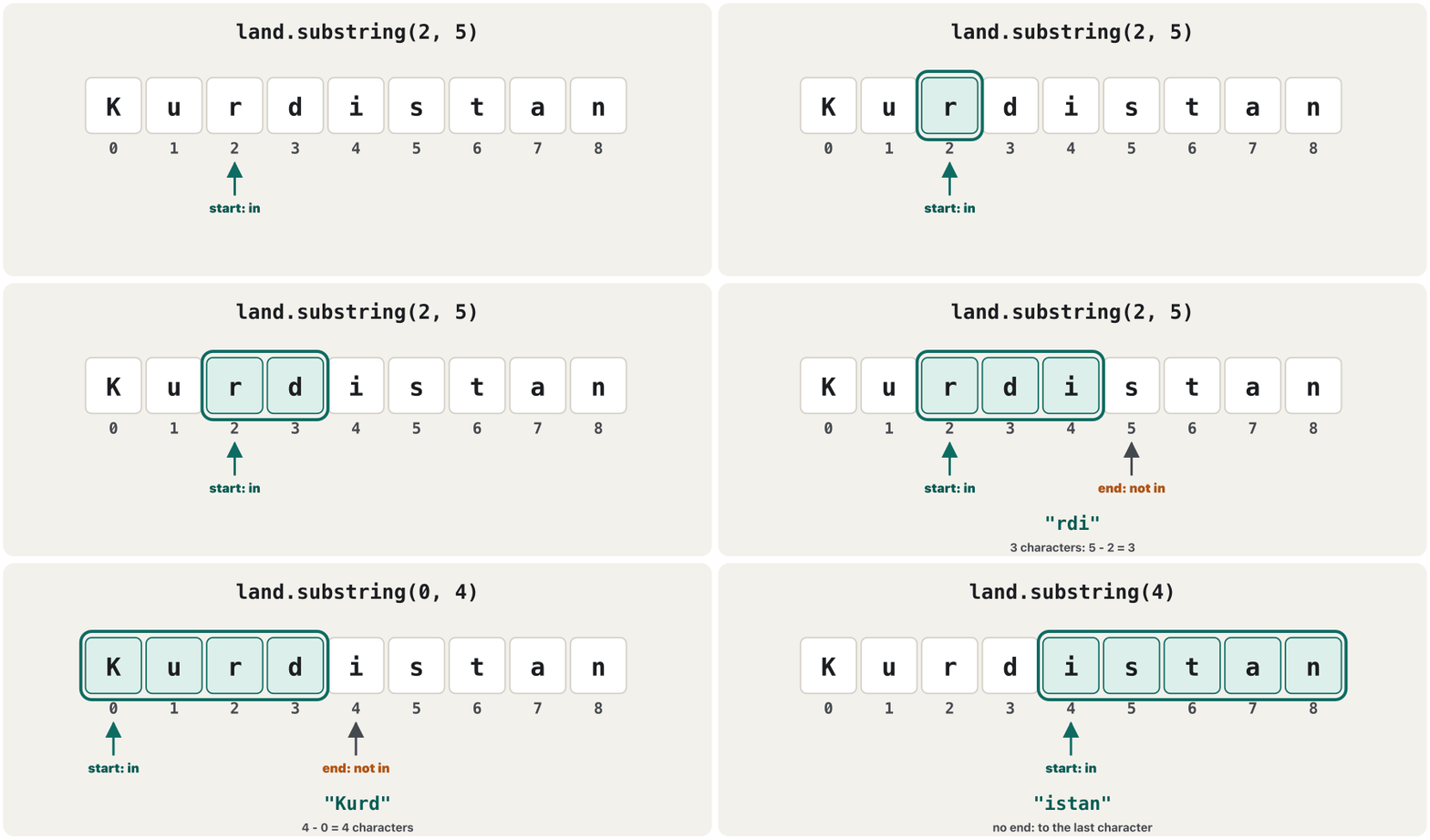
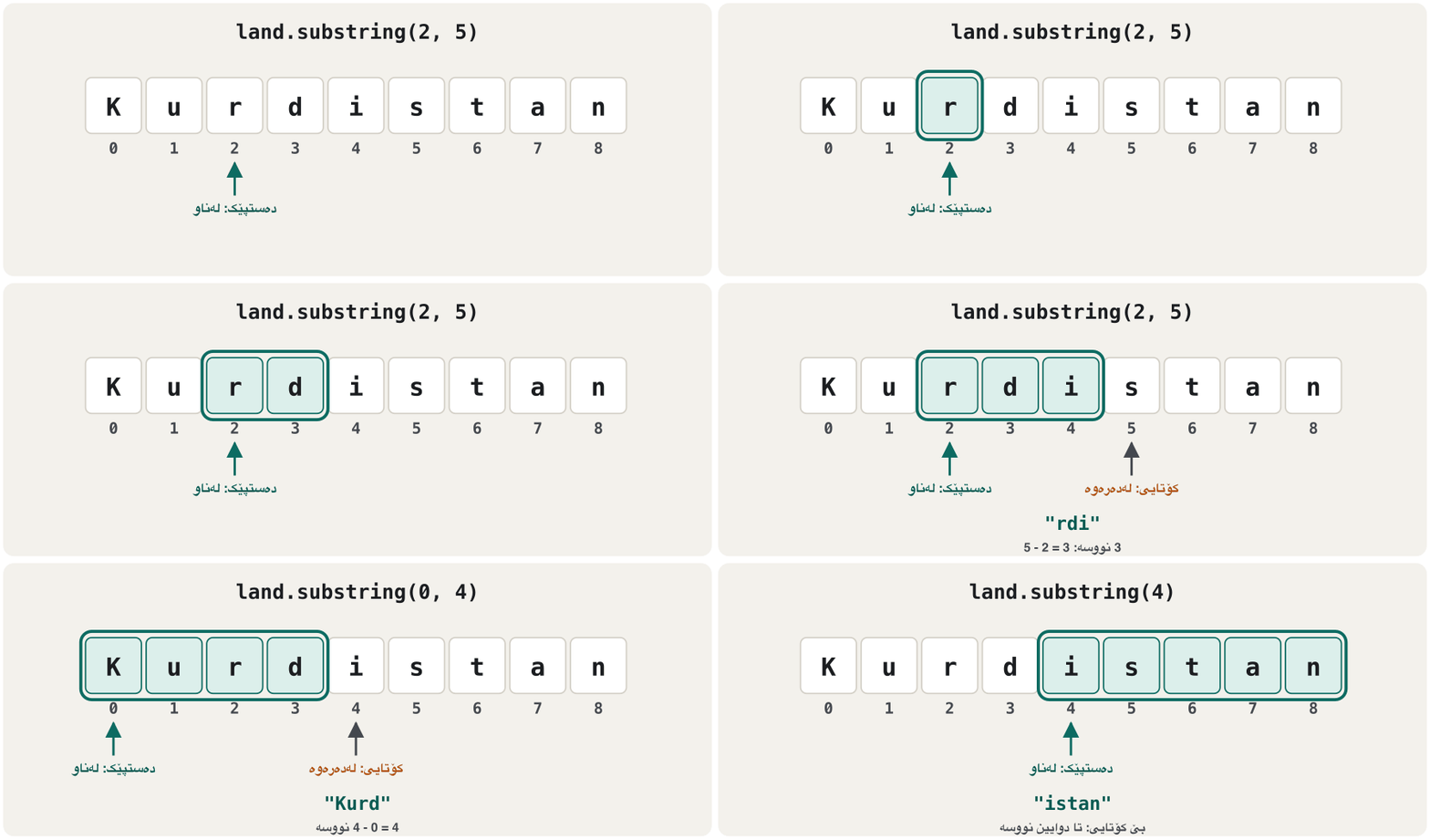
Cutting out a part: substringدەرهێنانی بەشێک: substring
Cutting at a separatorبڕین لە شوێنی جیاکەرەوەیەک
indexOf and substring work well together: find the separator, then take the parts before and after it. lastIndexOf searches from the right, for names with several dots:
indexOf و substring پێکەوە باش کار دەکەن: جیاکەرەوەکە بدۆزەرەوە، پاشان بەشەکانی پێش و دوای ئەو وەربگرە. lastIndexOf لە ڕاستەوە دەگەڕێت، بۆ ئەو ناوانەی چەند خاڵێکیان هەیە:
public class FileName {
    public static void main(String[] args) {
        String file = "report.pdf";
        int dot = file.indexOf('.');
        String name = file.substring(0, dot);
        String extension = file.substring(dot + 1);
        System.out.println(name);
        System.out.println(extension);

        String photo = "trip.2026.jpg";
        System.out.println(photo.substring(photo.lastIndexOf('.') + 1));
    }
}$ java FileName report pdf jpg
Wrong numbers stop the program: a start after the end gives begin 5, end 2, length 9, and an end past the length gives begin 0, end 10, length 9 (Common mistakes).
ژمارەی هەڵە دەوەستێنێت: دەستپێکێک لە دوای کۆتایی begin 5, end 2, length 9 دەدات و کۆتاییەک لە دوای درێژییەکە begin 0, end 10, length 9 دەدات (هەڵە باوەکان).
Joining strings: +, concat and +=پێکەوەلکاندنی زنجیرەنووسەکان: +، concat و +=
Joining strings end to end is called . The + operator joins (Joining text with +), the method concat does the same, and += adds to the end of a String variable, which is handy for building a text piece by piece:
لکاندنی بە یەکەوە پێی دەڵێن . + دەیانلکێنێت (لکاندنی دەق بە +)، concat هەمان کار دەکات و += دەقێک دەخاتە کۆتایی String، کە بۆ دروستکردنی دەقێک پارچە پارچە بەسوودە:
public class Joining {
    public static void main(String[] args) {
        String first = "Shilan";
        String last = "Aram";
        String full = first + " " + last;
        System.out.println(full);
        System.out.println(first.concat(" ").concat(last));

        String list = "Tea";
        list += ", coffee";
        list += ", juice";
        System.out.println(list);
    }
}$ java Joining Shilan Aram Shilan Aram Tea, coffee, juice
Joining strings: +, concat and +=پێکەوەلکاندنی زنجیرەنووسەکان: +، concat و +=
Numbers and textژمارە و دەق
With two numbers + adds; as soon as one side is a String, it joins. Java works from left to right, so 10 + 20 + "x" first adds 10 and 20 and gives "30x", but "x" + 10 + 20 gives "x1020"; brackets change the order. Text that looks like a number is still text: "10" + "20" is "1020". To add, turn it into a number first: Integer.parseInt("10") + Integer.parseInt("20") is 30 (Two ways to avoid the trap).
بە دوو ژمارە + کۆ دەکاتەوە؛ هەر کە یەکێک لە لاکان String بوو، دەیلکێنێت. Java لە چەپەوە بۆ ڕاست کار دەکات، بۆیە 10 + 20 + "x" سەرەتا 10 و 20 کۆ دەکاتەوە و "30x" دەدات، بەڵام "x" + 10 + 20 "x1020" دەدات؛ کەوانە ڕیزبەندییەکە دەگۆڕێت. دەقێک کە لە ژمارە دەچێت هەر دەقە: "10" + "20" دەکاتە "1020". بۆ کۆکردنەوە، سەرەتا بیکە بە ژمارە: Integer.parseInt("10") + Integer.parseInt("20") دەکاتە 30 (دوو ڕێگا بۆ خۆپاراستن لە تەڵەکە).
public class NumbersAndText {
    public static void main(String[] args) {
        System.out.println(10 + 20);
        System.out.println("10" + "20");
        System.out.println("10" + 20);
        System.out.println(10 + 20 + "x");
        System.out.println("x" + 10 + 20);
        System.out.println("x" + (10 + 20));
    }
}$ java NumbersAndText 30 1020 1020 30x x1020 x30
Special characters inside stringsنووسەکانی تایبەت لە ناو زنجیرەنووسەکاندا
Inside a string a backslash starts an : \n a new line, \t a tab, \" a double quote, \\ one backslash (Escape sequences has the table). Two keys in the code make one character in the string, and length() counts it once:
لە ناو دەست پێ دەکات: \n دێڕێکی نوێ، \t تابێک، \" گوتەیەکی جووت، \\ یەک (هێما تایبەتەکان خشتەکەی تێدایە). دوو نیشانە لە کۆددا یەک لە دروست دەکەن و length() یەک جار دەیژمێرێت:
public class EscapeLength {
    public static void main(String[] args) {
        String tab = "A\tB";
        String quoted = "\"Hi\"";
        String folder = "C:\\Java";
        System.out.println(tab + " has length " + tab.length());
        System.out.println(quoted + " has length " + quoted.length());
        System.out.println(folder + " has length " + folder.length());
    }
}$ java EscapeLength A B has length 3 "Hi" has length 4 C:\Java has length 7
Java has a few more: \' (a single quote, needed in a char: '\''), \r (carriage return), \b (backspace), \f (form feed) and, since Java 15, \s (a space). The last four are rarely needed today.
Java چەند دانەیەکی تریشی هەیە: \' (گوتەیەکی تاک، کە لە charـدا پێویستە: '\'')، \r ()، \b (سڕینەوەی پیتی پێشوو)، \f (لاپەڕەی نوێ) و لە Java 15ـەوە \s (بۆشاییەک). ئەم چوارەی کۆتایی ئەمڕۆ کەم پێویست دەبن.
Comparing strings: equals, not ==بەراوردکردنی زنجیرەنووسەکان: equals، نەک ==
To ask whether two strings hold the same text, use equals. The == operator asks something else: do both sides refer to the same object? Text typed by the user, or built while the program runs, is a new object, so == gives false even for the same letters (Careful with == on strings):
بۆ ئەوەی بپرسیت ئایا دوو هەمان دەقیان تێدایە، equals بەکار بهێنە. == شتێکی تر دەپرسێت: ئایا هەردوو لا ئاماژە بۆ هەمان دەکەن؟ ئەو دەقەی دەینووسێت، یان لە کاتی کارکردنی دروست دەبێت، نوێیە، بۆیە == تەنانەت بۆ هەمان پیتیش false دەدات (ئاگادار بە لە == لەگەڵ زنجیرەنووسەکان):
import java.util.Scanner;

public class CompareNames {
    public static void main(String[] args) {
        Scanner input = new Scanner(System.in);
        System.out.print("Your name: ");
        String name = input.next();
        System.out.println(name == "Aram");
        System.out.println(name.equals("Aram"));
    }
}$ java CompareNames Your name: Aram false true
Two equal literals in the code share one object, so "Aram" == "Aram" happens to be true; text made while the program runs is not shared. Do not depend on that: compare text with equals, always. Two variables that refer to one object come back with classes: Two variables, one object.
دوو یەکسان لە کۆددا یەک بەش دەکەن، بۆیە "Aram" == "Aram" بە ڕێکەوت trueـە؛ ئەو دەقەی لە کاتی کارکردندا دروست دەبێت بەش ناکرێت. پشتی پێ مەبەستە: هەمیشە دەق بە equals بەراورد بکە. دوو کە ئاماژە بۆ یەک دەکەن لەگەڵ دێنەوە: دوو گۆڕاو، یەک ئۆبجێکت.
Comparing strings: equals, not ==بەراوردکردنی زنجیرەنووسەکان: equals، نەک ==
equalsIgnoreCase and compareToequalsIgnoreCase و compareTo
equalsIgnoreCase compares without caring about capitals. compareTo puts two strings in , like words in a dictionary: it compares the characters one by one and, at the first difference, returns the difference of their codes. If one string is the start of the other, the shorter one comes first. A negative answer means the first string comes before, 0 means equal, positive means after; compareToIgnoreCase ignores capitals.
equalsIgnoreCase بەبێ گرنگیدان بە پیتی گەورە بەراورد دەکات. compareTo دوو بە ڕیز دەکات، وەک وشەکانی ناو فەرهەنگ: یەک بە یەک بەراورد دەکات و لە یەکەم جیاوازیدا جیاوازیی ژمارەکانیان دەداتەوە. ئەگەر سەرەتای ئەوی تر بێت، کورتترەکە پێش دەکەوێت. وەڵامێکی سالب واتە یەکەم پێش دەکەوێت، 0 واتە یەکسان، موجەب واتە دوا دەکەوێت؛ compareToIgnoreCase پیتی گەورە پشتگوێ دەخات.
public class Order {
    public static void main(String[] args) {
        System.out.println("Aram".equalsIgnoreCase("ARAM"));
        System.out.println("car".compareTo("cat"));
        System.out.println("cat".compareTo("car"));
        System.out.println("Hana".compareTo("Hana"));
        System.out.println("book".compareTo("bookshop"));
        System.out.println("Zana".compareTo("aram"));
        System.out.println("Zana".compareToIgnoreCase("aram"));
    }
}$ java Order true -2 2 0 -4 -7 25
Capitals come before small letters in ('Z' is 90, 'a' is 97), so "Zana".compareTo("aram") is -7. Python orders strings the same way (Why is "A" < "a" True?).
لە پیتی گەورە پێش پیتی بچووک دەکەون ('Z' دەکاتە 90، 'a' دەکاتە 97)، بۆیە "Zana".compareTo("aram") دەکاتە -7. Python بە هەمان شێوە ڕیز دەکات (بۆچی "A" < "a" Trueـە؟).
contains, startsWith, endsWith, replace and isEmptycontains، startsWith، endsWith، replace و isEmpty
More questions a String can answer: contains, startsWith and endsWith give true or false, and like equals they care about capitals. replace swaps every match, a char or a piece of text, and returns a new string. isEmpty() is true only for ""; isBlank() (Java 11) is also true when there are only spaces.
پرسیاری تر کە String وەڵامیان دەداتەوە: contains، startsWith و endsWith true یان false دەدەن و وەک equals پیتی گەورە جیا دەکەنەوە. replace هەموو دانە گونجاوەکان دەگۆڕێت (charـێک یان پارچە دەقێک) و نوێ دەداتەوە. isEmpty() تەنیا بۆ "" trueـە؛ isBlank() (Java 11) کاتێکیش trueـە کە تەنیا بۆشایی هەبێت.
public class Search {
    public static void main(String[] args) {
        String place = "Kurdistan Region";
        System.out.println(place.contains("stan"));
        System.out.println(place.startsWith("Kurd"));
        System.out.println(place.endsWith("region"));
        System.out.println(place.replace(' ', '-'));
        System.out.println(place.replace("Region", "Mountains"));
        System.out.println("".isEmpty());
        System.out.println("   ".isEmpty());
        System.out.println("   ".isBlank());
    }
}$ java Search true true false Kurdistan-Region Kurdistan Mountains true false true
trim: spaces at the endstrim: بۆشایی لە هەردوو سەر
Users often type spaces by accident. trim() removes (spaces, tabs, new lines) at both ends and keeps the spaces between words. Clean typed text before you compare it:
زۆرجار بە هەڵە بۆشایی دەنووسن. trim() (بۆشایی، تاب، دێڕی نوێ) لە هەردوو سەر لادەبات و بۆشاییەکانی نێوان وشەکان دەهێڵێتەوە. پێش بەراوردکردن، دەقی نووسراو پاک بکەرەوە:
public class Trim {
    public static void main(String[] args) {
        String typed = "  Aram  ";
        System.out.println("[" + typed + "] " + typed.length());
        String clean = typed.trim();
        System.out.println("[" + clean + "] " + clean.length());
        System.out.println(typed.equals("Aram"));
        System.out.println(clean.equals("Aram"));
    }
}$ java Trim [ Aram ] 8 [Aram] 4 false true
strip() (Java 11) works like trim() and also removes the other kinds of Unicode whitespace.
strip() (Java 11) وەک trim() کار دەکات و جۆرەکانی تری Unicodeـیش لادەبات.
split: cutting a string into partssplit: بڕینی زنجیرەنووسەیەک بۆ چەند بەشێک
split cuts a string at every separator and returns the pieces as an of Strings; the separators disappear. cities[0] is the first piece and cities.length the number of pieces (Arrays explains arrays fully; main has one too: String[] args). Python's split() works the same way (split() and join()):
split لە هەموو جیاکەرەوەیەکدا دەبڕێت و پارچەکان وەک لە Stringـەکان دەداتەوە؛ جیاکەرەوەکان نامێنن. cities[0] یەکەم پارچەیە و cities.length ژمارەی پارچەکان (ڕیزەکەکان بە تەواوی ڕوون دەکاتەوە؛ mainـیش یەکێکی هەیە: String[] args). split()ـی Python بە هەمان شێوە کار دەکات (split() و join()):
public class Cities {
    public static void main(String[] args) {
        String line = "Hawler,Silêmanî,Duhok";
        String[] cities = line.split(",");
        System.out.println(cities.length);
        System.out.println(cities[0]);
        System.out.println(cities[1]);
        System.out.println(cities[2]);
    }
}$ java Cities 3 Hawler Silêmanî Duhok
split: cutting a string into partssplit: بڕینی زنجیرەنووسەیەک بۆ چەند بەشێک
split takes a pattern: the dot trapsplit نموونەیەک وەردەگرێت: تەڵەی خاڵ
The separator of split is a , a small pattern language in which some characters have special meanings. A dot means any character, so split(".") cuts everywhere; all the pieces are empty, and empty pieces at the end are dropped, so 0 pieces are left. For a real dot write "\\.": the backslash cancels the special meaning, and inside a Java string the backslash itself is written twice. The same is true for |, +, *, ?, ^, $ and brackets:
جیاکەرەوەی split ، زمانێکی بچووکی نموونە کە هەندێک تێیدا واتای تایبەتیان هەیە. خاڵ واتە هەر ، بۆیە split(".") لە هەموو شوێنێک دەبڕێت؛ هەموو پارچەکان بەتاڵن و پارچە بەتاڵەکانی کۆتایی فڕێ دەدرێن، بۆیە 0 پارچە دەمێنێتەوە. بۆ خاڵێکی ڕاستەقینە بنووسە "\\.": واتا تایبەتییەکە هەڵدەوەشێنێتەوە و لە ناو Javaـدا خۆی دووجار دەنووسرێت. هەمان شت بۆ |، +، *، ?، ^، $ و کەوانەکان ڕاستە:
public class IpParts {
    public static void main(String[] args) {
        String ip = "192.168.1.10";
        System.out.println(ip.split(".").length);
        String[] parts = ip.split("\\.");
        System.out.println(parts.length);
        System.out.println(parts[0] + " | " + parts[3]);
    }
}$ java IpParts 0 4 192 | 10
Strings never changeزنجیرەنووسەکان هەرگیز ناگۆڕێن
A String object never changes: Java strings are . Methods such as toUpperCase, replace and trim build a new string and return it. Calling one without keeping the result changes nothing; store the result, often in the same variable:
String هەرگیز ناگۆڕێت: Java . وەک toUpperCase، replace و trim نوێ دروست دەکەن و دەیدەنەوە. بانگکردنی یەکێکیان بێ هەڵگرتنی ئەنجامەکە هیچ ناگۆڕێت؛ ئەنجامەکە هەڵبگرە، زۆرجار لە هەمان :
public class NeverChanges {
    public static void main(String[] args) {
        String name = "aram";
        name.toUpperCase();
        System.out.println(name);
        name = name.toUpperCase();
        System.out.println(name);
    }
}$ java NeverChanges aram ARAM
Explain the codeڕوونکردنەوەی کۆدەکە
- Lineدێڕی 4
The new string "ARAM" is made and thrown away.
نوێی "ARAM" دروست دەبێت و فڕێ دەدرێت.
- Lineدێڕی 6
Now the new string is kept in
name.ئێستا نوێیەکە لە
nameـدا هەڵدەگیرێت.
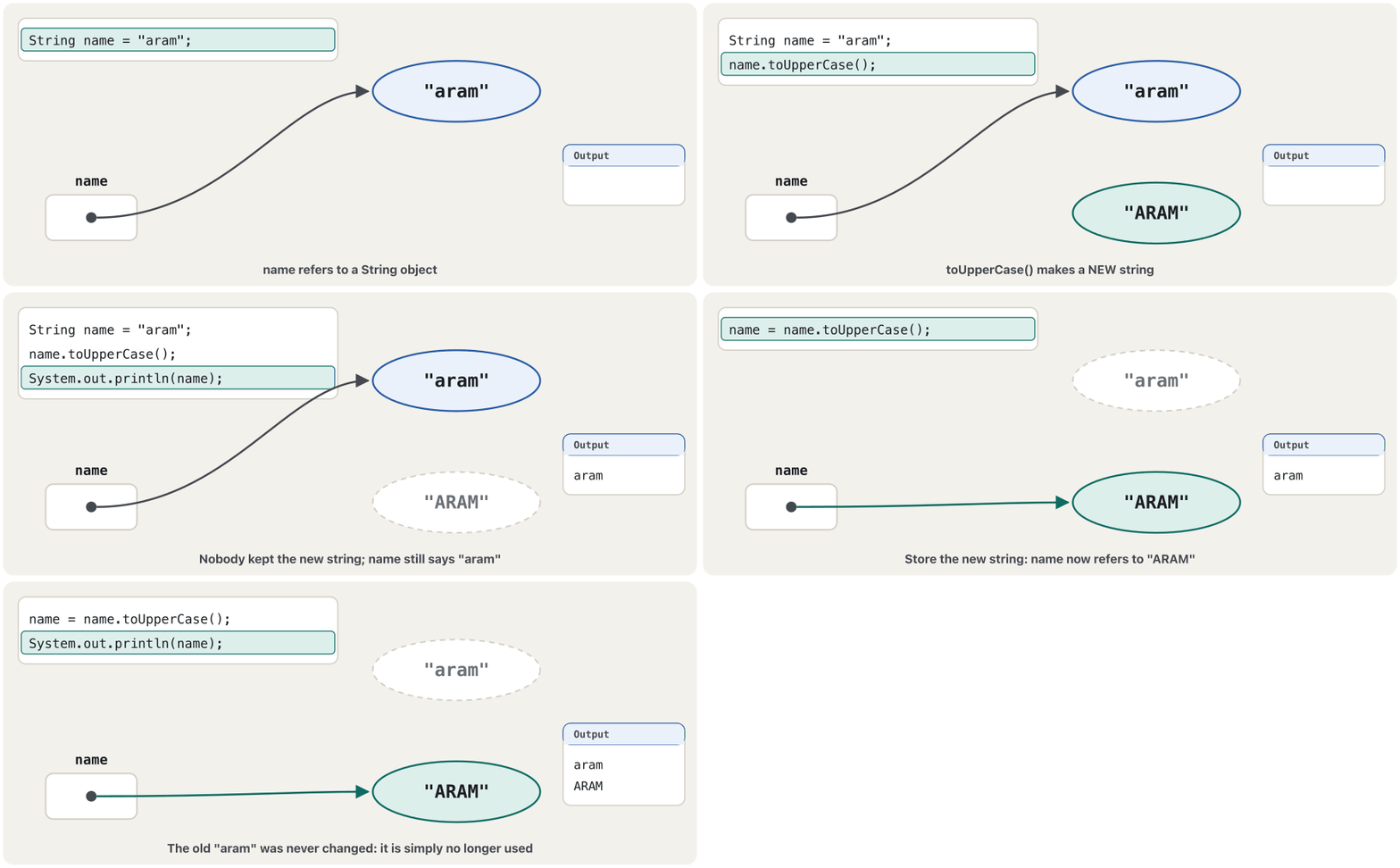
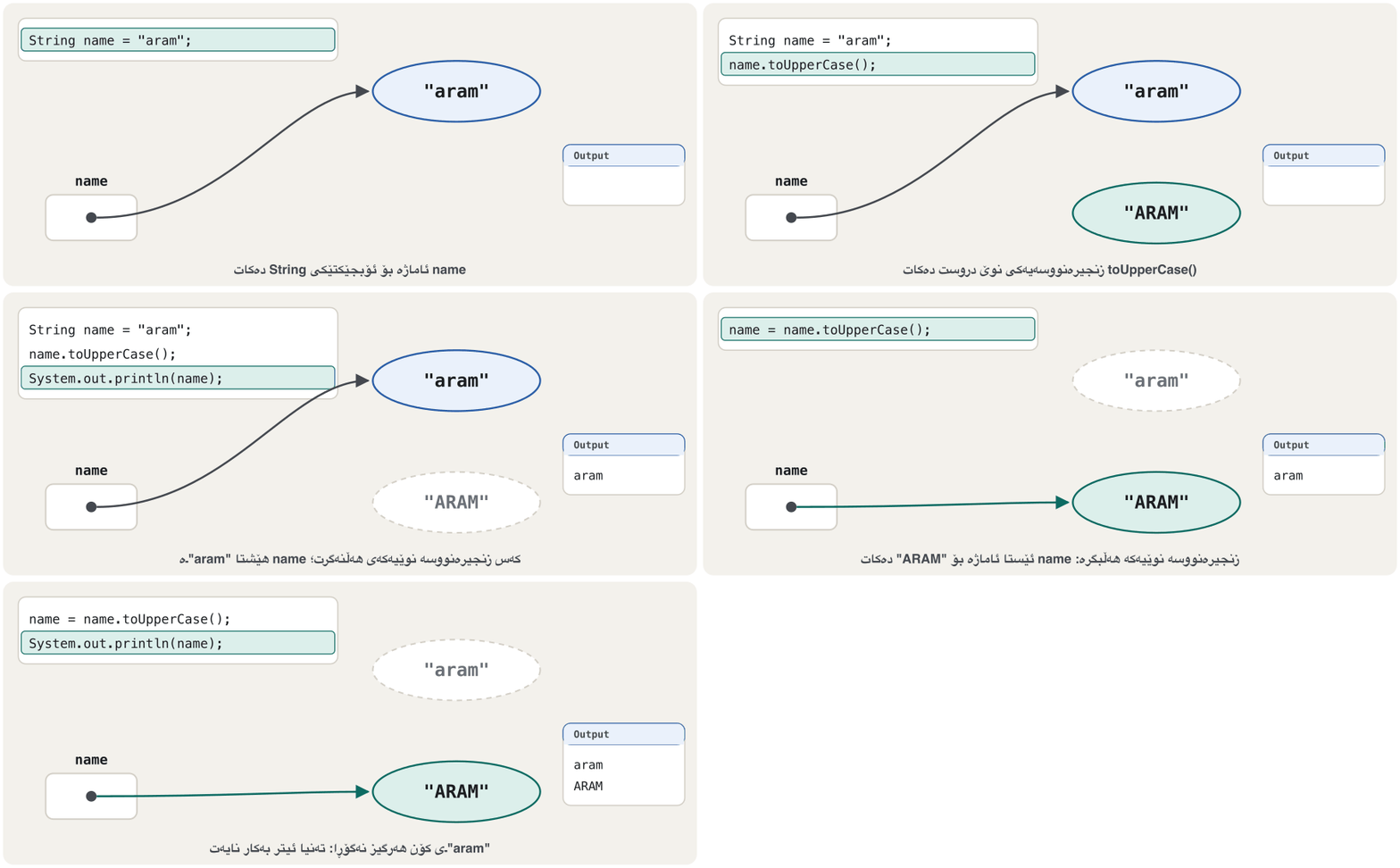
The old "aram" object is not changed, only forgotten; Java's removes such objects later. Python strings are immutable too (Strings cannot be changed).
کۆنی "aram" ناگۆڕێت، تەنیا لەبیر دەکرێت؛ Java دواتر ئەم لادەبات. Pythonـیش (زنجیرەنووسەکان ناگۆڕدرێن).
Building text: String.format, join and repeatدروستکردنی دەق: String.format، join و repeat
String.format builds a string from a pattern of , like printf but without printing (String.format): %-8s is a text 8 characters wide on the left, %4d a whole number 4 wide on the right. String.join glues pieces together with a separator, and repeat (Java 11) repeats a string:
String.format لە نموونەیەکی دروست دەکات، وەک printf بەڵام بێ چاپکردن (String.format): %-8s دەقێکە بە پانیی 8 لە لای چەپ، %4d بە پانیی 4 لە لای ڕاست. String.join پارچەکان بە جیاکەرەوەیەک پێکەوە دەلکێنێت و repeat (Java 11) دووپاتە دەکاتەوە:
public class Format {
    public static void main(String[] args) {
        String line1 = String.format("%-8s|%4d", "Aram", 87);
        String line2 = String.format("%-8s|%4d", "Shilan", 95);
        System.out.println(line1);
        System.out.println(line2);
        System.out.println(String.join(" - ", "Hawler", "Silêmanî", "Duhok"));
        System.out.println("=".repeat(13));
    }
}$ java Format Aram | 87 Shilan | 95 Hawler - Silêmanî - Duhok =============
Kurdish text in stringsدەقی کوردی لە زنجیرەنووسەکاندا
Java strings hold text, so Kurdish works like English. Each Kurdish letter is one char (Kurdish letters in a char): length() counts the letters, charAt(0) is the first letter (the one on the right on screen) and indexOf finds words. Kurdish has no capital letters, so toUpperCase() leaves it unchanged. An is one character but two chars (Emoji): length() counts UTF-16 units, and codePointCount counts real characters, their :
Java دەقی هەڵدەگرن، بۆیە کوردی وەک ئینگلیزی کار دەکات. هەر پیتێکی کوردی یەک charـە (پیتی کوردی لە charـێکدا): length() پیتەکان دەژمێرێت، charAt(0) یەکەم پیتە (ئەوەی لە سەر شاشە لای ڕاستە) و indexOf وشە دەدۆزێتەوە. کوردی پیتی گەورەی نییە، بۆیە toUpperCase() نایگۆڕێت. یەک بەڵام دوو charـە (ئیمۆجی): length() یەکەکانی UTF-16 دەژمێرێت و codePointCount ڕاستەقینەکان دەژمێرێت، واتە :
public class KurdishText {
    public static void main(String[] args) {
        String word = "کوردستان";
        System.out.println(word.length());
        System.out.println(word.charAt(0));
        System.out.println(word.indexOf("ستان"));
        System.out.println(word.toUpperCase().equals(word));

        String hello = "سڵاو 😀";
        System.out.println(hello.length());
        System.out.println(hello.codePointCount(0, hello.length()));
    }
}$ java KurdishText 8 ک 4 true 7 6
If a console window shows ? instead of Kurdish letters, the String is still right (length() still gives 8): that window cannot show the letters. Files need the same care: name UTF-8 when a program writes or reads Kurdish (Kurdish text: say UTF-8).
ئەگەر پەنجەرەیەکی لە جیاتی پیتی کوردی ? پیشان بدات، هەر دروستە (length() هەر 8 دەدات): ئەو پەنجەرەیە ناتوانێت پیتەکان پیشان بدات. هەمان ئاگاداری دەوێت: کاتێک دەقی کوردی دەنووسێت یان دەخوێنێتەوە، UTF-8 بڵێ (دەقی کوردی: بڵێ UTF-8).
Kurdish text in stringsدەقی کوردی لە زنجیرەنووسەکاندا
Kurdish source files: -encoding UTF-8فایلی کوردی: -encoding UTF-8
JDK 17 reads a source file in the computer's own . On Windows that is often a code page such as windows-1256, not UTF-8, so compile Kurdish source files with -encoding UTF-8. With the wrong encoding each Kurdish letter, two bytes in UTF-8, becomes two wrong characters, and the word's length doubles (Unicode and UTF-8):
JDK 17 بە خودی کۆمپیوتەرەکە دەخوێنێتەوە. لە Windowsـدا ئەوە زۆرجار کۆنی وەک windows-1256ـە، نەک UTF-8، بۆیە کوردی بە -encoding UTF-8 کۆمپایل بکە. بە هەڵە هەر پیتێکی کوردی، کە لە UTF-8ـدا دوو بایتە، دەبێت بە دوو هەڵە و درێژیی وشەکە دوو هێندە دەبێت (Unicode و UTF-8):
public class KurdishWord {
    public static void main(String[] args) {
        String word = "کوردستان";
        System.out.println(word + " has " + word.length() + " letters");
    }
}javac -encoding UTF-8 KurdishWord.java
java KurdishWord
javac -encoding windows-1256 KurdishWord.java
java KurdishWordکوردستان has 8 letters ع©ظˆط±ط¯ط³طھط§ظ† has 16 letters
JDK 18 and later read source files as UTF-8 by default (JEP 400). To see how Kurdish letters get their numbers, try Kurdish in Unicode.
JDK 18 و دواتر بە شێوەی بنەڕەت وەک UTF-8 دەخوێننەوە (JEP 400). بۆ ئەوەی ببینیت پیتە کوردییەکان چۆن ژمارەکانیان وەردەگرن، کوردی لە Unicodeـدا تاقی بکەرەوە.
Common mistakesهەڵە باوەکان
| You wroteنووسیت | javac or the run saysjavac یان جێبەجێکردن دەڵێت | Fixچارەسەر |
|---|---|---|
name == "Aram" | false for typed textfalse بۆ دەقی نووسراو | name.equals("Aram")name.equals("Aram") |
String s = 'Aram'; | unclosed character literal | double quotesگوتەی جووت |
s.length | cannot find symbol | s.length()s.length() |
s.charAt(s.length()) | StringIndexOutOfBoundsException | s.length() - 1s.length() - 1 |
land.substring(5, 2) | begin 5, end 2, length 9 | keep دەبێت بێت |
name.toUpperCase(); | name does not changename ناگۆڕێت | name = name.toUpperCase();name = name.toUpperCase(); |
"10" + "20" | 1020 | Integer.parseInt firstسەرەتا Integer.parseInt |
Integer.parseInt("ten") | NumberFormatException | check the text firstسەرەتا دەقەکە بپشکنە |
ip.split(".") | 0 pieces0 پارچە | split("\\.")split("\\.") |
"Aram ".equals("Aram") | false | trim() firstسەرەتا trim() |
name.length() // name is null | NullPointerException | check name != nullname != null بپشکنە |
"STRIKER".toLowerCase() | strıker on a Turkish computerstrıker لە کۆمپیوتەرێکی تورکیدا | toLowerCase(Locale.ROOT)toLowerCase(Locale.ROOT) |
The real messages of five rows:
پەیامە ڕاستەقینەکانی پێنج ڕیز:
$ javac Quotes.java
Quotes.java:3: error: unclosed character literal
        String name = 'Aram';
                      ^
Quotes.java:3: error: unclosed character literal
        String name = 'Aram';
                           ^
Quotes.java:3: error: not a statement
        String name = 'Aram';
                        ^
3 errors

$ javac LengthField.java
LengthField.java:4: error: cannot find symbol
        System.out.println(name.length);
                               ^
  symbol:   variable length
  location: variable name of type String
1 error

$ java BadPart
Exception in thread "main" java.lang.StringIndexOutOfBoundsException: begin 5, end 2, length 9
	at java.base/java.lang.String.checkBoundsBeginEnd(String.java:4606)
	at java.base/java.lang.String.substring(String.java:2709)
	at BadPart.main(BadPart.java:4)

$ java BadNumber
Exception in thread "main" java.lang.NumberFormatException: For input string: "ten"
	at java.base/java.lang.NumberFormatException.forInputString(NumberFormatException.java:67)
	at java.base/java.lang.Integer.parseInt(Integer.java:668)
	at java.base/java.lang.Integer.parseInt(Integer.java:786)
	at BadNumber.main(BadNumber.java:3)

$ java NoText
Exception in thread "main" java.lang.NullPointerException: Cannot invoke "String.length()" because "<local1>" is null
at NoText.main(NoText.java:4)Practiceڕاهێنان
Read a first and a last name and print the initials in capitals, like S.A. for shilan aram.
ناوێک و ناوی باوکێک بخوێنەوە و پیتە سەرەتاییەکان بە پیتی گەورە چاپ بکە، وەک S.A. بۆ shilan aram.
Show answerوەڵامەکە پیشان بدە
import java.util.Scanner;

public class Initials {
    public static void main(String[] args) {
        Scanner input = new Scanner(System.in);
        System.out.print("First and last name: ");
        String first = input.next();
        String last = input.next();
        String initials = first.charAt(0) + "." + last.charAt(0) + ".";
        System.out.println(initials.toUpperCase());
    }
}$ java Initials First and last name: shilan aram S.A. $ java Initials First and last name: Karwan Dilan K.D.
first.charAt(0) + "." is already a String (a char joined with text), so the rest joins too.
first.charAt(0) + "." پێشتر Stringـە (charـێک کە بە دەقەوە لکێنرا)، بۆیە ئەوانی تریش دەلکێن.
A word like level reads the same backwards (a palindrome). Read a word, print it backwards with new StringBuilder(word).reverse().toString(), and say whether it is a palindrome; capitals should not matter.
وشەیەکی وەک level لە پێچەوانەشەوە هەمان شتە. وشەیەک بخوێنەوە، بە new StringBuilder(word).reverse().toString() پێچەوانەکەی چاپ بکە و بڵێ ئایا لە هەردوو ئاڕاستەوە وەک یەکە؛ پیتی گەورە نابێت گرنگ بێت.
Show answerوەڵامەکە پیشان بدە
import java.util.Scanner;

public class Palindrome {
    public static void main(String[] args) {
        Scanner input = new Scanner(System.in);
        System.out.print("A word: ");
        String word = input.next();
        String back = new StringBuilder(word).reverse().toString();
        System.out.println("Backwards: " + back);
        System.out.println("Palindrome: " + word.equalsIgnoreCase(back));
    }
}$ java Palindrome A word: Level Backwards: leveL Palindrome: true $ java Palindrome A word: Java Backwards: avaJ Palindrome: false
equalsIgnoreCase makes Level equal to leveL.
equalsIgnoreCase وا دەکات Level یەکسان بێت بە leveL.
How many a's are in banana? Find out without a loop: remove every a with replace and compare the lengths.
چەند aـی تێدایە لە bananaـدا؟ بێ بیدۆزەرەوە: هەموو aـێک بە replace لابە و درێژییەکان بەراورد بکە.
Show answerوەڵامەکە پیشان بدە
public class CountLetter {
    public static void main(String[] args) {
        String word = "banana";
        int count = word.length() - word.replace("a", "").length();
        System.out.println(count);
    }
}$ java CountLetter 3
6 letters before, 3 after removing the a's: 3 a's. Counting all the vowels at once needs a loop: it comes after the for loop.
6 پیت پێشتر، 3 لە دوای لابردنی aـەکان: 3 a. ژماردنی هەموو پیتە بزوێنەکان پێکەوە پێویستی بە هەیە: لە دوای خولی for دێت.
Turn the typed text " Dilan Karim " into the dilan.karim: no outer spaces, lower case, a dot instead of the space. Use one line with three methods.
دەقی نووسراوی " Dilan Karim " بکە بە dilan.karim: بێ بۆشایی دەرەکی، پیتی بچووک، خاڵ لە جیاتی بۆشایی. یەک دێڕ بە سێ بەکار بهێنە.
Show answerوەڵامەکە پیشان بدە
public class UserName {
    public static void main(String[] args) {
        String typed = "  Dilan Karim  ";
        String user = typed.trim().toLowerCase().replace(' ', '.');
        System.out.println(user);
        System.out.println(user.length());
    }
}$ java UserName dilan.karim 11
The calls run from left to right, each on the new string the one before returned.
بانگکردنەکان لە چەپەوە بۆ ڕاست جێبەجێ دەبن، هەریەکەیان لەسەر ئەو نوێیەی پێشوو دایەوە.
Show 07501234567 as 0750*****67: keep the first 4 and the last 2 digits and put five stars between them.
07501234567 وەک 0750*****67 پیشان بدە: یەکەم 4 و دوایین 2 بهێڵەرەوە و پێنج ئەستێرە بخەرە نێوانیان.
Show answerوەڵامەکە پیشان بدە
public class MaskPhone {
    public static void main(String[] args) {
        String phone = "07501234567";
        String hidden = phone.substring(0, 4) + "*".repeat(5) + phone.substring(9);
        System.out.println(hidden);
        System.out.println(hidden.length() == phone.length());
    }
}$ java MaskPhone 0750*****67 true
Without running it, write down what each line prints. Careful: ê is one character.
بەبێ جێبەجێکردن، بنووسە هەر دێڕێک چی چاپ دەکات. ئاگادار بە: ê یەک .
public class PredictStrings {
    public static void main(String[] args) {
        String s = "Silêmanî";
        System.out.println(s.length());
        System.out.println(s.charAt(3));
        System.out.println(s.substring(1, 4));
        System.out.println(s.indexOf("man"));
        System.out.println(s.toUpperCase());
        System.out.println("Hawler".compareTo("Duhok") > 0);
    }
}
Show answerوەڵامەکە پیشان بدە
$ java PredictStrings
8
ê
ilê
4
SILÊMANÎ
true
S0 i1 l2 ê3 m4 a5 n6 î7: 8 characters; substring(1, 4) takes 1, 2, 3; "Hawler".compareTo("Duhok") is 4.
S0 i1 l2 ê3 m4 a5 n6 î7: 8 ؛ substring(1, 4) 1، 2، 3 وەردەگرێت؛ "Hawler".compareTo("Duhok") دەکاتە 4.
Predict the three lines, then run the program and explain each answer.
سێ دێڕەکە پێشبینی بکە، پاشان جێبەجێ بکە و هەر وەڵامێک ڕوون بکەرەوە.
public class SameObject {
    public static void main(String[] args) {
        String a = "Aram";
        String b = "Aram";
        String start = "Ar";
        String c = start + "am";
        System.out.println(a == b);
        System.out.println(a == c);
        System.out.println(a.equals(c));
    }
}
Show answerوەڵامەکە پیشان بدە
$ java SameObject
true
false
true
a and b are the same literal, so they share one object. c was joined while the program ran, so it is a new object: == is false, but equals is true.
a و b هەمان ، بۆیە یەک بەش دەکەن. c لە کاتی کارکردندا لکێنرا، بۆیە نوێیە: == falseـە، بەڵام equals trueـە.
Reversing a word without StringBuilder and counting vowels, digits and spaces need loops; you will write them in the for loop lesson.
پێچەوانەکردنەوەی وشەیەک بێ StringBuilder و ژماردنی پیتە بزوێنەکان، و بۆشاییەکان پێویستیان بە هەیە؛ لە وانەی خولی forـدا دەیاننووسیت.
Summaryکورتە
- A String is an object holding a sequence of characters; its methods are called with a dot.
- Indexes run from 0 to
length() - 1;charAt,indexOfandsubstring(start, end)(end not included) work with them. +,concatand+=join;+adds numbers until it meets a String, from left to right.- Compare text with
equals,equalsIgnoreCaseorcompareTo, never with==. - Strings are immutable: methods return new strings, so store the result.
splittakes a regular expression: a real dot is"\\.". - Kurdish letters are one
chareach; an emoji is two (codePointCountcounts it once). Compile Kurdish files with-encoding UTF-8on JDK 17.
- String کە زنجیرەیەک لە هەڵدەگرێت؛ بە خاڵ بانگ دەکرێن.
- لە 0ـەوە تا
length() - 1دەڕۆن؛charAt،indexOfوsubstring(start, end)(کۆتایی ناگیرێتەوە) بەکاریان دەهێنن. +،concatو+=دەلکێنن؛+ژمارەکان کۆ دەکاتەوە تا دەگاتە Stringـێک، لە چەپەوە بۆ ڕاست.- دەق بە
equals،equalsIgnoreCaseیانcompareToبەراورد بکە، هەرگیز بە==نا. - : نوێ دەدەنەوە، بۆیە ئەنجامەکە هەڵبگرە.
splitوەردەگرێت: خاڵی ڕاستەقینە"\\."ـە. - هەر پیتێکی کوردی یەک
charـە؛ دووە (codePointCountیەک جار دەیژمێرێت). لە JDK 17ـدا کوردی بە-encoding UTF-8کۆمپایل بکە.
Why can == be false for two strings with the same letters?بۆچی == دەکرێت بۆ دوو زنجیرەنووسە بە هەمان پیت false بێت؟
== compares references: it is true only for the same object. Text made at run time is a new object.
== بەراورد دەکات: تەنیا بۆ هەمان trueـە. دەقی دروستکراو لە کاتی کارکردندا نوێیە.
What is "Kurdistan".substring(5)?"Kurdistan".substring(5) چییە؟
"stan": from index 5 to the end.
"stan": لە 5ـەوە تا کۆتایی.
How do you get the number in "42"?چۆن ژمارەکەی ناو "42" وەردەگریت؟
Integer.parseInt("42") gives the int 42.
Integer.parseInt("42") intـی 42 دەدات.
Lesson complete!وانەکە تەواو بوو!
Well done. Review the key terms, then go on to the next lesson.دەستخۆش. سەیرێکی زاراوە سەرەکییەکان بکەرەوە، پاشان بڕۆ بۆ وانەی داهاتوو.
Key termsزاراوە سەرەکییەکان
The while and do-while Loopsخولی while و خولی do...while
Related lecturesوانە پەیوەندیدارەکان
- Your First Java Program: Output and Commentsیەکەم بەرنامەی Javaـت: دەرخستە و لێدوانەکان
- Keyboard Input with Scanner and Formatted Outputنێوخستە لە کیبۆردەوە بە Scanner و دەرخستەی ڕێکخراو
- The switch Statementڕستەی switch
- Arrays in One and Two Dimensionsڕیزەکەکان لە یەک و دوو ڕەهەنددا
- Working with Stringsکارکردن لەگەڵ زنجیرەنووسەکان
- ASCII and Character CodesASCII و کۆدەکانی نووسە
- Type Casting: Widening and Narrowingگۆڕینی جۆر: فراوانکردنی جۆر و تەسککردنەوەی جۆر
References and further readingسەرچاوەکان و خوێندنەوەی زیاتر
- W3Schools: Java Strings
- W3Schools: Java String Concatenation
- W3Schools: Java Numbers and Strings
- W3Schools: Java Special Characters
- Java SE 17 API: String
- Java SE 17 API: StringBuilder
- Java Language Specification (Java SE 17), §3.10.5 String Literals, §3.10.6 Text Blocks, §3.10.7 Escape Sequences
- JEP 378: Text Blocks (JDK 15)
- JEP 400: UTF-8 by Default (JDK 18)
This lecture is a first edition. The Kurdish text and terminology are waiting for review by Kurdish IT teachers.ئەم وانەیە چاپی یەکەمە. دەقە کوردییەکە و زاراوەکانی چاوەڕێی پێداچوونەوەی مامۆستایانی کوردی بواری IT ن.