JavaJava · Chapterبەش 3 · Lectureوانە 3.3
Compiling and Running: javac, Bytecode and the JVMکۆمپایلکردن و جێبەجێکردن: javac، بایتکۆد و ئامێری گریمانەیی Java
The practice of compile-and-run: saving ClassName.java, compiling with javac, running with java, a whole terminal session, what is inside a .class file (javap, CAFEBABE), the class loader and the bytecode verifier, Run buttons and TextPad, java Hello.java, JShell and the commonest command mistakes.
کاری کۆمپایل و جێبەجێکردن: پاشەکەوتکردنی ClassName.java، کۆمپایلکردن بە javac، جێبەجێکردن بە java، دانیشتنێکی تەواوی ، ناوەوەی فایلێکی .class (javap، CAFEBABE)، و ، دوگمەکانی Run و TextPad، java Hello.java، JShell و باوترین هەڵەکانی .
What you will learnچی فێر دەبیت
- Save a program under the right name, compile it with
javacand run it withjavain a terminal. - Explain what bytecode and a
.classfile are, and look inside one withjavap -c. - Describe what the class loader and the bytecode verifier do before a program runs.
- Use an IDE's Run button,
java Hello.javaand JShell, and fix the commonest command mistakes.
- بە ناوی دروست پاشەکەوت بکەیت، بە
javacکۆمپایلی بکەیت و بەjavaلە جێبەجێی بکەیت. - ڕوونی بکەیتەوە و فایلی
.classچین و بەjavap -cسەیری ناوی یەکێکیان بکەیت. - وەسفی ئەوە بکەیت کە و پێش جێبەجێبوونی چی دەکەن.
- دوگمەی Runـی ،
java Hello.javaو JShell بەکار بهێنیت و باوترین هەڵەکانی چاک بکەیتەوە.
Write, compile, runبنووسە، کۆمپایل بکە، جێبەجێ بکە
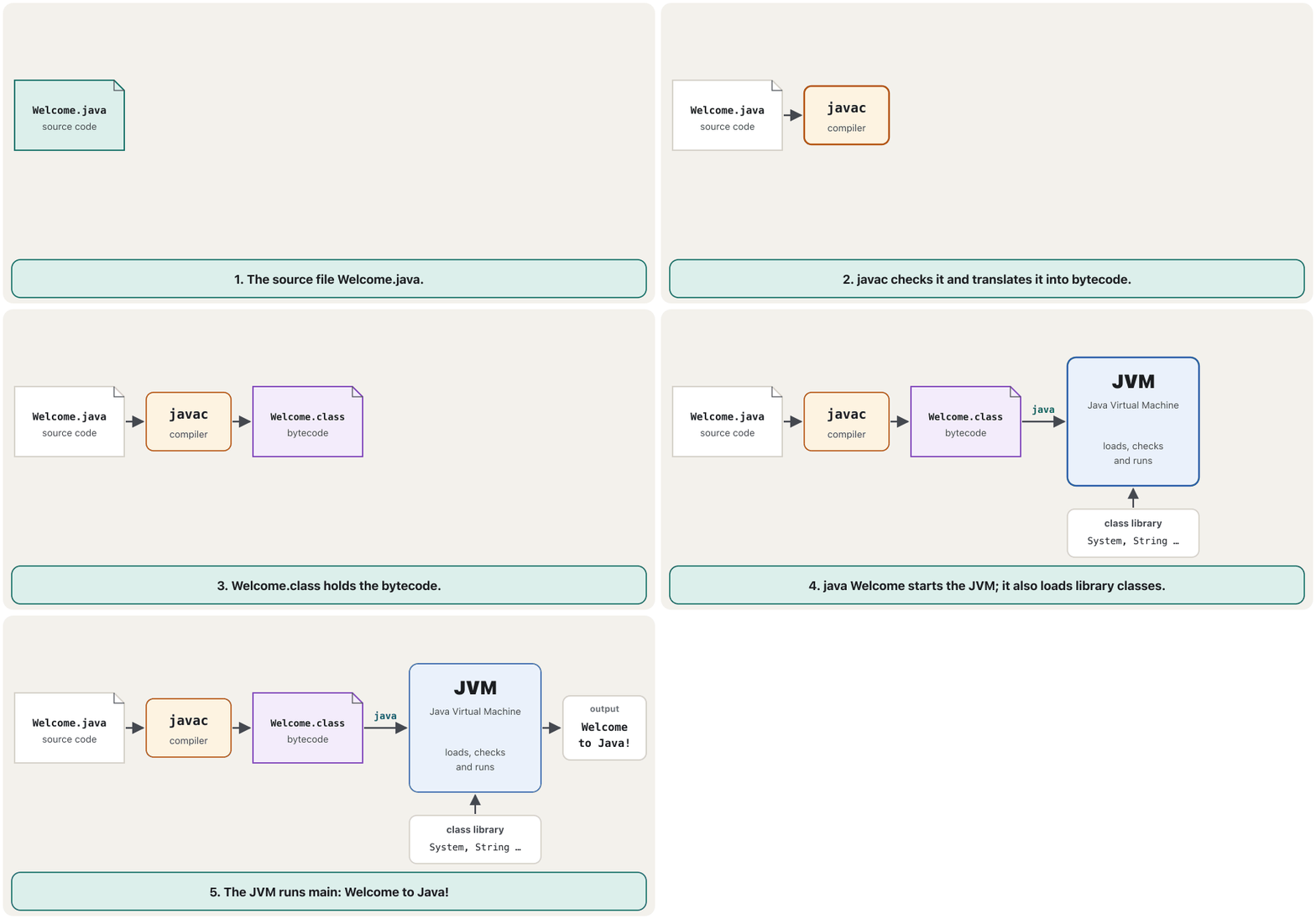
Every Java program goes through the same cycle, and you need a JDK installed for it (Install a JDK). You write the source code in any text editor or IDE, save it as a .java file, compile it with javac, and run the bytecode with java.
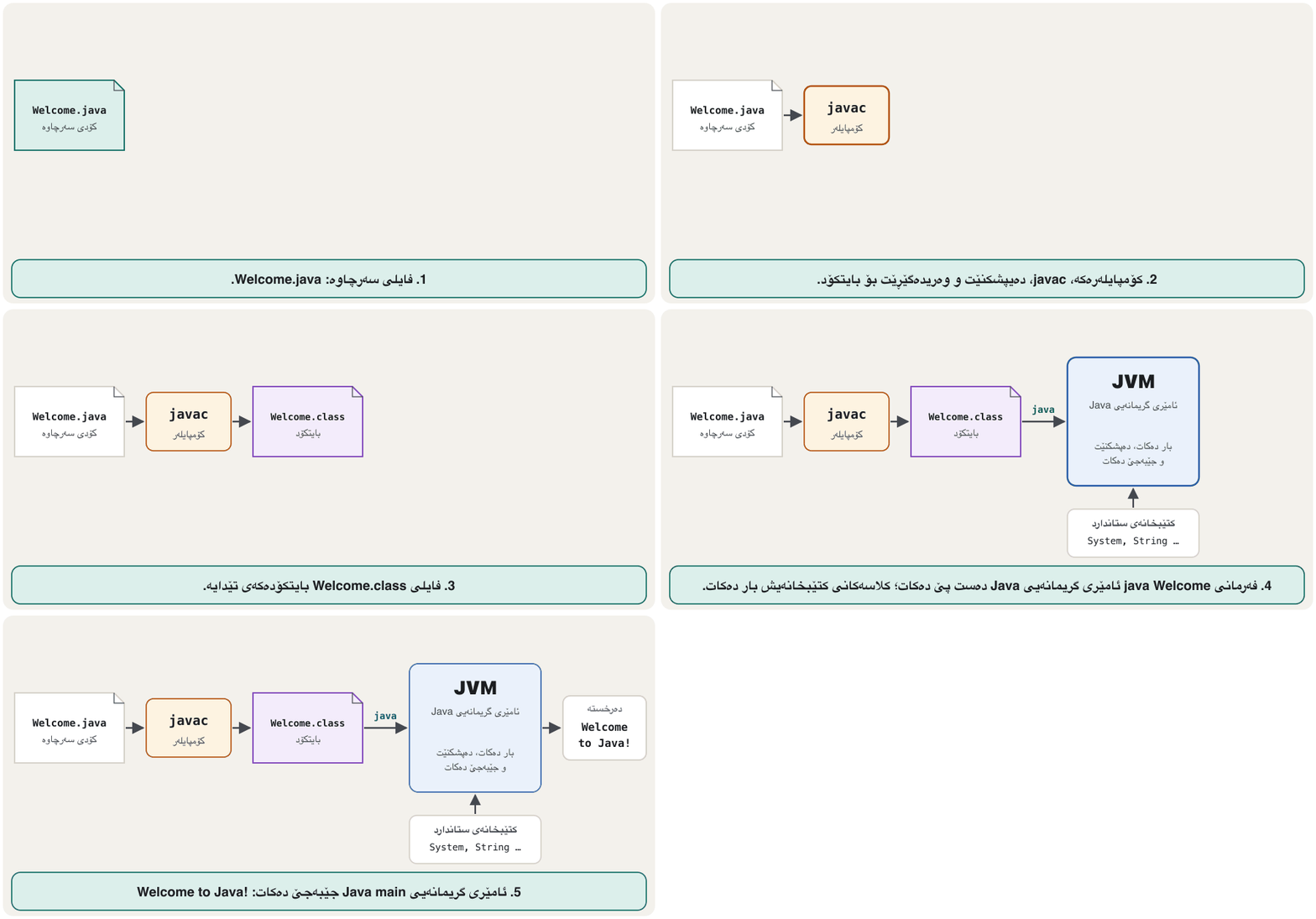
هەموو Java بە هەمان خولدا تێدەپەڕێت و بۆ ئەمە جێگیرکراوت پێویستە (کەرەستەیەکی گەشەپێدانی Java جێگیر بکە). لە هەر یان IDEـێکدا دەنووسیت، وەک فایلێکی .java پاشەکەوتی دەکەیت، بە javac کۆمپایلی دەکەیت و بە java جێبەجێ دەکەیت.
Mistakes send you back to the editor. A compile error means: fix the code and compile again. A runtime error or a wrong result means: change the code, compile it again and run it again.
هەڵەکان دەتگەڕێننەوە بۆ دەستکاریکەرەکە. واتە: کۆدەکە چاک بکە و دووپاتە کۆمپایل بکەرەوە. یان ئەنجامی هەڵە واتە: کۆدەکە بگۆڕە، دووپاتە کۆمپایلی بکەرەوە و دووپاتە جێبەجێی بکەرەوە.
Save the file with exactly the right nameفایلەکە ڕێک بە ناوی دروست پاشەکەوت بکە
Save the source code with the extension .java, under exactly the name of its public class: public class Welcome goes into Welcome.java — same letters, same capitals. Keep the programs of this track in one folder (for example examples), so the .class files appear next to their sources.
وەک فایلێکی .java پاشەکەوت بکە، ڕێک بە ناوی publicـەکەی: public class Welcome دەچێتە ناو Welcome.java — هەمان پیت و هەمان پیتە گەورەکان. ئەم ڕێڕەوە لە یەک هەڵبگرە (بۆ نموونە examples)، بۆ ئەوەی فایلەکانی .class لە تەنیشت فایلەکانی سەرچاوەیان دەربکەون.
Compile: javac makes bytecodeکۆمپایلکردن: javac بایتکۆد دروست دەکات
javac Welcome.java reads the source file, checks it against Java's rules and translates it into bytecode, which it writes into a new file, Welcome.class. Bytecode is like machine instructions, but for no real processor: it is architecture-neutral, so any computer with a Java Virtual Machine can run it. When javac prints nothing at all, the compile worked.
javac Welcome.java سەرچاوە دەخوێنێتەوە، بەراورد بە یاساکانی Java دەیپشکنێت و وەریدەگێڕێت بۆ ، کە لە فایلێکی نوێدا دەینووسێت: Welcome.class. وەک ئامێر وایە، بەڵام بۆ هیچ ڕاستەقینە نییە: سەربەخۆیە لە جۆری ئامێر، بۆیە هەر کە هەبێت دەتوانێت جێبەجێی بکات. کاتێک javac هیچ شتێک چاپ ناکات، کۆمپایلکردنەکە سەرکەوتوو بووە.
javac Welcome.javaNo message: the compile worked and Welcome.class was written.
هیچ پەیامێک نییە: کۆمپایلکردنەکە سەرکەوتوو بوو و Welcome.class نووسرا.
If a class uses another class of yours, javac compiles that one too. Compiling Shop.java, which uses a class Tea from Tea.java, gives both Shop.class and Tea.class. Classes inside packages are compiled and run a little differently (Packages).
ئەگەر تری خۆت بەکار بهێنێت، javac ئەویش کۆمپایل دەکات. کۆمپایلکردنی Shop.java، کە Tea لە Tea.java بەکار دەهێنێت، هەم Shop.class و هەم Tea.class دەدات. ئەو لە ناو تۆزێک بە جیاوازی کۆمپایل و جێبەجێ دەکرێن (پاکێجەکان).
Run: java starts the JVMجێبەجێکردن: java ئامێری گریمانەیی Java دەست پێ دەکات
java Welcome starts a Java Virtual Machine, which loads Welcome.class and runs its main method. After java you type the class name: no .java and no .class. The same Welcome.class would run in the same way on any other computer with a JVM.
java Welcome دەست پێ دەکات، کە Welcome.class بار دەکات و جێبەجێ دەکات. دوای java ناوی دەنووسیت: بێ .java و بێ .class. هەمان Welcome.class بە هەمان شێوە لەسەر هەر تر کە JVMـی هەبێت جێبەجێ دەبێت.
java WelcomeWelcome to Java!
java takes a class name, not a file namejava ناوی وەردەگرێت، نەک ناوی CêITAdding .class is one of the most common first mistakes:
زیادکردنی .class یەکێکە لە باوترین یەکەم هەڵەکان:
java Welcome.classError: Could not find or load main class Welcome.class Caused by: java.lang.ClassNotFoundException: Welcome.class
A whole session in the terminalدانیشتنێکی تەواو لە تێرمیناڵدا
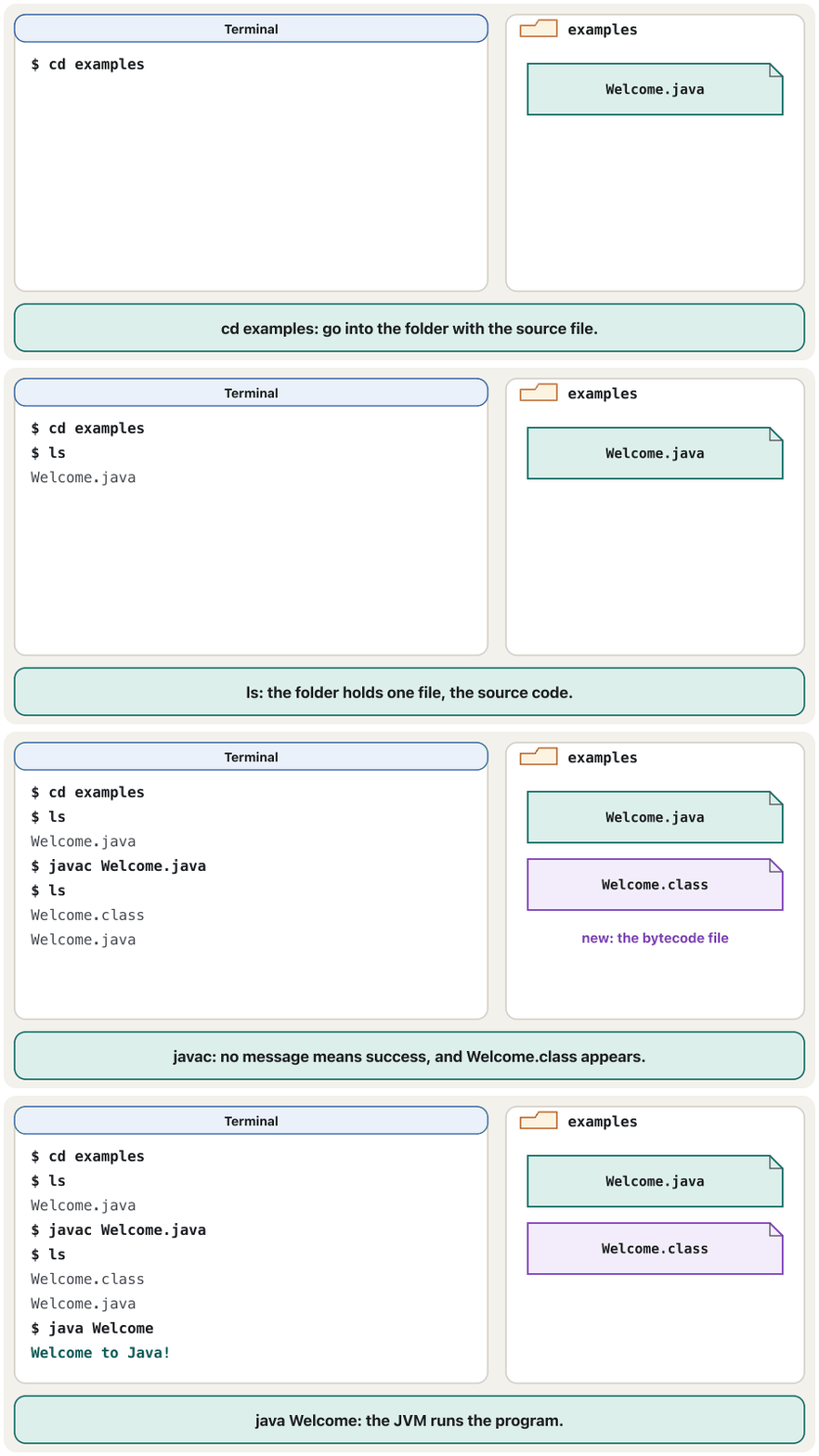
Here is the whole cycle typed in a terminal on macOS or Linux. cd moves into the folder with the file (Folders and cd) and ls lists the files; on Windows' Command Prompt you type dir instead of ls.
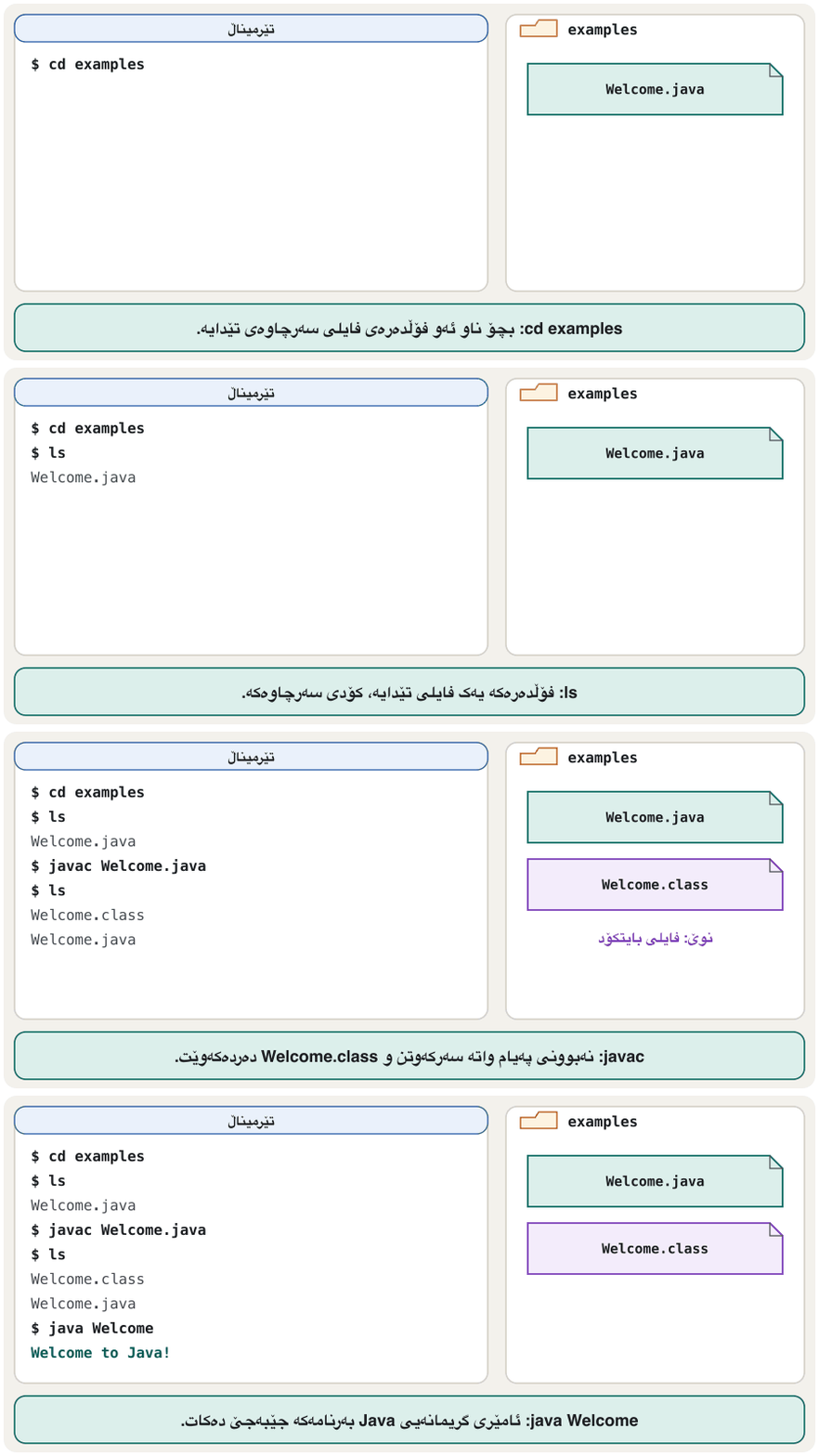
ئەمە هەموو خولەکەیە کە لە macOS یان Linux نووسراوە. cd دەچێتە ناو ئەو تێدایە (فۆڵدەرەکان و cd) و ls لیستی پیشان دەدات؛ لە Command Promptـی Windowsـدا لە جیاتی ls دەنووسیت dir.
cd examples
ls
javac Welcome.java
ls
java Welcome$ cd examples $ ls Welcome.java $ javac Welcome.java $ ls Welcome.class Welcome.java $ java Welcome Welcome to Java!
Explain the codeڕوونکردنەوەی کۆدەکە
- Lineدێڕی 3
No message from javac means success.
نەبوونی پەیام لە javacـەوە واتە سەرکەوتن.
- Lineدێڕی 4
Now the folder also holds the bytecode file
Welcome.class.ئێستا فایلی ،
Welcome.class، لەخۆ دەگرێت.
On Windows the same commands work in Command Prompt, and javac and java print exactly the same messages:
لەسەر Windows هەمان لە Command Promptـدا کار دەکەن و javac و java ڕێک هەمان پەیام چاپ دەکەن:
cd C:\examples
dir
javac Welcome.java
java WelcomeInside a .class fileناو فایلێکی .class
A .class file is not text. Every one starts with the same four bytes, CA FE BA BE — Java's "magic number" — followed by a version number: 00 3D is 61, the number for Java 17. The JDK tool javap -c shows the bytecode instructions in a readable form:
فایلێکی .class دەق نییە. هەموویان بە هەمان چوار بایت دەست پێ دەکەن، CA FE BA BE — «ژمارە سیحراوییەکەی» Java — و دوای ئەوان ژمارەی وەشانێک دێت: 00 3D دەکاتە 61، ژمارەی Java 17. ئامرازی javap -cـی JDK بە شێوەیەکی خوێندراوە پیشان دەدات:
javap -c WelcomeCompiled from "Welcome.java"
public class Welcome {
public Welcome();
Code:
0: aload_0
1: invokespecial #1 // Method java/lang/Object."<init>":()V
4: return
public static void main(java.lang.String[]);
Code:
0: getstatic #7 // Field java/lang/System.out:Ljava/io/PrintStream;
3: ldc #13 // String Welcome to Java!
5: invokevirtual #15 // Method java/io/PrintStream.println:(Ljava/lang/String;)V
8: return
}The main part is our one line of Java: getstatic fetches System.out, ldc loads the text, invokevirtual calls println, and return ends main. The first part, Welcome(), is a constructor that javac adds by itself (The default constructor). Here Welcome.java is 124 bytes and Welcome.class is 424 bytes. Because anyone can do this with a .class file, a compiled program is not a locked box: see Reverse Engineering.
بەشی main هەمان ئەو یەک دێڕەیە کە بە Java نووسیمان: getstatic System.out دەهێنێت، ldc دەقەکە بار دەکات، invokevirtual println بانگ دەکات و return main تەواو دەکات. بەشی یەکەم، Welcome()، کە javac خۆی زیادی دەکات (دروستکەری بنەڕەتی). لێرەدا Welcome.java 124 بایتە و Welcome.class 424 بایت. لەبەر ئەوەی هەر کەسێک دەتوانێت ئەمە لەگەڵ فایلێکی .class بکات، کۆمپایلکراو سندووقێکی قفڵدراو نییە: بڕوانە ئەندازیاریی پێچەوانە.
What the JVM does first: the class loader and the bytecode verifierیەکەم کارەکانی ئامێری گریمانەیی Java: بارکەری کلاس و پشکنەری بایتکۆد
When you type java Welcome, the JVM first uses a program called the class loader to find Welcome.class and load its bytecode into memory. Java's core classes, such as String and System, are already loaded while the JVM starts up. The program's other classes, such as your own, are loaded one by one, when they are first needed.
کاتێک java Welcome دەنووسیت، سەرەتا بەکار دەهێنێت بە ناوی بۆ دۆزینەوەی Welcome.class و بارکردنی بۆ ناو . Java، وەک String و System، لە کاتی دەستپێکردنی JVMـدا بار کراون. تری ، وەک هی خۆت، یەک بە یەک بار دەکرێن، کاتێک یەکەمجار پێویست دەبن.
After a class is loaded, the JVM's bytecode verifier checks that the bytecode is valid and keeps to Java's safety rules: every instruction is real, values are used with the right types, and no jump leaves its method. A broken or tampered .class file is refused with a VerifyError before any of it runs. Only then does the JVM run main, interpreting the bytecode and compiling the busiest parts to machine code (just-in-time compiling).
دوای ئەوەی بار کرا، ـی JVM دەپشکنێت کە دروستە و یاساکانی سەلامەتیی Java دەپارێزێت: هەموو ڕاستەقینەیە، بە جۆری ڕاست بەکار دێن و هیچ بازدانێک لە خۆی دەرناچێت. فایلێکی .classـی تێکچوو یان دەستکاریکراو پێش ئەوەی هیچ بەشێکی جێبەجێ بێت بە VerifyError ڕەت دەکرێتەوە. تەنیا ئەو کاتە JVM main جێبەجێ دەکات، وەردەگێڕێت و بەشە زۆر بەکارهاتووەکان دەکات بە (کۆمپایلکردنی کاتی جێبەجێکردن).
What the JVM does first: the class loader and the bytecode verifierیەکەم کارەکانی ئامێری گریمانەیی Java: بارکەری کلاس و پشکنەری بایتکۆد
See a class being set up when it is neededببینە کلاسێک کاتی پێویستبوون ئامادە دەکرێت
You can watch this happen. The class Helper below prints a line at the moment the JVM sets it up (the static { … } block runs once, when the class is first used; you will meet static again later). Look at the order of the output:
دەتوانیت سەیری ڕوودانی ئەمە بکەیت. Helperـی خوارەوە لەو کاتەدا دێڕێک چاپ دەکات کە JVM ئامادەی دەکات (بلۆکی static { … } یەکجار جێبەجێ دەبێت، کاتێک یەکەمجار بەکار دێت؛ static دواتر دووپاتە دەبینیتەوە). سەیری ڕیزبەندیی بکە:
public class Lazy {
    public static void main(String[] args) {
        System.out.println("main starts");
        Helper.greet();
        System.out.println("main ends");
    }
}

class Helper {
    static {
        System.out.println("(the JVM sets up class Helper now)");
    }

    static void greet() {
        System.out.println("Hello from Helper");
    }
}main starts (the JVM sets up class Helper now) Hello from Helper main ends
Explain the codeڕوونکردنەوەی کۆدەکە
- Lineدێڕی 4
The first use of
Helper: only now is the class set up.یەکەم بەکارهێنانی
Helper: تەنیا ئێستا ئامادە دەکرێت.
main starts comes first: Helper was not needed before line 4. One file gave two class files, Lazy.class and Helper.class, and each is loaded only when it is needed — which makes Java programs start faster.
main starts یەکەمە: پێش دێڕی 4 پێویست بە Helper نەبوو. یەک فایل دوو فایلی دا: Lazy.class و Helper.class. هەریەکەیان تەنیا کاتێک بار دەکرێت کە پێویست بێت — ئەمەش وا دەکات Java خێراتر دەست پێ بکەن.
One click: running in an editorبە یەک کرتە: جێبەجێکردن لە دەستکاریکەرێکدا
Editors and IDEs run the same two steps for you. In VS Code, click Run above main (or Run Java at the top right of the editor); in IntelliJ IDEA, click the green arrow next to main. The output appears in a panel at the bottom. Behind the button, the editor compiles the file and starts a JVM — exactly what javac and java do.
دەستکاریکەرەکان و هەمان دوو هەنگاو بۆت ئەنجام دەدەن. لە VS Code، Run لە سەرووی main دابگرە (یان Run Java لە سەرەوەی لای ڕاستی دەستکاریکەرەکە)؛ لە IntelliJ IDEA، تیرە سەوزەکەی تەنیشت main دابگرە. لە بەشێکی خوارەوەدا دەردەکەوێت. لە پشت دوگمەکەوە، دەستکاریکەرەکە کۆمپایل دەکات و JVMـێک دەست پێ دەکات — ڕێک ئەوەی javac و java دەیکەن.
- Open TextPadTextPad بکەرەوە
Some labs use TextPad, a paid editor for Windows only.
هەندێک تاقیگە TextPad بەکار دەهێنن، دەستکاریکەرێکی پارەدار کە تەنیا بۆ Windowsـە.
- New fileفایلی نوێ
Choose File → New, then Save.
File → New هەڵبژێرە، پاشان Save.
- Save itپاشەکەوتی بکە
Save it as
HelloWorld.javain your own folder, for example on driveD:.بە ناوی
HelloWorld.javaلە خۆتدا پاشەکەوتی بکە، بۆ نموونە لەسەر درایڤیD:. - Write the codeکۆدەکە بنووسە
Type the HelloWorld program and save again.
HelloWorld بنووسە و دووپاتە پاشەکەوت بکەرەوە.
- Compileکۆمپایل بکە
Tools → External Tools → Compile Java, or Ctrl + 1 (this runs
javac).Tools → External Tools → Compile Java، یان Ctrl + 1 (ئەمەjavacجێبەجێ دەکات). - Runجێبەجێ بکە
Tools → External Tools → Run Java Application, or Ctrl + 2 (this runs
java).Tools → External Tools → Run Java Application، یان Ctrl + 2 (ئەمەjavaجێبەجێ دەکات).
Shortcut: java Hello.javaکورتەڕێ: java Hello.java
Since JDK 11 the java launcher can also run a one-file program straight from its source code: it compiles the file in memory and runs it at once. No .class file is written.
لە JDK 11ـەوە دەستپێکەری java دەتوانێت یەک فایلی ڕاستەوخۆ لە جێبەجێ بکات: لە کۆمپایل دەکات و یەکسەر جێبەجێی دەکات. هیچ فایلێکی .class نانووسرێت.
java Hello.java
ls$ java Hello.java Run without javac! $ ls Hello.java
The compile still happens, so a syntax error still stops the program: the launcher prints the javac message and then error: compilation failed. On JDK 17 a program made of several files must be compiled with javac (or a build tool); since JDK 22 the launcher can also run a program whose classes sit in several .java files.
کۆمپایلکردنەکە هەر ڕوو دەدات، بۆیە هێشتا ڕادەگرێت: دەستپێکەرەکە پەیامی javac و پاشان error: compilation failed چاپ دەکات. لەسەر JDK 17، کە لە چەند فایلێک پێک دێت دەبێت بە javac (یان ئامرازێکی دروستکردن) کۆمپایل بکرێت؛ لە JDK 22ـەوە دەستپێکەرەکە دەتوانێت ئەو جێبەجێ بکات کە لە چەند فایلێکی .javaـدان.
JShell: try one line at a timeJShell: هەر جارە یەک دێڕ تاقی بکەرەوە
To try a single line of Java without writing a class, start JShell with the command jshell (it comes with every JDK since 9). It reads one line, runs it and shows the result at once; results get names such as $2. Type /exit to leave.
بۆ تاقیکردنەوەی یەک دێڕی Java بەبێ نووسینی ، JShell بە jshell دەست پێ بکە (لە JDK 9ـەوە لەگەڵ هەموو JDKـێک دێت). دێڕێک دەخوێنێتەوە، جێبەجێی دەکات و یەکسەر ئەنجامەکە پیشان دەدات؛ ئەنجامەکان ناوی وەک $2 وەردەگرن. بۆ دەرچوون /exit بنووسە.
jshell| Welcome to JShell -- Version 17.0.20
| For an introduction type: /help intro
jshell> System.out.println("Silav!")
Silav!
jshell> 39 + 3
$2 ==> 42
jshell> 10.5 / 2
$3 ==> 5.25
jshell> /exit
| GoodbyeCommon mistakesهەڵە باوەکان
Every message below is the real output of JDK 17. The first two rows are what Windows and macOS show, because their disks ignore capital letters in file names; on Linux javac and java simply find no such file or class. Reading a javac message explains the parts of a message.
هەموو پەیامێکی خوارەوە ڕاستەقینەی JDK 17ـە. دوو ڕیزی یەکەم ئەوەن کە Windows و macOS پیشانی دەدەن، چونکە دیسکەکانیان گوێ بە پیتی گەورە لە ناوی فایلدا نادەن؛ لەسەر Linux، javac و java بە سادەیی ئەو یان نادۆزنەوە. خوێندنەوەی پەیامێکی javac بەشەکانی پەیامێک ڕوون دەکاتەوە.
| You typedنووسیت | You seeدەبینیت | Fixچارەسەر |
|---|---|---|
javac welcome.java | error: class Welcome is public, should be declared in a file named Welcome.java | Name the file exactly like the class: Welcome.java. ڕێک وەک ناو بنێ: Welcome.java. |
java welcome | Error: Could not find or load main class welcome
Caused by: java.lang.NoClassDefFoundError: welcome (wrong name: Welcome) | Type the class name with its capitals: java Welcome.ناوی بە پیتە گەورەکانیەوە بنووسە: java Welcome. |
java Welcome.class | Error: Could not find or load main class Welcome.class | Leave out .class..class لاببە. |
javac Welcome | error: Class names, 'Welcome', are only accepted if annotation processing is explicitly requested | javac needs the file name with .java.javac ناوی لەگەڵ .java دەوێت. |
javac Welcom.java | error: file not found: Welcom.java | Check the spelling, and cd into the folder that holds the file.ڕێنووسەکە بپشکنە و cd بکە بۆ ئەو تێدایە. |
java Welcome | Error: Could not find or load main class Welcome
Caused by: java.lang.ClassNotFoundException: Welcome | You are in another folder, or you have not compiled yet: run javac Welcome.java in the right folder first.لە تردایت، یان هێشتا کۆمپایلت نەکردووە: سەرەتا لە ڕاستدا javac Welcome.java جێبەجێ بکە. |
javac (Windows)javac (Windows) | 'javac' is not recognized as an internal or external command | The JDK's bin folder is not in the PATH: see Check your JDK. binـی JDK لە PATHـدا نییە: بڕوانە کەرەستەی گەشەپێدانی Javaـەکەت بپشکنە. |
Practiceڕاهێنان
Write the HelloWorld program from Your first program, save it in a folder of its own and run it twice: (a) in a terminal with javac and java, (b) with the Run button of your editor. Check that both print the same line.
HelloWorld لە یەکەم بەرنامەکەت بنووسە، لە تایبەتدا پاشەکەوتی بکە و دوو جار جێبەجێی بکە: (a) لە بە javac و java، (b) بە دوگمەی Runـی دەستکاریکەرەکەت. دڵنیا ببەوە هەردووکیان هەمان دێڕ چاپ دەکەن.
Show answerوەڵامەکە پیشان بدە
javac HelloWorld.java
java HelloWorld$ javac HelloWorld.java $ java HelloWorld Hello, World!
The editor's Run button shows the same Hello, World! in its output panel, because it runs the same two steps.
دوگمەی Runـی دەستکاریکەرەکە هەمان Hello, World! لە بەشی پیشان دەدات، چونکە هەمان دوو هەنگاو جێبەجێ دەکات.
Hello.java holds public class Hello. Which of these work, and what does each one that fails say? javac hello.java · javac Hello · javac Hello.java · java Hello.class · java Hello · java Hello.java
Hello.java public class Hello لەخۆ دەگرێت. کامیان کار دەکەن و ئەوانەی شکست دەهێنن چی دەڵێن؟ javac hello.java · javac Hello · javac Hello.java · java Hello.class · java Hello · java Hello.java
Show answerوەڵامەکە پیشان بدە
javac hello.javafails: the file is calledHello.java(on a disk that ignores case you getclass Hello is public, should be declared in a file named Hello.java).javac Hellofails:Class names, 'Hello', are only accepted if annotation processing is explicitly requested.javac Hello.javaworks and writesHello.class.java Hello.classfails:Could not find or load main class Hello.class.java Helloworks (afterjavac).java Hello.javaworks on JDK 11 and later, withoutjavac.
javac hello.javaشکست دەهێنێت: ناویHello.javaـە (لەسەر دیسکێک کە گوێ بە پیتی گەورە ناداتclass Hello is public, should be declared in a file named Hello.javaدەبینیت).javac Helloشکست دەهێنێت:Class names, 'Hello', are only accepted if annotation processing is explicitly requested.javac Hello.javaکار دەکات وHello.classدەنووسێت.java Hello.classشکست دەهێنێت:Could not find or load main class Hello.class.java Helloکار دەکات (دوایjavac).java Hello.javaلەسەر JDK 11 و دواتر کار دەکات، بەبێjavac.
Compile your HelloWorld and run javap -c HelloWorld. Find the line that loads your text with ldc. Then look at the first bytes of HelloWorld.class (xxd HelloWorld.class | head -1 on macOS or Linux, Format-Hex HelloWorld.class in Windows PowerShell).
HelloWorldـەکەت کۆمپایل بکە و javap -c HelloWorld جێبەجێ بکە. ئەو دێڕە بدۆزەرەوە کە بە ldc دەقەکەت بار دەکات. پاشان سەیری یەکەم بایتەکانی HelloWorld.class بکە (xxd HelloWorld.class | head -1 لەسەر macOS یان Linux، Format-Hex HelloWorld.class لە PowerShellـی Windows).
Show answerوەڵامەکە پیشان بدە
In main you find ldc … // String Hello, World! between getstatic (System.out) and invokevirtual (println). The file starts with cafe babe 0000 003d on JDK 17: the magic number, then version 61.
لە mainـدا ldc … // String Hello, World! لە نێوان getstatic (System.out) و invokevirtual (println) دەدۆزیتەوە. لەسەر JDK 17 بە cafe babe 0000 003d دەست پێ دەکات: ژمارە سیحراوییەکە، پاشان 61.
In an empty folder, run java HelloWorld.java, then list the folder. Explain why there is no HelloWorld.class. Then run javac HelloWorld.java and list the folder again.
لە بەتاڵدا java HelloWorld.java جێبەجێ بکە، پاشان لیست بکە. ڕوونی بکەرەوە بۆچی HelloWorld.class نییە. پاشان javac HelloWorld.java جێبەجێ بکە و دووپاتە لیست بکە.
Show answerوەڵامەکە پیشان بدە
The launcher compiled the program in memory, ran it and threw the bytecode away, so only HelloWorld.java is in the folder. After javac HelloWorld.java the folder also holds HelloWorld.class.
دەستپێکەرەکە لە کۆمپایل کرد، جێبەجێی کرد و فڕێ دا، بۆیە تەنیا HelloWorld.java لە . دوای javac HelloWorld.java، HelloWorld.classـیش لەخۆ دەگرێت.
Summaryپوختە
- Write → save as
ClassName.java→javac ClassName.java→java ClassName; go back to the editor after any error. javacchecks and translates source code into architecture-neutral bytecode in a.classfile, which starts withCA FE BA BE.javastarts the JVM: the class loader loads classes when they are first needed, the bytecode verifier checks them, then the JVM interprets and JIT-compiles the code.- After
javacomes the class name, without.class; file and class names must match exactly, capitals included. - IDE Run buttons and TextPad's Ctrl + 1 / Ctrl + 2 run
javacandjavafor you;java Hello.javaruns a one-file program withoutjavac;jshelltries one line at a time.
- بنووسە ← بە
ClassName.javaپاشەکەوتی بکە ←javac ClassName.java←java ClassName؛ دوای هەر هەڵەیەک بگەڕێوە بۆ دەستکاریکەرەکە. javacدەپشکنێت و وەریدەگێڕێت بۆ سەربەخۆ لە جۆری ئامێر لە فایلێکی.classـدا، کە بەCA FE BA BEدەست پێ دەکات.javaدەست پێ دەکات: کاتێک یەکەمجار پێویست بن بار دەکات، دەیانپشکنێت، پاشان JVM کۆدەکە وەردەگێڕێت و بە JIT کۆمپایلی دەکات.- دوای
javaناوی دێت، بێ.class؛ ناوی و دەبێت ڕێک وەک یەک بن، پیتە گەورەکانیشەوە. - دوگمەکانی Runـی و Ctrl + 1 / Ctrl + 2ـی TextPad
javacوjavaبۆت جێبەجێ دەکەن؛java Hello.javaیەک فایلی بەبێjavacجێبەجێ دەکات؛jshellهەر جارە یەک دێڕ تاقی دەکاتەوە.
Why must you compile again after every change?بۆچی دەبێت دوای هەموو گۆڕانکارییەک دووپاتە کۆمپایل بکەیتەوە؟
java runs the bytecode in the .class file; only javac updates it from your source.
java ئەو جێبەجێ دەکات کە لە فایلی .classـدایە؛ تەنیا javac لە نوێی دەکاتەوە.
What is the difference between the class loader and the bytecode verifier?جیاوازیی نێوان بارکەری کلاس و پشکنەری بایتکۆد چییە؟
The class loader finds .class files and loads them into memory when they are needed; the verifier then checks that the loaded bytecode is valid and safe.
فایلەکانی .class دەدۆزێتەوە و لە کاتی پێویستدا باریان دەکاتە ناو ؛ پاشان دەپشکنێت کە بارکراو دروست و سەلامەتە.
When is java Hello.java enough?کەی java Hello.java بەسە؟
For a program in one file, on JDK 11 or newer. On JDK 17, programs with several files are compiled with javac; JDK 22 and later can launch them from source too.
بۆ لە یەک فایلدا، لەسەر JDK 11 یان نوێتر. لەسەر JDK 17، چەند فایلی بە javac کۆمپایل دەکرێت؛ JDK 22 و دواتر دەتوانن ئەوانیش ڕاستەوخۆ لە جێبەجێ بکەن.
Lesson complete!وانەکە تەواو بوو!
Well done. Review the key terms, then go on to the next lesson.دەستخۆش. سەیرێکی زاراوە سەرەکییەکان بکەرەوە، پاشان بڕۆ بۆ وانەی داهاتوو.
Key termsزاراوە سەرەکییەکان
Errors and Debugging: Syntax, Runtime and Logic Errorsهەڵەکان و کرمەکوژی: هەڵەی داڕستن، هەڵەی کاتی جێبەجێکردن و هەڵەی لۆجیکی
Related lecturesوانە پەیوەندیدارەکان
- Welcome to Java: the JDK, the JRE and the JVMبەخێربێیت بۆ Java: JDK، JRE و JVM
- Errors and Debugging: Syntax, Runtime and Logic Errorsهەڵەکان و کرمەکوژی: هەڵەی داڕستن، هەڵەی کاتی جێبەجێکردن و هەڵەی لۆجیکی
- The Command Line: Command Prompt Basicsنێوبەستەی هێڵی فەرمان: بنەماکانی Command Prompt
- Python Next to JavaPython لە تەنیشت Javaـەوە
References and further readingسەرچاوەکان و خوێندنەوەی زیاتر
- Oracle: the javac command (JDK 17)
- Oracle: the java command (JDK 17), incl. source-file mode
- JEP 458: Launch Multi-File Source-Code Programs (JDK 22)
- Oracle: the jshell command (JDK 17)
- The Java Virtual Machine Specification, Java SE 17 — chapter 4: the class file format (magic 0xCAFEBABE, versions)
- The Java Language Specification, Java SE 17 — chapter 12: loading, linking (verification) and initialization
- W3Schools: Java Getting Started (javac and java)
- Visual Studio Code: Running and debugging Java (Run | Debug, Run Java)
- JetBrains: Create and run your first Java application (IntelliJ IDEA)
- TextPad (Windows text editor)
This lecture is a first edition. The Kurdish text and terminology are waiting for review by Kurdish IT teachers.ئەم وانەیە چاپی یەکەمە. دەقە کوردییەکە و زاراوەکانی چاوەڕێی پێداچوونەوەی مامۆستایانی کوردی بواری IT ن.