Chapterبەش 2 · Lectureوانە 2.4
Links and Navigation Menusبەستەرەکان و لیستە ڕێنیشاندەرەکان
Links to places inside a page and tables of contents, links that open a new tab, phone, e-mail and download links, link text that makes sense alone, navigation menus with the current page, the same menu on every page, breadcrumbs, skip links and menus on phones.
بۆ شوێنی ناو لاپەڕە و ، ئەو نوێ دەکەنەوە، تەلەفۆن، و ، دەقی کە بە تەنیا واتای هەبێت، بە لاپەڕەی ئێستاوە، هەمان لە هەموو لاپەڕەیەکدا، ، و لەسەر مۆبایل.
What you will learnچی فێر دەبیت
- Link to a place in a page with an id and a fragment, and build a table of contents.
- Decide when a link may open a new tab, and write tel:, mailto: and download links.
- Write link text that makes sense on its own.
- Build a navigation menu with the current page marked, the same on every page.
- Add breadcrumbs and a skip link, and choose a menu for phones.
- بە id و بۆ شوێنێک لە لاپەڕەدا دروست بکەیت و بنیات بنێیت.
- بڕیار بدەیت کەی دەتوانێت نوێ بکاتەوە و tel:، mailto: و download بنووسیت.
- دەقی بنووسیت کە بە تەنیا واتای هەبێت.
- بنیات بنێیت بە لاپەڕەی ئێستاوە کە نیشانە کراوە و لە هەموو لاپەڕەیەکدا وەک یەک بێت.
- و زیاد بکەیت و بۆ مۆبایل هەڵبژێریت.
Links: a quick recapبەستەرەکان: پێداچوونەوەیەکی خێرا
A link is an <a> element: href holds the destination, and the text between the tags is what people click. You know the three kinds — absolute, relative and mail links — from Hyperlinks, and how a relative path finds its file from How a relative link finds its file. This lesson adds links to places inside a page, other kinds of links, good link text and the menus that hold a site together.
<a>ـە: href شوێنی مەبەست هەڵدەگرێت و دەقی نێوان ئەوەیە کە خەڵک کلیکی لێ دەکەن. سێ جۆرەکە — ، و — لە بەستەرەکان دەناسیت و چۆنیەتیی دۆزینەوەی بە ڕێژەیی لە بەستەری ڕێژەیی چۆن فایلەکەی دەدۆزێتەوە. ئەم وانەیە بۆ شوێنی ناو لاپەڕە، جۆرەکانی تری ، دەقی باشی و ئەو زیاد دەکات کە پێکەوە دەبەستنەوە.
Links to a place on a pageبەستەر بۆ شوێنێک لەناو لاپەڕەدا
The last part of a , after #, which points to a place inside the page. The browser jumps there and never sends the fragment to the server.
دوایین بەشی ، دوای #، کە ئاماژە بە شوێنێک لە ناو لاپەڕەکەدا دەکات. بازی بۆ دەدات و هەرگیز پارچەکە نانێرێت بۆ .
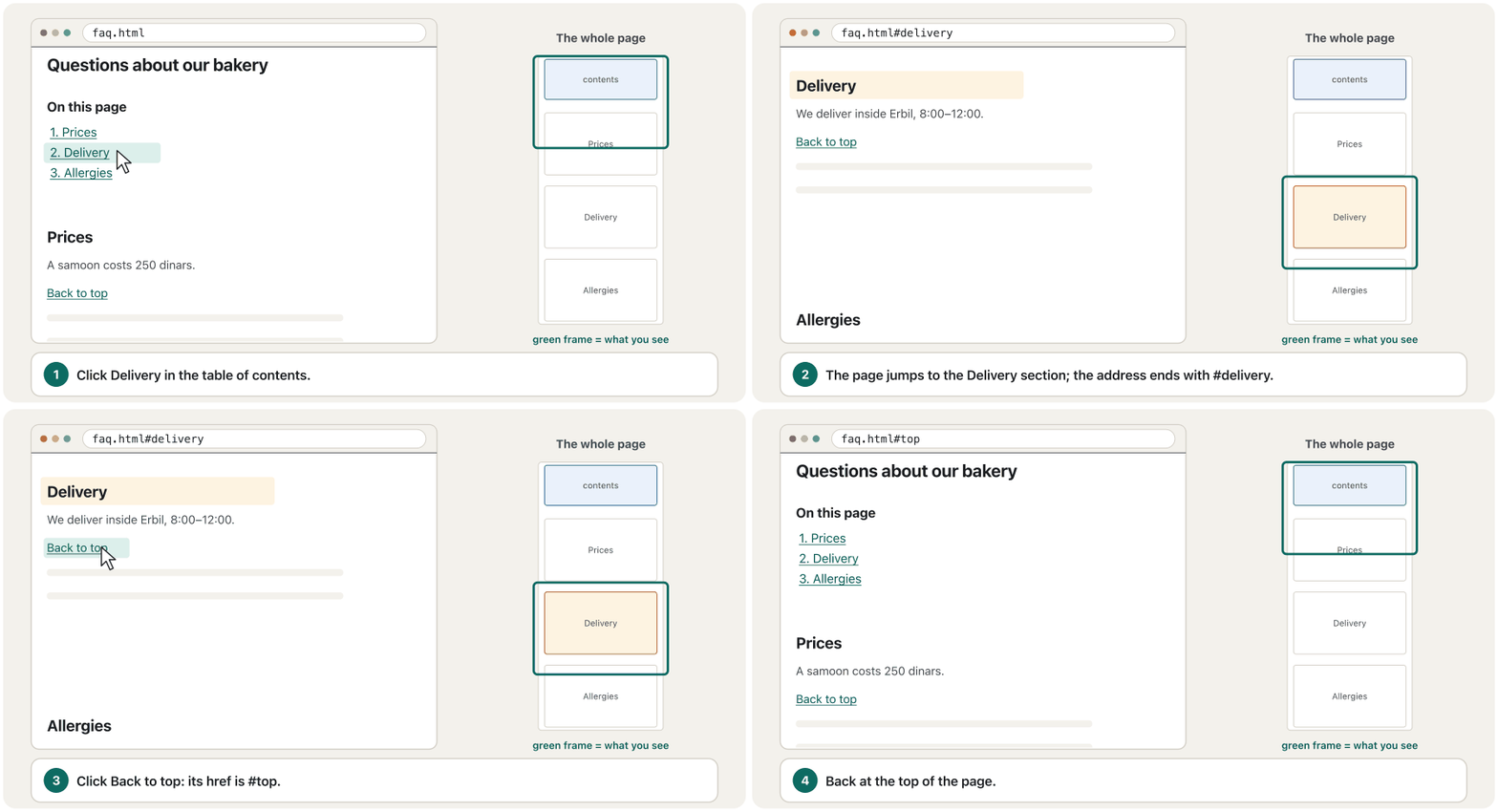
Give the target element an id, then link to it with # and that id. The part after # is the address's fragment: the browser scrolls to the element and never sends the fragment to the server.
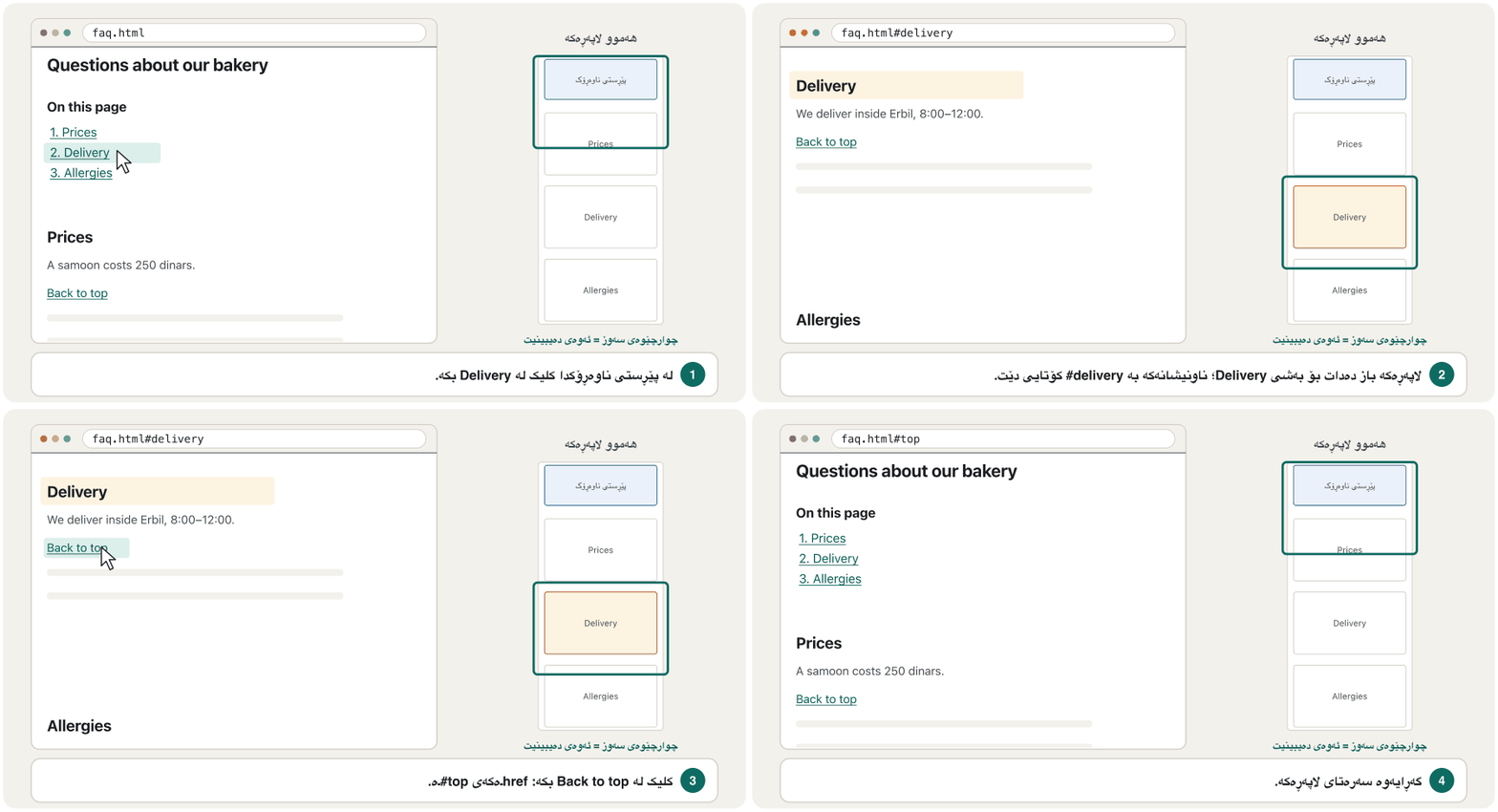
idـێک بدە بە ئامانج، پاشان بە # و ئەو idـیە بۆ بکە. ئەو بەشەی دوای # ـی ناونیشانەکەیە: بۆ لای دەچێت و هەرگیز نانێرێت بۆ .
<a href="#delivery">jumps to<h2 id="delivery">on the same page.<a href="faq.html#delivery">opensfaq.htmlat its Delivery part.<a href="#top">(or just#) goes back to the top of the page.
<a href="#delivery">باز دەدات بۆ<h2 id="delivery">لە هەمان لاپەڕەدا.<a href="faq.html#delivery">faq.htmlلە بەشی Deliveryـەکەیەوە دەکاتەوە.<a href="#top">(یان تەنیا#) دەگەڕێتەوە بۆ سەرەتای لاپەڕەکە.
An id must be unique on the page and must not contain spaces. Fragments are case-sensitive: #Delivery does not find id="delivery".
id دەبێت لە لاپەڕەکەدا تاک بێت و تێدا نەبێت. : #Delivery id="delivery" نادۆزێتەوە.
Links to a place on a pageبەستەر بۆ شوێنێک لەناو لاپەڕەدا
Example: a table of contentsنموونە: پێڕستی ناوەڕۆک
Long pages — rules, questions and answers, lessons — need a table of contents at the top: a <nav> with a list of fragment links, named by its own heading with aria-labelledby. A “Back to top” link after each part saves scrolling on phones.
لاپەڕە درێژەکان — ڕێسا، پرسیار و وەڵام، وانە — لە سەرەوە پێویستیان بە هەیە: <nav>ـێک بە لیستێکی ، کە بە خۆی و بە aria-labelledby ناو دەنرێت. «Back to top» دوای هەر بەشێک لەسەر مۆبایل لە زۆر ڕزگارت دەکات.
<!DOCTYPE html>
<html lang="en">
<head>
  <meta charset="utf-8">
  <meta name="viewport" content="width=device-width, initial-scale=1">
  <title>Questions – Shilan's Bakery</title>
  <style>
    section { min-height: 70vh; }
  </style>
</head>
<body>
  <main>
    <h1>Questions about our bakery</h1>
    <nav aria-labelledby="toc-title">
      <h2 id="toc-title">On this page</h2>
      <ol>
        <li><a href="#prices">Prices</a></li>
        <li><a href="#delivery">Delivery</a></li>
        <li><a href="#allergies">Allergies</a></li>
      </ol>
    </nav>
    <section id="prices">
      <h2>Prices</h2>
      <p>A samoon costs 250 dinars.</p>
      <p><a href="#top">Back to top</a></p>
    </section>
    <section id="delivery">
      <h2>Delivery</h2>
      <p>We deliver inside Erbil from 8:00 to 12:00.</p>
      <p><a href="#top">Back to top</a></p>
    </section>
    <section id="allergies">
      <h2>Allergies</h2>
      <p>Our bread contains wheat. Ask us about sesame.</p>
      <p><a href="#top">Back to top</a></p>
    </section>
  </main>
</body>
</html>HTML sent to the browserئەو HTMLـەی دەنێردرێت بۆ تۆڕگەڕ
<!DOCTYPE html>
<html lang="en">
<head>
  <meta charset="utf-8">
  <meta name="viewport" content="width=device-width, initial-scale=1">
  <title>Questions – Shilan's Bakery</title>
  <style>
    section { min-height: 70vh; }
  </style>
</head>
<body>
  <main>
    <h1>Questions about our bakery</h1>
    <nav aria-labelledby="toc-title">
      <h2 id="toc-title">On this page</h2>
      <ol>
        <li><a href="#prices">Prices</a></li>
        <li><a href="#delivery">Delivery</a></li>
        <li><a href="#allergies">Allergies</a></li>
      </ol>
    </nav>
    <section id="prices">
      <h2>Prices</h2>
      <p>A samoon costs 250 dinars.</p>
      <p><a href="#top">Back to top</a></p>
    </section>
    <section id="delivery">
      <h2>Delivery</h2>
      <p>We deliver inside Erbil from 8:00 to 12:00.</p>
      <p><a href="#top">Back to top</a></p>
    </section>
    <section id="allergies">
      <h2>Allergies</h2>
      <p>Our bread contains wheat. Ask us about sesame.</p>
      <p><a href="#top">Back to top</a></p>
    </section>
  </main>
</body>
</html>
Click Delivery in the preview, then Back to top.
لە پێشبینینەکەدا کلیک لە Delivery بکە، پاشان لە Back to top.
Explain the codeڕوونکردنەوەی کۆدەکە
- Lineدێڕی 14-21
The table of contents: a
<nav>named by its heading, with an ordered list of fragment links.:
<nav>ـێک کە بە ناو نراوە، بە لیستێکی ڕیزکراوی .- Lineدێڕی 22
id="prices"is the target ofhref="#prices".id="prices"ئامانجیhref="#prices"ـە.- Lineدێڕی 25
#topalways means the top of the page; no element needsid="top".#topهەمیشە واتە سەرەتای لاپەڕەکە؛ پێویست ناکات هیچid="top"ـی هەبێت.
Links to a place on a pageبەستەر بۆ شوێنێک لەناو لاپەڕەدا
When a sticky header hides the targetکاتێک سەرپەڕەیەکی لکاو ئامانجەکە دادەپۆشێت
A header that stays at the top while you scroll (fixed and sticky) can cover the heading you jumped to. Give the targets a scroll margin as tall as the header, and highlight the target with the :target pseudo-class so the reader sees where they landed:
کە لە کاتی لە سەرەوە دەمێنێتەوە (fixed و sticky) دەتوانێت ئەو دابپۆشێت کە بازت بۆ داوە. بە بەرزیی بدە بە ئامانجەکان و ئامانجەکە بە :target ڕووناک بکەرەوە تا خوێنەر ببینێت گەیشتووەتە کوێ:
<!DOCTYPE html>
<html lang="en">
<head>
  <meta charset="utf-8">
  <meta name="viewport" content="width=device-width, initial-scale=1">
  <title>Sticky header and fragment links</title>
  <style>
    body { margin: 0; font-family: sans-serif; }
    header { position: sticky; top: 0; padding: 12px 16px; background: #0d6b62; color: #fff; }
    header a { color: #fff; margin-inline-end: 12px; }
    section { min-height: 80vh; padding: 0 16px; }
    h2 { scroll-margin-top: 4rem; }
    h2:target { background: #fdf3e1; }
  </style>
</head>
<body>
  <header>
    <a href="#prices">Prices</a>
    <a href="#delivery">Delivery</a>
  </header>
  <main>
    <h1>Bakery information</h1>
    <section>
      <h2 id="prices">Prices</h2>
      <p>A samoon costs 250 dinars.</p>
    </section>
    <section>
      <h2 id="delivery">Delivery</h2>
      <p>We deliver inside Erbil from 8:00 to 12:00.</p>
    </section>
  </main>
</body>
</html>HTML sent to the browserئەو HTMLـەی دەنێردرێت بۆ تۆڕگەڕ
<!DOCTYPE html>
<html lang="en">
<head>
  <meta charset="utf-8">
  <meta name="viewport" content="width=device-width, initial-scale=1">
  <title>Sticky header and fragment links</title>
  <style>
    body { margin: 0; font-family: sans-serif; }
    header { position: sticky; top: 0; padding: 12px 16px; background: #0d6b62; color: #fff; }
    header a { color: #fff; margin-inline-end: 12px; }
    section { min-height: 80vh; padding: 0 16px; }
    h2 { scroll-margin-top: 4rem; }
    h2:target { background: #fdf3e1; }
  </style>
</head>
<body>
  <header>
    <a href="#prices">Prices</a>
    <a href="#delivery">Delivery</a>
  </header>
  <main>
    <h1>Bakery information</h1>
    <section>
      <h2 id="prices">Prices</h2>
      <p>A samoon costs 250 dinars.</p>
    </section>
    <section>
      <h2 id="delivery">Delivery</h2>
      <p>We deliver inside Erbil from 8:00 to 12:00.</p>
    </section>
  </main>
</body>
</html>
Click Delivery in the green bar of the preview.
لە پێشبینینەکەدا کلیک لە Delivery بکە لەناو شریتە سەوزەکەدا.
Explain the codeڕوونکردنەوەی کۆدەکە
- Lineدێڕی 9
The header sticks to the top of the window.
بە سەرەوەی پەنجەرەکەوە دەلکێت.
- Lineدێڕی 12
After a jump, the heading stops 4rem below the top: under the header, not behind it.
دوای بازدان، 4rem لە ژێر سەرەوە دەوەستێت: لە ژێر ، نەک لە پشتییەوە.
- Lineدێڕی 13
:targetmatches the element named in the address after#.:targetئەو هەڵدەبژێرێت کە لە ناونیشانەکەدا دوای#ناوی هاتووە.
Opening a new tab: target="_blank"کردنەوەی تابێکی تۆڕگەڕی نوێ: target="_blank"
target="_blank" opens the link in a new browser tab. Use it rarely: visitors can open a new tab themselves when they want one, and an unexpected tab breaks the Back button and confuses screen-reader users. A good reason is help or terms that the visitor reads while filling in a form, so the form is not lost. When you use it, say so in the link text:
target="_blank" لە نوێدا دەکاتەوە. بە کەمی بەکاری بهێنە: سەردانیکەران دەتوانن خۆیان تابێکی نوێ بکەنەوە کاتێک بیانەوێت و تابێکی چاوەڕواننەکراو دوگمەی Back تێک دەدات و بەکارهێنەرانی سەرلێشێواو دەکات. هۆیەکی باش یارمەتی یان مەرجێکە کە سەردانیکەر لە کاتی پڕکردنەوەی دەیخوێنێتەوە، تا لەدەست نەچێت. کاتێک بەکاری دەهێنیت، لە دەقی بیڵێ:
<p>Fill in the order form below.
<a href="delivery-terms.html" target="_blank">Delivery terms (opens in a new tab)</a></p>HTML sent to the browserئەو HTMLـەی دەنێردرێت بۆ تۆڕگەڕ
<p>Fill in the order form below.
<a href="delivery-terms.html" target="_blank">Delivery terms (opens in a new tab)</a></p>Phone, e-mail and download linksبەستەری تەلەفۆن، ئیمەیڵ و دابارکردن
The scheme at the start of href decides what a link does:
سەرەتای href بڕیار دەدات چی دەکات:
| Link | What happensچی ڕوودەدات | Tipئامۆژگاری |
|---|---|---|
<a href="tel:+9647500000000"> | The phone app opens, ready to call.ئەپی تەلەفۆن دەکرێتەوە، ئامادەی پەیوەندیکردن. | Use the international form: +, the country code (964 for Iraq) and the number, without spaces.شێوە نێودەوڵەتییەکە بەکاربهێنە: +، کۆدی وڵات (964 بۆ عێراق) و ژمارەکە، بەبێ . |
<a href="mailto:orders@example.com?subject=Bread%20order"> | A new e-mail opens with the address and the subject filled in. نوێ بە ناونیشان و بابەتی نووسراوەوە دەکرێتەوە. | Write spaces as %20. Show the address as text too: not everyone has an e-mail app. وەک %20 بنووسە. ناونیشانەکە وەک دەقیش پیشان بدە: هەموو کەس ئەپی نییە. |
<a href="price-list.pdf" download="bakery-prices.pdf"> | The file is saved, with the suggested name, instead of opened. بە ناوە پێشنیارکراوەکەوە پاشەکەوت دەکرێت لەبری ئەوەی بکرێتەوە. | download works only for files from your own site.download تەنیا بۆ خۆت کار دەکات. |
When a link opens or saves a file, give its type and size in the link text — “Price list (PDF, 120 KB)” — so visitors on mobile data know what they get. Phone numbers on Kurdish pages: Digits, dates and phone numbers.
کاتێک دەکاتەوە یان پاشەکەوتی دەکات، جۆر و قەبارەکەی لە دەقی بنووسە — «Price list (PDF, 120 KB)» — تا ئەوانەی بە داتای مۆبایل بەکاری دەهێنن بزانن چی وەردەگرن. ژمارەی تەلەفۆن لە لاپەڕە کوردییەکاندا: تاکژمارەکان، ڕێکەوت و ژمارەی تەلەفۆن.
<ul>
  <li><a href="tel:+9647500000000">Call us: 0750 000 0000</a></li>
  <li><a href="mailto:orders@example.com?subject=Bread%20order">E-mail an order</a></li>
  <li><a href="price-list.pdf" download="bakery-prices.pdf">Price list (PDF, 120 KB)</a></li>
</ul>HTML sent to the browserئەو HTMLـەی دەنێردرێت بۆ تۆڕگەڕ
<ul>
  <li><a href="tel:+9647500000000">Call us: 0750 000 0000</a></li>
  <li><a href="mailto:orders@example.com?subject=Bread%20order">E-mail an order</a></li>
  <li><a href="price-list.pdf" download="bakery-prices.pdf">Price list (PDF, 120 KB)</a></li>
</ul>Link text that makes sense aloneدەقی بەستەر کە بە تەنیا واتای هەبێت
Screen-reader users often open a list of all the links on a page (NVDA + F7) and choose from it, and keyboard users move from link to link. So the link text itself must say where the link goes. WCAG 2.2 requires this at level A (success criterion 2.4.4, Link Purpose (In Context)): the purpose must be clear from the link text, or from the link text together with its sentence.
بەکارهێنەرانی زۆرجار لیستی هەموو لاپەڕەیەک دەکەنەوە (NVDA + F7) و لێیەوە هەڵدەبژێرن و بەکارهێنەرانی لە بۆ تر دەچن. بۆیە خودی دەقی دەبێت بڵێت بۆ کوێ دەچێت. 2.2 لە ئاستی Aـدا داوای ئەمە دەکات ( 2.4.4، Link Purpose (In Context)): مەبەستەکە دەبێت لە دەقی ڕوون بێت، یان لە دەقی لەگەڵ ڕستەکەیدا.
<!-- Unclear: "Click here" means nothing in a list of links -->
<p>Our new price list is ready. <a href="prices.html">Click here</a>.</p>

<!-- Clear: the link text says where it goes -->
<p>Our <a href="prices.html">new price list</a> is ready.</p>HTML sent to the browserئەو HTMLـەی دەنێردرێت بۆ تۆڕگەڕ
<!-- Unclear: "Click here" means nothing in a list of links -->
<p>Our new price list is ready. <a href="prices.html">Click here</a>.</p>

<!-- Clear: the link text says where it goes -->
<p>Our <a href="prices.html">new price list</a> is ready.</p>- Put the meaning inside the link: “our [new price list]”, never “[click here]”.
- Links with the same text should go to the same place.
- Links in a text must look like links: underline them; colour alone is not enough (The four link states).
- An image link needs alt text that says where it goes (An image as a link).
- واتاکە بخە ناو : «[لیستی نوێی نرخەکان]ـمان»، هەرگیز «[کلیک لێرە بکە]».
- ئەو دەقیان وەک یەکە دەبێت بۆ هەمان شوێن بچن.
- ناو دەق دەبێت وەک دەربکەون: هێڵیان بە ژێردا بهێنە؛ ڕەنگ بە تەنیا بەس نییە (چوار دۆخەکەی بەستەر).
- وێنە پێویستە کە بڵێت بۆ کوێ دەچێت (وێنە وەک بەستەر).
Breadcrumbs: where am I?ڕێڕەوی لاپەڕە: من لە کوێم؟
A short row of links that shows where the current page sits in a , from the down, for example Home › Courses › Web Design. Every step except the last one is a link back up.
ڕیزێکی کورتی کە پیشان دەدات لاپەڕەی ئێستا لە کوێی ، لە بەرەو خوارەوە، بۆ نموونە: سەرەکی ← کۆرسەکان ← . هەموو هەنگاوێک جگە لە دوایین هەنگاو بۆ گەڕانەوە بۆ سەرەوە.
On a big site with many levels — a shop with Home › Bread › Flatbread › Samoon — a breadcrumb trail shows where the current page sits, and every step is a link one level up. It helps visitors who arrive from a search engine deep inside the site. The name comes from the fairy tale Hansel and Gretel, in which the children drop a trail of breadcrumbs to find their way home.
لە گەورەدا بە چەندین ئاست — دووکانێک بە Home › Bread › Flatbread › Samoon — پیشان دەدات لاپەڕەی ئێستا لە کوێدایە و هەموو هەنگاوێک بۆ یەک ئاست بەرەو سەرەوە. یارمەتی ئەو سەردانیکەرانە دەدات کە لە دەگەنە ناوەوەی قووڵی . ناوە ئینگلیزییەکەی (breadcrumb، واتە «وردەنان») لە چیرۆکی هانسێل و گرێتێلـەوە هاتووە، کە منداڵەکان وردەنان فڕێ دەدەن تا ڕێگای ماڵەوە بدۆزنەوە.
Use breadcrumbs for hierarchies, not for steps in a line or for small flat sites (How the pages are organised). They are an extra: the main menu stays.
بۆ پلەبەندی بەکاربهێنە، نەک بۆ هەنگاوی ڕیزبەند یان بچووکی تەخت (لاپەڕەکان چۆن ڕێک دەخرێن). زیادەیە: سەرەکییەکە دەمێنێتەوە.
Breadcrumbs: where am I?ڕێڕەوی لاپەڕە: من لە کوێم؟
Breadcrumbs in HTMLڕێڕەوی لاپەڕە لە HTMLـدا
- A
<nav>named “Breadcrumb” witharia-label, so it is a landmark of its own. - An ordered list,
<ol>: the order is the path. - The last item is the current page, marked with
aria-current="page". - The separators come from CSS: a slanted border with empty
content, so screen readers do not read “slash” between the links.
<nav>ـێک بە ناوی «Breadcrumb» بەaria-label، تا سەربەخۆ بێت.- لیستێکی ڕیزکراو،
<ol>: ڕیزەکە خودی . - دوایین دانە لاپەڕەی ئێستایە، بە
aria-current="page"نیشانە کراوە. - جیاکەرەوەکان لە دێن: لار بە
contentـی بەتاڵ، تا لە نێوان «slash» نەخوێننەوە.
<!DOCTYPE html>
<html lang="en">
<head>
  <meta charset="utf-8">
  <meta name="viewport" content="width=device-width, initial-scale=1">
  <title>Links and navigation – Web Design</title>
  <style>
    .breadcrumb ol { display: flex; flex-wrap: wrap; list-style: none; margin: 0; padding: 0; }
    .breadcrumb li + li::before {      /* the separator: a slanted line, not text */
      content: "";
      display: inline-block;
      height: 0.8em;
      margin: 0 0.6em;
      border-inline-end: 2px solid #6b7078;
      transform: rotate(15deg);
    }
    .breadcrumb [aria-current="page"] { color: inherit; text-decoration: none; font-weight: bold; }
  </style>
</head>
<body>
  <nav aria-label="Breadcrumb" class="breadcrumb">
    <ol>
      <li><a href="/">Home</a></li>
      <li><a href="/courses/">Courses</a></li>
      <li><a href="/courses/web-design/">Web Design</a></li>
      <li><a href="/courses/web-design/links/" aria-current="page">Links and navigation</a></li>
    </ol>
  </nav>
  <main>
    <h1>Links and navigation</h1>
  </main>
</body>
</html>HTML sent to the browserئەو HTMLـەی دەنێردرێت بۆ تۆڕگەڕ
<!DOCTYPE html>
<html lang="en">
<head>
  <meta charset="utf-8">
  <meta name="viewport" content="width=device-width, initial-scale=1">
  <title>Links and navigation – Web Design</title>
  <style>
    .breadcrumb ol { display: flex; flex-wrap: wrap; list-style: none; margin: 0; padding: 0; }
    .breadcrumb li + li::before {      /* the separator: a slanted line, not text */
      content: "";
      display: inline-block;
      height: 0.8em;
      margin: 0 0.6em;
      border-inline-end: 2px solid #6b7078;
      transform: rotate(15deg);
    }
    .breadcrumb [aria-current="page"] { color: inherit; text-decoration: none; font-weight: bold; }
  </style>
</head>
<body>
  <nav aria-label="Breadcrumb" class="breadcrumb">
    <ol>
      <li><a href="/">Home</a></li>
      <li><a href="/courses/">Courses</a></li>
      <li><a href="/courses/web-design/">Web Design</a></li>
      <li><a href="/courses/web-design/links/" aria-current="page">Links and navigation</a></li>
    </ol>
  </nav>
  <main>
    <h1>Links and navigation</h1>
  </main>
</body>
</html>
Explain the codeڕوونکردنەوەی کۆدەکە
- Lineدێڕی 9-16
The separator is drawn by CSS on every item except the first (
li + li).جیاکەرەوەکە بە بۆ هەموو دانەیەک جگە لە یەکەم دەکێشرێت (
li + li).- Lineدێڕی 26
The current page:
aria-current="page", shown in bold without an underline.لاپەڕەی ئێستا:
aria-current="page"، بە تۆخی و بەبێ هێڵی ژێرەوە پیشان دەدرێت.
On a Kurdish page with dir="rtl", the flex row starts on the right, so the trail reads from right to left by itself.
لە لاپەڕەیەکی کوردیدا بە dir="rtl"، ڕیزی flex لە لای ڕاستەوە دەست پێ دەکات، بۆیە خۆی دەخوێنرێتەوە.
Skip linksبەستەرەکانی بازدان
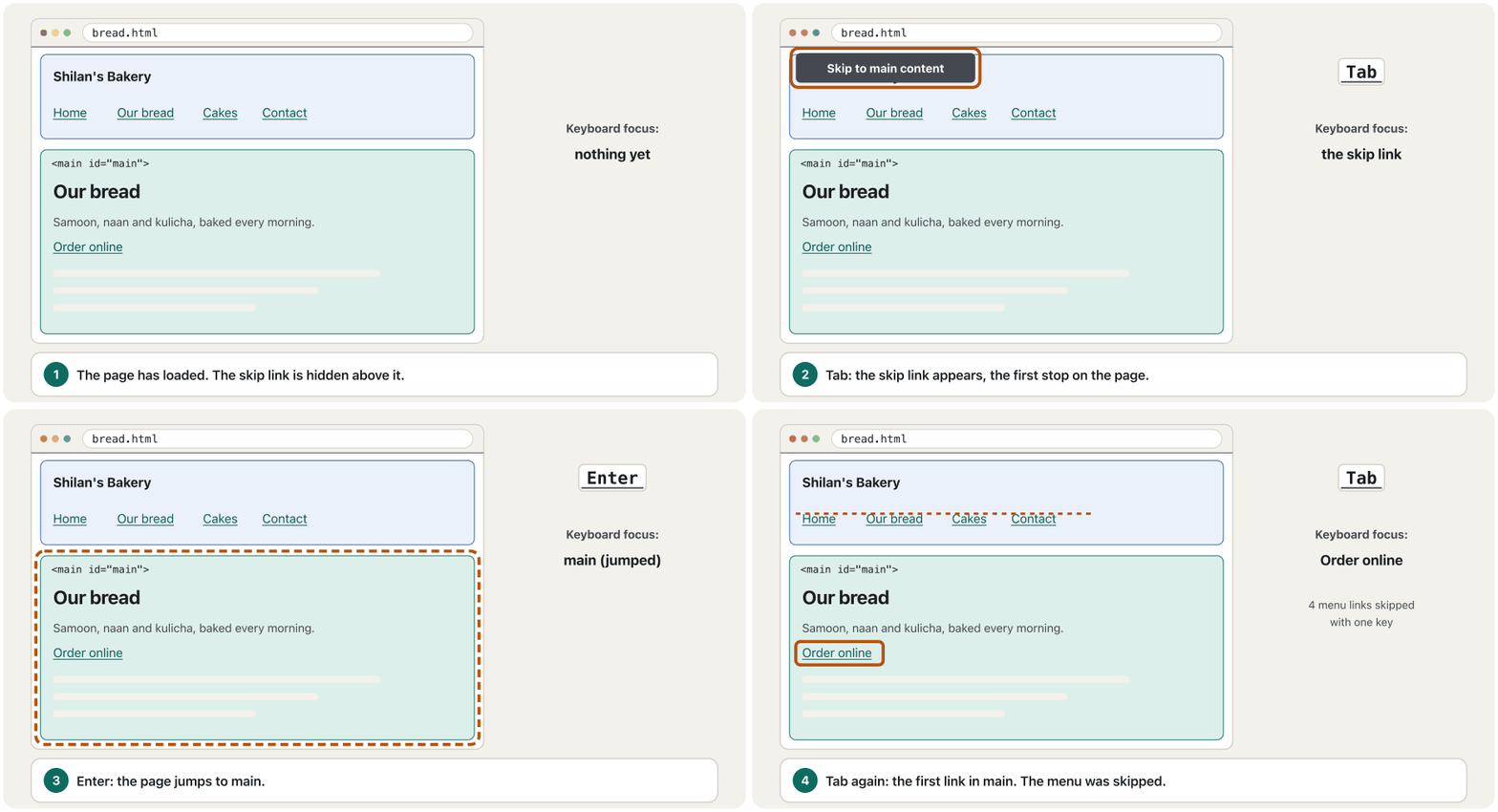
The first link on a page that jumps straight to the main content. It is usually hidden until it gets keyboard , so keyboard and screen-reader users do not have to go through the whole menu on every page.
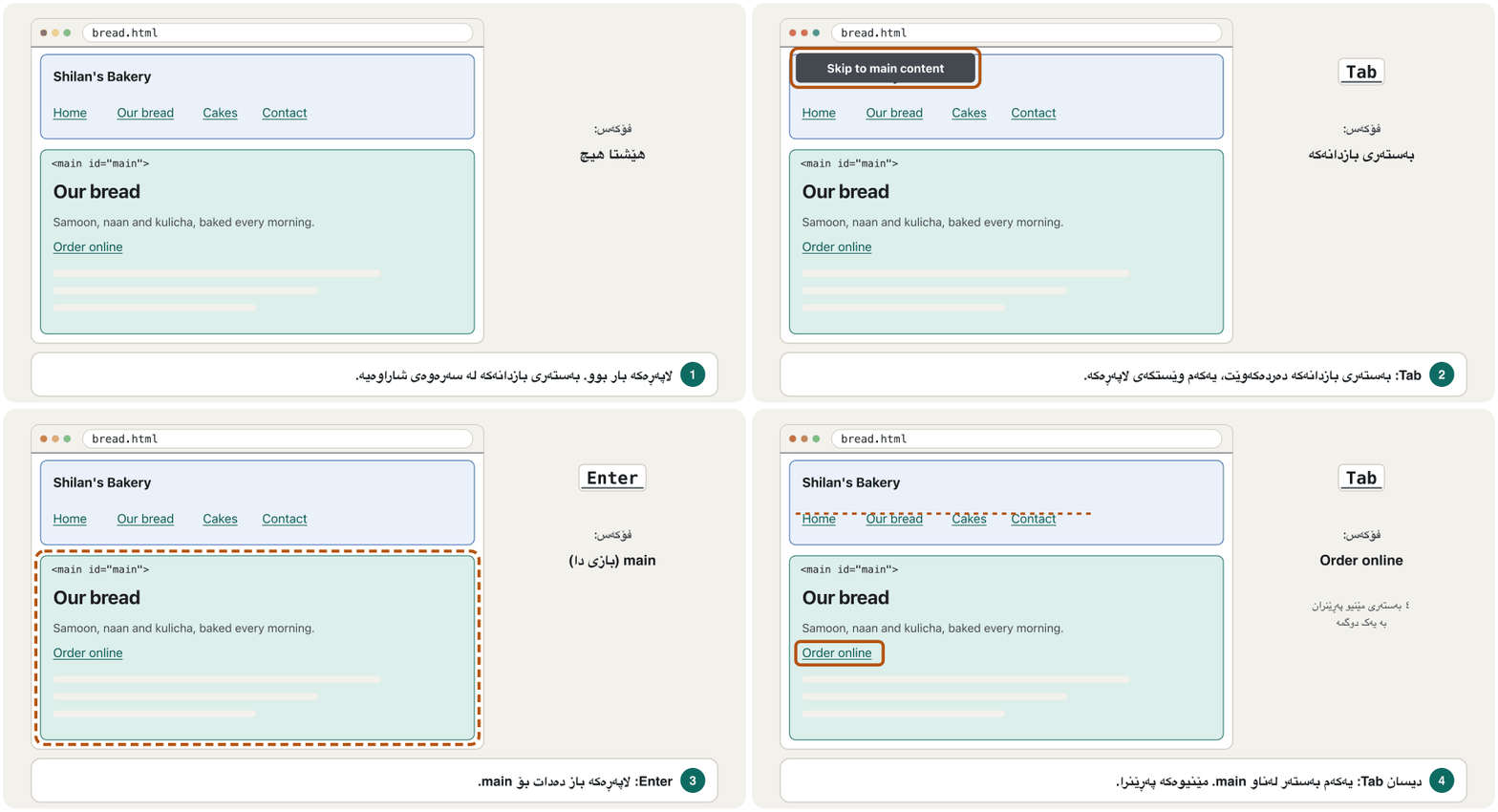
یەکەم لاپەڕەیە کە ڕاستەوخۆ باز دەدات بۆ ناوەڕۆکی سەرەکی. زۆرجار شاراوەیە تا وەردەگرێت. بەم شێوەیە بەکارهێنەرانی و پێویست ناکات لە هەموو لاپەڕەیەکدا بە هەموو تێپەڕن.
Keyboard users press Tab to move from link to link. With a ten-link menu, that is ten presses before the content — on every page. A skip link is the first link in <body> and jumps straight to <main id="main">. It may stay hidden until it gets the focus, but then it must appear on the screen. It meets WCAG 2.2 success criterion 2.4.1, Bypass Blocks; landmarks and headings help too.
بەکارهێنەرانی Tab دادەگرن تا لە بچن بۆ تر. لەگەڵ بە دە ، ئەوە دە جار داگرتنە پێش ناوەڕۆکەکە — لە هەموو لاپەڕەیەکدا. یەکەم ناو <body>ـە و ڕاستەوخۆ باز دەدات بۆ <main id="main">. دەتوانێت شاراوە بێت تا وەردەگرێت، بەڵام ئەو کاتە دەبێت لەسەر شاشە دەربکەوێت. 2.4.1ـی 2.2 (Bypass Blocks) جێبەجێ دەکات؛ و یارمەتی دەدەن.
<!DOCTYPE html>
<html lang="en">
<head>
  <meta charset="utf-8">
  <meta name="viewport" content="width=device-width, initial-scale=1">
  <title>Our bread – Shilan's Bakery</title>
  <style>
    .skip-link {
      position: absolute;
      inset-inline-start: 8px;
      top: -100px;            /* above the screen until it gets focus */
      padding: 8px 16px;
      background: #1b1d20;
      color: #fff;
    }
    .skip-link:focus { top: 8px; }
  </style>
</head>
<body>
  <a class="skip-link" href="#main">Skip to main content</a>
  <header>
    <p>Shilan's Bakery</p>
    <nav aria-label="Main">
      <ul>
        <li><a href="index.html">Home</a></li>
        <li><a href="bread.html" aria-current="page">Our bread</a></li>
        <li><a href="cakes.html">Cakes</a></li>
        <li><a href="contact.html">Contact</a></li>
      </ul>
    </nav>
  </header>
  <main id="main">
    <h1>Our bread</h1>
    <p>Samoon, naan and kulicha, baked every morning. <a href="order.html">Order online</a>.</p>
  </main>
</body>
</html>HTML sent to the browserئەو HTMLـەی دەنێردرێت بۆ تۆڕگەڕ
<!DOCTYPE html>
<html lang="en">
<head>
  <meta charset="utf-8">
  <meta name="viewport" content="width=device-width, initial-scale=1">
  <title>Our bread – Shilan's Bakery</title>
  <style>
    .skip-link {
      position: absolute;
      inset-inline-start: 8px;
      top: -100px;            /* above the screen until it gets focus */
      padding: 8px 16px;
      background: #1b1d20;
      color: #fff;
    }
    .skip-link:focus { top: 8px; }
  </style>
</head>
<body>
  <a class="skip-link" href="#main">Skip to main content</a>
  <header>
    <p>Shilan's Bakery</p>
    <nav aria-label="Main">
      <ul>
        <li><a href="index.html">Home</a></li>
        <li><a href="bread.html" aria-current="page">Our bread</a></li>
        <li><a href="cakes.html">Cakes</a></li>
        <li><a href="contact.html">Contact</a></li>
      </ul>
    </nav>
  </header>
  <main id="main">
    <h1>Our bread</h1>
    <p>Samoon, naan and kulicha, baked every morning. <a href="order.html">Order online</a>.</p>
  </main>
</body>
</html>
Click inside the preview, then press Tab: the skip link appears at the top.
کلیک لەناو پێشبینینەکە بکە، پاشان Tab دابگرە: لە سەرەوە دەردەکەوێت.
Explain the codeڕوونکردنەوەی کۆدەکە
- Lineدێڕی 8-15
Off the screen until it gets the focus;
inset-inline-startkeeps it at the start side in Kurdish pages too.تا وەرنەگرێت لە دەرەوەی شاشەیە؛
inset-inline-startلە لاپەڕە کوردییەکانیشدا لە لای سەرەتاوە دەیهێڵێتەوە.- Lineدێڕی 16
:focusbrings it onto the screen.:focusدەیهێنێتە سەر شاشە.- Lineدێڕی 20
The first link in
<body>.یەکەم ناو
<body>.- Lineدێڕی 32
The target:
id="main"on<main>.ئامانجەکە:
id="main"لەسەر<main>.
Common mistakesهەڵە باوەکان
| Mistakeهەڵە | Do this insteadلەبری ئەوە ئەمە بکە |
|---|---|
| “Click here”, “Read more”, “here”«Click here»، «Read more»، «here» | Link text that says where the link goes.دەقی کە بڵێت بۆ کوێ دەچێت. |
<a href="#"> with a click script, used as a button<a href="#"> کە بە وەک بەکار دەهێنرێت | A real <button> for actions; a link only for a real address.<button>ـی ڕاستەقینە بۆ ئەنجامدانی کارێک؛ تەنیا بۆ ناونیشانێکی ڕاستەقینە. |
| Links in a text that look like plain text ناو دەق کە وەک دەقی ئاسایی دەردەکەون | Underline them and keep a visible focus style.هێڵیان بە ژێردا بهێنە و شێوەیەکی دیاری بهێڵەوە. |
target="_blank" on every linktarget="_blank" لەسەر هەموو | Only where it helps, and say so in the text.تەنیا لەو شوێنەی یارمەتی دەدات و لە دەقەکەدا بیڵێ. |
href="#Prices" but id="prices"href="#Prices" بەڵام id="prices" | Fragment and id must match exactly, letter case too. و id دەبێت ڕێک وەک یەک بن، قەبارەی پیتیش. |
A skip link hidden with display: none کە بە display: none شاراوەتەوە | Off the screen until :focus.لە دەرەوەی شاشە تا :focus. |
| A different menu order on each pageڕیزێکی جیاوازی لە هەر لاپەڕەیەکدا | The same menu in the same order; aria-current on the current page.هەمان بە هەمان ڕیز؛ aria-current لەسەر لاپەڕەی ئێستا. |
| Two menus in the HTML, one for phones and one for computersدوو لە ، یەکێک بۆ مۆبایل و یەکێک بۆ | One menu; CSS changes its layout.یەک ؛ ڕێکخستنەکەی دەگۆڕێت. |
Several <nav>s without namesچەند <nav>ـێک بەبێ ناو | Give each an aria-label: “Main”, “Breadcrumb”.aria-label بدە بە هەریەکەیان: «Main»، «Breadcrumb». |
Exercisesڕاهێنانەکان
A bakery site has four pages: index.html (Home), bread.html (Our bread), cakes.html (Cakes) and contact.html (Contact). Write the menu for cakes.html, with the current page marked for screen readers and for the eye.
نانەواخانەیەک چوار لاپەڕەی هەیە: index.html (Home)، bread.html (Our bread)، cakes.html (Cakes) و contact.html (Contact). بۆ cakes.html بنووسە، بە لاپەڕەی ئێستاوە کە بۆ و بۆ چاو نیشانە کرابێت.
Show answerوەڵامەکە پیشان بدە
<nav aria-label="Main">
  <ul class="menu">
    <li><a href="index.html">Home</a></li>
    <li><a href="bread.html">Our bread</a></li>
    <li><a href="cakes.html" aria-current="page">Cakes</a></li>
    <li><a href="contact.html">Contact</a></li>
  </ul>
</nav>a[aria-current="page"] {
border-bottom: 4px solid #0d6b62;
font-weight: bold;
}On every other page the same menu appears, in the same order; only the position of aria-current changes.
لە هەموو لاپەڕەکانی تردا هەمان بە هەمان ڕیز دەردەکەوێت؛ تەنیا شوێنی aria-current دەگۆڕێت.
A long help page has three parts: Opening hours, Payment and Cakes for events. Write a table of contents for it, give each part an id, and add a “Back to top” link at the end.
لاپەڕەیەکی درێژی یارمەتی سێ بەشی هەیە: Opening hours، Payment و Cakes for events. بۆ بنووسە، idـێک بدە بە هەر بەشێک و لە کۆتاییدا «Back to top» زیاد بکە.
Show answerوەڵامەکە پیشان بدە
<nav aria-labelledby="contents-title">
  <h2 id="contents-title">Contents</h2>
  <ol>
    <li><a href="#opening-hours">Opening hours</a></li>
    <li><a href="#payment">Payment</a></li>
    <li><a href="#cakes-for-events">Cakes for events</a></li>
  </ol>
</nav>
<section>
  <h2 id="opening-hours">Opening hours</h2>
  <p>Every day from 6:00 to 14:00.</p>
</section>
<section>
  <h2 id="payment">Payment</h2>
  <p>Cash or card.</p>
</section>
<section>
  <h2 id="cakes-for-events">Cakes for events</h2>
  <p>Order three days before. <a href="#top">Back to top</a></p>
</section>HTML sent to the browserئەو HTMLـەی دەنێردرێت بۆ تۆڕگەڕ
<nav aria-labelledby="contents-title">
  <h2 id="contents-title">Contents</h2>
  <ol>
    <li><a href="#opening-hours">Opening hours</a></li>
    <li><a href="#payment">Payment</a></li>
    <li><a href="#cakes-for-events">Cakes for events</a></li>
  </ol>
</nav>
<section>
  <h2 id="opening-hours">Opening hours</h2>
  <p>Every day from 6:00 to 14:00.</p>
</section>
<section>
  <h2 id="payment">Payment</h2>
  <p>Cash or card.</p>
</section>
<section>
  <h2 id="cakes-for-events">Cakes for events</h2>
  <p>Order three days before. <a href="#top">Back to top</a></p>
</section>
Click the links in the preview.
لە پێشبینینەکەدا کلیک لە بکە.
The ids use lowercase words joined by hyphens, and every href repeats its id exactly after #.
idـەکان وشەی پیت بچووکن کە بە خەتی ناوەند بەیەکەوە بەستراون و هەموو hrefـێک idـەکەی ڕێک دوای # دووپاتە دەکاتەوە.
Add a skip link to the bakery home page of Semantic HTML. Which two changes do you make in the HTML, and what CSS do you need?
زیاد بکە بۆ نانەواخانەکەی HTMLـی واتایی. کام دوو گۆڕانکاری لە دەکەیت و چ پێویستە؟
Show answerوەڵامەکە پیشان بدە
<body>
  <a class="skip-link" href="#main">Skip to main content</a>
  <header>
    …
  </header>
  <main id="main">
    …
  </main>
</body>.skip-link {
position: absolute;
inset-inline-start: 8px;
top: -100px;
padding: 8px 16px;
background: #1b1d20;
color: #fff;
}
.skip-link:focus { top: 8px; }Test it: reload the page and press Tab once. The link must appear; Enter must take you to the main content.
تاقی بکەرەوە: لاپەڕەکە نوێ بکەرەوە و یەک جار Tab دابگرە. دەبێت دەربکەوێت؛ Enter دەبێت بتبات بۆ ناوەڕۆکی سەرەکی.
Summaryپوختە
idplus#: links to places in a page, tables of contents and “Back to top”;scroll-margin-topunder a sticky header.target="_blank"rarely, and announced in the link text; browsers addnoopenerthemselves.tel:,mailto:anddownloadlinks; give the type and size of files.- Link text must make sense on its own (WCAG 2.4.4).
- Menus:
nav > ul > li > a,aria-current="page"plus a visible style, the same order on every page (WCAG 3.2.3). - Breadcrumbs: a named
navwith an<ol>, separators from CSS, the current page last. - A skip link first in
<body>, visible on focus (WCAG 2.4.1); on phones a visible menu or a real Menu button.
idلەگەڵ#: بۆ شوێنی ناو لاپەڕە، و «Back to top»؛scroll-margin-topلە ژێر لکاودا.target="_blank"بە کەمی و بە ڕاگەیاندن لە دەقی ؛ خۆیانnoopenerزیاد دەکەن.-
tel:،mailto:وdownload؛ جۆر و قەبارەی بنووسە. - دەقی دەبێت بە تەنیا واتای هەبێت ( 2.4.4).
- :
nav > ul > li > a،aria-current="page"لەگەڵ شێوەیەکی دیار، هەمان ڕیز لە هەموو لاپەڕەیەکدا ( 3.2.3). - :
navـێکی ناونراو بە<ol>ـێک، جیاکەرەوە لە ، لاپەڕەی ئێستا لە کۆتاییدا. - یەکەم شت لە
<body>، دیار کاتێک وەردەگرێت ( 2.4.1)؛ لەسەر مۆبایل دیار یان ڕاستەقینەی Menu.
What is the fragment of a URL, and does the server see it?پارچەی URL چییە و ئایا ڕاژەکار دەیبینێت؟
The part after #. It names a place in the page; the browser scrolls there and never sends the fragment to the server.
ئەو بەشەیە کە دوای # دێت. ناوی شوێنێک لە لاپەڕەکەدا دەبات؛ بۆ ئەوێ دەچێت و هەرگیز نانێرێت بۆ .
Why use aria-current="page" and not only a colour?بۆچی aria-current="page" بەکاربهێنین و نەک تەنیا ڕەنگێک؟
Screen readers announce aria-current, and the same attribute can carry a visible style that does not depend on colour.
aria-current ڕادەگەیەنن و هەمان دەتوانێت شێوەیەکی دیار هەڵبگرێت کە پشت بە ڕەنگ نابەستێت.
Who needs a skip link, and how is it hidden?کێ پێویستی بە بەستەری بازدان هەیە و چۆن دەشاردرێتەوە؟
Keyboard and screen-reader users, to pass the repeated menu. It is moved off the screen and comes back with :focus — never display: none.
بەکارهێنەرانی و ، بۆ تێپەڕین بە دووپاتەکەدا. دەبرێتە دەرەوەی شاشە و بە :focus دەگەڕێتەوە — هەرگیز display: none.
Lesson complete!وانەکە تەواو بوو!
Well done. Review the key terms, then go on to the next lesson.دەستخۆش. سەیرێکی زاراوە سەرەکییەکان بکەرەوە، پاشان بڕۆ بۆ وانەی داهاتوو.
Key termsزاراوە سەرەکییەکان
Images for the Web: Formats, Size and Responsive Imagesوێنە بۆ وێب: جۆرەکانی فایل، قەبارە و وێنە ڕێسپۆنسیڤەکان
Related lecturesوانە پەیوەندیدارەکان
- HTML Text, Images and Listsدەق، وێنە و لیست لە HTMLـدا
- CSS Selectors, Pseudo-classes and Pseudo-elementsهەڵبژێرەکانی CSS، نیمچەکلاسەکان و نیمچەتوخمەکان
- Flexbox: Layout in One DirectionFlexbox: ڕێکخستن بە یەک ئاڕاستە
- The Website Development Life Cycleسووڕی ژیانی گەشەپێدانی تۆڕگە
- Including Files: include and requireهاوردەکردنی فایل: include و require
- A First Look at JavaScript: Making Pages Interactiveسەرەتایەک بۆ JavaScript: لاپەڕەی کارلێککار
References and further readingسەرچاوەکان و خوێندنەوەی زیاتر
- web.dev Learn HTML: Links
- web.dev Learn HTML: Navigation
- MDN: <a>: The Anchor element
- MDN: :target
- MDN: scroll-margin-top
- CSS Scroll Snap Module Level 1: scroll margins in scroll-into-view
- Can I use: target="_blank" implies rel="noopener"
- W3C: Understanding SC 2.4.4 Link Purpose (In Context)
- W3C: Understanding SC 2.4.1 Bypass Blocks
- W3C: Understanding SC 3.2.3 Consistent Navigation
- WAI-ARIA Authoring Practices: Breadcrumb pattern and example
- WebAIM: “Skip Navigation” Links
- NN/g: Hamburger menus and hidden navigation hurt UX metrics (mobile)
- Wikipedia: Breadcrumb navigation
- NVDA User Guide (Elements List)
This lecture is a first edition. The Kurdish text and terminology are waiting for review by Kurdish IT teachers.ئەم وانەیە چاپی یەکەمە. دەقە کوردییەکە و زاراوەکانی چاوەڕێی پێداچوونەوەی مامۆستایانی کوردی بواری IT ن.