Chapterبەش 6 · Lectureوانە 6.3
Designing Usable Formsدیزاینکردنی فۆرمی ئاسان بۆ پڕکردنەوە
How to design forms people can finish: one column with labels above, asking only for what you need, hints and “(optional)”, the right phone keyboard with type and inputmode, autofill with autocomplete tokens, helpful error messages shown with :user-invalid, an error summary and the focus, clear button texts, styled controls that stay accessible (also in Kurdish), a safe and easy log-in, and a registration form redesigned step by step.
چۆن دیزاین بکەیت کە خەڵک بتوانن تەواوی بکەن: یەک ستوون بە سەرەوە، پرسینی تەنیا ئەوەی پێویستە، ڕێنمایی و «(ئارەزوومەندانە)»، گونجاوی مۆبایل بە type و inputmode، بە تۆکنەکانی autocomplete، بەسوود کە بە :user-invalid پیشان دەدرێن، و ، دەقی ڕوونی ، کۆنترۆڵی شێوەپێدراو کە بۆ هەمووان بەکاردێن (بە کوردیش)، سەلامەت و ئاسان، هەروەها کە هەنگاو بە هەنگاو دیزاین کراوەتەوە.
What you will learnچی فێر دەبیت
- Lay out a form in one column with labels above the fields, grouped and in a logical order, asking only for what you need.
- Write labels, hints and “(optional)” marks, and never use a placeholder as a label.
- Bring up the right phone keyboard with type and inputmode, and enable autofill with autocomplete tokens.
- Write error messages that say what is wrong and how to fix it, show them at the right time with :user-invalid, and add an error summary.
- Style buttons and controls so they stay clear, large enough and accessible, also in Kurdish forms with dir="auto".
- Design a log-in that allows paste, password managers and a show-password button.
- بە یەک ستوون، لە سەرووی خانەکانەوە، خانەی کۆکراوە و ڕیزبەندییەکی لۆجیکی ڕێک بخەیت و تەنیا ئەوە بپرسیت کە پێویستە.
- ، ڕێنمایی و نیشانەی «(ئارەزوومەندانە)» بنووسیت و هەرگیز وەک بەکار نەهێنیت.
- بە
typeوinputmodeگونجاوی مۆبایل بهێنیت و بە تۆکنەکانیautocompleteچالاک بکەیت. - بنووسیت کە بڵێن چی هەڵەیە و چۆن چاک دەکرێتەوە، بە
:user-invalidلە کاتی گونجاودا پیشانیان بدەیت و زیاد بکەیت. - و کۆنترۆڵەکان بە شێوەیەک شێوە بدەیت کە ڕوون، بەس گەورە و بۆ هەمووان بەکارهاتوو بمێننەوە، لە کوردیشدا بە
dir="auto". - دیزاین بکەیت کە ڕێگە بە ، و پیشاندانی بدات.
Why form design mattersبۆچی دیزاینی فۆرم گرنگە
A form is the moment a visitor gives you something: an order, a registration, a question. It is also where many people give up — a long form, a confusing question or an error message that blames them, and they leave. Good form design means fewer mistakes, more finished orders and less work for you. HTML Forms taught the elements, and Form validation teaches the checks on the server; this lesson is about the design in between: what to ask, in which order and with which words.
ئەو ساتەیە کە سەردانکەرێک شتێکت پێدەدات: داواکارییەک، ، پرسیارێک. هەروەها ئەو شوێنەیە کە زۆر کەس وازی لێدەهێنن — درێژ، پرسیارێکی ناڕوون یان کە تاوانباریان دەکات؛ ئیتر دەڕۆن. دیزاینی باشی واتە هەڵەی کەمتر، داواکاریی تەواوکراوی زیاتر و کاری کەمتر بۆ تۆ. فۆرمەکانی HTML توخمەکانی فێر کردیت و پشتڕاستکردنەوە پشکنینەکانی سەر فێر دەکات؛ ئەم وانەیە لەبارەی دیزاینی نێوانیانە: چی بپرسیت، بە چ ڕیزبەندییەک و بە چ وشەیەک.
Think of a form as a conversation. A good shopkeeper asks one clear question at a time, never asks twice and says politely what is missing — your form should do the same.
وەک گفتوگۆیەک وێنا بکە. دووکاندارێکی باش لە یەک کاتدا یەک پرسیاری ڕوون دەکات، هەرگیز دوو جار ناپرسێت و بە ڕێزەوە دەڵێت چی کەمە — دەبێت هەمان شت بکات.
One column, labels aboveیەک ستوون، لەیبڵەکان لە سەرەوە
Put the fields in one column, with each label above its field. The eye then moves straight down one line, and nobody misses a field; in two columns the eye zig-zags and people skip fields or fill them in the wrong order (web.dev). Keep the order people think in — name, then contact details, then the order. Group related fields in a <fieldset> with a <legend>: a group of radio buttons always needs one (A login form with fieldset, legend and placeholder).
خانەکان لە یەک ستووندا دابنێ و هەر خانەیەک لە سەرووی خۆیەوە بێت. ئەو کاتە چاو ڕاستەوخۆ بە یەک هێڵدا بۆ خوارەوە دەڕوات و کەس خانەیەک لەبیر ناکات؛ لە دوو ستووندا چاو زیگزاگ دەکات و خەڵک خانە تێدەپەڕێنن یان بە ڕیزبەندیی هەڵە پڕیان دەکەنەوە (web.dev). ئەو ڕیزبەندییە بپارێزە کە خەڵک بیری پێدەکەنەوە — ناو، پاشان زانیاریی پەیوەندی، پاشان داواکارییەکە. خانە پەیوەندیدارەکان لە <fieldset>ـێکدا لەگەڵ <legend>ـێک کۆ بکەرەوە: کۆمەڵێک هەمیشە پێویستی بە یەکێکە (فۆرمێکی چوونەژوورەوە بە fieldset، legend و placeholder).
One column, labels aboveیەک ستوون، لەیبڵەکان لە سەرەوە
Ask only for what you needتەنیا ئەوە بپرسە کە پێویستتە
Every field costs the person time and is one more chance to make a mistake — and every piece of personal data you collect must be protected. The GDPR's rule of data minimisation says personal data must be “limited to what is necessary” for its purpose (What the GDPR protects). For each field ask: what will we do with this answer? If nothing, delete the field.
هەر خانەیەک کاتی کەسەکە دەبات و دەرفەتێکی تری هەڵەیە — هەروەها هەموو کە کۆی دەکەیتەوە دەبێت بپارێزرێت. ڕێسای کەمکردنەوەی لە GDPRـدا دەڵێت دەبێت «سنووردار بێت بەوەی کە پێویستە» بۆ مەبەستەکەی (GDPR چی دەپارێزێت). بۆ هەر خانەیەک بپرسە: ئەم وەڵامە چی لێدەکەین؟ ئەگەر هیچ، خانەکە بسڕەوە.
Names differ between cultures. Many Kurdish names are a given name plus the father's name, and some people have only one name. One Full name field is often best; if you must split it, avoid “first name” and “last name” and never require a family name (W3C).
ناو لە کولتوورێکەوە بۆ یەکێکی تر جیاوازە. زۆر ناوی کوردی ناوی کەسەکە و ناوی باوکە و هەندێک کەس تەنیا یەک ناویان هەیە. یەک خانەی ناوی تەواو زۆرجار باشترینە؛ ئەگەر ناچار بوویت دابەشی بکەیت، «ناوی یەکەم» و «ناوی کۆتایی» بەکارمەهێنە و هەرگیز ناوی خێزان پێویست مەکە (W3C).
Labels, not placeholdersلەیبڵ، نەک placeholder
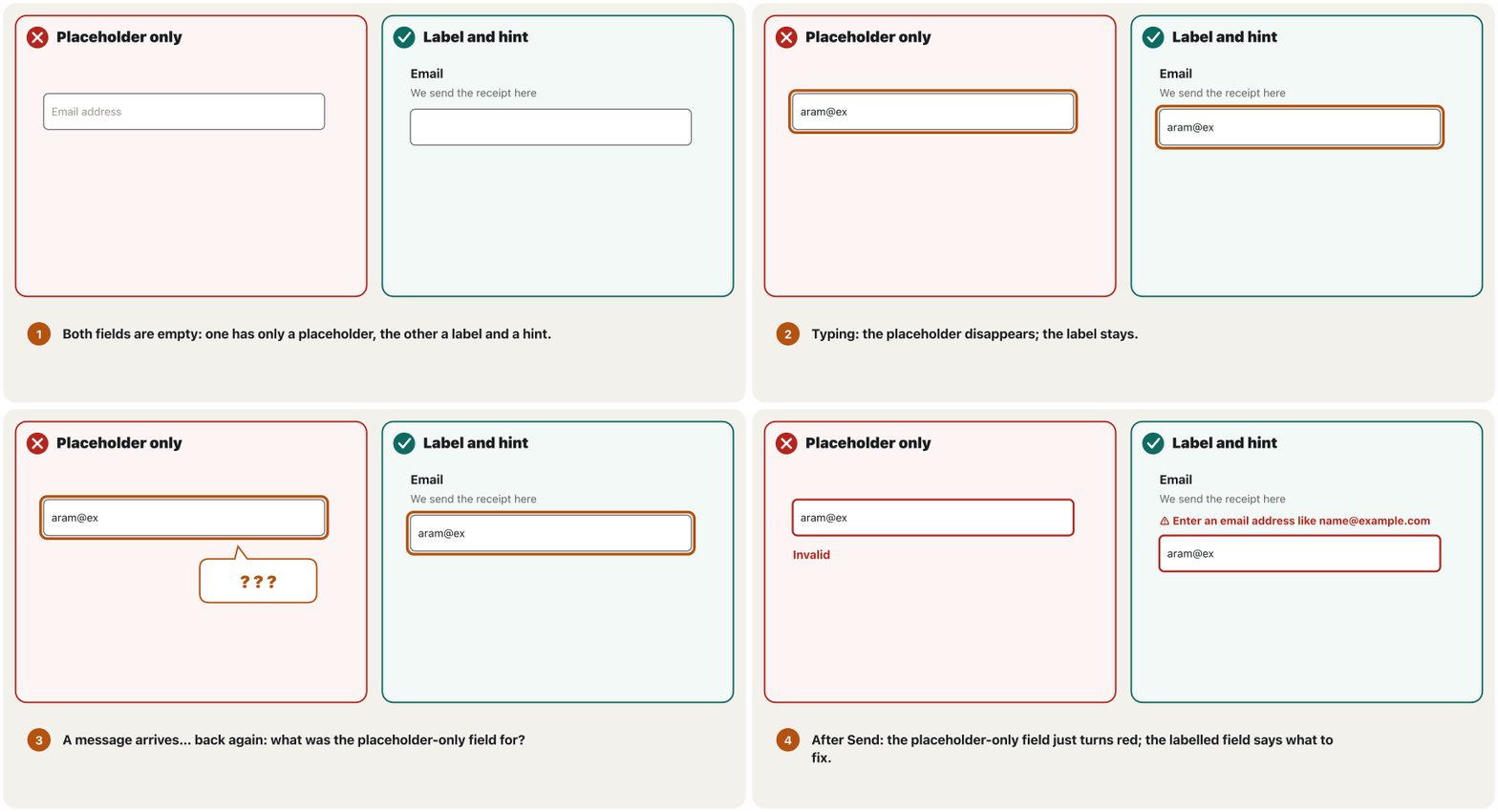
An that shows a grey hint inside an empty field, such as 'Enter your email'. The hint disappears when the user types; it is not a value and does not replace a .
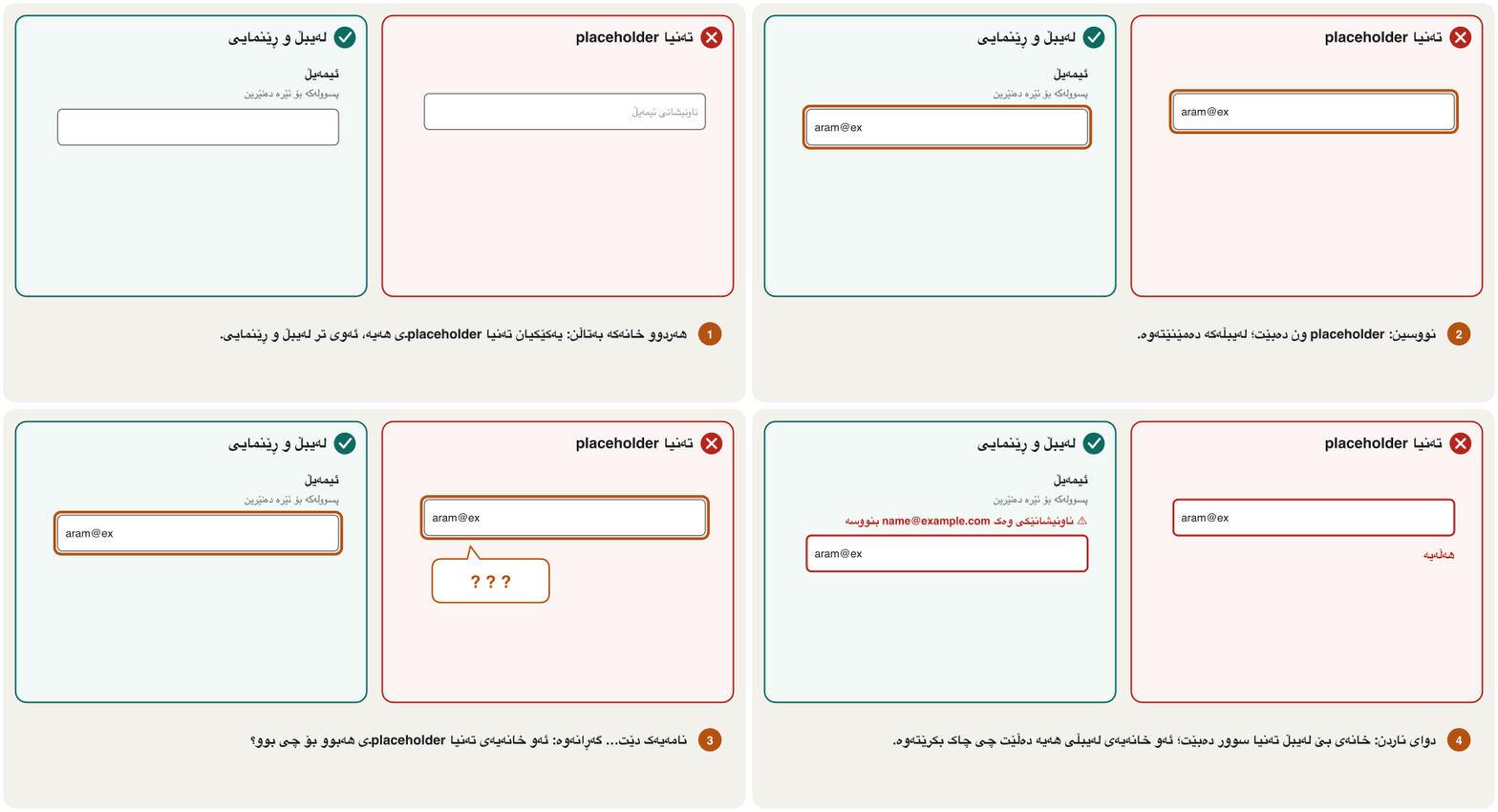
خەسڵەتێکی HTML5ـە کە ڕێنماییەکی خۆڵەمێشی لەناو خانەیەکی بەتاڵدا پیشان دەدات، وەک «ئیمەیڵەکەت بنووسە». کاتێک بەکارهێنەر دەنووسێت ون دەبێت؛ نرخ نییە و جێگەی ناگرێتەوە.
Every field needs a visible label that stays. A placeholder — the grey text inside an empty field — is only a hint: it disappears as soon as the person types, so they forget what the field was for, cannot check their answers before sending and see nothing helpful when an error appears. Pale placeholder text is also hard to read, and some screen readers do not announce it (Nielsen Norman Group). If you use a placeholder at all, use it for an example, never for the label.
هەموو خانەیەک پێویستی بە دیار هەیە کە بمێنێتەوە. — دەقە خۆڵەمێشییەکەی ناو خانەیەکی بەتاڵ — تەنیا ڕێنماییە: هەر کە کەسەکە دەنووسێت ون دەبێت، بۆیە لەبیری دەچێت خانەکە بۆ چی بوو، ناتوانێت پێش ناردن وەڵامەکانی بپشکنێت و کاتێک هەڵەیەک دەردەکەوێت هیچ شتێکی بەسوود نابینێت. دەقی کاڵی خوێندنەوەشی قورسە و هەندێک ڕای ناگەیەنن (Nielsen Norman Group). ئەگەر هەر بەکاردەهێنیت، بۆ نموونەیەکی بەکاربهێنە، هەرگیز بۆ نا.
Labels, not placeholdersلەیبڵ، نەک placeholder
Hints, optional fields and field widthsڕێنمایی، خانەی ئارەزوومەندانە و پانیی خانە
A hint sits between the label and the field and says what a good answer looks like — “11 digits, starting with 07” — before anyone makes a mistake. Tie it to the field with aria-describedby, so screen readers read it too. Mark the fewer kind of field: if most fields are required, write “(optional)” after the label of the few others, in words (GOV.UK). And make each field about as wide as its answer: the width itself is a hint.
ڕێنمایی لە نێوان و خانەکەدایە و دەڵێت وەڵامێکی باش چۆنە — «١١ ژمارە، بە 07 دەست پێدەکات» — پێش ئەوەی کەس هەڵە بکات. بە aria-describedby بە خانەکەوە بیبەستەرەوە، بۆ ئەوەی بیخوێننەوە. ئەو جۆرە خانەیە نیشانە بکە کە کەمترە: ئەگەر زۆربەی خانەکان پێویستن، دوای ئەوانی تر «(ئارەزوومەندانە)» بنووسە، بە وشە (GOV.UK). هەروەها هەر خانەیەک نزیکەی بە ئەندازەی وەڵامەکەی پان بکە: پانییەکە خۆی ڕێنماییە.
<form action="/order" method="post">
  <label for="phone">Phone</label>
  <p class="hint" id="phone-hint">11 digits, starting with 07</p>
  <input class="short" id="phone" name="phone" type="tel" autocomplete="tel"
         required aria-describedby="phone-hint">

  <label for="message">Message (optional)</label>
  <textarea id="message" name="message" rows="3"></textarea>
</form>HTML sent to the browserئەو HTMLـەی دەنێردرێت بۆ تۆڕگەڕ
<!DOCTYPE html>
<html lang="en">
<head>
<meta charset="utf-8">
<meta name="viewport" content="width=device-width, initial-scale=1">
<title>Label, hint and optional</title>
<style>
body { font-family: system-ui, sans-serif; margin: 1rem; max-width: 26rem; color: #1b1d20; }
label { display: block; font-weight: 600; margin-block: 1rem 0.25rem; }
.hint { color: #595959; margin-block: 0 0.35rem; }
input, select, textarea, button { font: inherit; }
input, textarea { box-sizing: border-box; width: 100%; padding: 0.45rem 0.6rem; border: 1px solid #767676; border-radius: 0.4rem; }
button { margin-block-start: 1rem; padding: 0.6rem 1.2rem; border: 0; border-radius: 0.5rem; background: #0d6b62; color: #ffffff; font-weight: 700; }
:focus-visible { outline: 3px solid #b4530f; outline-offset: 2px; }

.short { max-width: 11rem; }
</style>
</head>
<body>
<form action="/order" method="post">
  <label for="phone">Phone</label>
  <p class="hint" id="phone-hint">11 digits, starting with 07</p>
  <input class="short" id="phone" name="phone" type="tel" autocomplete="tel"
         required aria-describedby="phone-hint">

  <label for="message">Message (optional)</label>
  <textarea id="message" name="message" rows="3"></textarea>
</form>
</body>
</html>
Explain the codeڕوونکردنەوەی کۆدەکە
- Lineدێڕی 3
The hint has an id…
ڕێنماییەکە
idـی هەیە…- Lineدێڕی 4-5
…and aria-describedby joins it to the field.
…
aria-describedbyبە خانەکەوەی دەبەستێتەوە.- Lineدێڕی 7
Only the one optional field is marked, in words.
تەنیا تاکە خانە ئارەزوومەندانەکە نیشانە کراوە، بە وشە.
The right keyboard on a phoneکیبۆردی گونجاو لەسەر مۆبایل
A drawn on a that you type on by tapping the screen, as on phones and tablets. Windows and macOS also have one for people who cannot use a physical keyboard.
کە لەسەر کێشراوە و بە دەستلێدان لە شاشەکە تایپی لەسەر دەکەیت، وەک لە مۆبایل و . Windows و macOS یەکێکیان هەیە بۆ ئەو کەسانەی ناتوانن کیبۆردی ڕاستەقینە بەکار بهێنن.
On a phone, a field's type chooses the keyboard: type="email" adds the @ key, type="tel" shows a phone keypad and type="url" adds / and .com. For numbers that are not amounts — a student ID, a PIN, a card number — use type="text" with inputmode="numeric": you get a digit keyboard without the up and down arrows of type="number", and leading zeros stay. inputmode changes only the keyboard; it checks nothing, so add pattern or check on the server.
لەسەر مۆبایل، typeـی خانەیەک هەڵدەبژێرێت: type="email" دوگمەی @ زیاد دەکات، type="tel" تەختەی ژمارەی تەلەفۆن پیشان دەدات و type="url" نیشانەکانی / و .com زیاد دەکات. بۆ ئەو ژمارانەی بڕی پارە یان چەندایەتی نین — ژمارەی قوتابی، PIN، ژمارەی کارت — type="text" لەگەڵ inputmode="numeric" بەکاربهێنە: ژمارە وەردەگریت بێ تیرەکانی سەرەوە و خوارەوەی type="number" و سفرەکانی سەرەتاش دەمێننەوە. inputmode تەنیا دەگۆڕێت؛ هیچ ناپشکنێت، بۆیە pattern زیاد بکە یان لەسەر بیپشکنە.
typeـی گونجاو خەڵک لە گەڕان بەدوای دوگمەی @دا ڕزگار دەکات.CêIT<label for="email">Email</label>
<input id="email" name="email" type="email" autocomplete="email">
<label for="phone">Phone</label>
<input id="phone" name="phone" type="tel" autocomplete="tel">
<label for="student-id">Student ID (6 digits)</label>
<input id="student-id" name="student-id" type="text"
inputmode="numeric" pattern="[0-9]{6}">HTML sent to the browserئەو HTMLـەی دەنێردرێت بۆ تۆڕگەڕ
<!DOCTYPE html>
<html lang="en">
<head>
<meta charset="utf-8">
<meta name="viewport" content="width=device-width, initial-scale=1">
<title>Phone keyboards</title>
<style>
body { font-family: system-ui, sans-serif; margin: 1rem; max-width: 26rem; color: #1b1d20; }
label { display: block; font-weight: 600; margin-block: 1rem 0.25rem; }
.hint { color: #595959; margin-block: 0 0.35rem; }
input, select, textarea, button { font: inherit; }
input, textarea { box-sizing: border-box; width: 100%; padding: 0.45rem 0.6rem; border: 1px solid #767676; border-radius: 0.4rem; }
button { margin-block-start: 1rem; padding: 0.6rem 1.2rem; border: 0; border-radius: 0.5rem; background: #0d6b62; color: #ffffff; font-weight: 700; }
:focus-visible { outline: 3px solid #b4530f; outline-offset: 2px; }
</style>
</head>
<body>
<form action="/register" method="post">
<label for="email">Email</label>
<input id="email" name="email" type="email" autocomplete="email">

<label for="phone">Phone</label>
<input id="phone" name="phone" type="tel" autocomplete="tel">

<label for="student-id">Student ID (6 digits)</label>
<input id="student-id" name="student-id" type="text"
       inputmode="numeric" pattern="[0-9]{6}">
</form>
</body>
</html>Explain the codeڕوونکردنەوەی کۆدەکە
- Lineدێڕی 2
Email keyboard, and the browser checks the @.
ئیمەیڵ و @ دەپشکنێت.
- Lineدێڕی 5
Phone keypad; type="tel" checks no format.
تەختەی ژمارەی تەلەفۆن؛
type="tel"هیچ شێوەیەک ناپشکنێت.- Lineدێڕی 8-9
Digits only on the keyboard; pattern asks for exactly six.
تەنیا ژمارە لەسەر ؛
patternڕێک شەش ژمارە داوا دەکات.
The right keyboard on a phoneکیبۆردی گونجاو لەسەر مۆبایل
Autofill with autocomplete tokensپڕکردنەوەی خۆکار بە تۆکنەکانی autocomplete
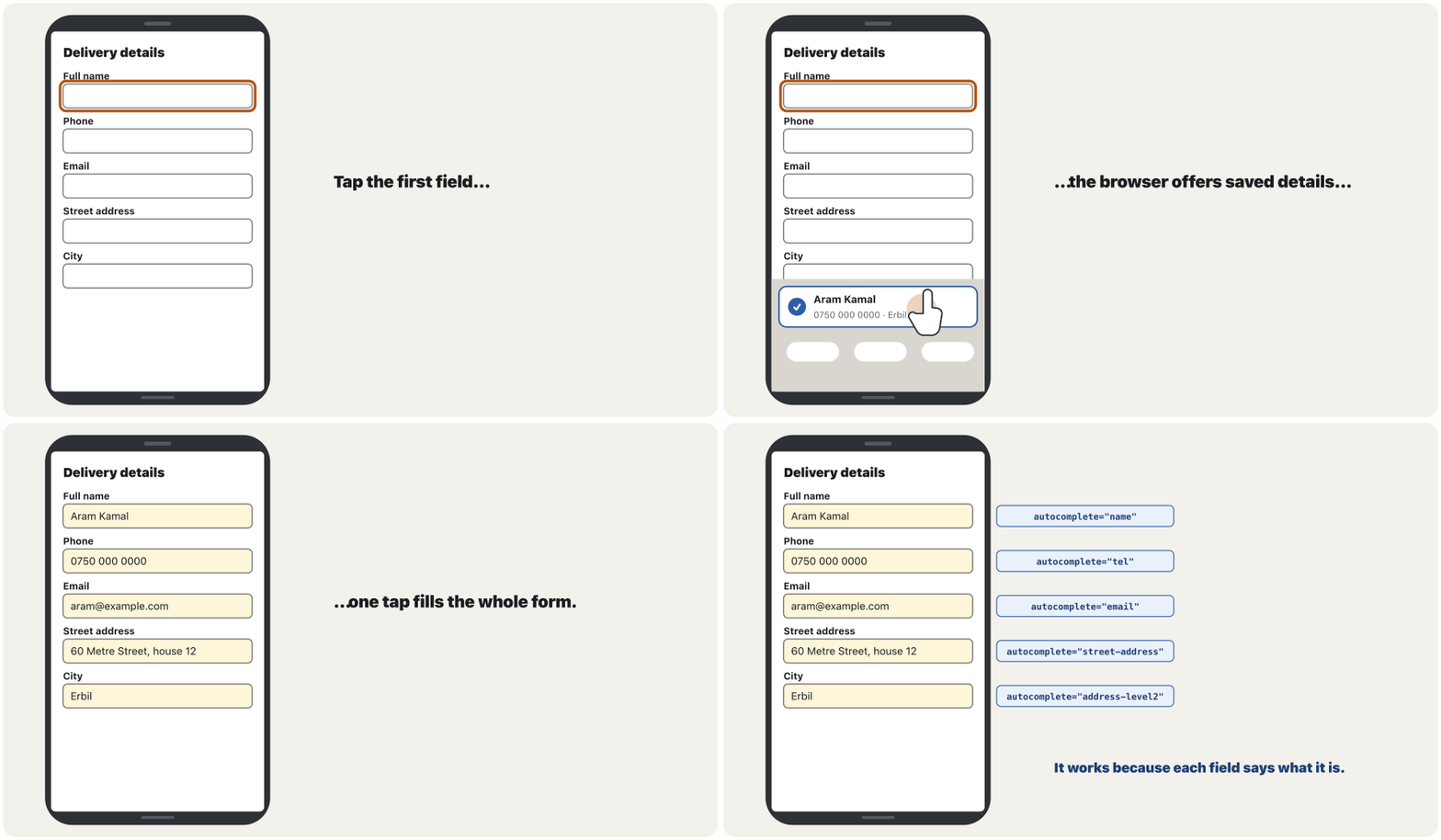
A feature of the browser or of a that fills in a form with saved details — name, email, address, a password or a one-time code — in one tap. The HTML autocomplete attribute (name, email, tel, street-address, current-password, one-time-code…) tells it which field is which.
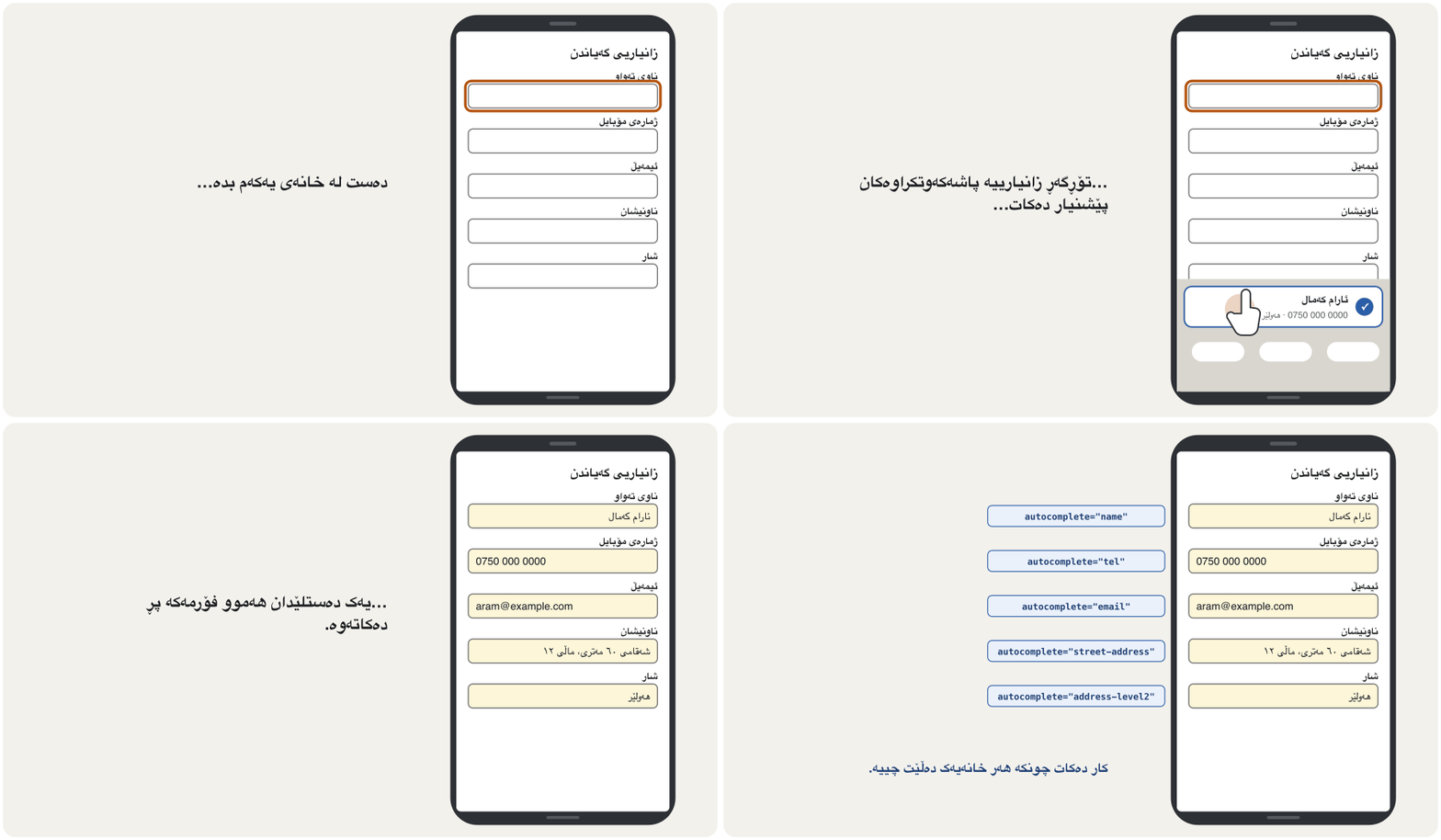
تایبەتمەندییەکی یان کە بە یەک دەستلێدان بە زانیاریی پاشەکەوتکراو پڕ دەکاتەوە — ناو، ، ناونیشان، یان کۆدێکی یەکجاری. autocompleteـی (name، email، tel، street-address، current-password، one-time-code…) پێی دەڵێت کام خانە کامەیە.
Browsers and password managers can fill a whole form in one tap — if every field says what it is. The autocomplete attribute does that with standard tokens, and the tokens also meet WCAG 1.3.5 Identify Input Purpose (AA). The browser's autofill does not count for 3.3.7 Redundant Entry (A): that rule asks your own form not to ask twice in one process — fill in or offer what the person already gave, such as a “Same as the delivery address” box.
و دەتوانن بە یەک دەستلێدان هەموو پڕ بکەنەوە — ئەگەر هەموو خانەیەک بڵێت چییە. autocomplete ئەمە بە تۆکنی ستاندارد دەکات و تۆکنەکان هەروەها 1.3.5 Identify Input Purpose (AA) جێبەجێ دەکەن. بەڵام بۆ 3.3.7 Redundant Entry (A) ناژمێردرێت: ئەو ڕێسایە داوا لە خۆت دەکات لە یەک پرۆسەدا دوو جار هەمان شت نەپرسێت — ئەوەی کەسەکە پێشتر داویەتی خۆت پڕی بکەرەوە یان بۆ هەڵبژاردن پێشکەشی بکە، وەک خانەی «هەمان ناونیشانی گەیاندن».
| Fieldخانە | Tokenتۆکن |
|---|---|
| Full name / given name / family nameناوی تەواو / ناوی کەس / ناوی خێزان | name · given-name · family-name |
| Email · phoneئیمەیڵ · ژمارەی مۆبایل | email · tel |
| Street address · cityناونیشان · شار | street-address · address-level2 |
| Username · password at log-in · لە کاتی | username · current-password |
| A new password at sign-up نوێ لە کاتی | new-password |
| A code sent by SMS or an appکۆدێک کە بە SMS یان نێردراوە | one-time-code |
Checking answers: when and howپشکنینی وەڵامەکان: کەی و چۆن
HTML can check answers before sending: required, type="email", minlength, maxlength and pattern (Important HTML5 attributes). Style the problems with :user-invalid, not :invalid: :invalid matches an empty required field as soon as the page loads, so the form looks full of errors before anyone has typed; :user-invalid waits until the person has worked with the field or tried to send the form. It is Baseline widely available — in all main browsers since November 2023.
دەتوانێت پێش ناردن وەڵامەکان بپشکنێت: required، type="email"، minlength، maxlength و pattern (خەسڵەتەکان گرنگەکانی HTML5). کێشەکان بە :user-invalid شێوە بدە، نەک بە :invalid: :invalid هەر کە لاپەڕەکە بار دەبێت لەسەر بەتاڵ جێبەجێ دەبێت، بۆیە پێش ئەوەی کەس بنووسێت پڕ لە هەڵە دەردەکەوێت؛ :user-invalid چاوەڕێ دەکات تا کەسەکە کاری لەگەڵ خانەکە کردبێت یان هەوڵی ناردنی دابێت. بە فراوانی بەردەستە — لە نۆڤەمبەری 2023ەوە لە هەموو سەرەکییەکاندا.
<style>
input:user-invalid { border: 2px solid #b3261e; }
input:user-invalid + .error { display: block; }
.error { display: none; color: #b3261e; font-weight: 600; }
</style>

<form action="/order" method="post">
  <label for="email">Email</label>
  <input id="email" name="email" type="email" required>
  <p class="error">⚠ Enter an email address like name@example.com</p>
  <button type="submit">Send</button>
</form>HTML sent to the browserئەو HTMLـەی دەنێردرێت بۆ تۆڕگەڕ
<!DOCTYPE html>
<html lang="en">
<head>
<meta charset="utf-8">
<meta name="viewport" content="width=device-width, initial-scale=1">
<title>user-invalid</title>
<style>
body { font-family: system-ui, sans-serif; margin: 1rem; max-width: 26rem; color: #1b1d20; }
label { display: block; font-weight: 600; margin-block: 1rem 0.25rem; }
.hint { color: #595959; margin-block: 0 0.35rem; }
input, select, textarea, button { font: inherit; }
input, textarea { box-sizing: border-box; width: 100%; padding: 0.45rem 0.6rem; border: 1px solid #767676; border-radius: 0.4rem; }
button { margin-block-start: 1rem; padding: 0.6rem 1.2rem; border: 0; border-radius: 0.5rem; background: #0d6b62; color: #ffffff; font-weight: 700; }
:focus-visible { outline: 3px solid #b4530f; outline-offset: 2px; }

input:user-invalid { border: 2px solid #b3261e; }
input:user-invalid + .error { display: block; }
.error { display: none; color: #b3261e; font-weight: 600; }
</style>
</head>
<body>
<form action="/order" method="post">
  <label for="email">Email</label>
  <input id="email" name="email" type="email" required>
  <p class="error">⚠ Enter an email address like name@example.com</p>
  <button type="submit">Send</button>
</form>
</body>
</html>
Type a few letters, then press Tab or Send: only then do the red border and the message appear. A real form also links the message with aria-describedby and switches aria-invalid on; switching it needs a little JavaScript (A live message with JavaScript).
چەند پیتێک بنووسە، پاشان Tab یان Send دابگرە: تەنیا ئەو کاتە چوارچێوە سوورەکە و پەیامەکە دەردەکەون. ڕاستەقینە پەیامەکەش بە aria-describedby دەبەستێتەوە و aria-invalid دادەنێت؛ گۆڕینی aria-invalid پێویستی بە کەمێک هەیە (پەیامێکی زیندوو بە JavaScript).
Explain the codeڕوونکردنەوەی کۆدەکە
- Lineدێڕی 2
Red border only after the person has worked with the field.
چوارچێوەی سوور تەنیا دوای ئەوەی کەسەکە کاری لەگەڵ خانەکە کردووە.
- Lineدێڕی 3-4
The message right after the field appears at the same moment.
پەیامەکەی ڕاست دوای خانەکە لە هەمان ساتدا دەردەکەوێت.
Checking answers: when and howپشکنینی وەڵامەکان: کەی و چۆن
Error messages that helpهەڵەنامەکان کە یارمەتی دەدەن
Show the message next to its field, between the label and the box, in words and with an icon — never only a red border (WCAG 1.4.1, 3.3.1). Say what is wrong and how to fix it, in the words of the label (3.3.3): “Enter all 11 digits, starting with 07”, not “Invalid input”. Never blame, joke or clear what the person typed. Tie the message to the field with aria-describedby and set aria-invalid="true", so a screen reader reads it with the field.
پەیامەکە لە تەنیشت خانەکەیەوە پیشان بدە، لە نێوان و خانەکەدا، بە وشە و بە — هەرگیز تەنیا بە چوارچێوەیەکی سوور نا ( 1.4.1، 3.3.1). بڵێ چی هەڵەیە و چۆن چاک دەکرێتەوە، بە وشەکانی (3.3.3): «هەر ١١ ژمارەکە بنووسە، بە 07 دەست پێدەکات»، نەک «نێوخستەی هەڵە». هەرگیز تاوانبار مەکە، گاڵتە مەکە و ئەوەی کەسەکە نووسیویەتی مەسڕەوە. پەیامەکە بە aria-describedby بە خانەکەوە ببەستەرەوە و aria-invalid="true" دابنێ، بۆ ئەوەی لەگەڵ خانەکەدا بیخوێنێتەوە.
| Unhelpfulبێسوود | Helpfulبەسوود |
|---|---|
| Invalid emailئیمەیڵ هەڵەیە | Enter an email address like name@example.comناونیشانێکی وەک name@example.com بنووسە |
| Error 22هەڵەی 22 | The pick-up date must be today or laterڕێکەوتی وەرگرتن دەبێت ئەمڕۆ یان دواتر بێت |
| Field requiredخانەکە پێویستە | Enter your full nameناوی تەواوت بنووسە |
<label for="phone">Phone</label>
<p class="hint" id="phone-hint">11 digits, starting with 07</p>
<p class="error" id="phone-error">⚠ Enter all 11 digits, starting with 07</p>
<input id="phone" name="phone" type="tel" value="0750 12"
aria-invalid="true" aria-describedby="phone-hint phone-error">HTML sent to the browserئەو HTMLـەی دەنێردرێت بۆ تۆڕگەڕ
<!DOCTYPE html>
<html lang="en">
<head>
<meta charset="utf-8">
<meta name="viewport" content="width=device-width, initial-scale=1">
<title>An error message next to its field</title>
<style>
body { font-family: system-ui, sans-serif; margin: 1rem; max-width: 26rem; color: #1b1d20; }
label { display: block; font-weight: 600; margin-block: 1rem 0.25rem; }
.hint { color: #595959; margin-block: 0 0.35rem; }
input, select, textarea, button { font: inherit; }
input, textarea { box-sizing: border-box; width: 100%; padding: 0.45rem 0.6rem; border: 1px solid #767676; border-radius: 0.4rem; }
button { margin-block-start: 1rem; padding: 0.6rem 1.2rem; border: 0; border-radius: 0.5rem; background: #0d6b62; color: #ffffff; font-weight: 700; }
:focus-visible { outline: 3px solid #b4530f; outline-offset: 2px; }

.error { color: #b3261e; font-weight: 600; margin-block: 0 0.35rem; }
input[aria-invalid="true"] { border: 2px solid #b3261e; max-width: 11rem; }
</style>
</head>
<body>
<form action="/order" method="post">
<label for="phone">Phone</label>
<p class="hint" id="phone-hint">11 digits, starting with 07</p>
<p class="error" id="phone-error">⚠ Enter all 11 digits, starting with 07</p>
<input id="phone" name="phone" type="tel" value="0750 12"
       aria-invalid="true" aria-describedby="phone-hint phone-error">
</form>
</body>
</html>
Explain the codeڕوونکردنەوەی کۆدەکە
- Lineدێڕی 3
The message, with an id, between the hint and the field.
پەیامەکە، بە
idـێکەوە، لە نێوان ڕێنمایی و خانەکەدا.- Lineدێڕی 4-5
The value stays; aria-describedby points to the hint and the message.
نرخەکە دەمێنێتەوە؛
aria-describedbyئاماژە بە ڕێنمایی و پەیامەکە دەکات.
Checking answers: when and howپشکنینی وەڵامەکان: کەی و چۆن
Long forms: an error summary and the focusفۆرمی درێژ: پوختەی هەڵەکان و فۆکەس
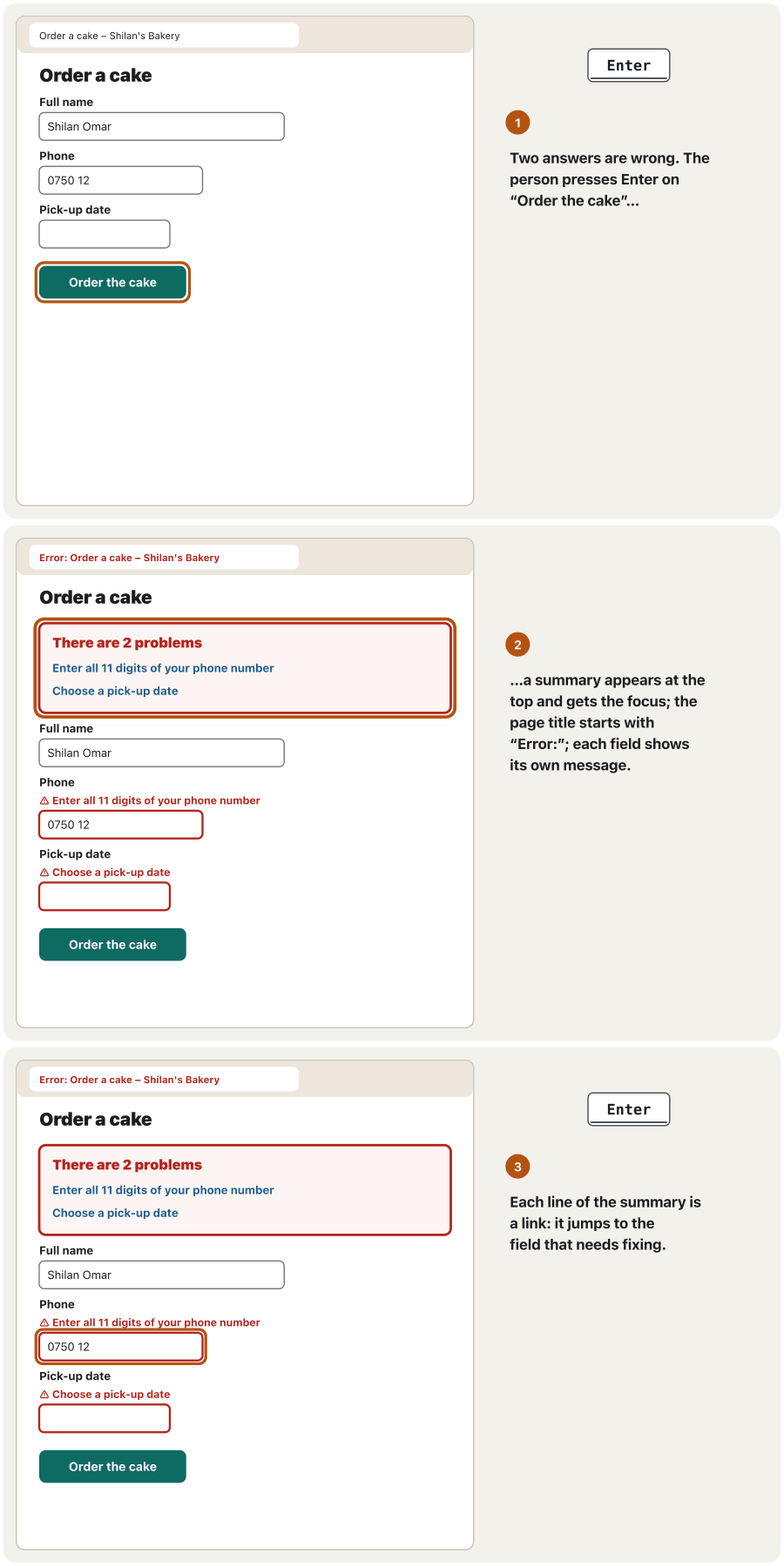
After a failed submit on a long form, show an error summary at the top: a heading such as “There are 2 problems” and one link per error that jumps to its field. Move the focus to the summary — or, on a short form, to the first wrong field — so keyboard and screen-reader users notice at once, and start the page title with “Error: ” (GOV.UK, W3C). Keep the messages next to the fields too: the summary repeats them; it does not replace them.
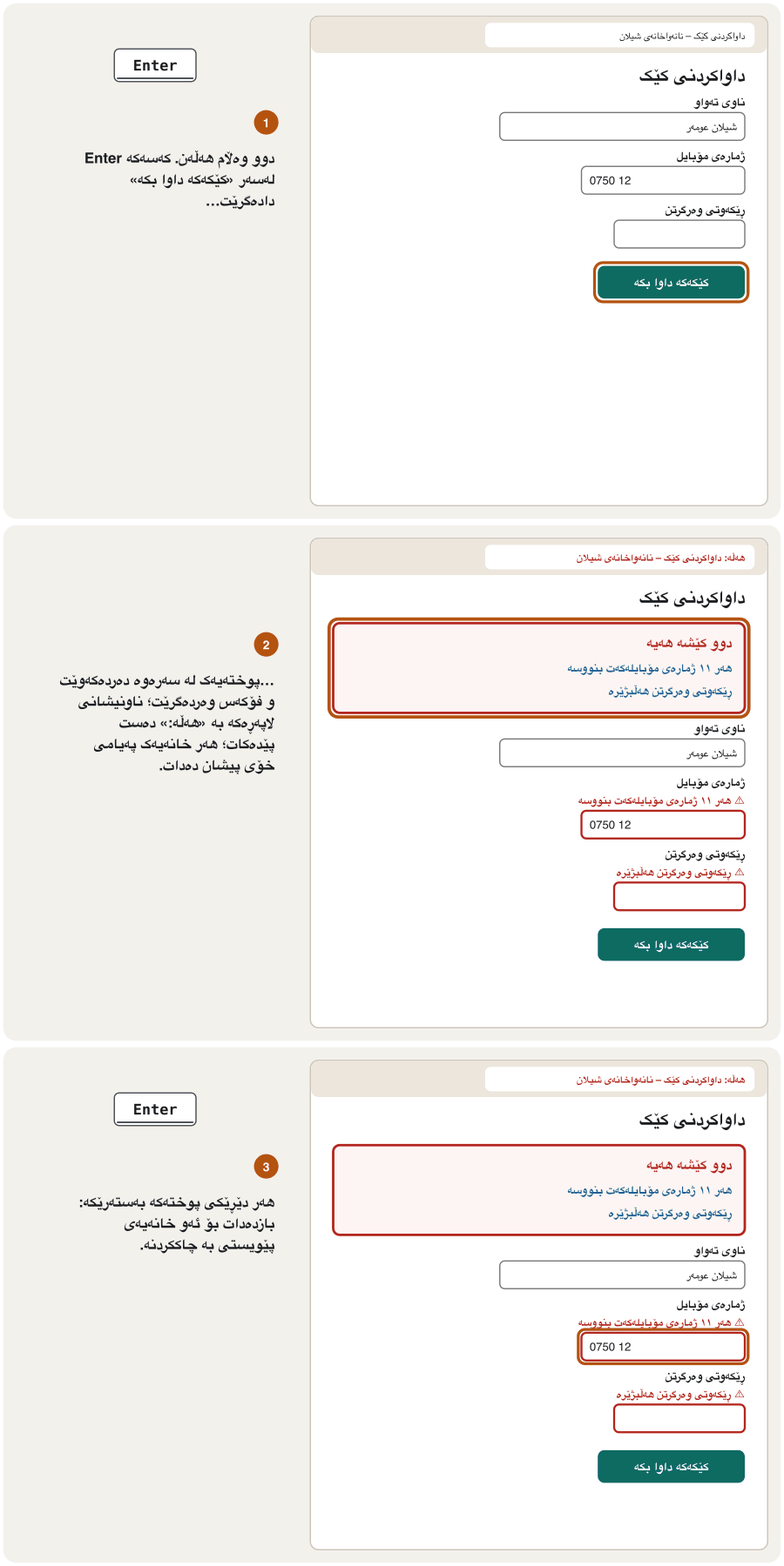
دوای ناردنێکی سەرنەکەوتوو لە درێژدا، لە سەرەوە پیشان بدە: وەک «دوو کێشە هەیە» و بۆ هەر هەڵەیەک کە بازدەدات بۆ خانەکەی. بگوازەرەوە بۆ پوختەکە — یان، لە کورتدا، بۆ یەکەم خانەی هەڵە — بۆ ئەوەی بەکارهێنەرانی و یەکسەر ئاگادار ببن و ناونیشانی لاپەڕەکە بە «هەڵە: » دەست پێبکە (GOV.UK، W3C). پەیامەکانی تەنیشت خانەکانیش بهێڵەرەوە: پوختەکە دووپاتەیان دەکاتەوە؛ جێگەیان ناگرێتەوە.
<div class="error-summary" role="alert" tabindex="-1">
  <h2>There are 2 problems</h2>
  <ul>
    <li><a href="#phone">Enter all 11 digits of your phone number</a></li>
    <li><a href="#date">Choose a pick-up date</a></li>
  </ul>
</div>

<form action="/order" method="post">
  <label for="phone">Phone</label>
  <p class="error" id="phone-error">⚠ Enter all 11 digits of your phone number</p>
  <input id="phone" name="phone" type="tel" value="0750 12" aria-invalid="true" aria-describedby="phone-error">
  <label for="date">Pick-up date</label>
  <p class="error" id="date-error">⚠ Choose a pick-up date</p>
  <input id="date" name="date" type="date" aria-invalid="true" aria-describedby="date-error">
  <button type="submit">Order the cake</button>
</form>HTML sent to the browserئەو HTMLـەی دەنێردرێت بۆ تۆڕگەڕ
<!DOCTYPE html>
<html lang="en">
<head>
<meta charset="utf-8">
<meta name="viewport" content="width=device-width, initial-scale=1">
<title>Error: Order a cake – Shilan's Bakery</title>
<style>
body { font-family: system-ui, sans-serif; margin: 1rem; max-width: 26rem; color: #1b1d20; }
label { display: block; font-weight: 600; margin-block: 1rem 0.25rem; }
.hint { color: #595959; margin-block: 0 0.35rem; }
input, select, textarea, button { font: inherit; }
input, textarea { box-sizing: border-box; width: 100%; padding: 0.45rem 0.6rem; border: 1px solid #767676; border-radius: 0.4rem; }
button { margin-block-start: 1rem; padding: 0.6rem 1.2rem; border: 0; border-radius: 0.5rem; background: #0d6b62; color: #ffffff; font-weight: 700; }
:focus-visible { outline: 3px solid #b4530f; outline-offset: 2px; }

.error-summary { border: 3px solid #b3261e; padding: 0.5rem 1rem; border-radius: 0.5rem; }
.error-summary h2 { color: #b3261e; font-size: 1.15rem; margin-block: 0.4rem; }
.error-summary a { color: #1f5f99; font-weight: 600; }
.error { color: #b3261e; font-weight: 600; margin-block: 0 0.35rem; }
input[aria-invalid="true"] { border: 2px solid #b3261e; }
</style>
</head>
<body>
<div class="error-summary" role="alert" tabindex="-1">
  <h2>There are 2 problems</h2>
  <ul>
    <li><a href="#phone">Enter all 11 digits of your phone number</a></li>
    <li><a href="#date">Choose a pick-up date</a></li>
  </ul>
</div>

<form action="/order" method="post">
  <label for="phone">Phone</label>
  <p class="error" id="phone-error">⚠ Enter all 11 digits of your phone number</p>
  <input id="phone" name="phone" type="tel" value="0750 12" aria-invalid="true" aria-describedby="phone-error">
  <label for="date">Pick-up date</label>
  <p class="error" id="date-error">⚠ Choose a pick-up date</p>
  <input id="date" name="date" type="date" aria-invalid="true" aria-describedby="date-error">
  <button type="submit">Order the cake</button>
</form>
</body>
</html>
In a real form the server (or JavaScript) writes the summary after a failed submit and moves the focus to it — that is why it has tabindex="-1".
لە ڕاستەقینەدا (یان ) دوای ناردنێکی سەرنەکەوتوو پوختەکە دەنووسێت و دەگوازێتەوە بۆی — بۆیە tabindex="-1"ـی هەیە.
Explain the codeڕوونکردنەوەی کۆدەکە
- Lineدێڕی 1
role="alert" announces it; tabindex="-1" lets a script focus it.
role="alert"ڕایدەگەیەنێت؛tabindex="-1"ڕێگە بە دەدات فۆکەسی بداتێ.- Lineدێڕی 4-5
Each link jumps to the field with that id.
هەر بازدەدات بۆ ئەو خانەیەی ئەو
idـەی هەیە.
Buttons that say what happensدوگمەکان کە دەڵێن چی ڕوودەدات
The submit button names the action: “Create account”, “Order the cake”, “Send message” — not “Submit”, “OK” or “Click here” (GOV.UK). Use one main button per step and make it the strongest; a second action such as “Back” looks quieter. Leave out reset buttons: one wrong click deletes everything (Text areas and submit buttons). And do not disable the submit button until the form is perfect: a pale grey button cannot say what is missing, and its low contrast is hard to read. Let people press it, then show the errors.
ناوی کردارەکە دەهێنێت: «هەژمار دروست بکە»، «کێکەکە داوا بکە»، «پەیامەکە بنێرە» — نەک «ناردن»، «باشە» یان «کلیک لێرە بکە» (GOV.UK). بۆ هەر هەنگاوێک یەک سەرەکی بەکاربهێنە و بیکە بە بەهێزترین؛ کردارێکی دووەم وەک «گەڕانەوە» ئارامتر دەردەکەوێت. reset بەکارمەهێنە: یەک کلیکی هەڵە هەموو شتێک دەسڕێتەوە (ناوچەی دەق و دوگمەکانی ناردن). هەروەها ناچالاک مەکە تا بێخەوش دەبێت: خۆڵەمێشیی کاڵ ناتوانێت بڵێت چی کەمە و کۆنتراستە نزمەکەی خوێندنەوەی قورسە. با خەڵک دای بگرن، پاشان هەڵەکان پیشان بدە.
Styling controls without breaking themشێوەدانی کۆنترۆڵەکان بێ تێکدانیان
font: inherit— browsers give form controls a smaller font of their own; use the page font, at least 1rem (web.dev).- Consistent sizes, padding and borders with at least 3 : 1 contrast (Contrast for icons, borders and focus).
- Targets of at least 24 px (WCAG 2.5.8); about 48 px tall is better on phones (Fingers and mice).
- A clear focus style with
:focus-visible(:focus for keyboard users). accent-colorcolours checkboxes, radio buttons and range sliders in your brand colour; MDN does not list it as Baseline yet (November 2026), but where it is not supported the controls simply keep their usual colour.appearance: noneremoves the browser's own look — then you must draw every state yourself (checked, focused, disabled), so use it rarely.
font: inherit— بچووکتری خۆیان دەدەن بە کۆنترۆڵەکانی ؛ لاپەڕەکە بەکاربهێنە، لانیکەم 1rem (web.dev).- قەبارە، و چوارچێوەی یەکدەست بە کۆنتراستی لانیکەم (کۆنتراست بۆ ئایکۆن، چوارچێوە و فۆکەس).
- ئامانجی لانیکەم ٢٤ ( 2.5.8)؛ بەرزیی نزیکەی ٤٨ لەسەر مۆبایل باشترە (پەنجە و ماوس).
- شێوازێکی ڕوونی بە
:focus-visible(:focusبۆ بەکارهێنەرانی کیبۆرد). accent-color، و خلیسکێنەرەکان بە ڕەنگی براندەکەت ڕەنگ دەکات؛ MDN هێشتا وەک ناوی نابات (نۆڤەمبەری 2026)، بەڵام لەو شوێنانەی پشتگیری ناکرێت کۆنترۆڵەکان تەنیا ڕەنگە ئاساییەکەی خۆیان دەهێڵنەوە.appearance: noneشێوەی تایبەتی لادەبات — ئەو کاتە دەبێت هەموو دۆخێک خۆت بکێشیت (نیشانەکراو، فۆکەسکراو، ناچالاک)، بۆیە کەم بەکاری بهێنە.
input, select, textarea, button { font: inherit; }        /* the page font, at least 1rem */
input:not([type="checkbox"], [type="radio"]), textarea {
  min-height: 3rem;                    /* about 48 px: easy to tap */
  padding: 0.5rem 0.75rem;
  border: 1px solid #767676;           /* 4.5 : 1 on white */
  border-radius: 0.5rem;
}
:focus-visible { outline: 3px solid #b4530f; outline-offset: 2px; }
input[type="checkbox"] { accent-color: #0d6b62; width: 1.25rem; height: 1.25rem; }HTML sent to the browserئەو HTMLـەی دەنێردرێت بۆ تۆڕگەڕ
<!DOCTYPE html>
<html lang="en">
<head>
<meta charset="utf-8">
<meta name="viewport" content="width=device-width, initial-scale=1">
<title>Styled form controls</title>
<style>
input, select, textarea, button { font: inherit; }        /* the page font, at least 1rem */
input:not([type="checkbox"], [type="radio"]), textarea {
  min-height: 3rem;                    /* about 48 px: easy to tap */
  padding: 0.5rem 0.75rem;
  border: 1px solid #767676;           /* 4.5 : 1 on white */
  border-radius: 0.5rem;
}
:focus-visible { outline: 3px solid #b4530f; outline-offset: 2px; }
input[type="checkbox"] { accent-color: #0d6b62; width: 1.25rem; height: 1.25rem; }

body { font-family: system-ui, sans-serif; margin: 1rem; max-width: 26rem; }
label { display: block; font-weight: 600; margin-block: 1rem 0.25rem; }
input:not([type="checkbox"]) { box-sizing: border-box; width: 100%; }
.check { display: flex; align-items: center; gap: 0.5rem; margin-block-start: 1rem; }
.check label { display: inline; margin: 0; font-weight: 400; }
button { margin-block-start: 1rem; padding: 0.7rem 1.3rem; border: 0; border-radius: 0.5rem; background: #0d6b62; color: #ffffff; font-weight: 700; }
</style>
</head>
<body>
<form action="/register" method="post">
  <label for="name">Full name</label>
  <input id="name" name="name" autocomplete="name" dir="auto">
  <label for="email">Email</label>
  <input id="email" name="email" type="email" autocomplete="email">
  <p class="check"><input id="menu" name="menu" type="checkbox" checked>
    <label for="menu">Send me the weekly menu</label></p>
  <button type="submit">Create my account</button>
</form>
</body>
</html>
Explain the codeڕوونکردنەوەی کۆدەکە
- Lineدێڕی 1
Form controls use the page font.
کۆنترۆڵەکانی لاپەڕەکە بەکاردەهێنن.
- Lineدێڕی 3
About 48 px tall.
نزیکەی ٤٨ بەرز.
- Lineدێڕی 5
A border with enough contrast to be seen.
چوارچێوەیەک بە کۆنتراستی بەس بۆ بینین.
- Lineدێڕی 9
The checkbox in the brand colour, a little bigger.
بە ڕەنگی براند، کەمێک گەورەتر.
Styling controls without breaking themشێوەدانی کۆنترۆڵەکان بێ تێکدانیان
Forms in Kurdish: dir="auto" and dir="ltr"فۆرم بە کوردی: dir="auto" و dir="ltr"
In a Kurdish page (<html lang="ckb" dir="rtl">) most fields run right to left. But people type names, comments and search words in Kurdish or in Latin letters, so give those fields dir="auto": the field turns round as the person types (Text you did not write). Email addresses, web addresses and phone numbers always run left to right, so give them dir="ltr". Labels, hints and error messages stay right to left, and the button sits at the start side — the right.
لە لاپەڕەیەکی کوردیدا (<html lang="ckb" dir="rtl">) زۆربەی خانەکان لە ڕاستەوە بۆ چەپ دەڕۆن. بەڵام خەڵک ناو، لێدوان و بە کوردی یان بە پیتی لاتینی دەنووسن، بۆیە dir="auto" بدە بەو خانانە: خانەکە لە کاتی نووسیندا ئاڕاستەی خۆی دەگۆڕێت (ئەو دەقەی تۆ نەتنووسیوە). ، ناونیشانی وێب و ژمارەی تەلەفۆن هەمیشە لە چەپەوە بۆ ڕاست دەڕۆن، بۆیە dir="ltr"ـیان بدەرێ. ، ڕێنمایی و لە ڕاستەوە بۆ چەپ دەمێننەوە و لە لای سەرەتادایە — لای ڕاست.
Log-in forms: safe and easyفۆرمەکانی چوونەژوورەوە: سەلامەت و ئاسان
autocomplete="username"andautocomplete="current-password"(sign-up:new-password) let password managers fill the fields and suggest strong passwords (Password managers).- Allow paste in every field, also for one-time codes:
autocomplete="one-time-code"withinputmode="numeric", in one box — six little boxes can block pasting (WCAG 3.3.8). - A Show password button lets people check what they typed; GOV.UK advises it instead of a second “confirm password” field. It needs a few lines of JavaScript (A First Look at JavaScript).
- Avoid puzzles such as twisted letters or sums: WCAG 3.3.8 allows them only when another way to log in exists. A passkey needs no password at all (Passkeys).
- Send the form only over HTTPS (HTTPS); the server side — hashing and sessions — is in A Login System.
autocomplete="username"وautocomplete="current-password"(:new-password) ڕێگە بە دەدەن خانەکان پڕ بکەنەوە و بەهێز پێشنیار بکەن (بەڕێوەبەرەکانی تێپەڕەوشە).- ڕێگە بە بدە لە هەموو خانەیەکدا، بۆ کۆدی یەکجاریش:
autocomplete="one-time-code"لەگەڵinputmode="numeric"، لە یەک خانەدا — شەش خانەی بچووک دەتوانن ڕێگە لە بگرن ( 3.3.8). - پیشاندانی ڕێگە بە خەڵک دەدات ئەوەی نووسیویانە بپشکنن؛ GOV.UK ئامۆژگاری دەکات ئەمە لەجیاتی خانەیەکی دووەمی «دووپاتکردنەوەی » بەکاربهێنرێت. پێویستی بە چەند دێڕێک هەیە (سەرەتایەک بۆ JavaScript).
- خۆت لە مەتەڵ بپارێزە، وەک پیتی خوار و خێچ یان کۆکردنەوە: 3.3.8 تەنیا کاتێک ڕێگەیان پێدەدات کە ڕێگەیەکی تر بۆ هەبێت. هیچ پێویستی بە نییە (پاسکییەکان).
- تەنیا بە HTTPS بنێرە (HTTPS)؛ لای — هاشکردن و دانیشتن — لە سیستەمی چوونەژوورەوەـدایە.
<form action="/login" method="post">
  <label for="username">Email or username</label>
  <input id="username" name="username" autocomplete="username" required>

  <label for="password">Password</label>
  <input id="password" name="password" type="password"
         autocomplete="current-password" required>

  <button type="submit">Log in</button>
</form>
<p><a href="/reset">Forgot your password?</a></p>

<!-- the next step, if a code is sent by SMS: one field, paste allowed -->
<label for="code">6-digit code</label>
<input id="code" name="code" inputmode="numeric" autocomplete="one-time-code">HTML sent to the browserئەو HTMLـەی دەنێردرێت بۆ تۆڕگەڕ
<!DOCTYPE html>
<html lang="en">
<head>
<meta charset="utf-8">
<meta name="viewport" content="width=device-width, initial-scale=1">
<title>Log in – Shilan's Bakery</title>
<style>
body { font-family: system-ui, sans-serif; margin: 1rem; max-width: 26rem; color: #1b1d20; }
label { display: block; font-weight: 600; margin-block: 1rem 0.25rem; }
.hint { color: #595959; margin-block: 0 0.35rem; }
input, select, textarea, button { font: inherit; }
input, textarea { box-sizing: border-box; width: 100%; padding: 0.45rem 0.6rem; border: 1px solid #767676; border-radius: 0.4rem; }
button { margin-block-start: 1rem; padding: 0.6rem 1.2rem; border: 0; border-radius: 0.5rem; background: #0d6b62; color: #ffffff; font-weight: 700; }
:focus-visible { outline: 3px solid #b4530f; outline-offset: 2px; }

#code { max-width: 9rem; }
</style>
</head>
<body>
<form action="/login" method="post">
  <label for="username">Email or username</label>
  <input id="username" name="username" autocomplete="username" required>

  <label for="password">Password</label>
  <input id="password" name="password" type="password"
         autocomplete="current-password" required>

  <button type="submit">Log in</button>
</form>
<p><a href="/reset">Forgot your password?</a></p>

<!-- the next step, if a code is sent by SMS: one field, paste allowed -->
<label for="code">6-digit code</label>
<input id="code" name="code" inputmode="numeric" autocomplete="one-time-code">
</body>
</html>
Explain the codeڕوونکردنەوەی کۆدەکە
- Lineدێڕی 3
The password manager knows this is the username.
دەزانێت ئەمە .
- Lineدێڕی 6-7
current-password at log-in; never block paste here.
current-passwordلە کاتی ؛ لێرە هەرگیز ڕێگە لە مەگرە.- Lineدێڕی 15
One field for the whole code: a phone can fill it from the SMS.
یەک خانە بۆ هەموو کۆدەکە: مۆبایل دەتوانێت لە SMSـەکەوە پڕی بکاتەوە.
Worked example: the registration form redesignedنموونەی کارپێکراو: فۆرمی خۆتۆمارکردن بە دیزاینی نوێ
The corrected registration page of Find the bugs now works, but it is not yet easy to use. The redesign:
لاپەڕە چاککراوەکەی لە هەڵەکان بدۆزەرەوە ئێستا کار دەکات، بەڵام هێشتا ئاسان نییە بۆ بەکارهێنان. دیزاینە نوێیەکە:
- One Full name field replaces First, Middle and Last name — it fits Kurdish names and halves the typing.
- Labels above the fields; the placeholders that only repeated the labels are gone.
- Email and phone with the right types and
autocompletetokens; a hint says why the email is needed. - “Required fields *” is gone: every field is required except the phone, so only the phone says “(optional)”.
- Four departments as radio buttons in a
<fieldset>with a<legend>: all choices are visible at once. - The button says what happens: “Create my account”.
- یەک خانەی ناوی تەواو جێگەی ناوی یەکەم، ناوەڕاست و کۆتایی دەگرێتەوە — لەگەڵ ناوی کوردیدا دەگونجێت و نووسین بە نیوە کەم دەکاتەوە.
- لە سەرووی خانەکانەوە؛ ئەو تەنیا دووپاتە دەکردەوە لابران.
- ئیمەیڵ و ژمارەی مۆبایل بە
typeو تۆکنیautocompleteـی گونجاو؛ ڕێنماییەک دەڵێت بۆچی ئیمەیڵەکە پێویستە. - « *» لابرا: هەموو خانەکان پێویستن جگە لە ژمارەی مۆبایل، بۆیە تەنیا ژمارەی مۆبایل دەڵێت «(ئارەزوومەندانە)».
- چوار بەش وەک لە
<fieldset>ـێکدا لەگەڵ<legend>ـێک: هەموو هەڵبژاردەکان پێکەوە دیارن. - دەڵێت چی ڕوودەدات: «هەژمارەکەم دروست بکە».
<!DOCTYPE html>
<html lang="en">
<head>
<meta charset="utf-8">
<meta name="viewport" content="width=device-width, initial-scale=1">
<title>Create your student account</title>
<style>
body { font-family: system-ui, sans-serif; margin: 1rem; max-width: 28rem; color: #1b1d20; }
label, legend { display: block; font-weight: 600; margin-block: 1rem 0.25rem; }
.hint { color: #595959; margin-block: 0 0.35rem; }
input, button { font: inherit; }
input:not([type="radio"]) { box-sizing: border-box; width: 100%; min-height: 3rem; padding: 0.5rem 0.75rem; border: 1px solid #767676; border-radius: 0.5rem; }
#phone { max-width: 12rem; }
fieldset { border: 1px solid #767676; border-radius: 0.5rem; margin-block-start: 1rem; }
fieldset label { display: inline-flex; align-items: center; gap: 0.35rem; margin: 0.25rem 1rem 0.25rem 0; font-weight: 400; }
input[type="radio"] { accent-color: #0d6b62; width: 1.2rem; height: 1.2rem; }
button { margin-block-start: 1.25rem; padding: 0.75rem 1.4rem; border: 0; border-radius: 0.5rem; background: #0d6b62; color: #ffffff; font-weight: 700; }
:focus-visible { outline: 3px solid #b4530f; outline-offset: 2px; }
</style>
</head>
<body>
<h1>Create your student account</h1>
<form action="register.php" method="post">
  <label for="name">Full name</label>
  <input id="name" name="full_name" autocomplete="name" dir="auto" required>

  <label for="email">Email</label>
  <p class="hint" id="email-hint">We send your timetable here</p>
  <input id="email" name="email" type="email" autocomplete="email" required
         aria-describedby="email-hint">

  <label for="phone">Phone (optional)</label>
  <input id="phone" name="phone" type="tel" autocomplete="tel">

  <fieldset>
    <legend>Department</legend>
    <label><input type="radio" name="department" value="IT" required> IT</label>
    <label><input type="radio" name="department" value="Banking"> Banking</label>
    <label><input type="radio" name="department" value="Business"> Business</label>
    <label><input type="radio" name="department" value="Accounting"> Accounting</label>
  </fieldset>

  <button type="submit">Create my account</button>
</form>
</body>
</html>HTML sent to the browserئەو HTMLـەی دەنێردرێت بۆ تۆڕگەڕ
<!DOCTYPE html>
<html lang="en">
<head>
<meta charset="utf-8">
<meta name="viewport" content="width=device-width, initial-scale=1">
<title>Create your student account</title>
<style>
body { font-family: system-ui, sans-serif; margin: 1rem; max-width: 28rem; color: #1b1d20; }
label, legend { display: block; font-weight: 600; margin-block: 1rem 0.25rem; }
.hint { color: #595959; margin-block: 0 0.35rem; }
input, button { font: inherit; }
input:not([type="radio"]) { box-sizing: border-box; width: 100%; min-height: 3rem; padding: 0.5rem 0.75rem; border: 1px solid #767676; border-radius: 0.5rem; }
#phone { max-width: 12rem; }
fieldset { border: 1px solid #767676; border-radius: 0.5rem; margin-block-start: 1rem; }
fieldset label { display: inline-flex; align-items: center; gap: 0.35rem; margin: 0.25rem 1rem 0.25rem 0; font-weight: 400; }
input[type="radio"] { accent-color: #0d6b62; width: 1.2rem; height: 1.2rem; }
button { margin-block-start: 1.25rem; padding: 0.75rem 1.4rem; border: 0; border-radius: 0.5rem; background: #0d6b62; color: #ffffff; font-weight: 700; }
:focus-visible { outline: 3px solid #b4530f; outline-offset: 2px; }
</style>
</head>
<body>
<h1>Create your student account</h1>
<form action="register.php" method="post">
  <label for="name">Full name</label>
  <input id="name" name="full_name" autocomplete="name" dir="auto" required>

  <label for="email">Email</label>
  <p class="hint" id="email-hint">We send your timetable here</p>
  <input id="email" name="email" type="email" autocomplete="email" required
         aria-describedby="email-hint">

  <label for="phone">Phone (optional)</label>
  <input id="phone" name="phone" type="tel" autocomplete="tel">

  <fieldset>
    <legend>Department</legend>
    <label><input type="radio" name="department" value="IT" required> IT</label>
    <label><input type="radio" name="department" value="Banking"> Banking</label>
    <label><input type="radio" name="department" value="Business"> Business</label>
    <label><input type="radio" name="department" value="Accounting"> Accounting</label>
  </fieldset>

  <button type="submit">Create my account</button>
</form>
</body>
</html>Common mistakesهەڵە باوەکان
| Mistakeهەڵە | Betterباشتر |
|---|---|
| A placeholder as the only label وەک تاکە | A visible label above the field دیار لە سەرووی خانەکەوە |
| Fields in two columnsخانە لە دوو ستووندا | One columnیەک ستوون |
| Asking for data you do not useداواکردنی کە بەکاری ناهێنیت | Delete the fieldخانەکە بسڕەوە |
| Red stars with no explanationئەستێرەی سوور بێ ڕوونکردنەوە | “(optional)” on the fewer fields, in words«(ئارەزوومەندانە)» لەسەر خانە کەمترەکان، بە وشە |
| “Invalid input”«نێوخستەی هەڵە» | Say what is wrong and how to fix itبڵێ چی هەڵەیە و چۆن چاک دەکرێتەوە |
Red errors before anyone has typed (:invalid)هەڵەی سوور پێش ئەوەی کەس بنووسێت (:invalid) | :user-invalid; check after the field is left or on submit:user-invalid؛ دوای جێهێشتنی خانەکە یان لە کاتی ناردندا بپشکنە |
| Clearing the form after an errorبەتاڵکردنەوەی دوای هەڵەیەک | Keep everything the person typedهەموو ئەوەی کەسەکە نووسیویەتی بهێڵەرەوە |
| A disabled submit button ناچالاک | Let people press it; show the errorsبا خەڵک دای بگرن؛ هەڵەکان پیشان بدە |
| Blocking paste in passwords and codesڕێگرتن لە لە و کۆدەکاندا | Allow paste and password managersڕێگە بە و بدە |
type="number" for IDs and phone numberstype="number" بۆ ژمارەی ناسنامە و تەلەفۆن | type="tel", or inputmode="numeric"type="tel"، یان inputmode="numeric" |
| Trusting the browser's checksمتمانەکردن بە پشکنینەکانی | The server checks everything again هەموو شتێک دووپاتە دەپشکنێتەوە |
Exercisesڕاهێنانەکان
This contact form works, but it breaks most of the advice in this lesson. List the problems, then rewrite it.
ئەم پەیوەندییە کار دەکات، بەڵام زۆربەی ئامۆژگارییەکانی ئەم وانەیە دەشکێنێت. کێشەکان بژمێرە، پاشان دووپاتە بینووسەوە.
<form action="contact.php" method="post">
  <table>
    <tr><td><input type="text" name="fname" placeholder="First name *"></td>
        <td><input type="text" name="lname" placeholder="Last name *"></td></tr>
    <tr><td><input type="text" name="email" placeholder="Email *"></td>
        <td><input type="text" name="phone" placeholder="Phone *"></td></tr>
    <tr><td colspan="2"><textarea name="msg" placeholder="Message *"></textarea></td></tr>
  </table>
  <input type="reset" value="Clear"> <input type="submit" value="Submit">
</form>HTML sent to the browserئەو HTMLـەی دەنێردرێت بۆ تۆڕگەڕ
<!DOCTYPE html>
<html lang="en">
<head>
<meta charset="utf-8">
<meta name="viewport" content="width=device-width, initial-scale=1">
<title>Contact</title>
<style>
body { font-family: system-ui, sans-serif; margin: 1rem; }
input, textarea { font-size: 0.8rem; }
textarea { width: 100%; }
</style>
</head>
<body>
<form action="contact.php" method="post">
  <table>
    <tr><td><input type="text" name="fname" placeholder="First name *"></td>
        <td><input type="text" name="lname" placeholder="Last name *"></td></tr>
    <tr><td><input type="text" name="email" placeholder="Email *"></td>
        <td><input type="text" name="phone" placeholder="Phone *"></td></tr>
    <tr><td colspan="2"><textarea name="msg" placeholder="Message *"></textarea></td></tr>
  </table>
  <input type="reset" value="Clear"> <input type="submit" value="Submit">
</form>
</body>
</html>
Show answerوەڵامەکە پیشان بدە
Problems: a table makes two columns; placeholders instead of labels; first and last name; stars on every field; the phone is required for no reason; type="text" for email and phone, so no right keyboard and no autofill; a reset button next to a vague “Submit”.
کێشەکان: خشتەیەک دوو ستوون دروست دەکات؛ لەجیاتی ؛ ناوی یەکەم و کۆتایی؛ ئەستێرە لەسەر هەموو خانەیەک؛ ژمارەی مۆبایل بێ هۆ پێویستە؛ type="text" بۆ ئیمەیڵ و ژمارەی مۆبایل، بۆیە نە گونجاو هەیە نە ؛ reset لە تەنیشت «Submit»ـێکی ناڕوونەوە.
<form action="contact.php" method="post">
  <label for="name">Full name</label>
  <input id="name" name="name" autocomplete="name" dir="auto" required>

  <label for="email">Email</label>
  <input id="email" name="email" type="email" autocomplete="email" required>

  <label for="phone">Phone (optional)</label>
  <input id="phone" name="phone" type="tel" autocomplete="tel">

  <label for="msg">Your message</label>
  <textarea id="msg" name="msg" rows="5" dir="auto" required></textarea>

  <button type="submit">Send message</button>
</form>HTML sent to the browserئەو HTMLـەی دەنێردرێت بۆ تۆڕگەڕ
<!DOCTYPE html>
<html lang="en">
<head>
<meta charset="utf-8">
<meta name="viewport" content="width=device-width, initial-scale=1">
<title>Contact Shilan's Bakery</title>
<style>
body { font-family: system-ui, sans-serif; margin: 1rem; max-width: 26rem; color: #1b1d20; }
label { display: block; font-weight: 600; margin-block: 1rem 0.25rem; }
.hint { color: #595959; margin-block: 0 0.35rem; }
input, select, textarea, button { font: inherit; }
input, textarea { box-sizing: border-box; width: 100%; padding: 0.45rem 0.6rem; border: 1px solid #767676; border-radius: 0.4rem; }
button { margin-block-start: 1rem; padding: 0.6rem 1.2rem; border: 0; border-radius: 0.5rem; background: #0d6b62; color: #ffffff; font-weight: 700; }
:focus-visible { outline: 3px solid #b4530f; outline-offset: 2px; }

#phone { max-width: 12rem; }
</style>
</head>
<body>
<form action="contact.php" method="post">
  <label for="name">Full name</label>
  <input id="name" name="name" autocomplete="name" dir="auto" required>

  <label for="email">Email</label>
  <input id="email" name="email" type="email" autocomplete="email" required>

  <label for="phone">Phone (optional)</label>
  <input id="phone" name="phone" type="tel" autocomplete="tel">

  <label for="msg">Your message</label>
  <textarea id="msg" name="msg" rows="5" dir="auto" required></textarea>

  <button type="submit">Send message</button>
</form>
</body>
</html>Add the right autocomplete token to each field of this delivery form. Which field gets none?
تۆکنی autocompleteـی گونجاو بۆ هەر خانەیەکی ئەم گەیاندنە زیاد بکە. کام خانە هیچی وەرناگرێت؟
<form action="/deliver" method="post">
  <label for="name">Full name</label>
  <input id="name" name="name">
  <label for="tel">Phone</label>
  <input id="tel" name="tel" type="tel">
  <label for="email">Email</label>
  <input id="email" name="email" type="email">
  <label for="street">Street address</label>
  <textarea id="street" name="street" rows="2"></textarea>
  <label for="city">City</label>
  <input id="city" name="city">
  <label for="notes">Notes for the driver (optional)</label>
  <textarea id="notes" name="notes" rows="2"></textarea>
</form>HTML sent to the browserئەو HTMLـەی دەنێردرێت بۆ تۆڕگەڕ
<!DOCTYPE html>
<html lang="en">
<head>
<meta charset="utf-8">
<meta name="viewport" content="width=device-width, initial-scale=1">
<title>Delivery details</title>
<style>
body { font-family: system-ui, sans-serif; margin: 1rem; max-width: 26rem; color: #1b1d20; }
label { display: block; font-weight: 600; margin-block: 1rem 0.25rem; }
.hint { color: #595959; margin-block: 0 0.35rem; }
input, select, textarea, button { font: inherit; }
input, textarea { box-sizing: border-box; width: 100%; padding: 0.45rem 0.6rem; border: 1px solid #767676; border-radius: 0.4rem; }
button { margin-block-start: 1rem; padding: 0.6rem 1.2rem; border: 0; border-radius: 0.5rem; background: #0d6b62; color: #ffffff; font-weight: 700; }
:focus-visible { outline: 3px solid #b4530f; outline-offset: 2px; }
</style>
</head>
<body>
<form action="/deliver" method="post">
  <label for="name">Full name</label>
  <input id="name" name="name">
  <label for="tel">Phone</label>
  <input id="tel" name="tel" type="tel">
  <label for="email">Email</label>
  <input id="email" name="email" type="email">
  <label for="street">Street address</label>
  <textarea id="street" name="street" rows="2"></textarea>
  <label for="city">City</label>
  <input id="city" name="city">
  <label for="notes">Notes for the driver (optional)</label>
  <textarea id="notes" name="notes" rows="2"></textarea>
</form>
</body>
</html>
Show answerوەڵامەکە پیشان بدە
<form action="/deliver" method="post">
  <label for="name">Full name</label>
  <input id="name" name="name" autocomplete="name">
  <label for="tel">Phone</label>
  <input id="tel" name="tel" type="tel" autocomplete="tel">
  <label for="email">Email</label>
  <input id="email" name="email" type="email" autocomplete="email">
  <label for="street">Street address</label>
  <textarea id="street" name="street" rows="2" autocomplete="street-address"></textarea>
  <label for="city">City</label>
  <input id="city" name="city" autocomplete="address-level2">
  <label for="notes">Notes for the driver (optional)</label>
  <textarea id="notes" name="notes" rows="2"></textarea>
</form>HTML sent to the browserئەو HTMLـەی دەنێردرێت بۆ تۆڕگەڕ
<!DOCTYPE html>
<html lang="en">
<head>
<meta charset="utf-8">
<meta name="viewport" content="width=device-width, initial-scale=1">
<title>Delivery details</title>
<style>
body { font-family: system-ui, sans-serif; margin: 1rem; max-width: 26rem; color: #1b1d20; }
label { display: block; font-weight: 600; margin-block: 1rem 0.25rem; }
.hint { color: #595959; margin-block: 0 0.35rem; }
input, select, textarea, button { font: inherit; }
input, textarea { box-sizing: border-box; width: 100%; padding: 0.45rem 0.6rem; border: 1px solid #767676; border-radius: 0.4rem; }
button { margin-block-start: 1rem; padding: 0.6rem 1.2rem; border: 0; border-radius: 0.5rem; background: #0d6b62; color: #ffffff; font-weight: 700; }
:focus-visible { outline: 3px solid #b4530f; outline-offset: 2px; }
</style>
</head>
<body>
<form action="/deliver" method="post">
  <label for="name">Full name</label>
  <input id="name" name="name" autocomplete="name">
  <label for="tel">Phone</label>
  <input id="tel" name="tel" type="tel" autocomplete="tel">
  <label for="email">Email</label>
  <input id="email" name="email" type="email" autocomplete="email">
  <label for="street">Street address</label>
  <textarea id="street" name="street" rows="2" autocomplete="street-address"></textarea>
  <label for="city">City</label>
  <input id="city" name="city" autocomplete="address-level2">
  <label for="notes">Notes for the driver (optional)</label>
  <textarea id="notes" name="notes" rows="2"></textarea>
</form>
</body>
</html>
The driver's notes get no token: no standard token describes them, and nobody's browser has them saved.
تێبینییەکانی شۆفێر هیچ تۆکنێک وەرناگرن: هیچ تۆکنێکی ستاندارد وەسفیان ناکات و هیچ کەسێک پاشەکەوتی نەکردوون.
Make each message say what is wrong and how to fix it: “Invalid email” · “Required” · “Wrong date” · “Password error” · “Error: 0750 12”.
وا لە هەر پەیامێک بکە بڵێت چی هەڵەیە و چۆن چاک دەکرێتەوە: «Invalid email» · «Required» · «Wrong date» · «Password error» · «Error: 0750 12».
Show answerوەڵامەکە پیشان بدە
| Beforeپێشتر | Afterدواتر |
|---|---|
| Invalid email | Enter an email address like name@example.com وەک name@example.com بنووسە |
| Required | Enter your full nameناوی تەواوت بنووسە |
| Wrong date | The pick-up date must be today or laterڕێکەوتی وەرگرتن دەبێت ئەمڕۆ یان دواتر بێت |
| Password error | Your password must have at least 12 characters دەبێت لانیکەم ١٢ نیشانەی هەبێت |
| Error: 0750 12 | Enter all 11 digits of your phone number, starting with 07هەر ١١ ژمارەی مۆبایلەکەت بنووسە، بە 07 دەست پێدەکات |
Summaryپوختە
- A form is a conversation: ask only what you need, one clear question at a time (GDPR: data minimisation).
- One column, labels above, related fields in a fieldset with a legend; one Full name field.
- Visible labels, never placeholders as labels; hints tied with aria-describedby; “(optional)” on the fewer fields; widths that fit the answer.
typeandinputmodebring the right phone keyboard;autocompletetokens enable autofill (WCAG 1.3.5); one process never asks twice for the same thing (3.3.7).- Errors next to their fields, in words, saying how to fix them;
:user-invalidfor timing; an error summary and the focus for long forms; the server checks again. - Buttons that say what happens; no reset buttons; no disabled submit buttons.
- Styled controls keep the page font, about 48 px height, 3 : 1 borders and a visible focus; dir="auto" and dir="ltr" in Kurdish forms.
- Log-in: username and current-password tokens, paste allowed, a Show password button, no puzzles, HTTPS.
- گفتوگۆیە: تەنیا ئەوە بپرسە کە پێویستتە، لە یەک کاتدا یەک پرسیاری ڕوون (GDPR: کەمکردنەوەی ).
- یەک ستوون، لە سەرەوە، خانە پەیوەندیدارەکان لە fieldsetـێکدا بە legendـێکەوە؛ یەک خانەی ناوی تەواو.
- دیار، هەرگیز وەک نا؛ ڕێنمایی کە بە
aria-describedbyبەستراوە؛ «(ئارەزوومەندانە)» لەسەر خانە کەمترەکان؛ پانییەک کە لەگەڵ وەڵامەکە بگونجێت. typeوinputmodeگونجاوی مۆبایل دەهێنن؛ تۆکنەکانیautocompleteچالاک دەکەن ( 1.3.5)؛ یەک پرۆسە هەرگیز دوو جار داوای هەمان شت ناکات (3.3.7).- هەڵەکان لە تەنیشت خانەکانیانەوە، بە وشە، کە دەڵێن چۆن چاک دەکرێنەوە؛
:user-invalidبۆ کات؛ و بۆ درێژ؛ دووپاتە دەپشکنێتەوە. - کە دەڵێن چی ڕوودەدات؛ بێ reset؛ بێ ناچالاک.
- کۆنترۆڵە شێوەپێدراوەکان لاپەڕە، بەرزیی نزیکەی ٤٨ ، چوارچێوەی و دیار دەپارێزن؛
dir="auto"وdir="ltr"لە کوردیدا. - : تۆکنەکانی username و current-password، ڕێگەپێدراو، پیشاندانی ، بێ مەتەڵ، HTTPS.
Lesson complete!وانەکە تەواو بوو!
Well done. Review the key terms, then go on to the next lesson.دەستخۆش. سەیرێکی زاراوە سەرەکییەکان بکەرەوە، پاشان بڕۆ بۆ وانەی داهاتوو.
Key termsزاراوە سەرەکییەکان
A First Look at JavaScript: Making Pages Interactiveسەرەتایەک بۆ JavaScript: لاپەڕەی کارلێککار
Related lecturesوانە پەیوەندیدارەکان
- Form Validationپشتڕاستکردنەوەی فۆرم
- A Login System with Sessionsسیستەمی چوونەژوورەوە بە سێشن
- Form Security and Sticky Formsئاسایشی فۆرم و فۆرمە لکاوەکان
- Kurdish and Bilingual Websites: Right to Leftتۆڕگەکانی کوردی و دووزمانە: ڕاست بۆ چەپ
- Responsive Design: Viewport, Media Queries and Mobile-Firstدیزاینی ڕێسپۆنسیڤ: ناوچەی بینین، پرسەکانی میدیا و مۆبایل لە پێشدا
- Colour for the Web: Palettes, Contrast and Themesڕەنگ بۆ وێب: پالێتی ڕەنگ، کۆنتراست و تێمەکان
- User Experience: Users, Wireframes and Prototypesئەزموونی بەکارهێنەر: بەکارهێنەران، وایەرفرەیمەکان و نموونە سەرەتاییەکان
- Europe's GDPR: Rights, Breach Notification and FinesGDPRـی ئەوروپا: ماف، ئاگادارکردنەوەی دزەکردنی دراوە و سزای دارایی
- Passwords, MFA and Access Controlتێپەڕەوشەکان، MFA و کۆنترۆڵی دەستڕاگەیشتن
- Text Fields and Formsخانەکانی دەق و فۆرمەکان
- HTTP and the Request–Response CycleHTTP و سووڕی داواکاری و وەڵام
References and further readingسەرچاوەکان و خوێندنەوەی زیاتر
- web.dev: Learn Forms
- web.dev: Learn Forms — Design basics
- web.dev: Learn Forms — Help users avoid re-entering data in forms (autofill)
- W3C WAI: Forms Tutorial
- W3C WAI: Forms Tutorial — User Notifications
- W3C WAI: Forms Tutorial — Validating Input
- W3C: Web Content Accessibility Guidelines (WCAG) 2.2
- W3C: Understanding SC 3.3.8 Accessible Authentication (Minimum)
- MDN: HTML attribute autocomplete
- MDN: inputmode
- MDN: :user-invalid
- MDN: accent-color
- MDN: appearance
- Nielsen Norman Group: Placeholders in Form Fields Are Harmful
- GOV.UK Design System: Question pages
- GOV.UK Design System: Error message
- GOV.UK Design System: Error summary
- GOV.UK Design System: Button
- GOV.UK Design System: Password input
- W3C Internationalization: Personal names around the world
- GDPR Article 5 — principles (data minimisation)
This lecture is a first edition. The Kurdish text and terminology are waiting for review by Kurdish IT teachers.ئەم وانەیە چاپی یەکەمە. دەقە کوردییەکە و زاراوەکانی چاوەڕێی پێداچوونەوەی مامۆستایانی کوردی بواری IT ن.