Chapterبەش 4 · Lectureوانە 4.5
Positioning and Page Layoutشوێندانان و ڕێکخستنی لاپەڕە
Normal flow, float and clear (the lecture's three-column page), the five position values and their reference boxes, z-index, the course author's fixed title bar made sticky, flexbox and grid first looks, responsive basics (viewport, fluid pictures, one media query) and layouts that work right to left in Kurdish.
، float و clear (لاپەڕە سێ ستوونییەکەی وانەکە)، پێنج بەهاکەی position و سندووقە بنەماکانیان، z-index، شریتی سەردێڕی جێگیری خاوەنی کۆرسەکە کە دەکرێتە sticky، یەکەم سەیرکردنی و ، بنەماکانی ڕێسپۆنسیڤ (، وێنەی نەرم، یەک ) و کە بە لە کوردیدا کار دەکات.
What you will learnچی فێر دەبیت
- Describe normal flow and use float and clear for text around a box.
- Choose the right position value and say what top/left are measured from in each case.
- Build rows of boxes and menus with flexbox (gap, justify-content, align-items, wrap, flex: 1).
- Lay out a page with grid columns, fr and named areas, and make it responsive with one media query.
- Build layouts that also work right to left in Kurdish.
- وەسف بکەیت و float و clear بۆ دەق بە دەوری سندووقێکدا بەکاربهێنیت.
- بەهای دروستی position هەڵبژێریت و بڵێیت top/left لە هەر حاڵەتێکدا لە کوێوە دەپێورێن.
- ڕیزی سندووق و بە دروست بکەیت (gap، justify-content، align-items، wrap، flex: 1).
- لاپەڕەیەک بە ستوونی grid، fr و ناوچەی ناوندراو ڕێک بخەیت و بە یەک ڕێسپۆنسیڤی بکەیت.
- دروست بکەیت کە بە لە کوردیشدا کار بکات.
Normal flow: where boxes go by themselvesڕەوتی ئاسایی: سندووقەکان خۆیان بۆ کوێ دەچن
Before you move anything, know where the browser puts boxes by itself. This is called : block boxes stack from top to bottom, each on its own line; inline boxes run along the line like words, and wrap to the next line when the line is full (Every element is a box, display).
پێش ئەوەی هیچ شتێک بجووڵێنیت، بزانە خۆی سندووقەکان لە کوێ دادەنێت. ئەمە ناوی : سندووقە بلۆکەکان لە سەرەوە بۆ خوارەوە لەسەر یەک دادەنرێن، هەریەکە لەسەر دێڕی خۆی؛ سندووقە ناودێڕەکان وەک وشە بە درێژایی دێڕەکە دەڕۆن و کاتێک دێڕەکە پڕ بوو دەچنە دێڕی دواتر (هەر توخمێک سندووقێکە، display).
<!DOCTYPE html>
<html lang="en">
<head>
  <meta charset="utf-8">
  <meta name="viewport" content="width=device-width, initial-scale=1">
  <title>Normal flow</title>
  <style>
    body { font-family: Arial, sans-serif; }
    p, .box { border: 1px dashed #2b5ea8; padding: 4px; }
    .tag { background-color: #fdf3e1; }
  </style>
</head>
<body>
  <h1>Normal flow</h1>
  <p>A paragraph is a block: it starts on a new line and fills the width.</p>
  <p>Inside it, <strong>strong</strong>, <a href="#">links</a> and <span class="tag">spans</span>
  are inline: they run along the line like words.</p>
  <div class="box">A div is a block too.</div>
</body>
</html>HTML sent to the browserئەو HTMLـەی دەنێردرێت بۆ تۆڕگەڕ
<!DOCTYPE html>
<html lang="en">
<head>
  <meta charset="utf-8">
  <meta name="viewport" content="width=device-width, initial-scale=1">
  <title>Normal flow</title>
  <style>
    body { font-family: Arial, sans-serif; }
    p, .box { border: 1px dashed #2b5ea8; padding: 4px; }
    .tag { background-color: #fdf3e1; }
  </style>
</head>
<body>
  <h1>Normal flow</h1>
  <p>A paragraph is a block: it starts on a new line and fills the width.</p>
  <p>Inside it, <strong>strong</strong>, <a href="#">links</a> and <span class="tag">spans</span>
  are inline: they run along the line like words.</p>
  <div class="box">A div is a block too.</div>
</body>
</html>
Every layout tool in this lesson changes normal flow in its own way: float pushes a box to one side, position moves a box or pins it to a place, and and arrange the children of a box in rows and columns. Normal flow is still the best start: write the HTML in a sensible order and it already reads well on any screen.
هەر ئامرازێکی لەم وانەیەدا بە ڕێگەی خۆی دەگۆڕێت: float سندووقێک بۆ لایەک پاڵ دەنێت، position سندووقێک دەجووڵێنێت یان لە شوێنێکدا دەیبەستێتەوە، و منداڵەکانی سندووقێک لە ڕیز و ستووندا ڕێک دەخەن. هێشتا باشترین دەستپێکە: بە ڕیزێکی ژیرانە بنووسە و لەسەر هەر شاشەیەک بە باشی دەخوێنرێتەوە.
Float and clearfloat و clear
float: left or float: right takes a box out of normal flow and pushes it to that side of its container. The text and inline content that follow wrap around it. This was the first job of float: a picture or a note inside a text, like in a newspaper. clear: both on a later element says "do not sit next to a float; start below it".
float: left یان float: right سندووقێک لە دەردەهێنێت و بۆ ئەو لایەی سندووقی دەرەوەی پاڵی دەنێت. دەق و ناوەڕۆکی ناودێڕی دوای ئەو بە دەوریدا دەسووڕێتەوە. ئەمە یەکەم کاری float بوو: وێنەیەک یان تێبینییەک لەناو دەقێکدا، وەک لە ڕۆژنامەدا. clear: both لەسەر دواتر دەڵێت «لە تەنیشت floatـێکەوە دامەنیشە؛ لە ژێریەوە دەست پێبکە».
<!DOCTYPE html>
<html lang="en">
<head>
  <meta charset="utf-8">
  <meta name="viewport" content="width=device-width, initial-scale=1">
  <title>Float</title>
  <style>
    body { font-family: Arial, sans-serif; }
    .hours {
      float: right;          /* go to the right; text wraps around */
      width: 170px;
      margin: 0 0 10px 15px;
      padding: 8px;
      background-color: #dcefeb;
    }
    .hours h2 { margin-top: 0; font-size: 1.1rem; }
    .after { clear: both; border-top: 2px solid #0d6b62; }
  </style>
</head>
<body>
  <article>
    <h1>Borrowing books</h1>
    <aside class="hours">
      <h2>Opening hours</h2>
      <p>Saturday to Thursday, 8:00 to 16:00</p>
    </aside>
    <p>The library of the department lends books to every student. Bring your
    student card. You may keep a book for two weeks, and you can ask for two
    more weeks at the desk. The text flows around the box on the right,
    like water around a stone.</p>
    <p class="after">This paragraph has clear: both, so it starts below the box.</p>
  </article>
</body>
</html>HTML sent to the browserئەو HTMLـەی دەنێردرێت بۆ تۆڕگەڕ
<!DOCTYPE html>
<html lang="en">
<head>
  <meta charset="utf-8">
  <meta name="viewport" content="width=device-width, initial-scale=1">
  <title>Float</title>
  <style>
    body { font-family: Arial, sans-serif; }
    .hours {
      float: right;          /* go to the right; text wraps around */
      width: 170px;
      margin: 0 0 10px 15px;
      padding: 8px;
      background-color: #dcefeb;
    }
    .hours h2 { margin-top: 0; font-size: 1.1rem; }
    .after { clear: both; border-top: 2px solid #0d6b62; }
  </style>
</head>
<body>
  <article>
    <h1>Borrowing books</h1>
    <aside class="hours">
      <h2>Opening hours</h2>
      <p>Saturday to Thursday, 8:00 to 16:00</p>
    </aside>
    <p>The library of the department lends books to every student. Bring your
    student card. You may keep a book for two weeks, and you can ask for two
    more weeks at the desk. The text flows around the box on the right,
    like water around a stone.</p>
    <p class="after">This paragraph has clear: both, so it starts below the box.</p>
  </article>
</body>
</html>Float and clearfloat و clear
The lecture's three-column pageلاپەڕە سێ ستوونییەکەی وانەکە
The lecture builds a whole page from div boxes and floats: a green header, a grey left menu (100 px, float: left), a light content box (350 px, float: left), a grey right menu (100 px, float: right) and a green footer with clear: both. Here it is with the inline styles moved into one <style> element:
وانەکە هەموو لاپەڕەیەک لە سندووقی div و float دروست دەکات: سەوز، چەپی خۆڵەمێشی (١٠٠ ، float: left)، سندووقێکی ناوەڕۆکی کاڵ (٣٥٠ ، float: left)، ڕاستی خۆڵەمێشی (١٠٠ ، float: right) و سەوز بە clear: both. ئەمە هەمان لاپەڕەیە، شێوازە ناوهێڵییەکان گوازراونەتەوە بۆ یەک <style>:
<!DOCTYPE html>
<html lang="en">
<head>
<meta charset="utf-8">
<meta name="viewport" content="width=device-width, initial-scale=1">
<title>HTML Layouts using DIV, SPAN</title>
<style>
body { font-family: Arial, sans-serif; }
h2 { font-size: 1rem; margin: 0; }
.header { background-color: #b5dcb3; }
.menu-left { background-color: #aaaaaa; height: 200px; width: 100px; float: left; }
.content { background-color: #eeeeee; height: 200px; width: 350px; float: left; }
.menu-right { background-color: #aaaaaa; height: 200px; width: 100px; float: right; }
.footer { background-color: #b5dcb3; clear: both; text-align: center; }
</style>
</head>
<body>
<div class="header">
<h1>This is Web Page</h1>
</div>
<div class="menu-left">
<h2>Main Menu</h2>
<p>HTML<br>CSS<br>JavaScript<br>PHP<br>MySQL</p>
</div>
<div class="content">
<p>Department of Information Technology</p>
</div>
<div class="menu-right">
<h2>Second Stage</h2>
<p>Web Design<br>Network<br>Database<br>Information Systems<br>Operating Systems</p>
</div>
<div class="footer">
<p>Copyright © 2017 IT Dept</p>
</div>
</body>
</html>HTML sent to the browserئەو HTMLـەی دەنێردرێت بۆ تۆڕگەڕ
<!DOCTYPE html>
<html lang="en">
<head>
<meta charset="utf-8">
<meta name="viewport" content="width=device-width, initial-scale=1">
<title>HTML Layouts using DIV, SPAN</title>
<style>
body { font-family: Arial, sans-serif; }
h2 { font-size: 1rem; margin: 0; }
.header { background-color: #b5dcb3; }
.menu-left { background-color: #aaaaaa; height: 200px; width: 100px; float: left; }
.content { background-color: #eeeeee; height: 200px; width: 350px; float: left; }
.menu-right { background-color: #aaaaaa; height: 200px; width: 100px; float: right; }
.footer { background-color: #b5dcb3; clear: both; text-align: center; }
</style>
</head>
<body>
<div class="header">
<h1>This is Web Page</h1>
</div>
<div class="menu-left">
<h2>Main Menu</h2>
<p>HTML<br>CSS<br>JavaScript<br>PHP<br>MySQL</p>
</div>
<div class="content">
<p>Department of Information Technology</p>
</div>
<div class="menu-right">
<h2>Second Stage</h2>
<p>Web Design<br>Network<br>Database<br>Information Systems<br>Operating Systems</p>
</div>
<div class="footer">
<p>Copyright © 2017 IT Dept</p>
</div>
</body>
</html>The result is the slide's picture: header on top, the two menus on the left and the right, the content next to the left menu, and the footer across the bottom. Make the window wider and a white gap opens between the content and the right menu, because every width is fixed in pixels.
ئەنجامەکە وێنەکەی سلایدەکەیە: لە سەرەوە، دوو لە چەپ و ڕاست، ناوەڕۆک لە تەنیشت چەپەوە و بە درێژایی خوارەوە. پەنجەرەکە پانتر بکە و بۆشاییەکی سپی لە نێوان ناوەڕۆک و ڕاستدا دەکرێتەوە، چونکە هەموو پانییەک بە جێگیر کراوە.
Float and clearfloat و clear
Why floats are the old way to lay out a pageبۆچی float ڕێگەی کۆنی ڕێکخستنی لاپەڕەیە
- Equal heights are a trick. Floated columns are only as tall as their content; the lecture fixes
height: 200px, so longer text spills out. - Everything after a float needs clearing, and a container does not grow around its floats unless you add
display: flow-root. - Fixed pixel widths have to add up exactly; one extra pixel of padding drops the last column to a new line.
- Phones: three fixed columns never fit a narrow screen.
- بەرزیی یەکسان فێڵە. ستوونە floatـکراوەکان تەنها بەقەد ناوەڕۆکەکەیان بەرزن؛ وانەکە
height: 200pxجێگیر دەکات، بۆیە دەقی درێژتر دەڕژێتە دەرەوە. - هەموو شتێکی دوای float پێویستی بە clear هەیە، و سندووقی دەرەوە بە دەوری floatـەکانیدا گەورە نابێت تا
display: flow-rootزیاد نەکەیت. - پانیی جێگیر دەبێت ڕێک کۆبکرێنەوە؛ یەک زیادەی ستوونی کۆتایی دەباتە دێڕێکی نوێ.
- مۆبایل: سێ ستوونی جێگیر هەرگیز لەسەر شاشەیەکی تەسک جێگەیان نابێتەوە.
Floats, layout tables (Page layout with a table) and absolutely positioned columns were all used for page layout before 2017. Today and do this job, with equal heights, gaps and phone layouts built in. Use float only for what it was made for: wrapping text around a box.
float، ڕێکخستن (ڕێکخستنی لاپەڕە بە خشتە) و ستوونی absolute هەموویان پێش ٢٠١٧ بۆ بەکاردەهاتن. ئەمڕۆ و ئەم کارە دەکەن و بەرزیی یەکسان، بۆشایی و ڕێکخستنی مۆبایل لەناو خۆیاندا هەیە. float تەنها بۆ ئەو کارە بەکاربهێنە کە بۆی دروستکراوە: سووڕاندنەوەی دەق بە دەوری سندووقێکدا.
The position propertyتایبەتمەندیی position
position chooses how a box is placed. There are five values. With every value except static, the properties top, right, bottom and left move the box — but measured from a different reference box each time. That reference is the whole secret of position:
position هەڵدەبژێرێت سندووقێک چۆن دابنرێت. پێنج بەهای هەیە. لەگەڵ هەموو بەهایەک جگە لە static، top، right، bottom و left سندووقەکە دەجووڵێنن — بەڵام هەر جارە لە سندووقێکی بنەمای جیاوازەوە دەپێورێن. ئەو بنەمایە هەموو نهێنیی positionـە:
| Valueبەها | Measured fromلە کوێوە دەپێورێت | Keeps its space in the flow?شوێنەکەی لە ڕەوتدا دەهێڵێتەوە؟ |
|---|---|---|
static | Not moved: the default for every element.ناجووڵێت: بنەڕەتی هەموو . | Yes (normal flow)بەڵێ () |
relative | Its own normal place.شوێنی ئاسایی خۆی. | Yes: the gap staysبەڵێ: بۆشاییەکە دەمێنێتەوە |
absolute | The nearest positioned ancestor (any position except static); if there is none, the page.نزیکترین باوانی شوێندراو (هەر positionـێک جگە لە static)؛ ئەگەر نەبوو، لاپەڕەکە. | No: the space closesنەخێر: بۆشاییەکە دادەخرێت |
fixed | The browser window (); it does not move when you scroll.پەنجەرەی ()؛ لە کاتی ناجووڵێت. | Noنەخێر |
sticky | Normal place, until a threshold like top: 0 is reached in its scrolling container; then it sticks.شوێنی ئاسایی، تا دەگاتە سنوورێکی وەک top: 0 لە سندووقی ؛ پاشان دەلکێت. | Yesبەڵێ |
In Sorani Kurdish: the CSS position property and its values, tried on coloured boxes in VS Code and the browser.
بە کوردیی سۆرانی: position لە و ، لەسەر چوارگۆشەی ڕەنگاوڕەنگ لە VS Code و تاقی دەکرێنەوە.
In Sorani, plays 0:00–14:30 (2020; position has not changed since).
بە سۆرانی، لە 0:00 تا 14:30 پەخش دەبێت (ساڵی 2020؛ position لەو کاتەوە نەگۆڕاوە).
The position propertyتایبەتمەندیی position
relative: moved from its own placerelative: لە شوێنی خۆیەوە جووڵاو
position: relative with top: 10px moves the box 10 px down from where it would normally be (top pushes from the top), and left: 40px moves it 40 px to the right. The other boxes do not notice: the space the box would have used stays empty, so a moved box can overlap its neighbours.
position: relative لەگەڵ top: 10px سندووقەکە ١٠ بەرەو خوارەوە دەجووڵێنێت لەو شوێنەی کە بە ئاسایی دەبوو (top لە سەرەوە پاڵ دەنێت)، left: 40pxیش ٤٠ بەرەو ڕاستی دەبات. سندووقەکانی تر هەست ناکەن: ئەو شوێنەی سندووقەکە دەیگرت بەتاڵ دەمێنێتەوە، بۆیە سندووقێکی جووڵاو دەتوانێت بچێتە سەر دراوسێکانی.
<!DOCTYPE html>
<html lang="en">
<head>
  <meta charset="utf-8">
  <meta name="viewport" content="width=device-width, initial-scale=1">
  <title>relative</title>
  <style>
    body { font-family: Arial, sans-serif; }
    .box { width: 320px; padding: 8px; margin: 6px 0; background-color: #eaf1fb; border: 1px solid #2b5ea8; }
    .moved {
      position: relative;
      top: 10px;     /* 10 px down from where it would be */
      left: 40px;    /* 40 px to the right */
      background-color: #fdf3e1;
    }
  </style>
</head>
<body>
  <div class="box">A</div>
  <div class="box moved">B: position: relative; top: 10px; left: 40px;</div>
  <div class="box">C</div>
</body>
</html>HTML sent to the browserئەو HTMLـەی دەنێردرێت بۆ تۆڕگەڕ
<!DOCTYPE html>
<html lang="en">
<head>
  <meta charset="utf-8">
  <meta name="viewport" content="width=device-width, initial-scale=1">
  <title>relative</title>
  <style>
    body { font-family: Arial, sans-serif; }
    .box { width: 320px; padding: 8px; margin: 6px 0; background-color: #eaf1fb; border: 1px solid #2b5ea8; }
    .moved {
      position: relative;
      top: 10px;     /* 10 px down from where it would be */
      left: 40px;    /* 40 px to the right */
      background-color: #fdf3e1;
    }
  </style>
</head>
<body>
  <div class="box">A</div>
  <div class="box moved">B: position: relative; top: 10px; left: 40px;</div>
  <div class="box">C</div>
</body>
</html>
The most common use of relative is not moving at all: a box with position: relative and no offsets stays put, but becomes the reference box for absolutely positioned children.
باوترین بەکارهێنانی relative هەر جووڵاندن نییە: سندووقێک بە position: relative و بێ لادان لە شوێنی خۆی دەمێنێتەوە، بەڵام دەبێتە سندووقی بنەما بۆ منداڵە absoluteـەکانی.
The position propertyتایبەتمەندیی position
absolute: placed inside a positioned parentabsolute: لەناو باوانێکی شوێندراودا
An absolutely positioned box leaves normal flow — the space it had closes — and is placed with top, right, bottom and left measured from the nearest ancestor that has a position other than static. If no ancestor is positioned, it is measured from the page itself. That is why the usual pattern is a parent with position: relative and a child with position: absolute:
سندووقێکی absolute لە دەردەچێت — ئەو شوێنەی هەیبوو دادەخرێت — و بە top، right، bottom و left دادەنرێت کە لە نزیکترین باوانێکەوە دەپێورێن کە positionـێکی جگە لە staticـی هەبێت. ئەگەر هیچ باوانێک شوێندراو نەبوو، لە خودی لاپەڕەکەوە دەپێورێت. بۆیە شێوازی باو باوانێکە بە position: relative و منداڵێک بە position: absolute:
<!DOCTYPE html>
<html lang="en">
<head>
  <meta charset="utf-8">
  <meta name="viewport" content="width=device-width, initial-scale=1">
  <title>absolute</title>
  <style>
    body { font-family: Arial, sans-serif; padding: 20px; }
    .card {
      position: relative;      /* the badge is placed inside this box */
      max-width: 300px;
      padding: 16px;
      border: 2px solid #0d6b62;
      border-radius: 10px;
    }
    .badge {
      position: absolute;
      top: -12px;              /* 12 px above the card's top edge */
      right: -12px;            /* 12 px past its right edge */
      padding: 4px 10px;
      background-color: #b4530f;
      color: white;
      border-radius: 999px;
    }
  </style>
</head>
<body>
  <div class="card">
    <span class="badge">New</span>
    <h2>Kurdish keyboard stickers</h2>
    <p>Price: 3,000 IQD</p>
  </div>
</body>
</html>HTML sent to the browserئەو HTMLـەی دەنێردرێت بۆ تۆڕگەڕ
<!DOCTYPE html>
<html lang="en">
<head>
  <meta charset="utf-8">
  <meta name="viewport" content="width=device-width, initial-scale=1">
  <title>absolute</title>
  <style>
    body { font-family: Arial, sans-serif; padding: 20px; }
    .card {
      position: relative;      /* the badge is placed inside this box */
      max-width: 300px;
      padding: 16px;
      border: 2px solid #0d6b62;
      border-radius: 10px;
    }
    .badge {
      position: absolute;
      top: -12px;              /* 12 px above the card's top edge */
      right: -12px;            /* 12 px past its right edge */
      padding: 4px 10px;
      background-color: #b4530f;
      color: white;
      border-radius: 999px;
    }
  </style>
</head>
<body>
  <div class="card">
    <span class="badge">New</span>
    <h2>Kurdish keyboard stickers</h2>
    <p>Price: 3,000 IQD</p>
  </div>
</body>
</html>The position propertyتایبەتمەندیی position
fixed and sticky: staying in view while you scrollfixed و sticky: مانەوە لە بەرچاو لە کاتی تێپەڕکردندا
A fixed box is placed relative to the browser window, the . It leaves normal flow and stays in the same place on the screen when the page scrolls — good for a top bar or a "back to top" button. Because it covers what is under it, the page needs room for it (for example padding-top on the content).
سندووقێکی fixed بە پێی پەنجەرەی ، واتە ، دادەنرێت. لە دەردەچێت و لە کاتی لاپەڕەکەدا لە هەمان شوێنی شاشەکەدا دەمێنێتەوە — باشە بۆ شریتێکی سەرەوە یان «گەڕانەوە بۆ سەرەوە». چونکە ئەوەی ژێری دادەپۆشێت، لاپەڕەکە پێویستی بە شوێن هەیە بۆی (بۆ نموونە padding-top لەسەر ناوەڕۆکەکە).
A sticky box toggles between the two: it scrolls with the page like a relative box until it reaches a threshold — top: 0 means "the top edge of the scrolling area" — and then it stays there like a fixed box, but only while its parent is still on the screen. Without top (or another threshold) sticky does nothing: it behaves like relative.
سندووقێکی sticky لە نێوان ئەو دووانەدا دەگۆڕێت: وەک سندووقێکی relative لەگەڵ لاپەڕەکەدا دەجووڵێت تا دەگاتە سنوورێک — top: 0 واتە «لێواری سەرەوەی ناوچەی » — پاشان وەک سندووقێکی fixed لەوێ دەمێنێتەوە، بەڵام تەنها تا کاتێک باوانەکەی هێشتا لەسەر شاشەکەیە. بەبێ top (یان سنوورێکی تر) sticky هیچ ناکات: وەک relative ڕەفتار دەکات.
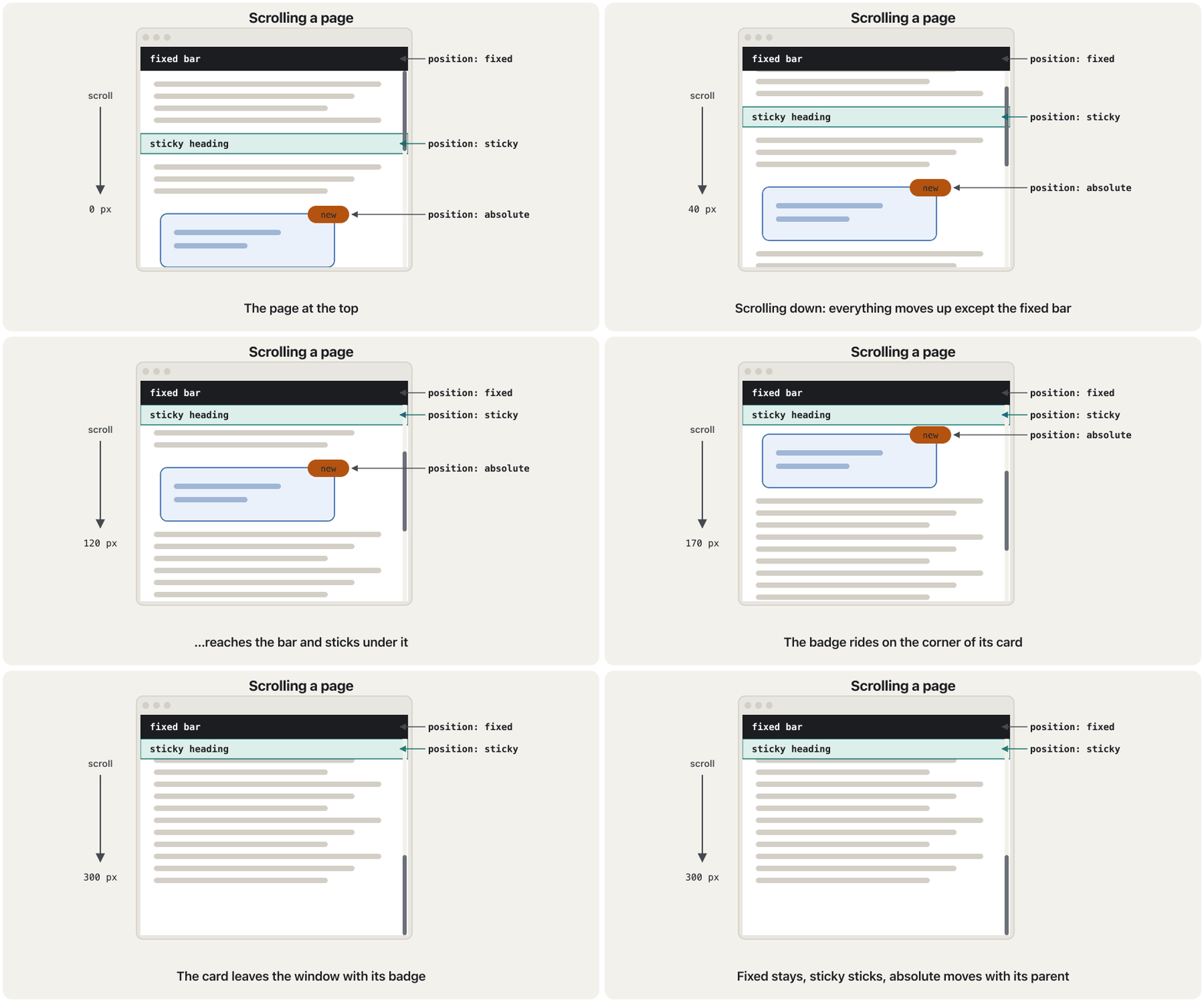
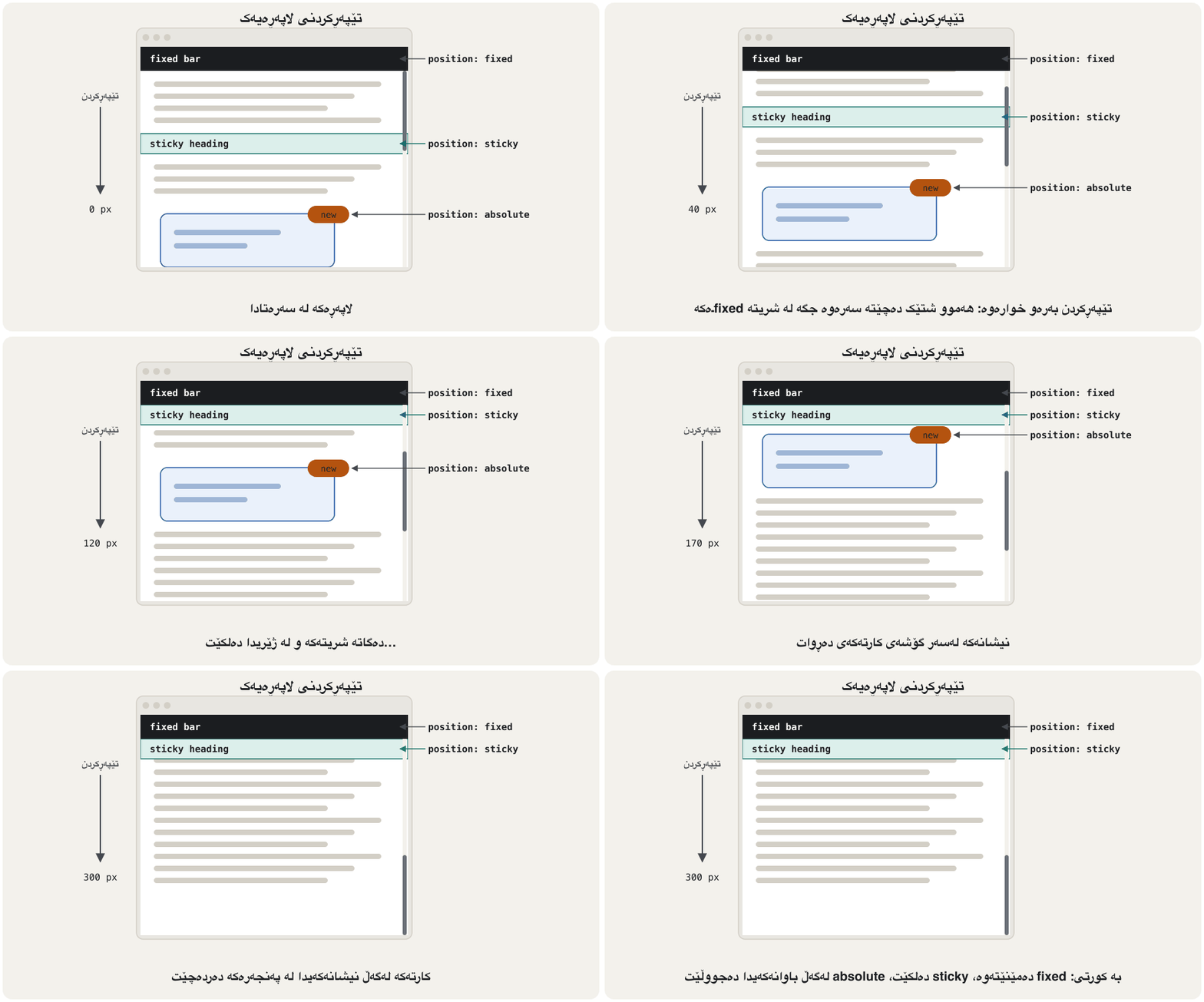
<!DOCTYPE html>
<html lang="en">
<head>
  <meta charset="utf-8">
  <meta name="viewport" content="width=device-width, initial-scale=1">
  <title>fixed and sticky</title>
  <style>
    body { font-family: Arial, sans-serif; margin: 0; }
    .top {
      position: fixed;         /* stuck to the window */
      top: 0; left: 0; right: 0;
      height: 40px;
      line-height: 40px;
      padding: 0 12px;
      background-color: #1b1d20;
      color: white;
    }
    main { padding: 60px 12px 0; }   /* room under the fixed bar */
    .sub {
      position: sticky;
      top: 40px;               /* sticks just under the fixed bar */
      margin: 0;
      padding: 6px;
      background-color: #dcefeb;
    }
    .long { min-height: 1200px; }
  </style>
</head>
<body>
  <header class="top">Fixed header: I never move</header>
  <main>
    <h2 class="sub">Sticky heading: I scroll, then I stick</h2>
    <p>Scroll this page. The dark bar at the top is fixed to the window.
    The green heading scrolls up with the text until it reaches the bar,
    then it stays there.</p>
    <p class="long">More text to make the page long enough to scroll…</p>
  </main>
</body>
</html>HTML sent to the browserئەو HTMLـەی دەنێردرێت بۆ تۆڕگەڕ
<!DOCTYPE html>
<html lang="en">
<head>
  <meta charset="utf-8">
  <meta name="viewport" content="width=device-width, initial-scale=1">
  <title>fixed and sticky</title>
  <style>
    body { font-family: Arial, sans-serif; margin: 0; }
    .top {
      position: fixed;         /* stuck to the window */
      top: 0; left: 0; right: 0;
      height: 40px;
      line-height: 40px;
      padding: 0 12px;
      background-color: #1b1d20;
      color: white;
    }
    main { padding: 60px 12px 0; }   /* room under the fixed bar */
    .sub {
      position: sticky;
      top: 40px;               /* sticks just under the fixed bar */
      margin: 0;
      padding: 6px;
      background-color: #dcefeb;
    }
    .long { min-height: 1200px; }
  </style>
</head>
<body>
  <header class="top">Fixed header: I never move</header>
  <main>
    <h2 class="sub">Sticky heading: I scroll, then I stick</h2>
    <p>Scroll this page. The dark bar at the top is fixed to the window.
    The green heading scrolls up with the text until it reaches the bar,
    then it stays there.</p>
    <p class="long">More text to make the page long enough to scroll…</p>
  </main>
</body>
</html>The position propertyتایبەتمەندیی position
z-index: which box is on top?z-index: کام سندووق لە سەرەوەیە؟
Positioned boxes can overlap. Normally the one that comes later in the HTML is drawn on top. z-index changes the order: a box with a larger z-index covers one with a smaller value. It works on positioned elements (any position except static) and on flex and grid items.
سندووقە شوێندراوەکان دەتوانن بچنە سەر یەک. بە ئاسایی ئەوەی دواتر لە دێت لە سەرەوە دەکێشرێت. z-index ڕیزەکە دەگۆڕێت: سندووقێک بە z-indexـی گەورەتر ئەوەی بەهای بچووکتری هەیە دادەپۆشێت. لەسەر شوێندراو (هەر positionـێک جگە لە static) و لەسەر منداڵەکانی flex و grid کار دەکات.
<!DOCTYPE html>
<html lang="en">
<head>
  <meta charset="utf-8">
  <meta name="viewport" content="width=device-width, initial-scale=1">
  <title>z-index</title>
  <style>
    body { font-family: Arial, sans-serif; }
    .area { position: relative; height: 170px; }
    .sq { position: absolute; width: 150px; height: 100px; padding: 6px; }
    .one { top: 10px; left: 10px; background-color: #f9cc9d; z-index: 2; }
    .two { top: 50px; left: 80px; background-color: #8cb6c0; z-index: 1; }
  </style>
</head>
<body>
  <div class="area">
    <div class="sq one">1 (z-index: 2)</div>
    <div class="sq two">2 (z-index: 1)</div>
  </div>
</body>
</html>HTML sent to the browserئەو HTMLـەی دەنێردرێت بۆ تۆڕگەڕ
<!DOCTYPE html>
<html lang="en">
<head>
  <meta charset="utf-8">
  <meta name="viewport" content="width=device-width, initial-scale=1">
  <title>z-index</title>
  <style>
    body { font-family: Arial, sans-serif; }
    .area { position: relative; height: 170px; }
    .sq { position: absolute; width: 150px; height: 100px; padding: 6px; }
    .one { top: 10px; left: 10px; background-color: #f9cc9d; z-index: 2; }
    .two { top: 50px; left: 80px; background-color: #8cb6c0; z-index: 1; }
  </style>
</head>
<body>
  <div class="area">
    <div class="sq one">1 (z-index: 2)</div>
    <div class="sq two">2 (z-index: 1)</div>
  </div>
</body>
</html>The position propertyتایبەتمەندیی position
Predict the picture: the lecture's exampleوێنەکە پێشبینی بکە: نموونەکەی وانەکە
The lecture puts three children inside a 700 px tall blue parent with position: relative: One is absolute, Two is sticky and Three is fixed. Read the code and try to predict the picture before you open the preview.
وانەکە سێ منداڵ دەخاتە ناو باوانێکی شینی ٧٠٠ بەرز بە position: relative: One absoluteـە، Two stickyـە و Three fixedـە. کۆدەکە بخوێنەوە و هەوڵ بدە وێنەکە لە مێشکی خۆتدا بکێشیت پێش ئەوەی پێشبینینەکە بکەیتەوە.
<!DOCTYPE html>
<html lang="en">
<head>
  <meta charset="utf-8">
  <meta name="viewport" content="width=device-width, initial-scale=1">
  <title>The position property</title>
  <style>
    .parent {
      position: relative;
      height: 700px;
      padding: 5px;
      background-color: #00aaff;
    }
    .child-one {
      position: absolute;
      left: 10px;
      width: 100px;
      height: 15px;
      border: 2px solid #4caa50;
      background-color: rgb(116, 255, 116);
    }
    .child-two {
      position: sticky;
      top: 100px;
      width: 100px;
      height: 15px;
      border: 2px solid #4caf50;
      background-color: rgb(248, 117, 117);
    }
    .child-three {
      position: fixed;
      top: 120px;
      width: 100px;
      height: 50px;
      border: 3px solid #73ad21;
      background-color: rgb(255, 116, 232);
    }
  </style>
</head>
<body>
  <div class="parent">
    <p>Parent</p>
    <div class="child-one">One</div>
    <div class="child-two">Two</div>
    <div class="child-three">Three</div>
  </div>
</body>
</html>HTML sent to the browserئەو HTMLـەی دەنێردرێت بۆ تۆڕگەڕ
<!DOCTYPE html>
<html lang="en">
<head>
  <meta charset="utf-8">
  <meta name="viewport" content="width=device-width, initial-scale=1">
  <title>The position property</title>
  <style>
    .parent {
      position: relative;
      height: 700px;
      padding: 5px;
      background-color: #00aaff;
    }
    .child-one {
      position: absolute;
      left: 10px;
      width: 100px;
      height: 15px;
      border: 2px solid #4caa50;
      background-color: rgb(116, 255, 116);
    }
    .child-two {
      position: sticky;
      top: 100px;
      width: 100px;
      height: 15px;
      border: 2px solid #4caf50;
      background-color: rgb(248, 117, 117);
    }
    .child-three {
      position: fixed;
      top: 120px;
      width: 100px;
      height: 50px;
      border: 3px solid #73ad21;
      background-color: rgb(255, 116, 232);
    }
  </style>
</head>
<body>
  <div class="parent">
    <p>Parent</p>
    <div class="child-one">One</div>
    <div class="child-two">Two</div>
    <div class="child-three">Three</div>
  </div>
</body>
</html>
One (absolute,
left: 10px, notop) stays at the height where it would be — just under "Parent" — but it has left the flow, so Two moves up into its place.One (absolute،
left: 10px، بێtop) لەو بەرزییەدا دەمێنێتەوە کە دەبوو — ڕێک لە ژێر «Parent» — بەڵام لە ڕەوتەکە دەرچووە، بۆیە Two دێتە سەرەوە بۆ شوێنەکەی.Two (sticky,
top: 100px) is pushed down to 100 px from the top of the window at once, because its sticky threshold is below its normal place. While you scroll it stays at 100 px, until the bottom of the blue parent arrives and carries it away.Two (sticky،
top: 100px) یەکسەر پاڵ دەنرێت بۆ ١٠٠ لە سەرەوەی پەنجەرەکە، چونکە سنووری stickyـەکەی لە خوار شوێنە ئاساییەکەیەوەیە. لە کاتی لە ١٠٠ دەمێنێتەوە تا خوارەوەی باوانە شینەکە دەگات و لەگەڵ خۆیدا دەیبات.Three (fixed,
top: 120px) sits 120 px from the top of the window, right under Two, and never moves — not even after the blue parent has scrolled away.Three (fixed،
top: 120px) ١٢٠ لە سەرەوەی پەنجەرەکە دادەنیشێت، ڕێک لە ژێر Two. هەرگیز ناجووڵێت — تەنانەت دوای ئەوەی باوانە شینەکە ڕۆیشتووە.
Worked example: the course author's fixed title barنموونەی کارپێکراو: شریتی سەردێڕی جێگیری خاوەنی کۆرسەکە
In one of the course author's practice pages, the title is a bar that stays at the top while the page scrolls: h1 { position: fixed; top: 0; left: 0; width: 100%; … }. The paragraphs get margin-top: 50px so that the first line is not hidden under the bar, and a signature line is floated to the right.
لە یەکێک لە لاپەڕەکانی ڕاهێنانی خاوەنی کۆرسەکەدا، ناونیشانەکە شریتێکە کە لە کاتی لە سەرەوە دەمێنێتەوە: h1 { position: fixed; top: 0; left: 0; width: 100%; … }. بڕگەکان margin-top: 50px وەردەگرن تا یەکەم دێڕ لە ژێر شریتەکەدا نەشاردرێتەوە، هەروەها دێڕێکی واژۆ float دەکرێت بۆ ڕاست.
<!DOCTYPE html>
<html lang="en">
<head>
  <meta charset="utf-8">
  <meta name="viewport" content="width=device-width, initial-scale=1">
  <title>css study</title>
  <style>
    h1 {
      position: fixed;
      top: 0;
      left: 0;
      margin: 0;
      padding: 0;
      width: 100%;
      background-color: white;
      text-align: center;
      border: 1px solid black;
    }
    p {
      margin-top: 50px;      /* a guess: is the bar 50 px tall? */
      text-indent: 50px;
      text-align: justify;
    }
    .quote {
      float: right;
      margin: 0;
    }
  </style>
</head>
<body>
  <h1>Information Technology</h1>
  <p>The Department of Information Technology teaches web design, networks and
  databases. Students build their own pages from the first month. (Imagine
  many more lines of text here, so that the page scrolls.)</p>
  <p class="quote">Hello World, I'm Aram</p>
</body>
</html>HTML sent to the browserئەو HTMLـەی دەنێردرێت بۆ تۆڕگەڕ
<!DOCTYPE html>
<html lang="en">
<head>
  <meta charset="utf-8">
  <meta name="viewport" content="width=device-width, initial-scale=1">
  <title>css study</title>
  <style>
    h1 {
      position: fixed;
      top: 0;
      left: 0;
      margin: 0;
      padding: 0;
      width: 100%;
      background-color: white;
      text-align: center;
      border: 1px solid black;
    }
    p {
      margin-top: 50px;      /* a guess: is the bar 50 px tall? */
      text-indent: 50px;
      text-align: justify;
    }
    .quote {
      float: right;
      margin: 0;
    }
  </style>
</head>
<body>
  <h1>Information Technology</h1>
  <p>The Department of Information Technology teaches web design, networks and
  databases. Students build their own pages from the first month. (Imagine
  many more lines of text here, so that the page scrolls.)</p>
  <p class="quote">Hello World, I'm Aram</p>
</body>
</html>
Two problems. The 50 px is a guess: if the title wraps onto two lines on a phone, or the font is bigger, the bar covers the text again. And margin-top: 50px is on every paragraph, so all the paragraphs get 50 px gaps, not only the first one. A sticky heading needs no guess: it keeps its own space in normal flow, scrolls up to the top and stays there.
دوو کێشە هەیە. ٥٠ مەزەندەیە: ئەگەر ناونیشانەکە لەسەر مۆبایل ببێتە دوو دێڕ، یان گەورەتر بێت، شریتەکە دووبارە دەقەکە دادەپۆشێت. هەروەها margin-top: 50px لەسەر هەموو بڕگەیەکە، بۆیە هەموو بڕگەکان بۆشایی ٥٠ وەردەگرن، نەک تەنها یەکەمیان. سەردێڕێکی sticky پێویستی بە مەزەندە نییە: شوێنی خۆی لە دەپارێزێت، لەگەڵ دەچێتە سەرەوە و لەوێ دەمێنێتەوە.
<!DOCTYPE html>
<html lang="en">
<head>
  <meta charset="utf-8">
  <meta name="viewport" content="width=device-width, initial-scale=1">
  <title>css study</title>
  <style>
    h1 {
      position: sticky;      /* scrolls with the page, then sticks */
      top: 0;
      margin: 0;
      background-color: white;
      text-align: center;
      border: 1px solid black;
    }
    p {
      text-indent: 50px;
      text-align: justify;
    }
    .quote {
      text-align: end;       /* right in English, left in Kurdish */
      text-indent: 0;
    }
  </style>
</head>
<body>
  <h1>Information Technology</h1>
  <p>The Department of Information Technology teaches web design, networks and
  databases. Students build their own pages from the first month.</p>
  <p class="quote">Hello World, I'm Aram</p>
</body>
</html>HTML sent to the browserئەو HTMLـەی دەنێردرێت بۆ تۆڕگەڕ
<!DOCTYPE html>
<html lang="en">
<head>
  <meta charset="utf-8">
  <meta name="viewport" content="width=device-width, initial-scale=1">
  <title>css study</title>
  <style>
    h1 {
      position: sticky;      /* scrolls with the page, then sticks */
      top: 0;
      margin: 0;
      background-color: white;
      text-align: center;
      border: 1px solid black;
    }
    p {
      text-indent: 50px;
      text-align: justify;
    }
    .quote {
      text-align: end;       /* right in English, left in Kurdish */
      text-indent: 0;
    }
  </style>
</head>
<body>
  <h1>Information Technology</h1>
  <p>The Department of Information Technology teaches web design, networks and
  databases. Students build their own pages from the first month.</p>
  <p class="quote">Hello World, I'm Aram</p>
</body>
</html>Flexbox: boxes in a row or a columnFlexbox: سندووق لە ڕیزێک یان ستوونێکدا
Put display: flex on a parent and its children become flex items that line up in a row. You do not style each child to make them sit side by side: the parent decides. works along two axes: the is the direction of the row (or column, with flex-direction: column), and the runs across it.
display: flex بخەرە سەر باوانێک و منداڵەکانی دەبنە flex item کە لە ڕیزێکدا ڕیز دەبن. پێویست ناکات هەر منداڵێک جیا بڕازێنیتەوە تا لە تەنیشت یەک دابنیشن: باوانەکە بڕیار دەدات. لەسەر دوو تەوەرە کار دەکات: ئاڕاستەی ڕیزەکەیە (یان ستوون، بە flex-direction: column)، یش بە پانیدا دەڕوات.
<!DOCTYPE html>
<html lang="en">
<head>
  <meta charset="utf-8">
  <meta name="viewport" content="width=device-width, initial-scale=1">
  <title>Flexbox</title>
  <style>
    body { font-family: Arial, sans-serif; }
    .row {
      display: flex;           /* the children become flex items */
      gap: 12px;               /* space between the items */
      padding: 8px;
      background-color: #f3f1ec;
    }
    .card { flex: 1; padding: 12px; background-color: #dcefeb; }
    .wide { flex: 2; }         /* takes twice as much of the free space */
  </style>
</head>
<body>
  <div class="row">
    <div class="card">Erbil</div>
    <div class="card">Sulaimani<br>and Halabja</div>
    <div class="card wide">Duhok</div>
  </div>
</body>
</html>HTML sent to the browserئەو HTMLـەی دەنێردرێت بۆ تۆڕگەڕ
<!DOCTYPE html>
<html lang="en">
<head>
  <meta charset="utf-8">
  <meta name="viewport" content="width=device-width, initial-scale=1">
  <title>Flexbox</title>
  <style>
    body { font-family: Arial, sans-serif; }
    .row {
      display: flex;           /* the children become flex items */
      gap: 12px;               /* space between the items */
      padding: 8px;
      background-color: #f3f1ec;
    }
    .card { flex: 1; padding: 12px; background-color: #dcefeb; }
    .wide { flex: 2; }         /* takes twice as much of the free space */
  </style>
</head>
<body>
  <div class="row">
    <div class="card">Erbil</div>
    <div class="card">Sulaimani<br>and Halabja</div>
    <div class="card wide">Duhok</div>
  </div>
</body>
</html>gapputs the same space between the items (and nothing at the outer edges).flex: 1on every item shares the free space equally; an item withflex: 2gets twice as much.- The items are as tall as the tallest one: flexbox stretches them along the cross axis by default.
gapهەمان بۆشایی دەخاتە نێوان itemـەکان (و هیچ لە لێوارەکانی دەرەوە).flex: 1لەسەر هەموو itemـێک بۆشاییە بەتاڵەکە بە یەکسانی دابەش دەکات؛ itemـێک بەflex: 2دوو هێندە وەردەگرێت.- itemـەکان بەقەد بەرزترینیان بەرزن: بە شێوەی بنەڕەتی بە درێژایی دەیانکێشێت.
In Sorani Kurdish, part 1 of 3 on Flexbox: the flex container and its items, first on a diagram, then in code.
بە کوردیی سۆرانی، بەشی 1 لە 3: — کۆنتەینەری flex و بڕگەکانی، سەرەتا لەسەر وێنەیەک، پاشان بە کۆد.
In Sorani, the whole of part 1 (13:19, 2020). Parts 2 and 3 on the same channel go further.
بە سۆرانی، هەموو بەشی 1 (13:19، ساڵی 2020). بەشەکانی 2 و 3 لە هەمان کەناڵدا زیاتر دەڕۆن.
Flexbox: boxes in a row or a columnFlexbox: سندووق لە ڕیزێک یان ستوونێکدا
Lining items up: justify-content and align-itemsڕیزکردنی itemـەکان: justify-content و align-items
| Property | Axisتەوەرە | Common valuesبەهای باو |
|---|---|---|
justify-content | Main axis (along the row) (بە درێژایی ڕیزەکە) | flex-start · center · flex-end · space-between · space-around |
align-items | Cross axis (across the row) (بە پانیی ڕیزەکە) | stretch · center · flex-start · flex-end · baseline |
flex-wrap | Main axis | nowrap (default: one line) · wrap (go to the next line)nowrap (بنەڕەت: یەک دێڕ) · wrap (چوونە دێڕی دواتر) |
<!DOCTYPE html>
<html lang="en">
<head>
  <meta charset="utf-8">
  <meta name="viewport" content="width=device-width, initial-scale=1">
  <title>Flex alignment</title>
  <style>
    body { font-family: Arial, sans-serif; }
    .row { display: flex; gap: 8px; margin-bottom: 10px; padding: 6px; background-color: #f3f1ec; }
    .row span { padding: 6px 14px; background-color: #8cb6c0; }
    .start   { justify-content: flex-start; }      /* the default */
    .center  { justify-content: center; }
    .between { justify-content: space-between; }
    .middle  { align-items: center; height: 70px; }  /* cross axis */
    .row .big { padding: 20px 14px; }   /* a taller B */
  </style>
</head>
<body>
  <div class="row start"><span>A</span><span>B</span><span>C</span></div>
  <div class="row center"><span>A</span><span>B</span><span>C</span></div>
  <div class="row between"><span>A</span><span>B</span><span>C</span></div>
  <div class="row middle"><span>A</span><span class="big">B</span><span>C</span></div>
</body>
</html>HTML sent to the browserئەو HTMLـەی دەنێردرێت بۆ تۆڕگەڕ
<!DOCTYPE html>
<html lang="en">
<head>
  <meta charset="utf-8">
  <meta name="viewport" content="width=device-width, initial-scale=1">
  <title>Flex alignment</title>
  <style>
    body { font-family: Arial, sans-serif; }
    .row { display: flex; gap: 8px; margin-bottom: 10px; padding: 6px; background-color: #f3f1ec; }
    .row span { padding: 6px 14px; background-color: #8cb6c0; }
    .start   { justify-content: flex-start; }      /* the default */
    .center  { justify-content: center; }
    .between { justify-content: space-between; }
    .middle  { align-items: center; height: 70px; }  /* cross axis */
    .row .big { padding: 20px 14px; }   /* a taller B */
  </style>
</head>
<body>
  <div class="row start"><span>A</span><span>B</span><span>C</span></div>
  <div class="row center"><span>A</span><span>B</span><span>C</span></div>
  <div class="row between"><span>A</span><span>B</span><span>C</span></div>
  <div class="row middle"><span>A</span><span class="big">B</span><span>C</span></div>
</body>
</html>
Explain the codeڕوونکردنەوەی کۆدەکە
- Lineدێڕی 15
Written
.row .big, not.big: the rule.row spanon line 10 is more specific, so a plain.bigwould lose and B would not grow (Specificity). In the last row,align-items: centerputs the short A and C in the middle of the tall B.بە
.row .bigنووسراوە، نەک.big: ڕێسای.row spanـی دێڕی ١٠ زیاترە، بۆیە.bigـی تەنها دەدۆڕێت و B گەورە نابێت (وردیی هەڵبژێر). لە دوایین ڕیزداalign-items: centerA و Cـی کورت دەخاتە ناوەڕاستی Bـی بەرز.
Flexbox: boxes in a row or a columnFlexbox: سندووق لە ڕیزێک یان ستوونێکدا
Worked example: the course author's Lab 4 boxesنموونەی کارپێکراو: سندووقەکانی Lab 4ـی خاوەنی کۆرسەکە
In the course author's Lab 4, sixteen divs labelled "Header 1" to "Header 16" get a purple background, padding and display: inline-flex. Like inline-block, inline-flex makes the block boxes sit side by side and wrap to the next line like words. The universal selector * gives every element a 50 px font.
لە Lab 4ـی خاوەنی کۆرسەکەدا، شازدە div بە ناونیشانی «Header 1» تا «Header 16» باکگراوندی مۆر، و display: inline-flex وەردەگرن. وەک inline-block، inline-flex وا دەکات سندووقە بلۆکەکان لە تەنیشت یەک دابنیشن و وەک وشە بچنە دێڕی دواتر. گشتی * ٥٠ دەداتە هەموو .
div {
  border: 1px black solid;
  background-color: blueviolet;
  margin-bottom: 14px;
  color: white;
  padding: 15px;
  padding-left: 25px;
  padding-right: 25px;
  text-align: center;
  display: inline-flex;
}

* {
  font-size: 50px;
}
It works, but: the gaps between the boxes come from the spaces between the tags in the HTML (so they change with the font); the vertical space comes from margin-bottom only; div (every div of the site!) and * style far more than these boxes; and the boxes are not headers. Today one flex container does the job:
کار دەکات، بەڵام: بۆشایی نێوان سندووقەکان لە بۆشایی نێوان تاگەکانی دێت (بۆیە لەگەڵ دەگۆڕێت)؛ بۆشایی ستوونی تەنها لە margin-bottomـەوە دێت؛ div (هەموو divـێکی !) و * زۆر زیاتر لەم سندووقانە دەڕازێننەوە؛ هەروەها سندووقەکان سەردێڕ نین. ئەمڕۆ یەک سندووقی flex ئەم کارە دەکات:
<!DOCTYPE html>
<html lang="en">
<head>
  <meta charset="utf-8">
  <meta name="viewport" content="width=device-width, initial-scale=1">
  <title>Lab 4</title>
  <style>
    body { font-family: Arial, sans-serif; }
    .boxes {
      display: flex;
      flex-wrap: wrap;         /* boxes move to the next line when full */
      gap: 14px;               /* the same space everywhere */
    }
    .box {
      padding: 15px 25px;
      background-color: blueviolet;
      color: white;
      font-size: 1.5rem;
      border: 1px solid black;
    }
  </style>
</head>
<body>
  <div class="boxes">
    <div class="box">Box 1</div>
    <div class="box">Box 2</div>
    <div class="box">Box 3</div>
    <div class="box">Box 4</div>
    <div class="box">Box 5</div>
    <div class="box">Box 6</div>
    <div class="box">Box 7</div>
    <div class="box">Box 8</div>
  </div>
</body>
</html>HTML sent to the browserئەو HTMLـەی دەنێردرێت بۆ تۆڕگەڕ
<!DOCTYPE html>
<html lang="en">
<head>
  <meta charset="utf-8">
  <meta name="viewport" content="width=device-width, initial-scale=1">
  <title>Lab 4</title>
  <style>
    body { font-family: Arial, sans-serif; }
    .boxes {
      display: flex;
      flex-wrap: wrap;         /* boxes move to the next line when full */
      gap: 14px;               /* the same space everywhere */
    }
    .box {
      padding: 15px 25px;
      background-color: blueviolet;
      color: white;
      font-size: 1.5rem;
      border: 1px solid black;
    }
  </style>
</head>
<body>
  <div class="boxes">
    <div class="box">Box 1</div>
    <div class="box">Box 2</div>
    <div class="box">Box 3</div>
    <div class="box">Box 4</div>
    <div class="box">Box 5</div>
    <div class="box">Box 6</div>
    <div class="box">Box 7</div>
    <div class="box">Box 8</div>
  </div>
</body>
</html>Grid: rows and columns togetherGrid: ڕیز و ستوون پێکەوە
lines boxes up in one direction. works in two at once. display: grid on a parent, then grid-template-columns lists the columns. The unit fr means "one share of the free space": 1fr 1fr 1fr (or repeat(3, 1fr)) is three equal columns, and 200px 1fr is a 200 px column plus one that takes the rest. gap sets the space between rows and columns.
سندووقەکان بە یەک ئاڕاستە ڕیز دەکات. بە دوو ئاڕاستە پێکەوە کار دەکات. display: grid لەسەر باوانێک، پاشان grid-template-columns ستوونەکان دەنووسێت. یەکەی fr واتە «بەشێک لە بۆشاییە بەتاڵەکە»: 1fr 1fr 1fr (یان repeat(3, 1fr)) سێ ستوونی یەکسانە و 200px 1fr ستوونێکی ٢٠٠ و ستوونێکە کە باقییەکەی دەگرێت. gap بۆشایی نێوان ڕیز و ستوونەکان دیاری دەکات.
<!DOCTYPE html>
<html lang="en">
<head>
  <meta charset="utf-8">
  <meta name="viewport" content="width=device-width, initial-scale=1">
  <title>Grid</title>
  <style>
    body { font-family: Arial, sans-serif; }
    .gallery {
      display: grid;
      grid-template-columns: repeat(3, 1fr);   /* three equal columns */
      gap: 12px;
      margin-bottom: 16px;
    }
    .gallery div { padding: 16px; background-color: #eaf1fb; text-align: center; }
    .two-col {
      display: grid;
      grid-template-columns: 200px 1fr;
      gap: 12px;
    }
    .two-col nav  { background-color: #fdf3e1; padding: 8px; }
    .two-col main { background-color: #dcefeb; padding: 8px; }
  </style>
</head>
<body>
  <div class="gallery">
    <div>1</div><div>2</div><div>3</div>
    <div>4</div><div>5</div><div>6</div>
  </div>
  <div class="two-col">
    <nav>Menu: 200 px</nav>
    <main>Content: 1fr, the rest of the width</main>
  </div>
</body>
</html>HTML sent to the browserئەو HTMLـەی دەنێردرێت بۆ تۆڕگەڕ
<!DOCTYPE html>
<html lang="en">
<head>
  <meta charset="utf-8">
  <meta name="viewport" content="width=device-width, initial-scale=1">
  <title>Grid</title>
  <style>
    body { font-family: Arial, sans-serif; }
    .gallery {
      display: grid;
      grid-template-columns: repeat(3, 1fr);   /* three equal columns */
      gap: 12px;
      margin-bottom: 16px;
    }
    .gallery div { padding: 16px; background-color: #eaf1fb; text-align: center; }
    .two-col {
      display: grid;
      grid-template-columns: 200px 1fr;
      gap: 12px;
    }
    .two-col nav  { background-color: #fdf3e1; padding: 8px; }
    .two-col main { background-color: #dcefeb; padding: 8px; }
  </style>
</head>
<body>
  <div class="gallery">
    <div>1</div><div>2</div><div>3</div>
    <div>4</div><div>5</div><div>6</div>
  </div>
  <div class="two-col">
    <nav>Menu: 200 px</nav>
    <main>Content: 1fr, the rest of the width</main>
  </div>
</body>
</html>In Sorani Kurdish, part 1 of 3 on CSS Grid: rows and columns on a diagram, then a grid built in code.
بە کوردیی سۆرانی، بەشی 1 لە 3: — ڕیز و ستوون لەسەر وێنەیەک، پاشان grid بە کۆد دروست دەکرێت.
In Sorani, plays 0:00–15:40 (2020; grid has not changed since).
بە سۆرانی، لە 0:00 تا 15:40 پەخش دەبێت (ساڵی 2020؛ grid لەو کاتەوە نەگۆڕاوە).
Grid: rows and columns togetherGrid: ڕیز و ستوون پێکەوە
The three-column page, rebuilt with gridلاپەڕە سێ ستوونییەکە، بە grid دووبارە دروستکراو
Now the lecture's float page again. This time the parts are the meaning-based elements from The modern way — header, nav, main, aside, footer — and the layout is drawn as a little map with grid-template-areas. Each child names its area with grid-area. No floats, no clear, no fixed heights: the three columns are always the same height, and the middle one takes all the free width.
ئێستا دووبارە لاپەڕە floatـییەکەی وانەکە. ئەمجارە بەشەکان ئەو واتادارانەن کە لە ڕێگە نوێیەکە هاتوون — header، nav، main، aside، footer — و وەک نەخشەیەکی بچووک بە grid-template-areas دەکێشرێت. هەر منداڵێک ناوچەکەی خۆی بە grid-area ناو دەبات. بێ float، بێ clear، بێ بەرزیی جێگیر: سێ ستوونەکە هەمیشە هاوبەرزن و ستوونی ناوەڕاست هەموو پانییە بەتاڵەکە دەگرێت.
<!DOCTYPE html>
<html lang="en">
<head>
<meta charset="utf-8">
<meta name="viewport" content="width=device-width, initial-scale=1">
<title>Grid layout</title>
<style>
* { box-sizing: border-box; }
body { font-family: Arial, sans-serif; margin: 8px; }
h1, h2 { margin: 0; }
h2 { font-size: 1rem; }
.page {
display: grid;
grid-template-columns: 150px 1fr 150px;
grid-template-areas:
"header header header"
"nav main aside"
"footer footer footer";
gap: 8px;
}
header { grid-area: header; background-color: #b5dcb3; padding: 8px; }
nav { grid-area: nav; background-color: #aaaaaa; padding: 8px; }
main { grid-area: main; background-color: #eeeeee; padding: 8px; min-height: 200px; }
aside { grid-area: aside; background-color: #aaaaaa; padding: 8px; }
footer { grid-area: footer; background-color: #b5dcb3; text-align: center; }
</style>
</head>
<body>
<div class="page">
<header><h1>This is Web Page</h1></header>
<nav>
<h2>Main Menu</h2>
<ul><li>HTML</li><li>CSS</li><li>JavaScript</li><li>PHP</li><li>MySQL</li></ul>
</nav>
<main><p>Department of Information Technology</p></main>
<aside>
<h2>Second Stage</h2>
<ul><li>Web Design</li><li>Network</li><li>Database</li></ul>
</aside>
<footer><p>Copyright © 2017 IT Dept</p></footer>
</div>
</body>
</html>HTML sent to the browserئەو HTMLـەی دەنێردرێت بۆ تۆڕگەڕ
<!DOCTYPE html>
<html lang="en">
<head>
<meta charset="utf-8">
<meta name="viewport" content="width=device-width, initial-scale=1">
<title>Grid layout</title>
<style>
* { box-sizing: border-box; }
body { font-family: Arial, sans-serif; margin: 8px; }
h1, h2 { margin: 0; }
h2 { font-size: 1rem; }
.page {
display: grid;
grid-template-columns: 150px 1fr 150px;
grid-template-areas:
"header header header"
"nav main aside"
"footer footer footer";
gap: 8px;
}
header { grid-area: header; background-color: #b5dcb3; padding: 8px; }
nav { grid-area: nav; background-color: #aaaaaa; padding: 8px; }
main { grid-area: main; background-color: #eeeeee; padding: 8px; min-height: 200px; }
aside { grid-area: aside; background-color: #aaaaaa; padding: 8px; }
footer { grid-area: footer; background-color: #b5dcb3; text-align: center; }
</style>
</head>
<body>
<div class="page">
<header><h1>This is Web Page</h1></header>
<nav>
<h2>Main Menu</h2>
<ul><li>HTML</li><li>CSS</li><li>JavaScript</li><li>PHP</li><li>MySQL</li></ul>
</nav>
<main><p>Department of Information Technology</p></main>
<aside>
<h2>Second Stage</h2>
<ul><li>Web Design</li><li>Network</li><li>Database</li></ul>
</aside>
<footer><p>Copyright © 2017 IT Dept</p></footer>
</div>
</body>
</html>Responsive basics: one page for every screenبنەماکانی ڕێسپۆنسیڤ: یەک لاپەڕە بۆ هەموو شاشەیەک
A changes its layout to fit the screen: one column on a phone, more on a laptop. Three small things make a page responsive. Test them with the device mode of the (open the developer tools, then Ctrl+Shift+M — Cmd+Shift+M on a Mac — in Chrome and Edge; Ctrl+Shift+M or Cmd+Option+M in Firefox) or simply by making the window narrower — a site that works on every screen is one of the marks of a good website (What makes a good website?).
دەگۆڕێت تا لەگەڵ شاشەکەدا بگونجێت: یەک ستوون لەسەر مۆبایل، زیاتر لەسەر لاپتۆپ. سێ شتی بچووک لاپەڕەیەک ڕێسپۆنسیڤ دەکەن. بە دۆخی ئامێری تاقییان بکەرەوە ( بکەرەوە، پاشان لە Chrome و Edgeـدا Ctrl+Shift+M — لەسەر Mac، Cmd+Shift+M؛ لە Firefoxـدا Ctrl+Shift+M یان Cmd+Option+M) یان تەنها پەنجەرەکە تەسکتر بکە — کە لەسەر هەموو شاشەیەک کار بکات یەکێکە لە نیشانەکانی باش (چی تۆڕگەیەکی باش دروست دەکات؟).
Responsive basics: one page for every screenبنەماکانی ڕێسپۆنسیڤ: یەک لاپەڕە بۆ هەموو شاشەیەک
1. The viewport meta tag١. تاگی meta بۆ ناوچەی بینین
Without help, a phone pretends to be a wide desktop screen (often 980 px) and shrinks the whole page, so the text is tiny and your media queries never switch. One line in the <head> tells it to use its real width. Every full example in these lessons already has it:
بەبێ یارمەتی، مۆبایل وا دەکات وەک ئەوەی شاشەیەکی پانی کۆمپیوتەر بێت (زۆرجار ٩٨٠ ) و هەموو لاپەڕەکە بچووک دەکاتەوە، بۆیە دەقەکە زۆر وردە و هەرگیز ناگۆڕێن. یەک دێڕ لە <head>ـدا پێی دەڵێت پانیی ڕاستەقینەی خۆی بەکاربهێنێت. هەموو نموونەیەکی تەواو لەم وانانەدا ئەمەی تێدایە:
<meta name="viewport" content="width=device-width, initial-scale=1">Responsive basics: one page for every screenبنەماکانی ڕێسپۆنسیڤ: یەک لاپەڕە بۆ هەموو شاشەیەک
2. Pictures that shrink: max-width: 100%٢. وێنەی بچووکبوو: max-width: 100%
A photo 1200 px wide sticks out of a 360 px phone screen. One rule fixes every picture on the site: it may never be wider than its container, and height: auto keeps its proportions. Keep the width and height attributes in the HTML (Width, height and the old align and border): the browser then reserves the right space while the picture loads.
وێنەیەکی ١٢٠٠ پان لە شاشەی مۆبایلێکی ٣٦٠ دەردەچێت. یەک ڕێسا هەموو وێنەیەکی چاک دەکات: هەرگیز لە سندووقی دەرەوەی پانتر نابێت و height: auto ڕێژەکانی دەپارێزێت. width و height لە بهێڵەوە (width، height و align و borderـی کۆن): ئیتر شوێنی دروست بۆ وێنەکە دەهێڵێتەوە تا باردەبێت.
img {
  max-width: 100%;   /* never wider than its container */
  height: auto;      /* keep the proportions */
}Responsive basics: one page for every screenبنەماکانی ڕێسپۆنسیڤ: یەک لاپەڕە بۆ هەموو شاشەیەک
3. One media query٣. یەک پرسی میدیا
A applies rules only when the screen matches a condition. The usual way today is mobile first: write the simple one-column layout for phones, then add the columns inside @media (min-width: 700px) { … }, which only applies when the window is at least 700 px wide. Here is the grid page again, now responsive:
ڕێساکان تەنها ئەو کاتە جێبەجێ دەکات کە شاشەکە لەگەڵ مەرجێکدا بگونجێت. ڕێگەی باوی ئەمڕۆ سەرەتا مۆبایلە: سادەی یەک ستوونی بۆ مۆبایل بنووسە، پاشان ستوونەکان لەناو @media (min-width: 700px) { … } زیاد بکە، کە تەنها کاتێک جێبەجێ دەبێت پانیی پەنجەرەکە لانیکەم ٧٠٠ بێت. ئەمە دووبارە لاپەڕەی gridـەکەیە، ئێستا ڕێسپۆنسیڤ:
<!DOCTYPE html>
<html lang="en">
<head>
<meta charset="utf-8">
<meta name="viewport" content="width=device-width, initial-scale=1">
<title>Responsive layout</title>
<style>
* { box-sizing: border-box; }
body { font-family: Arial, sans-serif; margin: 8px; }
h1, h2 { margin: 0; }
h2 { font-size: 1rem; }
img { max-width: 100%; height: auto; }
/* Phones first: one column, in the order of the HTML */
.page {
display: grid;
gap: 8px;
grid-template-areas: "header" "nav" "main" "aside" "footer";
}
/* Wider screens: three columns */
@media (min-width: 700px) {
.page {
grid-template-columns: 150px 1fr 150px;
grid-template-areas:
"header header header"
"nav main aside"
"footer footer footer";
}
}
header { grid-area: header; background-color: #b5dcb3; padding: 8px; }
nav { grid-area: nav; background-color: #aaaaaa; padding: 8px; }
main { grid-area: main; background-color: #eeeeee; padding: 8px; min-height: 120px; }
aside { grid-area: aside; background-color: #aaaaaa; padding: 8px; }
footer { grid-area: footer; background-color: #b5dcb3; text-align: center; }
</style>
</head>
<body>
<div class="page">
<header><h1>This is Web Page</h1></header>
<nav>
<h2>Main Menu</h2>
<ul><li>HTML</li><li>CSS</li><li>JavaScript</li><li>PHP</li><li>MySQL</li></ul>
</nav>
<main><p>Department of Information Technology</p></main>
<aside>
<h2>Second Stage</h2>
<ul><li>Web Design</li><li>Network</li><li>Database</li></ul>
</aside>
<footer><p>Copyright © 2017 IT Dept</p></footer>
</div>
</body>
</html>HTML sent to the browserئەو HTMLـەی دەنێردرێت بۆ تۆڕگەڕ
<!DOCTYPE html>
<html lang="en">
<head>
<meta charset="utf-8">
<meta name="viewport" content="width=device-width, initial-scale=1">
<title>Responsive layout</title>
<style>
* { box-sizing: border-box; }
body { font-family: Arial, sans-serif; margin: 8px; }
h1, h2 { margin: 0; }
h2 { font-size: 1rem; }
img { max-width: 100%; height: auto; }
/* Phones first: one column, in the order of the HTML */
.page {
display: grid;
gap: 8px;
grid-template-areas: "header" "nav" "main" "aside" "footer";
}
/* Wider screens: three columns */
@media (min-width: 700px) {
.page {
grid-template-columns: 150px 1fr 150px;
grid-template-areas:
"header header header"
"nav main aside"
"footer footer footer";
}
}
header { grid-area: header; background-color: #b5dcb3; padding: 8px; }
nav { grid-area: nav; background-color: #aaaaaa; padding: 8px; }
main { grid-area: main; background-color: #eeeeee; padding: 8px; min-height: 120px; }
aside { grid-area: aside; background-color: #aaaaaa; padding: 8px; }
footer { grid-area: footer; background-color: #b5dcb3; text-align: center; }
</style>
</head>
<body>
<div class="page">
<header><h1>This is Web Page</h1></header>
<nav>
<h2>Main Menu</h2>
<ul><li>HTML</li><li>CSS</li><li>JavaScript</li><li>PHP</li><li>MySQL</li></ul>
</nav>
<main><p>Department of Information Technology</p></main>
<aside>
<h2>Second Stage</h2>
<ul><li>Web Design</li><li>Network</li><li>Database</li></ul>
</aside>
<footer><p>Copyright © 2017 IT Dept</p></footer>
</div>
</body>
</html>Make the window narrower than 700 px (or use the device mode) to see the single column.
پەنجەرەکە لە ٧٠٠ تەسکتر بکە (یان دۆخی ئامێر بەکاربهێنە) تا یەک ستوونەکە ببینیت.
Layouts in Kurdish: right to leftڕێکخستنی لاپەڕە بە کوردی: ڕاست بۆ چەپ
In a page with <html lang="ckb" dir="rtl"> (A page in Kurdish) flexbox and grid flip by themselves: the first flex item and the first grid column are on the right, because they follow the text direction ("start" is on the right). Floats, left/right offsets and margin-left do not flip. So for Kurdish sites prefer flexbox, grid and the logical properties: margin-inline-start, padding-inline-end, text-align: start, float: inline-start.
لە لاپەڕەیەکدا بە <html lang="ckb" dir="rtl"> (لاپەڕەیەک بە کوردی) و grid خۆیان پێچەوانە دەبنەوە: یەکەم flex item و یەکەم ستوونی grid لە ڕاستن، چونکە شوێن ئاڕاستەی دەق دەکەون («سەرەتا» لە ڕاستە). float، لادانەکانی left/right و margin-left پێچەوانە نابنەوە. بۆیە بۆ کوردی ، grid و لۆجیکییەکان باشترن: margin-inline-start، padding-inline-end، text-align: start، float: inline-start.
<!DOCTYPE html>
<html lang="ckb" dir="rtl">
<head>
  <meta charset="utf-8">
  <meta name="viewport" content="width=device-width, initial-scale=1">
  <title>پەڕەی بەش</title>
  <style>
    * { box-sizing: border-box; }
    body { font-family: "Noto Naskh Arabic", "Noto Sans Arabic", Vazirmatn, sans-serif; margin: 8px; }
    h1, h2 { margin: 0; }
    h2 { font-size: 1rem; }
    .menu { display: flex; gap: 6px; margin-bottom: 8px; }
    .menu a { padding: 6px 12px; background-color: #1f4e79; color: white; text-decoration: none; }
    .page {
      display: grid;
      grid-template-columns: 160px 1fr;
      grid-template-areas:
        "header header"
        "side   main"
        "footer footer";
      gap: 8px;
    }
    header { grid-area: header; background-color: #b5dcb3; padding: 8px; }
    .side  { grid-area: side;   background-color: #aaaaaa; padding: 8px; }
    main   { grid-area: main;   background-color: #eeeeee; padding: 8px; min-height: 120px; }
    footer { grid-area: footer; background-color: #b5dcb3; text-align: center; }
  </style>
</head>
<body>
  <nav class="menu">
    <a href="index.html">سەرەکی</a>
    <a href="courses.html">وانەکان</a>
    <a href="contact.html">پەیوەندی</a>
  </nav>
  <div class="page">
    <header><h1>بەشی تەکنەلۆجیای زانیاری</h1></header>
    <nav class="side">
      <h2>لیستی سەرەکی</h2>
      <ul><li>HTML</li><li>CSS</li><li>JavaScript</li></ul>
    </nav>
    <main><p>بەخێربێن بۆ لاپەڕەی بەشەکەمان.</p></main>
    <footer><p>هەموو مافەکان پارێزراون</p></footer>
  </div>
</body>
</html>HTML sent to the browserئەو HTMLـەی دەنێردرێت بۆ تۆڕگەڕ
<!DOCTYPE html>
<html lang="ckb" dir="rtl">
<head>
  <meta charset="utf-8">
  <meta name="viewport" content="width=device-width, initial-scale=1">
  <title>پەڕەی بەش</title>
  <style>
    * { box-sizing: border-box; }
    body { font-family: "Noto Naskh Arabic", "Noto Sans Arabic", Vazirmatn, sans-serif; margin: 8px; }
    h1, h2 { margin: 0; }
    h2 { font-size: 1rem; }
    .menu { display: flex; gap: 6px; margin-bottom: 8px; }
    .menu a { padding: 6px 12px; background-color: #1f4e79; color: white; text-decoration: none; }
    .page {
      display: grid;
      grid-template-columns: 160px 1fr;
      grid-template-areas:
        "header header"
        "side   main"
        "footer footer";
      gap: 8px;
    }
    header { grid-area: header; background-color: #b5dcb3; padding: 8px; }
    .side  { grid-area: side;   background-color: #aaaaaa; padding: 8px; }
    main   { grid-area: main;   background-color: #eeeeee; padding: 8px; min-height: 120px; }
    footer { grid-area: footer; background-color: #b5dcb3; text-align: center; }
  </style>
</head>
<body>
  <nav class="menu">
    <a href="index.html">سەرەکی</a>
    <a href="courses.html">وانەکان</a>
    <a href="contact.html">پەیوەندی</a>
  </nav>
  <div class="page">
    <header><h1>بەشی تەکنەلۆجیای زانیاری</h1></header>
    <nav class="side">
      <h2>لیستی سەرەکی</h2>
      <ul><li>HTML</li><li>CSS</li><li>JavaScript</li></ul>
    </nav>
    <main><p>بەخێربێن بۆ لاپەڕەی بەشەکەمان.</p></main>
    <footer><p>هەموو مافەکان پارێزراون</p></footer>
  </div>
</body>
</html>
Look at the preview: the menu starts on the right, and the 160 px side column is on the right — the CSS says nothing about right or left.
سەیری پێشبینینەکە بکە: لە ڕاستەوە دەست پێدەکات و ستوونە لاتەنیشتە ١٦٠ لە ڕاستە — CSSـەکە هیچ باسی ڕاست یان چەپ ناکات.
Common mistakesهەڵە باوەکان
| Mistakeهەڵە | What happensچی ڕوودەدات | Fixچارەسەر |
|---|---|---|
position: absolute with no positioned parentposition: absolute بێ باوانی شوێندراو | The box is placed relative to the page.سندووقەکە بە پێی لاپەڕەکە دادەنرێت. | position: relative on the parent.position: relative لەسەر باوانەکە. |
position: sticky without topposition: sticky بێ top | Nothing sticks.هیچ نالکێت. | top: 0; |
| A fixed header and no room for it fixed و هیچ شوێنێک بۆی | The first lines hide under the bar.دێڕە یەکەمەکان لە ژێر شریتەکەدا دەشاردرێنەوە. | position: sticky; top: 0, or padding-top on the page.position: sticky; top: 0، یان padding-top لەسەر لاپەڕەکە. |
Floats without clearfloat بێ clear | The footer climbs up beside the columns. بەرز دەبێتەوە بۆ تەنیشت ستوونەکان. | clear: both, or better grid.clear: both، یان باشتر grid. |
| Whole layouts from floats, tables or absolute boxesهەموو بە float، یان سندووقی absolute | Breaks when text, font or window size changes.کاتێک دەق، یان قەبارەی پەنجەرە دەگۆڕێت تێکدەچێت. | Flexbox and grid. و grid. |
| Fixed pixel widths for columnsپانیی جێگیر بۆ ستوونەکان | Too wide for phones.بۆ مۆبایل زۆر پانە. | fr, %, max-width and a media query.fr، %، max-width و . |
| No viewport meta tagتاگی metaـی نییە | Tiny page on phones; media queries ignored.لاپەڕەی وردیلە لەسەر مۆبایل؛ پشتگوێ دەخرێن. | <meta name="viewport" content="width=device-width, initial-scale=1"> |
margin-left / float: left in a Kurdish layoutmargin-left / float: left لە کوردیدا | Does not flip for right-to-left.بۆ پێچەوانە نابێتەوە. | Logical properties, flex or grid. لۆجیکی، flex یان grid. |
z-index on a static elementz-index لەسەر static | No effect.هیچ کاریگەرییەکی نییە. | Give it a position (or use it on flex/grid items).positionـێکی پێبدە (یان لەسەر itemـەکانی flex/grid بەکاری بهێنە). |
Exercisesڕاهێنانەکان
Predict the positions. Inside <div class="box"> (with position: relative, px) there are three children: A position: relative; top: 20px;, B position: absolute; bottom: 0; right: 0; and C position: fixed; bottom: 10px; right: 10px;. Where is each one, and what happens to each when you scroll?
شوێنەکان پێشبینی بکە. لەناو <div class="box"> (بە position: relative، ) سێ منداڵ هەن: A position: relative; top: 20px;، B position: absolute; bottom: 0; right: 0; و C position: fixed; bottom: 10px; right: 10px;. هەریەکەیان لە کوێیە و لە کاتی چی بەسەر هەریەکەیاندا دێت؟
Show answerوەڵامەکە پیشان بدە
- A sits 20 px lower than its normal place at the top of the box; its original space stays empty. It scrolls with the page.
- B sits in the bottom-right corner of
.box(its positioned parent) and scrolls with it. - C sits 10 px from the bottom-right corner of the window, ignores
.box, and never moves while scrolling.
- A ٢٠ لە خوار شوێنە ئاساییەکەیەوە لە سەرەوەی سندووقەکە دادەنیشێت؛ شوێنە سەرەتاییەکەی بەتاڵ دەمێنێتەوە. لە کاتی لەگەڵ لاپەڕەکەدا دەجووڵێت.
- B لە گۆشەی خوارەوەی ڕاستی
.box(باوانە شوێندراوەکەی) دادەنیشێت و لە کاتی لەگەڵیدا دەجووڵێت. - C ١٠ لە گۆشەی خوارەوەی ڕاستی پەنجەرەکە دادەنیشێت،
.boxپشتگوێ دەخات و لە کاتی هەرگیز ناجووڵێت.
Make the site header of a tea house stay at the top of the window while the visitor scrolls, without covering the first lines of the page.
چایخانەیەک وا لێبکە لە کاتی لە سەرەوەی پەنجەرەکە بمێنێتەوە، بێ ئەوەی یەکەم دێڕەکانی لاپەڕەکە دابپۆشێت.
Hintئاماژە
Sticky keeps its own space in the flow.
sticky شوێنی خۆی لە ڕەوتەکەدا دەپارێزێت.
Show answerوەڵامەکە پیشان بدە
<!DOCTYPE html>
<html lang="en">
<head>
  <meta charset="utf-8">
  <meta name="viewport" content="width=device-width, initial-scale=1">
  <title>Sticky header</title>
  <style>
    body { font-family: Arial, sans-serif; margin: 0; }
    .site {
      position: sticky;
      top: 0;
      z-index: 10;             /* stay above the content */
      padding: 12px;
      background-color: #0d6b62;
      color: white;
    }
    main { padding: 12px; }
    .long { min-height: 1500px; }
  </style>
</head>
<body>
  <header class="site">Dilan's Tea House</header>
  <main>
    <p>Menu, prices and opening hours…</p>
    <p class="long">(a long page)</p>
  </main>
</body>
</html>HTML sent to the browserئەو HTMLـەی دەنێردرێت بۆ تۆڕگەڕ
<!DOCTYPE html>
<html lang="en">
<head>
  <meta charset="utf-8">
  <meta name="viewport" content="width=device-width, initial-scale=1">
  <title>Sticky header</title>
  <style>
    body { font-family: Arial, sans-serif; margin: 0; }
    .site {
      position: sticky;
      top: 0;
      z-index: 10;             /* stay above the content */
      padding: 12px;
      background-color: #0d6b62;
      color: white;
    }
    main { padding: 12px; }
    .long { min-height: 1500px; }
  </style>
</head>
<body>
  <header class="site">Dilan's Tea House</header>
  <main>
    <p>Menu, prices and opening hours…</p>
    <p class="long">(a long page)</p>
  </main>
</body>
</html>Make a row of three price cards (tea, coffee, kulicha) that share the width equally on a laptop and wrap under each other on a narrow phone. Use flexbox.
ڕیزێک لە سێ کارتی نرخ (چا، قاوە، کولێچە) دروست بکە کە لەسەر لاپتۆپ پانییەکە بە یەکسانی دابەش دەکەن و لەسەر مۆبایلێکی تەسک دەچنە ژێر یەکتر. بەکاربهێنە.
Show answerوەڵامەکە پیشان بدە
<!DOCTYPE html>
<html lang="en">
<head>
  <meta charset="utf-8">
  <meta name="viewport" content="width=device-width, initial-scale=1">
  <title>Cards</title>
  <style>
    * { box-sizing: border-box; }
    body { font-family: Arial, sans-serif; }
    .cards {
      display: flex;
      flex-wrap: wrap;
      gap: 16px;
    }
    .card {
      flex: 1 1 200px;         /* grow, shrink, start at 200 px */
      padding: 16px;
      border: 1px solid #d3cfc6;
      border-radius: 10px;
    }
  </style>
</head>
<body>
  <div class="cards">
    <article class="card"><h2>Tea</h2><p>1,000 IQD</p></article>
    <article class="card"><h2>Coffee</h2><p>2,000 IQD</p></article>
    <article class="card"><h2>Kulicha</h2><p>500 IQD</p></article>
  </div>
</body>
</html>HTML sent to the browserئەو HTMLـەی دەنێردرێت بۆ تۆڕگەڕ
<!DOCTYPE html>
<html lang="en">
<head>
  <meta charset="utf-8">
  <meta name="viewport" content="width=device-width, initial-scale=1">
  <title>Cards</title>
  <style>
    * { box-sizing: border-box; }
    body { font-family: Arial, sans-serif; }
    .cards {
      display: flex;
      flex-wrap: wrap;
      gap: 16px;
    }
    .card {
      flex: 1 1 200px;         /* grow, shrink, start at 200 px */
      padding: 16px;
      border: 1px solid #d3cfc6;
      border-radius: 10px;
    }
  </style>
</head>
<body>
  <div class="cards">
    <article class="card"><h2>Tea</h2><p>1,000 IQD</p></article>
    <article class="card"><h2>Coffee</h2><p>2,000 IQD</p></article>
    <article class="card"><h2>Kulicha</h2><p>500 IQD</p></article>
  </div>
</body>
</html>
flex: 1 1 200px lets each card start at 200 px, grow to share the extra space, and shrink; with flex-wrap: wrap, cards that do not fit move to the next line.
flex: 1 1 200px ڕێگە دەدات هەر کارتێک لە ٢٠٠ دەست پێبکات، گەورە ببێت بۆ بەشداریکردن لە بۆشاییە زیادەکە و بچووک ببێتەوە؛ بە flex-wrap: wrap ئەو کارتانەی جێگەیان نابێتەوە دەچنە دێڕی دواتر.
A photo gallery should show as many 200 px (or wider) columns as fit: four on a big screen, two on a tablet, one on a phone — without writing any media query.
پێشانگایەکی وێنە دەبێت ئەوەندە ستوونی ٢٠٠ (یان پانتر) پیشان بدات کە جێگەیان دەبێتەوە: چوار لەسەر شاشەی گەورە، دوو لەسەر ، یەک لەسەر مۆبایل — بێ نووسینی هیچ .
Show answerوەڵامەکە پیشان بدە
.gallery {
  display: grid;
  grid-template-columns: repeat(auto-fit, minmax(200px, 1fr));
  gap: 12px;
}
.gallery img {
  max-width: 100%;
  height: auto;
}
repeat(auto-fit, minmax(200px, 1fr)) makes as many columns of at least 200 px as fit, and shares the rest of the width among them. Grid decides the number of columns by itself.
repeat(auto-fit, minmax(200px, 1fr)) ئەوەندە ستوونی لانیکەم ٢٠٠ دروست دەکات کە جێگەیان دەبێتەوە و باقیی پانییەکە بەسەریاندا دابەش دەکات. grid خۆی ژمارەی ستوونەکان دیاری دەکات.
Find the four layout bugs in this CSS and fix them. The badge should sit on the card's corner, the menu should stick to the top, the sidebar and content should be two columns that also work in Kurdish, and the card should fit a phone.
چوار هەڵەی لەم CSSـەدا بدۆزەرەوە و چاکیان بکە. نیشانەکە دەبێت لەسەر گۆشەی کارتەکە بێت، دەبێت بە سەرەوە بلکێت، لاتەنیشت و ناوەڕۆک دەبێت دوو ستوون بن کە لە کوردیشدا کار بکەن و کارتەکە دەبێت لەسەر مۆبایل جێگەی ببێتەوە.
.card    { width: 600px; }
.badge   { position: absolute; top: 0; right: 0; }
.menu    { position: sticky; }
.sidebar { float: left; width: 30%; }
.footer  { background: #eee; }
Show answerوەڵامەکە پیشان بدە
.card    { position: relative; max-width: 600px; }
.badge   { position: absolute; top: 0; right: 0; }
.menu    { position: sticky; top: 0; }
.layout  { display: grid; grid-template-columns: 30% 1fr; gap: 16px; }
.footer  { background: #eee; }
(1) The badge's parent was not positioned → position: relative on .card. (2) Sticky had no threshold → top: 0. (3) A floated sidebar does not flip for right-to-left and needs clearing → a grid on the parent. (4) width: 600px → max-width: 600px.
(١) باوانی نیشانەکە شوێندراو نەبوو ← position: relative لەسەر .card. (٢) sticky سنووری نەبوو ← top: 0. (٣) لاتەنیشتێکی float بۆ پێچەوانە نابێتەوە و پێویستی بە clear هەیە ← gridـێک لەسەر باوانەکە. (٤) width: 600px ← max-width: 600px.
Summaryپوختە
- Normal flow: blocks stack, inlines run along the line. Write the HTML in a sensible order.
float+clear: for text around a box. Whole-page float layouts (like the lecture's three columns) are the old way.position: static (default), relative (from its own place, keeps its space), absolute (from the nearest positioned ancestor, leaves the flow), fixed (to the window), sticky (needstop);z-indexfor overlaps.- Flexbox: one row or column —
display: flex,justify-content,align-items,flex-wrap,gap,flex: 1. - Grid: rows and columns —
grid-template-columnswithfr,gap,grid-template-areas. - Responsive: the viewport meta tag,
img { max-width: 100%; height: auto; }, mobile first with@media (min-width: …). - Kurdish pages: flex and grid follow
dir="rtl"; floats and left/right do not — use logical properties.
- : بلۆکەکان لەسەر یەک، ناودێڕەکان بە درێژایی دێڕ. بە ڕیزێکی ژیرانە بنووسە.
float+clear: بۆ دەق بە دەوری سندووقێکدا. هەموو لاپەڕە بە float (وەک سێ ستوونەکەی وانەکە) ڕێگە کۆنەکەیە.position: static (بنەڕەت)، relative (لە شوێنی خۆیەوە، شوێنەکەی دەپارێزێت)، absolute (لە نزیکترین باوانی شوێندراوەوە، لە ڕەوتەکە دەردەچێت)، fixed (بە پەنجەرەکەوە)، sticky (topـی پێویستە)؛z-indexبۆ سەریەککەوتن.- : یەک ڕیز یان ستوون —
display: flex،justify-content،align-items،flex-wrap،gap،flex: 1. - Grid: ڕیز و ستوون —
grid-template-columnsبەfr،gap،grid-template-areas. - ڕێسپۆنسیڤ: تاگی metaـی ،
img { max-width: 100%; height: auto; }، سەرەتا مۆبایل بە@media (min-width: …). - لاپەڕەی کوردی: flex و grid شوێن
dir="rtl"دەکەون؛ float و left/right نا — لۆجیکی بەکاربهێنە.
What are the five values of position?پێنج بەهاکەی position چین؟
static, relative, absolute, fixed and sticky.
static، relative، absolute، fixed و sticky.
What is an absolutely positioned box measured from?سندووقێکی absolute لە کوێوە دەپێورێت؟
From its nearest positioned ancestor; if there is none, from the page.
لە نزیکترین باوانی شوێندراوی؛ ئەگەر نەبوو، لە لاپەڕەکەوە.
Flexbox or grid for a page with header, two side columns and a footer?Flexbox یان grid بۆ لاپەڕەیەک بە سەرپەڕە، دوو ستوونی لاتەنیشت و ژێرپەڕە؟
Grid: it places boxes in rows and columns at once; flexbox is best for one row, like a menu.
Grid: سندووقەکان لە ڕیز و ستووندا پێکەوە دادەنێت؛ بۆ یەک ڕیز باشترە، وەک .
Next: Project: Building and Styling Pages puts all of this together on the course author's own projects.
دواتر: پڕۆژە: دروستکردن و ڕازاندنەوەی لاپەڕە هەموو ئەمانە لەسەر پڕۆژەکانی خودی خاوەنی کۆرسەکە بەکار دەهێنێت.
Lesson complete!وانەکە تەواو بوو!
Well done. Review the key terms, then go on to the next lesson.دەستخۆش. سەیرێکی زاراوە سەرەکییەکان بکەرەوە، پاشان بڕۆ بۆ وانەی داهاتوو.
Key termsزاراوە سەرەکییەکان
Project: Building and Styling Pagesپڕۆژە: دروستکردن و ڕازاندنەوەی لاپەڕە
Related lecturesوانە پەیوەندیدارەکان
- HTML Basics: Documents, Links and Tablesبنەماکانی HTML: بەڵگەنامە، بەستەرەکان و خشتەکان
- CSS Basics: Rules, Three Places and Coloursبنەماکانی CSS: ڕێسا، سێ شوێن و ڕەنگ
- CSS Selectors, Pseudo-classes and Pseudo-elementsهەڵبژێرەکانی CSS، نیمچەکلاسەکان و نیمچەتوخمەکان
- Project: Building and Styling Pagesپڕۆژە: دروستکردن و ڕازاندنەوەی لاپەڕە
- Websites and Web Developmentتۆڕگەکان و دروستکردنیان
- Native, Web, Hybrid and Cross-Platform Appsئەپی ڕەسەن، بەرنامەی وێب، ئەپی تێکەڵ و ئەپەکانی فرەسەکۆ
References and further readingسەرچاوەکان و خوێندنەوەی زیاتر
This lecture is a first edition. The Kurdish text and terminology are waiting for review by Kurdish IT teachers.ئەم وانەیە چاپی یەکەمە. دەقە کوردییەکە و زاراوەکانی چاوەڕێی پێداچوونەوەی مامۆستایانی کوردی بواری IT ن.