Chapterبەش 7 · Lectureوانە 7.1
A First Look at JavaScript: Making Pages Interactiveسەرەتایەک بۆ JavaScript: لاپەڕەی کارلێککار
How JavaScript makes a page react: linking a script with defer (or type="module"), the console and its error messages, just enough values and variables, the DOM tree and querySelector, changing text, classes and visibility, events with addEventListener, three patterns — a dark-mode button, a phone menu button with aria-expanded and a live characters-left message — and progressive enhancement, so the page still works when a script fails.
چۆن لاپەڕەیەک کارلێککار دەکات: بەستنەوەی بە defer (یان type="module")، و ، ئەوەندەی پێویستە لە و ، داری و querySelector، گۆڕینی دەق، کلاس و دەرکەوتن، بە addEventListener، سێ نموونە — ، مێنیوی مۆبایل بە aria-expanded و پەیامێکی زیندووی «چەند ماوە» — هەروەها ، بۆ ئەوەی لاپەڕەکە کاتێک سەرنەکەوت هەر کار بکات.
What you will learnچی فێر دەبیت
- Explain what JavaScript adds to HTML and CSS, and where it runs.
- Link a script with defer or type="module", and read messages and errors in the console.
- Use const, let, strings, numbers and template literals in small scripts.
- Find elements in the DOM with querySelector and change their text, classes and visibility.
- React to clicks and typing with addEventListener, including an accessible menu button and a dark-mode button.
- Build pages by progressive enhancement, so they work even when JavaScript does not.
- ڕوون بکەیتەوە چی بۆ و زیاد دەکات و لە کوێ کار دەکات.
- بە
deferیانtype="module"ببەستیتەوە و پەیام و لە بخوێنیتەوە. const،let، ، ژمارە و template literal لە بچووکدا بەکار بهێنیت.- بە
querySelectorلە بدۆزیتەوە و دەق، کلاس و دەرکەوتنیان بگۆڕیت. - بە
addEventListenerوەڵامی کلیک و نووسین بدەیتەوە، لەوانە مێنیوی گونجاو بۆ هەمووان و . - لاپەڕە بە دروست بکەیت، بۆ ئەوەی تەنانەت کاتێک کار ناکات هەر کار بکەن.
What JavaScript adds to a pageJavaScript چی بۆ لاپەڕە زیاد دەکات؟
Every web page is built in three layers (What is web design?): HTML says what each part is, CSS decides how it looks, and JavaScript decides what it does. JavaScript is a whose code comes with the page and runs inside the visitor's browser, on their own phone or computer: it is code, while PHP runs on the server (Server-side and client-side languages).
هەموو لە سێ چین دروست دەبێت (دیزاینی وێب چییە؟): دەڵێت هەر بەشێک چییە، بڕیار دەدات چۆن دەردەکەوێت و بڕیار دەدات چی دەکات. کە کۆدەکەی لەگەڵ لاپەڕەکەدا دێت و لەناو سەردانیکەردا، لەسەر مۆبایل یان خۆی، کار دەکات: کۆدی ، لە کاتێکدا لەسەر کار دەکات (زمانەکانی لای ڕاژەکار و لای ڕاژەخواز).
- React to clicks, taps and key presses.
- Change its own text and look without loading a new page.
- Check a form while people type, before it is sent.
- Fetch new data in the background — that comes in the next lesson (Ajax and fetch()).
- وەڵامی کلیک، دەستلێدان و داگرتنی بداتەوە.
- دەق و ڕووخساری خۆی بگۆڕێت بێ ئەوەی لاپەڕەیەکی نوێ بار بکات.
- لە کاتی نووسیندا، پێش ناردنی، بپشکنێت.
- لە پشتەوە نوێ بهێنێت — ئەمە لە وانەی داهاتوودا دێت (Ajax و fetch()).
Adding JavaScript to a pageزیادکردنی JavaScript بۆ لاپەڕە
Put your JavaScript in its own file, such as script.js, next to index.html (one site, one folder: A website is a folder). Link it in the <head> with <script src="script.js" defer></script>. defer means: download the file now, but run it only after the browser has read the whole page — so every element the script looks for already exists (Where does a script go?). It also works when you open the page by double-clicking it.
لە فایلێکی تایبەت بە خۆیدا دابنێ، وەک script.js، لە تەنیشت index.html (یەک ، یەک : تۆڕگە فۆڵدەرێکە). لە <head>ـدا بە <script src="script.js" defer></script> بیبەستەرەوە. defer واتە: فایلەکە ئێستا دابار بکە، بەڵام تەنیا دوای ئەوەی هەموو لاپەڕەکەی خوێندەوە جێبەجێی بکە — بۆیە هەموو ئەو بەدوایاندا دەگەڕێت پێشتر هەن (دەسنووس لە کوێ دادەنرێت؟). کاتێک لاپەڕەکە بە دەکەیتەوەش کار دەکات.
<head>ـدا دەبەستێتەوەindex.htmlHTMLRuns in the browserلە ناو تۆڕگەڕ کار دەکات<!DOCTYPE html>
<html lang="en">
<head>
<meta charset="utf-8">
<meta name="viewport" content="width=device-width, initial-scale=1">
<title>Shilan's Bakery</title>
<link rel="stylesheet" href="style.css">
<script src="script.js" defer></script>
</head>
<body>
<h1>Shilan's Bakery</h1>
<p id="cakes-left">7 cakes left today</p>
<button type="button" id="order">Order a cake</button>
</body>
</html>HTML sent to the browserئەو HTMLـەی دەنێردرێت بۆ تۆڕگەڕ
<!DOCTYPE html>
<html lang="en">
<head>
<meta charset="utf-8">
<meta name="viewport" content="width=device-width, initial-scale=1">
<title>Shilan's Bakery</title>
<style>
body { font-family: system-ui, sans-serif; margin: 1rem; max-width: 30rem; color: #1b1d20; background: #fffaf3; }
h1 { font-size: 1.4rem; margin-block: 0 0.75rem; }
button { font: inherit; font-weight: 700; padding: 0.6rem 1.1rem; border: 0; border-radius: 0.5rem;
         background: #0d6b62; color: #ffffff; cursor: pointer; }
:focus-visible { outline: 3px solid #b4530f; outline-offset: 2px; }
</style>
</head>
<body>
<h1>Shilan's Bakery</h1>
<p id="cakes-left">7 cakes left today</p>
<button type="button" id="order">Order a cake</button>
</body>
</html>
This script.js only writes a message in the console, so the page itself looks the same. The next screens add more.
ئەم script.jsـە تەنیا پەیامێک لە دەنووسێت، بۆیە خودی لاپەڕەکە وەک خۆی دەمێنێتەوە. شاشەکانی داهاتوو زیاتر زیاد دەکەن.
Explain the codeڕوونکردنەوەی کۆدەکە
- Lineدێڕی 7
style.css: the look (CSS).
style.css: ڕووخسار ().- Lineدێڕی 8
script.js: the behaviour. defer = run after the page has been read.
script.js: ڕەفتار.defer= دوای خوێندنەوەی لاپەڕەکە جێبەجێ بکە.
Adding JavaScript to a pageزیادکردنی JavaScript بۆ لاپەڕە
Why defer? And what about modules?بۆچی defer؟ ئەی type="module"؟
Without defer, a script in the <head> stops the browser: it must download and run the file before it reads the rest of the HTML. The page appears later, and the script cannot find the elements below it — querySelector() gives back null, and the console shows an error (next screen).
بێ defer، لە <head>ـدا ڕادەگرێت: دەبێت فایلەکە دابار بکات و جێبەجێی بکات پێش ئەوەی باقیی بخوێنێتەوە. لاپەڕەکە دواتر دەردەکەوێت و ناتوانێت ئەو بدۆزێتەوە کە لە خوارییەوەن — querySelector() null دەگەڕێنێتەوە و پیشان دەدات (شاشەی داهاتوو).
defer و type="module" چاوەڕێی لاپەڕەکە دەکەن؛ ئاسایی لە <head>ـدا ڕێگری لێ دەکات.CêITA modern alternative is <script type="module" src="script.js"></script>. Modules wait for the page by themselves (they are deferred by default), but browsers load them only from a web server: opened as file://, the console reports a CORS policy error. Use a local server such as Live Preview, python3 -m http.server or XAMPP (file:// or http://localhost?). This lesson uses defer, so every example also works by double-clicking.
ڕێگەیەکی نوێتر <script type="module" src="script.js"></script>ـە. ئەم جۆرە خۆیان چاوەڕێی لاپەڕەکە دەکەن (بە شێوەی بنەڕەتی دوادەخرێن)، بەڵام تەنیا لە باریان دەکەن: ئەگەر بە file:// بکرێتەوە، CORS policy ڕادەگەیەنێت. ناوخۆیی وەک Live Preview، python3 -m http.server یان XAMPP بەکاربهێنە (file:// یان http://localhost؟). ئەم وانەیە defer بەکار دەهێنێت، بۆیە هەموو نموونەکان بە کار دەکەن.
The console: where JavaScript talks to youکۆنسۆڵ: شوێنی قسەکردنی JavaScript لەگەڵت
Open the (F12, or right-click → Inspect) and choose Console (Browsers and developer tools). console.log() writes a message there — your best friend while you learn. When something goes wrong, the error appears in red with its type, a message and the file and line (script.js:5): click it to jump to that line. You can also type JavaScript in the console and press Enter to try it at once.
بکەرەوە (F12، یان کلیکی ڕاست ← Inspect) و Console هەڵبژێرە (تۆڕگەڕ و ئامرازەکانی گەشەپێدەر). console.log() پەیامێک لەوێ دەنووسێت — باشترین هاوڕێتە لە کاتی فێربووندا. کاتێک شتێک تێکدەچێت، بە سوور دەردەکەوێت لەگەڵ جۆرەکەی، پەیامێک و ناوی فایل و ژمارەی دێڕ (script.js:5): کلیکی لێ بکە بۆ ئەوەی بچیتە سەر ئەو دێڕە. هەروەها دەتوانیت لە بنووسیت و Enter دابگریت بۆ ئەوەی یەکسەر تاقی بکەیتەوە.
console.log("Hello from script.js!");
console.log("Cakes left:", 7);

const button = document.querySelector("#order-button");
button.addEventListener("click", () => {
  console.log("Clicked!");
});Hello from script.js!
Cakes left: 7
Uncaught TypeError: Cannot read properties of null (reading 'addEventListener')
at script.js:5:8Line 4 looks for #order-button, but the button's id is order. querySelector() finds nothing and gives back null ("no value"), so line 5 fails. The fix: use the same name, querySelector("#order"). After the fix, every click writes Clicked! in the console.
دێڕی 4 بەدوای #order-buttonـدا دەگەڕێت، بەڵام idـی orderـە. querySelector() هیچ نادۆزێتەوە و null (واتە «هیچ نییە») دەگەڕێنێتەوە، بۆیە دێڕی 5 سەرناکەوێت. چارەسەر: هەمان ناو بەکاربهێنە، querySelector("#order"). دوای چاککردن، هەموو کلیکێک Clicked! لە دەنووسێت.
Explain the codeڕوونکردنەوەی کۆدەکە
- Lineدێڕی 1-2
console.log() writes a message, and also numbers or several values.
console.log()پەیامێک دەنووسێت، هەروەها ژمارە یان چەند .- Lineدێڕی 4
The selector has a typo: the HTML says id="order".
هەڵەی نووسینی تێدایە: دەڵێت
id="order".
Just enough JavaScript: values and variablesئەوەندەی پێویستە لە JavaScript: نرخەکان و گۆڕاوەکان
A variable is a named box for a value (What is a variable?). In JavaScript you make one with const when the value will not change and with let when it will — MDN's rule: "const when you can, let when you have to". The old var is not needed any more. Text goes in quotes (a ); numbers do not. A template literal is text in backticks that puts values inside with ${…}, like Python's f-strings (f-strings). Names are : cakesLeft is not cakesleft.
سندووقێکی ناونراوە بۆ (گۆڕاو چییە؟). لە بە const دروستی دەکەیت کاتێک ناگۆڕێت و بە let کاتێک دەگۆڕێت — یاسای MDN: «const هەر کاتێک دەتوانیت، let کاتێک ناچاریت». varـی کۆن چیتر پێویست نییە. دەق لەناو دەنووسرێت ()؛ ژمارە نا. نێو `…` (template literal) بە ${…} دەخاتە ناو دەقەوە ()، وەک f-stringـی Python (f-string). ناوەکان : cakesLeft هەمان cakesleft نییە.
const بۆ ئەو دەمێننەوە، let بۆ ئەوانەی دەگۆڕێن.CêITconst shop = "Shilan's Bakery"; // a string: text in quotes
const price = 1500; // a number (dinars)
let cakesLeft = 7; // let: this value will change
cakesLeft = cakesLeft - 1; // one cake sold
console.log(shop);
console.log(`${cakesLeft} cakes left at ${price} dinars each`);
console.log("Two cakes cost", 2 * price, "dinars");
console.log("5" + 5, 5 + 5);Shilan's Bakery 6 cakes left at 1500 dinars each Two cakes cost 3000 dinars 55 10
"5" + 5 gives "55": + joins text, and a number in quotes is text. That is why a number read from a form field needs Number() before maths: Number("5") + 5 is 10.
"5" + 5 دەبێت بە "55": + دەق پێکەوە دەلکێنێت و ژمارە لەناو دەقە. بۆیە ژمارەیەک کە لە خانەیەکی دەخوێنرێتەوە پێش بیرکاری پێویستی بە Number() هەیە: Number("5") + 5 دەبێت بە 10.
Explain the codeڕوونکردنەوەی کۆدەکە
- Lineدێڕی 3
let: cakesLeft will change on line 5.
let:cakesLeftلە دێڕی 5ـدا دەگۆڕێت.- Lineدێڕی 8
A template literal: backticks, and values inside ${ }.
template literal: دەق لەناو `…`ـدا و لەناو
${ }.
The DOM: your page as a treeDOM: لاپەڕەکەت وەک دارێک
The Document Object Model: the 's tree of objects that stands for the loaded page. reads and changes this tree, and the browser redraws the page at once.
Document Object Model: داری ئۆبجێکتەکانی کە نوێنەرایەتیی ئەو لاپەڕەیە دەکات کە بارکراوە. ئەم دارە دەخوێنێتەوە و دەیگۆڕێت و یەکسەر لاپەڕەکە دووپاتە دەکێشێتەوە.
When the browser reads your HTML, it builds the DOM (Document Object Model): a tree with one for every element and every piece of text. <html> is the ; <head> and <body> are its children, and each element inside an element is a child of it. JavaScript never edits your HTML file: it reads and changes this tree, and the browser redraws the screen at once.
کاتێک دەخوێنێتەوە، DOM (Document Object Model) دروست دەکات: کە بۆ هەموو و هەموو پارچە دەقێک تێدایە. <html> ؛ <head> و <body> منداڵەکانی ئەون و هەر کە لەناو تردایە منداڵی ئەوە. هەرگیز فایلی دەستکاری ناکات: ئەم دەخوێنێتەوە و دەیگۆڕێت و یەکسەر شاشەکە دووپاتە دەکێشێتەوە.
To change an element, first find it with document.querySelector(). It takes a CSS selector — the same #id, .class and tag selectors you use in CSS (Class selectors) — and gives back the first element that matches, or null when nothing matches. document.querySelectorAll() gives back all the matches.
بۆ گۆڕینی ، سەرەتا بە document.querySelector() بیدۆزەرەوە. وەردەگرێت — هەمان #id، .class و ناوی تاگ کە لە بەکاری دەهێنیت (هەڵبژێری کلاس) — و یەکەم کە دەگونجێت دەگەڕێنێتەوە، یان null ئەگەر هیچ نەگونجێت. document.querySelectorAll() هەموو ئەوانەی دەگونجێن دەگەڕێنێتەوە.
querySelector() بە دەیدۆزێتەوە.CêITThe DOM: your page as a treeDOM: لاپەڕەکەت وەک دارێک
Changing text, classes and visibilityگۆڕینی دەق، کلاس و دەرکەوتن
Once you have an element, change it. textContent reads or replaces its text, always as plain text. classList.add(), .remove() and .toggle() add or remove a class, and your CSS decides what that class looks like. Prefer classes to the style property: the look stays in the CSS file, one class can change many properties, and themes and media queries keep working (MDN). hidden = true hides an element; hidden = false shows it again.
کاتێک دۆزییەوە، بیگۆڕە. textContent دەقەکەی دەخوێنێتەوە یان دەیگۆڕێت، هەمیشە وەک دەقی ئاسایی. classList.add()، .remove() و .toggle() کلاسێک زیاد یان لادەبەن و بڕیار دەدات ئەو کلاسە چۆن دەردەکەوێت. کلاس لە تایبەتمەندیی style باشترە: ڕووخسار لە فایلی دەمێنێتەوە، یەک کلاس دەتوانێت چەندین بگۆڕێت و و بەردەوام کار دەکەن (MDN). hidden = true دەشارێتەوە؛ hidden = false دووپاتە پیشانی دەداتەوە.
textContent، ڕووخسار بە classList، پیشاندان و شاردنەوە بە hidden.CêITconst cakesText = document.querySelector("#cakes-left");
const note = document.querySelector(".note");
console.log(cakesText.textContent); // read the text
cakesText.textContent = "Only 2 cakes left today!"; // change the words
note.classList.add("highlight"); // change the look (CSS)7 cakes left today
HTML sent to the browserئەو HTMLـەی دەنێردرێت بۆ تۆڕگەڕ
<!DOCTYPE html>
<html lang="en"><head>
<meta charset="utf-8">
<meta name="viewport" content="width=device-width, initial-scale=1">
<title>Find and change</title>
<style>
body { font-family: system-ui, sans-serif; margin: 1rem; max-width: 30rem; color: #1b1d20; background: #fffaf3; }
h1 { font-size: 1.4rem; margin-block: 0 0.75rem; }
button { font: inherit; font-weight: 700; padding: 0.6rem 1.1rem; border: 0; border-radius: 0.5rem;
         background: #0d6b62; color: #ffffff; cursor: pointer; }
:focus-visible { outline: 3px solid #b4530f; outline-offset: 2px; }
.highlight { background: #fdf3e1; border-inline-start: 4px solid #b4530f;
             padding: 0.5rem 0.75rem; font-weight: 700; }
</style>

</head>
<body>
<h1>Shilan's Bakery</h1>
<p id="cakes-left">Only 2 cakes left today!</p>
<p class="note highlight">Order before 6 pm.</p>

</body></html>
The page has <p id="cakes-left"> and <p class="note">, and style.css has a .highlight rule (a warm background and a border). Scripts do not run inside this preview: it shows the page as the script left it.
لاپەڕەکە <p id="cakes-left"> و <p class="note">ـی تێدایە و style.css ڕێسای .highlightـی هەیە (پاشبنەمایەکی گەرم و چوارچێوەیەک). لەناو ئەم پێشبینینەدا کار ناکەن: لاپەڕەکە بەو شێوەیە پیشان دەدات کە جێی هێشتووە.
Explain the codeڕوونکردنەوەی کۆدەکە
- Lineدێڕی 4
Reading: console.log shows the old text.
خوێندنەوە:
console.logدەقە کۆنەکە پیشان دەدات.- Lineدێڕی 6-7
Writing: new words, and a class that CSS styles.
نووسین: وشەی نوێ و کلاسێک کە شێوەی دەدات.
Events: reacting to a clickڕووداوەکان: وەڵامدانەوەی کلیکێک
Something that happens while a program runs and that code can react to: a tap, a key press, a timer firing, data arriving or a value changing.
شتێکە کە لە کاتی کارکردنی ڕوو دەدات و کۆد دەتوانێت وەڵامی بداتەوە: دەستلێدانێک، داگرتنی دوگمەیەکی کیبۆرد، تەواوبوونی کاتژمێرێک، گەیشتنی دراوە یان گۆڕانی نرخێک.
On a web page an event is a click, a key press, typing in a field or the page finishing loading. addEventListener("click", function) asks the browser to run your function every time that event happens on that element; the function is called a (or handler). The order is always the same: click → event → your function → a change in the DOM → the browser redraws the page — with no new page from the server.
لە واتە کلیکێک، داگرتنی ، نووسین لە خانەیەکدا یان تەواوبوونی بارکردنی لاپەڕەکە. addEventListener("click", function) داوا لە دەکات هەر جارێک ئەو لەسەر ئەو ڕوو بدات جێبەجێ بکات؛ ئەم پێی دەگوترێت (یان handler). ڕیزبەندییەکە هەمیشە وەک یەکە: کلیک ← ← ← گۆڕانێک لە ← لاپەڕەکە دووپاتە دەکێشێتەوە — بێ لاپەڕەیەکی نوێ لە .
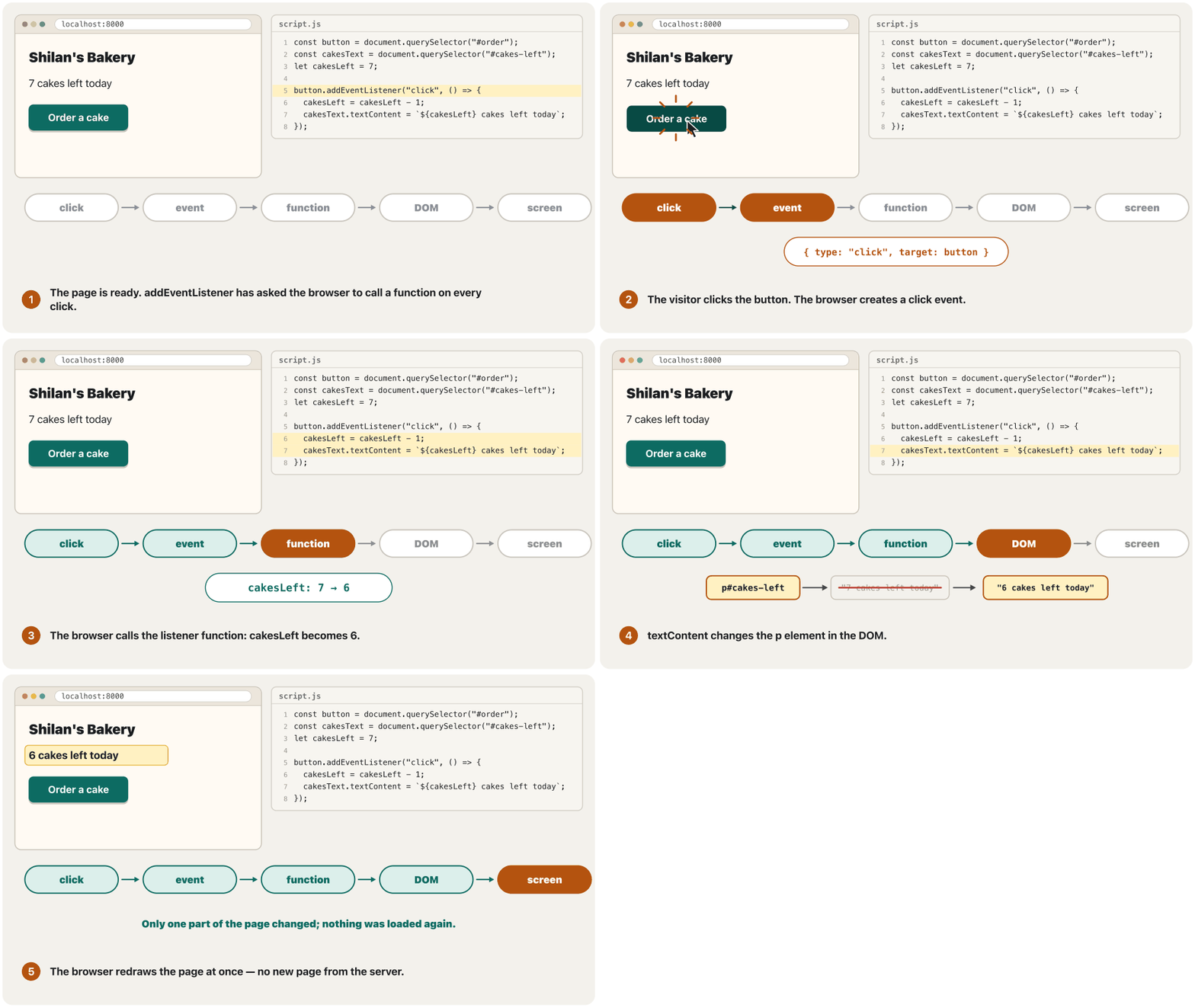
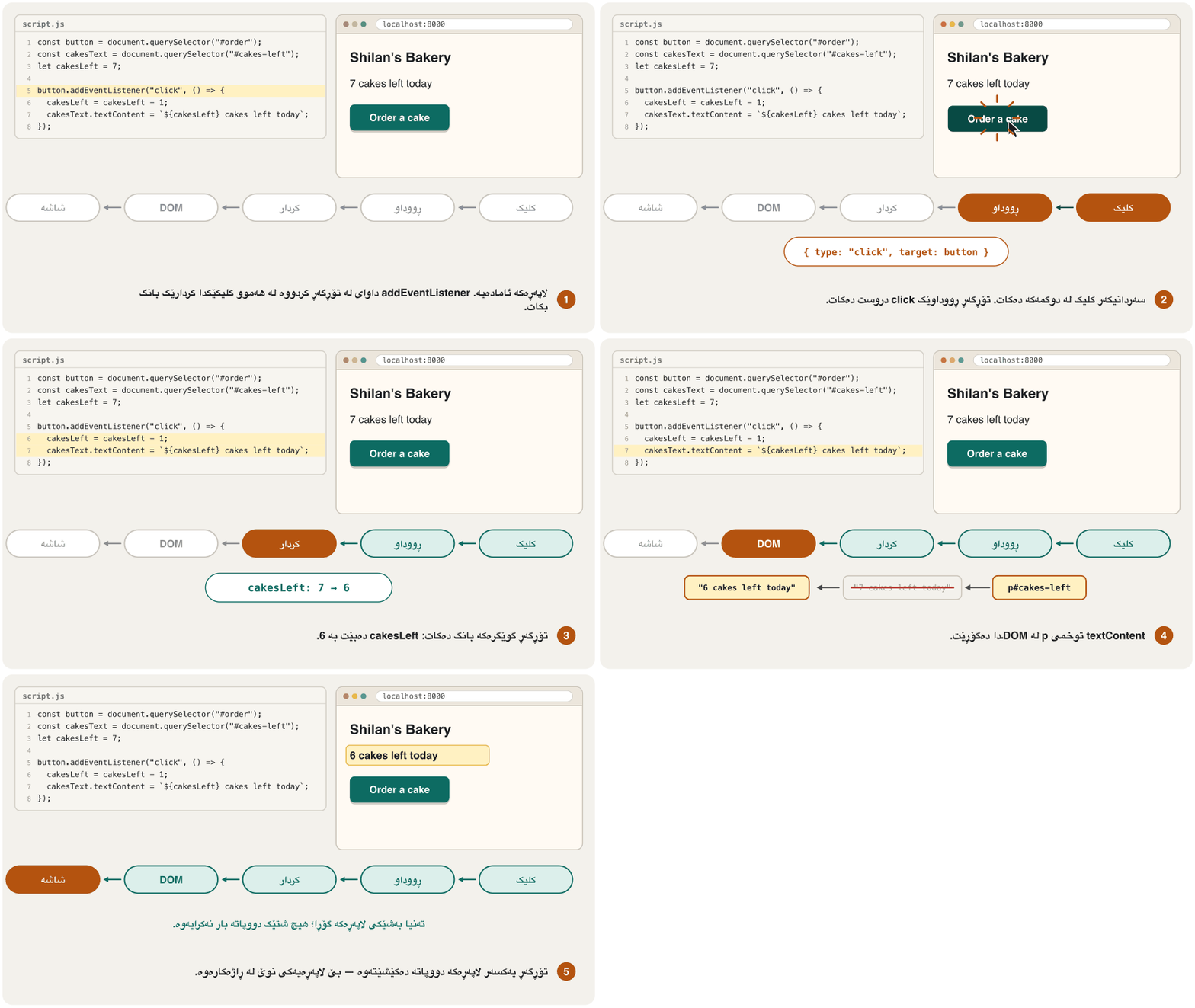
const button = document.querySelector("#order");
const cakesText = document.querySelector("#cakes-left");
let cakesLeft = 7;

button.addEventListener("click", () => {
  cakesLeft = cakesLeft - 1;
  cakesText.textContent = `${cakesLeft} cakes left today`;
});HTML sent to the browserئەو HTMLـەی دەنێردرێت بۆ تۆڕگەڕ
<!DOCTYPE html>
<html lang="en"><head>
<meta charset="utf-8">
<meta name="viewport" content="width=device-width, initial-scale=1">
<title>Order a cake</title>
<style>
body { font-family: system-ui, sans-serif; margin: 1rem; max-width: 30rem; color: #1b1d20; background: #fffaf3; }
h1 { font-size: 1.4rem; margin-block: 0 0.75rem; }
button { font: inherit; font-weight: 700; padding: 0.6rem 1.1rem; border: 0; border-radius: 0.5rem;
         background: #0d6b62; color: #ffffff; cursor: pointer; }
:focus-visible { outline: 3px solid #b4530f; outline-offset: 2px; }
</style>

</head>
<body>
<h1>Shilan's Bakery</h1>
<p id="cakes-left">5 cakes left today</p>
<button type="button" id="order">Order a cake</button>

</body></html>
The page has <p id="cakes-left">7 cakes left today</p> and <button type="button" id="order">. Run in Chrome, two clicks gave 6 and then 5 cakes left today. Scripts do not run inside this preview: try the code in your own files.
لاپەڕەکە <p id="cakes-left">7 cakes left today</p> و <button type="button" id="order">ـی تێدایە. لە Chrome تاقی کرایەوە: دوو کلیک یەکەمجار 6 و پاشان 5 cakes left todayـیان دا. لەناو ئەم پێشبینینەدا کار ناکەن: کۆدەکە لە فایلەکانی خۆتدا تاقی بکەرەوە.
Explain the codeڕوونکردنەوەی کۆدەکە
- Lineدێڕی 3
let: the number of cakes changes.
let: ژمارەی کێکەکان دەگۆڕێت.- Lineدێڕی 5
() => { … } is a short function with no name; the browser calls it on every click.
() => { … }کورتە؛ لە هەموو کلیکێکدا بانگی دەکات.- Lineدێڕی 6-7
Change the value, then the text in the DOM.
بگۆڕە، پاشان دەقەکە لە .
Events: reacting to a clickڕووداوەکان: وەڵامدانەوەی کلیکێک
Example: a dark-mode buttonنموونە: دوگمەیەکی دۆخی تاریک
In A dark theme the colours switch when the system setting changes. A button lets visitors choose for themselves: JavaScript only adds or removes one class, dark, on the <html> element (document.documentElement), and the custom properties do the rest. classList.toggle() adds the class when it is missing, removes it when it is there and gives back true when the class is now on. aria-pressed tells screen-reader users whether the toggle is on; the button's text stays “Dark mode” (WAI-ARIA).
لە دۆخی تاریکـدا ڕەنگەکان کاتێک ڕێکخستنی سیستەم دەگۆڕێت دەگۆڕێن. ڕێگە بە سەردانیکەران دەدات خۆیان هەڵبژێرن: تەنیا یەک کلاس، dark، بۆ <html> (document.documentElement) زیاد یان لادەبات و تایبەتمەندییە دڵخوازەکان باقیی کارەکە دەکەن. classList.toggle() کلاسەکە زیاد دەکات ئەگەر نەبێت، لای دەبات ئەگەر هەبێت و true دەگەڕێنێتەوە ئەگەر کلاسەکە ئێستا هەبێت. aria-pressed بە بەکارهێنەرانی دەڵێت سویچەکە هەڵکراوە یان نا؛ دەقی هەر «Dark mode» دەمێنێتەوە (WAI-ARIA).
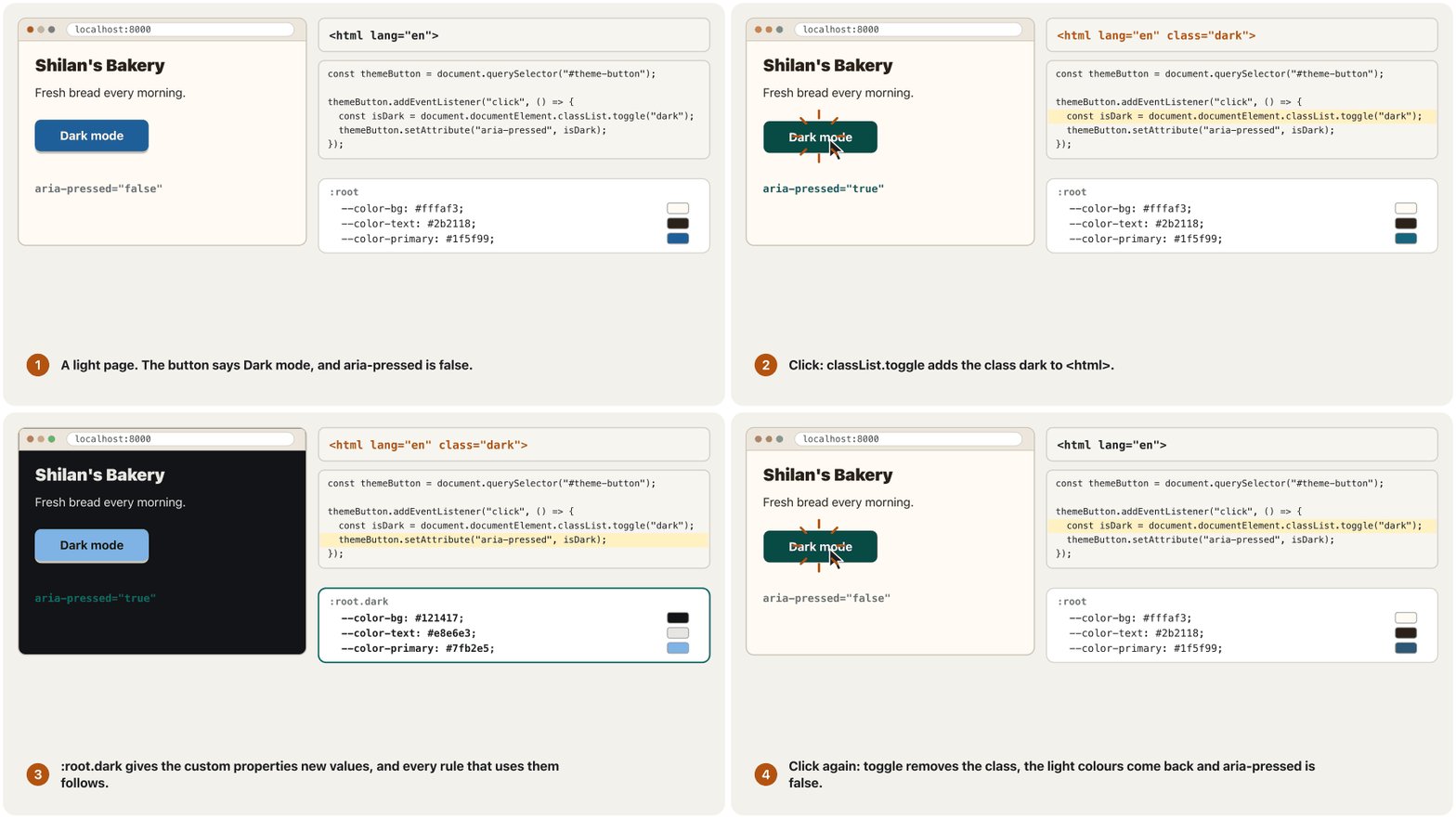
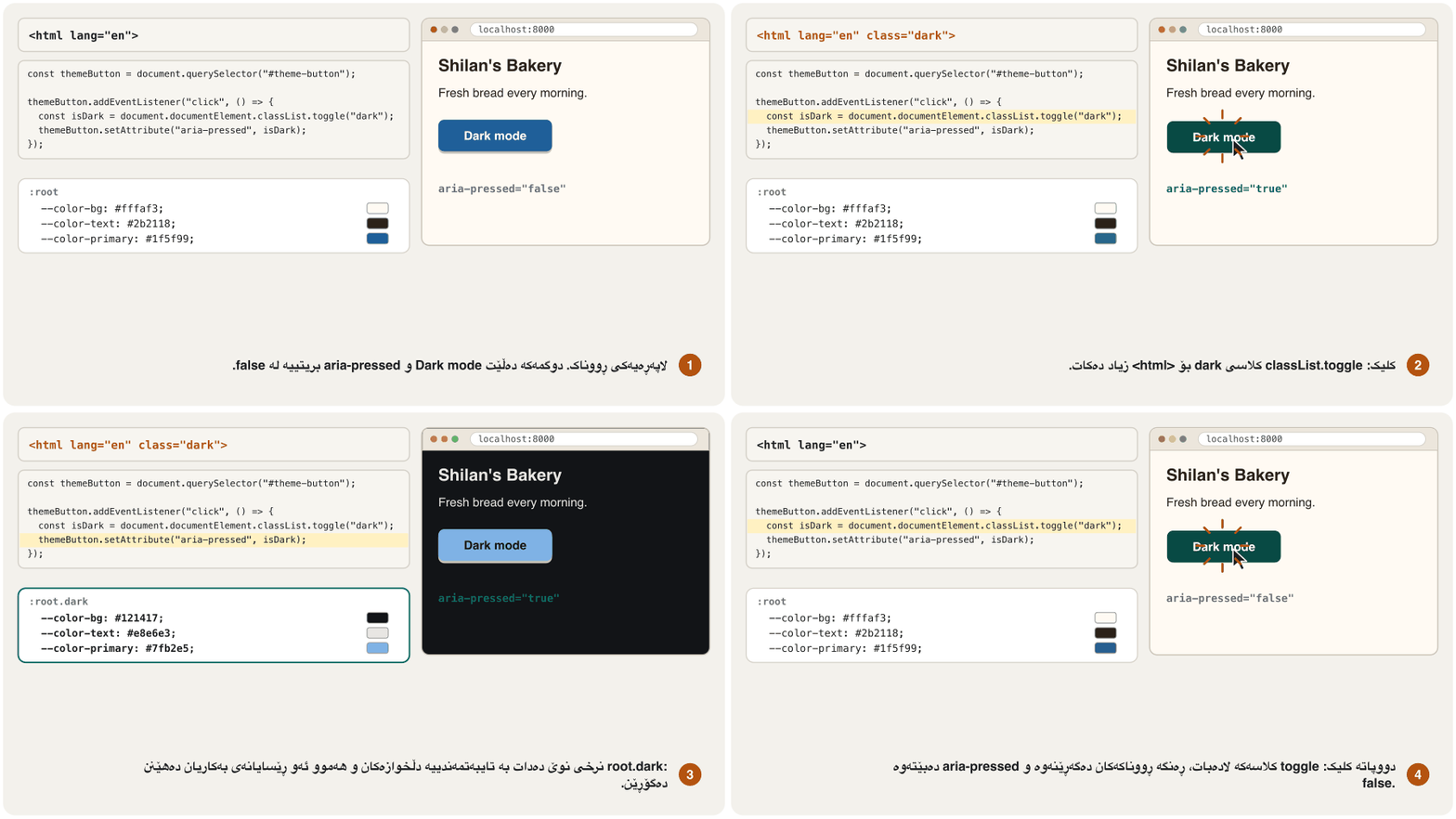
style.css: نرخەکانی تاریک بۆ کلاسەکەstyle.cssCSSRuns in the browserلە ناو تۆڕگەڕ کار دەکات:root.dark {
color-scheme: dark; /* form controls and scrollbars follow */
--color-bg: #121417;
--color-text: #e8e6e3;
--color-primary: #7fb2e5;
--color-on-primary: #121417;
}Explain the codeڕوونکردنەوەی کۆدەکە
- Lineدێڕی 2
color-scheme: dark — form controls and scrollbars turn dark too.
color-scheme: dark— کۆنترۆڵەکانی و بەشەکانی تری تاریک دەبن.- Lineدێڕی 3-6
The light values stay in :root, as in the colour lesson.
ڕووناکەکان وەک وانەی ڕەنگ لە
:rootـدا دەمێننەوە.
script.js: دوگمەکە کلاسەکە دەگۆڕێتscript.jsJAVASCRIPTRuns in the browserلە ناو تۆڕگەڕ کار دەکاتconst themeButton = document.querySelector("#theme-button");
themeButton.addEventListener("click", () => {
const isDark = document.documentElement.classList.toggle("dark");
themeButton.setAttribute("aria-pressed", isDark);
});HTML sent to the browserئەو HTMLـەی دەنێردرێت بۆ تۆڕگەڕ
<!DOCTYPE html>
<html lang="en" class="dark"><head>
<meta charset="utf-8">
<meta name="viewport" content="width=device-width, initial-scale=1">
<title>Dark mode</title>
<style>
body { font-family: system-ui, sans-serif; margin: 1rem; max-width: 30rem; color: #1b1d20; }
h1 { font-size: 1.4rem; margin-block: 0 0.75rem; }
button { font: inherit; font-weight: 700; padding: 0.6rem 1.1rem; border: 0; border-radius: 0.5rem;
background: #0d6b62; color: #ffffff; cursor: pointer; }
:focus-visible { outline: 3px solid #b4530f; outline-offset: 2px; }
:root {
--color-bg: #fffaf3;
--color-text: #2b2118;
--color-primary: #1f5f99;
--color-on-primary: #ffffff;
}
:root.dark {
  color-scheme: dark;              /* form controls and scrollbars follow */
  --color-bg: #121417;
  --color-text: #e8e6e3;
  --color-primary: #7fb2e5;
  --color-on-primary: #121417;
}
body { background: var(--color-bg); color: var(--color-text); }
button { background: var(--color-primary); color: var(--color-on-primary); }
</style>
</head>
<body>
<h1>Shilan's Bakery</h1>
<p>Fresh bread every morning.</p>
<button type="button" id="theme-button" aria-pressed="true">Dark mode</button>
</body></html>The button is <button type="button" id="theme-button" aria-pressed="false">Dark mode</button>. In Chrome, the first click gave <html class="dark"> and aria-pressed="true"; the second click took both back. A full theme switch would also start from the system setting and remember the choice — a good next step.
<button type="button" id="theme-button" aria-pressed="false">Dark mode</button>ـە. لە Chrome یەکەم کلیک <html class="dark"> و aria-pressed="true"ـی دا؛ کلیکی دووەم هەردووکیانی گەڕاندەوە. سویچێکی تەواو هەروەها لە ڕێکخستنی سیستەمەوە دەست پێدەکات و هەڵبژاردنەکە لەبیر دەکات — هەنگاوێکی باشی داهاتووە.
Explain the codeڕوونکردنەوەی کۆدەکە
- Lineدێڕی 4
toggle() gives back true when the class is now on.
toggle()trueدەگەڕێنێتەوە کاتێک کلاسەکە ئێستا هەیە.- Lineدێڕی 5
Keep aria-pressed in step with the class.
aria-pressedلەگەڵ کلاسەکەدا یەکسان بهێڵەرەوە.
Example: the phone menu buttonنموونە: دوگمەی مێنیوی مۆبایل
On phones a long menu often hides behind a Menu button (Menus on phones). Use a real <button> with aria-expanded: false while the menu is closed and true while it is open, so a screen reader says “Menu, button, collapsed” or “expanded”. aria-controls names the list it opens. Here the HTML shows the menu and hides the button; the script does the opposite when it starts — so if it never runs, every link is still there.
لەسەر مۆبایل درێژ زۆرجار لە پشت Menuـەوە دەشاردرێتەوە (مێنیو لەسەر مۆبایل). <button>ـێکی ڕاستەقینە لەگەڵ aria-expanded بەکاربهێنە: false تا داخراوە و true تا کراوەیە، بۆیە دەڵێت «Menu, button, collapsed» یان «expanded». aria-controls ناوی ئەو لیستە دەبات کە دەیکاتەوە. لێرەدا پیشان دەدات و دەشارێتەوە؛ کاتێک دەست پێدەکات پێچەوانەکەی دەکات — بۆیە ئەگەر هەرگیز کار نەکات، هەموو هەر لەوێن.
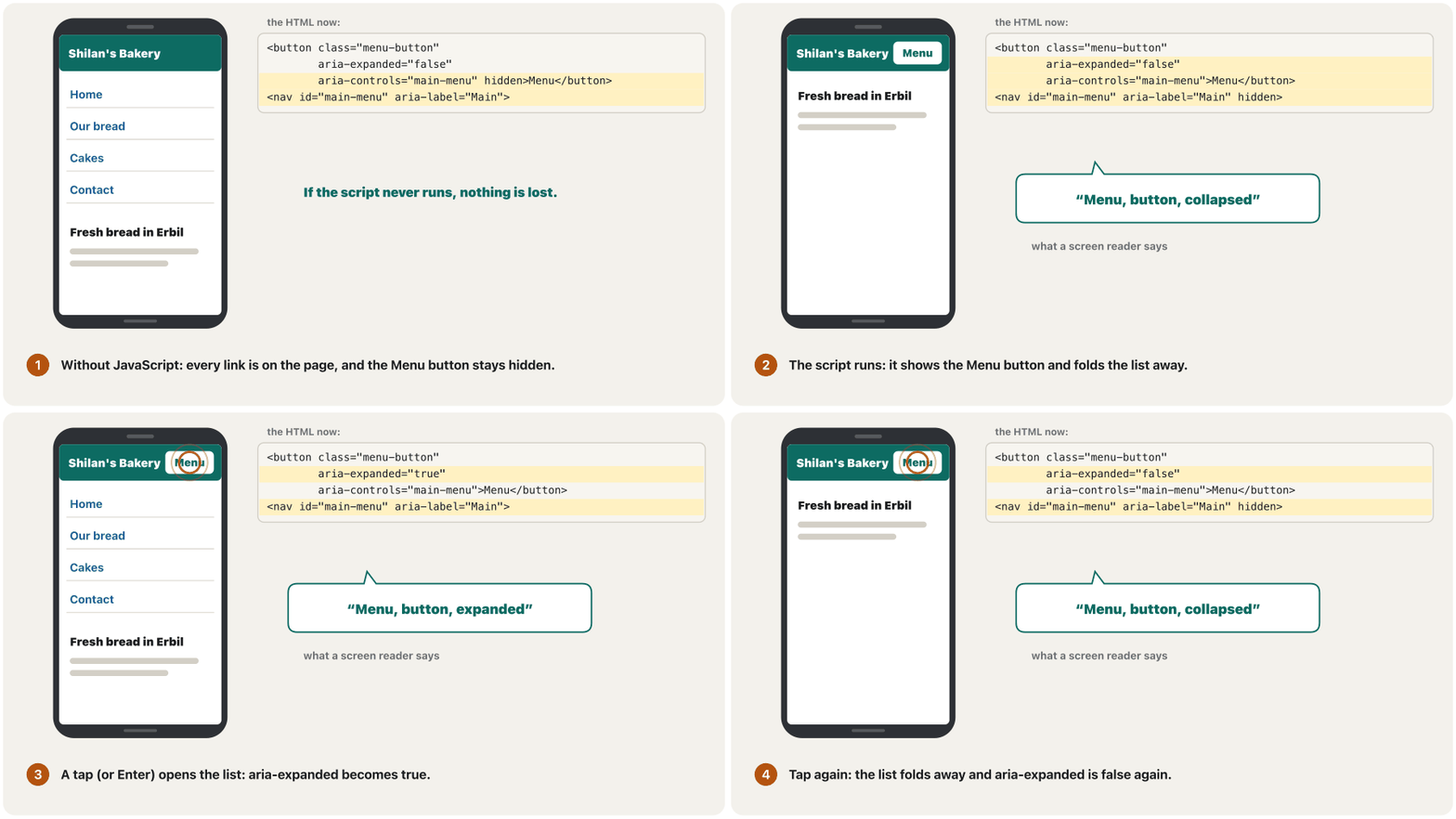
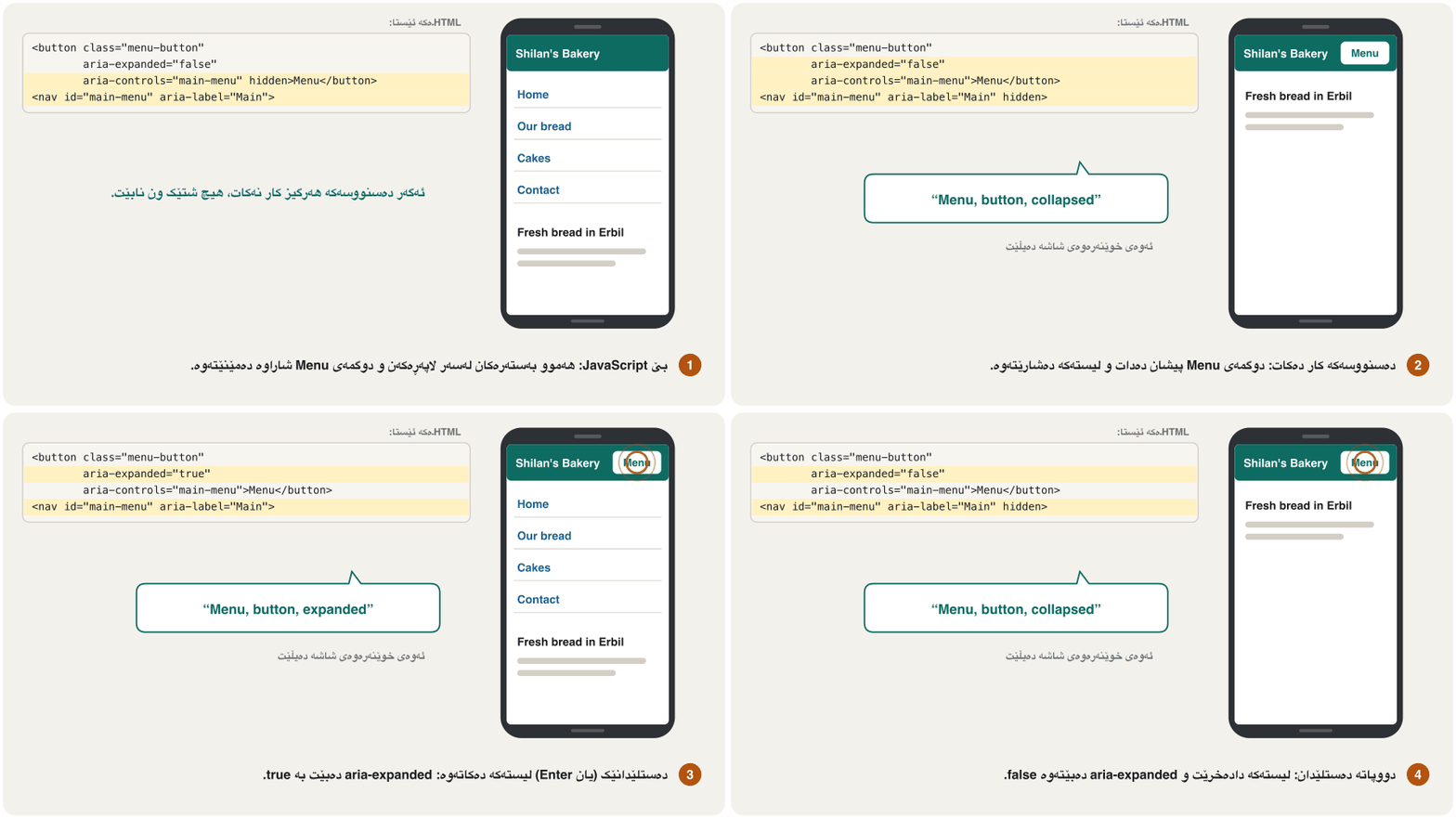
aria-expanded بە هەمووان دەڵێت کراوەیە یان نا.CêITindex.html: مێنیوەکە بێ JavaScript کار دەکاتindex.htmlHTMLRuns in the browserلە ناو تۆڕگەڕ کار دەکات<header class="site">
<p class="logo">Shilan's Bakery</p>
<button type="button" class="menu-button" aria-expanded="false"
aria-controls="main-menu" hidden>Menu</button>
<nav id="main-menu" aria-label="Main">
<ul>
<li><a href="index.html">Home</a></li>
<li><a href="bread.html">Our bread</a></li>
<li><a href="cakes.html">Cakes</a></li>
<li><a href="contact.html">Contact</a></li>
</ul>
</nav>
</header>Explain the codeڕوونکردنەوەی کۆدەکە
- Lineدێڕی 3-4
A real button, with its state and the id of the list it controls. hidden until the script shows it.
ڕاستەقینە لەگەڵ دۆخەکەی و idـی ئەو لیستەی کۆنترۆڵی دەکات. تا پیشانی دەدات
hiddenـە.
script.js: کردنەوە و داخستنی مێنیوەکەscript.jsJAVASCRIPTRuns in the browserلە ناو تۆڕگەڕ کار دەکاتconst menuButton = document.querySelector(".menu-button");
const menu = document.querySelector("#main-menu");
menuButton.hidden = false; // JavaScript works: show the button
menu.hidden = true; // and fold the menu away
menuButton.addEventListener("click", () => {
const willOpen = menu.hidden; // true when the menu is closed now
menu.hidden = !willOpen;
menuButton.setAttribute("aria-expanded", willOpen);
});HTML sent to the browserئەو HTMLـەی دەنێردرێت بۆ تۆڕگەڕ
<!DOCTYPE html>
<html lang="en"><head>
<meta charset="utf-8">
<meta name="viewport" content="width=device-width, initial-scale=1">
<title>Menu button</title>
<style>
body { font-family: system-ui, sans-serif; margin: 1rem; max-width: 30rem; color: #1b1d20; background: #fffaf3; }
h1 { font-size: 1.4rem; margin-block: 0 0.75rem; }
button { font: inherit; font-weight: 700; padding: 0.6rem 1.1rem; border: 0; border-radius: 0.5rem;
         background: #0d6b62; color: #ffffff; cursor: pointer; }
:focus-visible { outline: 3px solid #b4530f; outline-offset: 2px; }
.site { display: flex; flex-wrap: wrap; align-items: center; justify-content: space-between; gap: 0.5rem; }
.logo { font-weight: 800; margin: 0; }
.menu-button { padding: 0.6rem 1rem; }
#main-menu { flex-basis: 100%; }
#main-menu ul { list-style: none; margin: 0; padding: 0; }
#main-menu a { display: block; padding: 0.7rem 0.25rem; border-block-end: 1px solid #d3cfc6; color: #1f5f99; }
</style>

</head>
<body>
<header class="site">
  <p class="logo">Shilan's Bakery</p>
  <button type="button" class="menu-button" aria-expanded="true" aria-controls="main-menu">Menu</button>
  <nav id="main-menu" aria-label="Main">
    <ul>
      <li><a href="index.html">Home</a></li>
      <li><a href="bread.html">Our bread</a></li>
      <li><a href="cakes.html">Cakes</a></li>
      <li><a href="contact.html">Contact</a></li>
    </ul>
  </nav>
</header>

</body></html>
Tested in Chrome: after the script ran, the button was visible, the list hidden and aria-expanded="false"; one click opened the list ("true"), a second closed it. On wide screens a media query can show the list and hide the button — as your final project does.
لە Chrome تاقی کرایەوە: دوای جێبەجێبوونی ، دیار بوو، لیستەکە شاراوە و aria-expanded="false"؛ یەک کلیک لیستەکەی کردەوە ("true") و کلیکی دووەم دایخست. لەسەر شاشەی پان دەتوانێت لیستەکە پیشان بدات و بشارێتەوە — وەک لە پڕۆژەی کۆتاییدا.
Explain the codeڕوونکردنەوەی کۆدەکە
- Lineدێڕی 4-5
JavaScript works: show the button, fold the menu.
کار دەکات: پیشان بدە، بشارەوە.
- Lineدێڕی 8
willOpen is true when the menu is hidden now.
willOpenبریتییە لەtrueکاتێک ئێستا شاراوەیە.- Lineدێڕی 9-10
! means "not": open or close the list, and keep aria-expanded the same.
!واتە «نا»: لیستەکە بکەرەوە یان دایبخە وaria-expandedهاوشێوە بهێڵەرەوە.
Example: a live “characters left” messageنموونە: پەیامێکی زیندووی «چەند نووسە ماوە»
Let HTML check what it can first: here maxlength="120" stops typing after 120 characters, and required, type="email" or pattern can do more (Checking answers: when and how). JavaScript then helps: the input event fires on every change, so the page can say how many characters are left while people type. The aria-live="polite" paragraph is read out when the typing pauses. Browser checks never replace the server: anyone can switch them off, so PHP must check again (Client-side checks are not security).
سەرەتا با ئەوە بپشکنێت کە دەتوانێت: لێرەدا maxlength="120" دوای 120 ڕێگە لە نووسین دەگرێت و required، type="email" یان pattern دەتوانن زیاتر بکەن (پشکنینی وەڵامەکان: کەی و چۆن). پاشان یارمەتی دەدات: input لە هەموو گۆڕانێکدا ڕوو دەدات، بۆیە لاپەڕەکە دەتوانێت لە کاتی نووسیندا بڵێت چەند ماوە. بڕگەی aria-live="polite" کاتێک نووسین دەوەستێت دەخوێنرێتەوە. پشکنینەکانی هەرگیز جێی ناگرنەوە: هەر کەسێک دەتوانێت بیانکوژێنێتەوە، بۆیە دەبێت دووپاتە بپشکنێتەوە (پشتڕاستکردنەوەی لای ڕاژەخواز ئاسایش نییە).
script.js: لە کاتی نووسیندا بژمێرەscript.jsJAVASCRIPTRuns in the browserلە ناو تۆڕگەڕ کار دەکاتconst message = document.querySelector("#message");
const counter = document.querySelector("#counter");
function updateCounter() {
const left = message.maxLength - message.value.length;
counter.textContent = `${left} characters left`;
}
message.addEventListener("input", updateCounter);
updateCounter(); // show "120 characters left" at the startHTML sent to the browserئەو HTMLـەی دەنێردرێت بۆ تۆڕگەڕ
<!DOCTYPE html>
<html lang="en"><head>
<meta charset="utf-8">
<meta name="viewport" content="width=device-width, initial-scale=1">
<title>Characters left</title>
<style>
body { font-family: system-ui, sans-serif; margin: 1rem; max-width: 30rem; color: #1b1d20; background: #fffaf3; }
h1 { font-size: 1.4rem; margin-block: 0 0.75rem; }
button { font: inherit; font-weight: 700; padding: 0.6rem 1.1rem; border: 0; border-radius: 0.5rem;
         background: #0d6b62; color: #ffffff; cursor: pointer; }
:focus-visible { outline: 3px solid #b4530f; outline-offset: 2px; }
label { display: block; font-weight: 600; margin-block: 0.5rem 0.25rem; }
.hint { color: #595959; margin-block: 0 0.35rem; }
textarea { box-sizing: border-box; width: 100%; font: inherit; padding: 0.45rem 0.6rem;
           border: 1px solid #767676; border-radius: 0.4rem; }
#counter { color: #44484f; margin-block: 0.25rem 0.75rem; }
</style>

</head>
<body>
<form action="/order" method="post">
  <label for="message">Message for the baker</label>
  <p class="hint" id="message-hint">Up to 120 characters.</p>
  <textarea id="message" name="message" rows="3" maxlength="120" aria-describedby="message-hint">Please write Shilan on the cake</textarea>
  <p id="counter" aria-live="polite">89 characters left</p>
  <button type="submit">Send order</button>
</form>

</body></html>
The form has <textarea id="message" maxlength="120"> and <p id="counter" aria-live="polite"></p>. In Chrome the counter said 120 characters left at the start, 89 after these 31 characters and 0 at the limit.
<textarea id="message" maxlength="120"> و <p id="counter" aria-live="polite"></p>ـی تێدایە. لە Chrome بڕگەی #counter لە سەرەتادا 120 characters left، دوای ئەم 31 89 و لە سنووردا 0ـی گوت.
Explain the codeڕوونکردنەوەی کۆدەکە
- Lineدێڕی 4-7
A named function: it works out what is left and writes it in the page.
ناودار: حیسابی ئەوە دەکات کە ماوە و لە لاپەڕەکەدا دەینووسێت.
- Lineدێڕی 9-10
Run it on every input event, and once at the start.
لە هەموو
inputـدا جێبەجێی بکە و یەک جاریش لە سەرەتادا.
Progressive enhancement: HTML first, JavaScript lastباشترکردنی پلەبەپلە: سەرەتا HTML، JavaScript لە کۆتاییدا
Building a page in layers: first plain HTML that works for everyone, then CSS for the look, then JavaScript that improves it where it is available. If a script fails, the page still works.
دروستکردنی لاپەڕەیە بە چین چین: سەرەتا سادە کە بۆ هەمووان کار دەکات، پاشان بۆ شێوەکەی، پاشان کە لە هەر شوێنێک هەبێت باشتری دەکات. ئەگەر سەرنەکەوێت، لاپەڕەکە هەر کار دەکات.
Scripts fail more often than you think: a slow phone network, an old browser, a blocked file, one typing mistake that stops the whole script. So build in layers: first HTML that works for everyone — real links, real buttons, forms that send — then CSS for the look, then JavaScript that makes it nicer where it runs. The menu above follows this: without JavaScript every link is still on the page.
زیاتر لەوەی بیری لێ دەکەیتەوە سەرناکەون: هێواشی مۆبایل، کۆن، فایلێکی ڕێگەپێنەدراو، یەک هەڵەی نووسین کە هەموو ڕادەگرێت. بۆیە بە چین دروستی بکە: سەرەتا کە بۆ هەمووان کار دەکات — ڕاستەقینە، ڕاستەقینە و ڕاستەقینە کە دەنێردرێن — پاشان بۆ ڕووخسار، پاشان کە لەو شوێنانەی کار دەکات باشتری دەکات. مێنیوەکەی سەرەوە ئەمە پەیڕەو دەکات: بێ هەموو هەر لەسەر لاپەڕەکەن.
Two habits help most: use real <a> and <button> elements, never clickable <div>s, so the keyboard and screen readers work (Everything with the keyboard); and keep the focus outline visible on everything your script makes clickable.
دوو خوو زۆرترین یارمەتی دەدەن: <a> و <button> بەکاربهێنە، هەرگیز <div>ـی کلیکپێکراو، بۆ ئەوەی و کار بکەن (هەموو شتێک بە کیبۆرد)؛ هەروەها لەسەر هەموو ئەو شتانەی کلیکپێکراویان دەکات دیار بهێڵەرەوە.
Where to go nextدواتر بۆ کوێ بچیت
This lesson showed the most useful part: scripts, the console, a few values, the DOM, events and three patterns. To go further:
ئەم وانەیە بەسوودترین بەشی پیشان دا: ، ، چەند ، ، و سێ نموونە. بۆ ئەوەی زیاتر بڕۆیت:
- Next lesson: fetching data from the server without a new page (Ajax and fetch()).
- MDN's free module *Dynamic scripting with JavaScript*: 23 lessons and challenges (November 2026) — conditions, loops, functions, arrays, objects, events, network requests and JSON.
- Programming ideas in any language: CêIT's Programming course with Python or Java (Many languages for many jobs).
- Your final project adds one small touch from this lesson — the menu button or the theme switch (Final Project: Your Portfolio Website).
- Frameworks such as React, Vue or Svelte only after the basics: they are JavaScript too, and they still need good HTML, CSS and accessibility.
- وانەی داهاتوو: هێنانی لە بێ لاپەڕەی نوێ (Ajax و fetch()).
- مۆدیولی بێبەرانبەری MDN، *Dynamic scripting with JavaScript*: 23 وانە و ڕاهێنان (تشرینی دووەمی 2026) — ، ، ، ، ، ، داواکاریی تۆڕ و .
- بیرۆکەکانی لە هەر زمانێکدا: خولی CêIT بە Python یان Java (زۆر زمان بۆ زۆر کار).
- پڕۆژەی کۆتایی یەک دەستکاریی بچووک لەم وانەیە زیاد دەکات — مێنیو یان سویچی (پڕۆژەی کۆتایی: پۆرتفۆلیۆی ئۆنلاینەکەت).
- وەک React، Vue یان Svelte تەنیا دوای بنەڕەتەکان: ئەوانیش و هێشتا پێویستیان بە ، و باش هەیە.
Common mistakesهەڵە باوەکان
| Mistakeهەڵە | Betterباشتر |
|---|---|
A script in the <head> without defer: it runs before the elements exist and finds null لە <head>ـدا بێ defer: پێش دروستبوونی کار دەکات و null دەدۆزێتەوە | Add defer, or use type="module" through a local serverdefer زیاد بکە، یان type="module" لە ڕێگەی ناوخۆییەوە بەکاربهێنە |
A selector typo: querySelector("order") for id="order"هەڵەی نووسینی : querySelector("order") بۆ id="order" | querySelector("#order"): copy the exact id with its # (or . for a class)querySelector("#order"): هەمان idـەکە لەگەڵ # (یان . بۆ کلاس) بنووسە |
Wrong capitals: addeventListener, textcontentپیتی گەورەی هەڵە: addeventListener، textcontent | JavaScript is case-sensitive: addEventListener, textContent : addEventListener، textContent |
Setting style again and again from JavaScriptدانانی style جار لە دوای جار لە | Add or remove a class; keep the look in the CSSکلاسێک زیاد یان لاببە؛ ڕووخسار لە بهێڵەرەوە |
A clickable <div> or <span><div> یان <span>ـی کلیکپێکراو | A real <button type="button">: Tab, Enter, Space and screen readers work<button type="button">ـی ڕاستەقینە: Tab، Enter، Space و کار دەکەن |
| Content that only a script can show (hidden in the HTML)ناوەڕۆکێک کە تەنیا دەتوانێت پیشانی بدات (لە شاراوە) | Show it in the HTML; let the script hide it when it startsلە پیشانی بدە؛ با کاتێک دەست پێدەکات بیشارێتەوە |
onclick="…" attributes in the HTML onclick="…" لە | addEventListener() in script.jsaddEventListener() لە script.jsـدا |
Putting typed text into innerHTMLخستنە ناوەوەی دەقی نووسراو بۆ innerHTML | textContent: plain text, no hidden codetextContent: دەقی ئاسایی، بێ کۆدی شاراوە |
| Trusting the browser's checksمتمانەکردن بە پشکنینەکانی | The server checks every value again هەموو دووپاتە دەپشکنێتەوە |
| Ignoring the consoleپشتگوێخستنی | Keep it open: the red line names the error, the file and the lineکراوەی بهێڵەرەوە: دێڕە سوورەکە ناوی ، فایلەکە و دێڕەکە دەڵێت |
Exercisesڕاهێنانەکان
Make the button show and hide the second paragraph. Without JavaScript the text must stay visible; with JavaScript the button appears, the text starts hidden and aria-expanded follows its state.
وا بکە بڕگەی دووەم پیشان بدات و بیشارێتەوە. بێ دەقەکە دەبێت دیار بمێنێتەوە؛ بە دەردەکەوێت، دەقەکە بە شاراوەیی دەست پێدەکات و aria-expanded دۆخەکەی پەیڕەو دەکات.
<h2>Our bread</h2>
<p>Fresh naan and samoon every morning from 6 am.</p>
<button type="button" id="more-button" aria-expanded="false"
        aria-controls="more" hidden>More about our bread</button>
<p id="more">We bake with flour from a mill near Erbil, in a clay oven,
and we sell what is left at half price after 8 pm.</p>Hintئاماژە
Copy the menu example and change the names: more-button and more.
نموونەی مێنیوەکە کۆپی بکە و ناوەکان بگۆڕە: more-button و more.
Show answerوەڵامەکە پیشان بدە
The same pattern as the menu button: the HTML shows everything, the script shows the button and hides the text, and each click turns hidden and aria-expanded round.
هەمان شێوازی مێنیو: هەموو شتێک پیشان دەدات، پیشان دەدات و دەقەکە دەشارێتەوە و هەر کلیکێک hidden و aria-expanded پێچەوانە دەکاتەوە.
script.jsـێکی گونجاوscript.jsJAVASCRIPTRuns in the browserلە ناو تۆڕگەڕ کار دەکاتconst moreButton = document.querySelector("#more-button");
const more = document.querySelector("#more");
moreButton.hidden = false; // JavaScript works: show the button
more.hidden = true; // and hide the extra text
moreButton.addEventListener("click", () => {
const willShow = more.hidden;
more.hidden = !willShow;
moreButton.setAttribute("aria-expanded", willShow);
});HTML sent to the browserئەو HTMLـەی دەنێردرێت بۆ تۆڕگەڕ
<!DOCTYPE html>
<html lang="en"><head>
<meta charset="utf-8">
<meta name="viewport" content="width=device-width, initial-scale=1">
<title>Show more</title>
<style>
body { font-family: system-ui, sans-serif; margin: 1rem; max-width: 30rem; color: #1b1d20; background: #fffaf3; }
h1 { font-size: 1.4rem; margin-block: 0 0.75rem; }
button { font: inherit; font-weight: 700; padding: 0.6rem 1.1rem; border: 0; border-radius: 0.5rem;
         background: #0d6b62; color: #ffffff; cursor: pointer; }
:focus-visible { outline: 3px solid #b4530f; outline-offset: 2px; }
</style>

</head>
<body>
<h2>Our bread</h2>
<p>Fresh naan and samoon every morning from 6 am.</p>
<button type="button" id="more-button" aria-expanded="true" aria-controls="more">More about our bread</button>
<p id="more">We bake with flour from a mill near Erbil, in a clay oven,
  and we sell what is left at half price after 8 pm.</p>

</body></html>
Tested in Chrome: the text started hidden with aria-expanded="false"; one click showed it ("true"), the next hid it again. Without JavaScript, <details> and <summary> can do the same job.
لە Chrome تاقی کرایەوە: دەقەکە بە شاراوەیی و aria-expanded="false" دەستی پێکرد؛ یەک کلیک پیشانی دا ("true") و کلیکی دواتر دیسان شاردییەوە. بێ ، <details> و <summary> دەتوانن هەمان کار بکەن.
Write script.js for this button: each click adds or removes the class big-text on the <html> element, and aria-pressed must match. The CSS is html.big-text { font-size: 125%; }.
script.js بۆ ئەم بنووسە: هەر کلیکێک کلاسی big-text بۆ <html> زیاد یان لادەبات و aria-pressed دەبێت یەکسان بێت. بریتییە لە html.big-text { font-size: 125%; }.
<h1>Shilan's Bakery</h1>
<p>Fresh bread every morning.</p>
<button type="button" id="size-button" aria-pressed="false">Large text</button>Hintئاماژە
document.documentElement is the <html> element.
document.documentElement <html>ـە.
Show answerوەڵامەکە پیشان بدە
script.jsـێکی گونجاوscript.jsJAVASCRIPTRuns in the browserلە ناو تۆڕگەڕ کار دەکاتconst sizeButton = document.querySelector("#size-button");
sizeButton.addEventListener("click", () => {
const isBig = document.documentElement.classList.toggle("big-text");
sizeButton.setAttribute("aria-pressed", isBig);
});HTML sent to the browserئەو HTMLـەی دەنێردرێت بۆ تۆڕگەڕ
<!DOCTYPE html>
<html lang="en" class="big-text"><head>
<meta charset="utf-8">
<meta name="viewport" content="width=device-width, initial-scale=1">
<title>Large text</title>
<style>
body { font-family: system-ui, sans-serif; margin: 1rem; max-width: 30rem; color: #1b1d20; background: #fffaf3; }
h1 { font-size: 1.4rem; margin-block: 0 0.75rem; }
button { font: inherit; font-weight: 700; padding: 0.6rem 1.1rem; border: 0; border-radius: 0.5rem;
         background: #0d6b62; color: #ffffff; cursor: pointer; }
:focus-visible { outline: 3px solid #b4530f; outline-offset: 2px; }
html.big-text { font-size: 125%; }
</style>

</head>
<body>
<h1>Shilan's Bakery</h1>
<p>Fresh bread every morning.</p>
<button type="button" id="size-button" aria-pressed="true">Large text</button>

</body></html>
Tested in Chrome: the root font size went from 16px to 20px and aria-pressed became "true"; a second click took both back. It is the dark-mode pattern with another class.
لە Chrome تاقی کرایەوە: قەبارەی لە 16px بوو بە 20px و aria-pressed بوو بە "true"؛ کلیکی دووەم هەردووکیانی گەڕاندەوە. هەمان شێوازی بە کلاسێکی تر.
Change the characters-left script so that the counter turns red (class warn) when fewer than 10 characters are left, and back to normal otherwise.
«چەند ماوە» بگۆڕە بۆ ئەوەی بڕگەی #counter سوور ببێت (کلاسی warn) کاتێک کەمتر لە 10 ماوە و لە کاتەکانی تردا ئاسایی بێتەوە.
Hintئاماژە
Add one line inside updateCounter().
یەک دێڕ لەناو updateCounter() زیاد بکە.
Show answerوەڵامەکە پیشان بدە
classList.toggle() takes a second value: true adds the class and false removes it, so left < 10 decides.
classList.toggle() دووەم وەردەگرێت: true کلاسەکە زیاد دەکات و false لای دەبات، بۆیە left < 10 بڕیار دەدات.
script.jsـێکی گونجاوscript.jsJAVASCRIPTRuns in the browserلە ناو تۆڕگەڕ کار دەکاتconst message = document.querySelector("#message");
const counter = document.querySelector("#counter");
function updateCounter() {
const left = message.maxLength - message.value.length;
counter.textContent = `${left} characters left`;
counter.classList.toggle("warn", left < 10); // add "warn" only when true
}
message.addEventListener("input", updateCounter);
updateCounter();HTML sent to the browserئەو HTMLـەی دەنێردرێت بۆ تۆڕگەڕ
<!DOCTYPE html>
<html lang="en"><head>
<meta charset="utf-8">
<meta name="viewport" content="width=device-width, initial-scale=1">
<title>Counter warning</title>
<style>
body { font-family: system-ui, sans-serif; margin: 1rem; max-width: 30rem; color: #1b1d20; background: #fffaf3; }
h1 { font-size: 1.4rem; margin-block: 0 0.75rem; }
button { font: inherit; font-weight: 700; padding: 0.6rem 1.1rem; border: 0; border-radius: 0.5rem;
         background: #0d6b62; color: #ffffff; cursor: pointer; }
:focus-visible { outline: 3px solid #b4530f; outline-offset: 2px; }
label { display: block; font-weight: 600; margin-block: 0.5rem 0.25rem; }
.hint { color: #595959; margin-block: 0 0.35rem; }
textarea { box-sizing: border-box; width: 100%; font: inherit; padding: 0.45rem 0.6rem;
           border: 1px solid #767676; border-radius: 0.4rem; }
#counter { color: #44484f; margin-block: 0.25rem 0.75rem; }
#counter.warn { color: #b3261e; font-weight: 700; }
</style>

</head>
<body>
<form action="/order" method="post">
  <label for="message">Message for the baker</label>
  <p class="hint" id="message-hint">Up to 120 characters.</p>
  <textarea id="message" name="message" rows="3" maxlength="120" aria-describedby="message-hint">Please write Happy birthday, Dilan! on the cake in blue letters, and put ten candles around her name. Thank you!</textarea>
  <p id="counter" aria-live="polite" class="warn">8 characters left</p>
  <button type="submit">Send order</button>
</form>

</body></html>
Tested in Chrome: 8 characters left gave class="warn" (red, bold); with 20 left the class was gone. The CSS is #counter.warn { color: #b3261e; font-weight: 700; } — and the words still say how many are left, so colour is not the only signal.
لە Chrome تاقی کرایەوە: 8 characters left کلاسی warnـی دا (سوور، ئەستوور)؛ کاتێک 20 مابوو کلاسەکە نەما. بریتییە لە #counter.warn { color: #b3261e; font-weight: 700; } — وشەکانیش هێشتا دەڵێن چەند ماوە، بۆیە ڕەنگ تاکە نیشانە نییە.
Clicking this button should add a cake to the basket, but nothing happens and the console shows a red error. Find the three bugs, and say which error message each one causes.
کلیککردن لەم دەبێت کێکێک بخاتە سەبەتەکەوە، بەڵام هیچ ڕوو نادات و سوور پیشان دەدات. سێ بدۆزەرەوە و بڵێ هەریەکەیان چ دروست دەکات.
index.htmlindex.htmlHTMLRuns in the browserلە ناو تۆڕگەڕ کار دەکات<!DOCTYPE html>
<html lang="en">
<head>
<meta charset="utf-8">
<title>Order</title>
<script src="order.js"></script>
</head>
<body>
<button type="button" id="order">Order a cake</button>
<p id="total">0 cakes in your basket</p>
</body>
</html>order.jsorder.jsJAVASCRIPTRuns in the browserلە ناو تۆڕگەڕ کار دەکاتlet count = 0;
const button = document.querySelector("order");
const total = document.querySelector("#total");
button.addeventListener("click", () => {
count = count + 1;
total.textContent = count + " cakes in your basket";
});Hintئاماژە
Read the error, fix one thing, reload, read again. Each fix can show the next error.
بخوێنەوە، یەک شت چاک بکە، دووپاتە باری بکەرەوە، دیسان بیخوێنەوە. هەر چاککردنێک لەوانەیە داهاتوو پیشان بدات.
Show answerوەڵامەکە پیشان بدە
- No
deferon line 6 of index.html: the script runs in the<head>before the button exists. Adddefer. querySelector("order")looks for an<order>element. Write"#order". These two bugs giveCannot read properties of null (reading 'addeventListener').addeventListenerhas a small e. When the first two are fixed, Chrome saysbutton.addeventListener is not a function. WriteaddEventListener.
deferنییە لە دێڕی 6یindex.html: پێش دروستبوونی لە<head>ـدا کار دەکات.deferزیاد بکە.querySelector("order")بەدوای<order>ـدا دەگەڕێت. بنووسە"#order". ئەم دووCannot read properties of null (reading 'addeventListener')دەدەن.addeventListenereـی بچووکی هەیە. کاتێک دووانەکەی یەکەم چاک کران، Chrome دەڵێتbutton.addeventListener is not a function. بنووسەaddEventListener.
index.html، چاککراوindex.htmlHTMLRuns in the browserلە ناو تۆڕگەڕ کار دەکات<!DOCTYPE html>
<html lang="en">
<head>
<meta charset="utf-8">
<title>Order</title>
<script src="order.js" defer></script>
</head>
<body>
<button type="button" id="order">Order a cake</button>
<p id="total">0 cakes in your basket</p>
</body>
</html>order.js، چاککراوorder.jsJAVASCRIPTRuns in the browserلە ناو تۆڕگەڕ کار دەکاتlet count = 0;
const button = document.querySelector("#order");
const total = document.querySelector("#total");
button.addEventListener("click", () => {
count = count + 1;
total.textContent = `${count} cakes in your basket`;
});2 cakes in your basket
After two clicks the paragraph says 2 cakes in your basket, and the console shows no errors.
دوای دوو کلیک بڕگەکە دەڵێت 2 cakes in your basket و هیچ پیشان نادات.
Summaryپوختە
- JavaScript is the behaviour layer: client-side code that reacts, changes the page, checks forms and fetches data.
- Link
script.jsin the<head>withdefer, or withtype="module"through a web server; noonclickattributes. - The console shows
console.log()messages and red errors with the file and line;nullmeans nothing was found. constfor values that stay,letfor values that change; template literals put values into text with${…}.- The DOM is the page as a tree;
querySelector()finds an element with a CSS selector;textContent,classListandhiddenchange it. addEventListener()runs a function on every event: click → event → function → DOM → screen.- Keep ARIA in step:
aria-pressedfor a toggle button,aria-expandedfor a menu button. - HTML checks first, JavaScript helps, the server always checks again.
- Progressive enhancement: the page works with HTML alone, and JavaScript only makes it better.
- چینی ڕەفتارە: کۆدی کە وەڵام دەداتەوە، لاپەڕەکە دەگۆڕێت، دەپشکنێت و دەهێنێت.
script.jsلە<head>ـدا بەdeferببەستەرەوە، یان بەtype="module"لە ڕێگەی ؛onclickنا.- پەیامەکانی
console.log()و لەگەڵ فایل و دێڕ پیشان دەدات؛nullواتە هیچ نەدۆزرایەوە. constبۆ ئەو دەمێننەوە،letبۆ ئەوانەی دەگۆڕێن؛ template literal بە${…}دەخاتە ناو دەقەوە.- لاپەڕەکەیە وەک ؛
querySelector()بە دەدۆزێتەوە؛textContent،classListوhiddenدەیگۆڕن. addEventListener()لە هەموو جێبەجێ دەکات: کلیک ← ← ← DOM ← شاشە.- لەگەڵ دۆخەکەدا یەکسان بهێڵەرەوە:
aria-pressedبۆ سویچ،aria-expandedبۆ مێنیو. - سەرەتا دەپشکنێت، یارمەتی دەدات، هەمیشە دووپاتە دەپشکنێتەوە.
- : لاپەڕەکە تەنیا بە کار دەکات و تەنیا باشتری دەکات.
Lesson complete!وانەکە تەواو بوو!
Well done. Review the key terms, then go on to the next lesson.دەستخۆش. سەیرێکی زاراوە سەرەکییەکان بکەرەوە، پاشان بڕۆ بۆ وانەی داهاتوو.
Key termsزاراوە سەرەکییەکان
Static and Dynamic Websites and Website Typesلاپەڕەتۆڕە نەگۆڕەکان، لاپەڕەتۆڕە داینامیکەکان و جۆرەکانی تۆڕگە
Related lecturesوانە پەیوەندیدارەکان
- Static and Dynamic Websites and Website Typesلاپەڕەتۆڕە نەگۆڕەکان، لاپەڕەتۆڕە داینامیکەکان و جۆرەکانی تۆڕگە
- Welcome to Web Design: What Web Designers Do and Your Toolsبەخێربێیت بۆ دیزاینی وێب: دیزاینەرانی وێب چی دەکەن و ئامرازەکانت
- Links and Navigation Menusبەستەرەکان و لیستە ڕێنیشاندەرەکان
- Designing Usable Formsدیزاینکردنی فۆرمی ئاسان بۆ پڕکردنەوە
- Web Accessibility: WCAG 2.2 in Practiceدەستڕاگەیشتنی وێب: WCAG 2.2 لە کرداردا
- Introduction to PHPسەرەتایەک بۆ PHP
- Form Validationپشتڕاستکردنەوەی فۆرم
- What Is Programming?بەرنامەسازی چییە؟
- Variables and Data Typesگۆڕاوەکان و جۆرەکانی دراوە
- Web APIs and JSONAPIـی وێب و JSON
- Publishing Your Website: Hosting, Domains and HTTPSبڵاوکردنەوەی تۆڕگەکەت: هۆستینگ، ناوەکانی دۆمەین و HTTPS
References and further readingسەرچاوەکان و خوێندنەوەی زیاتر
- MDN: What is JavaScript?
- MDN: Dynamic scripting with JavaScript (module)
- MDN: DOM scripting introduction
- MDN: Introduction to events
- MDN: What went wrong? Troubleshooting JavaScript
- MDN: Storing the information you need — Variables
- MDN: Handling text — strings in JavaScript
- MDN: <script>: the Script element (defer, async, type="module")
- MDN: EventTarget.addEventListener()
- MDN: Element.classList
- MDN: Node.textContent
- MDN: Element input event
- MDN: aria-expanded
- MDN: aria-live
- MDN Glossary: Progressive enhancement
- W3C WAI-ARIA Authoring Practices: Button pattern (toggle buttons)
- W3C WAI-ARIA Authoring Practices: Disclosure navigation menu example
- GOV.UK Design System: Character count
- University of Michigan (Coursera): Interactivity with JavaScript
This lecture is a first edition. The Kurdish text and terminology are waiting for review by Kurdish IT teachers.ئەم وانەیە چاپی یەکەمە. دەقە کوردییەکە و زاراوەکانی چاوەڕێی پێداچوونەوەی مامۆستایانی کوردی بواری IT ن.