Chapterبەش 4 · Lectureوانە 4.4
The CSS Box Model: Margin, Border and Paddingمۆدێلی سندووقی CSS: پەراوێز، سنوور و بۆشایی ناوەوە
Every element is a box of four rings: content, padding, border and margin. How box-sizing decides what width measures (content-box and border-box), borders and rounded corners, the margin and padding shorthands, centring with margin: 0 auto, percentage margins and margin collapse, display (block, inline, inline-block, none) and the box model in the developer tools.
هەر سندووقێکە بە چوار ئەڵقە: ناوەڕۆک، ، و . box-sizing چۆن بڕیار دەدات width چی دەپێوێت (content-box و border-box)، و گۆشەی خڕ، کورتکراوەکانی و ، ناوەڕاستکردن بە margin: 0 auto، ڕێژەیی و تێکەڵبوونی ، display (block، inline، inline-block، none) و لە .
What you will learnچی فێر دەبیت
- Name the four rings of the box model and say which ones show the background.
- Calculate the width of a box with content-box and with border-box, and use
* { box-sizing: border-box; }. - Style borders by side, with the shorthand and with rounded corners.
- Use the margin and padding shorthands with one to four values, centre a box with
margin: 0 auto, and explain percentage margins and margin collapse. - Choose between display block, inline, inline-block and none, and read the box model in the developer tools.
- چوار ئەڵقەکەی ناو ببەیت و بڵێیت کامیان باکگراوند پیشان دەدەن.
- پانیی سندووقێک بە content-box و بە border-box هەژمار بکەیت و
* { box-sizing: border-box; }بەکاربهێنیت. - بە پێی لا، بە کورتکراوە و بە گۆشەی خڕ بڕازێنیتەوە.
- کورتکراوەکانی و بە یەک تا چوار بەها بەکاربهێنیت، سندووقێک بە
margin: 0 autoناوەڕاست بکەیت و ڕێژەیی و تێکەڵبوونیان ڕوون بکەیتەوە. - لە نێوان display block، inline، inline-block و none هەڵبژێریت و لە بخوێنیتەوە.
Every element is a boxهەر توخمێک سندووقێکە
To the browser, every element on a page is a rectangle, a box, even a single word inside a link. The CSS says how that box is built: four rings, from the inside out.
بۆ ، هەر لە لاپەڕەدا لاکێشەیەکە، واتە سندووقێک، تەنانەت یەک وشەش لەناو . CSS دەڵێت ئەو سندووقە چۆن دروست دەکرێت: چوار ئەڵقە، لە ناوەوە بۆ دەرەوە.
- Content — the text, picture or other boxes. Its size comes from
widthandheight(or from the content itself). - (
padding) — empty space around the content, inside the border. It clears room so the text does not touch the border. - (
border) — a line that goes around the padding and the content. It can be thick, thin, dashed, coloured, or missing. - (
margin) — empty space outside the border. It keeps the neighbouring boxes away.
- ناوەڕۆک — دەق، وێنە یان سندووقی تر. قەبارەکەی لە
widthوheightـەوە دێت (یان لە خودی ناوەڕۆکەکەوە). - (
padding) — بۆشایی بەتاڵ بە دەوری ناوەڕۆکەکەدا، لەناو . شوێن چۆڵ دەکات تا دەقەکە بەر نەکەوێت. - (
border) — هێڵێکە بە دەوری و ناوەڕۆکەکەدا. دەتوانێت ئەستوور، تەنک، پچڕپچڕ، ڕەنگاوڕەنگ یان نەبێت. - (
margin) — بۆشایی بەتاڵ لە دەرەوەی . سندووقە دراوسێکان دوور دەخاتەوە.
Think of a framed picture on a wall. The photo is the content. The white card around the photo, inside the frame, is the padding: it has a colour of its own. The wooden frame is the border. The empty wall between this frame and the next one is the margin: you see the wall through it.
وێنەیەکی چوارچێوەدار لەسەر دیوارێک بهێنە بەرچاوت. وێنەکە خۆی ناوەڕۆکە. ئەو کارتە سپییەی دەوری وێنەکە، لەناو چوارچێوەکەدا، : ڕەنگی خۆی هەیە. چوارچێوە دارینەکە . ئەو دیوارە بەتاڵەی نێوان ئەم چوارچێوەیە و چوارچێوەکەی تر : دیوارەکەی پێدا دەبینیت.
Where the analogy stops workingسنووری ئەم نموونەیە
A real frame cannot overlap its neighbour, but CSS margins between two boxes above each other can collapse into one (see below).
چوارچێوەی ڕاستەقینە ناچێتە سەر دراوسێکەی، بەڵام CSS لە نێوان دوو سندووقی سەروخواردا دەتوانن ببنە یەک (لە خوارەوە دەیبینیت).
Every element is a boxهەر توخمێک سندووقێکە
The four rings in real CSSچوار ئەڵقەکە لە CSSـی ڕاستەقینەدا
Here are the four rings on a real box. Look at the colours in the preview: the light green fills the content and the padding, while the 15 px margin around each card stays white, the colour of the page behind it.
ئەمە چوار ئەڵقەکەیە لەسەر سندووقێکی ڕاستەقینە. سەیری ڕەنگەکان بکە لە پێشبینینەکەدا: سەوزە کاڵەکە ناوەڕۆک و پڕ دەکاتەوە، بەڵام (١٥ ) بە دەوری هەر کارتێکدا سپی دەمێنێتەوە، واتە ڕەنگی ئەو لاپەڕەیەی لە پشتیەوەیە.
<!DOCTYPE html>
<html lang="en">
<head>
  <meta charset="utf-8">
  <meta name="viewport" content="width=device-width, initial-scale=1">
  <title>Four rings</title>
  <style>
    body { font-family: Arial, sans-serif; }
    .card {
      width: 300px;
      padding: 20px;
      border: 5px solid #0d6b62;
      margin: 15px;
      background-color: #dcefeb;
    }
  </style>
</head>
<body>
  <div class="card">Content: the text lives here.</div>
  <div class="card">A second card. The gap above it is 15 px.</div>
</body>
</html>HTML sent to the browserئەو HTMLـەی دەنێردرێت بۆ تۆڕگەڕ
<!DOCTYPE html>
<html lang="en">
<head>
  <meta charset="utf-8">
  <meta name="viewport" content="width=device-width, initial-scale=1">
  <title>Four rings</title>
  <style>
    body { font-family: Arial, sans-serif; }
    .card {
      width: 300px;
      padding: 20px;
      border: 5px solid #0d6b62;
      margin: 15px;
      background-color: #dcefeb;
    }
  </style>
</head>
<body>
  <div class="card">Content: the text lives here.</div>
  <div class="card">A second card. The gap above it is 15 px.</div>
</body>
</html>Every element is a boxهەر توخمێک سندووقێکە
Watch a box grow, ring by ringسەیری گەورەبوونی سندووقێک بکە، ئەڵقە بە ئەڵقە
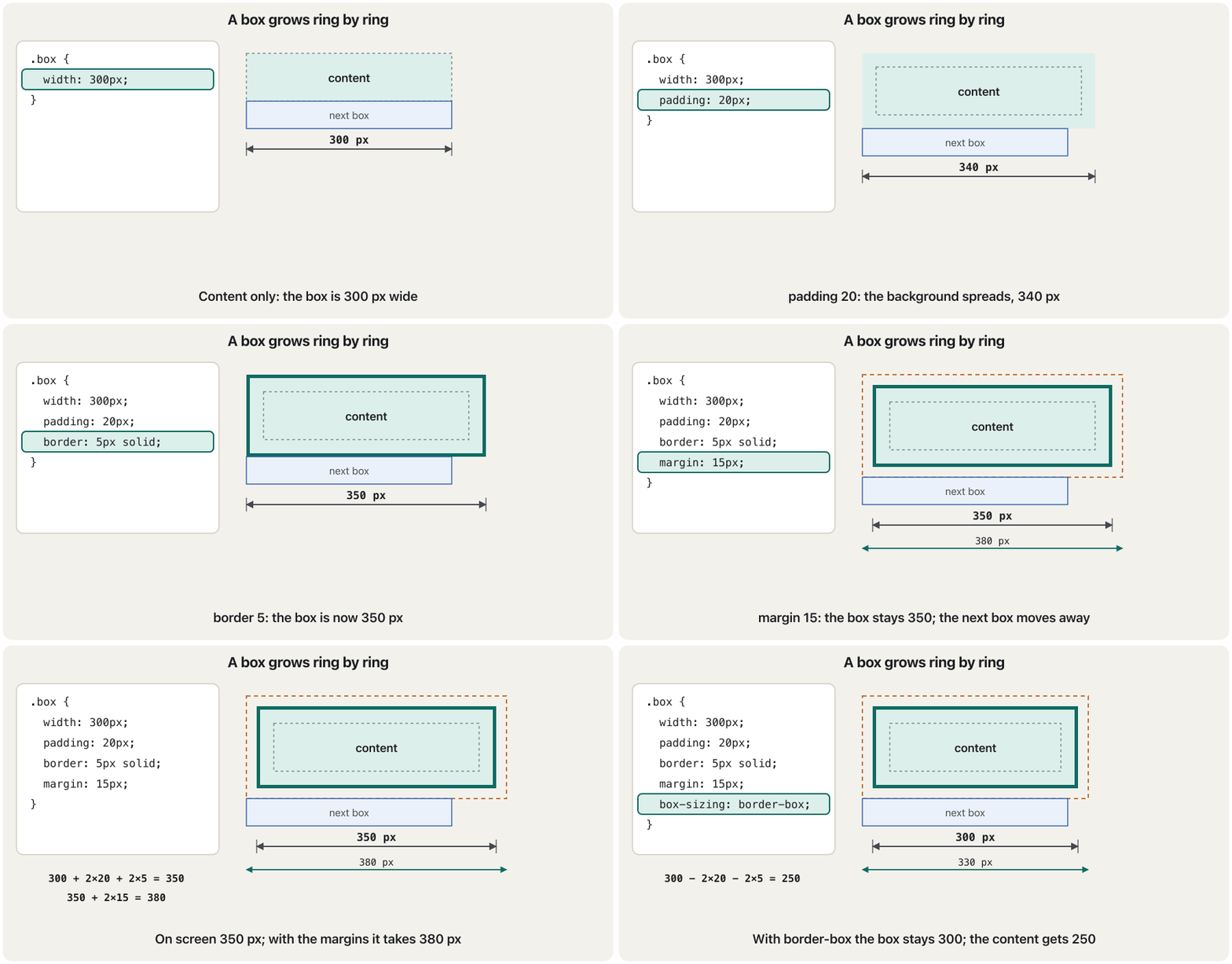
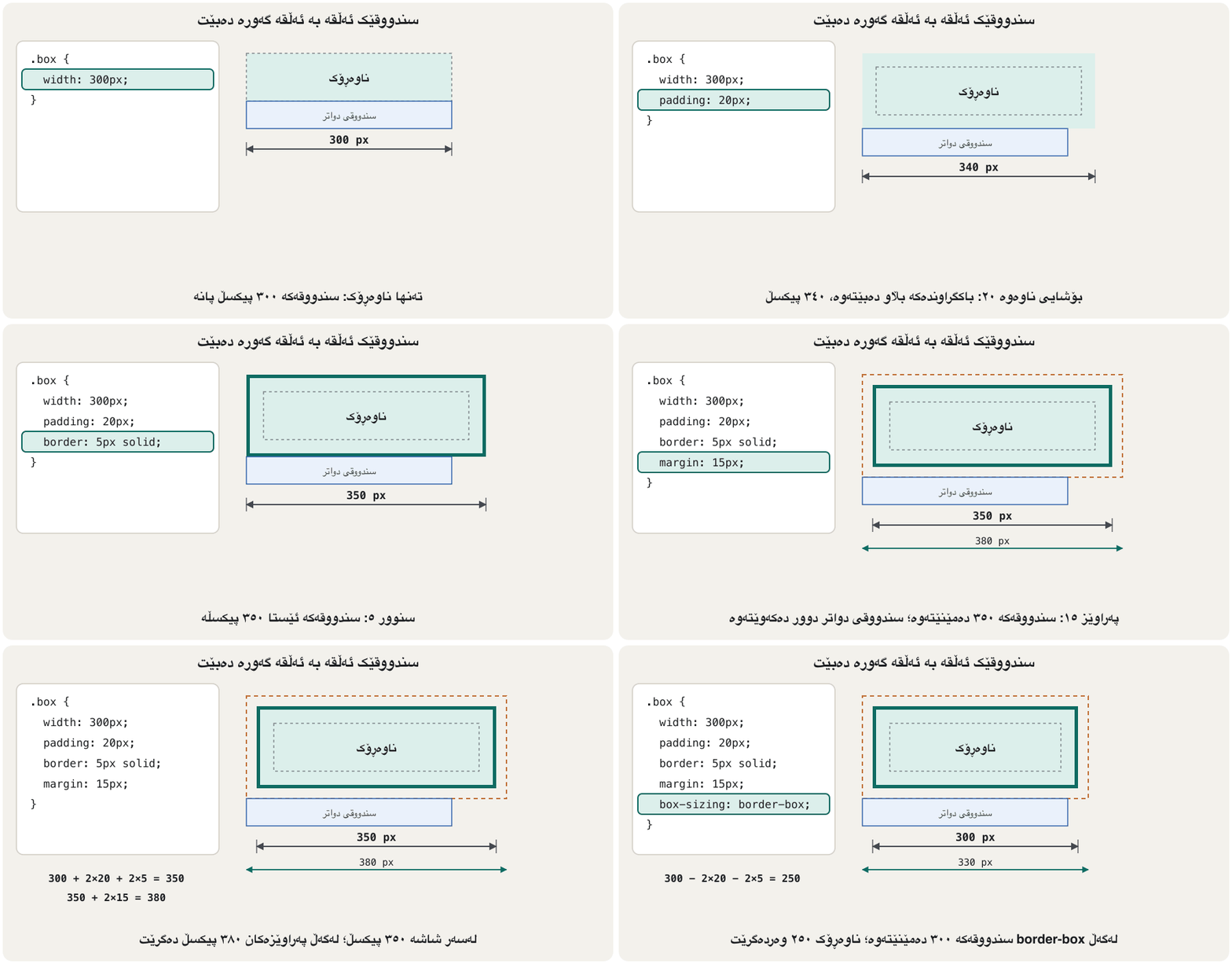
Add the rings one at a time and watch the width. Padding and border make the coloured box itself bigger; margin does not change the box, it only pushes the next box away.
ئەڵقەکان یەک بە یەک زیاد بکە و سەیری پانییەکە بکە. و خودی سندووقە ڕەنگکراوەکە گەورەتر دەکەن؛ سندووقەکە ناگۆڕێت، تەنها سندووقی دواتر دوور دەخاتەوە.
The content size: width, height, max-width, min-heightقەبارەی ناوەڕۆک: width، height، max-width، min-height
width and height set the size of the content ring. A block element without a width fills the whole width of its container; without a height it is just as tall as its content. Two more properties are usually better than fixed numbers:
width و height قەبارەی ئەڵقەی ناوەڕۆک دیاری دەکەن. بێ width هەموو پانیی سندووقی دەرەوەی پڕ دەکاتەوە؛ بێ height بەقەد ناوەڕۆکەکەی بەرز دەبێت. دوو تر زۆرجار لە ژمارەی جێگیر باشترن:
max-width— "at most this wide". The box is 500 px on a laptop but shrinks on a narrow phone instead of sticking out of the screen.min-height— "at least this tall". The box keeps its height when it holds little text, and grows when the text needs more room.- There are also
min-widthandmax-height. A fixedheightis risky: when the text is longer than the box, it overflows and spills over the border.
max-width— «لانیزۆر ئەوەندە پان». سندووقەکە لەسەر لاپتۆپ ٥٠٠ ، بەڵام لەسەر مۆبایلێکی تەسک بچووک دەبێتەوە لەبری ئەوەی لە شاشەکە دەربچێت.min-height— «لانیکەم ئەوەندە بەرز». سندووقەکە کاتێک دەقی کەمی تێدایە بەرزییەکەی دەپارێزێت و کاتێک دەقەکە شوێنی زیاتری پێویستە گەورە دەبێت.min-widthوmax-heightـیش هەن.heightـی جێگیر مەترسیدارە: کاتێک دەقەکە لە سندووقەکە درێژترە، دەڕژێتە دەرەوە و بەسەر دەکەوێت.
<!DOCTYPE html>
<html lang="en">
<head>
  <meta charset="utf-8">
  <meta name="viewport" content="width=device-width, initial-scale=1">
  <title>Sizes</title>
  <style>
    body { font-family: Arial, sans-serif; }
    .notice {
      max-width: 500px;    /* never wider than 500 px, narrower on a phone */
      min-height: 150px;   /* at least 150 px tall, taller if needed */
      background-color: #fdf3e1;
      border: 2px solid #b4530f;
    }
    .fixed {
      width: 220px;
      height: 60px;        /* fixed: the text overflows */
      margin-top: 20px;
      border: 2px dashed #2b5ea8;
    }
  </style>
</head>
<body>
  <div class="notice">
    <h2>Opening hours</h2>
    <p>Saturday to Thursday, 8:00 to 16:00.</p>
  </div>
  <div class="fixed">
    <p>This box has a fixed height of 60 px, but its text needs more room,
    so the words spill out over the bottom border.</p>
  </div>
</body>
</html>HTML sent to the browserئەو HTMLـەی دەنێردرێت بۆ تۆڕگەڕ
<!DOCTYPE html>
<html lang="en">
<head>
  <meta charset="utf-8">
  <meta name="viewport" content="width=device-width, initial-scale=1">
  <title>Sizes</title>
  <style>
    body { font-family: Arial, sans-serif; }
    .notice {
      max-width: 500px;    /* never wider than 500 px, narrower on a phone */
      min-height: 150px;   /* at least 150 px tall, taller if needed */
      background-color: #fdf3e1;
      border: 2px solid #b4530f;
    }
    .fixed {
      width: 220px;
      height: 60px;        /* fixed: the text overflows */
      margin-top: 20px;
      border: 2px dashed #2b5ea8;
    }
  </style>
</head>
<body>
  <div class="notice">
    <h2>Opening hours</h2>
    <p>Saturday to Thursday, 8:00 to 16:00.</p>
  </div>
  <div class="fixed">
    <p>This box has a fixed height of 60 px, but its text needs more room,
    so the words spill out over the bottom border.</p>
  </div>
</body>
</html>The content size: width, height, max-width, min-heightقەبارەی ناوەڕۆک: width، height، max-width، min-height
More units for sizesیەکەی زیاتر بۆ قەبارە
CSS Basics introduced px, %, em and rem. In box sizes % and em measure something special, and three new units are useful:
بنەماکانی CSS px، %، em و remـی ناساند. لە قەبارەی سندووقدا % و em شتێکی تایبەت دەپێون و سێ یەکەی نوێش بەسوودن:
| Unitیەکە | Meansواتا | Good forباشە بۆ |
|---|---|---|
% | A share of the container's width (for width, padding and margin).بەشێک لە پانیی سندووقی دەرەوە (بۆ width، padding و margin). | Boxes that follow the page width: width: 50%.سندووقێک کە لەگەڵ پانیی لاپەڕەکەدا دەگۆڕێت: width: 50%. |
vw / vh | 1% of the window's width / height (the ).١٪ی پانی / بەرزیی پەنجەرەکە (). | A first screen that fills the window: min-height: 100vh.یەکەم بەشی لاپەڕە کە پەنجەرەکە پڕ دەکاتەوە: min-height: 100vh. |
em | The element's own font size.قەبارەی خودی . | Padding that grows with the text: padding: 0.5em 1em. کە لەگەڵ دەقەکەدا گەورە دەبێت: padding: 0.5em 1em. |
ch | The width of the digit 0 in the current font.پانیی ژمارە 0 لە ئێستاییەکەدا. | Comfortable line length: max-width: 65ch.درێژیی ئاسوودەی دێڕ: max-width: 65ch. |
main {
  max-width: 65ch;     /* about 65 characters per line: easy to read */
  margin: 0 auto;
}
.hero {
  min-height: 50vh;    /* at least half the height of the window */
}
.button {
  padding: 0.5em 1em;  /* grows with the button's own font size */
}
The layout lesson adds fr, a share of the free space in a grid (Positioning and Page Layout).
وانەی یەکەی fr زیاد دەکات، بەشێک لە بۆشاییە بەتاڵەکەی (شوێندانان و ڕێکخستنی لاپەڕە).
box-sizing: what does width measure?box-sizing: width چی دەپێوێت؟
By default, width and height measure only the content. Padding and border are added outside that size. This default is called box-sizing: content-box. So this rule makes a box that is 370 px wide on the screen, not 350:
بە شێوەی بنەڕەتی، width و height تەنها ناوەڕۆکەکە دەپێون. و لە دەرەوەی ئەو قەبارەیە زیاد دەکرێن. ئەم بنەڕەتە ناوی box-sizing: content-boxـە. بۆیە ئەم ڕێسایە سندووقێک دروست دەکات کە لەسەر شاشە ٣٧٠ پانە، نەک ٣٥٠:
.box {
  width: 350px;
  border: 10px solid black;
}Content-box: the box on the screen is the width plus the border on both sides (370 px). With padding: 20px as well, add the padding of both sides too (410 px).
content-box: سندووقەکە لەسەر شاشە پانییەکەیە لەگەڵ هەردوو لا (٣٧٠ ). ئەگەر padding: 20pxـیش هەبێت، هەردوو لاش زیاد بکە (٤١٠ ).
With box-sizing: border-box the width means the whole visible box, border included. The browser makes the content smaller to fit the padding and the border inside: the same rule gives a 350 px box with 330 px of content. The margin is outside in both models.
بە box-sizing: border-box، width واتای هەموو سندووقە بینراوەکەیە، تێدایە. ناوەڕۆکەکە بچووکتر دەکات تا و لەناویدا جێگەیان ببێتەوە: هەمان ڕێسا سندووقێکی ٣٥٠ دەدات بە ٣٣٠ ناوەڕۆکەوە. لە هەردوو مۆدێلەکەدا لە دەرەوەیە.
<!DOCTYPE html>
<html lang="en">
<head>
  <meta charset="utf-8">
  <meta name="viewport" content="width=device-width, initial-scale=1">
  <title>box-sizing</title>
  <style>
    body { font-family: Arial, sans-serif; }
    .ruler {
      width: 350px;
      background-color: #44484f;
      color: white;
      text-align: center;
    }
    .box {
      width: 350px;
      border: 10px solid #2b5ea8;
      margin-top: 10px;
      background-color: #eaf1fb;
    }
    .content { box-sizing: content-box; }   /* the default */
    .border  { box-sizing: border-box; }
  </style>
</head>
<body>
  <div class="ruler">350 px</div>
  <div class="box content">content-box: 350 + 10 + 10 = 370 px wide</div>
  <div class="box border">border-box: 350 px wide (content 330 px)</div>
</body>
</html>HTML sent to the browserئەو HTMLـەی دەنێردرێت بۆ تۆڕگەڕ
<!DOCTYPE html>
<html lang="en">
<head>
  <meta charset="utf-8">
  <meta name="viewport" content="width=device-width, initial-scale=1">
  <title>box-sizing</title>
  <style>
    body { font-family: Arial, sans-serif; }
    .ruler {
      width: 350px;
      background-color: #44484f;
      color: white;
      text-align: center;
    }
    .box {
      width: 350px;
      border: 10px solid #2b5ea8;
      margin-top: 10px;
      background-color: #eaf1fb;
    }
    .content { box-sizing: content-box; }   /* the default */
    .border  { box-sizing: border-box; }
  </style>
</head>
<body>
  <div class="ruler">350 px</div>
  <div class="box content">content-box: 350 + 10 + 10 = 370 px wide</div>
  <div class="box border">border-box: 350 px wide (content 330 px)</div>
</body>
</html>Why width does not include padding and border by default, and how box-sizing: border-box fixes it for every element.
بۆچی بە شێوەی بنەڕەتی width و ناگرێتەوە و چۆن box-sizing: border-box ئەمە بۆ هەموو چارەسەر دەکات.
Also shows the inherit pattern used in the border-box habit.
هەروەها ڕێگای inherit پیشان دەدات کە لە خووی ئەمڕۆی border-boxـدا بەکاردێت.
box-sizing: what does width measure?box-sizing: width چی دەپێوێت؟
Today's habit: border-box everywhereخووی ئەمڕۆ: border-box لە هەموو شوێنێک
Most developers start every style sheet with one rule that switches all elements to border-box. Then width: 50% really means half, even after you add padding and a border, and boxes stop overflowing by surprise.
زۆربەی گەشەپێدەران هەموو بە یەک ڕێسا دەست پێدەکەن کە هەموو دەگۆڕێت بۆ border-box. ئیتر width: 50% بە ڕاستی واتای نیوە، تەنانەت دوای زیادکردنی و . سندووقەکانیش ئیتر لەناکاو ناڕژێنە دەرەوە.
*,
*::before,
*::after {
  box-sizing: border-box;
}
Explain the codeڕوونکردنەوەی کۆدەکە
- Lineدێڕی 1
*is the universal selector (CSS Selectors);::beforeand::afteradd the generated pseudo-elements.*گشتییە (هەڵبژێرەکانی CSS)؛::beforeو::afterزیاد دەکەن.
box-sizing: what does width measure?box-sizing: width چی دەپێوێت؟
Practice: predict the widthڕاهێنان: پانییەکە پێشبینی بکە
Work these out on paper before you choose. Remember: content-box adds padding and border to width; border-box does not; the margin is always outside.
پێش هەڵبژاردن لەسەر کاغەز کاری لەسەر بکە. لەبیرت بێت: content-box و دەخاتە سەر width؛ border-box نا؛ هەمیشە لە دەرەوەیە.
Borders: style, width and colourسنوورەکان: شێواز، ئەستووری و ڕەنگ
A border is drawn around the padding and the content of text, pictures or any other box. You give it three things: a style (border-style), a width (border-width) and a colour (border-color). border-style with one value gives all four sides the same style.
بە دەوری و ناوەڕۆکی دەق، وێنە یان هەر سندووقێکی تردا دەکێشرێت. سێ شتی پێ دەدەیت: شێواز (border-style)، ئەستووری (border-width) و ڕەنگ (border-color). border-style بە یەک بەها هەر چوار لا هەمان شێواز دەدات.
| Valueبەها | What you seeئەوەی دەیبینیت |
|---|---|
solid | One plain line.یەک هێڵی سادە. |
dashed / dotted | Short dashes / round dots.هێڵی کورت / خاڵی خڕ. |
double | Two lines (they need a width of at least 3 px to show).دوو هێڵ (بۆ ئەوەی دەربکەون، ئەستووری دەبێت لانیکەم ٣ بێت). |
groove / ridge | A carved / a raised 3-D edge.لێوارێکی سێ-ڕەهەندیی هەڵکۆڵراو / بەرزکراوە. |
inset / outset | The box looks pressed in / pushed out.سندووقەکە وەک چووبێتە ناوەوە / هاتبێتە دەرەوە دەردەکەوێت. |
none / hidden | No border. none is the default. نییە. none بنەڕەتە. |
<!DOCTYPE html>
<html lang="en">
<head>
  <meta charset="utf-8">
  <meta name="viewport" content="width=device-width, initial-scale=1">
  <title>Border styles</title>
  <style>
    body { font-family: Arial, sans-serif; }
    .demo p {
      display: inline-block;
      width: 110px;
      margin: 6px;
      padding: 10px;
      text-align: center;
      border-width: 6px;
      border-color: #2b5ea8;
    }
    .solid  { border-style: solid; }
    .dashed { border-style: dashed; }
    .dotted { border-style: dotted; }
    .double { border-style: double; }
    .groove { border-style: groove; }
    .ridge  { border-style: ridge; }
    .inset  { border-style: inset; }
    .outset { border-style: outset; }
  </style>
</head>
<body>
  <div class="demo">
    <p class="solid">solid</p>
    <p class="dashed">dashed</p>
    <p class="dotted">dotted</p>
    <p class="double">double</p>
    <p class="groove">groove</p>
    <p class="ridge">ridge</p>
    <p class="inset">inset</p>
    <p class="outset">outset</p>
  </div>
</body>
</html>HTML sent to the browserئەو HTMLـەی دەنێردرێت بۆ تۆڕگەڕ
<!DOCTYPE html>
<html lang="en">
<head>
  <meta charset="utf-8">
  <meta name="viewport" content="width=device-width, initial-scale=1">
  <title>Border styles</title>
  <style>
    body { font-family: Arial, sans-serif; }
    .demo p {
      display: inline-block;
      width: 110px;
      margin: 6px;
      padding: 10px;
      text-align: center;
      border-width: 6px;
      border-color: #2b5ea8;
    }
    .solid  { border-style: solid; }
    .dashed { border-style: dashed; }
    .dotted { border-style: dotted; }
    .double { border-style: double; }
    .groove { border-style: groove; }
    .ridge  { border-style: ridge; }
    .inset  { border-style: inset; }
    .outset { border-style: outset; }
  </style>
</head>
<body>
  <div class="demo">
    <p class="solid">solid</p>
    <p class="dashed">dashed</p>
    <p class="dotted">dotted</p>
    <p class="double">double</p>
    <p class="groove">groove</p>
    <p class="ridge">ridge</p>
    <p class="inset">inset</p>
    <p class="outset">outset</p>
  </div>
</body>
</html>Borders: style, width and colourسنوورەکان: شێواز، ئەستووری و ڕەنگ
A different border on each sideسنوورێکی جیاواز لەسەر هەر لایەک
Each side has its own properties: border-top-style, border-right-style, border-bottom-style and border-left-style set the style of one side. The same pattern exists for the width (border-top-width …) and the colour (border-top-color …).
هەر لایەک خۆی هەیە: border-top-style، border-right-style، border-bottom-style و border-left-style شێوازی یەک لا دیاری دەکەن. هەمان شێوە بۆ ئەستووری (border-top-width …) و ڕەنگ (border-top-color …) هەیە.
| Property | Sets the style ofشێوازی ئەم لایە دیاری دەکات |
|---|---|
border-top-style | the top border سەرەوە |
border-right-style | the right border ڕاست |
border-bottom-style | the bottom border خوارەوە |
border-left-style | the left border چەپ |
The lecture's example gives a heading a different style on every side: ridged on the left, grooved on the right, dashed on top and double at the bottom. Here it is in today's HTML, with a neutral shop name:
نموونەکەی وانەکە شێوازێکی جیاواز دەداتە هەر لایەکی سەردێڕێک: بەرزکراوە لە چەپ، هەڵکۆڵراو لە ڕاست، پچڕپچڕ لە سەرەوە و دووانە لە خوارەوە. ئەمە هەمان نموونەیە بە ئەمڕۆ و ناوی دوکانێکی بێلایەن:
<!DOCTYPE html>
<html lang="en">
<head>
  <meta charset="utf-8">
  <meta name="viewport" content="width=device-width, initial-scale=1">
  <title>Four sides</title>
  <style>
    body { font-family: Georgia, serif; }
    #heading {
      background-color: #ffffcc;
      text-align: center;
      border-width: 6px;
      border-color: #b4530f;
      border-left-style: ridge;     /* a raised edge on the left */
      border-right-style: groove;   /* a carved edge on the right */
      border-top-style: dashed;     /* dashes on top */
      border-bottom-style: double;  /* two lines at the bottom */
    }
  </style>
</head>
<body>
  <div id="heading">
    <h2>Welcome to Sulaimani Books</h2>
  </div>
</body>
</html>HTML sent to the browserئەو HTMLـەی دەنێردرێت بۆ تۆڕگەڕ
<!DOCTYPE html>
<html lang="en">
<head>
  <meta charset="utf-8">
  <meta name="viewport" content="width=device-width, initial-scale=1">
  <title>Four sides</title>
  <style>
    body { font-family: Georgia, serif; }
    #heading {
      background-color: #ffffcc;
      text-align: center;
      border-width: 6px;
      border-color: #b4530f;
      border-left-style: ridge;     /* a raised edge on the left */
      border-right-style: groove;   /* a carved edge on the right */
      border-top-style: dashed;     /* dashes on top */
      border-bottom-style: double;  /* two lines at the bottom */
    }
  </style>
</head>
<body>
  <div id="heading">
    <h2>Welcome to Sulaimani Books</h2>
  </div>
</body>
</html>Borders: style, width and colourسنوورەکان: شێواز، ئەستووری و ڕەنگ
The border shorthand and rounded cornersکورتکراوەی border و گۆشەی خڕ
Usually you write all three in one shorthand: border: 2px solid #0d6b62; (width, style, colour, in any order; only the style is required). One side alone works the same way: border-left: 6px solid #b4530f;. border-radius rounds the corners: a few pixels for a soft card, a big value for a pill-shaped button, 50% for a circle when the box is square.
زۆرجار هەر سێکیان لە یەک کورتکراوەدا دەنووسیت: border: 2px solid #0d6b62; (ئەستووری، شێواز، ڕەنگ، بە هەر ڕیزێک؛ تەنها شێوازەکە پێویستە). یەک لا بە تەنها هەروا کار دەکات: border-left: 6px solid #b4530f;. border-radius گۆشەکان خڕ دەکاتەوە: چەند بۆ کارتێکی نەرم، بەهایەکی گەورە بۆ شێوە-حەب، 50% بۆ بازنە کاتێک سندووقەکە چوارگۆشەیە.
<!DOCTYPE html>
<html lang="en">
<head>
  <meta charset="utf-8">
  <meta name="viewport" content="width=device-width, initial-scale=1">
  <title>Border shorthand</title>
  <style>
    body { font-family: Arial, sans-serif; }
    .badge {
      display: inline-block;
      padding: 4px 12px;
      border: 2px solid #0d6b62;   /* width, style, colour */
      border-radius: 8px;          /* rounded corners */
    }
    .pill {
      display: inline-block;
      padding: 8px 20px;
      background-color: #0d6b62;
      color: white;
      border-radius: 999px;        /* round ends */
    }
    .avatar {
      width: 80px;
      height: 80px;
      background-color: #b4530f;
      border-radius: 50%;          /* a circle */
    }
    .note {
      padding-left: 12px;
      border-left: 6px solid #b4530f;
    }
  </style>
</head>
<body>
  <p class="badge">New</p>
  <p class="pill">Order now</p>
  <div class="avatar"></div>
  <p class="note">Tip: borders can go on one side only.</p>
</body>
</html>HTML sent to the browserئەو HTMLـەی دەنێردرێت بۆ تۆڕگەڕ
<!DOCTYPE html>
<html lang="en">
<head>
  <meta charset="utf-8">
  <meta name="viewport" content="width=device-width, initial-scale=1">
  <title>Border shorthand</title>
  <style>
    body { font-family: Arial, sans-serif; }
    .badge {
      display: inline-block;
      padding: 4px 12px;
      border: 2px solid #0d6b62;   /* width, style, colour */
      border-radius: 8px;          /* rounded corners */
    }
    .pill {
      display: inline-block;
      padding: 8px 20px;
      background-color: #0d6b62;
      color: white;
      border-radius: 999px;        /* round ends */
    }
    .avatar {
      width: 80px;
      height: 80px;
      background-color: #b4530f;
      border-radius: 50%;          /* a circle */
    }
    .note {
      padding-left: 12px;
      border-left: 6px solid #b4530f;
    }
  </style>
</head>
<body>
  <p class="badge">New</p>
  <p class="pill">Order now</p>
  <div class="avatar"></div>
  <p class="note">Tip: borders can go on one side only.</p>
</body>
</html>Margin: space outside the borderپەراوێز: بۆشایی لە دەرەوەی سنوور
The margin is the empty space outside the border. It separates a box from its neighbours and from the edge of its container. You can set each side on its own, or all four at once with the shorthand margin.
بۆشاییە بەتاڵەکەی دەرەوەی . سندووقێک لە دراوسێکانی و لە لێواری سندووقی دەرەوەی جیا دەکاتەوە. دەتوانیت هەر لایەک بە جیا دابنێیت، یان هەر چواریان پێکەوە بە کورتکراوەی margin.
| Property | Sets the margin دیاری دەکات |
|---|---|
margin-top | above the elementلە سەرووی |
margin-right | to its rightلە لای ڕاستی |
margin-bottom | below itلە خوارییەوە |
margin-left | to its leftلە لای چەپی |
The shorthand takes one to four values. With four, it starts at the top and goes round clockwise: top, right, bottom, left (in English the word TRouBLe helps you remember). Fewer values copy the missing sides from the opposite side:
کورتکراوەکە یەک تا چوار بەها وەردەگرێت. بە چوار بەها، لە سەرەوە دەست پێدەکات و وەک میلی کاتژمێر دەسووڕێتەوە: سەرەوە، ڕاست، خوارەوە، چەپ (بە ئینگلیزی وشەی TRouBLe یارمەتیت دەدات لەبیرت بێت). بەهای کەمتر لاکانی نەنووسراو لە لای بەرامبەرەوە وەردەگرن:
| You writeدەنووسیت | Topسەرەوە | Rightڕاست | Bottomخوارەوە | Leftچەپ |
|---|---|---|---|---|
margin: 10px; | 10 | 10 | 10 | 10 |
margin: 10px 20px; | 10 | 20 | 10 | 20 |
margin: 10px 20px 30px; | 10 | 20 | 30 | 20 |
margin: 10px 20px 30px 40px; | 10 | 20 | 30 | 40 |
In Kurdish: margin and padding on each side and with the shorthand, checked in the browser's developer tools box-model panel.
بە کوردی: و بۆ هەر لایەک و بە شێوە کورتەکەیان، پاشان پشکنینیان لە لە .
Kurdish (Sorani). Frame checked at 8:20: DevTools box-model panel with padding and margin.
بە کوردیی سۆرانی؛ لە 8:20 لە و پیشان دەدات.
Margin: space outside the borderپەراوێز: بۆشایی لە دەرەوەی سنوور
Centring a box: margin: 0 autoناوەڕاستکردنی سندووقێک: margin: 0 auto
auto as a left and right margin tells the browser: share the free space equally on both sides. The box moves to the middle of its container. Two conditions: it must be a block box, and it must have a width or max-width smaller than the container (otherwise there is no free space to share).
auto وەک چەپ و ڕاست بە دەڵێت: بۆشاییە بەتاڵەکە بە یەکسانی لەسەر هەردوو لا دابەش بکە. سندووقەکە دەچێتە ناوەڕاستی سندووقی دەرەوە. دوو مەرج هەیە: دەبێت سندووقێکی بلۆک بێت و دەبێت width یان max-widthـی لە سندووقی دەرەوە بچووکتر هەبێت (ئەگەرنا هیچ بۆشاییەکی بەتاڵ نییە بۆ دابەشکردن).
<!DOCTYPE html>
<html lang="en">
<head>
  <meta charset="utf-8">
  <meta name="viewport" content="width=device-width, initial-scale=1">
  <title>Centred card</title>
  <style>
    * { box-sizing: border-box; }
    body { font-family: Arial, sans-serif; background-color: #f3f1ec; }
    .card {
      max-width: 360px;        /* a width is needed */
      margin: 40px auto;       /* 40 px top and bottom, auto left and right */
      padding: 20px;
      background-color: white;
      border: 1px solid #d3cfc6;
      border-radius: 10px;
    }
  </style>
</head>
<body>
  <div class="card">
    <h2>Log in</h2>
    <p>This card is centred with margin: 40px auto.</p>
  </div>
</body>
</html>HTML sent to the browserئەو HTMLـەی دەنێردرێت بۆ تۆڕگەڕ
<!DOCTYPE html>
<html lang="en">
<head>
  <meta charset="utf-8">
  <meta name="viewport" content="width=device-width, initial-scale=1">
  <title>Centred card</title>
  <style>
    * { box-sizing: border-box; }
    body { font-family: Arial, sans-serif; background-color: #f3f1ec; }
    .card {
      max-width: 360px;        /* a width is needed */
      margin: 40px auto;       /* 40 px top and bottom, auto left and right */
      padding: 20px;
      background-color: white;
      border: 1px solid #d3cfc6;
      border-radius: 10px;
    }
  </style>
</head>
<body>
  <div class="card">
    <h2>Log in</h2>
    <p>This card is centred with margin: 40px auto.</p>
  </div>
</body>
</html>Margin: space outside the borderپەراوێز: بۆشایی لە دەرەوەی سنوور
Percentage margins are measured on the widthپەراوێزەکانی ڕێژەیی لەسەر پانی دەپێورێن
The lecture's employment form puts its box 5% away from the top, the left and the right of the page:
فۆرمی دامەزراندنی وانەکە سندووقەکەی ٥٪ لە سەرەوە، چەپ و ڕاستی لاپەڕەکە دوور دەخاتەوە:
h2 {
  text-align: center;
}
.format {
  background-color: #ffffcc;
  border: thin solid red;
  margin-top: 5%;     /* 5% of the WIDTH of the container */
  margin-left: 5%;
  margin-right: 5%;
}
A percentage margin is a share of the width of the containing box — even margin-top and margin-bottom. On a page 1000 px wide, margin-top: 5% is 50 px, whatever the height of the page. (Percentage padding follows the same rule.) The three margins can be one shorthand: margin: 5% 5% 0;.
ڕێژەیی بەشێکە لە پانیی ئەو سندووقەی تێیدایە — تەنانەت margin-top و margin-bottomیش. لەسەر لاپەڕەیەکی ١٠٠٠ پان، margin-top: 5% دەکاتە ٥٠ ، بەرزیی لاپەڕەکە هەرچەند بێت. ( ڕێژەییش هەمان یاسا پەیڕەو دەکات.) سێ دەتوانن یەک کورتکراوە بن: margin: 5% 5% 0;.
Margin: space outside the borderپەراوێز: بۆشایی لە دەرەوەی سنوور
When two margins become oneکاتێک دوو پەراوێز دەبنە یەک
When two block boxes sit one above the other, the bottom margin of the first and the top margin of the second collapse: the gap is the larger of the two, not their sum. This only happens vertically, in normal block layout (not left and right, and not inside flex or grid containers). A negative margin pulls a box closer.
کاتێک دوو سندووقی بلۆک یەک لە سەر یەک دادەنرێن، خوارەوەی یەکەم و سەرەوەی دووەم تێکەڵ دەبن: بۆشاییەکە گەورەترەکەیانە، نەک کۆی هەردووکیان. ئەمە تەنها بە ئاڕاستەی ستوونی ڕوودەدات، لە ڕێکخستنی بلۆکی ئاساییدا (نەک چەپ و ڕاست، نەک لەناو سندووقی flex یان gridـدا). سالب سندووقێک نزیکتر ڕادەکێشێت.
<!DOCTYPE html>
<html lang="en">
<head>
  <meta charset="utf-8">
  <meta name="viewport" content="width=device-width, initial-scale=1">
  <title>Margin collapse</title>
  <style>
    body { font-family: Arial, sans-serif; }
    p { background-color: #eaf1fb; padding: 6px; }
    .one { margin-bottom: 50px; }
    .two { margin-top: 30px; }   /* the gap is 50 px, not 80 px */
  </style>
</head>
<body>
  <p class="one">Paragraph one: margin-bottom 50px</p>
  <p class="two">Paragraph two: margin-top 30px</p>
</body>
</html>HTML sent to the browserئەو HTMLـەی دەنێردرێت بۆ تۆڕگەڕ
<!DOCTYPE html>
<html lang="en">
<head>
  <meta charset="utf-8">
  <meta name="viewport" content="width=device-width, initial-scale=1">
  <title>Margin collapse</title>
  <style>
    body { font-family: Arial, sans-serif; }
    p { background-color: #eaf1fb; padding: 6px; }
    .one { margin-bottom: 50px; }
    .two { margin-top: 30px; }   /* the gap is 50 px, not 80 px */
  </style>
</head>
<body>
  <p class="one">Paragraph one: margin-bottom 50px</p>
  <p class="two">Paragraph two: margin-top 30px</p>
</body>
</html>Padding: space inside the borderبۆشایی ناوەوە: بۆشایی لەناو سنوور
Padding is the space between the content and the border. Like margin, it has four properties — padding-top, padding-right, padding-bottom, padding-left — and a shorthand padding with one to four values in the same clockwise order. Unlike margin, padding can never be negative or auto, and it is filled with the element's background.
بۆشایی نێوان ناوەڕۆک و . وەک ، چوار هەیە — padding-top، padding-right، padding-bottom، padding-left — هەروەها کورتکراوەی padding بە یەک تا چوار بەها بە هەمان ڕیزی میلی کاتژمێر. بە پێچەوانەی ، هەرگیز سالب یان auto نابێت و بە باکگراوندی پڕ دەکرێتەوە.
<!DOCTYPE html>
<html lang="en">
<head>
  <meta charset="utf-8">
  <meta name="viewport" content="width=device-width, initial-scale=1">
  <title>Padding</title>
  <style>
    body { font-family: Arial, sans-serif; }
    p {
      background-color: #fdf3e1;
      border: 2px solid #b4530f;
    }
    .tight { padding: 0; }
    .roomy { padding: 16px 24px; }   /* 16 top and bottom, 24 left and right */
  </style>
</head>
<body>
  <p class="tight">No padding: the text touches the border.</p>
  <p class="roomy">padding: 16px 24px — the background fills the padding.</p>
</body>
</html>HTML sent to the browserئەو HTMLـەی دەنێردرێت بۆ تۆڕگەڕ
<!DOCTYPE html>
<html lang="en">
<head>
  <meta charset="utf-8">
  <meta name="viewport" content="width=device-width, initial-scale=1">
  <title>Padding</title>
  <style>
    body { font-family: Arial, sans-serif; }
    p {
      background-color: #fdf3e1;
      border: 2px solid #b4530f;
    }
    .tight { padding: 0; }
    .roomy { padding: 16px 24px; }   /* 16 top and bottom, 24 left and right */
  </style>
</head>
<body>
  <p class="tight">No padding: the text touches the border.</p>
  <p class="roomy">padding: 16px 24px — the background fills the padding.</p>
</body>
</html>Padding: space inside the borderبۆشایی ناوەوە: بۆشایی لەناو سنوور
Worked example: a fruit galleryنموونەی کارپێکراو: پێشانگای میوە
The lecture's gallery puts four pictures in a cream box with a red border. Every picture gets 5 px of padding and a thin green border, so there is a frame of space between each picture and its border. The page body keeps 10% free on the left and the right.
پێشانگاکەی وانەکە چوار وێنە دەخاتە ناو سندووقێکی کرێمی بە سوور. هەر وێنەیەک ٥ و سەوزی تەنک وەردەگرێت، بۆیە چوارچێوەیەکی بۆشایی لە نێوان هەر وێنەیەک و هەیە. body ١٠٪ لە چەپ و ڕاست بەتاڵ دەهێڵێتەوە.
<!DOCTYPE html>
<html lang="en">
<head>
  <meta charset="utf-8">
  <meta name="viewport" content="width=device-width, initial-scale=1">
  <title>Fruit Gallery</title>
  <link rel="stylesheet" href="fruits.css">
</head>
<body>
  <div class="gallery">
    <h2>Fruit Gallery</h2>
    <div>
      <img class="fruit" src="apple.svg" alt="Apple" width="100" height="100">
      <img class="fruit" src="grapes.svg" alt="Grapes" width="100" height="100">
    </div>
    <div>
      <img class="fruit" src="banana.svg" alt="Banana" width="100" height="100">
      <img class="fruit" src="strawberry.svg" alt="Strawberry" width="100" height="100">
    </div>
  </div>
</body>
</html>body {
margin-left: 10%;
margin-right: 10%;
font-family: Arial, sans-serif;
}
.fruit {
padding: 5px; /* = the four padding-… lines of the lecture */
border: thin solid green;
}
.gallery {
background-color: #ffffcc;
border: thin solid red;
text-align: center;
}Explain the codeڕوونکردنەوەی کۆدەکە
- Lineدێڕی 7
The lecture writes four lines,
padding-left: 5px; padding-top: 5px; padding-right: 5px; padding-bottom: 5px;. One shorthand does the same.وانەکە چوار دێڕ دەنووسێت،
padding-left: 5px; padding-top: 5px; padding-right: 5px; padding-bottom: 5px;. یەک کورتکراوە هەمان کار دەکات.
display: block, inline, inline-block, nonedisplay: block، inline، inline-block، none
HTML Text, Images and Lists showed that some elements are and others . That is only their default. The CSS property display decides how a box behaves, and you can change it:
دەق، وێنە و لیست لە HTMLـدا پیشانی دا هەندێک و هەندێکی تر . ئەوە تەنها شێوەی بنەڕەتییانە. display بڕیار دەدات سندووقێک چۆن ڕەفتار دەکات و دەتوانیت بیگۆڕیت:
| Valueبەها | Starts a new line?دێڕی نوێ دەست پێدەکات؟ | width / height?width / height؟ | Typical useبەکارهێنانی باو |
|---|---|---|---|
block | Yes, and fills the widthبەڵێ، هەموو پانییەکەش پڕ دەکاتەوە | Yesبەڵێ | div, p, headings; a link that should fill a menu rowdiv، p، سەردێڕەکان؛ کە دەبێت ڕیزێکی پڕ بکاتەوە |
inline | No, flows in the lineنا، لەناو دێڕەکەدا دەڕوات | No (ignored)نا (پشتگوێ دەخرێت) | span, a, strong inside textspan، a، strong لەناو دەقدا |
inline-block | No, flows in the lineنا، لەناو دێڕەکەدا دەڕوات | Yesبەڵێ | Buttons, badges, small boxes side by side، نیشانە، سندووقی بچووک لە تەنیشت یەک |
none | No: no box at allنا: هیچ سندووقێک نییە | No boxسندووق نییە | Hide an element completely (it takes no space)شاردنەوەی تەواوی (هیچ شوێنێک ناگرێت) |
<!DOCTYPE html>
<html lang="en">
<head>
  <meta charset="utf-8">
  <meta name="viewport" content="width=device-width, initial-scale=1">
  <title>display</title>
  <style>
    body { font-family: Arial, sans-serif; line-height: 1.4; }
    span { width: 120px; padding: 10px; background-color: #fdf3e1; border: 1px solid #b4530f; }
    .inline { display: inline; }        /* the default for span */
    .ib     { display: inline-block; }
    .block  { display: block; padding: 8px; background-color: #dcefeb; }
    .gone   { display: none; }
  </style>
</head>
<body>
  <p>Inline: <span class="inline">a span</span> keeps to the line;
  its width is ignored and its padding spills over the lines above and below.</p>
  <p>Inline-block: <span class="ib">a span</span> stays in the line,
  but its width and padding now push the text away.</p>
  <p><a class="block" href="#">A link with display: block fills the whole line</a></p>
  <p class="gone">You will not see this paragraph: display: none.</p>
</body>
</html>HTML sent to the browserئەو HTMLـەی دەنێردرێت بۆ تۆڕگەڕ
<!DOCTYPE html>
<html lang="en">
<head>
  <meta charset="utf-8">
  <meta name="viewport" content="width=device-width, initial-scale=1">
  <title>display</title>
  <style>
    body { font-family: Arial, sans-serif; line-height: 1.4; }
    span { width: 120px; padding: 10px; background-color: #fdf3e1; border: 1px solid #b4530f; }
    .inline { display: inline; }        /* the default for span */
    .ib     { display: inline-block; }
    .block  { display: block; padding: 8px; background-color: #dcefeb; }
    .gone   { display: none; }
  </style>
</head>
<body>
  <p>Inline: <span class="inline">a span</span> keeps to the line;
  its width is ignored and its padding spills over the lines above and below.</p>
  <p>Inline-block: <span class="ib">a span</span> stays in the line,
  but its width and padding now push the text away.</p>
  <p><a class="block" href="#">A link with display: block fills the whole line</a></p>
  <p class="gone">You will not see this paragraph: display: none.</p>
</body>
</html>How block, inline and inline-block boxes behave: which take a full line, which ignore width, height and vertical margins.
، و inline-block چۆن ڕەفتار دەکەن: کامیان هێڵێکی تەواو دەگرێت و کامیان width، height و سەرەوە و خوارەوە پشتگوێ دەخات.
Chapters: block 0:33, inline 2:35, buttons 7:55, inline-block 12:23. Fits "What inline boxes ignore" too.
بەشەکان: block لە 0:33، inline لە 2:35، لە 7:55 و inline-block لە 12:23. بۆ بەشی «سندووقی ناودێڕ چی پشتگوێ دەخات»یش دەگونجێت.
display: block, inline, inline-block, nonedisplay: block، inline، inline-block، none
What inline boxes ignoreسندووقی ناودێڕ چی پشتگوێ دەخات
widthandheighthave no effect: the text decides the size.- Left and right padding, border and margin push the neighbouring words away.
- Top and bottom padding and border are drawn, but they do not move the lines: they can overlap the text above and below. Top and bottom margins do nothing.
widthوheightهیچ کاریگەرییەکیان نییە: دەقەکە قەبارەکە دیاری دەکات.- ، و چەپ و ڕاست وشە دراوسێکان دوور دەخەنەوە.
- و سەرەوە و خوارەوە دەکێشرێن، بەڵام دێڕەکان ناجووڵێنن: دەتوانن بچنە سەر دەقی سەرەوە و خوارەوە. سەرەوە و خوارەوە هیچ ناکات.
Pictures (<img>) are a special case: they are inline, but width, height, padding and margins all work on them, because the picture has its own size. That is why the fruit gallery above works. display: none removes an element from the page completely; visibility: hidden hides it but keeps its empty space.
وێنەکان (<img>) حاڵەتێکی تایبەتن: ناودێڕن، بەڵام width، height، و هەموویان لەسەریان کار دەکەن، چونکە وێنەکە قەبارەی خۆی هەیە. بۆیە پێشانگای میوەکەی سەرەوە کار دەکات. display: none بە تەواوی لە لاپەڕەکە لادەبات؛ visibility: hidden دەیشارێتەوە بەڵام شوێنە بەتاڵەکەی دەهێڵێتەوە.
See the box model in the browserمۆدێلی سندووق لە تۆڕگەڕدا ببینە
You do not have to guess the sizes. Every desktop browser has that show the four rings of any element with real numbers:
پێویست ناکات قەبارەکان مەزەندە بکەیت. هەموو کۆمپیوتەر ی هەیە کە چوار ئەڵقەکەی هەر بە ژمارەی ڕاستەقینە پیشان دەدەن:
Right-click the element on the page and choose Inspect (or press F12, or Ctrl+Shift+C; on a Mac Cmd+Option+C).
کلیکی ڕاست لەسەر بکە لە لاپەڕەکەدا و Inspect هەڵبژێرە (یان F12 دابگرە، یان Ctrl+Shift+C؛ لەسەر Mac، Cmd+Option+C).
The Elements panel opens with that element selected. While the mouse is over it, the page colours the rings: content blue, padding green, border yellow, margin orange.
پانێڵی Elements دەکرێتەوە و ئەو هەڵبژێردراوە. کاتێک لەسەریەتی، لاپەڕەکە ئەڵقەکان ڕەنگ دەکات: ناوەڕۆک شین، سەوز، زەرد، پرتەقاڵی.
Find the box-model diagram: in Chrome and Edge in the Styles or Computed pane, in Firefox in the Layout pane. Each ring shows its four numbers; the centre shows width × height.
هێڵکاریی بدۆزەرەوە: لە Chrome و Edgeـدا لە پانێڵی Styles یان Computed، لە Firefoxـدا لە پانێڵی Layout. هەر ئەڵقەیەک چوار ژمارەکەی پیشان دەدات؛ ناوەڕاستەکە پانی × بەرزی پیشان دەدات.
Double-click a number to try another value. The page changes at once, but only in your browser: copy the value you like into your
.cssfile.دوو کلیک لەسەر ژمارەیەک بکە بۆ تاقیکردنەوەی بەهایەکی تر. لاپەڕەکە یەکسەر دەگۆڕێت، بەڵام تەنها لە خۆتدا: ئەو بەهایەی پێت خۆشە بیگوازەرەوە بۆ
.cssـەکەت.
Common mistakesهەڵە باوەکان
| Mistakeهەڵە | What happensچی ڕوودەدات | Fixچارەسەر |
|---|---|---|
width: 100% plus padding, default box-sizingwidth: 100% لەگەڵ ، box-sizingـی بنەڕەتی | The box is wider than its container and sticks out.سندووقەکە لە سندووقی دەرەوە پانترە و دەردەچێت. | * { box-sizing: border-box; } |
border-width and border-color without a styleborder-width و border-color بێ شێواز | No border at all.هیچ نییە. | Add a style: border: 2px solid red;شێوازێک زیاد بکە: border: 2px solid red; |
margin: 0 auto on a box with no widthmargin: 0 auto لەسەر سندووقێک بێ پانی | Nothing is centred.هیچ ناوەڕاست ناکرێت. | Give it a max-width.max-widthـێکی پێبدە. |
margin-top: 10% expecting 10% of the heightmargin-top: 10% بە چاوەڕوانیی ١٠٪ی بەرزی | It is 10% of the container's width.١٠٪ی پانیی سندووقی دەرەوەیە. | Use px, em or rem for vertical space.بۆ بۆشایی ستوونی px، em یان rem بەکاربهێنە. |
width or vertical margin on a span or awidth یان ستوونی لەسەر span یان a | Ignored: they are inline.پشتگوێ دەخرێت: ناودێڕن. | display: inline-block; |
| Expecting px between two paragraphsچاوەڕوانیی لە نێوان دوو بڕگەدا | The margins collapse to 50 px. تێکەڵ دەبن بۆ ٥٠ . | Use one margin, or padding.یەک یان بەکاربهێنە. |
<br><br><br> for space or height<br><br><br> بۆ بۆشایی یان بەرزی | Hard to control; breaks on other screens.کۆنترۆڵکردنی قورسە؛ لەسەر شاشەی تر تێکدەچێت. | margin, padding or min-height.margin، padding یان min-height. |
-webkit-border-radius and friends-webkit-border-radius و هاوشێوەکانی | Extra lines nobody needs.دێڕی زیادە کە کەس پێویستی پێی نییە. | border-radius only |
A fixed width: 600px for a cardwidth: 600pxـی جێگیر بۆ کارتێک | Sticks out of a phone screen.لە شاشەی مۆبایل دەردەچێت. | max-width: 600px; |
Exercisesڕاهێنانەکان
Exam question: "Briefly discuss (i) the CSS box model, (ii) table tags." Write a short answer for both parts.
پرسیاری تاقیکردنەوە: «بە کورتی باس لە (i) CSS و (ii) بکە.» وەڵامێکی کورت بۆ هەردوو بەش بنووسە.
Show answerوەڵامەکە پیشان بدە
(i) Every HTML element is drawn as a rectangular box with four parts, from the inside out: the content (text or pictures, sized with width and height), the padding (space around the content, filled with the background), the border (a line around the padding, with a style, width and colour) and the margin (transparent space outside the border that separates the box from others). By default the width counts only the content; with box-sizing: border-box it includes padding and border. A small labelled drawing of the four rings earns full marks.
(i) هەر وەک سندووقێکی لاکێشەیی بە چوار بەش دەکێشرێت، لە ناوەوە بۆ دەرەوە: ناوەڕۆک (دەق یان وێنە، قەبارەکەی بە width و height)، (بۆشایی بە دەوری ناوەڕۆکدا، بە باکگراوند پڕکراوە)، (هێڵێک بە دەوری ، بە شێواز، ئەستووری و ڕەنگ) و (بۆشایی ڕوون لە دەرەوەی کە سندووقەکە لە سندووقەکانی تر جیا دەکاتەوە). بە شێوەی بنەڕەتی پانی تەنها ناوەڕۆک دەژمێرێت؛ بە box-sizing: border-box و دەگرێتەوە. وێنەیەکی بچووکی چوار ئەڵقەکە بە ناونیشانەوە نمرەی تەواو دەهێنێت.
(ii) <table> holds the table, <tr> a row, <th> a header cell, <td> a data cell; <caption>, <thead>, <tbody> and <tfoot> add a title and group the rows; colspan and rowspan merge cells. These are taught in the HTML review.
(ii) <table> لەخۆ دەگرێت، <tr> ، <th> ، <td> دراوە؛ <caption>، <thead>، <tbody> و <tfoot> ناونیشان زیاد دەکەن و ڕیزەکان کۆ دەکەنەوە؛ colspan و rowspan خانەکان یەک دەخەن. ئەمانە لە پێداچوونەوەی HTML فێر دەکرێن.
Predict the visible width (border to border) and the space taken (with margins) of each box. A: width: 300px; padding: 10px; border: 1px solid; margin: 20px; B: the same with box-sizing: border-box. C: width: 50%; padding: 5%; border: 4px solid; inside a container 600 px wide (content-box).
پانیی بینراو (لە بۆ ) و ئەو شوێنەی دەیگرێت (لەگەڵ ) بۆ هەر سندووقێک پێشبینی بکە. A: width: 300px; padding: 10px; border: 1px solid; margin: 20px; B: هەمان شت بە box-sizing: border-box. C: width: 50%; padding: 5%; border: 4px solid; لەناو سندووقێکی دەرەوەی ٦٠٠ پان (content-box).
Show answerوەڵامەکە پیشان بدە
| Boxسندووق | Visible widthپانیی بینراو | Space takenشوێنی گیراو |
|---|---|---|
| A | px | px |
| B | 300 px | px |
| C | px | 368 px |
In C both percentages are of the container's width: , and on each side.
لە Cـدا هەردوو ڕێژەکە لە پانیی سندووقی دەرەوەن: و لە هەر لایەک.
Make a card for a tea house: at most 420 px wide, centred on the page with 30 px above and below, 24 px of padding, a 2 px green border with rounded corners and a light green background. It must not stick out on a phone.
کارتێک بۆ چایخانەیەک دروست بکە: لانیزۆر ٤٢٠ پان، لە ناوەڕاستی لاپەڕەکەدا بە ٣٠ لە سەرەوە و خوارەوە، ٢٤ ، سەوزی ٢ بە گۆشەی خڕ و باکگراوندی سەوزی کاڵ. نابێت لەسەر مۆبایل دەربچێت.
Hintئاماژە
max-width, margin: … auto and border-radius.
max-width، margin: … auto و border-radius.
Show answerوەڵامەکە پیشان بدە
<!DOCTYPE html>
<html lang="en">
<head>
  <meta charset="utf-8">
  <meta name="viewport" content="width=device-width, initial-scale=1">
  <title>Centred card</title>
  <style>
    * { box-sizing: border-box; }
    body { font-family: Arial, sans-serif; }
    .card {
      max-width: 420px;
      margin: 30px auto;
      padding: 24px;
      border: 2px solid #0d6b62;
      border-radius: 12px;
      background-color: #dcefeb;
    }
  </style>
</head>
<body>
  <div class="card">
    <h2>Dilan's Tea House</h2>
    <p>Open every day from 7:00 to 23:00.</p>
  </div>
</body>
</html>HTML sent to the browserئەو HTMLـەی دەنێردرێت بۆ تۆڕگەڕ
<!DOCTYPE html>
<html lang="en">
<head>
  <meta charset="utf-8">
  <meta name="viewport" content="width=device-width, initial-scale=1">
  <title>Centred card</title>
  <style>
    * { box-sizing: border-box; }
    body { font-family: Arial, sans-serif; }
    .card {
      max-width: 420px;
      margin: 30px auto;
      padding: 24px;
      border: 2px solid #0d6b62;
      border-radius: 12px;
      background-color: #dcefeb;
    }
  </style>
</head>
<body>
  <div class="card">
    <h2>Dilan's Tea House</h2>
    <p>Open every day from 7:00 to 23:00.</p>
  </div>
</body>
</html>Rebuild the lecture's "Employee Registration" page without the table layout: a cream box with a thin red border and 5% margins at the top, left and right, a centred heading, a line, a form that sends name and email with POST to register.php, labels joined to their fields, a Next (submit) and a Reset button.
لاپەڕەی «Employee Registration»ـی وانەکە بەبێ دووبارە دروست بکەرەوە: سندووقێکی کرێمی بە سووری تەنک و ٥٪ لە سەرەوە، چەپ و ڕاست، سەردێڕێکی ناوەڕاستکراو، هێڵێک، کە name و email بە POST دەنێرێت بۆ register.php، کە بە خانەکانیانەوە بەستراون، Next (submit) و Reset.
Show answerوەڵامەکە پیشان بدە
<!DOCTYPE html>
<html lang="en">
<head>
  <meta charset="utf-8">
  <meta name="viewport" content="width=device-width, initial-scale=1">
  <title>Employee Registration</title>
  <style>
    body { font-family: Georgia, serif; }
    h2 { text-align: center; }
    .format {
      background-color: #ffffcc;
      border: thin solid red;
      margin: 5% 5% 0;        /* top 5%, left and right 5%, bottom 0 */
      padding: 0 16px 16px;
    }
    label { display: inline-block; width: 6em; }
  </style>
</head>
<body>
  <div class="format">
    <h2>Application for Employment</h2>
    <hr>
    <form action="register.php" method="post">
      <h3>Personal Information</h3>
      <p>
        <label for="name">Name:</label>
        <input type="text" id="name" name="name">
      </p>
      <p>
        <label for="email">E-mail:</label>
        <input type="email" id="email" name="email">
      </p>
      <p>
        <button type="submit">Next</button>
        <button type="reset">Reset</button>
      </p>
    </form>
  </div>
</body>
</html>HTML sent to the browserئەو HTMLـەی دەنێردرێت بۆ تۆڕگەڕ
<!DOCTYPE html>
<html lang="en">
<head>
  <meta charset="utf-8">
  <meta name="viewport" content="width=device-width, initial-scale=1">
  <title>Employee Registration</title>
  <style>
    body { font-family: Georgia, serif; }
    h2 { text-align: center; }
    .format {
      background-color: #ffffcc;
      border: thin solid red;
      margin: 5% 5% 0;        /* top 5%, left and right 5%, bottom 0 */
      padding: 0 16px 16px;
    }
    label { display: inline-block; width: 6em; }
  </style>
</head>
<body>
  <div class="format">
    <h2>Application for Employment</h2>
    <hr>
    <form action="register.php" method="post">
      <h3>Personal Information</h3>
      <p>
        <label for="name">Name:</label>
        <input type="text" id="name" name="name">
      </p>
      <p>
        <label for="email">E-mail:</label>
        <input type="email" id="email" name="email">
      </p>
      <p>
        <button type="submit">Next</button>
        <button type="reset">Reset</button>
      </p>
    </form>
  </div>
</body>
</html>
Changes to the slide's page: no layout table, <label for> and name on every field (see Labels: name, id and for), type="email", a real submit button instead of type="button" (which does nothing), and a PHP page instead of the old register.asp (The form element).
گۆڕانکارییەکان لە لاپەڕەی سلایدەکەدا: ڕێکخستن نییە، <label for> و name لەسەر هەموو خانەیەک (لەیبڵەکان: name، id و for)، type="email"، ڕاستەقینە لەبری type="button" (کە هیچ ناکات) و لاپەڕەیەکی PHP لەبری register.aspـی کۆن (توخمی form).
Two boxes have display: inline-block; width: 40%; padding-left: 15px; padding-right: 15px; border: 1px solid; (content-box), with a space between them in the HTML. Do they fit side by side in a container 600 px wide? And in one 300 px wide? What one rule makes them fit in both?
دوو سندووق display: inline-block; width: 40%; padding-left: 15px; padding-right: 15px; border: 1px solid;ـیان هەیە (content-box). لە بۆشاییەک لە نێوانیاندایە. لە سندووقێکی دەرەوەی ٦٠٠ پاندا لە تەنیشت یەک جێگەیان دەبێتەوە؟ لە سندووقێکی ٣٠٠ چی؟ کام یەک ڕێسا وا دەکات لە هەردووکدا جێگەیان ببێتەوە؟
Show answerوەڵامەکە پیشان بدە
600 px: each box is px; two boxes and a space (about 4 px) need about 548 px, so they fit. 300 px: each box is px; px, so the second box drops to a new line. With box-sizing: border-box each box is exactly 40%, and 80% always fits.
٦٠٠ : هەر سندووقێک ؛ دوو سندووق و بۆشاییەک (نزیکەی ٤ ) نزیکەی ٥٤٨ پێویستە، بۆیە جێگەیان دەبێتەوە. ٣٠٠ : هەر سندووقێک ؛ ، بۆیە سندووقی دووەم دەچێتە دێڕێکی نوێ. بە box-sizing: border-box هەر سندووقێک ڕێک ٤٠٪ـە و ٨٠٪ هەمیشە جێگەی دەبێتەوە.
Summaryپوختە
- Every element is a box: content, padding, border, margin — from the inside out.
- Padding is filled with the background; only the margin is transparent.
- By default
widthis the content only ();box-sizing: border-boxmakes it the whole box. Most sites set* { box-sizing: border-box; }. - Prefer
max-widthandmin-heightto fixed sizes. - Borders need a style;
border: width style colour;, one side withborder-left: …, rounded corners withborder-radius(no prefixes). - Margin and padding shorthands: 1–4 values, clockwise from the top.
margin: 0 autocentres a box that has a width. Percentage margins use the container's width. Vertical margins collapse. display: block, inline (ignores width and height), inline-block, none.- Check real sizes in the (right-click → Inspect).
- هەر سندووقێکە: ناوەڕۆک، ، ، — لە ناوەوە بۆ دەرەوە.
- بە باکگراوند پڕ دەکرێتەوە؛ تەنها ڕوونە.
- بە شێوەی بنەڕەتی
widthتەنها ناوەڕۆکە ()؛box-sizing: border-boxدەیکاتە هەموو سندووقەکە. زۆربەی* { box-sizing: border-box; }دادەنێن. max-widthوmin-heightلە قەبارەی جێگیر باشترن.- شێوازی پێویستە؛
border: width style colour;، یەک لا بەborder-left: …، گۆشەی خڕ بەborder-radius(بێ پێشگر). - کورتکراوەی و : یەک تا چوار بەها، لە سەرەوە وەک میلی کاتژمێر.
margin: 0 autoسندووقێکی خاوەن پانی ناوەڕاست دەکات. ڕێژەیی پانیی سندووقی دەرەوە بەکار دەهێنن. ستوونی تێکەڵ دەبن. display: block، inline (width و height پشتگوێ دەخات)، inline-block، none.- قەبارەی ڕاستەقینە لە بپشکنە (کلیکی ڕاست ← Inspect).
What are the four parts of the CSS box model?چوار بەشەکەی مۆدێلی سندووقی CSS چین؟
Content, padding, border and margin.
ناوەڕۆک، ، و .
How wide is width: 350px; border: 10px solid; with the default box-sizing?width: 350px; border: 10px solid; بە box-sizingـی بنەڕەتی چەند پانە؟
370 px. With border-box it is 350 px.
٣٧٠ . بە border-box ٣٥٠ .
What does margin: 10px 20px mean?margin: 10px 20px واتای چییە؟
10 px top and bottom, 20 px left and right.
١٠ سەرەوە و خوارەوە، ٢٠ چەپ و ڕاست.
Next: Positioning and Page Layout moves these boxes around the page with float, position, flexbox and grid.
دواتر: شوێندانان و ڕێکخستنی لاپەڕە ئەم سندووقانە بە float، position، و لە لاپەڕەکەدا دەجووڵێنێت.
Videoڤیدیۆ
Watch a videoسەیری ڤیدیۆیەک بکە
A video that viewers liked a lot and praised in their comments, chosen for this lesson.ڤیدیۆیەک کە بینەران زۆریان پێ خۆش بووە و لە کۆمێنتەکانیاندا ستایشیان کردووە، بۆ ئەم وانەیە هەڵبژێردراوە.
The box model: content, padding, border and margin, how margins collapse, and how box-sizing: border-box changes the size.
: ناوەڕۆک، ، و ؛ کاتێک دوو دەبنە یەک و box-sizing: border-box چۆن قەبارەکە دەگۆڕێت.
Chapters: box model 0:30, border 2:06, margin 2:26, padding 3:40, border-box 6:12.
بەشەکان: لە 0:30، لە 2:06، لە 2:26، لە 3:40 و border-box لە 6:12.
Lesson complete!وانەکە تەواو بوو!
Well done. Review the key terms, then go on to the next lesson.دەستخۆش. سەیرێکی زاراوە سەرەکییەکان بکەرەوە، پاشان بڕۆ بۆ وانەی داهاتوو.
Key termsزاراوە سەرەکییەکان
Positioning and Page Layoutشوێندانان و ڕێکخستنی لاپەڕە
Related lecturesوانە پەیوەندیدارەکان
- HTML Text, Images and Listsدەق، وێنە و لیست لە HTMLـدا
- Styling Text, Backgrounds, Lists and Tablesڕازاندنەوەی دەق، باکگراوند، لیست و خشتەکان
- Positioning and Page Layoutشوێندانان و ڕێکخستنی لاپەڕە
- Container: Size, Padding, Margin and AlignmentContainer: قەبارە، بۆشایی ناوەوە، پەراوێز و ڕێکخستنی شوێن
- HTML Forms Reviewپێداچوونەوەی فۆرمەکانی HTML
References and further readingسەرچاوەکان و خوێندنەوەی زیاتر
This lecture is a first edition. The Kurdish text and terminology are waiting for review by Kurdish IT teachers.ئەم وانەیە چاپی یەکەمە. دەقە کوردییەکە و زاراوەکانی چاوەڕێی پێداچوونەوەی مامۆستایانی کوردی بواری IT ن.