Chapterبەش 3 · Lectureوانە 3.2
HTML Text, Images and Listsدەق، وێنە و لیست لە HTMLـدا
Headings for the outline of a page, paragraphs and line breaks, special characters (entities), strong and em instead of old formatting tags, images with good alt text, picture links, ordered, unordered and description lists, nested lists, and block and inline elements with div and span.
سەردێڕ بۆ پێکهاتەی لاپەڕە، بڕگە و شکاندنی دێڕ، پیتە تایبەتەکان ()، strong و em لەبری کۆنی ڕێکخستن، وێنە بە باش، وێنە-، ، و ، لیستی تێکهەڵکێش، هەروەها و لەگەڵ div و span.
What you will learnچی فێر دەبیت
- Choose heading levels for the outline of a page and use p, br, hr and pre correctly.
- Write special characters with entities by name and by number.
- Choose strong, em, b, i, small, mark, sub and sup by meaning, and replace obsolete tags with CSS.
- Add images with src, alt, width and height, write good alt text, and make an image a link.
- Build ordered, unordered and description lists, change their numbering and nest them correctly.
- Explain block and inline elements and use div and span.
- ئاستی سەردێڕەکان بەپێی پێکهاتەی لاپەڕە هەڵبژێریت و p، br، hr و pre بە دروستی بەکاربهێنیت.
- پیتە تایبەتەکان بە بە ناو و بە ژمارە بنووسیت.
- strong، em، b، i، small، mark، sub و sup بەپێی واتا هەڵبژێریت و بە بگۆڕیت.
- وێنە بە src، alt، width و height زیاد بکەیت، باش بنووسیت و وێنەیەک بکەیتە .
- ، و دروست بکەیت، ژمارەکردنیان بگۆڕیت و بە دروستی تێکهەڵکێشیان بکەیت.
- و ڕوون بکەیتەوە و div و span بەکاربهێنیت.
Say what each part isبڵێ هەر بەشێک چییە
In HTML Basics you met , and , and the skeleton of a page. This lesson adds the elements that fill almost every page: headings and paragraphs, special characters, images and lists, and the difference between block and inline elements.
لە بنەماکانی HTMLدا ، و و ئێسکەپەیکەری لاپەڕەت ناسی. ئەم وانەیە ئەو زیاد دەکات کە نزیکەی هەموو لاپەڕەیەک پڕ دەکەنەوە: سەردێڕ و بڕگە، پیتە تایبەتەکان، وێنە و لیست، هەروەها جیاوازیی نێوان بلۆک و ناودێڕ.
Every element tells the what a piece of content is: a heading, a paragraph, a picture, a list. It does not say how the content must look. The browser gives each element a default look (headings big and bold, links blue and underlined), and you change that look with in the next chapter, starting with CSS Basics.
هەر بە دەڵێت پارچەیەک لە ناوەڕۆک چییە: سەردێڕ، بڕگە، وێنە یان لیست. ناڵێت ناوەڕۆکەکە دەبێت چۆن دەربکەوێت. شێوەیەکی بنەڕەتی دەداتە هەر (سەردێڕ گەورە و تۆخ، شین و هێڵ بەژێرداهاتوو) و تۆ ئەو شێوەیە لە بەشی داهاتوودا بە دەگۆڕیت، کە بە بنەماکانی CSS دەست پێدەکات.
A newspaper editor marks a text before it goes to print: "headline", "sub-heading", "photo caption", "list of prices". The editor does not choose the fonts. The designer does that later, for the whole paper at once. HTML is the editor's marks; CSS is the designer's work.
سەرنووسەری ڕۆژنامەیەک پێش چاپکردن نیشانە لەسەر دەقەکە دادەنێت: «سەردێڕی سەرەکی»، «سەردێڕی لاوەکی»، «ژێرنووسی وێنە»، «لیستی نرخ». سەرنووسەر هەڵنابژێرێت. دیزاینەر دواتر ئەو کارە دەکات، بۆ هەموو ڕۆژنامەکە بە یەکجار. نیشانەکانی سەرنووسەرە؛ کاری دیزاینەرە.
Where the analogy stops workingسنووری ئەم نموونەیە
A browser is not a blank page: it already has a default design for every element, so an HTML page looks readable even with no CSS at all.
لاپەڕەیەکی سپی نییە: پێشتر دیزاینێکی بنەڕەتی بۆ هەموو هەیە، بۆیە لاپەڕەیەکی بەبێ هیچ دەخوێنرێتەوە.
Headings h1 to h6سەردێڕەکان: h1 تا h6
Headings give titles to the parts of a page: to text, pictures and tables. HTML has six levels, from <h1> to <h6>. <h1> is the most important heading, the title of the whole page; <h6> is the least important. By default browsers show <h1> largest and <h6> smallest. Here is the lecture's page with all six levels:
سەردێڕەکان ناونیشان دەدەنە بەشەکانی لاپەڕە: دەق، وێنە و . شەش ئاستی هەیە، لە <h1>ـەوە تا <h6>. <h1> گرنگترین سەردێڕە، ناونیشانی هەموو لاپەڕەکە؛ <h6> کەمترین گرنگیی هەیە. بە شێوەی بنەڕەتی <h1> لە هەموویان گەورەتر و <h6> بچووکتر پیشان دەدەن. ئەمە لاپەڕەکەی وانەکەیە بە هەر شەش ئاستەکەوە:
<!DOCTYPE html>
<html lang="en">
<head>
  <meta charset="utf-8">
  <meta name="viewport" content="width=device-width, initial-scale=1">
  <title>Heading levels</title>
</head>
<body>
  <h1>Heading level 1</h1>
  <h2>Heading level 2</h2>
  <h3>Heading level 3</h3>
  <h4>Heading level 4</h4>
  <h5>Heading level 5</h5>
  <h6>Heading level 6</h6>
</body>
</html>HTML sent to the browserئەو HTMLـەی دەنێردرێت بۆ تۆڕگەڕ
<!DOCTYPE html>
<html lang="en">
<head>
  <meta charset="utf-8">
  <meta name="viewport" content="width=device-width, initial-scale=1">
  <title>Heading levels</title>
</head>
<body>
  <h1>Heading level 1</h1>
  <h2>Heading level 2</h2>
  <h3>Heading level 3</h3>
  <h4>Heading level 4</h4>
  <h5>Heading level 5</h5>
  <h6>Heading level 6</h6>
</body>
</html>In Kurdish: the six heading levels h1 to h6 and paragraphs, typed in a modern HTML5 page and shown in the browser.
بە کوردی: شەش ئاستەکەی سەردێڕ (h1 تا h6) و پەرەگراف لە نوێی دەنووسرێن و لە پیشان دەدرێن.
Kurdish (Sorani). Frames checked in my own tab: HTML5 boilerplate, h1-h6 at 2:30, paragraphs from about 6:00.
بە کوردیی سۆرانی: سەرەتا پێکهاتەی بنەڕەتیی ، لە 2:30 سەردێڕەکانی h1 تا h6 و نزیکەی لە 6:00ـەوە پەرەگرافەکان.
Headings h1 to h6سەردێڕەکان: h1 تا h6
Headings make the outlineسەردێڕەکان پێکهاتەی لاپەڕە دروست دەکەن
Think of the headings as the table of contents of the page. Use one <h1> for the page title, <h2> for each main part, <h3> for the parts inside an <h2> part, and so on. Do not skip levels (an <h4> directly under an <h2>). Many users jump from heading to heading to find what they need, and read the headings to understand the page.
سەردێڕەکان وەک ناوەڕۆکی لاپەڕەکە ببینە. یەک <h1> بۆ ناونیشانی لاپەڕەکە بەکاربهێنە، <h2> بۆ هەر بەشێکی سەرەکی، <h3> بۆ بەشەکانی ناو بەشێکی <h2>، بەم شێوەیە. ئاست مەپەڕێنە (<h4> ڕاستەوخۆ لە ژێر <h2>). زۆرێک لە بەکارهێنەرانی لە سەردێڕێکەوە بۆ سەردێڕێکی تر باز دەدەن بۆ دۆزینەوەی ئەوەی پێویستیانە و سەردێڕەکان دەخوێننەوە بۆ تێگەیشتن لە لاپەڕەکە.
<!DOCTYPE html>
<html lang="en">
<head>
  <meta charset="utf-8">
  <meta name="viewport" content="width=device-width, initial-scale=1">
  <title>Visiting Erbil</title>
</head>
<body>
  <h1>Visiting Erbil</h1>
  <p>A short guide for a one-day visit.</p>

  <h2>The Citadel</h2>
  <p>The old town stands on a hill in the centre of the city.</p>
  <h3>Opening hours</h3>
  <p>Every day from 8:00 to 17:00.</p>
  <h3>Tickets</h3>
  <p>Entry is free for students.</p>

  <h2>The Qaysari Bazaar</h2>
  <p>A covered market next to the Citadel.</p>
</body>
</html>HTML sent to the browserئەو HTMLـەی دەنێردرێت بۆ تۆڕگەڕ
<!DOCTYPE html>
<html lang="en">
<head>
  <meta charset="utf-8">
  <meta name="viewport" content="width=device-width, initial-scale=1">
  <title>Visiting Erbil</title>
</head>
<body>
  <h1>Visiting Erbil</h1>
  <p>A short guide for a one-day visit.</p>

  <h2>The Citadel</h2>
  <p>The old town stands on a hill in the centre of the city.</p>
  <h3>Opening hours</h3>
  <p>Every day from 8:00 to 17:00.</p>
  <h3>Tickets</h3>
  <p>Entry is free for students.</p>

  <h2>The Qaysari Bazaar</h2>
  <p>A covered market next to the Citadel.</p>
</body>
</html>Headings h1 to h6سەردێڕەکان: h1 تا h6
Paragraphs, line breaks, lines and preformatted textبڕگە، شکاندنی دێڕ، هێڵ و دەقی پێشڕێکخراو
Four more elements shape plain text:
چوار تر شێوە دەدەنە دەقی سادە:
<p>— a paragraph. The browser puts space above and below it. Extra spaces and line breaks you type inside it are shown as one space.<br>— a line break inside a paragraph, where the line division is part of the content: a line of a poem, an address. It is not a way to make space between blocks (CSSmargindoes that).<hr>— a thematic break: a change of topic between paragraphs. Browsers draw it as a horizontal line.<pre>— preformatted text: spaces and line breaks are kept exactly as typed, usually in a monospaced font. Good for code, a small text table or ASCII art.
<p>— بڕگەیەک. بۆشایی لە سەرەوە و خوارەوەی دادەنێت. ئەو بۆشایی و دێڕە زیادانەی لەناویدا دەینووسیت وەک یەک بۆشایی پیشان دەدرێن.<br>— شکاندنی دێڕ لەناو بڕگەیەکدا، لەو شوێنەی دابەشبوونی دێڕەکان بەشێکە لە ناوەڕۆکەکە: دێڕێکی شیعر، ناونیشانێکی پۆستە. ڕێگەیەک نییە بۆ دروستکردنی بۆشایی لە نێوان بلۆکەکاندا (marginـی ئەو کارە دەکات).<hr>— دابڕانێکی بابەتی: گۆڕانی بابەت لە نێوان بڕگەکاندا. وەک هێڵێکی ئاسۆیی دەیکێشن.<pre>— دەقی پێشڕێکخراو: بۆشایی و شکاندنی دێڕەکان ڕێک وەک نووسراون دەمێننەوە، زۆرجار بە یەکپانی. بۆ کۆد، خشتەیەکی دەقیی بچووک یان وێنەی پیتی گونجاوە.
<!DOCTYPE html>
<html lang="en">
<head>
  <meta charset="utf-8">
  <meta name="viewport" content="width=device-width, initial-scale=1">
  <title>The decimal number system</title>
</head>
<body>
  <h1>The decimal number system</h1>
  <hr>
  <p>We use the decimal system every day. It has ten digits, from 0 to 9.</p>
  <p>The place of a digit gives its value.<br>
  In 2026, the 2 on the left means two thousand.</p>
  <hr>
  <pre>
Place     Value
ones      6 x 1
tens      2 x 10
hundreds  0 x 100
thousands 2 x 1000
  </pre>
</body>
</html>HTML sent to the browserئەو HTMLـەی دەنێردرێت بۆ تۆڕگەڕ
<!DOCTYPE html>
<html lang="en">
<head>
  <meta charset="utf-8">
  <meta name="viewport" content="width=device-width, initial-scale=1">
  <title>The decimal number system</title>
</head>
<body>
  <h1>The decimal number system</h1>
  <hr>
  <p>We use the decimal system every day. It has ten digits, from 0 to 9.</p>
  <p>The place of a digit gives its value.<br>
  In 2026, the 2 on the left means two thousand.</p>
  <hr>
  <pre>
Place     Value
ones      6 x 1
tens      2 x 10
hundreds  0 x 100
thousands 2 x 1000
  </pre>
</body>
</html>Special characters: entitiesپیتە تایبەتەکان: قەوارەکانی HTML
Some characters have a special meaning in HTML. < starts a tag, and & starts a . If you type x<y in a paragraph, the browser may read <y as the start of a tag and hide the rest of the text. To show such a character as text, write its entity: a short code that the browser replaces with the character. (When PHP prints a visitor's text, htmlspecialchars() writes these entities for you.)
هەندێک پیت لە واتای تایبەتیان هەیە. < دەست پێدەکات و & . ئەگەر لە بڕگەیەکدا x<y بنووسیت، لەوانەیە <y وەک سەرەتای بخوێنێتەوە و باقیی دەقەکە بشارێتەوە. بۆ پیشاندانی پیتێکی وا وەک دەق، بنووسە: کۆدێکی کورت کە پیتەکەی لە جێگەیدا دادەنێت. (کاتێک دەقی سەردانکەرێک چاپ دەکات، htmlspecialchars() بۆ تۆ دەنووسێت.)
You can write an entity in two ways:
دەتوانیت بە دوو ڕێگە بنووسیت:
- By name:
&+ the name +;, for example<for<. - By number:
&#+ the number +;, for example<for<. The number is the character's Unicode number in decimal;<writes the same number in .
- بە ناو:
&+ ناوەکە +;، بۆ نموونە<بۆ<. - بە ژمارە:
&#+ ژمارەکە +;، بۆ نموونە<بۆ<. ژمارەکە ژمارەی Unicodeـی پیتەکەیە بە دەیی؛<هەمان ژمارە بە دەنووسێت.
| Characterپیت | By nameبە ناو | By numberبە ژمارە | When you need itکەی پێویستە |
|---|---|---|---|
< | < | < | Always, in textهەمیشە، لەناو دەقدا |
> | > | > | In text, to match <لەناو دەقدا، لەگەڵ < |
& | & | & | In text and in URLs inside attributesلەناو دەق و لەناو URLـی ناو |
" | " | " | Inside an attribute value written in double quotesلەناو کە بە جووتە نووسراوە |
| non-breaking spaceبۆشایی نەشکاو | |   | To keep two words on one line (10 km)بۆ ئەوەی دوو وشە لە یەک دێڕدا بمێننەوە (10 km) |
© | © | © | When the symbol is hard to typeکاتێک نووسینی هێماکە قورسە |
Special characters: entitiesپیتە تایبەتەکان: قەوارەکانی HTML
Example: a page about equationsنموونە: لاپەڕەیەک دەربارەی هاوکێشە
The lecture's "Mathematical Equations" page uses entities by name and by number. Here it is with a modern HTML5 skeleton (the slide used the old HTML 4.01 Transitional doctype):
لاپەڕەی «Mathematical Equations»ی وانەکە بە ناو و بە ژمارە بەکار دەهێنێت. ئەمە هەمان لاپەڕەیە بە ئێسکەپەیکەرێکی نوێی HTML5 (سلایدەکە کۆنی HTML 4.01 Transitionalـی بەکارهێنابوو):
<!DOCTYPE html>
<html lang="en">
<head>
<meta charset="utf-8">
<meta name="viewport" content="width=device-width, initial-scale=1">
<title>Equations</title>
</head>
<body>
<h1>Mathematical equations</h1>
<p>The symbols < and > are used to write a
"numerical equation" or to give the range of its variables.</p>
<p>For example:<br>
Given X > 10 & Y < 50<br>
Solve the equation Z = 3X + 4Y for X = 15 and Y = 45.</p>
<p>© 2026 Web Design notes</p>
</body>
</html>HTML sent to the browserئەو HTMLـەی دەنێردرێت بۆ تۆڕگەڕ
<!DOCTYPE html>
<html lang="en">
<head>
<meta charset="utf-8">
<meta name="viewport" content="width=device-width, initial-scale=1">
<title>Equations</title>
</head>
<body>
<h1>Mathematical equations</h1>
<p>The symbols < and > are used to write a
"numerical equation" or to give the range of its variables.</p>
<p>For example:<br>
Given X > 10 & Y < 50<br>
Solve the equation Z = 3X + 4Y for X = 15 and Y = 45.</p>
<p>© 2026 Web Design notes</p>
</body>
</html>Explain the codeڕوونکردنەوەی کۆدەکە
- Lineدێڕی 10
<and>show<and>.<و>هێماکانی<و>پیشان دەدەن.- Lineدێڕی 11
"shows a double quotation mark."جووتە پیشان دەدات.- Lineدێڕی 13
&is the number form of&.&شێوەی ژمارەیی&ـە.- Lineدێڕی 15
©shows ©.©هێمای © پیشان دەدات.
Meaning or looks: strong, em, b, i and moreواتا یان شێوە: strong، em، b، i و هی تر
The lecture lists five "formatting" elements: <b> (bold), <big> (larger text), <i> (italic), <small> (smaller text) and <u> (underline). Today HTML gives these elements a meaning, and some of them are gone. The look comes from CSS. Use the element whose meaning fits your text:
وانەکە پێنج «ڕێکخستن» دەژمێرێت: <b> ()، <big> (دەقی گەورەتر)، <i> ()، <small> (دەقی بچووکتر) و <u> (). ئەمڕۆ واتا دەداتە ئەم و هەندێکیان نەماون. شێوەکە لە دێت. ئەو بەکاربهێنە کە واتاکەی لەگەڵ دەقەکەتدا دەگونجێت:
| Element | Meaning todayواتای ئەمڕۆ | Default lookشێوەی بنەڕەتی |
|---|---|---|
<strong> | Strong importance, seriousness or urgency (a warning)گرنگی، جددیبوون یان پەلەیی بەهێز (ئاگادارکردنەوەیەک) | bold |
<em> | Stress emphasis: the word you would say louderجەختی دەنگ: ئەو وشەیەی بە دەنگی بەرزتر دەیڵێیت | italic |
<b> | Draws attention, with no extra importance (keywords, menu names)سەرنج ڕادەکێشێت، بەبێ گرنگیی زیاتر (وشەی سەرەکی، ناوی ) | bold |
<i> | A different voice: technical terms, foreign words, thoughtsدەنگێکی جیاواز: زاراوەی تەکنیکی، وشەی بیانی، بیرکردنەوە | italic |
<u> | A non-text note on the text, such as a marked spelling mistakeتێبینییەکی نادەقی لەسەر دەق، وەک ڕێنووس کە نیشان کراوە | underline |
<small> | Side comments and small print (copyright, legal text)تێبینیی لاوەکی و نووسینی ورد (، دەقی یاسایی) | smallerبچووکتر |
<mark> | Text highlighted because it is relevant hereدەقێک کە دیار کراوە چونکە لێرەدا پەیوەندیدارە | yellow backgroundباکگراوندی زەرد |
<sub>, <sup> | Subscript and superscript: , خوارنووس و سەرنووس: ، | lower / raised, smallerنزمتر / بەرزتر، بچووکتر |
<!DOCTYPE html>
<html lang="en">
<head>
<meta charset="utf-8">
<meta name="viewport" content="width=device-width, initial-scale=1">
<title>Formats</title>
</head>
<body>
<h1>Text-level elements</h1>
<p><strong>Warning:</strong> do not switch off the computer during an update.</p>
<p>I did <em>not</em> say the exam is tomorrow.</p>
<p>The word <i>markup</i> comes from printing.</p>
<p>Read the <b>File</b> menu first, then the <b>Edit</b> menu.</p>
<p>Find the word <mark>alt</mark> in the code.</p>
<p>Water is H<sub>2</sub>O and the area of a square is x<sup>2</sup>.</p>
<p><small>© 2026 Shilan's notes. All rights reserved.</small></p>
</body>
</html>HTML sent to the browserئەو HTMLـەی دەنێردرێت بۆ تۆڕگەڕ
<!DOCTYPE html>
<html lang="en">
<head>
<meta charset="utf-8">
<meta name="viewport" content="width=device-width, initial-scale=1">
<title>Formats</title>
</head>
<body>
<h1>Text-level elements</h1>
<p><strong>Warning:</strong> do not switch off the computer during an update.</p>
<p>I did <em>not</em> say the exam is tomorrow.</p>
<p>The word <i>markup</i> comes from printing.</p>
<p>Read the <b>File</b> menu first, then the <b>Edit</b> menu.</p>
<p>Find the word <mark>alt</mark> in the code.</p>
<p>Water is H<sub>2</sub>O and the area of a square is x<sup>2</sup>.</p>
<p><small>© 2026 Shilan's notes. All rights reserved.</small></p>
</body>
</html>Meaning or looks: strong, em, b, i and moreواتا یان شێوە: strong، em، b، i و هی تر
Old tags you will still meetتاگەکانی کۆن کە هێشتا دەیانبینیت
Old tutorials, old websites and the lecture slides use elements and attributes that only change the look. They are obsolete: HTML is for meaning, and CSS does all of this better. When you meet them, replace them:
فێرکارییە کۆنەکان، کۆن و سلایدەکانی وانەکە و بەکار دەهێنن کە تەنها شێوە دەگۆڕن. ئەمانە ن: بۆ واتایە و هەموو ئەمانە باشتر دەکات. کاتێک دەیانبینیت، بیانگۆڕە:
| Old markupنیشانەکردنی کۆن | What it didچی دەکرد | Use insteadلەبری ئەوە |
|---|---|---|
<big> | larger textدەقی گەورەتر | font-size (Styling text)font-size (ڕازاندنەوەی دەق) |
<font color size face> | text colour, size and fontڕەنگ، قەبارە و دەق | color, font-size, font-family |
<center> | centred text and blocksدەق و بلۆکی ناوەڕاستکراو | text-align: center |
<marquee> | moving textدەقی جووڵاو | CSS animation, or better: no moving text ، یان باشتر: دەقی نەجووڵاو |
bgcolor="…" | background colourڕەنگی باکگراوند | background-color (Colours)background-color (ڕەنگەکان) |
align, border on <img>align و border لەسەر <img> | image position and frameشوێن و چوارچێوەی وێنە | float, vertical-align, border |
type on <ul> and <li>type لەسەر <ul> و <li> | bullet or number styleشێوەی خاڵ یان ژمارە | list-style-type (List styles)list-style-type (شێوەی لیست) |
LINK, VLINK, ALINK on <body>LINK، VLINK، ALINK لەسەر <body> | link coloursڕەنگی | a:link, a:visited, a:active (Link states)a:link، a:visited، a:active (دۆخەکانی بەستەر) |
Imagesوێنەکان
Images are added with the <img> element. It is a void element: it has attributes only and no closing tag. The src (source) attribute holds the address of the image file. It can be a relative path such as images/citadel.svg (How a relative link finds its file) or a full URL such as https://www.example.com/images/citadel.svg.
وێنە بە <img> زیاد دەکرێت. بەتاڵە: تەنها هەیە و کۆتایی نییە. src (سەرچاوە) ناونیشانی وێنەکە هەڵدەگرێت. دەتوانێت ڕێژەیی بێت وەک images/citadel.svg (بەستەری ڕێژەیی چۆن فایلەکەی دەدۆزێتەوە) یان URLـێکی تەواو وەک https://www.example.com/images/citadel.svg.
<img src="images/citadel.svg"
     alt="Erbil Citadel on its hill, with the old wall and the main gate"
     width="400" height="260">
Explain the codeڕوونکردنەوەی کۆدەکە
- Lineدێڕی 1
src: where the file is.src: لە کوێیە.- Lineدێڕی 2
alt: the text alternative, read by screen readers and shown if the image fails.alt: ، کە دەیخوێننەوە و ئەگەر وێنەکە نەکرایەوە پیشان دەدرێت.- Lineدێڕی 3
widthandheight: the image's size in pixels, written withoutpx.widthوheight: قەبارەی وێنەکە بە ، بەبێpxدەنووسرێن.
| Attribute | What it doesچی دەکات | Todayئەمڕۆ |
|---|---|---|
src | The URL or path of the image fileURL یان وێنەکە | Requiredپێویستە |
alt | Text that replaces the imageدەقێک کە جێگەی وێنەکە دەگرێتەوە | Always write it (empty for decoration)هەمیشە بینووسە (بۆ ڕازاندنەوە بەتاڵ) |
width, height | Size in pixelsقەبارە بە | Write the real size, without a unitقەبارە ڕاستەقینەکە بنووسە، بەبێ یەکە |
title | Extra advice shown as a tooltipئامۆژگارییەکی زیادە کە وەک دەقێکی بچووکی سەر پیشان دەدرێت | Optionalئارەزوومەندانە |
align | Placed the image left, right, top …وێنەکەی لە چەپ، ڕاست، سەرەوە … دادەنا | Obsolete: CSS float, vertical-align: float و vertical-alignـی |
border | A frame around the image in pixelsچوارچێوەیەک بە دەوری وێنەکەدا بە | Obsolete: CSS border: borderـی |
Which file format? Photos are usually JPG (or the smaller WebP), screenshots and pictures with sharp edges PNG, drawings and icons that must stay sharp at any size SVG (), and short animations GIF. See File extensions.
کام شێوازی ؟ وێنەی فۆتۆگرافی زۆرجار JPGـە (یان WebP کە بچووکترە)، و وێنەی لێوار تیژ PNG، وێنەکێشان و ئایکۆن کە دەبێت لە هەموو قەبارەیەکدا تیژ بمێننەوە SVG (). کورتیش GIFن. بڕوانە پاشگرەکانی فایل.
How the img element works: src, alt text for screen readers, a title tooltip, size, and an image inside a link.
img چۆن کار دەکات: src، بۆ ، تێبینیی title، قەبارە و وێنەیەک لەناو .
Short; covers src, alt, title, height and an image as a link. His alt text starts 'This is a picture of'; the lesson's alt-text part explains why to leave that out.
ڤیدیۆیەکی کورتە: src، alt، title، height و وێنە وەک . لە ڤیدیۆکەدا بە This is a picture of دەست پێدەکات؛ بەشی لەم وانەیەدا ڕوون دەکاتەوە بۆچی ئەو دەستپێکە لادەبرێت.
Imagesوێنەکان
Alt text: for screen readers and failed imagesدەقی جێگرەوە: بۆ خوێنەرەوەکانی شاشە و وێنەی نەکراوە
The alt attribute is the text alternative of the image. The author writes it, and it is used whenever the picture cannot be seen:
alt وێنەکەیە. نووسەری لاپەڕەکە دەینووسێت و هەر کاتێک وێنەکە نەبینرێت بەکار دێت:
- A reads it aloud to a blind visitor.
- The browser shows it instead of the image if the file is missing, the path is wrong or the connection is slow; a text-only browser always shows it.
- read it to understand what the picture shows.
- بۆ سەردانکەرێکی نابینا بە دەنگی بەرز دەیخوێنێتەوە.
- لەبری وێنەکە پیشانی دەدات ئەگەر نەبێت، هەڵە بێت یان پەیوەندییەکە هێواش بێت؛ کە تەنها دەق پیشان دەدات هەمیشە ئەو دەقە پیشان دەدات.
- دەیخوێننەوە بۆ تێگەیشتن لەوەی وێنەکە چی پیشان دەدات.
Write what the picture means in this place, in a short sentence, without "image of". A picture that is only decoration (a line, a pattern) gets an empty alt: alt="". Do not leave alt out: without it, some screen readers read the file name aloud.
ئەوە بنووسە کە وێنەکە لەم شوێنەدا چ واتایەکی هەیە، بە ڕستەیەکی کورت و بەبێ «وێنەی». وێنەیەک کە تەنها ڕازاندنەوەیە (هێڵێک، نەخشێک) altـێکی بەتاڵ وەردەگرێت: alt="". alt بەجێ مەهێڵە: بەبێ ئەو، هەندێک ناوی بە دەنگی بەرز دەخوێننەوە.
Imagesوێنەکان
alt or title?alt یان title؟
An image can also have a title attribute. It does a different job from alt, and a page often needs both kinds of picture: informative ones with a real alt text and decorative ones with an empty alt.
وێنەیەک دەتوانێت titleیشی هەبێت. کارێکی جیاواز لە alt دەکات. لاپەڕەیەک زۆرجار هەردوو جۆرە وێنەکەی هەیە: وێنەی زانیاریبەخش بە ڕاستەقینە و وێنەی ڕازاندنەوە بە altـی بەتاڵ.
<!DOCTYPE html>
<html lang="en">
<head>
  <meta charset="utf-8">
  <meta name="viewport" content="width=device-width, initial-scale=1">
  <title>Images and alt text</title>
</head>
<body>
  <h1>Erbil Citadel</h1>
  <!-- informative picture: describe it -->
  <img src="images/citadel.svg" alt="The Citadel on its hill above the city"
       width="400" height="260">

  <!-- decorative line: empty alt, so screen readers skip it -->
  <img src="images/divider.svg" alt="" width="400" height="20">

  <!-- title gives a tooltip; the alt is still needed -->
  <img src="images/map-icon.svg" alt="Map of the Citadel area"
       title="Click to open the full map" width="64" height="64">
</body>
</html>Imagesوێنەکان
Width, height and the old align and borderپانی، بەرزی و align و borderـی کۆن
width and height give the size of the image in pixels, as plain numbers: width="400", not width="400px". Write the image's real size. The browser then keeps the right space while the file is still downloading, so the text does not jump when the picture arrives. To show the picture smaller or make it shrink on a phone, use CSS, for example max-width: 100% (Pictures that shrink).
width و height قەبارەی وێنەکە بە دەدەن، وەک ژمارەی سادە: width="400"، نەک width="400px". قەبارە ڕاستەقینەکەی وێنەکە بنووسە. ئەو کاتە شوێنی دروست دەهێڵێتەوە تا دادەبەزێت، بۆیە کاتێک وێنەکە دەگات دەقەکە ناجووڵێت. بۆ پیشاندانی وێنەکە بە قەبارەی بچووکتر یان بچووکبوونەوەی لەسەر مۆبایل بەکاربهێنە، بۆ نموونە max-width: 100% (وێنەی بچووکبوو).
Imagesوێنەکان
An image as a link; figure and figcaptionوێنە وەک بەستەر؛ figure و figcaption
To make an image a , put the <img> inside the <a> element. The whole picture becomes clickable. Because a screen reader announces the link with the image's alt text, the alt should say where the link goes.
بۆ ئەوەی وێنەیەک بکەیتە ، <img> بخە ناو <a>. هەموو وێنەکە کلیک دەکرێت. چونکە بە وێنەکە ڕادەگەیەنێت، alt دەبێت بڵێت بۆ کوێ دەچێت.
<figure> groups a picture (or a code example, a chart) with its caption, <figcaption>. The caption is visible to everyone; the alt text is for people who cannot see the picture, so the two do different jobs.
<figure> وێنەیەک (یان نموونەیەکی کۆد، هێڵکارییەک) لەگەڵ ژێرنووسەکەی، <figcaption>، کۆ دەکاتەوە. ژێرنووسەکە بۆ هەمووان دیارە؛ بۆ ئەو کەسانەیە کە وێنەکە نابینن، بۆیە هەردووکیان دوو کاری جیاواز دەکەن.
<!DOCTYPE html>
<html lang="en">
<head>
  <meta charset="utf-8">
  <meta name="viewport" content="width=device-width, initial-scale=1">
  <title>Places in Kurdistan</title>
</head>
<body>
  <h1>Places in Kurdistan</h1>

  <figure>
    <a href="citadel.html">
      <img src="images/citadel.svg" alt="Erbil Citadel: read more"
           width="240" height="156">
    </a>
    <figcaption>Erbil Citadel, one of the oldest towns in the world</figcaption>
  </figure>

  <figure>
    <a href="korek.html">
      <img src="images/mountains.svg" alt="Korek Mountain: read more"
           width="240" height="156">
    </a>
    <figcaption>Korek Mountain near Rawanduz</figcaption>
  </figure>
</body>
</html>Listsلیستەکان
Lists organise information so it is easy to find. People use them every day: shopping lists, timetables, the steps of a recipe, the rules of a game. HTML has three kinds of list, and every list is made of one or more items:
لیستەکان زانیاری ڕێک دەخەن بۆ ئەوەی دۆزینەوەی ئاسان بێت. خەڵک هەموو ڕۆژێک بەکاریان دەهێنن: لیستی بازاڕکردن، خشتەی کات، هەنگاوەکانی دروستکردنی خواردنێک، یاساکانی یارییەک. سێ جۆر لیستی هەیە و هەر لیستێک لە یەک یان چەند بەندێک پێک دێت:
| Listلیست | Element | Itemsبەندەکان | Use it forبۆ چی |
|---|---|---|---|
| Unordered (bulleted) list | <ul> | <li> | Items whose order does not matter: features, ingredientsبەندێک کە ڕیزبەندییان گرنگ نییە: تایبەتمەندیی بەرهەم، پێکهاتەی خواردن |
<ol> | <li> | Steps, rankings, anything where the order mattersهەنگاو، پلەبەندی، هەر شتێک کە ڕیزبەندی گرنگ بێت | |
<dl> | <dt> + <dd><dt> + <dd> | Terms and their descriptions, like a dictionaryزاراوە و پێناسەکانیان، وەک فەرهەنگێک |
Unordered, ordered and description lists, and how to put one list inside another list item.
، و ، هەروەها چۆن لیستێک دەخەیتە ناو liـی لیستێکی ترەوە.
Chapters: unordered 0:11, ordered 1:15, description 2:19, nested 3:35.
بەشەکان: لە 0:11، لە 1:15، لە 2:19 و لیستی ناوەکی لە 3:35.
Listsلیستەکان
Ordered listsلیستە ژمارەدارەکان
An uses two elements: the container <ol> … </ol> and one <li> (list item) for each item. The browser numbers the items itself, with Arabic numerals starting at 1. You never type the numbers. (The end tag </li> is optional, because the browser closes an item when the next <li> starts, but always write it: the code is clearer.)
دوو بەکار دەهێنێت: هەڵگری <ol> … </ol> و <li>ـێک (بەندی لیست) بۆ هەر بەندێک. خۆی ژمارە دەداتە بەندەکان، بە ژمارەی عەرەبی کە لە ١ـەوە دەست پێدەکەن. تۆ هەرگیز ژمارەکان نانووسیت. ( کۆتایی </li> ئارەزوومەندانەیە، چونکە بەندێک دادەخات کاتێک <li>ـی دواتر دەست پێدەکات، بەڵام هەمیشە بینووسە: کۆدەکە ڕوونترە.)
<!DOCTYPE html>
<html lang="en">
<head>
  <meta charset="utf-8">
  <meta name="viewport" content="width=device-width, initial-scale=1">
  <title>Web technologies</title>
</head>
<body>
  <p>Web technologies in this course:</p>
  <ol>
    <li>HTML: the structure of a page</li>
    <li>CSS: the look of a page</li>
    <li>JavaScript: behaviour in the browser</li>
    <li>PHP: programs on the server</li>
    <li>MySQL: the database</li>
  </ol>
</body>
</html>HTML sent to the browserئەو HTMLـەی دەنێردرێت بۆ تۆڕگەڕ
<!DOCTYPE html>
<html lang="en">
<head>
  <meta charset="utf-8">
  <meta name="viewport" content="width=device-width, initial-scale=1">
  <title>Web technologies</title>
</head>
<body>
  <p>Web technologies in this course:</p>
  <ol>
    <li>HTML: the structure of a page</li>
    <li>CSS: the look of a page</li>
    <li>JavaScript: behaviour in the browser</li>
    <li>PHP: programs on the server</li>
    <li>MySQL: the database</li>
  </ol>
</body>
</html>An <li> can contain almost anything: text, a link, a picture, even a whole new list. It is the item element of both ordered and unordered lists (description lists use <dt> and <dd> instead). In an <ol> each item gets a number or letter; in a <ul> it gets a bullet.
<li> دەتوانێت نزیکەی هەموو شتێک لەخۆ بگرێت: دەق، ، وێنە، تەنانەت لیستێکی نوێی تەواو. بەندە بۆ هەردوو و ( لەبری ئەوە <dt> و <dd> بەکار دەهێنن). لە <ol>دا هەر بەندێک ژمارە یان پیتێک وەردەگرێت؛ لە <ul>دا خاڵێک.
Listsلیستەکان
Changing the numbering: type, start, reversed and valueگۆڕینی ژمارەکردن: type، start، reversed و value
Three attributes of <ol> and one of <li> change the numbers:
سێ <ol> و یەکێکی <li> ژمارەکان دەگۆڕن:
typetype | Styleشێوە | Exampleنموونە |
|---|---|---|
1 | Arabic numerals (the default)ژمارەی عەرەبی (بنەڕەتی) | 1, 2, 3, 4 |
A | Uppercase lettersپیتی گەورە | A, B, C, D |
a | Lowercase lettersپیتی بچووک | a, b, c, d |
I | Uppercase Roman numeralsژمارەی ڕۆمانیی گەورە | I, II, III, IV |
i | Lowercase Roman numeralsژمارەی ڕۆمانیی بچووک | i, ii, iii, iv |
start="7"begins counting at 7, for example to continue a list after a paragraph. The value is always an Arabic number, even with letters:type="A" start="7"starts at G.reversedcounts down: 3, 2, 1.value="10"on one<li>gives that item the number 10; the next items continue 11, 12 … Usestartfor the first item andvalueinside a list.
start="7"ژماردن لە ٧ـەوە دەست پێدەکات، بۆ نموونە بۆ درێژەدان بە لیستێک دوای بڕگەیەک. هەمیشە ژمارەیەکی عەرەبییە، تەنانەت لەگەڵ پیتیش:type="A" start="7"لە Gـەوە دەست پێدەکات.reversedبەرەو خوارەوە دەژمێرێت: ٣، ٢، ١.value="10"لەسەر<li>ـێک ژمارەی ١٠ دەداتە ئەو بەندە؛ بەندەکانی دواتر بە ١١، ١٢ … درێژە دەدەن.startبۆ یەکەم بەند وvalueلەناو لیستدا بەکاربهێنە.
<!DOCTYPE html>
<html lang="en">
<head>
  <meta charset="utf-8">
  <meta name="viewport" content="width=device-width, initial-scale=1">
  <title>Units</title>
</head>
<body>
  <p>Units I have finished:</p>
  <ol type="I">
    <li>Introduction to HTML</li>
    <li>Text and headings</li>
    <li>Images</li>
  </ol>

  <p>I skipped three units. Next comes unit 7:</p>
  <ol type="I" start="7">
    <li>Tables</li>
  </ol>

  <p>The same start with letters:</p>
  <ol type="A" start="7">
    <li>Tables</li>
  </ol>
</body>
</html>HTML sent to the browserئەو HTMLـەی دەنێردرێت بۆ تۆڕگەڕ
<!DOCTYPE html>
<html lang="en">
<head>
  <meta charset="utf-8">
  <meta name="viewport" content="width=device-width, initial-scale=1">
  <title>Units</title>
</head>
<body>
  <p>Units I have finished:</p>
  <ol type="I">
    <li>Introduction to HTML</li>
    <li>Text and headings</li>
    <li>Images</li>
  </ol>

  <p>I skipped three units. Next comes unit 7:</p>
  <ol type="I" start="7">
    <li>Tables</li>
  </ol>

  <p>The same start with letters:</p>
  <ol type="A" start="7">
    <li>Tables</li>
  </ol>
</body>
</html><!DOCTYPE html>
<html lang="en">
<head>
<meta charset="utf-8">
<meta name="viewport" content="width=device-width, initial-scale=1">
<title>Countdown</title>
</head>
<body>
<p>Top three marks this term:</p>
<ol reversed>
<li>Third place: 88</li>
<li>Second place: 93</li>
<li>First place: 97</li>
</ol>
<p>Steps, with one number changed:</p>
<ol>
<li>Open the editor</li>
<li>Write the page</li>
<li value="10">Save as index.html</li>
<li>Open it in the browser</li>
</ol>
</body>
</html>HTML sent to the browserئەو HTMLـەی دەنێردرێت بۆ تۆڕگەڕ
<!DOCTYPE html>
<html lang="en">
<head>
  <meta charset="utf-8">
  <meta name="viewport" content="width=device-width, initial-scale=1">
  <title>Countdown</title>
</head>
<body>
  <p>Top three marks this term:</p>
  <ol reversed>
    <li>Third place: 88</li>
    <li>Second place: 93</li>
    <li>First place: 97</li>
  </ol>

  <p>Steps, with one number changed:</p>
  <ol>
    <li>Open the editor</li>
    <li>Write the page</li>
    <li value="10">Save as index.html</li>
    <li>Open it in the browser</li>
  </ol>
</body>
</html>Listsلیستەکان
Unordered listsلیستە خاڵدارەکان
An unordered list, <ul> … </ul>, is for items whose order does not matter, such as the features of a phone. The browser puts a bullet before each <li> and indents the list. In nested lists the bullet changes by level: a filled disc, then an empty circle, then a square.
، <ul> … </ul>، بۆ ئەو بەندانەیە کە ڕیزبەندییان گرنگ نییە، وەک تایبەتمەندییەکانی مۆبایلێک. خاڵێک پێش هەر <li>ـێک دادەنێت و لیستەکە کەمێک دەباتە ناوەوە. لە لیستی تێکهەڵکێشدا خاڵەکە بەپێی ئاست دەگۆڕێت: بازنەیەکی پڕ، پاشان بازنەیەکی بەتاڵ، پاشان چوارگۆشەیەک.
<!DOCTYPE html>
<html lang="en">
<head>
  <meta charset="utf-8">
  <meta name="viewport" content="width=device-width, initial-scale=1">
  <title>Bookshelf</title>
</head>
<body>
  <p>Books on a web developer's shelf:</p>
  <ul>
    <li>A first book of HTML</li>
    <li>Learning CSS step by step</li>
    <li>PHP and MySQL for beginners</li>
  </ul>
  <p>Most developers also keep a good dictionary nearby.</p>
</body>
</html>HTML sent to the browserئەو HTMLـەی دەنێردرێت بۆ تۆڕگەڕ
<!DOCTYPE html>
<html lang="en">
<head>
  <meta charset="utf-8">
  <meta name="viewport" content="width=device-width, initial-scale=1">
  <title>Bookshelf</title>
</head>
<body>
  <p>Books on a web developer's shelf:</p>
  <ul>
    <li>A first book of HTML</li>
    <li>Learning CSS step by step</li>
    <li>PHP and MySQL for beginners</li>
  </ul>
  <p>Most developers also keep a good dictionary nearby.</p>
</body>
</html>
On a Kurdish page with dir="rtl" the list follows the text direction: the bullets sit on the right and the indent is on the right too. You change nothing in the list itself.
لە لاپەڕەیەکی کوردیدا بە dir="rtl"، لیستەکە ئاڕاستەی دەقەکە دەگرێت: خاڵەکان دەکەونە لای ڕاست و چوونە ناوەوەکەش لە لای ڕاستە. هیچ شتێک لە خودی لیستەکەدا ناگۆڕیت.
<!DOCTYPE html>
<html lang="ckb" dir="rtl">
<head>
  <meta charset="utf-8">
  <meta name="viewport" content="width=device-width, initial-scale=1">
  <title>کتێبخانە</title>
</head>
<body>
  <p>کتێبەکانی سەر ڕەفەی گەشەپێدەرێکی وێب:</p>
  <ul>
    <li>یەکەم کتێبی HTML</li>
    <li>فێربوونی CSS هەنگاو بە هەنگاو</li>
    <li>PHP و MySQL بۆ سەرەتاکاران</li>
  </ul>
</body>
</html>HTML sent to the browserئەو HTMLـەی دەنێردرێت بۆ تۆڕگەڕ
<!DOCTYPE html>
<html lang="ckb" dir="rtl">
<head>
  <meta charset="utf-8">
  <meta name="viewport" content="width=device-width, initial-scale=1">
  <title>کتێبخانە</title>
</head>
<body>
  <p>کتێبەکانی سەر ڕەفەی گەشەپێدەرێکی وێب:</p>
  <ul>
    <li>یەکەم کتێبی HTML</li>
    <li>فێربوونی CSS هەنگاو بە هەنگاو</li>
    <li>PHP و MySQL بۆ سەرەتاکاران</li>
  </ul>
</body>
</html>Listsلیستەکان
Description listsلیستەکانی پێناسە
A pairs terms with their descriptions, like a dictionary or a glossary. <dl> holds the list, <dt> (description term) gives a term and <dd> (description details) the description under it. A term may have several descriptions, and several terms may share one description. Older books call it a definition list.
زاراوەکان لەگەڵ پێناسەکانیان جووت دەکات، وەک فەرهەنگ یان فەرهەنگۆکێک. <dl> لیستەکە هەڵدەگرێت، <dt> زاراوەیەک دەدات و <dd> ئەو پێناسەیەی لە ژێریدایە. زاراوەیەک دەتوانێت چەند پێناسەیەکی هەبێت و چەند زاراوەیەکیش دەتوانن یەک پێناسە بەکاربهێنن. کتێبە کۆنەکان پێی دەڵێن definition list.
<!DOCTYPE html>
<html lang="en">
<head>
  <meta charset="utf-8">
  <meta name="viewport" content="width=device-width, initial-scale=1">
  <title>Glossary</title>
</head>
<body>
  <h1>Web glossary</h1>
  <dl>
    <dt>HTML</dt>
    <dd>The markup language that gives a page its structure.</dd>

    <dt>CSS</dt>
    <dd>The language that sets colours, fonts and layout.</dd>

    <dt>PHP</dt>
    <dt>Python</dt>
    <dd>Programming languages that can run on a web server.</dd>
  </dl>
</body>
</html>HTML sent to the browserئەو HTMLـەی دەنێردرێت بۆ تۆڕگەڕ
<!DOCTYPE html>
<html lang="en">
<head>
  <meta charset="utf-8">
  <meta name="viewport" content="width=device-width, initial-scale=1">
  <title>Glossary</title>
</head>
<body>
  <h1>Web glossary</h1>
  <dl>
    <dt>HTML</dt>
    <dd>The markup language that gives a page its structure.</dd>

    <dt>CSS</dt>
    <dd>The language that sets colours, fonts and layout.</dd>

    <dt>PHP</dt>
    <dt>Python</dt>
    <dd>Programming languages that can run on a web server.</dd>
  </dl>
</body>
</html>Listsلیستەکان
Lists inside listsلیست لەناو لیستدا
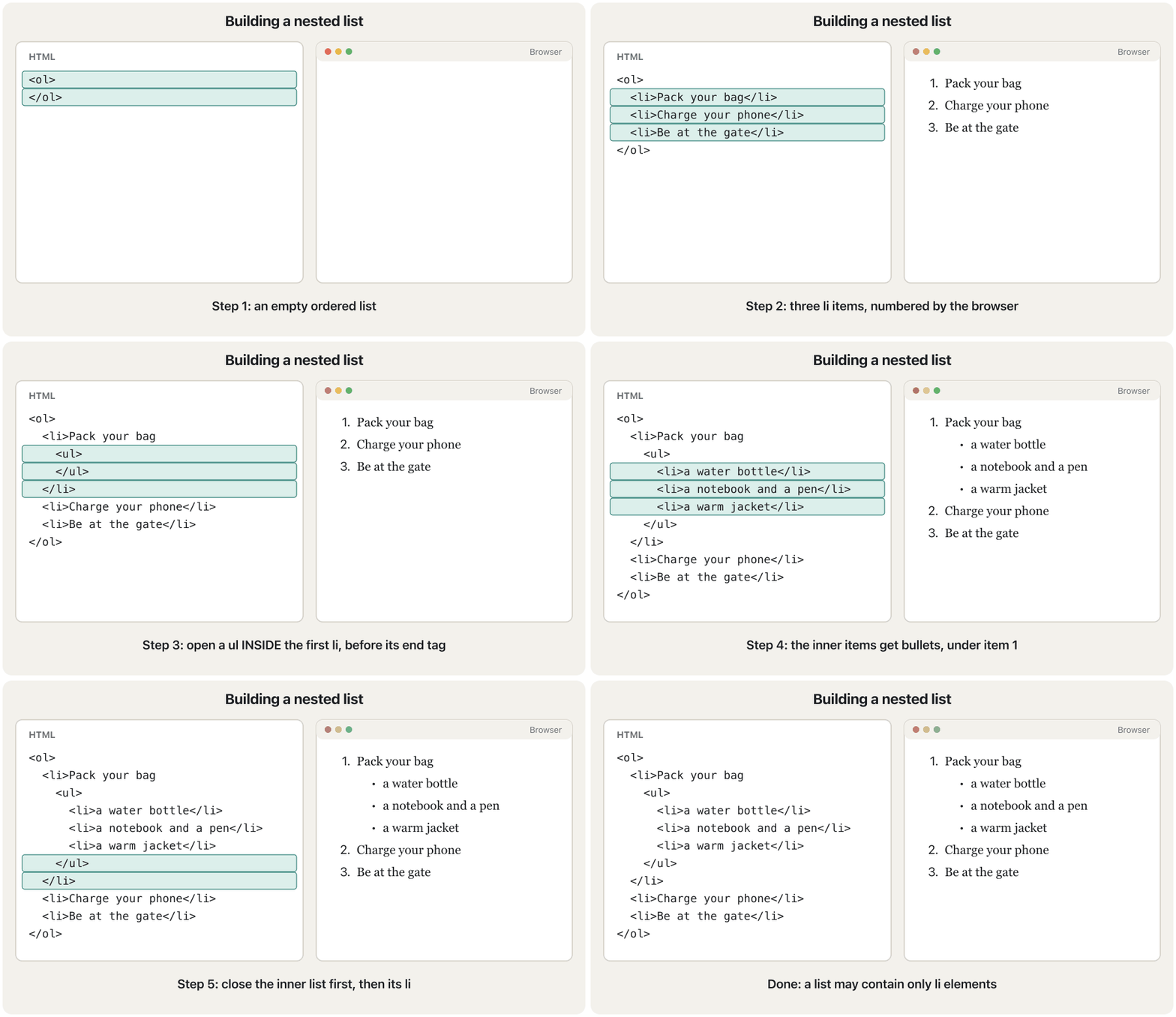
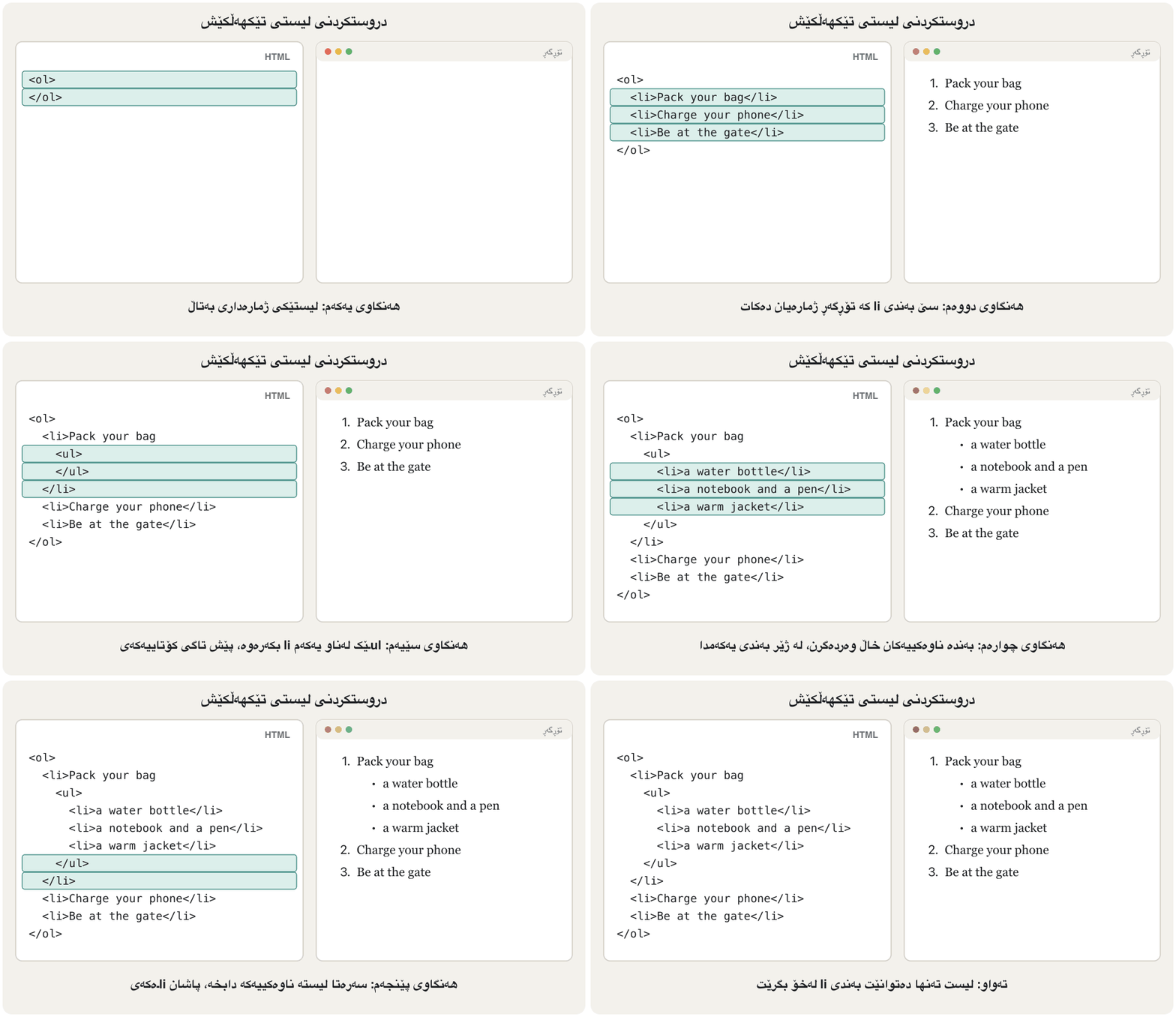
Lists can be nested to show more complex relationships: an ordered list with unordered lists inside it, unordered lists inside unordered lists, or ordered lists inside ordered lists. There is one rule: the inner list goes inside the <li> it belongs to, after that item's text and before its </li>.
دەتوانرێت لیستەکان تێکهەڵکێش بکرێن بۆ پیشاندانی پەیوەندیی ئاڵۆزتر: کە لەناویدان، لەناو ، یان لەناو . یەک یاسا هەیە: لیستە ناوەکییەکە دەچێتە ناو ئەو <li>ـەی کە هی ئەوە، دوای دەقی ئەو بەندە و پێش </li>ـەکەی.
<!DOCTYPE html>
<html lang="en">
<head>
  <meta charset="utf-8">
  <meta name="viewport" content="width=device-width, initial-scale=1">
  <title>School trip</title>
</head>
<body>
  <h1>Before the school trip</h1>
  <ol>
    <li>Pack your bag
      <ul>
        <li>a water bottle</li>
        <li>a notebook and a pen</li>
        <li>a warm jacket</li>
      </ul>
    </li>
    <li>Charge your phone</li>
    <li>Be at the school gate at 7:30</li>
  </ol>
</body>
</html>HTML sent to the browserئەو HTMLـەی دەنێردرێت بۆ تۆڕگەڕ
<!DOCTYPE html>
<html lang="en">
<head>
  <meta charset="utf-8">
  <meta name="viewport" content="width=device-width, initial-scale=1">
  <title>School trip</title>
</head>
<body>
  <h1>Before the school trip</h1>
  <ol>
    <li>Pack your bag
      <ul>
        <li>a water bottle</li>
        <li>a notebook and a pen</li>
        <li>a warm jacket</li>
      </ul>
    </li>
    <li>Charge your phone</li>
    <li>Be at the school gate at 7:30</li>
  </ol>
</body>
</html>Nested ordered lists can number an outline, as in a report: type="I" for the main parts, type="A" inside them and plain numbers below that.
تێکهەڵکێش دەتوانن پێکهاتەیەک ژمارە بکەن، وەک لە ڕاپۆرتێکدا: type="I" بۆ بەشە سەرەکییەکان، type="A" لەناویاندا و ژمارەی ئاسایی لە خوارەوەی ئەوان.
<!DOCTYPE html>
<html lang="en">
<head>
  <meta charset="utf-8">
  <meta name="viewport" content="width=device-width, initial-scale=1">
  <title>Report outline</title>
</head>
<body>
  <h1>Report: our school website</h1>
  <ol type="I">
    <li>Introduction
      <ol type="A">
        <li>Why the school needs a website</li>
        <li>Who will use it
          <ol>
            <li>students</li>
            <li>parents</li>
          </ol>
        </li>
      </ol>
    </li>
    <li>Design</li>
    <li>Testing</li>
  </ol>
</body>
</html>HTML sent to the browserئەو HTMLـەی دەنێردرێت بۆ تۆڕگەڕ
<!DOCTYPE html>
<html lang="en">
<head>
  <meta charset="utf-8">
  <meta name="viewport" content="width=device-width, initial-scale=1">
  <title>Report outline</title>
</head>
<body>
  <h1>Report: our school website</h1>
  <ol type="I">
    <li>Introduction
      <ol type="A">
        <li>Why the school needs a website</li>
        <li>Who will use it
          <ol>
            <li>students</li>
            <li>parents</li>
          </ol>
        </li>
      </ol>
    </li>
    <li>Design</li>
    <li>Testing</li>
  </ol>
</body>
</html>Block and inline elementsتوخمەکانی بلۆک و توخمەکانی ناودێڕ
Every element has a default way of sitting on the page:
هەر شێوازێکی بنەڕەتیی هەیە بۆ دانیشتن لەسەر لاپەڕە:
- start on a new line, end with a line break and take the full width they can:
<p>,<h1>–<h6>,<ul>,<ol>,<dl>,<table>,<hr>,<pre>,<figure>,<div>. - flow inside a line of text, like words, and are only as wide as their content:
<a>,<span>,<strong>,<em>,<img>,<br>.
- لە دێڕێکی نوێوە دەست پێدەکەن، بە شکاندنی دێڕ کۆتایی دێن و هەموو ئەو پانییەی دەتوانن دەیگرن:
<p>،<h1>تا<h6>،<ul>،<ol>،<dl>،<table>،<hr>،<pre>،<figure>،<div>. - وەک وشە لەناو دێڕێکی دەقدا دەڕۆن و تەنها هێندەی ناوەڕۆکەکەیان پانن:
<a>،<span>،<strong>،<em>،<img>،<br>.
Block and inline elementsتوخمەکانی بلۆک و توخمەکانی ناودێڕ
div and span: boxes with no meaningdiv و span: سندووقی بێ واتا
<div> and <span> are general-purpose boxes. They mean nothing by themselves; you use them to group content so that CSS can style it, usually with a class:
<div> و <span> سندووقی گشتین. بە تەنها هیچ واتایەکیان نییە؛ بەکاریان دەهێنیت بۆ کۆکردنەوەی ناوەڕۆک بۆ ئەوەی بیڕازێنێتەوە، زۆرجار بە classـێک:
<div>is a block box that makes a logical division of the page: a card, a column, a group of elements.<span>is an inline box for part of a text, without starting a new paragraph: one word in a different colour, a price, a date.
<div>سندووقێکی بلۆکـە کە دابەشکردنێکی لۆجیکیی لاپەڕەکە دروست دەکات: کارتێک، ستوونێک، کۆمەڵێک .<span>سندووقێکی ناودێڕـە بۆ بەشێک لە دەقێک، بەبێ دەستپێکردنی بڕگەیەکی نوێ: وشەیەک بە ڕەنگێکی جیاواز، نرخێک، بەروارێک.
<!DOCTYPE html>
<html lang="en">
<head>
  <meta charset="utf-8">
  <meta name="viewport" content="width=device-width, initial-scale=1">
  <title>div and span</title>
  <style>
    /* This CSS only draws the edges so you can see the boxes. */
    .card { border: 2px solid #2b5ea8; padding: 4px 12px; margin-bottom: 8px; }
    .day  { background-color: #fdf3e1; }
  </style>
</head>
<body>
  <h1>This week's lessons</h1>
  <div class="card">
    <h2>Web Design</h2>
    <p>Lessons on <span class="day">Sunday</span> and
    <span class="day">Tuesday</span>, room 12.</p>
  </div>
  <div class="card">
    <h2>Databases</h2>
    <p>Lessons on <span class="day">Monday</span>, lab 3.</p>
  </div>
</body>
</html>HTML sent to the browserئەو HTMLـەی دەنێردرێت بۆ تۆڕگەڕ
<!DOCTYPE html>
<html lang="en">
<head>
  <meta charset="utf-8">
  <meta name="viewport" content="width=device-width, initial-scale=1">
  <title>div and span</title>
  <style>
    /* This CSS only draws the edges so you can see the boxes. */
    .card { border: 2px solid #2b5ea8; padding: 4px 12px; margin-bottom: 8px; }
    .day  { background-color: #fdf3e1; }
  </style>
</head>
<body>
  <h1>This week's lessons</h1>
  <div class="card">
    <h2>Web Design</h2>
    <p>Lessons on <span class="day">Sunday</span> and
    <span class="day">Tuesday</span>, room 12.</p>
  </div>
  <div class="card">
    <h2>Databases</h2>
    <p>Lessons on <span class="day">Monday</span>, lab 3.</p>
  </div>
</body>
</html>
Explain the codeڕوونکردنەوەی کۆدەکە
- Lineدێڕی 8-10
The CSS only draws the box edges and a background; you will learn it in CSS Basics.
ئەم تەنها لێواری سندووقەکان و باکگراوندێک دەکێشێت؛ لە بنەماکانی CSSدا فێری دەبیت.
Common mistakesهەڵەکانی باو
| Mistake | What happensچی ڕوودەدات | Fixچارەسەر |
|---|---|---|
Choosing <h3> because it "looks the right size"هەڵبژاردنی <h3> چونکە «قەبارەکەی گونجاوە» | The outline is wrong for screen readers and search engines.پێکهاتەکە بۆ و هەڵەیە. | Choose by level; size with CSS font-size.بەپێی ئاست هەڵبژێرە؛ قەبارە بە font-sizeـی . |
Many <br>s to make spaceزۆر <br> بۆ دروستکردنی بۆشایی | Fragile layout, empty lines read aloud.ڕێکخستنێکی لاواز و دێڕی بەتاڵ کە دەخوێنرێتەوە. | Use CSS margin.marginـی بەکاربهێنە. |
< typed in text (x<y)< لەناو دەقدا نووسراوە (x<y) | Part of the text disappears.بەشێک لە دەقەکە ون دەبێت. | x < y |
An entity without ; (© 2026) بەبێ ; (© 2026) | Works by luck in some cases, fails in others.لە هەندێک حاڵەتدا بە ڕێکەوت کار دەکات و لە هەندێکی تردا نا. | © 2026 |
No alt, or alt="image"alt نییە، یان alt="image" | Screen readers read the file name or say nothing useful. ناوی دەخوێننەوە یان هیچ شتێکی بەسوود ناڵێن. | Describe the picture; alt="" for decoration.وێنەکە وەسف بکە؛ بۆ ڕازاندنەوە alt="". |
Tooltip text put in altدەقی سەر لەناو altدا | No tooltip appears.هیچ دەقێک دەرناکەوێت. | Use title (and keep a real alt).title بەکاربهێنە (و altـێکی ڕاستەقینە بهێڵەرەوە). |
width="300px" on <img>width="300px" لەسەر <img> | Invalid HTML. نادروست. | width="300" |
Numbers typed by hand in an <ol> or <br> listsژمارەی دەستنووس لە <ol> یان لیستی <br> | Double numbers, or no real list.ژمارەی دووبارە، یان هیچ لیستێکی ڕاستەقینە. | Let <ol> number; use start and value.با <ol> ژمارە بکات؛ start و value بەکاربهێنە. |
Inner list between two <li>sلیستی ناوەکی لە نێوان دوو <li>دا | Invalid nesting.تێکهەڵکێشی نادروست. | Put it inside its <li>.بیخە ناو <li>ـەکەی خۆی. |
<center>, <font>, <big>, <marquee><center>، <font>، <big>، <marquee> | Obsolete; mixes looks into HTML.؛ شێوە تێکەڵی دەکات. | Use CSS. بەکاربهێنە. |
Exercisesڕاهێنانەکان
Homework 1 — ordered lists. Make a page titled "This is an ordered list example" with four short lists of two options each. The first list is numbered I, II; the second a, b; the third 51, 52; the fourth G, H. Do not type any of the numbers or letters yourself.
ئەرکی ماڵەوەی ١ — . لاپەڕەیەک دروست بکە بە ناونیشانی «This is an ordered list example» و چوار لیستی کورت کە هەریەکەیان دوو هەڵبژاردەی تێدایە. لیستی یەکەم بە I، II ژمارە دەکرێت؛ دووەم a، b؛ سێیەم 51، 52؛ چوارەم G، H. هیچ ژمارە یان پیتێک خۆت مەنووسە.
Hintئاماژە
Use type for the style and start for the first number. G is the 7th letter.
type بۆ شێوە و start بۆ یەکەم ژمارە بەکاربهێنە. G حەوتەمین پیتە.
Show answerوەڵامەکە پیشان بدە
<!DOCTYPE html>
<html lang="en">
<head>
  <meta charset="utf-8">
  <meta name="viewport" content="width=device-width, initial-scale=1">
  <title>Ordered list examples</title>
</head>
<body>
  <h1>This is an ordered list example</h1>

  <h2>Start I</h2>
  <ol type="I">
    <li>Option 1</li>
    <li>Option 2</li>
  </ol>

  <h2>Start a</h2>
  <ol type="a">
    <li>Option 1</li>
    <li>Option 2</li>
  </ol>

  <h2>Start 51</h2>
  <ol start="51">
    <li>Option 1</li>
    <li>Option 2</li>
  </ol>

  <h2>Start G</h2>
  <ol type="A" start="7">
    <li>Option 1</li>
    <li>Option 2</li>
  </ol>
</body>
</html>HTML sent to the browserئەو HTMLـەی دەنێردرێت بۆ تۆڕگەڕ
<!DOCTYPE html>
<html lang="en">
<head>
  <meta charset="utf-8">
  <meta name="viewport" content="width=device-width, initial-scale=1">
  <title>Ordered list examples</title>
</head>
<body>
  <h1>This is an ordered list example</h1>

  <h2>Start I</h2>
  <ol type="I">
    <li>Option 1</li>
    <li>Option 2</li>
  </ol>

  <h2>Start a</h2>
  <ol type="a">
    <li>Option 1</li>
    <li>Option 2</li>
  </ol>

  <h2>Start 51</h2>
  <ol start="51">
    <li>Option 1</li>
    <li>Option 2</li>
  </ol>

  <h2>Start G</h2>
  <ol type="A" start="7">
    <li>Option 1</li>
    <li>Option 2</li>
  </ol>
</body>
</html>Homework 2 — nesting lists. Build this outline. Main items i, ii, iii (lower-case Roman). Under item 1 two sub items with circle bullets; under its second sub item two items lettered a, b. Under item 2 two numbered sub items 1, 2; under the first of them two items with square bullets. item 3 has no sub list.
ئەرکی ماڵەوەی ٢ — لیستی تێکهەڵکێش. ئەم پێکهاتەیە دروست بکە. بەندە سەرەکییەکان i، ii، iii (ژمارەی ڕۆمانیی بچووک). لە ژێر item 1 دوو بەندی لاوەکی بە خاڵی بازنەیی؛ لە ژێر دووەم بەندی لاوەکییدا دوو بەند بە پیتی a، b. لە ژێر item 2 دوو بەندی لاوەکیی ژمارەدار 1، 2؛ لە ژێر یەکەمیاندا دوو بەند بە خاڵی چوارگۆشە. item 3 لیستی لاوەکیی نییە.
Show answerوەڵامەکە پیشان بدە
Every inner list sits inside the <li> it belongs to. Circles and squares are set with the CSS property list-style-type in a style attribute, because type on <ul> is obsolete (CSS comes in the next chapter).
هەر لیستێکی ناوەکی لەناو ئەو <li>ـەدایە کە هی ئەوە. بازنە و چوارگۆشە بە list-style-typeـی لە styleدا دادەنرێن، چونکە type لەسەر <ul> ( لە بەشی داهاتوودا دێت).
<!DOCTYPE html>
<html lang="en">
<head>
  <meta charset="utf-8">
  <meta name="viewport" content="width=device-width, initial-scale=1">
  <title>Nesting lists</title>
</head>
<body>
  <h1>Nesting lists</h1>
  <ol type="i">
    <li>item 1
      <ul style="list-style-type: circle;">
        <li>sub item 1</li>
        <li>sub item 2
          <ol type="a">
            <li>sub item 1</li>
            <li>sub item 2</li>
          </ol>
        </li>
      </ul>
    </li>
    <li>item 2
      <ol>
        <li>sub item 1
          <ul style="list-style-type: square;">
            <li>sub item 1</li>
            <li>sub item 2</li>
          </ul>
        </li>
        <li>sub item 2</li>
      </ol>
    </li>
    <li>item 3</li>
  </ol>
</body>
</html>HTML sent to the browserئەو HTMLـەی دەنێردرێت بۆ تۆڕگەڕ
<!DOCTYPE html>
<html lang="en">
<head>
  <meta charset="utf-8">
  <meta name="viewport" content="width=device-width, initial-scale=1">
  <title>Nesting lists</title>
</head>
<body>
  <h1>Nesting lists</h1>
  <ol type="i">
    <li>item 1
      <ul style="list-style-type: circle;">
        <li>sub item 1</li>
        <li>sub item 2
          <ol type="a">
            <li>sub item 1</li>
            <li>sub item 2</li>
          </ol>
        </li>
      </ul>
    </li>
    <li>item 2
      <ol>
        <li>sub item 1
          <ul style="list-style-type: square;">
            <li>sub item 1</li>
            <li>sub item 2</li>
          </ul>
        </li>
        <li>sub item 2</li>
      </ol>
    </li>
    <li>item 3</li>
  </ol>
</body>
</html>Make a gallery of three Kurdistan places (for example Erbil Citadel, Lake Dukan and the Gali Ali Beg waterfall) as a bulleted list. Each picture is a link to an article about the place, has a width and a height, and has an alt text that says where the link goes.
پێشانگایەک لە سێ شوێنی کوردستان دروست بکە (بۆ نموونە قەڵای هەولێر، دەریاچەی دوکان و تاڤگەی گەلی عەلی بەگ) وەک . هەر وێنەیەک بۆ وتارێک دەربارەی ئەو شوێنە، پانی و بەرزیی هەیە و هەیە کە دەڵێت بۆ کوێ دەچێت.
Show answerوەڵامەکە پیشان بدە
<!DOCTYPE html>
<html lang="en">
<head>
  <meta charset="utf-8">
  <meta name="viewport" content="width=device-width, initial-scale=1">
  <title>Kurdistan gallery</title>
</head>
<body>
  <h1>Kurdistan in pictures</h1>
  <ul>
    <li>
      <a href="https://en.wikipedia.org/wiki/Erbil_Citadel">
        <img src="images/citadel.jpg" alt="Erbil Citadel: read the article"
             width="300" height="200">
      </a>
    </li>
    <li>
      <a href="https://en.wikipedia.org/wiki/Lake_Dukan">
        <img src="images/dukan.jpg" alt="Lake Dukan: read the article"
             width="300" height="200">
      </a>
    </li>
    <li>
      <a href="https://en.wikipedia.org/wiki/Gali_Ali_Beg">
        <img src="images/gali-ali-beg.jpg" alt="Gali Ali Beg waterfall: read the article"
             width="300" height="200">
      </a>
    </li>
  </ul>
</body>
</html>Write the HTML that shows exactly these three lines: Use <br> for a line break & <hr> for a thematic break. — Price: 5,000 IQD (the number and IQD must never be split over two lines) — © 2026 Shilan.
ئەو بنووسە کە ڕێک ئەم سێ دێڕە پیشان دەدات: Use <br> for a line break & <hr> for a thematic break. — Price: 5,000 IQD (ژمارەکە و IQD هەرگیز نابێت بەسەر دوو دێڕدا دابەش ببن) — © 2026 Shilan.
Show answerوەڵامەکە پیشان بدە
<!DOCTYPE html>
<html lang="en">
<head>
<meta charset="utf-8">
<meta name="viewport" content="width=device-width, initial-scale=1">
<title>Entities</title>
</head>
<body>
<p>Use <br> for a line break & <hr> for a thematic break.</p>
<p>Price: 5,000 IQD</p>
<p>© 2026 Shilan</p>
</body>
</html>HTML sent to the browserئەو HTMLـەی دەنێردرێت بۆ تۆڕگەڕ
<!DOCTYPE html>
<html lang="en">
<head>
<meta charset="utf-8">
<meta name="viewport" content="width=device-width, initial-scale=1">
<title>Entities</title>
</head>
<body>
<p>Use <br> for a line break & <hr> for a thematic break.</p>
<p>Price: 5,000 IQD</p>
<p>© 2026 Shilan</p>
</body>
</html>This page was copied from an old tutorial. Find every problem and write a correct, modern version.
ئەم لاپەڕەیە لە فێرکارییەکی کۆنەوە کۆپی کراوە. هەموو کێشەیەک بدۆزەرەوە و وەشانێکی دروست و نوێ بنووسە.
<html>
<body>
<center><font size="6" color="green">My page</font></center>
<big>Welcome!</big>
<img src="class.png" align="right" border="3">
<marquee>New photos every week</marquee>
<ul type="square">
  <li>Photos</li>
  <ul><li>Erbil</li></ul>
  <li>Videos</li>
</ul>
</body>
</html>
Show answerوەڵامەکە پیشان بدە
Problems: no doctype, lang, charset or title; <center>, <font>, <big> and <marquee> are obsolete; the page has no <h1>; align and border on <img> are obsolete and the image has no alt, width or height; type on <ul> is obsolete; the inner <ul> sits between two <li>s.
کێشەکان: ، lang، charset و ناونیشان نییە؛ <center>، <font>، <big> و <marquee> ؛ لاپەڕەکە <h1>ـی نییە؛ align و border لەسەر <img> و وێنەکە alt، width و heightـی نییە؛ type لەسەر <ul> ؛ <ul>ـە ناوەکییەکە لە نێوان دوو <li>دایە.
<!DOCTYPE html>
<html lang="en">
<head>
  <meta charset="utf-8">
  <meta name="viewport" content="width=device-width, initial-scale=1">
  <title>My page</title>
  <style>
    h1 { text-align: center; color: green; }
    p strong { font-size: 1.5em; }
    .side { float: right; border: 3px solid #333; }
    .square { list-style-type: square; }
  </style>
</head>
<body>
  <h1>My page</h1>
  <p><strong>Welcome!</strong></p>
  <img src="class.png" alt="Our class in the computer lab" width="200" height="150" class="side">
  <p>New photos every week.</p>
  <ul class="square">
    <li>Photos
      <ul>
        <li>Erbil</li>
      </ul>
    </li>
    <li>Videos</li>
  </ul>
</body>
</html>Summaryپوختە
- HTML says what content is; CSS says how it looks.
- Headings
<h1>–<h6>build the outline: one<h1>, no skipped levels; size comes from CSS. <p>paragraph,<br>line break inside text,<hr>thematic break,<pre>keeps spaces.- Entities:
&name;or&#number;— always for<and&. <strong>and<em>carry meaning;<big>,<font>,<center>,<marquee>are obsolete.<img src alt width height>: alt for screen readers and failed loads,alt=""for decoration,titlefor a tooltip; an image inside<a>is a link.<ul>,<ol>(type,start,reversed,value) and<dl>/<dt>/<dd>; a nested list goes inside its<li>.- Block elements stack, inline elements flow;
<div>and<span>are boxes for CSS.
- دەڵێت ناوەڕۆک چییە؛ دەڵێت چۆن دەردەکەوێت.
- سەردێڕەکانی
<h1>تا<h6>پێکهاتەی لاپەڕە دروست دەکەن: یەک<h1>، بەبێ پەڕاندنی ئاست؛ قەبارە لە دێت. <p>بڕگە،<br>شکاندنی دێڕ لەناو دەقدا،<hr>دابڕانی بابەتی،<pre>بۆشاییەکان دەپارێزێت.- :
&name;یان&#number;— هەمیشە بۆ<و&. <strong>و<em>واتا هەڵدەگرن؛<big>،<font>،<center>،<marquee>.<img src alt width height>: alt بۆ و وێنەی نەکراوە،alt=""بۆ ڕازاندنەوە،titleبۆ دەقی سەر ؛ وێنە لەناو<a>دا .<ul>،<ol>(type،start،reversed،value) و<dl>/<dt>/<dd>؛ لیستی تێکهەڵکێش دەچێتە ناو<li>ـەکەی.- لەسەر یەک دادەنرێن، لەناو دێڕدا دەڕۆن؛
<div>و<span>سندووقن بۆ .
What is the difference between alt and title on an image?جیاوازیی نێوان alt و title لەسەر وێنەیەک چییە؟
alt is the text alternative: screen readers read it and the browser shows it when the image fails. title is optional advice shown as a tooltip on hover.
alt : دەیخوێننەوە و کاتێک وێنەکە نەکرایەوە پیشانی دەدات. title ئامۆژگارییەکی ئارەزوومەندانەیە کە وەک دەقێکی بچووک لەسەر دەردەکەوێت.
Name the three kinds of list and their elements.سێ جۆرەکەی لیست و توخمەکانی ناویان ببە.
Unordered <ul> with <li>; ordered <ol> with <li>; description <dl> with <dt> and <dd>.
<ul> بە <li>؛ <ol> بە <li>؛ <dl> بە <dt> و <dd>.
Is <img> a block or an inline element?<img> توخمی بلۆکە یان توخمی ناودێڕ؟
Inline: it sits in the line of text. <div> is the block element for sections.
ناودێڕ: لەناو دێڕی دەقدا دادەنیشێت. <div> ئەو کە بۆ بەشەکانە.
How do you show the character & in a paragraph?چۆن پیتی & لە بڕگەیەکدا پیشان دەدەیت؟
With the entity & (or &).
بە & (یان &).
Lesson complete!وانەکە تەواو بوو!
Well done. Review the key terms, then go on to the next lesson.دەستخۆش. سەیرێکی زاراوە سەرەکییەکان بکەرەوە، پاشان بڕۆ بۆ وانەی داهاتوو.
Key termsزاراوە سەرەکییەکان
HTML Forms Reviewپێداچوونەوەی فۆرمەکانی HTML
Related lecturesوانە پەیوەندیدارەکان
- CSS Basics: Rules, Three Places and Coloursبنەماکانی CSS: ڕێسا، سێ شوێن و ڕەنگ
- The CSS Box Model: Margin, Border and Paddingمۆدێلی سندووقی CSS: پەراوێز، سنوور و بۆشایی ناوەوە
- HTML Forms Reviewپێداچوونەوەی فۆرمەکانی HTML
- Websites and Web Developmentتۆڕگەکان و دروستکردنیان
- Application Software and File Typesنەرمەواڵەی بەکارهێنان و جۆرەکانی فایل
References and further readingسەرچاوەکان و خوێندنەوەی زیاتر
- MDN: <img>: The Image Embed element
- MDN: <ol>: The Ordered List element
- MDN: HTML elements reference (obsolete and deprecated elements)
- MDN: <h1>–<h6>: The HTML Section Heading elements
- MDN: <marquee> (deprecated)
- MDN Glossary: Character reference
- MDN Learn: Structuring content with HTML
- W3C Markup Validation Service
This lecture is a first edition. The Kurdish text and terminology are waiting for review by Kurdish IT teachers.ئەم وانەیە چاپی یەکەمە. دەقە کوردییەکە و زاراوەکانی چاوەڕێی پێداچوونەوەی مامۆستایانی کوردی بواری IT ن.