Chapterبەش 4 · Lectureوانە 4.1
CSS Basics: Rules, Three Places and Coloursبنەماکانی CSS: ڕێسا، سێ شوێن و ڕەنگ
What CSS is and why pages use it, how the browser's rendering engine applies it, the parts of a CSS rule, inline, internal and external style sheets, comments, colour values (names, hex, rgb, hsl) and contrast, the cascade (source order, specificity, inheritance, !important) and the units px, %, em and rem.
چییە و بۆچی لاپەڕەکان بەکاری دەهێنن، چۆن جێبەجێی دەکات، بەشەکانی ، ناو ، ناوخۆیی و دەرەکی، ، ڕەنگ (ناو، hex، rgb، hsl) و ، (ڕیزبەندیی نووسین، ، ، !important) و یەکەکانی px، %، em و rem.
What you will learnچی فێر دەبیت
- Explain what CSS is, why content and presentation are kept apart, and how the browser applies CSS.
- Name the parts of a CSS rule and write rules with several declarations and comments.
- Add CSS inline, in a style element and in an external file, and choose the external file for real sites.
- Write colours as names, hex (3, 6 and 8 digits), rgb() and hsl(), and check text contrast.
- Predict which rule wins with the cascade: importance, specificity, source order and inheritance.
- ڕوونی بکەیتەوە چییە، بۆچی ناوەڕۆک و شێوەی پیشاندان جیا دەکرێنەوە و چۆن جێبەجێ دەکات.
- ناوی بەشەکانی ببەیت و ڕێسا بە چەند و بنووسیت.
- لە ناو ، لە style و لە دەرەکیدا زیاد بکەیت و بۆ ڕاستەقینە دەرەکی هەڵبژێریت.
- ڕەنگ وەک ناو، hex (٣، ٦ و ٨ ژمارە)، rgb() و hsl() بنووسیت و دەق بپشکنیت.
- بە پێشبینی بکەیت کام ڕێسا دەباتەوە: گرنگی، ، ڕیزبەندیی نووسین و .
What CSS isCSS چییە
CSS (Cascading Style Sheets) is the language that styles HTML elements. A is a collection of , and each rule says how some of the elements of an HTML document look: their colour, font, size, spacing and place on the page.
(Cascading Style Sheets) ئەو زمانەیە کە دەڕازێنێتەوە. کۆمەڵێک و هەر ڕێسایەک دەڵێت هەندێک لە بەڵگەنامەیەکی چۆن دەردەکەون: ڕەنگ، ، قەبارە، بۆشایی و شوێنیان لە لاپەڕەکەدا.
HTML gives the content and structure (this is a heading, this is a list). CSS gives the presentation. Keeping them apart is the main idea: CSS separates the content of a page from its formatting. The CSS can sit inside the HTML page, or, better, in its own file with the extension .css.
ناوەڕۆک و پێکهاتە دەدات (ئەمە سەردێڕە، ئەمە لیستە). شێوەی پیشاندان دەدات. جیاکردنەوەیان بیرۆکە سەرەکییەکەیە: ناوەڕۆکی لاپەڕە لە ڕێکخستنەکەی جیا دەکاتەوە. دەتوانێت لەناو لاپەڕەی بێت، یان باشتر، لە خۆیدا بە .css.
<!DOCTYPE html>
<html lang="en">
<head>
  <meta charset="utf-8">
  <meta name="viewport" content="width=device-width, initial-scale=1">
  <title>First CSS</title>
  <style>
    p { color: green; }
  </style>
</head>
<body>
  <h1>My first style sheet</h1>
  <p>This paragraph is green, because one rule says so.</p>
  <p>So is this one: the same rule styles every paragraph.</p>
</body>
</html>HTML sent to the browserئەو HTMLـەی دەنێردرێت بۆ تۆڕگەڕ
<!DOCTYPE html>
<html lang="en">
<head>
  <meta charset="utf-8">
  <meta name="viewport" content="width=device-width, initial-scale=1">
  <title>First CSS</title>
  <style>
    p { color: green; }
  </style>
</head>
<body>
  <h1>My first style sheet</h1>
  <p>This paragraph is green, because one rule says so.</p>
  <p>So is this one: the same rule styles every paragraph.</p>
</body>
</html>A school office writes one rule on the notice board: "Every student wears a blue shirt." Nobody has to tell each student one by one, and if the office changes the rule to grey, the whole school changes the next day. A CSS file is that notice board for the pages of a website.
ئۆفیسی قوتابخانەیەک یەک یاسا لەسەر تەختەی ڕاگەیاندن دەنووسێت: «هەموو قوتابییەک کراسی شین لەبەر دەکات.» پێویست ناکات کەس بە یەک یەکی قوتابییەکان بڵێت. ئەگەر ئۆفیسەکە یاساکە بۆ خۆڵەمێشی بگۆڕێت، هەموو قوتابخانەکە ڕۆژی دواتر دەگۆڕێت. ئەو تەختەی ڕاگەیاندنەیە بۆ لاپەڕەکانی .
Where the analogy stops workingسنووری ئەم نموونەیە
CSS rules can also pick out single elements or groups, and one page can add its own rules, as a teacher may allow a jacket in winter.
ڕێساکانی دەتوانن تاک یان کۆمەڵەیەکیش هەڵبژێرن و یەک لاپەڕە دەتوانێت ڕێسای خۆی زیاد بکات، وەک مامۆستایەک کە لە زستاندا ڕێگە بە چاکەت دەدات.
What CSS isCSS چییە
Why use CSS?بۆچی CSS بەکاربهێنین؟
The lecture lists the benefits of CSS. In short:
وانەکە سوودەکانی دەژمێرێت. بە کورتی:
- Reuse, which saves time. You write the formatting of an element once and use the same style sheet on every page.
- Less HTML code. The formatting lives in another file, so the HTML files are smaller and easier to read.
- Easy maintenance. Change one rule in the
.cssfile and every page that uses it changes. The browser also downloads the file once and reuses it for the next pages. - Device independence. The same content can get a different layout on a phone, a big screen or paper when you print it.
- A consistent look. All the pages of the site share one style, so the site feels like one place.
- دووبارە بەکارهێنانەوە کە کات دەپارێزێت. ڕێکخستنی یەک جار دەنووسیت و هەمان لە هەموو لاپەڕەیەکدا بەکار دەهێنیت.
- کۆدی کەمتر. ڕێکخستنەکە لە تردایە، بۆیە بچووکتر و خوێندنەوەیان ئاسانترە.
- چاککردنەوەی ئاسان. یەک ڕێسا لە
.cssـدا بگۆڕە و هەموو ئەو لاپەڕانەی بەکاری دەهێنن دەگۆڕێن. یەک جار دادەبەزێنێت و بۆ لاپەڕەکانی دواتر دووبارە بەکاری دەهێنێتەوە. - سەربەخۆیی لە ئامێر. هەمان ناوەڕۆک دەتوانێت ڕێکخستنێکی جیاواز لەسەر مۆبایل، شاشەی گەورە یان لەسەر کاغەز لە کاتی چاپکردندا وەربگرێت.
- شێوەیەکی یەکگرتوو. هەموو لاپەڕەکانی یەک شێواز بەکار دەهێنن، بۆیە وەک یەک شوێن هەست پێدەکرێت.
What CSS isCSS چییە
Two claims that are not trueدوو بانگەشە کە ڕاست نین
What CSS isCSS چییە
CSS and HTML comparedبەراوردی CSS و HTML
| Compareبەراورد | HTML | CSS |
|---|---|---|
| Jobکار | Content and structure: what each part isناوەڕۆک و پێکهاتە: هەر بەشێک چییە | Presentation: how each part looksشێوەی پیشاندان: هەر بەشێک چۆن دەردەکەوێت |
| Made ofپێکهاتووە لە | Elements written with tags and attributes کە بە و نووسراون | Rules: a selector and declarationsڕێسا: و |
| Files | .html.html | .css (or inside a <style> element).css (یان لەناو <style>) |
| Exampleنموونە | <h1>Welcome</h1> | h1 { color: navy; } |
| Without the otherبەبێ ئەوی تر | Works: the browser uses its default lookکار دەکات: شێوە بنەڕەتییەکەی بەکار دەهێنێت | Has nothing to styleهیچ شتێکی نییە بیڕازێنێتەوە |
How the browser uses CSSتۆڕگەڕ چۆن CSS بەکار دەهێنێت
The user asks for a web page with its URL.
بەکارهێنەر بە URLـەکەی داوای لاپەڕەیەکی وێب دەکات.
The server sends the HTML file. While reading it, the browser finds the linked files (images, scripts, external
.cssfiles) and asks for each one with a separate request.دەنێرێت. لە کاتی خوێندنەوەیدا، ئەو دەدۆزێتەوە کە بەستەریان پێوە کراوە (وێنە، سکریپت،
.cssـی دەرەکی) و بە داواکارییەکی جیا داوای هەریەکەیان دەکات.The browser's builds a tree of the page's elements, matches every CSS rule to the elements its selector chooses, and works out the final style and the place of every box.
دارێک لە لاپەڕەکە دروست دەکات، هەر بەو دەبەستێتەوە کە هەڵیاندەبژێرێت و شێوەی کۆتایی و شوێنی هەموو سندووقێک دیاری دەکات.
The engine paints the formatted page on the screen.
بزوێنەرەکە لاپەڕە ڕێکخراوەکە لەسەر شاشە دەکێشێت.
The part of a that reads the and the , works out where every box goes and paints the page on the screen. Chrome and Edge use Blink, Firefox uses Gecko and Safari uses WebKit.
ئەو بەشەی کە و دەخوێنێتەوە، شوێنی هەموو سندووقێک دیاری دەکات و لاپەڕەکە لەسەر شاشە دەکێشێت. Chrome و Edge بزوێنەری Blink بەکار دەهێنن، Firefox بزوێنەری Gecko و Safari بزوێنەری WebKit.
The rendering engine is the software that applies the formatting instructions to the page and shows the result. Chrome and Edge use Blink, Firefox Gecko and Safari WebKit. Because they all follow the same CSS standard, a page looks almost the same in all of them. If a declaration is invalid (a typo, a wrong value), the engine simply skips that one declaration and goes on with the rest.
ئەو نەرمەواڵەیەیە کە فەرمانەکانی ڕێکخستن لەسەر لاپەڕەکە جێبەجێ دەکات و ئەنجامەکە پیشان دەدات. Chrome و Edge Blink بەکار دەهێنن، Firefox Gecko و Safari WebKit. چونکە هەموویان پەیڕەوی هەمان ستانداردی دەکەن، لاپەڕەیەک لە هەموویاندا نزیکەی وەک یەک دەردەکەوێت. ئەگەر نادروست بێت (هەڵەی ڕێنووس، هەڵە)، بزوێنەرەکە تەنها ئەو دەپەڕێنێت و درێژە بە باقییەکەی دەدات.
The parts of a CSS ruleبەشەکانی ڕێسایەکی CSS
A (a rule set) has two parts: a and a declaration block. The selector says which elements the rule styles. The block, between curly braces { }, holds one or more . Each declaration is a name, a colon : and a , and it ends with a ;.
دوو بەشی هەیە: و بلۆکێکی ڕاگەیاندن. دەڵێت ڕێساکە کام دەڕازێنێتەوە. بلۆکەکە، لە نێوان کەوانەی لووتکەدار { }دا، یەک یان چەند هەڵدەگرێت. هەر ناوی ، دوو خاڵ : و و بە ; کۆتایی دێت.
One rule can hold many declarations, separated by semicolons. Spaces and new lines do not matter to the browser, so write one declaration per line when a rule is long: it is easier to read and to change. The last semicolon is optional, but always write it, so you never forget it when you add a line.
یەک ڕێسا دەتوانێت چەندین هەڵبگرێت کە بە جیا کراونەتەوە. و دێڕی نوێ بۆ گرنگ نین، بۆیە کاتێک ڕێسایەک درێژە هەر لە دێڕێکدا بنووسە: خوێندنەوە و گۆڕینی ئاسانترە. دوایین ئارەزوومەندانەیە، بەڵام هەمیشە بینووسە، بۆ ئەوەی هەرگیز لە بیرت نەچێت کاتێک دێڕێک زیاد دەکەیت.
<!DOCTYPE html>
<html lang="en">
<head>
  <meta charset="utf-8">
  <meta name="viewport" content="width=device-width, initial-scale=1">
  <title>Rules</title>
  <style>
    h1 {
      color: blue;
      font-size: 32px;
    }
    p { color: red; font-family: Arial, sans-serif; }
  </style>
</head>
<body>
  <h1>Kurdistan travel notes</h1>
  <p>Erbil, Duhok and Sulaymaniyah in one week.</p>
</body>
</html>HTML sent to the browserئەو HTMLـەی دەنێردرێت بۆ تۆڕگەڕ
<!DOCTYPE html>
<html lang="en">
<head>
  <meta charset="utf-8">
  <meta name="viewport" content="width=device-width, initial-scale=1">
  <title>Rules</title>
  <style>
    h1 {
      color: blue;
      font-size: 32px;
    }
    p { color: red; font-family: Arial, sans-serif; }
  </style>
</head>
<body>
  <h1>Kurdistan travel notes</h1>
  <p>Erbil, Duhok and Sulaymaniyah in one week.</p>
</body>
</html>
Explain the codeڕوونکردنەوەی کۆدەکە
- Lineدێڕی 8
A long rule: one declaration per line.
ڕێسایەکی درێژ: هەر لە دێڕێکدا.
- Lineدێڕی 12
A short rule on one line: two declarations separated by a semicolon.
ڕێسایەکی کورت لە یەک دێڕدا: دوو کە بە جیا کراونەتەوە.
The parts of a CSS ruleبەشەکانی ڕێسایەکی CSS
Comments in CSSلێدوانەکان لە CSSـدا
A is a note for people; the browser ignores it. CSS has only one kind: it starts with /* and ends with */, and it can cover one line or many lines. Use comments to explain why a rule is there, or to switch a rule off for a test.
تێبینییەکە بۆ خەڵک؛ پشتگوێی دەخات. تەنها یەک جۆری هەیە: بە /* دەست پێدەکات و بە */ کۆتایی دێت و دەتوانێت یەک دێڕ یان چەندین دێڕ بگرێتەوە. بەکاربهێنە بۆ ڕوونکردنەوەی ئەوەی بۆچی ڕێسایەک لەوێیە، یان بۆ ڕاگرتنی ڕێسایەک بۆ تاقیکردنەوە.
/* Colours of the whole site */
body {
  color: #222222;          /* dark grey text */
  background-color: #ffffff;
}

/*
  Type selector:
  numbered lists use small Roman numerals
*/
ol { list-style-type: lower-roman; }Three places for CSSسێ شوێن بۆ CSS
You can add CSS to a page in three ways:
دەتوانیت بە سێ ڕێگە زیاد بکەیتە لاپەڕەیەک:
| Wayڕێگە | Where the CSS is لە کوێیە | It stylesچی دەڕازێنێتەوە |
|---|---|---|
| 1. Inline style١. شێوازی ناو | In the style attribute of one elementلە styleـی یەک | That one element onlyتەنها ئەو یەک |
| 2. Internal style sheet٢. ناوخۆیی | In a <style> element in the <head>لە <style> لەناو <head> | One pageیەک لاپەڕە |
| 3. External style sheet٣. دەرەکی | In a separate .css file, linked with <link>لە .cssـی جیادا، بە <link> بەستراوە | Every page that links to itهەموو ئەو لاپەڕانەی بەستەریان پێوەی هەیە |
The next three screens show each way. At the end you will see which one to use (almost always the external file).
سێ پەڕەی داهاتوو هەر ڕێگەیەک پیشان دەدەن. لە کۆتاییدا دەبینیت کامیان بەکاربهێنیت (نزیکەی هەمیشە دەرەکی).
The three places for CSS: an inline style attribute, an internal style element and an external .css file linked with link.
سێ شوێنەکەی : style لەسەر خودی ، <style> لەناو head و دەرەکیی .css کە بە link دەبەسترێتەوە.
Segment 2:09-8:12: inline, internal, external. The id and class parts after 8:12 fit css-selectors.
لە 2:09 تا 8:12 سەیر بکە: سێ شوێنەکە (inline، internal و external). بەشەکانی id و کلاس دوای 8:12 لە وانەی دێن.
Three places for CSSسێ شوێن بۆ CSS
1. Inline styles: the style attribute١. شێوازی ناو توخم: خەسڵەتی style
The style attribute puts CSS declarations directly on one element: style="property: value". Here style is the attribute, the property says what to change and the value says how. Separate several declarations with semicolons. An inline style styles only that element and cannot be reused anywhere else.
style ڕاستەوخۆ لەسەر یەک دادەنێت: style="property: value". لێرەدا style ، دەڵێت چی بگۆڕدرێت و دەڵێت چۆن. چەند بە جیا بکەرەوە. شێوازی ناو تەنها ئەو دەڕازێنێتەوە و لە هیچ شوێنێکی تر دووبارە بەکارناهێنرێتەوە.
<!DOCTYPE html>
<html lang="en">
<head>
  <meta charset="utf-8">
  <meta name="viewport" content="width=device-width, initial-scale=1">
  <title>Colors</title>
</head>
<body>
  <h1 style="color: #ff00ff;">COMPUTER</h1>
  <hr>
  <p><b>Definition:</b></p>
  <p style="color: red;">A computer is an electronic device that is used for
  processing information at any point of time.</p>
  <p><b>Description:</b></p>
  <p style="color: rgb(0, 0, 255);">The computer system consists of the hardware,
  software, data and people. People interact with the computer using the mouse
  and keyboard and feed in the data to process it.</p>
</body>
</html>HTML sent to the browserئەو HTMLـەی دەنێردرێت بۆ تۆڕگەڕ
<!DOCTYPE html>
<html lang="en">
<head>
  <meta charset="utf-8">
  <meta name="viewport" content="width=device-width, initial-scale=1">
  <title>Colors</title>
</head>
<body>
  <h1 style="color: #ff00ff;">COMPUTER</h1>
  <hr>
  <p><b>Definition:</b></p>
  <p style="color: red;">A computer is an electronic device that is used for
  processing information at any point of time.</p>
  <p><b>Description:</b></p>
  <p style="color: rgb(0, 0, 255);">The computer system consists of the hardware,
  software, data and people. People interact with the computer using the mouse
  and keyboard and feed in the data to process it.</p>
</body>
</html>
Explain the codeڕوونکردنەوەی کۆدەکە
- Lineدێڕی 9
Fuchsia written in hexadecimal.
مۆری ئاڵ (fuchsia) بە نووسراوە.
- Lineدێڕی 12
A colour name.
ناوی ڕەنگێک.
- Lineدێڕی 15
Blue written as red, green and blue amounts.
شین کە وەک بڕی سوور، سەوز و شین نووسراوە.
Three places for CSSسێ شوێن بۆ CSS
2. Internal style sheets: the style element٢. پەڕەی شێوازی ناوخۆیی: توخمی style
An internal style sheet is a <style> element in the <head> of the page. Its rules are written in declaration blocks, just like in a .css file, and they can be reused by any element of that page, but not by other pages.
ناوخۆیی <style>ـە لەناو <head>ـی لاپەڕەکەدا. ڕێساکانی لە بلۆکی ڕاگەیاندندا دەنووسرێن، ڕێک وەک لە .cssـدا. هەر لەو لاپەڕەیە دەتوانێت بەکاریان بهێنێتەوە، بەڵام لاپەڕەکانی تر ناتوانن.
<!DOCTYPE html>
<html lang="en">
<head>
  <meta charset="utf-8">
  <meta name="viewport" content="width=device-width, initial-scale=1">
  <title>Internal styles</title>
  <style>
    hr {
      border: none;
      border-top: 2px solid brown;
    }
    h1 {
      color: green;
      font-weight: bold;
    }
  </style>
</head>
<body>
  <h1>Internal style sheet</h1>
  <hr>
  <p>These rules apply to this page only.</p>
</body>
</html>HTML sent to the browserئەو HTMLـەی دەنێردرێت بۆ تۆڕگەڕ
<!DOCTYPE html>
<html lang="en">
<head>
  <meta charset="utf-8">
  <meta name="viewport" content="width=device-width, initial-scale=1">
  <title>Internal styles</title>
  <style>
    hr {
      border: none;
      border-top: 2px solid brown;
    }
    h1 {
      color: green;
      font-weight: bold;
    }
  </style>
</head>
<body>
  <h1>Internal style sheet</h1>
  <hr>
  <p>These rules apply to this page only.</p>
</body>
</html>
Explain the codeڕوونکردنەوەی کۆدەکە
- Lineدێڕی 9
Draws the line of
<hr>with a border;color: brownalone does not colour the line in Chrome.هێڵی
<hr>بە دەکێشێت؛color: brownبە تەنها هێڵەکە لە Chromeـدا ڕەنگ ناکات.- Lineدێڕی 14
font-weight, notfont: bold.font-weight، نەکfont: bold.
Three places for CSSسێ شوێن بۆ CSS
3. External style sheets: a .css file٣. پەڕەی شێوازی دەرەکی: فایلێکی .css
An external style sheet is a separate text file saved with the extension .css. It contains only CSS rules, with no HTML tags. Each page connects to it with a <link> element in its <head>. Because many pages can link to the same file, it gives every page of a site the same look and makes the common rules reusable.
دەرەکی دەقیی جیایە کە بە .css پاشەکەوت کراوە. تەنها ڕێسای تێدایە، بەبێ هیچ . هەر لاپەڕەیەک بە <link> لە <head>ـەکەیدا پێیەوە دەبەسترێت. چونکە زۆر لاپەڕە دەتوانن بە هەمان فایلەوە ببەسترێن، شێوەیەکی یەکسان دەداتە هەموو لاپەڕەکانی و ڕێسا هاوبەشەکان دووبارە بەکاردەهێنرێنەوە.
body {
  background-color: #f2f2f2;
  font-family: Arial, sans-serif;
  font-style: italic;
}
Explain the codeڕوونکردنەوەی کۆدەکە
- Lineدێڕی 3
A font name followed by a generic family, in case Arial is missing.
ناوی و دوای ئەو خێزانێکی گشتی، ئەگەر Arial نەبوو.
<!DOCTYPE html>
<html lang="en">
<head>
  <meta charset="utf-8">
  <meta name="viewport" content="width=device-width, initial-scale=1">
  <title>Webex e-server</title>
  <link rel="stylesheet" href="body.css">
</head>
<body>
  <h1>Webex e-server</h1>
  <p>This is the fastest web server…</p>
</body>
</html>HTML sent to the browserئەو HTMLـەی دەنێردرێت بۆ تۆڕگەڕ
<!DOCTYPE html>
<html lang="en">
<head>
  <meta charset="utf-8">
  <meta name="viewport" content="width=device-width, initial-scale=1">
  <title>Webex e-server</title>
  <style>
    body {
      background-color: #f2f2f2;
      font-family: Arial, sans-serif;
      font-style: italic;
    }
  </style>
</head>
<body>
  <h1>Webex e-server</h1>
  <p>This is the fastest web server…</p>
</body>
</html>
The preview shows the page with body.css applied.
پێشبینینەکە لاپەڕەکە پیشان دەدات لەگەڵ body.css کە جێبەجێ کراوە.
Explain the codeڕوونکردنەوەی کۆدەکە
- Lineدێڕی 7
rel="stylesheet"says what the file is;hrefis its path, here in the same folder.rel="stylesheet"دەڵێت چییە؛hrefفایلەکەیە، لێرەدا لە هەمان بوخچەدا.
Three places for CSSسێ شوێن بۆ CSS
Which way should you use?کام ڕێگە بەکاربهێنیت؟
| Questionپرسیار | Inlineناو | Internalناوخۆیی | Externalدەرەکی |
|---|---|---|---|
| Reuseدووبارە بەکارهێنانەوە | Noneنییە | One pageیەک لاپەڕە | Every pageهەموو لاپەڕەکان |
| Change the whole siteگۆڕینی هەموو | Edit every elementدەستکاریکردنی هەموو | Edit every pageدەستکاریکردنی هەموو لاپەڕەیەک | Edit one fileدەستکاریکردنی یەک فایل |
| Mixes looks into HTMLشێوە تێکەڵی دەکات | Yesبەڵێ | A littleکەمێک | Noنەخێر |
| Good forباشە بۆ | A quick test, or HTML e-mailsتاقیکردنەوەیەکی خێرا، یان ئیمەیڵی | A single page, or a small exampleیەک لاپەڕە، یان نموونەیەکی بچووک | Real websites ڕاستەقینە |
You can use all three on one page. If they set the same property of the same element, an inline style wins over the style sheets, and between style sheets the rule that comes later wins (when the selectors are equally specific). The cascade below explains the full rule. The lessons of this course use internal <style> elements so that every example fits in one file; in your own projects use an external file.
دەتوانیت هەر سێکیان لە یەک لاپەڕەدا بەکاربهێنیت. ئەگەر هەمان بۆ هەمان دابنێن، شێوازی ناو لە دەباتەوە و لە نێوان ئەو ڕێسایەی دواتر دێت دەباتەوە (کاتێک بە یەک ئەندازە وردن). کاسکەید لە خوارەوە یاسا تەواوەکە ڕوون دەکاتەوە. وانەکانی ئەم کۆرسە <style>ـی ناوخۆیی بەکار دەهێنن بۆ ئەوەی هەر نموونەیەک لە یەک فایلدا جێی ببێتەوە؛ لە پڕۆژەکانی خۆتدا دەرەکی بەکاربهێنە.
Colours: color and background-colorڕەنگەکان: color و background-color
Two properties colour an element: color sets the colour of its text, and background-color the colour behind it. A colour value can be written in four ways: a name (red, navy, tomato — CSS knows about 150 names), a hexadecimal code (#ff0000), an rgb() value or an hsl() value. Every screen colour is a mix of red, green and blue light, and each of the three goes from 0 (none) to 255 (full).
دوو ڕەنگ دەکەن: color ڕەنگی دەقەکەی دادەنێت و background-color ڕەنگی پشتەوەی. ڕەنگ بە چوار شێوە دەنووسرێت: ناو (red، navy، tomato — نزیکەی ١٥٠ ناو دەناسێت)، کۆدی (#ff0000)، rgb() یان hsl(). هەموو ڕەنگێکی شاشە تێکەڵەیەکە لە ڕووناکیی سوور، سەوز و شین و هەریەکەیان لە 0 (هیچ) تا 255 (تەواو) دەڕوات.
<!DOCTYPE html>
<html lang="en">
<head>
  <meta charset="utf-8">
  <meta name="viewport" content="width=device-width, initial-scale=1">
  <title>Colours</title>
  <style>
    h1 { color: navy; background-color: lightyellow; }
    .note { color: #ffffff; background-color: #2b5ea8; }
    .soft { color: rgb(90 60 20); background-color: hsl(40 90% 85%); }
  </style>
</head>
<body>
  <h1>Duhok summer festival</h1>
  <p class="note">Tickets: 10,000 IQD</p>
  <p class="soft">Gates open at 6 in the evening.</p>
</body>
</html>HTML sent to the browserئەو HTMLـەی دەنێردرێت بۆ تۆڕگەڕ
<!DOCTYPE html>
<html lang="en">
<head>
  <meta charset="utf-8">
  <meta name="viewport" content="width=device-width, initial-scale=1">
  <title>Colours</title>
  <style>
    h1 { color: navy; background-color: lightyellow; }
    .note { color: #ffffff; background-color: #2b5ea8; }
    .soft { color: rgb(90 60 20); background-color: hsl(40 90% 85%); }
  </style>
</head>
<body>
  <h1>Duhok summer festival</h1>
  <p class="note">Tickets: 10,000 IQD</p>
  <p class="soft">Gates open at 6 in the evening.</p>
</body>
</html>
Explain the codeڕوونکردنەوەی کۆدەکە
- Lineدێڕی 8
A name for the text and a name for the background.
ناوێک بۆ دەق و ناوێک بۆ باکگراوند.
- Lineدێڕی 9
Hexadecimal codes: white text on blue.
کۆدی : دەقی سپی لەسەر شین.
- Lineدێڕی 10
rgb()for the text,hsl()for the background.rgb()بۆ دەق،hsl()بۆ باکگراوند.
Colours: color and background-colorڕەنگەکان: color و background-color
Hexadecimal coloursڕەنگی شانزەیی
A hex colour is # followed by three pairs of digits: #RRGGBB, red, green and blue. Each pair goes from 00 (0, none of that light) to FF (255, full light) (hex to decimal, why programmers use hex). Upper or lower case does not matter.
ڕەنگی hex بریتییە لە # و دوای ئەو سێ جووت ژمارەی : #RRGGBB، سوور، سەوز و شین. هەر جووتێک لە 00ـەوە (0، هیچ لەو ڕووناکییە) تا FF (255، ڕووناکیی تەواو) دەڕوات (شانزەیی بۆ دەیی، بۆچی بەرنامەسازان hex بەکار دەهێنن). پیتی گەورە یان بچووک گرنگ نییە.
| Colour nameناوی ڕەنگ | Hexکۆدی hex | rgb()rgb() |
|---|---|---|
| blackڕەش (black) | #000000 | rgb(0 0 0) |
| whiteسپی (white) | #FFFFFF | rgb(255 255 255) |
| redسوور (red) | #FF0000 | rgb(255 0 0) |
| lime (pure green light)lime (ڕووناکیی سەوزی پاک) | #00FF00 | rgb(0 255 0) |
| greengreen (سەوز) | #008000 | rgb(0 128 0) |
| blueشین (blue) | #0000FF | rgb(0 0 255) |
| yellowزەرد (yellow) | #FFFF00 | rgb(255 255 0) |
| cyan (also aqua)شینی ئاسمانی (cyan، هەروەها aqua) | #00FFFF | rgb(0 255 255) |
| magenta (also fuchsia)مۆری ئاڵ (magenta، هەروەها fuchsia) | #FF00FF | rgb(255 0 255) |
| silverزیوی (silver) | #C0C0C0 | rgb(192 192 192) |
| grayخۆڵەمێشی (gray) | #808080 | rgb(128 128 128) |
Two shorter and longer forms are useful. Three digits #RGB double each digit: #0CC = #00CCCC, #FFC = #FFFFCC. Eight digits #RRGGBBAA add an alpha pair for opacity: 00 is fully transparent, FF fully opaque. The course author's practical test page uses #acacac79 for see-through grey boxes: 79 is 121 out of 255, so the boxes are about 47 % opaque.
دوو شێوەی کورتتر و درێژتر بەسوودن. سێ ژمارە #RGB هەر ژمارەیەک دوو جار دەکەن: #0CC = #00CCCC، #FFC = #FFFFCC. هەشت ژمارە #RRGGBBAA جووتێکی alpha بۆ ڕوونی زیاد دەکەن: 00 بە تەواوی ڕوونە، FF بە تەواوی ناڕوون. لاپەڕەی تاقیکردنەوەی پراکتیکیی خاوەنی کۆرسەکە #acacac79 بۆ سندووقی خۆڵەمێشیی نیمچەڕوون بەکار دەهێنێت: 79 یەکسانە بە 121 لە 255، بۆیە سندووقەکان نزیکەی 47%ـیان ناڕوونن.
<!DOCTYPE html>
<html lang="en">
<head>
  <meta charset="utf-8">
  <meta name="viewport" content="width=device-width, initial-scale=1">
  <title>Hex colours</title>
  <style>
    p { padding: 6px; font-family: Arial, sans-serif; }
    .a { background-color: #f00; color: #fff; }
    .b { background-color: #0cc; }
    .c { background-color: #2b5ea880; }
    .d { background: linear-gradient(to right, green 50%, lime 50%); color: #fff; }
  </style>
</head>
<body>
  <p class="a">#f00 is the same as #ff0000</p>
  <p class="b">#0cc is the same as #00cccc</p>
  <p class="c">#2b5ea880 is blue at about 50% opacity</p>
  <p class="d">green is #008000; lime is #00ff00</p>
</body>
</html>HTML sent to the browserئەو HTMLـەی دەنێردرێت بۆ تۆڕگەڕ
<!DOCTYPE html>
<html lang="en">
<head>
  <meta charset="utf-8">
  <meta name="viewport" content="width=device-width, initial-scale=1">
  <title>Hex colours</title>
  <style>
    p { padding: 6px; font-family: Arial, sans-serif; }
    .a { background-color: #f00; color: #fff; }
    .b { background-color: #0cc; }
    .c { background-color: #2b5ea880; }
    .d { background: linear-gradient(to right, green 50%, lime 50%); color: #fff; }
  </style>
</head>
<body>
  <p class="a">#f00 is the same as #ff0000</p>
  <p class="b">#0cc is the same as #00cccc</p>
  <p class="c">#2b5ea880 is blue at about 50% opacity</p>
  <p class="d">green is #008000; lime is #00ff00</p>
</body>
</html>Colours: color and background-colorڕەنگەکان: color و background-color
rgb() and hsl()rgb() و hsl()
rgb() gives the three amounts as numbers from 0 to 255: rgb(255 0 0) is red. The modern syntax separates them with spaces and can add an opacity after a slash: rgb(255 0 0 / 40%). You will also meet the older comma syntax, rgb(255, 0, 0) and rgba(255, 0, 0, 0.4); browsers accept both.
rgb() سێ بڕەکە وەک ژمارە لە 0 تا 255 دەدات: rgb(255 0 0) سوورە. داڕستنی نوێ بە جیایان دەکاتەوە و دەتوانێت ناڕوونییەک دوای هێڵی لار زیاد بکات: rgb(255 0 0 / 40%). داڕستنە کۆنەکەی بە کۆماش دەبینیت، rgb(255, 0, 0) و rgba(255, 0, 0, 0.4)؛ هەردووکیان وەردەگرن.
hsl() describes a colour the way people think about it: the hue as an angle on the colour wheel (0 red, 120 green, 240 blue), the saturation in % (0 % grey, 100 % strong colour) and the lightness in % (0 % black, 100 % white). To make a lighter or darker shade of the same colour, change only the last number.
hsl() ڕەنگێک بەو شێوەیە وەسف دەکات کە خەڵک بیری لێ دەکەنەوە: hue وەک گۆشەیەک لەسەر بازنەی ڕەنگەکان (0 سوور، 120 سەوز، 240 شین)، saturation بە % (0% خۆڵەمێشی، 100% ڕەنگی بەهێز) و lightness بە % (0% ڕەش، 100% سپی). بۆ دروستکردنی ڕەنگێکی کاڵتر یان تاریکتری هەمان ڕەنگ، تەنها دوایین ژمارە بگۆڕە.
<!DOCTYPE html>
<html lang="en">
<head>
  <meta charset="utf-8">
  <meta name="viewport" content="width=device-width, initial-scale=1">
  <title>rgb and hsl</title>
  <style>
    p { padding: 6px; margin: 4px 0; font-family: Arial, sans-serif; }
    .r1 { background-color: rgb(255 0 0); color: white; }
    .r2 { background-color: rgb(255 0 0 / 40%); }
    .h1 { background-color: hsl(210 60% 30%); color: white; }
    .h2 { background-color: hsl(210 60% 60%); }
    .h3 { background-color: hsl(210 60% 90%); }
  </style>
</head>
<body>
  <p class="r1">rgb(255 0 0): red</p>
  <p class="r2">rgb(255 0 0 / 40%): red, 40% opaque</p>
  <p class="h1">hsl(210 60% 30%): dark blue</p>
  <p class="h2">hsl(210 60% 60%): the same blue, lighter</p>
  <p class="h3">hsl(210 60% 90%): even lighter</p>
</body>
</html>HTML sent to the browserئەو HTMLـەی دەنێردرێت بۆ تۆڕگەڕ
<!DOCTYPE html>
<html lang="en">
<head>
  <meta charset="utf-8">
  <meta name="viewport" content="width=device-width, initial-scale=1">
  <title>rgb and hsl</title>
  <style>
    p { padding: 6px; margin: 4px 0; font-family: Arial, sans-serif; }
    .r1 { background-color: rgb(255 0 0); color: white; }
    .r2 { background-color: rgb(255 0 0 / 40%); }
    .h1 { background-color: hsl(210 60% 30%); color: white; }
    .h2 { background-color: hsl(210 60% 60%); }
    .h3 { background-color: hsl(210 60% 90%); }
  </style>
</head>
<body>
  <p class="r1">rgb(255 0 0): red</p>
  <p class="r2">rgb(255 0 0 / 40%): red, 40% opaque</p>
  <p class="h1">hsl(210 60% 30%): dark blue</p>
  <p class="h2">hsl(210 60% 60%): the same blue, lighter</p>
  <p class="h3">hsl(210 60% 90%): even lighter</p>
</body>
</html>Colours: color and background-colorڕەنگەکان: color و background-color
Colour contrast: can everyone read it?کۆنتراستی ڕەنگ: هەمووان دەتوانن بیخوێننەوە؟
A colour pair must be easy to read, also for people with weak eyesight, on a cheap phone in the sun. The web accessibility guidelines (WCAG) measure the between text and background as a ratio from 1 : 1 (no difference) to 21 : 1 (black on white). Normal text needs at least 4.5 : 1, and large text (about 24 px, or 19 px bold) at least 3 : 1. Browser developer tools and online checkers show the ratio. See also What makes a good website?.
جووتە ڕەنگێک دەبێت خوێندنەوەی ئاسان بێت، بۆ ئەو کەسانەش کە بینینیان لاوازە، لەسەر مۆبایلێکی هەرزان لە ژێر خۆردا. ڕێنماییەکانی (WCAG) لە نێوان دەق و باکگراونددا وەک ڕێژەیەک دەپێون لە 1 : 1 (هیچ جیاوازییەک) تا 21 : 1 (ڕەش لەسەر سپی). دەقی ئاسایی لانیکەم 4.5 : 1ـی پێویستە و دەقی گەورە (نزیکەی 24 ، یان 19 تۆخ) لانیکەم 3 : 1. و پشکنەرە ئۆنلاینەکان ڕێژەکە پیشان دەدەن. هەروەها بڕوانە چی تۆڕگەیەک باش دەکات؟.
<!DOCTYPE html>
<html lang="en">
<head>
  <meta charset="utf-8">
  <meta name="viewport" content="width=device-width, initial-scale=1">
  <title>Contrast</title>
  <style>
    body { background-color: #ffffff; font-family: Arial, sans-serif; }
    .bad  { color: #aaaaaa; }
    .ok   { color: #767676; }
    .good { color: #333333; }
  </style>
</head>
<body>
  <p class="bad">Light grey on white: about 2.3 : 1. Too weak.</p>
  <p class="ok">Grey #767676 on white: about 4.5 : 1. Just enough.</p>
  <p class="good">Dark grey #333333 on white: about 12.6 : 1. Easy to read.</p>
</body>
</html>HTML sent to the browserئەو HTMLـەی دەنێردرێت بۆ تۆڕگەڕ
<!DOCTYPE html>
<html lang="en">
<head>
  <meta charset="utf-8">
  <meta name="viewport" content="width=device-width, initial-scale=1">
  <title>Contrast</title>
  <style>
    body { background-color: #ffffff; font-family: Arial, sans-serif; }
    .bad  { color: #aaaaaa; }
    .ok   { color: #767676; }
    .good { color: #333333; }
  </style>
</head>
<body>
  <p class="bad">Light grey on white: about 2.3 : 1. Too weak.</p>
  <p class="ok">Grey #767676 on white: about 4.5 : 1. Just enough.</p>
  <p class="good">Dark grey #333333 on white: about 12.6 : 1. Easy to read.</p>
</body>
</html>Which rule wins? The cascadeکام ڕێسا دەباتەوە؟ کاسکەید
A page often has several rules for the same element: the browser's default style, your style sheets and maybe an inline style. When two of them set the same property of the same element, only one value can win. The C of CSS, cascading, is the name of the process that decides. The lecture defines cascading as "combining and matching rules from different files"; here is how the winner is chosen. The browser asks three questions, in this order:
لاپەڕەیەک زۆرجار چەند ڕێسایەکی بۆ هەمان هەیە: شێوازی بنەڕەتیی ، تۆ و لەوانەیە شێوازێکی ناو . کاتێک دووان لەوان هەمان بۆ هەمان دادەنێن، تەنها یەک دەتوانێت ببەنەوە. Cـی ناو CSS، واتە cascading، ناوی ئەو کردەیەیە کە بڕیار دەدات. وانەکە cascading وەک «کۆکردنەوە و گونجاندنی ڕێسا لە فایلە جیاوازەکانەوە» پێناسە دەکات؛ ئەمە چۆنیەتی هەڵبژاردنی براوەکەیە. سێ پرسیار دەکات، بەم ڕیزبەندییە:
- Importance: is one declaration marked
!important? Then it wins. - Specificity: which selector is more specific? An inline style beats an id, an id beats a class, a class beats an element name.
- Source order: if the selectors are equally specific, the rule written later wins.
- گرنگی: ئایا بە
!importantنیشان کراوە؟ ئەوا دەباتەوە. - : کام وردترە؟ شێوازی ناو لە id دەباتەوە، id لە کلاس، کلاس لە ناوی .
- ڕیزبەندیی نووسین: ئەگەر بە یەک ئەندازە ورد بن، ئەو ڕێسایەی دواتر نووسراوە دەباتەوە.
A property that no rule sets for an element may be inherited from its parent, or else it takes its default value. The next four screens look at each step, starting with the easiest.
کە هیچ ڕێسایەک بۆ دانانێت لەوانەیە لە باوکەکەیەوە بە وەربگیرێت، ئەگەرنا بنەڕەتیی خۆی وەردەگرێت. چوار پەڕەی داهاتوو سەیری هەر هەنگاوێک دەکەن، لە ئاسانترینەوە.
The way CSS decides which wins when several rules set the same of one element: !important first, then , then source order (the later rule wins).
ئەو ڕێگەیەیە کە CSS پێی بڕیار دەدات کام سەردەکەوێت کاتێک چەند ڕێسایەک هەمان بۆ یەک دادەنێن: سەرەتا !important، پاشان ، پاشان ڕیزبەندیی نووسین (ڕێسای دواتر دەباتەوە).
Which rule wins? The cascadeکام ڕێسا دەباتەوە؟ کاسکەید
Source order: the later rule winsڕیزبەندیی نووسین: ڕێسای دواتر دەباتەوە
When two declarations have the same importance and the same specificity, the one that comes later in the code wins. This is true inside one rule, between two rules, and between style sheets (a <style> or <link> written lower in the <head> comes later).
کاتێک دوو هەمان گرنگی و هەمان هەیە، ئەوەی دواتر لە کۆدەکەدا دێت دەباتەوە. ئەمە لەناو یەک ڕێسادا، لە نێوان دوو ڕێسادا و لە نێوان ڕاستە (<style> یان <link>ـێک کە لە خوارتری <head>ـدا نووسراوە دواتر دێت).
The course author's mini-project "IT Department" shows it. Its box rule sets text-align: center and, a few lines later, text-align: justify. Only the second one counts, so the text is justified, not centred. Here is the box, simplified:
مینی-پڕۆژەی «IT Department»ـی خاوەنی کۆرسەکە ئەمە پیشان دەدات. ڕێسای سندووقەکەی text-align: center دادەنێت و چەند دێڕێک دواتر text-align: justify. تەنها دووەمیان هەژمار دەکرێت، بۆیە دەقەکە هاوتەریب (justify) دەبێت، نەک ناوەڕاست. ئەمە سندووقەکەیە، سادەکراوە:
<!DOCTYPE html>
<html lang="en">
<head>
  <meta charset="utf-8">
  <meta name="viewport" content="width=device-width, initial-scale=1">
  <title>IT Department</title>
  <style>
    .box {
      border: 1px solid blue;
      width: 60%;
      text-align: center;
      text-indent: 30px;
      text-align: justify;
    }
  </style>
</head>
<body>
  <h1>IT Department</h1>
  <div class="box">
    <p>First box</p>
    <p>Our department teaches web design, networks and databases.
    Students build real websites in the second year.</p>
  </div>
</body>
</html>HTML sent to the browserئەو HTMLـەی دەنێردرێت بۆ تۆڕگەڕ
<!DOCTYPE html>
<html lang="en">
<head>
  <meta charset="utf-8">
  <meta name="viewport" content="width=device-width, initial-scale=1">
  <title>IT Department</title>
  <style>
    .box {
      border: 1px solid blue;
      width: 60%;
      text-align: center;
      text-indent: 30px;
      text-align: justify;
    }
  </style>
</head>
<body>
  <h1>IT Department</h1>
  <div class="box">
    <p>First box</p>
    <p>Our department teaches web design, networks and databases.
    Students build real websites in the second year.</p>
  </div>
</body>
</html>
Explain the codeڕوونکردنەوەی کۆدەکە
- Lineدێڕی 11
Overwritten: a later declaration sets the same property.
دەسڕدرێتەوە: دواتر هەمان دادەنێت.
- Lineدێڕی 13
The winner: same specificity, written later.
براوەکە: هەمان ، دواتر نووسراوە.
Which rule wins? The cascadeکام ڕێسا دەباتەوە؟ کاسکەید
Specificity: id beats class beats elementوردیی هەڵبژێر: id لە کلاس دەباتەوە و کلاس لە توخم
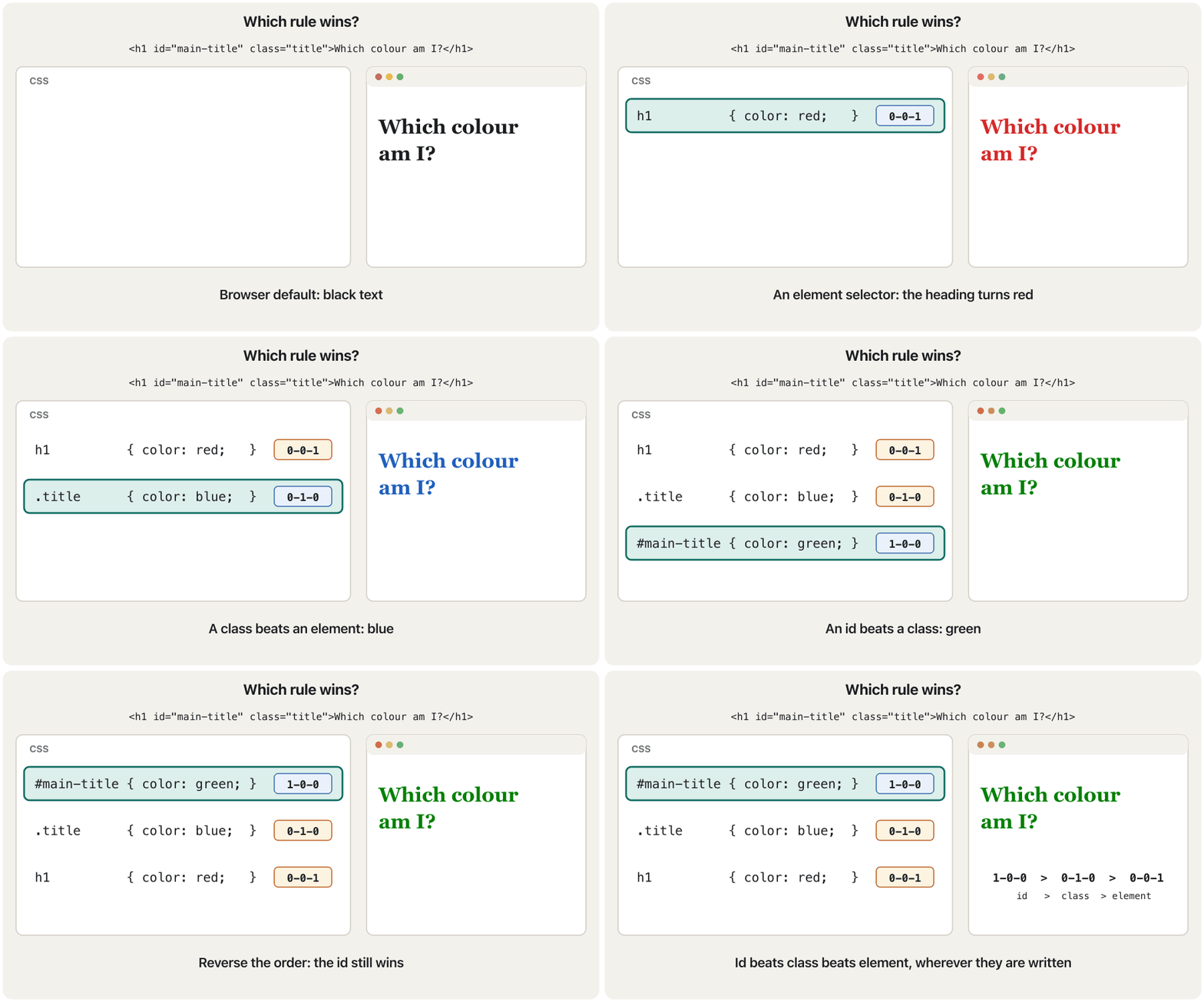
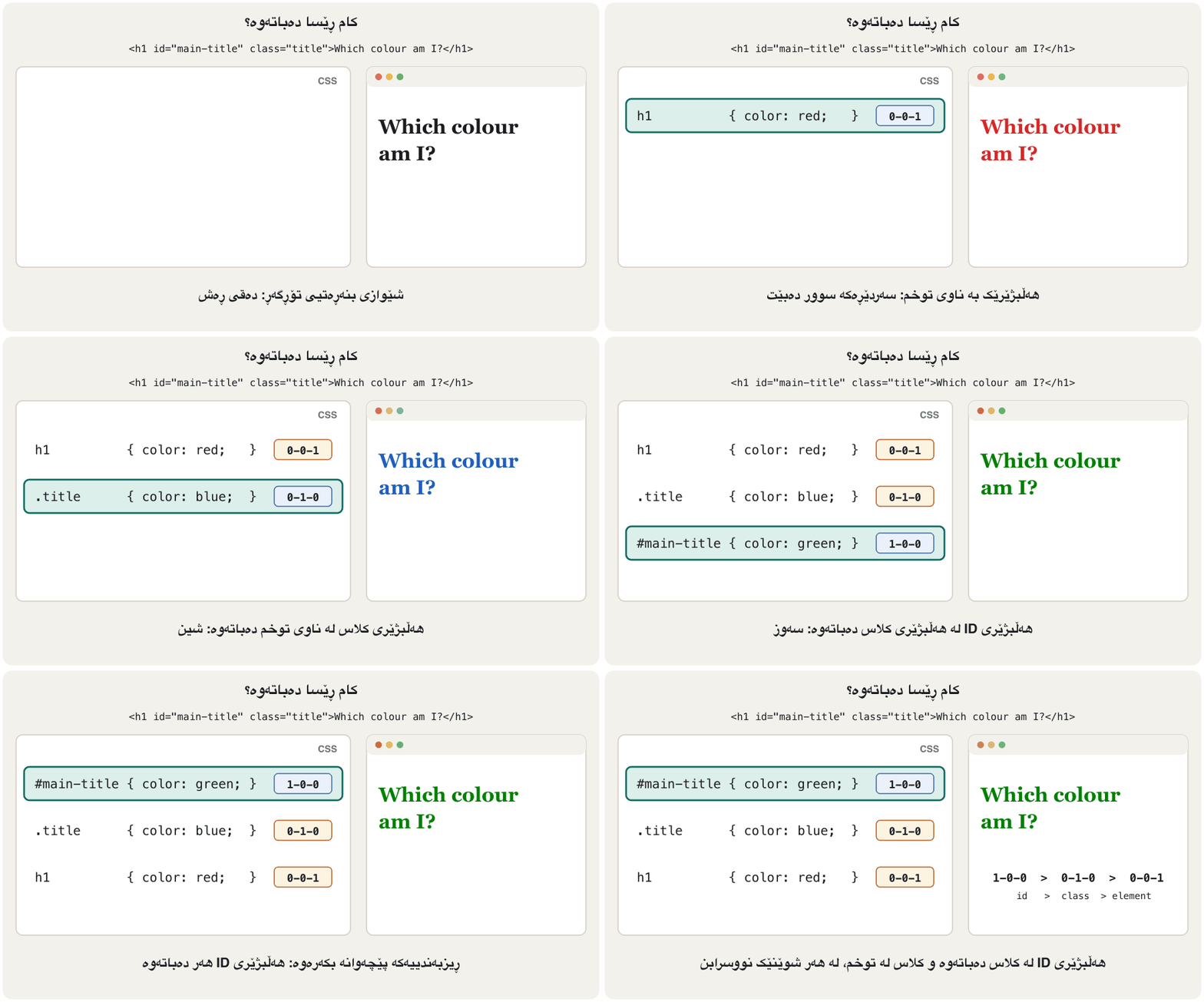
A more specific selector wins, wherever it is written. Think of a score in three columns, ID – CLASS – ELEMENT. Each id in the selector adds 1 to the first column; each class, attribute selector or pseudo-class to the second; each element name or pseudo-element to the third. Compare the columns from the left: one id beats any number of classes, and one class beats any number of element names. An inline style attribute beats every selector.
وردتر دەباتەوە، لە هەر شوێنێک نووسرابێت. نمرەیەک لە سێ ستووندا بهێنە بەرچاو: ID – CLASS – ELEMENT. هەر idـێک لە ١ بۆ ستوونی یەکەم زیاد دەکات؛ هەر کلاسێک، یان بۆ ستوونی دووەم؛ هەر ناوێکی یان بۆ ستوونی سێیەم. ستوونەکان لە چەپەوە بەراورد بکە: یەک id لە هەر ژمارەیەک کلاس دەباتەوە و یەک کلاس لە هەر ژمارەیەک ناوی . styleـی ناو لە هەموو دەباتەوە.
| Selector | IDستوونی ID | CLASSستوونی CLASS | ELEMENTستوونی ELEMENT | Scoreنمرە |
|---|---|---|---|---|
h1 | 0 | 0 | 1 | 0-0-1 |
.title | 0 | 1 | 0 | 0-1-0 |
h1.title | 0 | 1 | 1 | 0-1-1 |
#main-title | 1 | 0 | 0 | 1-0-0 |
nav ul li a | 0 | 0 | 4 | 0-0-4 |
style="…" (inline)style="…" (ناو ) | beats allلە هەمووان دەباتەوە |
<!DOCTYPE html>
<html lang="en">
<head>
  <meta charset="utf-8">
  <meta name="viewport" content="width=device-width, initial-scale=1">
  <title>Specificity</title>
  <style>
    #main-title { color: green; }
    .title      { color: blue; }
    h1          { color: red; }
  </style>
</head>
<body>
  <h1 id="main-title" class="title">Which colour am I?</h1>
</body>
</html>HTML sent to the browserئەو HTMLـەی دەنێردرێت بۆ تۆڕگەڕ
<!DOCTYPE html>
<html lang="en">
<head>
  <meta charset="utf-8">
  <meta name="viewport" content="width=device-width, initial-scale=1">
  <title>Specificity</title>
  <style>
    #main-title { color: green; }
    .title      { color: blue; }
    h1          { color: red; }
  </style>
</head>
<body>
  <h1 id="main-title" class="title">Which colour am I?</h1>
</body>
</html>How the browser decides which rule wins: counting ids, classes and elements, inline styles and why !important should be rare.
چۆن بڕیار دەدات کام دەباتەوە: ژماردنی id، کلاس و ، style و بۆچی دەبێت !important کەم بەکاربهێنرێت.
Counts specificity with four numbers (inline-id-class-element); the lesson uses three columns plus inline.
ڤیدیۆکە بە چوار ژمارە دەژمێرێت (inline-id-class-element)؛ ئەم وانەیە سێ و inline بەکاردەهێنێت، بەڵام بیرۆکەکە هەمان شتە.
Which rule wins? The cascadeکام ڕێسا دەباتەوە؟ کاسکەید
Inheritanceبۆماوە
Some properties pass from an element to the elements inside it. If you set color or font-family on <body>, every paragraph, heading and list item inherits them, unless a rule sets its own value. Mostly text properties inherit (color, font-family, font-size, line-height, text-align). Box properties do not (border, margin, padding, width, background-color): imagine every word inside a bordered box getting its own border!
هەندێک لە دەگوازرێنەوە بۆ ئەو لەناویدان. ئەگەر color یان font-family لەسەر <body> دابنێیت، هەموو بڕگە، سەردێڕ و بەندێکی لیست بە وەریان دەگرن، مەگەر ڕێسایەک خۆیان بۆ دابنێت. زۆربەی دەق دەگوازرێنەوە (color، font-family، font-size، line-height، text-align). سندووق ناگوازرێنەوە (border، margin، padding، width، background-color): وێنای بکە هەموو وشەیەک لەناو سندووقێکی سنووردار خۆی وەربگرێت!
<!DOCTYPE html>
<html lang="en">
<head>
  <meta charset="utf-8">
  <meta name="viewport" content="width=device-width, initial-scale=1">
  <title>Inheritance</title>
  <style>
    .card {
      color: #0a5a52;
      font-family: Georgia, serif;
      border: 2px solid #0a5a52;
      padding: 8px;
    }
  </style>
</head>
<body>
  <div class="card">
    <h2>Halabja</h2>
    <p>A town near the Hawraman mountains.</p>
  </div>
</body>
</html>HTML sent to the browserئەو HTMLـەی دەنێردرێت بۆ تۆڕگەڕ
<!DOCTYPE html>
<html lang="en">
<head>
  <meta charset="utf-8">
  <meta name="viewport" content="width=device-width, initial-scale=1">
  <title>Inheritance</title>
  <style>
    .card {
      color: #0a5a52;
      font-family: Georgia, serif;
      border: 2px solid #0a5a52;
      padding: 8px;
    }
  </style>
</head>
<body>
  <div class="card">
    <h2>Halabja</h2>
    <p>A town near the Hawraman mountains.</p>
  </div>
</body>
</html>
Explain the codeڕوونکردنەوەی کۆدەکە
- Lineدێڕی 9
Inherited by the
<h2>and the<p>.<h2>و<p>بە وەریدەگرن.- Lineدێڕی 11
Only the card gets a border; its children do not.
تەنها کارتەکە وەردەگرێت؛ منداڵەکانی نا.
Which rule wins? The cascadeکام ڕێسا دەباتەوە؟ کاسکەید
!important: the emergency exit!important: دەرگای فریاکەوتن
Adding !important after a value makes that declaration beat normal declarations, even an id or an inline style: p { color: red !important; }. Only another !important declaration with higher specificity (or the same specificity, written later) can beat it. This breaks the normal logic of the cascade and makes style sheets hard to fix, so avoid it. Raise the specificity or reorder the rules instead. One fair use: overriding a style you cannot edit, for example from a ready-made theme.
زیادکردنی !important دوای وا دەکات ئەو لە ئاسایی ببەنەوە، تەنانەت لە id یان شێوازی ناو : p { color: red !important; }. تەنها تری !important بە بەرزتر (یان هەمان ، کە دواتر نووسرابێت) دەتوانێت لێی ببەنەوە. ئەمە لۆجیکی ئاسایی تێکدەدات و چاککردنەوەی قورس دەکات، بۆیە خۆتی لێ بپارێزە. لەبری ئەوە بەرز بکەرەوە یان ڕیزبەندیی ڕێساکان بگۆڕە. یەک بەکارهێنانی ڕەوا: سەرکەوتن بەسەر شێوازێکدا کە ناتوانیت دەستکاریی بکەیت، بۆ نموونە لە ڕووکارێکی ئامادەکراوەوە.
Sizes: px, %, em and remقەبارەکان: px، %، em و rem
Many properties take a length. Four units are enough for now. Later in this chapter you meet vw, vh and ch in More units for sizes and the grid unit fr in Grid: rows and columns together.
زۆر درێژییەک وەردەگرن. چوار یەکە بۆ ئێستا بەسن. دواتر لەم بەشەدا vw، vh و ch لە یەکەی زیاتر بۆ قەبارە و یەکەی frـی Grid لە Grid: ڕیز و ستوون پێکەوە دەبینیت.
| Unitیەکە | Meansواتا | Exampleنموونە |
|---|---|---|
px | A CSS pixel: a fixed size : قەبارەیەکی جێگیر | border: 1px solid; |
% | A percentage of something else, usually the parent's sizeسەدییەک لە شتێکی تر، زۆرجار قەبارەی باوک | width: 50%; |
em | Relative to the font size of the parent (for font-size) or of the element itselfپەیوەستە بە قەبارەی باوک (بۆ font-size) یان خودی | font-size: 1.5em; |
rem | Relative to the root (<html>) font size, usually 16 pxپەیوەستە بە قەبارەی ڕەگ (<html>)، زۆرجار 16 | font-size: 1.25rem; |
<!DOCTYPE html>
<html lang="en">
<head>
  <meta charset="utf-8">
  <meta name="viewport" content="width=device-width, initial-scale=1">
  <title>Units</title>
  <style>
    .px  { font-size: 20px; }
    .parent { font-size: 20px; }
    .em  { font-size: 1.5em; }
    .rem { font-size: 1.5rem; }
    .pct { width: 50%; background-color: #eaf1fb; }
  </style>
</head>
<body>
  <p class="px">20px: always 20 pixels</p>
  <div class="parent">
    <p class="em">1.5em: 1.5 × the parent's 20px = 30px</p>
  </div>
  <p class="rem">1.5rem: 1.5 × the root's 16px = 24px</p>
  <p class="pct">width: 50%: half the width of the parent</p>
</body>
</html>HTML sent to the browserئەو HTMLـەی دەنێردرێت بۆ تۆڕگەڕ
<!DOCTYPE html>
<html lang="en">
<head>
  <meta charset="utf-8">
  <meta name="viewport" content="width=device-width, initial-scale=1">
  <title>Units</title>
  <style>
    .px  { font-size: 20px; }
    .parent { font-size: 20px; }
    .em  { font-size: 1.5em; }
    .rem { font-size: 1.5rem; }
    .pct { width: 50%; background-color: #eaf1fb; }
  </style>
</head>
<body>
  <p class="px">20px: always 20 pixels</p>
  <div class="parent">
    <p class="em">1.5em: 1.5 × the parent's 20px = 30px</p>
  </div>
  <p class="rem">1.5rem: 1.5 × the root's 16px = 24px</p>
  <p class="pct">width: 50%: half the width of the parent</p>
</body>
</html>The CSS length units px, %, em and rem, and the difference between em and rem; ends with vw and vh.
یەکەکانی درێژی لە : px، %، em و rem و جیاوازیی نێوان em و rem؛ لە کۆتاییدا vw و vh.
REM vs EM from 3:52.
جیاوازیی rem و em لە 3:52ـەوە دەست پێدەکات.
Common mistakesهەڵەکانی باو
| Mistake | What happensچی ڕوودەدات | Fixچارەسەر |
|---|---|---|
Curly quotes in style=”…” خوار لە style=”…” | The style is ignored.شێوەکە پشتگوێ دەخرێت. | Straight quotes ", typed in a code editor. ڕاست "، لە دەستکاریکەری کۆددا. |
color = red or color redcolor = red یان color red | Invalid declaration, skipped. نادروست، دەپەڕێنرێت. | color: red; |
A missing ; between declarations; نییە لە نێوان | The two declarations merge into one invalid one; both are lost.دوو دەبنە یەک نادروست؛ هەردووکیان ون دەبن. | End every declaration with ;.هەموو بە ; کۆتایی پێبهێنە. |
color for a backgroundcolor بۆ باکگراوند | The text changes, not the box.دەقەکە دەگۆڕێت، نەک سندووقەکە. | background-color |
<style> tags inside a .css file <style> لەناو .css | The first rule breaks.یەکەم ڕێسا تێکدەچێت. | A .css file holds only CSS. .css تەنها هەڵدەگرێت. |
Wrong href (css/style.css when the file is next to the page)hrefـی هەڵە (css/style.css کاتێک لە تەنیشت لاپەڕەکەیە) | Nothing is styled; DevTools shows a 404.هیچ شتێک ناڕازێنرێتەوە؛ DevTools هەڵەی 404 پیشان دەدات. | Check the relative path.ڕێڕەوەکە ڕێژەییەکە بپشکنە. |
// comment// comment | The next rule is lost.ڕێسای دواتر ون دەبێت. | /* comment */ |
font: bold alonefont: bold بە تەنها | Invalid shorthand, ignored.کورتکراوەی نادروست، پشتگوێ دەخرێت. | font-weight: bold; |
12 px12 px | Invalid value, ignored. نادروست، پشتگوێ دەخرێت. | 12px |
!important to win every conflict!important بۆ بردنەوەی هەموو ململانێیەک | Rules become impossible to override.ڕێساکان ناتوانرێن بگۆڕدرێن. | Use specificity and order. و ڕیزبەندی بەکاربهێنە. |
Exercisesڕاهێنانەکان
Answer the lecture's review questions in your own words: (a) What is CSS? (b) What are the advantages of using CSS? (c) What are the components of a CSS style rule? (d) What are the ways of using CSS in an HTML page?
بە وشەی خۆت وەڵامی پرسیارەکانی پێداچوونەوەی وانەکە بدەرەوە: (أ) چییە؟ (ب) سوودەکانی بەکارهێنانی چین؟ (ج) پێکهاتەکانی چین؟ (د) ڕێگەکانی بەکارهێنانی لە لاپەڕەیەکی چین؟
Show answerوەڵامەکە پیشان بدە
(a) What is CSS?(أ) CSS چییە؟
CSS (Cascading Style Sheets) is the language that describes how HTML elements are displayed: colours, fonts, spacing and layout. A style sheet is a set of rules; CSS separates the look of a page from its content.
(Cascading Style Sheets) ئەو زمانەیە کە وەسفی دەکات چۆن پیشان دەدرێن: ڕەنگ، ، بۆشایی و ڕێکخستن. کۆمەڵێک ڕێسایە؛ شێوەی لاپەڕە لە ناوەڕۆکەکەی جیا دەکاتەوە.
(b) Advantages(ب) سوودەکان
Write once and reuse on many pages (saves time); smaller HTML; one change updates the whole site; different layouts for phones, screens and print; a consistent look.
یەک جار بنووسە و لە زۆر لاپەڕەدا بەکاری بهێنەوە (کات دەپارێزێت)؛ بچووکتر؛ یەک گۆڕانکاری هەموو نوێ دەکاتەوە؛ ڕێکخستنی جیاواز بۆ مۆبایل، شاشە و چاپ؛ شێوەیەکی یەکگرتوو.
(c) Components of a rule(ج) پێکهاتەکانی ڕێسایەک
A selector and a declaration block in curly braces. Each declaration is a property and a value separated by a colon and ended by a semicolon: h1 { color: blue; }.
و بلۆکێکی ڕاگەیاندن لەناو کەوانەی لووتکەداردا. هەر و کە بە دوو خاڵ جیا کراونەتەوە و بە کۆتایی دێت: h1 { color: blue; }.
(d) Ways of using CSS(د) ڕێگەکانی بەکارهێنانی CSS
Inline (style attribute, one element), internal (<style> in the <head>, one page) and external (a .css file linked with <link>, many pages).
ناو ( style، یەک )، ناوخۆیی (<style> لە <head>، یەک لاپەڕە) و دەرەکی ( .css کە بە <link> بەستراوە، زۆر لاپەڕە).
Build a two-page class website, index.html and about.html, that share one external style sheet site.css. Both pages have the same navigation line, a heading and a paragraph. Then change the heading colour in site.css only and check that both pages change.
دوو لاپەڕەیی بۆ پۆلەکەت دروست بکە، index.html و about.html، کە یەک دەرەکی بەکار دەهێنن، site.css. هەردوو لاپەڕەکە هەمان دێڕی ڕێنیشاندەر، سەردێڕێک و بڕگەیەکیان هەیە. پاشان ڕەنگی سەردێڕ تەنها لە site.cssـدا بگۆڕە و بپشکنە کە هەردوو لاپەڕەکە دەگۆڕێن.
Show answerوەڵامەکە پیشان بدە
/* site.css: one file for the whole site */
body {
  font-family: Arial, sans-serif;
  color: #222222;
  background-color: #fdfaf3;
}
h1 { color: #0a5a52; }
nav a { color: #2b5ea8; }<!DOCTYPE html>
<html lang="en">
<head>
<meta charset="utf-8">
<meta name="viewport" content="width=device-width, initial-scale=1">
<title>Home</title>
<link rel="stylesheet" href="site.css">
</head>
<body>
<nav><a href="index.html">Home</a> | <a href="about.html">About us</a></nav>
<h1>Welcome to our class site</h1>
<p>News, timetables and projects of our class.</p>
</body>
</html><!DOCTYPE html>
<html lang="en">
<head>
<meta charset="utf-8">
<meta name="viewport" content="width=device-width, initial-scale=1">
<title>About us</title>
<link rel="stylesheet" href="site.css">
</head>
<body>
<nav><a href="index.html">Home</a> | <a href="about.html">About us</a></nav>
<h1>About our class</h1>
<p>We are 24 students of the IT department in Sulaymaniyah.</p>
</body>
</html>Find every mistake in this internal style sheet and write the correct CSS.
هەموو لەم ناوخۆییەدا بدۆزەرەوە و دروستەکە بنووسە.
<style>
body { background-color: #ffffff, color: #222222 }
h1 { color = navy; }
// links
a { colour: blue; }
</style>
Show answerوەڵامەکە پیشان بدە
Line 2: a comma instead of a semicolon between the declarations (and the last semicolon is missing). Line 3: = instead of :. Line 4: // is not a CSS comment. Line 5: the property is color (American spelling), not colour.
دێڕی ٢: کۆما لەبری لە نێوان (و دوایین نییە). دێڕی ٣: = لەبری :. دێڕی ٤: // نییە. دێڕی ٥: colorـە (ڕێنووسی ئەمریکی)، نەک colour.
body { background-color: #ffffff; color: #222222; }
h1 { color: navy; }
/* links */
a { color: blue; }Predict the colour of the word Hello, then explain: p { color: red; } .lead { color: blue; } #intro { color: green; } and <p id="intro" class="lead" style="color: purple;">Hello</p>. What changes if you delete the style attribute? And if you then delete the #intro rule?
ڕەنگی وشەی Hello پێشبینی بکە، پاشان ڕوونی بکەرەوە: p { color: red; } .lead { color: blue; } #intro { color: green; } و <p id="intro" class="lead" style="color: purple;">Hello</p>. ئەگەر style بسڕیتەوە چی دەگۆڕێت؟ و ئەگەر دواتر ڕێسای #intro بسڕیتەوە؟
Show answerوەڵامەکە پیشان بدە
Purple: the inline style beats every selector. Without it, green: the id (1-0-0) beats the class and the element. Without the id rule, blue: the class (0-1-0) beats p (0-0-1).
مۆر: شێوازی ناو لە هەموو دەباتەوە. بەبێ ئەو، سەوز: id (1-0-0) لە کلاس و دەباتەوە. بەبێ ڕێسای id، شین: کلاس (0-1-0) لە p (0-0-1) دەباتەوە.
<!DOCTYPE html>
<html lang="en">
<head>
  <meta charset="utf-8">
  <meta name="viewport" content="width=device-width, initial-scale=1">
  <title>Predict</title>
  <style>
    p      { color: red; }
    .lead  { color: blue; }
    #intro { color: green; }
  </style>
</head>
<body>
  <p id="intro" class="lead" style="color: purple;">Hello</p>
</body>
</html>HTML sent to the browserئەو HTMLـەی دەنێردرێت بۆ تۆڕگەڕ
<!DOCTYPE html>
<html lang="en">
<head>
  <meta charset="utf-8">
  <meta name="viewport" content="width=device-width, initial-scale=1">
  <title>Predict</title>
  <style>
    p      { color: red; }
    .lead  { color: blue; }
    #intro { color: green; }
  </style>
</head>
<body>
  <p id="intro" class="lead" style="color: purple;">Hello</p>
</body>
</html>Fill in: "…… you can write CSS once and then reuse the same sheet in multiple HTML pages."پڕی بکەرەوە: «…… دەتوانیت CSS یەک جار بنووسیت و پاشان هەمان پەڕە لە چەندین لاپەڕەی HTMLـدا بەکاربهێنیتەوە.»
CSS saves time (with an external style sheet).
کات دەپارێزێت (بە دەرەکی).
Fill in: "External CSS is defined in a separate file and saved with the …… extension."پڕی بکەرەوە: «CSSـی دەرەکی لە فایلێکی جیادا پێناسە دەکرێت و بە پاشگری …… پاشەکەوت دەکرێت.»
.css (for example filename.css).
.css (بۆ نموونە filename.css).
Fill in: "…… is the software that applies the formatting instructions to the web page and displays the formatted content on the screen."پڕی بکەرەوە: «…… ئەو نەرمەواڵەیەیە کە فەرمانەکانی ڕێکخستن لەسەر لاپەڕەی وێب جێبەجێ دەکات و ناوەڕۆکە ڕێکخراوەکە لەسەر شاشە پیشان دەدات.»
The rendering engine.
.
True or false: "The internal CSS file must contain the <script> tag."ڕاست یان هەڵە: «CSSـی ناوخۆیی دەبێت تاگی <script>ی تێدا بێت.»
False: internal CSS is written in a <style> element.
هەڵەیە: ناوخۆیی لە <style>دا دەنووسرێت.
Compare CSS and HTML.CSS و HTML بەراورد بکە.
HTML gives content and structure with elements; CSS gives presentation with rules (selector + declarations). HTML works without CSS (default look); CSS needs HTML to style. See the comparison table.
ناوەڕۆک و پێکهاتە بە دەدات؛ شێوەی پیشاندان بە ڕێسا ( + ) دەدات. بەبێ کار دەکات (شێوەی بنەڕەتی)؛ پێویستی بە هەیە بۆ ئەوەی بیڕازێنێتەوە. بڕوانە خشتەی بەراوردکردنەکە.
Summaryپوختە
- CSS styles HTML: HTML is content and structure, CSS is presentation.
- The browser downloads the CSS with its own request; the rendering engine applies it and paints the page.
- A rule = selector +
{ property: value; … }; comments are/* … */. - Three places: inline
style, internal<style>, external.csswith<link rel="stylesheet">(use this). - Colours: names,
#RRGGBB/#RGB/#RRGGBBAA,rgb(),hsl();color= text,background-color= background;greenis#008000; check the contrast. - The cascade:
!important, then specificity (inline > id > class > element), then the later rule; text properties are inherited, box properties are not. - Units:
px,%,em(parent),rem(root).
- دەڕازێنێتەوە: ناوەڕۆک و پێکهاتەیە، شێوەی پیشاندانە.
- بە خۆی دادەبەزێنێت؛ جێبەجێی دەکات و لاپەڕەکە دەکێشێت.
- ڕێسایەک = +
{ property: value; … }؛/* … */ن. - سێ شوێن:
styleـی ناو ،<style>ـی ناوخۆیی،.cssـی دەرەکی بە<link rel="stylesheet">(ئەمە بەکاربهێنە). - ڕەنگەکان: ناو،
#RRGGBB/#RGB/#RRGGBBAA،rgb()،hsl()؛color= دەق،background-color= باکگراوند؛greenبریتییە لە#008000؛ بپشکنە. - :
!important، پاشان (ناو > id > کلاس > )، پاشان ڕێسای دواتر؛ دەق بە دەگوازرێنەوە، سندووق نا. - یەکەکان:
px،%،em(باوک)،rem(ڕەگ).
Which wins: a class selector written last or an id selector written first?کامیان دەباتەوە: هەڵبژێرێکی کلاس کە دواجار نووسراوە یان هەڵبژێرێکی ID کە یەکەمجار نووسراوە؟
The id selector: specificity is checked before source order.
: پێش ڕیزبەندیی نووسین دەپشکنرێت.
Why is type="text/css" no longer written?بۆچی type="text/css" ئیتر نانووسرێت؟
CSS is the only style language and the default, so the attribute adds nothing; MDN marks it deprecated.
تاکە زمانی شێوازە و بنەڕەتییە، بۆیە ئەو هیچ زیاد ناکات؛ MDN بە نیشانی دەکات.
Videoڤیدیۆ
Watch a videoسەیری ڤیدیۆیەک بکە
A video that viewers liked a lot and praised in their comments, chosen for this lesson.ڤیدیۆیەک کە بینەران زۆریان پێ خۆش بووە و لە کۆمێنتەکانیاندا ستایشیان کردووە، بۆ ئەم وانەیە هەڵبژێردراوە.
In Kurdish: a first CSS lesson - linking an external style.css, element, id and class selectors, colours and fonts on headings, paragraphs and lists.
بە کوردی، یەکەم وانەی : بەستنەوەی دەرەکیی style.css، ، id و کلاس، ڕەنگ و بۆ سەردێڕ، پەرەگراف و لیست.
Kurdish (Sorani), part 3 of K97 Media's HTML+CSS series. Frames: 6:00 modern boilerplate (lang, viewport) and link rel=stylesheet, 10:22 external style.css, 18:40 id rules and a flex list.
بە کوردیی سۆرانی، بەشی سێیەمی زنجیرەی و K97 Media: لە 6:00 پێکهاتەی بنەڕەتیی نوێ (lang، viewport) و link rel=stylesheet، لە 10:22 دەرەکیی style.css و لە 18:40 بە id و لیستێک بە flex.
Lesson complete!وانەکە تەواو بوو!
Well done. Review the key terms, then go on to the next lesson.دەستخۆش. سەیرێکی زاراوە سەرەکییەکان بکەرەوە، پاشان بڕۆ بۆ وانەی داهاتوو.
Key termsزاراوە سەرەکییەکان
CSS Selectors, Pseudo-classes and Pseudo-elementsهەڵبژێرەکانی CSS، نیمچەکلاسەکان و نیمچەتوخمەکان
Related lecturesوانە پەیوەندیدارەکان
- HTML Basics: Documents, Links and Tablesبنەماکانی HTML: بەڵگەنامە، بەستەرەکان و خشتەکان
- HTTP and the Request–Response CycleHTTP و سووڕی داواکاری و وەڵام
- CSS Selectors, Pseudo-classes and Pseudo-elementsهەڵبژێرەکانی CSS، نیمچەکلاسەکان و نیمچەتوخمەکان
- Styling Text, Backgrounds, Lists and Tablesڕازاندنەوەی دەق، باکگراوند، لیست و خشتەکان
- Number Systems and Place Valueسیستەمە ژمارەییەکان و بەهای خانەیی
- Websites and Web Developmentتۆڕگەکان و دروستکردنیان
- The CSS Box Model: Margin, Border and Paddingمۆدێلی سندووقی CSS: پەراوێز، سنوور و بۆشایی ناوەوە
- Positioning and Page Layoutشوێندانان و ڕێکخستنی لاپەڕە
References and further readingسەرچاوەکان و خوێندنەوەی زیاتر
This lecture is a first edition. The Kurdish text and terminology are waiting for review by Kurdish IT teachers.ئەم وانەیە چاپی یەکەمە. دەقە کوردییەکە و زاراوەکانی چاوەڕێی پێداچوونەوەی مامۆستایانی کوردی بواری IT ن.