Chapterبەش 4 · Lectureوانە 4.3
Styling Text, Backgrounds, Lists and Tablesڕازاندنەوەی دەق، باکگراوند، لیست و خشتەکان
Font stacks (also for Kurdish), font size, style and weight, the text properties and text-shadow, Kurdish text and right-to-left alignment, background colours, images, sizes and gradients, list styles and ::marker, and tables with collapsed borders, zebra stripes and hover rows.
ڕیزی (بۆ کوردیش)، قەبارە، شێواز و ئەستووریی ، دەق و text-shadow، دەقی کوردی و ڕێکخستنی ڕاست-بۆ-چەپ، ڕەنگ، وێنە، قەبارە و باکگراوند، شێوەی لیست و ::marker، هەروەها بە تێکەڵکراو، هێڵی شێوە-گۆرەخەر و hover.
What you will learnچی فێر دەبیت
- Write font stacks with a generic family, choose fonts for Kurdish pages, and set size, style and weight.
- Use the text properties, including text-shadow, and know which ones do not suit Kurdish text.
- Style backgrounds with colours, images, cover and contain, and gradients.
- Style list markers with the three list properties, the list-style shorthand and ::marker.
- Style readable tables with border-collapse, padding, zebra stripes, hover rows and good contrast.
- ڕیزی بە خێزانێکی گشتییەوە بنووسیت، بۆ لاپەڕەی کوردی هەڵبژێریت و قەبارە، شێواز و ئەستووری دابنێیت.
- دەق بە text-shadowـیشەوە بەکاربهێنیت و بزانیت کامیان بۆ دەقی کوردی ناگونجێن.
- باکگراوند بە ڕەنگ، وێنە، cover، contain و بڕازێنیتەوە.
- نیشانەکانی لیست بە سێ تایبەتمەندییەکەی لیست، کورتکراوەی list-style و ::marker بڕازێنیتەوە.
- خوێنراو بە border-collapse، padding، هێڵی شێوە-گۆرەخەر، hover و باش بڕازێنیتەوە.
Fontsفۆنتەکان
Four properties choose the letters of a text:
چوار پیتەکانی دەقێک هەڵدەبژێرن:
| Property | What it setsچی دادەنێت | Values |
|---|---|---|
font-family | The font, as a list of choices (a font stack)، وەک لیستێک لە هەڵبژاردە (ڕیزێکی ) | "Times New Roman", serif; generic families serif, sans-serif, monospace, cursive, fantasy, system-ui"Times New Roman", serif؛ خێزانە گشتییەکان serif، sans-serif، monospace، cursive، fantasy، system-ui |
font-size | The size of the lettersقەبارەی پیتەکان | Keywords (small, medium, large, smaller, larger), px, em, rem, % (small، medium، large، smaller، larger)، px، em، rem، % |
font-style | Upright or slanted lettersپیتی ڕاست یان لار | normal, italic, oblique |
font-weight | How thick the letters areپیتەکان چەند ئەستوورن | normal (400), bold (700), bolder, lighter, or 100 to 900normal (400)، bold (700)، bolder، lighter، یان 100 تا 900 |
A visitor's computer may not have the font you want, so font-family takes a font stack: the browser uses the first font in the list that it has (or can load), letter by letter. Always end the stack with a generic family such as serif or sans-serif, so there is a sensible fallback. It is good practice to put a font name in quotes when it contains spaces, digits or punctuation: "Times New Roman"; generic names are never quoted. italic uses the real italic letters of the font, oblique simply slants the normal letters. font-size can be an absolute keyword (medium is the default), relative to the parent (smaller, larger, em, %), relative to the root (rem) or fixed (px).
لەوانەیە کۆمپیوتەری سەردانکەرێک ئەو نەبێت کە دەتەوێت، بۆیە font-family ڕیزێکی وەردەگرێت: یەکەم لە لیستەکەدا بەکار دەهێنێت کە هەیەتی (یان دەتوانێت دایبەزێنێت)، پیت بە پیت. هەمیشە ڕیزەکە بە خێزانێکی گشتی وەک serif یان sans-serif کۆتایی پێبهێنە، بۆ ئەوەی جێگرەوەیەکی گونجاو هەبێت. باشترە ناوی لەناو دابنێیت کاتێک ، ژمارە یان نیشانەی خاڵبەندیی تێدایە: "Times New Roman"؛ ناوە گشتییەکان هەرگیز لەناو نانووسرێن. italic پیتە لارە ڕاستەقینەکانی بەکار دەهێنێت، oblique تەنها پیتە ئاساییەکان لار دەکات. font-size دەتوانێت بێت (ڕەها؛ medium بنەڕەتییە)، یان پەیوەست بە باوکەوە (smaller، larger، em، %)، پەیوەست بە ڕەگەوە (rem) یان جێگیر (px).
<!DOCTYPE html>
<html lang="en">
<head>
  <meta charset="utf-8">
  <meta name="viewport" content="width=device-width, initial-scale=1">
  <title>Fonts</title>
  <style>
    .serif   { font-family: "Times New Roman", Georgia, serif; }
    .sans    { font-family: Verdana, Arial, sans-serif; }
    .mono    { font-family: "Courier New", monospace; }
    .big     { font-size: 1.5rem; font-weight: 700; }
    .slanted { font-style: italic; }
    .short   { font: italic bold 18px/1.5 Georgia, serif; }
  </style>
</head>
<body>
  <h1>Font properties</h1>
  <p class="serif">A serif font stack with a quoted name.</p>
  <p class="sans">A sans-serif stack: clean letters for the screen.</p>
  <p class="mono">A monospace stack for code: print("hello")</p>
  <p class="big">font-size: 1.5rem and font-weight: 700</p>
  <p class="slanted">font-style: italic</p>
  <p class="short">The font shorthand: style, weight, size/line-height and family.</p>
</body>
</html>HTML sent to the browserئەو HTMLـەی دەنێردرێت بۆ تۆڕگەڕ
<!DOCTYPE html>
<html lang="en">
<head>
  <meta charset="utf-8">
  <meta name="viewport" content="width=device-width, initial-scale=1">
  <title>Fonts</title>
  <style>
    .serif   { font-family: "Times New Roman", Georgia, serif; }
    .sans    { font-family: Verdana, Arial, sans-serif; }
    .mono    { font-family: "Courier New", monospace; }
    .big     { font-size: 1.5rem; font-weight: 700; }
    .slanted { font-style: italic; }
    .short   { font: italic bold 18px/1.5 Georgia, serif; }
  </style>
</head>
<body>
  <h1>Font properties</h1>
  <p class="serif">A serif font stack with a quoted name.</p>
  <p class="sans">A sans-serif stack: clean letters for the screen.</p>
  <p class="mono">A monospace stack for code: print("hello")</p>
  <p class="big">font-size: 1.5rem and font-weight: 700</p>
  <p class="slanted">font-style: italic</p>
  <p class="short">The font shorthand: style, weight, size/line-height and family.</p>
</body>
</html>
Explain the codeڕوونکردنەوەی کۆدەکە
- Lineدێڕی 13
The
fontshorthand: optional style and weight first, then the size (with/line-height), and the family last. Size and family are required.کورتکراوەی
font: سەرەتا style و weightـی ئارەزوومەندانە، پاشان قەبارە (لەگەڵ/line-height) و لە کۆتاییدا خێزانەکە. قەبارە و خێزان پێویستن.
The four font properties: font-family with a font stack, font-size, font-weight and font-style, shown step by step.
چوار : font-family لەگەڵ لیستێک لە ، font-size، font-weight و font-style، هەنگاو بە هەنگاو.
Segment 3:30-13:25: font-family, font-size, font-weight, font-style. Later chapters cover line-height, text-align, transform and decoration.
لە 3:30 تا 13:25 سەیر بکە: font-family، font-size، font-weight و font-style. بەشەکانی دواتر line-height، text-align، text-transform و text-decoration دەگرنەوە.
Fontsفۆنتەکان
Fonts for Kurdish pagesفۆنتەکان بۆ لاپەڕەی کوردی
Kurdish (Sorani) needs a font that contains the Arabic-script letters, including the Kurdish ones: ڕ ڵ ێ ۆ ە. Most computers have some Arabic font, but it may lack the Kurdish letters or look poor. Two good free fonts on Google Fonts list Central Kurdish among their languages: Noto Naskh Arabic (a book style) and Noto Sans Arabic (a clean screen style); Vazirmatn, the font of this website, is also popular. Load one with a <link> and put it first in the stack. Arabic-script text usually needs a larger line-height (about 1.7 to 1.9) because the letters have marks above and below.
کوردیی سۆرانی پێویستی بە هەیە کە پیتەکانی ئەلفوبێی عەرەبی لەخۆ بگرێت، پیتە کوردییەکانیشەوە: ڕ ڵ ێ ۆ ە. زۆربەی کۆمپیوتەرەکان عەرەبییان هەیە، بەڵام لەوانەیە پیتە کوردییەکانی تێدا نەبێت یان خراپ دەربکەوێت. دوو ئازادی باش لە Google Fonts کوردیی ناوەندی لە زمانەکانیاندا دەژمێرن: Noto Naskh Arabic (شێوەی کتێب) و Noto Sans Arabic (شێوەیەکی سادەی شاشە)؛ Vazirmatnیش، ئەم ماڵپەڕە، بەناوبانگە. یەکێکیان بە <link> دابەزێنە و لە سەرەتای ڕیزەکەدا دایبنێ. دەقی ئەلفوبێی عەرەبی زۆرجار line-heightـی گەورەتری پێویستە (نزیکەی 1.7 تا 1.9) چونکە پیتەکان نیشانەیان لە سەرەوە و خوارەوە هەیە.
<!DOCTYPE html>
<html lang="ckb" dir="rtl">
<head>
  <meta charset="utf-8">
  <meta name="viewport" content="width=device-width, initial-scale=1">
  <title>دەقی کوردی</title>
  <link rel="stylesheet" href="https://fonts.googleapis.com/css2?family=Noto+Naskh+Arabic&display=swap">
  <style>
    body {
      font-family: "Noto Naskh Arabic", "Noto Sans Arabic", Vazirmatn, sans-serif;
      font-size: 1.125rem;
      line-height: 1.8;
    }
    h1 { text-align: start; }
    ol { list-style-type: arabic-indic; }
  </style>
</head>
<body>
  <h1>چایخانەکەی بازاڕ</h1>
  <p>هەموو بەیانییەک خاوەنی چایخانەکە دەرگاکان دەکاتەوە و بۆنی چای تازە شەقامەکە پڕ دەکات.</p>
  <ol>
    <li>چای</li>
    <li>قاوە</li>
    <li>شیر</li>
  </ol>
</body>
</html>HTML sent to the browserئەو HTMLـەی دەنێردرێت بۆ تۆڕگەڕ
<!DOCTYPE html>
<html lang="ckb" dir="rtl">
<head>
  <meta charset="utf-8">
  <meta name="viewport" content="width=device-width, initial-scale=1">
  <title>دەقی کوردی</title>
  <link rel="stylesheet" href="https://fonts.googleapis.com/css2?family=Noto+Naskh+Arabic&display=swap">
  <style>
    body {
      font-family: "Noto Naskh Arabic", "Noto Sans Arabic", Vazirmatn, sans-serif;
      font-size: 1.125rem;
      line-height: 1.8;
    }
    h1 { text-align: start; }
    ol { list-style-type: arabic-indic; }
  </style>
</head>
<body>
  <h1>چایخانەکەی بازاڕ</h1>
  <p>هەموو بەیانییەک خاوەنی چایخانەکە دەرگاکان دەکاتەوە و بۆنی چای تازە شەقامەکە پڕ دەکات.</p>
  <ol>
    <li>چای</li>
    <li>قاوە</li>
    <li>شیر</li>
  </ol>
</body>
</html>
Explain the codeڕوونکردنەوەی کۆدەکە
- Lineدێڕی 7
Loads the font from Google Fonts; without internet the next fonts in the stack are used.
لە Google Fontsـەوە دادەبەزێنێت؛ بەبێ ئینتەرنێت دواتری ڕیزەکە بەکاردێن.
- Lineدێڕی 15
Numbers the list with Arabic-Indic digits: ١، ٢، ٣.
لیستەکە بە ژمارەی عەرەبی-هیندی ژمارە دەکات: ١، ٢، ٣.
Text propertiesتایبەتمەندییەکانی دەق
These properties change the text itself, not its letters' design:
ئەم خودی دەقەکە دەگۆڕن، نەک دیزاینی پیتەکان:
| Property | Setsدادەنێت | Exampleنموونە |
|---|---|---|
color | Text colourڕەنگی دەق | color: #222; |
text-align | Horizontal alignment: left, right, center, justify, and start/end, which follow the text directionڕێکخستنی ئاسۆیی: left، right، center، justify، هەروەها start/end کە ئاڕاستەی دەق دەگرن | text-align: start; |
text-decoration | Lines on the text: underline, overline, line-through, noneهێڵ لەسەر دەق: underline، overline، line-through، none | text-decoration: none; |
text-indent | Indent of the first line (length or %)چوونە ناوەوەی یەکەم دێڕ (درێژی یان %) | text-indent: 2em; |
text-transform | Letter case: uppercase, lowercase, capitalize, noneقەبارەی پیت: uppercase، lowercase، capitalize، none | text-transform: uppercase; |
word-spacing | Extra space between wordsبۆشایی زیادە لە نێوان وشەکاندا | word-spacing: 0.5em; |
letter-spacing | Extra space between letters (Latin text only)بۆشایی زیادە لە نێوان پیتەکاندا (تەنها دەقی لاتینی) | letter-spacing: 2px; |
line-height | Distance between lines; a plain number multiplies the font sizeدووریی نێوان دێڕەکان؛ ژمارەیەکی سادە قەبارەی لێک دەدات | line-height: 1.6; |
text-shadow | A shadow behind the lettersسێبەرێک لە پشت پیتەکانەوە | text-shadow: 1px 1px 2px gray; |
<!DOCTYPE html>
<html lang="en">
<head>
  <meta charset="utf-8">
  <meta name="viewport" content="width=device-width, initial-scale=1">
  <title>Text properties</title>
  <style>
    .title  { color: #0a5a52; text-transform: uppercase; letter-spacing: 2px; }
    .intro  { text-indent: 2em; line-height: 1.7; text-align: justify; }
    .spaced { word-spacing: 1em; }
    .plain  { text-decoration: none; }
  </style>
</head>
<body>
  <h1 class="title">Text properties</h1>
  <p class="intro">The first line of this paragraph starts a little to the right,
  because of text-indent. The lines have more room between them, because of
  line-height, and the text is justified, so both edges are straight.</p>
  <p class="spaced">word-spacing puts more room between words.</p>
  <p><a href="#top" class="plain">A link without its underline</a></p>
</body>
</html>HTML sent to the browserئەو HTMLـەی دەنێردرێت بۆ تۆڕگەڕ
<!DOCTYPE html>
<html lang="en">
<head>
  <meta charset="utf-8">
  <meta name="viewport" content="width=device-width, initial-scale=1">
  <title>Text properties</title>
  <style>
    .title  { color: #0a5a52; text-transform: uppercase; letter-spacing: 2px; }
    .intro  { text-indent: 2em; line-height: 1.7; text-align: justify; }
    .spaced { word-spacing: 1em; }
    .plain  { text-decoration: none; }
  </style>
</head>
<body>
  <h1 class="title">Text properties</h1>
  <p class="intro">The first line of this paragraph starts a little to the right,
  because of text-indent. The lines have more room between them, because of
  line-height, and the text is justified, so both edges are straight.</p>
  <p class="spaced">word-spacing puts more room between words.</p>
  <p><a href="#top" class="plain">A link without its underline</a></p>
</body>
</html>Text propertiesتایبەتمەندییەکانی دەق
Text properties on Kurdish textتایبەتمەندییەکانی دەق لەسەر دەقی کوردی
text-align: startandendfollow the direction. On adir="rtl"pagestartis the right side, so one style sheet works for English and Kurdish pages.leftandrightnever flip.- No
letter-spacingon Kurdish. Arabic-script letters are joined; spacing them out would break the words. Chrome simply ignores letter-spacing on such text (we checked), and other browsers may break the joins, so it never helps. text-transformdoes nothing to Kurdish letters. The Arabic script has no capital and small letters, souppercasechanges only the Latin letters in the text.- Never set direction with CSS alone: use
lang="ckb" dir="rtl"in the HTML (A page in Kurdish).
text-align: startوendئاڕاستەکە دەگرن. لە لاپەڕەیەکیdir="rtl"ـداstartلای ڕاستە، بۆیە یەک بۆ لاپەڕەی ئینگلیزی و کوردی کار دەکات.leftوrightهەرگیز ناگۆڕێن.- هیچ
letter-spacingـێک لەسەر کوردی. پیتەکانی ئەلفوبێی عەرەبی بەیەکەوە لکاون؛ دوورخستنەوەیان وشەکان دەشکێنێت. Chrome بە ئاسانی letter-spacing لەسەر دەقی وا پشتگوێ دەخات (تاقیمان کردەوە) و تر لەوانەیە لکانەکان بشکێنن، بۆیە هەرگیز سوودی نییە. text-transformهیچ لە پیتە کوردییەکان ناکات. ئەلفوبێی عەرەبی پیتی گەورە و بچووکی نییە، بۆیەuppercaseتەنها پیتە لاتینییەکانی ناو دەقەکە دەگۆڕێت.- هەرگیز ئاڕاستە تەنها بە دامەنێ:
lang="ckb" dir="rtl"لە بەکاربهێنە (لاپەڕەتۆڕێکی کوردی).
<!DOCTYPE html>
<html lang="ckb" dir="rtl">
<head>
  <meta charset="utf-8">
  <meta name="viewport" content="width=device-width, initial-scale=1">
  <title>دەقی کوردی</title>
  <style>
    body { font-family: Vazirmatn, "Noto Sans Arabic", sans-serif; line-height: 1.8; }
    .a { text-align: start; }
    .b { letter-spacing: 4px; }
    .c { text-transform: uppercase; }
  </style>
</head>
<body>
  <p class="a">ئەم بڕگەیە بە <code>text-align: start</code> لە لای ڕاستەوە دەست پێدەکات.</p>
  <p class="b">ئەم بڕگەیە <code>letter-spacing</code>ـی هەیە: پیتەکان جیا نابنەوە، بەڵام هیچ سوودێکیشی نییە.</p>
  <p class="c">text-transform: uppercase تەنها لەسەر latin کار دەکات.</p>
</body>
</html>HTML sent to the browserئەو HTMLـەی دەنێردرێت بۆ تۆڕگەڕ
<!DOCTYPE html>
<html lang="ckb" dir="rtl">
<head>
  <meta charset="utf-8">
  <meta name="viewport" content="width=device-width, initial-scale=1">
  <title>دەقی کوردی</title>
  <style>
    body { font-family: Vazirmatn, "Noto Sans Arabic", sans-serif; line-height: 1.8; }
    .a { text-align: start; }
    .b { letter-spacing: 4px; }
    .c { text-transform: uppercase; }
  </style>
</head>
<body>
  <p class="a">ئەم بڕگەیە بە <code>text-align: start</code> لە لای ڕاستەوە دەست پێدەکات.</p>
  <p class="b">ئەم بڕگەیە <code>letter-spacing</code>ـی هەیە: پیتەکان جیا نابنەوە، بەڵام هیچ سوودێکیشی نییە.</p>
  <p class="c">text-transform: uppercase تەنها لەسەر latin کار دەکات.</p>
</body>
</html>Text propertiesتایبەتمەندییەکانی دەق
text-shadowسێبەری دەق: text-shadow
text-shadow draws a shadow behind the letters. It needs at least two lengths: the horizontal offset and the vertical offset. A third length is the blur radius (0 = sharp), and a colour can come first or last: text-shadow: 2px 2px 4px gray;. Several shadows are separated by commas.
text-shadow سێبەرێک لە پشت پیتەکانەوە دەکێشێت. لانیکەم دوو درێژیـی پێویستە: لادانی ئاسۆیی و لادانی ستوونی. درێژیی سێیەم تیشکی تەڵخییە (0 = تیژ) و ڕەنگێک دەتوانێت لە سەرەتا یان کۆتاییدا بێت: text-shadow: 2px 2px 4px gray;. چەند سێبەرێک بە کۆما جیا دەکرێنەوە.
<!DOCTYPE html>
<html lang="en">
<head>
  <meta charset="utf-8">
  <meta name="viewport" content="width=device-width, initial-scale=1">
  <title>Text shadow</title>
  <style>
    .soft { text-shadow: 2px 2px 4px rgb(0 0 0 / 40%); }
    .hard { text-shadow: 3px 3px 0 #0cc; }
    .glow { color: white; background-color: #1f4e79; text-shadow: 0 0 8px #fdf3e1; }
  </style>
</head>
<body>
  <h1 class="soft">Soft shadow</h1>
  <h1 class="hard">Hard shadow</h1>
  <h1 class="glow">Glow</h1>
</body>
</html>HTML sent to the browserئەو HTMLـەی دەنێردرێت بۆ تۆڕگەڕ
<!DOCTYPE html>
<html lang="en">
<head>
  <meta charset="utf-8">
  <meta name="viewport" content="width=device-width, initial-scale=1">
  <title>Text shadow</title>
  <style>
    .soft { text-shadow: 2px 2px 4px rgb(0 0 0 / 40%); }
    .hard { text-shadow: 3px 3px 0 #0cc; }
    .glow { color: white; background-color: #1f4e79; text-shadow: 0 0 8px #fdf3e1; }
  </style>
</head>
<body>
  <h1 class="soft">Soft shadow</h1>
  <h1 class="hard">Hard shadow</h1>
  <h1 class="glow">Glow</h1>
</body>
</html>Worked example: the contact cardنموونەی کارپێکراو: کارتی پەیوەندی
The lecture combines the text and font properties in one example: a page Home.html that links to it2nd.css and shows a contact number and an e-mail address in brown, uppercase, underlined, oblique letters. Here it is rebuilt with a class, the two corrections and placeholder contact data:
وانەکە دەق و لە یەک نموونەدا کۆ دەکاتەوە: لاپەڕەیەکی Home.html کە بە it2nd.cssـەوە بەستراوە و ژمارەی پەیوەندی و ناونیشانی ئیمەیڵێک بە پیتی قاوەیی، گەورە، هێڵ بەژێرداهاتوو و لار پیشان دەدات. ئەمە هەمان نموونەیە کە بە کلاسێک، دوو ڕاستکردنەوەکە و زانیاریی پەیوەندیی نموونەیی دووبارە دروست کراوە:
.contact {
  color: #cc6633;
  text-align: left;
  text-indent: 2em;
  text-transform: uppercase;
  text-decoration: underline;
  text-shadow: 1px 1px 2px #0cc;
  word-spacing: 2em;
  font-family: "Times New Roman", serif;
  font-style: oblique;
  font-size: 24px;
}
Explain the codeڕوونکردنەوەی کۆدەکە
- Lineدێڕی 7
Corrected: two offsets and a blur before the colour.
ڕاستکراوە: دوو لادان و تەڵخییەک پێش ڕەنگەکە.
- Lineدێڕی 9
Corrected: the name is quoted and a generic family follows.
ڕاستکراوە: ناوەکە لەناو و خێزانێکی گشتی دوای دێت.
<!DOCTYPE html>
<html lang="en">
<head>
  <meta charset="utf-8">
  <meta name="viewport" content="width=device-width, initial-scale=1">
  <title>Contact</title>
  <link rel="stylesheet" href="contact.css">
</head>
<body>
  <div class="contact">
    <h2>Contact number</h2>
    <p>Mobile no: 0750 000 0000</p>
    <p>Email: info@example.com</p>
  </div>
</body>
</html>HTML sent to the browserئەو HTMLـەی دەنێردرێت بۆ تۆڕگەڕ
<!DOCTYPE html>
<html lang="en">
<head>
  <meta charset="utf-8">
  <meta name="viewport" content="width=device-width, initial-scale=1">
  <title>Contact</title>
  <style>
    .contact {
      color: #cc6633;
      text-align: left;
      text-indent: 2em;
      text-transform: uppercase;
      text-decoration: underline;
      text-shadow: 1px 1px 2px #0cc;
      word-spacing: 2em;
      font-family: "Times New Roman", serif;
      font-style: oblique;
      font-size: 24px;
    }
  </style>
</head>
<body>
  <div class="contact">
    <h2>Contact number</h2>
    <p>Mobile no: 0750 000 0000</p>
    <p>Email: info@example.com</p>
  </div>
</body>
</html>
The preview shows the page with contact.css applied.
پێشبینینەکە لاپەڕەکە لەگەڵ contact.css پیشان دەدات.
What you see: brown (#cc6633), capital, underlined, slanted letters; the first line of each block indented by 2em; words far apart (word-spacing: 2em). The heading takes all of this from the div except its size: the paragraphs are 24 px, but an <h2> keeps its own font-size: 1.5em, so it is px.
ئەوەی دەیبینیت: پیتی قاوەیی (#cc6633)، گەورە، هێڵ بەژێرداهاتوو و لار؛ یەکەم دێڕی هەر بلۆکێک بە 2em دەچێتە ناوەوە؛ وشەکان لە یەکتر دوورن (word-spacing: 2em). سەردێڕەکە هەموو ئەمانە لە divـەکەوە وەردەگرێت جگە لە قەبارەکەی: بڕگەکان ٢٤ ، بەڵام <h2> font-size: 1.5emـی خۆی دەپارێزێت، بۆیە .
Backgroundsباکگراوندەکان
Five background properties come from the lecture: background-color, background-image, background-repeat, background-attachment and background-position. The background fills the element's box, including its padding (Padding: space inside the border). Every element has its own background: a paragraph inside a div keeps its own colour on top of the div's colour.
پێنج باکگراوند لە وانەکەوە دێن: background-color، background-image، background-repeat، background-attachment و background-position. باکگراوند سندووقی پڕ دەکاتەوە، بە سندووقەکەشەوە (بۆشایی ناوەوە: بۆشایی لەناو سنوور). هەر باکگراوندی خۆی هەیە: بڕگەیەک لەناو divـێکدا ڕەنگی خۆی لەسەر ڕەنگی divـەکە دەپارێزێت.
<!DOCTYPE html>
<html lang="en">
<head>
  <meta charset="utf-8">
  <meta name="viewport" content="width=device-width, initial-scale=1">
  <title>Background colours</title>
  <style>
    h1 { background-color: green; color: white; }
    div { background-color: lightblue; }
    p { background-color: yellow; }
  </style>
</head>
<body>
  <h1>CSS background-color example</h1>
  <div>
    This is a text inside a div element.
    <p>This paragraph has its own background colour.</p>
    We are still in the div element.
  </div>
</body>
</html>HTML sent to the browserئەو HTMLـەی دەنێردرێت بۆ تۆڕگەڕ
<!DOCTYPE html>
<html lang="en">
<head>
  <meta charset="utf-8">
  <meta name="viewport" content="width=device-width, initial-scale=1">
  <title>Background colours</title>
  <style>
    h1 { background-color: green; color: white; }
    div { background-color: lightblue; }
    p { background-color: yellow; }
  </style>
</head>
<body>
  <h1>CSS background-color example</h1>
  <div>
    This is a text inside a div element.
    <p>This paragraph has its own background colour.</p>
    We are still in the div element.
  </div>
</body>
</html>In Kurdish: background-color and background-image with background-repeat, background-position and background-size: cover.
بە کوردی: background-color و background-image لەگەڵ background-repeat، background-position و background-size: cover.
Kurdish (Sorani). Frame checked at 7:00: background-image url(), background-position, background-size: cover, background-repeat.
بە کوردیی سۆرانی، لە دەوروبەری 7:00: background-image بە url()، background-position، background-size: cover و background-repeat.
Backgroundsباکگراوندەکان
Background imagesوێنەی باکگراوند
| Property | Doesدەکات | Common values باو |
|---|---|---|
background-image | A picture (or gradient) behind the contentوێنەیەک (یان ) لە پشت ناوەڕۆکەوە | url("sun.svg") |
background-repeat | Whether the picture repeats like tilesئایا وێنەکە وەک کاشی دووبارە دەبێتەوە | repeat, no-repeat, repeat-x, repeat-y |
background-position | Where the picture startsوێنەکە لە کوێوە دەست پێدەکات | right top, center, 50% 20% |
background-attachment | Whether it scrolls with the page or stays fixedئایا لەگەڵ لاپەڕەکە دەجووڵێت یان جێگیر دەمێنێتەوە | scroll, fixed |
background-size | The size of the pictureقەبارەی وێنەکە | cover, contain, 200px auto |
<!DOCTYPE html>
<html lang="en">
<head>
  <meta charset="utf-8">
  <meta name="viewport" content="width=device-width, initial-scale=1">
  <title>Background image</title>
  <style>
    body {
      background-image: url("sun.svg");
      background-repeat: no-repeat;
      background-position: right top;
      background-attachment: fixed;
      margin-right: 200px;
    }
  </style>
</head>
<body>
  <h1>A fixed background picture</h1>
  <p>The background image is fixed. Try to scroll down the page.</p>
  <p>The background image is fixed. Try to scroll down the page.</p>
  <p>The background image is fixed. Try to scroll down the page.</p>
</body>
</html>HTML sent to the browserئەو HTMLـەی دەنێردرێت بۆ تۆڕگەڕ
<!DOCTYPE html>
<html lang="en">
<head>
  <meta charset="utf-8">
  <meta name="viewport" content="width=device-width, initial-scale=1">
  <title>Background image</title>
  <style>
    body {
      background-image: url("data:image/svg+xml,%3Csvg%20xmlns='http://www.w3.org/2000/svg'%20width='160'%20height='160'%20viewBox='0%200%20160%20160'%3E%3Ccircle%20cx='80'%20cy='80'%20r='60'%20fill='%23f7d36b'/%3E%3Ccircle%20cx='80'%20cy='80'%20r='40'%20fill='%23fbe7a1'/%3E%3C/svg%3E");
      background-repeat: no-repeat;
      background-position: right top;
      background-attachment: fixed;
      margin-right: 200px;
    }
  </style>
</head>
<body>
  <h1>A fixed background picture</h1>
  <p>The background image is fixed. Try to scroll down the page.</p>
  <p>The background image is fixed. Try to scroll down the page.</p>
  <p>The background image is fixed. Try to scroll down the page.</p>
</body>
</html>
In the preview the sun picture is embedded in the page; on your computer, save any small picture as sun.svg next to the page.
لە پێشبینینەکەدا وێنەی خۆرەکە لەناو لاپەڕەکەدا دانراوە؛ لە کۆمپیوتەرەکەتدا هەر وێنەیەکی بچووک بە ناوی sun.svg لە تەنیشت لاپەڕەکە پاشەکەوت بکە.
Explain the codeڕوونکردنەوەی کۆدەکە
- Lineدێڕی 13
Keeps the text away from the right side, so it does not run over the picture.
دەقەکە لە لای ڕاست دوور دەخاتەوە، بۆ ئەوەی بەسەر وێنەکەدا نەڕوات.
Backgroundsباکگراوندەکان
background-size: cover and containbackground-size: cover و contain
background-size: cover scales the picture until it covers the whole box, keeping its shape; parts of it may be cut off. contain scales it until the whole picture fits inside; empty space may remain, showing the background colour. Several backgrounds can be layered, separated by commas: the first one is drawn on top, and the background colour is always at the bottom.
background-size: cover وێنەکە گەورە دەکات تا هەموو سندووقەکە دادەپۆشێت و شێوەکەی دەپارێزێت؛ لەوانەیە بەشێکی ببڕدرێت. contain گەورەی دەکات تا هەموو وێنەکە لەناو سندووقەکەدا جێی دەبێتەوە؛ لەوانەیە بۆشایی بمێنێتەوە کە ڕەنگی باکگراوند پیشان دەدات. دەتوانرێت چەند باکگراوندێک لەسەر یەک دابنرێن کە بە کۆما جیا دەکرێنەوە: یەکەمیان لە سەرەوە دەکێشرێت و ڕەنگی باکگراوند هەمیشە لە خوارەوەیە.
Backgroundsباکگراوندەکان
Gradients and the background shorthandڕەنگە تێکەڵەکان و کورتکراوەی background
A is drawn by the browser, so it needs no image file. linear-gradient(to bottom, #000428, #004e92) fades from the first colour to the second; radial-gradient() fades in circles. The course author's practical-test page uses exactly that dark-blue gradient for the whole page, and a gradient that fades to transparent on top of its banner photo so that the white slogan stays readable. The background shorthand sets several background properties at once: background: url("sun.svg") no-repeat right top / 120px, #fdf3e1;.
لەلایەن دەکێشرێت، بۆیە پێویستی بە وێنە نییە. linear-gradient(to bottom, #000428, #004e92) لە ڕەنگی یەکەمەوە بۆ دووەم وردە وردە دەگۆڕێت؛ radial-gradient() بە بازنە دەگۆڕێت. لاپەڕەی تاقیکردنەوەی پراکتیکیی خاوەنی کۆرسەکە ڕێک هەمان شینی تاریک بۆ هەموو لاپەڕەکە بەکار دەهێنێت و کە بۆ ڕوون کاڵ دەبێتەوە لەسەر وێنەی بانەرەکەی، بۆ ئەوەی دروشمە سپییەکە بخوێنرێتەوە. کورتکراوەی background چەند باکگراوند بە یەکجار دادەنێت: background: url("sun.svg") no-repeat right top / 120px, #fdf3e1;.
<!DOCTYPE html>
<html lang="en">
<head>
  <meta charset="utf-8">
  <meta name="viewport" content="width=device-width, initial-scale=1">
  <title>Gradients</title>
  <style>
    div { padding: 24px; margin-bottom: 10px; color: white; font-family: Arial, sans-serif; }
    .night  { background: linear-gradient(to bottom, #000428, #004e92); }
    .banner { background: linear-gradient(to right, #000428, #00042800), #7cb4d9; }
    .sun    { background: radial-gradient(circle, #f7d36b, #b4530f); }
  </style>
</head>
<body>
  <div class="night">to bottom: #000428 → #004e92</div>
  <div class="banner"><h2>Slogan goes here</h2></div>
  <div class="sun">radial-gradient</div>
</body>
</html>HTML sent to the browserئەو HTMLـەی دەنێردرێت بۆ تۆڕگەڕ
<!DOCTYPE html>
<html lang="en">
<head>
  <meta charset="utf-8">
  <meta name="viewport" content="width=device-width, initial-scale=1">
  <title>Gradients</title>
  <style>
    div { padding: 24px; margin-bottom: 10px; color: white; font-family: Arial, sans-serif; }
    .night  { background: linear-gradient(to bottom, #000428, #004e92); }
    .banner { background: linear-gradient(to right, #000428, #00042800), #7cb4d9; }
    .sun    { background: radial-gradient(circle, #f7d36b, #b4530f); }
  </style>
</head>
<body>
  <div class="night">to bottom: #000428 → #004e92</div>
  <div class="banner"><h2>Slogan goes here</h2></div>
  <div class="sun">radial-gradient</div>
</body>
</html>
Explain the codeڕوونکردنەوەی کۆدەکە
- Lineدێڕی 10
A gradient over a colour; on the real page the bottom layer is a photo:
linear-gradient(…), url("cover.jpg").لەسەر ڕەنگێک؛ لە لاپەڕە ڕاستەقینەکەدا چینی خوارەوە وێنەیەکە:
linear-gradient(…), url("cover.jpg").
Styling listsشێوەی لیست
Three CSS properties control lists, plus a shorthand:
سێ لیستەکان کۆنترۆڵ دەکەن، لەگەڵ کورتکراوەیەک:
| Property | Controlsکۆنترۆڵ دەکات | Values |
|---|---|---|
list-style-type | The shape or numbering of the markerشێوە یان ژمارەکردنی نیشانەکە | disc, circle, square, decimal, upper-roman, lower-roman, upper-alpha, lower-alpha, arabic-indic, persian, nonedisc، circle، square، decimal، upper-roman، lower-roman، upper-alpha، lower-alpha، arabic-indic، persian، none |
list-style-position | Whether the marker sits outside the item's box (default; wrapped lines line up with the first line) or inside it (wrapped lines start under the marker)ئایا نیشانەکە لە دەرەوەی سندووقی بەندەکەیە (بنەڕەت؛ دێڕە شکاوەکان لەگەڵ دێڕی یەکەم ڕێک دەبن) یان لەناویدا (دێڕە شکاوەکان لە ژێر نیشانەکەوە دەست پێدەکەن) | outside, inside |
list-style-image | A picture as the marker instead of a bullet or numberوێنەیەک وەک نیشانە لەبری خاڵ یان ژمارە | url("star.svg"), none |
list-style | Shorthand for the three, in any orderکورتکراوە بۆ هەر سێکیان، بە هەر ڕیزبەندییەک | square inside url("star.svg") |
<!DOCTYPE html>
<html lang="en">
<head>
  <meta charset="utf-8">
  <meta name="viewport" content="width=device-width, initial-scale=1">
  <title>List styles</title>
  <style>
    ul.a { list-style-type: circle; }
    ul.b { list-style-type: square; }
    ol.c { list-style-type: upper-roman; }
    ol.d { list-style-type: lower-alpha; }
  </style>
</head>
<body>
  <p>Example of unordered lists:</p>
  <ul class="a"><li>Coffee</li><li>Tea</li><li>Ayran</li></ul>
  <ul class="b"><li>Coffee</li><li>Tea</li><li>Ayran</li></ul>
  <p>Example of ordered lists:</p>
  <ol class="c"><li>Coffee</li><li>Tea</li><li>Ayran</li></ol>
  <ol class="d"><li>Coffee</li><li>Tea</li><li>Ayran</li></ol>
</body>
</html>HTML sent to the browserئەو HTMLـەی دەنێردرێت بۆ تۆڕگەڕ
<!DOCTYPE html>
<html lang="en">
<head>
  <meta charset="utf-8">
  <meta name="viewport" content="width=device-width, initial-scale=1">
  <title>List styles</title>
  <style>
    ul.a { list-style-type: circle; }
    ul.b { list-style-type: square; }
    ol.c { list-style-type: upper-roman; }
    ol.d { list-style-type: lower-alpha; }
  </style>
</head>
<body>
  <p>Example of unordered lists:</p>
  <ul class="a"><li>Coffee</li><li>Tea</li><li>Ayran</li></ul>
  <ul class="b"><li>Coffee</li><li>Tea</li><li>Ayran</li></ul>
  <p>Example of ordered lists:</p>
  <ol class="c"><li>Coffee</li><li>Tea</li><li>Ayran</li></ol>
  <ol class="d"><li>Coffee</li><li>Tea</li><li>Ayran</li></ol>
</body>
</html><!DOCTYPE html>
<html lang="en">
<head>
<meta charset="utf-8">
<meta name="viewport" content="width=device-width, initial-scale=1">
<title>List style</title>
<style>
ul.subjects { list-style: square inside url("purple-square.svg"); }
ul.subjects li { border: 1px solid #d3cfc6; width: 260px; }
ol.plain { list-style: none; padding-left: 0; }
</style>
</head>
<body>
<p>HTML subjects:</p>
<ul class="subjects">
<li>Lists, with a picture as the marker and the marker inside the box</li>
<li>Fonts</li>
<li>Colours</li>
</ul>
<ol class="plain">
<li>No numbers at all</li>
<li>with list-style: none</li>
</ol>
</body>
</html>HTML sent to the browserئەو HTMLـەی دەنێردرێت بۆ تۆڕگەڕ
<!DOCTYPE html>
<html lang="en">
<head>
  <meta charset="utf-8">
  <meta name="viewport" content="width=device-width, initial-scale=1">
  <title>List style</title>
  <style>
    ul.subjects { list-style: square inside url("data:image/svg+xml,%3Csvg%20xmlns='http://www.w3.org/2000/svg'%20width='10'%20height='10'%20viewBox='0%200%2010%2010'%3E%3Crect%20width='10'%20height='10'%20fill='%237a3db8'/%3E%3C/svg%3E"); }
    ul.subjects li { border: 1px solid #d3cfc6; width: 260px; }
    ol.plain { list-style: none; padding-left: 0; }
  </style>
</head>
<body>
  <p>HTML subjects:</p>
  <ul class="subjects">
    <li>Lists, with a picture as the marker and the marker inside the box</li>
    <li>Fonts</li>
    <li>Colours</li>
  </ul>
  <ol class="plain">
    <li>No numbers at all</li>
    <li>with list-style: none</li>
  </ol>
</body>
</html>
In the preview the purple square picture is embedded in the page.
لە پێشبینینەکەدا وێنەی چوارگۆشە مۆرەکە لەناو لاپەڕەکەدا دانراوە.
Explain the codeڕوونکردنەوەی کۆدەکە
- Lineدێڕی 8
If the picture cannot load, the square is used instead.
ئەگەر وێنەکە نەکرایەوە، چوارگۆشەکە لەبری ئەو بەکاردێت.
Styling listsشێوەی لیست
::marker and Kurdish numbers::marker و ژمارەی کوردی
The ::marker pseudo-element styles the bullet or number of each item: its colour, font and size, and even its text with content. Browsers support only a few properties on it (colour, font properties, content), and Safari fewer. On a Kurdish page, list-style-type: arabic-indic numbers the items with the digits ١، ٢، ٣.
::marker خاڵ یان ژمارەی هەر بەندێک دەڕازێنێتەوە: ڕەنگ، و قەبارەکەی، تەنانەت دەقەکەشی بە content. تەنها چەند لەسەری پشتگیری دەکەن (ڕەنگ، ، content) و Safari کەمتر. لە لاپەڕەیەکی کوردیدا list-style-type: arabic-indic بەندەکان بە ژمارەکانی ١، ٢، ٣ ژمارە دەکات.
<!DOCTYPE html>
<html lang="en">
<head>
  <meta charset="utf-8">
  <meta name="viewport" content="width=device-width, initial-scale=1">
  <title>Markers</title>
  <style>
    .steps li::marker { color: #b4530f; font-weight: bold; }
    .ticks li::marker { content: "✓ "; color: green; }
  </style>
</head>
<body>
  <ol class="steps">
    <li>Open the editor</li>
    <li>Write the page</li>
    <li>Open it in the browser</li>
  </ol>
  <ul class="ticks">
    <li>Valid HTML</li>
    <li>Alt text on every image</li>
  </ul>
</body>
</html>HTML sent to the browserئەو HTMLـەی دەنێردرێت بۆ تۆڕگەڕ
<!DOCTYPE html>
<html lang="en">
<head>
  <meta charset="utf-8">
  <meta name="viewport" content="width=device-width, initial-scale=1">
  <title>Markers</title>
  <style>
    .steps li::marker { color: #b4530f; font-weight: bold; }
    .ticks li::marker { content: "✓ "; color: green; }
  </style>
</head>
<body>
  <ol class="steps">
    <li>Open the editor</li>
    <li>Write the page</li>
    <li>Open it in the browser</li>
  </ol>
  <ul class="ticks">
    <li>Valid HTML</li>
    <li>Alt text on every image</li>
  </ul>
</body>
</html><!DOCTYPE html>
<html lang="ckb" dir="rtl">
<head>
<meta charset="utf-8">
<meta name="viewport" content="width=device-width, initial-scale=1">
<title>لیستی کوردی</title>
<style>
body { font-family: Vazirmatn, "Noto Sans Arabic", sans-serif; }
.ku { list-style-type: arabic-indic; }
</style>
</head>
<body>
<ol class="ku">
<li>هەولێر</li>
<li>سلێمانی</li>
<li>دهۆک</li>
</ol>
</body>
</html>HTML sent to the browserئەو HTMLـەی دەنێردرێت بۆ تۆڕگەڕ
<!DOCTYPE html>
<html lang="ckb" dir="rtl">
<head>
  <meta charset="utf-8">
  <meta name="viewport" content="width=device-width, initial-scale=1">
  <title>لیستی کوردی</title>
  <style>
    body { font-family: Vazirmatn, "Noto Sans Arabic", sans-serif; }
    .ku { list-style-type: arabic-indic; }
  </style>
</head>
<body>
  <ol class="ku">
    <li>هەولێر</li>
    <li>سلێمانی</li>
    <li>دهۆک</li>
  </ol>
</body>
</html>Styling tablesڕازاندنەوەی خشتەکان
The same table with CSS showed the first CSS table. Here are the properties in full. Borders come from the border property on table, th and td. By default each cell has its own border, so you see double lines with gaps between them; border-collapse: collapse merges neighbouring borders into one line. padding gives the text room inside each cell, and text-align places it (left-align text, right-align numbers).
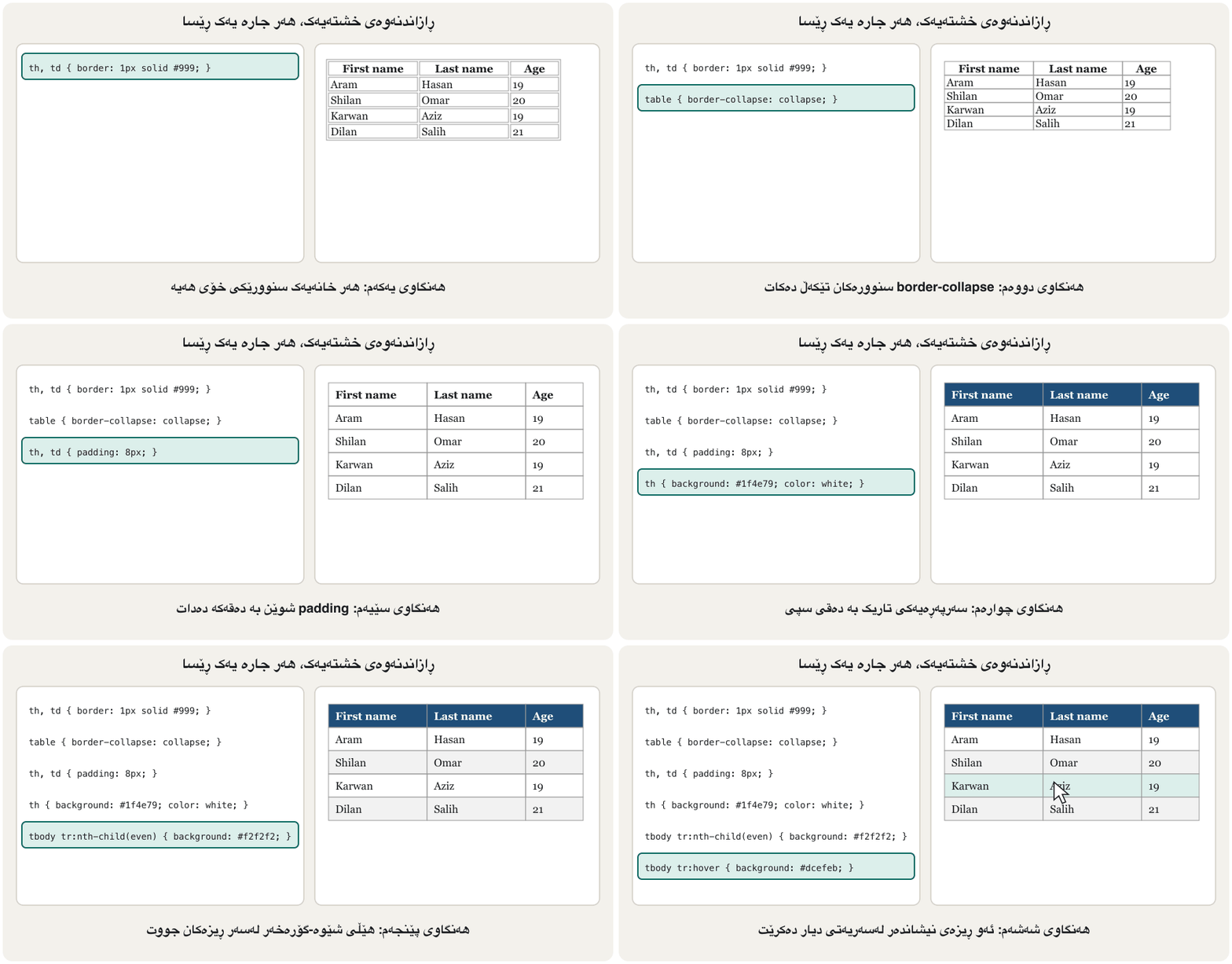
هەمان خشتە بە CSS یەکەم CSSـی پیشان دا. لێرەدا بە تەواوی دەبینیت. لە borderـەوە دێن لەسەر table، th و td. بە شێوەی بنەڕەتی هەر خۆی هەیە، بۆیە هێڵی دووانە بە بۆشایی لە نێوانیاندا دەبینیت؛ border-collapse: collapse دراوسێکان تێکەڵ دەکات بۆ یەک هێڵ. padding شوێن بە دەقەکە دەدات لەناو هەر . text-alignیش جێگەی دیاری دەکات (دەق بەرەو چەپ، ژمارە بەرەو ڕاست).
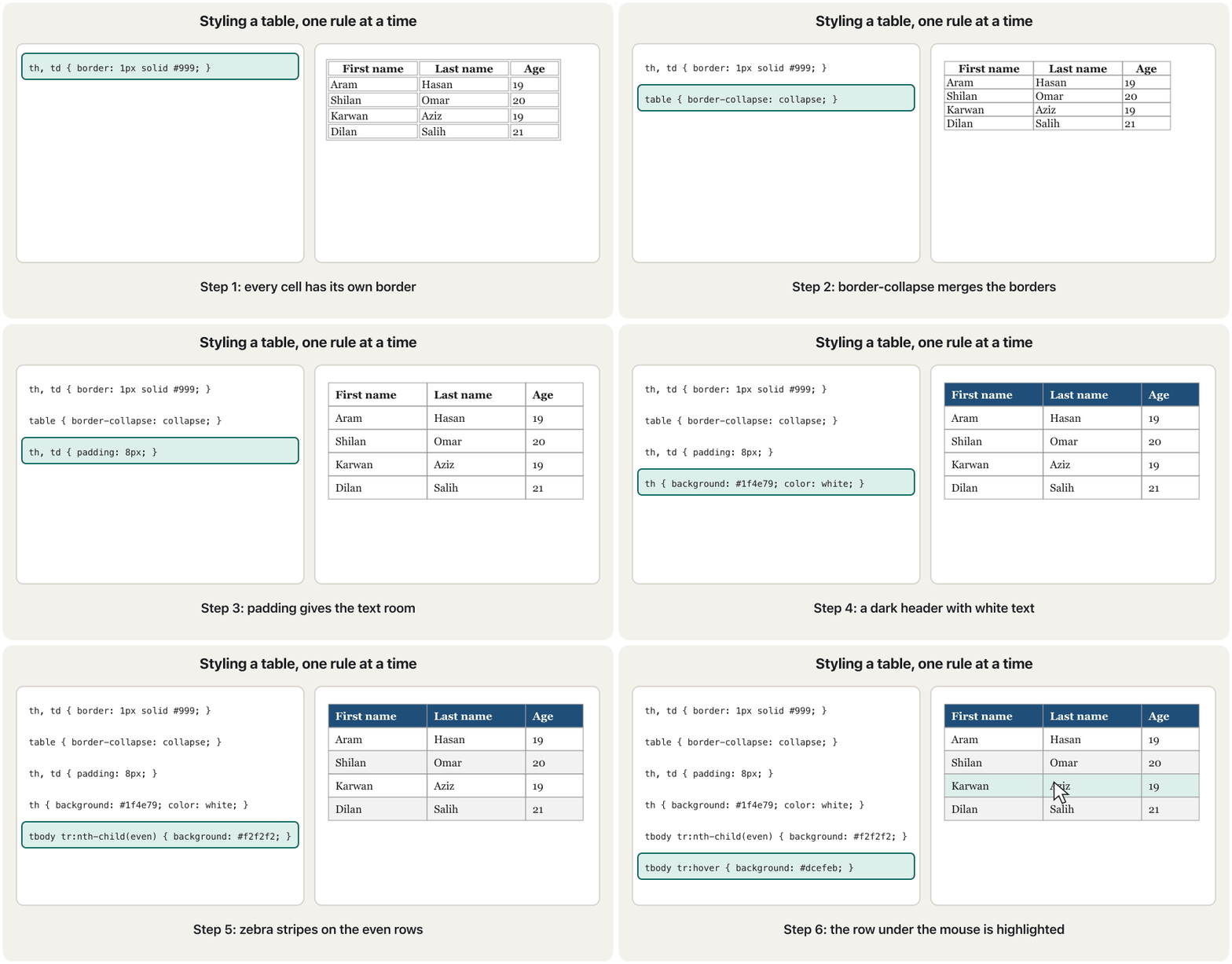
Two pseudo-classes from CSS Selectors make long tables easier to read: tr:nth-child(even) (or odd) colours every other row, the zebra stripes, and tr:hover highlights the row under the mouse pointer.
دوو لە هەڵبژێرەکانی CSS خوێندنەوەی ئاسانتر دەکەن: tr:nth-child(even) (یان odd) هەموو دووەم ڕەنگ دەکات، واتە هێڵی شێوە-گۆرەخەر. tr:hoverیش ئەو دیار دەکات کە لەسەریەتی.
<!DOCTYPE html>
<html lang="en">
<head>
  <meta charset="utf-8">
  <meta name="viewport" content="width=device-width, initial-scale=1">
  <title>Student table</title>
  <style>
    table { border-collapse: collapse; width: 100%; }
    caption { font-weight: bold; padding: 6px; }
    th, td { padding: 8px; text-align: left; border-bottom: 1px solid #ddd; }
    tbody tr:nth-child(even) { background-color: #f2f2f2; }
    tbody tr:hover { background-color: #dcefeb; }
  </style>
</head>
<body>
  <table>
    <caption>Student table</caption>
    <thead>
      <tr><th>First name</th><th>Last name</th><th>Age</th></tr>
    </thead>
    <tbody>
      <tr><td>Aram</td><td>Hasan</td><td>19</td></tr>
      <tr><td>Shilan</td><td>Omar</td><td>20</td></tr>
      <tr><td>Karwan</td><td>Aziz</td><td>19</td></tr>
      <tr><td>Dilan</td><td>Salih</td><td>21</td></tr>
    </tbody>
  </table>
</body>
</html>HTML sent to the browserئەو HTMLـەی دەنێردرێت بۆ تۆڕگەڕ
<!DOCTYPE html>
<html lang="en">
<head>
  <meta charset="utf-8">
  <meta name="viewport" content="width=device-width, initial-scale=1">
  <title>Student table</title>
  <style>
    table { border-collapse: collapse; width: 100%; }
    caption { font-weight: bold; padding: 6px; }
    th, td { padding: 8px; text-align: left; border-bottom: 1px solid #ddd; }
    tbody tr:nth-child(even) { background-color: #f2f2f2; }
    tbody tr:hover { background-color: #dcefeb; }
  </style>
</head>
<body>
  <table>
    <caption>Student table</caption>
    <thead>
      <tr><th>First name</th><th>Last name</th><th>Age</th></tr>
    </thead>
    <tbody>
      <tr><td>Aram</td><td>Hasan</td><td>19</td></tr>
      <tr><td>Shilan</td><td>Omar</td><td>20</td></tr>
      <tr><td>Karwan</td><td>Aziz</td><td>19</td></tr>
      <tr><td>Dilan</td><td>Salih</td><td>21</td></tr>
    </tbody>
  </table>
</body>
</html>
Explain the codeڕوونکردنەوەی کۆدەکە
- Lineدێڕی 12
Written after the zebra rule: both have the same specificity, so the later one wins on even rows too.
دوای ڕێسای شێوە-گۆرەخەرەکە نووسراوە: هەردووکیان هەمان هەیە، بۆیە دواترەکە لەسەر جووتیش دەباتەوە.
Styling an HTML table: collapsed borders, a coloured header row, cell padding, striped rows and a highlighted row.
ڕازاندنەوەی : یەکخستنی ، سەردێڕی ڕەنگکراو، ، بە دوو ڕەنگی گۆڕاوگۆڕ و دیارکراو.
Chapters: table 1:40, header row 3:22, cells 4:47, rows 5:27.
بەشەکان: لە 1:40، سەردێڕ لە 3:22، لە 4:47 و لە 5:27.
Styling tablesڕازاندنەوەی خشتەکان
Worked example: the course author's table projectنموونەی کارپێکراو: پڕۆژەی خشتەی خاوەنی کۆرسەکە
The course author's mini-project "Table" styles a two-column table with blue 2 px borders, collapsed, a burlywood header with white text, centred cells, 40 px text and a blue row on hover. Here it is with neutral names:
مینی-پڕۆژەی «Table»ـی خاوەنی کۆرسەکە دوو ستوونی دەڕازێنێتەوە بە شینی ٢ پیکسڵی کە تێکەڵ کراون، سەرپەڕەیەکی burlywood بە دەقی سپی، ناوەڕاستکراو، دەقی ٤٠ پیکسڵی و شین لە کاتی hover. ئەمە هەمان پڕۆژەیە بە ناوی بێلایەنەوە:
<!DOCTYPE html>
<html lang="en">
<head>
  <meta charset="utf-8">
  <meta name="viewport" content="width=device-width, initial-scale=1">
  <title>Table</title>
  <style>
    table, td, th { border: 2px blue solid; border-collapse: collapse; font-size: 40px; }
    th { background-color: burlywood; color: white; }
    table { width: 100%; margin-top: 15px; }
    td { text-align: center; }
    tr:hover { background-color: blue; }
  </style>
</head>
<body>
  <table>
    <tr><th>F_name</th><th>L_name</th></tr>
    <tr><td>Aram</td><td>Hasan</td></tr>
    <tr><td>Shilan</td><td>Omar</td></tr>
  </table>
</body>
</html>HTML sent to the browserئەو HTMLـەی دەنێردرێت بۆ تۆڕگەڕ
<!DOCTYPE html>
<html lang="en">
<head>
  <meta charset="utf-8">
  <meta name="viewport" content="width=device-width, initial-scale=1">
  <title>Table</title>
  <style>
    table, td, th { border: 2px blue solid; border-collapse: collapse; font-size: 40px; }
    th { background-color: burlywood; color: white; }
    table { width: 100%; margin-top: 15px; }
    td { text-align: center; }
    tr:hover { background-color: blue; }
  </style>
</head>
<body>
  <table>
    <tr><th>F_name</th><th>L_name</th></tr>
    <tr><td>Aram</td><td>Hasan</td></tr>
    <tr><td>Shilan</td><td>Omar</td></tr>
  </table>
</body>
</html>
Two contrast problems: white text on burlywood has a ratio of only about 1.9 : 1, and black text on the blue hover row about 2.4 : 1; both are far below 4.5 : 1. The page also has no doctype, no caption and no <thead>/<tbody>. The fixed version keeps the course author's colours where it can: dark brown text on the burlywood header (about 7.4 : 1) and white text on a dark blue hover row (about 8.7 : 1).
دوو کێشەی : دەقی سپی لەسەر burlywood ڕێژەکەی تەنها نزیکەی 1.9 : 1ـە و دەقی ڕەش لەسەر hover نزیکەی 2.4 : 1؛ هەردووکیان زۆر لە خوار 4.5 : 1ن. لاپەڕەکە هەروەها ، caption و <thead>/<tbody>ـی نییە. وەشانە چاککراوەکە لە هەر شوێنێک بتوانێت ڕەنگەکانی خاوەنی کۆرسەکە دەپارێزێت: دەقی قاوەیی تاریک لەسەر سەرپەڕەی burlywood (نزیکەی 7.4 : 1) و دەقی سپی لەسەر hoverـی شینی تاریک (نزیکەی 8.7 : 1).
<!DOCTYPE html>
<html lang="en">
<head>
  <meta charset="utf-8">
  <meta name="viewport" content="width=device-width, initial-scale=1">
  <title>Students</title>
  <style>
    table, td, th { border: 2px solid blue; border-collapse: collapse; }
    table { width: 100%; margin-top: 15px; font-size: 1.5rem; }
    th { background-color: burlywood; color: #3b2a14; }
    td { text-align: center; }
    tbody tr:hover { background-color: #1f4e79; color: white; }
  </style>
</head>
<body>
  <table>
    <caption>Students of group A</caption>
    <thead>
      <tr><th>First name</th><th>Last name</th></tr>
    </thead>
    <tbody>
      <tr><td>Aram</td><td>Hasan</td></tr>
      <tr><td>Shilan</td><td>Omar</td></tr>
    </tbody>
  </table>
</body>
</html>HTML sent to the browserئەو HTMLـەی دەنێردرێت بۆ تۆڕگەڕ
<!DOCTYPE html>
<html lang="en">
<head>
  <meta charset="utf-8">
  <meta name="viewport" content="width=device-width, initial-scale=1">
  <title>Students</title>
  <style>
    table, td, th { border: 2px solid blue; border-collapse: collapse; }
    table { width: 100%; margin-top: 15px; font-size: 1.5rem; }
    th { background-color: burlywood; color: #3b2a14; }
    td { text-align: center; }
    tbody tr:hover { background-color: #1f4e79; color: white; }
  </style>
</head>
<body>
  <table>
    <caption>Students of group A</caption>
    <thead>
      <tr><th>First name</th><th>Last name</th></tr>
    </thead>
    <tbody>
      <tr><td>Aram</td><td>Hasan</td></tr>
      <tr><td>Shilan</td><td>Omar</td></tr>
    </tbody>
  </table>
</body>
</html>Common mistakesهەڵەکانی باو
| Mistake | What happensچی ڕوودەدات | Fixچارەسەر |
|---|---|---|
font-family: Times New Roman; (no quotes, no generic)font-family: Times New Roman; (بێ ، بێ گشتی) | Valid, but there is no fallback if the font is missing; quotes make the name clear.دروستە، بەڵام ئەگەر نەبێت جێگرەوە نییە؛ ناوەکە ڕوون دەکاتەوە. | "Times New Roman", serif |
text-shadow: #0cc;text-shadow: #0cc; | Invalid, no shadow.نادروستە، سێبەر نییە. | text-shadow: 1px 1px #0cc; |
letter-spacing on Kurdishletter-spacing لەسەر کوردی | Ignored or broken words.پشتگوێ دەخرێت یان وشەکان دەشکێن. | Leave Kurdish letter spacing alone.بۆشایی پیتی کوردی بەجێ بهێڵە. |
letter-spacing: px; (no number)letter-spacing: px; (بێ ژمارە) | Invalid, ignored.نادروستە، پشتگوێ دەخرێت. | letter-spacing: 2px; |
font: bold; alonefont: bold; بە تەنها | Invalid shorthand.کورتکراوەی نادروست. | font-weight: bold; or font: bold 16px Arial, sans-serif;font-weight: bold; یان font: bold 16px Arial, sans-serif; |
background-image: url(img/bg.jpg) from css/style.cssbackground-image: url(img/bg.jpg) لە css/style.cssـەوە | Looks for css/img/bg.jpg; no picture.بە دوای css/img/bg.jpgدا دەگەڕێت؛ وێنە نییە. | Path relative to the CSS file: url("../img/bg.jpg"). پەیوەست بە CSSـەوە: url("../img/bg.jpg"). |
p.jpg in CSS, p.JPG on diskp.jpg لە CSSـدا، p.JPG لەسەر دیسک | Works on Windows and macOS, fails on a Linux server.لە Windows و macOSـدا کار دەکات، لەسەر Linux نا. | Use lowercase file names everywhere.لە هەموو شوێنێک ناوی فایلی بە پیتی بچووک بەکاربهێنە. |
tr:hover before the zebra ruletr:hover پێش ڕێسای شێوە-گۆرەخەر | No hover on even rows.hover لەسەر جووت نییە. | Write :hover last.:hover لە کۆتاییدا بنووسە. |
| White text on a light backgroundدەقی سپی لەسەر باکگراوندی کاڵ | Hard to read.خوێندنەوەی قورسە. | Check the contrast (4.5 : 1). بپشکنە (4.5 : 1). |
Exercisesڕاهێنانەکان
Style a short article: a sans-serif heading in a dark colour, serif body text with a comfortable line height, a grey italic line under the title, and the whole article no wider than about 40em, centred on the page.
وتارێکی کورت بڕازێنەوە: سەردێڕێکی sans-serif بە ڕەنگێکی تاریک، دەقی سەرەکیی serif بە line-heightـێکی ئاسوودە، دێڕێکی خۆڵەمێشیی لار لە ژێر ناونیشانەکەدا و هەموو وتارەکە پانییەکەی لە نزیکەی 40em زیاتر نەبێت و لە ناوەڕاستی لاپەڕەکەدا بێت.
Show answerوەڵامەکە پیشان بدە
<!DOCTYPE html>
<html lang="en">
<head>
  <meta charset="utf-8">
  <meta name="viewport" content="width=device-width, initial-scale=1">
  <title>Article</title>
  <style>
    body    { font-family: Georgia, "Times New Roman", serif; color: #222222;
              background-color: #fdfaf3; }
    article { max-width: 40em; margin: 0 auto; }
    h1      { font-family: Verdana, Arial, sans-serif; color: #0a5a52; }
    .meta   { color: #6b7078; font-style: italic; }
    p       { line-height: 1.7; font-size: 1.1rem; }
  </style>
</head>
<body>
  <article>
    <h1>Lake Dukan in spring</h1>
    <p class="meta">By Hana · 12 April</p>
    <p>Every spring the lake fills with water from the mountains, and families from
    Sulaymaniyah and Erbil come for picnics along the shore.</p>
    <p>The road from Sulaymaniyah takes about an hour by car.</p>
  </article>
</body>
</html>HTML sent to the browserئەو HTMLـەی دەنێردرێت بۆ تۆڕگەڕ
<!DOCTYPE html>
<html lang="en">
<head>
  <meta charset="utf-8">
  <meta name="viewport" content="width=device-width, initial-scale=1">
  <title>Article</title>
  <style>
    body    { font-family: Georgia, "Times New Roman", serif; color: #222222;
              background-color: #fdfaf3; }
    article { max-width: 40em; margin: 0 auto; }
    h1      { font-family: Verdana, Arial, sans-serif; color: #0a5a52; }
    .meta   { color: #6b7078; font-style: italic; }
    p       { line-height: 1.7; font-size: 1.1rem; }
  </style>
</head>
<body>
  <article>
    <h1>Lake Dukan in spring</h1>
    <p class="meta">By Hana · 12 April</p>
    <p>Every spring the lake fills with water from the mountains, and families from
    Sulaymaniyah and Erbil come for picnics along the shore.</p>
    <p>The road from Sulaymaniyah takes about an hour by car.</p>
  </article>
</body>
</html>
max-width and margin: 0 auto are explained in Centring a box: margin: 0 auto; here they keep the lines short and centre the article.
max-width و margin: 0 auto لە ناوەڕاستکردنی سندووقێک: margin: 0 auto ڕوون کراونەتەوە؛ لێرەدا دێڕەکان کورت دەهێڵنەوە و وتارەکە ناوەڕاست دەکەن.
Make the price list of a tea house from a <ul>: no bullets, a tea-cup sign before each item with ::before, every other item coloured, a dashed line under each item, and the prices in bold. Use IQD.
لیستی نرخی چایخانەیەک لە <ul>ـێک دروست بکە: بێ خاڵ، نیشانەی پیاڵەی چا پێش هەر بەندێک بە ::before، هەموو بەندێکی دووەم ڕەنگکراو، هێڵێکی پچڕپچڕ لە ژێر هەر بەندێک و نرخەکان بە تۆخی. IQD بەکاربهێنە.
Show answerوەڵامەکە پیشان بدە
<!DOCTYPE html>
<html lang="en">
<head>
  <meta charset="utf-8">
  <meta name="viewport" content="width=device-width, initial-scale=1">
  <title>Price list</title>
  <style>
    .prices { list-style: none; padding: 0; max-width: 20em; font-family: Arial, sans-serif; }
    .prices li { padding: 8px; border-bottom: 1px dashed #b4530f; }
    .prices li:nth-child(odd) { background-color: #fdf3e1; }
    .prices li::before { content: "\2615\0020"; }
    .prices span { font-weight: bold; color: #0a5a52; }
  </style>
</head>
<body>
  <h1>Tea house prices</h1>
  <ul class="prices">
    <li>Tea <span>500 IQD</span></li>
    <li>Coffee <span>1,500 IQD</span></li>
    <li>Ayran <span>1,000 IQD</span></li>
  </ul>
</body>
</html>HTML sent to the browserئەو HTMLـەی دەنێردرێت بۆ تۆڕگەڕ
<!DOCTYPE html>
<html lang="en">
<head>
  <meta charset="utf-8">
  <meta name="viewport" content="width=device-width, initial-scale=1">
  <title>Price list</title>
  <style>
    .prices { list-style: none; padding: 0; max-width: 20em; font-family: Arial, sans-serif; }
    .prices li { padding: 8px; border-bottom: 1px dashed #b4530f; }
    .prices li:nth-child(odd) { background-color: #fdf3e1; }
    .prices li::before { content: "\2615\0020"; }
    .prices span { font-weight: bold; color: #0a5a52; }
  </style>
</head>
<body>
  <h1>Tea house prices</h1>
  <ul class="prices">
    <li>Tea <span>500 IQD</span></li>
    <li>Coffee <span>1,500 IQD</span></li>
    <li>Ayran <span>1,000 IQD</span></li>
  </ul>
</body>
</html>
Explain the codeڕوونکردنەوەی کۆدەکە
- Lineدێڕی 11
\2615is the code of the hot drink sign ☕.\2615کۆدی نیشانەی خواردنەوەی گەرمە ☕.
Take the student table of this lesson and change it: the header row dark blue with white text, zebra stripes on the odd rows instead of the even ones, the Age column right-aligned, and a hover colour that also works on striped rows.
قوتابیانی ئەم وانەیە وەربگرە و بیگۆڕە: سەرەوە شینی تاریک بە دەقی سپی، هێڵی شێوە-گۆرەخەر لەسەر تاک لەبری جووت، ستوونی Age بەرەو ڕاست ڕێکخراو و ڕەنگێکی hover کە لەسەر هێڵدارەکانیش کار بکات.
Show answerوەڵامەکە پیشان بدە
thead th { background-color: #1f4e79; color: white; }
tbody tr:nth-child(odd) { background-color: #f2f2f2; }
td:nth-child(3), th:nth-child(3) { text-align: right; }
tbody tr:hover { background-color: #dcefeb; } /* last, so it wins */Summaryپوختە
- Fonts:
font-familystack ending with a generic family (quote names with spaces),font-size,font-style,font-weight; thefontshorthand needs size and family. - Kurdish: a font with Kurdish letters (Noto Naskh Arabic, Noto Sans Arabic, Vazirmatn),
text-align: start, a larger line height, no letter-spacing;text-transformdoes nothing to Kurdish letters. - Text:
color,text-align,text-decoration,text-indent,text-transform,word-spacing,line-height;text-shadowneeds two offsets. - Backgrounds: colour, image, repeat, position, attachment, size (
cover,contain), gradients and thebackgroundshorthand. - Lists:
list-style-type,list-style-position,list-style-imageandlist-style(three properties, not five);::marker. - Tables:
border-collapse: collapse, padding, zebra rows with:nth-child,:hoverlast, readable contrast.
- : ڕیزی
font-familyکە بە خێزانێکی گشتی کۆتایی دێت (ناوی لەناو )،font-size،font-style،font-weight؛ کورتکراوەیfontقەبارە و خێزانی پێویستە. - کوردی: بە پیتی کوردییەوە (Noto Naskh Arabic، Noto Sans Arabic، Vazirmatn)،
text-align: start، line-heightـی گەورەتر، بێ letter-spacing؛text-transformهیچ لە پیتە کوردییەکان ناکات. - دەق:
color،text-align،text-decoration،text-indent،text-transform،word-spacing،line-height؛text-shadowدوو لادانی پێویستە. - باکگراوند: ڕەنگ، وێنە، repeat، position، attachment، size (
cover،contain)، و کورتکراوەیbackground. - لیست:
list-style-type،list-style-position،list-style-imageوlist-style(سێ ، نەک پێنج)؛::marker. - :
border-collapse: collapse، padding، شێوە-گۆرەخەر بە:nth-child،:hoverلە کۆتاییدا، خوێنراو.
What are the five background properties of the lecture?پێنج تایبەتمەندییەکەی باکگراوندی وانەکە چین؟
background-color, background-image, background-repeat, background-attachment, background-position (and today also background-size).
background-color، background-image، background-repeat، background-attachment، background-position (و ئەمڕۆ background-sizeیش).
How do you colour every second row of a table?چۆن هەموو ڕیزێکی دووەمی خشتەیەک ڕەنگ دەکەیت؟
With tr:nth-child(even) (or odd) and a background-color.
بە tr:nth-child(even) (یان odd) و background-colorـێک.
Lesson complete!وانەکە تەواو بوو!
Well done. Review the key terms, then go on to the next lesson.دەستخۆش. سەیرێکی زاراوە سەرەکییەکان بکەرەوە، پاشان بڕۆ بۆ وانەی داهاتوو.
Key termsزاراوە سەرەکییەکان
The CSS Box Model: Margin, Border and Paddingمۆدێلی سندووقی CSS: پەراوێز، سنوور و بۆشایی ناوەوە
Related lecturesوانە پەیوەندیدارەکان
- HTML Basics: Documents, Links and Tablesبنەماکانی HTML: بەڵگەنامە، بەستەرەکان و خشتەکان
- HTML Text, Images and Listsدەق، وێنە و لیست لە HTMLـدا
- Websites and Web Developmentتۆڕگەکان و دروستکردنیان
- The CSS Box Model: Margin, Border and Paddingمۆدێلی سندووقی CSS: پەراوێز، سنوور و بۆشایی ناوەوە
- Positioning and Page Layoutشوێندانان و ڕێکخستنی لاپەڕە
References and further readingسەرچاوەکان و خوێندنەوەی زیاتر
- MDN Learn: Fundamental text and font styling
- MDN: font-family
- MDN: font (shorthand)
- MDN: text-shadow
- MDN: letter-spacing (internationalization concerns)
- MDN: text-transform
- MDN: background-size
- MDN: list-style
- MDN: list-style-type
- MDN: ::marker
- MDN Learn: Styling tables
- Google Fonts metadata: Noto Naskh Arabic (languages include ckb_Arab)
This lecture is a first edition. The Kurdish text and terminology are waiting for review by Kurdish IT teachers.ئەم وانەیە چاپی یەکەمە. دەقە کوردییەکە و زاراوەکانی چاوەڕێی پێداچوونەوەی مامۆستایانی کوردی بواری IT ن.