Chapterبەش 4 · Lectureوانە 4.6
Project: Building and Styling Pagesپڕۆژە: دروستکردن و ڕازاندنەوەی لاپەڕە
The course author's own projects rebuilt: one registration form in four layouts (absolute columns, a table, floats, then one CSS grid that also works in Kurdish), a responsive login card, two boxes over a background, a business template rebuilt with grid areas, two capstone projects with model answers and a checklist before you publish.
پڕۆژەکانی خودی خاوەنی کۆرسەکە دووبارە دروستکراون: یەک تۆمارکردن بە چوار (ستوونی absolute، ، float، پاشان یەک کە لە کوردیشدا کار دەکات)، کارتێکی چوونەژوورەوەی ڕێسپۆنسیڤ، دوو سندووق لەسەر باکگراوندێک، قاڵبێکی بازرگانی کە بە ناوچەکانی grid دووبارە دروستکراوە، دوو پڕۆژەی کۆتایی بە وەڵامی نموونەییەوە و لیستێکی پشکنین پێش .
What you will learnچی فێر دەبیت
- Find the problems in an existing page: missing form parts, typos, layouts that line up by luck, fixed sizes, wrong file names.
- Build a real form with labels and lay it out with a two-column grid that also works right to left.
- Make a card and a whole page responsive with max-width, box-sizing, flexbox, grid areas and a media query.
- Share one external style sheet between several pages.
- Check a page before publishing: validators, links, alt text, contrast, phone width, keyboard.
- کێشەکانی لاپەڕەیەکی ئامادە بدۆزیتەوە: بەشی ونبووی ، هەڵەی نووسین، ڕێکەوتی، قەبارەی جێگیر، ناوی هەڵە.
- ڕاستەقینە بە دروست بکەیت و بە gridـێکی دوو ستوونی ڕێکی بخەیت کە بە کار بکات.
- کارتێک و هەموو لاپەڕەیەک بە max-width، box-sizing، ، ناوچەکانی grid و ڕێسپۆنسیڤ بکەیت.
- یەک دەرەکی لە نێوان چەند لاپەڕەیەکدا بەش بکەیت.
- لاپەڕەیەک پێش بپشکنیت: پشکنەرەکانی W3C، ، ، ، پانیی مۆبایل، .
Building real pages from your own projectsدروستکردنی لاپەڕەی ڕاستەقینە لە پڕۆژەکانی خۆتەوە
This lesson puts the whole CSS chapter to work on the course author's own practice projects: a registration form built three ways, a login card, a page with two boxes and a business template from a practical test. For each one we run the original, list what is wrong or old, keep what is good and rebuild it with today's HTML and CSS. Two bigger projects with model answers end the lesson.
ئەم وانەیە هەموو بەشی CSS لەسەر پڕۆژەکانی ڕاهێنانی خودی خاوەنی کۆرسەکە بەکار دەهێنێت: تۆمارکردن کە بە سێ ڕێگە دروستکراوە، کارتێکی چوونەژوورەوە، لاپەڕەیەک بە دوو سندووقەوە و قاڵبێکی بازرگانی لە تاقیکردنەوەیەکی پراکتیکییەوە. بۆ هەریەکەیان وەشانە سەرەتاییەکە کار پێدەکەین، ئەوەی هەڵە یان کۆنە دەینووسین، ئەوەی باشە دەیپارێزین و بە و CSSـی ئەمڕۆ دووبارە دروستی دەکەینەوە. دوو پڕۆژەی گەورەتر بە وەڵامی نموونەییەوە وانەکە کۆتایی پێدەهێنن.
Plan the parts on paper: header, menu, content, form fields.
بەشەکان لەسەر کاغەز پلان بکە: ، ، ناوەڕۆک، خانەکانی .
Write the HTML for meaning first: headings, lists, a real
<form>with labels.سەرەتا بۆ واتا بنووسە: سەردێڕ، لیست،
<form>ـێکی ڕاستەقینە بە .Link one CSS file and style it step by step, checking in the browser.
یەک CSS ببەستەوە و هەنگاو بە هەنگاو بیڕازێنەوە و لە بیپشکنە.
Inspect with the when something is in the wrong place.
کاتێک شتێک لە شوێنی هەڵەدایە بە بیپشکنە.
Check it: the validators, a phone width, the keyboard, a Kurdish version (the checklist at the end).
بیپشکنە: پشکنەرەکانی W3C، پانیی مۆبایل، ، وەشانێکی کوردی (لیستی پشکنین لە کۆتاییدا).
Project 1: one form, four layoutsپڕۆژەی ١: یەک فۆرم، چوار ڕێکخستنی لاپەڕە
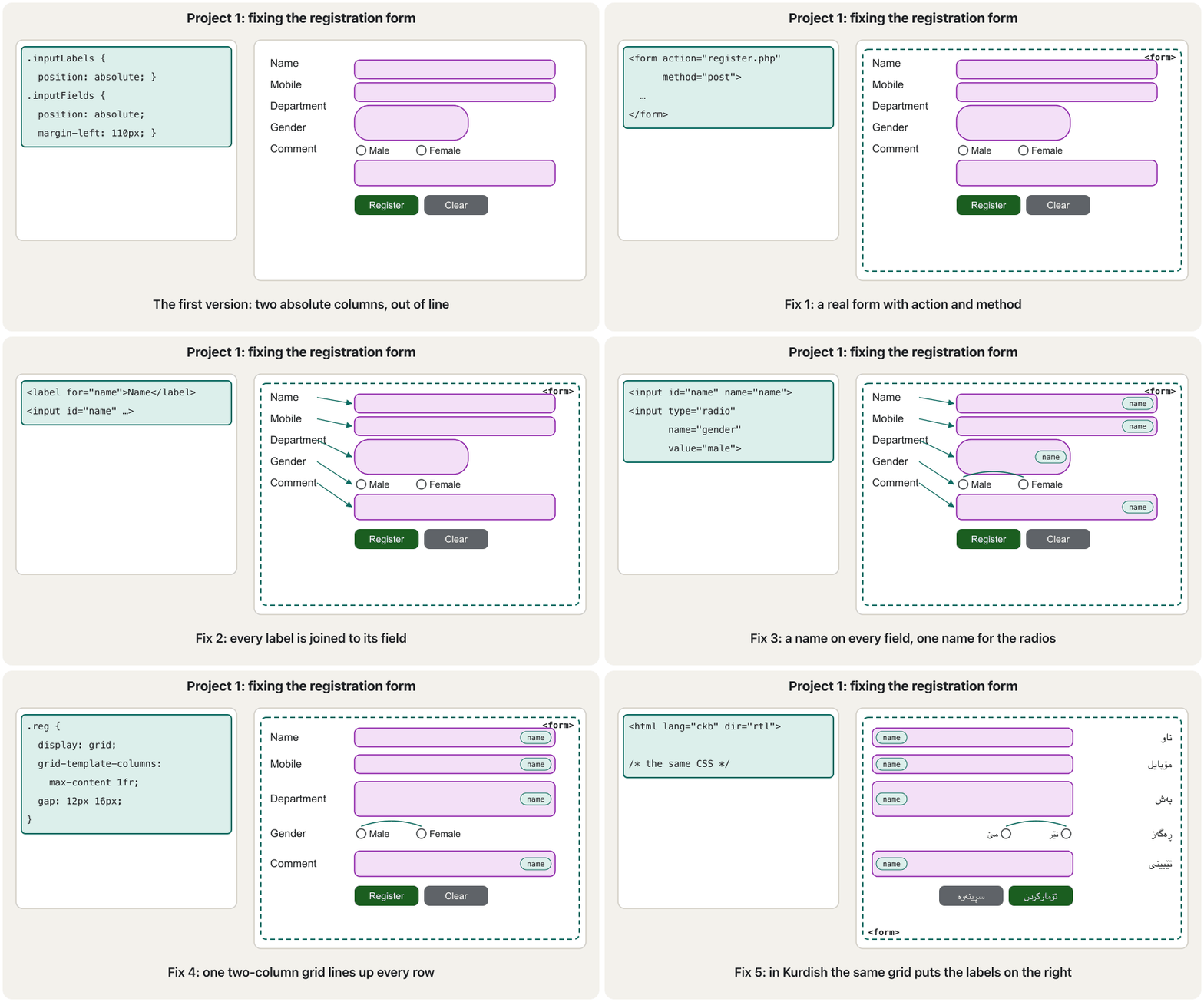
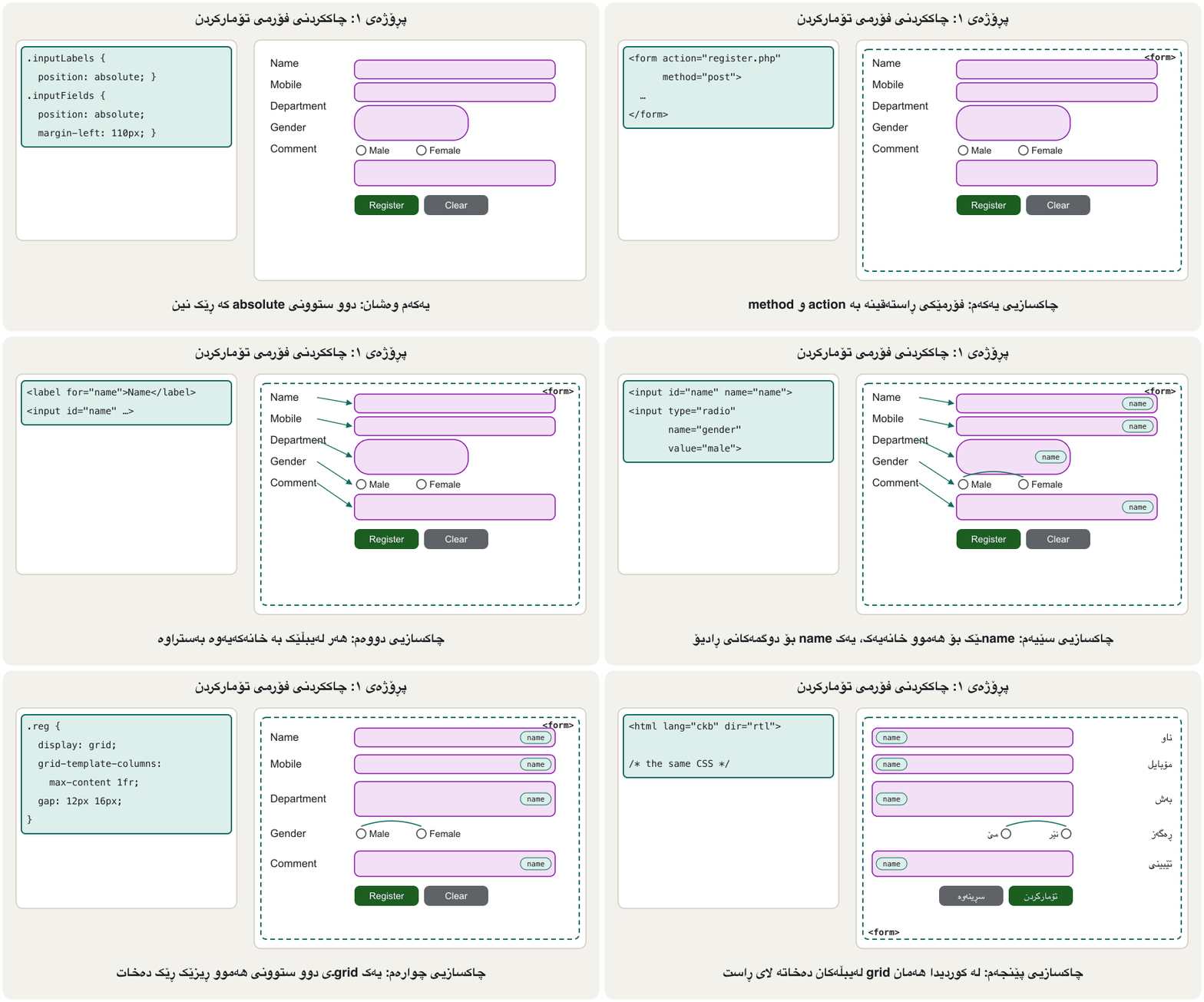
The course author built the same registration page three times — Name, Mobile number, Department, Gender, Comment, and Register / Clear buttons — each time with a different way of lining up the labels and the fields: two absolutely positioned columns, a table, and a float plus an inline-block column. Here are the three, run again in Chrome, next to the clean grid version you will build at the end of this project.
خاوەنی کۆرسەکە هەمان لاپەڕەی تۆمارکردنی سێ جار دروست کرد — ناو، ژمارەی مۆبایل، بەش، ڕەگەز، تێبینی و Register / Clear — هەر جارە بە ڕێگەیەکی جیاوازی ڕیزکردنی و خانەکان: دوو ستوونی absolute، و ستوونێکی float لەگەڵ ستوونێکی inline-block. ئەمە هەر سێکیانن، دووبارە لە Chromeـدا کارپێکراون، لە تەنیشت وەشانە پاکەکەی grid کە لە کۆتایی ئەم پڕۆژەیەدا دروستی دەکەیت.
Project 1: one form, four layoutsپڕۆژەی ١: یەک فۆرم، چوار ڕێکخستنی لاپەڕە
Version 1: two absolute columnsوەشانی ١: دوو ستوونی absolute
The labels are <p> elements in one absolutely positioned div; the fields are in a second one, pushed 110 px to the right. Each column is placed on its own, so a row lines up only if the label and the field happen to be the same height.
<p>ن لە divـێکی absoluteـدا؛ خانەکان لە دووەمیاندان، ١١٠ بەرەو ڕاست پاڵنراو. هەر ستوونێک بە تەنها دادەنرێت، بۆیە ڕیزێک تەنها ئەو کاتە ڕێک دێتەوە کە و خانەکە بە ڕێکەوت هاوبەرز بن.
<style>
  .inputLabels { position: absolute; }
  .inputFields { position: absolute; margin-left: 110px; }
  .firstStyle  { height: 45px; background-color: violet; border-color: red;
                 padding: 15px; padding-left: 40px; border-radius: 15px; }
  .selectorStyle { border-radius: 500px; padding-left: 40px; padding: 40px; }
</style>

<div class="inputLabels">
  <p>Name</p>
  <p>Mobile Number</p>
  <p>Department</p>
  <p>Gender</p>
  <p>Comment</p>
</div>

<div class="inputFields">
  <input type="text" class="firstStyle" placeholder="insert full name"><br>
  <input type="text" class="firstStyle" placeholder="Mobile number"><br>
  <select class="selectorStyle"><option>IT</option><option>Marketing</option></select><br>
  <input type="radio">Male <input type="radio">Female<br>
  <textarea></textarea><br>
  <button>Register</button>
  <button>Clear</button>
</div>- No
<form>element and nonameattributes: pressing Register sends nothing (The form element). <p>instead of<label for>: clicking a word does not focus the field, and screen readers do not know which label belongs to which field (Labels: name, id and for).- The two radio buttons have no shared
name, so both can be ticked (Radio buttons and checkboxes). - "Clear" does nothing outside a form. In
.selectorStyle,padding-left: 40pxis overwritten at once by thepadding: 40pxshorthand on the same line (the later declaration wins), andborder-radius: 500pxturns the select into the huge pill of the screenshot. - The columns line up only by luck: the tall select and the radio row push everything out of line.
-
<form>وnameنین: داگرتنی Register هیچ نانێرێت (توخمی form). <p>لەبری<label for>: کلیککردنی وشەیەک خانەکە چالاک ناکات و نازانن کام هی کام خانەیە (لەیبڵەکان: name، id و for).- هەردوو
nameـی هاوبەشیان نییە، بۆیە هەردووکیان دەتوانرێن نیشانە بکرێن (دوگمەکانی ڕادیۆ و چێکبۆکسەکان). - «Clear» لە دەرەوەی هیچ ناکات. لە
.selectorStyleـداpadding-left: 40pxیەکسەر بە کورتکراوەیpadding: 40pxـی هەمان دێڕ دەسڕدرێتەوە ( دواتر دەباتەوە)، هەروەهاborder-radius: 500pxselectـەکە دەکاتە ئەو حەبە گەورەیەی . - ستوونەکان تەنها بە ڕێکەوت ڕێک دێنەوە: selectـە بەرزەکە و ڕیزی هەموو شتێک لە ڕیز دەردەکەن.
Project 1: one form, four layoutsپڕۆژەی ١: یەک فۆرم، چوار ڕێکخستنی لاپەڕە
Version 2: a layout tableوەشانی ٢: خشتەیەکی ڕێکخستن
The second version puts every label in one table cell and its field in the next. The rows now line up, and the radio buttons share name="gender", so only one can be chosen. A picture is placed with position: absolute in the top-right corner.
وەشانی دووەم هەر دەخاتە خانەیەکی و خانەکەی لە خانەی دواتردا. ئێستا ڕیزەکان ڕێک دێنەوە و name="gender"یان هاوبەشە، بۆیە تەنها یەکێکیان هەڵدەبژێردرێت. وێنەیەک بە position: absolute لە گۆشەی سەرەوەی ڕاست دادەنرێت.
<table>
  <tr>
    <td>Name</td>
    <td><input type="tex" placeholder="insert full name" style="width: 250px;"></td>
  </tr>
  <tr>
    <td>Gender</td>
    <td><input type="radio" name="gender"> Male <input type="radio" name="gender"> Female</td>
  </tr>
  <!-- … Mobile number, Department, Comment, Register / Clear … -->
</table>

<style>
  img { position: absolute; width: 100; height: 100px; top: 20px; right: 8px; }
</style>type="tex"is a typo: the browser does not know it and falls back to a text box, so it works by accident.width: 100;has no unit, so the browser ignores it (only0may be written without a unit).- A table used for layout (Page layout with a table): screen readers announce rows and columns of "data" that are not data, and it does not adapt to phones.
- Still no
<form>, no<label>and nonameon the text fields.
type="tex"هەڵەی نووسینە: نایناسێت و دەگەڕێتەوە بۆ ، بۆیە بە ڕێکەوت کار دەکات.width: 100;یەکەی نییە، بۆیە پشتگوێی دەخات (تەنها0دەتوانرێت بێ یەکە بنووسرێت).- بۆ ڕێکخستن بەکارهاتووە (ڕێکخستنی لاپەڕە بە خشتە): ڕیز و ستوونی «دراوە» دەخوێننەوە کە دراوە نین. لەگەڵ مۆبایلیشدا ناگونجێت.
- هێشتا
<form>،<label>وnameلەسەر نییە.
Project 1: one form, four layoutsپڕۆژەی ١: یەک فۆرم، چوار ڕێکخستنی لاپەڕە
Version 3: float and tuned line-heightsوەشانی ٣: float و line-heightـی ڕێکخراو
The third version floats the label column to the left and puts the fields in an inline-block column. To make the first three labels line up with their fields, their line-height is tuned by hand to 2.1.
وەشانی سێیەم ستوونی float دەکات بۆ چەپ و خانەکان دەخاتە ستوونێکی inline-block. بۆ ئەوەی سێ یەکەم لەگەڵ خانەکانیان ڕێک بێنەوە، line-heightـیان بە دەست دەکرێتە 2.1.
<style>
  .firstDiv    { float: left; margin-right: 5px; }
  .threeLabels { line-height: 2.1; }      /* tuned until the rows match */
  .secondDiv   { display: inline-block; }
</style>

<div class="firstDiv">
  <div class="threeLabels">
    <label>Name</label><br>
    <label>Mobile number</label><br>
    <label>Department</label>
  </div>
  <label>Gender</label><br>
  <label>Comment</label>
</div>
<div class="secondDiv">
  <input type="text" placeholder="Insert Full Name"><br>
  <input type="text" placeholder="Mobile Number"><br>
  <select><option>IT</option></select><br>
  <input type="radio"> Male <input type="radio"> Female<br>
  <textarea></textarea><br>
  <button>Register</button> <button>Clear</button>
</div>
Now there are real <label> elements, but they are not joined to their fields (no for/id), the radios still have no name, and the Department list has one option. The tuned line-height matches only these field heights in this font: change the font size, the padding of one field, or the browser, and the rows drift apart — as they already do for Gender and Comment. Absolute columns, a table, a float with magic numbers: three old ways. The modern answer is one grid.
ئێستا <label>ـی ڕاستەقینە هەن، بەڵام بە خانەکانیانەوە نەبەستراون (for/id نییە)، هێشتا nameیان نییە و لیستی Department یەک هەڵبژاردەی هەیە. line-heightـە ڕێکخراوەکە تەنها لەگەڵ بەرزیی ئەم خانانە و ئەم دەگونجێت: قەبارەی ، یەک خانە یان بگۆڕە و ڕیزەکان لێک دوور دەکەونەوە — هەروەک ئێستا بۆ Gender و Comment ڕوویداوە. ستوونی absolute، ، float بە ژمارەی جادوویی: سێ ڕێگەی کۆن. وەڵامی نوێ یەک gridـە.
Project 1: one form, four layoutsپڕۆژەی ١: یەک فۆرم، چوار ڕێکخستنی لاپەڕە
The clean version: a real form on a gridوەشانی پاک: فۆرمێکی ڕاستەقینە لەسەر grid
The rebuilt form fixes the HTML first: one <form> that posts to a PHP page, a <label for> for every field, a name on every field, one shared name for the radio group, a tel field for the phone number, and real submit and reset buttons. Then one grid rule does the layout: grid-template-columns: max-content 1fr makes a label column exactly as wide as the longest label and gives the fields the rest. Every label and its field share a row, whatever their heights.
نوێکراوەکە سەرەتا چاک دەکات: یەک <form> کە بە POST دەنێرێت بۆ لاپەڕەیەکی PHP، <label for>ـێک بۆ هەموو خانەیەک، nameـێک لەسەر هەموو خانەیەک، یەک nameـی هاوبەش بۆ کۆمەڵەی ، خانەیەکی tel بۆ ژمارەی مۆبایل و ڕاستەقینەی ناردن و سڕینەوە. پاشان یەک ڕێسای grid ڕێکخستنەکە دەکات: grid-template-columns: max-content 1fr ستوونێکی دروست دەکات کە ڕێک بەقەد درێژترین پانە و باقییەکە دەداتە خانەکان. هەر و خانەکەی یەک ڕیز بەش دەکەن، بەرزییان هەرچەند بێت.
<!DOCTYPE html>
<html lang="en">
<head>
  <meta charset="utf-8">
  <meta name="viewport" content="width=device-width, initial-scale=1">
  <title>Course Registration</title>
  <style>
    * { box-sizing: border-box; }
    body { margin: 0; font-family: Arial, sans-serif; background-color: #e6f7f5; }
    .site { padding: 8px; background-color: white; text-align: center; }
    .site h1 { margin: 0; font-size: 1.6rem; color: #a4161a; }
    .reg {
      display: grid;
      grid-template-columns: max-content 1fr;   /* labels | fields */
      gap: 12px 16px;
      align-items: center;
      max-width: 560px;
      margin: 24px auto;
      padding: 0 16px;
    }
    .reg input[type="text"], .reg input[type="tel"], .reg select, .reg textarea {
      width: 100%;
      padding: 10px 14px;
      border: 2px solid #8e24aa;
      border-radius: 12px;
      background-color: #f3e0f7;
      font: inherit;
    }
    .choices { display: flex; gap: 16px; }
    .buttons { grid-column: 2; display: flex; gap: 8px; }
    button { padding: 10px 20px; border: 0; border-radius: 10px;
             background-color: #1b5e20; color: white; font: inherit; }
    button[type="reset"] { background-color: #5f6368; }
  </style>
</head>
<body>
  <header class="site"><h1>Course Registration</h1></header>
  <main>
    <form class="reg" action="register.php" method="post">
      <label for="name">Name</label>
      <input type="text" id="name" name="name" placeholder="Full name" required>

      <label for="mobile">Mobile number</label>
      <input type="tel" id="mobile" name="mobile" placeholder="0750 000 0000">

      <label for="dept">Department</label>
      <select id="dept" name="department">
        <option value="it">IT</option>
        <option value="marketing">Marketing</option>
      </select>

      <span id="gender-label">Gender</span>
      <div class="choices" role="radiogroup" aria-labelledby="gender-label">
        <label><input type="radio" name="gender" value="male"> Male</label>
        <label><input type="radio" name="gender" value="female"> Female</label>
      </div>

      <label for="comment">Comment</label>
      <textarea id="comment" name="comment" rows="3"></textarea>

      <div class="buttons">
        <button type="submit">Register</button>
        <button type="reset">Clear</button>
      </div>
    </form>
  </main>
</body>
</html>HTML sent to the browserئەو HTMLـەی دەنێردرێت بۆ تۆڕگەڕ
<!DOCTYPE html>
<html lang="en">
<head>
  <meta charset="utf-8">
  <meta name="viewport" content="width=device-width, initial-scale=1">
  <title>Course Registration</title>
  <style>
    * { box-sizing: border-box; }
    body { margin: 0; font-family: Arial, sans-serif; background-color: #e6f7f5; }
    .site { padding: 8px; background-color: white; text-align: center; }
    .site h1 { margin: 0; font-size: 1.6rem; color: #a4161a; }
    .reg {
      display: grid;
      grid-template-columns: max-content 1fr;   /* labels | fields */
      gap: 12px 16px;
      align-items: center;
      max-width: 560px;
      margin: 24px auto;
      padding: 0 16px;
    }
    .reg input[type="text"], .reg input[type="tel"], .reg select, .reg textarea {
      width: 100%;
      padding: 10px 14px;
      border: 2px solid #8e24aa;
      border-radius: 12px;
      background-color: #f3e0f7;
      font: inherit;
    }
    .choices { display: flex; gap: 16px; }
    .buttons { grid-column: 2; display: flex; gap: 8px; }
    button { padding: 10px 20px; border: 0; border-radius: 10px;
             background-color: #1b5e20; color: white; font: inherit; }
    button[type="reset"] { background-color: #5f6368; }
  </style>
</head>
<body>
  <header class="site"><h1>Course Registration</h1></header>
  <main>
    <form class="reg" action="register.php" method="post">
      <label for="name">Name</label>
      <input type="text" id="name" name="name" placeholder="Full name" required>

      <label for="mobile">Mobile number</label>
      <input type="tel" id="mobile" name="mobile" placeholder="0750 000 0000">

      <label for="dept">Department</label>
      <select id="dept" name="department">
        <option value="it">IT</option>
        <option value="marketing">Marketing</option>
      </select>

      <span id="gender-label">Gender</span>
      <div class="choices" role="radiogroup" aria-labelledby="gender-label">
        <label><input type="radio" name="gender" value="male"> Male</label>
        <label><input type="radio" name="gender" value="female"> Female</label>
      </div>

      <label for="comment">Comment</label>
      <textarea id="comment" name="comment" rows="3"></textarea>

      <div class="buttons">
        <button type="submit">Register</button>
        <button type="reset">Clear</button>
      </div>
    </form>
  </main>
</body>
</html>
Explain the codeڕوونکردنەوەی کۆدەکە
- Lineدێڕی 52
The radio group gets its visible name from this span through
aria-labelledby; a<fieldset>with a<legend>is the other good way (fieldset and legend).کۆمەڵەی ناوە بینراوەکەی لەم spanـەوە وەردەگرێت لە ڕێگەی
aria-labelledby؛<fieldset>لەگەڵ<legend>ڕێگە باشەکەی ترە (fieldset و legend).- Lineدێڕی 30
The buttons skip the label column and sit under the fields.
ستوونی تێدەپەڕێنن و لە ژێر خانەکان دادەنیشن.
Styling a form: label and field groups, fonts that inherit, and lining up labels and fields with CSS Grid.
ڕازاندنەوەی : و لە گرووپێکدا، بە و دانانی و لە تەنیشت یەک بە .
Segment 0:00-10:50: form groups, inherited fonts, grid for forms, input sizes, layout tips.
لە 0:00 تا 10:50 سەیر بکە: گرووپەکانی ، بە ، grid بۆ ، قەبارەی و چەند ئامۆژگارییەک بۆ دانانی شوێنەکان.
The same form in Kurdishهەمان فۆرم بە کوردی
Change only the words and the root element to <html lang="ckb" dir="rtl">. The CSS stays exactly the same (except the font), and the grid puts the label column on the right, where Kurdish readers start. The absolute, table and float versions would all need new CSS for this.
تەنها وشەکان و بگۆڕە بۆ <html lang="ckb" dir="rtl">. CSSـەکە ڕێک وەک خۆی دەمێنێتەوە (جگە لە ) و gridـەکە ستوونی دەخاتە لای ڕاست، کە خوێنەری کورد لێیەوە دەست پێدەکات. وەشانەکانی absolute، و float هەموویان بۆ ئەمە پێویستیان بە CSSـی نوێ دەبوو.
<!DOCTYPE html>
<html lang="ckb" dir="rtl">
<head>
  <meta charset="utf-8">
  <meta name="viewport" content="width=device-width, initial-scale=1">
  <title>تۆمارکردن لە خول</title>
  <style>
    * { box-sizing: border-box; }
    body { margin: 0; font-family: "Noto Naskh Arabic", "Noto Sans Arabic", Vazirmatn, sans-serif; background-color: #e6f7f5; }
    .site { padding: 8px; background-color: white; text-align: center; }
    .site h1 { margin: 0; font-size: 1.6rem; color: #a4161a; }
    .reg {
      display: grid;
      grid-template-columns: max-content 1fr;   /* labels | fields */
      gap: 12px 16px;
      align-items: center;
      max-width: 560px;
      margin: 24px auto;
      padding: 0 16px;
    }
    .reg input[type="text"], .reg input[type="tel"], .reg select, .reg textarea {
      width: 100%;
      padding: 10px 14px;
      border: 2px solid #8e24aa;
      border-radius: 12px;
      background-color: #f3e0f7;
      font: inherit;
    }
    .choices { display: flex; gap: 16px; }
    .buttons { grid-column: 2; display: flex; gap: 8px; }
    button { padding: 10px 20px; border: 0; border-radius: 10px;
             background-color: #1b5e20; color: white; font: inherit; }
    button[type="reset"] { background-color: #5f6368; }
  </style>
</head>
<body>
  <header class="site"><h1>تۆمارکردن لە خول</h1></header>
  <main>
    <form class="reg" action="register.php" method="post">
      <label for="name">ناو</label>
      <input type="text" id="name" name="name" placeholder="ناوی تەواو" required>

      <label for="mobile">ژمارەی مۆبایل</label>
      <input type="tel" id="mobile" name="mobile" placeholder="0750 000 0000">

      <label for="dept">بەش</label>
      <select id="dept" name="department">
        <option value="it">IT</option>
        <option value="marketing">بازاڕگەری</option>
      </select>

      <span id="gender-label">ڕەگەز</span>
      <div class="choices" role="radiogroup" aria-labelledby="gender-label">
        <label><input type="radio" name="gender" value="male"> نێر</label>
        <label><input type="radio" name="gender" value="female"> مێ</label>
      </div>

      <label for="comment">تێبینی</label>
      <textarea id="comment" name="comment" rows="3"></textarea>

      <div class="buttons">
        <button type="submit">تۆمارکردن</button>
        <button type="reset">سڕینەوە</button>
      </div>
    </form>
  </main>
</body>
</html>HTML sent to the browserئەو HTMLـەی دەنێردرێت بۆ تۆڕگەڕ
<!DOCTYPE html>
<html lang="ckb" dir="rtl">
<head>
  <meta charset="utf-8">
  <meta name="viewport" content="width=device-width, initial-scale=1">
  <title>تۆمارکردن لە خول</title>
  <style>
    * { box-sizing: border-box; }
    body { margin: 0; font-family: "Noto Naskh Arabic", "Noto Sans Arabic", Vazirmatn, sans-serif; background-color: #e6f7f5; }
    .site { padding: 8px; background-color: white; text-align: center; }
    .site h1 { margin: 0; font-size: 1.6rem; color: #a4161a; }
    .reg {
      display: grid;
      grid-template-columns: max-content 1fr;   /* labels | fields */
      gap: 12px 16px;
      align-items: center;
      max-width: 560px;
      margin: 24px auto;
      padding: 0 16px;
    }
    .reg input[type="text"], .reg input[type="tel"], .reg select, .reg textarea {
      width: 100%;
      padding: 10px 14px;
      border: 2px solid #8e24aa;
      border-radius: 12px;
      background-color: #f3e0f7;
      font: inherit;
    }
    .choices { display: flex; gap: 16px; }
    .buttons { grid-column: 2; display: flex; gap: 8px; }
    button { padding: 10px 20px; border: 0; border-radius: 10px;
             background-color: #1b5e20; color: white; font: inherit; }
    button[type="reset"] { background-color: #5f6368; }
  </style>
</head>
<body>
  <header class="site"><h1>تۆمارکردن لە خول</h1></header>
  <main>
    <form class="reg" action="register.php" method="post">
      <label for="name">ناو</label>
      <input type="text" id="name" name="name" placeholder="ناوی تەواو" required>

      <label for="mobile">ژمارەی مۆبایل</label>
      <input type="tel" id="mobile" name="mobile" placeholder="0750 000 0000">

      <label for="dept">بەش</label>
      <select id="dept" name="department">
        <option value="it">IT</option>
        <option value="marketing">بازاڕگەری</option>
      </select>

      <span id="gender-label">ڕەگەز</span>
      <div class="choices" role="radiogroup" aria-labelledby="gender-label">
        <label><input type="radio" name="gender" value="male"> نێر</label>
        <label><input type="radio" name="gender" value="female"> مێ</label>
      </div>

      <label for="comment">تێبینی</label>
      <textarea id="comment" name="comment" rows="3"></textarea>

      <div class="buttons">
        <button type="submit">تۆمارکردن</button>
        <button type="reset">سڕینەوە</button>
      </div>
    </form>
  </main>
</body>
</html>Project 2: the login cardپڕۆژەی ٢: کارتی چوونەژوورەوە
The course author's LoginForm project is a card with a logo, a blue "Login Form" title bar and a form: <label for="unameID">Username</label> with a matching id on the input, a password field, both required, and a rounded <button type="submit">. The CSS centres the card with margin: auto and rounds every corner.
پڕۆژەی LoginFormـی خاوەنی کۆرسەکە کارتێکە بە لۆگۆیەک، شریتێکی شینی ناونیشانی «Login Form» و : <label for="unameID">Username</label> بە idـێکی هاوتا لەسەر ، ، هەردووکیان required، لەگەڵ <button type="submit">ـێکی خڕ. CSSـەکە کارتەکە بە margin: auto ناوەڕاست دەکات و هەموو گۆشەکان خڕ دەکاتەوە.
.div1 {
  border-radius: 10px;
  border: 1px solid blue;
  height: 550px;
  width: 600px;
  margin: auto;          /* centers the div */
  margin-top: 40px;
  background-color: rgb(255, 237, 214);
}
.login_form {
  background-color: blue;
  border-radius: 10px;
  color: white;
  font-size: 30px;
  -moz-border-radius: 10px;
  -webkit-border-radius: 10px;
  -ms-border-radius: 10px;
}
input {
  width: 98%;
  height: 40px;
  padding: 10px;
  border-radius: 7px;
  border-color: rgba(255, 255, 255, 0);
}
.loginButton { padding: 10px 25px; border-radius: 20px; border: none;
               font-size: 30px; color: seagreen; }
.loginButton:hover { background-color: yellow; }
What to fix
ئەوەی دەبێت چاک بکرێت
- Fixed size
width: 600px; height: 550px: wider than a phone, and the height cuts off longer content →max-width: 600pxand no height. width: 98%pluspadding: 10pxon the inputs can overflow the card →box-sizing: border-boxandwidth: 100%(box-sizing).- Vendor prefixes
-moz-,-webkit-,-ms-border-radius: not needed (rounded corners). - Invisible input borders (
rgba(255, 255, 255, 0)): visitors cannot see where to type → a visible grey border. - Low contrast: seagreen on the grey button is only about , and about on the yellow hover — readable only because the text is very large (30 px). White on dark green (about ) is readable at any size (Colour contrast).
alt=""on the logo: a logo is information (the site's name), so it needs alt text (Alt text); no doctype,lang, charset or viewport line.
- قەبارەی جێگیر
width: 600px; height: 550px: لە مۆبایل پانترە و بەرزییەکە ناوەڕۆکی درێژتر دەبڕێت ←max-width: 600pxو بێ بەرزی. width: 98%لەگەڵpadding: 10pxلەسەر دەتوانێت لە کارتەکە دەربچێت ←box-sizing: border-boxوwidth: 100%(box-sizing).- پێشگری
-moz-،-webkit-،-ms-border-radius: پێویست نین (گۆشەی خڕ). - نەبینراوی (
rgba(255, 255, 255, 0)): سەردانکەران نابینن لە کوێ بنووسن ← خۆڵەمێشیی بینراو. - کەم: ڕێژەی seagreen لەسەر خۆڵەمێشی تەنها نزیکەی و لەسەر hoverـی زەرد نزیکەی ؛ تەنها لەبەر ئەوە دەخوێنرێتەوە کە دەقەکە زۆر گەورەیە (30 ). سپی لەسەر سەوزی تاریک (نزیکەی ) لە هەموو قەبارەیەکدا دەخوێنرێتەوە (کۆنتراستی ڕەنگ).
alt=""لەسەر لۆگۆ: لۆگۆ زانیارییە (ناوی )، بۆیە پێویستە (دەقی جێگرەوە)؛ ،lang، charset و دێڕی نین.
Project 2: the login cardپڕۆژەی ٢: کارتی چوونەژوورەوە
The login card, rebuiltکارتی چوونەژوورەوە، نوێکراوە
The rebuilt card keeps the course author's design — a cream card with rounded corners, a blue title bar, rounded fields and a pill-shaped button — and fixes every problem in the list above. Open the preview and make the window narrow: the card shrinks with it.
کارتە نوێکراوەکە دیزاینەکەی خاوەنی کۆرسەکە دەپارێزێت — کارتێکی کرێمی بە گۆشەی خڕ، شریتێکی شینی ناونیشان، خانەی خڕ و شێوە-حەب — و هەموو کێشەکانی لیستەکەی سەرەوە چاک دەکات. پێشبینینەکە بکەرەوە و پەنجەرەکە تەسک بکە: کارتەکە لەگەڵیدا بچووک دەبێتەوە.
<!DOCTYPE html>
<html lang="en">
<head>
  <meta charset="utf-8">
  <meta name="viewport" content="width=device-width, initial-scale=1">
  <title>Log in</title>
  <style>
    * { box-sizing: border-box; }
    body { margin: 0; padding: 16px; font-family: Arial, Helvetica, sans-serif;
           background-color: #f3f1ec; }
    .card {
      max-width: 600px;        /* was width: 600px */
      margin: 40px auto;       /* centred, 40 px from the top */
      padding: 24px;
      border: 1px solid #2b5ea8;
      border-radius: 10px;     /* no prefixes needed */
      background-color: rgb(255, 237, 214);
    }
    .logo { display: block; margin: 0 auto 16px; }
    .title {
      margin: 0 0 8px;
      padding: 8px;
      border-radius: 10px;
      background-color: #1f4e79;
      color: white;
      font-size: 1.6rem;
      text-align: center;
    }
    label { display: block; margin-top: 14px; font-weight: bold; }
    input {
      width: 100%;             /* fits, thanks to border-box */
      margin-top: 6px;
      padding: 10px;
      border: 1px solid #8a8f98;
      border-radius: 7px;
      font-size: 1rem;
    }
    button {
      display: block;
      margin: 24px auto 0;
      padding: 10px 28px;
      border: none;
      border-radius: 20px;
      background-color: #2e7d32;
      color: white;
      font-size: 1.3rem;
    }
    button:hover, button:focus { background-color: #1b5e20; }
  </style>
</head>
<body>
  <div class="card">
    <img class="logo" src="img/logo.svg" alt="Dilan's Bakery" width="120" height="120">
    <h1 class="title">Log in</h1>
    <form action="login.php" method="post">
      <label for="username">Username</label>
      <input type="text" id="username" name="username" placeholder="Enter username"
             autocomplete="username" required>

      <label for="password">Password</label>
      <input type="password" id="password" name="password" placeholder="Enter password"
             autocomplete="current-password" required>

      <button type="submit">Log in</button>
    </form>
  </div>
</body>
</html>HTML sent to the browserئەو HTMLـەی دەنێردرێت بۆ تۆڕگەڕ
<!DOCTYPE html>
<html lang="en">
<head>
  <meta charset="utf-8">
  <meta name="viewport" content="width=device-width, initial-scale=1">
  <title>Log in</title>
  <style>
    * { box-sizing: border-box; }
    body { margin: 0; padding: 16px; font-family: Arial, Helvetica, sans-serif;
           background-color: #f3f1ec; }
    .card {
      max-width: 600px;        /* was width: 600px */
      margin: 40px auto;       /* centred, 40 px from the top */
      padding: 24px;
      border: 1px solid #2b5ea8;
      border-radius: 10px;     /* no prefixes needed */
      background-color: rgb(255, 237, 214);
    }
    .logo { display: block; margin: 0 auto 16px; }
    .title {
      margin: 0 0 8px;
      padding: 8px;
      border-radius: 10px;
      background-color: #1f4e79;
      color: white;
      font-size: 1.6rem;
      text-align: center;
    }
    label { display: block; margin-top: 14px; font-weight: bold; }
    input {
      width: 100%;             /* fits, thanks to border-box */
      margin-top: 6px;
      padding: 10px;
      border: 1px solid #8a8f98;
      border-radius: 7px;
      font-size: 1rem;
    }
    button {
      display: block;
      margin: 24px auto 0;
      padding: 10px 28px;
      border: none;
      border-radius: 20px;
      background-color: #2e7d32;
      color: white;
      font-size: 1.3rem;
    }
    button:hover, button:focus { background-color: #1b5e20; }
  </style>
</head>
<body>
  <div class="card">
    <img class="logo" src="data:image/svg+xml;base64,PHN2ZyB4bWxucz0iaHR0cDovL3d3dy53My5vcmcvMjAwMC9zdmciIHZpZXdCb3g9IjAgMCAxMjAgMTIwIiB3aWR0aD0iMTIwIiBoZWlnaHQ9IjEyMCI+PGNpcmNsZSBjeD0iNjAiIGN5PSI2MCIgcj0iNTYiIGZpbGw9IiMxZjRlNzkiLz48cGF0aCBkPSJNMjggNzAgcTMyIC00NCA2NCAwIHEtMzIgMTQgLTY0IDB6IiBmaWxsPSIjZTNiMjZiIiBzdHJva2U9IiM4YTVhMWMiIHN0cm9rZS13aWR0aD0iMyIvPjxwYXRoIGQ9Ik00NCA1OCBsNiAtOCBNNTggNTQgbDYgLTggTTcyIDU4IGw2IC04IiBzdHJva2U9IiM4YTVhMWMiIHN0cm9rZS13aWR0aD0iMyIgc3Ryb2tlLWxpbmVjYXA9InJvdW5kIi8+PHRleHQgeD0iNjAiIHk9Ijk4IiBmb250LWZhbWlseT0iQXJpYWwiIGZvbnQtc2l6ZT0iMTMiIGZpbGw9IiNmZmZmZmYiIHRleHQtYW5jaG9yPSJtaWRkbGUiPkJha2VyeTwvdGV4dD48L3N2Zz4=" alt="Dilan's Bakery" width="120" height="120">
    <h1 class="title">Log in</h1>
    <form action="login.php" method="post">
      <label for="username">Username</label>
      <input type="text" id="username" name="username" placeholder="Enter username"
             autocomplete="username" required>

      <label for="password">Password</label>
      <input type="password" id="password" name="password" placeholder="Enter password"
             autocomplete="current-password" required>

      <button type="submit">Log in</button>
    </form>
  </div>
</body>
</html>The course author's three notesسێ تێبینییەکەی خاوەنی کۆرسەکە
Project 3: two boxes over a backgroundپڕۆژەی ٣: دوو سندووق لەسەر باکگراوندێک
The course author's "IT Department" page shows two text boxes side by side (display: inline-block; width: 40%) with blue and red borders, a third green box under them, all inside <center>, over a wallpaper photo that stays still while the page scrolls (background-attachment: fixed). About 120 <br> tags at the end make the page long enough to scroll.
لاپەڕەی «IT Department»ـی خاوەنی کۆرسەکە دوو سندووقی پڕ لە دەق لە تەنیشت یەک پیشان دەدات (display: inline-block; width: 40%) بە شین و سوور، سندووقێکی سێیەمی سەوز لە ژێریانەوە، هەمووی لەناو <center>، لەسەر وێنەیەکی باکگراوند کە لە کاتی ناجووڵێت (background-attachment: fixed). نزیکەی ١٢٠ <br> لە کۆتاییدا لاپەڕەکە ئەوەندە درێژ دەکەن کە پێویست بێت.
<style>
  .firstDiv {
    border: 1px blue solid;
    text-align: center;
    display: inline-block;
    width: 40%;
    text-align: justify;      /* the same property again: this one wins */
    text-indent: 30px;
    padding-left: 15px;
    padding-right: 15px;
  }
  .secondDiv { /* the same as .firstDiv, with a red border */ }
  .thirdDiv  { border: 1px green dotted; background-color: green; width: 80%; }
  body {
    background-image: url("img.jpg");
    background-attachment: fixed;
    background-repeat: no-repeat;
    background-position: center center;
  }
</style>

<center>
  <div class="firstDiv"> … </div>
  <div class="secondDiv"> … </div>
  <div class="thirdDiv"> … </div>
</center>
<br><br><br> … about 120 line breaks …text-alignis set twice in one rule; the laterjustifywins, socenteris dead code — the cascade's source order (Source order).<center>is obsolete; 40% + 30 px padding + 2 px border per box can push the second box onto a new line (Will the two boxes fit?).- 120
<br>tags only to make height →min-height: 100vh. - The empty
<title>and the missing doctype.
text-alignدوو جار لە یەک ڕێسادا دانراوە؛justifyـی دواتر دەباتەوە، بۆیەcenterکۆدی مردووە — ڕیزی سەرچاوەی (ڕیزی سەرچاوە).<center>لابراوە؛ ٤٠٪ + ٣٠ + ٢ بۆ هەر سندووقێک دەتوانێت سندووقی دووەم بباتە دێڕێکی نوێ (دوو سندووقەکە جێگەیان دەبێتەوە؟).- ١٢٠
<br>تەنها بۆ دروستکردنی بەرزی ←min-height: 100vh. <title>ـی بەتاڵ و نەبوو.
<!DOCTYPE html>
<html lang="en">
<head>
  <meta charset="utf-8">
  <meta name="viewport" content="width=device-width, initial-scale=1">
  <title>IT Department</title>
  <style>
    * { box-sizing: border-box; }
    body {
      margin: 0;
      padding: 24px;
      min-height: 100vh;                  /* instead of 120 <br> tags */
      font-family: Arial, sans-serif;
      background: linear-gradient(#0b3d5c, #f28c38) fixed;   /* instead of a photo */
    }
    h1 { text-align: center; color: white; }
    .boxes {
      display: flex;
      flex-wrap: wrap;
      gap: 16px;
      max-width: 80%;
      margin: 0 auto;
    }
    .box { padding: 4px 15px; background-color: rgb(255 255 255 / 90%); }
    .box p { text-align: justify; text-indent: 30px; }   /* set once */
    .first  { flex: 1 1 250px; border: 1px solid blue; }
    .second { flex: 1 1 250px; border: 1px solid red; }
    .third  { max-width: 80%; margin: 16px auto; border: 2px dotted green; }
  </style>
</head>
<body>
  <h1>IT Department</h1>
  <div class="boxes">
    <section class="box first">
      <h2>First box</h2>
      <p>Our department teaches web design, networks and databases. Students build
      their own pages from the first month and present them to the class.</p>
    </section>
    <section class="box second">
      <h2>Second box</h2>
      <p>The computer lab is open every day from 8:00 to 16:00. Bring your student
      card and save your work on your own USB stick or in the cloud.</p>
    </section>
  </div>
  <section class="box third">
    <h2>Third box</h2>
  </section>
</body>
</html>HTML sent to the browserئەو HTMLـەی دەنێردرێت بۆ تۆڕگەڕ
<!DOCTYPE html>
<html lang="en">
<head>
  <meta charset="utf-8">
  <meta name="viewport" content="width=device-width, initial-scale=1">
  <title>IT Department</title>
  <style>
    * { box-sizing: border-box; }
    body {
      margin: 0;
      padding: 24px;
      min-height: 100vh;                  /* instead of 120 <br> tags */
      font-family: Arial, sans-serif;
      background: linear-gradient(#0b3d5c, #f28c38) fixed;   /* instead of a photo */
    }
    h1 { text-align: center; color: white; }
    .boxes {
      display: flex;
      flex-wrap: wrap;
      gap: 16px;
      max-width: 80%;
      margin: 0 auto;
    }
    .box { padding: 4px 15px; background-color: rgb(255 255 255 / 90%); }
    .box p { text-align: justify; text-indent: 30px; }   /* set once */
    .first  { flex: 1 1 250px; border: 1px solid blue; }
    .second { flex: 1 1 250px; border: 1px solid red; }
    .third  { max-width: 80%; margin: 16px auto; border: 2px dotted green; }
  </style>
</head>
<body>
  <h1>IT Department</h1>
  <div class="boxes">
    <section class="box first">
      <h2>First box</h2>
      <p>Our department teaches web design, networks and databases. Students build
      their own pages from the first month and present them to the class.</p>
    </section>
    <section class="box second">
      <h2>Second box</h2>
      <p>The computer lab is open every day from 8:00 to 16:00. Bring your student
      card and save your work on your own USB stick or in the cloud.</p>
    </section>
  </div>
  <section class="box third">
    <h2>Third box</h2>
  </section>
</body>
</html>Project 4: rebuild a business templateپڕۆژەی ٤: قاڵبێکی بازرگانی دووبارە دروست بکەرەوە
In a practical test, the course author rebuilt a classic free business template, "Your Company", by hand: one folder with index.html, style.css and two photos. The page has a header with a logo and a phone line, a navigation bar of seven links, a slogan banner, a welcome box with a picture, a "Main Menu" of ten links on the right, two boxes "What's New" and "Resources" with "read more" buttons, and an empty footer. The HTML starts well: a complete head with <!DOCTYPE html>, lang, the charset and the viewport line, and a linked style sheet.
لە تاقیکردنەوەیەکی پراکتیکیدا، خاوەنی کۆرسەکە قاڵبێکی بازرگانیی بێبەرانبەری ناسراو، «Your Company»، بە دەست دووبارە دروست کرد: یەک بوخچە بە index.html، style.css و دوو وێنە. لاپەڕەکە بە لۆگۆ و دێڕی تەلەفۆنەوە، بە حەوت ، شریتێکی دروشم، سندووقێکی بەخێرهاتن بە وێنەیەکەوە، «Main Menu»ـێکی دە لە ڕاست، دوو سندووقی «What's New» و «Resources» بە «read more» و بەتاڵی هەیە. باش دەست پێدەکات: headـێکی تەواو بە <!DOCTYPE html>، lang، charset و دێڕی ، لەگەڵ بەستراو.
Project 4: rebuild a business templateپڕۆژەی ٤: قاڵبێکی بازرگانی دووبارە دروست بکەرەوە
Find the errors in the HTMLهەڵەکانی HTMLـەکە بدۆزەرەوە
<title>Document</title>
…
<P class="callus">Call Us : 000 000 0000</P>
<li><a href=""> Home</a></li>
…
<ul>
  <li>Link 1</li>
  <hr class="right-hr">
  <li>Link 2</li>
  <hr class="right-hr">
</ul>
…
<button>read more</button>
<ul><li></li</ul><li></li— the end tag lost its>(twice); the browser guesses what was meant.<hr>directly inside<ul>: only<li>is allowed there. Draw the lines withborder-bottomon each<li>.href=""links go nowhere (they reload the page); the side menu items are not links at all.- The title is still "Document", the text is Latin filler text, and the buttons "read more" do nothing — they should be links.
<li></li— کۆتایی>ـەکەی لەدەست داوە (دوو جار)؛ مەزەندەی مەبەستەکە دەکات.<hr>ڕاستەوخۆ لەناو<ul>: تەنها<li>لەوێ ڕێگەپێدراوە. هێڵەکان بەborder-bottomلەسەر هەر<li>ـێک بکێشە.- بە
href=""بۆ هیچ شوێنێک ناچن (لاپەڕەکە نوێ دەکەنەوە)؛ بەندەکانی لاتەنیشت هەر نین. - ناونیشانەکە هێشتا «Document»ـە، دەقەکە دەقی لاتینیی پڕکەرەوەیە و «read more» هیچ ناکەن — دەبێت بن.
Project 4: rebuild a business templateپڕۆژەی ٤: قاڵبێکی بازرگانی دووبارە دروست بکەرەوە
Find the errors in the CSSهەڵەکانی CSSـەکە بدۆزەرەوە
.therd-border .img {
  background-image: url('p.jpg');      /* the file on disk is p.JPG */
}
.therd-border h2 {
  margin-top: -110px;                  /* pulled up over other boxes */
  letter-spacing: px;                  /* no number: invalid, ignored */
}
.navbar ul {
  list-style-type: none;
  list-style: none;                    /* says the same thing again */
}
.right-border ul li:before {           /* old one-colon spelling */
  content: "\00BB \0020";
}
.news {
  position: absolute;
  margin-top: 330px;
  margin-left: 8px;                    /* every box placed by hand */
}url('p.jpg')but the file isp.JPG: Windows and macOS do not care about upper and lower case, a Linux web server does — the picture disappears once the site is online. Use lowercase file names everywhere.letter-spacing: px;has no number, so the browser drops it.list-style-type: none; list-style: none;says the same thing twice;:beforeis the old one-colon spelling of::before.- Almost every box is placed with
position: absoluteand large or negative margins (margin-top: -110px), inside a fixed 800 × 600 px page. Change the text, the font or the window and the boxes run over each other. On a phone the 800 px box, centred withtransform, is cut off on the left, and the cut part cannot be scrolled into view (checked in Chrome).
url('p.jpg')بەڵامp.JPGـە: Windows و macOS گوێ بە پیتی گەورە و بچووک نادەن، بەڵام Linux گوێ دەدات — وێنەکە کاتێک دەچێتە سەر ون دەبێت. لە هەموو شوێنێک ناوی بە پیتی بچووک بەکاربهێنە.letter-spacing: px;ژمارەی نییە، بۆیە فڕێی دەدات.list-style-type: none; list-style: none;هەمان شت دوو جار دەڵێت؛:beforeنووسینی کۆنی یەک-خاڵی::beforeـە.- نزیکەی هەموو سندووقێک بە
position: absoluteو گەورە یان سالب (margin-top: -110px) دادەنرێت، لەناو لاپەڕەیەکی جێگیری 800 × 600 . دەق، یان پەنجەرەکە بگۆڕە و سندووقەکان دەچنە سەر یەکتر. لەسەر مۆبایل سندووقە ٨٠٠ ، کە بەtransformناوەڕاست کراوە، لە لای چەپەوە دەبڕدرێت و بەشە بڕاوەکە بە نایەتە بەرچاو (لە Chromeـدا تاقیکراوەتەوە).
Project 4: rebuild a business templateپڕۆژەی ٤: قاڵبێکی بازرگانی دووبارە دروست بکەرەوە
What is worth keepingئەوەی شایەنی پاراستنە
The test also uses several good techniques, all of them taught in this chapter:
تاقیکردنەوەکە چەند تەکنیکێکی باشیش بەکار دەهێنێت، هەموویان لەم بەشەدا فێر کراون:
body {
  background: linear-gradient(to bottom, #000428, #004e92);
  background-attachment: fixed;        /* the gradient stays while scrolling */
}
.main-border {
  position: absolute;
  top: 50%;
  left: 50%;
  transform: translateX(-50%) translateY(-50%);   /* centre a box */
}
.second-border {
  background-image: linear-gradient(to right, #000428, #ffffff00), url("cover.jpg");
  background-size: cover;
}
.right-border { background: #acacac79; }   /* 8-digit hex: grey, half transparent */
.right-border ul li::before { content: "\00BB\0020"; }   /* » before each item */
Explain the codeڕوونکردنەوەی کۆدەکە
- Lineدێڕی 3
A gradient background that does not move (Gradients).
باکگراوندێکی کە ناجووڵێت (ڕەنگە تێکەڵەکان).
- Lineدێڕی 9
top: 50%; left: 50%puts the box's corner in the middle;translate(-50%, -50%)moves it back by half its own size, so its centre is in the middle.top: 50%; left: 50%گۆشەی سندووقەکە دەخاتە ناوەڕاست؛translate(-50%, -50%)بە نیوەی قەبارەی خۆی دەیگەڕێنێتەوە، بۆیە ناوەڕاستی خۆی دەکەوێتە ناوەڕاست.- Lineدێڕی 13
A dark gradient over a photo keeps the slogan readable;
coverfills the banner (background-size).تاریک لەسەر وێنەیەک دروشمەکە خوێنراو دەهێڵێتەوە؛
coverشریتەکە پڕ دەکاتەوە (background-size).- Lineدێڕی 16
Generated content draws the » arrows, so the HTML stays clean (Pseudo-elements).
ناوەڕۆکی دروستکراو تیرەکانی » دەکێشێت، بۆیە پاک دەمێنێتەوە (نیمچەتوخمەکان).
Project 4: rebuild a business templateپڕۆژەی ٤: قاڵبێکی بازرگانی دووبارە دروست بکەرەوە
The template rebuilt with gridقاڵبەکە بە grid دووبارە دروستکراو
The rebuilt page keeps the look — gradient body, gradient navigation bar, banner, grey boxes, » bullets — but replaces every absolute position and negative margin with one grid of named areas, and real links. Under 700 px the grid becomes one column.
لاپەڕە نوێکراوەکە شێوەکە دەپارێزێت — bodyـی ، ، شریتی دروشم، سندووقی خۆڵەمێشی، خاڵی » — بەڵام هەموو شوێندانانێکی absolute و سالب دەگۆڕێت بە یەک grid لە ناوچەی ناوندراو و ڕاستەقینە. لە خوار ٧٠٠ gridـەکە دەبێتە یەک ستوون.
<!DOCTYPE html>
<html lang="en">
<head>
<meta charset="utf-8">
<meta name="viewport" content="width=device-width, initial-scale=1">
<title>Your Company</title>
<style>
* { box-sizing: border-box; }
body {
margin: 0;
padding: 16px;
font-family: "Franklin Gothic Medium", "Arial Narrow", Arial, sans-serif;
background: linear-gradient(to bottom, #000428, #004e92) fixed;
}
.site {
display: grid;
grid-template-columns: 1fr 1fr 220px;
grid-template-areas:
"top top top"
"nav nav nav"
"banner banner banner"
"welcome welcome side"
"news res side"
"bottom bottom bottom";
gap: 12px;
max-width: 800px;
margin: 0 auto;
padding: 12px;
background-color: silver;
}
.top { grid-area: top; display: flex; justify-content: space-between; align-items: center; }
.navbar { grid-area: nav; }
.banner { grid-area: banner; }
.welcome { grid-area: welcome; }
.side { grid-area: side; }
.news { grid-area: news; }
.res { grid-area: res; }
.bottom { grid-area: bottom; text-align: center; }
.top p { margin: 0; }
.logo { font-size: 1.5rem; }
.logo a { color: #004e92; text-decoration: none; }
.navbar ul {
display: flex; flex-wrap: wrap; justify-content: center; gap: 4px 24px;
margin: 0; padding: 10px; list-style: none;
background: linear-gradient(#292929 40%, #000000 60%);
}
.navbar a { color: #e0e0e0; text-decoration: none; }
.navbar a:hover, .navbar a:focus { color: #8ec5ff; }
.banner {
padding: 50px 20px;
color: #e0e0e0;
background-image: linear-gradient(to right, #000428, #00042800), url("banner.jpg");
background-size: cover;
}
.banner h2 { margin: 0; color: #e0e0e0; }
.welcome { display: flow-root; }
.welcome img { float: left; margin: 0 12px 8px 0; border: 2px solid #9e9e9e; }
.welcome h1 { margin-top: 0; font-size: 1.25rem; }
.side, .news, .res { padding: 0 12px 12px; background: #acacac79; border: 1px solid #acacac; }
.side ul { margin: 0; padding: 0; list-style: none; }
.side li { padding: 4px 0; border-bottom: 1px solid #8f8f8f; }
.side li::before { content: "\00BB\0020"; }
h2, h3 { color: #1f4e79; }
.more { display: inline-block; padding: 4px 10px; background: #acacac79; color: #1b1d20; }
@media (max-width: 700px) {
.site {
grid-template-columns: 1fr;
grid-template-areas: "top" "nav" "banner" "welcome" "side" "news" "res" "bottom";
}
}
</style>
</head>
<body>
<div class="site">
<header class="top">
<p class="logo">Your <a href="index.html">Company</a></p>
<p>Call us: 000 000 0000</p>
</header>
<nav class="navbar">
<ul>
<li><a href="index.html">Home</a></li>
<li><a href="about.html">About Us</a></li>
<li><a href="news.html">What's New</a></li>
<li><a href="services.html">Services</a></li>
<li><a href="contact.html">Contact</a></li>
<li><a href="resources.html">Resources</a></li>
<li><a href="links.html">Links</a></li>
</ul>
</nav>
<div class="banner"><h2>Slogan goes here</h2></div>
<main class="welcome">
<img src="welcome.jpg" alt="Our office in Erbil" width="160" height="120">
<h1>Welcome to Your Company</h1>
<p>We design websites and print shop signs for small businesses in Kurdistan.
Tell us what you need, and we will plan the site with you.</p>
</main>
<aside class="side">
<h3>Main Menu</h3>
<ul>
<li><a href="link1.html">Link 1</a></li>
<li><a href="link2.html">Link 2</a></li>
<li><a href="link3.html">Link 3</a></li>
<li><a href="link4.html">Link 4</a></li>
<li><a href="link5.html">Link 5</a></li>
</ul>
</aside>
<section class="news">
<h3>What's New</h3>
<p>Our new course on responsive pages starts next month.</p>
<a class="more" href="news.html">Read more</a>
</section>
<section class="res">
<h3>Resources</h3>
<p>Free templates, colour palettes and icon sets for your projects.</p>
<a class="more" href="resources.html">Read more</a>
</section>
<footer class="bottom"><p>© 2026 Your Company</p></footer>
</div>
</body>
</html>HTML sent to the browserئەو HTMLـەی دەنێردرێت بۆ تۆڕگەڕ
<!DOCTYPE html>
<html lang="en">
<head>
<meta charset="utf-8">
<meta name="viewport" content="width=device-width, initial-scale=1">
<title>Your Company</title>
<style>
* { box-sizing: border-box; }
body {
margin: 0;
padding: 16px;
font-family: "Franklin Gothic Medium", "Arial Narrow", Arial, sans-serif;
background: linear-gradient(to bottom, #000428, #004e92) fixed;
}
.site {
display: grid;
grid-template-columns: 1fr 1fr 220px;
grid-template-areas:
"top top top"
"nav nav nav"
"banner banner banner"
"welcome welcome side"
"news res side"
"bottom bottom bottom";
gap: 12px;
max-width: 800px;
margin: 0 auto;
padding: 12px;
background-color: silver;
}
.top { grid-area: top; display: flex; justify-content: space-between; align-items: center; }
.navbar { grid-area: nav; }
.banner { grid-area: banner; }
.welcome { grid-area: welcome; }
.side { grid-area: side; }
.news { grid-area: news; }
.res { grid-area: res; }
.bottom { grid-area: bottom; text-align: center; }
.top p { margin: 0; }
.logo { font-size: 1.5rem; }
.logo a { color: #004e92; text-decoration: none; }
.navbar ul {
display: flex; flex-wrap: wrap; justify-content: center; gap: 4px 24px;
margin: 0; padding: 10px; list-style: none;
background: linear-gradient(#292929 40%, #000000 60%);
}
.navbar a { color: #e0e0e0; text-decoration: none; }
.navbar a:hover, .navbar a:focus { color: #8ec5ff; }
.banner {
padding: 50px 20px;
color: #e0e0e0;
background-image: linear-gradient(to right, #000428, #00042800), url("banner.jpg");
background-size: cover;
}
.banner h2 { margin: 0; color: #e0e0e0; }
.welcome { display: flow-root; }
.welcome img { float: left; margin: 0 12px 8px 0; border: 2px solid #9e9e9e; }
.welcome h1 { margin-top: 0; font-size: 1.25rem; }
.side, .news, .res { padding: 0 12px 12px; background: #acacac79; border: 1px solid #acacac; }
.side ul { margin: 0; padding: 0; list-style: none; }
.side li { padding: 4px 0; border-bottom: 1px solid #8f8f8f; }
.side li::before { content: "\00BB\0020"; }
h2, h3 { color: #1f4e79; }
.more { display: inline-block; padding: 4px 10px; background: #acacac79; color: #1b1d20; }
@media (max-width: 700px) {
.site {
grid-template-columns: 1fr;
grid-template-areas: "top" "nav" "banner" "welcome" "side" "news" "res" "bottom";
}
}
</style>
</head>
<body>
<div class="site">
<header class="top">
<p class="logo">Your <a href="index.html">Company</a></p>
<p>Call us: 000 000 0000</p>
</header>
<nav class="navbar">
<ul>
<li><a href="index.html">Home</a></li>
<li><a href="about.html">About Us</a></li>
<li><a href="news.html">What's New</a></li>
<li><a href="services.html">Services</a></li>
<li><a href="contact.html">Contact</a></li>
<li><a href="resources.html">Resources</a></li>
<li><a href="links.html">Links</a></li>
</ul>
</nav>
<div class="banner"><h2>Slogan goes here</h2></div>
<main class="welcome">
<img src="data:image/svg+xml;base64,PHN2ZyB4bWxucz0iaHR0cDovL3d3dy53My5vcmcvMjAwMC9zdmciIHZpZXdCb3g9IjAgMCAxNjAgMTIwIiB3aWR0aD0iMTYwIiBoZWlnaHQ9IjEyMCI+PHJlY3Qgd2lkdGg9IjE2MCIgaGVpZ2h0PSIxMjAiIGZpbGw9IiNjZmUzZjIiLz48Y2lyY2xlIGN4PSIxMjAiIGN5PSIzMCIgcj0iMTQiIGZpbGw9IiNmN2QzNmIiLz48cGF0aCBkPSJNMCAxMjAgTDUwIDYwIEw4MCA5MCBMMTA1IDcwIEwxNjAgMTIwIFoiIGZpbGw9IiM1ZjhmNWEiLz48L3N2Zz4=" alt="Our office in Erbil" width="160" height="120">
<h1>Welcome to Your Company</h1>
<p>We design websites and print shop signs for small businesses in Kurdistan.
Tell us what you need, and we will plan the site with you.</p>
</main>
<aside class="side">
<h3>Main Menu</h3>
<ul>
<li><a href="link1.html">Link 1</a></li>
<li><a href="link2.html">Link 2</a></li>
<li><a href="link3.html">Link 3</a></li>
<li><a href="link4.html">Link 4</a></li>
<li><a href="link5.html">Link 5</a></li>
</ul>
</aside>
<section class="news">
<h3>What's New</h3>
<p>Our new course on responsive pages starts next month.</p>
<a class="more" href="news.html">Read more</a>
</section>
<section class="res">
<h3>Resources</h3>
<p>Free templates, colour palettes and icon sets for your projects.</p>
<a class="more" href="resources.html">Read more</a>
</section>
<footer class="bottom"><p>© 2026 Your Company</p></footer>
</div>
</body>
</html>A whole page layout with grid-template-areas: header, nav, sidebar, main and footer, then a responsive version for small screens.
تەواو بە grid-template-areas: ، ، شریتی لاتەنیشت، ناوەڕۆکی سەرەکی و ، پاشان بۆ .
Grid template areas from 1:40; responsive sidebar from 7:51.
grid-template-areas لە 1:40ـەوە؛ شریتی لاتەنیشت لە 7:51ـەوە.
Before and afterپێش و دوای
Project 5: two capstone projectsپڕۆژەی ٥: دوو پڕۆژەی کۆتایی
Now build two pages on your own. Try first, then compare with the model answers.
ئێستا دوو لاپەڕە بە خۆت دروست بکە. سەرەتا هەوڵ بدە، پاشان بەراوردی بکە لەگەڵ وەڵامە نموونەییەکان.
Homework from the lecture: design this page with boxes. A header bar with the links Home | Register | E-learning | About; a side column with links (Home, Register, E-learning, Gallery); a main area with a "Student Registration Form": E-mail, Username, Password, a Department list, City, Phone, Age and a Submit button; and a footer "© IT Dept". It should also work on a phone.
ئەرکی ماڵەوەی وانەکە: ئەم لاپەڕەیە بە سندووق دیزاین بکە. شریتی بە Home | Register | E-learning | About؛ ستوونێکی لاتەنیشت بە (Home، Register، E-learning، Gallery)؛ ناوچەیەکی سەرەکی بە «Student Registration Form»: E-mail، Username، Password، لیستی Department، City، Phone، Age و Submit؛ و «© IT Dept». دەبێت لەسەر مۆبایلیش کار بکات.
Show answerوەڵامەکە پیشان بدە
<!DOCTYPE html>
<html lang="en">
<head>
<meta charset="utf-8">
<meta name="viewport" content="width=device-width, initial-scale=1">
<title>Student Registration</title>
<style>
* { box-sizing: border-box; }
body { margin: 0; font-family: Arial, sans-serif; }
.topbar { background-color: #6e6e1e; padding: 12px 20px; }
.topbar nav { display: flex; flex-wrap: wrap; gap: 0; }
.topbar a {
padding: 4px 14px;
color: white;
font-size: 1.6rem;
text-decoration: none;
border-inline-start: 2px solid white; /* the | between links */
}
.topbar a:first-child { border-inline-start: 0; }
.layout {
display: grid;
grid-template-columns: 180px 1fr;
min-height: 60vh;
}
.side { padding: 12px; }
.side ul { margin: 0; padding-inline-start: 20px; }
main { padding: 12px 20px; background-color: #1d3fbf; color: white; }
main h1 { font-size: 1.2rem; }
.reg {
display: grid;
grid-template-columns: max-content minmax(0, 260px);
gap: 8px 12px;
align-items: center;
}
.reg input, .reg select { padding: 6px; font: inherit; }
.reg button { grid-column: 2; justify-self: start; padding: 6px 16px; font: inherit; }
.bottom { background-color: #6e6e1e; color: white; text-align: center; font-size: 1.6rem; }
.bottom p { margin: 0; padding: 8px; }
@media (max-width: 600px) {
.layout { grid-template-columns: 1fr; }
}
</style>
</head>
<body>
<header class="topbar">
<nav>
<a href="index.html">Home</a>
<a href="register.html">Register</a>
<a href="e-learning.html">E-learning</a>
<a href="about.html">About</a>
</nav>
</header>
<div class="layout">
<nav class="side" aria-label="Side links">
<ul>
<li><a href="index.html">Home</a></li>
<li><a href="register.html">Register</a></li>
<li><a href="e-learning.html">E-learning</a></li>
<li><a href="gallery.html">Gallery</a></li>
</ul>
</nav>
<main>
<h1>Student Registration Form</h1>
<form class="reg" action="register.php" method="post">
<label for="email">E-mail</label>
<input type="email" id="email" name="email" required>
<label for="user">Username</label>
<input type="text" id="user" name="username" placeholder="Please enter your username" required>
<label for="pass">Password</label>
<input type="password" id="pass" name="password" placeholder="Please enter your password" required>
<label for="dept">Department</label>
<select id="dept" name="department">
<option value="it">IT</option>
<option value="accounting">Accounting</option>
</select>
<label for="city">City</label>
<input type="text" id="city" name="city">
<label for="phone">Phone</label>
<input type="tel" id="phone" name="phone">
<label for="age">Age</label>
<input type="number" id="age" name="age" min="15" max="99">
<button type="submit">Submit</button>
</form>
</main>
</div>
<footer class="bottom"><p>© IT Dept</p></footer>
</body>
</html>HTML sent to the browserئەو HTMLـەی دەنێردرێت بۆ تۆڕگەڕ
<!DOCTYPE html>
<html lang="en">
<head>
<meta charset="utf-8">
<meta name="viewport" content="width=device-width, initial-scale=1">
<title>Student Registration</title>
<style>
* { box-sizing: border-box; }
body { margin: 0; font-family: Arial, sans-serif; }
.topbar { background-color: #6e6e1e; padding: 12px 20px; }
.topbar nav { display: flex; flex-wrap: wrap; gap: 0; }
.topbar a {
padding: 4px 14px;
color: white;
font-size: 1.6rem;
text-decoration: none;
border-inline-start: 2px solid white; /* the | between links */
}
.topbar a:first-child { border-inline-start: 0; }
.layout {
display: grid;
grid-template-columns: 180px 1fr;
min-height: 60vh;
}
.side { padding: 12px; }
.side ul { margin: 0; padding-inline-start: 20px; }
main { padding: 12px 20px; background-color: #1d3fbf; color: white; }
main h1 { font-size: 1.2rem; }
.reg {
display: grid;
grid-template-columns: max-content minmax(0, 260px);
gap: 8px 12px;
align-items: center;
}
.reg input, .reg select { padding: 6px; font: inherit; }
.reg button { grid-column: 2; justify-self: start; padding: 6px 16px; font: inherit; }
.bottom { background-color: #6e6e1e; color: white; text-align: center; font-size: 1.6rem; }
.bottom p { margin: 0; padding: 8px; }
@media (max-width: 600px) {
.layout { grid-template-columns: 1fr; }
}
</style>
</head>
<body>
<header class="topbar">
<nav>
<a href="index.html">Home</a>
<a href="register.html">Register</a>
<a href="e-learning.html">E-learning</a>
<a href="about.html">About</a>
</nav>
</header>
<div class="layout">
<nav class="side" aria-label="Side links">
<ul>
<li><a href="index.html">Home</a></li>
<li><a href="register.html">Register</a></li>
<li><a href="e-learning.html">E-learning</a></li>
<li><a href="gallery.html">Gallery</a></li>
</ul>
</nav>
<main>
<h1>Student Registration Form</h1>
<form class="reg" action="register.php" method="post">
<label for="email">E-mail</label>
<input type="email" id="email" name="email" required>
<label for="user">Username</label>
<input type="text" id="user" name="username" placeholder="Please enter your username" required>
<label for="pass">Password</label>
<input type="password" id="pass" name="password" placeholder="Please enter your password" required>
<label for="dept">Department</label>
<select id="dept" name="department">
<option value="it">IT</option>
<option value="accounting">Accounting</option>
</select>
<label for="city">City</label>
<input type="text" id="city" name="city">
<label for="phone">Phone</label>
<input type="tel" id="phone" name="phone">
<label for="age">Age</label>
<input type="number" id="age" name="age" min="15" max="99">
<button type="submit">Submit</button>
</form>
</main>
</div>
<footer class="bottom"><p>© IT Dept</p></footer>
</body>
</html>Notes: the homework says "using div tags"; header, nav, main and footer are boxes just like div, with a meaning added. The | separators are borders, not characters, so screen readers do not read them. White text has good contrast on the deep blue () and on the dark olive bars (); the picture's black on bright blue does not. type="email", type="tel" and type="number" give phones the right keyboard; checking the values is the server's job (Form validation).
تێبینی: ئەرکەکە دەڵێت «بە divـەکان»؛ header، nav، main و footer هەروەک div سندووقن، بە واتایەکی زیادەوە. جیاکەرەوەکانی | نەک پیت، بۆیە نایانخوێننەوە. دەقی سپی لەسەر شینی تاریک () و لەسەر شریتە زەیتوونییە تاریکەکان () باشی هەیە؛ ڕەشی سەر شینی گەشی وێنەکە نا. type="email"، type="tel" و type="number" گونجاو دەدەنە مۆبایل؛ پشکنینی بەهاکان کاری (پشتڕاستکردنەوەی فۆرم).
Exam question: design a home page for your institute's website using HTML and CSS, with a separate page for each department. Show the files, the shared style sheet, the home page and one department page.
پرسیاری تاقیکردنەوە: بۆ پەیمانگاکەت بە و CSS دیزاین بکە، بە لاپەڕەیەکی جیا بۆ هەر بەشێک. ، هاوبەشەکە، و لاپەڕەی یەک بەش پیشان بدە.
Show answerوەڵامەکە پیشان بدە
institute-site/
├── index.html          ← home page: links to every department
├── it.html             ← Information Technology department
├── accounting.html     ← Accounting department
├── business.html       ← Business department
├── css/
│   └── style.css       ← ONE style sheet for every page
└── img/
└── logo.svg* { box-sizing: border-box; }
body {
margin: 0;
font-family: Arial, sans-serif;
color: #1b1d20;
}
.site-header {
display: flex;
flex-wrap: wrap;
justify-content: space-between;
align-items: center;
gap: 8px;
padding: 12px 20px;
background-color: #0d6b62;
color: white;
}
.site-header a { color: white; text-decoration: none; margin-inline-start: 16px; }
.site-header a[aria-current="page"] { text-decoration: underline; }
main { max-width: 900px; margin: 0 auto; padding: 16px; }
.departments {
display: grid;
grid-template-columns: repeat(auto-fit, minmax(220px, 1fr));
gap: 16px;
}
.card { padding: 16px; border: 1px solid #d3cfc6; border-radius: 10px; }
footer { padding: 12px; text-align: center; background-color: #f3f1ec; }<!DOCTYPE html>
<html lang="en">
<head>
<meta charset="utf-8">
<meta name="viewport" content="width=device-width, initial-scale=1">
<title>Our Institute</title>
<link rel="stylesheet" href="css/style.css">
</head>
<body>
<header class="site-header">
<strong>Our Institute</strong>
<nav>
<a href="index.html" aria-current="page">Home</a>
<a href="it.html">IT</a>
<a href="accounting.html">Accounting</a>
<a href="business.html">Business</a>
</nav>
</header>
<main>
<h1>Welcome</h1>
<div class="departments">
<section class="card"><h2><a href="it.html">Information Technology</a></h2><p>Programming, networks and web design.</p></section>
<section class="card"><h2><a href="accounting.html">Accounting</a></h2><p>Bookkeeping, tax and spreadsheets.</p></section>
<section class="card"><h2><a href="business.html">Business</a></h2><p>Marketing and small business management.</p></section>
</div>
</main>
<footer>Our Institute · Erbil</footer>
</body>
</html><!DOCTYPE html>
<html lang="en">
<head>
<meta charset="utf-8">
<meta name="viewport" content="width=device-width, initial-scale=1">
<title>Information Technology – Our Institute</title>
<link rel="stylesheet" href="css/style.css">
</head>
<body>
<header class="site-header">
<strong>Our Institute</strong>
<nav>
<a href="index.html">Home</a>
<a href="it.html" aria-current="page">IT</a>
<a href="accounting.html">Accounting</a>
<a href="business.html">Business</a>
</nav>
</header>
<main>
<h1>Information Technology</h1>
<p>Two years, four semesters: programming, databases, networks and web design.</p>
</main>
<footer>Our Institute · Erbil</footer>
</body>
</html>Every page links the same css/style.css. Change the green of the header once, and all four pages change: this is the reason external style sheets exist (External style sheets). aria-current="page" marks the link of the page you are on, for screen readers and for the CSS.
هەموو لاپەڕەیەک بە هەمان css/style.cssـەوە بەستراوە. سەوزی یەک جار بگۆڕە و هەر چوار لاپەڕەکە دەگۆڕێن: ئەمە هۆکاری بوونی دەرەکییە (پەڕەکانی شێواز دەرەکی). aria-current="page" ئەو لاپەڕەیەی لێیەتی نیشان دەکات، بۆ و بۆ CSS.
Checklist before you publishلیستی پشکنین پێش بڵاوکردنەوە
Before any page goes online, go through this list. It takes ten minutes and finds most of the bugs in this lesson's projects.
پێش ئەوەی هەر لاپەڕەیەک بچێتە سەر ، ئەم لیستە تێپەڕێنە. دە خولەک دەخایەنێت و زۆربەی هەڵەکانی پڕۆژەکانی ئەم وانەیە دەدۆزێتەوە.
- Validate the HTMLHTML بپشکنە
Use the W3C Nu HTML Checker (validator.w3.org/nu) by address, file upload or pasted code. Fix the first error first: one missing end tag can cause many messages.
پشکنەری Nu HTMLـی W3C (validator.w3.org/nu) بەکاربهێنە، بە ناونیشان، بارکردنی یان لکاندنی کۆد. سەرەتا یەکەم هەڵە چاک بکە: یەک کۆتایی ونبوو دەتوانێت زۆر پەیام دروست بکات.
- Validate the CSSCSS بپشکنە
Use the W3C CSS Validation Service (jigsaw.w3.org/css-validator). It finds values the browser silently ignores, such as
width: 100andletter-spacing: px.خزمەتگوزاریی پشکنینی CSSـی W3C بەکاربهێنە (jigsaw.w3.org/css-validator). ئەو بەهایانە دەدۆزێتەوە کە بە بێدەنگی پشتگوێیان دەخات، وەک
width: 100وletter-spacing: px. - Check links and file namesبەستەرەکان و ناوی فایلەکان بپشکنە
Every
hrefandsrcmust work, with lowercase names and no spaces, exactly as on disk (p.jpgis notp.JPGon a Linux server). The W3C Link Checker (validator.w3.org/checklink) finds .هەموو
hrefوsrcـێک دەبێت کار بکات، بە ناوی پیتی بچووک و بێ بۆشایی، ڕێک وەک سەر دیسک (p.jpgلەسەر Linux هەمانp.JPGنییە). پشکنەری بەستەری W3C (validator.w3.org/checklink) دەدۆزێتەوە. - Picturesوێنەکان
Every
<img>has analtthat says what it shows (oralt=""if it is only decoration), pluswidthandheight.هەموو
<img>ـێکaltـێکی هەیە کە دەڵێت چی پیشان دەدات (یانalt=""ئەگەر تەنها ڕازاندنەوەیە)، لەگەڵwidthوheight.
Checklist before you publishلیستی پشکنین پێش بڵاوکردنەوە
Checklist, part 2: screens, people and the serverلیستی پشکنین، بەشی ٢: شاشە، خەڵک و ڕاژەکار
- Contrastکۆنتراستی ڕەنگ
Normal text needs a contrast ratio of at least against its background; the show the ratio when you inspect a text colour.
دەقی ئاسایی پێویستی بە ڕێژەی لانیکەم هەیە لەگەڵ باکگراوندەکەیدا؛ ڕێژەکە پیشان دەدەن کاتێک ڕەنگی دەقێک دەپشکنیت.
- Phone widthپانیی مۆبایل
Turn on the device mode at about 360 px: nothing should scroll sideways, and the text should be readable without zooming (the viewport line is in the head).
دۆخی ئامێر لە نزیکەی ٣٦٠ چالاک بکە: نابێت هیچ ئاسۆیی پێویست بێت و دەبێت دەقەکە بێ گەورەکردن بخوێنرێتەوە (دێڕی لە headـدایە).
- Keyboardکیبۆرد
Put the mouse away and press Tab through the page: every link and field is reached in a sensible order, the focus is always visible, and the form can be sent with Enter.
دابنێ و Tab دابگرە بە درێژایی لاپەڕەکە: هەموو و خانەیەک بە ڕیزێکی ژیرانە دەگەیەنرێت، چالاکبوون هەمیشە دیارە و بە Enter دەنێردرێت.
- Language and titlesزمان و ناونیشان
Every page has a meaningful
<title>; Kurdish pages havelang="ckb" dir="rtl"and a font with Kurdish letters.هەموو لاپەڕەیەک
<title>ـێکی واتاداری هەیە؛ لاپەڕە کوردییەکانlang="ckb" dir="rtl"و بە پیتی کوردییەوەیان هەیە. - Online: HTTPSلەسەر ئینتەرنێت: HTTPS
Once the site is on a server, every page — and every page with a form — must load over
https://(HTTPS).کاتێک چووە سەر ، هەموو لاپەڕەیەک — بە تایبەتی هەر لاپەڕەیەک کە تێدایە — دەبێت بە
https://بار بێت (HTTPS).
These are the page-level checks. Testing a whole website — test plans, test data, several browsers, slow connections, and the users' acceptance — is one phase of the website life cycle: Testing a website.
ئەمانە پشکنینەکانی ئاستی لاپەڕەن. تاقیکردنەوەی بە تەواوی — پلانی تاقیکردنەوە، ، چەند ، پەیوەندیی خاو و پەسەندکردنی — یەکێکە لە قۆناغەکانی : تاقیکردنەوەی تۆڕگەیەک.
Common mistakes in the projectsهەڵە باوەکان لە پڕۆژەکاندا
| Mistakeهەڵە | Projectپڕۆژە | Fixچارەسەر |
|---|---|---|
Fields without <form> and nameخانە بێ <form> و name | 1 | A real form; a name on every field ڕاستەقینە؛ name لەسەر هەموو خانەیەک |
<p> instead of <label for><p> لەبری <label for> | 1 | <label for> + id<label for> + id |
| Radio buttons without a shared name بێ nameـی هاوبەش | 1 | name="gender" |
| Columns that line up by luck (absolute, line-height)ستوونی ڕێکەوتی (absolute، line-height) | 1 | One gridیەک grid |
type="tex", width: 100;type="tex"، width: 100; | 1 | Validate: type="text", 100pxپشکنین: type="text"، 100px |
Fixed width/height on a cardwidth/heightـی جێگیر لەسەر کارت | 2 | max-width |
| Vendor prefixesپێشگری | 2 | Plain border-radiusborder-radiusـی سادە |
<br> for height, <center><br> بۆ بەرزی، <center> | 3 | min-height, flex, margin: 0 automin-height، flex، margin: 0 auto |
</li without >, <hr> in <ul></li بێ >، <hr> لەناو <ul> | 4 | Close tags; a border on li دابخە؛ لەسەر li |
p.jpg vs p.JPGp.jpg بەرامبەر p.JPG | 4 | Lowercase file namesناوی پیتی بچووک |
| Boxes placed with absolute positions and negative marginsسندووق بە شوێنی absolute و سالب | 4 | Grid areasناوچەکانی grid |
Exercisesڕاهێنانەکان
Find the bugs: this registration snippet has at least six problems. List them, then rewrite it.
هەڵەکان بدۆزەرەوە: ئەم پارچەیەی تۆمارکردن لانیکەم شەش کێشەی هەیە. بیانژمێرە، پاشان دووبارە بینووسەرەوە.
<div class="labels" style="position: absolute;">
  <p>Name</p>
  <p>Gender</p>
</div>
<div class="fields" style="position: absolute; margin-left: 110px;">
  <input type="tex" placeholder="Full name">
  <input type="radio">Male <input type="radio">Female
  <button>Register</button>
</div>
Show answerوەڵامەکە پیشان بدە
- No
<form>(withactionandmethod), so nothing is sent. type="tex"→type="text".- No
nameon the fields. - The radios share no
nameand have novalue. <p>instead of<label for>; "Male" and "Female" are not labels either.- Two absolute columns line up only by luck; inline styles instead of a style sheet.
<form>نییە (بەactionوmethod)، بۆیە هیچ نانێردرێت.type="tex"←type="text".nameلەسەر خانەکان نییە.-
nameـی هاوبەش وvalueیان نییە. <p>لەبری<label for>؛ «Male» و «Female»یش نین.- دوو ستوونی absolute تەنها بە ڕێکەوت ڕێک دێنەوە؛ شێوازی ناوهێڵ لەبری .
<form class="reg" action="register.php" method="post">
  <label for="name">Name</label>
  <input type="text" id="name" name="name" placeholder="Full name">

  <span id="g">Gender</span>
  <div role="radiogroup" aria-labelledby="g">
    <label><input type="radio" name="gender" value="male"> Male</label>
    <label><input type="radio" name="gender" value="female"> Female</label>
  </div>

  <button type="submit">Register</button>
</form>Paste the course author's table version (Project 1, version 2) into the W3C Nu HTML Checker. Which errors do you expect, and what does each one mean?
وەشانی خاوەنی کۆرسەکە (پڕۆژەی ١، وەشانی ٢) بخەرە ناو پشکنەری Nu HTMLـی W3C. چاوەڕوانی چ هەڵەیەک دەکەیت و هەریەکەیان واتای چییە؟
Show answerوەڵامەکە پیشان بدە
- No doctype — add
<!DOCTYPE html>as the first line. headis missing atitle— every page needs one.- An
imgelement must have analtattribute — the photo in the corner has none; add one that says what it shows (oralt=""if it is only decoration). - Bad value "tex" for attribute "type" — the typo; and because of it,
placeholderis reported as not allowed on that input. - CSS: only "0" can be written without a unit —
width: 100;must bewidth: 100px;. - A warning suggests a
langattribute on<html>.
- نییە —
<!DOCTYPE html>وەک یەکەم دێڕ زیاد بکە. headtitleـی نییە — هەموو لاپەڕەیەک پێویستی پێیەتی.-
imgدەبێتaltـی هەبێت — وێنەکەی گۆشەکە هیچی نییە؛altـێک زیاد بکە کە بڵێت چی پیشان دەدات (یانalt=""ئەگەر تەنها ڕازاندنەوەیە). - بەهای «tex» بۆ «type» هەڵەیە — هەڵە نووسینەکە؛ هەر بەهۆی ئەوەوە
placeholderیش وەک ڕێگەپێنەدراو لەسەر ئەو inputـە دەردەکەوێت. - CSS: تەنها «0» دەتوانرێت بێ یەکە بنووسرێت —
width: 100;دەبێتwidth: 100px;بێت. - ئاگادارکردنەوەیەک
langلەسەر<html>پێشنیار دەکات.
We ran it (with the photo's file name changed): the checker gives exactly these messages — six errors (the typo counts twice: the bad value and the placeholder) and one warning.
ئێمە تاقیمان کردەوە (بە گۆڕینی ناوی وێنەکە): پشکنەرەکە ڕێک ئەم پەیامانە دەدات — شەش هەڵە (هەڵە نووسینەکە دوو جار دەژمێردرێت: بەها هەڵەکە و placeholder) و یەک ئاگادارکردنەوە.
Replace the <hr> lines inside the template's side menu with valid HTML and CSS, and make every item a real link with a » before it.
هێڵەکانی <hr>ـی ناو لاتەنیشتی قاڵبەکە بە و CSSـی دروست بگۆڕە و هەموو بەندێک بکە بە ڕاستەقینە بە »ـێک لە پێشیەوە.
Show answerوەڵامەکە پیشان بدە
<aside class="side">
  <h3>Main Menu</h3>
  <ul>
    <li><a href="link1.html">Link 1</a></li>
    <li><a href="link2.html">Link 2</a></li>
    <li><a href="link3.html">Link 3</a></li>
  </ul>
</aside>.side ul { margin: 0; padding: 0; list-style: none; }
.side li { padding: 4px 0; border-bottom: 1px solid #8f8f8f; } /* instead of <hr> */
.side li::before { content: "\00BB\0020"; }Make a Kurdish version of the login card. What do you change in the HTML, and what in the CSS?
وەشانێکی کوردیی کارتی چوونەژوورەوە دروست بکە. چی لە دەگۆڕیت و چی لە CSSـدا؟
Show answerوەڵامەکە پیشان بدە
- HTML:
<html lang="ckb" dir="rtl">, Kurdish labels, placeholders, title and button text (keep thenamevalues in English: the PHP code reads them). - CSS: only the font stack (a font with Kurdish letters).
margin: 40px autocentres in both directions,display: blocklabels start on the right by themselves, andtext-align: centeris the same.
- :
<html lang="ckb" dir="rtl">، ، placeholder، ناونیشان و دەقی بە کوردی (بەهاکانیnameبە ئینگلیزی بهێڵەوە: کۆدی PHP دەیانخوێنێتەوە). - CSS: تەنها ڕیزی ( بە پیتی کوردییەوە).
margin: 40px autoلە هەردوو ئاڕاستەدا ناوەڕاست دەکات،display: blockخۆیان لە ڕاستەوە دەست پێدەکەن وtext-align: centerوەک خۆیەتی.
Summary of the CSS chapterپوختەی بەشی CSS
- CSS Basics: rules, the three places for CSS (use an external file), colours and the cascade.
- CSS Selectors: type, class and id selectors, combinators, attributes, pseudo-classes and pseudo-elements.
- Styling Text, Backgrounds, Lists and Tables: fonts (also Kurdish), text, backgrounds and gradients, lists, tables.
- The CSS Box Model: content, padding, border, margin; box-sizing; display.
- Positioning and Page Layout: float, position, flexbox, grid, responsive pages and right-to-left layouts.
- This project: real forms on a grid, a responsive card, flex boxes, a template rebuilt with grid areas, and a checklist before you publish.
- بنەماکانی CSS: ڕێسا، سێ شوێنەکەی CSS ( دەرەکی بەکاربهێنە)، ڕەنگ و .
- هەڵبژێرەکانی CSS: جۆر، کلاس و id، پەیوەستکەرەکان، ، و .
- ڕازاندنەوەی دەق، باکگراوند، لیست و خشتەکان: (کوردیش)، دەق، باکگراوند و ، لیست، .
- مۆدێلی سندووقی CSS: ناوەڕۆک، ، ، ؛ box-sizing؛ display.
- شوێندانان و ڕێکخستنی لاپەڕە: float، position، ، grid، لاپەڕەی ڕێسپۆنسیڤ و .
- ئەم پڕۆژەیە: ڕاستەقینە لەسەر grid، کارتێکی ڕێسپۆنسیڤ، سندووقی flex، قاڵبێک کە بە ناوچەکانی grid دووبارە دروستکراوە و لیستێکی پشکنین پێش .
Next: in Introduction to PHP the pages stop being fixed files — PHP builds them on the server. How a whole website is planned, tested and launched is in The Website Development Life Cycle.
دواتر: لە ناساندنی PHP لاپەڕەکان ئیتر جێگیر نین — PHP لەسەر دروستیان دەکات. چۆنیەتیی پلاندانان، تاقیکردنەوە و بڵاوکردنەوەی بە تەواوی لە وانەی سووڕی ژیانی گەشەپێدانی تۆڕگە فێر دەبیت.
Videoڤیدیۆ
Watch a videoسەیری ڤیدیۆیەک بکە
A video that viewers liked a lot and praised in their comments, chosen for this lesson.ڤیدیۆیەک کە بینەران زۆریان پێ خۆش بووە و لە کۆمێنتەکانیاندا ستایشیان کردووە، بۆ ئەم وانەیە هەڵبژێردراوە.
Building a whole personal page with HTML and CSS: header, sections, an image grid, a FAQ and making it mobile friendly.
دروستکردنی کەسیی تەواو بە و : ، بەشەکان، وێنە، پرسیارە باوەکان و گونجاندنی بۆ مۆبایل.
Chapters: setup 1:10, header 3:58, gallery grid 15:50, FAQ 19:17, responsive 22:20.
بەشەکان: ئامادەکاری لە 1:10، لە 3:58، وێنە بە grid لە 15:50، پرسیارە باوەکان (FAQ) لە 19:17 و لە 22:20.
Lesson complete!وانەکە تەواو بوو!
Well done. Review the key terms, then go on to the next lesson.دەستخۆش. سەیرێکی زاراوە سەرەکییەکان بکەرەوە، پاشان بڕۆ بۆ وانەی داهاتوو.
Key termsزاراوە سەرەکییەکان
Introduction to PHPسەرەتایەک بۆ PHP
Related lecturesوانە پەیوەندیدارەکان
- CSS Basics: Rules, Three Places and Coloursبنەماکانی CSS: ڕێسا، سێ شوێن و ڕەنگ
- CSS Selectors, Pseudo-classes and Pseudo-elementsهەڵبژێرەکانی CSS، نیمچەکلاسەکان و نیمچەتوخمەکان
- Styling Text, Backgrounds, Lists and Tablesڕازاندنەوەی دەق، باکگراوند، لیست و خشتەکان
- A Login System with Sessionsسیستەمی چوونەژوورەوە بە سێشن
- Form Validationپشتڕاستکردنەوەی فۆرم
- The Website Development Life Cycleسووڕی ژیانی گەشەپێدانی تۆڕگە
References and further readingسەرچاوەکان و خوێندنەوەی زیاتر
This lecture is a first edition. The Kurdish text and terminology are waiting for review by Kurdish IT teachers.ئەم وانەیە چاپی یەکەمە. دەقە کوردییەکە و زاراوەکانی چاوەڕێی پێداچوونەوەی مامۆستایانی کوردی بواری IT ن.