Chapterبەش 2 · Lectureوانە 2.3
Semantic HTML: Page Structure and LandmarksHTMLـی واتایی: پێکهاتەی لاپەڕە و ناوچە نیشانەدارەکان
Choose HTML elements for their meaning: the landmarks header, nav, main, aside and footer, article versus section versus div, a heading for every section, small meaningful elements (time, address, abbr, blockquote, q, cite, code, kbd), details and summary, a whole bakery page and its real accessibility tree, and the same page in Kurdish.
بەپێی واتاکەیان هەڵبژێرە: header، nav، main، aside و footer، جیاوازیی article و section و div، بۆ هەر بەشێک، بچووکی واتادار (time، address، abbr، blockquote، q، cite، code، kbd)، details و summary، لاپەڕەیەکی تەواوی نانەواخانەیەک و ڕاستەقینەکەی، هەروەها هەمان لاپەڕە بە کوردی.
What you will learnچی فێر دەبیت
- Explain who reads the meaning of HTML elements: screen readers, search engines and browser tools.
- Build a page from the landmarks header, nav, main, aside and footer, and know when header and footer are landmarks.
- Choose between article, section and div, and give every section a heading.
- Use small meaningful elements: time, address, abbr, blockquote, q, cite, code and kbd.
- Make questions that open and close with details and summary, without JavaScript.
- Read a page’s accessibility tree in the developer tools.
- ڕوونی بکەیتەوە کێ واتای دەخوێنێتەوە: ، و ئامرازەکانی .
- لاپەڕەیەک بە header، nav، main، aside و footer دروست بکەیت و بزانیت header و footer کەی .
- لە نێوان article، section و divـدا هەڵبژێریت و بدەیتە هەموو بەشێک.
- بچووکی واتادار بەکاربهێنیت: time، address، abbr، blockquote، q، cite، code و kbd.
- بە details و summary پرسیار دروست بکەیت کە دەکرێنەوە و دادەخرێن، بەبێ .
- لاپەڕەیەک لە بخوێنیتەوە.
Why semantic HTML?بۆچی HTMLـی واتایی؟
Writing HTML with the elements that say what each part of a page is — header, nav, main, article, h1, button — and not only boxes such as div and span. Browsers, and then understand the page.
نووسینی بەو کە دەڵێن هەر بەشێکی لاپەڕەکە چییە — header، nav، main، article، h1، button — نەک تەنیا بە سندووقی وەک div و span. بەم شێوەیە ، و لە لاپەڕەکە تێدەگەن.
You already know that every element says what a piece of content is (Say what each part is). Semantic HTML takes this idea to the whole page: you choose elements for their meaning, never for their default look. Who reads that meaning?
دەزانیت هەر دەڵێت بەشێک لە ناوەڕۆک چییە (بڵێ هەر بەشێک چییە). ئەم بیرۆکەیە بۆ هەموو لاپەڕەکە دەبات: بەپێی واتاکەیان هەڵدەبژێریت، هەرگیز بەپێی شێوە بنەڕەتییەکەیان. کێ ئەو واتایە دەخوێنێتەوە؟
- Screen readers. The browser builds an accessibility tree from your HTML. Screen readers list its regions and headings and let blind users jump straight to them.
- Search engines read the headings,
mainandarticleto understand what a page is about. - Browser tools. Reader mode shows the article and hides the menus; translation and summary tools find the main text.
- You and your team.
<nav>is easier to read and to style than<div class="menu">.
- . لە دروست دەکات. ناوچە و لیست دەکەن و ڕێگە دەدەن بەکارهێنەرانی نابینا ڕاستەوخۆ بازیان بۆ بدەن.
- ،
mainوarticleدەخوێننەوە بۆ ئەوەی تێبگەن لاپەڕەیەک لەبارەی چییە. - ئامرازەکانی . دۆخی خوێندنەوە (reader mode) وتارەکە پیشان دەدات و دەشارێتەوە؛ ئامرازەکانی وەرگێڕان و پوختەکردن دەقی سەرەکی دەدۆزنەوە.
- خۆت و تیمەکەت. خوێندنەوە و ڕازاندنەوەی
<nav>لە<div class="menu">ئاسانترە.
A newspaper has a masthead with its name, sections such as Sport and News, separate articles with their own headlines, and small print at the bottom. Readers find things fast because every part has a known job. Semantic HTML gives a web page the same named parts.
ڕۆژنامەیەک سەرێکی هەیە بە ناوەکەیەوە، بەشی وەک وەرزش و هەواڵ، وتاری جیاجیا کە هەریەکە ناونیشانی خۆی هەیە و نووسینی بچووک لە خوارەوە. خوێنەران بە خێرایی شت دەدۆزنەوە، چونکە هەموو بەشێک کارێکی ناسراوی هەیە. هەمان بەشی ناونراو دەداتە .
Where the analogy stops workingسنووری ئەم نموونەیە
A newspaper's layout is fixed, but in HTML meaning and look are separate: CSS can put a <nav> anywhere on the screen, and it is still the navigation.
ڕێکخستنی ڕۆژنامە جێگیرە، بەڵام لە واتا و شێوە جیان: دەتوانێت <nav> لە هەر شوێنێکی شاشەکە دابنێت و هەر navigation دەمێنێتەوە.
Why semantic HTML?بۆچی HTMLـی واتایی؟
From div soup to semantic HTMLلە شۆربای divـەوە بۆ HTMLـی واتایی
A page built only from <div> and <span> is called div soup. It can look perfect, but its boxes mean nothing (div and span: boxes with no meaning). Here is the top of the same page twice:
لاپەڕەیەک کە تەنیا بە <div> و <span> دروست کرابێت پێی دەوترێت شۆربای div. دەکرێت تەواو جوان دەربکەوێت، بەڵام سندووقەکانی هیچ واتایەکیان نییە (div و span: سندووقی بێ واتا). ئەمە سەرەتای هەمان لاپەڕەیە دوو جار:
<div class="top">
  <div class="logo">Shilan's Bakery</div>
  <div class="menu"><a href="index.html">Home</a> <a href="bread.html">Our bread</a></div>
</div>
<div class="content">
  <div class="title">Fresh bread every morning</div>
  <div>Naan, samoon and kulicha, baked in Erbil.</div>
</div>
<div class="side">Open every day, 6:00–14:00</div>
<div class="bottom">© 2026 Shilan's Bakery</div><header>
<p class="logo">Shilan's Bakery</p>
<nav aria-label="Main">
<a href="index.html">Home</a> <a href="bread.html">Our bread</a>
</nav>
</header>
<main>
<h1>Fresh bread every morning</h1>
<p>Naan, samoon and kulicha, baked in Erbil.</p>
</main>
<aside>Open every day, 6:00–14:00</aside>
<footer>© 2026 Shilan's Bakery</footer>HTML sent to the browserئەو HTMLـەی دەنێردرێت بۆ تۆڕگەڕ
<header>
  <p class="logo">Shilan's Bakery</p>
  <nav aria-label="Main">
    <a href="index.html">Home</a> <a href="bread.html">Our bread</a>
  </nav>
</header>
<main>
  <h1>Fresh bread every morning</h1>
  <p>Naan, samoon and kulicha, baked in Erbil.</p>
</main>
<aside>Open every day, 6:00–14:00</aside>
<footer>© 2026 Shilan's Bakery</footer>Explain the codeڕوونکردنەوەی کۆدەکە
- Lineدێڕی 1-6
<header>holds the site name and a<nav>with the main links.<header>ناوی و<nav>ـێک بە سەرەکییەکانەوە لەخۆ دەگرێت.- Lineدێڕی 7-10
<main>holds this page's own content and its<h1>.<main>ناوەڕۆکی تایبەتی ئەم لاپەڕەیە و<h1>ـەکەی لەخۆ دەگرێت.- Lineدێڕی 11-12
<aside>for related extras,<footer>for the end of the page.<aside>بۆ زانیاریی لاوەکی و<footer>بۆ کۆتایی لاپەڕەکە.
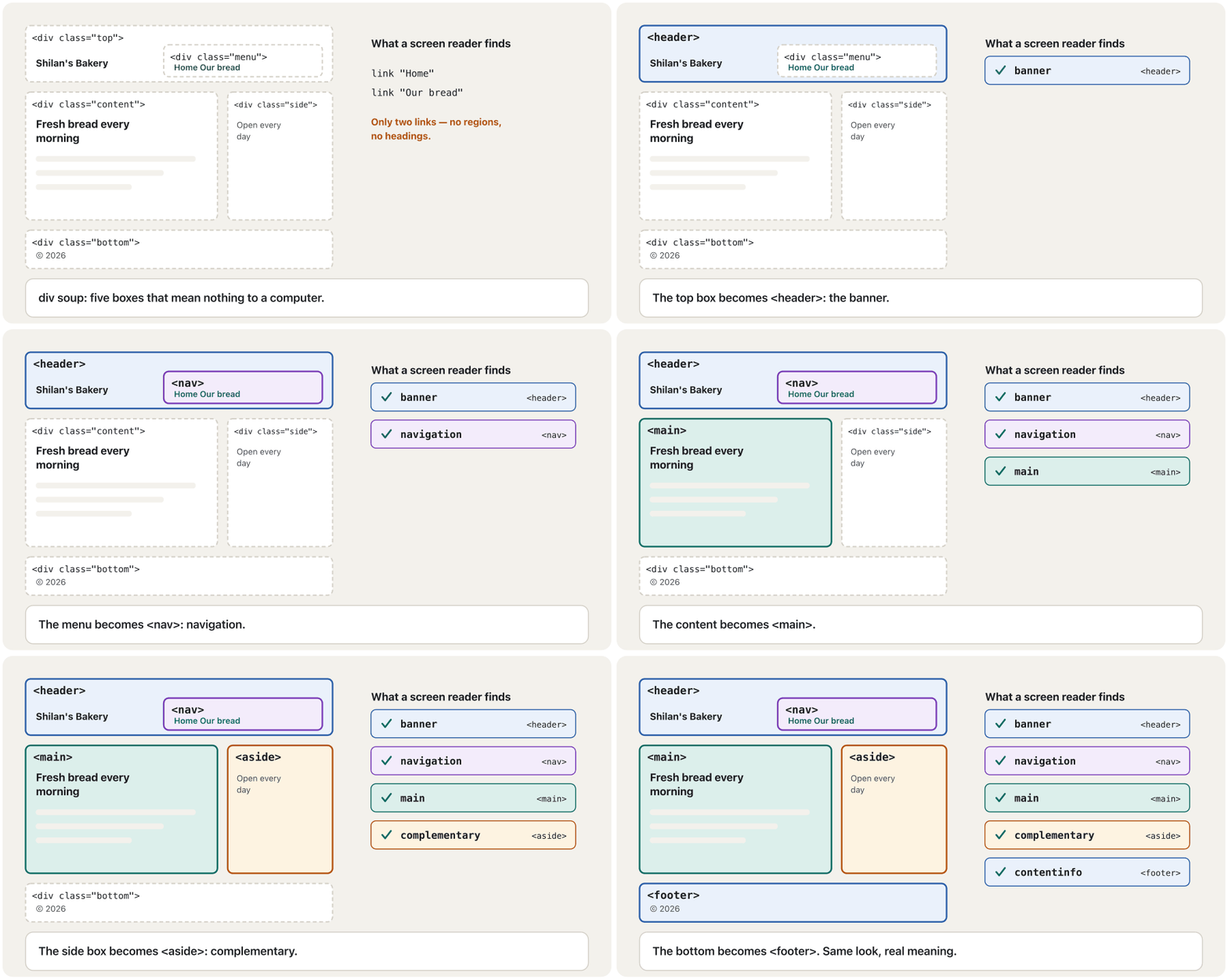
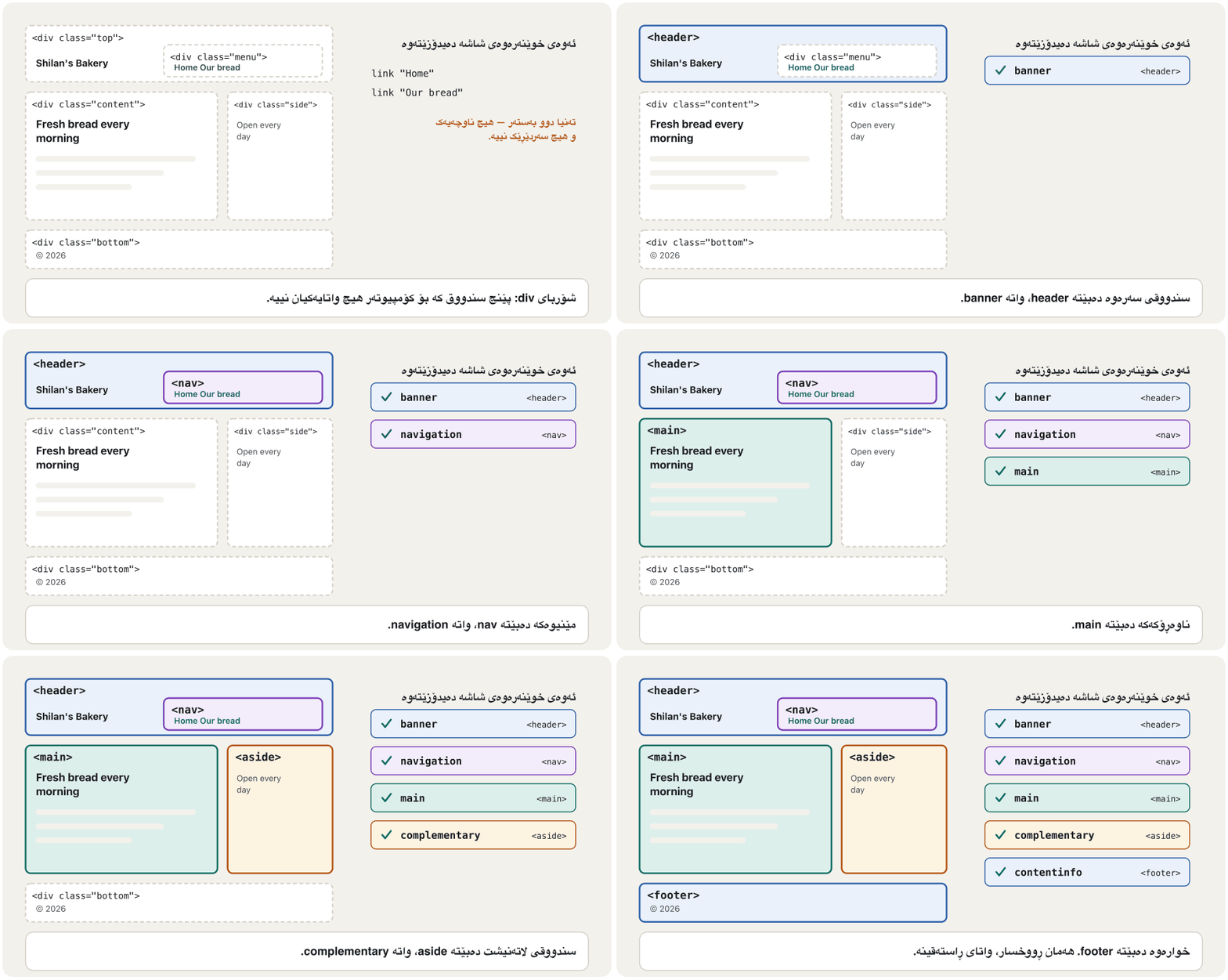
Landmarks: the big regions of a pageناوچە نیشانەدارەکان: ناوچە گەورەکانی لاپەڕە
A main region of a page that is marked so that can list it and jump straight to it: the banner (header), the navigation (nav), the main content (main), complementary content (aside) and the footer (footer).
ناوچەیەکی سەرەکیی لاپەڕەیە کە نیشانە کراوە بۆ ئەوەی بتوانێت لیستی بکات و ڕاستەوخۆ بچێتە سەری: (header)، (nav)، ناوەڕۆکی سەرەکی (main)، ناوەڕۆکی لاتەنیشت (aside) و (footer).
Five elements mark the big regions of almost every page. Each one creates a landmark with an ARIA role that screen readers can list and jump to:
پێنج ناوچە گەورەکانی نزیکەی هەموو لاپەڕەیەک نیشان دەکەن. هەریەکەیان بە ڕۆڵێکی ARIA دروست دەکات کە دەتوانن لیستی بکەن و بازی بۆ بدەن:
| Element | Landmark roleڕۆڵی | What goes in itچی تێدا دادەنرێت |
|---|---|---|
<header> | banner | the site's name or logo, often the main menuناو یان لۆگۆی ، زۆرجار |
<nav> | navigation | a block of main linksکۆمەڵێک سەرەکی |
<main> | main | this page's own content — one per pageناوەڕۆکی تایبەتی ئەم لاپەڕەیە — یەک دانە بۆ هەر لاپەڕەیەک |
<aside> | complementary | related extras: opening hours, related linksزانیاریی لاوەکیی پەیوەندیدار: کاتەکانی کار، پەیوەندیدار |
<footer> | contentinfo | contact details, copyright, small linksزانیاریی پەیوەندی، ، بچووک |
Two more landmarks exist: <search> around a search form (role search, in all browsers since 2023), and a <form> or <section> that you name with aria-label (roles form and region).
دوو تریش هەن: <search> بە دەوری گەڕاندا (ڕۆڵی search، لە 2023ـەوە لە هەموو )، هەروەها <form> یان <section>ـێک کە بە aria-label ناوی لێ دەنێیت (ڕۆڵەکانی form و region).
Landmarks: the big regions of a pageناوچە نیشانەدارەکان: ناوچە گەورەکانی لاپەڕە
Rules for landmarksڕێساکانی ناوچە نیشانەدارەکان
<header>and<footer>are landmarks only at page level. Inside an<article>,<section>,<aside>,<nav>or<main>they are just that part's own header and footer.- Use one visible
<main>per page, directly in<body>or in a plain<div>— never inside<article>,<section>,<aside>,<header>,<footer>or<nav>. - When a page has two navigation regions, give each a name:
<nav aria-label="Main">and<nav aria-label="Breadcrumb">. Leave the word “navigation” out of the name: screen readers already say it. - Do not add a role the element already has:
<main role="main">only repeats itself. Use native HTML first and ARIA only where HTML has no element.
<header>و<footer>تەنیا لە ئاستی لاپەڕەدا . لەناو<article>،<section>،<aside>،<nav>یان<main>ـدا تەنیا سەر و بنی خودی ئەو بەشەن.- بۆ هەر لاپەڕەیەک یەک
<main>ـی دیار بەکاربهێنە، ڕاستەوخۆ لەناو<body>یان لەناو<div>ـێکی سادەدا — هەرگیز لەناو<article>،<section>،<aside>،<header>،<footer>یان<nav>ـدا نا. - کاتێک لاپەڕەیەک دوو ناوچەی navigationـی هەیە، ناو بدە بە هەریەکەیان:
<nav aria-label="Main">و<nav aria-label="Breadcrumb">. وشەی «navigation» مەخە ناو ناوەکەوە: خۆیان دەیڵێن. - ڕۆڵێک زیاد مەکە کە خۆی هەیەتی:
<main role="main">تەنیا خۆی دووپاتە دەکاتەوە. سەرەتا ڕەسەن بەکاربهێنە و ARIA تەنیا لەو شوێنەدا کە بۆ نییە.
Landmarks: the big regions of a pageناوچە نیشانەدارەکان: ناوچە گەورەکانی لاپەڕە
How screen-reader users move aroundبەکارهێنەرانی خوێنەرەوەی شاشە چۆن لە لاپەڕەدا دەگەڕێن
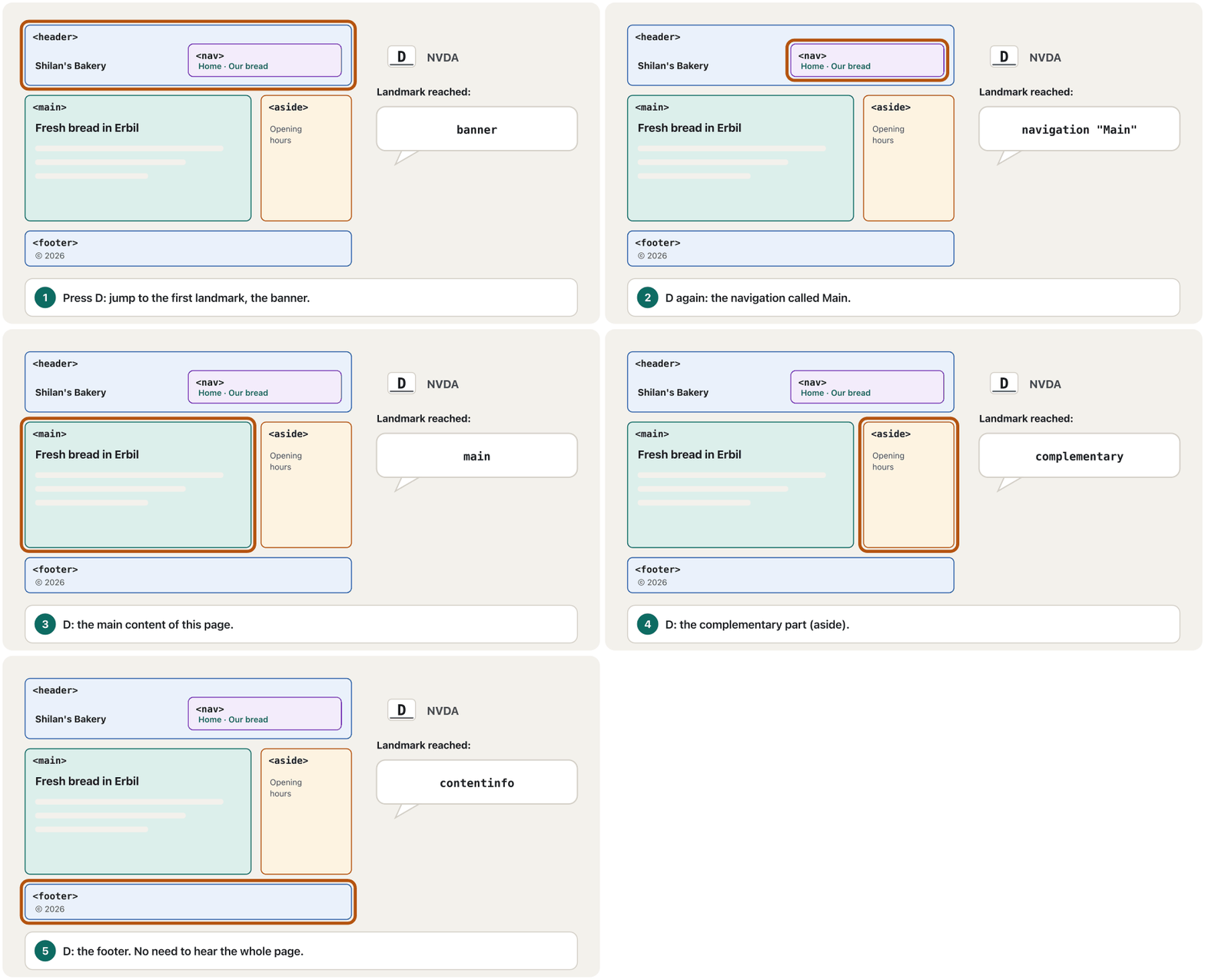
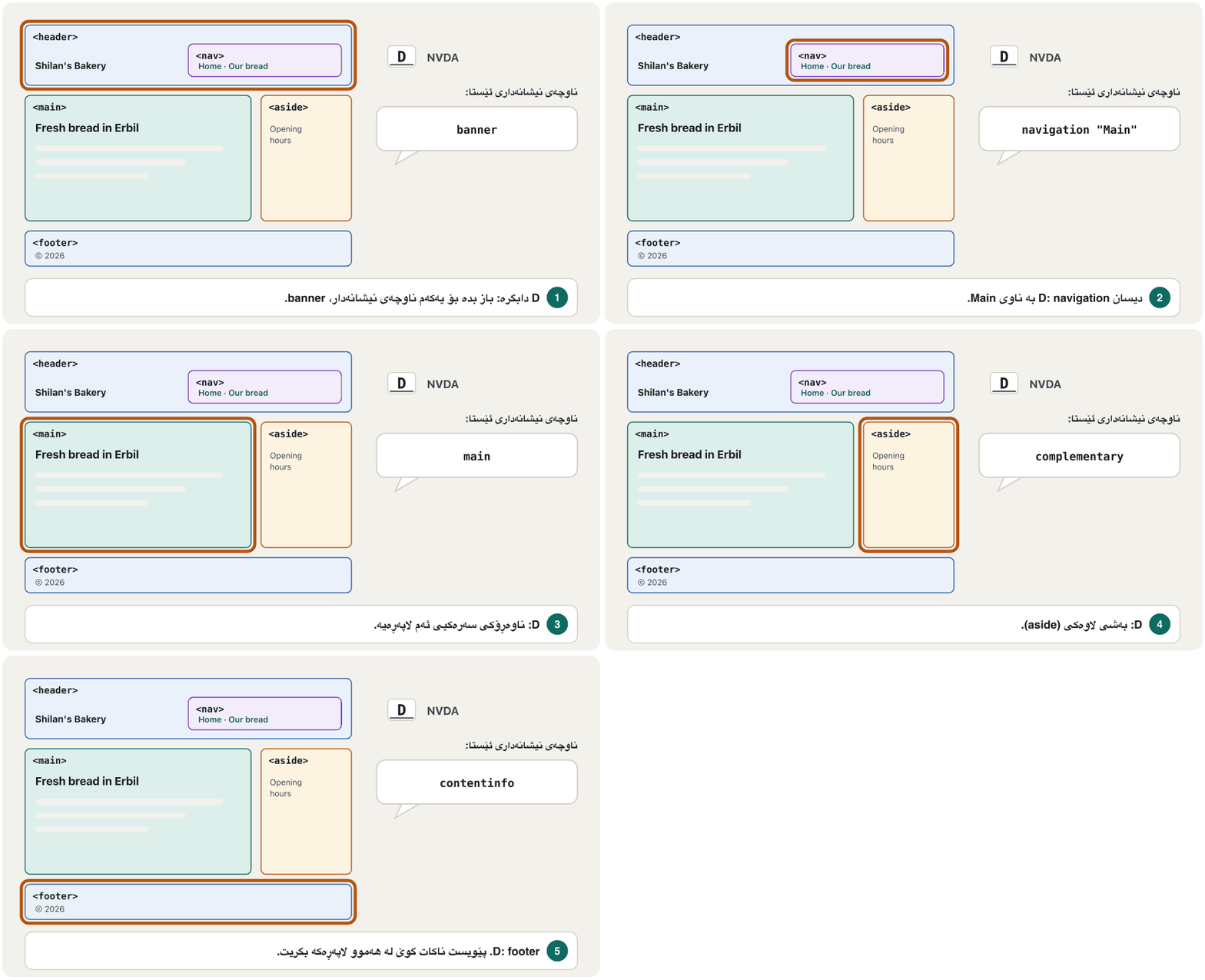
A screen reader reads the page aloud, but nobody wants to hear the whole menu again on every page. Users jump instead. In NVDA, the free screen reader for Windows, D moves to the next landmark, H to the next heading, and NVDA + F7 lists all the headings, links and landmarks. VoiceOver on Apple devices has a similar list, the rotor.
لاپەڕەکە بە دەنگی بەرز دەخوێنێتەوە، بەڵام کەس نایەوێت لە هەموو لاپەڕەیەکدا دووپاتە گوێ لە هەموو بگرێت. بۆیە بەکارهێنەران باز دەدەن. لە NVDA، بێبەرانبەر بۆ Windows، D دەچێتە سەر دواتر، H دەچێتە سەر دواتر و NVDA + F7 هەموو ، و لیست دەکات. VoiceOver لەسەر ئامێرەکانی Apple لیستێکی هاوشێوەی هەیە بە ناوی rotor.
In WebAIM's 2026 survey of 1,780 screen-reader users, 67.8% said they first move through a long page by its headings, and 28.3% use landmarks often or whenever a page has them. Good headings and good landmarks serve both groups.
لە ڕاپرسییەکەی WebAIMـی ساڵی 2026ـدا لەگەڵ 1,780 بەکارهێنەری ، 67.8%ـیان گوتیان سەرەتا بە لە لاپەڕەیەکی درێژدا دەگەڕێن و 28.3%ـیان زۆرجار یان هەر کاتێک لاپەڕەکە هەبێت بەکاری دەهێنن. باش و باش خزمەتی هەردوو گرووپەکە دەکەن.
article, section or div?article، section یان div؟
Inside <main>, three elements group content. They look the same — plain boxes — but they mean different things:
لەناو <main>ـدا سێ ناوەڕۆک کۆ دەکەنەوە. وەک یەک دەردەکەون — سندووقی سادە — بەڵام واتای جیاوازیان هەیە:
<article>: a complete piece that makes sense on its own, even on another site: a blog post, a news story, a product card, a comment.<section>: a themed part of something bigger, with its own heading: “Today's bread”, “Prices”, “About us”.<div>: no meaning at all. Use it only as a box for CSS when no other element fits.
<article>: پارچەیەکی تەواو کە بە تەنیا واتای هەیە، تەنانەت لە تریشدا: پۆستێکی ، هەواڵێک، بەرهەمێک، لێدوانێک.<section>: بەشێکی بابەتداری شتێکی گەورەتر، بە خۆی: «نانی ئەمڕۆ»، «نرخەکان»، «لەبارەی ئێمە».<div>: هیچ واتایەکی نییە. تەنیا وەک سندووقێک بۆ بەکاری بهێنە کاتێک هیچ تر نەگونجێت.
article, section or div?article، section یان div؟
Articles in sections, sections in articlesarticle لەناو section و section لەناو article
The two can be nested both ways. A news page can have a Sport section that holds several articles; one long article, such as a recipe, can be split into sections. Each <article> and each <section> starts with its own heading.
دەتوانرێت ئەم دووانە بە هەردوو ڕێگا تێکەڵی یەکتر بکرێن. لاپەڕەیەکی هەواڵ دەتوانێت sectionـێکی وەرزشـی هەبێت کە چەند articleـێک لەخۆ بگرێت؛ articleـێکی درێژ، وەک ڕێنمایی چێشتلێنان، دەتوانرێت بەسەر چەند sectionـێکدا دابەش بکرێت. هەر <article> و هەر <section>ـێک بە خۆی دەست پێ دەکات.
<main>
  <h1>Erbil Today</h1>
  <section>
    <h2>Sport</h2>
    <article>
      <h3>Our school team wins at home</h3>
      <p>The team won 2–1 on Friday.</p>
    </article>
    <article>
      <h3>New swimming pool opens</h3>
      <p>Students can swim for free on Mondays.</p>
    </article>
  </section>
</main>HTML sent to the browserئەو HTMLـەی دەنێردرێت بۆ تۆڕگەڕ
<main>
  <h1>Erbil Today</h1>
  <section>
    <h2>Sport</h2>
    <article>
      <h3>Our school team wins at home</h3>
      <p>The team won 2–1 on Friday.</p>
    </article>
    <article>
      <h3>New swimming pool opens</h3>
      <p>Students can swim for free on Mondays.</p>
    </article>
  </section>
</main>Every section needs a headingهەموو بەشێک پێویستی بە سەردێڕێک هەیە
Headings and regions work together. The rules from Headings make the outline now apply to the whole page:
و ناوچەکان پێکەوە کار دەکەن. ئەو ڕێسایانەی لە سەردێڕەکان پێکهاتەی لاپەڕە دروست دەکەندا فێریان بوویت، ئێستا بۆ هەموو لاپەڕەکە جێبەجێ دەبن:
- Give the page one
<h1>: its main title, usually at the start of<main>. - Start every
<section>and<article>with a heading. A section that needs no heading should probably be a<div>. - Do not skip levels: under an
<h2>comes an<h3>, not an<h4>. - Choose the level for its place in the outline, and change the size with CSS.
- یەک
<h1>بدە بە لاپەڕەکە: ناونیشانە سەرەکییەکەی، زۆرجار لە سەرەتای<main>ـدا. - هەموو
<section>و<article>ـێک بە دەست پێ بکە. sectionـێک کە پێویستی بە نییە، بە ئەگەری زۆر دەبێت<div>بێت. - ئاست مەپەڕێنە: لە ژێر
<h2>ـدا<h3>دێت، نەک<h4>. - ئاستەکە بەپێی شوێنەکەی لە پێکهاتەکەدا هەڵبژێرە و قەبارەکەی بە بگۆڕە.
Small elements with meaningتوخمی بچووکی واتادار
Inside the text, a few small elements tell browsers and tools what a word or a number is:
لەناو دەقدا، چەند بچووک بە و ئامرازەکان دەڵێن وشەیەک یان ژمارەیەک چییە:
| Element | Use it forبۆ چی بەکاری دەهێنیت |
|---|---|
<time datetime> | a date or a time; datetime gives the exact value in a form computers can read: 2026-11-07, 10:00, 2026-11-07T10:00ڕێکەوت یان کات؛ datetime بەها وردەکە بە شێوەیەک دەدات کە بیخوێننەوە: 2026-11-07، 10:00، 2026-11-07T10:00 |
<address> | contact details of the page's owner or of an article's author — not every address mentioned in a textزانیاریی پەیوەندیی خاوەنی لاپەڕە یان نووسەری articleـێک — نەک هەموو ناونیشانێک کە لە دەقێکدا باس دەکرێت |
<abbr title> | an abbreviation; title holds the full words (also write them out the first time you use it)؛ title وشە تەواوەکان هەڵدەگرێت (یەکەم جاریش بە تەواوی بیاننووسە) |
<article>
  <h2>IT club meeting</h2>
  <p>Our school's <abbr title="Information Technology">IT</abbr> club meets on
    <time datetime="2026-11-07T10:00">Saturday 7 November at 10:00</time>.</p>
  <footer>
    <address>Written by Dilan · <a href="mailto:itclub@example.com">itclub@example.com</a></address>
  </footer>
</article>HTML sent to the browserئەو HTMLـەی دەنێردرێت بۆ تۆڕگەڕ
<article>
  <h2>IT club meeting</h2>
  <p>Our school's <abbr title="Information Technology">IT</abbr> club meets on
    <time datetime="2026-11-07T10:00">Saturday 7 November at 10:00</time>.</p>
  <footer>
    <address>Written by Dilan · <a href="mailto:itclub@example.com">itclub@example.com</a></address>
  </footer>
</article>Two more small elements were taught earlier: <mark> in Meaning or looks and <figure> in An image as a link; figure and figcaption.
دوو بچووکی تر پێشتر خوێندراون: <mark> لە واتا یان شێوە و <figure> لە وێنە وەک بەستەر؛ figure و figcaption.
Small elements with meaningتوخمی بچووکی واتادار
Quotes, titles, code and keysگوتە، ناونیشان، کۆد و دوگمەکان
| Element | Use it forبۆ چی بەکاری دەهێنیت |
|---|---|
<blockquote> | a long quotation, as a block of its own; say who said it in a <figcaption> or the text around itگوتەیەکی درێژ، وەک بلۆکێکی سەربەخۆ؛ بڵێ کێ گوتوویەتی لە <figcaption> یان لە دەقی دەوروبەریدا |
<q> | a short quotation inside a sentence; the browser adds the quotation marksگوتەیەکی کورت لەناو ڕستەیەکدا؛ زیاد دەکات |
<cite> | the title of a work: a book, a film, a song, an articleناونیشانی بەرهەمێک: کتێب، فیلم، گۆرانی، وتار |
<code> | a piece of computer codeپارچەیەک کۆدی |
<kbd> | a key or keys the user presses یان ئەو بەکارهێنەر دایاندەگرێت |
<figure>
<blockquote>
<p>The kulicha were still warm, and the whole shop smelled of fresh bread.</p>
</blockquote>
<figcaption>— Aram, a customer</figcaption>
</figure>
<p>Shilan says: <q>We bake every morning at five.</q></p>
<p>My favourite Kurdish book is <cite>Mem û Zîn</cite> by Ahmad Khani.</p>
<p>Press <kbd>Ctrl</kbd> + <kbd>S</kbd> to save. The element <code><main></code> holds the main content.</p>HTML sent to the browserئەو HTMLـەی دەنێردرێت بۆ تۆڕگەڕ
<figure>
<blockquote>
<p>The kulicha were still warm, and the whole shop smelled of fresh bread.</p>
</blockquote>
<figcaption>— Aram, a customer</figcaption>
</figure>
<p>Shilan says: <q>We bake every morning at five.</q></p>
<p>My favourite Kurdish book is <cite>Mem û Zîn</cite> by Ahmad Khani.</p>
<p>Press <kbd>Ctrl</kbd> + <kbd>S</kbd> to save. The element <code><main></code> holds the main content.</p>Questions that open and close: details and summaryپرسیار کە دەکرێتەوە و دادەخرێت: details و summary
A list of headings that open and close to show or hide their content, like the folds of the musical instrument — common for questions and answers and for long menus on phones. In HTML, <details> and <summary> make one without JavaScript.
لیستێکی کە دەکرێنەوە و دادەخرێن تا ناوەڕۆکەکەیان پیشان بدەن یان بیشارنەوە، وەک چینەکانی ئامێری مۆسیقای ئەکۆردیۆن — بۆ پرسیار و وەڵام و درێژ لەسەر مۆبایل باوە. لە <details> و <summary> بەبێ دروستی دەکەن.
<details> hides its content until the visitor opens it; <summary> is the visible line that opens it. It is perfect for questions and answers, and it needs no JavaScript: it works with a mouse, with touch and with the keyboard (Tab to the summary, then Enter or Space). Add the open attribute to start it open.
<details> ناوەڕۆکەکەی دەشارێتەوە تا سەردانیکەر دەیکاتەوە؛ <summary> ئەو دێڕە دیارەیە کە دەیکاتەوە. بۆ پرسیار و وەڵام زۆر گونجاوە و پێویستی بە نییە: بە ، بە دەستلێدان و بە کار دەکات (بە Tab بگە سەر summary، پاشان Enter یان Space دابگرە). open زیاد بکە تا بە کراوەیی دەست پێ بکات.
<h2>Questions</h2>
<details>
  <summary>Do you deliver?</summary>
  <p>Yes, inside Erbil, from 8:00 to 12:00.</p>
</details>
<details>
  <summary>Do you bake bread without sugar?</summary>
  <p>Yes: our plain naan has no sugar.</p>
</details>HTML sent to the browserئەو HTMLـەی دەنێردرێت بۆ تۆڕگەڕ
<h2>Questions</h2>
<details>
  <summary>Do you deliver?</summary>
  <p>Yes, inside Erbil, from 8:00 to 12:00.</p>
</details>
<details>
  <summary>Do you bake bread without sugar?</summary>
  <p>Yes: our plain naan has no sugar.</p>
</details>
Click a question in the preview: it opens and closes.
لە پێشبینینەکەدا کلیک لە پرسیارێک بکە: دەکرێتەوە و دادەخرێت.
Worked example: a bakery home pageنموونەی کارپێکراو: لاپەڕەی سەرەکیی نانەواخانەیەک
Here is everything together in a small but complete home page. The menu is a list of links; menus are the subject of Links and Navigation Menus. The page passes the W3C Nu HTML Checker with no errors and no warnings.
ئەمە هەموو شتێکە پێکەوە لە بچووک بەڵام تەواودا. لیستێکی ؛ بابەتی بەستەرەکان و لیستە ڕێنیشاندەرەکانن. لاپەڕەکە بەبێ هیچ و ئاگادارکردنەوەیەک بە Nu HTML Checkerـی تێدەپەڕێت.
<!DOCTYPE html>
<html lang="en">
<head>
  <meta charset="utf-8">
  <meta name="viewport" content="width=device-width, initial-scale=1">
  <title>Shilan's Bakery – fresh bread in Erbil</title>
</head>
<body>
  <header>
    <p><a href="index.html">Shilan's Bakery</a></p>
    <nav aria-label="Main">
      <ul>
        <li><a href="index.html">Home</a></li>
        <li><a href="bread.html">Our bread</a></li>
        <li><a href="contact.html">Contact</a></li>
      </ul>
    </nav>
  </header>

  <main>
    <h1>Fresh bread in Erbil</h1>
    <section>
      <h2>Today's bread</h2>
      <article>
        <h3>Samoon</h3>
        <p>Light bread from the stone oven. 250 dinars.</p>
      </article>
      <article>
        <h3>Kulicha</h3>
        <p>Date pastries for Eid. 1,000 dinars a box.</p>
      </article>
    </section>
    <section>
      <h2>Questions</h2>
      <details>
        <summary>Do you deliver?</summary>
        <p>Yes, inside Erbil, from 8:00 to 12:00.</p>
      </details>
    </section>
  </main>

  <aside>
    <h2>Opening hours</h2>
    <p>Every day, <time datetime="06:00">6:00</time>–<time datetime="14:00">14:00</time>.</p>
  </aside>

  <footer>
    <address>60 Metre Street, Erbil · <a href="tel:+9647500000000">0750 000 0000</a></address>
    <p><small>© 2026 Shilan's Bakery</small></p>
  </footer>
</body>
</html>HTML sent to the browserئەو HTMLـەی دەنێردرێت بۆ تۆڕگەڕ
<!DOCTYPE html>
<html lang="en">
<head>
  <meta charset="utf-8">
  <meta name="viewport" content="width=device-width, initial-scale=1">
  <title>Shilan's Bakery – fresh bread in Erbil</title>
</head>
<body>
  <header>
    <p><a href="index.html">Shilan's Bakery</a></p>
    <nav aria-label="Main">
      <ul>
        <li><a href="index.html">Home</a></li>
        <li><a href="bread.html">Our bread</a></li>
        <li><a href="contact.html">Contact</a></li>
      </ul>
    </nav>
  </header>

  <main>
    <h1>Fresh bread in Erbil</h1>
    <section>
      <h2>Today's bread</h2>
      <article>
        <h3>Samoon</h3>
        <p>Light bread from the stone oven. 250 dinars.</p>
      </article>
      <article>
        <h3>Kulicha</h3>
        <p>Date pastries for Eid. 1,000 dinars a box.</p>
      </article>
    </section>
    <section>
      <h2>Questions</h2>
      <details>
        <summary>Do you deliver?</summary>
        <p>Yes, inside Erbil, from 8:00 to 12:00.</p>
      </details>
    </section>
  </main>

  <aside>
    <h2>Opening hours</h2>
    <p>Every day, <time datetime="06:00">6:00</time>–<time datetime="14:00">14:00</time>.</p>
  </aside>

  <footer>
    <address>60 Metre Street, Erbil · <a href="tel:+9647500000000">0750 000 0000</a></address>
    <p><small>© 2026 Shilan's Bakery</small></p>
  </footer>
</body>
</html>
Explain the codeڕوونکردنەوەی کۆدەکە
- Lineدێڕی 9-18
The page-level
<header>: the site name and a<nav>named “Main” with a list of links.<header>ـی ئاستی لاپەڕە: ناوی و<nav>ـێک بە ناوی «Main» کە لیستێکی لەخۆ دەگرێت.- Lineدێڕی 20-21
One
<main>with the page's only<h1>.یەک
<main>بە تاکە<h1>ـی لاپەڕەکە.- Lineدێڕی 22-32
A
<section>with an<h2>and two<article>s, each with an<h3>.<section>ـێک بە<h2>ـێک و دوو<article>، هەریەکە بە<h3>ـێک.- Lineدێڕی 33-39
A second section with a question in
<details>.sectionـی دووەم بە پرسیارێک لە
<details>ـدا.- Lineدێڕی 42-45
<aside>for the opening hours, with<time>.<aside>بۆ کاتەکانی کار، بە<time>.- Lineدێڕی 47-50
The page-level
<footer>with the bakery's contact details in<address>.<footer>ـی ئاستی لاپەڕە بە زانیاریی پەیوەندیی نانەواخانەکە لە<address>ـدا.
Worked example: a bakery home pageنموونەی کارپێکراو: لاپەڕەی سەرەکیی نانەواخانەیەک
See the page as a screen reader doesلاپەڕەکە وەک خوێنەرەوەی شاشە ببینە
A simpler copy of the that the builds for . For each important element it keeps its role (button, link, heading), its name and its state; a reads the page from this tree.
وەشانێکی سادەتری کە بۆ دروستی دەکات. بۆ هەر گرنگ ئەرکەکەی (، ، )، ناوەکەی و دۆخەکەی هەڵدەگرێت؛ لاپەڕەکە لەم دارەوە دەخوێنێتەوە.
For each important element the accessibility tree keeps a role (banner, link, heading), a name and a state. Plain <div>s and unnamed sections are left out. This is the tree that Chrome builds for the bakery page, shortened a little:
بۆ هەر گرنگ ڕۆڵ (banner، ، )، ناو و دۆخـەکەی هەڵدەگرێت. <div>ـە سادەکان و sectionـی بێناو لادەبرێن. ئەمە ئەو دارەیە کە Chrome بۆ لاپەڕەی نانەواخانەکە دروستی دەکات، کەمێک کورتکراوە:
Open the page and press F12 to open the developer tools.
لاپەڕەکە بکەرەوە و F12 دابگرە بۆ کردنەوەی .
In Chrome or Edge, select an element in the Elements panel and open the Accessibility tab; turn on Show accessibility tree to see the tree of the whole page.
لە Chrome یان Edgeـدا، لە پانێڵی Elements هەڵبژێرە و تابی Accessibility بکەرەوە؛ Show accessibility tree چالاک بکە تا دارەکەی هەموو لاپەڕەکە ببینیت.
In Firefox, open the Accessibility panel of the developer tools.
لە Firefoxـدا پانێڵی Accessibilityـی بکەرەوە.
Who uses this tree, and with which tools: Assistive technology: how people use the web.
کێ ئەم دارە بەکار دەهێنێت و بە چ ئامرازێک: تەکنەلۆژیای یارمەتیدەر: خەڵک چۆن وێب بەکاردەهێنن.
The same page in Kurdishهەمان لاپەڕە بە کوردی
A Kurdish page uses exactly the same elements. Only two attributes on <html> change: lang="ckb" (Central Kurdish) and dir="rtl" (right to left), as in A page in Kurdish. Screen readers, search engines and translation tools then know the language, and the whole layout mirrors: the site name starts on the right.
لاپەڕەیەکی کوردی ڕێک هەمان بەکار دەهێنێت. تەنیا دوو لەسەر <html> دەگۆڕێن: lang="ckb" (کوردیی ناوەندی) و dir="rtl" ()، وەک لە لاپەڕەیەک بە کوردی. ئیتر ، و ئامرازەکانی وەرگێڕان زمانەکە دەزانن و هەموو وەک ئاوێنە هەڵدەگەڕێتەوە: ناوی لە لای ڕاستەوە دەست پێ دەکات.
<!DOCTYPE html>
<html lang="ckb" dir="rtl">
<head>
  <meta charset="utf-8">
  <meta name="viewport" content="width=device-width, initial-scale=1">
  <title>نانەواخانەی شیلان – نانی تازە لە هەولێر</title>
</head>
<body>
  <header>
    <p><a href="index.html">نانەواخانەی شیلان</a></p>
    <nav aria-label="سەرەکی">
      <ul>
        <li><a href="index.html">سەرەکی</a></li>
        <li><a href="bread.html">نانەکانمان</a></li>
        <li><a href="contact.html">پەیوەندی</a></li>
      </ul>
    </nav>
  </header>

  <main>
    <h1>نانی تازە لە هەولێر</h1>
    <section>
      <h2>نانی ئەمڕۆ</h2>
      <article>
        <h3>سەموون</h3>
        <p>نانی سووک لە تەنووری بەرد. ٢٥٠ دینار.</p>
      </article>
    </section>
  </main>

  <aside>
    <h2>کاتەکانی کار</h2>
    <p>هەموو ڕۆژێک، <time datetime="06:00">٦:٠٠</time> تا <time datetime="14:00">١٤:٠٠</time>.</p>
  </aside>

  <footer>
    <p><small>© 2026 نانەواخانەی شیلان</small></p>
  </footer>
</body>
</html>HTML sent to the browserئەو HTMLـەی دەنێردرێت بۆ تۆڕگەڕ
<!DOCTYPE html>
<html lang="ckb" dir="rtl">
<head>
  <meta charset="utf-8">
  <meta name="viewport" content="width=device-width, initial-scale=1">
  <title>نانەواخانەی شیلان – نانی تازە لە هەولێر</title>
</head>
<body>
  <header>
    <p><a href="index.html">نانەواخانەی شیلان</a></p>
    <nav aria-label="سەرەکی">
      <ul>
        <li><a href="index.html">سەرەکی</a></li>
        <li><a href="bread.html">نانەکانمان</a></li>
        <li><a href="contact.html">پەیوەندی</a></li>
      </ul>
    </nav>
  </header>

  <main>
    <h1>نانی تازە لە هەولێر</h1>
    <section>
      <h2>نانی ئەمڕۆ</h2>
      <article>
        <h3>سەموون</h3>
        <p>نانی سووک لە تەنووری بەرد. ٢٥٠ دینار.</p>
      </article>
    </section>
  </main>

  <aside>
    <h2>کاتەکانی کار</h2>
    <p>هەموو ڕۆژێک، <time datetime="06:00">٦:٠٠</time> تا <time datetime="14:00">١٤:٠٠</time>.</p>
  </aside>

  <footer>
    <p><small>© 2026 نانەواخانەی شیلان</small></p>
  </footer>
</body>
</html>Landmarks, headings and lists stay the same. The lesson on Kurdish and bilingual websites teaches mixed Kurdish and English text, mirrored icons and bilingual sites.
، و لیستەکان وەک خۆیان دەمێننەوە. لە وانەی کوردی و دووزمانەدا فێری دەقی تێکەڵی کوردی و ئینگلیزی، ئایکۆنەکانی ئاوێنەکراو و تۆڕگەکانی دووزمانە دەبیت.
Common mistakesهەڵە باوەکان
| Mistakeهەڵە | Why it hurtsبۆچی زیان دەگەیەنێت | Fixچارەسەر |
|---|---|---|
Several <h1>s, or skipped levelsچەند <h1>ـێک، یان پەڕاندنی ئاست | The outline confuses screen-reader users.پێکهاتەکە بەکارهێنەرانی سەرلێشێواو دەکات. | One <h1>, then <h2>, <h3> in order.یەک <h1>، پاشان <h2>، <h3> بە ڕیز. |
A <section> without a heading<section> بەبێ | It is not a real themed part.بەشێکی بابەتداری ڕاستەقینە نییە. | Add a heading, or use a <div>. زیاد بکە، یان <div> بەکاربهێنە. |
Two visible <main>s, or <main> inside an <article>دوو <main>ـی دیار، یان <main> لەناو <article>ـدا | The page is invalid and the main content is unclear.لاپەڕەکە نادروستە و ناوەڕۆکی سەرەکی ڕوون نییە. | One <main>, directly in <body> or in a plain <div>.یەک <main>، ڕاستەوخۆ لەناو <body> یان لەناو <div>ـێکی سادەدا. |
A <nav> around every group of links<nav> بە دەوری هەموو کۆمەڵە | Too many navigation regions to choose from.ناوچەی navigation زۆر دەبن و هەڵبژاردن قورس دەبێت. | Only for major menus; name them with aria-label.تەنیا بۆ سەرەکییەکان؛ بە aria-label ناویان لێ بنێ. |
Elements chosen for their look: <blockquote> to indent, <h4> for small bold text بەپێی شێوە هەڵبژێردراو: <blockquote> بۆ بردنە ناوەوەی دەق، <h4> بۆ دەقی بچووکی تۆخ | They announce a meaning that is not there.واتایەک ڕادەگەیەنن کە بوونی نییە. | Choose by meaning; style with CSS.بەپێی واتا هەڵبژێرە؛ بە بیڕازێنەرەوە. |
<div class="header"> or <div role="button"><div class="header"> یان <div role="button"> | Extra work, and often incomplete.کاری زیادە و زۆرجار ناتەواو. | Use the real element: <header>, <button>. ڕاستەقینەکە بەکاربهێنە: <header>، <button>. |
<address> for any address in a text<address> بۆ هەر ناونیشانێک لە دەقێکدا | It means contact details.واتای زانیاریی پەیوەندییە. | Use it only for contact details.تەنیا بۆ زانیاریی پەیوەندی بەکاری بهێنە. |
Exercisesڕاهێنانەکان
Rewrite this div soup of a school home page with semantic elements: a page header with the school's name and a menu, the main content with one <h1> and a section, an aside and a page footer. Check your answer with the W3C Nu HTML Checker.
ئەم شۆربای divـەی قوتابخانەیەک بە واتادار بنووسەرەوە: بە ناوی قوتابخانەکە و ، ناوەڕۆکی سەرەکی بە یەک <h1> و sectionـێک، asideـێک و . وەڵامەکەت بە Nu HTML Checkerـی بپشکنە.
<div id="top">
  <div class="big">Hawler Secondary School</div>
  <div class="links">
    <a href="index.html">Home</a> <a href="news.html">News</a> <a href="contact.html">Contact</a>
  </div>
</div>
<div id="page">
  <div class="big">Welcome back to school</div>
  <div class="box">
    <div class="small-title">Exam dates</div>
    <div>The first exams start on 15 November.</div>
  </div>
</div>
<div id="extra">Library: open 8:00–15:00</div>
<div id="end">© 2026 Hawler Secondary School</div>Hintئاماژە
Ask for each box: what is it? The big text at the top of the content is the page title.
بۆ هەر سندووقێک بپرسە: ئەمە چییە؟ دەقە گەورەکەی سەرەوەی ناوەڕۆکەکە ناونیشانی لاپەڕەکەیە.
Show answerوەڵامەکە پیشان بدە
One correct answer (the menu is now a list of links, and the dates use <time>):
وەڵامێکی دروست ( ئێستا لیستێکی و ڕێکەوتەکان <time> بەکار دەهێنن):
<header>
  <p class="site-name">Hawler Secondary School</p>
  <nav aria-label="Main">
    <ul>
      <li><a href="index.html">Home</a></li>
      <li><a href="news.html">News</a></li>
      <li><a href="contact.html">Contact</a></li>
    </ul>
  </nav>
</header>
<main>
  <h1>Welcome back to school</h1>
  <section>
    <h2>Exam dates</h2>
    <p>The first exams start on <time datetime="2026-11-15">15 November</time>.</p>
  </section>
</main>
<aside>
  <p>Library: open <time datetime="08:00">8:00</time>–<time datetime="15:00">15:00</time></p>
</aside>
<footer>
  <p><small>© 2026 Hawler Secondary School</small></p>
</footer>HTML sent to the browserئەو HTMLـەی دەنێردرێت بۆ تۆڕگەڕ
<header>
  <p class="site-name">Hawler Secondary School</p>
  <nav aria-label="Main">
    <ul>
      <li><a href="index.html">Home</a></li>
      <li><a href="news.html">News</a></li>
      <li><a href="contact.html">Contact</a></li>
    </ul>
  </nav>
</header>
<main>
  <h1>Welcome back to school</h1>
  <section>
    <h2>Exam dates</h2>
    <p>The first exams start on <time datetime="2026-11-15">15 November</time>.</p>
  </section>
</main>
<aside>
  <p>Library: open <time datetime="08:00">8:00</time>–<time datetime="15:00">15:00</time></p>
</aside>
<footer>
  <p><small>© 2026 Hawler Secondary School</small></p>
</footer>Which element fits each part? (a) a news story on a news site; (b) the “Contact us” part of a company page, with a heading; (c) a box that only adds a coloured background behind two paragraphs; (d) a reader's comment under a post; (e) the related links next to a blog post; (f) the site's main menu.
کام بۆ هەر بەشێک دەگونجێت؟ (a) هەواڵێک لە هەواڵ؛ (b) بەشی «پەیوەندیمان پێوە بکە» لە لاپەڕەی کۆمپانیایەک، بە ؛ (c) سندووقێک کە تەنیا ڕەنگێکی پاشبنەما دەخاتە پشت دوو بڕگە؛ (d) لێدوانی خوێنەرێک لە ژێر پۆستێک؛ (e) پەیوەندیدارەکانی تەنیشت پۆستێکی ؛ (f) سەرەکیی .
Show answerوەڵامەکە پیشان بدە
- (a)
<article>— it makes sense on its own. - (b)
<section>— a themed part with a heading. - (c)
<div>— a box only for CSS. - (d)
<article>— a comment is complete in itself. - (e)
<aside>— related extras. - (f)
<nav>— the main block of links.
- (a)
<article>— بە تەنیا واتای هەیە. - (b)
<section>— بەشێکی بابەتدار بە . - (c)
<div>— سندووقێک تەنیا بۆ . - (d)
<article>— لێدوان بە تەنیا تەواوە. - (e)
<aside>— زانیاریی لاوەکیی پەیوەندیدار. - (f)
<nav>— کۆمەڵە سەرەکییەکە.
Write the HTML skeleton of a blog post page: a page header with the site name and a menu; <main> with one <article> that has its own <header> (an <h1> title and a <time>), two sections with <h2> headings and an article <footer> with the author in <address>; an <aside> with more posts; and a page footer.
ئێسکەپەیکەری لاپەڕەی پۆستێکی بنووسە: بە ناوی و ؛ <main> بە یەک <article> کە <header>ـی خۆی هەیە (ناونیشانێکی <h1> و <time>ـێک)، دوو section بە <h2> و <footer>ـی article بە نووسەرەکە لە <address>ـدا؛ <aside>ـێک بە پۆستی زیاتر؛ هەروەها .
Show answerوەڵامەکە پیشان بدە
<!DOCTYPE html>
<html lang="en">
<head>
  <meta charset="utf-8">
  <meta name="viewport" content="width=device-width, initial-scale=1">
  <title>Baking samoon at home – Shilan's Bakery blog</title>
</head>
<body>
  <header>
    <p><a href="index.html">Shilan's Bakery</a></p>
    <nav aria-label="Main">
      <ul>
        <li><a href="index.html">Home</a></li>
        <li><a href="blog.html">Blog</a></li>
        <li><a href="contact.html">Contact</a></li>
      </ul>
    </nav>
  </header>

  <main>
    <article>
      <header>
        <h1>Baking samoon at home</h1>
        <p>Posted on <time datetime="2026-10-20">20 October 2026</time></p>
      </header>
      <section>
        <h2>What you need</h2>
        <ul>
          <li>Flour, water, salt and yeast</li>
          <li>A very hot oven</li>
        </ul>
      </section>
      <section>
        <h2>Method</h2>
        <p>Mix, knead, let the dough rise, shape it and bake for 10 minutes.</p>
      </section>
      <footer>
        <address>Written by Shilan · <a href="mailto:shilan@example.com">shilan@example.com</a></address>
      </footer>
    </article>
  </main>

  <aside>
    <h2>More posts</h2>
    <ul>
      <li><a href="kulicha.html">Kulicha for Eid</a></li>
      <li><a href="naan.html">Naan from the tandoor</a></li>
    </ul>
  </aside>

  <footer>
    <p><small>© 2026 Shilan's Bakery</small></p>
  </footer>
</body>
</html>HTML sent to the browserئەو HTMLـەی دەنێردرێت بۆ تۆڕگەڕ
<!DOCTYPE html>
<html lang="en">
<head>
  <meta charset="utf-8">
  <meta name="viewport" content="width=device-width, initial-scale=1">
  <title>Baking samoon at home – Shilan's Bakery blog</title>
</head>
<body>
  <header>
    <p><a href="index.html">Shilan's Bakery</a></p>
    <nav aria-label="Main">
      <ul>
        <li><a href="index.html">Home</a></li>
        <li><a href="blog.html">Blog</a></li>
        <li><a href="contact.html">Contact</a></li>
      </ul>
    </nav>
  </header>

  <main>
    <article>
      <header>
        <h1>Baking samoon at home</h1>
        <p>Posted on <time datetime="2026-10-20">20 October 2026</time></p>
      </header>
      <section>
        <h2>What you need</h2>
        <ul>
          <li>Flour, water, salt and yeast</li>
          <li>A very hot oven</li>
        </ul>
      </section>
      <section>
        <h2>Method</h2>
        <p>Mix, knead, let the dough rise, shape it and bake for 10 minutes.</p>
      </section>
      <footer>
        <address>Written by Shilan · <a href="mailto:shilan@example.com">shilan@example.com</a></address>
      </footer>
    </article>
  </main>

  <aside>
    <h2>More posts</h2>
    <ul>
      <li><a href="kulicha.html">Kulicha for Eid</a></li>
      <li><a href="naan.html">Naan from the tandoor</a></li>
    </ul>
  </aside>

  <footer>
    <p><small>© 2026 Shilan's Bakery</small></p>
  </footer>
</body>
</html>
Check: one <h1>, every section has a heading, one <main>, and the article's header and footer are not landmarks. The page passes the W3C checker with no messages.
بپشکنە: یەک <h1>، هەموو sectionـێک هەیە، یەک <main> و header و footerـی articleـەکە نین. لاپەڕەکە بەبێ هیچ پەیامێک بە پشکنەری تێدەپەڕێت.
Summaryپوختە
- Semantic HTML chooses elements for their meaning. Browsers turn that meaning into an accessibility tree for screen readers; search engines and browser tools use it too.
- Five landmarks:
<header>(banner),<nav>(navigation),<main>(main, one per page),<aside>(complementary) and<footer>(contentinfo). Header and footer are landmarks only at page level. <article>stands alone,<section>is a themed part with a heading,<div>means nothing.- One
<h1>, a heading for every section, no skipped levels. - Small elements add exact meaning:
time,address,abbr,blockquote,q,cite,code,kbd;detailsandsummaryopen and close without JavaScript. - A Kurdish page keeps the same structure with
lang="ckb" dir="rtl"on<html>.
- بەپێی واتاکەیان هەڵدەبژێرێت. ئەو واتایە دەکەن بە بۆ ؛ و ئامرازەکانی بەکاری دەهێنن.
- پێنج :
<header>(banner)،<nav>(navigation)،<main>(main، یەک دانە بۆ هەر لاپەڕەیەک)،<aside>(complementary) و<footer>(contentinfo). header و footer تەنیا لە ئاستی لاپەڕەدا . <article>بە تەنیا دەوەستێت،<section>بەشێکی بابەتدارە بە ،<div>هیچ واتایەکی نییە.- یەک
<h1>، بۆ هەموو بەشێک، هیچ ئاستێک ناپەڕێنرێت. - بچووکەکان واتای ورد زیاد دەکەن:
time،address،abbr،blockquote،q،cite،code،kbd؛detailsوsummaryبەبێ دەکرێنەوە و دادەخرێن. - لاپەڕەی کوردی هەمان پێکهاتە دەهێڵێتەوە بە
lang="ckb" dir="rtl"لەسەر<html>.
Why is a <header> inside an <article> not a banner landmark?بۆچی <header>ـی ناو <article> ناوچەی نیشانەداری banner نییە؟
Because it introduces only that article. The banner is the header of the whole page; only a page-level header gets that role.
چونکە تەنیا ئەو articleـە دەناسێنێت. banner سەری هەموو لاپەڕەکەیە؛ تەنیا headerـی ئاستی لاپەڕە ئەو ڕۆڵە وەردەگرێت.
When do you choose <div>?کەی <div> هەڵدەبژێریت؟
Only when you need a box for CSS and no element with a meaning fits: not article, section, nav, aside, header, footer, figure or a list.
تەنیا کاتێک سندووقێکت بۆ پێویستە و هیچ واتادار ناگونجێت: نە article، section، nav، aside، header، footer، figure و نە لیست.
How do screen-reader users find their way on a long page?بەکارهێنەرانی خوێنەرەوەی شاشە چۆن ڕێگای خۆیان لە لاپەڕەیەکی درێژدا دەدۆزنەوە؟
They jump by headings (most of them start this way) and by landmarks, or open a list of headings, links and landmarks — NVDA's keys are H, D and NVDA + F7.
بە باز دەدەن (زۆربەیان بەم شێوەیە دەست پێ دەکەن) و بە ، یان لیستێکی ، و دەکەنەوە — NVDA ئەمانەن: H، D و NVDA + F7.
Lesson complete!وانەکە تەواو بوو!
Well done. Review the key terms, then go on to the next lesson.دەستخۆش. سەیرێکی زاراوە سەرەکییەکان بکەرەوە، پاشان بڕۆ بۆ وانەی داهاتوو.
Key termsزاراوە سەرەکییەکان
Links and Navigation Menusبەستەرەکان و لیستە ڕێنیشاندەرەکان
Related lecturesوانە پەیوەندیدارەکان
- HTML Basics: Documents, Links and Tablesبنەماکانی HTML: بەڵگەنامە، بەستەرەکان و خشتەکان
- Links and Navigation Menusبەستەرەکان و لیستە ڕێنیشاندەرەکان
- Kurdish and Bilingual Websites: Right to Leftتۆڕگەکانی کوردی و دووزمانە: ڕاست بۆ چەپ
- Web Accessibility: WCAG 2.2 in Practiceدەستڕاگەیشتنی وێب: WCAG 2.2 لە کرداردا
- Websites and Web Developmentتۆڕگەکان و دروستکردنیان
References and further readingسەرچاوەکان و خوێندنەوەی زیاتر
- web.dev Learn HTML: Semantic HTML
- web.dev Learn HTML: Headings and sections
- MDN: Structuring documents
- MDN: <main>
- MDN: <address>
- MDN: <details>
- MDN: <search>
- HTML Living Standard: the main element
- HTML Living Standard: sections (article, address)
- MDN Blog: Default styles for h1 elements are changing (2025)
- NVDA User Guide (single-letter navigation, Elements List)
- WebAIM: Screen Reader User Survey #11 results (2026)
- Chrome DevTools: Accessibility features reference
- W3C WAI: Easy Checks
- W3C Nu HTML Checker
This lecture is a first edition. The Kurdish text and terminology are waiting for review by Kurdish IT teachers.ئەم وانەیە چاپی یەکەمە. دەقە کوردییەکە و زاراوەکانی چاوەڕێی پێداچوونەوەی مامۆستایانی کوردی بواری IT ن.