Chapterبەش 2 · Lectureوانە 2.6
Audio, Video and Embedded Contentدەنگ، ڤیدیۆ و ناوەڕۆکی چەسپێنراو
Put sound and video on your pages: from Flash to HTML, hosting the file yourself or using a platform, the video and audio elements, containers, codecs and several sources, why browsers block autoplay with sound, captions, subtitles and transcripts with track and WebVTT, iframes for privacy-enhanced videos and maps, safe embedding with sandbox, allow and referrerpolicy, and how big video files are.
دەنگ و ڤیدیۆ بخەرە سەر لاپەڕەکانت: لە Flashـەوە بۆ HTML، هۆستکردنی خۆت یان بەکارهێنانی پلاتفۆرمێک، video و audio، ، و چەند سەرچاوەیەک، بۆچی ڕێگە لە بە دەنگ دەگرن، ، و بە track و ، بۆ ڤیدیۆی پارێزەری و نەخشە، چەسپاندنی بێ مەترسی بە sandbox، allow و referrerpolicy، هەروەها قەبارەی ڤیدیۆ.
What you will learnچی فێر دەبیت
- Choose between hosting a video yourself and embedding it from a platform.
- Write video and audio elements with controls, a poster, preload, several sources and fallback content.
- Explain containers and codecs and offer formats that every browser plays.
- Follow the autoplay rules and WCAG: no sound by itself, a way to pause anything that moves.
- Add captions and subtitles with track and WebVTT, and a transcript.
- Embed a video or a map with iframe safely: title, lazy loading, privacy-enhanced mode, sandbox, allow and referrerpolicy.
- لە نێوان هۆستکردنی ڤیدیۆیەک خۆت و چەسپاندنی لە پلاتفۆرمێکەوە هەڵبژێریت.
-
videoوaudioبنووسیت بەcontrols،poster،preload، چەند سەرچاوە و ناوەڕۆکی جێگرەوەوە. - و ڕوون بکەیتەوە و ئەو پێشکەش بکەیت کە هەموو لێیان دەدات.
- یاساکانی و جێبەجێ بکەیت: دەنگ خۆی دەست پێ نەکات و ڕێگەیەک بۆ وەستاندنی هەر شتێک کە دەجووڵێت.
- و بە
trackو زیاد بکەیت، لەگەڵ . - ڤیدیۆ یان نەخشەیەک بە
iframeبە بێ مەترسی بچەسپێنیت:title، ، دۆخی پاراستنی ،sandbox،allowوreferrerpolicy.
Media on the web: from plugins to HTMLمیدیا لە وێبدا: لە پاشکۆکانەوە بۆ HTML
For years, a video on a web page needed a plugin — an extra program inside the browser, such as Adobe Flash or Microsoft Silverlight. Plugins had security holes and accessibility problems. HTML5 added the <video> and <audio> elements, which every browser plays by itself. Adobe stopped supporting Flash Player on 31 December 2020 and has blocked Flash content since 12 January 2021, so today all web media is HTML.
بۆ چەندین ساڵ، ڤیدیۆ لە پێویستی بە هەبوو — زیادە لەناو ، وەک Adobe Flash یان Microsoft Silverlight. کەلێنی و کێشەی هەبوو. HTML5 <video> و <audio>ـی زیاد کرد کە هەموو خۆی لێیان دەدات. Adobe لە 31ی کانوونی یەکەمی 2020 پشتگیریی Flash Playerـی ڕاگرت و لە 12ی کانوونی دووەمی 2021ـەوە ڕێگە لە ناوەڕۆکی Flash دەگرێت، بۆیە ئەمڕۆ هەموو میدیای وێب HTMLـە.
You can host the file yourself — upload it with your site and show it with <video> — or use a video platform such as YouTube or Vimeo and put its player on your page with <iframe>. Platforms carry the huge bandwidth for you and give you a ready player; your own file gives you full control and no adverts or tracking (Media in PowerPoint works the same way: embed the file or link to an online video).
دەتوانیت لەسەر خۆت دابنێیت — لەگەڵ بکەیت و بە <video> پیشانی بدەیت — یان پلاتفۆرمێکی ڤیدیۆ وەک YouTube یان Vimeo بەکاربهێنیت و بە <iframe> بخەیتە ناو لاپەڕەکەتەوە. پلاتفۆرمەکان زۆر لە جیاتی تۆ هەڵدەگرن و ئامادەت دەدەنێ؛ خۆت کۆنترۆڵی تەواوت دەداتێ و نە ڕیکلام و نە چاودێریی تێدایە (میدیا لە PowerPointـدا هەمان شێوە کار دەکات: دابنێ یان بەستەر بۆ ڤیدیۆیەکی ئۆنلاین).
The video elementتوخمی video
<video> works like <img> for moving pictures. Give it controls, so visitors — also keyboard and screen-reader users — can play, pause, seek, change the volume, turn on captions and go full screen. width and height keep the space, as for pictures, and poster is the picture shown before the video starts. Whatever you write between the tags is fallback content: only a browser that cannot play HTML video shows it, so offer a download link there.
<video> بۆ وێنەی جووڵاو وەک <img> کار دەکات. controlsـی پێ بدە، بۆ ئەوەی سەردانیکەران — بەکارهێنەرانی و — بتوانن لێی بدەن، بیوەستێنن، بازی پێ بدەن، دەنگ بگۆڕن، بکەنەوە و پڕ بە شاشە سەیری بکەن. width و height وەک وێنە شوێنەکە دەهێڵنەوە. poster ئەو وێنەیەیە کە پێش دەستپێکردنی ڤیدیۆکە پیشان دەدرێت. هەرچی لە نێوان بنووسیت ناوەڕۆکی جێگرەوەیە: تەنیا پیشانی دەدات کە نەتوانێت ڤیدیۆی HTML لێبدات، بۆیە لەوێ دابنێ.
<video controls width="640" height="360"
       poster="images/citadel-poster.jpg" preload="metadata">
  <source src="video/citadel-walk.webm" type="video/webm">
  <source src="video/citadel-walk.mp4" type="video/mp4">
  <p>Your browser cannot play this video.
     <a href="video/citadel-walk.mp4">Download it (MP4, 24 MB)</a>.</p>
</video>HTML sent to the browserئەو HTMLـەی دەنێردرێت بۆ تۆڕگەڕ
<style>video{max-width:100%;height:auto}</style>
<video controls width="640" height="360"
       poster="data:image/svg+xml,%3Csvg%20xmlns='http://www.w3.org/2000/svg'%20width='640'%20height='360'%20viewBox='0%200%20640%20360'%3E%3Crect%20width='640'%20height='360'%20fill='%23cfe6f6'/%3E%3Cpath%20d='M0,280%20Q320,130%20640,280%20L640,360%20L0,360%20Z'%20fill='%23c9a77a'/%3E%3Ctext%20x='320'%20y='90'%20font-family='sans-serif'%20font-size='34'%20font-weight='700'%20text-anchor='middle'%20fill='%231b1d20'%3EA%20walk%20around%20Erbil%20Citadel%3C/text%3E%3C/svg%3E" preload="metadata">
  <source src="video/citadel-walk.webm" type="video/webm">
  <source src="video/citadel-walk.mp4" type="video/mp4">
  <p>Your browser cannot play this video.
     <a href="video/citadel-walk.mp4">Download it (MP4, 24 MB)</a>.</p>
</video>
The preview has no video file, so you see only the poster and the controls; the play button does nothing here.
پێشبینینەکە ڤیدیۆی تێدا نییە، بۆیە تەنیا وێنەی poster و کۆنترۆڵ دەبینیت؛ لێرەدا لێدان هیچ ناکات.
Explain the codeڕوونکردنەوەی کۆدەکە
- Lineدێڕی 1-2
controls, the size, aposterpicture andpreload="metadata"(fetch only the length and size until the visitor presses play).controls، قەبارە، وێنەیposterوpreload="metadata"(تا سەردانیکەر لێدان دانەگرێت تەنیا درێژی و قەبارە دەهێنێت).- Lineدێڕی 3-4
Two files of the same video; the browser plays the first one it can (next screens).
دوو هەمان ڤیدیۆ؛ یەکەمیان لێدەدات کە بتوانێت (شاشەکانی داهاتوو).
- Lineدێڕی 5-6
Fallback content with a download link that says the format and size.
ناوەڕۆکی جێگرەوە بە کە و قەبارەکەی دەڵێت.
controls، هەموو دەداتە هەموو سەردانیکەرێک.CêITThe video elementتوخمی video
poster, preload, muted, loop and playsinlineposter، preload، muted، loop و playsinline
| Attribute | What it doesچی دەکات | Use it…کەی بەکاری بهێنیت |
|---|---|---|
controls | Shows the browser's player buttons پیشان دەدات | Almost alwaysنزیکەی هەمیشە |
poster | A picture before playingوێنەیەک پێش لێدان | A clear frame or a title card, the same shape as the videoچوارچێوەیەکی ڕوون یان کارتێکی ناونیشان، بە هەمان شێوەی ڤیدیۆکە |
preload="none" | Downloads nothing until playتا لێدان هیچ دابار ناکات | Long videos that many visitors skipڤیدیۆی درێژ کە زۆر سەردانیکەر بازی بەسەردا دەدەن |
preload="metadata" | Fetches only the length and sizeتەنیا درێژی و قەبارە دەهێنێت | A good defaultبنەڕەتێکی باش |
preload="auto" | May download the whole fileلەوانەیە هەموو دابار بکات | The page's main videoڤیدیۆی سەرەکیی لاپەڕەکە |
muted | Starts without soundبێدەنگ دەست پێ دەکات | Needed for autoplayبۆ پێویستە |
loop | Starts again at the endلە کۆتاییدا دووپاتە دەست پێ دەکاتەوە | Short silent clips onlyتەنیا کلیپی کورتی بێدەنگ |
playsinline | Plays inside the page on iPhones, not full screenلە iPhoneـدا لەناو لاپەڕەکەدا لێدەدرێت، نەک پڕ بە شاشە | With autoplay (Safari needs it)لەگەڵ (Safari پێویستی پێیەتی) |
autoplay | Starts by itselfخۆی دەست پێ دەکات | Only muted — see Autoplayتەنیا بێدەنگ — بڕوانە |
Containers, codecs and formatsفۆرماتی کۆنتەینەر، کۆدەک و جۆری فایل
A video file is a container — MP4 or WebM — that holds tracks: a picture track, one or more sound tracks, sometimes captions. Each track is squeezed with a codec: H.264, VP9 or AV1 for the picture, AAC or Opus for the sound (Formats and compression). A browser can play a file only if it understands both the container and its codecs.
ڤیدیۆ — MP4 یان WebM — کە چەند ڕێچکەیەک لەخۆ دەگرێت: ڕێچکەی وێنە، یەک یان چەند ڕێچکەی دەنگ، هەندێک جاریش . هەر ڕێچکەیەک بە دەپەستێنرێت: H.264، VP9 یان AV1 بۆ وێنە و AAC یان Opus بۆ دەنگ (جۆرەکانی فایل و پەستاندنی فایل). تەنیا کاتێک دەتوانێت لێبدات کە هەم و هەم تێبگات.
| Container | Usual codecs باو | Plays inلە کوێ لێدەدرێت |
|---|---|---|
| MP4 (.mp4) | H.264 picture + AAC soundوێنەی H.264 + دەنگی AAC | Every browser: the safe choiceهەموو : هەڵبژاردنی دڵنیا |
| WebM (.webm) | VP9 or AV1 picture + Opus sound; royalty-freeوێنەی VP9 یان AV1 + دەنگی Opus؛ بێ کرێی پاتێنت | All modern browsers; usually a smaller fileهەموو نوێیەکان؛ زۆرجار بچووکتر |
| MP3 (.mp3), AAC (.m4a) | Sound onlyتەنیا دەنگ | Every browserهەموو |
MDN's advice: a WebM and an MP4 version are enough for almost every browser. H.264 is covered by patents, which is one reason the royalty-free WebM codecs exist.
ئامۆژگاریی MDN: وەشانێکی WebM و وەشانێکی MP4 بۆ نزیکەی هەموو بەسن. H.264 پاتێنتی لەسەرە، ئەمەش یەکێکە لە هۆکارەکانی بوونی بێ کرێی WebM.
Containers, codecs and formatsفۆرماتی کۆنتەینەر، کۆدەک و جۆری فایل
Several sources: the browser picks oneچەند سەرچاوەیەک: تۆڕگەڕەکە یەکێکیان هەڵدەبژێرێت
Inside <video> or <audio>, list one <source> per file. The browser plays the first one it can. Put the smaller, newer format first and the MP4 that plays everywhere last, then the fallback content. The type attribute (a MIME type) lets the browser skip files it cannot play without downloading them; it may also name the codecs.
لەناو <video> یان <audio>ـدا بۆ هەر <source>ـێک بنووسە. یەکەم ئەوەیان لێدەدات کە بتوانێت. بچووکتر و نوێیەکە یەکەم دابنێ و ئەو MP4ـەی لە هەموو شوێنێک لێدەدرێت لە کۆتاییدا، پاشان ناوەڕۆکی جێگرەوە. type () ڕێگە بە دەدات ئەو تێپەڕێنێت کە ناتوانێت لێیان بدات، بەبێ ؛ دەتوانێت ناوی بهێنێت.
<video controls width="640" height="360">
  <source src="lesson.webm" type="video/webm">
  <source src="lesson.mp4"
          type='video/mp4; codecs="avc1.42E01E, mp4a.40.2"'>
  <p><a href="lesson.mp4">Download the lesson (MP4)</a></p>
</video>
Explain the codeڕوونکردنەوەی کۆدەکە
- Lineدێڕی 3-4
codecsnames H.264 and AAC exactly; the value has double quotes, so the attribute uses single quotes.codecsناوی H.264 و AAC بە وردی دەهێنێت؛ جووتە کۆتیشنی تێدایە، بۆیە تاکە کۆتیشن بەکار دەهێنێت.
The audio elementتوخمی audio
<audio controls> works like <video> without a picture, so it has no width, height or poster. Use it for the pronunciation of a word on a language page, a school radio programme or a episode. The official type of MP3 is audio/mpeg. Always give the words as text too — a transcript (later on this page).
<audio controls> وەک <video>ـێکی بێ وێنە کار دەکات، بۆیە width، height و posterـی نییە. بۆ گۆکردنی وشەیەک لە لاپەڕەیەکی فێربوونی زمان، بەرنامەیەکی ڕادیۆی قوتابخانە یان ئەڵقەیەکی بەکاری بهێنە. جۆری فەرمیی MP3 audio/mpegـە. هەمیشە وشەکان وەک دەقیش بدە — (لە خوارتری ئەم لاپەڕەیەدا).
<figure>
  <figcaption>Episode 12: Learning to code in Kurdish (24 minutes)</figcaption>
  <audio controls preload="none">
    <source src="audio/episode-12.mp3" type="audio/mpeg">
    <a href="audio/episode-12.mp3">Download the episode (MP3, 23 MB)</a>
  </audio>
</figure>HTML sent to the browserئەو HTMLـەی دەنێردرێت بۆ تۆڕگەڕ
<figure>
  <figcaption>Episode 12: Learning to code in Kurdish (24 minutes)</figcaption>
  <audio controls preload="none">
    <source src="audio/episode-12.mp3" type="audio/mpeg">
    <a href="audio/episode-12.mp3">Download the episode (MP3, 23 MB)</a>
  </audio>
</figure>
The preview has no sound file; it shows the browser's audio player.
پێشبینینەکە دەنگی تێدا نییە؛ دەنگی پیشان دەدات.
Explain the codeڕوونکردنەوەی کۆدەکە
- Lineدێڕی 3
preload="none": a 23 MB file is not downloaded unless someone presses play.preload="none": 23 MB دابار ناکرێت مەگەر کەسێک لێدان دابگرێت.- Lineدێڕی 5
The fallback says the format and the size before anyone downloads.
جێگرەوەکە پێش و قەبارەکە دەڵێت.
Autoplay: why browsers say noلێدانی خۆکار: بۆچی تۆڕگەڕەکان ڕێگە نادەن
Sound that starts by itself startles people, talks over screen readers and uses mobile data. So browsers block autoplay with sound. A video may start by itself only if it is muted (or has no sound), after the visitor has clicked or typed on the site, or where the browser has learned that this visitor often plays media (MDN). On iPhones it also needs playsinline.
دەنگێک کە خۆی دەست پێ دەکات خەڵک دەترسێنێت، بەسەر قسە دەکات و مۆبایل بەکار دەهێنێت. بۆیە ڕێگە لە بە دەنگ دەگرن. ڤیدیۆیەک تەنیا لەم کاتانەدا دەتوانێت خۆی دەست پێ بکات: کە بێدەنگ بێت (یان دەنگی نەبێت)، دوای ئەوەی سەردانیکەر لە کلیکی کردبێت یان شتێکی نووسیبێت، یان کە فێر بووبێت ئەم سەردانیکەرە زۆرجار لەوێ میدیا لێدەدات (MDN). لە iPhoneـدا playsinlineـیشی پێویستە.
- Never autoplay sound. WCAG 1.4.2 (level A): sound that plays by itself for over 3 seconds needs a way to pause or stop it, or its own volume control.
- Anything that starts moving by itself and lasts more than 5 seconds needs a way to pause, stop or hide it (WCAG 2.2.2, level A) — keep
controls, even on a silent loop. - Some visitors ask their system for less motion; the page can respect that (Respect reduced motion).
- A short silent loop is a better "animated picture" than a GIF: the same animation was 3.7 MB as a GIF, 551 KB as MP4 and 341 KB as WebM (web.dev).
- هەرگیز دەنگ بە لێمەدە. 1.4.2 (ئاستی A): ئەو دەنگەی خۆی بۆ زیاتر لە 3 چرکە لێدەدرێت پێویستی بە ڕێگەیەک هەیە بۆ ڕاگرتن یان وەستاندنی، یان بە کۆنترۆڵی دەنگی تایبەت بە خۆی.
- هەر شتێک خۆی دەست بە جووڵە بکات و زیاتر لە 5 چرکە بخایەنێت پێویستی بە ڕێگەیەکە بۆ ڕاگرتن، وەستاندن یان شاردنەوەی ( 2.2.2، ئاستی A) —
controlsبهێڵەوە، تەنانەت لەسەر کلیپێکی بێدەنگی دووپاتەبوویش. - هەندێک سەردانیکەر لە سیستەمەکەیان داوا دەکەن؛ لاپەڕەکە دەتوانێت ڕێزی لێ بگرێت (ڕێزگرتن لە جووڵەی کەمکراو).
- کلیپێکی کورتی بێدەنگ لە GIF باشترە بۆ «وێنەی جووڵاو»: هەمان وەک GIF 3.7 MB بوو، وەک MP4 551 KB و وەک WebM 341 KB (web.dev).
<!-- A short, silent clip: allowed to start by itself -->
<video autoplay muted loop playsinline controls
       width="640" height="360" poster="images/bread-poster.jpg">
  <source src="video/bread-loop.webm" type="video/webm">
  <source src="video/bread-loop.mp4" type="video/mp4">
</video>Captions, subtitles and descriptionsژێرنووسی دەنگ، ژێرنووس و وەسف
Deaf and hard-of-hearing visitors cannot hear the sound; many people watch with the sound off on a bus or in a library; language learners read along. WCAG 2.2 success criterion 1.2.2 (level A) asks for captions on all recorded video with sound. The kind of a text track says who it is for:
سەردانیکەرانی کەڕ و قورسبیست ناتوانن دەنگەکە ببیستن؛ زۆر کەس لە پاس یان کتێبخانەدا بێدەنگ سەیر دەکەن؛ فێرخوازانی زمانیش لەگەڵیدا دەخوێننەوە. 1.2.2ی 2.2 (ئاستی A) بۆ هەموو ڤیدیۆیەکی تۆمارکراوی بە دەنگ داوا دەکات. kindـی ڕێچکەیەکی دەق دەڵێت بۆ کێیە:
kind | For whomبۆ کێ | What it containsچی تێدایە |
|---|---|---|
captions | People who cannot hear the soundئەوانەی ناتوانن دەنگەکە ببیستن | The speech in the same language, who is speaking, important sounds such as [door bangs]قسەکان بە هەمان زمان، کێ قسە دەکات و دەنگە گرنگەکان وەک [دەرگا دادەخرێت] |
subtitles | People who hear but do not understand the languageئەوانەی دەبیستن بەڵام لە زمانەکە تێناگەن | A translation of the speech, for example Kurdish subtitles on an English videoوەرگێڕانی قسەکان، بۆ نموونە کوردی لەسەر ڤیدیۆیەکی ئینگلیزی |
descriptions | Blind peopleنابینایان | Text about important things you can only see, to be read aloudدەق لەبارەی ئەو شتە گرنگانەی تەنیا دەبینرێن، بۆ ئەوەی بخوێنرێتەوە |
chapters | Everyoneهەمووان | Chapter titles for jumpingناونیشانی بەشەکان بۆ بازدان |
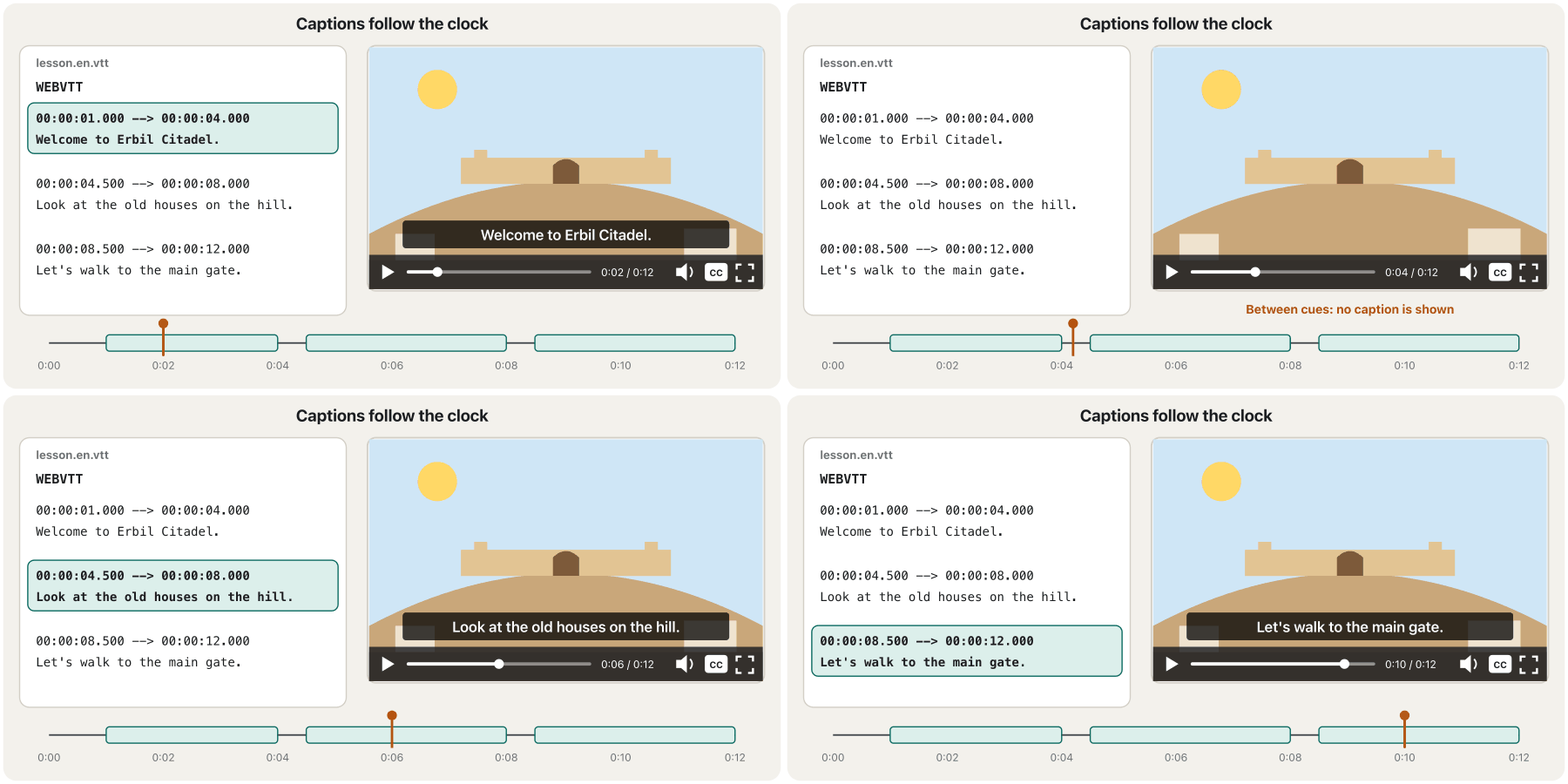
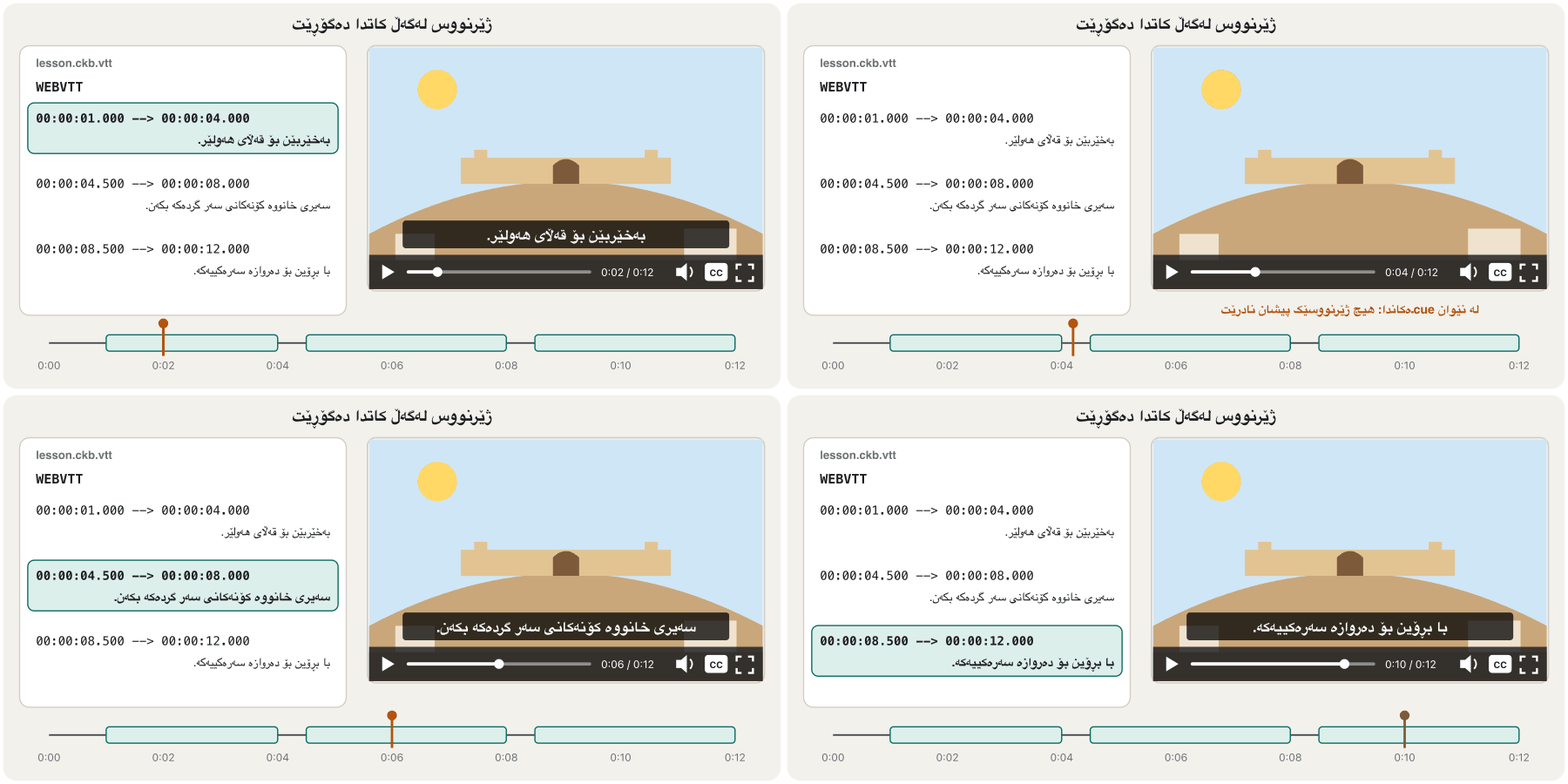
Captions, subtitles and descriptionsژێرنووسی دەنگ، ژێرنووس و وەسف
Adding captions with trackزیادکردنی ژێرنووسی دەنگ بە track
Put one <track> per text file inside <video>, after the <source> elements. kind says what it is, src is the WebVTT file, srclang is its (en, ckb for Central Kurdish) and label is the name in the player's menu — write it in its own language. default turns one track on from the start.
بۆ هەر دەق <track>ـێک لەناو <video>ـدا دابنێ، دوای <source>. kind دەڵێت چییە، src ، srclang (en، ckb بۆ کوردیی ناوەندی) و label ناوەکەیەتی لە لیستی — بە زمانی خۆی بینووسە. default یەک ڕێچکە لە سەرەتاوە دەکاتەوە.
<video controls width="640" height="360"
       poster="images/citadel-poster.jpg">
  <source src="video/citadel-walk.webm" type="video/webm">
  <source src="video/citadel-walk.mp4" type="video/mp4">
  <track kind="captions" src="captions/citadel.en.vtt"
         srclang="en" label="English" default>
  <track kind="subtitles" src="captions/citadel.ckb.vtt"
         srclang="ckb" label="کوردی">
</video>
Explain the codeڕوونکردنەوەی کۆدەکە
- Lineدێڕی 5-6
English captions, switched on by
default.ئینگلیزی، بە
defaultکراوەیە.- Lineدێڕی 7-8
Kurdish subtitles;
label="کوردی"is what Kurdish visitors look for.کوردی؛
label="کوردی"ئەوەیە کە سەردانیکەرانی کورد بەدوایدا دەگەڕێن.
labelـی هەر ڕێچکەیەک دەبێتە بژاردەیەک لە لیستی .CêITCaptions, subtitles and descriptionsژێرنووسی دەنگ، ژێرنووس و وەسف
WebVTT: the caption fileWebVTT: فایلی ژێرنووسی دەنگ
A WebVTT file (.vtt) is plain text saved as UTF-8. It starts with the line WEBVTT, then a blank line, then cues: an optional number or name, a timing line start --> end (hh:mm:ss.ttt; the hours may be left out) and the text. A blank line ends each cue. In captions, <v Aram> marks who is speaking, and sounds go in square brackets.
(.vtt) دەقێکی سادەیە کە بە UTF-8 پاشەکەوت دەکرێت. بە دێڕی WEBVTT دەست پێ دەکات، پاشان دێڕێکی بەتاڵ، پاشان cueـەکان: ژمارە یان ناوێکی ئارەزوومەندانە، دێڕی کات start --> end (hh:mm:ss.ttt؛ کاتژمێر دەکرێت نەنووسرێت) و دەقەکە. دێڕێکی بەتاڵ کۆتایی بە هەر cueـێک دێنێت. لە ، <v Aram> دەڵێت کێ قسە دەکات و دەنگەکان لەناو کەوانەی چوارگۆشەدا دەنووسرێن.
WEBVTT

1
00:00:01.000 --> 00:00:04.000
<v Aram>Welcome to Erbil Citadel.</v>

2
00:00:04.500 --> 00:00:08.000
[birds singing]

3
00:00:08.500 --> 00:00:12.000
<v Aram>Let's walk to the main gate.</v>WEBVTT
1
00:00:01.000 --> 00:00:04.000
بەخێربێن بۆ قەڵای هەولێر.
2
00:00:08.500 --> 00:00:12.000
با بڕۆین بۆ دەروازە سەرەکییەکە.Explain the codeڕوونکردنەوەی کۆدەکە
- Lineدێڕی 1-8
Subtitles translate the speech, so the bird sounds are left out; the timings match the English file.
قسەکان وەردەگێڕن، بۆیە دەنگی باڵندەکان نانووسرێت؛ کاتەکان وەک ئینگلیزییەکەن.
Captions, subtitles and descriptionsژێرنووسی دەنگ، ژێرنووس و وەسف
Transcripts and audio descriptionدەقی ئاخاوتن و وەسفی دەنگی
A transcript is the whole text of a video or a recording — speech and important sounds — on the page itself. It helps deaf-blind visitors who read with a braille display, people on slow connections, search engines and anyone who wants to read or copy. Audio-only content such as a podcast needs a transcript (WCAG 1.2.1, level A).
هەموو دەقی ڤیدیۆیەک یان تۆمارێکە — قسە و دەنگە گرنگەکان — لەسەر خودی لاپەڕەکە. یارمەتیی سەردانیکەرانی کەڕ و نابینا دەدات کە بە ئامێری بریل دەخوێننەوە، ئەوانەی پەیوەندییان هێواشە، و هەر کەسێک کە بیەوێت بیخوێنێتەوە یان کۆپی بکات. ناوەڕۆکی تەنیا-دەنگ وەک پێویستی بە هەیە ( 1.2.1، ئاستی A).
If important information is only seen — text on a board, a chart, a hand pointing — blind visitors miss it. Say it in the narration, add an audio description, or describe it in the transcript (WCAG 1.2.3 and 1.2.5).
ئەگەر زانیارییەکی گرنگ تەنیا ببینرێت — نووسین لەسەر تەختە، ، دەستێک کە ئاماژە دەکات — سەردانیکەرانی نابینا لەدەستی دەدەن. لە قسەکاندا بیڵێ، زیاد بکە، یان لە وەسفی بکە ( 1.2.3 و 1.2.5).
<details>
  <summary>Transcript</summary>
  <p><b>Aram:</b> Welcome to Erbil Citadel.</p>
  <p>[birds singing]</p>
  <p><b>Aram:</b> Let's walk to the main gate.</p>
</details>HTML sent to the browserئەو HTMLـەی دەنێردرێت بۆ تۆڕگەڕ
<details>
  <summary>Transcript</summary>
  <p><b>Aram:</b> Welcome to Erbil Citadel.</p>
  <p>[birds singing]</p>
  <p><b>Aram:</b> Let's walk to the main gate.</p>
</details>iframe: a window into another pageiframe: پەنجەرەیەک بۆ لاپەڕەیەکی تر
<iframe> shows another web page inside a rectangle of your page: a video player, a map, a form. The embedded page keeps its own address and runs its own code. Your page cannot change it, and it can collect data about your visitors — so embed only what you trust. This is how you put a YouTube video on your page, in privacy-enhanced mode (the youtube-nocookie.com address):
<iframe> تر لەناو لاکێشەیەکی لاپەڕەکەتدا پیشان دەدات: ڤیدیۆ، نەخشەیەک، . لاپەڕە چەسپێنراوەکە ناونیشانی خۆی دەهێڵێتەوە و کۆدی خۆی جێبەجێ دەکات. لاپەڕەکەت ناتوانێت بیگۆڕێت، ئەویش دەتوانێت زانیاری لەبارەی سەردانیکەرانت کۆ بکاتەوە — بۆیە تەنیا ئەوە بچەسپێنە کە متمانەت پێیەتی. ئەمە ڕێگەی دانانی ڤیدیۆیەکی YouTubeـە لە لاپەڕەکەتدا، بە دۆخی پاراستنی (ناونیشانی youtube-nocookie.com):
<iframe src="https://www.youtube-nocookie.com/embed/VIDEO_ID"
        title="Video: a walk around Erbil Citadel"
        width="560" height="315" loading="lazy"
        allow="accelerometer; autoplay; clipboard-write; encrypted-media; gyroscope; picture-in-picture; web-share"
        referrerpolicy="strict-origin-when-cross-origin"
        allowfullscreen></iframe>
Explain the codeڕوونکردنەوەی کۆدەکە
- Lineدێڕی 1
In privacy-enhanced mode, views on your page do not shape the viewer's YouTube recommendations or personalised adverts (YouTube Help).
لە دۆخی پاراستنی ، سەیرکردن لە لاپەڕەکەتدا کار لە پێشنیارەکانی YouTube و ڕیکلامی تایبەتی بینەر ناکات (YouTube Help).
- Lineدێڕی 2
titlenames the frame for screen readers. Every iframe needs one.titleناو لە پەنجەرەکە دەنێت بۆ . هەموو پێویستی پێیەتی.- Lineدێڕی 3
YouTube requires a player of at least 200 × 200 px and recommends at least 480 × 270 for 16 : 9.
loading="lazy"waits until the visitor comes near.YouTube لانیکەم 200 × 200 px داوا دەکات و بۆ 16 : 9 لانیکەم 480 × 270 پێشنیار دەکات.
loading="lazy"چاوەڕێ دەکات تا سەردانیکەر نزیک دەبێتەوە.- Lineدێڕی 4
allowlists the features the player may use; copy it from the platform's own embed code and add nothing else.allowئەو تایبەتمەندییانە لیست دەکات کە بۆی هەیە بەکاریان بهێنێت؛ لە کۆدی چەسپاندنی خودی پلاتفۆرمەکەوە کۆپی بکە و هیچی تر زیاد مەکە.- Lineدێڕی 5
Keep this value: YouTube needs the
Refererto identify your site; withno-referrerthe player shows an error (Error 153) instead of the video.ئەم بهێڵەوە: YouTube پێویستی بە
Refererهەیە بۆ ناسینەوەی ؛ بەno-referrerلەبری ڤیدیۆکە هەڵەیەک پیشان دەدات (Error 153).- Lineدێڕی 6
allowfullscreenis the older way to writeallow="fullscreen"; YouTube's code still includes it.allowfullscreenشێوە کۆنەکەی نووسینیallow="fullscreen"ـە؛ کۆدی YouTube هێشتا لەخۆی دەگرێت.
iframe {
  width: 100%;
  height: auto;
  aspect-ratio: 16 / 9;   /* the frame keeps the video's shape on every screen */
}iframe: a window into another pageiframe: پەنجەرەیەک بۆ لاپەڕەیەکی تر
Embedding a mapچەسپاندنی نەخشە
OpenStreetMap, the free world map made by volunteers, gives an iframe for any place: Share → HTML. The embedded map shows the credit © OpenStreetMap contributors itself; keep it visible. Add a link to the full map and write the address as text, for screen readers and for copying.
OpenStreetMap، نەخشەی ئازادی جیهان کە خۆبەخشان دروستیان کردووە، بۆ هەر شوێنێک دەدات: Share → HTML. نەخشە چەسپێنراوەکە خۆی ناوهێنانی © OpenStreetMap contributors پیشان دەدات؛ با دیار بێت. بۆ نەخشە تەواوەکە زیاد بکە و ناونیشانەکە وەک دەق بنووسە، بۆ و بۆ کۆپیکردن.
<iframe src="https://www.openstreetmap.org/export/embed.html?bbox=44.0030,36.1870,44.0155,36.1955&layer=mapnik&marker=36.1912,44.0092"
title="Map: Erbil Citadel"
width="600" height="400" loading="lazy"></iframe>
<p><a href="https://www.openstreetmap.org/?mlat=36.1912&mlon=44.0092#map=17/36.1912/44.0092">See a bigger map</a>
— Erbil Citadel, city centre, Erbil.</p>Explain the codeڕوونکردنەوەی کۆدەکە
- Lineدێڕی 1
bboxis the box to show: west, south, east and north edges;markeris the pin: latitude, longitude.bboxئەو چوارگۆشەیەیە کە پیشان دەدرێت: لێوارەکانی ڕۆژئاوا، باشوور، ڕۆژهەڵات و باکوور؛markerنیشانەکەیە: پانی و درێژیی جوگرافی.- Lineدێڕی 5-6
A normal link and the address in words.
ئاسایی و ناونیشانەکە بە وشە.
title، ناوهێنانەکەی، و ناونیشانەکە بە وشە.CêITSafe embedding: sandbox, allow and referrerpolicyچەسپاندنی بێ مەترسی: sandbox، allow و referrerpolicy
sandboxputs the frame in a . An emptysandboxapplies every restriction: no scripts, no forms, no pop-ups, no changing your page's address, and the frame counts as a stranger even to its own site. Each token lifts one restriction:allow-scripts,allow-forms,allow-popups,allow-same-origin… Never combineallow-scriptsandallow-same-originfor a page from your own site: the frame could remove its own sandbox (MDN).allowlists the powerful features the frame may use — camera, microphone, location, full screen, autoplay. A cross-origin frame gets none of them unless you list them.referrerpolicydecides how much of your page's address is sent. The default,strict-origin-when-cross-origin, sends other sites only your site's name.
sandboxپەنجەرەکە دەخاتە .sandboxـی بەتاڵ هەموو سنوورەکان دادەنێت: نە سکریپت، نە ، نە پەنجەرەی نوێ، نە گۆڕینی ناونیشانی لاپەڕەکەت. پەنجەرەکە تەنانەت بۆ خۆیشی وەک بێگانە دەژمێردرێت. هەر نیشانەیەک سنوورێک لادەبات:allow-scripts،allow-forms،allow-popups،allow-same-origin… هەرگیزallow-scriptsوallow-same-originپێکەوە بۆ لاپەڕەیەکی خۆت دامەنێ: پەنجەرەکە دەتوانێت خۆی لابەرێت (MDN).allowئەو تایبەتمەندییە بەهێزانە لیست دەکات کە پەنجەرەکە بۆی هەیە بەکاریان بهێنێت — کامێرا، مایک، شوێن، پڕ بە شاشە، . پەنجەرەیەکی تر هیچیان وەرناگرێت مەگەر خۆت لیستیان بکەیت.referrerpolicyبڕیار دەدات چەندە لە ناونیشانی لاپەڕەکەت بنێردرێت. بنەڕەتەکە،strict-origin-when-cross-origin، تەنیا ناوی بۆ تر دەنێرێت.
<!-- A quiz from a partner site: scripts and forms only -->
<iframe src="https://quiz.example.org/web-design/week-3"
        title="Quiz: week 3"
        width="600" height="450" loading="lazy"
        sandbox="allow-scripts allow-forms"></iframe>
A real example: the "What the browser shows" boxes in these lessons are iframes with srcdoc (the HTML written inside the attribute) and sandbox="allow-same-origin": your HTML is drawn, but no script runs. The other way round, banks and log-in pages refuse to appear in other sites' frames (X-Frame-Options or frame-ancestors) to stop clickjacking, tricks with invisible frames; the frame shows an error instead.
نموونەیەکی ڕاستەقینە: سندووقەکانی «ئەوەی پیشانی دەدات» لەم وانانەدا بە srcdoc (HTMLـەکە لەناو نووسراوە) و sandbox="allow-same-origin": HTMLـەکەت دەکێشرێت، بەڵام هیچ سکریپتێک جێبەجێ نابێت. بە پێچەوانەوە، بانک و لاپەڕەکانی ڕێگە نادەن لە پەنجەرەی تردا پیشان بدرێن (X-Frame-Options یان frame-ancestors) بۆ ڕێگرتن لە clickjacking، واتە فێڵ بە پەنجەرەی نەبینراو؛ پەنجەرەکە لەبری ئەوە هەڵەیەک پیشان دەدات.
How big is a video?ڤیدیۆ چەندە گەورەیە؟
A video is many still pictures shown quickly — 24 to 60 every second () — plus sound. In 1878 Eadweard Muybridge showed the idea with a row of photos of a running horse. Ten minutes at 30 pictures a second is 18,000 pictures, so codecs are essential. After compression, the size depends on the : how many bits each second of video uses.
ڤیدیۆ چەندین وێنەی ڕاوەستاوە کە بە خێرایی پیشان دەدرێن — 24 تا 60 لە هەر چرکەیەکدا () — لەگەڵ دەنگ. لە 1878 Eadweard Muybridge ئەم بیرۆکەیەی بە ڕیزێک فۆتۆی ئەسپێکی ڕاکەر پیشان دا. دە خولەک بە 30 وێنە لە چرکەیەکدا دەکاتە 18,000 وێنە، بۆیە زۆر پێویستن. دوای پەستاندن، قەبارە بەستراوەتەوە بە : هەر چرکەیەکی ڤیدیۆ چەند بیت بەکار دەهێنێت.
S is the size in MB, b the bit rate in Mbit/s and t the length in seconds. Divide by 8 because 8 bits make one byte.
S قەبارەیە بە MB، b بە Mbit/s و t درێژییە بە چرکە. دابەشی 8ی دەکەین چونکە 8 بیت یەک بایتە.
| A 10-minute video (600 s) at…ڤیدیۆیەکی 10 خولەکی (600 چرکە) بە… | Sizeقەبارە |
|---|---|
| 1 Mbit/s | MB |
| 2.5 Mbit/s | MB |
| 5 Mbit/s | MB |
For a lesson, 720p is usually enough. Many students watch on mobile data, so: use preload="none" for long videos, offer a smaller file or the sound alone, and keep the transcript on the page (Keeping media small and working gives the same advice for slides).
بۆ وانەیەک، 720p زۆرجار بەسە. زۆر قوتابی بە مۆبایل سەیر دەکەن، بۆیە: بۆ ڤیدیۆی درێژ preload="none" بەکاربهێنە، بچووکتر یان تەنیا دەنگەکە پێشکەش بکە و لەسەر لاپەڕەکە بهێڵەوە (بچووک و کارا هێشتنەوەی میدیا هەمان ئامۆژگاری بۆ سلاید دەدات).
Common mistakesهەڵە باوەکان
- Autoplay with sound. Browsers block it and WCAG 1.4.2 fails. Autoplay only muted, short clips, with
controls. - No
controls. Keyboard users cannot pause or turn on captions. - Captions only burned into the picture. They cannot be turned off, enlarged, translated or searched; use
<track>. - Testing captions from
file://and thinking the code is wrong. Usehttp://localhost. - A wrong MIME type, such as
type="audio/mp3". The official type for MP3 isaudio/mpeg. - An iframe without
title, or with a fixed width that sticks out of phone screens. referrerpolicy="no-referrer"on a YouTube embed. The video refuses to play; keepstrict-origin-when-cross-origin.- Uploading the camera's 4K file to your own hosting. Export a 720p web version first.
- بە دەنگەوە. ڕێگەی لێ دەگرن و 1.4.2 جێبەجێ نابێت. تەنیا کلیپی کورتی بێدەنگ بە
controlsـەوە بە لێبدە. - بێ
controls. بەکارهێنەرانی ناتوانن بیوەستێنن یان بکەنەوە. - کە تەنیا لەناو وێنەکەدا نووسراون. ناتوانرێت بکوژێنرێنەوە، گەورە بکرێن، وەربگێڕدرێن یان بگەڕێن بەدوایاندا؛
<track>بەکاربهێنە. - تاقیکردنەوەی لە
file://ـەوە و وا زانین کۆدەکە هەڵەیە.http://localhostبەکاربهێنە. - هەڵە، وەک
type="audio/mp3". جۆری فەرمیی MP3audio/mpegـە. - بێ
title، یان بە پانییەکی جێگیر کە لە شاشەی مۆبایل دەردەچێت. referrerpolicy="no-referrer"لەسەر ڤیدیۆیەکی چەسپێنراوی YouTube. ڤیدیۆکە لێنادرێت؛strict-origin-when-cross-originبهێڵەوە.- 4Kـی کامێرا بۆ خۆت. سەرەتا وەشانێکی 720pـی وێب دەربهێنە.
Exercisesڕاهێنانەکان
Build a lesson page with a 12-second video of Erbil Citadel: two sources (WebM, MP4), a poster, controls, preload="metadata", English captions switched on by default, Kurdish subtitles, a download link as fallback and a transcript that opens and closes.
لاپەڕەیەکی وانە دروست بکە بە ڤیدیۆیەکی 12 چرکەیی قەڵای هەولێر: دوو سەرچاوە (WebM، MP4)، poster، controls، preload="metadata"، ئینگلیزی کە بە بنەڕەت کراوەیە، کوردی، وەک جێگرەوە و کە دەکرێتەوە و دادەخرێت.
Show answerوەڵامەکە پیشان بدە
<!DOCTYPE html>
<html lang="en">
<head>
  <meta charset="utf-8">
  <meta name="viewport" content="width=device-width, initial-scale=1">
  <title>A walk around Erbil Citadel</title>
  <style>
    video { max-width: 100%; height: auto; }
  </style>
</head>
<body>
  <h1>A walk around Erbil Citadel</h1>
  <video controls width="640" height="360" preload="metadata"
         poster="images/citadel-poster.jpg">
    <source src="video/citadel-walk.webm" type="video/webm">
    <source src="video/citadel-walk.mp4" type="video/mp4">
    <track kind="captions" src="captions/citadel.en.vtt"
           srclang="en" label="English" default>
    <track kind="subtitles" src="captions/citadel.ckb.vtt"
           srclang="ckb" label="کوردی">
    <p><a href="video/citadel-walk.mp4">Download the video (MP4, 24 MB)</a></p>
  </video>
  <details>
    <summary>Transcript</summary>
    <p><b>Aram:</b> Welcome to Erbil Citadel.</p>
    <p>[birds singing]</p>
    <p><b>Aram:</b> Let's walk to the main gate.</p>
  </details>
</body>
</html>HTML sent to the browserئەو HTMLـەی دەنێردرێت بۆ تۆڕگەڕ
<!DOCTYPE html>
<html lang="en">
<head>
  <meta charset="utf-8">
  <meta name="viewport" content="width=device-width, initial-scale=1">
  <title>A walk around Erbil Citadel</title>
  <style>
    video { max-width: 100%; height: auto; }
  </style>
</head>
<body>
  <h1>A walk around Erbil Citadel</h1>
  <video controls width="640" height="360" preload="metadata"
         poster="data:image/svg+xml,%3Csvg%20xmlns='http://www.w3.org/2000/svg'%20width='640'%20height='360'%20viewBox='0%200%20640%20360'%3E%3Crect%20width='640'%20height='360'%20fill='%23cfe6f6'/%3E%3Cpath%20d='M0,280%20Q320,130%20640,280%20L640,360%20L0,360%20Z'%20fill='%23c9a77a'/%3E%3Ctext%20x='320'%20y='90'%20font-family='sans-serif'%20font-size='34'%20font-weight='700'%20text-anchor='middle'%20fill='%231b1d20'%3EA%20walk%20around%20Erbil%20Citadel%3C/text%3E%3C/svg%3E">
    <source src="video/citadel-walk.webm" type="video/webm">
    <source src="video/citadel-walk.mp4" type="video/mp4">
    <track kind="captions" src="captions/citadel.en.vtt"
           srclang="en" label="English" default>
    <track kind="subtitles" src="captions/citadel.ckb.vtt"
           srclang="ckb" label="کوردی">
    <p><a href="video/citadel-walk.mp4">Download the video (MP4, 24 MB)</a></p>
  </video>
  <details>
    <summary>Transcript</summary>
    <p><b>Aram:</b> Welcome to Erbil Citadel.</p>
    <p>[birds singing]</p>
    <p><b>Aram:</b> Let's walk to the main gate.</p>
  </details>
</body>
</html>
The preview has no video file, so you see only the poster and the controls; the play button does nothing here.
پێشبینینەکە ڤیدیۆی تێدا نییە، بۆیە تەنیا وێنەی poster و کۆنترۆڵ دەبینیت؛ لێرەدا لێدان هیچ ناکات.
The two .vtt files are the ones on the WebVTT screen. Open the folder through http://localhost to see the captions.
دوو .vtt ئەوانەن کە لە شاشەی هەن. لە ڕێگەی http://localhostـەوە بکەرەوە بۆ بینینی .
Embed an OpenStreetMap map of your school or university: a title, lazy loading, a frame that keeps a 4 : 3 shape on every screen, a link to the bigger map and the address as text.
نەخشەیەکی OpenStreetMap بۆ قوتابخانە یان زانکۆکەت بچەسپێنە: title، ، پەنجەرەیەک کە لە هەموو شاشەیەکدا شێوەی 4 : 3 دەپارێزێت، بۆ نەخشە گەورەکە و ناونیشانەکە وەک دەق.
Show answerوەڵامەکە پیشان بدە
<iframe class="map"
src="https://www.openstreetmap.org/export/embed.html?bbox=…&layer=mapnik&marker=…"
title="Map: our school" loading="lazy"></iframe>
<p><a href="https://www.openstreetmap.org/?mlat=…&mlon=…">See a bigger map</a> — 60 Metre Street, Erbil.</p>.map {
width: 100%;
height: auto;
aspect-ratio: 4 / 3; /* the same shape on every screen */
border: 0;
}Copy the bbox and marker numbers from Share → HTML on openstreetmap.org.
ژمارەکانی bbox و marker لە Share → HTMLـی openstreetmap.org کۆپی بکە.
Calculate: (a) a 45-minute recorded lecture at 1.5 Mbit/s; (b) the same lecture as sound only at 128 kbit/s. Which would you offer students who watch on mobile data?
حساب بکە: (a) وانەیەکی تۆمارکراوی 45 خولەکی بە 1.5 Mbit/s؛ (b) هەمان وانە وەک تەنیا دەنگ بە 128 kbit/s. کامیان پێشکەشی ئەو قوتابییانە دەکەیت کە بە مۆبایل سەیر دەکەن؟
Show answerوەڵامەکە پیشان بدە
Offer both: the video for those on Wi-Fi, and the 43 MB sound file plus the transcript for those on mobile data.
هەردووکیان پێشکەش بکە: ڤیدیۆکە بۆ ئەوانەی هەیە و دەنگی 43 MB لەگەڵ بۆ ئەوانەی مۆبایل بەکار دەهێنن.
Which kind? (a) a Kurdish translation of an English lecture; (b) English text for deaf viewers of an English video, with [applause]; (c) the titles 'Introduction', 'Lab', 'Summary' to jump between parts; (d) text read aloud for blind viewers about what is drawn on the board.
کام kind؟ (a) وەرگێڕانی کوردیی وانەیەکی ئینگلیزی؛ (b) دەقی ئینگلیزی بۆ بینەرانی کەڕی ڤیدیۆیەکی ئینگلیزی، بە [چەپڵە]وە؛ (c) ناونیشانەکانی «پێشەکی»، «تاقیگە»، «پوختە» بۆ بازدان لە نێوان بەشەکاندا؛ (d) دەقێک کە بۆ بینەرانی نابینا دەخوێنرێتەوە لەبارەی ئەوەی لەسەر تەختەکە کێشراوە.
Show answerوەڵامەکە پیشان بدە
(a) subtitles: a translation. (b) captions: same language, with sounds, for deaf viewers. (c) chapters. (d) descriptions.
(a) subtitles: وەرگێڕانە. (b) captions: هەمان زمان، بە دەنگەکانەوە، بۆ بینەرانی کەڕ. (c) chapters. (d) descriptions.
Summaryپوختە
<video>and<audio>replaced plugins such as Flash; host the file yourself or embed a platform's player.- Always
controls; addwidth,height, aposter, a sensiblepreloadand fallback content. - A container (MP4, WebM) holds tracks packed by codecs; list
<source>s withtype, newest format first. - No autoplay with sound; silent loops need
muted playsinlineand a way to pause. - Captions and subtitles come from
<track>and WebVTT files; add a transcript, and describe what is only seen. <iframe>needs atitle; use privacy-enhanced video,loading="lazy", a 16 : 9aspect-ratio, andsandbox,allowandreferrerpolicyto limit what it can do.- File size: (MB, Mbit/s, seconds) — think of students on mobile data.
<video>و<audio>جێگەی وەک Flashیان گرتەوە؛ خۆت هۆست بکە یان پلاتفۆرمێک بچەسپێنە.- هەمیشە
controls؛width،height،poster،preloadـێکی گونجاو و ناوەڕۆکی جێگرەوە زیاد بکە. - (MP4، WebM) ڕێچکەکان لەخۆ دەگرێت کە پەستاندوویانن؛
<source>ـەکان بەtypeـەوە لیست بکە، نوێترین یەکەم. - بە دەنگەوە نا؛ کلیپی بێدەنگی دووپاتەبوو
muted playsinlineو ڕێگەیەکی وەستاندنی پێویستە. - و لە
<track>و دێن؛ زیاد بکە و ئەوەی تەنیا دەبینرێت وەسف بکە. <iframe>titleـی پێویستە؛ ڤیدیۆی پارێزەری ،loading="lazy"،aspect-ratioـی 16 : 9 بەکاربهێنە، هەروەهاsandbox،allowوreferrerpolicyبۆ سنووردارکردنی ئەوەی دەتوانێت بیکات.- قەبارەی : (MB، Mbit/s، چرکە) — بیر لەو قوتابییانە بکەرەوە کە مۆبایل بەکار دەهێنن.
Lesson complete!وانەکە تەواو بوو!
Well done. Review the key terms, then go on to the next lesson.دەستخۆش. سەیرێکی زاراوە سەرەکییەکان بکەرەوە، پاشان بڕۆ بۆ وانەی داهاتوو.
Key termsزاراوە سەرەکییەکان
HTML Formsفۆرمەکانی HTML
Related lecturesوانە پەیوەندیدارەکان
- Images for the Web: Formats, Size and Responsive Imagesوێنە بۆ وێب: جۆرەکانی فایل، قەبارە و وێنە ڕێسپۆنسیڤەکان
- Multimediaفرەمیدیا
- Links, Symbols and Mediaبەستەرەکان، هێماکان و میدیا
- Welcome to Web Design: What Web Designers Do and Your Toolsبەخێربێیت بۆ دیزاینی وێب: دیزاینەرانی وێب چی دەکەن و ئامرازەکانت
- Web Accessibility: WCAG 2.2 in Practiceدەستڕاگەیشتنی وێب: WCAG 2.2 لە کرداردا
- Effects, Transitions and Animationsکاریگەرییەکان، گۆڕانە نەرمەکان و ئەنیمەیشنەکان
- Responsive Design: Viewport, Media Queries and Mobile-Firstدیزاینی ڕێسپۆنسیڤ: ناوچەی بینین، پرسەکانی میدیا و مۆبایل لە پێشدا
References and further readingسەرچاوەکان و خوێندنەوەی زیاتر
- MDN: HTML video and audio
- MDN: <track> element
- MDN: Web Video Text Tracks Format (WebVTT)
- MDN: Autoplay guide for media and Web Audio APIs
- MDN: <iframe> element
- MDN: X-Frame-Options
- web.dev: Replace animated GIFs with video
- web.dev: Browser-level lazy loading (images and iframes)
- W3C: Web Content Accessibility Guidelines (WCAG) 2.2 — 1.2.1, 1.2.2, 1.2.3, 1.2.5, 1.4.2, 2.2.2
- W3C WAI: Easy Checks — A First Review of Web Accessibility
- Adobe: Flash Player end of life
- YouTube Help: Embed videos and playlists (privacy-enhanced mode)
- YouTube API Services: Required Minimum Functionality (Referer, player size)
- Simon Willison: OpenStreetMap embed URL (bbox, layer, marker)
- W3Schools: HTML Video, Audio, YouTube and Iframes (topic checklist)
- Simon Willison: Error 153 "Video player configuration error" on YouTube embeds (Referrer-Policy)
This lecture is a first edition. The Kurdish text and terminology are waiting for review by Kurdish IT teachers.ئەم وانەیە چاپی یەکەمە. دەقە کوردییەکە و زاراوەکانی چاوەڕێی پێداچوونەوەی مامۆستایانی کوردی بواری IT ن.