Chapterبەش 1 · Lectureوانە 1.1
Welcome to Web Design: What Web Designers Do and Your Toolsبەخێربێیت بۆ دیزاینی وێب: دیزاینەرانی وێب چی دەکەن و ئامرازەکانت
Start here: what web design is, the three layers of every page (HTML, CSS and JavaScript), who builds websites, how a page travels from your folder to a visitor's screen, the tools you need (a code editor, browsers, developer tools, validators and a local server), how to organise a site folder, who writes the web standards and what Baseline means, and the map of this course.
لێرەوە دەست پێ بکە: چییە، سێ چینەکەی هەموو لاپەڕەیەک (، و )، کێ دروست دەکات، لاپەڕەیەک چۆن لە دەگاتە سەر شاشەی سەردانیکەرێک، ئەو ئامرازانەی پێویستت پێیانە (، ، ، پشکنەرەکان و ناوخۆیی)، چۆن ڕێک دەخەیت، کێ وێب دەنووسێت و چ واتایەک دەدات، هەروەها نەخشەی ئەم کۆرسە.
What you will learnچی فێر دەبیت
- Explain what web design is and what HTML, CSS and JavaScript each do.
- Name the main jobs in a web team, from UI designer to full-stack developer.
- Describe how a page travels from your folder to a visitor’s browser.
- Set up your tools: a code editor, two browsers, developer tools, a validator and a local server.
- Organise a site folder, name files safely and open your first page.
- Say who writes the web standards and use Baseline to decide whether a feature is safe to use.
- ڕوونی بکەیتەوە چییە و هەریەک لە ، و چی دەکات.
- کارە سەرەکییەکانی تیمێکی وێب ناو ببەیت، لە دیزاینەری تا .
- باسی ئەوە بکەیت لاپەڕەیەک چۆن لە دەگاتە سەردانیکەرێک.
- ئامرازەکانت ئامادە بکەیت: ، دوو ، ، پشکنەرێک و ناوخۆیی.
- ڕێک بخەیت، بە دروستی ناو بنێیت و یەکەم لاپەڕەت بکەیتەوە.
- بڵێیت کێ وێب دەنووسێت و بە بڕیار بدەیت ئایا تایبەتمەندییەک بۆ بەکارهێنان سەلامەتە.
What is web design?دیزاینی وێب چییە؟
Planning and creating how a looks and works: its layout, colours, fonts, images and navigation.
پلاندانان و دروستکردنی ڕووخسار و شێوازی کارکردنی : ڕێکخستنی لاپەڕەکان، ڕەنگ، فۆنت، وێنە و ڕێنیشاندان (navigation).
Every website you open was planned by someone. Web design decides how a site looks and how it works: what goes on each page, where the menu is, which colours and fonts it uses. Every web page is built in three layers, and each layer has its own language:
هەر کە دەیکەیتەوە، کەسێک پلانی بۆ داناوە. بڕیار دەدات چۆن دەردەکەوێت و چۆن کار دەکات: چی لە هەر لاپەڕەیەکدا دادەنرێت، لە کوێیە، چ ڕەنگ و بەکار دەهێنێت. هەموو لە سێ چین دروست دەبێت و هەر چینێک زمانی خۆی هەیە:
- HTML — the structure: it says what each part is (a heading, a paragraph, a link, a picture).
- CSS — the presentation: how each part looks (colours, fonts, spacing, layout).
- JavaScript — the behaviour: what happens when the visitor clicks or types (a menu opens, a form is checked).
- — پێکهاتە: دەڵێت هەر بەشێک چییە (، بڕگە، ، وێنە).
- — ڕووخسار: هەر بەشێک چۆن دەردەکەوێت (ڕەنگ، ، دووریی نێوان بەشەکان، ).
- — ڕەفتار: کاتێک سەردانیکەر کلیک دەکات یان دەنووسێت چی ڕوودەدات ( دەکرێتەوە، دەپشکنرێت).
Think of a house. HTML is the walls and the rooms: this is the kitchen, this is the door. CSS is the paint, the furniture and the curtains. JavaScript is the electricity: you press a switch and a light comes on.
خانوویەک بهێنە بەرچاوی خۆت. دیوار و ژوورەکانە: ئەمە چێشتخانەیە، ئەمە دەرگایە. بۆیە و کەلوپەل و پەردەکانە. کارەباکەیە: دادەگریت و گڵۆپێک هەڵدەبێت.
Where the analogy stops workingسنووری ئەم نموونەیە
A house is built once, but a browser builds the page again every time it opens it. And you can repaint a whole website in seconds by changing one CSS file, without touching the HTML.
خانوو یەکجار دروست دەکرێت، بەڵام هەر جارێک لاپەڕەکە بکاتەوە، دووپاتە دروستی دەکاتەوە. هەروەها دەتوانیت بە گۆڕینی یەک لە چەند چرکەیەکدا ڕەنگی هەموو بگۆڕیت، بەبێ ئەوەی دەست لە بدەیت.
HTML and CSS are compared side by side in CSS and HTML compared.
بەراوردی و لە تەنیشت یەکەوە: بەراوردی CSS و HTML.
Who builds a website?کێ تۆڕگە دروست دەکات؟
A big website is made by a team. In a small company, or in your own projects, one person often does several of these jobs:
گەورە تیمێک دروستی دەکات. لە کۆمپانیایەکی بچووکدا، یان لە پڕۆژەکانی خۆتدا، زۆرجار یەک کەس چەند کارێک لەمانە دەکات:
| Roleڕۆڵ | What they doچی دەکات |
|---|---|
| UI designerدیزاینەری | Designs the screens: layout, colours, buttons and icons.شاشەکان دیزاین دەکات: ، ڕەنگ، و . |
| UX designerدیزاینەری | Studies the visitors and plans the whole visit so that their tasks are easy.لە سەردانیکەران دەکۆڵێتەوە و هەموو سەردانەکە پلان دەکات بۆ ئەوەی کارەکانیان ئاسان بن. |
| Front-end developerگەشەپێدەری | Builds the pages that run in the browser, with HTML, CSS and JavaScript.ئەو لاپەڕانە بە ، و دروست دەکات کە لە کار دەکەن. |
| Back-end developerگەشەپێدەری | Writes the code on the server: user accounts, databases, orders.کۆدی سەر دەنووسێت: هەژماری بەکارهێنەران، ، کڕینەکان. |
| Full-stack developer (both ends) (هەردوو لا) | Works on both the front end and the back end.لەسەر هەردوو و کار دەکات. |
| Content writerنووسەری ناوەڕۆک | Writes the text, chooses the pictures and writes their alt text.دەقەکان دەنووسێت، وێنەکان هەڵدەبژێرێت و بۆ دەنووسێت. |
In this course you work as a web designer and a front-end developer. The back end (PHP and MySQL) is taught in the Web Programming course, which starts with What is PHP?. The English job words are in Key words: building websites, and the full list of skills in What does a web developer need to know?
لەم کۆرسەدا وەک و گەشەپێدەری کار دەکەیت. ( و ) لە کۆرسی پڕۆگرامسازیی وێبدا دەخوێندرێت کە بە PHP چییە؟ دەست پێ دەکات. وشە ئینگلیزییەکانی ئەم کارانە لە وشە سەرەکییەکان: دروستکردنی تۆڕگەدان. لیستی تەواوی شارەزاییەکانیش: گەشەپێدەری وێب پێویستە چی بزانێت؟
From your folder to a visitor’s screenلە فۆڵدەرەکەتەوە بۆ شاشەی سەردانیکەرێک
A website is a folder of files. While you build it, the folder is on your computer and only you can see it. To publish it, you copy it to a web host: a server that is always connected to the internet. Then a visit works like this:
پڕ لە . کاتێک دروستی دەکەیت، لەسەر و تەنیا خۆت دەیبینیت. بۆ ، کۆپیی دەکەیت بۆ : کە هەمیشە بە بەستراوە. پاشان سەردانێک بەم شێوەیە کار دەکات:
You upload your folder to the web host.
هەڵبار دەکەیت بۆ سەر .
A visitor types your address or taps a link. DNS turns the name, such as
example.com, into the server's IP address.سەردانیکەرێک ناونیشانەکەت دەنووسێت یان دەست لە دەدات. ناوەکە، وەک
example.com، دەکاتە .The browser sends a request to that server, and the server sends back
index.html.دەنێرێت بۆ ئەو و
index.htmlدەنێرێتەوە.The browser reads the HTML, asks for every CSS file, picture and script that the page needs, and draws the page.
دەخوێنێتەوە، داوای هەر ، وێنە و دەکات کە لاپەڕەکە پێویستی پێیەتی، پاشان لاپەڕەکە دەکێشێت.
You will meet each step again: URLs and DNS in From URL to page, requests and responses in HTTP and the request–response cycle, and putting your own site online in Publishing your website.
هەر هەنگاوێک دووپاتە دەبینیتەوە: و لە لە URLـەوە بۆ لاپەڕە، و لە HTTP و خولی داواکاری و وەڵام، هەروەها چۆن دەخەیتە سەر ، لە بڵاوکردنەوەی تۆڕگەکەت.
Your tools: a code editorئامرازەکانت: دەستکاریکەری دەق
You write HTML and CSS as plain text, so you need a code editor: a made for code. It colours the code so it is easy to read, closes tags for you, suggests names while you type and shows all the files of your site in one panel. A good free choice is Visual Studio Code (VS Code) for Windows, macOS and Linux; Notepad++ (Windows) and similar editors also work.
و وەک دەقی سادە دەنووسیت، بۆیە پێویستت بە تایبەت بە کۆد هەیە. کۆدەکە ڕەنگ دەکات تا بە ئاسانی بخوێنرێتەوە، بۆت دادەخات، لە کاتی نووسیندا ناو پێشنیار دەکات و هەموو لە یەک پانێڵدا پیشان دەدات. هەڵبژاردنێکی باشی بێبەرانبەر Visual Studio Codeـە (VS Code) بۆ Windows، macOS و Linux؛ Notepad++ (Windows) و دەستکاریکەری هاوشێوەش کار دەکەن.
Editors can add extensions (small add-ons). Two of them help in this course: a live preview that reloads the page when you save, and a formatter such as Prettier that tidies the code every time you save.
دەتوانیت (زیادکراوی بچووک) بخەیتە سەر . دوانیان لەم کۆرسەدا یارمەتیت دەدەن: پێشبینینی ڕاستەوخۆ کە لە کاتی لاپەڕەکە نوێ دەکاتەوە، هەروەها ڕێکخەرێک وەک Prettier کە هەر جارێک پاشەکەوتی بکەیت کۆدەکە ڕێک دەخات.
Your tools: a code editorئامرازەکانت: دەستکاریکەری دەق
Browsers and developer toolsتۆڕگەڕەکان و ئامرازەکانی گەشەپێدەر
Test every page in at least two browsers, because browsers are built on different engines: Blink from the Chromium project (Chrome, Edge, Opera), Gecko (Firefox) and WebKit (Safari, and most browsers on an iPhone). Open your pages on a phone too.
هەموو لاپەڕەیەک لە لانیکەم دوو تاقی بکەرەوە، چونکە لەسەر جیاواز دروست کراون: Blink لە پڕۆژەی Chromiumـەوە (Chrome، Edge، Opera)، Gecko (Firefox) و WebKit (Safari و زۆربەی سەر iPhone). لاپەڕەکانت لەسەر مۆبایلیش بکەرەوە.
Every desktop browser has developer tools (DevTools): press F12 (on a Mac, Cmd + Option + I), or right-click any part of the page and choose Inspect. The Elements panel shows the HTML and the CSS of what you clicked, the Console shows errors, and you can try a change live before you copy it into your file. You will use them often, for example in See the box model in the browser.
هەموو (DevTools)ـی هەیە: F12 دابگرە (لەسەر Mac، Cmd + Option + I)، یان کلیکی ڕاست لەسەر هەر بەشێکی لاپەڕەکە بکە و Inspect هەڵبژێرە. پانێڵی Elements و ئەو شتە پیشان دەدات کە کلیکت لێ کردووە، Console پیشان دەدات و دەتوانیت گۆڕانکارییەک ڕاستەوخۆ تاقی بکەیتەوە پێش ئەوەی بیخەیتە ناو . زۆر بەکاریان دەهێنیت، بۆ نموونە لە بینینی مۆدێلی سندووق لە تۆڕگەڕدا.
Your tools: a code editorئامرازەکانت: دەستکاریکەری دەق
The validator: a spell-checker for codeپشکنەر: ڕێنووسپشکنی کۆد
Browsers are kind: they try to show even broken HTML, so a mistake can stay hidden until it breaks the page in another browser or for a screen reader. A validator finds these mistakes. The W3C's Nu HTML Checker (validator.w3.org/nu) checks HTML and the W3C CSS Validator (jigsaw.w3.org/css-validator) checks CSS: give them the address of your page, upload the file or paste the code.
دڵسۆزن: هەوڵ دەدەن تەنانەت تێکچووش پیشان بدەن، بۆیە هەڵەیەک دەکرێت شاراوە بمێنێتەوە تا لە تردا یان بۆ لاپەڕەکە تێک دەدات. پشکنەر ئەم هەڵانە دەدۆزێتەوە. Nu HTML Checkerـی (validator.w3.org/nu) دەپشکنێت و W3C CSS Validator (jigsaw.w3.org/css-validator) دەپشکنێت: ناونیشانی لاپەڕەکەتی پێ بدە، هەڵبار بکە یان کۆدەکە بلکێنە.
Notice the second message: the checker also catches accessibility problems, such as a picture without alt text. Validate every page before you publish it; the full list of checks is in Checklist before you publish.
سەرنجی پەیامی دووەم بدە: پشکنەرەکە کێشەکانی دەگرێت، وەک وێنەیەک بەبێ . پێش هەموو لاپەڕەیەک بپشکنە؛ لیستی تەواوی پشکنینەکان لە لیستی پشکنین پێش بڵاوکردنەوەدایە.
A website is a folderتۆڕگە فۆڵدەرێکە
Keep each website in its own folder, with the home page at the top and a sub-folder for each kind of file:
هەر لە تایبەتی خۆیدا ڕابگرە، لە سەرەوە و بۆ هەر جۆرە ناوەوە:
index.htmlis the home page. When an address ends with a folder, such ashttps://example.com/, the server sends that folder'sindex.html.- Use lowercase letters, digits and hyphens:
opening-hours.html, notOpening Hours.html. - Keep the extension:
.html,.css,.js,.jpg,.svg.
index.html. کاتێک ناونیشانێک بە کۆتایی دێت، وەکhttps://example.com/،index.htmlـی ئەو دەنێرێت.- پیتی بچووک، ژمارە و خەتی ناوەند بەکاربهێنە:
opening-hours.html، نەکOpening Hours.html. - بهێڵەوە:
.html،.css،.js،.jpg،.svg.
Why so strict? Most web servers run Linux, where Logo.png and logo.png are two different files, and a space becomes %20 in an address. A page that works on your laptop can then break on the server (see Common mistakes). Pages find each other's files with relative paths: How a relative link finds its file.
بۆچی ئەوەندە ورد؟ زۆربەی لەسەر Linux کار دەکەن، کە تێیدا Logo.png و logo.png دوو جیاوازن و لە ناونیشاندا دەبێتە %20. بەم شێوەیە لاپەڕەیەک کە لەسەر کار دەکات، دەکرێت لەسەر تێک بچێت (بڕوانە هەڵە باوەکان). لاپەڕەکان بە یەکتر دەدۆزنەوە: بەستەری ڕێژەیی چۆن فایلەکەی دەدۆزێتەوە.
Your first page in five stepsیەکەم لاپەڕەت بە پێنج هەنگاو
- Make a folderفۆڵدەرێک دروست بکە
Create a folder called
my-site, for example in Documents.بە ناوی
my-siteدروست بکە، بۆ نموونە لەناو Documents. - Open it in the editorلە دەستکاریکەری دەقدا بیکەرەوە
In VS Code choose
File → Open Folder…and pickmy-site.لە VS Codeـدا
File → Open Folder…هەڵبژێرە وmy-siteدیاری بکە. - Create index.htmlindex.html دروست بکە
Make a new file
index.htmland type this page. You will learn every line in The structure of an HTML document.نوێی
index.htmlدروست بکە و ئەم لاپەڕەیە بنووسە. هەموو دێڕێکی لە پێکهاتەی بەڵگەنامەیەکی HTML فێر دەبیت.index.html — your first pageindex.html — یەکەم لاپەڕەتindex.htmlHTMLRuns in the browserلە ناو تۆڕگەڕ کار دەکات <!DOCTYPE html> <html lang="en"> <head> <meta charset="utf-8"> <meta name="viewport" content="width=device-width, initial-scale=1"> <title>My first page</title> </head> <body> <h1>Hello, web!</h1> <p>I built this page myself, in my own folder.</p> </body> </html>What the browser showsئەوەی تۆڕگەڕ پیشانی دەداتHTML sent to the browserئەو HTMLـەی دەنێردرێت بۆ تۆڕگەڕ
<!DOCTYPE html> <html lang="en"> <head> <meta charset="utf-8"> <meta name="viewport" content="width=device-width, initial-scale=1"> <title>My first page</title> </head> <body> <h1>Hello, web!</h1> <p>I built this page myself, in my own folder.</p> </body> </html> - Save and open itپاشەکەوتی بکە و بیکەرەوە
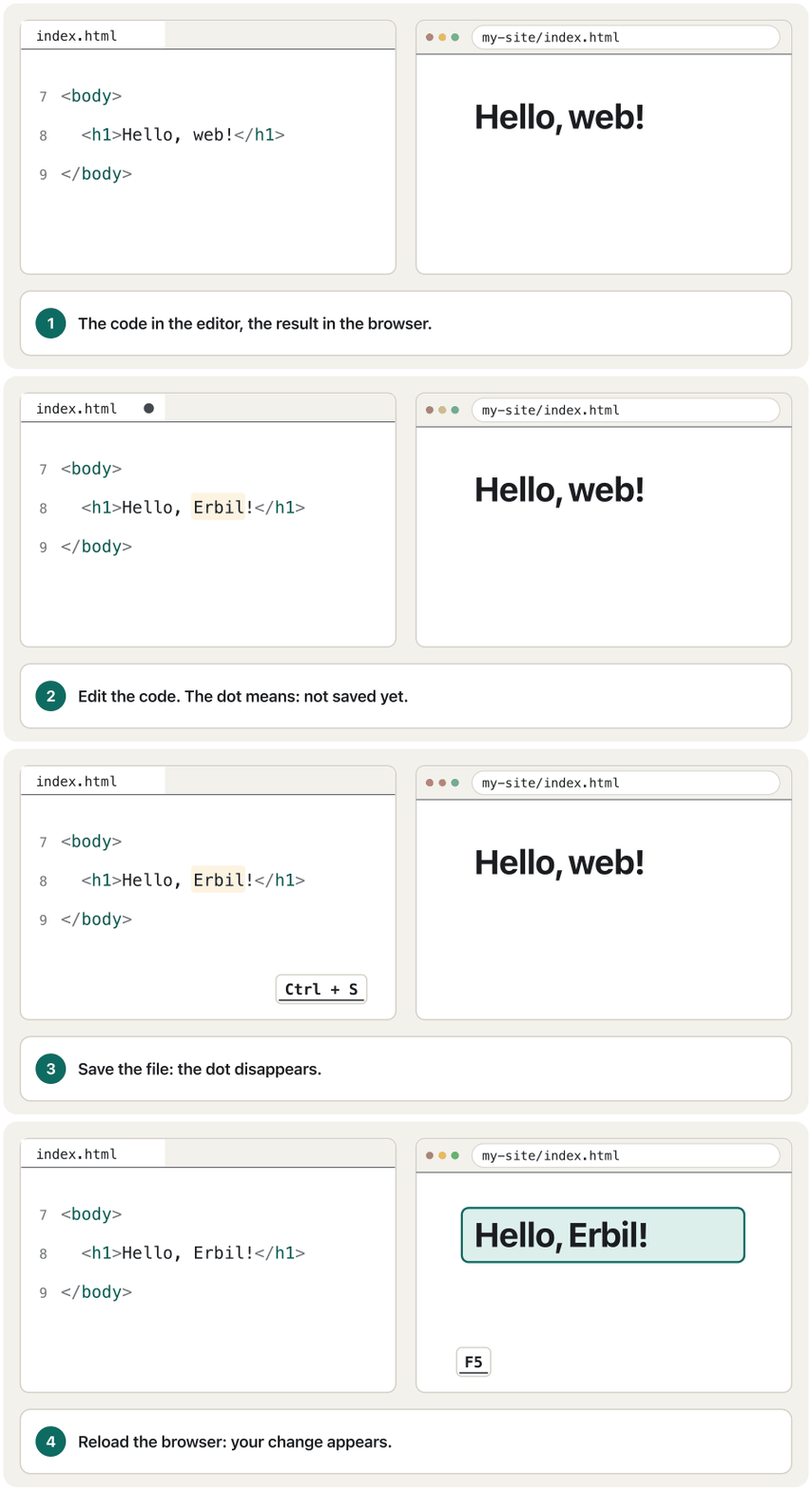
Save (Ctrl + S; Cmd + S on a Mac), then open the file in two browsers: double-click it or drag it into a browser window.
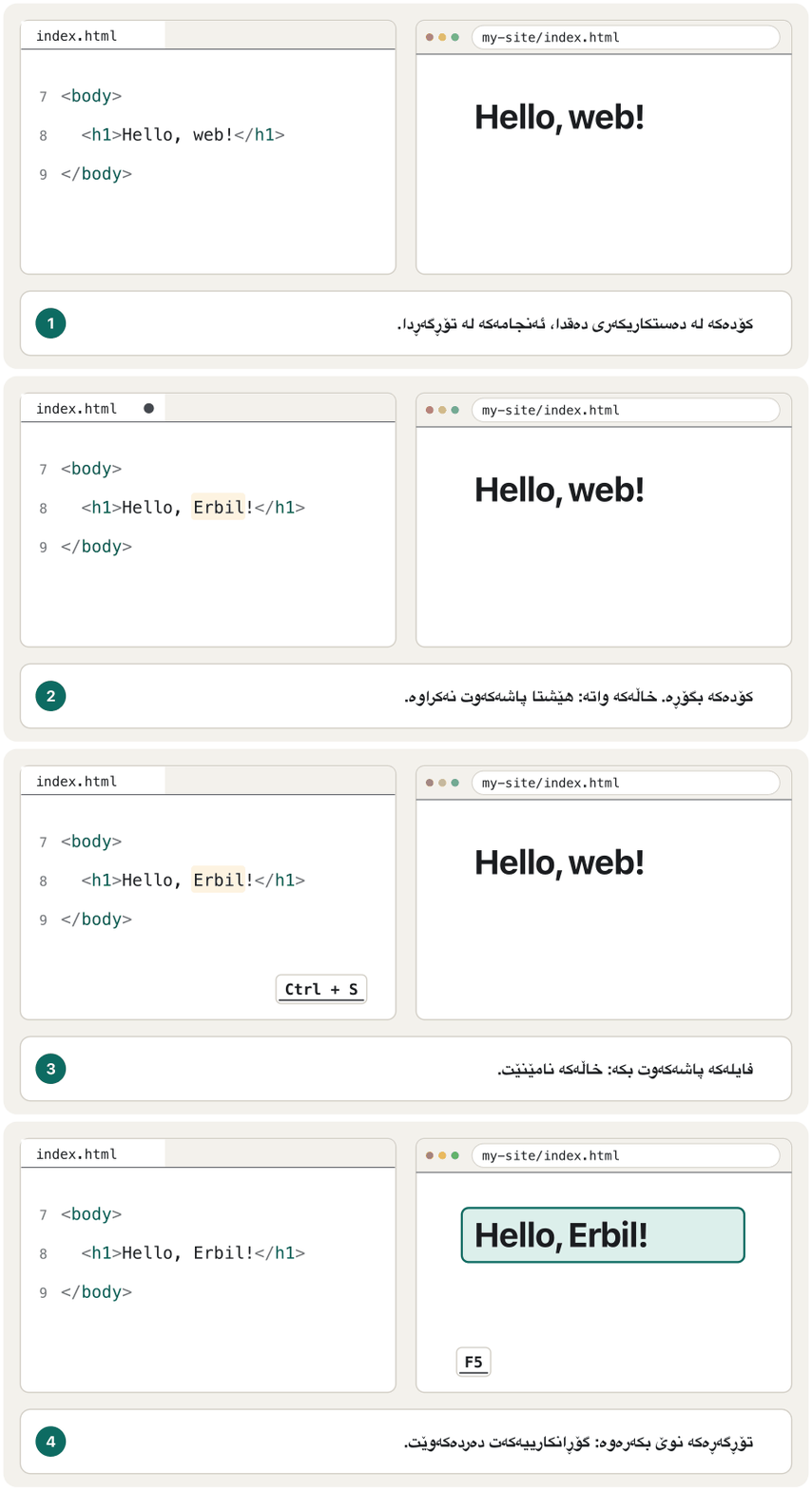
پاشەکەوتی بکە (Ctrl + S؛ لەسەر Mac، Cmd + S)، پاشان لە دوو بکەرەوە: دوو کلیکی لێ بکە یان ڕایبکێشە ناو .
- Change, save, reloadبگۆڕە، پاشەکەوت بکە، نوێی بکەرەوە
Change a word, save, and reload the browser (F5; Cmd + R on a Mac). You will repeat this loop all through the course.
وشەیەک بگۆڕە، پاشەکەوتی بکە و نوێ بکەرەوە (F5؛ لەسەر Mac، Cmd + R). لە هەموو کۆرسەکەدا ئەم خولە دووپاتە دەکەیتەوە.
Your first page in five stepsیەکەم لاپەڕەت بە پێنج هەنگاو
file:// or http://localhost?file:// یان http://localhost؟
When you double-click index.html, the address bar shows file:///…/my-site/index.html: the browser reads the file straight from your disk. That is fine for HTML, CSS and pictures. A few features work only through a web server, even one on your own computer at http://localhost: loading data with JavaScript's fetch(), JavaScript modules (type="module") and caption files for videos (<track>, taught in Adding captions with track). For security, browsers block them on file:// pages.
کاتێک دوو کلیک لە index.html دەکەیت، file:///…/my-site/index.html پیشان دەدات: ڕاستەوخۆ لە دیسکەکەتەوە دەخوێنێتەوە. ئەمە بۆ ، و وێنە باشە. چەند تایبەتمەندییەک تەنیا لە ڕێگەی کار دەکەن، تەنانەت ئەگەر لەسەر خۆت بێت لە http://localhost: هێنانی بە fetch()ـی ، مۆدیوڵەکانی (type="module") و بۆ ڤیدیۆ (<track>، کە لە زیادکردنی ژێرنووسی دەنگ بە trackدا فێری دەبیت). لەبەر هۆکاری لە لاپەڕەکانی file://ـدا ڕێیان لێ دەگرن.
Three easy ways to get http://localhost: the free Live Preview extension for VS Code (it also refreshes the page as you edit), the command python3 -m http.server run inside the site folder (on Windows, py -m http.server; then open http://localhost:8000), or XAMPP, which you will also use for PHP.
سێ ڕێگەی ئاسان بۆ http://localhost: Live Previewـی بێبەرانبەر بۆ VS Code (لە کاتی دەستکاریکردنیشدا لاپەڕەکە نوێ دەکاتەوە)، فەرمانی python3 -m http.server لەناو (لە Windowsـدا py -m http.server؛ پاشان http://localhost:8000 بکەرەوە)، یان XAMPP کە بۆ بەکاری دەهێنیت.
Who decides how HTML and CSS work?کێ بڕیار دەدات HTML و CSS چۆن کار بکەن؟
The Web works in every browser because everybody follows the same open standards:
وێب لە هەموو کار دەکات، چونکە هەمووان پەیڕەوی هەمان دەکەن:
- HTML — the HTML Living Standard, written by the WHATWG, a group led by the makers of the browser engines (Apple, Google, Microsoft and Mozilla). Living means it has no version numbers: it is updated all the time. Since 2019 the W3C and the WHATWG have worked on this one version. People still say “HTML5”, but today it is simply HTML.
- CSS — the specifications of the W3C's CSS Working Group, published as separate modules (Flexbox, Grid, Colour …).
- Accessibility — WCAG, also from the W3C (later in this course).
- Browser makers build these standards into their engines — not all at the same time.
- — HTML Living Standard، کە دەینووسێت، گرووپێک کە دروستکەرانی بزوێنەری (Apple، Google، Microsoft و Mozilla) سەرکردایەتیی دەکەن. Living (زیندوو) واتە ژمارەی وەشانی نییە: هەمیشە نوێ دەکرێتەوە. لە ساڵی 2019ـەوە و پێکەوە لەسەر ئەم یەک وەشانە کار دەکەن. خەڵک هێشتا دەڵێن «HTML5»، بەڵام ئەمڕۆ تەنیا .
- — گرووپی کاری CSSـی ، کە وەک بەشی جیاجیا بڵاو دەکرێنەوە (Flexbox، Grid، Colour …).
- — ، ئەویش لە (دواتر لەم کۆرسەدا).
- دروستکەرانی ئەم دەخەنە ناو بزوێنەرەکانیانەوە — نەک هەموویان لە یەک کاتدا.
It all began at CERN in Switzerland, where Tim Berners-Lee had the first web browser and the first web server running by the end of 1990. More of the story is in The W3C: the Web's rule-makers.
هەمووی لە CERN لە سویسرا دەستی پێ کرد، کە تیم بێرنەرز-لی تا کۆتایی ساڵی 1990 یەکەم و یەکەم خستە کار. زیاتری چیرۆکەکە لە W3C: یاسادانەرانی وێبدایە.
Who decides how HTML and CSS work?کێ بڕیار دەدات HTML و CSS چۆن کار بکەن؟
Can I use it? Baselineدەتوانم بەکاری بهێنم؟ Baseline
New HTML and CSS features reach the browsers at different times. Baseline, defined by the W3C's WebDX Community Group and shown on web.dev and MDN, tells you when a feature is safe to use:
تایبەتمەندییە نوێیەکانی و لە کاتی جیاوازدا دەگەنە . ، کە گرووپی کۆمەڵگەی WebDXـی پێناسەی دەکات و لە web.dev و MDNـدا پیشان دەدرێت، پێت دەڵێت تایبەتمەندییەک کەی بۆ بەکارهێنان سەلامەتە:
- Limited availability — not yet in all the core browsers.
- Newly available — works in the latest versions of all the core browsers: Chrome, Edge, Firefox and Safari, on computers and phones.
- Widely available — 30 months later: it also works in the older versions that most people still use.
- بەردەستبوونی سنووردار — هێشتا لە هەموو سەرەکییەکاندا نییە.
- تازە بەردەست — لە نوێترین وەشانی هەموو سەرەکییەکاندا کار دەکات: Chrome، Edge، Firefox و Safari، لەسەر و مۆبایل.
- بە فراوانی بەردەست — ٣٠ مانگ دواتر: لەو وەشانە کۆنترانەشدا کار دەکات کە زۆربەی خەڵک هێشتا بەکاریان دەهێنن.
MDN (developer.mozilla.org) shows a Baseline box at the top of every element and property page. In this course we prefer widely available features; when a lesson uses a newer one, it says so.
MDN (developer.mozilla.org) لە سەرەوەی لاپەڕەی هەموو و سندووقێکی پیشان دەدات. لەم کۆرسەدا تایبەتمەندیی بە فراوانی بەردەست بەباشتر دەزانین؛ کاتێک وانەیەک تایبەتمەندییەکی نوێتر بەکار دەهێنێت، دەیڵێت.
The map of this courseنەخشەی ئەم کۆرسە
The course has eight chapters. Each one builds on the one before, and the last one is your own portfolio website:
کۆرسەکە هەشت بەشی هەیە. هەر بەشێک لەسەر بەشی پێشووی دادەمەزرێت و دوایینیان خۆتە:
The path ends with your own portfolio website and a review of the whole course. After this course, Web Programming adds the back end with PHP and MySQL; it starts with What is PHP?.
ڕێگاکە بە پۆرتفۆلیۆی ئۆنلاینی خۆت و پێداچوونەوەی هەموو کۆرسەکە کۆتایی دێت. دوای ئەم کۆرسە، پڕۆگرامسازیی وێب بە و زیاد دەکات؛ بە PHP چییە؟ دەست پێ دەکات.
How to learn web designچۆن دیزاینی وێب فێر ببیت
- Type the examples yourself instead of copying them: your fingers learn the tags.
- Change one thing and predict what will happen before you reload.
- Inspect pages you like with the developer tools to see how they are built.
- Validate your HTML and CSS, and fix the first error first.
- Keep a learning portfolio: save each exercise with a short note on what you learned. This reflective portfolio (Online portfolios) grows into your final project.
- نموونەکان خۆت بنووسە لەبری کۆپیکردنیان: پەنجەکانت فێر دەبن.
- یەک شت بگۆڕە و پێشبینی بکە چی ڕوودەدات پێش ئەوەی نوێی بکەیتەوە.
- ئەو لاپەڕانەی بەدڵتن بە بپشکنە تا ببینیت چۆن دروست کراون.
- و بپشکنە و سەرەتا یەکەم چاک بکە.
- فێربوون ڕابگرە: هەر ڕاهێنانێک لەگەڵ تێبینییەکی کورت لەبارەی ئەوەی فێری بوویت هەڵبگرە. ئەم پۆرتفۆلیۆی فێربوونە (پۆرتفۆلیۆی ئۆنلاین) گەشە دەکات و دەبێتە پڕۆژەی کۆتاییت.
Common mistakesهەڵە باوەکان
| Mistakeهەڵە | Do this insteadلەبری ئەوە ئەمە بکە |
|---|---|
Writing code in Word and saving a .docxنووسینی کۆد لە Word و .docx | Use a code editor and save as .html. بەکاربهێنە و وەک .html پاشەکەوتی بکە. |
index.html.txt: Windows hides the real extensionindex.html.txt: Windows ڕاستەقینە دەشارێتەوە | Show file extensions (File Explorer → View → Show → File name extensions) and save as .html. پیشان بدە (File Explorer → View → Show → File name extensions) و وەک .html پاشەکەوتی بکە. |
| Spaces and capital letters in file names و پیتی گەورە لە ناوی | Lowercase with hyphens: about-us.html.پیتی بچووک بە خەتی ناوەند: about-us.html. |
| Editing one copy of a file and opening another (Downloads and Documents)دەستکاریکردنی کۆپییەکی و کردنەوەی کۆپییەکی تر (Downloads و Documents) | Open the site folder in the editor and open the page from there. لە بکەرەوە و لاپەڕەکە لەوێوە بکەرەوە. |
| Forgetting to save, or to reloadلەبیرچوونی یان نوێکردنەوە | Watch the dot on the editor's tab: save, then reload.سەرنجی خاڵەکەی سەر تابی بدە: پاشەکەوت بکە، پاشان نوێی بکەرەوە. |
| Testing in one browser on one screenتاقیکردنەوە لە یەک و لەسەر یەک شاشە | Test in two browsers and on a phone.لە دوو و لەسەر مۆبایلێک تاقی بکەرەوە. |
| Pasting code you have not read, from websites or AI toolsلکاندنی کۆدێک کە نەتخوێندووەتەوە، لە یان ئامرازەکانی | Type it, understand it and validate it.بینووسە، لێی تێبگە و بیپشکنە. |
Exercisesڕاهێنانەکان
Plan the folder of your own portfolio site: a home page, an “About me” page, one style sheet and a folder of pictures. A classmate already saved three files as My Photo.JPG, About Me.html and STYLE.CSS. Draw the folder tree and rename the three files.
خۆت پلان بکە: ، لاپەڕەیەکی «لەبارەی من»، یەک و وێنە. هاوڕێیەکت پێشتر سێ بەم ناوانە پاشەکەوت کردووە: My Photo.JPG، About Me.html و STYLE.CSS. داری بکێشە و ناوی سێ بگۆڕە.
Hintئاماژە
Use the rules of the site-folder screen.
ڕێساکانی شاشەی بەکاربهێنە.
Show answerوەڵامەکە پیشان بدە
my-portfolio/
├── index.html
├── about-me.html
├── css/
│   └── style.css
└── images/
    └── my-photo.jpg
Lowercase letters, hyphens instead of spaces and the usual extensions: my-photo.jpg, about-me.html, style.css. The home page is index.html at the top of the folder.
پیتی بچووک، خەتی ناوەند لەبری و ئاسایی: my-photo.jpg، about-me.html، style.css. index.htmlـە لە سەرەوەی .
Paste this page into the W3C Nu HTML Checker (validator.w3.org/nu, “Check by text input”). It reports seven errors. Which three mistakes in the code cause them? Fix them and check again until there are no messages.
ئەم لاپەڕەیە بلکێنە ناو Nu HTML Checkerـی (validator.w3.org/nu، «Check by text input»). حەوت ڕاپۆرت دەکات. کام سێ هەڵەی ناو کۆدەکە دروستیان دەکەن؟ چاکیان بکە و دووپاتە بیپشکنە تا هیچ پەیامێک نەمێنێت.
<!DOCTYPE html>
<html lang="en">
<head>
  <meta charset="utf-8">
  <meta name="viewport" content="width=device-width, initial-scale=1">
  <title>My portfolio</title>
</head>
<body>
  <h1>My portfolio</h2>
  <img src="images/me.jpg">
  <p>Read <a href="about.html">about me</a.</p>
</body>
</html>
Show answerوەڵامەکە پیشان بدە
Line 9 closes <h1> with </h2>. Line 10 has no alt text. Line 11 writes </a. instead of </a>: this one small slip alone causes five of the seven messages. The fixed page passes with no messages:
دێڕی ٩ <h1> بە </h2> دادەخات. دێڕی ١٠ altـی نییە. دێڕی ١١ لەبری </a> نووسیویەتی </a.: تەنیا ئەم هەڵە بچووکە پێنج لە حەوت پەیامەکە دروست دەکات. لاپەڕە چاککراوەکە بەبێ هیچ پەیامێک تێدەپەڕێت:
<!DOCTYPE html>
<html lang="en">
<head>
  <meta charset="utf-8">
  <meta name="viewport" content="width=device-width, initial-scale=1">
  <title>My portfolio</title>
</head>
<body>
  <h1>My portfolio</h1>
  <img src="images/me.jpg" alt="Aram at the Erbil Citadel">
  <p>Read <a href="about.html">about me</a>.</p>
</body>
</html>HTML sent to the browserئەو HTMLـەی دەنێردرێت بۆ تۆڕگەڕ
<!DOCTYPE html>
<html lang="en">
<head>
  <meta charset="utf-8">
  <meta name="viewport" content="width=device-width, initial-scale=1">
  <title>My portfolio</title>
</head>
<body>
  <h1>My portfolio</h1>
  <img src="images/me.jpg" alt="Aram at the Erbil Citadel">
  <p>Read <a href="about.html">about me</a>.</p>
</body>
</html>Summaryپوختە
- Web design plans how a site looks and works. HTML gives the structure, CSS the presentation and JavaScript the behaviour.
- A team has UI and UX designers, front-end and back-end developers and content writers; a full-stack developer does both ends.
- A site is a folder that you upload to a web host; DNS finds the server, and the visitor's browser draws the page.
- Your tools: a code editor, two or more browsers, the developer tools, the W3C validators and a local server for
http://localhost. - Name files in lowercase with hyphens and keep
index.htmlas the home page. - HTML is a living standard of the WHATWG; CSS comes from the W3C. Baseline tells you when a feature works in all the core browsers.
- پلانی ئەوە دادەنێت کە چۆن دەردەکەوێت و چۆن کار دەکات. پێکهاتەکە دەدات، ڕووخسارەکە و ڕەفتارەکە.
- تیمێک دیزاینەری و ، گەشەپێدەری و و نووسەری ناوەڕۆکی تێدایە؛ هەردوو لایەکە دەکات.
- کە بۆ هەڵباری دەکەیت؛ دەدۆزێتەوە و سەردانیکەر لاپەڕەکە دەکێشێت.
- ئامرازەکانت: ، دوو یان زیاتر، ، پشکنەرەکانی و ناوخۆیی بۆ
http://localhost. - ناوی بە پیتی بچووک و خەتی ناوەند دابنێ و
index.htmlوەک بهێڵەوە. - زیندووی ؛ لە دێت. پێت دەڵێت تایبەتمەندییەک کەی لە هەموو سەرەکییەکاندا کار دەکات.
What does each of the three layers of a web page do?هەریەک لە سێ چینەکەی لاپەڕەتۆڕێک چی دەکات؟
HTML says what each part is (structure), CSS says how it looks (presentation) and JavaScript says what happens when the visitor acts (behaviour).
دەڵێت هەر بەشێک چییە (پێکهاتە)، دەڵێت چۆن دەردەکەوێت (ڕووخسار) و دەڵێت کاتێک سەردانیکەر کارێک دەکات چی ڕوودەدات (ڕەفتار).
Why do some features need http://localhost instead of file://?بۆچی هەندێک تایبەتمەندی لەبری file:// پێویستیان بە http://localhost هەیە؟
For security, browsers block fetch(), JavaScript modules and caption files on pages opened straight from the disk. A local web server serves them like a real website.
لەبەر هۆکاری لەو لاپەڕانەی ڕاستەوخۆ لە دیسکەوە کراونەتەوە ڕێگە لە fetch()، مۆدیوڵەکانی و دەگرن. ناوخۆیی وەک ڕاستەقینە پێشکەشیان دەکات.
What is the difference between newly available and widely available?جیاوازیی نێوان تازە بەردەست و بە فراوانی بەردەست چییە؟
Newly available: the feature works in the latest Chrome, Edge, Firefox and Safari. Widely available: 30 months have passed, so older versions in use support it too.
تازە بەردەست: تایبەتمەندییەکە لە نوێترین Chrome، Edge، Firefox و Safariـدا کار دەکات. بە فراوانی بەردەست: ٣٠ مانگ تێپەڕیوە، بۆیە وەشانە کۆنترەکانی بەکارهاتووش پشتگیریی دەکەن.
Lesson complete!وانەکە تەواو بوو!
Well done. Review the key terms, then go on to the next lesson.دەستخۆش. سەیرێکی زاراوە سەرەکییەکان بکەرەوە، پاشان بڕۆ بۆ وانەی داهاتوو.
Key termsزاراوە سەرەکییەکان
HTML Basics: Documents, Links and Tablesبنەماکانی HTML: بەڵگەنامە، بەستەرەکان و خشتەکان
Related lecturesوانە پەیوەندیدارەکان
- The Internet and the Webئینتەرنێت و وێب
- Browsers, Web Servers and URLsتۆڕگەڕەکان، ڕاژەکارەکانی وێب و URL
- HTML Basics: Documents, Links and Tablesبنەماکانی HTML: بەڵگەنامە، بەستەرەکان و خشتەکان
- Websites and Web Developmentتۆڕگەکان و دروستکردنیان
- XAMPP: Your Own Local Web ServerXAMPP: ڕاژەکاری وێبی ناوخۆیی خۆت
References and further readingسەرچاوەکان و خوێندنەوەی زیاتر
- MDN Learn web development
- MDN: Environment setup — Code editors
- MDN: Dealing with files
- MDN: How do you set up a local testing server?
- Visual Studio Marketplace: Live Preview (Microsoft)
- web.dev: Baseline
- WHATWG FAQ
- W3C blog: W3C and WHATWG to work together to advance the open Web platform (2019)
- W3C: Standards
- CERN: A short history of the Web
- U.S. Bureau of Labor Statistics: Web Developers and Digital Designers
- University of Michigan (Coursera): Web Design for Everybody
- W3C Nu HTML Checker
This lecture is a first edition. The Kurdish text and terminology are waiting for review by Kurdish IT teachers.ئەم وانەیە چاپی یەکەمە. دەقە کوردییەکە و زاراوەکانی چاوەڕێی پێداچوونەوەی مامۆستایانی کوردی بواری IT ن.