Chapterبەش 4 · Lectureوانە 4.2
CSS Selectors, Pseudo-classes and Pseudo-elementsهەڵبژێرەکانی CSS، نیمچەکلاسەکان و نیمچەتوخمەکان
Type, class, ID and universal selectors, selector lists, class versus id, descendant and child combinators, attribute selectors, the link pseudo-classes in LVHA order, :focus, :first-child and :nth-child, pseudo-elements such as ::first-letter and ::before, and the specificity of each kind of selector.
جۆر، کلاس، ID و گشتی، لیستی ، کلاس بەرامبەر id، پەیوەستکەری نەوە و منداڵ، ، بە ڕیزبەندیی LVHA، :focus، :first-child و :nth-child، وەک ::first-letter و ::before، هەروەها هەر جۆرێکی .
What you will learnچی فێر دەبیت
- Write type, class, ID, universal and grouped selectors, and choose a class or an id correctly.
- Select elements by their place with the descendant and child combinators, and by their attributes.
- Style link states in LVHA order, keep keyboard focus visible, and use :first-child and :nth-child.
- Style parts of elements with pseudo-elements and work out the specificity of a selector.
- جۆر، کلاس، ID، گشتی و کۆکراوە بنووسیت و بە دروستی کلاس یان id هەڵبژێریت.
- بەپێی شوێنیان بە پەیوەستکەری نەوە و منداڵ و بەپێی هەڵبژێریت.
- دۆخەکانی بە ڕیزبەندیی LVHA بڕازێنیتەوە، focusـی دیار بهێڵیتەوە و :first-child و :nth-child بەکاربهێنیت.
- بەشەکانی بە بڕازێنیتەوە و دیاری بکەیت.
What a selector doesهەڵبژێر چی دەکات
The is the first part of a rule. It names the HTML elements that the rule styles: "all paragraphs", "everything with the class note", "the links inside the navigation bar". The better you know selectors, the less you need extra classes and ids in your HTML.
بەشی یەکەمی ڕێسایەکە. ناوی ئەو دەبات کە ڕێساکە دەیانڕازێنێتەوە: «هەموو بڕگەکان»، «هەموو شتێک بە کلاسی note»، «ئەو لەناو شریتی ڕێنیشاندەردان». هەتا باشتر بناسیت، پێویستیت بە کلاس و idـی زیادە لە کەمتر دەبێت.
What a selector doesهەڵبژێر چی دەکات
Type selectorsهەڵبژێری جۆر
A type selector (element selector) is just the element name. Its declarations apply to every element of that type on the page.
جۆر تەنها ناوی . لەسەر هەموو لەو جۆرە لە لاپەڕەکەدا جێبەجێ دەبن.
<!DOCTYPE html>
<html lang="en">
<head>
  <meta charset="utf-8">
  <meta name="viewport" content="width=device-width, initial-scale=1">
  <title>Type selector</title>
  <style>
    h3 {
      font-family: "Courier New", monospace;
      font-style: italic;
    }
  </style>
</head>
<body>
  <h1>Planets</h1>
  <h3>Mercury</h3>
  <p>The planet closest to the Sun.</p>
  <h3>Venus</h3>
  <p>The hottest planet.</p>
</body>
</html>HTML sent to the browserئەو HTMLـەی دەنێردرێت بۆ تۆڕگەڕ
<!DOCTYPE html>
<html lang="en">
<head>
  <meta charset="utf-8">
  <meta name="viewport" content="width=device-width, initial-scale=1">
  <title>Type selector</title>
  <style>
    h3 {
      font-family: "Courier New", monospace;
      font-style: italic;
    }
  </style>
</head>
<body>
  <h1>Planets</h1>
  <h3>Mercury</h3>
  <p>The planet closest to the Sun.</p>
  <h3>Venus</h3>
  <p>The hottest planet.</p>
</body>
</html>What a selector doesهەڵبژێر چی دەکات
Class selectorsهەڵبژێرەکانی کلاس
A is a dot followed by a class name: .planets. It matches every element whose class attribute contains that name, whatever the element type. One class can be used on many elements, and one element can have several classes, separated by spaces: class="planets big". To limit a class to one element type, join them with no space: p.planets.
خاڵێکە و دوای ئەو ناوی کلاسێک: .planets. هەموو ئەو دەگرێتەوە کە classـیان ئەو ناوەی تێدایە، جۆری هەرچییەک بێت. یەک کلاس دەتوانێت لەسەر زۆر بەکاربێت و یەک دەتوانێت چەند کلاسێکی هەبێت کە بە جیا دەکرێنەوە: class="planets big". بۆ سنووردارکردنی کلاسێک بە یەک جۆری ، بەبێ بیانلکێنە: p.planets.
<!DOCTYPE html>
<html lang="en">
<head>
  <meta charset="utf-8">
  <meta name="viewport" content="width=device-width, initial-scale=1">
  <title>Class selector</title>
  <style>
    .planets { font-size: 1.5em; }
    .big     { color: #b4530f; }
  </style>
</head>
<body>
  <h1>The solar system</h1>
  <p class="planets">Mercury, Venus, Earth and Mars are rocky planets.</p>
  <p>The Sun is a star, not a planet.</p>
  <p class="planets big">Jupiter and Saturn are gas giants.</p>
</body>
</html>HTML sent to the browserئەو HTMLـەی دەنێردرێت بۆ تۆڕگەڕ
<!DOCTYPE html>
<html lang="en">
<head>
  <meta charset="utf-8">
  <meta name="viewport" content="width=device-width, initial-scale=1">
  <title>Class selector</title>
  <style>
    .planets { font-size: 1.5em; }
    .big     { color: #b4530f; }
  </style>
</head>
<body>
  <h1>The solar system</h1>
  <p class="planets">Mercury, Venus, Earth and Mars are rocky planets.</p>
  <p>The Sun is a star, not a planet.</p>
  <p class="planets big">Jupiter and Saturn are gas giants.</p>
</body>
</html>What a selector doesهەڵبژێر چی دەکات
ID selectorsهەڵبژێرەکانی ID
An is # followed by an id: #E001. It matches the element whose id attribute has exactly that value. An id is a unique name: one page may contain each id only once, so an ID selector styles one element.
بریتییە لە # و دوای ئەو idـێک: #E001. ئەو دەگرێتەوە کە idـەکەی ڕێک ئەو هەیە. id ناوێکی تاکـە: لاپەڕەیەک دەتوانێت هەر idـێک تەنها یەک جار لەخۆ بگرێت، بۆیە یەک دەڕازێنێتەوە.
<!DOCTYPE html>
<html lang="en">
<head>
  <meta charset="utf-8">
  <meta name="viewport" content="width=device-width, initial-scale=1">
  <title>ID selector</title>
  <style>
    #E001 { font-size: 2em; }
  </style>
</head>
<body>
  <h1>Staff list</h1>
  <p id="E001">Aram — head of department</p>
  <p id="E002">Shilan — web design teacher</p>
  <p id="E003">Karwan — network teacher</p>
</body>
</html>HTML sent to the browserئەو HTMLـەی دەنێردرێت بۆ تۆڕگەڕ
<!DOCTYPE html>
<html lang="en">
<head>
  <meta charset="utf-8">
  <meta name="viewport" content="width=device-width, initial-scale=1">
  <title>ID selector</title>
  <style>
    #E001 { font-size: 2em; }
  </style>
</head>
<body>
  <h1>Staff list</h1>
  <p id="E001">Aram — head of department</p>
  <p id="E002">Shilan — web design teacher</p>
  <p id="E003">Karwan — network teacher</p>
</body>
</html>What a selector doesهەڵبژێر چی دەکات
The universal selectorهەڵبژێری گشتی
The universal selector * matches every element of the page. The lecture uses it to give the whole document one font stack. It is also used to reset browser defaults, for example * { margin: 0; }. Use it with care: it really styles everything.
گشتی * هەموو لاپەڕەکە دەگرێتەوە. وانەکە بەکاری دەهێنێت بۆ ئەوەی یەک ڕیزی بداتە هەموو بەڵگەنامەکە. هەروەها بۆ سڕینەوەی شێوازە بنەڕەتییەکانی بەکاردێت، بۆ نموونە * { margin: 0; }. بە ئاگاییەوە بەکاری بهێنە: بە ڕاستی هەموو شتێک دەڕازێنێتەوە.
<!DOCTYPE html>
<html lang="en">
<head>
  <meta charset="utf-8">
  <meta name="viewport" content="width=device-width, initial-scale=1">
  <title>Universal selector</title>
  <style>
    * {
      font-family: Verdana, Calibri, sans-serif;
    }
  </style>
</head>
<body>
  <h1>One font everywhere</h1>
  <p>Every element on this page uses the same font stack.</p>
  <ul><li>Headings</li><li>Paragraphs</li><li>Lists</li></ul>
</body>
</html>HTML sent to the browserئەو HTMLـەی دەنێردرێت بۆ تۆڕگەڕ
<!DOCTYPE html>
<html lang="en">
<head>
  <meta charset="utf-8">
  <meta name="viewport" content="width=device-width, initial-scale=1">
  <title>Universal selector</title>
  <style>
    * {
      font-family: Verdana, Calibri, sans-serif;
    }
  </style>
</head>
<body>
  <h1>One font everywhere</h1>
  <p>Every element on this page uses the same font stack.</p>
  <ul><li>Headings</li><li>Paragraphs</li><li>Lists</li></ul>
</body>
</html>What a selector doesهەڵبژێر چی دەکات
Selector lists (grouping)لیستی هەڵبژێرەکان (کۆکردنەوە)
When several selectors need the same declarations, write them once, separated by commas: h1, h2, h3 { color: maroon; }. This is a selector list: the rule applies to every element that matches any selector in the list. You can group selectors with one declaration or with several, and the same element may appear in several groups.
کاتێک چەند هەمان پێویستە، یەک جار بیاننووسە و بە کۆما جیایان بکەرەوە: h1, h2, h3 { color: maroon; }. ئەمە لیستێک لە ـە: ڕێساکە لەسەر هەموو ئەو جێبەجێ دەبێت کە لەگەڵ هەر لە لیستەکەدا دەگونجێن. دەتوانیت بە یەک یان بە چەندین کۆ بکەیتەوە و هەمان دەتوانێت لە چەند گروپێکدا بێت.
<!DOCTYPE html>
<html lang="en">
<head>
  <meta charset="utf-8">
  <meta name="viewport" content="width=device-width, initial-scale=1">
  <title>Selector list</title>
  <style>
    h1, h2, h3 { color: maroon; }
    h1, h3     { font-family: "Times New Roman", serif; }
    p, h2      { font-family: Arial, sans-serif; }
  </style>
</head>
<body>
  <h1>Main title</h1>
  <h2>Section title</h2>
  <h3>Small title</h3>
  <p>Normal text.</p>
</body>
</html>HTML sent to the browserئەو HTMLـەی دەنێردرێت بۆ تۆڕگەڕ
<!DOCTYPE html>
<html lang="en">
<head>
  <meta charset="utf-8">
  <meta name="viewport" content="width=device-width, initial-scale=1">
  <title>Selector list</title>
  <style>
    h1, h2, h3 { color: maroon; }
    h1, h3     { font-family: "Times New Roman", serif; }
    p, h2      { font-family: Arial, sans-serif; }
  </style>
</head>
<body>
  <h1>Main title</h1>
  <h2>Section title</h2>
  <h3>Small title</h3>
  <p>Normal text.</p>
</body>
</html>Class or id?کلاس یان id؟
| Compareبەراورد | Class selector | ID selector |
|---|---|---|
| Written asشێوەی نووسین | .warning | #site-title |
| In the HTMLلە | class="warning" | id="site-title" |
| How many elementsچەند | Many; an element can have several classesزۆر؛ دەتوانێت چەند کلاسێکی هەبێت | One: unique in the pageیەک: لە لاپەڕەکەدا تاکە |
| Specificity | 0-1-0 | 1-0-0 (much stronger)1-0-0 (زۆر بەهێزتر) |
| Other usesبەکارهێنانی تر | Groups for JavaScriptگروپ بۆ | Link targets (#site-title), <label for>, JavaScriptشوێنی مەبەستی (#site-title)، <label for>، |
| Use it forبۆ چی بەکاری بهێنە | Almost all stylingنزیکەی هەموو ڕازاندنەوەیەک | Naming one element; style with it rarelyناونانی یەک ؛ بە دەگمەن شێوازی پێ بدە |
An id also gives an element a name that other parts of the web use: a link to page.html#site-title jumps to it, a <label for="…"> points at the form field with that id (name, id and for), and JavaScript finds it with getElementById. For styling, prefer classes: they can be reused and they are easy to override.
id هەروەها ناوێک دەداتە کە بەشەکانی تری وێب بەکاری دەهێنن: بۆ page.html#site-title باز دەداتە سەری، <label for="…"> ئاماژە بەو خانەی دەکات کە ئەو idـەی هەیە (name، id و for) و بە getElementById دەیدۆزێتەوە. بۆ ڕازاندنەوە، کلاس باشترە: دووبارە بەکاردێتەوە و گۆڕینی ئاسانە.
In Kurdish: giving elements a class or an id in HTML and styling them with .class and #id selectors in an external style sheet.
بە کوردی: دانانی کلاس یان id بۆ لە و ڕازاندنەوەیان بە .class و #id لە دەرەکیدا.
Kurdish (Sorani). VV frames: .first colours two headings (3:25) and #fourth one heading (4:05), in an external style.css; at 2:30 the rule is still typed without the dot and the headings stay black until it is added.
بە کوردیی سۆرانی: لە 3:25 .first دوو سەردێڕ ڕەنگ دەکات و لە 4:05 #fourth یەک سەردێڕ، لە دەرەکیی style.css. لە 2:30 هێشتا بێ خاڵ نووسراوە و سەردێڕەکان ڕەش دەمێننەوە تا خاڵەکە زیاد دەکرێت.
Descendant and child combinatorsپەیوەستکەری نەوە و منداڵ
Selectors can be combined to describe where an element is. A space between two selectors is the descendant combinator: nav a means "an a anywhere inside a nav", at any depth. The course author's practical-test page styles its menu links with .navbar ul li a: links inside list items inside a list inside the element with class navbar. The child combinator > is stricter: .box > p means "a p whose parent is the box", not a p deeper inside.
دەتوانرێت تێکەڵ بکرێن بۆ وەسفکردنی ئەوەی لە کوێیە. لە نێوان دوو پەیوەستکەری نەوەیە: nav a واتە «aـێک لە هەر شوێنێکی ناو navـێک»، لە هەر قووڵاییەک. لاپەڕەی تاقیکردنەوەی پراکتیکیی خاوەنی کۆرسەکە لیستەکەی بە .navbar ul li a دەڕازێنێتەوە: ئەو لەناو بەندەکانی لیستێکدان کە لەناو ئەو کە کلاسی navbarـی هەیە. پەیوەستکەری منداڵ > توندترە: .box > p واتە «pـێک کە باوکەکەی سندووقەکەیە»، نەک pـێکی قووڵتر لەناویدا.
<!DOCTYPE html>
<html lang="en">
<head>
  <meta charset="utf-8">
  <meta name="viewport" content="width=device-width, initial-scale=1">
  <title>Combinators</title>
  <style>
    .navbar ul li a { color: white; background-color: #2b5ea8;
                      padding: 4px 8px; text-decoration: none; }
    .box > p        { border-left: 4px solid #b4530f; padding-left: 6px; }
  </style>
</head>
<body>
  <nav class="navbar">
    <ul>
      <li><a href="index.html">Home</a></li>
      <li><a href="about.html">About us</a></li>
      <li><a href="contact.html">Contact</a></li>
    </ul>
  </nav>
  <main>
    <h1>Welcome</h1>
    <p>Read our <a href="news.html">latest news</a>.</p>
    <div class="box">
      <p>A paragraph directly inside the box.</p>
      <div class="inner"><p>A paragraph deeper inside.</p></div>
    </div>
  </main>
</body>
</html>HTML sent to the browserئەو HTMLـەی دەنێردرێت بۆ تۆڕگەڕ
<!DOCTYPE html>
<html lang="en">
<head>
  <meta charset="utf-8">
  <meta name="viewport" content="width=device-width, initial-scale=1">
  <title>Combinators</title>
  <style>
    .navbar ul li a { color: white; background-color: #2b5ea8;
                      padding: 4px 8px; text-decoration: none; }
    .box > p        { border-left: 4px solid #b4530f; padding-left: 6px; }
  </style>
</head>
<body>
  <nav class="navbar">
    <ul>
      <li><a href="index.html">Home</a></li>
      <li><a href="about.html">About us</a></li>
      <li><a href="contact.html">Contact</a></li>
    </ul>
  </nav>
  <main>
    <h1>Welcome</h1>
    <p>Read our <a href="news.html">latest news</a>.</p>
    <div class="box">
      <p>A paragraph directly inside the box.</p>
      <div class="inner"><p>A paragraph deeper inside.</p></div>
    </div>
  </main>
</body>
</html>
Explain the codeڕوونکردنەوەی کۆدەکە
- Lineدێڕی 8
Only the three menu links; the "latest news" link is not inside
.navbar.تەنها سێ لیستەکە؛ «latest news» لەناو
.navbarدا نییە.- Lineدێڕی 10
Only the paragraph that is a direct child of
.box, not the one inside.inner.تەنها ئەو بڕگەیەی منداڵی ڕاستەوخۆی
.boxـە، نەک ئەوەی لەناو.innerدایە.
Attribute selectorsهەڵبژێرەکانی خەسڵەت
An attribute selector chooses elements by an attribute or its value, written in square brackets right after the element name:
بەپێی یان هەڵدەبژێرێت، کە لەناو کەوانەی چوارگۆشەدا ڕاستەوخۆ دوای ناوی دەنووسرێت:
| Selector | Matchesدەگرێتەوە |
|---|---|
[title] | Elements that have a title attributeئەو کە titleـیان هەیە |
input[type="text"] | Inputs whose type is exactly textئەو inputـانەی جۆرەکەیان ڕێک textـە |
a[href^="https"] | Links whose address starts with httpsئەو ناونیشانەکەیان بە https دەست پێدەکات |
a[href$=".pdf"] | Links whose address ends with .pdfئەو ناونیشانەکەیان بە .pdf کۆتایی دێت |
img[src*="logo"] | Images whose src contains logoئەو وێنانەی srcـەکەیان logoـی تێدایە |
<!DOCTYPE html>
<html lang="en">
<head>
  <meta charset="utf-8">
  <meta name="viewport" content="width=device-width, initial-scale=1">
  <title>Attribute selectors</title>
  <style>
    input[type="text"]  { border: 2px solid green; }
    a[href^="https"]    { color: #0a5a52; }
    a[href$=".pdf"]     { font-weight: bold; }
  </style>
</head>
<body>
  <form>
    <label for="name">Name</label> <input type="text" id="name" name="name">
    <label for="mail">E-mail</label> <input type="email" id="mail" name="mail">
    <button type="submit">Send</button>
  </form>
  <p><a href="https://www.example.com">A secure external site</a></p>
  <p><a href="timetable.pdf">The timetable (PDF)</a></p>
</body>
</html>HTML sent to the browserئەو HTMLـەی دەنێردرێت بۆ تۆڕگەڕ
<!DOCTYPE html>
<html lang="en">
<head>
  <meta charset="utf-8">
  <meta name="viewport" content="width=device-width, initial-scale=1">
  <title>Attribute selectors</title>
  <style>
    input[type="text"]  { border: 2px solid green; }
    a[href^="https"]    { color: #0a5a52; }
    a[href$=".pdf"]     { font-weight: bold; }
  </style>
</head>
<body>
  <form>
    <label for="name">Name</label> <input type="text" id="name" name="name">
    <label for="mail">E-mail</label> <input type="email" id="mail" name="mail">
    <button type="submit">Send</button>
  </form>
  <p><a href="https://www.example.com">A secure external site</a></p>
  <p><a href="timetable.pdf">The timetable (PDF)</a></p>
</body>
</html>Attribute selectors: match an exact value, a value that starts with (^=), ends with ($=) or contains (*=) a string, with practical examples.
: ڕێک، یان کە بە دەقێک دەست پێدەکات (^=)، پێی کۆتایی دێت ($=) یان تێیدایە (*=)، بە نموونەی پراکتیکی.
Covers the lesson's [attr], [type="text"], ^= and $= examples.
نموونەکانی ئەم وانەیە دەگرێتەوە: [attr]، [type="text"]، ^= و $=.
Pseudo-classes: elements in a stateنیمچەکلاسەکان: توخم لە دۆخێکدا
Sometimes the look should depend on the state of an element: a link you have already visited, a button under the mouse pointer, the field you are typing in. A selects an element in such a state, as if the browser had added a class to it for you. It is a keyword after one colon: selector:state { property: value; }.
هەندێک جار شێوەکە دەبێت پەیوەست بێت بە دۆخی : کە پێشتر سەردانت کردووە، دوگمەیەک لە ژێر ، ئەو خانەیەی تێیدا دەنووسیت. لە دۆخێکی وادا هەڵدەبژێرێت، وەک ئەوەی کلاسێکی بۆ تۆ پێوە زیاد کردبێت. دوای یەک دوو خاڵ: selector:state { property: value; }.
A keyword after one colon that selects an in a certain state or position, such as :hover (the mouse is over it), :visited (a link you have opened) or :first-child.
دوای یەک دوو خاڵ کە لە دۆخێکی دیاریکراو یان شوێنێکی دیاریکراودا هەڵدەبژێرێت، وەک :hover ( لەسەریەتی)، :visited ( کە کردووتەتەوە) یان :first-child.
Pseudo-classes: elements in a stateنیمچەکلاسەکان: توخم لە دۆخێکدا
The four link statesچوار دۆخەکەی بەستەر
| Pseudo-class | When it appliesکەی جێبەجێ دەبێت |
|---|---|
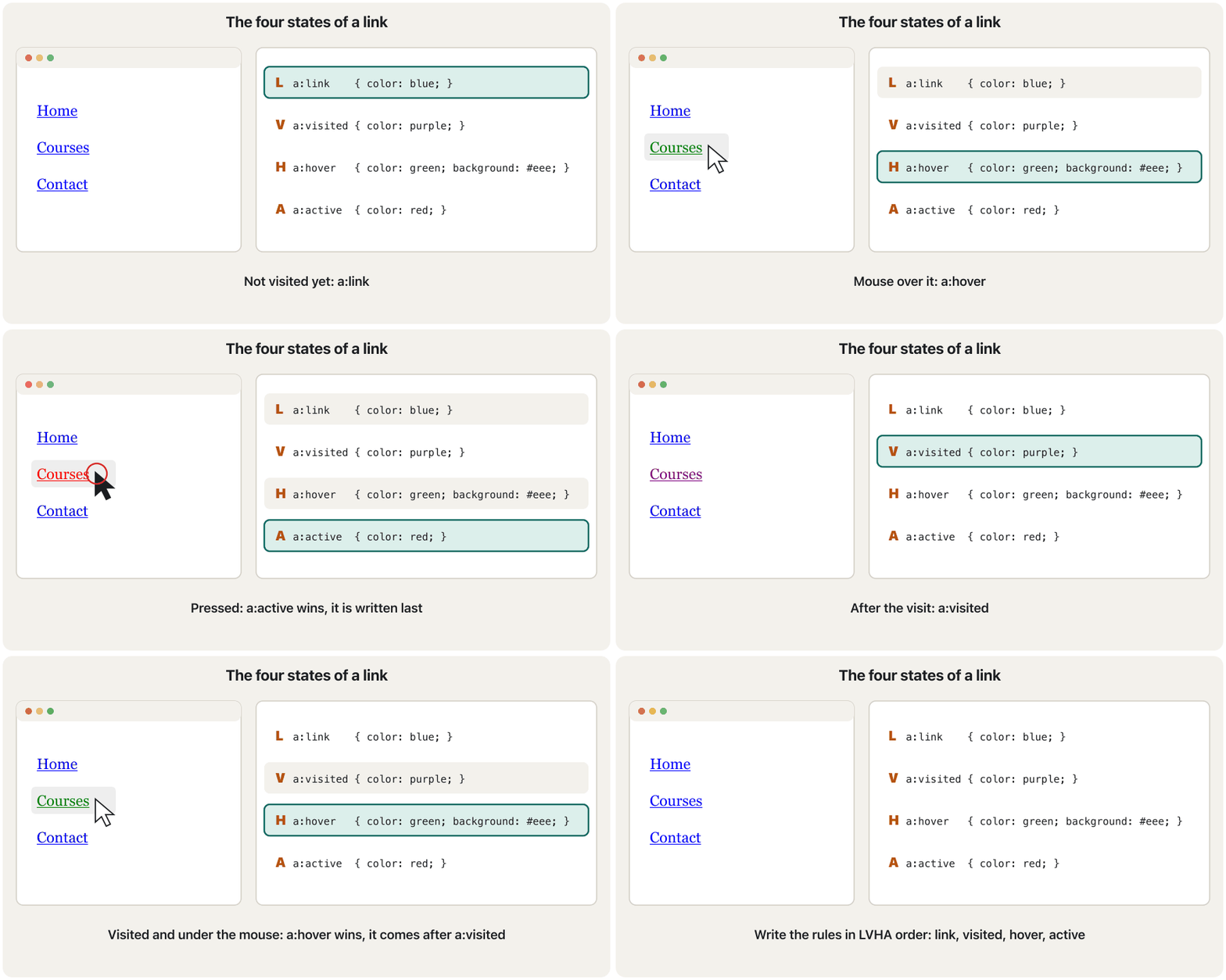
:link | A link that has an href and that you have not visited yet کە hrefـی هەیە و هێشتا سەردانت نەکردووە |
:visited | A link to a page you have already visited بۆ لاپەڕەیەک کە پێشتر سەردانت کردووە |
:hover | While the mouse pointer is over the element (any element, not only links)لەو کاتەی لەسەر (هەر ، نەک تەنها ) |
:active | While the element is being activated: from pressing the mouse button until you release itلەو کاتەی چالاک دەکرێت: لە داگرتنی دوگمەی ماوسەوە تا بەریدەدەیت |
<!DOCTYPE html>
<html lang="en">
<head>
  <meta charset="utf-8">
  <meta name="viewport" content="width=device-width, initial-scale=1">
  <title>Link states</title>
  <style>
    a:link    { color: white; background-color: black; border: 1px solid white; }
    a:visited { color: white; background-color: brown; }
    a:hover   { color: black; background-color: white; border: 1px solid black; }
    a:active  { color: white; background-color: #b4530f; }
  </style>
</head>
<body>
  <p>Visit the <a href="https://www.example.com">example site</a>
  or the <a href="#top">top of this page</a>.</p>
</body>
</html>HTML sent to the browserئەو HTMLـەی دەنێردرێت بۆ تۆڕگەڕ
<!DOCTYPE html>
<html lang="en">
<head>
  <meta charset="utf-8">
  <meta name="viewport" content="width=device-width, initial-scale=1">
  <title>Link states</title>
  <style>
    a:link    { color: white; background-color: black; border: 1px solid white; }
    a:visited { color: white; background-color: brown; }
    a:hover   { color: black; background-color: white; border: 1px solid black; }
    a:active  { color: white; background-color: #b4530f; }
  </style>
</head>
<body>
  <p>Visit the <a href="https://www.example.com">example site</a>
  or the <a href="#top">top of this page</a>.</p>
</body>
</html>
Move the mouse over a link and press it to see :hover and :active.
بخە سەر و دایبگرە بۆ بینینی :hover و :active.
Pseudo-classes: elements in a stateنیمچەکلاسەکان: توخم لە دۆخێکدا
Why the order is LVHAبۆچی ڕیزبەندییەکە LVHAـیە
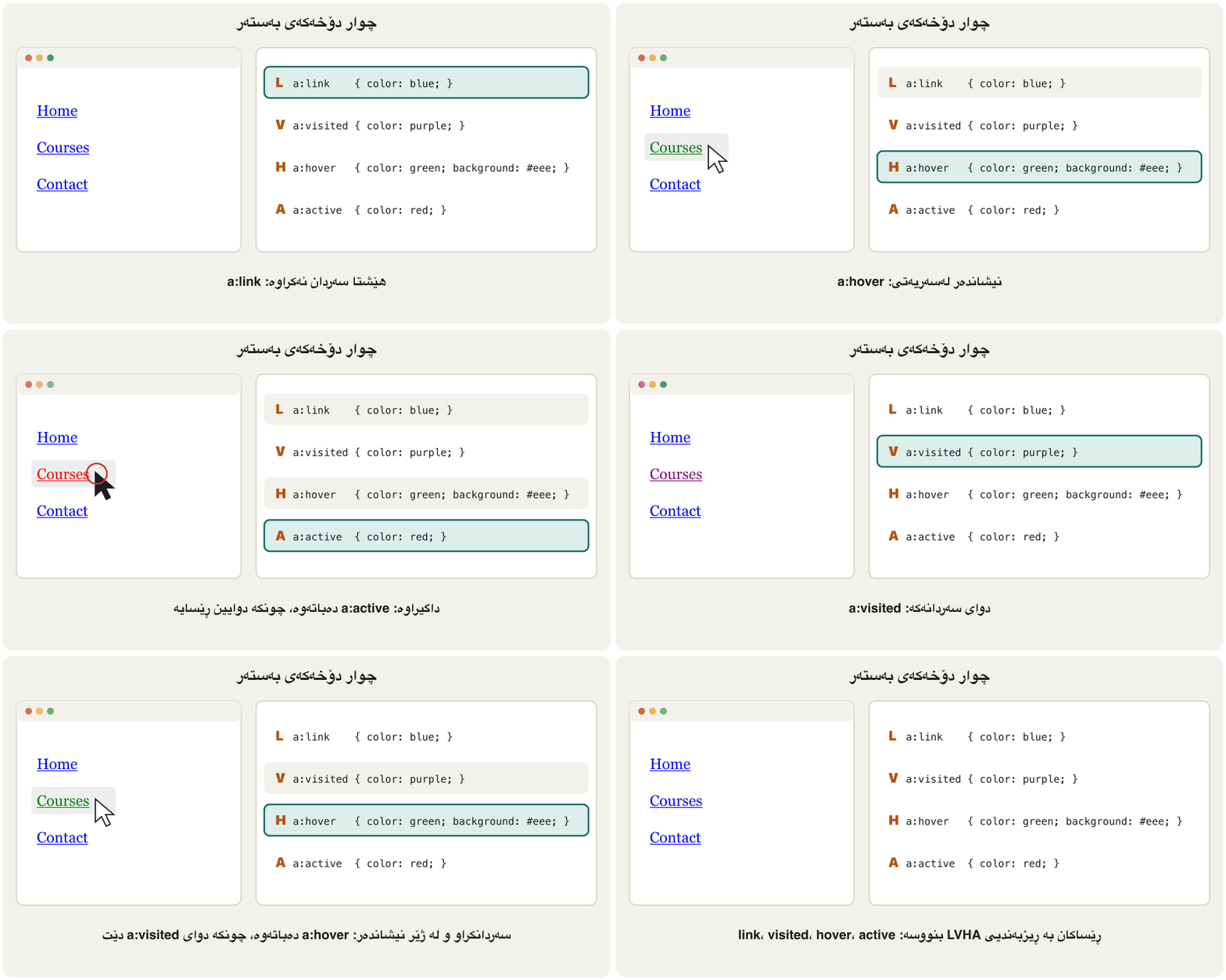
a:link, a:visited, a:hover and a:active all have the same (0-1-1). So when two of them apply at the same time, for example a visited link under the mouse, the rule written later wins. Write them in the order Link, Visited, Hover, Active ("LoVe HAte"). Then hovering works on visited links too, and the active colour shows while you click.
a:link، a:visited، a:hover و a:active هەموویان هەمان هەیە (0-1-1). بۆیە کاتێک دووانیان لە هەمان کاتدا جێبەجێ دەبن، بۆ نموونە سەردانکراو لە ژێر ، ئەو ڕێسایەی دواتر نووسراوە دەباتەوە. بەم ڕیزبەندییە بیاننووسە: Link، Visited، Hover، Active («LoVe HAte»). ئەو کاتە hover لەسەر سەردانکراویش کار دەکات و ڕەنگی active لە کاتی کلیککردندا دەردەکەوێت.
Pseudo-classes: elements in a stateنیمچەکلاسەکان: توخم لە دۆخێکدا
:focus for keyboard users:focus بۆ بەکارهێنەرانی کیبۆرد
Many people use a website with the keyboard: Tab moves to the next link, button or form field. :focus selects the element that has the focus now. :focus-visible is the same, but only when the browser thinks the user needs to see it (keyboard use, not a mouse click), so it is the best place for a strong outline. Browsers draw a focus outline by default. Never remove it with outline: none unless you give a clear replacement, as the input below does with its border.
زۆر کەس بە بەکار دەهێنن: Tab دەچێتە سەر ، دوگمە یان خانەی دواتر. :focus ئەو هەڵدەبژێرێت کە ئێستا focusـی لەسەرە. :focus-visible هەمان شتە، بەڵام تەنها کاتێک پێی وایە بەکارهێنەر پێویستی بە بینینییەتی (بەکارهێنانی ، نەک کلیکی ماوس)، بۆیە باشترین شوێنە بۆ هێڵێکی دەوری بەهێز. بە شێوەی بنەڕەتی هێڵی focus دەکێشن. هەرگیز بە outline: none لای مەبە مەگەر جێگرەوەیەکی ڕوون بدەیت، وەک ئەوەی inputـەکەی خوارەوە بە دەیکات.
<!DOCTYPE html>
<html lang="en">
<head>
  <meta charset="utf-8">
  <meta name="viewport" content="width=device-width, initial-scale=1">
  <title>Focus</title>
  <style>
    a:focus-visible  { outline: 3px solid #b4530f; outline-offset: 2px; }
    input:focus      { border: 2px solid #2b5ea8; outline: none; }
  </style>
</head>
<body>
  <p><a href="index.html">Home</a> · <a href="news.html">News</a></p>
  <label for="q">Search</label> <input type="search" id="q" name="q">
</body>
</html>HTML sent to the browserئەو HTMLـەی دەنێردرێت بۆ تۆڕگەڕ
<!DOCTYPE html>
<html lang="en">
<head>
  <meta charset="utf-8">
  <meta name="viewport" content="width=device-width, initial-scale=1">
  <title>Focus</title>
  <style>
    a:focus-visible  { outline: 3px solid #b4530f; outline-offset: 2px; }
    input:focus      { border: 2px solid #2b5ea8; outline: none; }
  </style>
</head>
<body>
  <p><a href="index.html">Home</a> · <a href="news.html">News</a></p>
  <label for="q">Search</label> <input type="search" id="q" name="q">
</body>
</html>
Click inside the preview and press Tab to move the focus.
لەناو پێشبینینەکەدا کلیک بکە و Tab دابگرە بۆ جووڵاندنی focus.
Pseudo-classes: elements in a stateنیمچەکلاسەکان: توخم لە دۆخێکدا
:first-child, :last-child and :nth-child:first-child، :last-child و :nth-child
Some pseudo-classes select by position among brothers and sisters. :first-child matches an element that is the first child of its parent and :last-child the last one. :nth-child(n) matches every element that is the n-th child of its parent, whatever its type. Counting starts at 1, and n can be:
هەندێک بەپێی شوێن لە نێوان خوشک و براکاندا هەڵدەبژێرن. :first-child دەگرێتەوە کە یەکەم منداڵی باوکەکەیەتی و :last-child دواینیان. :nth-child(n) هەموو ئەو دەگرێتەوە کە منداڵی n-ەمی باوکیانن، جۆرەکەیان هەرچییەک بێت. ژماردن لە ١ـەوە دەست پێدەکات و n دەتوانێت ئەمانە بێت:
- a number:
:nth-child(3)is the third child; - a keyword:
odd(1, 3, 5 …) oreven(2, 4, 6 …); - a formula
An+B:2n+1is the same asodd,3nis every third child,-n+3the first three.
- ژمارەیەک:
:nth-child(3)منداڵی سێیەمە؛ - :
odd(١، ٣، ٥ …) یانeven(٢، ٤، ٦ …)؛ - هاوکێشەیەکی
An+B:2n+1وەکoddـە،3nهەموو منداڵێکی سێیەمە،-n+3سێ یەکەمەکان.
Several pseudo-classes can be joined on one selector when they do not exclude each other: li:nth-child(odd):hover is an odd item under the mouse. a:link:visited can never match, because a link cannot be visited and unvisited at once.
دەتوانرێت چەند لەسەر یەک پێکەوە بلکێنرێن کاتێک یەکتر ڕەت ناکەنەوە: li:nth-child(odd):hover بەندێکی تاکە لە ژێر . a:link:visited هەرگیز ناگونجێت، چونکە ناتوانێت لە یەک کاتدا سەردانکراو و سەردان نەکراو بێت.
<!DOCTYPE html>
<html lang="en">
<head>
  <meta charset="utf-8">
  <meta name="viewport" content="width=device-width, initial-scale=1">
  <title>Structural pseudo-classes</title>
  <style>
    .league li:first-child   { font-weight: bold; }
    .league li:nth-child(odd) { background-color: #eaf1fb; }
    .league li:last-child    { color: #5a5f66; }
    .league li:nth-child(odd):hover { background-color: #dcefeb; }
  </style>
</head>
<body>
  <h1>School football league</h1>
  <ol class="league">
    <li>Eagles</li>
    <li>Lions</li>
    <li>Falcons</li>
    <li>Tigers</li>
    <li>Wolves</li>
  </ol>
</body>
</html>HTML sent to the browserئەو HTMLـەی دەنێردرێت بۆ تۆڕگەڕ
<!DOCTYPE html>
<html lang="en">
<head>
  <meta charset="utf-8">
  <meta name="viewport" content="width=device-width, initial-scale=1">
  <title>Structural pseudo-classes</title>
  <style>
    .league li:first-child   { font-weight: bold; }
    .league li:nth-child(odd) { background-color: #eaf1fb; }
    .league li:last-child    { color: #5a5f66; }
    .league li:nth-child(odd):hover { background-color: #dcefeb; }
  </style>
</head>
<body>
  <h1>School football league</h1>
  <ol class="league">
    <li>Eagles</li>
    <li>Lions</li>
    <li>Falcons</li>
    <li>Tigers</li>
    <li>Wolves</li>
  </ol>
</body>
</html>Pseudo-elements: parts of an elementنیمچەتوخمەکان: بەشەکانی توخمێک
A styles a part of an element as if it were a separate element: its first letter, its first line, or new content added before or after it. It is written with two colons: selector::pseudo-element { property: value; }.
بەشێک لە دەڕازێنێتەوە وەک ئەوەی جیا بێت: یەکەم پیتی، یەکەم دێڕی، یان ناوەڕۆکی نوێ کە پێش یان دوای زیاد دەکرێت. بە دوو جار دوو خاڵ دەنووسرێت: selector::pseudo-element { property: value; }.
| Pseudo-element | Stylesچی دەڕازێنێتەوە |
|---|---|
::first-line | The first line of a block, however long the line is on this screenیەکەم دێڕی بلۆکێک، درێژیی دێڕەکە لەسەر ئەم شاشەیە هەرچەند بێت |
::first-letter | The first letter, for example a big drop capیەکەم پیت، بۆ نموونە پیتێکی گەورەی سەرەتا |
::before, ::after::before، ::after | New content from the content property, before or after the element's contentناوەڕۆکی نوێ لە content، پێش یان دوای ناوەڕۆکی |
::selection | The text the user has selected with the mouseئەو دەقەی بەکارهێنەر بە ماوس دیاری کردووە |
::marker | The bullet or number of a list item (List styles)خاڵ یان ژمارەی بەندێکی لیست (شێوەی لیست) |
<!DOCTYPE html>
<html lang="en">
<head>
  <meta charset="utf-8">
  <meta name="viewport" content="width=device-width, initial-scale=1">
  <title>Pseudo-elements</title>
  <style>
    .story p::first-letter { font-size: 2.5em; font-weight: bold; color: #b4530f; }
    .story p::first-line   { font-variant: small-caps; }
    .menu { list-style: none; padding-left: 0; }
    .menu li::before       { content: "\00BB\0020"; color: #2b5ea8; }
    ::selection            { color: red; background-color: yellow; }
  </style>
</head>
<body>
  <h1>A short story</h1>
  <article class="story">
    <h2>The tea house</h2>
    <p>Once there was a small tea house in the old bazaar of Erbil. Every morning the
    owner opened the doors and the smell of fresh tea filled the street.</p>
  </article>
  <h2>Main menu</h2>
  <ul class="menu">
    <li>Link 1</li>
    <li>Link 2</li>
    <li>Link 3</li>
  </ul>
</body>
</html>HTML sent to the browserئەو HTMLـەی دەنێردرێت بۆ تۆڕگەڕ
<!DOCTYPE html>
<html lang="en">
<head>
  <meta charset="utf-8">
  <meta name="viewport" content="width=device-width, initial-scale=1">
  <title>Pseudo-elements</title>
  <style>
    .story p::first-letter { font-size: 2.5em; font-weight: bold; color: #b4530f; }
    .story p::first-line   { font-variant: small-caps; }
    .menu { list-style: none; padding-left: 0; }
    .menu li::before       { content: "\00BB\0020"; color: #2b5ea8; }
    ::selection            { color: red; background-color: yellow; }
  </style>
</head>
<body>
  <h1>A short story</h1>
  <article class="story">
    <h2>The tea house</h2>
    <p>Once there was a small tea house in the old bazaar of Erbil. Every morning the
    owner opened the doors and the smell of fresh tea filled the street.</p>
  </article>
  <h2>Main menu</h2>
  <ul class="menu">
    <li>Link 1</li>
    <li>Link 2</li>
    <li>Link 3</li>
  </ul>
</body>
</html>
Explain the codeڕوونکردنەوەی کۆدەکە
- Lineدێڕی 11
The course author's practical-test page draws » bullets like this;
\00BBis the code of »,\0020a space.لاپەڕەی تاقیکردنەوەی پراکتیکیی خاوەنی کۆرسەکە بەم شێوەیە خاڵی » دەکێشێت؛
\00BBکۆدی »ـە و\0020.- Lineدێڕی 12
The slide's example: selected text is red on yellow.
نموونەکەی سلایدەکە: دەقی دیاریکراو سوورە لەسەر زەرد.
Pseudo-elements with two colons: ::first-letter, ::first-line, ::selection, and adding content with ::before and ::after.
بە دوو خاڵی سەریەک: ::first-letter، ::first-line، ::selection و زیادکردنی ناوەڕۆک بە ::before و ::after.
Matches the screen's ::first-letter, ::first-line, ::before and ::after.
هەمان نموونەکانی ئەم بەشە پیشان دەدات: ::first-letter، ::first-line، ::before و ::after.
Specificity of each kind of selectorوردیی هەڵبژێری هەر جۆرێکی هەڵبژێر
The cascade from CSS Basics counts selectors in three columns. Here is the whole list with the selectors of this lesson:
لە بنەماکانی CSSـدا لە سێ ستووندا دەژمێرێت. ئەمە هەموو لیستەکەیە لەگەڵ ئەم وانەیە:
| Kindجۆر | Exampleنموونە | Counts inلە کوێدا دەژمێردرێت |
|---|---|---|
| Universal, combinatorsگشتی، پەیوەستکەرەکان | *, space, >*، ، > | Nothing (0-0-0)هیچ (0-0-0) |
| Type, pseudo-elementجۆر، | p, ::beforep، ::before | ELEMENT (0-0-1)ستوونی ELEMENT (0-0-1) |
| Class, attribute, pseudo-classکلاس، ، | .note, [type="text"], :hover.note، [type="text"]، :hover | CLASS (0-1-0)ستوونی CLASS (0-1-0) |
| ID | #menu | ID (1-0-0)ستوونی ID (1-0-0) |
| Inline styleشێوازی ناو | style="…" | Beats every selectorلە هەموو دەباتەوە |
Examples: .navbar ul li a scores 0-1-3, a:hover 0-1-1 and #menu a:hover 1-1-1.
نموونەکان: .navbar ul li a نمرەی 0-1-3 وەردەگرێت، a:hover 0-1-1 و #menu a:hover 1-1-1.
Common mistakesهەڵەکانی باو
| Mistake | What happensچی ڕوودەدات | Fixچارەسەر |
|---|---|---|
#note for class="note" (or .note for an id)#note بۆ class="note" (یان .note بۆ id) | Nothing is styled.هیچ شتێک ناڕازێنرێتەوە. | . for classes, # for ids.. بۆ کلاس، # بۆ id. |
p .note when you mean p.notep .note کاتێک مەبەستت p.noteـە | Looks for .note inside a paragraph.بە دوای .noteدا لەناو بڕگەیەکدا دەگەڕێت. | No space: p.note.بەبێ : p.note. |
Input [type="text"]Input [type="text"] | Matches nothing.هیچ ناگرێتەوە. | input[type="text"] |
| The same id on two elementsهەمان id لەسەر دوو | Invalid page; links and scripts find only one.لاپەڕەی نادروست؛ و سکریپتەکان تەنها یەکێکیان دەدۆزنەوە. | Use a class.کلاس بەکاربهێنە. |
a:hover before a:visiteda:hover پێش a:visited | No hover colour on visited links.ڕەنگی hover لەسەر سەردانکراو نییە. | LVHA order.ڕیزبەندیی LVHA. |
::before without content::before بەبێ content | Nothing appears.هیچ دەرناکەوێت. | content: "…"; |
outline: none on focusoutline: none لەسەر focus | Keyboard users get lost.بەکارهێنەرانی ون دەبن. | Keep or replace the outline.هێڵی دەورەکە بهێڵەرەوە یان جێگرەوەیەکی بدە. |
One wrong selector in a list (h1, ..note)یەک هەڵە لە لیستێکدا (h1, ..note) | The whole rule is dropped.هەموو ڕێساکە فڕێ دەدرێت. | Check each selector.هەر بپشکنە. |
Exercisesڕاهێنانەکان
Write a selector for each: (a) every paragraph; (b) the element with id="logo"; (c) every element with the class price; (d) links inside <nav>; (e) list items that are direct children of ul.menu; (f) e-mail fields (<input type="email">); (g) the first item of every list; (h) links to PDF files.
بۆ هەریەکەیان بنووسە: (أ) هەموو بڕگەیەک؛ (ب) ئەو id="logo"ی هەیە؛ (ج) هەموو بە کلاسی price؛ (د) لەناو <nav>؛ (هـ) ئەو بەندانەی لیست کە منداڵی ڕاستەوخۆی ul.menuن؛ (و) خانەکانی ئیمەیڵ (<input type="email">)؛ (ز) یەکەم بەندی هەموو لیستێک؛ (ح) بۆ PDF.
Show answerوەڵامەکە پیشان بدە
p { }                    /* (a) */
#logo { }                /* (b) */
.price { }               /* (c) */
nav a { }                /* (d) */
ul.menu > li { }         /* (e) */
input[type="email"] { }  /* (f) */
li:first-child { }       /* (g) */
a[href$=".pdf"] { } /* (h) */Which elements turn red with each rule? Use this HTML.
بە هەر ڕێسایەک کام سوور دەبن؟ ئەم بەکاربهێنە.
<ul id="list">
  <li class="new">Erbil</li>
  <li>Duhok</li>
  <li class="new"><a href="sul.html">Sulaymaniyah</a></li>
</ul>
<p class="new">Halabja</p>
Show answerوەڵامەکە پیشان بدە
.new { color: red; }→ Erbil, the Sulaymaniyah item (the link inside inherits nothing: links have their own colour) and Halabja.li.new { color: red; }→ Erbil and the Sulaymaniyah item, not the paragraph Halabja.#list li:nth-child(2) { color: red; }→ Duhok..new a { color: red; }→ the link Sulaymaniyah only.ul > .new { color: red; }→ Erbil and the Sulaymaniyah item.
.new { color: red; }← Erbil، بەندی Sulaymaniyah ( ناوی هیچ وەرناگرێت: ڕەنگی خۆیان هەیە) و Halabja.li.new { color: red; }← Erbil و بەندی Sulaymaniyah، نەک بڕگەی Halabja.#list li:nth-child(2) { color: red; }← Duhok..new a { color: red; }← تەنها Sulaymaniyah.ul > .new { color: red; }← Erbil و بەندی Sulaymaniyah.
Build a horizontal navigation bar from a list of three links. The links are white on dark blue, get a lighter background under the mouse and a different colour while pressed, and show a clear outline for keyboard focus. Write the link rules in LVHA order.
ئاسۆیی لە لیستێکی سێ دروست بکە. سپین لەسەر شینی تاریک، لە ژێر باکگراوندێکی کاڵتر وەردەگرن و لە کاتی داگرتندا ڕەنگێکی جیاواز، هەروەها بۆ focusـی هێڵێکی دەوری ڕوون پیشان دەدەن. ڕێساکانی بە ڕیزبەندیی LVHA بنووسە.
<nav class="site-nav">
  <ul>
    <li><a href="index.html">Home</a></li>
    <li><a href="courses.html">Courses</a></li>
    <li><a href="contact.html">Contact</a></li>
  </ul>
</nav>Hintئاماژە
display: inline-block puts the list items side by side. A navigation bar: from inline-block to flex builds the same bar with flexbox later.
display: inline-block بەندەکانی لیست لە تەنیشت یەکتر دادەنێت. لیستی ڕێنیشاندەر: لە inline-blockـەوە بۆ flex دواتر هەمان شریت بە flexbox دروست دەکات.
Show answerوەڵامەکە پیشان بدە
<!DOCTYPE html>
<html lang="en">
<head>
  <meta charset="utf-8">
  <meta name="viewport" content="width=device-width, initial-scale=1">
  <title>Navigation bar</title>
  <style>
    .site-nav ul { list-style: none; margin: 0; padding: 0; background-color: #1f4e79; }
    .site-nav li { display: inline-block; }
    .site-nav a  { display: block; padding: 10px 16px; text-decoration: none; }
    .site-nav a:link,
    .site-nav a:visited { color: #ffffff; }
    .site-nav a:hover   { background-color: #2b5ea8; }
    .site-nav a:active  { background-color: #0a5a52; }
    .site-nav a:focus-visible { outline: 3px solid #fdf3e1; }
  </style>
</head>
<body>
  <nav class="site-nav">
    <ul>
      <li><a href="index.html">Home</a></li>
      <li><a href="courses.html">Courses</a></li>
      <li><a href="contact.html">Contact</a></li>
    </ul>
  </nav>
</body>
</html>HTML sent to the browserئەو HTMLـەی دەنێردرێت بۆ تۆڕگەڕ
<!DOCTYPE html>
<html lang="en">
<head>
  <meta charset="utf-8">
  <meta name="viewport" content="width=device-width, initial-scale=1">
  <title>Navigation bar</title>
  <style>
    .site-nav ul { list-style: none; margin: 0; padding: 0; background-color: #1f4e79; }
    .site-nav li { display: inline-block; }
    .site-nav a  { display: block; padding: 10px 16px; text-decoration: none; }
    .site-nav a:link,
    .site-nav a:visited { color: #ffffff; }
    .site-nav a:hover   { background-color: #2b5ea8; }
    .site-nav a:active  { background-color: #0a5a52; }
    .site-nav a:focus-visible { outline: 3px solid #fdf3e1; }
  </style>
</head>
<body>
  <nav class="site-nav">
    <ul>
      <li><a href="index.html">Home</a></li>
      <li><a href="courses.html">Courses</a></li>
      <li><a href="contact.html">Contact</a></li>
    </ul>
  </nav>
</body>
</html>
Explain the codeڕوونکردنەوەی کۆدەکە
- Lineدێڕی 8
list-style: noneremoves the bullets (List styles).list-style: noneخاڵەکان لادەبات (شێوەی لیست).
Summaryپوختە
- Type
p, class.name, id#name(one element), universal*; a selector listh1, h2shares one rule. - Prefer classes for styling; an id is unique and very specific.
- A space selects descendants (
nav a),>direct children (ul > li). - Attribute selectors:
input[type="text"](no space),a[href^="https"],a[href$=".pdf"]. - Pseudo-classes (one colon) select states:
:link,:visited,:hover,:activein LVHA order,:focus,:first-child,:nth-child(). - Pseudo-elements (two colons) select parts:
::first-line,::first-letter,::before/::afterwithcontent,::selection,::marker.
- جۆر
p، کلاس.name، id#name(یەک )، گشتی*؛ لیستیh1, h2یەک ڕێسا بەکار دەهێنێت. - بۆ ڕازاندنەوە کلاس باشترە؛ id تاکە و زۆر وردە.
- نەوەکان هەڵدەبژێرێت (
nav a)،>منداڵە ڕاستەوخۆکان (ul > li). - :
input[type="text"](بەبێ )،a[href^="https"]،a[href$=".pdf"]. - (یەک دوو خاڵ) دۆخ هەڵدەبژێرن:
:link،:visited،:hover،:activeبە ڕیزبەندیی LVHA،:focus،:first-child،:nth-child(). - (دوو جار دوو خاڵ) بەش هەڵدەبژێرن:
::first-line،::first-letter،::before/::afterبەcontent،::selection،::marker.
Compare class and ID selectors in one sentence each.هەڵبژێری کلاس و هەڵبژێری ID هەریەکەیان بە یەک ڕستە بەراورد بکە.
A class selector (.x) styles every element with that class; an ID selector (#x) styles the one element with that unique id and has a higher specificity.
(.x) هەموو بەو کلاسە دەڕازێنێتەوە؛ (#x) ئەو یەک دەڕازێنێتەوە کە ئەو idـە تاکەی هەیە و بەرزترە.
Why does Input [type="text"] style nothing?بۆچی Input [type="text"] هیچ ناڕازێنێتەوە؟
The space makes it a descendant selector: it looks for elements inside an input, and inputs have no children.
دەیکاتە نەوە: بە دوای لەناو inputـێکدا دەگەڕێت و input منداڵی نییە.
Videoڤیدیۆ
Watch a videoسەیری ڤیدیۆیەک بکە
A video that viewers liked a lot and praised in their comments, chosen for this lesson.ڤیدیۆیەک کە بینەران زۆریان پێ خۆش بووە و لە کۆمێنتەکانیاندا ستایشیان کردووە، بۆ ئەم وانەیە هەڵبژێردراوە.
A tour of CSS selectors: universal, type, class and id, combining them, descendant, child and sibling combinators, and pseudo-classes.
گەشتێک بە ناو : گشتی، جۆر، کلاس و id، تێکەڵکردنیان، پەیوەستکەری نەوە، منداڵ و خوشکوبرا، هەروەها .
Chapters: selectors 0:36, combining 5:10, siblings 7:49, pseudo-classes 10:23.
بەشەکان: لە 0:36، تێکەڵکردنیان لە 5:10، خوشکوبراکان لە 7:49 و لە 10:23.
Lesson complete!وانەکە تەواو بوو!
Well done. Review the key terms, then go on to the next lesson.دەستخۆش. سەیرێکی زاراوە سەرەکییەکان بکەرەوە، پاشان بڕۆ بۆ وانەی داهاتوو.
Key termsزاراوە سەرەکییەکان
Styling Text, Backgrounds, Lists and Tablesڕازاندنەوەی دەق، باکگراوند، لیست و خشتەکان
Related lecturesوانە پەیوەندیدارەکان
References and further readingسەرچاوەکان و خوێندنەوەی زیاتر
This lecture is a first edition. The Kurdish text and terminology are waiting for review by Kurdish IT teachers.ئەم وانەیە چاپی یەکەمە. دەقە کوردییەکە و زاراوەکانی چاوەڕێی پێداچوونەوەی مامۆستایانی کوردی بواری IT ن.