Chapterبەش 5 · Lectureوانە 5.5
Temperature and Humidity: the DHT11 and a 16x2 LCDپلەی گەرمی و شێ: DHT11 و LCDـێکی 16x2
The DHT11: a digital temperature and humidity sensor, bare (4 pins) or on a module (3 pins), with its own one-wire protocol, a checksum, data-sheet ranges and accuracy, and at most one reading a second; the DHT22 compared. Then the three-LED thermometer, a 16×2 LCD on I²C with setCursor(), the four Lab 6 fixes the checker found (leftover letters, a lost %, pin 0, no pause) and scrolling text.
: پلەی گەرمی و ، ڕووت (4 پین) یان لەسەر مۆدیوڵ (3 پین)، بە تاکەوایەریی خۆی، ، و ڕاستیی و لانیزۆر چرکەی یەک خوێندنەوە؛ بەراورد لەگەڵ DHT22. پاشان گەرمیپێو بە سێ ، 16×2 لەسەر بە setCursor()، ئەو چوار چاککردنەوەیەی تاقیگەی 6 کە پشکنەرەکە دۆزینییەوە (پیتی بەجێماو، %ـی ونبوو، پینی 0، بێ پشوو) و دەقی ڕۆیشتوو.
What you will learnچی فێر دەبیت
- Describe what the DHT11 measures, how it sends its data and what its data sheet promises.
- Wire a bare DHT11 or a module, and read it at a safe rate with the Adafruit library.
- Check a DHT11 reading with its checksum and handle a failed reading with isnan().
- Show values on a 16×2 I²C LCD with setCursor(), clear() and print(), without leftovers or lost characters.
- Scroll a message longer than 16 characters across the LCD.
- باسی ئەوە بکەیت کە چی دەپێوێت، چۆن دەنێرێت و چ بەڵێنێک دەدات.
- ڕووت یان مۆدیوڵ ببەستیت و بە Adafruit بە ڕێژەیەکی سەلامەت بیخوێنیتەوە.
- خوێندنەوەیەکی بە بپشکنیت و خوێندنەوەیەکی سەرنەکەوتوو بە isnan() چارەسەر بکەیت.
- نرخەکان لەسەر 16×2ـی بە setCursor()، clear() و print() پیشان بدەیت، بەبێ پیتی بەجێماو یان ونبوو.
- پەیامێکی درێژتر لە 16 بەسەر ببەیت.
Weather on your deskکەشوهەوا لەسەر مێزەکەت
A room's temperature and humidity decide whether people, plants and pet birds are comfortable. This lesson reads both from one small sensor, the DHT11, lights one of three LEDs for the temperature band and shows the numbers on a 16×2 LCD that needs only two data wires. On the way you meet the DHT11's own one-wire protocol, its data sheet, its better sibling the DHT22, and the mistakes that the CêIT checker found in the class sketches.
پلەی گەرمی و ژوورێک بڕیار دەدەن کە ئایا خەڵک، ڕووەک و باڵندەی ماڵی ئاسوودەن. ئەم وانەیە هەردووکیان لە بچووک دەخوێنێتەوە، ، یەکێک لە سێ بۆ ناوچەی پلەی گەرمییەکە دادەگیرسێنێت و ژمارەکان لەسەر 16×2 پیشان دەدات کە تەنیا دوو وایەری پێویستە. لە ڕێگادا تاکەوایەریی خودی ، ، براگەورەترەکەی DHT22 و ئەو هەڵانە دەناسیت کە پشکنەری CêIT لە پۆلەکەدا دۆزیونییەوە.
The DHT11: two sensors and a small chipDHT11: دوو هەستەوەر و چیپێکی بچووک
The DHT11 is a cheap digital sensor that measures temperature and relative humidity: how much water vapour is in the air, as a percentage of the most the air could hold at that temperature (% RH). Behind the holes of its blue case sit a capacitive humidity element, whose capacitance changes with damp air, an NTC thermistor for the temperature and a small 8-bit microcontroller that measures both and sends ready, calibrated numbers.
هەرزانە کە پلەی گەرمی و ڕێژەیی دەپێوێت: چەند هەڵمی ئاو لە هەوادایە، وەک ڕێژەیەکی سەدی لەو زۆرترینەی هەوا لەو پلەی گەرمییەدا دەتوانێت هەڵیبگرێت (% RH). لە پشت کونەکانی قاپە شینەکەیەوە توخمێکی هەیە کە و لەگەڵ هەوای شێداردا دەگۆڕێت، NTC بۆ پلەی گەرمی و بچووکی 8 کە هەردووکیان دەپێوێت و ژمارەی ئامادە و ڕێکخراو دەنێرێت.
Because the chip does the measuring, the board reads bits instead of a voltage (Inside a digital sensor). Typical uses: a small weather station, automatic climate control in a room or greenhouse, and environment monitoring; the maker also lists heating and air-conditioning (HVAC), data loggers and household appliances.
چونکە چیپەکە پێوانەکە دەکات، بۆردەکە دەخوێنێتەوە لە جیاتی (ناوەوەی هەستەوەری دیجیتاڵێک). بەکارهێنانی باو: وێستگەیەکی بچووکی کەشوهەوا، کۆنترۆڵی خۆکاری کەشی ژوورێک یان گوڵخانەیەک و چاودێریی ژینگە؛ دروستکەرەکە هەروەها گەرمکردنەوە و ساردکردنەوە ()، تۆمارکەری و ئامێری ماڵ ناو دەبات.
Bare sensor or module: 4 pins or 3هەستەوەرێک ڕووت یان مۆدیوڵ: 4 پین یان 3
You can buy the DHT11 as a bare sensor or on a small module board. Inside, they are the same sensor and measure the same; the difference is the parts around it. The bare sensor has 4 pins, of which 3 are used: 1 VDD (power), 2 DATA, 3 NC ("not connected": leave it free) and 4 GND. You add a pull-up resistor from DATA to VDD yourself: the maker's manual suggests 4.7 kΩ for cables shorter than 5 m.
دەتوانیت وەک ڕووت یان لەسەر بۆردێکی بچووکی مۆدیوڵ بکڕیت. لە ناوەوە هەمان و هەمان شت دەپێون؛ جیاوازییەکە لەو پارچانەدایە کە بە دەوریدان. ڕووتەکە 4 پینی هەیە کە 3یان بەکار دێن: 1 VDD (وزە)، 2 DATA، 3 NC («نەبەستراو»: بە بەتاڵی بیهێڵەوە) و 4 GND. خۆت لە DATAـەوە بۆ VDD زیاد دەکەیت: ڕێبەری دروستکەر 4.7 kΩ بۆ وایەری کورتتر لە 5 m پێشنیار دەکات.
The module has 3 pins — DATA (often marked S), VCC (+) and GND (−) — and already carries the pull-up resistor and a small filter capacitor that smooths the supply. The order of the pins differs between makers, so read the labels. The maker's manual gives 3.3–5.5 V for the supply, so the DHT11 runs on a 5 V UNO and on a 3.3 V MKR board; on 3.3 V keep the wires short.
مۆدیوڵ 3 پینی هەیە — DATA (زۆرجار بە S نیشانە کراوە)، VCC (+) و GND (−) — و و بچووکی پاڵاوتنی لەسەرە کە لووس دەکات. ڕیزی پینەکان لای دروستکەرەکان جیاوازە، بۆیە نووسینەکان بخوێنەوە. ڕێبەری دروستکەر 3.3–5.5 V بۆ وزە دەدات، بۆیە لەسەر UNOـی 5 V و لەسەر بۆردی MKRـی 3.3 V کار دەکات؛ لەسەر 3.3 V وایەرەکان کورت بهێڵەوە.
One data wire: the DHT11's own protocolیەک وایەری دراوە: پرۆتۆکۆڵی خودی DHT11
The DHT11 talks over one data line with a protocol of its own. It is not the 1-Wire bus of Dallas/Maxim, a different, trademarked system used by sensors such as the DS18B20; the DHT11 only shares the idea of one wire. A conversation goes like this:
بەسەر یەک هێڵی دا بە تایبەتی خۆی قسە دەکات. ئەمە 1-Wireـی Dallas/Maxim نییە، سیستەمێکی جیاوازی خاوەن کە وەک DS18B20 بەکاری دەهێنن؛ تەنیا بیرۆکەی یەک وایەرەکەی هاوبەشە. گفتوگۆیەک بەم شێوەیە دەڕوات:
The board pulls DATA LOW for at least 18 ms: "wake up, measure".
بۆردەکە DATA بۆ LOW دەکێشێت بۆ لانیکەم 18 ms: «بەئاگا بێ، بپێوە».
It lets go. The DHT11 answers: about 80 µs LOW, then 80 µs HIGH.
بەری دەدات. وەڵام دەداتەوە: نزیکەی 80 µs LOW، پاشان 80 µs HIGH.
It sends 40 bits. Every bit starts with about 50 µs LOW; a short HIGH (26–28 µs) is a 0, a long HIGH (70 µs) is a 1.
40 دەنێرێت. هەموو بە نزیکەی 50 µs LOW دەست پێدەکات؛ HIGHـێکی کورت (26–28 µs) 0ـە و HIGHـێکی درێژ (70 µs) 1ـە.
The line goes back HIGH, and the sensor measures again for next time.
هێڵەکە دەگەڕێتەوە بۆ HIGH و دیسان بۆ جاری داهاتوو دەپێوێت.
The whole answer takes about 4 ms. The single wire is what makes the DHT11 quick to fit into a project; a library does all this timing for you, so the sketch only asks for the temperature and the humidity.
هەموو وەڵامەکە نزیکەی 4 ms دەخایەنێت. یەک وایەرەکەیە کە خێرا دەخاتە ناو پڕۆژەیەکەوە؛ هەموو ئەم کاتگرتنە بۆ تۆ دەکات، بۆیە تەنیا داوای پلەی گەرمی و دەکات.
One data wire: the DHT11's own protocolیەک وایەری دراوە: پرۆتۆکۆڵی خودی DHT11
Is the reading correct? The checksumئایا خوێندنەوەکە دروستە؟ پشکنینی کۆ
A bit can be lost on a long wire. So the fifth byte is a checksum: the last 8 bits of the sum of the first four. The board adds the four bytes and compares. The maker's manual gives this example:
لەوانەیە لەسەر وایەرێکی درێژ ون بێت. بۆیە پێنجەم ـە: 8 کۆتایی کۆی چوارەکەی یەکەم. بۆردەکە چوار کۆ دەکاتەوە و بەراوردی دەکات. ڕێبەری دروستکەر ئەم نموونەیە دەدات:
If the fifth byte had arrived as 01001001 (73), the sum would not match: the board throws the reading away and asks again. The Adafruit DHT library does this check for you. Checksums catch accidents, not attackers (Checksums stop accidents, not attackers).
ئەگەر پێنجەم وەک 01001001 (73) بگەیشتایە، کۆکە یەک نەدەگرتەوە: بۆردەکە خوێندنەوەکە فڕێ دەدات و دیسان داوا دەکاتەوە. DHTـی Adafruit ئەم پشکنینە بۆ تۆ دەکات. هەڵەی ڕێکەوت دەگرێت، نەک هێرشبەر (پشکنینی کۆ ڕێکەوت ڕادەگرێت، نەک هێرشبەر).
Ranges and accuracy: read the data sheetمەودای پێوان و ڕاستیی پێوان: پەڕەی تایبەتمەندییەکان بخوێنەوە
The DHT11's numbers depend on which version of its data sheet you read. The maker's current manual (Aosong, V1.3) widened the ranges; older sheets, still copied by many shops, give narrower ones. Both agree on the accuracy:
ژمارەکانی بەندن بەوەی کام وەشانی دەخوێنیتەوە. ڕێبەری ئێستای دروستکەر (Aosong، V1.3) فراوانتر کردووە؛ پەڕە کۆنەکان، کە هێشتا زۆر دوکان کۆپییان دەکەن، تەسکتر دەدەن. هەردووکیان لەسەر ڕێککەوتوون:
| DHT11تایبەتمەندیی DHT11 | Maker's manual V1.3ڕێبەری دروستکەر V1.3 | Older data sheets کۆن |
|---|---|---|
| humidity range | 5–95 % RH | 20–90 % RH |
| humidity accuracy (at 25 °C) (لە 25 °C) | ±5 % RH | ±5 % RH |
| temperature range پلەی گەرمی | −20 to 60 °C | 0 to 50 °C |
| temperature accuracy (at 25 °C) پلەی گەرمی (لە 25 °C) | ±2 °C | ±2 °C |
| supplyوزە | 3.3–5.5 V | 3–5.5 V |
| current | 0.06 mA idle, 1 mA measuring0.06 mA لە پشوودا، 1 mA لە کاتی پێوان | — |
| time between readingsکاتی نێوان خوێندنەوەکان | more than 2 sزیاتر لە 2 چرکە | at least 1 sلانیکەم 1 چرکە |
±2 °C means a display that says 24 °C can be anywhere from 22 to 26 °C in truth (Accuracy: how close to the truth?). The humidity comes in whole percent, the temperature in steps of 0.1 °C; many digits on the display do not make it more accurate.
±2 °C واتە شاشەیەک کە دەڵێت 24 °C لە ڕاستیدا دەتوانێت لە هەر شوێنێکی نێوان 22 و 26 °C بێت (ڕاستیی پێوان: چەند نزیکە لە ڕاستی؟). بە سەدیی تەواو دێت و پلەی گەرمی بە هەنگاوی 0.1 °C؛ ژمارەی زۆر لەسەر شاشە وردتری ناکات.
Ranges and accuracy: read the data sheetمەودای پێوان و ڕاستیی پێوان: پەڕەی تایبەتمەندییەکان بخوێنەوە
Slow down: one reading every second or twoهێواش بە: هەر چرکەیەک یان دووان خوێندنەوەیەک
The DHT11 is slow on purpose. Older sheets and Adafruit allow at most one reading a second; the maker's current manual asks for more than 2 s. It also answers with the result of its previous measurement, so after a long pause the first value is old: read twice. Asking more often gives nothing new — the Adafruit library even hands back its last result if you ask again within 2 s.
بە ئەنقەست هێواشە. پەڕە کۆنەکان و Adafruit لانیزۆر چرکەی یەک خوێندنەوە ڕێگە دەدەن؛ ڕێبەری ئێستای دروستکەر زیاتر لە 2 چرکە داوا دەکات. هەروەها بە ئەنجامی پێوانی پێشووی وەڵام دەداتەوە، بۆیە دوای پشوویەکی درێژ یەکەم نرخ کۆنە: دوو جار بخوێنەوە. پرسیاری زۆرتر هیچ شتێکی نوێ نادات — Adafruit تەنانەت ئەگەر لە ماوەی 2 چرکەدا دیسان بپرسیت دوایین ئەنجامی خۆیت دەداتەوە.
// Read the DHT11 every 2 s with millis(): loop() stays free for other work
#include <DHT.h>

DHT dht(2, DHT11);
const unsigned long interval = 2000;   // ms between two readings
unsigned long lastRead = 0;

void setup() {
  Serial.begin(9600);
  dht.begin();
}

void loop() {
  unsigned long now = millis();
  if (now - lastRead >= interval) {
    lastRead = now;
    float t = dht.readTemperature();
    float h = dht.readHumidity();
    Serial.print(now);
    Serial.print(" ms: ");
    Serial.print(t, 1);
    Serial.print(" C, ");
    Serial.print(h, 0);
    Serial.println(" %");
  }
  // ...buttons, the LCD or the network can be served here
}2000 ms: 23.0 C, 41 % 4000 ms: 23.4 C, 42 % 6000 ms: 23.9 C, 42 %
CêIT Arduino checker: the scenario changed the room's values at 0, 3 and 5 s.
پشکنەری Arduinoـی CêIT: سیناریۆکە نرخەکانی ژوورەکەی لە چرکەی 0، 3 و 5 گۆڕی.
Explain the codeڕوونکردنەوەی کۆدەکە
- Lineدێڕی 14-16
The millis() pattern from the Serial Monitor lab: act only when 2000 ms have passed.
شێوازی millis() لە تاقیگەی : تەنیا کاتێک 2000 ms تێپەڕی کار بکە.
The better sibling: the DHT22براگەورەترەکە: DHT22
The DHT22 (also sold as the AM2302) works the same way — one data wire, the same library with DHT22 in place of DHT11 — but measures more, and more accurately. It is a little bigger, costs more and wants 2 s between readings. Its full data sheet is read line by line in A digital sensor: the DHT22 (AM2302) data sheet.
DHT22 (کە بە AM2302یش دەفرۆشرێت) بە هەمان شێوە کار دەکات — یەک وایەری ، هەمان بە DHT22 لە جیاتی DHT11 — بەڵام زیاتر و وردتر دەپێوێت. کەمێک گەورەترە، گرانترە و 2 چرکە لە نێوان خوێندنەوەکاندا دەوێت. تەواوەکەی دێڕ بە دێڕ لە هەستەوەری دیجیتاڵێک: پەڕەی تایبەتمەندییەکانی DHT22 (AM2302) دەخوێنرێتەوە.
| DHT11 | DHT22 | |
|---|---|---|
| humidity | 5–95 % RH, ±5 % | 0–100 % RH, ±2–5 % |
| temperatureپلەی گەرمی | −20 to 60 °C, ±2 °C | −40 to 80 °C, ±0.5 °C |
| readingsخوێندنەوە | at most 1 a second (maker: every 2 s)لانیزۆر چرکەی 1 (دروستکەر: هەموو 2 چرکە) | 1 every 2 sهەموو 2 چرکە 1 |
| library lineدێڕی | DHT dht(2, DHT11); | DHT dht(2, DHT22); |
Lab: a three-LED thermometerتاقیگە: گەرمیپێو بە سێ LED
Wire a DHT11 module to pin 5 of an UNO and three LEDs with their resistors to pins 2, 3 and 4. Every 2 seconds the sketch reads the sensor, prints the values and lights exactly one LED: blue below 23 °C, green from 23 °C up to (not including) 25 °C, red at 25 °C and above.
مۆدیوڵێکی بە پینی 5ی UNOـەوە و سێ بە بە پینەکانی 2، 3 و 4ـەوە ببەستە. هەموو 2 چرکە دەخوێنێتەوە، نرخەکان چاپ دەکات و ڕێک یەک دادەگیرسێنێت: شین لە خوار 23 °C، سەوز لە 23 °Cـەوە تا کەمتر لە 25 °C، سوور لە 25 °C و سەرووتر.
// Lab: a three-LED thermometer with a DHT11 (Arduino UNO)
#include <DHT.h>

const int dhtPin = 5;      // DHT11 data pin
const int coldLed = 2;     // blue: below 23 °C
const int okLed = 3;       // green: from 23 °C up to 25 °C
const int hotLed = 4;      // red: 25 °C and above

DHT dht(dhtPin, DHT11);

void setup() {
  pinMode(coldLed, OUTPUT);
  pinMode(okLed, OUTPUT);
  pinMode(hotLed, OUTPUT);
  Serial.begin(115200);    // set the Serial Monitor to 115200 baud too
  dht.begin();
}

void loop() {
  delay(2000);             // the DHT11 needs at least 1-2 s between readings
  float temp = dht.readTemperature();
  float hum = dht.readHumidity();
  if (isnan(temp) || isnan(hum)) {
    Serial.println("Failed to read from the DHT11");
    return;
  }

  // exactly one LED is on
  digitalWrite(coldLed, temp < 23 ? HIGH : LOW);
  digitalWrite(okLed, (temp >= 23 && temp < 25) ? HIGH : LOW);
  digitalWrite(hotLed, temp >= 25 ? HIGH : LOW);

  Serial.print("Temperature: ");
  Serial.print(temp, 1);
  Serial.print(" °C  Humidity: ");
  Serial.print(hum, 0);
  Serial.println(" %");
}Temperature: 22.0 °C Humidity: 40 % Temperature: 24.0 °C Humidity: 45 % Temperature: 24.0 °C Humidity: 45 % Temperature: 26.5 °C Humidity: 50 %
CêIT Arduino checker: the room was 22.0 °C, then 24.0 °C from 3 s and 26.5 °C from 7 s. Pins: blue (2) on at 2 s, green (3) at 4 s, red (4) at 8 s.
پشکنەری Arduinoـی CêIT: ژوورەکە 22.0 °C بوو، پاشان لە چرکەی 3ـەوە 24.0 °C و لە چرکەی 7ـەوە 26.5 °C. پینەکان: شین (2) لە چرکەی 2 داگیرسا، سەوز (3) لە چرکەی 4، سوور (4) لە چرکەی 8.
Explain the codeڕوونکردنەوەی کۆدەکە
- Lineدێڕی 9
One object for the sensor: the pin and the type.
یەک ئۆبجێکت بۆ : پینەکە و جۆرەکە.
- Lineدێڕی 15
115200 baud: the Serial Monitor must use the same speed.
115200 باود: دەبێت هەمان خێرایی بەکار بهێنێت.
- Lineدێڕی 20
Wait 2 s before every reading, as the maker asks.
پێش هەر خوێندنەوەیەک 2 چرکە چاوەڕێ بکە، وەک دروستکەر داوا دەکات.
- Lineدێڕی 23-26
NaN (not a number) means no valid reading: skip this round.
NaN (ژمارە نییە) واتە خوێندنەوەی دروست نییە: ئەم جارە تێپەڕێنە.
- Lineدێڕی 29-31
Three tests that do not overlap, so exactly one LED is on.
سێ پشکنین کە یەک ناگرنەوە، بۆیە ڕێک یەک داگیرساوە.
Lab: a three-LED thermometerتاقیگە: گەرمیپێو بە سێ LED
Watch it: the room warms upسەیر بکە: ژوورەکە گەرم دەبێت
The checker fed the sketch three room temperatures. Each new reading moves the lit LED up one band; the readings in between (24.0 twice) change nothing, because the same LED stays on.
پشکنەرەکە سێ پلەی گەرمیی ژووری دایە . هەر خوێندنەوەیەکی نوێ داگیرساوەکە یەک ناوچە بەرز دەکاتەوە؛ خوێندنەوەکانی نێوانیان (24.0 دوو جار) هیچ ناگۆڕن، چونکە هەمان داگیرساو دەمێنێتەوە.
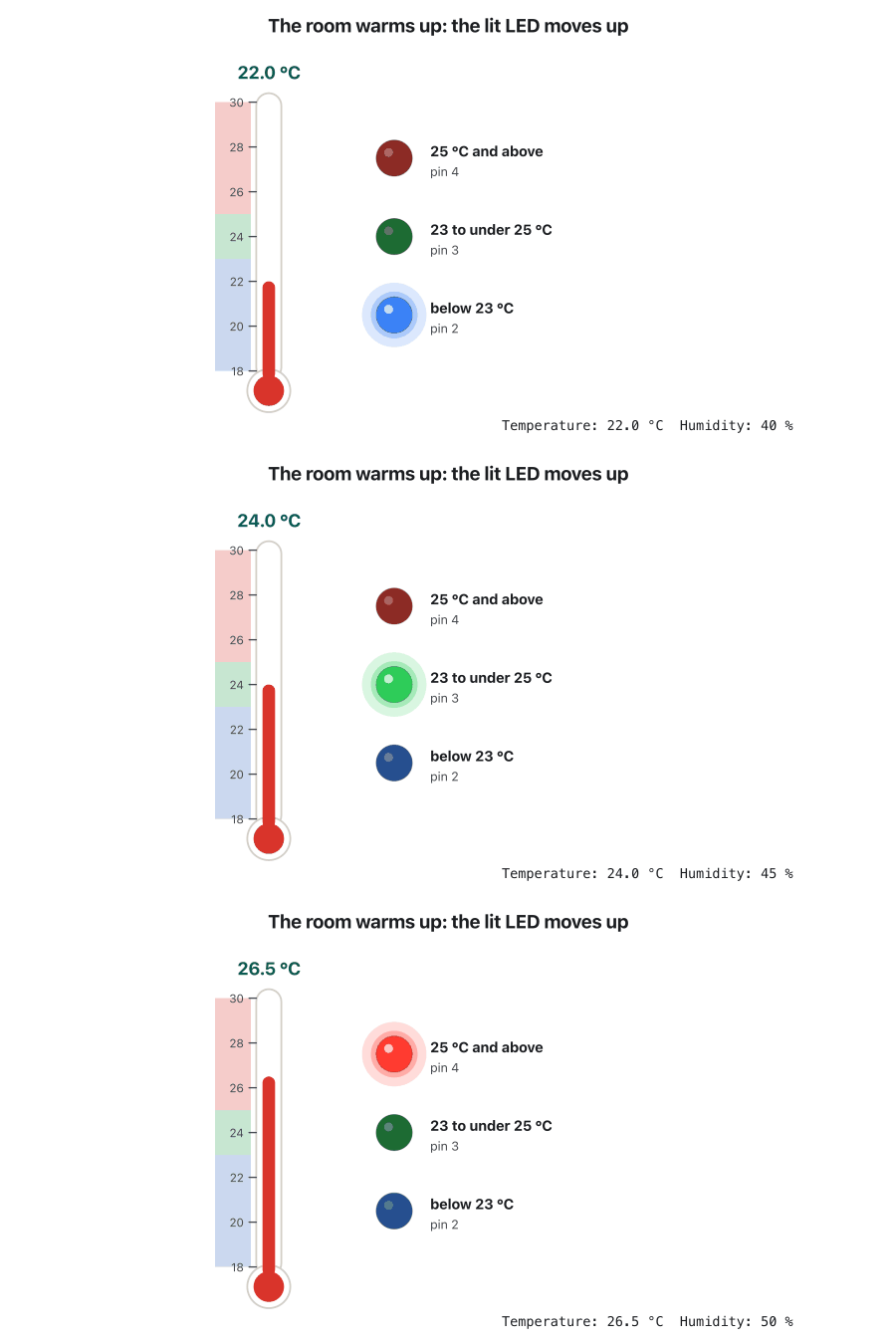
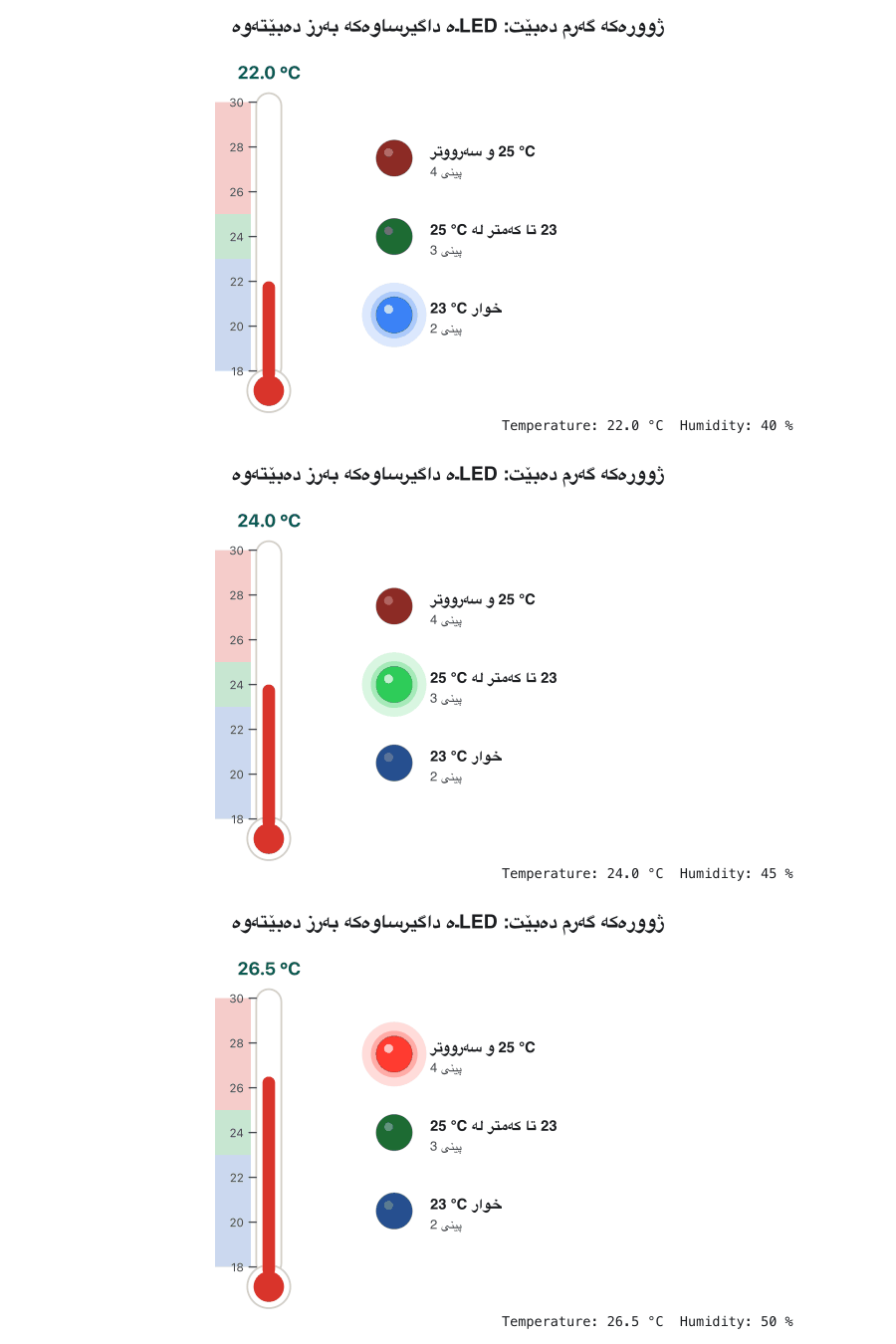
Lab: a three-LED thermometerتاقیگە: گەرمیپێو بە سێ LED
The class version: four things to improveوەشانی پۆلەکە: چوار شت بۆ باشترکردن
Another common sketch does the same job with a small third-party library, Bonezegei_DHT11 (getData(), getTemperature(), getHumidity()). It works, and the checker shows its output:
باوی تر هەمان کار دەکات بە بچووکی لایەنی سێیەم، Bonezegei_DHT11 (getData()، getTemperature()، getHumidity()). کار دەکات و پشکنەرەکە دەرچوونەکەی پیشان دەدات:
#include <Bonezegei_DHT11.h>
#define ledPinTemp1 2
#define ledPinTemp2 3
#define ledPinTemp3 4

//param = DHT11 signal pin
Bonezegei_DHT11 dht(5);

void setup() {
  pinMode(ledPinTemp1, OUTPUT);
  pinMode(ledPinTemp2, OUTPUT);
  pinMode(ledPinTemp3, OUTPUT);

  Serial.begin(115200);
  dht.begin();
}

void loop() {

 if (dht.getData()) {
    float tempDeg = dht.getTemperature();
    int hum = dht.getHumidity();

    tempDeg < 23 ? digitalWrite(ledPinTemp1, HIGH): digitalWrite(ledPinTemp1, LOW);
    tempDeg >= 23 && tempDeg < 25 ? digitalWrite(ledPinTemp2, HIGH): digitalWrite(ledPinTemp2, LOW);
    tempDeg >= 25 ? digitalWrite(ledPinTemp3, HIGH): digitalWrite(ledPinTemp3, LOW);

    delay(200);

    String str  = "Temperature: ";
           str += tempDeg;
           str += "°C  ";
           str += hum;
           str += " Humdity";
    Serial.println(str.c_str());
  }
  delay(200);
}Temperature: 22.00°C 40 Humdity Temperature: 22.00°C 40 Humdity Temperature: 22.00°C 40 Humdity Temperature: 24.00°C 45 Humdity Temperature: 24.00°C 45 Humdity Temperature: 26.50°C 50 Humdity Temperature: 26.50°C 50 Humdity Temperature: 26.50°C 50 Humdity
CêIT Arduino checker, 3 s: the room was 22.0, 24.0 and 26.5 °C for a second each, yet eight lines appear.
پشکنەری Arduinoـی CêIT، 3 چرکە: ژوورەکە هەر یەکێک بۆ چرکەیەک 22.0، 24.0 و 26.5 °C بوو، کەچی هەشت دێڕ دەردەکەوێت.
- Too often: two
delay(200)make a reading about every 0.4 s, so most lines repeat (read every 2 s). - Units: "40 Humdity" should say "Humidity: 40 %".
- Speed:
Serial.begin(115200)while most labs use 9600: set the Serial Monitor to match. - Clarity:
tempDeg < 23 ? digitalWrite(...) : digitalWrite(...);uses the ternary operator as a statement. It compiles, butif … else, or the ternary inside onedigitalWrite(), is easier to read.
- زۆر زوو زوو: دوو
delay(200)نزیکەی هەموو 0.4 چرکە خوێندنەوەیەک دەکەن، بۆیە زۆربەی دێڕەکان دووپاتەن (هەموو 2 چرکە بخوێنەوە). - یەکەکان: «40 Humdity» دەبێت بڵێت «Humidity: 40 %».
- خێرایی:
Serial.begin(115200)لە کاتێکدا زۆربەی تاقیگەکان 9600 بەکار دەهێنن: بگونجێنە. - ڕوونی:
tempDeg < 23 ? digitalWrite(...) : digitalWrite(...);وەک ڕستەیەک بەکار دەهێنێت. کۆمپایل دەبێت، بەڵامif … else، یان لە ناو یەکdigitalWrite()ـدا، ئاسانتر دەخوێنرێتەوە.
Lab: a three-LED thermometerتاقیگە: گەرمیپێو بە سێ LED
Common mistake: the Serial Monitor at the wrong speedهەڵەی باو: Serial Monitor بە خێرایی هەڵە
A 16×2 character LCDLCDـێکی نووسەیی 16×2
A 16×2 character LCD shows 2 rows of 16 characters. Each character is drawn in its own box of 5 × 8 dots, and an LED backlight shines through the liquid crystals. A small chip on the display (the HD44780 or a copy of it) keeps the text in its memory, 40 places for each row, and draws the 16 that fit. A screw on a small variable resistor sets the contrast: if the screen looks empty, turn it.
نووسەیی 16×2 2 ڕیز لە 16 پیشان دەدات. هەر لە سندووقی خۆیدا بە 5 × 8 خاڵ دەکێشرێت و ـی LED بە کریستاڵە شلەکاندا دەدرەوشێتەوە. چیپێکی بچووک لەسەر شاشەکە (HD44780 یان کۆپییەکی) دەقەکە لە هەڵدەگرێت (40 شوێن بۆ هەر ڕیزێک) و ئەو 16ـەی جێیان دەبێتەوە دەیانکێشێت. بورغییەک لەسەر بچووک کۆنتراستەکە ڕێک دەخات: ئەگەر شاشەکە بەتاڵ دەرکەوت، بیسووڕێنە.
A 16×2 character LCDLCDـێکی نووسەیی 16×2
I²C: the LCD on two wiresI²C: LCD لەسەر دوو وایەر
On its own the LCD needs at least six data pins. The I²C backpack soldered behind it needs two: SDA carries the data and SCL the clock. Each device on these two wires has its own address: 0x27 for backpacks with the PCF8574 chip, 0x3F for the PCF8574A. On an UNO, SDA is A4 and SCL is A5 (the same pins are also beside AREF); the backpack takes 5 V and GND.
بە تەنیا لانیکەم شەش پینی دەوێت. پشتەبۆردی کە لە پشتییەوە لەحیم کراوە دووانی دەوێت: SDA هەڵدەگرێت و SCL کاتژمێرەکە. هەر ئامێرێک لەسەر ئەم دوو وایەرە ناونیشانی خۆی هەیە: 0x27 بۆ ئەو پشتەبۆردانەی چیپی PCF8574یان هەیە، 0x3F بۆ PCF8574A. لەسەر UNO، SDA A4ـە و SCL A5ـە (هەمان پینەکان لە تەنیشت AREFـیشن)؛ پشتەبۆردەکە 5 V و GND وەردەگرێت.
A 16×2 character LCDLCDـێکی نووسەیی 16×2
The LiquidCrystal I2C libraryکتێبخانەی LiquidCrystal I2C
Install LiquidCrystal I2C (by Frank de Brabander) from the Library Manager. Its functions copy Arduino's own LiquidCrystal library:
LiquidCrystal I2C (لە Frank de Brabanderـەوە) لە Library Managerـەوە دابمەزرێنە. لە LiquidCrystalـی خودی Arduino دەچن:
| Codeکۆد | What it doesچی دەکات |
|---|---|
LiquidCrystal_I2C lcd(0x27, 16, 2); | address, columns, rowsناونیشان، ستوون، ڕیز |
lcd.init(); lcd.backlight(); | start the display, switch on the lightشاشەکە دەست پێ بکە، ڕووناکییەکە هەڵبکە |
lcd.setCursor(col, row); | where the next character goes داهاتوو بۆ کوێ دەچێت |
lcd.print("Hi"); lcd.print(24.5); | write text or a number from the cursorدەق یان ژمارە لە بنووسە |
lcd.clear(); | blank the screen, cursor to (0, 0), undo scrollingشاشەکە بەتاڵ بکە، بۆ (0, 0)، هەڵبوەشێنەوە |
lcd.scrollDisplayLeft(); | move all the text one place leftهەموو دەقەکە یەک شوێن بۆ چەپ ببە |
setCursor(column, row): where the next character goessetCursor(column, row): نووسەی داهاتوو بۆ کوێ دەچێت
The screen is a grid: columns 0–15 across and rows 0–1 down, counted from 0. setCursor(column, row) — column first — puts the cursor in one box; print() writes from there to the right. Characters stay on the screen until something writes over them or clear() wipes them.
شاشەکە تۆڕێکە: ستوونی 0–15 بە پانی و ڕیزی 0–1 بە درێژی، لە 0ـەوە دەژمێردرێن. setCursor(column, row) — یەکەم ستوون — لە یەک سندووقدا دادەنێت؛ print() لەوێوە بەرەو ڕاست دەنووسێت. لەسەر شاشەکە دەمێننەوە تا شتێکی تر لە جێیان دەنووسرێت یان clear() دەیانسڕێتەوە.
// setCursor(column, row): where the next character goes
#include <Wire.h>
#include <LiquidCrystal_I2C.h>

LiquidCrystal_I2C lcd(0x27, 16, 2);   // 16 columns (0-15), 2 rows (0-1)

void setup() {
  lcd.init();
  lcd.backlight();
  lcd.setCursor(0, 0);     // column 0, row 0: the top-left corner
  lcd.print("Hello");
  lcd.setCursor(13, 1);    // column 13, row 1: near the bottom-right
  lcd.print("IoT");
}

void loop() {
} 0 s |Hello |
| IoT|From the LCD log of the CêIT Arduino checker.
لە تۆماری پشکنەری Arduinoـی CêITـەوە.
Explain the codeڕوونکردنەوەی کۆدەکە
- Lineدێڕی 10
Column 0, row 0: the top-left corner.
ستوونی 0، ڕیزی 0: گۆشەی سەرەوەی چەپ.
- Lineدێڕی 12
Column 13, row 1: "IoT" fills columns 13, 14 and 15.
ستوونی 13، ڕیزی 1: «IoT» ستوونەکانی 13، 14 و 15 پڕ دەکاتەوە.
Lab 6: temperature and humidity on the LCDتاقیگەی 6: پلەی گەرمی و شێ لەسەر LCD
Lab 6 puts the DHT11 module on pin 2 and the LCD backpack on A4/A5 of an UNO. It shows a welcome message for 2 s, then every 2 s writes the temperature on row 0 and the humidity on row 1. This is the corrected sketch: four changes, highlighted, fix what the checker found in the class version (the next screens).
تاقیگەی 6 مۆدیوڵی لەسەر پینی 2 و پشتەبۆردی لەسەر A4/A5ـی UNO دادەنێت. 2 چرکە پەیامێکی بەخێرهاتن پیشان دەدات، پاشان هەموو 2 چرکە پلەی گەرمی لەسەر ڕیزی 0 و لەسەر ڕیزی 1 دەنووسێت. ئەمە چاککراوەکەیە: چوار گۆڕانکاری، کە ڕەنگ کراون، ئەوە چاک دەکەنەوە کە پشکنەرەکە لە وەشانی پۆلەکەدا دۆزییەوە (شاشەکانی داهاتوو).
// Lab 6: temperature and humidity on a 16x2 I2C LCD (Arduino UNO)
#include <Wire.h>
#include <LiquidCrystal_I2C.h>
#include <DHT.h>

#define DHTPIN 2        // pin 2: pins 0 and 1 belong to Serial on an UNO R3
#define DHTTYPE DHT11
DHT dht(DHTPIN, DHTTYPE);
LiquidCrystal_I2C lcd(0x27, 16, 2);   // address 0x27, 16 columns, 2 rows

void setup() {
  lcd.init();
  lcd.backlight();
  dht.begin();
  lcd.setCursor(0, 0);
  lcd.print("DHT11 Sensor");
  lcd.setCursor(0, 1);
  lcd.print("Initializing...");
  delay(2000);
  lcd.clear();
}

void loop() {
  float humidity = dht.readHumidity();
  float temperature = dht.readTemperature();
  if (isnan(humidity) || isnan(temperature)) {   // NaN: no valid reading
    lcd.clear();
    lcd.setCursor(0, 0);
    lcd.print("Failed to read");
    lcd.setCursor(0, 1);
    lcd.print("from DHT sensor!");
    delay(2000);                    // wait before the next try
    return;
  }
  lcd.clear();                      // remove what the last screen left
  lcd.setCursor(0, 0);
  lcd.print("Temp: ");
  lcd.print(temperature);
  lcd.print(" C");
  lcd.setCursor(0, 1);
  lcd.print("Hum: ");               // short enough: 12 characters
  lcd.print(humidity);
  lcd.print(" %");
  delay(2000);
} 0 s |DHT11 Sensor |
|Initializing... |
2 s |Failed to read |
|from DHT sensor!|
4 s |Temp: 24.50 C |
|Hum: 40.00 % |CêIT Arduino checker: no reading until 3 s, then 24.5 °C and 40 %.
پشکنەری Arduinoـی CêIT: تا چرکەی 3 هیچ خوێندنەوەیەک نییە، پاشان 24.5 °C و 40%.
Explain the codeڕوونکردنەوەی کۆدەکە
- Lineدێڕی 6
Pin 2, not pin 0: pin 0 is the UNO R3's Serial RX.
پینی 2، نەک پینی 0: پینی 0 RXـی Serialـی UNO R3ـە.
- Lineدێڕی 26-33
No valid reading: clear, show the message, wait 2 s before trying again.
خوێندنەوەی دروست نییە: بیسڕەوە، پەیامەکە پیشان بدە، پێش هەوڵی داهاتوو 2 چرکە چاوەڕێ بکە.
- Lineدێڕی 35
Clear before writing: nothing is left over from the last screen.
پێش نووسین بیسڕەوە: هیچ لە شاشەی پێشوو نامێنێتەوە.
- Lineدێڕی 41
"Hum: " keeps the row at 12 characters, so the % fits.
«Hum: » ڕیزەکە لە 12 دەهێڵێتەوە، بۆیە % جێی دەبێتەوە.
Lab 6: temperature and humidity on the LCDتاقیگەی 6: پلەی گەرمی و شێ لەسەر LCD
Common mistake: "Temp: 24.50 Cd"هەڵەی باو: «Temp: 24.50 Cd»
  0 s  |DHT11 Sensor    |
       |Initializing... |
  2 s  |Failed to read  |
       |from DHT sensor!|
  3 s  |Temp: 24.50 Cd  |
|Humidity: 40.00 |Lab 6: temperature and humidity on the LCDتاقیگەی 6: پلەی گەرمی و شێ لەسەر LCD
Common mistake: the % that fell off the screenهەڵەی باو: ئەو %ـەی لە شاشەکە کەوتە دەرەوە
Lab 6: temperature and humidity on the LCDتاقیگەی 6: پلەی گەرمی و شێ لەسەر LCD
Common mistakes: pin 0, and asking again at onceهەڵەی باو: پینی 0 و دیسان پرسینی یەکسەر
Lab 6: temperature and humidity on the LCDتاقیگەی 6: پلەی گەرمی و شێ لەسەر LCD
NaN: when there is no readingNaN: کاتێک خوێندنەوە نییە
When the library gets no valid answer — a loose wire, no reply, a wrong checksum — readTemperature() and readHumidity() return NaN, "not a number": a special value of a float. You cannot test it with ==, because NaN is not equal to anything, not even to itself. Use isnan(): isnan(temperature) is true exactly when there is no number.
کاتێک وەڵامێکی دروست وەرناگرێت — وایەرێکی شل، بێ وەڵام، هەڵە — readTemperature() و readHumidity() دەگەڕێننەوە، «ژمارە نییە»: نرخێکی تایبەتی . ناتوانیت بە == بیپشکنیت، چونکە NaN یەکسان نییە بە هیچ شتێک، تەنانەت بە خۆشی. isnan() بەکار بهێنە: isnan(temperature) ڕێک کاتێک ڕاستە کە ژمارە نییە.
Showing a clear message instead of "nan" on the screen, as Lab 6 does, is good practice. The same NaN exists in Java (Dividing a double by zero: Infinity and NaN).
پیشاندانی پەیامێکی ڕوون لە جیاتی «nan» لەسەر شاشە، وەک ئەوەی تاقیگەی 6 دەیکات، کارێکی باشە. هەمان NaN لە Javaـشدا هەیە (دابەشکردنی doubleـێک بەسەر سفردا: Infinity و NaN).
Scrolling text: what the class sketch doesدەقی ڕۆیشتوو: سکێچی پۆلەکە چی دەکات
The second Lab 6 sketch prints "Hey" and moves the display left three times with scrollDisplayLeft(), 100 ms apart, waits 1 s and clears. On the checker, "Hey" slides off the left edge and the screen stays blank for a second:
دووەمی تاقیگەی 6 «Hey» چاپ دەکات و بە scrollDisplayLeft() سێ جار شاشەکە بەرەو چەپ دەبات، بە 100 ms جیاوازی، 1 چرکە چاوەڕێ دەکات و دەیسڕێتەوە. لەسەر پشکنەرەکە، «Hey» لە لێواری چەپەوە دەردەچێت و شاشەکە بۆ چرکەیەک بەتاڵ دەمێنێتەوە:
#include <Wire.h>
#include <LiquidCrystal_I2C.h>

LiquidCrystal_I2C lcd(0x27, 16, 2); // 16 columns, 2 rows

void setup() {
  lcd.init();         // Initialize the LCD
  lcd.backlight();    // Turn on the backlight

  // Print a long message (longer than 16 characters)
  lcd.setCursor(0, 0);
}

void loop() {
  lcd.print("Hey");

  // Wait a moment
  delay(1000);

  // Scroll message to the left
  for (int pos = 0; pos < 3; pos++) {
    lcd.scrollDisplayLeft();
    delay(100); // Adjust speed here
  }

  // Hold final screen for 2 seconds
  delay(1000);

  lcd.clear(); // Clear before going to loop
} 0 s |Hey |
| |
1.0 s |ey |
| |
1.1 s |y |
| |
1.2 s | |
| |
2.3 s |Hey |
| |CêIT Arduino checker, LCD log.
پشکنەری Arduinoـی CêIT، تۆماری .
Scrolling text: what the class sketch doesدەقی ڕۆیشتوو: سکێچی پۆلەکە چی دەکات
A real marqueeدەقێکی ڕۆیشتووی ڕاستەقینە
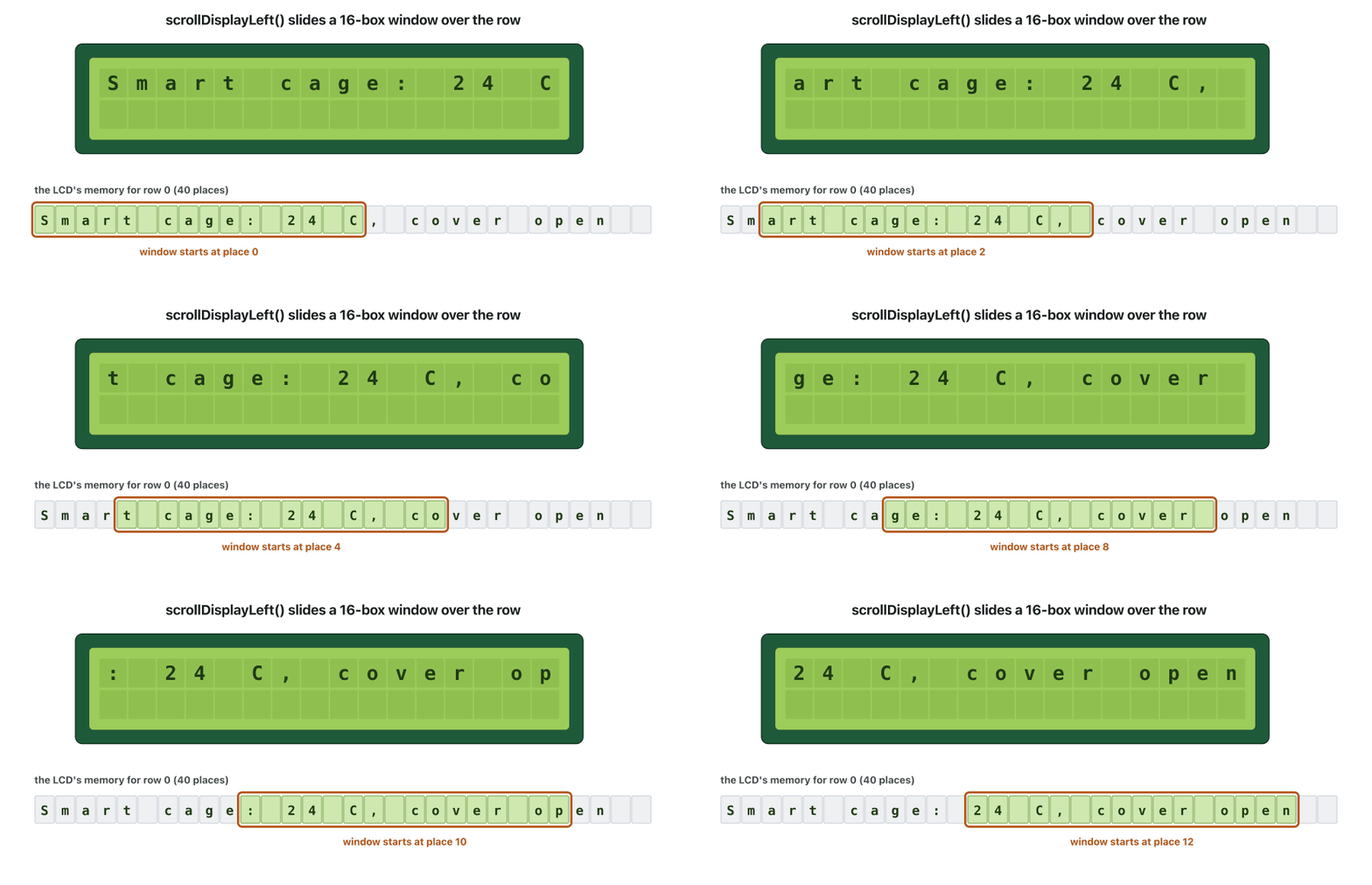
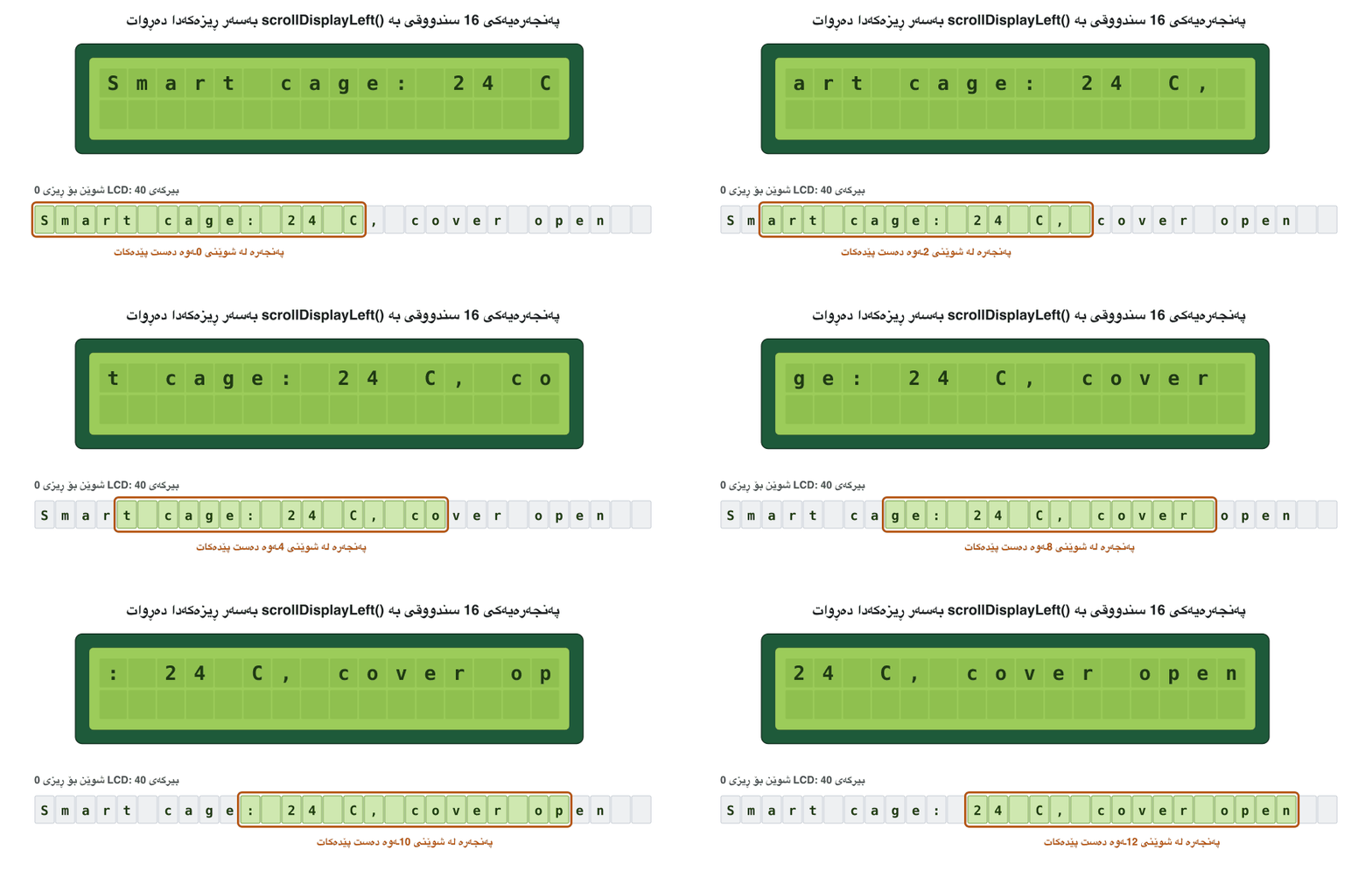
Scrolling is for text that is longer than 16 characters. Print the whole message — it goes into the memory, 40 places per row — then call scrollDisplayLeft() once for every character that does not fit, so the window walks to the end. Both rows move together, and clear() puts the window back at the start.
بۆ دەقێکە کە درێژترـە لە 16 . هەموو پەیامەکە چاپ بکە — دەچێتە ناو ، 40 شوێن بۆ هەر ڕیزێک — پاشان بۆ هەر کە جێی نابێتەوە جارێک scrollDisplayLeft() بانگ بکە، تا پەنجەرەکە بگاتە کۆتایی. هەردوو ڕیزەکە پێکەوە دەجووڵێن و clear() پەنجەرەکە دەگەڕێنێتەوە سەرەتا.
// A marquee: a message longer than 16 characters slides across the LCD
#include <Wire.h>
#include <LiquidCrystal_I2C.h>

LiquidCrystal_I2C lcd(0x27, 16, 2);
const char message[] = "Smart cage: 24 C, cover open";   // 28 characters

void setup() {
  lcd.init();
  lcd.backlight();
}

void loop() {
  lcd.clear();                          // also undoes the last scrolling
  lcd.setCursor(0, 0);
  lcd.print(message);                   // all 28 go into the LCD's memory
  delay(1000);
  int hidden = strlen(message) - 16;    // characters that do not fit: 12
  for (int step = 0; step < hidden; step++) {
    lcd.scrollDisplayLeft();            // move the window one character
    delay(300);
  }
  delay(1500);                          // time to read the end
} 0 s |Smart cage: 24 C|
| |
1.0 s |mart cage: 24 C,|
| |
2.2 s | cage: 24 C, cov|
| |
3.4 s |e: 24 C, cover o|
| |
4.3 s |24 C, cover open|
| |
6.1 s |Smart cage: 24 C|
| |CêIT Arduino checker, LCD log (some steps left out).
پشکنەری Arduinoـی CêIT، تۆماری (هەندێک هەنگاو لابراون).
Explain the codeڕوونکردنەوەی کۆدەکە
- Lineدێڕی 6
28 characters: 12 more than the window.
28 : 12 زیاتر لە پەنجەرەکە.
- Lineدێڕی 18-22
One step left per hidden character, 300 ms apart.
بۆ هەر شاراوە یەک هەنگاو بەرەو چەپ، بە 300 ms جیاوازی.
Common mistakesهەڵە باوەکان
| Mistakeهەڵە | Betterباشتر |
|---|---|
| Reading the DHT11 several times a second.خوێندنەوەی چەند جار لە چرکەیەکدا. | Every 2 s, with delay(2000) or millis().هەموو 2 چرکە، بە delay(2000) یان millis(). |
| A bare 4-pin sensor with no pull-up. ڕووتی 4 پین بەبێ . | 4.7 kΩ from DATA to VDD, or a 3-pin module.4.7 kΩ لە DATAـەوە بۆ VDD، یان مۆدیوڵێکی 3 پین. |
| The sensor on pin 0 or 1 of an UNO R3. لەسەر پینی 0 یان 1ـی UNO R3. | Pin 2 to 7: pins 0 and 1 belong to Serial.پینی 2 تا 7: پینەکانی 0 و 1 هی Serialـن. |
Testing temperature == NAN.پشکنینی temperature == NAN. | isnan(temperature).isnan(temperature). |
return right after a failed read.return ڕاستەوخۆ دوای خوێندنەوەیەکی سەرنەکەوتوو. | Wait 2 s first.سەرەتا 2 چرکە چاوەڕێ بکە. |
| Writing a shorter text over a longer one.نووسینی دەقێکی کورتتر لەسەر دەقێکی درێژتر. | lcd.clear() first, or pad rows to 16 characters.سەرەتا lcd.clear()، یان ڕیزەکان تا 16 پڕ بکەرەوە. |
| 17 or more characters in a row.17 یان زیاتر لە ڕیزێکدا. | Count them; shorten the label.بیانژمێرە؛ ناونیشانەکە کورت بکەرەوە. |
| Wrong I²C address: a blank screen.ناونیشانی هەڵە: شاشەی بەتاڵ. | Try 0x27 and 0x3F; check the backpack chip.0x27 و 0x3F تاقی بکەرەوە؛ چیپی پشتەبۆردەکە بپشکنە. |
| Serial Monitor at 9600 for a 115200 sketch. لەسەر 9600 بۆ 115200. | Match the menu to Serial.begin().لیستەکە لەگەڵ Serial.begin()ـدا بگونجێنە. |
| Comments that promise what the code does not do. کە بەڵێنی شتێک دەدەن کە کۆدەکە نایکات. | Update the comments with the code. لەگەڵ کۆدەکەدا نوێ بکەرەوە. |
Exercisesڕاهێنانەکان
Show the temperature in °C on row 0 and in °F on row 1, updated every 2 s.
پلەی گەرمی بە °C لەسەر ڕیزی 0 و بە °F لەسەر ڕیزی 1 پیشان بدە، هەموو 2 چرکە نوێ بکرێتەوە.
Hintئاماژە
The Adafruit library converts for you: readTemperature(true).
Adafruit بۆت دەگۆڕێت: readTemperature(true).
Show answerوەڵامەکە پیشان بدە
// Show the temperature in °C on row 0 and in °F on row 1 (Arduino UNO)
#include <Wire.h>
#include <LiquidCrystal_I2C.h>
#include <DHT.h>

DHT dht(2, DHT11);
LiquidCrystal_I2C lcd(0x27, 16, 2);

void setup() {
  lcd.init();
  lcd.backlight();
  dht.begin();
}

void loop() {
  delay(2000);
  float c = dht.readTemperature();       // Celsius
  float f = dht.readTemperature(true);   // true = Fahrenheit
  if (isnan(c) || isnan(f)) {
    return;                              // try again after the next 2 s
  }
  lcd.clear();
  lcd.setCursor(0, 0);
  lcd.print("C: ");
  lcd.print(c, 1);
  lcd.setCursor(0, 1);
  lcd.print("F: ");
  lcd.print(f, 1);
} 2 s |C: 24.5 |
|F: 76.1 |CêIT Arduino checker, room at 24.5 °C. Check: 24.5 × 9 ÷ 5 + 32 = 76.1.
پشکنەری Arduinoـی CêIT، ژوورەکە لە 24.5 °C. پشکنین: 24.5 × 9 ÷ 5 + 32 = 76.1.
Under the temperature, show Too cold (below 23 °C), Comfortable (23 to under 25 °C) or Too warm (25 °C and above). Make sure no letters are left over when the message gets shorter.
لە ژێر پلەی گەرمییەکەدا Too cold (خوار 23 °C)، Comfortable (23 تا کەمتر لە 25 °C) یان Too warm (25 °C و سەرووتر) پیشان بدە. دڵنیا بە کە کاتێک پەیامەکە کورتتر دەبێت هیچ پیتێک نامێنێتەوە.
Show answerوەڵامەکە پیشان بدە
// A comfort message under the temperature, padded so nothing is left over
#include <Wire.h>
#include <LiquidCrystal_I2C.h>
#include <DHT.h>

DHT dht(2, DHT11);
LiquidCrystal_I2C lcd(0x27, 16, 2);

void showRow(int row, String text) {
  while (text.length() < 16) {
    text += " ";                // pad to 16 characters
  }
  lcd.setCursor(0, row);
  lcd.print(text);
}

void setup() {
  lcd.init();
  lcd.backlight();
  dht.begin();
}

void loop() {
  delay(2000);
  float t = dht.readTemperature();
  if (isnan(t)) {
    showRow(0, "No reading");
    return;
  }
  showRow(0, "Temp: " + String(t, 1) + " C");
  if (t < 23) {
    showRow(1, "Too cold");
  } else if (t < 25) {
    showRow(1, "Comfortable");
  } else {
    showRow(1, "Too warm");
  }
} 2 s |Temp: 22.0 C |
|Too cold |
4 s |Temp: 24.0 C |
|Comfortable |
6 s |Temp: 26.5 C |
|Too warm |CêIT Arduino checker: 22.0, 24.0 and 26.5 °C. "Too warm" replaces "Comfortable" with no leftover letters.
پشکنەری Arduinoـی CêIT: 22.0، 24.0 و 26.5 °C. «Too warm» جێی «Comfortable» دەگرێتەوە بەبێ پیتی بەجێماو.
Explain the codeڕوونکردنەوەی کۆدەکە
- Lineدێڕی 9-15
showRow() adds spaces up to 16 characters, so a shorter text wipes a longer one.
showRow() تا 16 بۆشایی زیاد دەکات، بۆیە دەقی کورتتر دەقی درێژتر دەسڕێتەوە.
A DHT11 sends the bytes 40, 0, 26, 3 and then 69. Is the reading correct, and what are the humidity and the temperature?
40، 0، 26، 3 و پاشان 69 دەنێرێت. ئایا خوێندنەوەکە دروستە و و پلەی گەرمی چەندن؟
Show answerوەڵامەکە پیشان بدە
Correct: the sum matches. The fourth byte is the temperature's tenths, so 26 and 3 make 26.3 °C.
دروستە: کۆکە یەک دەگرێتەوە. چوارەم دەیەکی پلەی گەرمییەکەیە، بۆیە 26 و 3 دەکەنە 26.3 °C.
A student prints lcd.print("Temperature: 24.50 C"); on row 0. What will the screen show, and how would you fix it?
قوتابییەک lcd.print("Temperature: 24.50 C"); لەسەر ڕیزی 0 دەنووسێت. شاشەکە چی پیشان دەدات و چۆن چاکی دەکەیتەوە؟
Show answerوەڵامەکە پیشان بدە
The text has 20 characters, so the screen shows only Temperature: 24.5 (16 characters) and the rest stays in memory. Use Temp: 24.50 C (13) or T: 24.5 C.
دەقەکە 20 ، بۆیە شاشەکە تەنیا Temperature: 24.5 (16 ) پیشان دەدات و ئەوانی تر لە دەمێننەوە. Temp: 24.50 C (13) یان T: 24.5 C بەکار بهێنە.
Summaryپوختە
- The DHT11 measures temperature (±2 °C) and relative humidity (±5 % RH) and sends them as 40 bits over one data wire, with its own protocol and a checksum.
- Bare sensor: 4 pins (VDD, DATA, NC, GND) and your own 4.7 kΩ pull-up; module: 3 pins with the pull-up on board.
- Read it at most once a second; the maker's current manual asks for 2 s. The DHT22 measures wider and more accurately.
- A 16×2 LCD on I²C needs SDA, SCL, 5 V and GND; its address is usually 0x27 or 0x3F. setCursor(column, row) counts from 0.
- Old letters stay until overwritten, and only 16 characters per row are visible: clear or pad, and count.
- scrollDisplayLeft() moves the window over a 40-place row; it is for messages longer than 16 characters.
- پلەی گەرمی (±2 °C) و ڕێژەیی (±5% RH) دەپێوێت و وەک 40 بەسەر یەک وایەری دەیاننێرێت، بە خۆی و .
- ڕووت: 4 پین (VDD، DATA، NC، GND) و 4.7 kΩـی خۆت؛ مۆدیوڵ: 3 پین و لەسەر بۆردەکە.
- لانیزۆر چرکەی جارێک بیخوێنەوە؛ ڕێبەری ئێستای دروستکەر 2 چرکە داوا دەکات. DHT22 فراوانتر و وردتر دەپێوێت.
- 16×2 لەسەر پێویستی بە SDA، SCL، 5 V و GND هەیە؛ ناونیشانەکەی زۆرجار 0x27 یان 0x3Fـە. setCursor(column, row) لە 0ـەوە دەژمێرێت.
- پیتە کۆنەکان دەمێننەوە تا لە جێیان دەنووسرێت و تەنیا 16 لە هەر ڕیزێکدا دەبینرێن: بیسڕەوە یان پڕی بکەرەوە و بژمێرە.
- scrollDisplayLeft() پەنجەرەکە بەسەر ڕیزێکی 40 شوێنیدا دەجووڵێنێت؛ بۆ پەیامی درێژتر لە 16 .
Why does the DHT11 need only one data wire?بۆچی DHT11 تەنیا یەک وایەری دراوەی پێویستە؟
It sends all 40 bits one after the other on the same line; the length of each HIGH pulse says 0 or 1.
هەموو 40 یەک لە دوای یەک بەسەر هەمان هێڵدا دەنێرێت؛ درێژیی هەر HIGH دەڵێت 0 یان 1.
What did "Temp: 24.50 Cd" teach?«Temp: 24.50 Cd» چی فێر کردین؟
An LCD keeps old characters until something writes over them: clear the screen or pad the text.
کۆن دەهێڵێتەوە تا شتێک لە جێیان دەنووسرێت: شاشەکە بسڕەوە یان دەقەکە پڕ بکەرەوە.
How do you know a reading failed?چۆن دەزانیت خوێندنەوەیەک سەرنەکەوتووە؟
The library returns NaN; test it with isnan(), never with ==.
NaN دەگەڕێنێتەوە؛ بە isnan() بیپشکنە، هەرگیز بە == نا.
Lesson complete!وانەکە تەواو بوو!
Well done. Review the key terms, then go on to the next lesson.دەستخۆش. سەیرێکی زاراوە سەرەکییەکان بکەرەوە، پاشان بڕۆ بۆ وانەی داهاتوو.
Key termsزاراوە سەرەکییەکان
Actuators: DC Motors, Encoders and Servosجووڵێنەرەکان: ماتۆڕەکانی DC، کۆدکەرەکانی هەنگاوبەهەنگاو و ماتۆڕەکانی سێرڤۆ
Related lecturesوانە پەیوەندیدارەکان
- Accuracy, Precision, Range: Reading a Sensor's Data Sheetڕاستیی پێوان، وردیی پێوان و مەودای پێوان: خوێندنەوەی پەڕەی تایبەتمەندییەکانی هەستەوەرێک
- Sensing Light with an LDRهەستکردن بە ڕووناکی بە LDR
- Actuators: DC Motors, Encoders and Servosجووڵێنەرەکان: ماتۆڕەکانی DC، کۆدکەرەکانی هەنگاوبەهەنگاو و ماتۆڕەکانی سێرڤۆ
- Project: a Smart Bird-Cage Coverپرۆژە: بەرگی هۆشمەندی قەفەزی باڵندە
- Lab: Buttons, INPUT_PULLUP and Debouncingتاقیگە: دوگمەکانی پەستان، INPUT_PULLUP و لابردنی هەڵبەزینەوە
- Arduino Boards and the Arduino IDEبۆردەکانی Arduino و Arduino IDE
- The Questions Behind Every IoT Designئەو پرسیارانەی لە پشت هەموو دیزاینێکی IoTـەوەن
- Embedded Systems at Work: a Bike Computer and a Car Engineسیستەمە چەسپێنراوەکان لە کاردا: کۆمپیوتەری پاسکیل و بزوێنەری ئۆتۆمبێل
- Errors and Debugging: Syntax, Runtime and Logic Errorsهەڵەکان و کرمەکوژی: هەڵەی داڕستن، هەڵەی کاتی جێبەجێکردن و هەڵەی لۆجیکی
References and further readingسەرچاوەکان و خوێندنەوەی زیاتر
- Aosong: Temperature and Humidity Module DHT11 Product Manual, V1.3 (2017)
- Adafruit: DHT11, DHT22 and AM2302 sensors — overview (ranges, accuracy, sampling rate)
- Adafruit DHT sensor library: DHT.cpp (2 s minimum interval, NaN on failure, checksum test)
- Hitachi HD44780U (LCD-II) data sheet: 80-character display RAM, display shift, clear display
- NXP PCF8574/PCF8574A data sheet: I²C address maps (0x20–0x27, 0x38–0x3F)
- Arduino LiquidCrystal library API (setCursor, clear, scrollDisplayLeft)
- LiquidCrystal_I2C library (Frank de Brabander)
This lecture is a first edition. The Kurdish text and terminology are waiting for review by Kurdish IT teachers.ئەم وانەیە چاپی یەکەمە. دەقە کوردییەکە و زاراوەکانی چاوەڕێی پێداچوونەوەی مامۆستایانی کوردی بواری IT ن.