Chapterبەش 7 · Lectureوانە 7.4
Project: a Smart Bird-Cage Coverپرۆژە: بەرگی هۆشمەندی قەفەزی باڵندە
The course capstone: a Wi-Fi board covers a bird cage at sunset and uncovers it at sunrise (an LDR with two thresholds and a five-minute wait), keeps the room between 20 and 25 °C with a heater and a cooler (a DHT11 with a dead band and hysteresis) using safe low-voltage stand-ins, and sends the temperature (a double) and the cover state (a Boolean) to a cloud table for a phone app. With the parts list, the mains-safety rule, the system diagram, the pulley mechanism, the wiring, the full sketch tested in nine situations, failure handling, resources and where to go next.
پرۆژەی کۆتایی کۆرسەکە: بۆردێکی لە ئاوابوونی خۆردا قەفەزی باڵندە دادەپۆشێت و لە هەڵهاتنیدا لای دەبات ( بە دوو و چاوەڕوانییەکی پێنج خولەکی)، ژوورەکە لە نێوان 20 و 25 °Cـدا بە گەرمکەرەوە و ساردکەرەوە دەهێڵێتەوە ( بە و ) بە جێگرەوەی نزمی پارێزراو و پلەی گەرمی () و دۆخی بەرگ () بۆ هەور دەنێرێت بۆ مۆبایل. لەگەڵ لیستی پارچەکان، یاسای سەلامەتیی کارەبای ماڵ، هێڵکاریی سیستەم، میکانیزمی ، بەستنەوەکان، هەموو کە لە نۆ دۆخدا تاقی کراوەتەوە، مامەڵەکردن لەگەڵ تێکچوون، سەرچاوەکان و هەنگاوی داهاتوو.
What you will learnچی فێر دەبیت
- Turn a real need into requirements, parts and rules for an IoT device.
- Design robust control rules: two thresholds with a time filter for light, a dead band with hysteresis for temperature.
- Build the low-voltage version safely and explain why mains is never wired to a board.
- Read, run and change a non-blocking sketch that moves a cover, switches appliances and posts a double and a Boolean to the cloud.
- Plan for failures, security and privacy, and choose where to continue after the course.
- پێویستییەکی ڕاستەقینە بکەیت بە پێداویستی، پارچە و یاسا بۆ ئامێرێکی IoT.
- یاسای کۆنترۆڵی بەهێز دیزاین بکەیت: دوو بە فلتەرێکی کاتی بۆ ڕووناکی، بە بۆ پلەی گەرمی.
- وەشانی نزم بە سەلامەتی دروست بکەیت و ڕوون بکەیتەوە بۆچی هەرگیز کارەبای ماڵ بە بۆردەوە نابەسترێت.
- بێ ڕاگرتن بخوێنیتەوە، کاری پێ بکەیت و بیگۆڕیت کە بەرگێک دەجووڵێنێت، ئامێر هەڵدەکات و و بۆ هەور دەنێرێت.
- پلان بۆ تێکچوون، و دابنێیت و هەڵبژێریت دوای کۆرسەکە لە کوێ بەردەوام بیت.
The project: a cage that looks after its birdsپرۆژەکە: قەفەزێک کە ئاگای لە باڵندەکانی دەبێت
This last lesson builds the whole course into one device. It starts from a student project called "Smart Cage’s Cover and Automated Temperature Control System", written to demonstrate the advantages of the Internet of Things. The device pulls a cover over a bird cage at night and back in the morning, switches a heater or a cooler to keep the room comfortable, and sends what it does to the cloud so the owner can watch from a phone.
ئەم وانەیەی کۆتایی هەموو کۆرسەکە دەکات بە یەک ئامێر. لە پرۆژەیەکی خوێندکارییەوە دەست پێ دەکات بە ناوی «سیستەمی بەرگی هۆشمەندی قەفەز و کۆنترۆڵی خۆکارانەی پلەی گەرمی»، کە بۆ تێگەیشتن لە سوودەکانی نووسراوە. ئامێرەکە شەوان بەرگێک بەسەر قەفەزی باڵندەدا دەکێشێت و بەیانیان لای دەبات، گەرمکەرەوە یان ساردکەرەوەیەک هەڵدەکات تا ژوورەکە خۆش بمێنێتەوە و ئەوەی دەیکات بۆ هەور دەنێرێت تا خاوەنەکەی لە مۆبایلەوە چاودێری بکات.
Every part has its own lesson: the LDR, the DHT11, motors, Wi-Fi, HTTP and the cloud, security. Here they meet. You will see the problem, the parts, the rules, the safety limits, the wiring, the full sketch tested in nine situations, the data in the cloud and the phone app.
هەموو بەشێک وانەی خۆی هەیە: ، ، ، ، و هەور، . لێرەدا بەیەک دەگەن. کێشەکە، پارچەکان، یاساکان، سنوورەکانی سەلامەتی، بەستنەوەکان، هەموو کە لە نۆ دۆخدا تاقی کراوەتەوە، لە هەوردا و مۆبایل دەبینیت.
The gap: nobody at homeکەلێنەکە: کەس لە ماڵەوە نییە
Most pet birds are active by day and sleep at night: they come out, sing and explore when the sun rises, and rest when it sets. So their owners uncover the cage in the morning and cover it at night. Birds also need a room that is neither too cold nor too hot.
زۆربەی باڵندە ماڵییەکان بە ڕۆژ چالاکن و شەو دەخەون: کاتێک خۆر هەڵدێت دێنە دەرەوە، دەخوێنن و دەگەڕێن و کاتێک ئاوا دەبێت پشوو دەدەن. بۆیە خاوەنەکانیان بەیانیان بەرگی قەفەزەکە لادەبەن و شەوان دایدەدەنەوە. باڵندەکان هەروەها ژوورێکیان دەوێت کە نە زۆر سارد بێت و نە زۆر گەرم.
The gap: when the family travels for a few days, nobody is home to switch the cooler or the heater, and nobody covers and uncovers the cage. The birds can fall ill or suffer. The project fills this gap with a few digital and electronic parts — an IoT device.
کەلێنەکە: کاتێک خێزانەکە بۆ چەند ڕۆژێک گەشت دەکات، کەس لە ماڵەوە نییە ساردکەرەوە یان گەرمکەرەوە هەڵبکات و کەسیش بەرگی قەفەزەکە داناداتەوە و لای نابات. باڵندەکان دەکرێت نەخۆش بکەون یان ئازار بچێژن. پرۆژەکە ئەم کەلێنە بە چەند پارچەیەکی دیجیتاڵی و ئەلیکترۆنی پڕ دەکاتەوە — ئامێرێکی IoT.
The solution: sense, decide, act, reportچارەسەرەکە: هەستکردن، بڕیاردان، کردن، ڕاپۆرتکردن
The solution is a small automated IoT device. It controls the cooler or the heater at different times of the day according to the temperature, and opens or closes the cage cover according to the daylight. A phone app receives the room temperature, so the owner can watch, notice problems and look back at the data. In the words of earlier lessons it is a closed control loop with a cloud on the side: the decisions run on the board, the cloud only keeps the record (Closed-loop control).
چارەسەرەکە ئامێرێکی بچووکی خۆکاری IoTـیە. لە کاتە جیاوازەکانی ڕۆژدا بەپێی پلەی گەرمی ساردکەرەوە یان گەرمکەرەوە کۆنترۆڵ دەکات و بەپێی ڕووناکیی ڕۆژ بەرگی قەفەزەکە دەکاتەوە یان دایدەخات. مۆبایل پلەی گەرمیی ژوورەکە وەردەگرێت، بۆیە خاوەنەکەی دەتوانێت چاودێری بکات، کێشەکان ببینێت و دواتر سەیری بکات. بە زمانی وانەکانی پێشوو، ئەمە داخراوە و هەورێک لە تەنیشتیدایە: بڕیارەکان لەسەر بۆردەکە دەدرێن، هەور تەنیا تۆمارەکە هەڵدەگرێت (کۆنترۆڵی خولی داخراو).
The parts listلیستی پارچەکان
- Home Wi-Fi: the room’s readings travel through the home internet to an app.
- Mobile internet on the phone, to see the data when you are away for days.
- A light sensor, an LDR with a 10 kΩ resistor: notices sunrise and sunset (LDR).
- A temperature sensor, the DHT11 module: temperature and humidity of the room (DHT11).
- A cloud database, such as Supabase (similar to Google’s Firebase): a table for the temperature (a double) and the cover state (a Boolean).
- Wires (conductors) and a breadboard to connect the parts.
- A board with Wi-Fi (next screen), a motor for the cover, and stand-ins for the heater and cooler.
- ماڵ: خوێندنەوەکانی ژوورەکە لەڕێی ماڵەوە دەگەنە .
- مۆبایل لەسەر تەلەفۆن، بۆ بینینی کاتێک بۆ چەند ڕۆژێک دووریت.
- ، لەگەڵ 10 kΩ: هەڵهاتن و ئاوابوونی خۆر هەست پێ دەکات (LDR).
- ، مۆدیولی : پلەی گەرمی و ژوورەکە (DHT11).
- ، وەک Supabase (هاوشێوەی Firebaseـی گووگڵ): بۆ پلەی گەرمی () و دۆخی بەرگ ().
- وایەر () و بۆ بەستنەوەی پارچەکان.
- بۆردێک بە (شاشەی داهاتوو)، بۆ بەرگەکە و جێگرەوە بۆ گەرمکەرەوە و ساردکەرەوە.
The motor choice is explained in Choosing a motor for the cage cover: here a continuous-rotation servo with two limit switches, the simplest reliable build.
هەڵبژاردنی لە هەڵبژاردنی ماتۆڕێک بۆ بەرگی قەفەز ڕوون کراوەتەوە: لێرەدا بە دوو ، سادەترین دروستکردنی متمانەپێکراو.
The parts listلیستی پارچەکان
The board must have Wi-Fiبۆردەکە دەبێت وایفایی هەبێت
The board is the brain and heart of the project: every part connects to it and the code runs on it. Because it must send the temperature and the cover state to the cloud by itself, it must have Wi-Fi. A plain Arduino UNO has none, so this project uses a Nano ESP32 (Wi-Fi and Bluetooth, 3.3 V pins), the course’s Wi-Fi board; an UNO R4 WiFi, an MKR WiFi 1010 or another ESP32 board also works with small changes (Boards for IoT).
بۆردەکە مێشک و دڵی پرۆژەکەیە: هەموو پارچەیەک پێیەوە دەبەسترێت و کۆدەکە لەسەری کار دەکات. چونکە دەبێت بە خۆی پلەی گەرمی و دۆخی بەرگ بۆ هەور بنێرێت، دەبێت هەبێت. Arduino UNOـی ئاسایی نییە، بۆیە ئەم پرۆژەیە Nano ESP32 بەکار دەهێنێت ( و Bluetooth، پینی 3.3 V)، کە بۆردی کۆرسەکەیە؛ UNO R4 WiFi، MKR WiFi 1010 یان بۆردێکی تری ESP32یش بە گۆڕانکاریی بچووک کار دەکەن (بۆرد بۆ IoT).
How it works, in shortچۆن کار دەکات، بە کورتی
Both sensors and both appliances are connected to the board, and the conditions live in the code. The rules:
هەردوو و هەردوو ئامێرەکە بە بۆردەکەوە دەبەسترێن و مەرجەکان لە ناو کۆدەکەدان. یاساکان:
| Sensor says دەڵێت | The board doesبۆردەکە دەکات | Sent to the cloudبۆ هەور دەنێردرێت |
|---|---|---|
| Dark (sunset)تاریک (ئاوابوونی خۆر) | The motor on the cover’s left turns clockwise and pulls the cover over the cage لە لای چەپی بەرگەکە دەسووڕێت و بەرگەکە بەسەر قەفەزەکەدا دەکێشێت | cover_open = false (a Boolean)cover_open = false () |
| Light (sunrise)ڕووناک (هەڵهاتنی خۆر) | The motor turns counterclockwise and pulls the cover off دەسووڕێت و بەرگەکە لادەبات | cover_open = trueهەمان : cover_open = true |
| Below 20 °Cخوارووی 20 °C | Heater onگەرمکەرەوە هەڵ | the temperature, e.g. 18.5 (a double)پلەی گەرمی، وەک 18.5 () |
| Above 25 °Cسەروو 25 °C | Cooler onساردکەرەوە هەڵ | the temperature (a double)پلەی گەرمی () |
In summer you can unplug the heater from the system, and in winter the cooler: the rules simply never switch the missing one on.
لە هاویندا دەتوانیت گەرمکەرەوە لە سیستەمەکە جیا بکەیتەوە و لە زستاندا ساردکەرەوە: یاساکان ئەوەی نییە هەرگیز هەڵی ناکەن.
How it works, in shortچۆن کار دەکات، بە کورتی
The light rule: no cover dance at duskیاسای ڕووناکی: بەرگەکە لە ئێوارەدا نالەرزێت
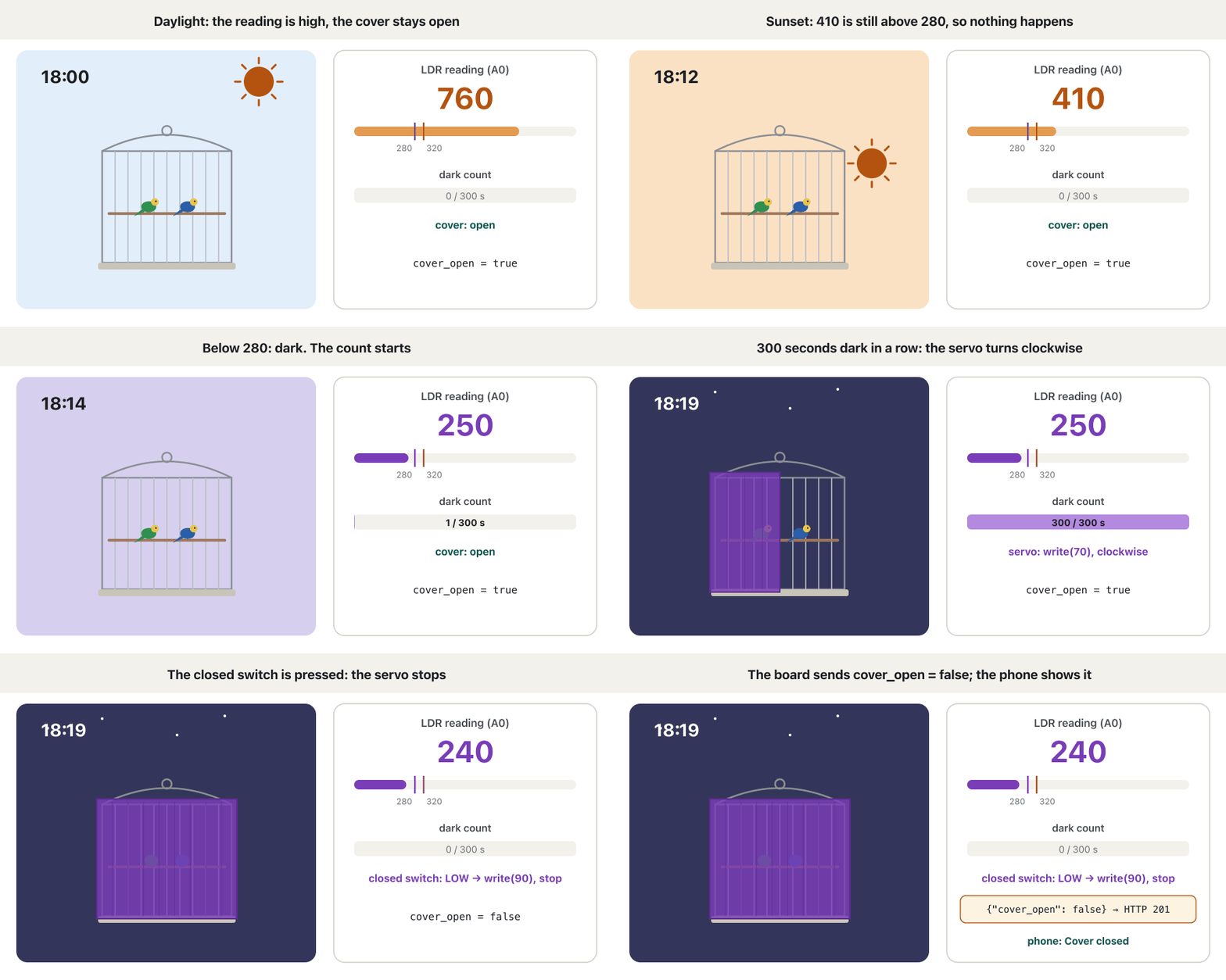
One threshold is not enough: at dusk the reading wobbles around it, and a car’s lights or a lamp can fool it. So the sketch uses the two ideas of No flicker at dusk plus a wait. Two thresholds: below 280 counts as dark, above 320 as light. Five patient minutes: the reading must stay on the new side for 300 seconds in a row; any second on the other side starts the count again. Only then does the motor move.
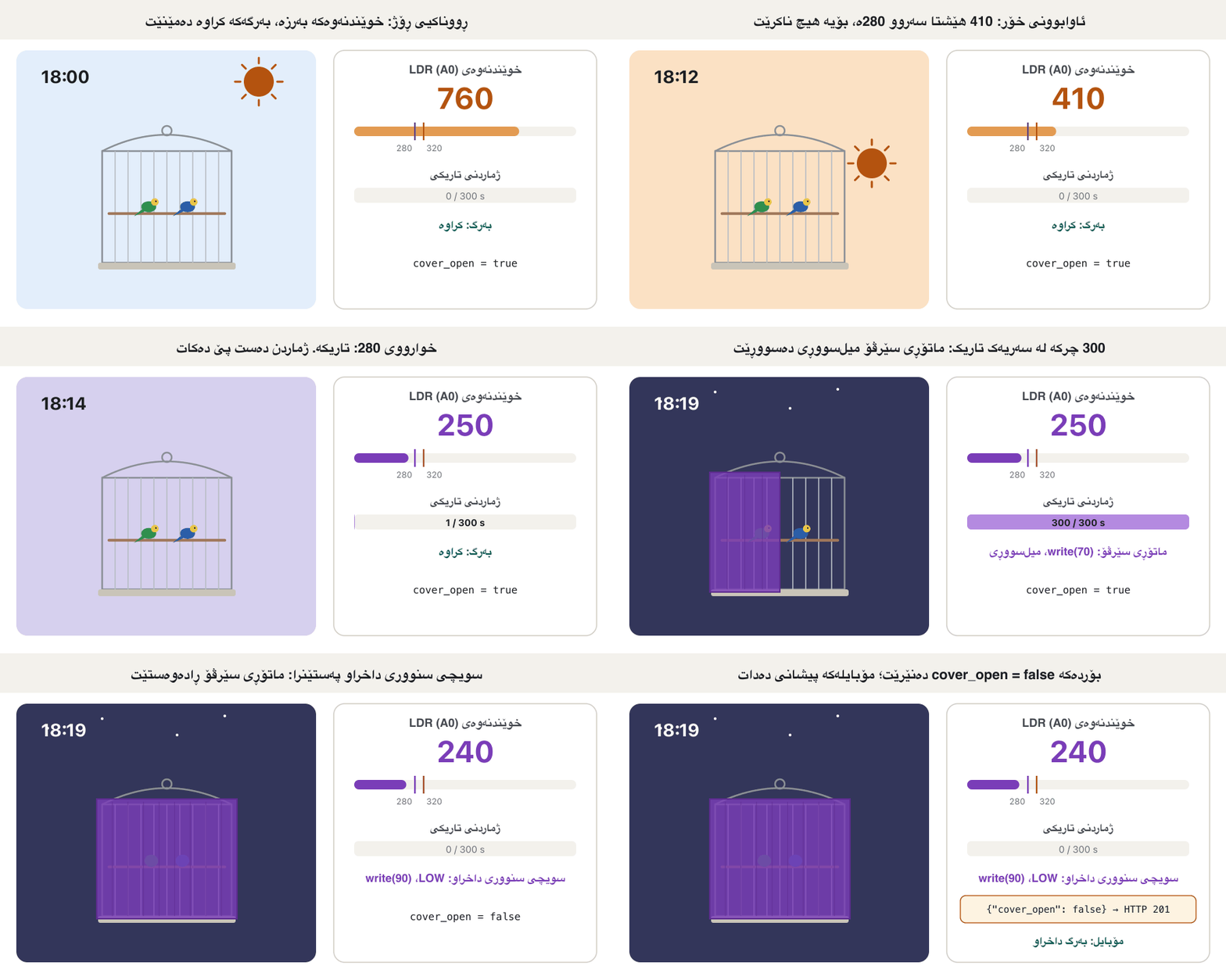
یەک بەس نییە: لە ئێوارەدا خوێندنەوەکە بە دەوریدا دەلەرزێت و ڕووناکیی ئۆتۆمبێلێک یان چرایەک دەتوانێت هەڵیبخەڵەتێنێت. بۆیە دوو بیرۆکەی ئێوارە بێ لەرزین و چاوەڕوانییەک بەکار دەهێنێت. دوو : خوارووی 280 بە تاریک دادەنرێت، سەروو 320 بە ڕووناک. پێنج خولەکی ئارام: خوێندنەوەکە دەبێت 300 چرکە لە سەریەک لە لایەنە نوێیەکەدا بمێنێتەوە؛ هەر چرکەیەک لە لایەنەکەی تر ژماردنەکە دەگەڕێنێتەوە بۆ سەرەتا. تەنیا ئەوکات دەجووڵێت.
How it works, in shortچۆن کار دەکات، بە کورتی
The temperature rule: a dead band and a little hysteresisیاسای پلەی گەرمی: ناوچەی بێکار و کەمێک هیستێرێسیس
The project’s rule: below 20 °C the heater runs, above 25 °C the cooler runs. Between 20 and 25 °C neither switches on: that range is the dead band, where the controller does nothing and saves energy. One more detail stops a relay clicking every few seconds at the edges: the heater goes off only at 21 °C and the cooler only at 24 °C. That is hysteresis, the same idea as the light rule. The DHT11 is read every 2 seconds, as Slow down advises.
یاسای پرۆژەکە: خوارووی 20 °C گەرمکەرەوە کار دەکات، سەروو 25 °C ساردکەرەوە کار دەکات. لە نێوان 20 و 25 °Cـدا هیچیان هەڵناکرێن: ئەم نێوانە ، کە کۆنترۆڵکەر تێیدا هیچ ناکات و وزە پاشەکەوت دەکات. وردەکارییەکی تر ڕێ لە کرتەی لە هەموو چەند چرکەیەکدا لە لێوارەکاندا دەگرێت: گەرمکەرەوە تەنیا لە 21 °C دەکوژێتەوە و ساردکەرەوە تەنیا لە 24 °C. ئەمە ، هەمان بیرۆکەی یاسای ڕووناکی. هەموو دوو چرکەیەک دەخوێندرێتەوە، وەک هێواش بە ئامۆژگاری دەکات.
Safety first: never wire mains to the boardسەلامەتی پێش هەموو شتێک: هەرگیز کارەبای ماڵ بە بۆردەوە مەبەستە
A cooler or a heater can be switched in two ways. Mechanically: a small motor acts as an actuator and presses the appliance’s own switch. Electrically: a switching part turns its power on and off — simpler and more reliable, but never by plugging the appliance’s wires "directly into the board". Heaters and air coolers run on mains electricity, 230 V in Iraq, which can kill and start fires; a board pin gives 3.3 V and at most a few tens of milliamps, while a 2,000 W heater draws about 9 A. Even the electric way needs a proper switching device between the board and the appliance.
ساردکەرەوە یان گەرمکەرەوە بە دوو ڕێگا هەڵدەکرێن. بە شێوەی میکانیکی: بچووک وەک کار دەکات و سویچی خودی ئامێرەکە دەپەستێنێت. بە شێوەی کارەبایی: پارچەیەکی سویچکەر کارەباکەی هەڵدەکات و دەیکوژێنێتەوە — سادەتر و متمانەپێکراوترە، بەڵام هەرگیز بە دانی وایەری ئامێرەکە "ڕاستەوخۆ لە بۆردەکە" نا. گەرمکەرەوە و ساردکەرەوە بە کارەبای ماڵ کار دەکەن، لە عێراقدا 230 V ()، کە دەتوانێت بکوژێت و ئاگر بکاتەوە؛ پینی بۆرد 3.3 V و هەر زۆر بێت چەند دە میلیئەمپێرێک دەدات، بەڵام گەرمکەرەوەیەکی 2,000 W نزیکەی 9 A دەکێشێت. ڕێگا کارەباییەکەش پارچەیەکی سویچکەری گونجاوی لە نێوان بۆرد و ئامێرەکەدا پێویستە.
Safety first: never wire mains to the boardسەلامەتی پێش هەموو شتێک: هەرگیز کارەبای ماڵ بە بۆردەوە مەبەستە
The lab version: LEDs and a relay moduleوەشانی تاقیگە: LED و مۆدیولی ڕیلەی
In the lab the heater is a red LED on D5 and the cooler a blue LED on D6, each through a 220 Ω resistor. If you want to hear a real switch, add a relay module on its low-voltage side only (VCC, GND, IN1, IN2) and leave its contacts (COM, NO, NC) empty. Many relay modules switch on when IN is LOW: check yours and swap HIGH and LOW in setAppliances() if needed. Low-voltage loads, such as a 5 V fan with its own supply and a transistor or driver, are fine; mains is not.
لە تاقیگەدا گەرمکەرەوە سوورە لەسەر D5 و ساردکەرەوە شین لەسەر D6، هەریەکەیان بە 220 Ωـەوە. ئەگەر دەتەوێت دەنگی سویچێکی ڕاستەقینە ببیستیت، مۆدیولی تەنیا لە لای نزمەکەیەوە زیاد بکە (VCC، GND، IN1، IN2) و کۆنتاکتەکانی (COM، NO، NC) بە بەتاڵی بهێڵەرەوە. زۆر مۆدیولی کاتێک IN بووە LOW هەڵدەبن: هی خۆت بپشکنە و ئەگەر پێویست بوو HIGH و LOW لە setAppliances()ـدا بگۆڕە. بارە نزمەکان، وەک پانکەیەکی 5 V بە خۆی و ترانزیستۆر یان ، کێشە نین؛ کارەبای ماڵ کێشەیە.
The whole system in one pictureهەموو سیستەمەکە لە یەک وێنەدا
The project’s own diagram showed the LDR and the temperature sensor wired to an Arduino microcontroller, a modified positional servo spinning clockwise or counterclockwise, the cooling appliance and a digital heater, and a Wi-Fi link "sending the temperature value and cage’s cover status to Supabase over Internet". Redrawn for this course, the board has Wi-Fi, a relay or LED block stands between the board and the appliances, the servo is a ready-made continuous-rotation servo, and the data path ends on a phone.
هێڵکارییەکەی خودی پرۆژەکە و نیشان دەدا کە بە Arduinoـەوە بەسترابوون، شوێنیی دەستکاریکراو کە یان دەسووڕێت، ئامێری ساردکەرەوە و هیتەرێکی دیجیتاڵی و بەستەرێکی کە «ناردنی داتای پلەی گەرمییەکە و بارودۆخی پەردەی سەر قەفەزەکە بەرەو سوپابەیس لەڕێی ئینتەرنێتەوە». لێرەدا بۆ ئەم کۆرسە دووپاتە کێشراوەتەوە: بۆردەکە هەیە، بلۆکێکی یان لە نێوان بۆرد و ئامێرەکاندایە، ئامادەیە و ڕێگای لەسەر مۆبایلێک کۆتایی دێت.
Closing and opening the coverداخستن و کردنەوەی بەرگەکە
The motor sits on the left side of the cover. When the light rule says "dark", it turns the pulley clockwise: the upper run of the string loop moves to the right and pulls the cover over the cage. When it says "light", the motor turns counterclockwise and the cover goes back to the left. A limit switch at each end tells the board to stop (Stopping in the right place); with a continuous servo, write(70) turns one way, write(110) the other and write(90) stops (Continuous-rotation servos).
لە لای چەپی بەرگەکەدایە. کاتێک یاسای ڕووناکی دەڵێت "تاریکە"، دەسووڕێنێت: لای سەرەوەی پەتە بازنەییەکە بۆ لای ڕاست دەجووڵێت و بەرگەکە بەسەر قەفەزەکەدا دەکێشێت. کاتێک دەڵێت "ڕووناکە"، دەسووڕێت و بەرگەکە بۆ لای چەپ دەگەڕێتەوە. لە هەر سەرێکدا بە بۆردەکە دەڵێت بوەستێت (وەستان لە شوێنی دروست)؛ بە ، write(70) بە لایەکدا دەسووڕێت، write(110) بە لاکەی تردا و write(90) ڕادەوەستێت (سێرڤۆی خولانەوەی بەردەوام).
Closing and opening the coverداخستن و کردنەوەی بەرگەکە
The pulley wheelخلۆکە
A pulley is a wheel with a groove that a string runs over; it changes the direction of a pull. In the cover it lets a small motor on one side move a long cover along a straight line, and a second pulley on the far end closes the string into a loop. The finished cover moves smoothly and the motor never has to lift it.
چەرخێکی چاڵدارە کە پەتێک بەسەریدا دەڕوات؛ ئاراستەی ڕاکێشان دەگۆڕێت. لە بەرگەکەدا ڕێگە بە بچووک لە لایەکەوە دەدات بەرگێکی درێژ بە هێڵێکی ڕاستدا بجووڵێنێت و دووەم لە سەرەکەی تر پەتەکە دەکات بە بازنە. بەرگە تەواوکراوەکە بە نەرمی دەجووڵێت و هەرگیز پێویست ناکات بەرزی بکاتەوە.
Wiring the Nano ESP32بەستنەوەی Nano ESP32
The pin names are the Arduino ones printed on the Nano ESP32. The LDR and its 10 kΩ resistor form a voltage divider on A0 (The voltage divider); the board runs at 3.3 V, so power the LDR and the DHT11 from 3.3 V. The limit switches use INPUT_PULLUP, so a pressed switch reads LOW (INPUT_PULLUP). The servo gets 5 V from its own supply or the VBUS pin, never from the 3.3 V pin, with all grounds joined (Powering a servo).
ناوی پینەکان هی Arduinoن کە لەسەر Nano ESP32 چاپ کراون. و 10 kΩـەکەی لەسەر A0 پێک دەهێنن (دابەشکەری ڤۆڵتیە)؛ بۆردەکە بە 3.3 V کار دەکات، بۆیە و لە 3.3 Vـەوە وزە بدە. INPUT_PULLUP بەکار دەهێنن، بۆیە سویچێکی پەستێنراو LOW دەخوێنێتەوە (INPUT_PULLUP). 5 V لە خۆی یان پینی VBUS وەردەگرێت، هەرگیز لە پینی 3.3 V نا؛ هەموو GNDـەکانیش پێکەوە دەبەسترێن (وزەدان بە ماتۆڕی سێرڤۆ).
The plan of the sketchنەخشەی سکێچەکە
setup() connects to Wi-Fi and finds the cover by its switches. Then loop() never waits: it checks three clocks with millis() (millis()). Every second it reads the light and counts; every 2 seconds it reads the DHT11 and applies the temperature rule; every 60 seconds it sends a reading. Only moving the cover takes a few seconds, and even that has a 15-second limit. The general flowchart symbols are in Algorithms and flowcharts.
setup() بە پەیوەست دەبێت و شوێنی بەرگ بە سویچەکان دەدۆزێتەوە. پاشان loop() هەرگیز چاوەڕێ ناکات: بە millis() سێ کاتژمێر دەپشکنێت (millis()). هەموو چرکەیەک ڕووناکی دەخوێنێتەوە و دەژمێرێت؛ هەموو دوو چرکەیەک دەخوێنێتەوە و یاسای پلەی گەرمی جێبەجێ دەکات؛ هەموو 60 چرکەیەک خوێندنەوەیەک دەنێرێت. تەنیا جووڵاندنی بەرگ چەند چرکەیەک دەخایەنێت و ئەویش سنووری 15 چرکەی هەیە. هێماکانی بە گشتی لە ئەلگۆریتم و هێڵکاریی ڕەوتدان.
The full sketchهەموو سکێچەکە
Here is the whole program, checked in the CêIT Arduino checker in nine situations. Read it in parts: the pins and rules at the top, then setup(), loop() and one function per job.
ئەمە هەموو بەرنامەکەیە کە لە پشکنەری Arduinoـی CêITـدا لە نۆ دۆخدا تاقی کراوەتەوە. بەش بە بەش بیخوێنەرەوە: پینەکان و یاساکان لە سەرەوە، پاشان setup()، loop() و بۆ هەر کارێک .
// Smart bird-cage cover and temperature control (Arduino Nano ESP32)
// Cover: a continuous-rotation servo and two limit switches.
// Heater and cooler: LED stand-ins (or a relay module with NOTHING on its contacts).
#include <WiFi.h>
#include <WiFiClientSecure.h>
#include <HTTPClient.h>
#include <ESP32Servo.h>
#include <DHT.h>
#include "arduino_secrets.h"   // Wi-Fi, project URL, publishable key, root certificate

// Pins
const int LDR_PIN = A0;          // LDR divider: more light = a higher reading
const int DHT_PIN = 2;           // DHT11 data
const int OPEN_SWITCH = 3;       // limit switch at the open end (pressed = LOW)
const int CLOSED_SWITCH = 4;     // limit switch at the closed end
const int HEATER_PIN = 5;        // red LED = "heater"
const int COOLER_PIN = 6;        // blue LED = "cooler"
const int SERVO_PIN = 9;

// Rules
const int DARK_BELOW = 280;      // light rule: two thresholds...
const int LIGHT_ABOVE = 320;
const int CONFIRM_S = 300;       // ...and 5 minutes (300 s) of the same light
const float HEAT_ON = 20.0;      // heater on below 20 C...
const float HEAT_OFF = 21.0;     // ...and off again from 21 C
const float COOL_ON = 25.0;      // cooler on above 25 C...
const float COOL_OFF = 24.0;     // ...and off again from 24 C
const int CLOSE_SPEED = 70;      // continuous servo: 70 = clockwise on our servo
const int OPEN_SPEED = 110;      // 110 = counterclockwise, 90 = stop
const unsigned long MOVE_LIMIT = 15000;   // give up if a switch is not reached in 15 s

Servo coverMotor;
DHT dht(DHT_PIN, DHT11);
WiFiClientSecure tls;

bool coverOpen = true;
bool heaterOn = false;
bool coolerOn = false;
float temperature = NAN;         // NAN = no valid reading yet
int failedReads = 0;
int darkSeconds = 0;
int lightSeconds = 0;
unsigned long lastLight = 0, lastTemp = 0, lastSend = 0;

void setup() {
  Serial.begin(115200);
  analogReadResolution(10);      // 0-1023, as in the LDR lesson
  pinMode(OPEN_SWITCH, INPUT_PULLUP);
  pinMode(CLOSED_SWITCH, INPUT_PULLUP);
  pinMode(HEATER_PIN, OUTPUT);
  pinMode(COOLER_PIN, OUTPUT);
  coverMotor.attach(SERVO_PIN);
  coverMotor.write(90);          // stop
  dht.begin();

  WiFi.begin(SECRET_SSID, SECRET_PASS);
  unsigned long start = millis();
  while (WiFi.status() != WL_CONNECTED && millis() - start < 10000) delay(250);
  say(WiFi.status() == WL_CONNECTED ? "Wi-Fi connected" : "No Wi-Fi: working offline");
  tls.setCACert(SECRET_ROOT_CA); // HTTPS: check that it is the real server

  // Where is the cover? After a power cut it may have stopped half-way.
  if (digitalRead(OPEN_SWITCH) == LOW) { coverOpen = true; say("cover is open"); }
  else if (digitalRead(CLOSED_SWITCH) == LOW) { coverOpen = false; say("cover is closed"); }
  else moveCover(analogRead(LDR_PIN) >= 300);   // half-way: follow the light now
}

void loop() {
  unsigned long now = millis();
  if (now - lastLight >= 1000) { lastLight = now; checkLight(); }
  if (now - lastTemp >= 2000) { lastTemp = now; checkTemperature(); }
  if (now - lastSend >= 60000) { lastSend = now; sendReading(); }
}

void checkLight() {
  int light = analogRead(LDR_PIN);
  if (coverOpen) {
    if (light < DARK_BELOW) {
      darkSeconds++;
      if (darkSeconds == 1) say("light " + String(light) + ": dark, counting");
    } else if (darkSeconds > 0) {
      say("light " + String(light) + ": light again after " + String(darkSeconds) + " s, count reset");
      darkSeconds = 0;
    }
    if (darkSeconds >= CONFIRM_S) { darkSeconds = 0; moveCover(false); sendReading(); }
  } else {
    if (light > LIGHT_ABOVE) {
      lightSeconds++;
      if (lightSeconds == 1) say("light " + String(light) + ": light, counting");
    } else if (lightSeconds > 0) {
      say("light " + String(light) + ": dark again after " + String(lightSeconds) + " s, count reset");
      lightSeconds = 0;
    }
    if (lightSeconds >= CONFIRM_S) { lightSeconds = 0; moveCover(true); sendReading(); }
  }
}

void checkTemperature() {
  float t = dht.readTemperature();
  if (isnan(t)) {
    failedReads++;
    if (failedReads == 5) {          // 10 s without a valid reading
      temperature = NAN;             // never send an old value
      if (heaterOn || coolerOn) say("DHT11 not answering: heater and cooler off");
      setAppliances(false, false);   // fail safe: nothing runs blind
    }
    return;
  }
  failedReads = 0;
  temperature = t;
  bool heat = heaterOn, cool = coolerOn;
  if (t < HEAT_ON) heat = true;
  else if (t >= HEAT_OFF) heat = false;
  if (t > COOL_ON) cool = true;
  else if (t <= COOL_OFF) cool = false;
  if (heat != heaterOn || cool != coolerOn) {
    setAppliances(heat, cool);
    say(String(t, 1) + " C: heater " + (heaterOn ? "ON" : "off") + ", cooler " + (coolerOn ? "ON" : "off"));
  }
}

void setAppliances(bool heat, bool cool) {
  heaterOn = heat;
  coolerOn = cool;
  digitalWrite(HEATER_PIN, heaterOn ? HIGH : LOW);
  digitalWrite(COOLER_PIN, coolerOn ? HIGH : LOW);
}

bool moveCover(bool open) {
  int target = open ? OPEN_SWITCH : CLOSED_SWITCH;
  say(open ? "opening the cover (counterclockwise)" : "closing the cover (clockwise)");
  coverMotor.write(open ? OPEN_SPEED : CLOSE_SPEED);
  unsigned long start = millis();
  while (digitalRead(target) == HIGH) {      // the end switch is not pressed yet
    if (millis() - start > MOVE_LIMIT) {
      coverMotor.write(90);
      say("ERROR: no limit switch after 15 s, motor stopped");
      return false;
    }
    delay(10);
  }
  coverMotor.write(90);                      // stop exactly at the end
  coverOpen = open;
  say(String("cover ") + (open ? "open" : "closed") + " after " + String(millis() - start) + " ms");
  return true;
}

void sendReading() {
  if (WiFi.status() != WL_CONNECTED) { say("no Wi-Fi: reading not sent"); return; }
  if (isnan(temperature)) { say("no valid temperature: nothing sent"); return; }
  String body = "{\"device\":\"cage-01\",\"temperature\":" + String(temperature, 1) +
                ",\"cover_open\":" + (coverOpen ? "true" : "false") + "}";
  HTTPClient http;
  http.begin(tls, String(SUPABASE_URL) + "/rest/v1/readings");
  http.addHeader("apikey", SUPABASE_KEY);
  http.addHeader("Content-Type", "application/json");
  http.addHeader("Prefer", "return=minimal");
  int code = http.POST(body);                // 201 = the row was added
  http.end();
  say("sent " + body + " -> HTTP " + String(code));
}

void say(const String &message) {
  Serial.print(millis() / 1000);
  Serial.print(" s  ");
  Serial.println(message);
}0 s Wi-Fi connected
0 s cover is open
60 s sent {"device":"cage-01","temperature":23.0,"cover_open":true} -> HTTP 201
120 s sent {"device":"cage-01","temperature":23.0,"cover_open":true} -> HTTP 201CêIT Arduino checker, scenario "day": bright light (760), 23 °C inside the dead band, cover open. Nothing switches; a row is sent every minute.
پشکنەری Arduinoـی CêIT، نەخشەنامەی "ڕۆژ": ڕووناکیی زۆر (760)، 23 °C لە ناو ، بەرگ کراوە. هیچ شتێک ناگۆڕێت؛ هەموو خولەکێک ڕیزێک دەنێردرێت.
Explain the codeڕوونکردنەوەی کۆدەکە
- Lineدێڕی 20-30
All rules in one place: two light thresholds, 300 s, the 20/21 and 25/24 temperature edges, the servo speeds and the 15 s limit.
هەموو یاساکان لە یەک شوێندا: دوو ڕووناکی، 300 چرکە، لێوارەکانی 20/21 و 25/24ی پلەی گەرمی، خێراییەکانی و سنووری 15 چرکە.
- Lineدێڕی 62-65
After a restart the switches say where the cover is; half-way, it follows the light.
دوای دووپاتە هەڵکردنەوە سویچەکان دەڵێن بەرگ لە کوێیە؛ ئەگەر لە نیوەدا بێت، بەدوای ڕووناکیدا دەچێت.
- Lineدێڕی 68-73
Three millis() timers: no delay() in loop().
سێ تایمەری millis(): هیچ delay() لە ناو loop()ـدا نییە.
- Lineدێڕی 77-85
Count dark seconds while the cover is open; any light second resets the count.
کاتێک بەرگ کراوەیە چرکە تاریکەکان بژمێرە؛ هەر چرکەیەکی ڕووناک ژماردنەکە سفر دەکاتەوە.
- Lineدێڕی 100-107
Five failed reads (10 s): both appliances off and no old value sent: fail safe.
پێنج خوێندنەوەی شکستخواردوو (10 چرکە): هەردوو ئامێر دەکوژێنەوە و نرخی کۆن نانێردرێت: سەلامەتی لە کاتی تێکچووندا.
- Lineدێڕی 112-115
Hysteresis: on below 20, off from 21; on above 25, off from 24.
: خوارووی 20 هەڵ، لە 21ەوە کوژاوە؛ سەروو 25 هەڵ، لە 24ەوە کوژاوە.
- Lineدێڕی 134-141
Run until the end switch reads LOW, but never longer than 15 s.
بسووڕێ تا سویچی کۆتایی LOW دەخوێنێتەوە، بەڵام هەرگیز زیاتر لە 15 چرکە نا.
- Lineدێڕی 151-158
One JSON row: a double and a Boolean, sent by HTTPS POST with the publishable key.
یەک ڕیزی JSON: و ، بە HTTPS POST و دەنێردرێت.
The full sketchهەموو سکێچەکە
Libraries and the secrets fileکتێبخانەکان و فایلی نهێنییەکان
Install in the Arduino IDE: the board package for the Nano ESP32 (Arduino ESP32 Boards), the DHT sensor library by Adafruit, and ESP32Servo, because Arduino’s own Servo library does not support ESP32 boards; ESP32Servo keeps the same attach(), write() and detach(). WiFi, WiFiClientSecure and HTTPClient come with the board package. Your Wi-Fi password and keys go in a second tab, arduino_secrets.h, exactly as in Sending a reading from the board:
لە Arduino IDEـدا دابمەزرێنە: پاکێجی بۆرد بۆ Nano ESP32 (Arduino ESP32 Boards)، DHT sensor libraryـی Adafruit و ESP32Servo، چونکە Servoـی خودی Arduino پشتگیریی بۆردەکانی ESP32 ناکات؛ ESP32Servo هەمان attach()، write() و detach() دەهێڵێتەوە. WiFi، WiFiClientSecure و HTTPClient لەگەڵ پاکێجی بۆردەکەدا دێن. و دەچنە تابێکی دووەمەوە، arduino_secrets.h، ڕێک وەک ناردنی خوێندنەوەیەک لە بۆردەوە:
// arduino_secrets.h - keep this file private: never share it or upload it to GitHub.
#define SECRET_SSID    "your-wifi-name"
#define SECRET_PASS    "your-wifi-password"
#define SUPABASE_URL   "https://your-project-ref.supabase.co"
#define SUPABASE_KEY   "sb_publishable_REPLACE_WITH_YOUR_KEY"   // publishable only, never the secret key
#define SECRET_ROOT_CA "-----BEGIN CERTIFICATE-----\n...the server's root certificate...\n-----END CERTIFICATE-----\n"
Explain the codeڕوونکردنەوەی کۆدەکە
- Lineدێڕی 5
Only the publishable key may live on a device; Row Level Security limits it.
تەنیا دەتوانێت لەسەر ئامێرێک بێت؛ سنووری بۆ دادەنێت.
Watch it at sunsetلە کاتی ئاوابوونی خۆردا سەیری بکە
The "night" run feeds the sketch a real-looking sunset: bright light, dusk at 410 (still light), dark at 250 from 30 s, a car’s lights at 90 s, then dark again. The cover closes exactly 300 dark seconds later, and the state goes to the cloud at once.
تاقیکردنەوەی "شەو" ئاوابوونێکی وەک ڕاستەقینە دەداتە : ڕووناکیی زۆر، ئێوارە بە 410 (هێشتا ڕووناک)، تاریکی بە 250 لە چرکەی 30ەوە، ڕووناکیی ئۆتۆمبێلێک لە چرکەی 90 و پاشان دیسان تاریک. بەرگ ڕێک 300 چرکەی تاریک دواتر دادەخرێت و دۆخەکە یەکسەر دەچێت بۆ هەور.
0 s  Wi-Fi connected
0 s  cover is open
30 s  light 250: dark, counting
60 s  sent {"device":"cage-01","temperature":22.0,"cover_open":true} -> HTTP 201
90 s  light 345: light again after 60 s, count reset
95 s  light 250: dark, counting
120 s  sent {"device":"cage-01","temperature":22.0,"cover_open":true} -> HTTP 201
180 s  sent {"device":"cage-01","temperature":22.0,"cover_open":true} -> HTTP 201
240 s  sent {"device":"cage-01","temperature":22.0,"cover_open":true} -> HTTP 201
300 s  sent {"device":"cage-01","temperature":22.0,"cover_open":true} -> HTTP 201
360 s  sent {"device":"cage-01","temperature":22.0,"cover_open":true} -> HTTP 201
394 s  closing the cover (clockwise)
398 s  cover closed after 4200 ms
398 s  sent {"device":"cage-01","temperature":22.0,"cover_open":false} -> HTTP 201
420 s  sent {"device":"cage-01","temperature":22.0,"cover_open":false} -> HTTP 201
CêIT Arduino checker, scenario "night" (22 °C). The count reset at 90 s cost 65 s; the cover closed at 394 s and the closed switch was pressed 4.2 s later.
پشکنەری Arduinoـی CêIT، نەخشەنامەی "شەو" (22 °C). سفربوونەوەی ژماردن لە چرکەی 90 65 چرکەی خایاند؛ بەرگ لە چرکەی 394 دەستی بە داخستن کرد و داخراو 4.2 چرکە دواتر پەستێنرا.
Watch it in the coldلە سەرمادا سەیری بکە
The "cold" run starts the room at 18 °C and lets the heater warm it slowly: 19 °C at 40 s, 20 °C at 70 s, 21 °C at 100 s; then the room cools to 20 and 19 °C again. Read the output and check each line against the rule.
تاقیکردنەوەی "سەرما" ژوورەکە لە 18 °Cـەوە دەست پێ دەکات و ڕێگە دەدات گەرمکەرەوە هێدی هێدی گەرمی بکات: 19 °C لە چرکەی 40، 20 °C لە چرکەی 70، 21 °C لە چرکەی 100؛ پاشان ژوورەکە دیسان سارد دەبێتەوە بۆ 20 و 19 °C. دەرچوونەکە بخوێنەرەوە و هەر هێڵێک بەراورد بکە بە یاساکە.
0 s  Wi-Fi connected
0 s  cover is open
2 s  18.0 C: heater ON, cooler off
60 s  sent {"device":"cage-01","temperature":19.0,"cover_open":true} -> HTTP 201
100 s  21.0 C: heater off, cooler off
120 s  sent {"device":"cage-01","temperature":21.0,"cover_open":true} -> HTTP 201
170 s  19.0 C: heater ON, cooler off
180 s  sent {"device":"cage-01","temperature":19.0,"cover_open":true} -> HTTP 201
CêIT Arduino checker, scenario "cold". At 70 s (20.0 °C) the heater stays ON: it switches off only at 21 °C. At 140 s (20.0 °C) it stays off: it switches on only below 20.
پشکنەری Arduinoـی CêIT، نەخشەنامەی "سەرما". لە چرکەی 70 (20.0 °C) گەرمکەرەوە هەڵکراو دەمێنێتەوە: تەنیا لە 21 °C دەکوژێتەوە. لە چرکەی 140 (20.0 °C) کوژاوە دەمێنێتەوە: تەنیا لە خوارووی 20 هەڵدەبێت.
Sending a double and a Booleanناردنی ژمارەیەکی کەرتی و بوولیانێک
Each reading becomes one row of the table readings: temperature is a double (double precision, float8) and cover_open a Boolean, exactly the two types the project asked for; device names the cage and the database fills in created_at. How the table, the keys and Row Level Security are set up is the subject of Storing IoT Readings in the Cloud, with the SQL in Creating the table; what the answer codes mean is in What the reply tells the board. The sketch sends a row every minute and right after the cover moves, so the app never shows an old cover state for long.
هەر خوێندنەوەیەک دەبێتە یەک ڕیزی readings: temperature (double precision، float8) و cover_open ، ڕێک ئەو دوو جۆرەی پرۆژەکە داوای کردبوون؛ device قەفەزەکە ناو دەبات و created_at پڕ دەکاتەوە. چۆنیەتیی دروستکردنی ، و بابەتی خەزنکردنی خوێندنەوەکانی IoT لە هەوردایە و SQLـەکەی لە دروستکردنی خشتەدایە؛ واتای کۆدەکانی وەڵام لە وەڵامەکە چی بە بۆرد دەڵێتدایە. هەموو خولەکێک و ڕاستەوخۆ دوای جووڵانی بەرگ ڕیزێک دەنێرێت، بۆیە بۆ ماوەیەکی درێژ دۆخێکی کۆنی بەرگ پیشان نادات.
The phone appئەپی مۆبایل
The project asked for a phone app that shows the room’s temperature, for watching, noticing problems and looking back. Away from home for days, the phone needs only mobile internet: the board talks to the cloud over the home Wi-Fi, and the phone reads the same table from anywhere. The app signs in and reads the newest rows, as built in The phone app with the skills of HTTP and JSON in Flutter. One useful addition: if no new row has arrived for 10 minutes, the board is probably off or offline, so the app should warn.
پرۆژەکە داوای مۆبایلی کردبوو کە پلەی گەرمیی ژوورەکە پیشان بدات، بۆ چاودێری، بینینی کێشەکان و سەیرکردنەوەی ڕابردوو. کاتێک بۆ چەند ڕۆژێک لە ماڵ دووریت، مۆبایلەکە تەنیا مۆبایلـی پێویستە: بۆردەکە لەڕێی ماڵەوە قسە لەگەڵ هەور دەکات و مۆبایلەکە لە هەر شوێنێکەوە هەمان دەخوێنێتەوە. دەچێتە ژوورەوە و نوێترین ڕیزەکان دەخوێنێتەوە، وەک لە ئەپی مۆبایل بە شارەزاییەکانی HTTP و JSON لە Flutterـدا دروست کراوە. زیادکراوێکی بەسوود: ئەگەر دە خولەک ڕیزی نوێ نەهات، بۆردەکە لەوانەیە کوژابێتەوە یان بێ هێڵ بێت، بۆیە دەبێت ئاگادار بکاتەوە.
When something goes wrongکاتێک شتێک تێک دەچێت
A device that runs alone for days must fail safely. The sketch handles four cases: after a power cut it reads the two switches and, if the cover stopped half-way, moves it to match the light; with no Wi-Fi the rules keep working and only the reports wait; if the DHT11 is silent for 10 s, heater and cooler go off and no old value is sent; if the cover sticks, the motor stops after 15 s and the board tries again after the next 5-minute count. In Kurdistan’s frequent power cuts, a small UPS or power bank for the board and the router helps too.
ئامێرێک کە چەند ڕۆژێک بە تەنیا کار دەکات دەبێت بە سەلامەتی تێک بچێت. چوار حاڵەت چارەسەر دەکات: دوای بڕانی کارەبا دوو سویچەکە دەخوێنێتەوە و ئەگەر بەرگ لە نیوەدا وەستابێت، بەپێی ڕووناکی دەیجووڵێنێت؛ بەبێ یاساکان بەردەوام کار دەکەن و تەنیا ڕاپۆرتەکان چاوەڕێ دەکەن؛ ئەگەر 10 چرکە بێدەنگ بێت، گەرمکەرەوە و ساردکەرەوە دەکوژێنەوە و نرخی کۆن نانێردرێت؛ ئەگەر بەرگ گیرا، دوای 15 چرکە ڕادەوەستێت و بۆردەکە دوای ژماردنی 5 خولەکیی داهاتوو دیسان هەوڵ دەداتەوە. لەگەڵ بڕانی زۆری کارەبا لە کوردستاندا، بچووک یان پاوەربانکێک بۆ بۆرد و یارمەتی دەدات.
| Checker runتاقیکردنەوەی پشکنەر | Serial Monitorدەرچوونی Serial Monitor |
|---|---|
| Power cut: restart at night, cover half-wayبڕانی کارەبا: دووپاتە هەڵکردنەوە لە شەودا، بەرگ لە نیوەدا | 0 s Wi-Fi connected
0 s closing the cover (clockwise)
3 s cover closed after 3300 ms
60 s sent {"device":"cage-01","temperature":22.0,"cover_open":false} -> HTTP 201 |
| Cover stuck: no switch ever pressedبەرگ گیراوە: هیچ سویچێک ناپەستێنرێت | 0 s Wi-Fi connected
0 s closing the cover (clockwise)
15 s ERROR: no limit switch after 15 s, motor stopped
15 s light 150: dark, counting |
| DHT11 stops answering at 30 s, heater on لە چرکەی 30ەوە وەڵام نادات، گەرمکەرەوە هەڵکراوە | 0 s Wi-Fi connected
0 s cover is open
2 s 18.0 C: heater ON, cooler off
38 s DHT11 not answering: heater and cooler off
60 s no valid temperature: nothing sent |
Make it secure and privateپارێزراو و تایبەتی بکە
The cage is a real IoT device, so the baseline of Keeping IoT Devices Safe and Private applies to it:
قەفەزەکە ئامێرێکی ڕاستەقینەی IoTـیە، بۆیە بنچینەکەی ئامێرەکانی IoT: ئاسایش و تایبەتێتی دەیگرێتەوە:
- Keys and the Wi-Fi password stay in
arduino_secrets.h; only the publishable key is on the board. - HTTPS with the server’s root certificate checked (
setCACert). - Row Level Security: the board may only add rows; the app user may only read.
- Put the board on the router’s guest network and keep its firmware updated.
- Privacy: it collects a temperature and a cover state — no camera, no microphone.
- و لە
arduino_secrets.hـدا دەمێننەوە؛ تەنیا لەسەر بۆردەکەیە. - بە پشکنینی ڕەگی (
setCACert). - : بۆردەکە تەنیا دەتوانێت ڕیز زیاد بکات؛ بەکارهێنەری تەنیا دەتوانێت بخوێنێتەوە.
- بۆردەکە بخە سەر و نوێ بهێڵەرەوە.
- : پلەی گەرمی و دۆخی بەرگ کۆ دەکاتەوە — نە کامێرا و نە .
Useful resourcesسەرچاوەی بەسوود
The project listed four resources about servos and curtain covers. Use them together with this course: the videos show real builds, but this lesson’s safety rules always come first.
پرۆژەکە چوار سەرچاوەی لەبارەی و پەردەی خۆکار ناو بردبوو. لەگەڵ ئەم کۆرسەدا بەکاریان بهێنە: ڤیدیۆکان دروستکردنی ڕاستەقینە پیشان دەدەن، بەڵام یاساکانی سەلامەتیی ئەم وانەیە هەمیشە یەکەمن.
- How servo motors work (Jameco workshop article).
- How to modify a positional servo motor (video). Ready-made continuous-rotation servos make this step optional.
- Positional versus continuous servo motors (video).
- Automatic cage cover system using Arduino (video).
- Official documentation: Arduino Nano ESP32, ESP32Servo library, Arduino 4 Relays Shield (48 V limit), Supabase API keys.
- ماتۆڕی سێرڤۆ چۆن کار دەکات (وتارێکی Jameco).
- چۆنیەتیی دەستکاریکردنی ماتۆڕێکی سێرڤۆی شوێنی (ڤیدیۆ). ئامادە ئەم هەنگاوە ئارەزوومەندانە دەکەن.
- جیاوازیی ماتۆڕی سێرڤۆی شوێنی و بەردەوام (ڤیدیۆ).
- سیستەمی خۆکاری بەرگی قەفەز بە Arduino (ڤیدیۆ).
- بەڵگەنامەی فەرمی: Arduino Nano ESP32، کتێبخانەی ESP32Servo، Arduino 4 Relays Shield (سنووری 48 V)، کلیلەکانی APIـی Supabase.
Common mistakesهەڵە باوەکان
Exercisesڕاهێنانەکان
The "hot" run: 27 °C from 0 s, 25.0 at 50 s, 24.0 at 80 s, 25.0 at 110 s, 26.0 at 140 s. Write which lines the sketch prints about the cooler, and when. Then compare with the checker’s answer.
تاقیکردنەوەی "گەرما": 27 °C لە چرکەی 0ەوە، 25.0 لە چرکەی 50، 24.0 لە 80، 25.0 لە 110، 26.0 لە 140. بنووسە لەبارەی ساردکەرەوە کام هێڵانە چاپ دەکات و کەی. پاشان بەراوردی بکە بە وەڵامی پشکنەرەکە.
Show answerوەڵامەکە پیشان بدە
2 s: cooler ON (27 is above 25). 50 s: nothing, 25.0 is still above 24. 80 s: cooler off (24.0). 110 s: nothing, 25.0 is not above 25. 140 s: cooler ON again (26.0).
چرکەی 2: ساردکەرەوە هەڵ (27 سەروو 25ە). 50: هیچ، 25.0 هێشتا سەروو 24ە. 80: ساردکەرەوە کوژاوە (24.0). 110: هیچ، 25.0 سەروو 25 نییە. 140: ساردکەرەوە دیسان هەڵ (26.0).
0 s  Wi-Fi connected
0 s  cover is open
2 s  27.0 C: heater off, cooler ON
60 s  sent {"device":"cage-01","temperature":25.0,"cover_open":true} -> HTTP 201
80 s  24.0 C: heater off, cooler off
120 s  sent {"device":"cage-01","temperature":25.0,"cover_open":true} -> HTTP 201
140 s  26.0 C: heater off, cooler ON
180 s  sent {"device":"cage-01","temperature":26.0,"cover_open":true} -> HTTP 201
CêIT Arduino checker, scenario "hot".
پشکنەری Arduinoـی CêIT، نەخشەنامەی "گەرما".
The temperature goes 20.0, 22.0, 24.0, 25.0, 23.0, 21.0 °C, and both appliances start off. How many heater or cooler lines are printed?
پلەی گەرمی دەبێتە 20.0، 22.0، 24.0، 25.0، 23.0، 21.0 °C و هەردوو ئامێرەکە لە سەرەتادا کوژاوەن. چەند هێڵی گەرمکەرەوە یان ساردکەرەوە چاپ دەکرێن؟
Show answerوەڵامەکە پیشان بدە
None: every value is from 20 to 25 inclusive, so nothing ever switches on; only the two cloud lines appear.
هیچ: هەموو نرخەکان لە 20 تا 25ن، بۆیە هیچ شتێک هەڵناکرێت؛ تەنیا دوو هێڵی هەور دەردەکەون.
0 s  Wi-Fi connected
0 s  cover is open
60 s  sent {"device":"cage-01","temperature":25.0,"cover_open":true} -> HTTP 201
120 s  sent {"device":"cage-01","temperature":21.0,"cover_open":true} -> HTTP 201
CêIT Arduino checker, scenario "dead band".
پشکنەری Arduinoـی CêIT، نەخشەنامەی "".
The cover starts closed (closed switch pressed). The reading is 180, then 300 at 20 s, then 520 from 30 s. When does the cover start to open, and which way does the servo turn?
بەرگ لە سەرەتادا داخراوە ( داخراو پەستێنراوە). خوێندنەوەکە 180ـە، پاشان 300 لە چرکەی 20، پاشان 520 لە چرکەی 30ەوە. بەرگ کەی دەست بە کردنەوە دەکات و بە کام لادا دەسووڕێت؟
Show answerوەڵامەکە پیشان بدە
300 is not above 320, so the count starts at 30 s with 520; after 300 light seconds the cover opens at 329 s, turning counterclockwise.
300 سەروو 320 نییە، بۆیە ژماردن لە چرکەی 30 بە 520 دەست پێ دەکات؛ دوای 300 چرکەی ڕووناک بەرگ لە چرکەی 329 دەکرێتەوە، بە .
0 s  Wi-Fi connected
0 s  cover is closed
30 s  light 520: light, counting
60 s  sent {"device":"cage-01","temperature":21.0,"cover_open":false} -> HTTP 201
120 s  sent {"device":"cage-01","temperature":21.0,"cover_open":false} -> HTTP 201
180 s  sent {"device":"cage-01","temperature":21.0,"cover_open":false} -> HTTP 201
240 s  sent {"device":"cage-01","temperature":21.0,"cover_open":false} -> HTTP 201
300 s  sent {"device":"cage-01","temperature":21.0,"cover_open":false} -> HTTP 201
329 s  opening the cover (counterclockwise)
333 s  cover open after 4900 ms
333 s  sent {"device":"cage-01","temperature":21.0,"cover_open":true} -> HTTP 201
CêIT Arduino checker, scenario "morning".
پشکنەری Arduinoـی CêIT، نەخشەنامەی "بەیانی".
Choose one: (a) add the DHT11 humidity to the JSON and the table, and a warning above 70 %; (b) add a summer/winter switch on D7 that disables the heater in summer; (c) make a farm version without Wi-Fi that sends a 3-byte LoRaWAN packet every 15 minutes; (d) send with MQTT instead of HTTP. What changes in each?
یەکێک هەڵبژێرە: (a) بۆ JSON و زیاد بکە و ئاگادارکردنەوەیەک بۆ سەروو 70 %؛ (b) سویچێکی هاوین/زستان لەسەر D7 زیاد بکە کە لە هاویندا گەرمکەرەوە ناچالاک دەکات؛ (c) وەشانێکی کێڵگە بێ دروست بکە کە هەموو 15 خولەکێک 3 LoRaWAN دەنێرێت؛ (d) لە جیاتی HTTP بە MQTT بنێرە. لە هەریەکەیاندا چی دەگۆڕێت؟
Show answerوەڵامەکە پیشان بدە
- (a) A
humiditycolumn (double), one more JSON field, and a check after each reading (JSON on the board). - (b)
pinMode(7, INPUT_PULLUP); in summerheatis always false. This is the project’s own idea of removing the heater in summer. - (c) An MKR WAN 1310 and a packed payload instead of JSON (Send a reading, Packing a reading); far fewer messages, so the cover state is sent only when it changes.
- (d) Publishing to an MQTT broker instead of HTTP POST suits many cages and instant updates on the phone (MQTT); choose QoS 1 for the cover state so it is delivered at least once (QoS).
- (a)
humidity()، خانەیەکی تری JSON و پشکنینێک دوای هەر خوێندنەوەیەک (JSON لەسەر بۆرد). - (b)
pinMode(7, INPUT_PULLUP)؛ لە هاوینداheatهەمیشە falseـە. ئەمە بیرۆکەی خودی پرۆژەکەیە بۆ لابردنی گەرمکەرەوە لە هاویندا. - (c) MKR WAN 1310 و پێچراو لە جیاتی JSON (ناردنی خوێندنەوەیەک، پێچانەوەی خوێندنەوەیەک)؛ پەیامی زۆر کەمتر، بۆیە دۆخی بەرگ تەنیا کاتێک دەگۆڕێت دەنێردرێت.
- (d) بڵاوکردنەوە بۆ MQTT لە جیاتی HTTP POST بۆ چەندین قەفەز و پیشاندانی دەستبەجێ لەسەر مۆبایل دەگونجێت (MQTT)؛ بۆ دۆخی بەرگ QoS 1 هەڵبژێرە تا لانیکەم یەک جار بگات (QoS).
Where next?دواتر بۆ کوێ؟
You have finished the Internet of Things course: from sensors and boards to radios, the cloud, security and a working project. Good next steps on CêIT:
کۆرسی تەواو کرد: لە و بۆردەکانەوە تا ڕادیۆ، هەور، و پرۆژەیەکی کارکردوو. هەنگاوی باشی داهاتوو لە CêIT:
- Computer Networks — what really happens under Wi-Fi and HTTPS: TCP and UDP, DNS, DHCP; start at What a network is made of.
- Routing and Switching — configure real routers and switches: Cisco IOS and the command line.
- Programming — write the cloud side and tools in the Python track (Welcome to Python) or the Java track (Welcome to Java).
- Cybersecurity — protect what you build (Malware today).
- کۆمپیوتەر — ئەوەی بە ڕاستی لە ژێر و HTTPSـدا ڕوو دەدات: TCP و UDP، DNS، DHCP؛ لە ڕایەڵە لە چی پێک دێتـەوە دەست پێ بکە.
- و — و سویچی ڕاستەقینە ڕێک بخە: Cisco IOS و هێڵی فەرمان.
- — لای هەور و ئامرازەکان لە بەشی Pythonـدا بنووسە (بەخێربێیت بۆ Python) یان لە بەشی Javaـدا (بەخێربێیت بۆ Java).
- — ئەوەی دروستی دەکەیت بیپارێزە (نەرمەواڵەی زیانبەخش ئەمڕۆ).
Summaryپوختە
- The project fills a real gap: covering a bird cage by light and keeping the room between 20 and 25 °C when nobody is home, and reporting to a phone.
- Parts: a Wi-Fi board (Nano ESP32), an LDR, a DHT11, a continuous servo with two limit switches, LED or relay-module stand-ins, a cloud table and a phone.
- Light rule: dark below 280, light above 320, and 300 s in a row before the cover moves — clockwise to close, counterclockwise to open.
- Temperature rule: heater below 20 (off at 21), cooler above 25 (off at 24), a dead band in between.
- Mains is never on the board: LEDs in the lab, a certified smart plug and an electrician at home.
- Every minute and after each move, one row — a double and a Boolean — goes by HTTPS with the publishable key; decisions stay on the board, so it works offline and fails safely.
- پرۆژەکە کەلێنێکی ڕاستەقینە پڕ دەکاتەوە: داپۆشینی قەفەزی باڵندە بەپێی ڕووناکی و هێشتنەوەی ژوور لە نێوان 20 و 25 °Cـدا کاتێک کەس لە ماڵەوە نییە و ڕاپۆرتکردن بۆ مۆبایل.
- پارچەکان: بۆردێکی (Nano ESP32)، ، ، بە دوو ، جێگرەوەی یان مۆدیولی ، هەور و مۆبایلێک.
- یاسای ڕووناکی: خوارووی 280 تاریک، سەروو 320 ڕووناک و 300 چرکە لە سەریەک پێش ئەوەی بەرگ بجووڵێت — بۆ داخستن، بۆ کردنەوە.
- یاسای پلەی گەرمی: گەرمکەرەوە خوارووی 20 (لە 21 دەکوژێتەوە)، ساردکەرەوە سەروو 25 (لە 24 دەکوژێتەوە)، لە نێوانیاندا.
- کارەبای ماڵ هەرگیز لەسەر بۆرد نییە: لە تاقیگەدا، بڕوانامەدار و کارەباچی لە ماڵەوە.
- هەموو خولەکێک و دوای هەر جووڵەیەک، یەک ڕیز — و — بە HTTPS و دەڕوات؛ بڕیارەکان لەسەر بۆرد دەمێننەوە، بۆیە بەبێ هێڵ کار دەکات و بە سەلامەتی تێک دەچێت.
Why does the cover wait 300 seconds?بۆچی بەرگ 300 چرکە چاوەڕێ دەکات؟
So a passing cloud, a car’s lights or a room lamp cannot move it; only a real sunset or sunrise lasts that long.
بۆ ئەوەی هەورێکی تێپەڕ، ڕووناکیی ئۆتۆمبێلێک یان چرایەکی ژوور نەتوانن بیجووڵێنن؛ تەنیا ئاوابوون یان هەڵهاتنی ڕاستەقینەی خۆر ئەوەندە دەخایەنێت.
What are the two values sent to the cloud, and their types?ئەو دوو نرخەی بۆ هەور دەنێردرێن چین و جۆرەکانیان چییە؟
The temperature as a double and the cover state (cover_open) as a Boolean.
پلەی گەرمی وەک و دۆخی بەرگ (cover_open) وەک .
How does the cage switch a real heater safely at home?قەفەزەکە چۆن لە ماڵەوە گەرمکەرەوەیەکی ڕاستەقینە بە سەلامەتی هەڵدەکات؟
Through a certified smart plug or another certified, correctly rated device installed by an electrician — never with mains wires on the board.
لەڕێی بڕوانامەدار یان ئامێرێکی تری بڕوانامەدار و گونجاو کە کارەباچییەک دایدەمەزرێنێت — هەرگیز بە وایەری کارەبای ماڵ لەسەر بۆرد نا.
Lesson complete!وانەکە تەواو بوو!
Well done. Review the key terms, then go on to the next lesson.دەستخۆش. سەیرێکی زاراوە سەرەکییەکان بکەرەوە، پاشان بڕۆ بۆ وانەی داهاتوو.
Key termsزاراوە سەرەکییەکان
Related lecturesوانە پەیوەندیدارەکان
- Keeping IoT Devices Safe and Privateئامێرەکانی IoT: ئاسایش و تایبەتێتی
- Sending IoT Data: HTTP, JSON and MQTTناردنی دراوەی IoT: HTTP، JSON و MQTT
- Embedded Systems at Work: a Bike Computer and a Car Engineسیستەمە چەسپێنراوەکان لە کاردا: کۆمپیوتەری پاسکیل و بزوێنەری ئۆتۆمبێل
- Where Should the Thinking Happen?بیرکردنەوە دەبێت لە کوێ ڕووبدات؟
- Arduino Boards and the Arduino IDEبۆردەکانی Arduino و Arduino IDE
- Lab: Talking to the Board with the Serial Monitorتاقیگە: قسەکردن لەگەڵ بۆرد بە Serial Monitor
- Lab: Buttons, INPUT_PULLUP and Debouncingتاقیگە: دوگمەکانی پەستان، INPUT_PULLUP و لابردنی هەڵبەزینەوە
- LoRaWAN: the Network Behind LoRaLoRaWAN: ڕایەڵەکەی پشت LoRa
- Getting Data from the Internet: HTTP and JSONوەرگرتنی دراوە لە ئینتەرنێت: HTTP و JSON
- Mobile Cloud and Backend-as-a-Serviceهەورەژمێرکاریی مۆبایل و BaaS
- Algorithms, Pseudocode and Flowchartsئەلگۆریزمەکان، نیمچەکۆد و هێڵکارییەکانی ڕەوت
- What a Network Is Made Ofڕایەڵە لە چی پێکدێت؟
- Cisco IOS and the Command LineCisco IOS و نێوبەستەی هێڵی فەرمان
- Welcome to Python: Install and Runبەخێربێیت بۆ Python: جێگیرکردن و جێبەجێکردن
- Welcome to Java: the JDK, the JRE and the JVMبەخێربێیت بۆ Java: JDK، JRE و JVM
References and further readingسەرچاوەکان و خوێندنەوەی زیاتر
- Arduino Docs: Nano ESP32
- Arduino Servo library: library.properties (supported architectures; no ESP32)
- ESP32Servo library (Arduino Servo API for ESP32 boards, 544–2400 µs defaults)
- Arduino Docs: 4 Relays Shield (loads of at most 48 V)
- Supabase Docs: API keys (publishable and secret keys)
- Supabase Docs: REST API
- Jameco Workshop: How servo motors work
- Wikidata Q48378: pulley (Central Kurdish label «خلۆکە»)
This lecture is a first edition. The Kurdish text and terminology are waiting for review by Kurdish IT teachers.ئەم وانەیە چاپی یەکەمە. دەقە کوردییەکە و زاراوەکانی چاوەڕێی پێداچوونەوەی مامۆستایانی کوردی بواری IT ن.