Chapterبەش 4 · Lectureوانە 4.2
Lab: Talking to the Board with the Serial Monitorتاقیگە: قسەکردن لەگەڵ بۆرد بە Serial Monitor
Make the board talk: Serial.begin() and the baud rate, print() and println(), and reading commands with Serial.available() and Serial.read(). See what the Serial Monitor's line-ending menu really sends (R, then \n), then run the session's labs — R/Y/G/O commands, small letters, LED patterns with for loops, toggles with switch and !, and a serial password check — with their real mistakes found and fixed. Learn why delay() makes the board deaf, how millis() keeps it listening, and why a password must never live in the code.
بۆردەکە بخەرە قسە: Serial.begin() و ، print() و println() و خوێندنەوەی فەرمان بە Serial.available() و Serial.read(). ببینە کۆتایی دێڕی بەڕاستی چی دەنێرێت (R، پاشان \n)، پاشان تاقیگەکانی دانیشتنەکە جێبەجێ بکە — فەرمانەکانی R/Y/G/O، پیتی بچووک، شێوەی بە ، گۆڕین بە switch و ! و پشکنینی بە Serial — لەگەڵ دۆزینەوە و چاککردنی هەڵە ڕاستەقینەکانیان. فێر ببە بۆچی delay() بۆردەکە کەڕ دەکات، millis() چۆن بە گوێگرتوویی دەیهێڵێتەوە و بۆچی هەرگیز نابێت لە ناو کۆددا بێت.
What you will learnچی فێر دەبیت
- Open serial communication with Serial.begin(), choose a matching baud rate and explain what a baud rate means.
- Send text with print() and println(), and read commands with Serial.available(), Serial.read() and readStringUntil().
- Explain the line-ending menu and handle the
'\n'and'\r'that arrive with each command. - Control LEDs with if/else, ||, switch, ! and for loops, and find and fix the labs' mistakes.
- Explain why delay() blocks, use millis() to keep listening, and say why passwords must not be written in code.
- بە Serial.begin() بکەرەوە، گونجاو هەڵبژێرە و ڕوون بکەرەوە واتە چی.
- بە print() و println() دەق بنێرە و بە Serial.available()، Serial.read() و readStringUntil() فەرمان بخوێنەرەوە.
- کۆتایی دێڕ ڕوون بکەرەوە و ئەو
'\n'و'\r'ـانە چارەسەر بکە کە لەگەڵ هەر فەرمانێک دەگەن. - بە if/else، ||، switch، ! و کۆنترۆڵ بکە و هەڵەکانی تاقیگەکان بدۆزەرەوە و چاکیان بکەرەوە.
- ڕوون بکەرەوە بۆچی delay() ڕێگرە، millis() بۆ بەردەوامبوون لە گوێگرتن بەکار بهێنە و بڵێ بۆچی نابێت لە ناو کۆددا بنووسرێت.
A conversation over USBگفتوگۆیەک بە USB
A board has no screen and no keyboard, so how does it tell you what it is doing, or take an order from you? Through the USB cable that brought its sketch. The Serial Monitor of the Arduino IDE shows the text the board sends and sends the text you type. This serial communication moves one bit after another along the line, like spelling a word letter by letter; on the board the (or the USB part of the chip) sends and receives the bits.
بۆرد شاشە و نییە، کەواتە چۆن پێت دەڵێت چی دەکات، یان فەرمانێکت لێ وەردەگرێت؟ بە هەمان کێبڵی کە هێنا. ـی Arduino IDE ئەو دەقە پیشان دەدات کە بۆردەکە دەینێرێت و ئەو دەقە دەنێرێت کە تۆ دەینووسیت. ئەم ـە یەک لە دوای یەک بە هێڵەکەدا دەگوازێتەوە، وەک ئەوەی وشەیەک پیت بە پیت بڵێیت؛ لەسەر بۆردەکە (یان بەشی ) دەنێرێت و وەردەگرێت.
Serial.begin(9600): open the line at the right speedSerial.begin(9600): هێڵەکە بە خێراییەکی دروست بکەرەوە
Serial is a built-in object for sending and receiving data, and Serial.begin(9600) starts it — begin means start — usually in setup(). The number is the baud rate, the speed: 9600 bits per second, a common choice for simple projects. Other usual speeds are 4800, 19200 and 115200. The sketch and the Serial Monitor's baud menu must use the same speed, or the text turns into strange symbols (a later lab shows this mistake at 115200 baud: the Serial Monitor at the wrong speed).
Serial ئۆبجێکتێکی ئامادەیە بۆ ناردن و وەرگرتنی و Serial.begin(9600) دەستی پێ دەکات — begin واتە دەستپێکردن — زۆرجار لە setup()ـدا. ژمارەکە ـە، واتە خێرایی: 9600 لە چرکەیەکدا، هەڵبژاردنێکی باو بۆ پڕۆژەی سادە. خێرایییە باوەکانی تر 4800، 19200 و 115200ـن. و baudـی دەبێت هەمان خێرایی بەکار بهێنن، ئەگینا دەقەکە دەبێتە هێمای سەیر (تاقیگەیەکی دواتر ئەم هەڵەیە بە 115200 baud پیشان دەدات: Serial Monitor بە خێرایی هەڵە).
By default each character travels as 10 bits: a start bit, 8 data bits (lowest bit first) and a stop bit. So 9600 baud carries about 960 characters a second. Boards with native USB, such as the UNO R4 Minima and the MKR family, ignore the number on their USB port, but it matters on the real serial pins 0 and 1 and on an UNO R3, so set both sides alike.
بە شێوەی بنەڕەتی هەر وەک 10 دەڕوات: دەستپێک، 8 (بچووکترین یەکەم) و کۆتایی. بۆیە 9600 baud نزیکەی 960 لە چرکەیەکدا دەگوازێتەوە. ئەو بۆردانەی ڕاستەوخۆیان هەیە، وەک UNO R4 Minima و خێزانی MKR، لەسەر ژمارەکە پشتگوێ دەخەن، بەڵام لەسەر پینە زنجیرەییە ڕاستەقینەکانی 0 و 1 و لە UNO R3ـدا گرنگە، بۆیە هەردوو لا وەک یەک دابنێ.
Hello from the boardسڵاو لە بۆردەکەوە
The smallest Serial sketch sends one line every second. The text between the double quotes is a string; put your own name in it.
بچووکترین Serial هەر چرکەیەک دێڕێک دەنێرێت. ئەو دەقەی لە نێوان ـە؛ ناوی خۆتی تێدا بنووسە.
void setup() {
  Serial.begin(9600);              // open the serial line at 9600 baud
}

void loop() {
  Serial.println("Hello, Aram!");  // send one line to the computer
  delay(1000);                     // wait 1 second
}Hello, Aram! Hello, Aram! Hello, Aram!
Lines appear at 0, 1000 and 2000 ms (CêIT checker).
دێڕەکان لە 0، 1000 و 2000 ms دەردەکەون (پشکنەری CêIT).
Explain the codeڕوونکردنەوەی کۆدەکە
- Lineدێڕی 2
Open the serial line at 9600 baud, once.
هێڵی زنجیرەیی بە 9600 baud دەکاتەوە، یەک جار.
- Lineدێڕی 6-7
Send a line, wait a second, and again.
دێڕێک دەنێرێت، چرکەیەک چاوەڕێ دەکات و دووپاتە.
Hello from the boardسڵاو لە بۆردەکەوە
print() or println()?print() یان println()؟
Serial.print() sends text and stays on the same line. Serial.println() sends text and then ends the line with a carriage return and a newline (\r\n), so the next text starts on a new line. To build one line from several pieces, use print() for every piece but the last, and println() for the last one:
Serial.print() دەق دەنێرێت و لەسەر هەمان دێڕ دەمێنێتەوە. Serial.println() دەق دەنێرێت و پاشان بە و (\r\n) دێڕەکە کۆتایی پێ دەهێنێت، بۆیە دەقی دواتر لە دێڕێکی نوێوە دەست پێ دەکات. بۆ دروستکردنی یەک دێڕ لە چەند پارچەیەک، بۆ هەموو پارچەکان جگە لە دوایینیان print() و بۆ دوایینیان println() بەکار بهێنە:
void setup() {
  Serial.begin(9600);
  Serial.print("Red: ");      // print: the line goes on
  Serial.print(1);
  Serial.print(", Green: ");
  Serial.println(0);          // println: end the line here
  Serial.println("Ready.");   // so this starts a new line
}

void loop() {
}Red: 1, Green: 0 Ready.
Listening: Serial.available() and Serial.read()گوێگرتن: Serial.available() و Serial.read()
Bytes that arrive from the computer wait in a small receive buffer (64 bytes). Serial.available() says how many are waiting; Serial.read() takes the oldest one, or returns −1 if none is there. So a listening sketch always asks first: if (Serial.available() > 0) { char command = Serial.read(); … }. A char holds one character and is written in single quotes, 'R'; a string uses double quotes, "R" (char: one character).
ئەو لە دێن لە وەرگرتنی بچووکدا (64 ) چاوەڕێ دەکەن. Serial.available() دەڵێت چەندیان چاوەڕێن؛ Serial.read() کۆنترینیان وەردەگرێت، یان ئەگەر هیچ نەبێت −1 دەگەڕێنێتەوە. بۆیە کە گوێ دەگرێت هەمیشە سەرەتا دەپرسێت: if (Serial.available() > 0) { char command = Serial.read(); … }. char یەک هەڵدەگرێت و لە نێوان دەنووسرێت، 'R'؛ بەکار دەهێنێت، "R" (char: یەک نووسە).
The line-ending menuمێنیوی کۆتایی دێڕ
Beside the baud menu, the Serial Monitor has a line-ending menu. When you press Enter, the IDE sends your text and then adds the chosen ending: No Line Ending adds nothing; New Line adds \n and is the default of the IDE 2; Carriage Return adds \r; Both NL & CR adds \r\n. The names come from typewriters and teleprinters: the carriage went back to the start of the line, and the paper moved up one line.
لە تەنیشت baud، کۆتایی دێڕـی هەیە. کاتێک Enter دادەگریت، IDEـەکە دەقەکەت دەنێرێت و پاشان کۆتاییە هەڵبژێردراوەکە زیاد دەکات: No Line Ending هیچ زیاد ناکات؛ New Line \n زیاد دەکات و لە IDE 2ـدا بنەڕەتە؛ Carriage Return \r زیاد دەکات؛ Both NL & CR هەردووکیان زیاد دەکات، \r\n. ناوەکان لە ئامێری تایپ و تێلێپرینتەرەوە هاتوون: گالیسکەکە دەگەڕایەوە بۆ سەرەتای دێڕ و کاغەزەکە یەک دێڕ دەچووە سەرەوە.
The line-ending menuمێنیوی کۆتایی دێڕ
What the board really receives: R, then \nبۆردەکە بەڕاستی چی وەردەگرێت: R، پاشان \n
This sketch prints the number of every byte it receives. Type R with New Line, then Y with Both NL & CR, then G with No Line Ending:
ئەم ژمارەی هەر کە وەری دەگرێت چاپ دەکات. R بە New Line بنووسە، پاشان Y بە Both NL & CR، پاشان G بە No Line Ending:
// What does the board really receive? Print each byte's number.
void setup() {
  Serial.begin(9600);
  Serial.println("Type a letter and press Enter.");
}

void loop() {
  if (Serial.available() > 0) {     // is at least one byte waiting?
    int b = Serial.read();          // take the first byte
    Serial.print("byte ");
    Serial.print(b);                // its number (ASCII code)
    if (b == '\n') {
      Serial.println(" = \\n (new line)");
    } else if (b == '\r') {
      Serial.println(" = \\r (carriage return)");
    } else {
      Serial.print(" = '");
      Serial.print((char)b);
      Serial.println("'");
    }
  }
}Type a letter and press Enter. byte 82 = 'R' byte 10 = \n (new line) byte 89 = 'Y' byte 13 = \r (carriage return) byte 10 = \n (new line) byte 71 = 'G'
Checker input: R + \n at 500 ms, Y + \r\n at 1500 ms, G alone at 2500 ms.
نێوخستەی پشکنەر: R + \n لە 500 ms، Y + \r\n لە 1500 ms، G بە تەنیا لە 2500 ms.
Explain the codeڕوونکردنەوەی کۆدەکە
- Lineدێڕی 9-11
Read one byte and print its number (its ASCII code).
یەک دەخوێنێتەوە و ژمارەکەی (کۆدی ) چاپ دەکات.
- Lineدێڕی 12-15
Name the two invisible ones:
\nand\r.دوو نادیارەکە ناو دەبات:
\nو\r.
The numbers are ASCII codes (Control characters): R is 82, the newline \n is 10 and the carriage return \r is 13. A sketch that reads one character at a time therefore receives the line ending as a character too — the cause of the next two mistakes.
ژمارەکان کۆدی (نووسەکانی کۆنترۆڵ): کۆدی R 82ـە، کۆدی (\n) 10ـە و کۆدی (\r) 13ـە. کەواتە کە هەر جارە یەک دەخوێنێتەوە کۆتایی دێڕەکەش وەک وەردەگرێت — هۆی دوو هەڵەکەی داهاتوو.
Lab 3: commands R, Y, G and Oتاقیگەی 3: فەرمانەکانی R، Y، G و O
Lab 3 turns the Serial Monitor into a remote control for the three LEDs of Lab 2 (UNO, pins 2, 3 and 4): R lights red, Y yellow, G green, and O switches all of them off. This is the corrected version:
تاقیگەی 3 دەکات بە ڕیمۆتێک بۆ سێ تاقیگەی 2 (UNO، پینەکانی 2، 3 و 4): R سوور هەڵدەکات، Y زەرد، G سەوز و O هەموویان دەکوژێنێتەوە. ئەمە وەشانە چاککراوەکەیە:
// Lab 3: control three LEDs from the Serial Monitor (Arduino UNO)
const int redPin = 2;
const int yellowPin = 3;
const int greenPin = 4;

void setup() {
  Serial.begin(9600);
  pinMode(redPin, OUTPUT);
  pinMode(yellowPin, OUTPUT);
  pinMode(greenPin, OUTPUT);
  Serial.println("Send R, Y, G or O (all off).");
}

void loop() {
  if (Serial.available() > 0) {
    char command = Serial.read();

    if (command == '\n' || command == '\r') {
      return;                        // the Enter key is not a command
    }

    if (command == 'R') {
      digitalWrite(redPin, HIGH);
      digitalWrite(yellowPin, LOW);
      digitalWrite(greenPin, LOW);
    } else if (command == 'Y') {
      digitalWrite(redPin, LOW);
      digitalWrite(yellowPin, HIGH);
      digitalWrite(greenPin, LOW);
    } else if (command == 'G') {
      digitalWrite(redPin, LOW);
      digitalWrite(yellowPin, LOW);
      digitalWrite(greenPin, HIGH);
    } else if (command == 'O') {
      digitalWrite(redPin, LOW);
      digitalWrite(yellowPin, LOW);
      digitalWrite(greenPin, LOW);
    } else {
      Serial.print("Unknown command: ");
      Serial.println(command);
    }
  }
}Send R, Y, G or O (all off). Unknown command: X
LEDs (checker): 500 ms red; 1500 ms yellow; 2500 ms green, and yellow goes off; 3500 ms all off.
(پشکنەر): 500 ms سوور؛ 1500 ms زەرد؛ 2500 ms سەوز و زەرد دەکوژێتەوە؛ 3500 ms هەموو کوژاوە.
Explain the codeڕوونکردنەوەی کۆدەکە
- Lineدێڕی 18-20
The Enter key's
\n(and\r) is not a command:||means or, andreturnleaves loop() early; loop() is called again at once.\n(و\r)ـی Enter فەرمان نییە:||واتە یان وreturnبە زوویی لە loop() دەردەچێت؛ loop() یەکسەر دووپاتە بانگ دەکرێتەوە.- Lineدێڕی 22-37
Each branch writes all three pins, always in the same order: red, yellow, green.
هەر بەشێک هەر سێ پینەکە دەنووسێت، هەمیشە بە هەمان ڕیز: سوور، زەرد، سەوز.
- Lineدێڕی 38-41
An unknown character is named, so the user knows what went wrong.
نەناسراو ناو دەبرێت، بۆ ئەوەی بزانێت چی هەڵە بوو.
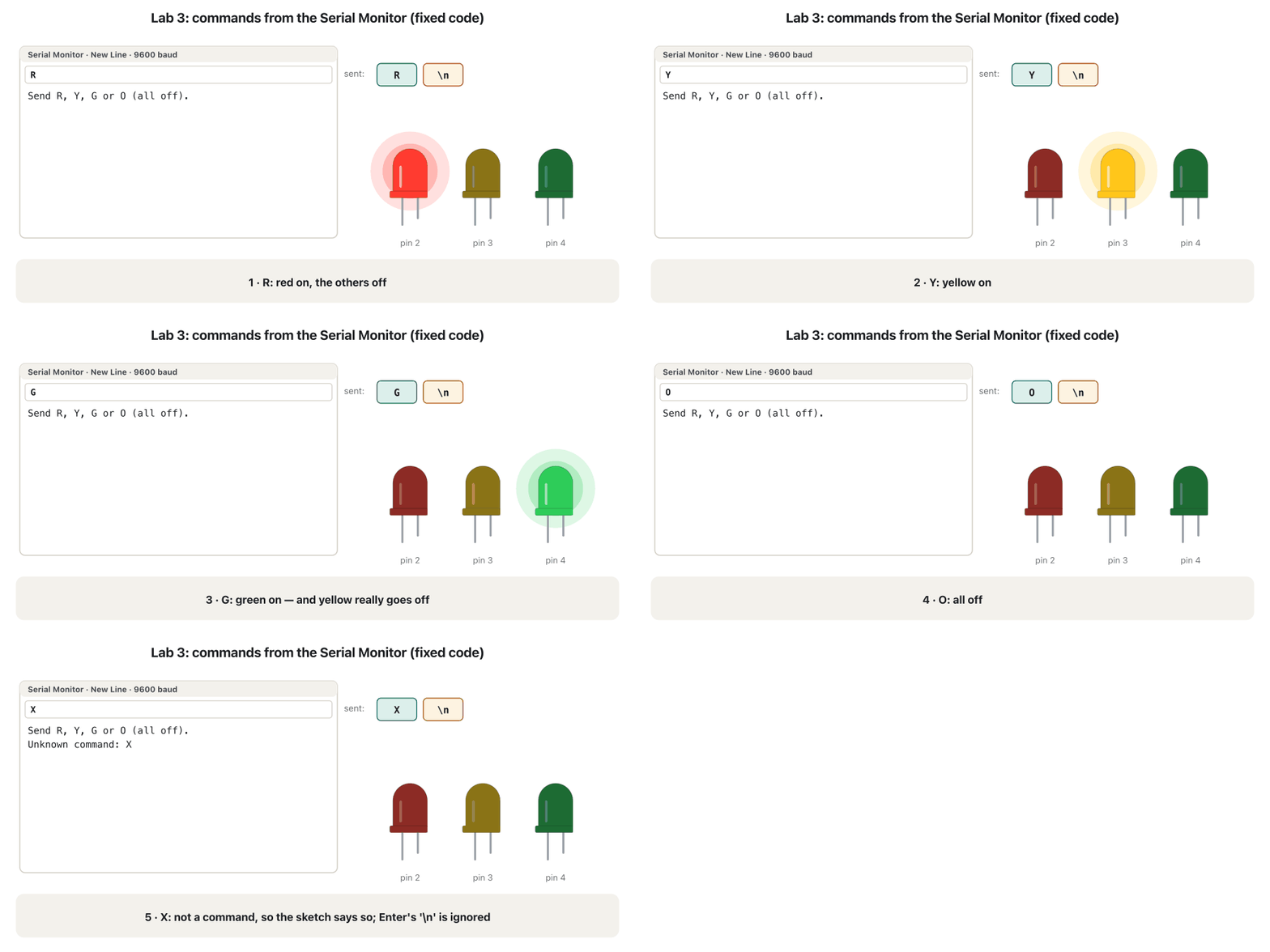
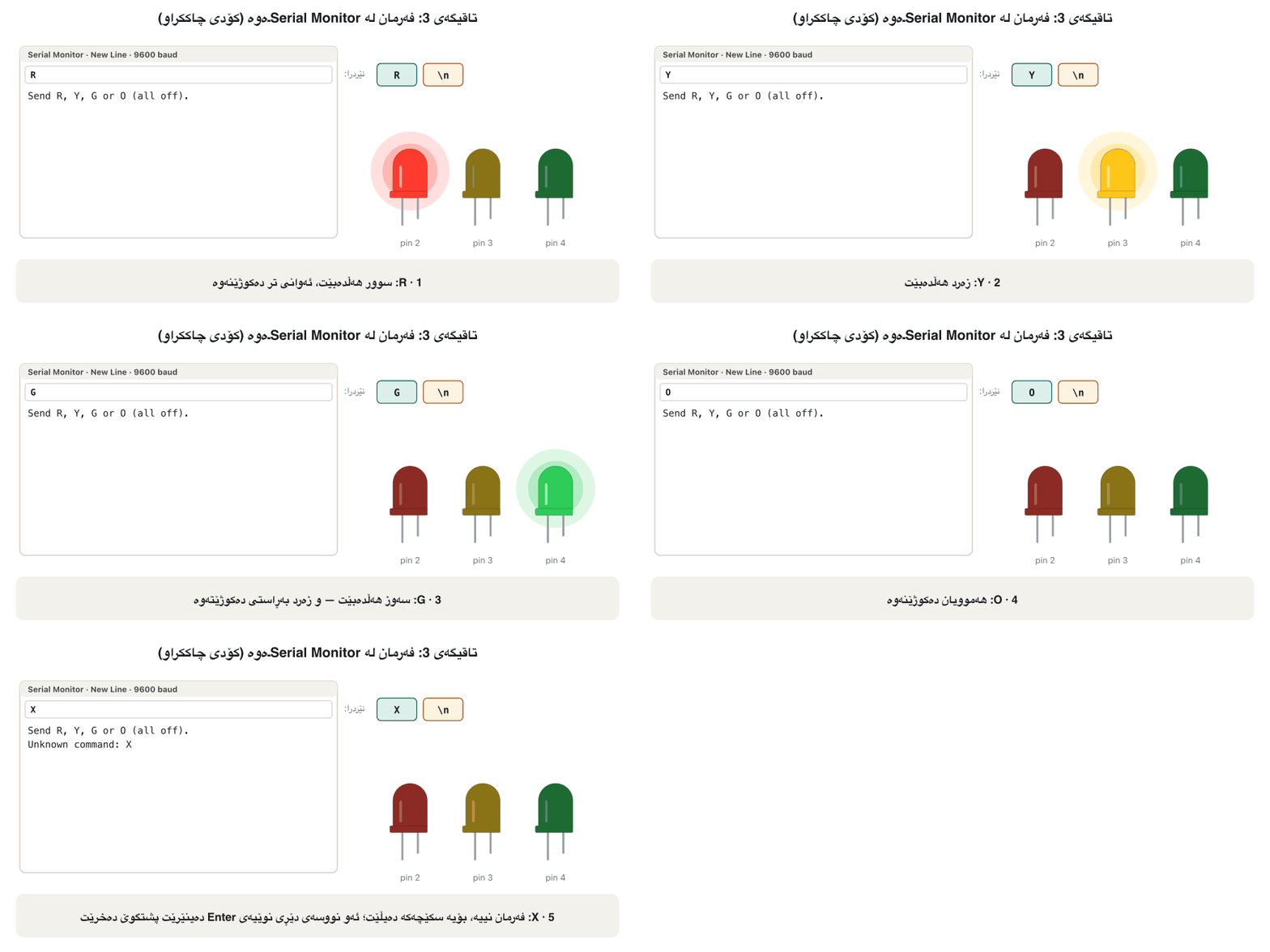
Lab 3: commands R, Y, G and Oتاقیگەی 3: فەرمانەکانی R، Y، G و O
Common mistake: the yellow LED that stays onهەڵەی باو: LEDـە زەردەکە کە هەڵکراو دەمێنێتەوە
Lab 3: commands R, Y, G and Oتاقیگەی 3: فەرمانەکانی R، Y، G و O
Common mistake: the Enter key becomes a commandهەڵەی باو: دوگمەی Enter دەبێتە فەرمان
Task 3: small letters too, and a confirmationئەرکی 3: پیتی بچووکیش و پشتڕاستکردنەوە
Task 3 asks for two changes: accept r, y, g and o as well, and confirm each command. || means or: command == 'R' || command == 'r' is true for either letter (another way is toupper(command) == 'R', which first turns a small letter into a capital). The confirmation now depends on known, a boolean variable that remembers whether the command was valid:
ئەرکی 3 داوای دوو گۆڕانکاری دەکات: r، y، g و oـیش وەربگرە و هەر فەرمانێک پشتڕاست بکەرەوە. || واتە یان: command == 'R' || command == 'r' بۆ هەر یەک لە دوو پیتەکە ڕاستە (ڕێگایەکی تر toupper(command) == 'R'ـە کە سەرەتا پیتی بچووک دەکاتە گەورە). پشتڕاستکردنەوەکە ئێستا بەستراوە بە known، کە لەبیری دەمێنێت ئایا فەرمانەکە دروست بوو:
// Task 3: capital or small letters, and a confirmation
const int redPin = 2;
const int yellowPin = 3;
const int greenPin = 4;

void setup() {
  Serial.begin(9600);
  pinMode(redPin, OUTPUT);
  pinMode(yellowPin, OUTPUT);
  pinMode(greenPin, OUTPUT);
  Serial.println("Send R, Y, G or O (small letters work too).");
}

void loop() {
  if (Serial.available() > 0) {
    char command = Serial.read();
    if (command == '\n' || command == '\r') {
      return;                               // ignore the Enter key
    }

    bool known = true;                      // is it one of our commands?
    if (command == 'R' || command == 'r') {
      digitalWrite(redPin, HIGH);
      digitalWrite(yellowPin, LOW);
      digitalWrite(greenPin, LOW);
    } else if (command == 'Y' || command == 'y') {
      digitalWrite(redPin, LOW);
      digitalWrite(yellowPin, HIGH);
      digitalWrite(greenPin, LOW);
    } else if (command == 'G' || command == 'g') {
      digitalWrite(redPin, LOW);
      digitalWrite(yellowPin, LOW);
      digitalWrite(greenPin, HIGH);
    } else if (command == 'O' || command == 'o') {
      digitalWrite(redPin, LOW);
      digitalWrite(yellowPin, LOW);
      digitalWrite(greenPin, LOW);
    } else {
      known = false;
    }

    if (known) {
      Serial.print("Done: ");               // confirm only real commands
    } else {
      Serial.print("Unknown command: ");
    }
    Serial.println(command);
  }
}Send R, Y, G or O (small letters work too). Done: r Done: y Done: G Done: o Unknown command: x
Run with the CêIT Arduino checker; the Serial Monitor was set to New Line unless the text says otherwise.
بە پشکنەری Arduinoـی CêIT جێبەجێ کراوە؛ لەسەر New Line بوو، مەگەر دەقەکە شتێکی تر بڵێت.
Explain the codeڕوونکردنەوەی کۆدەکە
- Lineدێڕی 21
knownstarts true; the else branch sets it to false.knownبە true دەست پێ دەکات؛ دەیکاتە false.- Lineدێڕی 42-47
Confirm only real commands; name unknown ones.
تەنیا فەرمانی ڕاستەقینە پشتڕاست بکەرەوە؛ نەناسراوەکان ناو ببە.
Lab 4: LED patterns with for loopsتاقیگەی 4: شێوەی LED بە خولی for
Lab 4 runs a pattern for each number: 1 blinks red ten times, 2 blinks yellow five times and 3 flashes green once. A for loop repeats a block a counted number of times (The three parts of a for header); here i counts 0, 1, …, 9. Nothing happens for 4 or 9: no branch matches and there is no else, so the Enter key's '\n' is quietly ignored too.
تاقیگەی 4 بۆ هەر ژمارەیەک شێوەیەک جێبەجێ دەکات: 1 سوور دە جار دەترووکێنێت، 2 زەرد پێنج جار و 3 سەوز یەک جار. بلۆکێک بە ژمارەیەکی دیاریکراو دووپاتە دەکاتەوە (سێ بەشی سەری for)؛ لێرەدا i دەژمێرێت 0، 1، …، 9. بۆ 4 یان 9 هیچ ڕوو نادات: هیچ بەشێک یەک ناگرێتەوە و else نییە، بۆیە '\n'ـی Enterـیش بە بێدەنگی پشتگوێ دەخرێت.
// Lab 4: LED patterns chosen by a number
const int redPin = 2;
const int yellowPin = 3;
const int greenPin = 4;

void setup() {
  Serial.begin(9600);
  pinMode(redPin, OUTPUT);
  pinMode(yellowPin, OUTPUT);
  pinMode(greenPin, OUTPUT);
  Serial.println("Send 1, 2 or 3 to run an LED pattern.");
}

void loop() {
  if (Serial.available() > 0) {
    char input = Serial.read();

    if (input == '1') {                  // red blinks 10 times
      for (int i = 0; i < 10; i++) {
        digitalWrite(redPin, HIGH);
        delay(200);
        digitalWrite(redPin, LOW);
        delay(200);
      }
    } else if (input == '2') {           // yellow blinks 5 times
      for (int i = 0; i < 5; i++) {
        digitalWrite(yellowPin, HIGH);
        delay(200);
        digitalWrite(yellowPin, LOW);
        delay(200);
      }
    } else if (input == '3') {           // green blinks once
      digitalWrite(greenPin, HIGH);
      delay(200);
      digitalWrite(greenPin, LOW);
      delay(200);
    }
  }
}Send 1, 2 or 3 to run an LED pattern.
The LEDs (checker): red blinks 10 times from 300 to 4300 ms, yellow 5 times from 4600 to 6600 ms, green once at 7000 ms; 9 does nothing.
(پشکنەر): سوور لە 300 تا 4300 ms دە جار دەترووکێت، زەرد لە 4600 تا 6600 ms پێنج جار، سەوز یەک جار لە 7000 ms؛ 9 هیچ ناکات.
Explain the codeڕوونکردنەوەی کۆدەکە
- Lineدێڕی 19-24
Ten times: on 200 ms, off 200 ms.
دە جار: 200 ms هەڵکراو، 200 ms کوژاو.
Lab 4: LED patterns with for loopsتاقیگەی 4: شێوەی LED بە خولی for
Task 4: a chaseئەرکی 4: ڕاکردنی ڕووناکی
Add pattern 4: red, yellow and green each flash once for 200 ms, one after another, like a light running along. Update the start message too.
شێوەی 4 زیاد بکە: سوور، زەرد و سەوز هەریەکە یەک جار بۆ 200 ms دەترووکێن، یەک لە دوای یەک، وەک ڕووناکییەک کە ڕادەکات. پەیامی سەرەتاش نوێ بکەرەوە.
Hintئاماژە
Copy one blink block three times, or put the pins in an array.
یەک بلۆکی ترووسکاندن سێ جار کۆپی بکە، یان پینەکان بخەرە ناو .
Show answerوەڵامەکە پیشان بدە
} else if (input == '4') {           // chase: red, yellow, green
  int pins[] = {redPin, yellowPin, greenPin};
  for (int i = 0; i < 3; i++) {
    digitalWrite(pins[i], HIGH);
    delay(200);
    digitalWrite(pins[i], LOW);
    delay(200);
  }
}Send 1, 2, 3 or 4 to run an LED pattern.
The whole Task 4 sketch was checked: red 300–500 ms, yellow 700–900 ms, green 1100–1300 ms.
هەموو ئەرکی 4 پشکنرا: سوور 300–500 ms، زەرد 700–900 ms، سەوز 1100–1300 ms.
An array pins[] holds the three pin numbers, so one for loop visits them in turn (Arrays). Writing the three blocks out one after another also works. The start message becomes Send 1, 2, 3 or 4 to run an LED pattern. — a first version still said 1, 2, 3.
pins[] سێ ژمارەی پینەکان هەڵدەگرێت، بۆیە یەک یەک لە دوای یەک سەردانیان دەکات (ڕیزەکەکان). نووسینی سێ بلۆکەکە یەک لە دوای یەکیش کار دەکات. پەیامی سەرەتا دەبێتە Send 1, 2, 3 or 4 to run an LED pattern. — یەکەم وەشانێک هێشتا دەیگوت 1، 2، 3.
Lab 4: LED patterns with for loopsتاقیگەی 4: شێوەی LED بە خولی for
While a pattern runs, the board is deafکاتێک شێوەیەک کار دەکات، بۆردەکە گوێی لێ نییە
Type 1 and then, quickly, 3. The green flash comes only when the 4-second red pattern has ended: inside the for loop and its delay() calls the sketch never reaches Serial.read(). The 3 is not lost — it waits in the receive buffer — but it waits 3.3 seconds. This test sketch prints the time at which it reads each command:
1 بنووسە و پاشان بە خێرایی 3. ترووسکەی سەوز تەنیا کاتێک دێت کە شێوە سوورە 4 چرکەییەکە تەواو بووە: لە ناو و بانگکردنەکانی delay()ـدا هەرگیز ناگاتە Serial.read(). 3ـەکە ون نابێت — لە وەرگرتندا چاوەڕێ دەکات — بەڵام 3.3 چرکە چاوەڕێ دەکات. ئەم تاقیکردنەوەیە ئەو کاتە چاپ دەکات کە هەر فەرمانێکی تێدا دەخوێنێتەوە:
// While a pattern runs, the board does not read new commands
const int redPin = 2;
const int greenPin = 4;

void setup() {
  Serial.begin(9600);
  pinMode(redPin, OUTPUT);
  pinMode(greenPin, OUTPUT);
}

void loop() {
  if (Serial.available() > 0) {
    char input = Serial.read();
    Serial.print(millis());           // the time now, in ms
    Serial.print(" ms: read ");
    Serial.println(input);

    if (input == '1') {               // 10 blinks = 4 seconds of delay()
      for (int i = 0; i < 10; i++) {
        digitalWrite(redPin, HIGH);
        delay(200);
        digitalWrite(redPin, LOW);
        delay(200);
      }
    } else if (input == '3') {
      digitalWrite(greenPin, HIGH);
      delay(200);
      digitalWrite(greenPin, LOW);
    }
  }
}300 ms: read 1 4300 ms: read 3
Explain the codeڕوونکردنەوەی کۆدەکە
- Lineدێڕی 14
millis() is the time since the board started, in ms.
millis() ئەو کاتەیە کە لە دەستپێکردنی بۆردەکەوە تێپەڕیوە، بە ms.
Lab 4: LED patterns with for loopsتاقیگەی 4: شێوەی LED بە خولی for
millis(): check the clock instead of waitingmillis(): لەبری چاوەڕێکردن سەیری کاتژمێر بکە
millis() returns the number of milliseconds since the board started. Instead of stopping with delay(), a sketch can look at the clock on every pass of loop() and act only when enough time has passed — the idea of Arduino's Blink Without Delay example. The loop then runs thousands of times a second and can read the Serial Monitor between blinks:
millis() ژمارەی ئەو میلیچرکانە دەگەڕێنێتەوە کە لە دەستپێکردنی بۆردەکەوە تێپەڕیون. لەبری وەستان بە delay()، دەتوانێت لە هەر جارێکی loop()ـدا سەیری کاتژمێرەکە بکات و تەنیا کاتێک کار بکات کە کاتی پێویست تێپەڕیوە — بیرۆکەی نموونەی Blink Without Delayـی . ئینجا لە چرکەیەکدا هەزاران جار کار دەکات و لە نێوان ترووسکەکاندا دەتوانێت بخوێنێتەوە:
// Blink with millis(): the board keeps listening while the LED blinks
const int redPin = 2;
const int greenPin = 4;
const unsigned long interval = 500;   // ms between two changes

unsigned long lastChange = 0;         // when the red LED last changed
int redState = LOW;

void setup() {
  Serial.begin(9600);
  pinMode(redPin, OUTPUT);
  pinMode(greenPin, OUTPUT);
}

void loop() {
  unsigned long now = millis();       // look at the clock
  if (now - lastChange >= interval) { // has half a second passed?
    lastChange = now;
    if (redState == LOW) {
      redState = HIGH;
    } else {
      redState = LOW;
    }
    digitalWrite(redPin, redState);
  }

  if (Serial.available() > 0) {       // and, every time, listen
    char input = Serial.read();
    if (input == '3') {
      digitalWrite(greenPin, HIGH);
      Serial.print(now);
      Serial.println(" ms: green on");
    }
  }
}1000 ms: green on
The LEDs (checker): red changes at 500, 1000, 1500 and 2000 ms; green goes on at 1000 ms, the moment 3 arrives.
(پشکنەر): سوور لە 500، 1000، 1500 و 2000 ms دەگۆڕێت؛ سەوز لە 1000 msـدا هەڵدەبێت، هەر ئەو ساتەی 3 دەگات.
Explain the codeڕوونکردنەوەی کۆدەکە
- Lineدێڕی 4-6
Times are unsigned long, like the value millis() returns.
کاتەکان unsigned longـن، وەک ئەو بەهایەی millis() دەیگەڕێنێتەوە.
- Lineدێڕی 16-24
Has 500 ms passed since the last change? Then change the red LED and remember the time.
500 ms لە دوایین گۆڕانەوە تێپەڕیوە؟ ئینجا سوورەکە بگۆڕە و کاتەکە لەبیر بکە.
- Lineدێڕی 27-33
Listen on every pass: the 3 is handled at once.
لە هەموو جارێکدا گوێ بگرە: 3 یەکسەر کاری لەسەر دەکرێت.
Keep times in unsigned long variables: millis() goes back to zero after about 50 days (2³² ms ≈ 49.7 days), and the subtraction now - lastChange still gives the right answer across that jump. The same pattern makes the button labs work: debouncing times each press with millis(). The same pattern matters with a watchdog timer: a short loop() that never blocks longer than its time-out (Lab: The Watchdog Timer).
کاتەکان لە unsigned longـدا هەڵبگرە: millis() دوای نزیکەی 50 ڕۆژ (2³² ms ≈ 49.7 ڕۆژ) دەگەڕێتەوە بۆ سفر و لێدەرکردنی now - lastChange بە سەر ئەو بازدانەشدا وەڵامی دروست دەدات. هەمان شێوە تاقیگەکانی کارا دەکات: لابردنی هەڵبەزینەوە کاتی هەر پەستانێک بە millis() دەپێوێت. هەمان شێوە لەگەڵ گرنگە: loop()ـێکی کورت کە هەرگیز لە سنووری کاتەکەی زیاتر ڕانەوەستێت (تاقیگە: تایمەری پاسەوان).
Lab 5: toggles with switch and !تاقیگەی 5: گۆڕین بە switch و !
Lab 5 switches each LED on with one press of its letter and off with the next. It keeps three boolean variables, redOn, yellowOn and greenOn (true or false). ! is logical not: redOn = !redOn; turns true into false and false into true (Two conditions at once: &&, || and !). digitalWrite(redPin, redOn) works because true counts as HIGH and false as LOW.
تاقیگەی 5 بە یەک داگرتنی پیتی هەر هەڵی دەکات و بە داگرتنی دواتر دەیکوژێنێتەوە. سێ هەڵدەگرێت، redOn، yellowOn و greenOn (true یان false). ! واتە نای لۆجیکی: redOn = !redOn; true دەکاتە false و false دەکاتە true (دوو مەرج پێکەوە: &&، || و !). digitalWrite(redPin, redOn) کار دەکات چونکە true وەک HIGH و false وەک LOW هەژمار دەکرێت.
switch (input) jumps to the case that matches the letter, and break ends that case; a letter with no case does nothing (The switch statement).
switch (input) باز دەداتە ئەو caseـەی لەگەڵ پیتەکە یەک دەگرێتەوە و break ئەو caseـە کۆتایی پێ دەهێنێت؛ پیتێک کە caseـی نەبێت هیچ ناکات (ڕستەی switch).
// Lab 5: toggle each LED with one letter
const int redPin = 2;
const int yellowPin = 3;
const int greenPin = 4;

bool redOn = false;                   // remember the state of each LED
bool yellowOn = false;
bool greenOn = false;

void setup() {
  Serial.begin(9600);
  pinMode(redPin, OUTPUT);
  pinMode(yellowPin, OUTPUT);
  pinMode(greenPin, OUTPUT);
  Serial.println("R: toggle red, Y: toggle yellow, G: toggle green");
}

void loop() {
  if (Serial.available() > 0) {
    char input = Serial.read();
    if (input == '\n' || input == '\r') {
      return;                         // ignore the Enter key
    }

    switch (input) {
      case 'R':
        redOn = !redOn;               // true -> false, false -> true
        digitalWrite(redPin, redOn);
        break;
      case 'Y':
        yellowOn = !yellowOn;
        digitalWrite(yellowPin, yellowOn);
        break;
      case 'G':
        greenOn = !greenOn;
        digitalWrite(greenPin, greenOn);
        break;
    }

    Serial.print("Red: ");
    Serial.print(redOn);
    Serial.print(", Yellow: ");
    Serial.print(yellowOn);
    Serial.print(", Green: ");
    Serial.println(greenOn);          // println ends the status line
  }
}R: toggle red, Y: toggle yellow, G: toggle green Red: 1, Yellow: 0, Green: 0 Red: 1, Yellow: 1, Green: 0 Red: 0, Yellow: 1, Green: 0 Red: 0, Yellow: 1, Green: 1
Run with the CêIT Arduino checker; the Serial Monitor was set to New Line unless the text says otherwise.
بە پشکنەری Arduinoـی CêIT جێبەجێ کراوە؛ لەسەر New Line بوو، مەگەر دەقەکە شتێکی تر بڵێت.
Explain the codeڕوونکردنەوەی کۆدەکە
- Lineدێڕی 6-8
The state of each LED, remembered between commands.
دۆخی هەر ، لە نێوان فەرمانەکاندا لەبیر دەکرێت.
- Lineدێڕی 21-23
The Enter key is ignored, so each command prints one status line.
Enter پشتگوێ دەخرێت، بۆیە هەر فەرمانێک یەک دێڕی دۆخ چاپ دەکات.
- Lineدێڕی 45
println ends the status line.
println دێڕی دۆخەکە کۆتایی پێ دەهێنێت.
Lab 5: toggles with switch and !تاقیگەی 5: گۆڕین بە switch و !
Common mistake: one endless lineهەڵەی باو: یەک دێڕی بێکۆتایی
Lab 5: toggles with switch and !تاقیگەی 5: گۆڕین بە switch و !
Task 5: A for all on, O for all offئەرکی 5: A بۆ هەمووی هەڵکراو، O بۆ هەمووی کوژاو
Add two commands to Lab 5: A switches all three LEDs on and O switches them all off. The status line must stay correct, and the start message should mention A and O.
دوو فەرمان بۆ تاقیگەی 5 زیاد بکە: A هەر سێ هەڵدەکات و O هەموویان دەکوژێنێتەوە. دێڕی دۆخ دەبێت دروست بمێنێتەوە و پەیامی سەرەتا دەبێت A و O بڵێت.
Hintئاماژە
Two more cases; in each, set all three booleans.
دوو caseـی زیاتر؛ لە هەریەکەیاندا هەر سێ دیاری بکە.
Show answerوەڵامەکە پیشان بدە
// Task 5: Lab 5 plus A (all on) and O (all off)
const int redPin = 2;
const int yellowPin = 3;
const int greenPin = 4;

bool redOn = false;
bool yellowOn = false;
bool greenOn = false;

void setup() {
  Serial.begin(9600);
  pinMode(redPin, OUTPUT);
  pinMode(yellowPin, OUTPUT);
  pinMode(greenPin, OUTPUT);
  Serial.println("R, Y, G: toggle one LED. A: all on. O: all off.");
}

void loop() {
  if (Serial.available() > 0) {
    char input = Serial.read();
    if (input == '\n' || input == '\r') {
      return;
    }

    switch (input) {
      case 'R':
        redOn = !redOn;
        break;
      case 'Y':
        yellowOn = !yellowOn;
        break;
      case 'G':
        greenOn = !greenOn;
        break;
      case 'A':                       // all on
        redOn = true;
        yellowOn = true;
        greenOn = true;
        break;
      case 'O':                       // all off
        redOn = false;
        yellowOn = false;
        greenOn = false;
        break;
    }
    digitalWrite(redPin, redOn);      // write all three after the switch
    digitalWrite(yellowPin, yellowOn);
    digitalWrite(greenPin, greenOn);

    Serial.print("Red: ");
    Serial.print(redOn);
    Serial.print(", Yellow: ");
    Serial.print(yellowOn);
    Serial.print(", Green: ");
    Serial.println(greenOn);
  }
}R, Y, G: toggle one LED. A: all on. O: all off. Red: 1, Yellow: 0, Green: 0 Red: 1, Yellow: 1, Green: 1 Red: 1, Yellow: 0, Green: 1 Red: 0, Yellow: 0, Green: 0
Run with the CêIT Arduino checker; the Serial Monitor was set to New Line unless the text says otherwise.
بە پشکنەری Arduinoـی CêIT جێبەجێ کراوە؛ لەسەر New Line بوو، مەگەر دەقەکە شتێکی تر بڵێت.
Explain the codeڕوونکردنەوەی کۆدەکە
- Lineدێڕی 35-44
A and O set all three states.
A و O هەر سێ دۆخەکە دیاری دەکەن.
- Lineدێڕی 46-48
Write the three pins once, after the switch, from the stored states.
سێ پینەکە یەک جار، دوای switch، لە دۆخە هەڵگیراوەکانەوە بنووسە.
Writing the pins after the switch keeps the LEDs and the printed states in step. A first version of Task 5 had the same missing println, and its start message did not mention A and O.
نووسینی پینەکان دوای switch، و دۆخە چاپکراوەکان پێکەوە ڕێک دەهێڵێتەوە. یەکەم وەشانی ئەرکی 5 هەمان printlnـی ونی هەبوو و پەیامی سەرەتاکەی باسی A و Oـی نەدەکرد.
A password over Serialتێپەڕەوشەیەک بە Serial
The last sketch of this lab checks a password typed in the Serial Monitor: the green LED for the right one, the red LED for a wrong one. It reads a whole line with Serial.readStringUntil('\n'), which collects the characters up to the newline and drops the newline, and trim() removes spaces and a leftover '\r'. The next lab opens a lock with buttons instead of the keyboard, and cleans every press first with debouncing.
دوایین ئەم تاقیگەیە دەپشکنێت کە لە دەنووسرێت: سەوز بۆ دروست و سوور بۆ هەڵە. بە Serial.readStringUntil('\n') دێڕێکی تەواو دەخوێنێتەوە، کە تا کۆ دەکاتەوە و ئەو فڕێ دەدات و trim() بۆشاییەکان و '\r'ـێکی بەجێماو لادەبات. تاقیگەی داهاتوو قفڵێک بە لەبری دەکاتەوە و هەموو پەستانێک سەرەتا بە لابردنی هەڵبەزینەوە پاک دەکاتەوە.
// The serial password check (practice only: read the security note)
const int redPin = 2;
const int greenPin = 4;
const String password = "test";       // a password inside the code!

void setup() {
  Serial.begin(9600);
  pinMode(redPin, OUTPUT);
  pinMode(greenPin, OUTPUT);
  Serial.println("Enter the password:");
}

void loop() {
  if (Serial.available() > 0) {
    String userInput = Serial.readStringUntil('\n');  // read up to Enter
    userInput.trim();                                   // remove spaces and \r
    if (userInput == password) {
      digitalWrite(redPin, LOW);
      digitalWrite(greenPin, HIGH);
      Serial.println("Access granted");
    } else {
      digitalWrite(redPin, HIGH);
      digitalWrite(greenPin, LOW);
      Serial.println("Access denied");
    }
  }
}Enter the password: Access granted Access denied Access denied
Run with the CêIT Arduino checker; the Serial Monitor was set to New Line unless the text says otherwise.
بە پشکنەری Arduinoـی CêIT جێبەجێ کراوە؛ لەسەر New Line بوو، مەگەر دەقەکە شتێکی تر بڵێت.
Explain the codeڕوونکردنەوەی کۆدەکە
- Lineدێڕی 4
A password written in the code: fine for this exercise, never for a real device.
کە لە ناو کۆددا نووسراوە: بۆ ئەم ڕاهێنانە باشە، هەرگیز بۆ ئامێرێکی ڕاستەقینە.
- Lineدێڕی 15-16
Read up to Enter, then remove spaces and
\r.تا Enter بخوێنەرەوە، پاشان بۆشایی و
\rلاببە.
A password over Serialتێپەڕەوشەیەک بە Serial
Security: never ship a password inside the codeئاسایش: هەرگیز ئامێرێک بە تێپەڕەوشەیەک لە ناو کۆددا مەنێرە بازاڕ
This lab is fine for practice, but a real device must never work like this. The password "test" is written in the code, so it ends up in the firmware: anyone who can read the board's flash or a copy of the firmware file can find it (picture), and every board built from the same code shares it. Such hard-coded credentials and default passwords are how the Mirai malware took over cameras and routers in 2016: it simply tried 62 default username-and-password pairs (Mirai).
ئەم تاقیگەیە بۆ ڕاهێنان باشە، بەڵام ئامێرێکی ڕاستەقینە هەرگیز نابێت بەم شێوەیە کار بکات. "test" لە ناو کۆددا نووسراوە، بۆیە دەچێتە ناو : هەر کەسێک بتوانێت فلاشی بۆردەکە یان کۆپییەکی بخوێنێتەوە دەتوانێت بیدۆزێتەوە (وێنەکە) و هەموو ئەو بۆردانەی لە هەمان کۆد دروست کراون هەمان هەیە. ئەم جۆرە و ئەو ڕێگایە بوون کە Mirai لە ساڵی 2016ـدا کامێرا و ڕاوتەری پێ داگیر کرد: تەنیا 62 جووتی بنەڕەتیی و تاقی دەکردەوە (Mirai).
The European standard ETSI EN 303 645 for consumer IoT devices forbids universal default passwords. Good practice is a unique password for each device, set by its owner and stored hashed with a salt, a pause after several wrong tries, and security updates (Passwords, MFA and Access Control, Unique passwords, and no secrets in the code).
ستانداردی ئەورووپیی ETSI EN 303 645 بۆ ئامێرەکانی IoTـی بەکارهێنەران گشتی قەدەغە دەکات. کاری باش تایبەتە بۆ هەر ئامێرێک، کە خاوەنەکەی دایدەنێت و بە و هەڵدەگیرێت، وەستانێک دوای چەند هەوڵێکی هەڵە و نوێکردنەوەی ئاسایش (تێپەڕەوشەکان، MFA و کۆنترۆڵی دەستڕاگەیشتن، تێپەڕەوشەکانی تایبەت و هیچ نهێنییەک لە ناو کۆددا).
Common mistakesهەڵە باوەکان
| Mistakeهەڵە | Betterباشتر |
|---|---|
| Strange symbols in the Serial Monitor.هێمای سەیر لە . | Set the monitor's baud menu to the speed in Serial.begin(). baudـی Serial Monitor لەسەر خێرایی ناو Serial.begin() دابنێ. |
| Calling Serial.read() without asking first.بانگکردنی Serial.read() بێ پرسینی پێشوەختە. | Check Serial.available() > 0; read() returns −1 when nothing waits.Serial.available() > 0 بپشکنە؛ read() کاتێک هیچ چاوەڕێ نەبێت −1 دەگەڕێنێتەوە. |
| The Enter key arrives as a command. Enter وەک فەرمان دەگات. | Ignore '\n' and '\r' in the sketch (or choose No Line Ending).لە '\n' و '\r' پشتگوێ بخە (یان No Line Ending هەڵبژێرە). |
| A copied branch writes the same pin twice.بەشێکی کۆپیکراو هەمان پین دوو جار دەنووسێت. | Write all three pins in every branch, in the same order.لە هەموو بەشێکدا هەر سێ پینەکە بە هەمان ڕیز بنووسە. |
| Statuses run together on one line.دۆخەکان لەسەر یەک دێڕ تێکەڵ دەبن. | End each line with println().هەر دێڕێک بە println() کۆتایی پێ بهێنە. |
command == "R" with double quotes.command == "R" بە . | A char needs single quotes, 'R'. "R" is a string, so the test can never be true: most boards stop with a compile error, while the UNO R3 only shows a warning.char دەوێت، 'R'. "R" ، بۆیە تاقیکردنەوەکە هەرگیز ڕاست نابێت: زۆربەی بۆردەکان بە هەڵەی کۆمپایل دەوەستن، بەڵام UNO R3 تەنیا ئاگادارکردنەوەیەک پیشان دەدات. |
| A missing break in a switch.breakـێکی ون لە switchـدا. | Without break the next case runs too (Forgetting break).بێ break، caseـی دواتریش جێبەجێ دەبێت (لەبیرکردنی break). |
| Long patterns with delay() make the board deaf.شێوەی درێژ بە delay() بۆردەکە کەڕ دەکەن. | Use millis() to check the clock and keep listening.millis() بەکار بهێنە بۆ پشکنینی کاتژمێر و بەردەوامبوون لە گوێگرتن. |
| A password written in the code. کە لە ناو کۆددا نووسراوە. | Practice only; a real device needs a unique password set by its owner.تەنیا بۆ ڕاهێنان؛ ئامێری ڕاستەقینە تایبەتی دەوێت کە خاوەنەکەی دایدەنێت. |
Exercisesڕاهێنانەکان
The board sends Serial.println("Hello, Aram!") at 9600 baud. That is 12 characters plus \r\n. How long does the line take on the wire, and how long at 115200 baud?
بۆردەکە Serial.println("Hello, Aram!") بە 9600 baud دەنێرێت. ئەمە 12 لەگەڵ \r\n. دێڕەکە لەسەر وایەرەکە چەند دەخایەنێت و بە 115200 baud چەند؟
Show answerوەڵامەکە پیشان بدە
14 bytes of 10 bits each. At 115200 baud the same line takes about twelve times less time.
14 ، هەریەکە 10 . بە 115200 baud هەمان دێڕ نزیکەی دوازدە جار کەمتر دەخایەنێت.
Change Lab 3 so that after each valid command it prints how many valid commands it has received so far. Unknown letters must not be counted.
تاقیگەی 3 بگۆڕە بۆ ئەوەی دوای هەر فەرمانێکی دروست چاپ بکات تا ئێستا چەند فەرمانی دروستی وەرگرتووە. پیتە نەناسراوەکان نابێت بژمێردرێن.
Hintئاماژە
Declare int commands = 0; above setup().
int commands = 0; لە سەرووی setup() بناسێنە.
Show answerوەڵامەکە پیشان بدە
// Lab 3 with a command counter
const int redPin = 2;
const int yellowPin = 3;
const int greenPin = 4;

int commands = 0;                   // how many valid commands so far

void setup() {
  Serial.begin(9600);
  pinMode(redPin, OUTPUT);
  pinMode(yellowPin, OUTPUT);
  pinMode(greenPin, OUTPUT);
}

void loop() {
  if (Serial.available() > 0) {
    char command = Serial.read();
    if (command == '\n' || command == '\r') {
      return;
    }
    if (command == 'R' || command == 'Y' || command == 'G' || command == 'O') {
      digitalWrite(redPin, command == 'R');      // true -> HIGH, false -> LOW
      digitalWrite(yellowPin, command == 'Y');
      digitalWrite(greenPin, command == 'G');
      commands = commands + 1;
      Serial.print("Commands so far: ");
      Serial.println(commands);
    } else {
      Serial.println("Use R, Y, G or O.");
    }
  }
}Commands so far: 1 Use R, Y, G or O. Commands so far: 2 Commands so far: 3
Run with the CêIT Arduino checker; the Serial Monitor was set to New Line unless the text says otherwise.
بە پشکنەری Arduinoـی CêIT جێبەجێ کراوە؛ لەسەر New Line بوو، مەگەر دەقەکە شتێکی تر بڵێت.
Explain the codeڕوونکردنەوەی کۆدەکە
- Lineدێڕی 6
A global variable keeps its value between passes of loop().
گشتی بەهاکەی لە نێوان جارەکانی loop()ـدا دەپارێزێت.
- Lineدێڕی 22-24
command == 'R'is true or false, which digitalWrite() takes as HIGH or LOW.command == 'R'ڕاست یان هەڵەیە، کە digitalWrite() وەک HIGH یان LOW وەریدەگرێت.
Change the password check so that after three wrong passwords it stops checking and prints "Locked" until the board is reset. Is the device now safe?
پشکنینی بگۆڕە بۆ ئەوەی دوای سێ تێپەڕەوشەی هەڵە پشکنین ڕابگرێت و تا بۆردەکە Reset دەکرێت "Locked" چاپ بکات. ئایا ئێستا ئامێرەکە سەلامەتە؟
Show answerوەڵامەکە پیشان بدە
// Password check that locks after three wrong tries (still practice only)
const int redPin = 2;
const int greenPin = 4;
const String password = "test";
int wrongTries = 0;

void setup() {
  Serial.begin(9600);
  pinMode(redPin, OUTPUT);
  pinMode(greenPin, OUTPUT);
  Serial.println("Enter the password:");
}

void loop() {
  if (Serial.available() > 0) {
    String userInput = Serial.readStringUntil('\n');
    userInput.trim();
    if (wrongTries >= 3) {
      Serial.println("Locked. Reset the board to try again.");
    } else if (userInput == password) {
      digitalWrite(redPin, LOW);
      digitalWrite(greenPin, HIGH);
      wrongTries = 0;
      Serial.println("Access granted");
    } else {
      digitalWrite(redPin, HIGH);
      digitalWrite(greenPin, LOW);
      wrongTries = wrongTries + 1;
      Serial.print("Access denied (");
      Serial.print(wrongTries);
      Serial.println(" of 3)");
    }
  }
}Enter the password: Access denied (1 of 3) Access denied (2 of 3) Access denied (3 of 3) Locked. Reset the board to try again.
Run with the CêIT Arduino checker; the Serial Monitor was set to New Line unless the text says otherwise.
بە پشکنەری Arduinoـی CêIT جێبەجێ کراوە؛ لەسەر New Line بوو، مەگەر دەقەکە شتێکی تر بڵێت.
It is better — guessing is slow now — but still not safe: the password is still in the code, it is the same on every board, and anyone can reset the board and guess again.
باشترە — ئێستا تاقیکردنەوەی هێواشە — بەڵام هێشتا سەلامەت نییە: هێشتا لە ناو کۆددایە، لەسەر هەموو بۆردێک هەمانە و هەر کەسێک دەتوانێت بۆردەکە Reset بکات و دووپاتە تاقی بکاتەوە.
A sketch reads whole lines with readStringUntil('\n') and then calls trim(). With which line-ending settings does it answer at once, and with which does it wait one second?
بە readStringUntil('\n') دێڕی تەواو دەخوێنێتەوە و پاشان trim() بانگ دەکات. بە کام ڕێکخستنی کۆتایی دێڕ یەکسەر وەڵام دەداتەوە و بە کامیان یەک چرکە چاوەڕێ دەکات؟
Show answerوەڵامەکە پیشان بدە
New Line and Both NL & CR answer at once: the '\n' ends the read, and trim() removes the '\r'. With Carriage Return or No Line Ending no '\n' arrives, so the read ends only at its 1-second timeout; the text still arrives, a second late (the checker answered at 1500 ms for a password sent at 500 ms).
New Line و Both NL & CR یەکسەر وەڵام دەدەنەوە: '\n' خوێندنەوەکە کۆتایی پێ دەهێنێت و trim() '\r' لادەبات. بە Carriage Return یان No Line Ending هیچ '\n'ـێک ناگات، بۆیە خوێندنەوەکە تەنیا دوای 1 چرکە (timeout) کۆتایی دێت؛ دەقەکە هەر دەگات، بەڵام چرکەیەک درەنگ (پشکنەرەکە بۆ کە لە 500 ms نێردرابوو لە 1500 msـدا وەڵامی دایەوە).
Summaryپوختە
- Serial.begin(9600) opens serial communication at 9600 baud; the Serial Monitor's baud menu must match. One character costs 10 bits, so 9600 baud ≈ 960 characters a second.
- print() continues the line; println() ends it with
\r\n. - Incoming bytes wait in a 64-byte buffer: check Serial.available(), then Serial.read() one character, or
readStringUntil('\n')a whole line. - Enter adds the chosen line ending (New Line
'\n'by default), and a sketch that reads characters receives it too: ignore'\n'and'\r'. - if/else and switch choose what to do; || means or; ! flips a boolean; for repeats a pattern.
- delay() makes the sketch deaf; millis() lets it keep listening.
- Never ship a device with a password written in its code.
- Serial.begin(9600) بە 9600 baud دەکاتەوە؛ baudـی Serial Monitor دەبێت یەک بگرێتەوە. هەر 10 دەخایەنێت، بۆیە 9600 baud ≈ 960 لە چرکەیەکدا.
- print() دێڕەکە بەردەوام دەکات؛ println() بە
\r\nکۆتایی پێ دەهێنێت. - هاتووەکان لە 64 بایتیدا چاوەڕێ دەکەن: Serial.available() بپشکنە، پاشان Serial.read() بۆ یەک ، یان
readStringUntil('\n')بۆ دێڕێکی تەواو. - Enter کۆتایی دێڕی هەڵبژێردراو زیاد دەکات (بە بنەڕەت New Line، واتە
'\n') و کە دەخوێنێتەوە ئەویش وەردەگرێت:'\n'و'\r'پشتگوێ بخە. - if/else و switch هەڵدەبژێرن چی بکرێت؛ || واتە یان؛ ! پێچەوانە دەکاتەوە؛ for شێوەیەک دووپاتە دەکاتەوە.
- delay() کەڕ دەکات؛ millis() ڕێگەی پێ دەدات بەردەوام گوێ بگرێت.
- هەرگیز ئامێرێک بە کە لە ناو کۆدەکەیدا نووسراوە مەنێرە بازاڕ.
Why does the Serial Monitor show strange symbols?بۆچی Serial Monitor هێمای سەیر پیشان دەدات؟
Its baud rate does not match the one in Serial.begin().
لەگەڵ ئەوەی ناو Serial.begin() یەک ناگرێتەوە.
What does the board receive when you type R and press Enter with New Line?کاتێک R دەنووسیت و بە New Line دوگمەی Enter دادەگریت بۆردەکە چی وەردەگرێت؟
Two bytes: 'R' (82) and '\n' (10).
دوو : 'R' (82) و '\n' (10).
Which two mistakes did Lab 3 have?تاقیگەی 3 کام دوو هەڵەی هەبوو؟
The G and O branches switched red off twice instead of yellow, and the Enter key's '\n' was treated as a command.
بەشەکانی G و O لەبری زەرد دوو جار سووریان دەکوژاندەوە و '\n'ـی Enter وەک فەرمان مامەڵەی لەگەڵ دەکرا.
Lesson complete!وانەکە تەواو بوو!
Well done. Review the key terms, then go on to the next lesson.دەستخۆش. سەیرێکی زاراوە سەرەکییەکان بکەرەوە، پاشان بڕۆ بۆ وانەی داهاتوو.
Key termsزاراوە سەرەکییەکان
Lab: Buttons, INPUT_PULLUP and Debouncingتاقیگە: دوگمەکانی پەستان، INPUT_PULLUP و لابردنی هەڵبەزینەوە
Related lecturesوانە پەیوەندیدارەکان
- Arduino Boards and the Arduino IDEبۆردەکانی Arduino و Arduino IDE
- Lab: Buttons, INPUT_PULLUP and Debouncingتاقیگە: دوگمەکانی پەستان، INPUT_PULLUP و لابردنی هەڵبەزینەوە
- Keeping IoT Devices Safe and Privateئامێرەکانی IoT: ئاسایش و تایبەتێتی
- Passwords, MFA and Access Controlتێپەڕەوشەکان، MFA و کۆنترۆڵی دەستڕاگەیشتن
- Malware Today: Infostealers, Banking Trojans, RATs, Cryptojacking and Moreنەرمەواڵەی زیانبەخشی ئەمڕۆ: نەرمەواڵە زانیاریدزەکان، ئەسپەکانی ترۆیای بانکی، RAT، کریپتۆجاکینگ و زیاتر
- ASCII and Character CodesASCII و کۆدەکانی نووسە
- The switch Statementڕستەی switch
- The for Loop and Nested Loopsخولی for و خولە ناوەکییەکان
- Logical Operators, Nested and Multi-way ifکارپێکەرە لۆجیکییەکان، ڕستەکانی ifـی ناوەکی و ifـی فرە ڕێگا
- Primitive Data Typesجۆرە سەرەتاییەکان
References and further readingسەرچاوەکان و خوێندنەوەی زیاتر
- Arduino reference: Serial.begin() (speed in bits per second; default SERIAL_8N1)
- Arduino reference: Serial.available() (the serial receive buffer holds 64 bytes)
- Arduino reference: Serial.read() (first byte of incoming data, or -1)
- Arduino reference: Serial.println() (followed by carriage return and newline)
- Arduino reference: Serial.readStringUntil() (terminator discarded; ends at the timeout)
- Arduino reference: millis() (overflows after about 50 days; use unsigned long) and delay()
- Arduino built-in examples: Blink Without Delay
- Arduino IDE 2 source: Serial Monitor line-ending options and default (monitor-widget.tsx, monitor-service.ts)
- Arduino docs: Using the Serial Monitor tool (IDE 2)
- ETSI EN 303 645 V3.1.3 (2024): Cyber Security for Consumer Internet of Things — Baseline Requirements (provision 5.1: no universal default passwords)
This lecture is a first edition. The Kurdish text and terminology are waiting for review by Kurdish IT teachers.ئەم وانەیە چاپی یەکەمە. دەقە کوردییەکە و زاراوەکانی چاوەڕێی پێداچوونەوەی مامۆستایانی کوردی بواری IT ن.