Chapterبەش 4 · Lectureوانە 4.4
Lab: Dimming with PWM and Beeping with tone()تاقیگە: کزکردن بە PWM و بیپ بە tone()
Dim an LED with PWM: duty cycle, the ~ pins of the UNO R3, UNO R4 and MKR boards, analogWrite() 0–255, the fade and brightness-button labs with constrain(); then buzzers, active or passive, their uses, and tone()/noTone() with their limits.
کزکردنی بە : ، پینەکانی ~ـی UNO R3، UNO R4 و بۆردەکانی MKR، analogWrite() 0–255، تاقیگەکانی کزکردن و دوگمەکانی ڕووناکی بە constrain()؛ پاشان ، چالاک یان ناچالاک، بەکارهێنانەکانی و tone()/noTone() لەگەڵ سنوورەکانیان.
What you will learnچی فێر دەبیت
- Explain PWM, duty cycle and the average voltage it gives.
- Choose a PWM pin on the UNO R3, UNO R4 and MKR boards and use analogWrite() with values 0–255.
- Fix a sketch whose value leaves 0–255, using constrain().
- Tell an active buzzer from a passive one and wire a buzzer safely.
- Play tones with tone() and noTone(), and know their limits.
- ، و ئەو تێکڕای دەیدات ڕوون بکەیتەوە.
- پینێکی PWM لەسەر UNO R3، UNO R4 و بۆردەکانی MKR هەڵبژێریت و analogWrite() بە بەهای 0–255 بەکار بهێنیت.
- چاک بکەیتەوە کە بەهاکەی لە 0–255 دەردەچێت، بە constrain().
- چالاک لە ناچالاک جیا بکەیتەوە و بە سەلامەتی ببەستیت.
- بە tone() و noTone() دەنگ لێ بدەیت و سنوورەکانیان بزانیت.
Between on and offلە نێوان هەڵکراو و کوژاودا
digitalWrite() knows only two states: fully on or fully off. Yet a lamp can be dimmed and a buzzer can play different notes. Both tricks use the same idea: switch the pin on and off very fast. If you change how long it stays on in each round, an LED looks brighter or dimmer; if you change how many rounds happen per second, a buzzer sounds higher or lower.
digitalWrite() تەنیا دوو دۆخ دەناسێت: تەواو هەڵکراو یان تەواو کوژاو. کەچی دەتوانرێت گڵۆپێک کز بکرێت و دەنگی جیاواز لێ بدات. هەردوو فێڵەکە هەمان بیرۆکە بەکار دەهێنن: پینەکە زۆر بە خێرایی هەڵبکە و بکوژێنەوە. ئەگەر بگۆڕیت چەند کات لە هەر خولێکدا هەڵکراو دەمێنێتەوە، گەشتر یان کزتر دەردەکەوێت؛ ئەگەر بگۆڕیت چەند خول لە چرکەیەکدا ڕوو دەدات، دەنگی بەرزتر یان نزمتر دەدات.
This lab fades an LED with analogWrite(), sets its brightness with two buttons and plays tones with tone(). The buttons are read exactly as in Lab: Buttons, INPUT_PULLUP and Debouncing.
ئەم تاقیگەیە بە analogWrite() کز و گەش دەکات، بە دوو دوگمە ڕووناکییەکەی دیاری دەکات و بە tone() دەنگ لێ دەدات. دوگمەکان ڕێک وەک تاقیگە: دوگمەکانی پەستان، INPUT_PULLUP و لابردنی هەڵبەزینەوە دەخوێنرێنەوە.
PWM: on and off, faster than the eyeمۆدیولەیشنی پانایی تڕپە: هەڵکردن و کوژاندنەوە، لە چاو خێراتر
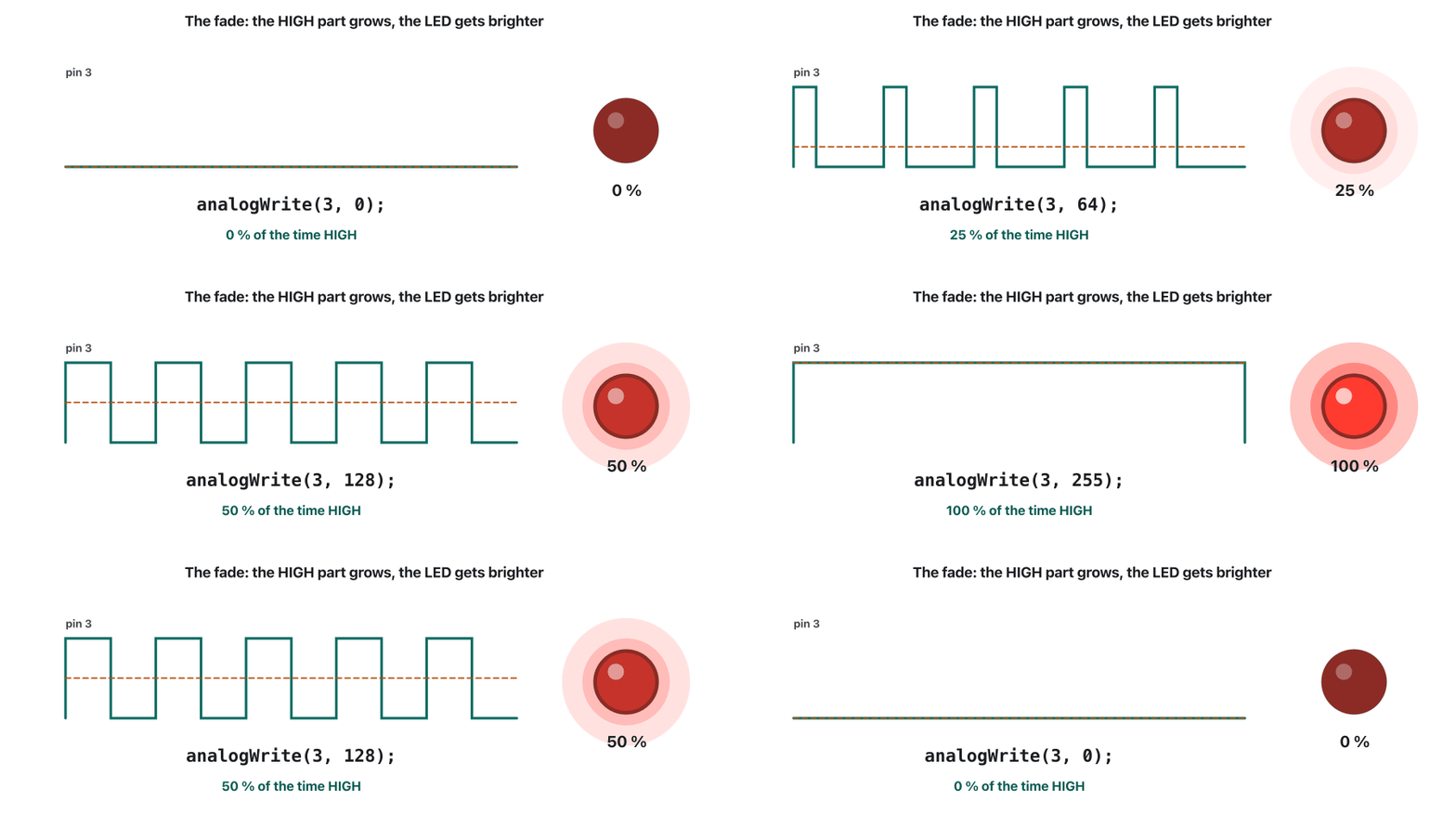
PWM (pulse-width modulation) switches a pin fully on and fully off hundreds of times a second: 490 times on most UNO pins. The duty cycle is the share of each period the pin is HIGH. At 25 % the LED is on a quarter of the time; our eyes cannot follow the flashes and see a dim light. The motor or LED feels the average voltage:
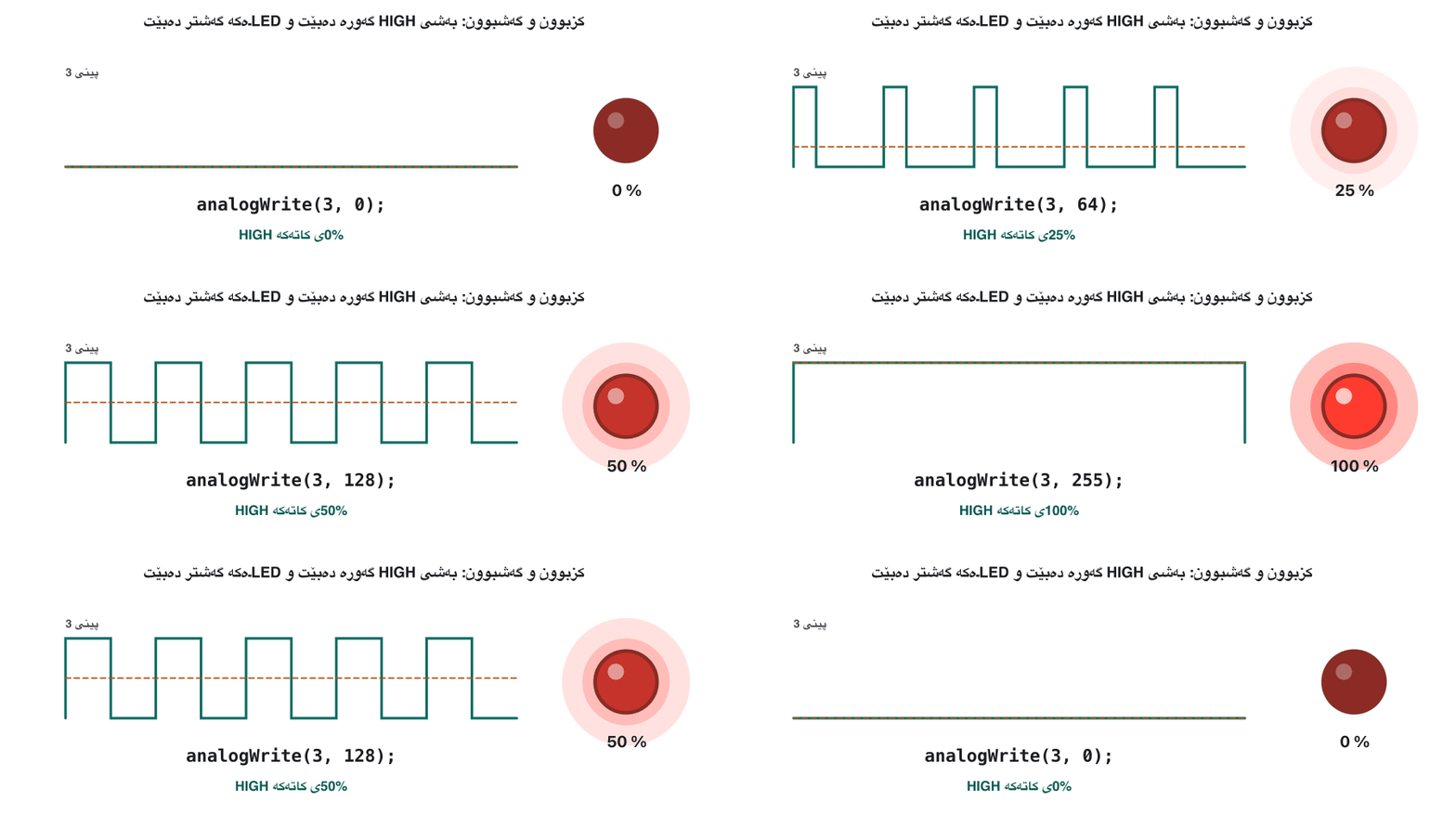
پینێک لە چرکەیەکدا سەدان جار تەواو هەڵدەکات و تەواو دەیکوژێنێتەوە: لەسەر زۆربەی پینەکانی UNO، 490 جار. ئەو بەشەی هەر کە پینەکە تێیدا HIGHـە. لە 25%ـدا چارەکێکی کاتەکە هەڵکراوە؛ چاومان ناتوانێت بەدوای داگیرسانەکاندا بڕوات و ڕووناکییەکی کز دەبینێت. یان تێکڕای هەست پێ دەکات:
The average voltage is the duty cycle times the HIGH voltage (5 V on an UNO, 3.3 V on 3.3 V boards).
تێکڕای دەکاتە جارانی HIGH (5 V لەسەر UNO، 3.3 V لەسەر بۆردەکانی 3.3 V).
At 490 Hz one period lasts about 2 ms (period and frequency). A servo motor also reads pulses, but there the width of each pulse sets an angle: Pulse width sets the angle.
لە 490 Hzـدا یەک نزیکەی 2 ms دەخایەنێت (کاتی خولی و لەرەلەر). دەخوێنێتەوە، بەڵام لەوێ پانایی هەر گۆشەیەک دیاری دەکات: پانایی تڕپە گۆشەکە دیاری دەکات.
Imagine a hose that can only be fully open or shut. Open it for one second in every four and the garden gets a quarter of the water, on average. PWM does the same with electricity, about 490 times a second.
شلنگێک وێنا بکە کە تەنیا دەتوانێت تەواو کراوە یان داخراو بێت. لە هەر چوار چرکەدا یەک چرکە بیکەرەوە، باخچەکە بە تێکڕا چارەکی ئاوەکە وەردەگرێت. هەمان کار بە کارەبا دەکات، نزیکەی 490 جار لە چرکەیەکدا.
Where the analogy stops workingسنووری ئەم نموونەیە
The LED never glows at half strength: it is fully on or off, and our eyes do the averaging.
هەرگیز بە نیوەی هێز ناگەشێتەوە: یان تەواو هەڵکراوە یان کوژاو و چاومان تێکڕاکە دەکات.
PWM: on and off, faster than the eyeمۆدیولەیشنی پانایی تڕپە: هەڵکردن و کوژاندنەوە، لە چاو خێراتر
Which pins can do PWM? The ~ pinsکام پینانە دەتوانن PWM بکەن؟ پینەکانی ~
PWM needs a hardware timer behind the pin, so only some pins have it. On the board they carry a ~ next to the number. The table shows the official pins and frequencies of the boards in this course, as of November 2026:
پێویستی بە ڕەقەواڵە لە پشت پینەکەوە هەیە، بۆیە تەنیا هەندێک پین هەیانە. لەسەر بۆردەکە ~یان لە تەنیشت ژمارەکەوەیە. خشتەکە پینە فەرمییەکان و بۆردەکانی ئەم کۆرسە پیشان دەدات، تا تشرینی دووەمی 2026:
| Boardبۆرد | PWM pinsپینەکانی PWM | Frequency |
|---|---|---|
| UNO R3 | 3, 5, 6, 9, 10, 11 | 490 Hz (pins 5 and 6: 980 Hz)490 Hz (پینەکانی 5 و 6: 980 Hz) |
| UNO R4 Minima / WiFi | 3, 5, 6, 9, 10, 11 | 490 Hz |
| MKR boards, such as the MKR WAN 1310بۆردەکانی MKR، وەک MKR WAN 1310 | 0–8, 10, A3, A4 | 732 Hz |
analogWrite(pin, value): 0 to 255analogWrite(pin, value): 0 تا 255
analogWrite(pin, value) starts PWM on a ~ pin. The value is the duty cycle: 0 is always off, 255 is always on, 64 is about 25 % and 128 about 50 %. Why 255? The classic boards use 8 bits, and 8 bits give values, 0 to 255 (How many patterns do N bits give?). The pin keeps pulsing until the next analogWrite(), digitalWrite() or digitalRead() on it.
analogWrite(pin, value) لەسەر پینێکی ~ دەست پێدەکات. بەهاکە : 0 هەمیشە کوژاوە، 255 هەمیشە هەڵکراو، 64 نزیکەی 25% و 128 نزیکەی 50%. بۆچی 255؟ بۆردە کلاسیکییەکان 8 بەکار دەهێنن و 8 بەها دەدات، 0 تا 255 (N بیت چەند نەخش دەدات؟). پینەکە بەردەوام تڕپە دەدات تا analogWrite()، digitalWrite() یان digitalRead()ـی داهاتوو لەسەری.
analogWrite(pin, value): 0 to 255analogWrite(pin, value): 0 تا 255
More steps: analogWriteResolution()پلەی زیاتر: analogWriteResolution()
256 steps is the classic Arduino range. Newer boards can use finer steps: on the UNO R4, analogWriteResolution(12); makes analogWrite() take 0 to 4095, and the MKR boards' PWM pins can also go up to 12 bits. The UNO R3 always uses 8 bits. The UNO R4 and the MKR boards also have one true analog output on pin A0, a digital-to-analog converter (12-bit on the UNO R4, 10-bit on the MKR boards), which gives a steady voltage instead of pulses.
256 پلە ڕێگای کلاسیکی . بۆردە نوێیەکان دەتوانن پلەی وردتر بەکار بهێنن: لەسەر UNO R4، analogWriteResolution(12); دەکات analogWrite() لە 0 تا 4095 وەربگرێت و پینەکانی PWMـی بۆردەکانی MKRـیش دەتوانن تا 12 بڕۆن. UNO R3 هەمیشە 8 بەکار دەهێنێت. UNO R4 و بۆردەکانی MKR هەروەها یەک ڕاستەقینەیان لەسەر پینی A0 هەیە، (12 لەسەر UNO R4، 10 لەسەر بۆردەکانی MKR)، کە جێگیر دەدات لە جیاتی تڕپە.
Lab 4: fade an LED up and downتاقیگەی 4: LEDـێک گەش و کز بکە
Wire an LED with its resistor to pin 3, a ~ pin, as in the LED lab. The sketch climbs from 0 to 255 in steps of 1, waiting 10 ms at each step, then walks back down: each way, about 5 seconds for a full breath.
بە بە پینی 3ـەوە ببەستە، کە پینێکی ~ـە، وەک تاقیگەی . بە پلەی 1 لە 0ـەوە بۆ 255 سەردەکەوێت، لە هەر پلەیەکدا 10 ms چاوەڕێ دەکات، پاشان بۆ خوارەوە دەگەڕێتەوە: بۆ هەر لایەک، نزیکەی 5 چرکە بۆ هەناسەیەکی تەواو.
const int ledPin = 3;

void setup() {
  pinMode(ledPin, OUTPUT);
}

void loop() {
  for (int brightness = 0; brightness <= 255; brightness++) {
    analogWrite(ledPin, brightness);
    delay(10);
  }

  for (int brightness = 255; brightness >= 0; brightness--) {
    analogWrite(ledPin, brightness);
    delay(10);
  }
}0 ms pin 3 = 0 (0% of the time HIGH) 640 ms pin 3 = 64 (25% of the time HIGH) 1280 ms pin 3 = 128 (50% of the time HIGH) 1920 ms pin 3 = 192 (75% of the time HIGH) 2550 ms pin 3 = 255 (100% of the time HIGH) 2570 ms pin 3 = 254 (100% of the time HIGH) 3210 ms pin 3 = 190 (75% of the time HIGH) 3850 ms pin 3 = 126 (49% of the time HIGH) 4490 ms pin 3 = 62 (24% of the time HIGH) 5110 ms pin 3 = 0 (0% of the time HIGH)
From the events of the CêIT Arduino checker; this sketch prints nothing to the Serial Monitor.
لە ڕووداوەکانی پشکنەری Arduinoـی CêITـەوە؛ ئەم هیچ لە چاپ ناکات.
Explain the codeڕوونکردنەوەی کۆدەکە
- Lineدێڕی 8-11
Up: brightness 0, 1, 2 … 255, one step every 10 ms.
سەرکەوتن: ڕووناکی 0، 1، 2 … 255، هەر 10 ms پلەیەک.
- Lineدێڕی 13-16
Down: 255 … 0, then loop() starts again.
دابەزین: 255 … 0، پاشان loop() دیسان دەست پێدەکاتەوە.
Lab 5: brightness buttonsتاقیگەی 5: دوگمەکانی ڕووناکی
Two buttons with INPUT_PULLUP, UP on pin 2 and DOWN on pin 4, change a number from 0 to 255 in steps of 5, and analogWrite() sends it to the LED on pin 3. Holding a button repeats the step every 200 ms, like the volume button of a TV remote. This is the corrected sketch:
دوو دوگمە بە INPUT_PULLUP، سەرەوە لەسەر پینی 2 و خوارەوە لەسەر پینی 4، ژمارەیەک لە 0 تا 255 بە پلەی 5 دەگۆڕن و analogWrite() دەینێرێت بۆ پینی 3. گرتنی دوگمەیەک هەر 200 ms جارێک پلەکە دووپاتە دەکاتەوە، وەک دوگمەی دەنگی ڕیمۆتی تەلەفزیۆن. ئەمە چاککراوەکەیە:
// Lab 5: brightness up and down with two buttons
const int upBtnPin = 2;
const int downBtnPin = 4;
const int ledPin = 3;                 // a ~ (PWM) pin

int brightness = 128;                 // start at half

void setup() {
  pinMode(upBtnPin, INPUT_PULLUP);
  pinMode(downBtnPin, INPUT_PULLUP);
  pinMode(ledPin, OUTPUT);
  Serial.begin(9600);
  analogWrite(ledPin, brightness);
}

void loop() {
  if (digitalRead(upBtnPin) == LOW) {
    brightness = brightness + 5;
    brightness = constrain(brightness, 0, 255);   // never above 255
    analogWrite(ledPin, brightness);              // the LED follows the number
    Serial.print("Brightness: ");
    Serial.println(brightness);
    delay(200);                                   // held: one step every 200 ms
  }

  if (digitalRead(downBtnPin) == LOW) {
    brightness = brightness - 5;
    brightness = constrain(brightness, 0, 255);   // never below 0
    analogWrite(ledPin, brightness);
    Serial.print("Brightness: ");
    Serial.println(brightness);
    delay(200);
  }
}Brightness: 133 Brightness: 138 ⋮ (21 lines left out) Brightness: 248 Brightness: 253 Brightness: 255 Brightness: 255 Brightness: 255 ⋮ (57 lines left out) Brightness: 0 Brightness: 0 Brightness: 0 Brightness: 0
89 lines in all; the value stops at 255 and at 0, and the checker logs a PWM change on pin 3 at every step.
سەرجەم 89 دێڕ؛ بەهاکە لە 255 و لە 0ـدا دەوەستێت و پشکنەرەکە لە هەموو پلەیەکدا گۆڕانێکی PWM لەسەر پینی 3 تۆمار دەکات.
Explain the codeڕوونکردنەوەی کۆدەکە
- Lineدێڕی 19
Never above 255, whatever the sum was.
هەرگیز لە 255 زیاتر نا، کۆکردنەوەکە هەرچی بێت.
- Lineدێڕی 20
The LED follows the number: the line the first version forgot.
بەدوای ژمارەکەدا دەڕوات: ئەو دێڕەی یەکەم وەشان لەبیری کرد.
- Lineدێڕی 23
Held: one step every 200 ms.
گیراو: هەر 200 ms پلەیەک.
Lab 5: brightness buttonsتاقیگەی 5: دوگمەکانی ڕووناکی
Common mistake: the number changes, the LED does notهەڵەی باو: ژمارەکە دەگۆڕێت، LEDـەکە ناگۆڕێت
Lab 5: brightness buttonsتاقیگەی 5: دوگمەکانی ڕووناکی
Common mistake: 258 and −2هەڵەی باو: 258 و −2
This little test shows what an 8-bit register keeps of each number; it is the same overflow as in When the answer does not fit:
ئەم تاقیکردنەوە بچووکە پیشان دەدات تۆمارێکی 8 چی لە هەر ژمارەیەک دەهێڵێتەوە؛ هەمان وەک کاتێک وەڵامەکە جێی نابێتەوە:
// What an 8-bit register keeps of a number
void setup() {
  Serial.begin(9600);
  Serial.println((byte)253);   // fits: 253
  Serial.println((byte)258);   // too big: 258 - 256
  Serial.println((byte)3);     // fits: 3
  Serial.println((byte)-2);    // below zero: 256 - 2
}

void loop() {
}253 2 3 254
Run with the CêIT Arduino checker.
بە پشکنەری Arduinoـی CêIT جێبەجێ کراوە.
Lab 5: brightness buttonsتاقیگەی 5: دوگمەکانی ڕووناکی
constrain(): keep a number inside its rangeconstrain(): ژمارەیەک لەناو سنوورەکەیدا بهێڵەوە
constrain(x, a, b) returns x when it lies between a and b, a when x is smaller and b when x is larger. Do the sum first and constrain the result in its own line: Arduino's reference warns against putting other function calls inside constrain().
constrain(x, a, b) کاتێک x لە نێوان a و bـدا بێت x دەگەڕێنێتەوە، کاتێک x بچووکتر بێت a و کاتێک گەورەتر بێت b. سەرەتا کۆکردنەوەکە بکە و ئەنجامەکە لە دێڕێکی جیادا constrain بکە: سەرچاوەی ئاگادار دەکاتەوە کە بانگکردنی تر نەخرێتە ناو constrain()ـەوە.
x | constrain(x, 0, 255) | Whyبۆچی |
|---|---|---|
| 258 | 255 | above the range: the topسەرووی سنوورەکە: بەرزترین بەها |
| 130 | 130 | inside: unchangedلەناویدا: نەگۆڕاو |
| -2 | 0 | below the range: the bottomخوارووی سنوورەکە: نزمترین بەها |
The buzzer: the simplest way to make a soundبەزەر: سادەترین ڕێگا بۆ دروستکردنی دەنگ
A buzzer is the easiest and cheapest way to add sound to a project: alarms, bells, sirens, even simple music. It runs on a low DC voltage. You find buzzers in timers, alarm devices, printers and computers, and they confirm what you did: a beep for a key press or a mouse click.
ئاسانترین و هەرزانترین ڕێگایە بۆ زیادکردنی دەنگ بۆ پڕۆژەیەک: ئاگادارکەرەوە، زەنگ، سیرەن، تەنانەت مۆسیقای سادە. بە DCـی نزم کار دەکات. لە ، ئامێرەکانی ئاگادارکردنەوە، و دەبینیت و ئەوەی کردووتە پشتڕاستی دەکەنەوە: بیپێک بۆ پەستانی دوگمەیەکی یان کرتەیەکی .
It has two legs. The positive one, marked + or simply the longer leg, goes to the board's pin; the negative one, marked − or the shorter leg, goes to GND.
دوو قاچی هەیە. قاچی پۆزەتیڤ، کە + ـی لەسەرە یان تەنیا قاچە درێژەکەیە، بۆ پینی بۆردەکە دەچێت؛ قاچی نێگەتیڤ، کە − ـی لەسەرە یان قاچە کورتەکەیە، بۆ GND دەچێت.
The buzzer: the simplest way to make a soundبەزەر: سادەترین ڕێگا بۆ دروستکردنی دەنگ
Active or passive buzzer?بەزەری چالاک یان ناچالاک؟
Buzzers come in two kinds. An active buzzer has its own little oscillator inside: give it a steady DC voltage and it beeps at one fixed pitch, so digitalWrite() is enough. A passive buzzer is only the sound disc: it needs a changing signal, and tone() makes the square wave, so it can play any pitch. Only a passive one can play 1000 Hz and then 2000 Hz, a siren or a tune. Quick test: on a steady 5 V an active buzzer beeps; a passive one only clicks.
دوو جۆرە. چالاک لەرزێنەرێکی بچووکی خۆی لەناودایە: DCـی جێگیری بدەیتێ بە یەک دەنگی جێگیر بیپ دەکات، بۆیە digitalWrite() بەسە. ناچالاک تەنیا قرسی دەنگەکەیە: پێویستی بە گۆڕاو هەیە و tone() دروست دەکات، بۆیە دەتوانێت هەر دەنگێک لێ بدات. تەنیا جۆری ناچالاک دەتوانێت 1000 Hz و پاشان 2000 Hz، سیرەنێک یان ئاوازێک لێ بدات. تاقیکردنەوەی خێرا: لەسەر 5 Vـی جێگیر چالاک بیپ دەکات؛ ناچالاک تەنیا کرتەیەک دەکات.
// An ACTIVE buzzer on pin 4: HIGH = beep, LOW = quiet
const int buzzerPin = 4;

void setup() {
  pinMode(buzzerPin, OUTPUT);
}

void loop() {
  digitalWrite(buzzerPin, HIGH);   // its own oscillator makes the sound
  delay(200);
  digitalWrite(buzzerPin, LOW);
  delay(800);
}0 ms pin 4 = HIGH beep 200 ms pin 4 = LOW quiet 1000 ms pin 4 = HIGH beep 1200 ms pin 4 = LOW quiet 2000 ms pin 4 = HIGH beep 2200 ms pin 4 = LOW quiet
From the events of the CêIT Arduino checker; this sketch prints nothing to the Serial Monitor.
لە ڕووداوەکانی پشکنەری Arduinoـی CêITـەوە؛ ئەم هیچ لە چاپ ناکات.
The buzzer: the simplest way to make a soundبەزەر: سادەترین ڕێگا بۆ دروستکردنی دەنگ
Inside: piezo or magneticلە ناوەوە: پیزۆ یان موگناتیسی
A piezo buzzer holds a thin ceramic disc glued to a metal plate; the disc bends a little when voltage is put across it, and the bending makes the sound. It needs very little current. A magnetic buzzer works like a tiny speaker: a coil pulls a metal disc. It runs on lower voltages but draws more current, often over 20 mA.
پیزۆ قرسێکی سێرامیکیی تەنکی هەیە کە بە پلێتێکی کانزاییەوە نووسێنراوە؛ کاتێک دەخرێتە سەری قرسەکە کەمێک دەچەمێتەوە و ئەم چەمانەوەیە دەنگەکە دروست دەکات. زۆر کەمی پێویستە. موگناتیسی وەک بچووک کار دەکات: کۆیلێک قرسێکی کانزایی ڕادەکێشێت. بە نزمتر کار دەکات، بەڵام زیاتر دەکێشێت، زۆرجار زیاتر لە 20 mA.
Where buzzers beepبەزەر لە کوێ بیپ دەکات
- cars: the seat belt, reverse gear or an open door;
- alarm circuits: a loud noise for smoke, fire or theft;
- annunciator panels: a sound that tells operators about a fault;
- communication devices: beeps for keys and calls on phones and radios;
- electronic metronomes: regular ticks that keep musicians in time;
- game shows: a beep when a player presses the button;
- household appliances: the microwave or the washing machine is done;
- portable devices: calculators and hand tools;
- security systems: a noise when an intruder is detected;
- sport: the start and the end of a match or a round;
- timers: ovens and stopwatches beep when time is up.
- ئۆتۆمبێل: پشتێنی کورسی، گێڕی پاشەوە یان دەرگایەکی کراوە؛
- ئاگادارکردنەوە: دەنگێکی بەرز بۆ دووکەڵ، ئاگر یان دزی؛
- تابلۆکانی ئاگادارکردنەوە: دەنگێک کە کارمەندان لە هەڵەیەک ئاگادار دەکاتەوە؛
- : بیپ بۆ دوگمە و پەیوەندی لە مۆبایل و ڕادیۆدا؛
- مێترۆنۆمی ئەلیکترۆنی: لێدانی ڕێک کە مۆسیقاژەنەکان لەسەر ڕیتم دەهێڵێتەوە؛
- پێشبڕکێی تەلەفزیۆنی: بیپێک کاتێک یاریزانێک دوگمەکە دەپەستێنێت؛
- ئامێرەکانی ماڵ: مایکرۆوەیڤ یان جلشۆر تەواو بووە؛
- ئامێرە هەڵگرەکان: و ئامرازی دەستی؛
- سیستەمەکانی پاراستن: دەنگێک کاتێک دزێک دەدۆزرێتەوە؛
- وەرزش: دەستپێک و کۆتایی یارییەک یان گەڕێک؛
- : فڕن و کاتژمێری وەرزشی کاتێک کات تەواو دەبێت بیپ دەکەن.
A metronome ticks or flashes at a steady beat chosen in BPM, beats per minute: 60 BPM is one beat a second, 120 BPM two beats a second. In a sketch the time between beats is milliseconds (an exercise below).
مێترۆنۆم بە ڕیتمێکی جێگیر لێدەدات یان دەدرەوشێتەوە کە بە BPM، لێدان لە خولەکێکدا، هەڵدەبژێردرێت: 60 BPM واتە یەک لێدان لە چرکەیەکدا، 120 BPM دوو لێدان لە چرکەیەکدا. لە کاتی نێوان دوو لێدان میلیچرکەیە (ڕاهێنانێک لە خوارەوە).
tone() and noTone(): a square wave of any pitchtone() و noTone(): شەپۆلی چوارگۆشەییەک بە هەر بەرزییەک
tone(pin, frequency) makes a square wave with a 50 % duty cycle on any digital pin and keeps it going until noTone(pin). tone(pin, frequency, duration) stops by itself after duration milliseconds. The frequency is the number of waves per second, in hertz (Hz): a higher frequency sounds higher. 2000 Hz is one octave above 1000 Hz, because it has twice the frequency.
tone(pin, frequency) لەسەر هەر پینێکی بە 50% دروست دەکات و بەردەوامی دەکات تا noTone(pin). tone(pin, frequency, duration) دوای duration میلیچرکە خۆی دەوەستێت. ژمارەی شەپۆلەکانە لە چرکەیەکدا، بە (Hz): بەرزتر دەنگی بەرزتر دەدات. 2000 Hz ئۆکتاڤێک لە سەرووی 1000 Hzـەوەیە، چونکە دوو هێندەیە.
Lab: two tones and a pause on the MKR WAN 1310تاقیگە: دوو دەنگ و وەستانێک لەسەر MKR WAN 1310
- Wireببەستە
Connect the buzzer's positive (red) wire to pin 4 and the negative (black) wire to GND.
وایەری پۆزەتیڤی (سوور) بە پینی 4 و وایەری نێگەتیڤی (ڕەش) بە GNDـەوە ببەستە.
- Uploadهەڵبارکردن
Upload the sketch to the MKR WAN 1310 from the Arduino IDE (Tools → Board, Port).
لە Arduinoـەوە بۆ MKR WAN 1310 هەڵبار بکە (Tools → Board، Port).
- Listenگوێ بگرە
Listen: 1000 Hz for a second, 2000 Hz for a second, one second of silence, again and again.
گوێ بگرە: یەک چرکە 1000 Hz، یەک چرکە 2000 Hz، یەک چرکە بێدەنگی، دووپاتە و دووپاتە.
// Define the digital pin connected to the buzzer
int buzzerPin = 4;

void setup() {
  // Set the buzzer pin as an output
  pinMode(buzzerPin, OUTPUT);
}

void loop() {
  // Play a tone with a frequency of 1000 Hz for 1 second
  tone(buzzerPin, 1000);
  delay(1000);

  // Play a tone with a frequency of 2000 Hz for 1 second
  tone(buzzerPin, 2000);
  delay(1000);

  // Stop the buzzer
  noTone(buzzerPin);
  // Wait for 1 second before repeating the loop
  delay(1000);
}0 ms tone on pin 4: 1000 Hz 1000 ms tone on pin 4: 2000 Hz 2000 ms noTone on pin 4 (silence) 3000 ms tone on pin 4: 1000 Hz 4000 ms tone on pin 4: 2000 Hz 5000 ms noTone on pin 4 (silence) 6000 ms tone on pin 4: 1000 Hz
From the events of the CêIT Arduino checker; this sketch prints nothing to the Serial Monitor.
لە ڕووداوەکانی پشکنەری Arduinoـی CêITـەوە؛ ئەم هیچ لە چاپ ناکات.
Explain the codeڕوونکردنەوەی کۆدەکە
- Lineدێڕی 11-12
1000 Hz, and wait 1 s while it plays.
1000 Hz و 1 چرکە چاوەڕێ تا لێدەدرێت.
- Lineدێڕی 15-16
The same pin again: tone() just changes the pitch.
دیسان هەمان پین: tone() تەنیا دەنگەکە دەگۆڕێت.
- Lineدێڕی 19-21
Silence for 1 s.
1 چرکە بێدەنگی.
It needs a passive buzzer, because it changes the pitch. The MKR WAN 1310 is a 3.3 V board, which is fine for a small piezo; the same sketch runs unchanged on an UNO.
پێویستی بە ناچالاک هەیە، چونکە دەنگەکە دەگۆڕێت. MKR WAN 1310 بۆردێکی 3.3 Vـە، کە بۆ پیزۆیەکی بچووک باشە؛ هەمان بەبێ گۆڕان لەسەر UNOـش کار دەکات.
What tone() cannot dotone() چی ناتوانێت بکات
- Only one tone at a time. A tone() on another pin does nothing while a tone plays; a tone() on the same pin only changes the pitch. To move to another pin, call noTone() first.
- Nothing below 31 Hz.
- On boards other than the Mega, tone() disturbs PWM on pins 3 and 11. On the UNO R3 the reason is visible in its core: tone() borrows Timer 2, the timer that makes the PWM of pins 3 and 11. Fading an LED on pin 3 while a buzzer plays does not work; move the LED to pin 9 or 10.
- تەنیا یەک دەنگ لە یەک کاتدا. تا دەنگێک لێدەدرێت، tone() لەسەر پینێکی تر هیچ ناکات؛ tone() لەسەر هەمان پین تەنیا دەنگەکە دەگۆڕێت. بۆ چوون بۆ پینێکی تر، سەرەتا noTone() بانگ بکە.
- هیچ شتێک لە خوارووی 31 Hz نا.
- لەسەر بۆردەکان جگە لە Mega، tone() PWMـی پینەکانی 3 و 11 تێک دەدات. لەسەر UNO R3 هۆکارەکە لە ناوەکیی دیارە: tone() تایمەری 2 دەبات، ئەو PWMـی پینەکانی 3 و 11 دروست دەکات. کزکردنی لەسەر پینی 3 تا لێدەدات کار ناکات؛ بۆ پینی 9 یان 10 بگوازەوە.
Common mistakesهەڵە باوەکان
| Mistakeهەڵە | Betterباشتر |
|---|---|
| analogWrite() on a pin without ~: the LED only switches on or off.analogWrite() لەسەر پینێک بەبێ ~: تەنیا هەڵ یان دەکوژێتەوە. | Use a PWM pin: 3, 5, 6, 9, 10 or 11 on an UNO.پینێکی PWM بەکار بهێنە: 3، 5، 6، 9، 10 یان 11 لەسەر UNO. |
| Changing the variable but never calling analogWrite().گۆڕینی بەبێ بانگکردنی analogWrite(). | Write the new value to the pin after every change.دوای هەر گۆڕانێک بەها نوێیەکە بۆ پینەکە بنووسە. |
| Checking the limit before adding: 258 and −2.پشکنینی سنوور پێش زیادکردن: 258 و −2. | Add, then constrain(value, 0, 255).زیاد بکە، پاشان constrain(value, 0, 255). |
| A function call inside constrain().بانگکردنی لەناو constrain()ـدا. | Compute first, then constrain the variable.سەرەتا هەژمار بکە، پاشان constrain بکە. |
| tone() on an active buzzer: always the same beep.tone() لەسەر چالاک: هەمیشە هەمان بیپ. | Use a passive buzzer for different pitches.بۆ دەنگی جیاواز ناچالاک بەکار بهێنە. |
| A big magnetic buzzer straight on a pin. موگناتیسیی گەورە ڕاستەوخۆ لەسەر پینێک. | Use a transistor or a buzzer module. یان مۆدیولی بەکار بهێنە. |
| Two tones on two pins at the same time.دوو دەنگ لەسەر دوو پین لە یەک کاتدا. | One tone at a time; noTone() before moving pins.یەک دەنگ لە یەک کاتدا؛ پێش گواستنەوەی پین noTone(). |
| Fading on pin 3 or 11 of an UNO R3 while tone() plays.کزکردن لەسەر پینی 3 یان 11ـی UNO R3 تا tone() لێدەدات. | Use pin 9 or 10 for the LED.بۆ پینی 9 یان 10 بەکار بهێنە. |
| Expecting tone() to wait for its duration.چاوەڕوانی ئەوە کە tone() چاوەڕێی duration بکات. | Add a delay() after each note.دوای هەر نۆتەیەک delay() زیاد بکە. |
Exercisesڕاهێنانەکان
Rewrite Lab 4 without for loops: one variable brightness, a step of +5 that turns into −5 at the ends, and 30 ms between steps.
تاقیگەی 4 بەبێ دووپاتە بنووسەوە: یەک brightness، پلەیەکی +5 کە لە کۆتاییەکاندا دەبێتە −5 و 30 ms لە نێوان پلەکاندا.
Hintئاماژە
When brightness reaches 0 or 255, set step = -step.
کاتێک brightness دەگاتە 0 یان 255، step = -step.
Show answerوەڵامەکە پیشان بدە
// The fade with one variable and no for loops
const int ledPin = 3;
int brightness = 0;
int step = 5;                  // +5 going up, -5 going down

void setup() {
  pinMode(ledPin, OUTPUT);
}

void loop() {
  analogWrite(ledPin, brightness);
  brightness = brightness + step;
  if (brightness <= 0 || brightness >= 255) {
    step = -step;              // turn round at the ends
  }
  delay(30);
}0 ms pin 3 = 0 (0% of the time HIGH) 510 ms pin 3 = 85 (33% of the time HIGH) 1020 ms pin 3 = 170 (67% of the time HIGH) 1530 ms pin 3 = 255 (100% of the time HIGH) 2040 ms pin 3 = 170 (67% of the time HIGH) 2550 ms pin 3 = 85 (33% of the time HIGH) 3060 ms pin 3 = 0 (0% of the time HIGH)
From the events of the CêIT Arduino checker; this sketch prints nothing to the Serial Monitor.
لە ڕووداوەکانی پشکنەری Arduinoـی CêITـەوە؛ ئەم هیچ لە چاپ ناکات.
loop() now stays short, so it could also read buttons between steps.
ئێستا loop() کورت دەمێنێتەوە، بۆیە دەتوانێت لە نێوان پلەکاندا دوگمەش بخوێنێتەوە.
Make a passive buzzer click at 120 BPM: a 50 ms click at 1500 Hz on every beat.
ناچالاک بە 120 BPM لێ بدە: کرتەیەکی 50 ms بە 1500 Hz لە هەر لێدانێکدا.
Hintئاماژە
tone() with a duration returns at once; delay() sets the beat.
tone() بە duration یەکسەر دەگەڕێتەوە؛ delay() ڕیتمەکە دیاری دەکات.
Show answerوەڵامەکە پیشان بدە
// A metronome: a short click at 120 beats per minute
const int buzzerPin = 4;
const int bpm = 120;
const unsigned long beat = 60000UL / bpm;   // 500 ms between beats

void setup() {
  pinMode(buzzerPin, OUTPUT);
}

void loop() {
  tone(buzzerPin, 1500, 50);   // a 50 ms click; tone() returns at once
  delay(beat);                 // so delay() sets the time between beats
}0 ms tone on pin 4: 1500 Hz for 50 ms 500 ms tone on pin 4: 1500 Hz for 50 ms 1000 ms tone on pin 4: 1500 Hz for 50 ms 1500 ms tone on pin 4: 1500 Hz for 50 ms
From the events of the CêIT Arduino checker; this sketch prints nothing to the Serial Monitor.
لە ڕووداوەکانی پشکنەری Arduinoـی CêITـەوە؛ ئەم هیچ لە چاپ ناکات.
Make the buzzer alternate between 700 Hz and 1000 Hz, half a second each, for ever.
بە نۆرە لە نێوان 700 Hz و 1000 Hzـدا لێ بدە، هەریەکە نیو چرکە، بۆ هەمیشە.
Show answerوەڵامەکە پیشان بدە
// A two-tone siren: 700 Hz and 1000 Hz, half a second each
const int buzzerPin = 4;

void setup() {
  pinMode(buzzerPin, OUTPUT);
}

void loop() {
  tone(buzzerPin, 700);
  delay(500);
  tone(buzzerPin, 1000);    // same pin: tone() just changes the pitch
  delay(500);
}0 ms tone on pin 4: 700 Hz 500 ms tone on pin 4: 1000 Hz 1000 ms tone on pin 4: 700 Hz 1500 ms tone on pin 4: 1000 Hz 2000 ms tone on pin 4: 700 Hz
From the events of the CêIT Arduino checker; this sketch prints nothing to the Serial Monitor.
لە ڕووداوەکانی پشکنەری Arduinoـی CêITـەوە؛ ئەم هیچ لە چاپ ناکات.
An MKR WAN 1310 must dim an LED. Pin 9 or pin 5? And at what PWM frequency?
MKR WAN 1310 دەبێت کز بکات. پینی 9 یان پینی 5؟ و بە چ PWM؟
Show answerوەڵامەکە پیشان بدە
Pin 5: the MKR boards have PWM on 0–8, 10, A3 and A4, so pin 9 has none. Their PWM runs at 732 Hz.
پینی 5: بۆردەکانی MKR لەسەر 0–8، 10، A3 و A4 PWMـیان هەیە، بۆیە پینی 9 PWMـی نییە. PWMـەکەیان بە 732 Hz کار دەکات.
Summaryپوختە
- PWM switches a pin fully on and off very fast; the duty cycle (% of each period HIGH) sets the average voltage and the brightness.
- Only ~ pins do PWM: 3, 5, 6, 9, 10, 11 on the UNO R3 and R4 (490 Hz; 980 Hz on pins 5 and 6 of the R3); 0–8, 10, A3, A4 on the MKR boards (732 Hz).
- analogWrite(pin, 0…255): 8 bits; the UNO R4 can use analogWriteResolution(12) for 0…4095.
- Keep the value in range with constrain(); past 255 an UNO R3 wraps around (258 → 2).
- An active buzzer beeps on DC at one pitch; a passive buzzer needs tone(), which can play any pitch from 31 Hz up.
- tone() plays one tone at a time, returns at once and, on boards other than the Mega, disturbs PWM on pins 3 and 11.
- پینێک زۆر بە خێرایی تەواو هەڵدەکات و دەیکوژێنێتەوە؛ (ئەو %ـەی هەر خولێک کە HIGHـە) تێکڕای و ڕووناکی دیاری دەکات.
- تەنیا پینەکانی ~ PWM دەکەن: 3، 5، 6، 9، 10 و 11 لەسەر UNO R3 و R4 (490 Hz؛ 980 Hz لەسەر پینەکانی 5 و 6ـی R3)؛ 0–8، 10، A3 و A4 لەسەر بۆردەکانی MKR (732 Hz).
- analogWrite(pin, 0…255): 8 ؛ UNO R4 دەتوانێت analogWriteResolution(12) بۆ 0…4095 بەکار بهێنێت.
- بە constrain() بەهاکە لەناو سنوورەکەدا بهێڵەوە؛ لە دوای 255، UNO R3 دەسووڕێتەوە (258 دەبێتە 2).
- چالاک لەسەر DC بە یەک دەنگ بیپ دەکات؛ ناچالاک پێویستی بە tone() هەیە، کە دەتوانێت لە 31 Hzـەوە بەرەو سەرەوە هەر دەنگێک لێ بدات.
- tone() لە یەک کاتدا یەک دەنگ لێدەدات، یەکسەر دەگەڕێتەوە و لەسەر بۆردەکان جگە لە Mega، PWMـی پینەکانی 3 و 11 تێک دەدات.
Why does an LED look dim at 25 % duty cycle although it only ever gets 0 V or 5 V?بۆچی LEDـێک لە ڕێژەی کارکردنی 25%ـدا کز دەردەکەوێت، لە کاتێکدا تەنیا 0 V یان 5 V وەردەگرێت؟
It flashes about 490 times a second, far too fast for the eye, which sees the average: a quarter of full brightness.
لە چرکەیەکدا نزیکەی 490 جار دەدرەوشێتەوە، زۆر خێراتر لەوەی چاو بەدوایدا بڕوات، کە تێکڕاکە دەبینێت: چارەکی ڕووناکیی تەواو.
What two bugs did the first brightness sketch have?یەکەم سکێچی ڕووناکی چ دوو هەڵەیەکی هەبوو؟
It never called analogWrite(), and it checked the limit before adding, so it reached 258 and −2.
هەرگیز analogWrite()ـی بانگ نەدەکرد و سنوورەکەی پێش زیادکردن دەپشکنی، بۆیە گەیشتە 258 و −2.
How do you tell an active buzzer from a passive one?چۆن بەزەری چالاک لە ناچالاک جیا دەکەیتەوە؟
Put a steady 5 V on it: an active buzzer beeps, a passive one only clicks. Or read its datasheet.
5 Vـی جێگیری بخەرە سەر: چالاک بیپ دەکات، ناچالاک تەنیا کرتەیەک دەکات. یان بخوێنەوە.
Lesson complete!وانەکە تەواو بوو!
Well done. Review the key terms, then go on to the next lesson.دەستخۆش. سەیرێکی زاراوە سەرەکییەکان بکەرەوە، پاشان بڕۆ بۆ وانەی داهاتوو.
Key termsزاراوە سەرەکییەکان
Lab: The Watchdog Timer — Restarting a Frozen Deviceتاقیگە: تایمەری پاسەوان — دەستپێکردنەوەی ئامێرێکی گیرخواردوو
Related lecturesوانە پەیوەندیدارەکان
- Lab: Talking to the Board with the Serial Monitorتاقیگە: قسەکردن لەگەڵ بۆرد بە Serial Monitor
- Arduino Boards and the Arduino IDEبۆردەکانی Arduino و Arduino IDE
- Analog and Digital Signalsسیگناڵەکانی ئەنالۆگ و دیجیتاڵ
- Number Systems and Place Valueسیستەمە ژمارەییەکان و بەهای خانەیی
- Binary Addition and Subtractionکۆکردنەوەی دووانی و لێدەرکردنی دووانی
- Primitive Data Typesجۆرە سەرەتاییەکان
- Reading Analog Signals: the ADC and analogRead()خوێندنەوەی سیگناڵەکانی ئەنالۆگ: ADC و analogRead()
- Actuators: DC Motors, Encoders and Servosجووڵێنەرەکان: ماتۆڕەکانی DC، کۆدکەرەکانی هەنگاوبەهەنگاو و ماتۆڕەکانی سێرڤۆ
References and further readingسەرچاوەکان و خوێندنەوەی زیاتر
- Arduino reference: analogWrite() (PWM pins and frequencies per board, 0–255, pins 5 and 6, DAC0)
- Arduino reference: analogWriteResolution()
- Arduino UNO R4 Minima cheat sheet (PWM pins, 8-bit default, up to 12 bits, DAC on A0)
- Arduino reference: constrain()
- Arduino reference: tone() (square wave, 50 % duty cycle, one tone at a time, 31 Hz, pins 3 and 11, non-blocking)
- Arduino reference: noTone()
- Arduino built-in example: Fade
- ArduinoCore-avr: wiring_analog.c (analogWrite writes the 8-bit timer register; pins without PWM)
- ArduinoCore-avr: Tone.cpp (tone() uses Timer 2 on the ATmega328P)
- Same Sky (formerly CUI Devices): Buzzer basics — technologies, tones and driving circuits
This lecture is a first edition. The Kurdish text and terminology are waiting for review by Kurdish IT teachers.ئەم وانەیە چاپی یەکەمە. دەقە کوردییەکە و زاراوەکانی چاوەڕێی پێداچوونەوەی مامۆستایانی کوردی بواری IT ن.