Chapterبەش 4 · Lectureوانە 4.9
Multi-Area OSPF and Virtual LinksOSPFـی فرەناوچەیی و بەستەرە گریمانەییەکان
Why one area stops scaling (the 900-router example), what an OSPF area is and how area IDs are written, the backbone area 0 and its rules, the four router types (internal, backbone, ABR, ASBR), what an ABR passes on (summary LSAs, area range), why areas help, the O / O IA / O E2 codes, stub, totally stubby and NSSA areas, the book’s three-router lab in three areas, and virtual links: when an area cannot touch area 0, how to configure and check them on the owner’s four-area lab, why the router ID must be set first, and why they are a last resort.
بۆچی یەک گەورە نابێت (نموونەی 900 )، چییە و ژمارەی چۆن دەنووسرێت، و یاساکانی، چوار جۆری (، ، ABR، ASBR)، ABR چی دەگوازێتەوە ( کورتە، area range)، بۆچی یارمەتی دەدەن، کۆدەکانی O / O IA / O E2، stub، totally stubby و NSSA، تاقیکردنەوەی سێ کتێبەکە لە سێ و : کاتێک ناگاتە 0، چۆن لەسەر تاقیکردنەوە چوار ناوچەییەکە ڕێک دەخرێن و دەپشکنرێن، بۆچی دەبێت سەرەتا دابنرێت و بۆچی دوایین چارەسەرن.
What you will learnچی فێر دەبیت
- Explain why large OSPF networks are split into areas and what stays inside an area.
- Name internal routers, backbone routers, ABRs and ASBRs, and read O, O IA and O E2 routes.
- Choose between standard, stub, totally stubby and NSSA areas.
- Configure and verify multi-area OSPF with the right area in every network line.
- Configure and check a virtual link, and explain why it is only a temporary fix.
- ڕوون بکەیتەوە بۆچی گەورەی بۆ دابەش دەکرێن و چی لە ناو دەمێنێتەوە.
- ، ، ABR و ASBR بناسیت و ڕێگاکانی O، O IA و O E2 بخوێنیتەوە.
- لە نێوان ئاسایی، stub، totally stubby و NSSAـدا هەڵبژێریت.
- فرەناوچەیی ڕێک بخەیت و بیپشکنیت، بە دروست لە هەموو دێڕێکی network.
- ڕێک بخەیت و بیپشکنیت و ڕوون بکەیتەوە بۆچی تەنیا چارەسەرێکی کاتییە.
One area is fine — until the network growsیەک ناوچە باشە — تا ڕایەڵەکە گەورە دەبێت
In the last lesson every router was in area 0. For a small network that is the best choice: the configuration is simple and every router sees the same map. Now imagine 900 routers and several thousand subnets. Every router keeps the whole map, so the link-state database and the routing table become huge. Every time one link anywhere goes up or down, LSAs flood to all 900 routers and every one of them runs SPF again.
لە وانەی پێشوودا هەموو لە 0دا بوو. بۆ بچووک ئەوە باشترین هەڵبژاردنە: سادەیە و هەموو هەمان نەخشە دەبینێت. ئێستا 900 و چەند هەزار بهێنە پێش چاو. هەموو تەواوی نەخشەکە هەڵدەگرێت، بۆیە و زۆر گەورە دەبن. هەر جارێک بەستەرێک لە هەر شوێنێک بکەوێت یان هەستێتەوە، بۆ هەر 900 بڵاو دەبێتەوە و هەموویان دووپاتە SPF کار پێ دەکەن.
Areas: one OSPF network in several partsناوچەکان: یەک ڕایەڵەی OSPF لە چەند بەشێکدا
An area is a group of routers and links that share one link-state database. Inside an area, routers flood the detailed LSAs about every link; outside it, only short summaries travel. An area is named by a 32-bit number from 0 to 4,294,967,295, written either as a number (area 1) or in dotted form like an address (area 0.0.0.1). Both mean the same area, and area 0 (0.0.0.0) is a real area — the most important one.
کۆمەڵێک و بەستەرە کە یەک هاوبەش دەکەن. لە ناو ورد لەبارەی هەموو بەستەرێک بڵاو دەکەنەوە؛ لە دەرەوەی تەنیا کورتە دەڕۆن. بە ژمارەیەکی 32 ناو دەنرێت لە 0ـەوە تا 4,294,967,295، یان وەک ژمارە دەنووسرێت (area 1) یان بە شێوەی خاڵدار وەک ناونیشانێک (area 0.0.0.1). هەردووکیان هەمان و 0 (0.0.0.0) ڕاستەقینەیە — گرنگترینیان.
A group of OSPF routers and links that share one link-state database. LSAs are flooded only inside the area, and areas connect through area 0, the backbone. Smaller areas mean smaller databases and faster SPF.
کۆمەڵێک و بەستەری کە یەک هاوبەش دەکەن. تەنیا لەناو ناوچەکەدا بڵاو دەکرێنەوە؛ ناوچەکانیش لە ڕێگەی (ناوچەی 0) بەیەکەوە دەبەسترێن. ناوچەی بچووکتر واتە بنکەدراوەی بچووکتر و SPFـی خێراتر.
Area 0, the backboneناوچەی بڕبڕە
Area 0 is the backbone area: the core of an OSPF network that joins all the other areas. Two rules make the design work. First, every other area must touch area 0 — at least one of its routers must also have an interface in area 0. Second, traffic between two areas always crosses area 0; areas never carry traffic for each other. That is why area 0 must stay in one piece (contiguous).
0 ـیە: ناوکی کە هەموو تر پێکەوە دەبەستێت. دوو یاسا دیزاینەکە کار پێ دەکەن. یەکەم، هەموو تر دەبێت بە 0ـەوە بلکێت — لانیکەم یەکێک لە دەبێت لە 0دا هەبێت. دووەم، هاتوچۆی نێوان دوو هەمیشە بە 0دا تێدەپەڕێت؛ هەرگیز هاتوچۆ بۆ یەکتری ناگوازنەوە. بۆیە 0 دەبێت یەک پارچە بمێنێتەوە.
Four kinds of OSPF routerچوار جۆری ڕێدۆزی OSPF
Once there are areas, a router is described by where its interfaces are. An internal router has all its interfaces in one area. A backbone router has at least one interface in area 0. An area border router (ABR) has interfaces in area 0 and in at least one other area. An ASBR connects OSPF to another routing domain — EIGRP, BGP or the Internet — and brings those routes in. One router can be several kinds at once: an ABR is always a backbone router too.
کاتێک هەبێت، بەپێی شوێنی وەسف دەکرێت. هەموو لە یەک . لانیکەم یەک لە 0دا هەیە. (ABR) لە 0 و لانیکەم تردا هەیە. بە پاوانێکی تری دەبەستێت — ، یان — و ئەو ڕێگایانە دەهێنێتە ژوورەوە. یەک دەتوانێت لە یەک کاتدا چەند جۆرێک بێت: ABR هەمیشە .
Why OSPF splits a big network into areas, area 0 as the backbone, and the kinds of router: internal, backbone, ABR and ASBR.
بۆچی گەورە دابەش دەکات بۆ چەند ، (ناوچەی 0) و جۆرەکانی : ناوەکی، بڕبڕە، و .
Watch 3:55–7:16: internal, backbone, ABR and ASBR routers.
لە 3:55 تا 7:16 سەیر بکە: ناوەکی، بڕبڕە، و .
Four kinds of OSPF routerچوار جۆری ڕێدۆزی OSPF
The area border router: a gateway between areasڕێدۆزی سنوورەناوچە: دەروازەیەک لە نێوان ناوچەکاندا
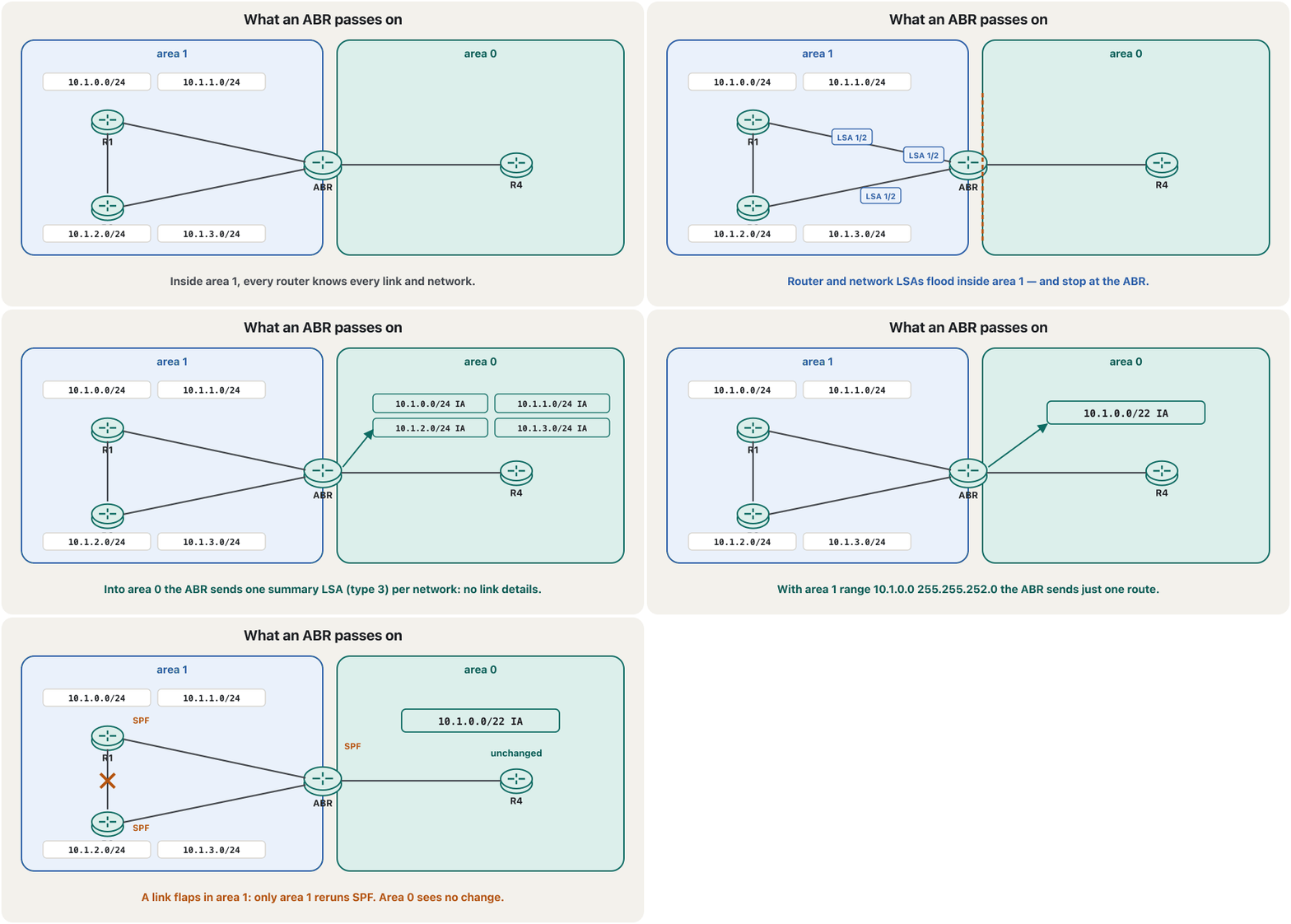
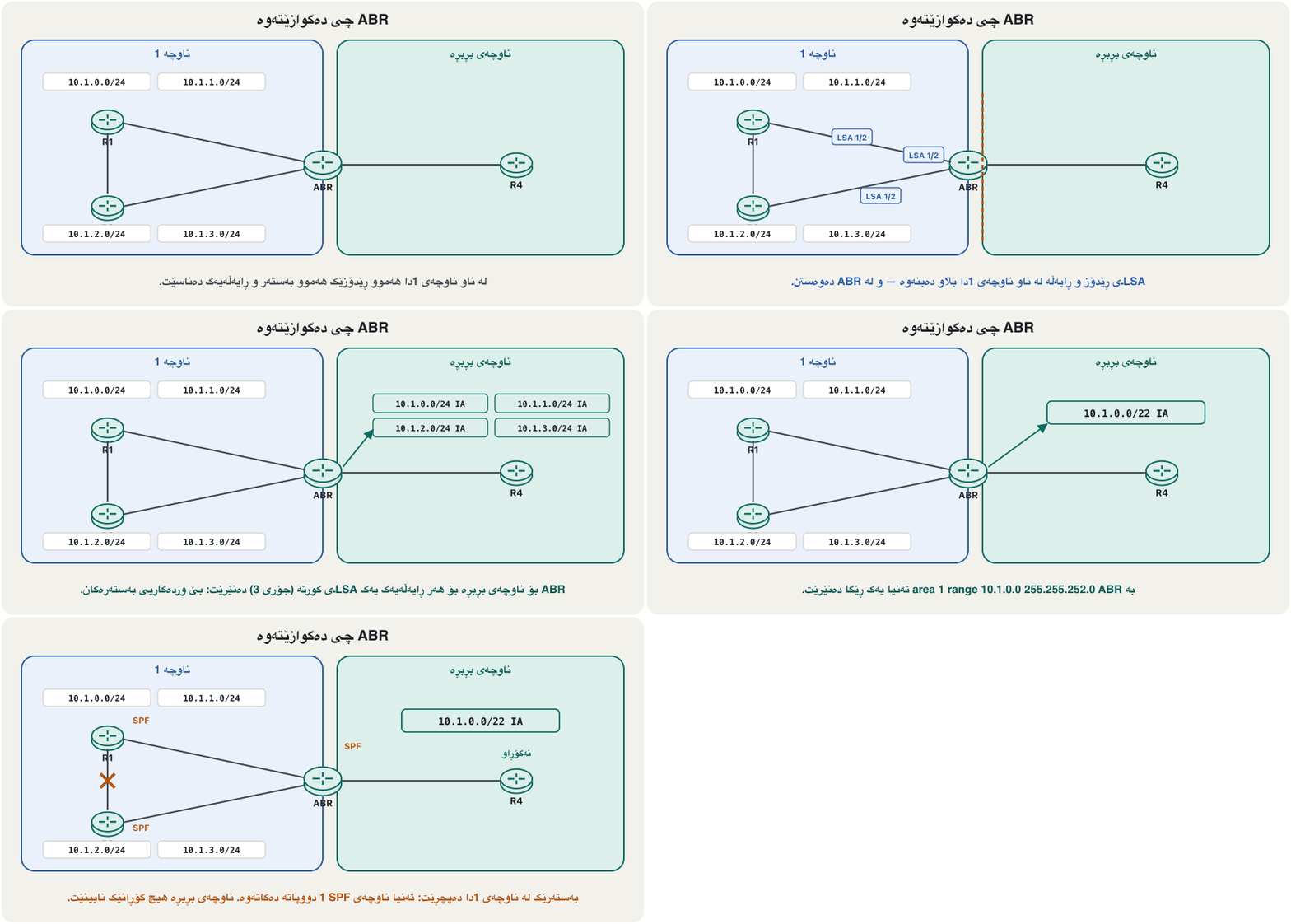
An ABR keeps a separate link-state database for each of its areas and runs SPF for each one. Into every area it advertises the other areas’ networks as summary LSAs (type 3): one line per network with a cost, but none of the link details. And it forwards packets between areas, like a gateway. An ABR can go further and join many networks into one route with area <id> range — the method is in route summarization.
ABR بۆ هەر یەک لە جیا هەڵدەگرێت و بۆ هەریەکەیان SPF کار پێ دەکات. بۆ هەر تر وەک کورتە (جۆری 3) ڕادەگەیەنێت: بۆ هەر یەک دێڕ لەگەڵ تێچوو، بەڵام بێ وردەکاریی بەستەرەکان. و لە نێوان دەگوازێتەوە، وەک دەروازەیەک. ABR دەتوانێت زیاتریش بکات و بە area <id> range چەندین بکاتە یەک ڕێگا — ڕێگاکەی لە ڕاپوختکردنـدایە.
ABR(config)#router ospf 1
ABR(config-router)#area 1 range 10.1.0.0 255.255.252.0
Explain the codeڕوونکردنەوەی کۆدەکە
- Lineدێڕی 2
rangetakes a subnet mask (not a wildcard): 255.255.252.0 = /22 covers 10.1.0.0–10.1.3.255.rangeوەردەگرێت (نەک ): 255.255.252.0 =/2210.1.0.0–10.1.3.255 دەگرێتەوە.
Four kinds of OSPF routerچوار جۆری ڕێدۆزی OSPF
The ASBR: the door to other routing domainsASBR: دەرگای پاوانەکانی تری ڕێدۆزی
An ASBR (autonomous system boundary router) stands where OSPF meets something else: an EIGRP network after a company merger, or an ISP. It brings outside routes into OSPF, and other routers see them with an E in the code (O E2, O E1). You already made one: default-information originate turned R1 into an ASBR (sharing the way out). Copying a whole protocol’s routes into OSPF is called redistribution (redistribute …) and is beyond this course.
(autonomous system boundary router) لەو شوێنە دەوەستێت کە بە شتێکی ترەوە دەلکێت: دوای یەکگرتنی دوو کۆمپانیا، یان . ڕێگای دەرەکی دەهێنێتە ناو و تر بە E لە کۆدەکەدا دەیانبینن (O E2، O E1). تۆ پێشتر یەکێکت دروست کرد: default-information originate R1ـی کردە ASBR (بەشکردنی ڕێگای دەرچوون). کۆپیکردنی هەموو ڕێگاکانی بۆ ناو پێی دەگوترێت redistribution (redistribute …) و لە دەرەوەی ئەم کۆرسەیە.
Why areas helpبۆچی ناوچەکان یارمەتی دەدەن
Routers in the same area share the same database and know nothing about the routers of other areas — only summaries of their networks. So each database and routing table is smaller. SPF runs only when something changes inside the router’s own area, and a flap far away causes no flooding at all. With range at the ABRs, tables shrink even more and a flap inside an area may not even change the summary.
هەمان هەمان هاوبەش دەکەن و هیچ لەبارەی تر نازانن — تەنیا کورتەی . بۆیە هەر و بچووکترە. SPF تەنیا کاتێک کار دەکات کە شتێک لە ناو خودی بگۆڕێت و پچڕانێکی دوور هیچ بڵاوکردنەوەیەک دروست ناکات. بە range لە ABRـەکاندا خشتەکان زیاتر بچووک دەبنەوە و لەوانەیە پچڕانێک لە ناو تەنانەت کورتەکەش نەگۆڕێت.
Reading the table: O, O IA and O E2خوێندنەوەی خشتەکە: O، O IA و O E2
The routing table tells you where an OSPF route comes from. O is intra-area: the network is inside one of the router’s own areas. O IA is inter-area: it was learned from another area through an ABR. O E2 (or E1) is external: it came from outside OSPF through an ASBR. The codes are the same on every Cisco router (all route codes).
پێت دەڵێت ڕێگایەکی لە کوێوە هاتووە. O ناو-ناوچەییە: لە یەکێک لە خودی . O IA نێوان-ناوچەییە: لە ترەوە لە ڕێگەی ABRـەوە فێر بووە. O E2 (یان E1) دەرەکییە: لە دەرەوەی لە ڕێگەی ASBRـەوە هاتووە. کۆدەکان لەسەر هەموو Cisco وەک یەکن (هەموو کۆدەکانی ڕێگا).
Area types: standard, stub, totally stubby and NSSAجۆرەکانی ناوچە: ئاسایی، stub، totally stubby و NSSA
Most areas are standard areas: they receive everything — routes of their own area, of other areas and from outside OSPF. An area at the edge with only one way out does not need all that. A stub area blocks external routes and gets a default route from its ABR instead. A totally stubby area also blocks the inter-area routes: inside it, a default route replaces everything outside the area. An NSSA (not-so-stubby area) is a stub area that may still have its own ASBR, for example a branch with its own Internet link.
زۆربەی ئاسایین: هەموو شتێک وەردەگرن — ڕێگاکانی خۆیان، تر و دەرەوەی . لێوار کە تەنیا یەک ڕێگای دەرچوونی هەیە پێویستی بە هەموو ئەوانە نییە. stub ڕێگای دەرەکی ڕێ لێ دەگرێت و لە جیاتیان لە ABRـەکەیەوە وەردەگرێت. totally stubby ڕێگاکانی نێوان ڕێ لێ دەگرێت: لە ناویدا، جێگەی هەموو شتێکی دەرەوەی دەگرێتەوە. NSSA (not-so-stubby area) stubـە کە دەتوانێت هێشتا ASBRـی خۆی هەبێت، بۆ نموونە لقێک کە بەستەری خۆی هەیە.
R5(config)#router ospf 1
R5(config-router)#area 1 stub

ABR(config)#router ospf 1
ABR(config-router)#area 1 stub no-summary
Explain the codeڕوونکردنەوەی کۆدەکە
- Lineدێڕی 2
Every router of area 1 needs
area 1 stub; routers that disagree do not become neighbours.هەموو 1 پێویستی بە
area 1 stubهەیە؛ ئەو ڕێک نین نابنە دراوسێ.- Lineدێڕی 5
no-summaryon the ABR also stops the O IA routes; the ABR still sends a default route.no-summaryلەسەر ABR ڕێگاکانی O IA ـیش دەوەستێنێت؛ ABR هێشتا دەنێرێت.
Lab: the three-router network in three areasتاقیکردنەوە: ڕایەڵەی سێ ڕێدۆز لە سێ ناوچەدا
Go back to the three-router lab of OSPF configuration. This time, as in the book, the left LAN goes into area 1 and the right LAN into area 2, while the two router-to-router links stay in area 0. Only the area numbers of two network lines change. R1 and R3 become ABRs and R2 is a backbone router.
بگەڕێوە بۆ تاقیکردنەوەی سێ ڕێکخستنی OSPF. ئەم جارە، وەک لە کتێبەکەدا، چەپ دەچێتە 1 و ڕاست دەچێتە 2، بەڵام دوو بەستەرەکەی نێوان لە 0دا دەمێننەوە. تەنیا ژمارەی دوو دێڕی network دەگۆڕێت. R1 و R3 دەبنە ABR و R2 .
R1(config)#router ospf 1
R1(config-router)#router-id 1.1.1.1
R1(config-router)#network 192.168.3.0 0.0.0.255 area 1
R1(config-router)#network 192.168.1.0 0.0.0.255 area 0
R1(config-router)#passive-interface fastEthernet 0/1
R1(config-router)#end
R1#copy running-config startup-config

R2(config)#router ospf 1
R2(config-router)#router-id 2.2.2.2
R2(config-router)#network 192.168.1.0 0.0.0.255 area 0
R2(config-router)#network 192.168.2.0 0.0.0.255 area 0
R2(config-router)#end
R2#copy running-config startup-config

R3(config)#router ospf 1
R3(config-router)#router-id 3.3.3.3
R3(config-router)#network 192.168.4.0 0.0.0.255 area 2
R3(config-router)#network 192.168.2.0 0.0.0.255 area 0
R3(config-router)#passive-interface fastEthernet 0/1
R3(config-router)#end
R3#copy running-config startup-config
Explain the codeڕوونکردنەوەی کۆدەکە
- Lineدێڕی 3-4
R1 has one interface in area 1 and one in area 0: an ABR. Wildcards, not subnet masks.
R1 لە 1 و یەکێکی لە 0دا هەیە: ABR. ، نەک .
- Lineدێڕی 18-19
R3 is the mirror image: area 2 for its LAN, area 0 towards R2.
R3 وێنەی ئاوێنەییە: 2 بۆ ، 0 بەرەو R2.
Lab: the three-router network in three areasتاقیکردنەوە: ڕایەڵەی سێ ڕێدۆز لە سێ ناوچەدا
Checking the three areasپشکنینی سێ ناوچەکە
R2 lives only in area 0, so both LANs arrive as O IA: each ABR summarised its area into the backbone. R1 sees the link 192.168.2.0 as plain O (it is in area 0, like R1’s Fa0/0) and R3’s LAN as O IA. show ip ospf interface brief shows the area of each interface, and show ip protocols says outright that R1 is an area border router.
R2 تەنیا لە 0دایە، بۆیە هەردوو وەک O IA دەگەن: هەر ABRـێک خۆی بۆ کورت کردەوە. R1 بەستەری 192.168.2.0 وەک O ی ئاسایی دەبینێت (لە 0دایە، وەک Fa0/0ـی R1) و R3 وەک O IA. show ip ospf interface brief هەر پیشان دەدات و show ip protocols بە ئاشکرا دەڵێت R1 .
R2#show ip route ospf
...
Gateway of last resort is not set

O IA  192.168.3.0/24 [110/2] via 192.168.1.1, 00:01:05, FastEthernet0/0
O IA  192.168.4.0/24 [110/2] via 192.168.2.2, 00:00:58, FastEthernet0/1

R1#show ip route ospf
...
O     192.168.2.0/24 [110/2] via 192.168.1.2, 00:02:10, FastEthernet0/0
O IA  192.168.4.0/24 [110/3] via 192.168.1.2, 00:01:02, FastEthernet0/0

R1#show ip ospf interface brief
Interface    PID   Area            IP Address/Mask    Cost  State Nbrs F/C
Fa0/1        1     1               192.168.3.1/24     1     DR    0/0
Fa0/0        1     0               192.168.1.1/24     1     BDR   1/1

R1#show ip protocols
Routing Protocol is "ospf 1"
  Outgoing update filter list for all interfaces is not set
  Incoming update filter list for all interfaces is not set
  Router ID 1.1.1.1
  It is an area border router
  Number of areas in this router is 2. 2 normal 0 stub 0 nssa
...
Explain the codeڕوونکردنەوەی کۆدەکە
- Lineدێڕی 5
Cost 2 = R2’s Fa0/0 (1) + the summary’s cost from R1 (1).
تێچووی 2 = Fa0/0ـی R2 (1) + تێچووی کورتەکە لە R1ـەوە (1).
- Lineدێڕی 15-16
The Area column: Fa0/1 is in area 1, Fa0/0 in area 0.
ستوونی Area: Fa0/1 لە 1دایە، Fa0/0 لە 0.
When an area cannot touch area 0کاتێک ناوچەیەک ناتوانێت بگاتە ناوچەی 0
Sometimes the rule is broken by accident: two companies merge, or a new site is joined to the nearest router, and an area ends up behind another area with no link to area 0. Normally that does not work. The router between the two outer areas has no interface in area 0, so it is not an ABR: it passes no summaries, and the cut-off area’s networks never reach the rest of OSPF — or the rest of OSPF reach it.
هەندێک جار یاساکە بە هەڵکەوت دەشکێت: دوو کۆمپانیا یەک دەگرن، یان شوێنێکی نوێ بە نزیکترین دەبەسترێت و لە پشت ترەوە دەکەوێت بێ هیچ بەستەرێک بۆ 0. بە شێوەی ئاسایی ئەوە کار ناکات. ئەو لە نێوان دوو دەرەکییەکەدایە هیچ لە 0دا نییە، بۆیە ABR نییە: هیچ کورتەیەک ناگوازێتەوە و دابڕاوەکە هەرگیز ناگەنە باقی — باقی ناگاتە ئەو.
When an area cannot touch area 0کاتێک ناوچەیەک ناتوانێت بگاتە ناوچەی 0
A virtual link: a tunnel through the transit areaبەستەری گریمانەیی: تونێلێک بە ناو ناوچەی گوازەرەوەدا
A virtual link is a logical link that belongs to area 0. It runs between two ABRs that share a non-backbone area, the transit area: one of them touches area 0 and the other touches the cut-off area. Through it, the far router becomes connected to area 0 as if a cable ran there, so it becomes a real ABR. Think of it as a tunnel through area 1 that reaches area 2. It is not a link between two non-backbone areas, and it needs no special LSA: it simply appears as one more link in the two routers’ router LSAs.
بەستەرێکی لۆجیکییە کە سەر بە 0ـە. لە نێوان دوو ABRـدا دەڕوات کە تر (جگە لە ) هاوبەش دەکەن، : یەکێکیان بە 0ـەوە دەلکێت و ئەوی تریان بە دابڕاوەکەوە. لە ڕێگەیەوە، دوورەکە وەک ئەوەی کێبڵێک تا ئەوێ بڕوات بە 0ـەوە دەبەسترێت، بۆیە دەبێتە ABRـی ڕاستەقینە. وەک تونێلێک بیری لێ بکەرەوە بە ناو 1دا کە دەگاتە 2. بەستەرێک نییە لە نێوان دوو کە هیچیان نین و پێویستی بە تایبەت نییە: تەنیا وەک بەستەرێکی زیادە لە دوو دەردەکەوێت.
A logical OSPF link through a transit area that joins an area which cannot touch area 0 directly to the backbone (area 1 virtual-link 2.2.2.2 on both ABRs).
بەستەرێکی لۆجیکیی بە ناو ناوچەیەکی گوازەرەوەدا، کە ناوچەیەک کە ناتوانێت ڕاستەوخۆ بگاتە ناوچەی 0 دەبەستێتەوە بە (area 1 virtual-link 2.2.2.2 لەسەر هەردوو ABRـەکە).
Your village (area 2) has no road to the city centre (area 0) — only to the next village (area 1), which does. Instead of building a new road, the two village heads agree on a tunnel straight through the next village: traffic from your village now reaches the centre as if it lay on the city’s own road.
گوندەکەت ( 2) هیچ ڕێگایەکی بۆ ناوەندی شار ( 0) نییە — تەنیا بۆ گوندی تەنیشت ( 1)، کە ڕێگای هەیە. لە جیاتی دروستکردنی ڕێگایەکی نوێ، دوو کوێخاکە لەسەر تونێلێک ڕێک دەکەون کە ڕاستەوخۆ بە ناو گوندی تەنیشتدا دەڕوات: هاتوچۆی گوندەکەت ئێستا وەک ئەوەی لەسەر ڕێگای خودی شار بێت دەگاتە ناوەند.
Where the analogy stops workingسنووری ئەم نموونەیە
Real packets still travel over area 1’s links and routers; only OSPF treats the path as part of area 0.
ڕاستەقینە هێشتا بەسەر بەستەر و 1دا دەڕۆن؛ تەنیا ڕێڕەوەکە وەک بەشێک لە 0 دادەنێت.
When an area cannot touch area 0کاتێک ناوچەیەک ناتوانێت بگاتە ناوچەی 0
Lab: four areas in a rowتاقیکردنەوە: چوار ناوچە بە ڕیز
This lab was built in Packet Tracer with three 2811 routers. Area 0 is R1’s LAN. Then come area 2 (the R1–R2 link), area 3 (the R2–R3 link) and area 4 (R3’s LAN). Only R1 touches area 0, so after the normal configuration below, PC0 cannot reach the networks of areas 3 and 4. Set the router IDs first — the virtual-link command will name them.
ئەم تاقیکردنەوەیە لە Packet Tracerـدا بە سێ 2811 دروست کراوە. 0 R1ـە. پاشان 2 (بەستەری R1–R2)، 3 (بەستەری R2–R3) و 4 ( R3) دێن. تەنیا R1 بە 0ـەوە دەلکێت، بۆیە دوای ئاساییەکەی خوارەوە، PC0 ناگاتە 3 و 4. سەرەتا دابنێ — virtual-link ناویان دەبات.
R1(config)#router ospf 1
R1(config-router)#router-id 1.1.1.1
R1(config-router)#network 192.168.1.0 0.0.0.255 area 0
R1(config-router)#network 192.168.2.0 0.0.0.255 area 2
R1(config-router)#passive-interface fastEthernet 0/0
R1(config-router)#end
R1#copy running-config startup-config

R2(config)#router ospf 1
R2(config-router)#router-id 2.2.2.2
R2(config-router)#network 192.168.2.0 0.0.0.255 area 2
R2(config-router)#network 192.168.3.0 0.0.0.255 area 3
R2(config-router)#end
R2#copy running-config startup-config

R3(config)#router ospf 1
R3(config-router)#router-id 3.3.3.3
R3(config-router)#network 192.168.3.0 0.0.0.255 area 3
R3(config-router)#network 192.168.4.0 0.0.0.255 area 4
R3(config-router)#passive-interface fastEthernet 0/1
R3(config-router)#end
R3#copy running-config startup-config
Explain the codeڕوونکردنەوەی کۆدەکە
- Lineدێڕی 4
R1 is an ABR: area 0 and area 2.
R1 ABRـە: 0 و 2.
- Lineدێڕی 11-12
R2 has areas 2 and 3 but no area 0: it is not an ABR yet.
R2 2 و 3ـی هەیە بەڵام 0ی نییە: هێشتا ABR نییە.
When an area cannot touch area 0کاتێک ناوچەیەک ناتوانێت بگاتە ناوچەی 0
Configuring the virtual linkڕێکخستنی بەستەری گریمانەیی
The command is area <transit-area> virtual-link <router-ID>, typed in router mode on both ends. First the area the link crosses (here area 2), then the router ID of the router at the other end — not its IP address. When both sides are configured, a new adjacency comes up on an interface called OSPF_VL0.
area <transit-area> virtual-link <router-ID>ـە، کە لە باری لەسەر هەردوو سەر دەنووسرێت. سەرەتا ئەو بەستەرەکە پێیدا تێدەپەڕێت (لێرەدا 2)، پاشان ی ئەو لە سەرەکەی ترە — نەک . کاتێک هەردوو لا ڕێک خران، پەیوەندیی دراوسێیەتییەکی نوێ لەسەر بە ناوی OSPF_VL0 دروست دەبێت.
R1(config)#router ospf 1
R1(config-router)#area 2 virtual-link 2.2.2.2
R1(config-router)#end
R1#copy running-config startup-config

R2(config)#router ospf 1
R2(config-router)#area 2 virtual-link 1.1.1.1
R2(config-router)#
%OSPF-5-ADJCHG: Process 1, Nbr 1.1.1.1 on OSPF_VL0 from LOADING to FULL, Loading Done
R2(config-router)#end
R2#copy running-config startup-config
Explain the codeڕوونکردنەوەی کۆدەکە
- Lineدێڕی 2
On R1: transit area 2, the far end is R2 (router ID 2.2.2.2).
لەسەر R1: 2، سەرەکەی تر R2ـە ( 2.2.2.2).
- Lineدێڕی 7
On R2: the same area, R1’s router ID.
لەسەر R2: هەمان ، R1.
- Lineدێڕی 9
The virtual neighbour is FULL: R2 is now attached to area 0 and becomes an ABR.
دراوسێ گریمانەییەکە FULLـە: R2 ئێستا بە 0ـەوە بەستراوە و دەبێتە ABR.
When an area cannot touch area 0کاتێک ناوچەیەک ناتوانێت بگاتە ناوچەی 0
Checking: show ip ospf virtual-linksپشکنین: show ip ospf virtual-links
show ip ospf virtual-links should say the link is up, name the transit area and show the adjacency as FULL. Hellos on a virtual link are suppressed once it is up; OSPF treats it like a demand circuit. Then the routing tables fill: R1 now learns area 3’s network as O IA from R2.
show ip ospf virtual-links دەبێت بڵێت بەستەرەکە upـە، ناوی ببات و پەیوەندیی دراوسێیەتییەکە وەک FULL پیشان بدات. لەسەر دوای دروستبوونی ڕادەگیرێن؛ وەک demand circuit مامەڵەی لەگەڵ دەکات. پاشان پڕ دەبنەوە: R1 ئێستا 3 وەک O IA لە R2ـەوە فێر دەبێت.
R1#show ip ospf virtual-links
Virtual Link OSPF_VL0 to router 2.2.2.2 is up
  Run as demand circuit
  DoNotAge LSA allowed.
  Transit area 2, via interface FastEthernet0/1, Cost of using 1
  Transmit Delay is 1 sec, State POINT_TO_POINT,
  Timer intervals configured, Hello 10, Dead 40, Wait 40, Retransmit 5
    Hello due in 00:00:06
    Adjacency State FULL (Hello suppressed)

R1#show ip route ospf
...
O IA 192.168.3.0/24 [110/2] via 192.168.2.2, 00:00:41, FastEthernet0/1When an area cannot touch area 0کاتێک ناوچەیەک ناتوانێت بگاتە ناوچەی 0
Why set the router ID first?بۆچی سەرەتا ناسێنەری ڕێدۆز دادەنرێت؟
Why is resetting OSPF required after adding or changing a router ID?بۆچی دوای زیادکردن یان گۆڕینی ناسێنەری ڕێدۆز پێویستە OSPF دەست پێ بکرێتەوە؟
Because IOS chooses the router ID only when the OSPF process starts. A new router-id is stored at once but used only after clear ip ospf process (or a reload). Until then the old ID stays in every LSA and in every neighbour’s table — and a virtual link that names the new ID will not come up. The ID matters because it names the router everywhere in OSPF: in LSAs, in the SPF tree, in DR/BDR elections and in virtual links, so it must also be unique.
چونکە IOS تەنیا کاتێک هەڵدەبژێرێت کە دەست پێ دەکات. router-idـێکی نوێ دەستبەجێ هەڵدەگیرێت بەڵام تەنیا دوای clear ip ospf process (یان دووپاتە هەڵکردنەوە) بەکار دێت. تا ئەو کاتە IDـە کۆنەکە لە هەموو و لە خشتەی هەموو دراوسێیەکدا دەمێنێتەوە — و کە ناوی IDـە نوێیەکە دەبات دروست نابێت. گرنگە چونکە لە هەموو شوێنێکی ناوی : لە ، لە داری SPF، لە هەڵبژاردنی DR/BDR و لە ، بۆیە دەبێت جیاوازیش بێت.
R2(config-router)#router-id 2.2.2.2
% OSPF: Reload or use "clear ip ospf process" command, for this to take effect
R2(config-router)#end
R2#clear ip ospf process
Reset ALL OSPF processes? [no]: yesWhen an area cannot touch area 0کاتێک ناوچەیەک ناتوانێت بگاتە ناوچەی 0
Virtual links are a last resortبەستەرە گریمانەییەکان دوایین چارەسەرن
A virtual link is a patch, not a design. It makes the network harder to understand, it depends on the transit area staying healthy, and a chain of virtual links depends on every link in the chain. It is good as a temporary fix — after a merger, or to rejoin a backbone that was split in two — while the network is redesigned so that every area really touches area 0. Two rules: the transit area cannot be a stub area, and a virtual link never crosses area 0 itself.
پینەیە، نەک دیزاین. تێگەیشتن لە قورستر دەکات، پشت بە ساغی دەبەستێت و زنجیرەیەک پشت بە هەموو بەستەرێکی زنجیرەکە دەبەستێت. وەک چارەسەرێکی کاتی باشە — دوای یەکگرتنی دوو کۆمپانیا، یان بۆ بەستنەوەی کە بووە بە دوو پارچە — تا دووپاتە دیزاین دەکرێتەوە بۆ ئەوەی هەموو بەڕاستی بە 0ـەوە بلکێت. دوو یاسا: ناتوانێت stub بێت و هەرگیز بە ناو 0 خۆیدا ناڕوات.
Common mistakesهەڵە باوەکان
Exercisesڕاهێنانەکان
In the three-area lab (area 1 – R1 – area 0 – R2 – area 0 – R3 – area 2), name the type of each router. Then R3 also gets a link to an ISP and default-information originate. What is R3 now?
لە تاقیکردنەوە سێ ناوچەییەکەدا ( 1 – R1 – 0 – R2 – 0 – R3 – 2)، جۆری هەر ناو ببە. پاشان R3 بەستەرێکی بۆ و default-information originateـیش وەردەگرێت. ئێستا R3 چییە؟
Show answerوەڵامەکە پیشان بدە
R1: ABR (and backbone router). R2: internal backbone router (all interfaces in area 0). R3: ABR (and backbone router). With the ISP default route R3 is also an ASBR — one router, three roles.
R1: ABR، هەروەها . R2: و ، چونکە هەموو لە 0ـدایە. R3: ABR، هەروەها . بە R3 ASBRـیشە — یەک ، سێ ڕۆڵ.
In the four-area lab, the virtual link R1–R2 brought area 3 in. Area 4 is still cut off. Which virtual link fixes it? Write the commands on both ends, and say what it depends on.
لە تاقیکردنەوە چوار ناوچەییەکەدا، R1–R2 3ـی هێنایە ژوورەوە. 4 هێشتا دابڕاوە. کام چاکی دەکاتەوە؟ لەسەر هەردوو سەر بنووسە و بڵێ پشت بە چی دەبەستێت.
Hintئاماژە
Which router touches area 4, and which area does it share with a router that already reaches area 0?
کام بە 4ـەوە دەلکێت و کام لەگەڵ هاوبەش دەکات کە پێشتر دەگاتە 0؟
Show answerوەڵامەکە پیشان بدە
R2(config)#router ospf 1
R2(config-router)#area 3 virtual-link 3.3.3.3
R2(config-router)#end
R2#copy running-config startup-config

R3(config)#router ospf 1
R3(config-router)#area 3 virtual-link 2.2.2.2
R3(config-router)#end
R3#copy running-config startup-config
A second virtual link, R2–R3 through transit area 3. It only works because R2 is already attached to area 0 through the first virtual link: the two links form a chain, and if R1–R2 fails, area 4 is cut off too. The cleaner answer is the redesign in the last-resort screen.
دووەم، R2–R3 بە ناو 3دا. تەنیا لەبەر ئەوە کار دەکات کە R2 پێشتر لە ڕێگەی یەکەمەوە بە 0ـەوە بەستراوە: دوو بەستەرەکە زنجیرەیەک پێک دێنن و ئەگەر R1–R2 تێک بچێت، 4یش دادەبڕێت. وەڵامە پاکترەکە دیزاینکردنەوەکەیە لە پەڕەی دوایین چارەسەر.
On R3 of the four-area lab, after both virtual links, which code do you expect for 192.168.1.0/24, 192.168.3.0/24 and 192.168.4.0/24?
لەسەر R3ـی تاقیکردنەوە چوار ناوچەییەکە، دوای هەردوو ، چاوەڕێی کام کۆد دەکەیت بۆ 192.168.1.0/24، 192.168.3.0/24 و 192.168.4.0/24؟
Show answerوەڵامەکە پیشان بدە
192.168.1.0/24 (area 0, not one of R3’s areas): O IA. 192.168.3.0/24 and 192.168.4.0/24 are directly connected to R3, so they appear as C (and L), not as OSPF routes.
192.168.1.0/24 لە 0ـدایە، کە یەکێک نییە لە R3، بۆیە: O IA. 192.168.3.0/24 و 192.168.4.0/24 ڕاستەوخۆ بە R3ـەوە بەستراون، بۆیە وەک C (و L) دەردەکەون، نەک وەک ڕێگای .
A school branch has one link to the head office and no Internet of its own. A factory area has one link to area 0 and its own ISP link. Which area type suits each?
لقێکی قوتابخانە یەک بەستەری بۆ نووسینگەی سەرەکی هەیە و خۆی نییە. کارگە یەک بەستەری بۆ 0 و بەستەرێکی خۆی هەیە. کام جۆری بۆ هەریەکەیان دەگونجێت؟
Show answerوەڵامەکە پیشان بدە
School branch: totally stubby (area <id> stub on its routers, area <id> stub no-summary on the ABR) — a default route is enough. Factory: NSSA (area <id> nssa), because it has its own ASBR, which a stub area does not allow.
لقی قوتابخانە: totally stubby (area <id> stub لەسەر ، area <id> stub no-summary لەسەر ABR) — بەسە. کارگە: NSSA (area <id> nssa)، چونکە ASBRـی خۆی هەیە، کە stub ڕێگەی پێ نادات.
A note says: “A virtual link is a link between two non-backbone areas; it is set up between two ABRs that have an interface in the backbone, using a special Type 1 LSA flooded through the whole OSPF domain.” Rewrite it correctly.
تێبینییەک دەڵێت: « بەستەرێکە لە نێوان دوو کە نین؛ لە نێوان دوو ABRـدا دادەمەزرێت کە لە هەیە، بە تایبەتی جۆری 1 کە بە هەموو پاوانی بڵاو دەکرێتەوە.» بە دروستی بینووسەوە.
Show answerوەڵامەکە پیشان بدە
A virtual link is a logical part of area 0 between two ABRs that share a non-backbone transit area; one end touches area 0, the other touches the cut-off area (or the other half of a split backbone). It appears as an extra link in the two routers’ normal router LSAs, which flood only inside their areas.
بەشێکی لۆجیکیی 0ـە لە نێوان دوو ABRـدا کە هاوبەش دەکەن؛ سەرێکی بە 0ـەوە دەلکێت، سەرەکەی تر بە دابڕاوەکەوە (یان بە نیوەکەی تری دوو پارچە). وەک بەستەرێکی زیادە لە ئاسایی دوو دەردەکەوێت، کە تەنیا لە ناو خۆیاندا بڵاو دەبنەوە.
Summaryکورتە
- Areas split one OSPF network: detailed LSAs stay inside an area, so databases are smaller and SPF runs only where something changed.
- Area IDs are 32-bit (0 = 0.0.0.0 is the backbone). Every area touches area 0; traffic between areas crosses it.
- Router types: internal, backbone, ABR (area 0 + another; sends summary LSAs,
area <id> range), ASBR (brings outside routes in, E1/E2). - Codes: O = own area, O IA = another area, O E2 = outside OSPF. Area types: standard, stub, totally stubby, NSSA.
- Multi-area configuration = the right area number in each
networkline (with wildcards). - A virtual link (
area <transit> virtual-link <router-ID>on both ABRs) extends area 0 through a transit area — a last resort; set router IDs first; check withshow ip ospf virtual-links.
- یەک دابەش دەکەن: ورد لە ناو دەمێنێتەوە، بۆیە بچووکترن و SPF تەنیا لەو شوێنە کار دەکات کە شتێکی تێدا گۆڕاوە.
- ژمارەی 32 (0 = 0.0.0.0 ). هەموو بە 0ـەوە دەلکێت؛ هاتوچۆی نێوان بە ناویدا تێدەپەڕێت.
- جۆرەکانی : ، ، ABR ( 0 + یەکێکی تر؛ کورتە دەنێرێت،
area <id> range)، ASBR (ڕێگای دەرەکی دەهێنێت، E1/E2). - کۆدەکان: O = خۆی، O IA = تر، O E2 = دەرەوەی . جۆرەکانی : ئاسایی، stub، totally stubby، NSSA.
- فرەناوچەیی = ژمارەی دروستی لە هەر دێڕێکی
networkـدا (بە ). - (
area <transit> virtual-link <router-ID>لەسەر هەردوو ABR) 0 بە ناو درێژ دەکاتەوە — دوایین چارەسەرە؛ سەرەتا دابنێ؛ بەshow ip ospf virtual-linksبیپشکنە.
Videoڤیدیۆ
Watch a videoسەیری ڤیدیۆیەک بکە
A video that viewers liked a lot and praised in their comments, chosen for this lesson.ڤیدیۆیەک کە بینەران زۆریان پێ خۆش بووە و لە کۆمێنتەکانیاندا ستایشیان کردووە، بۆ ئەم وانەیە هەڵبژێردراوە.
A Kurdish CCNA lab: OSPF configured in several areas, then a default route shared through OSPF.
تاقیکردنەوەیەکی CCNA بە کوردی: لە چەند ڕێکدەخرێت، پاشان لە ڕێگەی بڵاو دەکرێتەوە.
Whole video, in Kurdish: a multi-area OSPF lab, then a default route.
هەموو ڤیدیۆکە، بە کوردی: تاقیکردنەوەیەکی بە چەند ، پاشان .
Lesson complete!وانەکە تەواو بوو!
Well done. Review the key terms, then go on to the next lesson.دەستخۆش. سەیرێکی زاراوە سەرەکییەکان بکەرەوە، پاشان بڕۆ بۆ وانەی داهاتوو.
Key termsزاراوە سەرەکییەکان
EIGRP: Cisco’s Advanced Distance-Vector ProtocolEIGRP: مەودای ئاڕاستەی پێشکەوتووی Cisco
Related lecturesوانە پەیوەندیدارەکان
- OSPF Neighbours: From Down to Full; DR and BDRڕێدۆزە دراوسێکانی OSPF: لە Downـەوە بۆ Full؛ DR و BDR
- Route Summarizationڕاپوختکردن
- Reading the Routing Table: Route Sources, Metrics and ADخوێندنەوەی خشتەی ڕێدۆزی: سەرچاوەکانی ڕێگە، پێوانە و مەودای بەڕێوەبەری
- EIGRP: Cisco’s Advanced Distance-Vector ProtocolEIGRP: مەودای ئاڕاستەی پێشکەوتووی Cisco
- Default Routes and Floating Static Routesڕێگە بنەڕەتییەکان و ڕێگە جێگیرە یەدەگەکان
References and further readingسەرچاوەکان و خوێندنەوەی زیاتر
- RFC 2328: OSPF Version 2 — §3 Splitting the AS into areas (backbone, virtual links, router classification)
- Cisco: Understand OSPF Areas and Virtual Links (Document 13703, updated 26 Nov 2024)
- Cisco: OSPF virtual link examples and show ip ospf virtual-links (Document 47866, updated 21 Dec 2022)
- Cisco: Configure the OSPF Not-So-Stubby Area (NSSA)
- INE: Understanding OSPF transit capability (a chain of virtual links in a lab)
- Cisco Networking Academy: Enterprise Networking, Security, and Automation (ENSA) companion guide
This lecture is a first edition. The Kurdish text and terminology are waiting for review by Kurdish IT teachers.ئەم وانەیە چاپی یەکەمە. دەقە کوردییەکە و زاراوەکانی چاوەڕێی پێداچوونەوەی مامۆستایانی کوردی بواری IT ن.