Chapterبەش 1 · Lectureوانە 1.2
Show Commands, Running and Startup Configurationsفەرمانەکانی show، ڕێکخستنی کارا و ڕێکخستنی دەستپێکردن
The running-config in RAM and the startup-config in NVRAM; why configure terminal saves nothing and how copy running-config startup-config (write memory) does; reload and its questions; show running-config, show startup-config, show version and the configuration register, show flash:, show history, show ip interface brief and the full show ? list; reading a running-config; the do command; erasing and a full switch reset with vlan.dat; merging with copy and the legacy configure memory / configure network; backups to TFTP and SCP servers.
لە RAMـدا و لە NVRAMـدا؛ بۆچی configure terminal هیچ پاشەکەوت ناکات و copy running-config startup-config (write memory) چۆن دەیکات؛ reload و پرسیارەکانی؛ show running-config، show startup-config، show version و configuration register، show flash:، show history، show ip interface brief و لیستی تەواوی show ?؛ خوێندنەوەی running-config؛ do؛ سڕینەوە و ڕێکخستنەوەی تەواوی لەگەڵ vlan.dat؛ تێکەڵکردن بە copy و configure memory / configure networkـی کۆن؛ بۆ TFTP و SCP.
What you will learnچی فێر دەبیت
- Explain the difference between the running-config (RAM) and the startup-config (NVRAM) and what happens at power-off.
- Save with copy running-config startup-config or write memory, and explain why configure terminal does not save.
- Use the main show commands, read a running-config from top to bottom and use do from configuration mode.
- Erase a router and fully reset a switch (including vlan.dat), and reload safely.
- Explain that copying into the running-config merges, and back up a configuration to a TFTP or SCP server.
- جیاوازیی نێوان (RAM) و (NVRAM) و ئەوەی لە کاتی بڕینی کارەبادا ڕوو دەدات ڕوون بکەیتەوە.
- بە copy running-config startup-config یان write memory پاشەکەوت بکەیت و ڕوونی بکەیتەوە بۆچی configure terminal پاشەکەوت ناکات.
- سەرەکییەکانی show بەکار بهێنیت، running-config لە سەرەوە بۆ خوارەوە بخوێنیتەوە و do لە ڕێکخستنەوە بەکار بهێنیت.
- بسڕیتەوە و بە تەواوی ڕێکبخەیتەوە (لەگەڵ vlan.dat) و بە سەلامەتی reload بکەیت.
- ڕوونی بکەیتەوە کە کۆپیکردن بۆ ناو running-config تێکەڵ دەکات و لە بۆ TFTP یان SCP دروست بکەیت.
Two configurations: running and startupدوو ڕێکخستن: کارا و دەستپێکردن
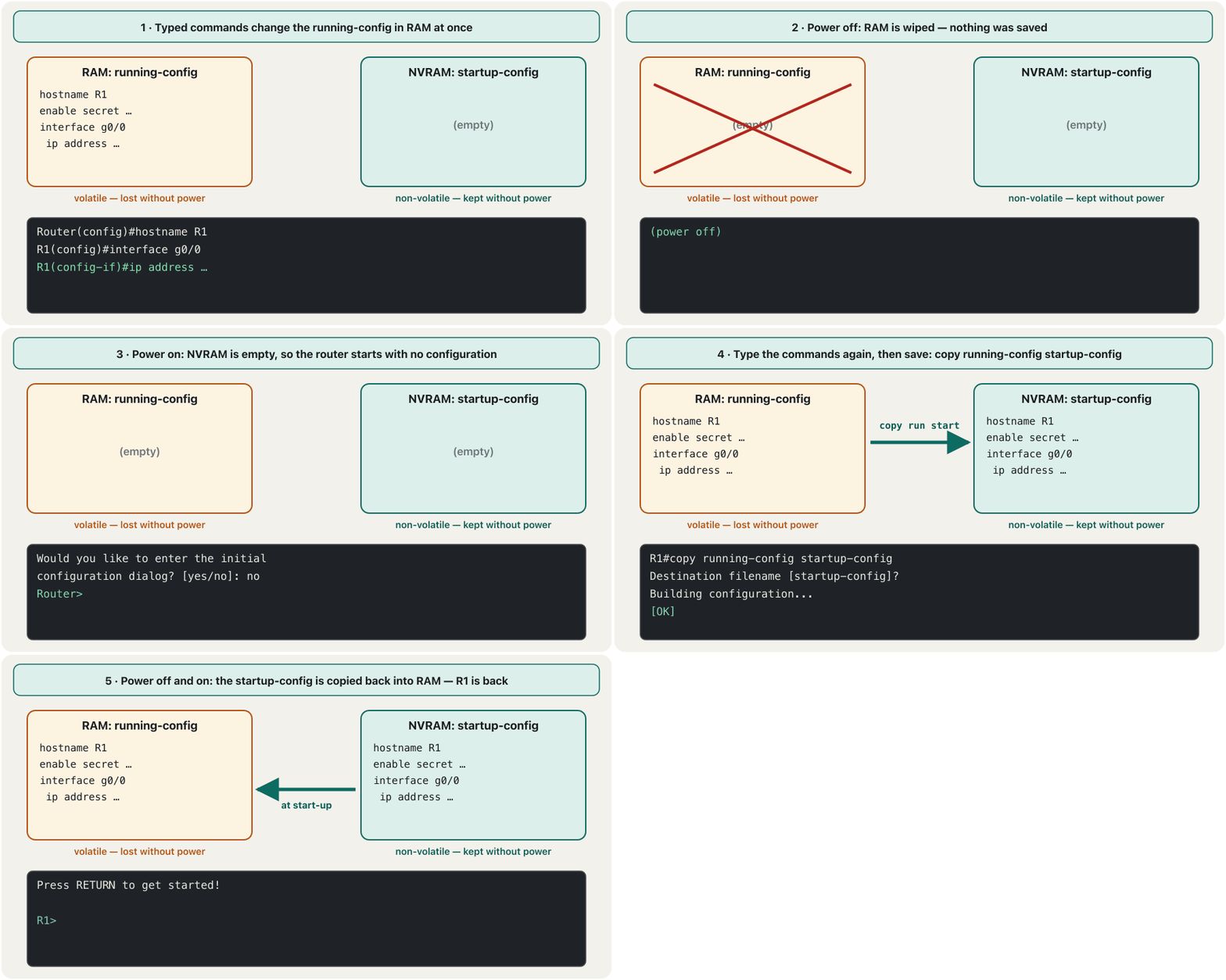
A Cisco device keeps its configuration in two places, which you met as two of the four memories. The running-config lives in RAM: it is the configuration the device is using right now, and every command you type changes it at once. The startup-config lives in NVRAM: it is the saved copy that IOS loads when the device starts.
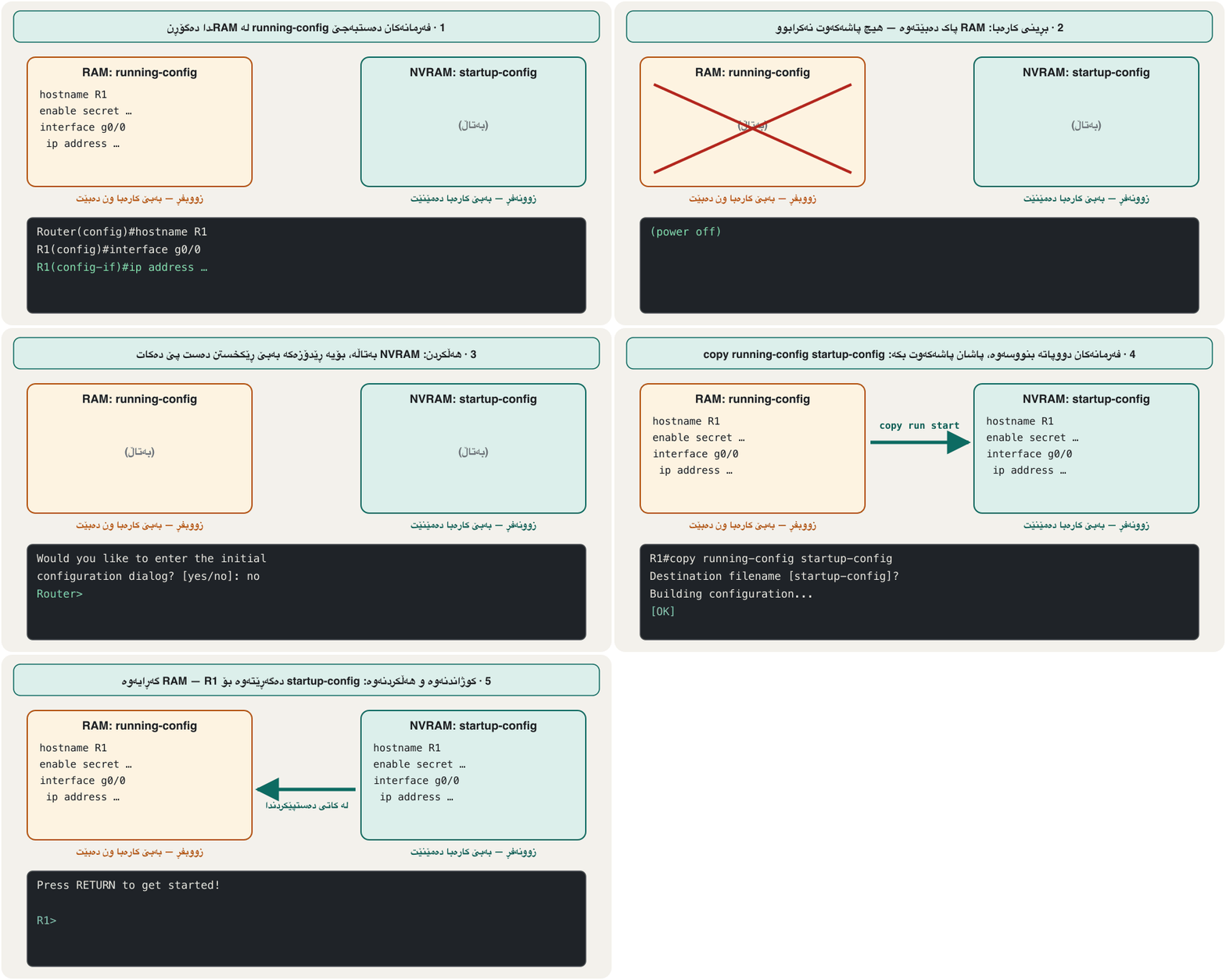
ئامێرێکی Cisco لە دوو شوێندا هەڵدەگرێت، کە وەک دووان لە چوار بیرگەکە ناسیتن. لە RAMـدایە: ئەو کە ئامێرەکە ئێستا بەکاری دەهێنێت و هەر بنووسیت دەستبەجێ دەیگۆڕێت. لە NVRAMـدایە: ئەو کۆپییە پاشەکەوتکراوەیە کە IOS لە کاتی دەستپێکردنی ئامێرەکەدا باری دەکات.
RAM is volatile: if the power goes off before you save, everything since the last save is gone, and the device starts from the old startup-config — or from nothing.
RAM . ئەگەر پێش پاشەکەوتکردن کارەبا ببڕێت، هەموو ئەو شتانەی لە دوایین پاشەکەوتەوە ڕێکت خستوون ون دەبن و ئامێرەکە دووپاتە لە startup-configـە کۆنەکەوە دەست پێ دەکاتەوە — یان لە هیچەوە.
The running-config is like the classroom whiteboard: you can change it freely and everyone works from it, but the cleaner wipes it every evening. The startup-config is your notebook: it stays. Before you leave, copy the board into the notebook.
وەک تەختەی سپیی پۆلە: بە ئازادی دەیگۆڕیت و هەمووان لێیەوە کار دەکەن، بەڵام پاککەرەوەکە هەموو ئێوارەیەک دەیسڕێتەوە. دەفتەرەکەتە: دەمێنێت. پێش ئەوەی بڕۆیت، تەختەکە بگوازەوە بۆ ناو دەفتەرەکە.
Where the analogy stops workingسنووری ئەم نموونەیە
A whiteboard changes only when you write; the running-config also changes when the device itself learns things, such as a new route.
تەختەی سپی تەنیا کاتێک دەگۆڕێت کە دەنووسیت؛ کاتێکیش دەگۆڕێت کە خودی ئامێرەکە شتێک فێر دەبێت.
configure terminal does not save anythingconfigure terminal هیچ پاشەکەوت ناکات
A common belief is that configure terminal saves the configuration. It does not. It only moves you from privileged EXEC (R1#) into global configuration mode (R1(config)#), where you may type configuration commands. Each of those commands takes effect immediately in the running-config — the device starts using it the moment you press Enter — and NVRAM stays exactly as it was.
باوەڕێکی باو ئەوەیە کە configure terminal پاشەکەوت دەکات. وا نییە. تەنیا لە (R1#)ەوە دەتباتە (R1(config)#)، کە لەوێ دەتوانیت ڕێکخستن بنووسیت. هەر لەوانە دەستبەجێ لە running-configـدا کار دەکات — ئامێرەکە لەو ساتەوە بەکاری دەهێنێت کە Enter دادەگریت — و NVRAM ڕێک وەک خۆی دەمێنێتەوە.
So two separate steps always belong together: change (in configuration mode) and save (copy running-config startup-config, back at R1#). When you leave configuration mode, IOS logs %SYS-5-CONFIG_I: Configured from console by console — that only says the running-config was changed, not that it was saved.
بۆیە دوو هەنگاوی جیا هەمیشە پێکەوەن: گۆڕین (لە ) و پاشەکەوتکردن (copy running-config startup-config، دوای گەڕانەوە بۆ R1#). کاتێک لە ڕێکخستن دەردەچیت، IOS دەنووسێت %SYS-5-CONFIG_I: Configured from console by console — ئەمە تەنیا دەڵێت running-config گۆڕدرا، نەک پاشەکەوت کرا.
Saving: copy running-config startup-configپاشەکەوتکردن: copy running-config startup-config
copy running-config startup-config copies the running-config from RAM to NVRAM and replaces the old startup-config. Most people type the short form copy run start. The older write memory (or just wr) does the same and still works on current IOS and IOS XE. Make it a habit: every lab in this course ends with this command.
copy running-config startup-config لە RAMـەوە کۆپی دەکات بۆ NVRAM و startup-configـە کۆنەکە دەگۆڕێتەوە. زۆربەی خەڵک copy run start دەنووسن. write memoryـی کۆنتر (یان تەنیا wr) هەمان کار دەکات و هێشتا لە IOS و IOS XEـی ئەمڕۆدا کار دەکات. بیکە بە ڕاهاتن: هەموو تاقیگەیەکی ئەم کۆرسە بەم کۆتایی دێت.
R1#copy running-config startup-config
Destination filename [startup-config]?
Building configuration...
[OK]
R1#write memory
Building configuration...
[OK]
Explain the codeڕوونکردنەوەی کۆدەکە
- Lineدێڕی 2
IOS proposes the name startup-config: just press Enter.
IOS ناوی startup-config پێشنیار دەکات: تەنیا Enter دابگرە.
- Lineدێڕی 4
[OK] means the configuration is now in NVRAM.
[OK] واتە ئێستا لە NVRAMـدایە.
- Lineدێڕی 5-7
write memory saves without asking for a file name.
write memory بەبێ پرسیاری ناوی پاشەکەوت دەکات.
reload: restarting from the command linereload: دەستپێکردنەوە لە هێڵی فەرمانەوە
reload restarts a router or switch, like switching it off and on. If the running-config differs from the startup-config, IOS first asks whether to save. Answer yes to keep your changes or no to throw them away — useful when an experiment went wrong. Then confirm the restart with Enter.
reload یان دەستپێدەکاتەوە، وەک کوژاندنەوە و هەڵکردنەوە. ئەگەر running-config جیاواز بێت لە startup-config، IOS سەرەتا دەپرسێت ئایا پاشەکەوتی بکات. وەڵامی yes بدەوە بۆ پاراستنی گۆڕانکارییەکانت یان no بۆ فڕێدانیان — بەسوودە کاتێک تاقیکردنەوەیەک هەڵە دەرچوو. پاشان بە Enter پشتڕاست بکەرەوە.
R1#reload
System configuration has been modified. Save? [yes/no]: no
Proceed with reload? [confirm]
Explain the codeڕوونکردنەوەی کۆدەکە
- Lineدێڕی 2
Asked only when there are unsaved changes.
تەنیا کاتێک دەپرسرێت کە گۆڕانکاریی پاشەکەوتنەکراو هەبێت.
- Lineدێڕی 3
Enter restarts; any other key cancels.
Enter دەستپێدەکاتەوە؛ هەر دوگمەیەکی تر هەڵی دەوەشێنێتەوە.
Looking at the two configurationsسەیرکردنی هەردوو ڕێکخستنەکە
show running-config lists the configuration the device is using now, from RAM. show startup-config lists the saved one, from NVRAM; on a new or erased device it answers startup-config is not present. Both are privileged EXEC commands. Compare them: if they differ, you have unsaved changes.
show running-config ئەو ڕیز دەکات کە ئامێرەکە ئێستا بەکاری دەهێنێت، لە RAMـەوە. show startup-config ئەوەی پاشەکەوتکراو ڕیز دەکات، لە NVRAMـەوە؛ لە ئامێرێکی نوێ یان سڕاوەدا وەڵام دەداتەوە startup-config is not present. هەردووکیان . بەراوردیان بکە: ئەگەر جیاواز بن، گۆڕانکاریی پاشەکەوتنەکراوت هەیە.
A long output stops at --More--. Press Space for the next screen, Enter for the next line, or any other key to stop. Short forms: sh run, sh start.
دەرچوونێکی درێژ لە --More--ـدا دەوەستێت. Space دابگرە بۆ پەڕەی داهاتوو، Enter بۆ دێڕی داهاتوو، یان هەر دوگمەیەکی تر بۆ وەستان. : sh run، sh start.
Reading a running-configخوێندنەوەی running-config
Here is the real running-config of a Cisco 1941 router from a Packet Tracer DHCP lab (empty ! lines shortened). Read it from top to bottom: global settings, then services, then one block per interface, then the lines.
ئەمە running-configـی ڕاستەقینەی Cisco 1941ـە لە تاقیگەیەکی DHCPـی Packet Tracerـەوە (دێڕە بەتاڵەکانی ! کورت کراونەتەوە). لە سەرەوە بۆ خوارەوە بیخوێنەوە: ڕێکخستنە گشتییەکان، پاشان خزمەتگوزارییەکان، پاشان بۆ هەر بلۆکێک، پاشان هێڵەکان.
Router#show running-config
Building configuration...

Current configuration : 801 bytes
!
version 15.1
no service timestamps log datetime msec
no service timestamps debug datetime msec
no service password-encryption
!
hostname Router
!
ip dhcp excluded-address 192.168.2.100
ip dhcp excluded-address 192.168.2.5
!
ip dhcp pool vlan2
 network 192.168.2.0 255.255.255.0
 default-router 192.168.2.5
 dns-server 8.8.8.8
!
ip cef
no ipv6 cef
!
license udi pid CISCO1941/K9 sn FTX1524T2NP-
!
spanning-tree mode pvst
!
interface GigabitEthernet0/0
 ip address 192.168.2.5 255.255.255.0
 duplex auto
 speed auto
!
interface GigabitEthernet0/1
 no ip address
 duplex auto
 speed auto
 shutdown
!
interface Vlan1
 no ip address
 shutdown
!
ip classless
!
ip flow-export version 9
!
Explain the codeڕوونکردنەوەی کۆدەکە
- Lineدێڕی 4
The size of the configuration.
قەبارەی .
- Lineدێڕی 6-11
Global settings. no service password-encryption is the default: passwords would appear as plain text (see lesson 3).
ڕێکخستنە گشتییەکان. no service password-encryption بنەڕەتە: وەک دەردەکەون (بڕوانە وانەی 3).
- Lineدێڕی 13-19
The DHCP service: excluded addresses and the pool. Lines that start with a space belong to the line above.
خزمەتگوزاریی DHCP: ناونیشانە دەرکراوەکان و . ئەو دێڕانەی بە دەست پێ دەکەن سەر بە دێڕی سەرەوەن.
- Lineدێڕی 28-31
The interface in use: its address.
ئەو بەکار دێت: ناونیشانەکەی.
- Lineدێڕی 33-37
An unused interface: no address and shutdown (router interfaces start switched off).
بەکارنەهاتوو: بێ ناونیشان و shutdown ( کوژاوە دەست پێ دەکەن).
Not every line comes from you: IOS also prints settings it added itself (ip cef, license udi …, spanning-tree mode pvst). On a real router the configuration ends with the line con 0 and line vty blocks and the word end.
هەموو دێڕێک لە تۆوە نایەت: IOS ئەو ڕێکخستنانەش چاپ دەکات کە خۆی زیادی کردوون (ip cef، license udi …، spanning-tree mode pvst). لە ڕاستەقینەدا بە بلۆکەکانی line con 0 و line vty و وشەی end کۆتایی دێت.
The show commands you will use mostئەو فەرمانەکانی show کە زۆرترین بەکاریان دەهێنیت
show commands only look; they never change anything, so you can type them freely in privileged EXEC mode. show ? lists them all. The ones you need from the start:
show تەنیا سەیر دەکەن؛ هەرگیز هیچ ناگۆڕن، بۆیە دەتوانیت بە ئازادی لە بیاننووسیت. show ? هەموویان ڕیز دەکات. ئەوانەی لە سەرەتاوە پێویستن:
| Command | What it showsچی پیشان دەدات |
|---|---|
show version | the IOS version, uptime, image file, memory sizes, interfaces and the configuration registerوەشانی IOS، کاتی کارکردن، IOS، قەبارەی ، و configuration register |
show flash: | the files in flash memory — the IOS image, and on a switch vlan.dat ناو — IOS و لە vlan.dat |
show history | the commands in the history buffer ناو مێژوو |
show running-config / show startup-config | the configuration in RAM / in NVRAM لە RAM / لە NVRAMـدا |
show ip interface brief | one line per interface: address and statusیەک دێڕ بۆ هەر : ناونیشان و دۆخ |
show interfaces | full details of every interface: status, MAC address, speed, countersوردەکاریی تەواوی هەموو : دۆخ، ، خێرایی، ژمێرەرەکان |
show clock | the time the device usesئەو کاتەی ئامێرەکە بەکاری دەهێنێت |
The show commands you will use mostئەو فەرمانەکانی show کە زۆرترین بەکاریان دەهێنیت
Inside show versionلە ناو show versionـدا
show version is the device's identity card. On the Packet Tracer Cisco 2901 it includes the lines below. The last line is the configuration register: 0x2102 means a normal start — load IOS from flash and the startup-config from NVRAM. Other values are used, for example, to recover a lost password.
show version ناسنامەی ئامێرەکەیە. لە Cisco 2901ـی Packet Tracerـدا ئەم دێڕانەی خوارەوەی تێدایە. دوایین دێڕ configuration registerـە: 0x2102 واتە دەستپێکردنی ئاسایی — IOS لە و startup-config لە NVRAMـەوە بار بکە. بەهای تر بەکار دێن، بۆ نموونە بۆ گەڕاندنەوەی لەبیرچوو.
R1#show version
Cisco IOS Software, C2900 Software (C2900-UNIVERSALK9-M), Version 15.1(4)M4, RELEASE SOFTWARE (fc2)
<output omitted>
Cisco CISCO2901/K9 (revision 1.0) with 491520K/32768K bytes of memory.
Processor board ID FTX152400KS
2 Gigabit Ethernet interfaces
DRAM configuration is 64 bits wide with parity disabled.
255K bytes of non-volatile configuration memory.
249856K bytes of ATA System CompactFlash 0 (Read/Write)
<output omitted>
Configuration register is 0x2102
Explain the codeڕوونکردنەوەی کۆدەکە
- Lineدێڕی 2
The IOS image family and version.
خێزان و وەشانی IOS.
- Lineدێڕی 4
RAM: main memory plus memory for packets.
RAM: سەرەکی لەگەڵ بۆ .
- Lineدێڕی 8
NVRAM, where the startup-config lives.
NVRAM، شوێنی startup-config.
- Lineدێڕی 9
Flash (CompactFlash), where the IOS image lives.
(CompactFlash)، شوێنی IOS.
- Lineدێڕی 11
0x2102 = normal start.
0x2102 = دەستپێکردنی ئاسایی.
The show commands you will use mostئەو فەرمانەکانی show کە زۆرترین بەکاریان دەهێنیت
show ? on a 1941 routershow ? لە ڕێدۆزی 1941ـدا
show alone is not enough — IOS answers % Incomplete command. — and show ? lists every subject it can show. This is the full list of a Cisco 1941 router in Packet Tracer (IOS 15.1). You do not need to learn it; notice how many parts of the device you can inspect.
show بەتەنیا بەس نییە — IOS وەڵام دەداتەوە % Incomplete command. — و show ? هەموو ئەو بابەتانە ڕیز دەکات کە دەتوانێت پیشانیان بدات. ئەمە لیستی تەواوی Cisco 1941ـە لە Packet Tracerـدا (IOS 15.1). پێویست ناکات لەبەری بکەیت؛ سەرنج بدە چەند بەشی ئامێرەکە دەتوانیت بپشکنیت.
Router#show
% Incomplete command.
Router#show ?
  aaa                Show AAA values
  access-lists       List access lists
  arp                Arp table
  cdp                CDP information
  class-map          Show QoS Class Map
  clock              Display the system clock
  controllers        Interface controllers status
  crypto             Encryption module
  debugging          State of each debugging option
  dhcp               Dynamic Host Configuration Protocol status
  dot11              IEEE 802.11 show information
  file               Show filesystem information
  flash:             display information about flash: file system
  flow               Flow information
  frame-relay        Frame-Relay information
  history            Display the session command history
  hosts              IP domain-name, lookup style, nameservers, and host table
  interfaces         Interface status and configuration
  ip                 IP information
  ipv6               IPv6 information
  license            Show license information
  line               TTY line information
  lldp               LLDP information
  logging            Show the contents of logging buffers
  login              Display Secure Login Configurations and State
  mac-address-table  MAC forwarding table
  ntp                Network time protocol
  parser             Show parser commands
  policy-map         Show QoS Policy Map
  pppoe              PPPoE information
  privilege          Show current privilege level
  processes          Active process statistics
  protocols          Active network routing protocols
  queue              Show queue contents
  queueing           Show queueing configuration
  running-config     Current operating configuration
  secure             Show secure image and configuration archive
  sessions           Information about Telnet connections
  snmp               snmp statistics
  spanning-tree      Spanning tree topology
  ssh                Status of SSH server connections
  standby            standby configuration
  startup-config     Contents of startup configuration
  storm-control      Show storm control configuration
  tcp                Status of TCP connections
  tech-support       Show system information for Tech-Support
  terminal           Display terminal configuration parameters
  users              Display information about terminal lines
  version            System hardware and software status
  vlan-switch        VTP VLAN status
  vtp                Configure VLAN database
  zone               Zone Information
  zone-pair          Zone pair information
Explain the codeڕوونکردنەوەی کۆدەکە
- Lineدێڕی 1-2
show needs a subject.
show پێویستی بە بابەتێک هەیە.
- Lineدێڕی 39
running-config: the configuration in RAM.
running-config: لە RAMـدا.
- Lineدێڕی 45
startup-config: the configuration in NVRAM.
startup-config: لە NVRAMـدا.
- Lineدێڕی 51
version: hardware and software status.
version: دۆخی و .
Checking interfaces: show ip interface brief and pingپشکنینی نێوبەستەکان: show ip interface brief و ping
After configuring addresses, check them with show ip interface brief (short: sh ip int br): one line per interface with its address and two status columns. Status is the physical side (cable, power, and whether the interface was switched on); Protocol says whether the link really works. administratively down means someone — or the factory default — switched the interface off with shutdown.
دوای ڕێکخستنی ناونیشانەکان، بە show ip interface brief (کورتەکەی: sh ip int br) بیانپشکنە: یەک دێڕ بۆ هەر لەگەڵ ناونیشانەکەی و دوو ستوونی دۆخ. Status لایەنی فیزیکییە (کێبڵ، کارەبا و ئایا هەڵکراوە)؛ Protocol دەڵێت ئایا بەستەرەکە بەڕاستی کار دەکات. administratively down واتە کەسێک — یان ڕێکخستنی کارگە — بە shutdown کوژاندووەتەوە.
Router#show ip interface brief
Interface              IP-Address      OK? Method Status                Protocol
GigabitEthernet0/0     192.168.2.5     YES manual up                    up
GigabitEthernet0/1     unassigned      YES unset  administratively down down
Vlan1                  unassigned      YES unset  administratively down down
Router#ping 192.168.2.10

Type escape sequence to abort.
Sending 5, 100-byte ICMP Echos to 192.168.2.10, timeout is 2 seconds:
.!!!!
Success rate is 80 percent (4/5), round-trip min/avg/max = 0/0/1 ms
Explain the codeڕوونکردنەوەی کۆدەکە
- Lineدێڕی 3
In use: an address typed by hand (manual), up and up.
بەکار دێت: ناونیشانێکی دەستی (manual)، up و up.
- Lineدێڕی 4-5
Not in use and switched off.
بەکار نایەت و کوژێنراوەتەوە.
- Lineدێڕی 10
! = a reply, . = a timeout. The first dot is normal: the router was still learning the PC's MAC address with ARP.
! = وەڵامێک، . = تەواوبوونی کات. یەکەم خاڵ ئاساییە: هێشتا بە ARP فێری دەبوو.
do: show commands from configuration modedo: فەرمانەکانی show لە ڕێکخستنەوە
show, copy, ping and clock are privileged EXEC commands. If you type show running-config at R1(config)#, IOS answers with an error (Packet Tracer sometimes says % Unrecognized command instead). You could type end, look, and go back with conf t — or put do in front: do show running-config runs the EXEC command and leaves you in the same configuration mode.
show، copy، ping و clock . ئەگەر لە R1(config)#ـدا show running-config بنووسیت، IOS بە هەڵەیەک وەڵام دەداتەوە (Packet Tracer هەندێک جار لەبری ئەوە دەڵێت % Unrecognized command). دەتوانیت end بنووسیت، سەیر بکەیت و بە conf t بگەڕێیتەوە — یان do بخەیتە پێشەوەی: do show running-config EXEC جێبەجێ دەکات و لە هەمان بارێکی ڕێکخستندا دەتهێڵێتەوە.
R1(config)#interface g0/0
R1(config-if)#do show ip interface brief
Interface              IP-Address      OK? Method Status                Protocol
GigabitEthernet0/0     192.168.2.5     YES manual up                    up
GigabitEthernet0/1     unassigned      YES unset  administratively down down
Vlan1                  unassigned      YES unset  administratively down down
R1(config-if)#do copy running-config startup-config
Destination filename [startup-config]?
Building configuration...
[OK]
R1(config-if)#
Explain the codeڕوونکردنەوەی کۆدەکە
- Lineدێڕی 2
do + any EXEC command.
do + هەر EXEC.
- Lineدێڕی 11
Still in interface sub-mode.
هێشتا لە .
Erasing: back to factory settingsسڕینەوە: گەڕانەوە بۆ ڕێکخستنی کارگە
To start a lab from zero, delete the saved configuration and restart. erase startup-config deletes the startup-config from NVRAM (the older write erase and erase nvram: do the same). The running-config is untouched until you reload — and at the reload, answer no if IOS asks to save, or you write the old configuration straight back.
بۆ دەستپێکردنی تاقیگەیەک لە سفرەوە، پاشەکەوتکراو بسڕەوە و دەستپێبکەرەوە. erase startup-config startup-config لە NVRAMـدا دەسڕێتەوە (write erase و erase nvram:ـی کۆنتر هەمان کار دەکەن). running-config دەست لێنەدراو دەمێنێت تا reload دەکەیت — و لە کاتی reloadـدا، ئەگەر IOS پرسی پاشەکەوت بکات، وەڵامی no بدەوە، ئەگەرنا کۆنەکە ڕاستەوخۆ دەنووسیتەوە.
A switch keeps its VLANs in a separate file, vlan.dat, in flash — not in the startup-config. For a full reset of a lab switch, also delete flash:vlan.dat before the reload. (To change single VLANs, use the VLAN commands of VLANs instead; Cisco warns that deleting the file by hand outside a full reset can leave the VLAN database inconsistent.)
لە جیادا هەڵدەگرێت، vlan.dat، لە — نەک لە startup-configـدا. بۆ ڕێکخستنەوەی تەواوی تاقیگە، پێش reload delete flash:vlan.datیش بکە. (بۆ گۆڕینی تاکە ، لەبری ئەوە VLAN بەکار بهێنە؛ Cisco ئاگاداری دەکاتەوە کە سڕینەوەی بە دەست لە دەرەوەی ڕێکخستنەوەیەکی تەواو دەتوانێت بنکەی تێکبدات.)
Switch#delete flash:vlan.dat
Delete filename [vlan.dat]?
Delete flash:/vlan.dat? [confirm]
Switch#erase startup-config
Erasing the nvram filesystem will remove all configuration files! Continue? [confirm]
[OK]
Erase of nvram: complete
%SYS-7-NV_BLOCK_INIT: Initialized the geometry of nvram
Switch#reload
Proceed with reload? [confirm]
Explain the codeڕوونکردنەوەی کۆدەکە
- Lineدێڕی 1-3
Remove the VLAN database from flash; press Enter twice to confirm.
بنکەی لە لاببە؛ دوو جار Enter دابگرە بۆ پشتڕاستکردنەوە.
- Lineدێڕی 4-8
Delete the startup-config from NVRAM.
startup-config لە NVRAMـدا بسڕەوە.
- Lineدێڕی 9-10
Restart. If IOS asks Save? [yes/no], answer no.
دەستپێبکەرەوە. ئەگەر IOS پرسی Save? [yes/no]، وەڵامی no بدەوە.
Loading a configuration: copy mergesبارکردنی ڕێکخستنێک: copy تێکەڵ دەکات
You can also copy into the running-config: copy startup-config running-config takes the saved file from NVRAM, and copy tftp: running-config takes a file from a TFTP server. Either way, IOS does not erase the running-config first. It applies the copied lines as if you typed them: lines in the copied file win, and lines the file does not mention stay. The result is a mixture, not a clean copy.
دەتوانیت بۆ ناو running-configیش کۆپی بکەیت: copy startup-config running-config پاشەکەوتکراو لە NVRAMـەوە وەردەگرێت و copy tftp: running-config لە TFTPـەوە وەردەگرێت. لە هەردوو ڕێگەدا IOS سەرەتا running-config ناسڕێتەوە. دێڕە کۆپیکراوەکان جێبەجێ دەکات وەک ئەوەی خۆت نووسیبێتت: دێڕەکانی کۆپیکراو سەردەکەون و ئەو دێڕانەی باسیان ناکات دەمێنن. ئەنجامەکە تێکەڵەیەکە، نەک کۆپییەکی پاک.
Older IOS books name two commands for this. configure memory merged the startup-config from NVRAM into the running-config — it does not change the startup-config. configure network loaded a configuration from a network (TFTP) host into the running-config — it does not move where the device stores its configuration. Both are legacy forms; today you use the copy commands above.
کتێبە کۆنەکانی IOS ناوی دوو بۆ ئەمە دەبەن. configure memory startup-configـی لە NVRAMـەوە تێکەڵی running-config دەکرد — startup-config ناگۆڕێت. configure network لە (TFTP)ەوە بار دەکرد بۆ ناو running-config — شوێنی هەڵگرتنی ئامێرەکە ناگوازێتەوە. هەردووکیان شێوەی کۆنن؛ ئەمڕۆ copyـی سەرەوە بەکار دەهێنیت.
Backups on a server: TFTP and SCPباکئەپ لەسەر ڕاژەکارێک: TFTP و SCP
NVRAM keeps a configuration through a restart, but not through a broken router or a mistake. Network teams therefore keep copies on a server. TFTP (how it works) is the simple way: no user name, no password, nothing encrypted — fine in a lab (Packet Tracer's Server has a TFTP service), risky on a real network. SCP (Secure Copy) runs over SSH, so it asks for a user name and password and encrypts the file.
NVRAM لە دەپارێزێت، بەڵام لە تێکچوو یان هەڵەیەکدا نا. بۆیە تیمەکانی کۆپی لەسەر هەڵدەگرن. TFTP (چۆن کار دەکات) ڕێگە سادەکەیە: بێ ، بێ ، هیچ شفرە ناکرێت — بۆ تاقیگە باشە ( Packet Tracer خزمەتگوزاریی TFTPـی هەیە)، بۆ ڕاستەقینە مەترسیدارە. SCP (Secure Copy) بە ناو کار دەکات، بۆیە داوای و دەکات و شفرە دەکات.
R1#copy running-config tftp://192.168.1.10/r1-confg
Address or name of remote host [192.168.1.10]?
Destination filename [r1-confg]?
!!
874 bytes copied in 0.092 secs (9500 bytes/sec)
R1#copy tftp://192.168.1.10/r1-confg running-config
Destination filename [running-config]?
Accessing tftp://192.168.1.10/r1-confg...
Loading r1-confg from 192.168.1.10 (via GigabitEthernet0/0): !
[OK - 874 bytes]

874 bytes copied in 9.520 secs (91 bytes/sec)
Explain the codeڕوونکردنەوەی کۆدەکە
- Lineدێڕی 1-5
IOS asks for the server and the file name and shows its guess in brackets: press Enter to accept it. Each ! is a block of the file sent.
IOS ناونیشانی و ناوی دەپرسێت و پێشنیارەکەی لە ناو
[ ]ـدا پیشان دەدات: بۆ پەسەندکردنی Enter دابگرە. هەر ! بەشێکی کە نێردرا.- Lineدێڕی 6-12
Loading the file back merges it into the running-config; then copy run start if you want to keep it.
بارکردنەوەی تێکەڵی running-config دەکات؛ پاشان ئەگەر دەتەوێت بیمێنێتەوە copy run start بکە.
In Packet Tracer, type copy running-config tftp: without an address: IOS asks Address or name of remote host []? (type the server's address) and Destination filename [R1-confg]? (press Enter), then reports the bytes copied.
لە Packet Tracerـدا copy running-config tftp: بەبێ ناونیشان بنووسە: IOS دەپرسێت Address or name of remote host []? (ناونیشانی بنووسە) و Destination filename [R1-confg]? (Enter دابگرە)، پاشان دەڵێت چەند کۆپی کرا.
Command card: modes, files and sessionsکارتی فەرمانەکان: بارەکانی فەرمان، فایلەکان و دانیشتنەکان
This table collects the basic commands of the first two lessons with the mode in which each one is typed:
ئەم خشتەیە سەرەتاییەکانی دوو وانەی یەکەم کۆ دەکاتەوە لەگەڵ ئەو هەریەکەیان تێیدا دەنووسرێت:
| Command | Mode | What it doesچی دەکات |
|---|---|---|
enable / disable | > / # | to privileged EXEC (asks for a password if one is set) / back to user EXECبۆ (ئەگەر دانرابێت داوای دەکات) / گەڕانەوە بۆ |
configure terminal | # | into global configuration modeبۆ ناو |
hostname R1 | (config)# | sets the host name, also the first part of the prompt دادەنێت، کە بەشی یەکەمی |
interface g0/1 | (config)# | into interface mode, e.g. interface FastEthernet0/1 on a switchبۆ ناو ، بۆ نموونە interface FastEthernet0/1 لە |
line console 0 | (config)# | into the console lineبۆ ناو هێڵی کۆنسۆڵ |
password …, login | (config-line)# | set a line password; ask for it at login (lesson 3) بۆ هێڵەکە دادەنێت؛ لە کاتی چوونەژوورەوەدا داوای دەکات (وانەی 3) |
exit / end, Ctrl+Z | any configuration modeهەر بارێکی ڕێکخستن | one level up / straight back to # (Ctrl+Z is a key combination, not a command)ئاستێک بۆ سەرەوە / ڕاستەوخۆ بۆ # (Ctrl+Z تێکەڵەی دوگمەیە، نەک ) |
copy running-config startup-config | # | save: replace the startup-config with the running-configپاشەکەوتکردن: startup-config بە running-config دەگۆڕێتەوە |
copy startup-config running-config | # | merge the startup-config into the running-configstartup-config تێکەڵی running-config دەکات |
show running-config / show startup-config | # | list the running / saved configuration کارا / پاشەکەوتکراو ڕیز دەکات |
write erase, erase startup-config, erase nvram: | # | erase the startup-configstartup-config دەسڕێتەوە |
reload | # | restart the switch or router یان دەستپێدەکاتەوە |
no debug all / undebug all | # | turn off every debug that is runningهەموو debugـێکی کارا دەکوژێنێتەوە |
quit, exit, logout | > / # | disconnect from the CLI sessionلە دانیشتنی دەردەچێت |
Common mistakesهەڵە باوەکان
Exercisesڕاهێنانەکان
Explain what each command does, and correct any wrong idea: (a) configure terminal (b) configure memory (c) configure network. Then say which command saves the configuration.
ڕوونی بکەرەوە هەر چی دەکات و هەر بیرۆکەیەکی هەڵە ڕاست بکەرەوە: (a) configure terminal (b) configure memory (c) configure network. پاشان بڵێ کام پاشەکەوت دەکات.
Show answerوەڵامەکە پیشان بدە
- (a) Enters global configuration mode. It saves nothing; commands typed there change the running-config in RAM at once.
- (b) A legacy command that merges the startup-config from NVRAM into the running-config. It does not change the startup-config. Today:
copy startup-config running-config. - (c) A legacy command that loads a configuration file from a TFTP host into the running-config. It does not change where the device stores its configuration. Today:
copy tftp: running-config. - Saving:
copy running-config startup-config(orwrite memory).
- (a) دەچێتە ناو . هیچ پاشەکەوت ناکات؛ کە لەوێ دەنووسرێن دەستبەجێ running-config لە RAMـدا دەگۆڕن.
- (b) کۆنە کە startup-config لە NVRAMـەوە تێکەڵی running-config دەکات. startup-config ناگۆڕێت. ئەمڕۆ:
copy startup-config running-config. - (c) کۆنە کە لە TFTPـەوە بار دەکات بۆ ناو running-config. شوێنی هەڵگرتنی ئامێرەکە ناگۆڕێت. ئەمڕۆ:
copy tftp: running-config. - پاشەکەوتکردن:
copy running-config startup-config(یانwrite memory).
Use the running-config in Reading a running-config. (a) What is the host name? (b) Which address do DHCP clients get as their default gateway? (c) Which interfaces are not in use? (d) Would passwords be shown as plain text? (e) How many addresses are excluded from the DHCP pool?
running-configـەکەی خوێندنەوەی running-config بەکار بهێنە. (a) چییە؟ (b) DHCP کام ناونیشان وەک وەردەگرن؟ (c) کام بەکار نایەن؟ (d) ئایا وەک پیشان دەدرێن؟ (e) چەند ناونیشان لە پووڵی DHCP دەرکراون؟
Show answerوەڵامەکە پیشان بدە
- (a)
Router— the default; it was never changed. - (b) 192.168.2.5 (
default-router), which is the G0/0 address — correct. - (c) GigabitEthernet0/1 and Vlan1: no address and
shutdown. - (d) Yes:
no service password-encryptionis set (lesson 3 explains what that changes). - (e) Two: 192.168.2.100 and 192.168.2.5.
- (a)
Router— بنەڕەتییەکە؛ هەرگیز نەگۆڕدراوە. - (b) 192.168.2.5 (
default-router)، کە ناونیشانی G0/0ـە — دروستە. - (c) GigabitEthernet0/1 و Vlan1: بێ ناونیشان و
shutdown. - (d) بەڵێ:
no service password-encryptionدانراوە (وانەی 3 ڕوونی دەکاتەوە چی دەگۆڕێت). - (e) دوو: 192.168.2.100 و 192.168.2.5.
Write, in order, the commands that return switch SW1 completely to factory settings, and say what to answer at each question.
بە ڕیز بنووسە کە SW1 بە تەواوی دەگەڕێننەوە بۆ ڕێکخستنی کارگە و بڵێ وەڵامی هەر پرسیارێک چی بێت.
Show answerوەڵامەکە پیشان بدە
SW1#delete flash:vlan.dat          ! Enter, then Enter again to confirm
SW1#erase startup-config           ! Enter to confirm
SW1#reload ! Save? answer no; then Enter to confirmFor each command, name the memory it reads or writes: (a) show running-config (b) copy run start (c) show flash: (d) erase startup-config (e) delete flash:vlan.dat (f) show startup-config.
بۆ هەر ، ناوی ئەو بڵێ کە دەیخوێنێتەوە یان دەینووسێت: (a) show running-config (b) copy run start (c) show flash: (d) erase startup-config (e) delete flash:vlan.dat (f) show startup-config.
Show answerوەڵامەکە پیشان بدە
(a) RAM. (b) reads RAM, writes NVRAM. (c) flash. (d) NVRAM. (e) flash. (f) NVRAM.
(a) RAM. (b) RAM دەخوێنێتەوە، NVRAM دەنووسێت. (c) . (d) NVRAM. (e) . (f) NVRAM.
In Packet Tracer, give a new router the host name R1, save, change the host name to R2 without saving, then reload and answer no. Which name does the router have afterwards, and why?
لە Packet Tracerـدا، R1 بدە بە نوێ، پاشەکەوتی بکە، بگۆڕە بۆ R2 بەبێ پاشەکەوتکردن، پاشان reload بکە و وەڵامی no بدەوە. دوای ئەوە چ ناوێکی هەیە و بۆچی؟
Show answerوەڵامەکە پیشان بدە
R1. The saved startup-config says hostname R1; the change to R2 existed only in the running-config, which was lost at the reload.
R1. startup-configـی پاشەکەوتکراو دەڵێت hostname R1؛ گۆڕینەکە بۆ R2 تەنیا لە running-configـدا بوو، کە لە کاتی reloadـدا ون بوو.
Summaryپوختە
- running-config = RAM, in use now, changes with every command, lost at power-off. startup-config = NVRAM, loaded at start-up.
configure terminalonly enters global configuration mode. Save withcopy running-config startup-config(copy run start,write memory) — at the end of every lab.reloadrestarts; atSave? [yes/no]answer yes to keep changes, no to drop them.- Look with
show running-config,show startup-config,show version(last line: configuration register 0x2102),show flash:,show history,show ip interface brief,show interfaces;do show …from configuration mode. - Reset:
erase startup-config(write erase), on a switch alsodelete flash:vlan.dat, thenreloadand answer no. - Copying into the running-config merges (
copy startup-config running-config,copy tftp: running-config; old formsconfigure memory,configure network). Back up to a server with TFTP in the lab, SCP in real networks.
- = RAM، ئێستا بەکار دێت، بە هەر دەگۆڕێت، بە بڕینی کارەبا ون دەبێت. = NVRAM، لە کاتی دەستپێکردندا بار دەکرێت.
configure terminalتەنیا دەچێتە ناو . بەcopy running-config startup-config(copy run start،write memory) پاشەکەوت بکە — لە کۆتایی هەموو تاقیگەیەکدا.reloadدەستپێدەکاتەوە؛ لەSave? [yes/no]ـدا yes بۆ پاراستنی گۆڕانکارییەکان، no بۆ فڕێدانیان.- بە
show running-config،show startup-config،show version(دوایین دێڕ: configuration register 0x2102)،show flash:،show history،show ip interface brief،show interfacesسەیر بکە؛ لە ڕێکخستنداdo show …. - ڕێکخستنەوە:
erase startup-config(write erase)، لە هەروەهاdelete flash:vlan.dat، پاشانreloadو وەڵامی no. - کۆپیکردن بۆ ناو running-config تێکەڵ دەکات (
copy startup-config running-config،copy tftp: running-config؛ شێوە کۆنەکانconfigure memory،configure network). بۆ : TFTP لە تاقیگەدا، SCP لە ڕاستەقینەدا.
Lesson complete!وانەکە تەواو بوو!
Well done. Review the key terms, then go on to the next lesson.دەستخۆش. سەیرێکی زاراوە سەرەکییەکان بکەرەوە، پاشان بڕۆ بۆ وانەی داهاتوو.
Key termsزاراوە سەرەکییەکان
Securing a Cisco Device: Passwords, Users and Bannersپاراستنی ئامێرێکی Cisco: تێپەڕەوشەکان، بەکارهێنەران و بانەر
Related lecturesوانە پەیوەندیدارەکان
- Securing a Cisco Device: Passwords, Users and Bannersپاراستنی ئامێرێکی Cisco: تێپەڕەوشەکان، بەکارهێنەران و بانەر
- Your First Router: Interfaces and Addressesیەکەم ڕێدۆز: نێوبەستەکان و ناونیشانەکان
- Managing Devices Remotely: From Telnet to SSHبەڕێوەبردنی ئامێرەکان لە دوورەوە: لە Telnetـەوە بۆ SSH
- VLANs: Many Networks on One SwitchVLAN: چەند ڕایەڵەیەک لەسەر یەک سویچ
- Windows Network Commandsفەرمانەکانی ڕایەڵە لە Windows
- DHCP on a Cisco Router and DHCP RelayDHCP لەسەر ڕێدۆزێکی Cisco و گوازەرەوەی DHCP
References and further readingسەرچاوەکان و خوێندنەوەی زیاتر
- Cisco IOS command reference: copy (copy run start; copying a file into the running configuration)
- Cisco: Managing Configuration Files, Catalyst 3650 (IOS XE 16.9) — TFTP examples, merging into the running configuration, write memory
- Cisco: Catalyst 2960 Software Configuration Guide — Configuring VLANs (vlan.dat in flash)
- Cisco: Catalyst 2960 Software Configuration Guide — Using the Command-Line Interface (--More-- prompt, show history)
- Cisco Press: Introduction to Networks Companion Guide (CCNAv7) — table of contents
This lecture is a first edition. The Kurdish text and terminology are waiting for review by Kurdish IT teachers.ئەم وانەیە چاپی یەکەمە. دەقە کوردییەکە و زاراوەکانی چاوەڕێی پێداچوونەوەی مامۆستایانی کوردی بواری IT ن.