Chapterبەش 2 · Lectureوانە 2.3
Inter-VLAN Routing with a Router: Router-on-a-Stickڕێدۆزیی نێوان VLANـەکان بە ڕێدۆز: ڕێدۆزی تاکقۆڵ
Why VLANs need a layer 3 device, the old one-interface-per-VLAN way, and router-on-a-stick: one 802.1Q trunk, one subinterface per VLAN with encapsulation dot1Q, the native VLAN on the router, PC gateways, the U-turn of every packet, verification, limits, designs with more switches and the address mistakes to avoid.
بۆچی ئامێرێکی چینی 3یان پێویستە، ڕێگا کۆنەکەی یەک بۆ هەر و : یەک 802.1Q، بۆ هەر یەک بە encapsulation dot1Q، لەسەر ، PCـەکان، سووڕانەوەی هەموو ، پشکنین، سنوورەکان، نەخشەی چەند و ئەو هەڵانەی ناونیشان کە دەبێت لێیان دوور بکەویتەوە.
What you will learnچی فێر دەبیت
- Explain why inter-VLAN routing needs a layer 3 device and compare the legacy method with router-on-a-stick.
- Configure subinterfaces with encapsulation dot1Q, including the native VLAN, and the switch trunk to the router.
- Plan one subnet and one gateway address per VLAN and set the PCs’ gateways.
- Trace a packet’s U-turn and verify with show ip interface brief, show ip route, show interfaces trunk and ping.
- Recognise the limits of router-on-a-stick and the common configuration mistakes.
- ڕوون بکەیتەوە بۆچی ئامێرێکی چینی 3ی پێویستە و ڕێگا کۆنەکە لەگەڵ بەراورد بکەیت.
- بە encapsulation dot1Q ڕێک بخەیت (لەگەڵ ) و بەرەو .
- بۆ هەر یەک و یەک ناونیشانی پلان بکەیت و PCـەکان دابنێیت.
- سووڕانەوەی شوێن بکەویت و بە show ip interface brief، show ip route، show interfaces trunk و بیپشکنیت.
- سنوورەکانی و هەڵە باوەکانی ڕێکخستن بناسیتەوە.
VLANs need a layer 3 device to talkVLANـەکان بۆ قسەکردن ئامێرێکی چینی 3یان پێویستە
VLANs keep groups apart: PCs in VLAN 10 and VLAN 20 cannot ping each other, even on the same switch (test the isolation). That is on purpose — each VLAN is its own broadcast domain and has its own subnet. To let them talk, under control, something must route packets from one subnet to the other. A switch that only switches frames cannot do it; you need a layer 3 device. This is inter-VLAN routing.
گرووپەکان لە یەک جیا دەهێڵنەوە: PCـەکانی VLAN 10 و VLAN 20 ناتوانن بۆ یەکتر بکەن، تەنانەت لەسەر هەمان (جیاکردنەوەکە تاقی بکەرەوە). ئەمە بە ئەنقەستە — هەر خۆیەتی و خۆی هەیە. بۆ ئەوەی قسە بکەن، بە کۆنترۆڵەوە، دەبێت شتێک لە بۆ ئەوی تر بکات. کە تەنیا دەگوازێتەوە ناتوانێت ئەمە بکات؛ ئامێرێکی چینی 3ت پێویستە. ئەمە .
Routing packets from one VLAN to another. Hosts in different VLANs are in different subnets and need a layer 3 device: a router with one interface per VLAN (the old way), router-on-a-stick, or a layer 3 switch with SVIs.
ڕێدۆزیی لە VLANـێکەوە بۆ VLANـێکی تر. میوانگرەکانی VLANـی جیاواز لە جیاوازدان و پێویستیان بە ئامێرێکی چینی 3 هەیە: بە یەک بۆ هەر VLANـێک (ڕێگا کۆنەکە)، ، یان بە SVI.
There are three ways: one router interface per VLAN (the old way), router-on-a-stick (this lesson) and a layer 3 switch (next lesson). How a router chooses where to send a packet is in how packets are routed.
سێ ڕێگە هەیە: بۆ هەر (ڕێگا کۆنەکە)، (ئەم وانەیە) و (وانەی داهاتوو). چۆن بڕیار دەدات بۆ کوێ بنێرێت لە پاکێتەکان چۆن ڕێدۆزی دەکرێنـدایە.
The old way: one router interface per VLANڕێگا کۆنەکە: بۆ هەر VLANـێک نێوبەستەیەکی ڕێدۆز
The first solution was simple: give the router one physical interface per VLAN. G0/0 is cabled to an access port of VLAN 10 and gets 192.168.10.1; G0/1 is cabled to an access port of VLAN 20 and gets 192.168.20.1. Each interface is the default gateway of its VLAN. It works, but a router has only a few interfaces, and every new VLAN needs another interface, another cable and another switch port. Cisco’s CCNA course teaches it only to explain the idea; it is not used in switched networks today.
یەکەم چارەسەر ساکار بوو: بۆ هەر یەک فیزیکی بدە بە . G0/0 بە VLAN 10 دەبەسترێت و 192.168.10.1 وەردەگرێت؛ G0/1 بە VLAN 20 دەبەسترێت و 192.168.20.1 وەردەگرێت. هەر . کار دەکات، بەڵام تەنیا چەند هەیە و هەر نوێ ، کێبڵ و تری دەوێت. کۆرسی CCNAـی Cisco تەنیا بۆ ڕوونکردنەوەی بیرۆکەکە فێری دەکات؛ ئەمڕۆ لە سویچکراودا بەکار نایەت.
Router-on-a-stick: one trunk, many gatewaysڕێدۆزی تاکقۆڵ: یەک ترەنک، چەندین دەروازەی بنەڕەتی
A layer 3 switch is the fastest answer, but it costs more; a router you already have can do the job instead. Router-on-a-stick joins the router to the switch with one cable configured as an 802.1Q trunk (trunks). Inside the router, that one interface is split into one logical subinterface per VLAN, and each subinterface is the gateway of its VLAN. The router hangs on the switch by a single “stick” — hence the name.
خێراترین وەڵامە، بەڵام گرانترە؛ کە پێشتر هەتە دەتوانێت لە جیاتی ئەو کارەکە بکات. بە یەک کێبڵ بە دەبەستێت کە وەک 802.1Q ڕێک خراوە (ترەنکەکان). لە ناو ، ئەو یەک بۆ هەر دابەش دەکرێت بە یەک لۆجیکی و هەر خۆیەتی. بە تاکە «قۆڵێک» بە هەڵدەواسرێت — بۆیە بە کوردی پێی دەڵێین .
Inter-VLAN routing through one router interface: the switch sends all VLANs to the router over one trunk, the router has one subinterface per VLAN (interface g0/0.10, encapsulation dot1Q 10) and sends each packet back down the same link.
بە یەک : هەموو VLANـەکان بە یەک دەنێرێت بۆ ؛ بۆ هەر VLANـێک هەیە (interface g0/0.10، encapsulation dot1Q 10) و هەر بە هەمان بەستەر دەگەڕێنێتەوە خوارەوە.
A hospital’s records office has one hatch to the corridor. Files from every ward arrive at the hatch with a coloured label (the tag). The clerk reads the label and the destination, sticks on the label of the destination ward, and hands the file back out through the same hatch. One hatch serves every ward; the clerk is the router and the hatch is the trunk.
نووسینگەی تۆمارەکانی نەخۆشخانەیەک یەک پەنجەرەی هەیە بەرەو ڕاڕەوەکە. فایلی هەموو بەشێک بە نیشانەیەکی ڕەنگاوڕەنگەوە (تاگەکە) دەگاتە پەنجەرەکە. فەرمانبەرەکە نیشانەکە و شوێنی مەبەست دەخوێنێتەوە، نیشانەی بەشی مەبەست دەلکێنێت و فایلەکە بە هەمان پەنجەرەدا دەداتەوە دەرەوە. یەک پەنجەرە خزمەتی هەموو بەشەکان دەکات؛ فەرمانبەرەکە و پەنجەرەکە .
Where the analogy stops workingسنووری ئەم نموونەیە
If the hatch is busy, every ward waits — exactly the weakness of router-on-a-stick (see the limits below).
ئەگەر پەنجەرەکە قەرەباڵغ بێت، هەموو بەشەکان چاوەڕێ دەکەن — ڕێک لایەنی لاوازی (سنوورەکان لە خوارەوە ببینە).
Subinterfaces: one interface, many logical onesژێرنێوبەستەکان: یەک نێوبەستە، چەندین نێوبەستەی لۆجیکی
A subinterface is a logical interface made by dividing one physical interface into several virtual ones, each with its own settings. Its name is the physical name, a dot and a number: G0/0.10. Each subinterface gets its own VLAN tag (encapsulation dot1Q 10), its own IP address and mask, and other settings such as a description. The number after the dot is only a name; making it equal to the VLAN ID keeps the configuration easy to read.
لۆجیکییە کە بە دابەشکردنی یەک فیزیکی بۆ چەند دانەیەکی گریمانەیی دروست دەکرێت، هەریەکەیان بە خۆیەوە. ناوەکەی ناوی فیزیکییەکە، خاڵێک و ژمارەیەکە: G0/0.10. هەر خۆی (encapsulation dot1Q 10)، و خۆی و تری وەک وەسف وەردەگرێت. ژمارەی دوای خاڵەکە تەنیا ناوە؛ یەکسانکردنی لەگەڵ ژمارەی VLAN ڕێکخستنەکە ئاسان دەخوێنرێتەوە.
A logical interface made inside one physical router interface, such as g0/0.10, with its own VLAN tag and IP address; router-on-a-stick uses one subinterface per VLAN.
لۆجیکییە کە لەناو یەک نێوبەستەی فیزیکیی دروست دەکرێت، وەک g0/0.10، بە و خۆیەوە؛ بۆ هەر VLANـێک یەک ژێرنێوبەستە بەکار دەهێنێت.
The lab and its address planتاقیکردنەوەکە و نەخشەی ناونیشانەکانی
Build this in Packet Tracer: a router R1 (a 1941 or 2911, interface G0/0) cabled to the G0/1 port of a 2960 switch, SW1. PCs on Fa0/1–5 are in VLAN 10, PCs on Fa0/6–10 in VLAN 20. VLAN 99 is the management VLAN for the switch’s own address. VLAN 999 is the native VLAN: unused, with no ports and no address, and kept apart from management, as Cisco’s hardening advice recommends. Each VLAN has one subnet and one gateway address, and that address lives on the router. An older 2811 router names the port FastEthernet0/0 — then type fa0/0 instead of g0/0.
ئەمە لە Packet Tracer دروست بکە: R1، 1941 یان 2911، بە G0/0 و بە G0/1ـی 2960، SW1 بەستراوە. PCـەکانی سەر Fa0/1–5 لە VLAN 10دان و PCـەکانی سەر Fa0/6–10 لە VLAN 20. VLAN 99 بەڕێوەبردنە بۆ ناونیشانی خودی . VLAN 999 : بەکارنەهێنراوە، بێ و بێ ناونیشان. هەروەها لە بەڕێوەبردن جیا کراوەتەوە، وەک ئامۆژگاریی Cisco بۆ پاراستن. هەر یەک و یەک ناونیشانی هەیە و ئەو ناونیشانە لەسەر . کۆنتری 2811 ناوی FastEthernet0/0ـە — ئەوکاتە لە جیاتی g0/0 بنووسە fa0/0.
Step 1: the switch — VLANs, access ports and a trunk to the routerهەنگاوی 1: سویچەکە — VLAN، دەرچەکانی دەستڕاگەیشتن و ترەنکێک بۆ ڕێدۆز
On SW1 the VLANs and access ports are as in the VLAN lesson. The port to the router, G0/1, must be a trunk: the router has to receive every VLAN’s frames with their tags. A router does not speak DTP, so set the mode by hand with switchport mode trunk (a port left in dynamic auto would stay an access port) and turn DTP off with switchport nonegotiate. The switch’s own management address goes into VLAN 99, with R1 as its default gateway (the switch’s management address).
لەسەر SW1 و وەک وانەی . بەرەو ، G0/1، دەبێت بێت: دەبێت هەموو بە تاگەکانیانەوە وەربگرێت. بە قسە ناکات، بۆیە بارەکە بە دەست بە switchport mode trunk دابنێ ( کە لە dynamic auto بمێنێتەوە دەمێنێتەوە) و بە switchport nonegotiate DTP بکوژێنەوە. ناونیشانی بەڕێوەبردنی خودی دەچێتە ناو VLAN 99، بە R1 وەک (ناونیشانی بەڕێوەبردنی سویچ).
SW1(config)#vlan 10
SW1(config-vlan)#name IT
SW1(config-vlan)#vlan 20
SW1(config-vlan)#name Marketing
SW1(config-vlan)#vlan 99
SW1(config-vlan)#name Management
SW1(config-vlan)#vlan 999
SW1(config-vlan)#name Native
SW1(config-vlan)#exit
SW1(config)#interface range fastEthernet 0/1 - 5
SW1(config-if-range)#switchport mode access
SW1(config-if-range)#switchport access vlan 10
SW1(config-if-range)#interface range fastEthernet 0/6 - 10
SW1(config-if-range)#switchport mode access
SW1(config-if-range)#switchport access vlan 20
SW1(config-if-range)#exit
SW1(config)#interface gigabitEthernet 0/1
SW1(config-if)#switchport mode trunk
SW1(config-if)#switchport nonegotiate
SW1(config-if)#switchport trunk native vlan 999
SW1(config-if)#switchport trunk allowed vlan 10,20,99,999
SW1(config-if)#exit
SW1(config)#interface vlan 99
SW1(config-if)#ip address 192.168.99.2 255.255.255.0
SW1(config-if)#no shutdown
SW1(config-if)#exit
SW1(config)#ip default-gateway 192.168.99.1
SW1(config)#end
SW1#copy running-config startup-config
Explain the codeڕوونکردنەوەی کۆدەکە
- Lineدێڕی 5-8
VLAN 99 for management; VLAN 999 is the native VLAN and stays empty.
VLAN 99 بۆ بەڕێوەبردن؛ VLAN 999 و بەتاڵ دەمێنێتەوە.
- Lineدێڕی 17-21
G0/1 to the router: a fixed trunk without DTP, native VLAN 999, only the VLANs in use.
G0/1 بەرەو : جێگیر بێ DTP، 999، تەنیا ئەو بەکار دێن.
- Lineدێڕی 23-27
The management address of SW1 in VLAN 99; R1’s G0/0.99 is its gateway.
ناونیشانی بەڕێوەبردنی SW1 لە VLAN 99؛ G0/0.99ـی R1 .
Step 2: the router — no shutdown, then one subinterface per VLANهەنگاوی 2: ڕێدۆزەکە — no shutdown، پاشان بۆ هەر VLANـێک ژێرنێوبەستەیەک
First switch on the physical interface with no shutdown — router interfaces start administratively down, and every subinterface stays down while its parent is down. The physical interface needs no IP address. Then, for each VLAN, create the subinterface, give it its VLAN with encapsulation dot1Q, and then its gateway address. The order matters: IOS accepts an IP address on a LAN subinterface only after the encapsulation.
سەرەتا فیزیکی بە no shutdown هەڵبکە — بە administratively down دەست پێ دەکەن و هەموو تا دایکەکەی down بێت down دەمێنێتەوە. فیزیکی پێویستی بە نییە. پاشان بۆ هەر ، دروست بکە، بە encapsulation dot1Q بدەرێ و دواتر ناونیشانی . ڕیزبەندییەکە گرنگە: IOS تەنیا دوای encapsulation لەسەر LAN وەردەگرێت.
R1>enable
R1#configure terminal
R1(config)#interface g0/0
R1(config-if)#no shutdown
%LINK-5-CHANGED: Interface GigabitEthernet0/0, changed state to up
%LINEPROTO-5-UPDOWN: Line protocol on Interface GigabitEthernet0/0, changed state to up
R1(config-if)#exit
R1(config)#interface g0/0.10
R1(config-subif)#description Gateway of VLAN 10
R1(config-subif)#encapsulation dot1Q 10
R1(config-subif)#ip address 192.168.10.1 255.255.255.0
R1(config-subif)#exit
R1(config)#interface g0/0.20
R1(config-subif)#description Gateway of VLAN 20
R1(config-subif)#encapsulation dot1Q 20
R1(config-subif)#ip address 192.168.20.1 255.255.255.0
R1(config-subif)#exit
R1(config)#interface g0/0.99
R1(config-subif)#description Gateway of the management VLAN
R1(config-subif)#encapsulation dot1Q 99
R1(config-subif)#ip address 192.168.99.1 255.255.255.0
R1(config-subif)#exit
R1(config)#interface g0/0.999
R1(config-subif)#encapsulation dot1Q 999 native
R1(config-subif)#end
R1#copy running-config startup-config
Destination filename [startup-config]?
Building configuration...
[OK]
Explain the codeڕوونکردنەوەی کۆدەکە
- Lineدێڕی 4-6
The parent interface comes up. Packet Tracer prints the same two lines again for each subinterface you create.
دایکەکە هەڵدەستێت. Packet Tracer بۆ هەر کە دروستی دەکەیت هەمان دوو دێڕ دووپاتە چاپ دەکات.
- Lineدێڕی 8-11
Subinterface for VLAN 10: tag first, then the gateway address of VLAN 10.
بۆ VLAN 10: سەرەتا تاگ، پاشان ناونیشانی VLAN 10.
- Lineدێڕی 18-21
The management VLAN 99 is tagged like any other VLAN; its subinterface is the gateway of SW1’s management address.
بەڕێوەبردنی 99 وەک هەر تر تاگ دەکرێت؛ ناونیشانی بەڕێوەبردنی SW1ـە.
- Lineدێڕی 23-24
The native VLAN 999: untagged frames would belong here. It gets no IP address, because nothing should live in it.
999: سەر بەم . هیچ وەرناگرێت، چونکە هیچ شتێک نابێت تێیدا بێت.
R1(config)#interface g0/0.30
R1(config-subif)#ip address 192.168.30.1 255.255.255.0
% Configuring IP routing on a LAN subinterface is only allowed if that subinterface is already configured as part of an IEEE 802.10, IEEE 802.1Q, or ISL vLAN.
IOS accepts unique abbreviations here too: int g0/0.10 and encap dot1q 10 work. A router already routes between its connected networks — ip routing is on by default on routers, so you do not need to type it (it is needed on layer 3 switches).
IOS لێرەشدا بێهاوتا وەردەگرێت: int g0/0.10 و encap dot1q 10 کار دەکەن. پێشتر لە نێوان ئەو پێیەوە بەستراون دەکات — ip routing لەسەر بە بنەڕەت هەڵکراوە، بۆیە پێویست ناکات بینووسیت (لەسەر پێویستە).
The native VLAN on the routerVLANـی ڕەسەن لەسەر ڕێدۆز
Frames of the native VLAN cross the trunk without a tag, so the router must know which subinterface owns untagged frames. encapsulation dot1Q 999 native marks subinterface G0/0.999 for that job. It must match the switch’s switchport trunk native vlan 999, and it needs no IP address, because nothing should live in VLAN 999. Older configurations often left the native VLAN at 1 and wrote encapsulation dot1Q 1 native; good practice uses an unused VLAN such as 999, apart from the management VLAN 99 (why).
بەبێ تاگ بە تێدەپەڕن، بۆیە دەبێت بزانێت کام خاوەنی . encapsulation dot1Q 999 native G0/0.999 بۆ ئەو کارە نیشان دەکات. دەبێت لەگەڵ switchport trunk native vlan 999ـی یەک بگرێتەوە و پێویستی بە نییە، چونکە هیچ شتێک نابێت لە VLAN 999دا بێت. لە ڕێکخستنە کۆنەکاندا زۆرجار لە 1دا دەمایەوە و encapsulation dot1Q 1 nativeـیان دەنووسی؛ ڕێگەی باش بەکارنەهێنراو بەکار دەهێنێت وەک 999، جیا لە بەڕێوەبردنی 99 (بۆچی).
Step 3: the PCs — address, mask and gatewayهەنگاوی 3: PCـەکان — ناونیشان، ماسکی ژێرڕایەڵە و دەروازەی بنەڕەتی
Every PC needs an address in its VLAN’s subnet, the mask 255.255.255.0 and, above all, a default gateway: the subinterface address of its own VLAN. PC1 and PC2 use 192.168.10.1, PC3 and PC4 use 192.168.20.1. Without a gateway a PC can reach only its own subnet (the default gateway). The VLANs themselves need no IP address on the switch; the PCs and the router’s subinterfaces do.
هەموو PCـێک ناونیشانێکی لە ، 255.255.255.0 و لە هەمووی گرنگتر پێویستە: ناونیشانی خۆی. PC1 و PC2 192.168.10.1 بەکار دەهێنن و PC3 و PC4 192.168.20.1. بەبێ PC تەنیا دەگاتە خۆی (دەروازەی بنەڕەتی). خودی لەسەر پێویستیان بە نییە؛ PCـەکان و پێویستیانە.
Follow one ping: the U-turn on the stickشوێن یەک پینگ بکەوە: سووڕانەوە لەسەر قۆڵەکە
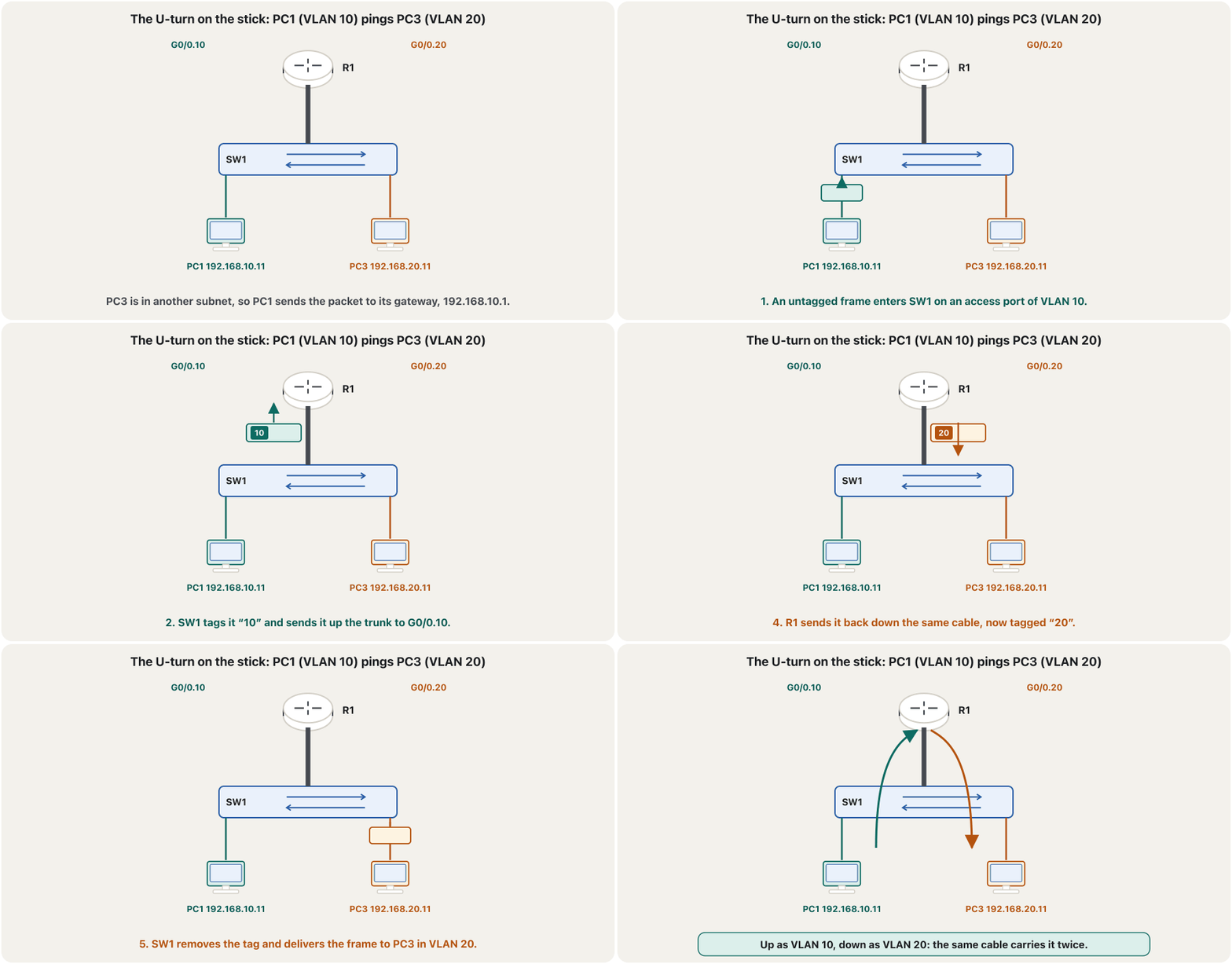
PC1 (VLAN 10) pings PC3 (VLAN 20). PC1 sees that 192.168.20.11 is not in its subnet, so it sends the packet to its gateway. The frame goes up the trunk tagged 10, the router routes it from G0/0.10 to G0/0.20 and lowers the TTL by one, and the frame comes back down the same cable tagged 20. The switch removes the tag and delivers it to PC3. Every packet between two VLANs crosses the stick twice.
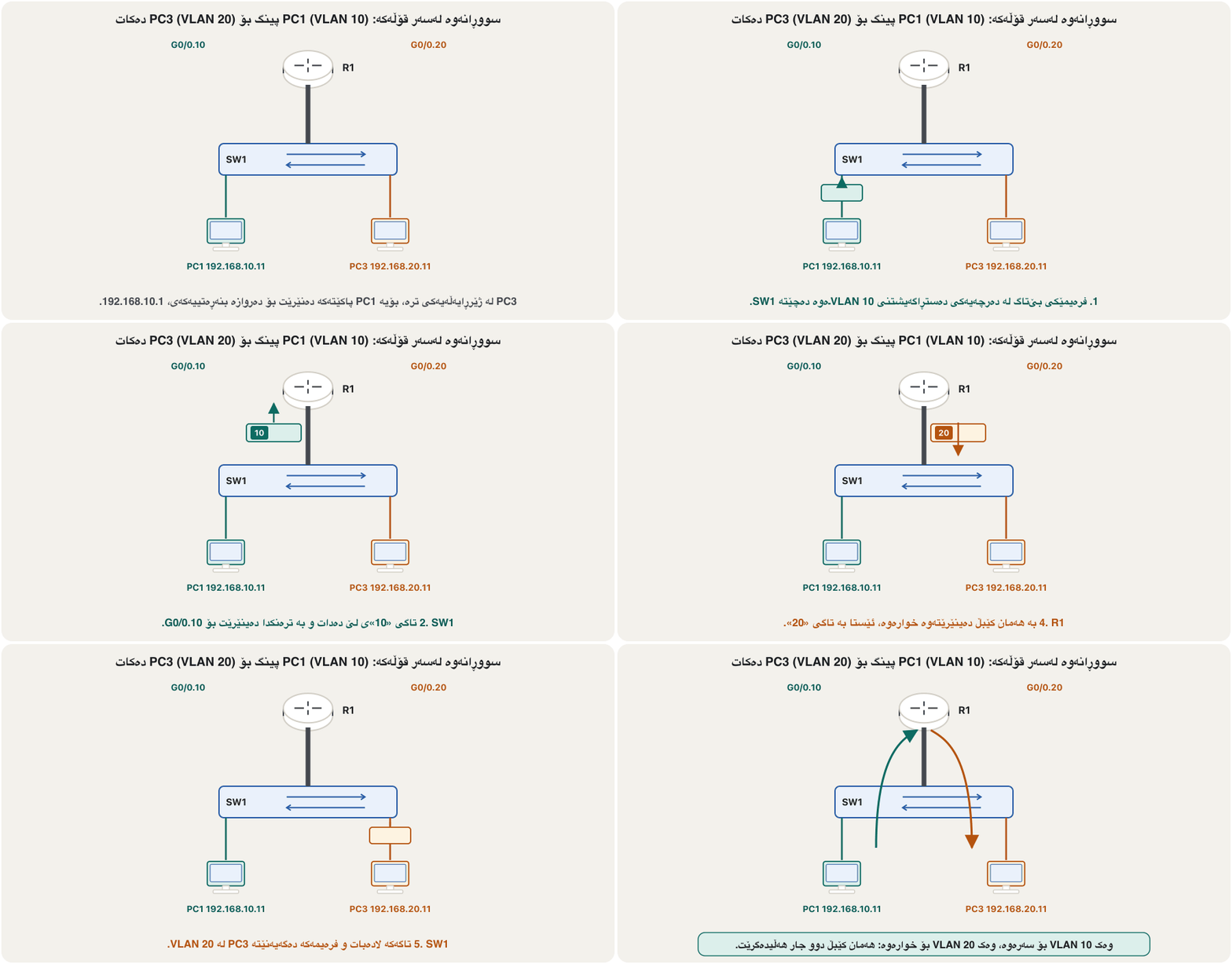
PC1 (VLAN 10) بۆ PC3 (VLAN 20) دەکات. PC1 دەبینێت 192.168.20.11 لە نییە، بۆیە دەنێرێت بۆ . بە تاگی 10 بە سەردەکەوێت، لە G0/0.10ـەوە بۆ G0/0.20 دەکات و یەکێک کەم دەکاتەوە و بە تاگی 20 بە هەمان کێبڵدا دەگەڕێتەوە خوارەوە. تاگەکە لادەبات و دەیگەیەنێتە PC3. هەموو نێوان دوو دوو جار بە قۆڵەکەدا تێدەپەڕێت.
Step 4: verify on the router and the switchهەنگاوی 4: لەسەر ڕێدۆز و سویچ بیپشکنە
Three checks find almost every problem. On R1, show ip interface brief must show G0/0 and every subinterface up / up, and show ip route must show one connected route (C) and one local route (L) per VLAN. On SW1, show interfaces trunk must list G0/1 as trunking with native VLAN 999 and VLANs 10, 20, 99, 999.
سێ پشکنین نزیکەی هەموو کێشەیەک دەدۆزنەوە. لەسەر R1، show ip interface brief دەبێت G0/0 و هەموو بە up / up پیشان بدات و show ip route دەبێت بۆ هەر یەک (C) و یەک ڕێگەی ناوخۆیی (L) پیشان بدات. لەسەر SW1، show interfaces trunk دەبێت G0/1 وەک trunking بە 999 و VLANـەکانی 10، 20، 99، 999 ڕیز بکات.
R1#show ip interface brief
Interface              IP-Address      OK? Method Status                Protocol
GigabitEthernet0/0     unassigned      YES unset  up                    up
GigabitEthernet0/0.10  192.168.10.1    YES manual up                    up
GigabitEthernet0/0.20  192.168.20.1    YES manual up                    up
GigabitEthernet0/0.99  192.168.99.1    YES manual up                    up
GigabitEthernet0/0.999 unassigned      YES unset  up                    up
GigabitEthernet0/1     unassigned      YES unset  administratively down down
Vlan1 unassigned YES unset administratively down downR1#show ip route
Codes: L - local, C - connected, S - static, R - RIP, M - mobile, B - BGP
Gateway of last resort is not set
192.168.10.0/24 is variably subnetted, 2 subnets, 2 masks
C 192.168.10.0/24 is directly connected, GigabitEthernet0/0.10
L 192.168.10.1/32 is directly connected, GigabitEthernet0/0.10
192.168.20.0/24 is variably subnetted, 2 subnets, 2 masks
C 192.168.20.0/24 is directly connected, GigabitEthernet0/0.20
L 192.168.20.1/32 is directly connected, GigabitEthernet0/0.20
192.168.99.0/24 is variably subnetted, 2 subnets, 2 masks
C 192.168.99.0/24 is directly connected, GigabitEthernet0/0.99
L 192.168.99.1/32 is directly connected, GigabitEthernet0/0.99R1#show interfaces g0/0.10
GigabitEthernet0/0.10 is up, line protocol is up
Description: Gateway of VLAN 10
Internet address is 192.168.10.1/24
Encapsulation 802.1Q Virtual LAN, Vlan ID 10.Step 5: ping between the VLANsهەنگاوی 5: پینگ لە نێوان VLANـەکاندا
Now PC1 reaches PC3. The first request may time out while ARP finds the gateway’s MAC address (why the first ping fails). The replies show TTL=127: the PC starts at 128 and the router took one off, so exactly one router was on the way. tracert 192.168.20.11 on PC1 shows two hops: 192.168.10.1 (the subinterface), then PC3. Finally save the router and the switch.
ئێستا PC1 دەگاتە PC3. لەوانەیە یەکەم کاتی بەسەر بچێت لە کاتێکدا دەدۆزێتەوە (بۆچی یەکەم پینگ سەرناکەوێت). وەڵامەکان TTL=127 پیشان دەدەن: PC لە 128ـەوە دەست پێ دەکات و یەکێکی کەم کردەوە، بۆیە ڕێک یەک لە ڕێگادا بوو. tracert 192.168.20.11 لەسەر PC1 دوو پیشان دەدات: 192.168.10.1 ()، پاشان PC3. لە کۆتاییدا و پاشەکەوت بکە.
C:\>ping 192.168.20.11

Pinging 192.168.20.11 with 32 bytes of data:

Request timed out.
Reply from 192.168.20.11: bytes=32 time<1ms TTL=127
Reply from 192.168.20.11: bytes=32 time<1ms TTL=127
Reply from 192.168.20.11: bytes=32 time<1ms TTL=127

Ping statistics for 192.168.20.11:
    Packets: Sent = 4, Received = 3, Lost = 1 (25% loss),
Approximate round trip times in milli-seconds:
    Minimum = 0ms, Maximum = 0ms, Average = 0ms
Explain the codeڕوونکردنەوەی کۆدەکە
- Lineدێڕی 5
The first request is lost while ARP runs.
یەکەم لە کاتی کارکردنی ARPـدا ون دەبێت.
- Lineدێڕی 6-8
TTL=127: one router hop.
TTL=127: یەک .
The limits of one stickسنوورەکانی یەک قۆڵ
Router-on-a-stick is cheap and simple, but every routed frame crosses the one link twice, all VLANs share that link’s bandwidth, the router’s software routes each packet, and a single cable or port is a single point of failure. Cisco’s CCNA course calls it a good fit for small and medium networks and says it does not scale beyond about 50 VLANs. Bigger campuses route inside a layer 3 switch (layer 3 switching). In a real network the router usually hands out the PCs’ addresses too, with one DHCP pool per VLAN (DHCP pools per VLAN).
هەرزان و ساکارە، بەڵام هەموو ڕێدۆزراو دوو جار بەو یەک بەستەرەدا تێدەپەڕێت، هەموو ئەو بەستەرە بەش دەکەن، هەموو دەکات و تاکە کێبڵ یان . کۆرسی CCNAـی Cisco دەڵێت بۆ بچووک و مامناوەند گونجاوە و لە نزیکەی 50 زیاتر گەورە نابێت. کەمپەسە گەورەترەکان لە ناو دەکەن (سویچکردنی چینی 3). لە ڕاستەقینەدا زۆرجار ناونیشانی PCـەکانیش دەدات، بە بۆ هەر (DHCP بۆ هەر VLANـێک).
More switches between the PCs and the routerسویچی زیاتر لە نێوان PCـەکان و ڕێدۆز
Real networks have several switches. Suppose R1 hangs on a middle switch SW1, and two leaf switches hang below it: SW2 with the PCs of VLAN 10 and SW3 with the PCs of VLAN 20. It is tempting to make each middle-switch port an access port “in the VLAN of the switch behind it”. Do not: that mixes trunk on one end and access on the other, works only by accident through the native VLAN, triggers native VLAN mismatch messages, and breaks as soon as a leaf switch has PCs of both VLANs. The clean design: every link between switches, and the link to the router, is a trunk on both ends; only PC ports are access ports. Every switch knows every VLAN.
ڕاستەقینە چەند هەیە. وای دابنێ R1 بە ناوەندی SW1ـەوە هەڵواسراوە و دوو لق لە ژێریدان: SW2 بە PCـەکانی VLAN 10 و SW3 بە PCـەکانی VLAN 20. وا دەردەکەوێت هەر ناوەندییەکە بکەیت بە «لە ئەو لە دواوەیەتی». مەیکە: ئەمە trunk لە سەرێک و access لە سەرەکەی تر تێکەڵ دەکات، تەنیا بە ڕێکەوت لە ڕێگەی کار دەکات، پەیامی نەگونجانی دروست دەکات و هەر کە لق PCـی هەردوو هەبوو تێک دەچێت. نەخشە پاکەکە: هەموو بەستەرێکی نێوان و بەستەرەکەی بەرەو لەسەر هەردوو سەر ؛ تەنیا PC . هەموو هەموو دەناسێت.
One gateway address per VLANبۆ هەر VLANـێک یەک ناونیشانی دەروازەی بنەڕەتی
A gateway address belongs to one device. Look at this lab: the router’s subinterfaces have 10.1.10.1 and 10.1.20.1, and the switch was also given SVIs with exactly the same addresses. Two devices now claim one address — an IP conflict, and ARP answers from the wrong device. The PCs also had the mask 255.0.0.0 and no gateway. Remove the switch SVIs (the switch needs only a management address, in another VLAN), and give the PCs /24 masks and their gateways. The campus project has more planted mistakes to find (find the mistakes).
ناونیشانی هی یەک ئامێرە. سەیری ئەم تاقیکردنەوەیە بکە: 10.1.10.1 و 10.1.20.1یان هەیە و هەمان ناونیشانەکانیش وەک SVI دراون بە . ئێستا دوو ئامێر داوای یەک ناونیشان دەکەن — ناکۆکیی IP و وەڵامی لە ئامێری هەڵەوە. PCـەکانیش 255.0.0.0 و بێ بوون. SVIـەکانی لاببە ( تەنیا ناونیشانێکی بەڕێوەبردنی پێویستە، لە تردا) و 255.255.255.0 و خۆیان بدە بە PCـەکان. پڕۆژەی کەمپەس هەڵەی زیاتری تێدایە بۆ دۆزینەوە (هەڵەکان بدۆزەوە).
Switch(config)#interface vlan 10
Switch(config-if)#ip address 10.1.10.1 255.255.255.0
Switch(config-if)#exit
Switch(config)#interface vlan 20
Switch(config-if)#ip address 10.1.20.1 255.255.255.0Common mistakesهەڵە باوەکان
Exercisesڕاهێنانەکان
A 2811 router’s Fa0/0 is cabled to Fa0/3 of a 2960 switch. PC0 on Fa0/1 is in VLAN 10, PC1 on Fa0/2 in VLAN 20. Write the switch and router configuration, and give each PC an address, mask and gateway (192.168.10.0/24 and 192.168.20.0/24). Do the VLANs themselves need IP addresses on the switch?
2811 Fa0/0ـی بە Fa0/3ـی 2960ـەوە بەستراوە. PC0 لەسەر Fa0/1 لە VLAN 10دایە و PC1 لەسەر Fa0/2 لە VLAN 20. و بنووسە و ناونیشان، و بدە بە هەر PCـێک (192.168.10.0/24 و 192.168.20.0/24). ئایا خودی لەسەر پێویستە؟
Show answerوەڵامەکە پیشان بدە
Switch(config)#vlan 999
Switch(config-vlan)#name Native
Switch(config-vlan)#exit
Switch(config)#interface fastEthernet 0/1
Switch(config-if)#switchport mode access
Switch(config-if)#switchport access vlan 10
% Access VLAN does not exist. Creating vlan 10
Switch(config-if)#interface fastEthernet 0/2
Switch(config-if)#switchport mode access
Switch(config-if)#switchport access vlan 20
% Access VLAN does not exist. Creating vlan 20
Switch(config-if)#interface fastEthernet 0/3
Switch(config-if)#switchport mode trunk
Switch(config-if)#switchport trunk native vlan 999
Switch(config-if)#end
Switch#copy running-config startup-config

Router(config)#interface fastEthernet 0/0
Router(config-if)#no shutdown
Router(config-if)#interface fastEthernet 0/0.10
Router(config-subif)#encapsulation dot1Q 10
Router(config-subif)#ip address 192.168.10.1 255.255.255.0
Router(config-subif)#interface fastEthernet 0/0.20
Router(config-subif)#encapsulation dot1Q 20
Router(config-subif)#ip address 192.168.20.1 255.255.255.0
Router(config-subif)#interface fastEthernet 0/0.999
Router(config-subif)#encapsulation dot1Q 999 native
Router(config-subif)#end
Router#copy running-config startup-config
PC0: 192.168.10.2, 255.255.255.0, gateway 192.168.10.1. PC1: 192.168.20.2, 255.255.255.0, gateway 192.168.20.1. The VLANs need no IP addresses on the switch (no interface vlan 10/20): the gateways live on the router. The PCs, however, do need addresses and gateways. VLAN 999 is the unused native VLAN on both sides, as in the lab; VLANs 10 and 20 are created automatically when the ports are assigned.
PC0: 192.168.10.2، 255.255.255.0، 192.168.10.1. PC1: 192.168.20.2، 255.255.255.0، 192.168.20.1. لەسەر پێویست نییە (interface vlan 10/20 نا): ناونیشانەکانی لەسەر . بەڵام PCـەکان ناونیشان و پێویستە. VLAN 999 لە هەردوو لا بەکارنەهێنراوە، وەک لە تاقیکردنەوەکەدا؛ VLAN 10 و 20 کاتی دانانی خۆکار دروست دەبن.
In a lab, R1 Fa0/0.10 = 10.1.10.1/24 and Fa0/0.20 = 10.1.20.1/24; the switch has interface vlan 10 = 10.1.10.1 and interface vlan 20 = 10.1.20.1; the PCs use 10.1.10.2 and 10.1.20.2 with mask 255.0.0.0 and no gateway; the lab claims that a gateway is not needed and that 192.168.x.x would not work. Find the three mistakes and write the correct plan.
لە تاقیکردنەوەیەکدا R1 Fa0/0.10 = 10.1.10.1/24 و Fa0/0.20 = 10.1.20.1/24ـە؛ interface vlan 10 = 10.1.10.1 و interface vlan 20 = 10.1.20.1ـی هەیە؛ PCـەکان 10.1.10.2 و 10.1.20.2 بە 255.0.0.0 و بێ بەکار دەهێنن؛ تاقیکردنەوەکە دەڵێت پێویست نییە و 192.168.x.x کار ناکات. سێ هەڵەکە بدۆزەوە و نەخشەی دروست بنووسە.
Show answerوەڵامەکە پیشان بدە
- Duplicate addresses: the switch SVIs copy the router’s gateways. Remove them (
no interface vlan 10,no interface vlan 20). - Wrong mask and no gateway: with 255.0.0.0 every 10.x.x.x address looks local, so the PCs never use the router; it only seems to work through ARP replies from the router. Use 255.255.255.0 and gateways 10.1.10.1 and 10.1.20.1.
- “Class A only” is a wrong diagnosis: the same lab with 192.168.10.0/24 and 192.168.20.0/24 and correct gateways works too.
- ناونیشانی دووپاتە: SVIـەکانی ناونیشانەکانی کۆپی دەکەن. لایان ببە (
no interface vlan 10،no interface vlan 20). - هەڵە و بێ : بە 255.0.0.0 هەموو ناونیشانێکی 10.x.x.x ناوخۆیی دەردەکەوێت، بۆیە PCـەکان هەرگیز بەکار ناهێنن؛ تەنیا لە ڕێگەی وەڵامی ARPـی وا دەردەکەوێت کار بکات. 255.255.255.0 و ناونیشانەکانی 10.1.10.1 و 10.1.20.1 بەکار بهێنە.
- «تەنیا پۆلی A» دەستنیشانکردنێکی هەڵەیە: هەمان تاقیکردنەوە بە 192.168.10.0/24 و 192.168.20.0/24 و دروست کار دەکات.
A screenshot shows only: Router(config)#int fa0/0.10, then Router(config-subif)#en and encap…, cut at the edge. Write the full three-line sequence for VLAN 10 with the gateway 192.168.3.1/24, and say which prompt each line has.
تەنیا ئەمە پیشان دەدات: Router(config)#int fa0/0.10، پاشان Router(config-subif)#en و encap…، لە لێوارەکەدا بڕاوە. هەر سێ دێڕەکە بۆ VLAN 10 بە 192.168.3.1/24 تەواو بنووسە و بڵێ هەر دێڕێک چ پرۆمپتێکی هەیە.
Show answerوەڵامەکە پیشان بدە
Router(config)#interface fastEthernet 0/0.10
Router(config-subif)#encapsulation dot1Q 10
Router(config-subif)#ip address 192.168.3.1 255.255.255.0
After interface fa0/0.10 the prompt is Router(config-subif)#. encap dot1q 10 is an accepted abbreviation; a word cut too short is not — type enough letters for IOS to know the command.
دوای interface fa0/0.10 پرۆمپتەکە Router(config-subif)#ـە. encap dot1q 10 وەرگیراوە؛ وشەیەک کە زۆر کورت بڕابێت نا — ئەوەندە پیت بنووسە کە IOS بناسێتەوە.
Two routers are joined by a serial link (192.168.2.0/24). The left router has one LAN, 192.168.1.0/24. The right router reaches a 2960 switch on Fa0/24, where PC3 on Fa0/1 is in VLAN 10 (192.168.3.0/24) and PC4 on Fa0/6 in VLAN 20 (192.168.4.0/24). Which parts of this lesson do you use on the right router and its switch, and what else is needed so that the left LAN can reach PC3?
دوو بە بەستەرێکی سیریاڵ بەستراون (192.168.2.0/24). چەپ یەک هەیە، 192.168.1.0/24. ڕاست دەگاتە 2960 لەسەر Fa0/24، کە PC3 لەسەر Fa0/1 لە VLAN 10 (192.168.3.0/24) و PC4 لەسەر Fa0/6 لە VLAN 20 (192.168.4.0/24)دان. کام بەشەکانی ئەم وانەیە لەسەر ڕاست و بەکار دەهێنیت و چی تر پێویستە تاکو لای چەپ بگاتە PC3؟
Show answerوەڵامەکە پیشان بدە
On the right: Fa0/24 of the switch is a trunk with the unused native VLAN 999, the right router gets no shutdown on its LAN interface and subinterfaces Fa0/0.10 (192.168.3.1) and Fa0/0.20 (192.168.4.1) with encapsulation dot1Q (and Fa0/0.999 with encapsulation dot1Q 999 native); PC3 and PC4 use those gateways. The routers then need routes to each other’s networks — static routes or a routing protocol (static routes; a RIP lab with VLANs behind a router is in RIP lab 2), with the serial link configured as in your first router.
لە لای ڕاست: Fa0/24ـی بە بەکارنەهێنراوی 999، ڕاست no shutdown لەسەر LANـەکەی و Fa0/0.10 (192.168.3.1) و Fa0/0.20 (192.168.4.1) بە encapsulation dot1Q وەردەگرێت (و Fa0/0.999 بە encapsulation dot1Q 999 native)؛ PC3 و PC4 ئەو ناونیشانانە وەک بەکار دەهێنن. پاشان ڕێگەیان بۆ یەکتر پێویستە — یان (ڕێگە جێگیرەکان؛ تاقیکردنەوەیەکی RIP بە لە پشت لە تاقیکردنەوەی 2ـی RIP هەیە). بەستەرە سیریاڵەکەش وەک یەکەم ڕێدۆزت ڕێک دەخرێت.
In your own words: what is a subinterface, when is it used, and what does each one have of its own?
بە وشەی خۆت: چییە، کەی بەکار دێت و هەریەکەیان چی هی خۆی هەیە؟
Show answerوەڵامەکە پیشان بدە
A subinterface is a logical interface made by dividing one physical interface, such as G0/0.10. It is used when several networks must share one physical interface — for example a router serving several VLANs over one trunk (router-on-a-stick). Each has its own number, VLAN tag (encapsulation dot1Q), IP address and mask, and description.
لۆجیکییە کە بە دابەشکردنی یەک فیزیکی دروست دەکرێت، وەک G0/0.10. بەکار دێت کاتێک چەند دەبێت یەک فیزیکی بەش بکەن — بۆ نموونە کە بە یەک خزمەتی چەند دەکات (). هەریەکەیان ژمارە، (encapsulation dot1Q)، و و وەسفی خۆی هەیە.
R1 is cabled to SW1 Fa0/3. SW1 Fa0/1 goes to SW0 (PCs of VLAN 10) and SW1 Fa0/2 to SW3 (PCs of VLAN 20). Which ports are trunks and which are access ports? Where do the gateways live, and which switches need which VLANs?
R1 بە SW1 Fa0/3ـەوە بەستراوە. SW1 Fa0/1 دەچێت بۆ SW0، کە PCـەکانی VLAN 10ـی لەسەرە. SW1 Fa0/2 دەچێت بۆ SW3، کە PCـەکانی VLAN 20ـی لەسەرە. کام و کامیان ؟ ناونیشانەکانی لە کوێن و کام کام پێویستە؟
Show answerوەڵامەکە پیشان بدە
- Trunks: SW1 Fa0/3 (to R1), SW1 Fa0/1 and Fa0/2, and the uplinks of SW0 and SW3 — both ends of every inter-switch link.
- Access ports: only the PC ports on SW0 (VLAN 10) and SW3 (VLAN 20).
- Gateways: R1’s subinterfaces G0/0.10 = 192.168.10.1 and G0/0.20 = 192.168.20.1; the switches need no SVIs for these VLANs.
- Create VLAN 10 and VLAN 20 on every switch, so each can carry both VLANs and new PCs can be added anywhere. Every trunk uses the unused native VLAN 999, as in the lab.
- : SW1 Fa0/3 (بەرەو R1)، SW1 Fa0/1 و Fa0/2 و سەرەوەی SW0 و SW3 — هەردوو سەری هەموو بەستەرێکی نێوان .
- : تەنیا PC لەسەر SW0 (VLAN 10) و SW3 (VLAN 20).
- ناونیشانەکانی : R1، G0/0.10 = 192.168.10.1 و G0/0.20 = 192.168.20.1؛ بۆ ئەم SVIـیان ناوێت.
- VLAN 10 و VLAN 20 لەسەر هەموو دروست بکە، تاکو هەریەکەیان هەردوو هەڵبگرێت و PCـی نوێ لە هەر شوێنێک زیاد بکرێت. هەموو بەکارنەهێنراوی 999 بەکار دەهێنێت، وەک لە تاقیکردنەوەکەدا.
Summaryکورتە
- Different VLANs are different subnets: a layer 3 device must route between them — inter-VLAN routing.
- The old way used one router interface and cable per VLAN; router-on-a-stick uses one 802.1Q trunk and one subinterface per VLAN.
- Router:
no shutdownon G0/0, theninterface g0/0.10,encapsulation dot1Q 10,ip address …— encapsulation first;encapsulation dot1Q 999 nativefor the unused native VLAN. - Switch: the port to the router is a fixed trunk; PC ports are access ports; no SVIs with the gateway addresses.
- PCs: address in their VLAN’s subnet, the right mask and the subinterface as gateway; any address class works.
- Verify with
show ip interface brief,show ip route,show interfaces trunkand ping (TTL 127). Limits: one shared link, router software, single point of failure — fine for small networks.
- جیاواز جیاوازن: ئامێرێکی چینی 3 دەبێت لە نێوانیاندا بکات — .
- ڕێگا کۆنەکە بۆ هەر و کێبڵێکی بەکار دەهێنا؛ یەک 802.1Q و بۆ هەر یەک بەکار دەهێنێت.
- :
no shutdownلەسەر G0/0، پاشانinterface g0/0.10،encapsulation dot1Q 10،ip address …— سەرەتا encapsulation؛encapsulation dot1Q 999 nativeبۆ بەکارنەهێنراو. - : بەرەو جێگیرە؛ PC ؛ هیچ SVIـێک بە ناونیشانەکانی .
- PCـەکان: ناونیشان لە ، دروست و وەک ؛ هەر پۆلێکی ناونیشان کار دەکات.
- بە
show ip interface brief،show ip route،show interfaces trunkو (TTL 127) بیپشکنە. سنوورەکان: یەک بەستەری هاوبەش، ، — بۆ بچووک باشە.
Next: route inside the switch itself — Inter-VLAN routing with a layer 3 switch.
دواتر: لە ناو خودی بکە — ڕێدۆزیی نێوان VLANـەکان بە سویچی چینی 3.
Lesson complete!وانەکە تەواو بوو!
Well done. Review the key terms, then go on to the next lesson.دەستخۆش. سەیرێکی زاراوە سەرەکییەکان بکەرەوە، پاشان بڕۆ بۆ وانەی داهاتوو.
Key termsزاراوە سەرەکییەکان
Inter-VLAN Routing with a Layer-3 Switchڕێدۆزیی نێوان VLANـەکان بە سویچی چینی 3
Related lecturesوانە پەیوەندیدارەکان
- Inter-VLAN Routing with a Layer-3 Switchڕێدۆزیی نێوان VLANـەکان بە سویچی چینی 3
- Static Routesڕێگە جێگیرەکان
- Managing Devices Remotely: From Telnet to SSHبەڕێوەبردنی ئامێرەکان لە دوورەوە: لە Telnetـەوە بۆ SSH
- ARP: From IP Address to MAC AddressARP: لە ناونیشانی IP بۆ ناونیشانی MAC
- Address Classes, and Why CIDR Replaced Themپۆلەکانی ناونیشانی IP و بۆچی CIDR جێگەیانی گرتەوە
- Project: A Campus Network with VLANs and DHCPپڕۆژە: ڕایەڵەی کەمپەسێک بە VLAN و DHCP
References and further readingسەرچاوەکان و خوێندنەوەی زیاتر
- Cisco Press, SRWE: Inter-VLAN Routing Operation — legacy, router-on-a-stick (does not scale beyond 50 VLANs) and layer 3 switch
- Cisco Press, SRWE: Router-on-a-Stick Inter-VLAN Routing — subinterface configuration and verification
- Cisco Catalyst 9300 (IOS XE 17.12) VLAN Configuration Guide: Configuring VLAN Trunks — native VLAN must match on both ends
- Cisco Catalyst 2960 Software Configuration Guide 12.2(55)SE: Configuring VLANs — trunk modes and DTP
This lecture is a first edition. The Kurdish text and terminology are waiting for review by Kurdish IT teachers.ئەم وانەیە چاپی یەکەمە. دەقە کوردییەکە و زاراوەکانی چاوەڕێی پێداچوونەوەی مامۆستایانی کوردی بواری IT ن.