Chapterبەش 5 · Lectureوانە 5.3
Configuring Static NAT, Dynamic NAT and PATڕێکخستنی وەرگێڕانی جێگیری ناونیشانی ڕایەڵە، وەرگێڕانی بزۆکی ناونیشانی ڕایەڵە و وەرگێڕانی ناونیشانی پۆرت
NAT on a Cisco router step by step: the four parts of every NAT configuration, a company LAN behind R1 and an ISP router with documentation addresses, routes out and back, marking ip nat inside and ip nat outside, static NAT and reading the translation table, publishing a server with static NAT and ports, dynamic NAT with an access list, a wildcard mask and a pool, PAT with overload on an interface or a pool, show ip nat statistics, clear ip nat translation and debug ip nat, common mistakes and exercises.
NAT لەسەر Cisco هەنگاو بە هەنگاو: چوار بەشەکەی هەموو NAT، کۆمپانیایەک لە پشت R1 و بە ناونیشانی ، ڕێگەی دەرچوون و گەڕانەوە، دیاریکردنی ip nat inside و ip nat outside، و خوێندنەوەی خشتەی وەرگێڕان، بڵاوکردنەوەی بە و ، بە ، و ، بە overload لەسەر یان ، show ip nat statistics، clear ip nat translation و debug ip nat، هەڵە باوەکان و ڕاهێنانەکان.
What you will learnچی فێر دەبیت
- Name the four parts of every NAT configuration and mark inside and outside interfaces.
- Configure static NAT, including a static rule with ports, and read show ip nat translations.
- Configure dynamic NAT with an access list, a wildcard mask and a pool, and check the pool with show ip nat statistics.
- Configure PAT with overload on an interface or a pool and explain how ports keep conversations apart.
- Troubleshoot NAT: missing marks, wrong wildcards, mismatched names, missing return routes; clear and debug translations safely.
- چوار بەشەکەی هەموو NAT ناو ببەیت و ناوەوە و دەرەوە دیاری بکەیت.
- ڕێک بخەیت (لەگەڵ یاسایەکی جێگیر بە ) و show ip nat translations بخوێنیتەوە.
- بە ، و ڕێک بخەیت و بە show ip nat statistics بپشکنیت.
- بە overload لەسەر یان ڕێک بخەیت و ڕوون بکەیتەوە چۆن گفتوگۆکان لێک جیا دەکەنەوە.
- NAT بکەیت: نیشانەی ون، هەڵە، ناوی ناڕێک، ڕێگەی گەڕانەوەی ون؛ وەرگێڕانەکان بە سەلامەتی بسڕیتەوە و debug بکەیت.
From the idea to the commandsلە بیرۆکەوە بۆ فەرمانەکان
You already know why a router translates addresses: private addresses such as 192.168.1.2 cannot travel on the Internet, so the router swaps them for public ones. You also know the three kinds — static NAT (one fixed pair), dynamic NAT (borrowing from a pool) and PAT (many hosts share one address, told apart by port) — and the four address names (NAT and PAT: Sharing Public Addresses). This lesson types them into a Cisco router.
پێشتر دەزانیت بۆچی ناونیشان وەردەگێڕێت: وەک 192.168.1.2 ناتوانن لە بگوازرێنەوە، بۆیە بە ناونیشانی گشتی دەیانگۆڕێتەوە. هەروەها سێ جۆرەکە دەناسیت — (یەک جووتی جێگیر)، (قەرزکردن لە ) و (زۆر یەک ناونیشان بەکار دەهێنن و بە جیا دەکرێنەوە) — لەگەڵ چوار ناوی ناونیشانەکان (NAT و PAT: هاوبەشکردنی ناونیشانە گشتییەکان). ئەم وانەیە ئەوانە لە Ciscoـدا دەنووسێت.
Every NAT configuration, whatever its kind, has the same four parts. Keep this picture in mind; each lab below fills in the parts in this order.
هەموو NAT، هەر جۆرێک بێت، هەمان چوار بەشی هەیە. ئەم وێنەیە لە بیرت بێت؛ هەر تاقیکردنەوەیەکی خوارەوە بەشەکان بەم ڕیزبەندییە پڕ دەکاتەوە.
The lab: a company LAN, an ISP and a serverتاقیکردنەوەکە: ڕایەڵەی ناوچەیی کۆمپانیا، دابینکەری ئینتەرنێت و ڕاژەکارێک
All the labs in this lesson use one small network. On the inside, PC0 (192.168.1.2) and PC1 (192.168.1.3) sit on a 2960 switch behind router R1 (an ISR 4331). On the outside, a serial link joins R1 to the ISP’s router R2, and behind R2 is Server0 (192.0.2.10). The ISP gave the company the public block 203.0.113.0/27: those are the addresses the Internet may see.
هەموو تاقیکردنەوەکانی ئەم وانەیە یەک بچووک بەکار دەهێنن. لە ناوەوە، PC0 (192.168.1.2) و PC1 (192.168.1.3) لەسەر 2960ن لە پشت R1 (ISR 4331). لە دەرەوە، بەستەرێکی زنجیرەیی R1 بە R2ـی دەبەستێتەوە و لە پشت R2ـیش Server0 (192.0.2.10) هەیە. بلۆکی گشتیی 203.0.113.0/27ـی بە کۆمپانیاکە داوە: ئەمانە ئەو ناونیشانانەن کە بۆی هەیە ببینێت.
The same lab in Packet Tracerهەمان تاقیکردنەوە لە Packet Tracerـدا
Here is the lab as built in Packet Tracer: two PCs, a 2960-24TT switch, two ISR 4331 routers joined by a serial cable, and a server. The green and blue boxes are only drawings — made with the Draw Rectangle tool and a text note — but they make the lab easy to read: everything in green is inside, everything in blue is outside. The routers keep their workspace labels Router0 and Router1; we give them the host names R1 and R2.
ئەمە تاقیکردنەوەکەیە وەک لە Packet Tracerـدا دروستکراوە: دوو PC، 2960-24TT، دوو ISR 4331 کە بە کێبڵێکی زنجیرەیی بەستراون و . چوارگۆشە سەوز و شینەکان تەنیا وێنەن — بە ئامرازی Draw Rectangle و تێبینییەکی نووسراو کراون — بەڵام تاقیکردنەوەکە ئاسان دەکەن بۆ خوێندنەوە: هەرچی سەوزە لە ناوەوەیە و هەرچی شینە لە دەرەوەیە. ناوی شوێنی کارەکەیان Router0 و Router1 دەمێنێت؛ ئێمە R1 و R2یان پێ دەدەین.
Step 1: addresses and routes before NATهەنگاوی 1: ناونیشان و ڕێگەکان پێش NAT
NAT never replaces routing — you need routes first. R1 sends everything it does not know to the ISP with a default route. R2 needs a route back to the company — but to the public block 203.0.113.0/27, not to 192.168.1.0/24: after translation, no packet on the outside ever carries a private address.
NAT هەرگیز جێی ناگرێتەوە — سەرەتا پێویستت بە ڕێگەکانە. R1 هەموو ئەوەی نایناسێت بە ڕێگەیەکی بنەڕەتی بۆ دەنێرێت. R2 پێویستی بە ڕێگەیەکی گەڕانەوە هەیە بۆ کۆمپانیاکە — بەڵام بۆ بلۆکە گشتییەکەی 203.0.113.0/27، نەک بۆ 192.168.1.0/24: دوای وەرگێڕان، هیچ لە دەرەوە ناونیشانی تایبەت هەڵناگرێت.
Router>enable
Router#configure terminal
Enter configuration commands, one per line.  End with CNTL/Z.
Router(config)#hostname R1
R1(config)#interface g0/0/0
R1(config-if)#ip address 192.168.1.1 255.255.255.0
R1(config-if)#no shutdown
R1(config-if)#interface s0/1/0
R1(config-if)#ip address 198.51.100.1 255.255.255.252
R1(config-if)#no shutdown
R1(config-if)#exit
R1(config)#ip route 0.0.0.0 0.0.0.0 198.51.100.2
R1(config)#end
R1#copy running-config startup-config
Destination filename [startup-config]?
Building configuration...
[OK]
Explain the codeڕوونکردنەوەی کۆدەکە
- Lineدێڕی 8
From one interface you can go straight to the next with
interface …; IOS stays in interface mode.لە دەتوانیت ڕاستەوخۆ بە
interface …بچیت بۆ دانەی دواتر؛ IOS لە باری دەمێنێتەوە.- Lineدێڕی 12
The default route: “anything I do not know goes to 198.51.100.2”.
: «هەرچی نایناسم دەچێت بۆ 198.51.100.2».
- Lineدێڕی 14-17
Save after every lab step.
دوای هەموو هەنگاوێکی تاقیکردنەوە پاشەکەوت بکە.
Router(config)#hostname R2
R2(config)#interface s0/1/1
R2(config-if)#ip address 198.51.100.2 255.255.255.252
R2(config-if)#clock rate 64000
R2(config-if)#no shutdown
R2(config-if)#interface g0/0/0
R2(config-if)#ip address 192.0.2.1 255.255.255.0
R2(config-if)#no shutdown
R2(config-if)#exit
R2(config)#ip route 203.0.113.0 255.255.255.224 198.51.100.1
R2(config)#end
R2#copy running-config startup-config
Destination filename [startup-config]?
Building configuration...
[OK]
Explain the codeڕوونکردنەوەی کۆدەکە
- Lineدێڕی 4
R2 holds the DCE end of the serial cable, so it sets the clock.
سەری DCEـی کێبڵە زنجیرەییەکە لای R2ـیە، بۆیە ئەو کاتژمێرەکە دادەنێت.
- Lineدێڕی 10
/27 = 255.255.255.224: the whole public block lives behind R1.
/27 = 255.255.255.224: هەموو بلۆکە گشتییەکە لە پشت R1ـەوەیە.
Give the PCs their addresses with gateway 192.168.1.1 and Server0 192.0.2.10 with gateway 192.0.2.1. Now ping Server0 from PC0: Request timed out. The echo request does reach the server, but the reply is addressed to 192.168.1.2 and R2 has no route to it. That is exactly the problem NAT solves.
ناونیشان بدە بە PCـەکان لەگەڵ 192.168.1.1 و بە Server0 ناونیشانی 192.0.2.10 لەگەڵ 192.0.2.1. ئێستا لە PC0ـەوە بۆ Server0 بکە: Request timed out. echo دەگاتە ، بەڵام وەڵامەکە بۆ 192.168.1.2 نێردراوە و R2 هیچ ڕێگەیەکی بۆی نییە. ئەمە ڕێک ئەو کێشەیەیە کە NAT چارەسەری دەکات.
Step 2: mark the inside and the outsideهەنگاوی 2: ناوەوە و دەرەوە دیاری بکە
NAT translates only packets that cross from an inside interface to an outside interface (and their replies). So the first NAT step is always to tell R1 which interface faces the company and which faces the ISP. Without these two marks the NAT rules sit in the configuration and nothing is translated: packets leave with their private source and the replies never come back.
NAT تەنیا ئەو وەردەگێڕێت کە لە ناوەوەوە دەپەڕنەوە بۆ دەرەوە (و وەڵامەکانیان). بۆیە یەکەم هەنگاوی NAT هەمیشە ئەوەیە بە R1 بڵێیت کام ڕووی لە کۆمپانیایە و کامیان ڕووی لە . بەبێ ئەم دوو نیشانەیە یاساکانی NAT لە دەمێنن و هیچ شتێک وەرناگێڕدرێت: بە سەرچاوە تایبەتەکەیانەوە دەڕۆن و وەڵامەکان هەرگیز ناگەڕێنەوە.
R1#configure terminal
R1(config)#interface g0/0/0
R1(config-if)#ip nat inside
R1(config-if)#interface s0/1/0
R1(config-if)#ip nat outside
R1(config-if)#exit
Step 3: static NAT — one fixed pairهەنگاوی 3: وەرگێڕانی جێگیری ناونیشانی ڕایەڵە — یەک جووتی جێگیر
Static NAT ties one inside address to one public address for good. Here PC0 (192.168.1.2) will always appear on the Internet as 203.0.113.2. The command is typed in global configuration mode:
یەک ناونیشانی ناوەوە بۆ هەمیشە بە یەک ناونیشانی گشتییەوە دەبەستێتەوە. لێرەدا PC0 (192.168.1.2) هەمیشە لە وەک 203.0.113.2 دەردەکەوێت. لە دەنووسرێت:
R1(config)#ip nat inside source static 192.168.1.2 203.0.113.2
R1(config)#end
R1#copy running-config startup-config
Destination filename [startup-config]?
Building configuration...
[OK]Read it left to right: for packets coming from the inside, change the source address, using a static pair: 192.168.1.2 ↔ 203.0.113.2. The private address always comes first. To remove the pair, type the same line with no in front.
لە چەپەوە بۆ ڕاست بیخوێنەوە: بۆ ئەو لە ناوەوە دێن، ناونیشانی سەرچاوە بگۆڕە، بە جووتێکی جێگیر: 192.168.1.2 ↔ 203.0.113.2. ناونیشانە تایبەتەکە هەمیشە یەکەم دێت. بۆ لابردنی جووتەکە، هەمان دێڕ بە noـەوە لە پێشیدا بنووسە.
Step 4: ping and read the translation tableهەنگاوی 4: پینگ بکە و خشتەی وەرگێڕان بخوێنەوە
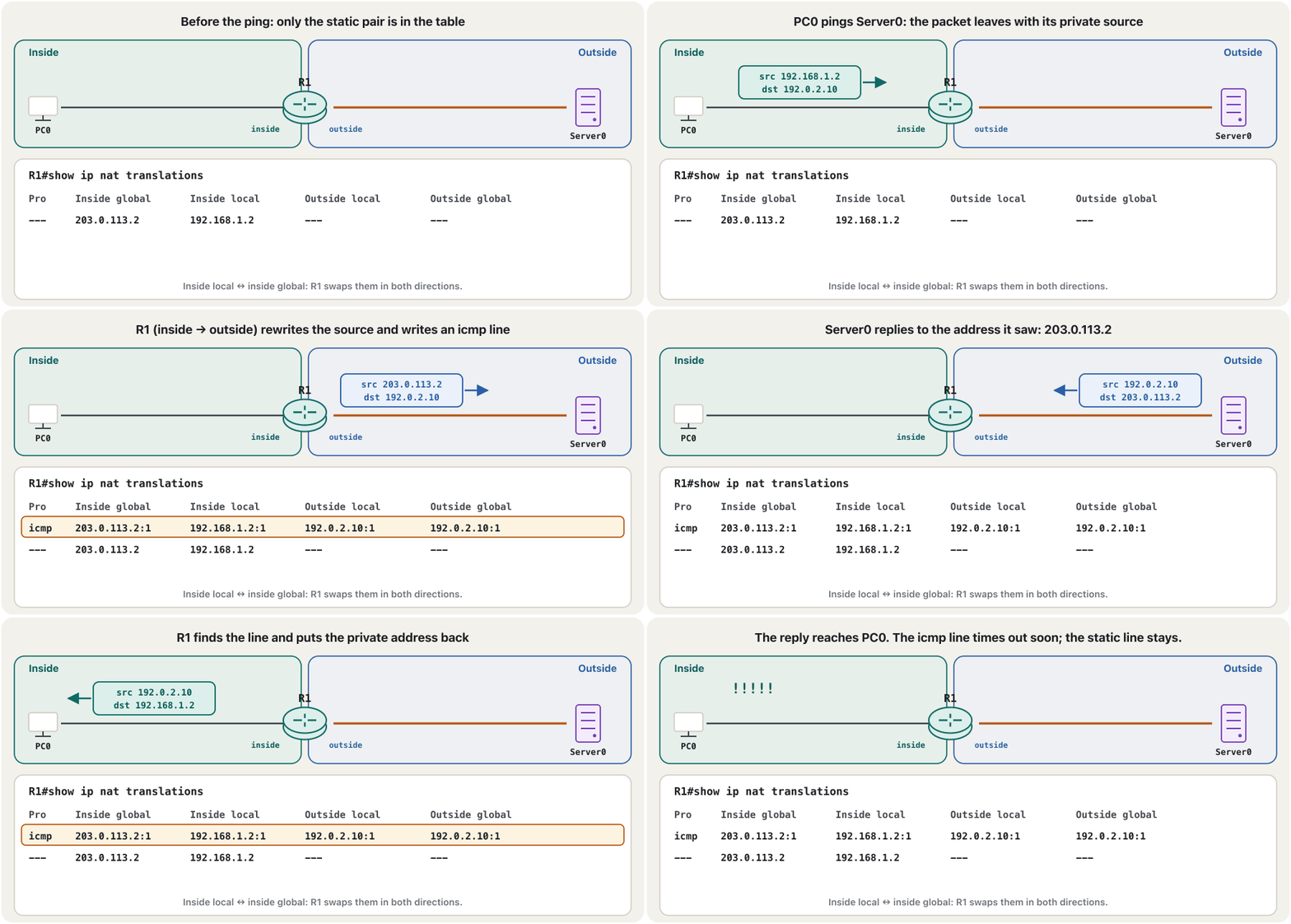
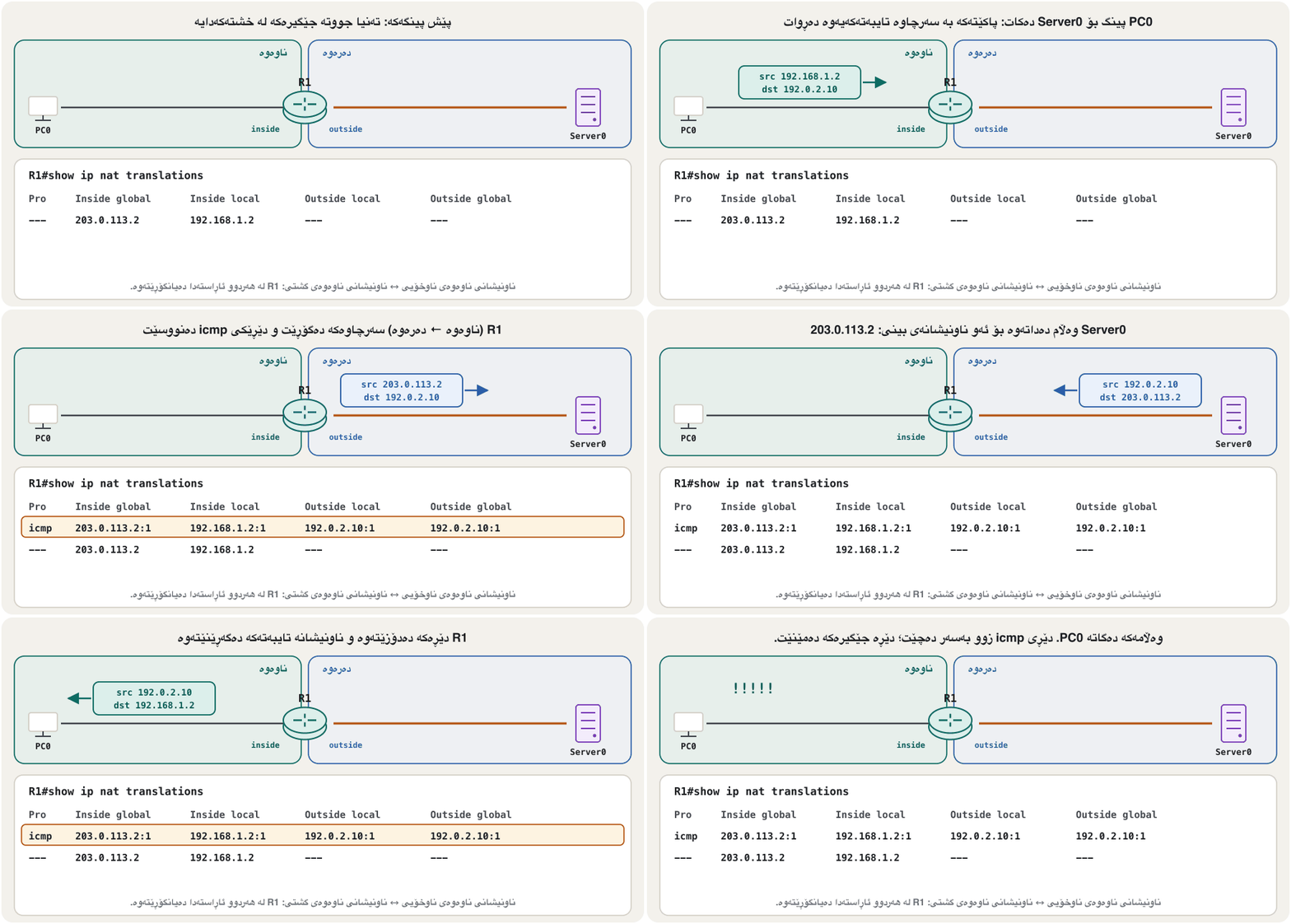
Ping Server0 from PC0 again — now the replies arrive. On R1, show ip nat translations shows why. The static line (---) is always there. While PC0 talks, IOS adds a line for the conversation with the protocol and the ICMP identifier after each address.
دووپاتە لە PC0ـەوە بۆ Server0 بکە — ئێستا وەڵامەکان دێن. لەسەر R1، show ip nat translations هۆکارەکەی پیشان دەدات. دێڕە جێگیرەکە (---) هەمیشە هەیە. تا PC0 قسە دەکات، IOS دێڕێک بۆ گفتوگۆکە زیاد دەکات لەگەڵ و ناسێنەری ICMP لە دوای هەر ناونیشانێک.
R1#show ip nat translations
Pro  Inside global     Inside local       Outside local      Outside global
icmp 203.0.113.2:1     192.168.1.2:1      192.0.2.10:1       192.0.2.10:1
---  203.0.113.2       192.168.1.2        ---                ---
Total number of translations: 2
Explain the codeڕوونکردنەوەی کۆدەکە
- Lineدێڕی 2
The four columns are the four NAT address names. Outside local = outside global because nobody translates the server.
چوار ستوونەکە چوار ناوی ناونیشانەکانی NATـن. = چونکە کەس ناونیشانی وەرناگێڕێت.
- Lineدێڕی 4
The static pair itself: no protocol, no ports.
خودی جووتە جێگیرەکە: نە ، نە .
- Lineدێڕی 5
IOS XE ends the table with this count; older IOS and Packet Tracer may leave the line out.
IOS XE خشتەکە بەم ژمارەیە کۆتایی پێ دەهێنێت؛ IOSـی کۆنتر و Packet Tracer لەوانەیە ئەم دێڕە نەنووسن.
Now ping Server0 from PC1: it still times out. Only PC0 has a pair, so PC1’s packets leave with 192.168.1.3 and their replies are lost at R2. Static NAT is one-to-one — one public address for every inside host — which is why it is used for servers, not for a whole office.
ئێستا لە PC1ـەوە بۆ Server0 بکە: هێشتا کاتی بەسەر دەچێت. تەنیا PC0 جووتی هەیە، بۆیە PC1 بە 192.168.1.3ـەوە دەڕۆن و وەڵامەکانیان لە R2 ون دەبن. یەک بۆ یەکە — یەک ناونیشانی گشتی بۆ هەر ناوەوە — بۆیە بۆ بەکار دێت، نەک بۆ هەموو ئۆفیسێک.
Static NAT works both ways: publishing a serverوەرگێڕانی جێگیری ناونیشانی ڕایەڵە لە هەردوو ئاڕاستەدا کار دەکات: بڵاوکردنەوەی ڕاژەکارێک
A static pair also works from the outside in. Ping 203.0.113.2 from Server0 and PC0 answers, because R1 changes the destination 203.0.113.2 to 192.168.1.2. (Pinging 192.168.1.2 from Server0 still fails: that private address is never routed on the outside.) This is how a company publishes a web or mail server that must be reachable at a fixed public address.
جووتێکی جێگیر لە دەرەوەشەوە بۆ ناوەوە کار دەکات. لە Server0ـەوە بۆ 203.0.113.2 بکە و PC0 وەڵام دەداتەوە، چونکە R1 مەبەستی 203.0.113.2 دەگۆڕێت بۆ 192.168.1.2. ( بۆ 192.168.1.2 لە Server0ـەوە هێشتا شکست دەهێنێت: ئەو ناونیشانە تایبەتە هەرگیز لە دەرەوە بۆ ناکرێت.) کۆمپانیا بەم شێوەیە یان ئیمەیڵێک بڵاو دەکاتەوە کە دەبێت لەسەر ناونیشانێکی گشتیی جێگیر دەستی پێ بگات.
Often you want to open only one service, not the whole host. Add the protocol and the ports: only TCP port 80 of 203.0.113.10 is forwarded to the web server WEB1 (192.168.1.10). This is static PAT: what a home router calls port forwarding.
زۆرجار دەتەوێت تەنیا یەک خزمەتگوزاری بکەیتەوە، نەک هەموو . و زیاد بکە: تەنیا TCP 80ـی 203.0.113.10 دەنێردرێت بۆ WEB1 (192.168.1.10). ئەمە PATـی جێگیرە: ئەوەی ماڵەوە پێی دەڵێت پێشڕۆکردنی پۆرت.
R1(config)#ip nat inside source static tcp 192.168.1.10 80 203.0.113.10 80Explain the codeڕوونکردنەوەی کۆدەکە
- Lineدێڕی 1
protocol (tcp or udp) · inside local address and port · inside global address and port
(tcp یان udp) · و · و
Dynamic NAT: an access list, a pool and the linkوەرگێڕانی بزۆکی ناونیشانی ڕایەڵە: ACL، پووڵی ناونیشان و پەیوەندییەکە
For the second lab, remove PC0’s static pair (no ip nat inside source static 192.168.1.2 203.0.113.2) and let every inside host borrow a public address from a pool of 203.0.113.20 – 203.0.113.30. Dynamic NAT needs three commands that point at each other:
بۆ تاقیکردنەوەی دووەم، جووتە جێگیرەکەی PC0 لاببە (no ip nat inside source static 192.168.1.2 203.0.113.2) و با هەموو ناوەوە ناونیشانێکی گشتی لە 203.0.113.20 – 203.0.113.30 قەرز بکات. پێویستی بە سێ هەیە کە ئاماژە بە یەکتری دەکەن:
R1(config)#no ip nat inside source static 192.168.1.2 203.0.113.2
R1(config)#access-list 1 permit 192.168.1.0 0.0.0.255
R1(config)#ip nat pool PUB 203.0.113.20 203.0.113.30 netmask 255.255.255.224
R1(config)#ip nat inside source list 1 pool PUB
R1(config)#end
R1#copy running-config startup-config
Destination filename [startup-config]?
Building configuration...
[OK]
Explain the codeڕوونکردنەوەی کۆدەکە
- Lineدێڕی 1
The two labs are separate: remove the static pair first.
دوو تاقیکردنەوەکە جیان: سەرەتا جووتە جێگیرەکە لاببە.
- Lineدێڕی 2
WHO: a standard access list that permits the inside network (next screen).
کێ: ستاندارد کە ڕێگە بە ناوەوە دەدات (شاشەی داهاتوو).
- Lineدێڕی 3
INTO WHAT: the pool PUB, first and last address, and the mask of the public block.
بۆ چی: PUB، یەکەم و دوایین ناونیشان و ماسکی بلۆکە گشتییەکە.
- Lineدێڕی 4
THE LINK: translate the sources that list 1 permits into addresses from pool PUB.
پەیوەندییەکە: ئەو سەرچاوانەی list 1 ڕێگەیان پێ دەدات وەربگێڕە بۆ ناونیشانەکانی PUB.
PUB is a name you choose — POOLNAME, ISP-POOL, anything — but it must be spelled the same in ip nat pool and in ip nat inside source. The netmask describes the public block the pool lives in (/27 here); prefix-length 27 says the same. Keep the static addresses (like 203.0.113.2) out of the pool.
PUB ناوێکە کە خۆت هەڵیدەبژێریت — POOLNAME، ISP-POOL، هەر شتێک — بەڵام دەبێت لە ip nat pool و لە ip nat inside sourceـدا وەک یەک بنووسرێت. netmaskـەکە ئەو بلۆکە گشتییە وەسف دەکات کە تێیدایە (لێرەدا /27)؛ prefix-length 27 هەمان شت دەڵێت. ناونیشانە جێگیرەکان (وەک 203.0.113.2) لە دەرەوەی بهێڵەوە.
The access list behind “list 1”ACLـەکەی پشت «list 1»
access-list 1 permit 192.168.1.0 0.0.0.255 is a standard access list. Here it does not block anything — it selects: hosts it permits are translated, everything else is left alone. The second number is a wildcard mask, not a subnet mask: a 0 bit means “this bit must match”, a 1 bit means “ignore it”. So 0.0.0.255 matches every address from 192.168.1.0 to 192.168.1.255. Wildcards are explained fully in Configuring OSPF, and access lists in Access Control Lists.
access-list 1 permit 192.168.1.0 0.0.0.255 ستانداردە. لێرەدا هیچ شتێک ڕاناگرێت — هەڵدەبژێرێت: ئەو ڕێگەیان پێ دەدات وەردەگێڕدرێن، هەموو شتێکی تر وەک خۆی دەمێنێت. ژمارەی دووەم ، نەک : 0 واتە «ئەم دەبێت وەک یەک بێت»، 1 واتە «گرنگی پێ مەدە». بۆیە 0.0.0.255 هەموو ناونیشانێک لە 192.168.1.0ـەوە تا 192.168.1.255 دەگرێتەوە. بە تەواوی لە ڕێکخستنی OSPF و لە وانەی ACLـەکان: فلتەرکردنی هاتوچۆ ڕوون کراونەتەوە.
Checking dynamic NAT: the table and the poolپشکنینی وەرگێڕانی بزۆکی ناونیشانی ڕایەڵە: خشتەکە و پووڵی ناونیشانەکە
Ping Server0 from PC0, then from PC1. Each PC gets the next free address of the pool and keeps it while it is in use; a dynamic entry that stays idle times out (after 24 hours by default, unless you clear it). While traffic flows you may also see icmp or tcp lines with ports.
لە PC0ـەوە بۆ Server0 بکە، پاشان لە PC1ـەوە. هەر PCـێک ناونیشانی بەتاڵی دواتری وەردەگرێت و تا بەکاری دەهێنێت هەڵیدەگرێت؛ دێڕێکی بزۆک کە بێکار بمێنێتەوە کاتی بەسەر دەچێت (بە شێوەی بنەڕەت دوای 24 کاتژمێر، مەگەر خۆت بیسڕیتەوە). تا هاتوچۆ هەیە لەوانەیە دێڕی icmp یان tcp لەگەڵ ببینیت.
R1#show ip nat translations
Pro Inside global      Inside local       Outside local      Outside global
--- 203.0.113.20       192.168.1.2        ---                ---
--- 203.0.113.21       192.168.1.3        ---                ---
Total number of translations: 2R1#show ip nat statistics
Total active translations: 2 (0 static, 2 dynamic; 0 extended)
Outside interfaces:
Serial0/1/0
Inside interfaces:
GigabitEthernet0/0/0
Hits: 10 Misses: 0
Expired translations: 0
Dynamic mappings:
-- Inside Source
[Id: 1] access-list 1 pool PUB refcount 2
pool PUB: id 1, netmask 255.255.255.224
start 203.0.113.20 end 203.0.113.30
type generic, total addresses 11, allocated 2 (18%), misses 0Explain the codeڕوونکردنەوەی کۆدەکە
- Lineدێڕی 3-6
Your inside and outside marks: the first thing to check when nothing is translated.
نیشانەکانی ناوەوە و دەرەوەت: یەکەم شت بۆ پشکنین کاتێک هیچ شتێک وەرناگێڕدرێت.
- Lineدێڕی 11
Which list feeds which pool.
کام لیست دەچێتە ناو کام .
- Lineدێڕی 14
11 addresses, 2 in use. misses counts hosts that wanted an address when none was free.
11 ناونیشان، 2 بەکارهاتوو. misses ئەو دەژمێرێت کە ناونیشانیان ویستووە کاتێک هیچ بەتاڵ نەبووە.
PAT: add one word — overloadوەرگێڕانی ناونیشانی پۆرت: یەک وشە زیاد بکە — overload
To let many hosts share one public address, add the keyword overload. R1 then tells the conversations apart by their port numbers. There are two forms. The most common one overloads R1’s own outside interface — exactly what a home router does with the one address its ISP gives it. The other overloads the pool.
بۆ ئەوەی زۆر یەک ناونیشانی گشتی هاوبەش بکەن، وشەی overload زیاد بکە. ئەوکات R1 گفتوگۆکان بە ژمارەی لێک جیا دەکاتەوە. دوو شێوە هەیە. باوترینیان دەرەوەی خودی R1 overload دەکات — ڕێک ئەوەی ماڵەوە بە تاکە ناونیشانەکەی پێی دەدات دەیکات. ئەوی تر overload دەکات.
R1#clear ip nat translation *
R1#configure terminal
R1(config)#no ip nat inside source list 1 pool PUB
R1(config)#ip nat inside source list 1 interface Serial0/1/0 overload
R1(config)#end
R1#copy running-config startup-config
Destination filename [startup-config]?
Building configuration...
[OK]
Explain the codeڕوونکردنەوەی کۆدەکە
- Lineدێڕی 1
Clear the old dynamic entries first: IOS will not simply remove a mapping that entries still use.
سەرەتا دێڕە بزۆکە کۆنەکان بسڕەوە: IOS بە سانایی ئەو یاسایە لانابات کە هێشتا دێڕەکانی خشتەکە بەکاری دەهێنن.
- Lineدێڕی 4
No pool at all: every inside host appears as 198.51.100.1, with its own port.
هیچ نییە: هەموو ناوەوە وەک 198.51.100.1 دەردەکەوێت، بە خۆیەوە.
R1(config)#ip nat inside source list 1 pool PUB overloadThe capstone project uses the interface form for a whole company: Step 7: PAT to the Internet on R1.
پڕۆژەی کۆتایی شێوەی بۆ هەموو کۆمپانیایەک بەکار دەهێنێت: هەنگاوی 7: PAT بۆ ئینتەرنێت لەسەر R1.
Reading PAT entriesخوێندنەوەی دێڕەکانی وەرگێڕانی ناونیشانی پۆرت
Open Desktop > Web Browser on PC0 and PC1 and browse to http://192.0.2.10 (Packet Tracer’s server answers HTTP by default). Every PAT entry carries the ports. Suppose both PCs happen to choose source port 1025: R1 keeps PC0 at 1025 and gives PC1 the next free port, 1026, so the two replies cannot be mixed up.
Desktop > Web Browser لەسەر PC0 و PC1 بکەرەوە و بڕۆ بۆ http://192.0.2.10 ( Packet Tracer بە شێوەی بنەڕەت وەڵامی HTTP دەداتەوە). هەموو دێڕێکی هەڵدەگرێت. وا دابنێ هەردوو PC بە ڕێکەوت سەرچاوەی 1025 هەڵدەبژێرن: R1 PC0 لەسەر 1025 دەهێڵێتەوە و بەتاڵی دواتر، 1026، دەدات بە PC1، بۆیە دوو وەڵامەکە تێکەڵ نابن.
R1#show ip nat translations
Pro Inside global        Inside local       Outside local      Outside global
tcp 198.51.100.1:1025    192.168.1.2:1025   192.0.2.10:80      192.0.2.10:80
tcp 198.51.100.1:1026    192.168.1.3:1025   192.0.2.10:80      192.0.2.10:80
Total number of translations: 2PAT entries are short-lived: a UDP entry, for example, disappears after 5 minutes without traffic by default. That is normal — the next packet simply creates a new entry.
دێڕەکانی تەمەنیان کورتە: بۆ نموونە دێڕێکی UDP بە شێوەی بنەڕەت دوای 5 خولەک بێ هاتوچۆ نامێنێت. ئەمە ئاساییە — دواتر بە سانایی دێڕێکی نوێ دروست دەکات.
Clearing entries and watching NAT liveسڕینەوەی دێڕەکان و چاودێریکردنی ڕاستەوخۆی NAT
clear ip nat translation * (privileged EXEC) removes all dynamic entries at once — static pairs stay. Use it after changing an access list or pool, so old entries do not hide the result. To see each translation as it happens, use debug ip nat; when you have seen enough, switch it off with undebug all (the same as no debug all).
clear ip nat translation * () هەموو دێڕە بزۆکەکان بەیەکجار لادەبات — جووتە جێگیرەکان دەمێنن. دوای گۆڕینی یان بەکاری بهێنە، بۆ ئەوەی دێڕە کۆنەکان ئەنجامەکە نەشارنەوە. بۆ بینینی هەر وەرگێڕانێک لە کاتی ڕوودانیدا، debug ip nat بەکار بهێنە؛ کاتێک بەسەت بینی، بە undebug all بیکوژێنەرەوە (هەمان no debug all).
R1#debug ip nat
IP NAT debugging is on
NAT: s=192.168.1.2->203.0.113.2, d=192.0.2.10 [21]
NAT*: s=192.0.2.10, d=203.0.113.2->192.168.1.2 [21]
R1#undebug all
All possible debugging has been turned off
Explain the codeڕوونکردنەوەی کۆدەکە
- Lineدێڕی 3
Outbound: the source 192.168.1.2 becomes 203.0.113.2.
دەرچوون: سەرچاوەی 192.168.1.2 دەبێت بە 203.0.113.2.
- Lineدێڕی 4
The reply: the destination 203.0.113.2 becomes 192.168.1.2 again. The number in brackets is the packet’s IP identification.
وەڵامەکە: مەبەستی 203.0.113.2 دووپاتە دەبێتەوە بە 192.168.1.2. ژمارەی ناو کەوانەکە ناسێنەری IPـی .
- Lineدێڕی 5
Always switch debugging off with the full command. A short form such as
no debug almay be rejected as ambiguous on IOS versions that have otherdebugkeywords starting with al.هەمیشە debug بە تەواوەکە بکوژێنەرەوە. کورتکراوەیەکی وەک
no debug alلەوانەیە لەو وەشانانەی IOSـدا ڕەت بکرێتەوە کە وشەی تریdebugیان هەیە بە al دەست پێ دەکەن.
Common mistakesهەڵە باوەکان
Exercisesڕاهێنانەکان
A first attempt at the two labs looked like this. Find four problems and write the corrected R1 commands.
یەکەم هەوڵ بۆ دوو تاقیکردنەوەکە بەم شێوەیە بوو. چوار کێشە بدۆزەرەوە و ڕاستکراوەی R1 بنووسە.
Router0:
Router(config)#ip nat inside source static 192.168.1.2 100.100.100.2
Router(config)#ip route 0.0.0.0 0.0.0.0 9.9.9.2
Router#debug ip nat
Router#no debug al

Router0 (second lab):
Router(config)#access-list 1 permit 192.168.1.0 0.0.0.255
Router(config)#ip nat pool POOLNAME 100.100.100.1 100.100.100.100 netmask 255.0.0.0
Router(config)#ip nat inside source list 1 pool POOLNAMEHintئاماژە
Compare with the four parts of every NAT configuration.
بەراوردی بکە لەگەڵ چوار بەشەکەی هەموو NAT.
Show answerوەڵامەکە پیشان بدە
- No interface marks — add
ip nat insideon G0/0/0 andip nat outsideon S0/1/0. - Public-looking addresses that are not yours — 9.0.0.0/8 belongs to a real organisation and 100.100.100.x is carrier-grade NAT space: use 198.51.100.0/30 for the link and 203.0.113.0/27 as the public block.
- The pool’s netmask 255.0.0.0 does not describe the public block — use the block’s mask.
no debug al— typeundebug allorno debug all.
- نیشانەی نییە —
ip nat insideلەسەر G0/0/0 وip nat outsideلەسەر S0/1/0 زیاد بکە. - ناونیشانی وەک گشتی کە هی تۆ نین — 9.0.0.0/8 هی دامەزراوەیەکی ڕاستەقینەیە و 100.100.100.x بەشێکە لە ناونیشانەکانی : 198.51.100.0/30 بۆ بەستەرەکە و 203.0.113.0/27 وەک بلۆکی گشتی بەکار بهێنە.
- netmaskـی 255.0.0.0 بلۆکە گشتییەکە وەسف ناکات — ماسکی بلۆکەکە بەکار بهێنە.
no debug al—undebug allیانno debug allبنووسە.
R1(config)#interface g0/0/0
R1(config-if)#ip nat inside
R1(config-if)#interface s0/1/0
R1(config-if)#ip nat outside
R1(config-if)#exit
R1(config)#access-list 1 permit 192.168.1.0 0.0.0.255
R1(config)#ip nat pool POOLNAME 203.0.113.20 203.0.113.30 netmask 255.255.255.224
R1(config)#ip nat inside source list 1 pool POOLNAME
R1(config)#end
R1#copy running-config startup-config
Destination filename [startup-config]?
Building configuration...
[OK]Add WEB1 (192.168.1.10) to the inside LAN. Make only its HTTPS service (TCP 443) reachable from the Internet at 203.0.113.10, while the PCs keep using PAT on S0/1/0.
WEB1 (192.168.1.10) زیاد بکە بۆ ناوەوە. تەنیا (TCP 443) لە لەسەر 203.0.113.10 بەردەست بکە، لە کاتێکدا PCـەکان بەردەوام لەسەر S0/1/0 بەکار دەهێنن.
Show answerوەڵامەکە پیشان بدە
R1(config)#ip nat inside source static tcp 192.168.1.10 443 203.0.113.10 443
R1(config)#end
R1#copy running-config startup-config
Destination filename [startup-config]?
Building configuration...
[OK]
Static entries are checked before the dynamic ones, so WEB1’s HTTPS replies leave as 203.0.113.10:443. R2 already routes 203.0.113.0/27 to R1.
دێڕە جێگیرەکان پێش دێڕە بزۆکەکان دەپشکنرێن، بۆیە وەڵامەکانی WEB1 وەک 203.0.113.10:443 دەڕۆن. R2 پێشتر ڕێگەی بۆ 203.0.113.0/27 بەرەو R1 هەیە.
R1 gets a second inside LAN, 192.168.2.0/24 on G0/0/1 (address 192.168.2.1). What must you add so its hosts use the same PAT?
R1 دووەمی ناوەوە وەردەگرێت، 192.168.2.0/24 لەسەر G0/0/1 (ناونیشانی 192.168.2.1). چی دەبێت زیاد بکەیت بۆ ئەوەی هەمان بەکار بهێنن؟
Show answerوەڵامەکە پیشان بدە
R1(config)#interface g0/0/1
R1(config-if)#ip address 192.168.2.1 255.255.255.0
R1(config-if)#ip nat inside
R1(config-if)#no shutdown
R1(config-if)#exit
R1(config)#access-list 1 permit 192.168.2.0 0.0.0.255
R1(config)#end
R1#copy running-config startup-config
Destination filename [startup-config]?
Building configuration...
[OK]
Nothing else changes: the PAT command already uses list 1, and R2 still sees only 198.51.100.1.
هیچ شتێکی تر ناگۆڕێت: پێشتر list 1 بەکار دەهێنێت و R2 هێشتا تەنیا 198.51.100.1 دەبینێت.
show ip nat statistics shows Inside interfaces: with nothing under it, and Hits: 0 Misses: 0, while PCs keep pinging Server0. What is the most likely fault, and the fix?
PCـەکان بەردەوام بۆ Server0 دەکەن، بەڵام show ip nat statistics لە ژێر Inside interfaces:ـدا هیچ شتێک پیشان نادات و دەڵێت Hits: 0 Misses: 0. هۆکاری ئەگەرداری کێشەکە و چارەسەرەکەی چییە؟
Show answerوەڵامەکە پیشان بدە
No interface is marked inside, so no packet is ever considered for translation (hits and misses stay 0). Add ip nat inside on the LAN interface (G0/0/0).
هیچ وەک ناوەوە دیاری نەکراوە، بۆیە هیچ بۆ وەرگێڕان لەبەرچاو ناگیرێت (hits و misses لە 0 دەمێننەوە). ip nat inside لەسەر (G0/0/0) زیاد بکە.
How many addresses are in ip nat pool PUB 203.0.113.20 203.0.113.30 netmask 255.255.255.224? With plain dynamic NAT, how many inside hosts can reach the outside at the same time?
چەند ناونیشان لە ip nat pool PUB 203.0.113.20 203.0.113.30 netmask 255.255.255.224ـدایە؟ بە سادە، چەند ناوەوە دەتوانن لە یەک کاتدا بگەنە دەرەوە؟
Show answerوەڵامەکە پیشان بدە
From .20 to .30 inclusive: 30 − 20 + 1 = 11 addresses, so 11 hosts at a time. With overload the limit disappears (each address can carry many thousands of port-numbered conversations).
لە .20 تا .30 بە خۆیانەوە: 30 − 20 + 1 = 11 ناونیشان، بۆیە 11 لە یەک کاتدا. بە overload سنوورەکە نامێنێت (هەر ناونیشانێک دەتوانێت چەندین هەزار گفتوگۆ بە ژمارەی هەڵبگرێت).
Summaryپوختە
- Every NAT configuration: mark
ip nat inside/ip nat outside, say who is translated, say into what, and make sure routes exist out and back. - Static NAT:
ip nat inside source static <inside local> <inside global>— one fixed pair, both directions; addtcp/udpand ports to publish one service. - Dynamic NAT:
access-list 1 permit … <wildcard>+ip nat pool NAME start end netmask …+ip nat inside source list 1 pool NAME. - PAT: add
overload— to a pool, or withinterface <outside interface>; conversations are kept apart by port. - Check with
show ip nat translationsandshow ip nat statistics; clear dynamic entries withclear ip nat translation *; watch withdebug ip nat, stop withundebug all. - Use documentation addresses in labs, and save with
copy running-config startup-config.
- هەموو NAT:
ip nat inside/ip nat outsideدیاری بکە، بڵێ کێ وەردەگێڕدرێت، بڵێ بۆ چی و دڵنیا بە ڕێگەی دەرچوون و گەڕانەوە هەیە. - :
ip nat inside source static <inside local> <inside global>— یەک جووتی جێگیر، هەردوو ئاڕاستە؛tcp/udpو زیاد بکە بۆ بڵاوکردنەوەی یەک خزمەتگوزاری. - :
access-list 1 permit … <wildcard>+ip nat pool NAME start end netmask …+ip nat inside source list 1 pool NAME. - :
overloadزیاد بکە — بۆ ، یان لەگەڵinterface <outside interface>؛ گفتوگۆکان بە لێک جیا دەکرێنەوە. - بە
show ip nat translationsوshow ip nat statisticsبپشکنە؛ دێڕە بزۆکەکان بەclear ip nat translation *بسڕەوە؛ بەdebug ip natچاودێری بکە و بەundebug allڕایبگرە. - لە تاقیکردنەوەدا ناونیشانی بەکار بهێنە و بە
copy running-config startup-configپاشەکەوت بکە.
Next: the access list you met here as access-list 1 can do much more than pick hosts for NAT — it can filter traffic. That is the next lesson, Access Control Lists.
دواتر: ئەو لێرەدا وەک access-list 1 بینیت دەتوانێت زۆر زیاتر لە هەڵبژاردنی بۆ NAT بکات — دەتوانێت هاتوچۆ فلتەر بکات. ئەمە لە وانەی داهاتوودا دەبینیت: ACLـەکان: فلتەرکردنی هاتوچۆ.
Lesson complete!وانەکە تەواو بوو!
Well done. Review the key terms, then go on to the next lesson.دەستخۆش. سەیرێکی زاراوە سەرەکییەکان بکەرەوە، پاشان بڕۆ بۆ وانەی داهاتوو.
Key termsزاراوە سەرەکییەکان
Access Control Lists: Filtering TrafficACLـەکان: فلتەرکردنی هاتوچۆ
Related lecturesوانە پەیوەندیدارەکان
- Access Control Lists: Filtering TrafficACLـەکان: فلتەرکردنی هاتوچۆ
- Configuring OSPF: Wildcard Masks, Networks and Passive Interfacesڕێکخستنی OSPF: ماسکە پێچەوانەکان، ڕایەڵەکان و نێوبەستە ناچالاکەکان
- Troubleshooting with IOS: show, ping, traceroute and debugچارەسەرکردنی کێشە بە IOS: show، پینگ، بەدواداچوونی ڕێگە و debug
- Your First Router: Interfaces and Addressesیەکەم ڕێدۆز: نێوبەستەکان و ناونیشانەکان
- DHCP on a Cisco Router and DHCP RelayDHCP لەسەر ڕێدۆزێکی Cisco و گوازەرەوەی DHCP
- IPv4 Addresses in Depthناونیشانەکانی IPv4 بە وردی
- IP Addresses and MAC Addressesناونیشانەکانی IP و ناونیشانەکانی MAC
- Port Numbers and Socketsژمارەی پۆرت و سۆکێتەکان
- Project: Subnet, Route and NAT a Company Networkپڕۆژە: ژێرڕایەڵەسازی، ڕێدۆزی و NATـی ڕایەڵەی کۆمپانیایەک
References and further readingسەرچاوەکان و خوێندنەوەی زیاتر
- Cisco IOS XE 16 IP Addressing: NAT Configuration Guide — Configuring NAT for IP Address Conservation (inside/outside addresses, static, dynamic and overloading tasks; 24-hour simple-entry timeout; UDP 300 s)
- Cisco IOS 15.2S NAT Configuration Guide — Monitoring and Maintaining NAT (show ip nat translations, show ip nat statistics, clear ip nat translation *)
- Cisco: NAT Order of Operation / sample configurations (ip nat inside and outside, pool, list, overload, interface overload, static with ports)
- Cisco: Verify NAT Operation and Basic NAT Troubleshooting (common causes, debug ip nat lines, show ip nat statistics)
- RFC 5737: IPv4 Address Blocks Reserved for Documentation
- RFC 6598: IANA-Reserved IPv4 Prefix for Shared Address Space (100.64.0.0/10)
- Cisco Press: Enterprise Networking, Security, and Automation Companion Guide (CCNAv7) — NAT for IPv4
This lecture is a first edition. The Kurdish text and terminology are waiting for review by Kurdish IT teachers.ئەم وانەیە چاپی یەکەمە. دەقە کوردییەکە و زاراوەکانی چاوەڕێی پێداچوونەوەی مامۆستایانی کوردی بواری IT ن.