Chapterبەش 3 · Lectureوانە 3.3
Default Routes and Floating Static Routesڕێگە بنەڕەتییەکان و ڕێگە جێگیرە یەدەگەکان
Why a router cannot list the whole Internet and how one default route (0.0.0.0/0, quad zero) solves it: the gateway of last resort, stub networks, the default-route lab and the mixed static + default lab, why a more specific route always wins, floating static routes as backups with a higher administrative distance (with a two-provider lab and the limits of failover), floating routes behind routing protocols, and IPv6 default and floating routes with ::/0.
بۆچی ناتوانێت هەموو لیست بکات و یەک (0.0.0.0/0، چوار سفر) چۆن چارەسەری دەکات: gateway of last resort، ، تاقیکردنەوەی و تاقیکردنەوەی تێکەڵی جێگیر و بنەڕەتی، بۆچی ڕێگەی وردتر هەمیشە دەباتەوە، وەک یەدەگ بە بەرزتر (لەگەڵ تاقیکردنەوەیەکی دوو و سنوورەکانی جێگرتنەوە)، لە پشت . هەروەها و بە ::/0.
What you will learnچی فێر دەبیت
- Explain why stub and Internet-connected routers use a default route, and what “gateway of last resort” means.
- Configure and verify IPv4 and IPv6 default routes.
- Build the mixed static + default lab and predict which route a packet uses (longest prefix match).
- Configure a floating static route with the right administrative distance and test the failover.
- Explain when a floating route does not take over and how tracking helps.
- ڕوون بکەیتەوە بۆچی بنبەست و بەستراو بە بەکار دەهێنن و «gateway of last resort» واتای چییە.
- IPv4 و ڕێک بخەیت و بیانپشکنیت.
- تاقیکردنەوەی تێکەڵی جێگیر و بنەڕەتی دروست بکەیت و پێشبینی بکەیت کام ڕێگە بەکار دەهێنێت ().
- بە دروست ڕێک بخەیت و جێگرتنەوەکە تاقی بکەیتەوە.
- ڕوون بکەیتەوە کەی جێگە ناگرێتەوە و بەدواداچوون چۆن یارمەتی دەدات.
Too many networks to listڕایەڵەی زۆرتر لەوەی لیست بکرێن
With static routes, every network beyond your neighbours must be typed into the router. That works for a handful of networks — not for the Internet. Your Internet provider gives you a router through which you can reach millions of devices; nobody can type all those routes into a home router, and its routing table could not carry them. As of November 2026 the Internet’s global table holds about 1.09 million IPv4 routes.
بە ، هەموو لە دوای دراوسێکانتەوە دەبێت لە بنووسرێت. ئەمە بۆ چەند کار دەکات — بۆ نا. دەداتێ کە لە ڕێیەوە دەگەیتە ملیۆنان ئامێر؛ کەس ناتوانێت هەموو ئەو ڕێگانە لە ماڵەوەدا بنووسێت و ناتوانێت ئەو بارە قورسە هەڵبگرێت. تا نۆڤەمبەری 2026 خشتەی جیهانیی نزیکەی 1.09 ملیۆن ڕێگەی IPv4ـی تێدایە.
The default route: 0.0.0.0/0ڕێگەی بنەڕەتی: 0.0.0.0/0
Put differently: a computer asks for a network the main router does not know; the data reaches the router, and then the router does not know where to send it. The solution is a default route — the route for everything else. It is written with address 0.0.0.0 and mask 0.0.0.0, so it is called quad zero and shown as 0.0.0.0/0. A /0 prefix compares no bits at all, so every address matches it — which is why it must be the route of last resort: any longer route that matches wins first (when several routes match).
بە شێوەیەکی تر: داوای دەکات کە سەرەکییەکە نایناسێت؛ دەگاتە و پاشان نازانێت بۆ کوێی بنێرێت. چارەسەرەکە ـە — ڕێگەی هەموو شتێکی تر. بە ناونیشانی 0.0.0.0 و ماسکی 0.0.0.0 دەنووسرێت، بۆیە پێی دەگوترێت quad zero (چوار سفر) و وەک 0.0.0.0/0 پیشان دەدرێت. /0 هیچ بەراورد ناکات، بۆیە هەموو ناونیشانێک لەگەڵیدا دەگونجێت — لەبەر ئەمەیە دەبێت دوا چارە بێت: هەر ڕێگەیەکی درێژتر کە بگونجێت سەرەتا دەباتەوە (کاتێک چەند ڕێگەیەک دەگونجێن).
The route used when no more specific route matches: 0.0.0.0/0 in IPv4 (ip route 0.0.0.0 0.0.0.0 <next hop>) and ::/0 in IPv6. Its next hop is the 'gateway of last resort', usually towards the ISP.
ئەو ڕێگەیەیە کە بەکار دێت کاتێک هیچ ڕێگەیەکی وردتر ناگونجێت: 0.0.0.0/0 لە IPv4ـدا (ip route 0.0.0.0 0.0.0.0 <next hop>) و ::/0 لە IPv6ـدا. پێی دەگوترێت 'gateway of last resort'، زۆرجار بەرەو .
It is as if your Internet provider told your home router: “Any data from the people in this house — send it to us through this port of yours. Don’t worry whether you know the way; what matters is that you are joined to us by the cable.” From there, the provider’s own routers and protocols decide which path the data takes across the Internet.
وەک ئەوە وایە بە ماڵەوەتی گوتبێت: «هەر بۆ هات لەلایەن ئەندامانی ئەم ماڵە، لەڕێی ئەم خۆتەوە بۆمان بنێرە. گوێ مەدە بەوەی ڕێگاکە دەزانیت یان نا؛ گرنگ ئەوەیە بە کێبڵ بە ئێمەوە بەستراویت.» لەوێوە و خودی بڕیار دەدەن بە کام ڕێگادا بە بڕوات.
Where the analogy stops workingسنووری ئەم نموونەیە
The provider’s routers do not have a default route back to you: they need specific routes for your addresses. A default route works only towards the side that knows more.
بۆ گەڕانەوە بۆ تۆ نییە: پێویستیان بە ڕێگەی دیاریکراوە بۆ ناونیشانەکانی تۆ. تەنیا بەرەو ئەو لایە کار دەکات کە زیاتر دەزانێت.
/0 هیچ ناپشکنێت، بۆیە لەگەڵ هەموو شتێک دەگونجێت — و هەمیشە لە گونجانێکی درێژتر دەدۆڕێت.CêITConfiguring a default routeڕێکخستنی ڕێگەیەکی بنەڕەتی
In global configuration mode: ip route 0.0.0.0 0.0.0.0 and then the next hop (or the exit interface, on a point-to-point link). The table marks it S* — static, candidate default — and the line above the routes names the gateway of last resort (reading that line).
لە : ip route 0.0.0.0 0.0.0.0 و پاشان (یان ، لەسەر بەستەرێکی خاڵ بۆ خاڵ). خشتەکە بە S* نیشانی دەکات — جێگیر، بەربژێری بنەڕەتی — و ئەو دێڕەی سەرووی ڕێگەکان gateway of last resort ناو دەبات (خوێندنەوەی ئەو دێڕە).
R1(config)#ip route 0.0.0.0 0.0.0.0 203.0.113.1
R1(config)#end
R1#show ip route 0.0.0.0
Routing entry for 0.0.0.0/0, supernet
  Known via "static", distance 1, metric 0, candidate default path
  Routing Descriptor Blocks:
  * 203.0.113.1
      Route metric is 0, traffic share count is 1
Explain the codeڕوونکردنەوەی کۆدەکە
- Lineدێڕی 1
Any network (0.0.0.0), any mask (0.0.0.0), towards the ISP router 203.0.113.1.
هەر (0.0.0.0)، هەر ماسکێک (0.0.0.0)، بەرەو 203.0.113.1.
- Lineدێڕی 5
Static, AD 1, metric 0 — and the router has picked it as the candidate default.
جێگیر، AD 1، 0 — و وەک بەربژێری بنەڕەتی هەڵیبژاردووە.
Stub networks: one way outڕایەڵە بنبەستەکان: یەک ڕێگای دەرچوون
A stub network has only one way in and out — a branch office behind one link to headquarters, or a home behind one router. Its router has a single neighbour, and every packet in it starts or ends there: no transit traffic crosses it on the way to another network. A stub router needs no list of remote networks: one default route towards the bigger network is enough. The other side is different: headquarters must know the branch’s network exactly, with a specific static route back (or a routing protocol), because a default route there already points towards the Internet.
تەنیا یەک ڕێگای هاتنە ژوورەوە و چوونە دەرەوەی هەیە — لقی کۆمپانیایەک لە پشت یەک بەستەر بۆ بارەگای سەرەکی، یان ماڵێک لە پشت یەک . تەنیا یەک دراوسێی هەیە و هەموو تێیدا لەوێ دەست پێ دەکات یان کۆتایی دێت: هیچ هاتوچۆیەکی تێپەڕ بە ناویدا ناچێت بۆ تر. بنبەست پێویستی بە لیستی دوورەکان نییە: یەک بەرەو گەورەترەکە بەسە. لایەکەی تر جیاوازە: بارەگای سەرەکی دەبێت لقەکە بە وردی بناسێت، بە دیاریکراو بۆ گەڕانەوە (یان )، چونکە ئەوێ پێشتر بەرەو ئاماژە دەکات.
Lab 1: two LANs joined with default routesتاقیکردنەوەی 1: دوو ڕایەڵەی ناوچەیی بە ڕێگە بنەڕەتییەکان بەستراونەتەوە
Two routers, a serial link and two LANs. LAN 10 (192.168.10.0/24: PC0 .100, PC1 .101, gateway .1) sits on R1; the link LAN 20 is 192.168.20.0/24 (R1 .1, R2 .2); LAN 30 (192.168.30.0/24: two laptops .100 and .101, gateway .1) sits on R2. LAN 10 cannot reach LAN 30 yet. Static routes would solve it — but imagine R1 joined to the Internet with its millions of routes. So in global configuration on R1, type a default route through its exit interface, and check it in the same mode with do show ip route:
دوو ، بەستەرێکی زنجیرەیی و دوو . LAN 10 (192.168.10.0/24: PC0 .100، PC1 .101، .1) لەسەر R1ـە؛ بەستەری LAN 20 192.168.20.0/24ـە (R1 .1، R2 .2)؛ LAN 30 (192.168.30.0/24: دوو لاپتۆپ .100 و .101، .1) لەسەر R2ـە. LAN 10 هێشتا ناگاتە LAN 30. چارەسەری دەکەن — بەڵام وای دابنێ R1 بە بەستراوە بە ملیۆنان ڕێگەیەوە. بۆیە لە R1ـدا لە ڕێی بنووسە و لە هەمان باردا بە do show ip route بیپشکنە:
R1(config)#ip route 0.0.0.0 0.0.0.0 s0/0/0
R1(config)#do show ip route
Codes: L - local, C - connected, S - static, R - RIP, M - mobile, B - BGP

Gateway of last resort is 0.0.0.0 to network 0.0.0.0

S*    0.0.0.0/0 is directly connected, Serial0/0/0
      192.168.10.0/24 is variably subnetted, 2 subnets, 2 masks
C        192.168.10.0/24 is directly connected, GigabitEthernet0/0
L        192.168.10.1/32 is directly connected, GigabitEthernet0/0
      192.168.20.0/24 is variably subnetted, 2 subnets, 2 masks
C        192.168.20.0/24 is directly connected, Serial0/0/0
L        192.168.20.1/32 is directly connected, Serial0/0/0
R1(config)#end
R1#copy running-config startup-config

R2(config)#ip route 0.0.0.0 0.0.0.0 s0/0/0
R2(config)#end
R2#copy running-config startup-config
Explain the codeڕوونکردنەوەی کۆدەکە
- Lineدێڕی 1
s0/0/0 is R1’s exit interface. On a 2811 with a WIC-2T in slot 3 it is s0/3/0.
s0/0/0 R1ـە. لەسەر 2811 بە WIC-2T لە شوێنی 3، s0/3/0ـە.
- Lineدێڕی 5-7
With an exit interface, the gateway of last resort is 0.0.0.0 and S* says “is directly connected”.
بە ، gateway of last resort 0.0.0.0ـە و S* دەڵێت «is directly connected».
- Lineدێڕی 17
R2 needs the same, through its own serial interface — otherwise the ping still fails.
R2 پێویستی بە هەمان شتە، لە ڕێی زنجیرەییەکەی خۆیەوە — ئەگەر نا هێشتا سەرناکەوێت.
- Lineدێڕی 14-15
Save R1 (and R2 after its line): a lab is finished only when it is saved.
R1 پاشەکەوت بکە (و R2 لە دوای دێڕەکەی خۆی): تاقیکردنەوە تەنیا کاتێک تەواوە کە پاشەکەوت کراوە.
Lab 1: what to noticeتاقیکردنەوەی 1: چی تێبینی بکەیت
do show ip routeruns a show command without leaving configuration mode (the do command).show ip routealso works in user EXEC mode (R1>), but privileged EXEC is the usual place.- A default route through an exit interface is fine on a point-to-point serial link; on Ethernet give the next hop (the three forms).
do show ip routeshow جێبەجێ دەکات بەبێ دەرچوون لە باری ڕێکخستن (فەرمانی do).show ip routeلە (R1>) کار دەکات، بەڵام شوێنی ئاسایی .- لە ڕێی لەسەر بەستەرێکی زنجیرەیی خاڵ بۆ خاڵ باشە؛ لەسەر بدە (سێ شێوەکە).
Lab 2: static there, default backتاقیکردنەوەی 2: جێگیر بۆ چوون، بنەڕەتی بۆ گەڕانەوە
Use the three-router triangle from Static routes. The task: data from network 192.168.1.0 must go through 192.168.3.0 and 192.168.4.0 to network 192.168.5.0 with static routes, and come back from 192.168.2.0 to 192.168.1.0 with a default route.
سێگۆشەکەی سێ لە ڕێگە جێگیرەکان بەکار بهێنە. ئەرکەکە: لە 192.168.1.0ـەوە دەبێت بە 192.168.3.0 و 192.168.4.0دا بڕوات بۆ 192.168.5.0 بە و لە 192.168.2.0ـەوە بگەڕێتەوە بۆ 192.168.1.0 بە .
R1(config)#ip route 192.168.4.0 255.255.255.0 192.168.3.2
R1(config)#ip route 192.168.5.0 255.255.255.0 192.168.3.2
R0(config)#ip route 192.168.5.0 255.255.255.0 192.168.4.1
R2(config)#ip route 0.0.0.0 0.0.0.0 192.168.2.1
Explain the codeڕوونکردنەوەی کۆدەکە
- Lineدێڕی 1
Not needed for the ping (R1 only forwards towards 192.168.5.0), but it lets R1 reach the R0–R2 link.
بۆ پێویست نییە (R1 تەنیا بەرەو 192.168.5.0 دەنێرێت)، بەڵام ڕێگە دەدات R1 بگاتە بەستەری R0–R2.
- Lineدێڕی 4
R2’s way back: everything it does not know goes to R1 (192.168.2.1), which is connected to 192.168.1.0.
ڕێگای گەڕانەوەی R2: هەموو ئەوەی نایزانێت دەچێت بۆ R1 (192.168.2.1)، کە بە 192.168.1.0ـەوە بەستراوە.
Now data moves from network 1.0 to network 5.0 and back. Notice that R0 needs no route to 192.168.1.0: the replies never pass through it.
ئێستا لە 1.0ـەوە بۆ 5.0 دەڕوات و دەگەڕێتەوە. تێبینی بکە کە R0 هیچ ڕێگەیەکی بۆ 192.168.1.0 پێویست نییە: وەڵامەکان هەرگیز بەویدا تێناپەڕن.
A more specific route always winsڕێگەی وردتر هەمیشە دەباتەوە
A default route never overrides a real route: the longest prefix is chosen first (how a router chooses). In lab 2, add on R2 ip route 192.168.1.0 255.255.255.0 192.168.4.2. Replies for 192.168.1.x now match this /24 instead of the /0, so they go to R0 — and R0 has no route to 192.168.1.0, so they die there. The more specific route wins even when it is wrong; add ip route 192.168.1.0 255.255.255.0 192.168.3.1 on R0 to complete the new path.
هەرگیز جێگەی ڕێگەیەکی ڕاستەقینە ناگرێتەوە: درێژترین یەکەم جار هەڵدەبژێردرێت (ڕێدۆز چۆن هەڵدەبژێرێت). لە تاقیکردنەوەی 2ـدا لەسەر R2 ip route 192.168.1.0 255.255.255.0 192.168.4.2 زیاد بکە. وەڵامەکان بۆ 192.168.1.x ئێستا لەگەڵ ئەم /24ـە دەگونجێن لە جیاتی /0، بۆیە دەچن بۆ R0 — و R0 هیچ ڕێگەیەکی بۆ 192.168.1.0 نییە، بۆیە لەوێ دەمرن. ڕێگە وردترەکە دەباتەوە تەنانەت کاتێک هەڵەیە؛ ip route 192.168.1.0 255.255.255.0 192.168.3.1 لەسەر R0 زیاد بکە تا ڕێگا نوێیەکە تەواو بێت.
/24 لە /0 دەباتەوە — بپشکنە کە ڕێگا نوێیەکە تا کۆتایی کار دەکات.CêITFloating static routes: a backup that waitsڕێگە جێگیرە یەدەگەکان: یەدەگێک کە چاوەڕێ دەکات
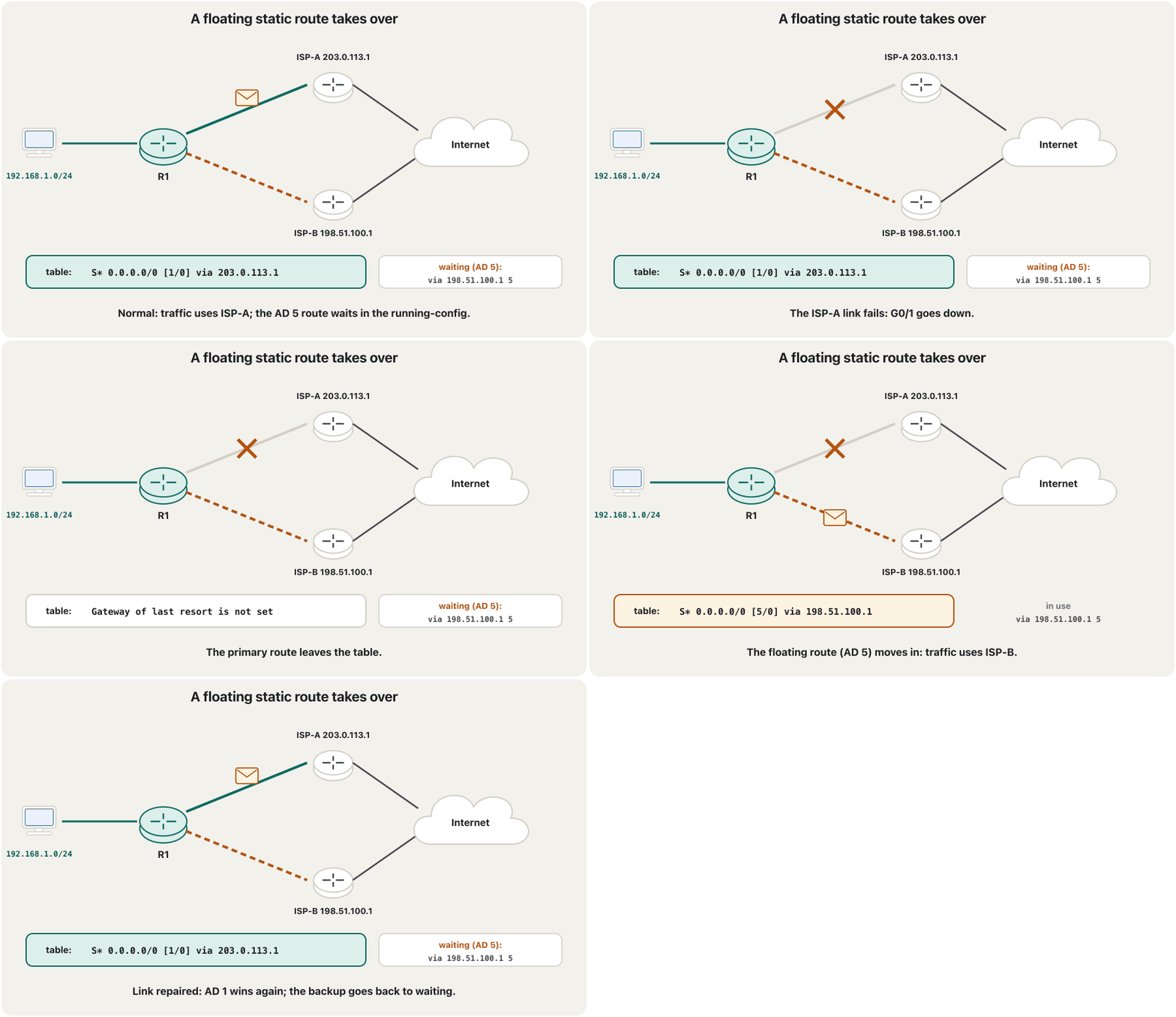
A floating static route is a static route with a higher administrative distance than the main route to the same network. While the main route is in the table, the backup loses on AD and stays out — it floats above the table, visible only in the running-config. When the main route disappears, the backup is installed at once. The AD is the last number of the command: ip route 0.0.0.0 0.0.0.0 198.51.100.1 5 — any value higher than the main route’s AD (1 for a static route) works.
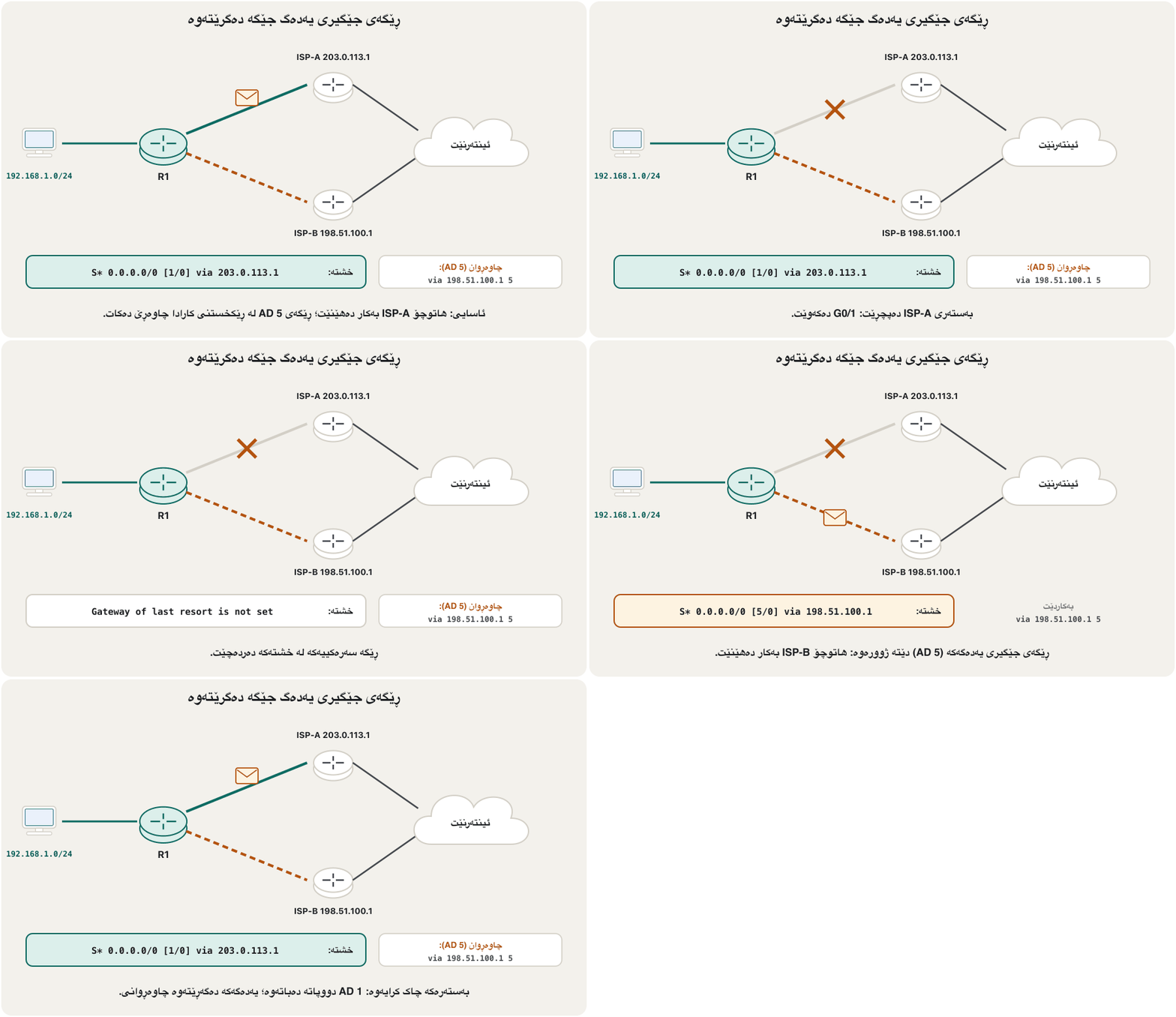
بە بەرزتر لە ڕێگە سەرەکییەکە بۆ هەمان . تا ڕێگە سەرەکییەکە لە خشتەکەدا بێت، یەدەگەکە لە ADـدا دەدۆڕێت و لە دەرەوە دەمێنێتەوە — لە سەرووی خشتەکەوە سەر ئاو دەکەوێت و تەنیا لە دەبینرێت. کاتێک ڕێگە سەرەکییەکە نامێنێت، یەدەگەکە دەستبەجێ دادەنرێت. AD دوایین ژمارەی : ip route 0.0.0.0 0.0.0.0 198.51.100.1 5 — هەر بەهایەک لە ADـی ڕێگە سەرەکییەکە (1 بۆ ) بەرزتر بێت کار دەکات.
A backup static route given a higher administrative distance than the main route (for example ip route 0.0.0.0 0.0.0.0 198.51.100.1 5), so it stays out of the routing table until the main route disappears.
یەدەگە کە بەرزتری هەیە لە ڕێگا سەرەکییەکە (بۆ نموونە ip route 0.0.0.0 0.0.0.0 198.51.100.1 5)، بۆیە لە دەرەوەی دەمێنێتەوە تا ڕێگا سەرەکییەکە نامێنێت.
In a football match the substitute sits on the bench, kit on, ready. He does not play while the first player is on the pitch. When the first player is injured and leaves, the substitute comes on at once — and when the first player is fit again, the substitute returns to the bench.
لە یارییەکی تۆپی پێدا یاریزانی یەدەگ لەسەر کورسییەکە دادەنیشێت، جلەکانی لەبەرە و ئامادەیە. تا یاریزانی سەرەکی لە یاریگاکەدایە یاری ناکات. کاتێک یاریزانی سەرەکی بریندار دەبێت و دەچێتە دەرەوە، یەدەگەکە دەستبەجێ دێتە ناوەوە — و کاتێک یاریزانی سەرەکی چاک دەبێتەوە، یەدەگەکە دەگەڕێتەوە سەر کورسییەکە.
Where the analogy stops workingسنووری ئەم نموونەیە
A coach also changes a player who is merely playing badly. A router changes only when the main route leaves the table — it does not notice a slow or overloaded link.
ڕاهێنەر یاریزانێکیش دەگۆڕێت کە تەنیا خراپ یاری دەکات. تەنیا کاتێک دەیگۆڕێت کە ڕێگە سەرەکییەکە لە خشتەکە دەردەچێت — هەست بە بەستەرێکی هێواش یان قەرەباڵغ ناکات.
Lab 3: two Internet linksتاقیکردنەوەی 3: دوو بەستەری ئینتەرنێت
A branch router R1 (a 2911) has its LAN on G0/0, a link to provider A on G0/1 (R1 203.0.113.2/30, provider 203.0.113.1) and a cheaper backup link to provider B on G0/2 (R1 198.51.100.2/30, provider 198.51.100.1). Both default routes are fully specified — interface and next hop — so each disappears as soon as its interface goes down. Test the backup by shutting G0/1, then turn it on again and save.
لق R1 (2911) لەسەر G0/0ـە، بەستەرێک بۆ A لەسەر G0/1 (R1 203.0.113.2/30، 203.0.113.1) و بەستەرێکی یەدەگی هەرزانتر بۆ B لەسەر G0/2 (R1 198.51.100.2/30، 198.51.100.1). هەردوو تەواو دیاریکراون — و — بۆیە هەریەکەیان هەر کە بکەوێت نامێنێت. یەدەگەکە بە کوژاندنەوەی G0/1 تاقی بکەرەوە، پاشان دووپاتە هەڵیبکەرەوە و پاشەکەوت بکە.
R1(config)#ip route 0.0.0.0 0.0.0.0 GigabitEthernet0/1 203.0.113.1
R1(config)#ip route 0.0.0.0 0.0.0.0 GigabitEthernet0/2 198.51.100.1 5
R1(config)#end
R1#show running-config | include ip route
ip route 0.0.0.0 0.0.0.0 GigabitEthernet0/1 203.0.113.1
ip route 0.0.0.0 0.0.0.0 GigabitEthernet0/2 198.51.100.1 5
R1#show ip route
Gateway of last resort is 203.0.113.1 to network 0.0.0.0

S*    0.0.0.0/0 [1/0] via 203.0.113.1, GigabitEthernet0/1
Explain the codeڕوونکردنەوەی کۆدەکە
- Lineدێڕی 2
The 5 at the end is the administrative distance: higher than 1, so this route waits.
5ـەکەی کۆتایی : لە 1 بەرزترە، بۆیە ئەم ڕێگەیە چاوەڕێ دەکات.
- Lineدێڕی 4-6
The running-config shows both routes …
هەردوو ڕێگەکە پیشان دەدات …
- Lineدێڕی 10
… but the table holds only the primary one.
… بەڵام خشتەکە تەنیا سەرەکییەکەی تێدایە.
R1(config)#interface g0/1
R1(config-if)#shutdown
%LINK-5-CHANGED: Interface GigabitEthernet0/1, changed state to administratively down
%LINEPROTO-5-UPDOWN: Line protocol on Interface GigabitEthernet0/1, changed state to down
R1(config-if)#do show ip route
Gateway of last resort is 198.51.100.1 to network 0.0.0.0

S*    0.0.0.0/0 [5/0] via 198.51.100.1, GigabitEthernet0/2
R1(config-if)#no shutdown
R1(config-if)#end
R1#copy running-config startup-config
Explain the codeڕوونکردنەوەی کۆدەکە
- Lineدێڕی 8
AD 5: the floating route has moved into the table and the gateway of last resort is now ISP-B.
AD 5: چووەتە ناو خشتەکە و gateway of last resort ئێستا ISP-Bـیە.
- Lineدێڕی 9
After no shutdown the primary route (AD 1) returns and the backup leaves the table again.
دوای no shutdown ڕێگە سەرەکییەکە (AD 1) دەگەڕێتەوە و یەدەگەکە دووپاتە لە خشتەکە دەردەچێت.
When the backup does not take overکاتێک یەدەگەکە جێگە ناگرێتەوە
A static route leaves the table only when its exit interface goes down or its next hop becomes unreachable. If the failure is beyond your interface — the provider’s router dies behind a modem or switch, so R1’s G0/1 stays up — the primary route stays in the table and traffic is lost in a black hole, while the backup keeps waiting. Two things help: (1) write the primary as a fully specified route, so at least an interface failure removes it; (2) on real routers, let the router test the path: Cisco’s IP SLA sends pings to an address beyond the link, and a track object removes the primary route (ip route … track 1) when the pings stop.
تەنیا کاتێک لە خشتەکە دەردەچێت کە بکەوێت یان نەگاتێ. ئەگەر تێکچوونەکە لە دوای بێت — لە پشت مۆدێمێک یان بکەوێت، بۆیە G0/1ـی R1 هەر up دەمێنێتەوە — ڕێگە سەرەکییەکە لە خشتەکەدا دەمێنێتەوە و هاتوچۆ لە کونێکی ڕەشدا ون دەبێت، لە کاتێکدا یەدەگەکە هەر چاوەڕێ دەکات. دوو شت یارمەتی دەدەن: (1) ڕێگە سەرەکییەکە بە تەواو دیاریکراوی بنووسە، تا لانیکەم کەوتنی لای ببات؛ (2) لەسەر ڕاستەقینە، با ڕێگاکە تاقی بکاتەوە: IP SLAـی Cisco بۆ ناونیشانێک لە دوای بەستەرەکە دەنێرێت و track ڕێگە سەرەکییەکە لادەبات (ip route … track 1) کاتێک دەوەستن.
Floating routes behind a routing protocolڕێگە جێگیرە یەدەگەکان لە پشت پرۆتۆکۆڵێکی ڕێدۆزییەوە
A floating route can also back up a route learned from a routing protocol. Its AD must then be higher than the protocol’s: more than 110 behind OSPF, more than 90 behind EIGRP — Cisco’s own example uses 250. The same idea is built into IOS: a default route learned from DHCP on an interface (ip address dhcp) gets AD 254, so a default route you configure, or one from a routing protocol, always wins over it.
دەتوانێت یەدەگی ڕێگەیەکیش بێت کە لە فێربووە. ئەوسا ADـەکەی دەبێت لە هی بەرزتر بێت: زیاتر لە 110 لە پشت ، زیاتر لە 90 لە پشت — نموونەکەی خودی Cisco 250 بەکار دەهێنێت. هەمان بیرۆکە لە ناو IOSـدا هەیە: کە لە لەسەر فێر دەبێت (ip address dhcp) AD 254 وەردەگرێت، بۆیە ئەو خۆت ڕێکی دەخەیت، یان یەکێک لە ، هەمیشە لێی دەباتەوە.
| Main route learned fromڕێگە سەرەکییەکە فێربووە لە | Its ADADـەکەی | A working AD for the floating routeADـێکی گونجاو بۆ |
|---|---|---|
| 1 | 5 (any 2–254) | |
| 90 | 95 (any 91–254) | |
| 110 | 120 (any 111–254) | |
| 120 | 130 (any 121–254) |
IPv6 default and floating routesڕێگە بنەڕەتییەکان و ڕێگە جێگیرە یەدەگەکانی IPv6
IPv6 writes “everything else” as ::/0. The commands follow IPv6 static routes: ipv6 route ::/0 and the next hop, and an AD at the end turns a second one into a floating backup. A link-local next hop needs the exit interface (ipv6 route ::/0 g0/1 fe80::1).
«هەموو شتێکی تر» وەک ::/0 دەنووسێت. بەدوای ڕێگە جێگیرەکانی IPv6دا دەڕۆن: ipv6 route ::/0 و ؛ ADـێک لە کۆتاییدا دانەی دووەم دەکاتە یەدەگێکی سەر ئاو کەوتوو. پێویستی بە هەیە (ipv6 route ::/0 g0/1 fe80::1).
R1(config)#ipv6 unicast-routing
R1(config)#ipv6 route ::/0 2001:db8:a::1
R1(config)#ipv6 route ::/0 2001:db8:b::1 5
R1(config)#end
R1#show ipv6 route static
S   ::/0 [1/0]
     via 2001:DB8:A::1
Explain the codeڕوونکردنەوەی کۆدەکە
- Lineدێڕی 3
AD 5: waits outside the table while the route via 2001:db8:a::1 exists.
AD 5: لە دەرەوەی خشتەکە چاوەڕێ دەکات تا ڕێگەکەی via 2001:db8:a::1 هەبێت.
::/0 چوار سفرەکەی ؛ سەر ئاو کەوتن بە هەمان شێوە کار دەکات.CêITCommon mistakesهەڵە باوەکان
A step-by-step way to find the fault is in IOS troubleshooting: static route faults.
ڕێگایەکی هەنگاو بە هەنگاو بۆ دۆزینەوەی کێشەکە لە چارەسەرکردنی کێشە لە IOS: کێشەکانی ڕێگەی جێگیردایە.
Exercisesڕاهێنانەکان
In the triangle (R1 with 192.168.1.0/24, R0 at the top, R2 with 192.168.5.0/24), send data from 192.168.1.0 through 192.168.3.0 and 192.168.4.0 to 192.168.5.0 with static routes, and bring it back from 192.168.2.0 to 192.168.1.0 with a default route. Write every command, then save.
لە سێگۆشەکەدا (R1 بە 192.168.1.0/24، R0 لە سەرەوە، R2 بە 192.168.5.0/24)، لە 192.168.1.0ـەوە بە 192.168.3.0 و 192.168.4.0دا بنێرە بۆ 192.168.5.0 بە و لە 192.168.2.0ـەوە بیگەڕێنەوە بۆ 192.168.1.0 بە . هەموو بنووسە، پاشان پاشەکەوت بکە.
Show answerوەڵامەکە پیشان بدە
R1(config)#ip route 192.168.4.0 255.255.255.0 192.168.3.2
R1(config)#ip route 192.168.5.0 255.255.255.0 192.168.3.2
R0(config)#ip route 192.168.5.0 255.255.255.0 192.168.4.1
R2(config)#ip route 0.0.0.0 0.0.0.0 192.168.2.1
R1#copy running-config startup-config
R0#copy running-config startup-config
R2#copy running-config startup-config
Check with ping 192.168.5.2 from PC1: the replies come back over the direct link. tracert is confusing on this one-sided path. Line 1 is 192.168.1.1. R0 has no route back to 192.168.1.0, so its answer is lost and line 2 shows * * *. R2 answers from the interface it uses to reach PC1 (192.168.2.2 on a Cisco router; Packet Tracer may show another R2 address), and the last line is 192.168.5.2.
بە ping 192.168.5.2 لە PC1ـەوە بیپشکنە: وەڵامەکان بە بەستەرە ڕاستەوخۆکەدا دەگەڕێنەوە. tracert لەم ڕێگا یەکلایەنەیەدا سەرلێشێوێنەرە. دێڕی 1 بریتییە لە 192.168.1.1. R0 هیچ ڕێگەیەکی بۆ گەڕانەوە بۆ 192.168.1.0 نییە، بۆیە وەڵامەکەی ون دەبێت و دێڕی 2 * * * پیشان دەدات. R2 بە ناونیشانی ئەو وەڵام دەداتەوە کە پێی دەگاتە PC1 (لەسەر Cisco 192.168.2.2؛ Packet Tracer لەوانەیە ناونیشانێکی تری R2 پیشان بدات) و دوایین دێڕ 192.168.5.2ـە.
Branch router BR1 reaches headquarters over 10.0.0.0/30 (HQ = 10.0.0.1) and has a slower backup link 10.0.1.0/30 (HQ = 10.0.1.1). Write BR1’s default routes so the backup is used only when the main link is down. What must HQ have?
لق BR1 بە 10.0.0.0/30 دەگاتە بارەگای سەرەکی (HQ = 10.0.0.1) و بەستەرێکی یەدەگی هێواشتری 10.0.1.0/30ـی هەیە (HQ = 10.0.1.1). BR1 بنووسە تا یەدەگەکە تەنیا کاتێک بەکار بێت کە بەستەرە سەرەکییەکە کەوتووە. HQ دەبێت چی هەبێت؟
Show answerوەڵامەکە پیشان بدە
BR1(config)#ip route 0.0.0.0 0.0.0.0 10.0.0.1
BR1(config)#ip route 0.0.0.0 0.0.0.0 10.0.1.1 10
BR1(config)#end
BR1#copy running-config startup-config
HQ needs routes back to the branch LAN on both links — the main one normal, the one over 10.0.1.0 floating (for example ip route 192.168.50.0 255.255.255.0 10.0.1.2 10). On Ethernet links write them fully specified, or track them, so a failure is noticed.
HQ پێویستی بە ڕێگەی گەڕانەوەیە بۆ لقەکە لەسەر هەردوو بەستەر — سەرەکییەکە ئاسایی، ئەوەی سەر 10.0.1.0 سەر ئاو کەوتوو (بۆ نموونە ip route 192.168.50.0 255.255.255.0 10.0.1.2 10). لەسەر بەستەری بە تەواو دیاریکراوی بیاننووسە، یان بەدوایان بگرە، تا تێکچوون هەستی پێ بکرێت.
A router shows Gateway of last resort is 0.0.0.0 to network 0.0.0.0 and S* 0.0.0.0/0 is directly connected, Serial0/0/0. (a) How was the default route written? (b) Would the same form be a good idea on GigabitEthernet0/1 towards an ISP switch?
Gateway of last resort is 0.0.0.0 to network 0.0.0.0 و S* 0.0.0.0/0 is directly connected, Serial0/0/0 پیشان دەدات. (ئ) چۆن نووسراوە؟ (ب) هەمان شێوە لەسەر GigabitEthernet0/1 بەرەو بیرۆکەیەکی باش دەبێت؟
Show answerوەڵامەکە پیشان بدە
- (a) With the exit interface only:
ip route 0.0.0.0 0.0.0.0 Serial0/0/0— no next-hop address, so the gateway shows 0.0.0.0. - (b) No: on Ethernet the router would treat every Internet address as directly connected and ARP for each one. Use
ip route 0.0.0.0 0.0.0.0 g0/1 <ISP address>.
- (ئ) تەنیا بە :
ip route 0.0.0.0 0.0.0.0 Serial0/0/0— بێ ناونیشانی ، بۆیە gateway 0.0.0.0 پیشان دەدات. - (ب) نەخێر: لەسەر هەموو ناونیشانێکی بە ڕاستەوخۆ بەستراو دادەنێت و بۆ هەریەکەیان دەکات.
ip route 0.0.0.0 0.0.0.0 g0/1 <ISP address>بەکار بهێنە.
Summaryکورتە
- A default route (0.0.0.0/0, “quad zero”; ::/0 in IPv6) matches every address and is used only when nothing longer matches. Its next hop is the gateway of last resort; the table marks it S*.
- Command:
ip route 0.0.0.0 0.0.0.0 <next hop>(exit interface only on point-to-point links). - Stub networks (one neighbour, no transit traffic) need only a default route; the hub needs a specific route back.
- A more specific route always beats the default route (longest prefix match).
- A floating static route is a backup with a higher AD (
… 198.51.100.1 5): it waits in the running-config and enters the table only while the main route is gone. - A static route notices only interface and next-hop failures; use fully specified routes and, on real routers, IP SLA tracking.
- (0.0.0.0/0، «چوار سفر»؛
::/0لە ) لەگەڵ هەموو ناونیشانێک دەگونجێت و تەنیا کاتێک بەکار دێت کە هیچی درێژتر نەگونجێت. gateway of last resortـە؛ خشتەکە بە S* نیشانی دەکات. - :
ip route 0.0.0.0 0.0.0.0 <next hop>( تەنیا لەسەر بەستەری خاڵ بۆ خاڵ). - (یەک دراوسێ، بێ هاتوچۆی تێپەڕ) تەنیا پێویستیان بە ؛ ناوەند پێویستی بە ڕێگەیەکی دیاریکراوە بۆ گەڕانەوە.
- ڕێگەی وردتر هەمیشە لە دەباتەوە ().
- یەدەگێکە بە ADـی بەرزتر (
… 198.51.100.1 5): لە چاوەڕێ دەکات و تەنیا تا ئەو کاتە دێتە ناو خشتەکە کە ڕێگە سەرەکییەکە نەماوە. - تەنیا هەست بە تێکچوونی و دەکات؛ ڕێگەی تەواو دیاریکراو بەکار بهێنە و لەسەر ڕاستەقینە بەدواداچوونی IP SLA.
Next: routers that find routes by themselves — Routing protocols.
دواتر: ئەو خۆیان ڕێگەکان دەدۆزنەوە — پرۆتۆکۆڵەکانی ڕێدۆزی.
Lesson complete!وانەکە تەواو بوو!
Well done. Review the key terms, then go on to the next lesson.دەستخۆش. سەیرێکی زاراوە سەرەکییەکان بکەرەوە، پاشان بڕۆ بۆ وانەی داهاتوو.
Key termsزاراوە سەرەکییەکان
How Routers Learn Routes: Routing Protocols, Metrics and Loopsڕێدۆزەکان چۆن ڕێگەکان فێر دەبن: پرۆتۆکۆڵەکانی ڕێدۆزی، پێوانەکان و ئەڵقەکانی ڕێدۆزی
Related lecturesوانە پەیوەندیدارەکان
- How a Packet Finds Its Way: Gateways and Routing Tablesپاکێت چۆن ڕێگای خۆی دەدۆزێتەوە: دەروازەی بنەڕەتی و خشتەکانی ڕێدۆزی
- How Routers Learn Routes: Routing Protocols, Metrics and Loopsڕێدۆزەکان چۆن ڕێگەکان فێر دەبن: پرۆتۆکۆڵەکانی ڕێدۆزی، پێوانەکان و ئەڵقەکانی ڕێدۆزی
- Show Commands, Running and Startup Configurationsفەرمانەکانی show، ڕێکخستنی کارا و ڕێکخستنی دەستپێکردن
- IPv6 Addresses: Format and Typesناونیشانەکانی IPv6: شێوە و جۆرەکان
- DHCP on a Cisco Router and DHCP RelayDHCP لەسەر ڕێدۆزێکی Cisco و گوازەرەوەی DHCP
- OSPF: Cost, Router IDs and Link-State AdvertisementsOSPF: تێچوو، ناسێنەرەکانی ڕێدۆز و LSAـەکان
- EIGRP: Cisco’s Advanced Distance-Vector ProtocolEIGRP: مەودای ئاڕاستەی پێشکەوتووی Cisco
References and further readingسەرچاوەکان و خوێندنەوەی زیاتر
- Cisco: Configure a Gateway of Last Resort Using IP Commands (ip route 0.0.0.0 0.0.0.0, S*, show ip route 0.0.0.0; updated 24 April 2025)
- Cisco: What Is Administrative Distance? (floating static route example with distance 250; updated 20 July 2026)
- Cisco: Configure a Next Hop IP Address for Static Routes (floating static routes stay out while the next hop is reachable; specify the interface)
- Cisco IOS IPv6 Configuration Guide: Implementing Static Routes for IPv6 (::/0 default route; floating IPv6 static routes)
- Cisco: Reliable Static Routing Backup Using Object Tracking (IP SLA)
- Cisco: Configure Administrative Distance for DHCP Default Route (default AD 254)
- CIDR Report, 9 November 2026 (IPv4 table: 1,091,154 prefixes)
- Cisco Press: Switching, Routing, and Wireless Essentials Companion Guide (CCNAv7) — default and floating static routes
This lecture is a first edition. The Kurdish text and terminology are waiting for review by Kurdish IT teachers.ئەم وانەیە چاپی یەکەمە. دەقە کوردییەکە و زاراوەکانی چاوەڕێی پێداچوونەوەی مامۆستایانی کوردی بواری IT ن.