Chapterبەش 4 · Lectureوانە 4.3
RIP: The Simplest Routing ProtocolRIP: سادەترین پرۆتۆکۆڵی ڕێدۆزی
RIP from the inside: hop count (1–15, 16 = unreachable), updates every 30 seconds and the four Cisco timers, RIPv1 versus RIPv2 versus RIPng, the four configuration commands (router rip, version 2, no auto-summary, network), verification with show ip route, show ip protocols and debug ip rip, and three Packet Tracer labs — two routers, RIP with VLANs and RIP with /18 subnets — plus where RIP still fits in 2026.
لە ناوەوە: ژمارەی (1–15، 16 = ناگەیەنرێت)، نوێکردنەوە هەموو 30 چرکە و چوار Cisco، RIPv1 و RIPv2 و RIPng، چوار ڕێکخستن (router rip، version 2، no auto-summary، network)، پشکنین بە show ip route، show ip protocols و debug ip rip و سێ تاقیکردنەوەی Packet Tracer — دوو ، لەگەڵ و لەگەڵ 172.16.0.0/18 — هەروەها لە 2026دا هێشتا لە کوێ دەگونجێت.
What you will learnچی فێر دەبیت
- Explain how RIP measures paths (hop count, 16 = unreachable) and why it can choose a slow path.
- Describe RIP’s updates and timers and compare RIPv1, RIPv2 and RIPng.
- Configure RIPv2 with router rip, version 2, no auto-summary and network, and say what the network command really matches.
- Verify RIP with show ip route, show ip protocols and debug ip rip.
- Build the three labs (two routers, VLANs, subnets) and judge where RIP fits today.
- ڕوون بکەیتەوە چۆن ڕێگاکان دەپێوێت (ژمارەی ، 16 = ناگەیەنرێت) و بۆچی دەتوانێت ڕێگایەکی خاو هەڵبژێرێت.
- نوێکردنەوە و وەسف بکەیت و RIPv1، RIPv2 و RIPng بەراورد بکەیت.
- RIPv2 بە router rip، version 2، no auto-summary و network ڕێک بخەیت و بڵێیت network بە ڕاستی لەگەڵ چی دەگونجێت.
- بە show ip route، show ip protocols و debug ip rip بپشکنیت.
- سێ تاقیکردنەوەکە دروست بکەیت (دوو ، ، ) و بڕیار بدەیت ئەمڕۆ لە کوێ دەگونجێت.
What RIP isRIP چییە
RIP, the Routing Information Protocol, is the simplest routing protocol and the classic distance-vector protocol (Distance vector and link state). Its job is to spread routing information among the routers of a network. Every RIP router sends routing updates to its neighbours: “these are the networks I know, and this is how far each one is.” Each neighbour builds its own picture from them, keeps a routing table of the best paths and updates it whenever new updates arrive.
، Routing Information Protocol، سادەترین و نموونەی کلاسیکی (مەودای ئاڕاستە و بارودۆخی بەستەر). کارەکەی بڵاوکردنەوەی زانیاریی لە نێوان . هەموو نوێکردنەوەی بۆ دراوسێکانی دەنێرێت: «ئەمانە ئەو کە دەیانناسم و ئەمەش دووریی هەریەکەیانە.» هەر دراوسێیەک وێنەی خۆی لەوانەوە دروست دەکات، لە باشترین ڕێگەکان هەڵدەگرێت و هەر کاتێک نوێکردنەوەی نوێ دەگات نوێی دەکاتەوە.
Hop count: 1 to 15, and 16 means unreachableژمارەی بازەکان: 1 تا 15؛ 16 واتە ناگەیەنرێت
RIP’s metric is the hop count: the number of routers a packet must pass to reach the network. Each router on the way adds one hop, the cost of a path is the sum, and the route with the lowest count wins. A network one router away has metric 1. The largest usable value is 15; the value 16 means infinity — the network cannot be reached. So RIP cannot serve networks in which a path crosses more than 15 routers. (How to count hops on a drawing is shown in Hop count.)
ژمارەی : ژمارەی ئەو دەبێت پێیاندا تێپەڕێت تا بگاتە . هەر سەر ڕێگا یەک زیاد دەکات، تێچووی ڕێگایەک کۆی ئەوانە و ڕێگەی خاوەن کەمترین ژمارە دەباتەوە. کە یەک دوورە 1ـی هەیە. گەورەترین بەهای بەکارهاتوو 15ـە؛ بەهای 16 واتە — ناگەیەنرێت. بۆیە ناتوانێت خزمەتی ئەو بکات کە ڕێگایەکیان بە زیاتر لە 15 تێپەڕێت. (چۆنیەتیی ژماردنی لەسەر وێنە لە ژمارەی بازەکاندا پیشان دراوە.)
Hop count: 1 to 15, and 16 means unreachableژمارەی بازەکان: 1 تا 15؛ 16 واتە ناگەیەنرێت
Hops are not speedبازەکان خێرایی نین
Hop count ignores bandwidth. In the picture Host 2 can reach Host 1 through R2 over 10 Mb/s links (2 hops), or through R5 and R4 over 100 Mb/s links (3 hops). RIP chooses the 2-hop path, although the other path is ten times faster. This is RIP’s biggest weakness in modern networks, where links have very different speeds — the two-roads story in Routing protocols shows the same idea.
ژمارەی گوێ نادات بە . لە وێنەکەدا Host 2 دەتوانێت لە ڕێی R2ـەوە بە بەستەری 10 Mb/s (2 ) بگاتە Host 1، یان لە ڕێی R5 و R4ـەوە بە بەستەری 100 Mb/s (3 ). ڕێگای 2 هەڵدەبژێرێت، هەرچەندە ڕێگاکەی تر دە جار خێراترە. ئەمە گەورەترین لاوازیی لە ئەمڕۆدا، کە بەستەرەکان خێراییی زۆر جیاوازیان هەیە — چیرۆکی دوو ڕێکە لە پرۆتۆکۆڵەکانی ڕێدۆزی هەمان بیرۆکە پیشان دەدات.
Updates and timersنوێکردنەوە و تایمەرەکان
A RIP router sends its whole routing table out of every RIP interface every 30 seconds — RIPv2 to the multicast address 224.0.0.9 on UDP port 520. The timer is shifted by a few random seconds so that routers do not all speak at once. When a route changes it also sends a triggered update at once, and it uses split horizon by default. Four Cisco timers decide what happens when updates stop:
هەموو لە هەموو هەموو 30 چرکە جارێک دەنێرێت — RIPv2 بۆ ناونیشانی 224.0.0.9 لەسەر 520. چەند چرکەیەکی هەڕەمەکی دەجووڵێنرێت بۆ ئەوەی هەموویان پێکەوە قسە نەکەن. کاتێک ڕێگەیەک دەگۆڕێت، ـیش یەکسەر دەنێرێت و بە بنەڕەت بەکار دەهێنێت. چوار Cisco بڕیار دەدەن کاتێک نوێکردنەوەکان دەوەستن چی ڕوو دەدات:
| Timer | Defaultبنەڕەت | What it doesچی دەکات |
|---|---|---|
| updateنوێکردنەوە | 30 s30 چرکە | how often the whole table is sentهەموو خشتەکە چەند جار دەنێردرێت |
| invalidنادروست | 180 s180 چرکە | no news for this long: the route is marked “possibly down” and advertised with 16ئەگەر ئەوەندە هەواڵ نەبێت: ڕێگەکە وەک «ڕەنگە پچڕابێت» نیشان دەکرێت و بە 16 ڕادەگەیەنرێت |
| hold-down | 180 s180 چرکە | news of other paths to that network is ignoredهەواڵی ڕێگای تر بۆ ئەو پشتگوێ دەخرێت |
| flushسڕینەوە | 240 s240 چرکە | no news for this long: the route is deletedئەگەر ئەوەندە هەواڵ نەبێت: ڕێگەکە دەسڕدرێتەوە |
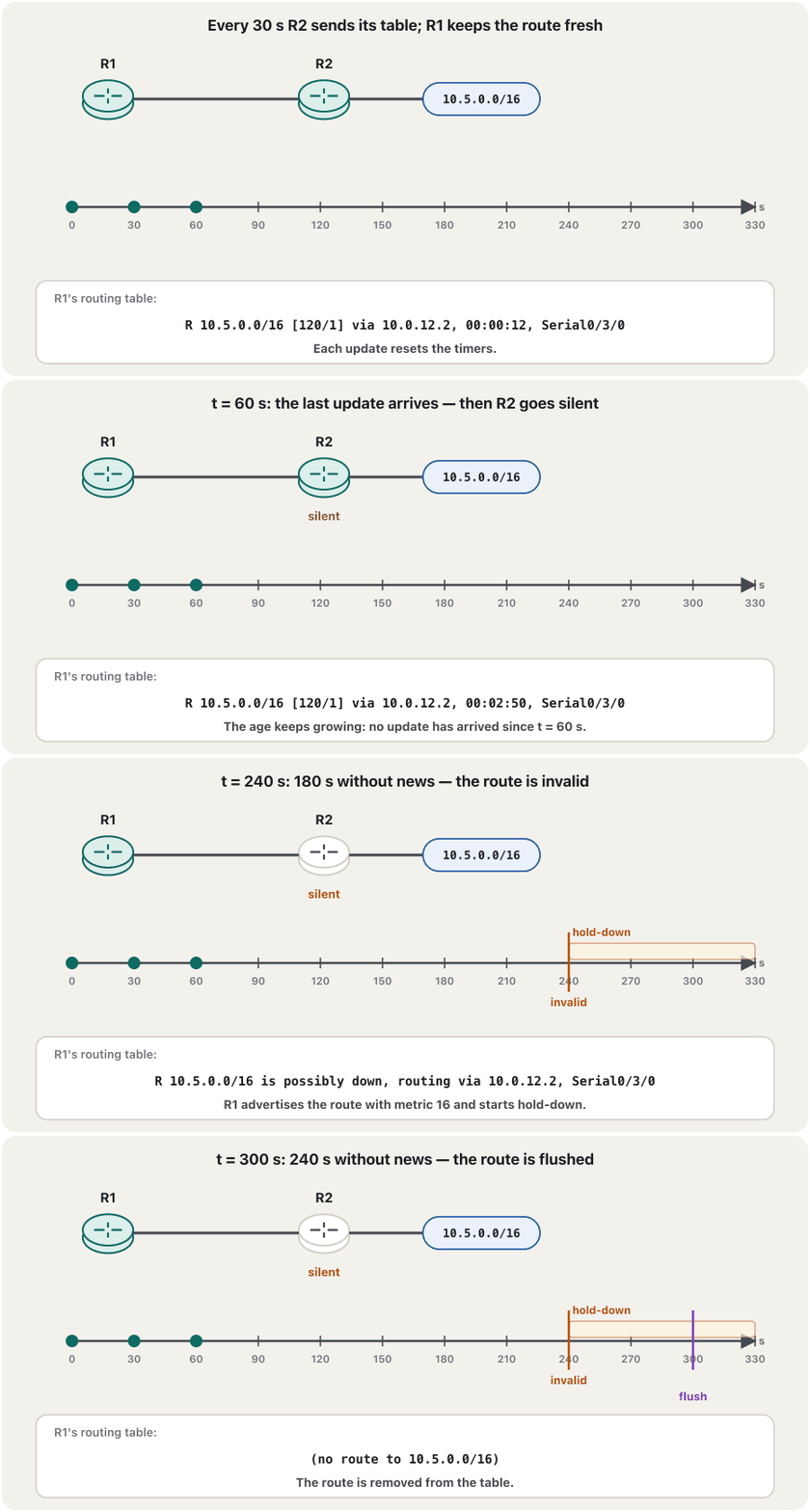
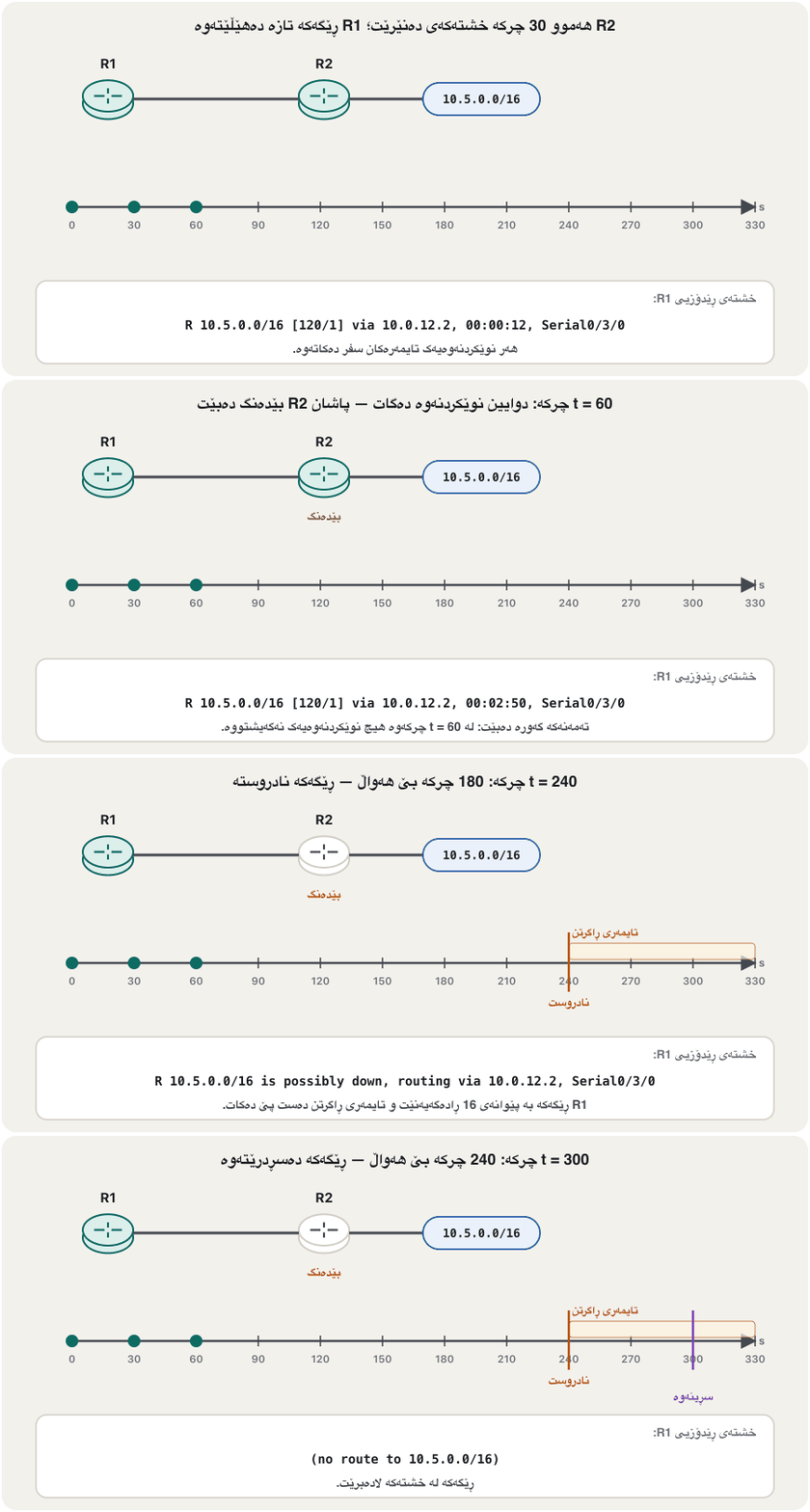
RIP’s administrative distance on Cisco routers is 120, so a route learned by OSPF (110) or EIGRP (90) for the same network wins (the AD table). The RFC itself names two timers, a 180-second timeout and a 120-second garbage-collection timer; Cisco’s hold-down is an extra protection against loops.
لەسەر Cisco 120ـە، بۆیە ڕێگەیەک بۆ هەمان کە لە (110) یان (90)ـەوە فێربووبێت دەباتەوە (خشتەی AD). خودی RFCـەکە ناوی دوو دەبات، timeoutـی 180 چرکەیی و garbage-collectionـی 120 چرکەیی؛ Cisco پاراستنێکی زیادەیە دژی .
RIPv1, RIPv2 and RIPngRIPv1، RIPv2 و RIPng
RIPv1 (RFC 1058, 1988) is classful: its updates carry no subnet masks, and it sends them as broadcasts to 255.255.255.255, so every device on the link — PCs included — must stop and read them. It has no authentication, so any device can send fake routes. RIPv2 (1994; today RFC 2453, 1998) fixes this: it is classless — every route carries its mask, so VLSM and CIDR work — it sends updates to the multicast address 224.0.0.9, which only RIPv2 routers listen to, and it supports authentication (next lesson). RIPng (RFC 2080) is RIP for IPv6; it uses FF02::9 and UDP port 521. On Cisco routers we always choose version 2.
RIPv1 (RFC 1058، 1988) پۆلدارە: نوێکردنەوەکانی هەڵناگرن و وەک بۆ 255.255.255.255 دەینێرێت، بۆیە هەموو ئامێرێکی سەر بەستەرەکە — PCـەکانیش — دەبێت بوەستن و بیخوێننەوە. پشتگیریی ناکات، بۆیە هەر ئامێرێک دەتوانێت ڕێگەی ساختە بنێرێت. RIPv2 (1994؛ ئەمڕۆ RFC 2453، 1998) ئەمە چاک دەکات: بێپۆلە — هەر ڕێگەیەک ماسکەکەی هەڵدەگرێت، بۆیە و کار دەکەن — نوێکردنەوەکان بۆ ناونیشانی 224.0.0.9 دەنێرێت، کە تەنیا RIPv2 گوێی لێ دەگرن. هەروەها پشتگیریی دەکات (وانەی داهاتوو). RIPng (RFC 2080) بۆ ؛ FF02::9 و 521 بەکار دەهێنێت. لەسەر Cisco هەمیشە وەشانی 2 هەڵدەبژێرین.
Configuring RIP: four commandsڕێکخستنی RIP: چوار فەرمان
- Start RIPدەستپێکردنی RIP
router rip— in global configuration mode, starts the RIP process and enters router configuration mode,R1(config-router)#.router rip— لە ، پرۆسەی دەست پێ دەکات و دەچێتە باری ڕێکخستنی ،R1(config-router)#. - Choose version 2هەڵبژاردنی وەشانی 2
version 2— use RIPv2 only. Without it, Cisco IOS sends version 1 updates and accepts both versions.version 2— تەنیا RIPv2 بەکار بهێنە. بەبێ ئەمە، Cisco IOS نوێکردنەوەی وەشانی 1 دەنێرێت و هەردوو وەشانەکە وەردەگرێت. - Stop automatic summarisingوەستاندنی پوختکردنەوەی خۆکار
no auto-summary— RIP summarises routes at classful boundaries by default; turn that off so that every subnet is advertised as it is (Automatic summarization).no auto-summary— بە بنەڕەت ڕێگەکان لە سنووری پۆلەکاندا پوخت دەکاتەوە؛ ئەمە بکوژێنەرەوە بۆ ئەوەی هەر وەک خۆی ڕابگەیەنرێت (ڕاپوختکردنی خۆکار). - List the connected networksناساندنی ڕایەڵەیە بەستراوەکان
network 192.168.1.0— one line for each directly connected network, written as its classful network address. It does two things: RIP starts sending and receiving updates on every interface inside that network, and the network itself is advertised.network 192.168.1.0— یەک دێڕ بۆ هەر ڕاستەوخۆ بەستراو، بە پۆلدارەکەی دەنووسرێت. دوو کار دەکات: لەسەر هەموو ناو ئەو دەست بە ناردن و وەرگرتنی نوێکردنەوە دەکات. هەروەها خودی ڕادەگەیەنرێت.
A network line also makes RIP send updates out of LAN interfaces where no router listens. To keep them quiet while still advertising their networks, add passive-interface — taught in Passive interfaces.
دێڕێکی network وا دەکات نوێکردنەوە لەو بنێرێت کە بەرەو دەچن و هیچ گوێی لێ ناگرێت. بۆ بێدەنگکردنیان و هێشتا ڕاگەیاندنی ، passive-interface زیاد بکە — لە نێوبەستە ناچالاکەکاندا دەخوێنرێت.
Lab 1: RIP between two routersتاقیکردنەوەی 1: RIP لە نێوان دوو ڕێدۆزدا
The first lab has four 2811 routers in a ring, but only the two lower ones, R1 and R2, run RIP: PC0 (192.168.1.2) must reach PC1 (192.168.2.2) through them. The interfaces are already addressed and up, as in Basic router configuration; R2’s Se0/3/0 is the DCE end, so it also has clock rate 64000. Now each router gets RIP for its own connected networks.
تاقیکردنەوەی یەکەم چوار 2811ـی هەیە لە ئەڵقەیەکدا، بەڵام تەنیا دوو خوارەوەکە، R1 و R2، کار پێ دەکەن: PC0 (192.168.1.2) دەبێت لە ڕێی ئەوانەوە بگاتە PC1 (192.168.2.2). پێشتر ناونیشانیان دراوە و هەڵکراون، وەک لە ڕێکخستنی سەرەتاییی ڕێدۆزدا؛ Se0/3/0ـی R2 لای DCEـیە، بۆیە clock rate 64000ـیشی هەیە. ئێستا هەر بۆ بەستراوەکانی خۆی وەردەگرێت.
R1(config)#router rip
R1(config-router)#version 2
R1(config-router)#no auto-summary
R1(config-router)#network 192.168.1.0
R1(config-router)#network 192.168.3.0
R1(config-router)#end
R1#copy running-config startup-config
Destination filename [startup-config]?
Building configuration...
[OK]
Explain the codeڕوونکردنەوەی کۆدەکە
- Lineدێڕی 2-3
Many lab guides type only
version 2; addno auto-summarytoo — a good habit for every RIPv2 router.زۆر ڕێنمایی تاقیگە تەنیا
version 2دەنووسن؛no auto-summaryـیش زیاد بکە — خوویەکی باشە بۆ هەموو RIPv2.- Lineدێڕی 4-5
R1’s two connected networks: the LAN and the serial link.
دوو بەستراوەکەی R1: و بەستەرە زنجیرەییەکە.
R2(config)#router rip
R2(config-router)#version 2
R2(config-router)#no auto-summary
R2(config-router)#network 192.168.3.0
R2(config-router)#network 192.168.2.0
R2(config-router)#end
R2#copy running-config startup-config
Destination filename [startup-config]?
Building configuration...
[OK]Checking RIPپشکنینی RIP
After a few seconds R1 learns 192.168.2.0/24 from R2. show ip route marks it with R; [120/1] means administrative distance 120 and 1 hop. Reading every part of the table is taught in Reading the routing table.
دوای چەند چرکەیەک R1 لە R2ـەوە فێری 192.168.2.0/24 دەبێت. show ip route بە R نیشانی دەکات؛ [120/1] واتە 120 و 1 . خوێندنەوەی هەموو بەشێکی خشتەکە لە خوێندنەوەی خشتەی ڕێدۆزیدا دەخوێنرێت.
R1#show ip route
Codes: L - local, C - connected, S - static, R - RIP, M - mobile, B - BGP
       D - EIGRP, EX - EIGRP external, O - OSPF, IA - OSPF inter area
       N1 - OSPF NSSA external type 1, N2 - OSPF NSSA external type 2
       E1 - OSPF external type 1, E2 - OSPF external type 2
       i - IS-IS, su - IS-IS summary, L1 - IS-IS level-1, L2 - IS-IS level-2
       ia - IS-IS inter area, * - candidate default, U - per-user static route
       o - ODR, P - periodic downloaded static route, H - NHRP, l - LISP
       a - application route
       + - replicated route, % - next hop override, p - overrides from PfR

Gateway of last resort is not set

      192.168.1.0/24 is variably subnetted, 2 subnets, 2 masks
C        192.168.1.0/24 is directly connected, FastEthernet0/0
L        192.168.1.1/32 is directly connected, FastEthernet0/0
R     192.168.2.0/24 [120/1] via 192.168.3.2, 00:00:12, Serial0/3/1
      192.168.3.0/24 is variably subnetted, 2 subnets, 2 masks
C        192.168.3.0/24 is directly connected, Serial0/3/1
L        192.168.3.1/32 is directly connected, Serial0/3/1
Explain the codeڕوونکردنەوەی کۆدەکە
- Lineدێڕی 17
The RIP route: AD 120, 1 hop, next hop R2 (192.168.3.2), heard 12 seconds ago, out of Serial0/3/1.
ڕێگەی : AD 120، 1 ، R2 (192.168.3.2)، 12 چرکە لەمەوبەر بیستراوە، لە Serial0/3/1ـەوە.
Checking RIPپشکنینی RIP
show ip protocols and a pingshow ip protocols و پینگ
show ip protocols shows RIP’s settings in one place: the timers, the version on each interface, whether auto-summary is off, the network lines and the routers that send updates.
show ip protocols ڕێکخستنەکانی لە یەک شوێندا پیشان دەدات: ، وەشان لەسەر هەر ، ئایا auto-summary کوژاوەتەوە، دێڕەکانی network و ئەو نوێکردنەوە دەنێرن.
R1#show ip protocols
*** IP Routing is NSF aware ***

Routing Protocol is "rip"
  Outgoing update filter list for all interfaces is not set
  Incoming update filter list for all interfaces is not set
  Sending updates every 30 seconds, next due in 16 seconds
  Invalid after 180 seconds, hold down 180, flushed after 240
  Redistributing: rip
  Default version control: send version 2, receive version 2
    Interface             Send  Recv  Triggered RIP  Key-chain
    FastEthernet0/0       2     2
    Serial0/3/1           2     2
  Automatic network summarization is not in effect
  Maximum path: 4
  Routing for Networks:
    192.168.1.0
    192.168.3.0
  Routing Information Sources:
    Gateway         Distance      Last Update
    192.168.3.2          120      00:00:08
  Distance: (default is 120)
Explain the codeڕوونکردنەوەی کۆدەکە
- Lineدێڕی 7-8
The four timers: update 30, invalid 180, hold-down 180, flush 240.
چوار : نوێکردنەوە 30، نادروست 180، ڕاگرتن 180، سڕینەوە 240.
- Lineدێڕی 10-13
Version 2 is sent and received on both interfaces.
وەشانی 2 لەسەر هەردوو دەنێردرێت و وەردەگیرێت.
- Lineدێڕی 14
no auto-summaryworked.no auto-summaryکاری کرد.- Lineدێڕی 16-18
The network lines.
دێڕەکانی network.
- Lineدێڕی 19-21
Where updates come from: R2, AD 120, last heard 8 seconds ago.
نوێکردنەوەکان لە کوێوە دێن: R2، AD 120، 8 چرکە لەمەوبەر بیستراوە.
Packet Tracer’s routers print the same fields, in a slightly different order and without the NSF line. Finally test from PC0: ping 192.168.2.2 gets four replies with TTL=126 — the packet crossed two routers (128 − 2).
Packet Tracer هەمان خانەکان چاپ دەکەن، بە ڕیزبەندییەکی کەمێک جیاواز و بەبێ دێڕی NSF. لە کۆتاییدا لە PC0ـەوە تاقی بکەرەوە: ping 192.168.2.2 چوار وەڵام بە TTL=126 وەردەگرێت — بە دوو تێپەڕیوە (128 − 2).
Checking RIPپشکنینی RIP
Watching updates with debug ip ripسەیرکردنی نوێکردنەوەکان بە debug ip rip
debug ip rip prints every RIP update the router sends and receives. Look at the lines: R1 receives 192.168.2.0/24 “in 1 hops” from R2; it sends that network on to its LAN with metric 2; and towards R2 it sends only 192.168.1.0/24 — split horizon keeps 192.168.2.0 from going back where it came from. Notice too that the sender counts the hop: R1 lists its own networks with metric 1 and 192.168.2.0 with metric 2 — the “neighbour’s hops + 1” of distance vector. Debug output costs CPU on a busy router, so switch it off as soon as you have seen enough with undebug all (or no debug all). Over SSH, type terminal monitor first to see the messages.
debug ip rip هەموو نوێکردنەوەیەکی چاپ دەکات کە دەینێرێت و وەری دەگرێت. سەیری دێڕەکان بکە: R1 ڕێگەی 192.168.2.0/24 بە «in 1 hops» لە R2ـەوە وەردەگرێت؛ ئەو بە 2 بۆ دەنێرێت؛ و بەرەو R2 تەنیا 192.168.1.0/24 دەنێرێت — ناهێڵێت 192.168.2.0 بگەڕێتەوە ئەو شوێنەی لێوەی هاتووە. هەروەها سەرنج بدە کە نێرەر دەژمێرێت: R1 خۆییەکانی بە 1 و 192.168.2.0 بە 2 دەنێرێت — هەمان « دراوسێ + 1»ـی مەودای ئاڕاستە. دەرچوونی debug لەسەر قەرەباڵغ CPU دەخوات، بۆیە هەر کە بەشی خۆت بینی بە undebug all (یان no debug all) بیکوژێنەرەوە. لە ڕێی SSHـەوە سەرەتا terminal monitor بنووسە بۆ بینینی پەیامەکان.
R1#debug ip rip
RIP protocol debugging is on
R1#
RIP: received v2 update from 192.168.3.2 on Serial0/3/1
     192.168.2.0/24 via 0.0.0.0 in 1 hops
RIP: sending v2 update to 224.0.0.9 via FastEthernet0/0 (192.168.1.1)
RIP: build update entries
      192.168.2.0/24 via 0.0.0.0, metric 2, tag 0
      192.168.3.0/24 via 0.0.0.0, metric 1, tag 0
RIP: sending v2 update to 224.0.0.9 via Serial0/3/1 (192.168.3.1)
RIP: build update entries
      192.168.1.0/24 via 0.0.0.0, metric 1, tag 0
R1#undebug all
All possible debugging has been turned off
Explain the codeڕوونکردنەوەی کۆدەکە
- Lineدێڕی 4-5
Received from R2: 192.168.2.0/24, 1 hop. (
via 0.0.0.0means “via the sender”.)لە R2ـەوە وەرگیراوە: 192.168.2.0/24، 1 . (
via 0.0.0.0واتە «لە ڕێی نێرەرەوە».)- Lineدێڕی 10-12
Towards R2 only 192.168.1.0/24 is sent: split horizon at work.
بەرەو R2 تەنیا 192.168.1.0/24 دەنێردرێت: لە کاردا.
- Lineدێڕی 13-14
Always switch debugging off when you are done.
هەمیشە کە تەواو بوویت debug بکوژێنەرەوە.
Lab 2: RIP with VLANsتاقیکردنەوەی 2: RIP لەگەڵ VLANـەکان
In the second lab the right-hand switch, SW1, has two VLANs: VLAN 10 (192.168.3.0/24) and VLAN 20 (192.168.4.0/24). Their gateways live on R2 as subinterfaces — the cable between SW1 and R2 is a trunk and Fa0/0 itself has no IP address (Router-on-a-stick). R1 and R2 are joined by a serial link, 192.168.2.0/24, with the DCE end on R2. As in every lab of this course, the trunk’s native VLAN is the unused VLAN 999 (why) and unused switch ports are parked in VLAN 998. RIP then carries the two VLAN networks to R1 and the left LAN to R2.
لە تاقیکردنەوەی دووەمدا لای ڕاست، SW1، دوو هەیە: VLAN 10 (192.168.3.0/24) و VLAN 20 (192.168.4.0/24). هەردووکیان لەسەر R2ـە، وەک دوو — کێبڵی نێوان SW1 و R2 و خودی Fa0/0 وەرناگرێت (ڕێدۆزی تاکقۆڵ). R1 و R2 بە بەستەرێکی زنجیرەیی بەستراون، 192.168.2.0/24، کە لای DCEـی لەسەر R2ـیە. وەک هەموو تاقیکردنەوەکانی ئەم کۆرسە، VLAN 999ـی بەکارنەهێنراوە (بۆچی) و هەموو بەکارنەهێنراوی دەخرێتە VLAN 998. پاشان هەردوو VLAN دەگەیەنێتە R1 و چەپ دەگەیەنێتە R2.
Switch>enable
Switch#configure terminal
Enter configuration commands, one per line.  End with CNTL/Z.
Switch(config)#hostname SW1
SW1(config)#vlan 10
SW1(config-vlan)#exit
SW1(config)#vlan 20
SW1(config-vlan)#exit
SW1(config)#vlan 998
SW1(config-vlan)#name Unused
SW1(config-vlan)#vlan 999
SW1(config-vlan)#name Native
SW1(config-vlan)#exit
SW1(config)#interface range fastEthernet 0/1 , fastEthernet 0/3 - 5
SW1(config-if-range)#switchport mode access
SW1(config-if-range)#switchport access vlan 10
SW1(config-if-range)#exit
SW1(config)#interface range fastEthernet 0/6 - 10
SW1(config-if-range)#switchport mode access
SW1(config-if-range)#switchport access vlan 20
SW1(config-if-range)#exit
SW1(config)#interface range fastEthernet 0/11 - 24 , gigabitEthernet 0/1 - 2
SW1(config-if-range)#switchport mode access
SW1(config-if-range)#switchport access vlan 998
SW1(config-if-range)#shutdown
SW1(config-if-range)#exit
SW1(config)#interface fastEthernet 0/2
SW1(config-if)#switchport mode trunk
SW1(config-if)#switchport trunk native vlan 999
SW1(config-if)#end
SW1#copy running-config startup-config
Destination filename [startup-config]?
Building configuration...
[OK]
Explain the codeڕوونکردنەوەی کۆدەکە
- Lineدێڕی 9-12
The course’s two special VLANs: 998 for unused ports, 999 as the trunk’s native VLAN — no users, no IP address.
دوو تایبەتەکەی ئەم کۆرسە: 998 بۆ ، 999 وەک — بێ بەکارهێنەر، بێ .
- Lineدێڕی 14
Fa0/2 is left out of the VLAN 10 range, because it becomes the trunk.
Fa0/2 لە
interface rangeـی VLAN 10 دەرهێنراوە، چونکە دەبێتە .- Lineدێڕی 22-25
Every port the lab does not use is parked in VLAN 998 and shut down (why).
هەر کە تاقیکردنەوەکە بەکاری ناهێنێت دەخرێتە VLAN 998 و دەکوژێنرێتەوە (بۆچی).
- Lineدێڕی 27-29
The uplink to R2 is a trunk with native VLAN 999, configured once.
بەستەری سەرەوە بۆ R2 بە 999، یەک جار ڕێک دەخرێت.
Lab 2: RIP with VLANsتاقیکردنەوەی 2: RIP لەگەڵ VLANـەکان
Lab 2: the two routersتاقیکردنەوەی 2: دوو ڕێدۆزەکە
Router>enable
Router#configure terminal
Enter configuration commands, one per line.  End with CNTL/Z.
Router(config)#hostname R1
R1(config)#interface fastEthernet 0/0
R1(config-if)#ip address 192.168.1.1 255.255.255.0
R1(config-if)#no shutdown
R1(config-if)#exit
R1(config)#interface serial 0/3/0
R1(config-if)#ip address 192.168.2.1 255.255.255.0
R1(config-if)#no shutdown
R1(config-if)#exit
R1(config)#router rip
R1(config-router)#version 2
R1(config-router)#no auto-summary
R1(config-router)#network 192.168.1.0
R1(config-router)#network 192.168.2.0
R1(config-router)#end
R1#copy running-config startup-config
Destination filename [startup-config]?
Building configuration...
[OK]Router>enable
Router#configure terminal
Enter configuration commands, one per line. End with CNTL/Z.
Router(config)#hostname R2
R2(config)#interface serial 0/3/1
R2(config-if)#ip address 192.168.2.2 255.255.255.0
R2(config-if)#clock rate 64000
R2(config-if)#no shutdown
R2(config-if)#exit
R2(config)#interface fastEthernet 0/0.10
R2(config-subif)#encapsulation dot1Q 10
R2(config-subif)#ip address 192.168.3.1 255.255.255.0
R2(config-subif)#exit
R2(config)#interface fastEthernet 0/0.20
R2(config-subif)#encapsulation dot1Q 20
R2(config-subif)#ip address 192.168.4.1 255.255.255.0
R2(config-subif)#exit
R2(config)#interface fastEthernet 0/0.999
R2(config-subif)#encapsulation dot1Q 999 native
R2(config-subif)#exit
R2(config)#interface fastEthernet 0/0
R2(config-if)#no shutdown
R2(config-if)#exit
R2(config)#router rip
R2(config-router)#version 2
R2(config-router)#no auto-summary
R2(config-router)#network 192.168.2.0
R2(config-router)#network 192.168.3.0
R2(config-router)#network 192.168.4.0
R2(config-router)#end
R2#copy running-config startup-config
Destination filename [startup-config]?
Building configuration...
[OK]Explain the codeڕوونکردنەوەی کۆدەکە
- Lineدێڕی 7
Se0/3/1 is the DCE end of the serial cable, so it gives the clock. Packet Tracer marks that end with a clock icon.
Se0/3/1 لای DCEـی کێبڵە زنجیرەییەکەیە، بۆیە کاتژمێرەکە دەدات. Packet Tracer ئەو لایە بە وێنەی کاتژمێرێک نیشان دەکات.
- Lineدێڕی 18-19
The native VLAN 999 is named on the router too, so both ends of the trunk agree. It carries no users and gets no IP address.
999 لەسەر ناو دەبرێت، بۆ ئەوەی هەردوو سەری ڕێک بن. هیچ بەکارهێنەرێک هەڵناگرێت و وەرناگرێت.
- Lineدێڕی 21-22
The physical interface needs
no shutdown; its subinterfaces come up with it.فیزیکی پێویستی بە
no shutdownـە؛ لەگەڵیدا هەڵدەکرێن.- Lineدێڕی 28-29
The two VLAN networks are advertised like any other connected network.
هەردوو VLAN وەک هەر بەستراوی تر ڕادەگەیەنرێن.
Test from PC0: ping 192.168.3.2 and ping 192.168.4.2 should both succeed, and R1’s table shows two R routes, 192.168.3.0/24 and 192.168.4.0/24, through 192.168.2.2.
لە PC0ـەوە تاقی بکەرەوە: ping 192.168.3.2 و ping 192.168.4.2 دەبێت هەردووکیان سەرکەوتوو بن و خشتەی R1 دوو ڕێگەی R پیشان دەدات، 192.168.3.0/24 و 192.168.4.0/24، لە ڕێی 192.168.2.2ـەوە.
Lab 3: RIP with subnetsتاقیکردنەوەی 3: RIP لەگەڵ ژێرڕایەڵەکان
The third lab subnets 172.16.0.0/16 into /18 networks: the mask is 255.255.192.0, two borrowed bits give 2² = 4 subnets of 64 in the third octet (Subnetting). Subnet 1 is 172.16.0.0–172.16.63.255, subnet 2 172.16.64.0–172.16.127.255, subnet 3 172.16.128.0–172.16.191.255, and the fourth, 172.16.192.0/18, stays unused. The address 172.16.128.200 belongs to subnet 3.
تاقیکردنەوەی سێیەم 172.16.0.0/16 دابەش دەکات بۆ /18: ماسکەکە 255.255.192.0ـیە، دوو بیتی قەرزکراو 2² = 4 دەدەن بە قەبارەی 64 لە سێیەمدا (ژێرڕایەڵەسازی). 1 172.16.0.0–172.16.63.255ـە، 2 172.16.64.0–172.16.127.255، 3 172.16.128.0–172.16.191.255 و چوارەمیان، 172.16.192.0/18، بەکارنەهاتوو دەمێنێتەوە. ناونیشانی 172.16.128.200 سەر بە 3ـە.
R3(config)#router rip
R3(config-router)#version 2
R3(config-router)#no auto-summary
R3(config-router)#network 172.16.0.0
R3(config-router)#network 172.16.64.0
R3(config-router)#end
R3#copy running-config startup-config
Destination filename [startup-config]?
Building configuration...
[OK]router rip
version 2
network 172.16.0.0
no auto-summaryThe network command is classful: IOS turns both lines into the class B network 172.16.0.0 and keeps it once. That is enough, because one line covers every interface in 172.16.0.0/16. The subnet masks still travel in the updates because the routers run version 2, and no auto-summary keeps each /18 subnet as it is. R4 is configured the same way (network 172.16.64.0 and network 172.16.128.0 also become network 172.16.0.0), and R3 then shows R 172.16.128.0/18 [120/1] via 172.16.64.2.
network پۆلدارە: IOS هەردوو دێڕەکە دەکاتە 172.16.0.0ـی پۆلی B و یەک جار دەیهێڵێتەوە. ئەمە بەسە، چونکە یەک دێڕ هەموو ناو 172.16.0.0/16 دەگرێتەوە. هێشتا لە نوێکردنەوەکاندا دەڕوات چونکە وەشانی 2 کار پێ دەکەن و no auto-summary هەر /18 وەک خۆی دەهێڵێتەوە. R4 بە هەمان شێوە ڕێک دەخرێت (network 172.16.64.0 و network 172.16.128.0ـیش دەبنە network 172.16.0.0) و پاشان R3 پیشان دەدات R 172.16.128.0/18 [120/1] via 172.16.64.2.
RIP todayRIP لە ئەمڕۆدا
RIP is old and limited: it converges slowly, it cannot grow past 15 hops, and it ignores link speed. As of November 2026 it is rarely chosen for new enterprise networks; it survives in labs, in very small networks where simplicity matters more than speed, and in some older equipment. Medium and large networks use OSPF (why OSPF) or EIGRP inside the organisation, and BGP between organisations. RIP is still worth learning, because it is the clearest example of distance-vector routing — every idea in it reappears elsewhere.
کۆن و سنووردارە: خاو دەگاتە ، ناتوانێت لە 15 گەورەتر بێت و خێراییی بەستەر پشتگوێ دەخات. تا تشرینی دووەمی 2026 بە دەگمەن بۆ نوێی دامەزراوەکان هەڵدەبژێردرێت؛ لە تاقیگەکان، لە زۆر بچووکدا کە سادەیی لە خێرایی گرنگترە و لە هەندێک ئامێری کۆندا ماوەتەوە. مامناوەند و گەورە لە ناو دامەزراوەکەدا (بۆچی OSPF) یان و لە نێوان دامەزراوەکاندا بەکار دەهێنن. هێشتا شایەنی فێربوونە، چونکە ڕوونترین نموونەی — هەموو بیرۆکەیەکی تێیدا لە شوێنی تردا دەردەکەوێتەوە.
Common mistakesهەڵە باوەکان
Exercisesڕاهێنانەکان
In lab 1, configure RIPv2 on R3 and R4 too (R3: 192.168.4.0 and 192.168.5.0; R4: 192.168.5.0 and 192.168.6.0), and add network 192.168.4.0 on R1 and network 192.168.6.0 on R2. (a) Which path does R1 use to reach 192.168.2.0/24, and with which metric? (b) The link R1–R2 fails. What does R1 use after RIP converges?
لە تاقیکردنەوەی 1دا، RIPv2 لەسەر R3 و R4ـیش ڕێک بخە (R3: 192.168.4.0 و 192.168.5.0؛ R4: 192.168.5.0 و 192.168.6.0) و network 192.168.4.0 لەسەر R1 و network 192.168.6.0 لەسەر R2 زیاد بکە. (ئ) R1 بۆ گەیشتن بە 192.168.2.0/24 کام ڕێگا بەکار دەهێنێت و بە چ ؟ (ب) بەستەری R1–R2 دەپچڕێت. دوای R1 چی بەکار دەهێنێت؟
Show answerوەڵامەکە پیشان بدە
R3(config)#router rip
R3(config-router)#version 2
R3(config-router)#no auto-summary
R3(config-router)#network 192.168.4.0
R3(config-router)#network 192.168.5.0
R3(config-router)#end
R3#copy running-config startup-config
Destination filename [startup-config]?
Building configuration...
[OK]
(a) The direct serial link: R 192.168.2.0/24 [120/1] via 192.168.3.2 — 1 hop beats the 3 hops round the ring (R3, R4, R2). (b) After the link fails, R1 learns the network through R3 with metric 3: R 192.168.2.0/24 [120/3] via 192.168.4.2. Pings still work, a little later.
(ئ) بەستەرە زنجیرەییە ڕاستەوخۆکە: R 192.168.2.0/24 [120/1] via 192.168.3.2 — 1 لە 3 دەوری ئەڵقەکە (R3، R4، R2) دەباتەوە. (ب) دوای پچڕانی بەستەرەکە، R1 لە ڕێی R3ـەوە بە 3 فێری دەبێت: R 192.168.2.0/24 [120/3] via 192.168.4.2. هێشتا کار دەکات، کەمێک دواتر.
Explain every part of: R 10.4.0.0/16 [120/3] via 10.0.23.3, 00:00:21, Serial0/0/1. Is the route healthy?
هەموو بەشێکی ئەمە ڕوون بکەرەوە: R 10.4.0.0/16 [120/3] via 10.0.23.3, 00:00:21, Serial0/0/1. ئایا ڕێگەکە تەندروستە؟
Show answerوەڵامەکە پیشان بدە
R = learned by RIP; 10.4.0.0/16 = the destination network; 120 = RIP’s administrative distance; 3 = three hops away; via 10.0.23.3 = next hop; 00:00:21 = the last update came 21 seconds ago; Serial0/0/1 = exit interface. Healthy: updates come every 30 seconds, and 21 s is well below the 180-s invalid timer.
R = لە فێربووە؛ 10.4.0.0/16 = مەبەست؛ 120 = ؛ 3 = سێ دوورە؛ via 10.0.23.3 = ؛ 00:00:21 = دوایین نوێکردنەوە 21 چرکە لەمەوبەر هات؛ Serial0/0/1 = . تەندروستە: نوێکردنەوەکان هەموو 30 چرکە دێن و 21 چرکە زۆر کەمترە لە نادروستی 180 چرکەیی.
Under router rip you type network 172.20.8.0, network 192.168.50.0 and network 10.200.0.0. What appears in the running configuration?
لە ژێر router rip دەنووسیت network 172.20.8.0، network 192.168.50.0 و network 10.200.0.0. چی لە دەردەکەوێت؟
Show answerوەڵامەکە پیشان بدە
router rip
 network 10.0.0.0
 network 172.20.0.0
 network 192.168.50.0
172.20.x.x is class B → 172.20.0.0; 192.168.50.x is class C → stays 192.168.50.0; 10.x.x.x is class A → 10.0.0.0. IOS lists them in order.
172.20.x.x پۆلی Bـیە ← 172.20.0.0؛ 192.168.50.x پۆلی Cـیە ← وەک خۆی 192.168.50.0؛ 10.x.x.x پۆلی Aـیە ← 10.0.0.0. IOS بە ڕیز ڕیزیان دەکات.
R1 last heard a RIP update for 10.9.0.0/16 at 10:00:00, and then its neighbour crashed. With Cisco’s default timers, when is the route marked invalid and when is it removed?
R1 دوایین نوێکردنەوەی بۆ 10.9.0.0/16 لە کاتژمێر 10:00:00دا بیست و پاشان دراوسێکەی تێکچوو. بە بنەڕەتیی Cisco، ڕێگەکە کەی وەک نادروست نیشان دەکرێت و کەی لادەبرێت؟
Show answerوەڵامەکە پیشان بدە
Invalid 180 s later, at 10:03:00 (“possibly down”, advertised with metric 16, hold-down starts). Flushed 240 s after the last update, at 10:04:00.
180 چرکە دواتر نادروست دەبێت، لە 10:03:00دا («ڕەنگە پچڕابێت»، بە 16 ڕادەگەیەنرێت، دەست پێ دەکات). 240 چرکە دوای دوایین نوێکردنەوە دەسڕدرێتەوە، لە 10:04:00دا.
A network uses 10.1.1.0/26, 10.1.1.64/26 and 10.1.2.0/24 on three routers. Explain why RIPv1 is a bad choice and which commands you type instead.
10.1.1.0/26، 10.1.1.64/26 و 10.1.2.0/24 لەسەر سێ بەکار دەهێنێت. ڕوونی بکەرەوە بۆچی RIPv1 هەڵبژاردنێکی خراپە و لە جیاتی ئەوە چ دەنووسیت.
Show answerوەڵامەکە پیشان بدە
The masks differ (VLSM: /26 and /24), and RIPv1 sends no masks, so routers would guess wrongly. Use RIPv2 on every router: router rip, version 2, no auto-summary, network 10.0.0.0.
ماسکەکان جیاوازن (: /26 و /24) و RIPv1 هیچ ماسکێک نانێرێت، بۆیە بە هەڵە مەزەندە دەکەن. لەسەر هەموو RIPv2 بەکار بهێنە: router rip، version 2، no auto-summary، network 10.0.0.0.
Summaryکورتە
- RIP is the classic distance-vector protocol: metric = hop count (1–15, 16 = unreachable), whole table every 30 s, AD 120, UDP 520.
- Hop count ignores speed, so RIP can pick a slow path.
- Timers: update 30, invalid 180, hold-down 180, flush 240 seconds.
- RIPv1 classful + broadcast; RIPv2 classless + multicast 224.0.0.9 + authentication; RIPng for IPv6.
- Configure:
router rip,version 2,no auto-summary,network <classful network>for each connected network; verify withshow ip route,show ip protocolsand, briefly,debug ip rip; save withcopy running-config startup-config. - RIP fits labs and small networks; real networks use OSPF or EIGRP inside and BGP between organisations.
- نموونەی کلاسیکی : = ژمارەی (1–15، 16 = ناگەیەنرێت)، هەموو خشتەکە هەموو 30 چرکە، AD 120، 520.
- ژمارەی خێرایی پشتگوێ دەخات، بۆیە دەتوانێت ڕێگایەکی خاو هەڵبژێرێت.
- : نوێکردنەوە 30، نادروست 180، ڕاگرتن 180، سڕینەوە 240 چرکە.
- RIPv1 پۆلدار + ؛ RIPv2 بێپۆل + 224.0.0.9 + ؛ RIPng بۆ .
- ڕێکخستن:
router rip،version 2،no auto-summary،network <classful network>بۆ هەر بەستراو؛ پشکنین بەshow ip route،show ip protocolsو بۆ ماوەیەکی کورتdebug ip rip؛ پاشەکەوت بەcopy running-config startup-config. - بۆ تاقیگە و بچووک دەگونجێت؛ ڕاستەقینە لە ناوەوە یان و لە نێوان دامەزراوەکاندا بەکار دەهێنن.
Next: protect RIP updates with authentication and keep them off LAN ports — RIP authentication and passive interfaces.
دواتر: نوێکردنەوەکانی بە بپارێزە و لە دووریان بخەرەوە — پشتڕاستکردنەوەی ناسنامەی RIP و نێوبەستە ناچالاکەکان.
Lesson complete!وانەکە تەواو بوو!
Well done. Review the key terms, then go on to the next lesson.دەستخۆش. سەیرێکی زاراوە سەرەکییەکان بکەرەوە، پاشان بڕۆ بۆ وانەی داهاتوو.
Key termsزاراوە سەرەکییەکان
Securing Routing Updates: RIP Authentication and Passive Interfacesپاراستنی نوێکردنەوەکانی ڕێدۆزی: پشتڕاستکردنەوەی ناسنامەی RIP و نێوبەستە ناچالاکەکان
Related lecturesوانە پەیوەندیدارەکان
- How Routers Learn Routes: Routing Protocols, Metrics and Loopsڕێدۆزەکان چۆن ڕێگەکان فێر دەبن: پرۆتۆکۆڵەکانی ڕێدۆزی، پێوانەکان و ئەڵقەکانی ڕێدۆزی
- Securing Routing Updates: RIP Authentication and Passive Interfacesپاراستنی نوێکردنەوەکانی ڕێدۆزی: پشتڕاستکردنەوەی ناسنامەی RIP و نێوبەستە ناچالاکەکان
- Route Summarizationڕاپوختکردن
- Inter-VLAN Routing with a Router: Router-on-a-Stickڕێدۆزیی نێوان VLANـەکان بە ڕێدۆز: ڕێدۆزی تاکقۆڵ
- Subnetting Step by Stepژێرڕایەڵەسازی هەنگاو بە هەنگاو
- OSPF: Cost, Router IDs and Link-State AdvertisementsOSPF: تێچوو، ناسێنەرەکانی ڕێدۆز و LSAـەکان
- Static Routesڕێگە جێگیرەکان
References and further readingسەرچاوەکان و خوێندنەوەی زیاتر
- RFC 2453: RIP Version 2 (STD 56) — metric 1–15 and 16 = infinity, 30-second updates with a random offset, timeout and garbage-collection timers, split horizon, triggered updates, multicast 224.0.0.9, UDP port 520
- RFC 1058: Routing Information Protocol (RIPv1, 1988)
- RFC 2080: RIPng for IPv6
- Cisco IOS IP Routing: RIP Command Reference — auto-summary (enabled by default), network (no subnet information), version (sends v1, receives v1 and v2), timers basic, ip split-horizon, debug ip rip lines
- Cisco IP Routing: RIP Configuration Guide (IOS XE) — Configuring Routing Information Protocol
- Cisco: Sample Configuration for Authentication in RIPv2 (debug ip rip and show ip route output)
- Cisco IOS Software Feature Removal — IGRP removed as of Release 12.2(13)T
This lecture is a first edition. The Kurdish text and terminology are waiting for review by Kurdish IT teachers.ئەم وانەیە چاپی یەکەمە. دەقە کوردییەکە و زاراوەکانی چاوەڕێی پێداچوونەوەی مامۆستایانی کوردی بواری IT ن.