Chapterبەش 1 · Lectureوانە 1.5
Managing Devices Remotely: From Telnet to SSHبەڕێوەبردنی ئامێرەکان لە دوورەوە: لە Telnetـەوە بۆ SSH
Reach switches and routers from your desk instead of the console: give a switch a management SVI and default gateway, understand vty lines, see in one Telnet lab why plain-text logins are dangerous, then set up SSH step by step — host name, domain name, a 2048-bit RSA key, SSH version 2, a local user with a secret and SSH-only vty lines — connect from a PC, check the host key and verify with show ip ssh and show ssh.
لەبری کۆنسۆڵ لە مێزەکەتەوە بگە بە و : SVIـی بەڕێوەبردن و بدە بە ، تێبگە، لە یەک تاقیکردنەوەی ببینە بۆچی بە مەترسیدارە، پاشان هەنگاو بە هەنگاو ڕێک بخە — ، ، 2048 ، وەشانی 2ـی ، ناوخۆیی بە نهێنییەوە و تەنیا — لە PCـێکەوە پەیوەندی بکە، ئامێرەکە بپشکنە و بە show ip ssh و show ssh بیپشکنە.
What you will learnچی فێر دەبیت
- Give a layer 2 switch a management address on an SVI and a default gateway.
- Explain vty lines and secure all of them.
- Explain why Telnet is unsafe on every network by what an eavesdropper sees.
- Configure SSH version 2 with a 2048-bit RSA key, a local user with a secret and SSH-only vty lines, and save it.
- Connect with an SSH client, judge the host-key alert and verify with show ip ssh and show ssh.
- ناونیشانی بەڕێوەبردن لەسەر SVI و بدەیت بە چینی 2.
- ڕوون بکەیتەوە و هەموویان بپارێزیت.
- بەو شتەی گوێگر دەیبینێت ڕوونی بکەیتەوە بۆچی لەسەر هەموو مەترسیدارە.
- وەشانی 2 بە 2048 ، ناوخۆیی بە نهێنییەوە و تەنیا ڕێک بخەیت و پاشەکەوتی بکەیت.
- بە کلاینتێکی پەیوەندی بکەیت، ئاگاداریی هەڵبسەنگێنیت و بە show ip ssh و show ssh بیپشکنیت.
Why manage devices remotely?بۆچی ئامێرەکان لە دوورەوە بەڕێوە دەبرێن؟
A college network has switches in every building and routers in locked rooms. With a console cable you must walk to each one and plug in. Remote management lets you open the command line of any device from your own desk, over the same network that carries the users’ data.
کۆلێژێک لە هەموو بینایەکدا و لە ژووری داخراودا هەیە. بە دەبێت بۆ لای هەریەکەیان بڕۆیت و کێبڵەکە ببەستیت. بەڕێوەبردن لە دوورەوە ڕێگەت پێ دەدات هێڵی هەر ئامێرێک لە مێزی خۆتەوە بکەیتەوە، لە ڕێگەی هەمان کە هەڵدەگرێت.
Two protocols do this job. Telnet is old and sends everything — even the password — as readable text. SSH (Secure Shell) does the same job inside an encrypted tunnel. You will build both once, so that you can see why only SSH is allowed on a real network (remote-access protocols in general).
دوو ئەم کارە دەکەن. کۆنە و هەموو شتێک — تەنانەت — وەک دەقێکی خوێندراوە دەنێرێت. (Secure Shell) هەمان کار لە ناو تونێلێکی شفرەکراودا دەکات. هەردووکیان یەک جار دروست دەکەیت، بۆ ئەوەی ببینیت بۆچی تەنیا لەسەر ڕاستەقینە ڕێگەپێدراوە (پرۆتۆکۆڵەکانی دەستڕاگەیشتن لە دوورەوە بە گشتی).
A switch needs an address to be reachedسویچ بۆ ئەوەی پێی بگەیت ناونیشانێکی پێویستە
To reach a device over the network you need its IP address. A router already has addresses on its interfaces. A layer 2 switch is different: its ports only pass frames along, and they take no IP address. So the switch gets one virtual interface for management — a switch virtual interface (SVI) in VLAN 1, the VLAN that every port belongs to at the start.
بۆ گەیشتن بە ئامێرێک لە ڕێگەی پێویستە. پێشتر لەسەر ناونیشانی هەیە. چینی 2 جیاوازە: تەنیا دەگوازنەوە و هیچ وەرناگرن. بۆیە یەک گریمانەیی بۆ بەڕێوەبردن وەردەگرێت — لە VLAN 1، ئەو لە سەرەتادا هەموو سەر بەوە.
A virtual interface of a switch for one VLAN (interface vlan 10). An SVI gives a layer 2 switch an IP address for remote management; on a layer 3 switch it is the default gateway of the VLAN.
گریمانەیی بۆ یەک VLAN (interface vlan 10). SVI ناونیشانێکی IP دەدات بە سویچێکی چینی 2 بۆ بەڕێوەبردنی لە دوورەوە؛ لەسەر VLANـەکەیە.
Give the switch its management addressناونیشانی بەڕێوەبردن بدە بە سویچەکە
Name the switch first — a network has many switches, and the host name tells you which one you are typing into. Then configure the SVI exactly like a router interface and add a default gateway, so that the switch can answer administrators in other networks too.
سەرەتا ناو لە بنێ — چەندین هەیە و پێت دەڵێت لە ناو کامیاندا دەنووسیت. پاشان SVIـەکە ڕێک وەک ڕێک بخە و زیاد بکە، بۆ ئەوەی بتوانێت وەڵامی بەڕێوەبەرانی تریش بداتەوە.
Switch>enable
Switch#configure terminal
Enter configuration commands, one per line.  End with CNTL/Z.
Switch(config)#hostname SW1
SW1(config)#interface vlan 1
SW1(config-if)#ip address 192.168.1.10 255.255.255.0
SW1(config-if)#no shutdown

SW1(config-if)#
%LINK-5-CHANGED: Interface Vlan1, changed state to up

%LINEPROTO-5-UPDOWN: Line protocol on Interface Vlan1, changed state to up
SW1(config-if)#exit
SW1(config)#ip default-gateway 192.168.1.1
Explain the codeڕوونکردنەوەی کۆدەکە
- Lineدێڕی 7
An SVI starts shut down, like a router interface. It comes up only while at least one port of its VLAN is up (a PC is connected).
SVI بە کوژاوەیی دەست پێ دەکات، وەک . تەنیا کاتێک up دەبێت کە لانیکەم یەک up بێت (PCـێک بەستراوە).
- Lineدێڕی 14
Typed in global configuration, not inside the SVI. A layer 2 switch uses it like a PC uses its gateway.
لە دەنووسرێت، نەک لە ناو SVIـەکەدا. چینی 2 وەک PC کە بەکار دەهێنێت، بەکاری دەهێنێت.
vty lines: the doors for remote sessionsهێڵەکانی VTY: دەرگاکانی دانیشتنی دوور
A console session comes in through the console line. Remote sessions — Telnet or SSH — come in through virtual terminal (vty) lines. Each line is one session, so the number of lines is the number of administrators who can be logged in at the same time. You secure them all at once with line vty 0 15 (lines 0 to 15).
دانیشتنێکی کۆنسۆڵ لە ڕێگەی هێڵی کۆنسۆڵەوە دێت. دانیشتنە دوورەکان — یان — لە ڕێگەی دێن. هەر هێڵێک یەک دانیشتنە، بۆیە ژمارەی هێڵەکان ژمارەی ئەو بەڕێوەبەرانەیە کە دەتوانن لە یەک کاتدا چوونە ژوورەوە. هەموویان بە یەکجار بە line vty 0 15 (هێڵی 0 تا 15) دەپارێزیت.
Virtual teletype lines: the virtual 'doors' of a Cisco device for remote command-line sessions over Telnet or SSH (line vty 0 15). They should allow SSH only, with login local.
هێڵەکانی Virtual Teletype: 'دەرگا' گریمانەییەکانی ئامێرێکی Ciscoـن بۆ دانیشتنی هێڵی فەرمان لە دوورەوە بە یان (line vty 0 15). دەبێت تەنیا ڕێگە بە SSH بدەن، لەگەڵ login local.
The Telnet lab — once, to see the dangerتاقیکردنەوەی Telnet — تەنیا یەک جار، بۆ بینینی مەترسییەکە
Cable PC1 to SW1 with a straight-through cable and wait until both link lights are green. Give PC1 192.168.1.20/24. Then open the vty lines with a line password and login (“ask for that password”), and set an enable secret — without it a remote user can never reach privileged EXEC.
PC1 بە بە SW1ـەوە ببەستە و چاوەڕێ بکە تا هەردوو سەوز دەبن. 192.168.1.20/24 بدە بە PC1. پاشان بە هێڵ و login («داوای ئەو بکە») بکەرەوە و enable secret دابنێ — بەبێ ئەوە دوور هەرگیز ناگاتە .
SW1(config)#line vty 0 15
SW1(config-line)#password vtyPass
SW1(config-line)#login
SW1(config-line)#exit
SW1(config)#enable secret En@ble2026C:\>telnet 192.168.1.10
Trying 192.168.1.10 ...Open
User Access Verification
Password:
SW1>enable
Password:
SW1#If no enable secret is set, enable over Telnet answers % No password set and you stay in user EXEC.
ئەگەر enable secret دانەنرابێت، enable لە ڕێگەی وەڵام دەداتەوە % No password set و لە دەمێنیتەوە.
What an eavesdropper seesئەوەی هێرشبەرێکی گوێگر دەیبینێت
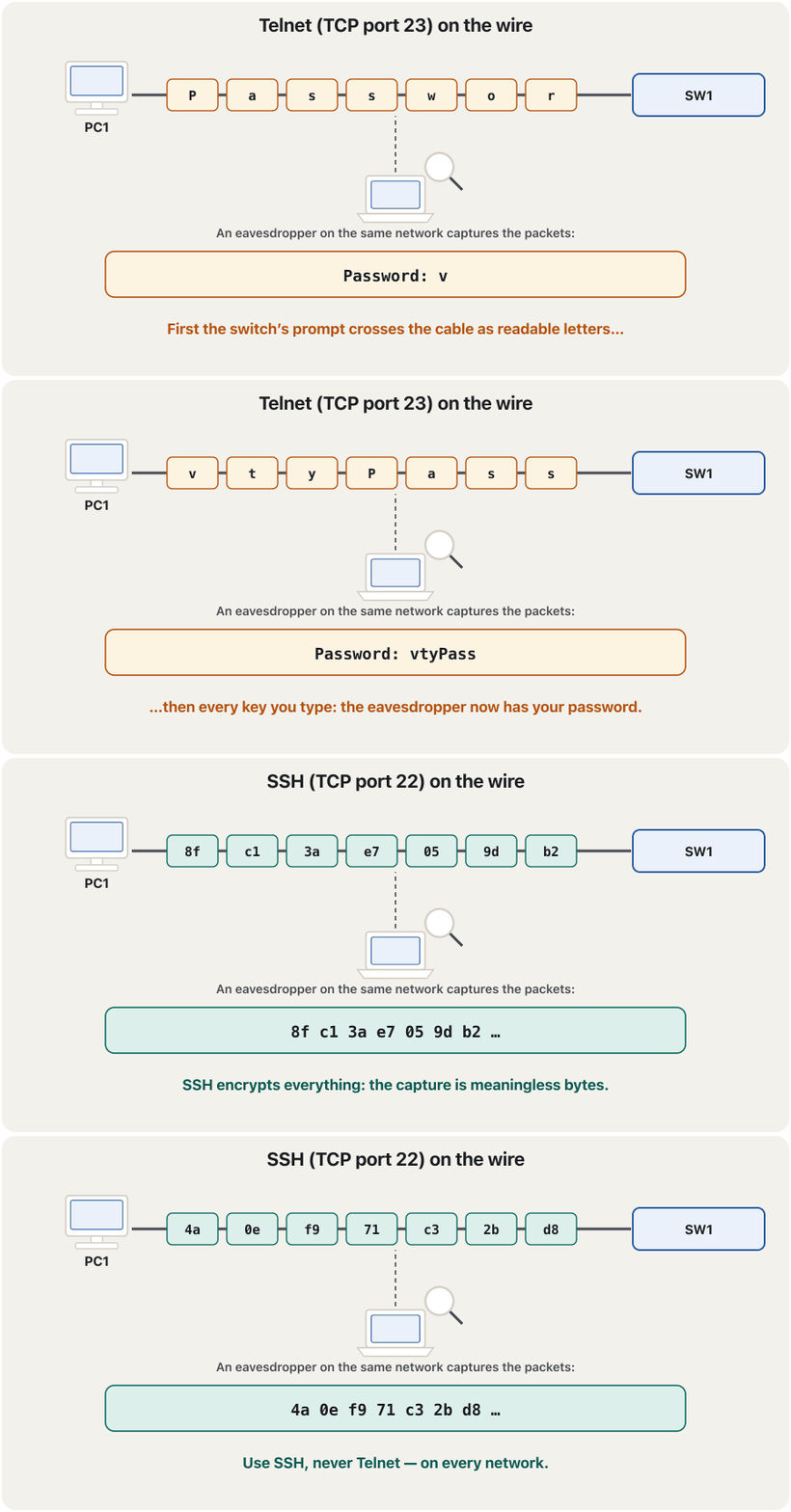
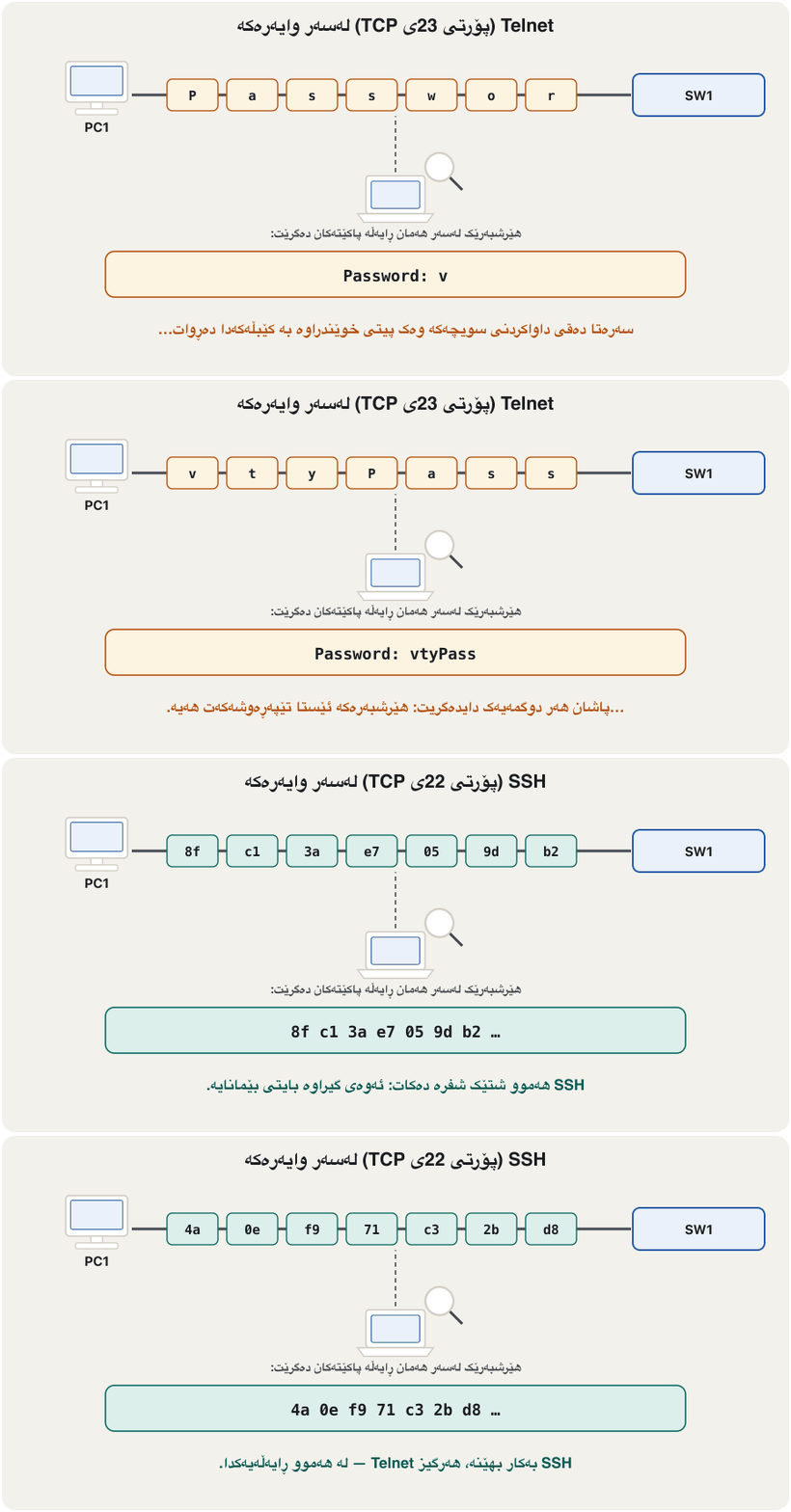
Telnet worked — and that is the problem. Telnet (TCP port 23) sends every key you press as a plain character. Anyone who can capture traffic on the path — a classmate with a packet-capture program, an infected PC, a switch port mirrored by mistake — reads your password and every command.
کاری کرد — و ئەوە کێشەکەیە. ( 23ی TCP) هەر دابگریت وەک پیتێکی ئاشکرا دەنێرێت. هەر کەسێک بتوانێت هاتوچۆ لەسەر ڕێگەکە بگرێت — هاوپۆلێک بە گرتنی ، PCـێکی تووشبوو، کە بە هەڵە کۆپی دەکرێت — و هەموو دەخوێنێتەوە.
What SSH addsئەوەی SSH زیادی دەکات
SSH (TCP port 22) protects three things at once. It encrypts the whole session. The device proves who it is with its host key, so you know you reached the real switch and not an impostor. And you prove who you are with a username and secret. The device’s key is an RSA key pair: a public key it shows to everyone and a private key it never gives away (how key pairs work).
( 22ی TCP) سێ شت پێکەوە دەپارێزێت. هەموو دانیشتنەکە شفرە دەکات. ئامێرەکە بە خۆی دەیسەلمێنێت کێیە، بۆیە دەزانیت گەیشتوویت بە ڕاستەقینەکە نەک بە ساختەیەک. و تۆ دەیسەلمێنیت کێیت بە و نهێنییەک. ئامێرەکە ـە: کە بە هەمووانی پیشان دەدات و کە هەرگیز نایداتە کەس (جووتە کلیل چۆن کار دەکات).
Setting up SSH, step by stepڕێکخستنی SSH، هەنگاو بە هەنگاو
- A host nameناوی میوانگر
hostname SW1— the key’s name is built from the host name, and the default name “Switch” is refused.hostname SW1— ناوی لە دروست دەکرێت و ناوی بنەڕەتی «Switch» ڕەت دەکرێتەوە. - A domain nameناوی دۆمەین
ip domain-name example.com— the second half of the key’s name (newer IOS XE shows it asip domain name).ip domain-name example.com— نیوەی دووەمی ناوی (IOS XEـی نوێتر بە شێوەیip domain nameپیشانی دەدات). - An RSA key pairجووتە کلیلێکی RSA
crypto key generate rsawith a modulus of 2048 bits or more — this also switches SSH on.crypto key generate rsaبە قەبارەی 2048 یان زیاتر — ئەمە هەڵدەکات. - Version 2 onlyتەنیا وەشانی 2
ip ssh version 2— refuse the old version.ip ssh version 2— وەشانە کۆنەکە ڕەت بکەرەوە. - A local userبەکارهێنەرێکی ناوخۆیی
username admin secret …— a local user whose password is stored hashed.username admin secret …— ناوخۆیی کە بە هاشکراوی هەڵدەگیرێت. - Lock the vty linesهێڵەکانی VTY قفڵ بکە
line vty 0 15+login local+transport input ssh— check the local user, accept SSH only.line vty 0 15+login local+transport input ssh— ناوخۆیی بپشکنە، تەنیا وەربگرە. - Reachable and savedگەیشتنی پێی و پاشەکەوت
An address to reach (the SVI from before), an enable secret, and
copy running-config startup-config.ناونیشانێک بۆ گەیشتن (SVIـەکەی پێشوو)، enable secret و
copy running-config startup-config.
Generating the key pairدروستکردنی جووتە کلیلەکە
crypto key generate rsa asks how long the key should be. The default answer, 512 bits, is far too short, and 1024 bits is too short as well. Cisco’s SSH guide asks for 2048 bits or more (4096 where the device supports it), and as of November 2026 Cisco IOS XE 17.11.1 and later refuse RSA keys under 2048 bits for SSH by default. Packet Tracer accepts 2048.
crypto key generate rsa دەپرسێت چەند درێژ بێت. وەڵامی بنەڕەتی، 512 ، زۆر کورتە و 1024 کورتە. ڕێنمایی Cisco داوای 2048 یان زیاتر دەکات (4096 ئەگەر ئامێرەکە پشتگیری بکات) و تا تشرینی دووەمی 2026، Cisco IOS XE 17.11.1 و دواتر کەمتر لە 2048 بۆ بە بنەڕەت ڕەت دەکەنەوە. Packet Tracer 2048 وەردەگرێت.
SW1(config)#ip domain-name example.com
SW1(config)#crypto key generate rsa
The name for the keys will be: SW1.example.com
Choose the size of the key modulus in the range of 360 to 4096 for your
  General Purpose Keys. Choosing a key modulus greater than 512 may take
  a few minutes.

How many bits in the modulus [512]: 2048
% Generating 2048 bit RSA keys, keys will be non-exportable...[OK]

%SSH-5-ENABLED: SSH 1.99 has been enabled
SW1(config)#ip ssh version 2
Explain the codeڕوونکردنەوەی کۆدەکە
- Lineدێڕی 3
host name + domain name = the key’s label.
+ = ناوی .
- Lineدێڕی 4
Older switch software (IOS 12.2) offers 360 to 2048 here; 2048 works on both.
کۆنتری (IOS 12.2) لێرەدا 360 تا 2048 پێشنیار دەکات؛ 2048 لەسەر هەردووکیان کار دەکات.
- Lineدێڕی 11
1.99 = versions 1 and 2 are both on; the next line leaves only version 2. A timestamp may appear in front of the message.
1.99 = وەشانی 1 و 2 هەردووکیان کاران؛ دێڕی دواتر تەنیا وەشانی 2 دەهێڵێتەوە. لەوانەیە کاتێک لە پێش پەیامەکەوە دەربکەوێت.
A local user and SSH-only vty linesبەکارهێنەرێکی ناوخۆیی و هێڵەکانی VTYـی تەنیا SSH
With login local, the vty lines stop using a shared line password and ask for a username and its secret from the device’s own user list. transport input ssh closes the Telnet door: the lines now accept SSH and nothing else. Use secret, never password: a secret is stored as a hash, a password in clear text or as reversible type 7 (password types and secrets). To allow only the administrators’ PCs on the vty lines, add an access list later (vty access class).
بە login local، وازیان لە هاوبەشی هێڵ دێنن و و نهێنییەکەی لە لیستی خودی ئامێرەکە دەپرسن. transport input ssh دەرگای دادەخات: ئێستا هێڵەکان تەنیا وەردەگرن. secret بەکار بهێنە، هەرگیز password: نهێنی وەک هاش هەڵدەگیرێت، بە یان وەک جۆری 7ـی گەڕاوە (جۆرەکانی تێپەڕەوشە و نهێنی). بۆ ئەوەی تەنیا PCـی بەڕێوەبەران بگەنە ، دواتر زیاد بکە (access-class لەسەر vty).
SW1(config)#username admin secret N3tLab!26
SW1(config)#line vty 0 15
SW1(config-line)#login local
SW1(config-line)#transport input ssh
SW1(config-line)#exit
SW1(config)#enable secret En@ble2026
SW1(config)#end
SW1#copy running-config startup-config
Destination filename [startup-config]?
Building configuration...
[OK]
Explain the codeڕوونکردنەوەی کۆدەکە
- Lineدێڕی 1
Example secret: use your own long one. Never “cisco” — it is the first word every attacker tries.
نهێنیی نموونە: هی درێژی خۆت بەکار بهێنە. هەرگیز «cisco» — یەکەم وشەیە کە هەموو تاقی دەکاتەوە.
- Lineدێڕی 4
Lines with
transport input sshrefuse Telnet connections.هێڵەکان بە
transport input sshپەیوەندیی ڕەت دەکەنەوە.
Connect from a PCلە PCـێکەوە پەیوەندی بکە
On PC1 open Desktop > Command Prompt and type ssh -l admin 192.168.1.10. The letter after the dash is a small L, for login: it names the user. The password you type is the user’s secret; enable then asks for the enable secret.
لەسەر PC1 Desktop > Command Prompt بکەرەوە و ssh -l admin 192.168.1.10 بنووسە. ئەو پیتەی دوای داشەکە L ـی بچووکە، بۆ login: دیاری دەکات. ئەو دەینووسیت نهێنیی ؛ پاشان enable داوای enable secret دەکات.
C:\>ssh -l admin 192.168.1.10

Password:

SW1>enable
Password:
SW1#On a real Windows 10 or 11 computer the built-in OpenSSH client also accepts ssh admin@192.168.1.10. PuTTY and other terminal programs (for example SecureCRT) work too: choose SSH, type the address and keep port 22.
لەسەر ڕاستەقینەی Windows 10 یان 11، کلاینتی ناوخۆیی OpenSSH ssh admin@192.168.1.10ـیش وەردەگرێت. PuTTY و تری (بۆ نموونە SecureCRT)ـیش کار دەکەن: SSH هەڵبژێرە، ناونیشانەکە بنووسە و 22 وەک خۆی بهێڵەوە.
The first connection: check the keyیەکەم پەیوەندی: کلیلەکە بپشکنە
The first time a real SSH client meets a device, it does not know the device’s key yet, so it shows the key’s fingerprint and asks whether to trust it. This is the moment that stops an impostor: if someone has put a fake device in the path, its key will be different. Compare the fingerprint with the one your administrator recorded before you accept it.
یەکەم جار کە کلاینتێکی ڕاستەقینەی ئامێرێک دەبینێت، هێشتا ناناسێت، بۆیە پەنجەمۆری پیشان دەدات و دەپرسێت متمانەی پێ بکات یان نا. ئەمە ئەو ساتەیە کە ساختەکار ڕادەگرێت: ئەگەر کەسێک ئامێرێکی ساختەی لە ڕێگەکەدا دانابێت، جیاواز دەبێت. پێش قبووڵکردن، پەنجەمۆرەکە لەگەڵ ئەوەی تۆماری کردووە بەراورد بکە.
Check that SSH is workingبپشکنە کە SSH کار دەکات
show ip ssh tells you whether SSH is enabled and which version. show ssh lists the sessions that are open right now, with the encryption they use and the user’s name.
show ip ssh پێت دەڵێت ئایا کارایە و کام وەشان. show ssh ئەو دانیشتنانە ڕیز دەکات کە ئێستا کراوەن، لەگەڵ ئەو بەکاری دەهێنن و .
SW1#show ip ssh
SSH Enabled - version 2.0
Authentication timeout: 120 secs; Authentication retries: 3

SW1#show ssh
Connection Version Mode Encryption  Hmac          State           Username
0          2.0     IN   aes128-ctr  hmac-sha2-256 Session started admin
0          2.0     OUT  aes128-ctr  hmac-sha2-256 Session started admin
%No SSHv1 server connections running.
Explain the codeڕوونکردنەوەی کۆدەکە
- Lineدێڕی 2
“version 2.0” after
ip ssh version 2; “1.99” would mean versions 1 and 2. Real IOS XE prints more lines here, such as the algorithms and the key’s modulus size.«version 2.0» دوای
ip ssh version 2؛ «1.99» واتە وەشانی 1 و 2. IOS XEـی ڕاستەقینە لێرە دێڕی زیاتر چاپ دەکات، وەک و قەبارەی .- Lineدێڕی 7-8
One session = one IN and one OUT line. The cipher names depend on your IOS version and on the client.
یەک دانیشتن = یەک دێڕی IN و یەک دێڕی OUT. ناوی بەپێی IOS و کلاینتەکە دەگۆڕێن.
Why the first ping failsبۆچی یەکەم پینگ سەرناکەوێت
Before you try SSH, test the path with ping 192.168.1.10. On a fresh lab the first echo usually times out and the other three succeed. Nothing is wrong: PC1 first has to learn the switch’s MAC address with ARP, and that echo is lost while it waits (the ARP delay). Ping again and all four succeed.
پێش تاقیکردنەوەی ، ڕێگەکە بە ping 192.168.1.10 تاقی بکەرەوە. لە تاقیکردنەوەیەکی تازەدا یەکەم echo زۆرجار کاتی بەسەر دەچێت و سێیەکەی تر سەردەکەون. هیچ شتێک هەڵە نییە: PC1 سەرەتا دەبێت بە فێر ببێت و ئەو echoـیە لە کاتی چاوەڕوانیدا لەدەست دەچێت (دواکەوتنی ARP). دووپاتە بکە و هەر چواریان سەردەکەون.
C:\>ping 192.168.1.10

Pinging 192.168.1.10 with 32 bytes of data:

Request timed out.
Reply from 192.168.1.10: bytes=32 time<1ms TTL=255
Reply from 192.168.1.10: bytes=32 time<1ms TTL=255
Reply from 192.168.1.10: bytes=32 time<1ms TTL=255

Ping statistics for 192.168.1.10:
Packets: Sent = 4, Received = 3, Lost = 1 (25% loss),Common mistakesهەڵە باوەکان
Exercisesڕاهێنانەکان
A 2960 switch must be named IT_Switch and managed securely from the PCs of its LAN at 192.168.10.240/24. The task also asked for a “type-7 password” to move from user mode to privileged mode. Write the whole configuration — and say what you use instead of a type-7 password, and why.
2960 دەبێت ناوی IT_Switch بێت و لە PCـەکانی بە 192.168.10.240/24 بە پارێزراوی بەڕێوە ببرێت. ئەرکەکە هەروەها داوای « جۆری 7»ی کردبوو بۆ چوون لە بۆ . هەموو بنووسە — و بڵێ لەبری جۆری 7 چی بەکار دەهێنیت و بۆچی.
Hintئاماژە
Follow the seven-step checklist, then replace the weak password with a secret.
لیستی پشکنینی حەوت هەنگاوەکە پەیڕەو بکە، پاشان لاوازەکە بە نهێنییەک بگۆڕە.
Show answerوەڵامەکە پیشان بدە
Switch(config)#hostname IT_Switch
IT_Switch(config)#interface vlan 1
IT_Switch(config-if)#ip address 192.168.10.240 255.255.255.0
IT_Switch(config-if)#no shutdown
IT_Switch(config-if)#exit
IT_Switch(config)#ip domain-name example.com
IT_Switch(config)#crypto key generate rsa
How many bits in the modulus [512]: 2048
IT_Switch(config)#ip ssh version 2
IT_Switch(config)#username admin secret Str0ng-Exam!Pass
IT_Switch(config)#line vty 0 15
IT_Switch(config-line)#login local
IT_Switch(config-line)#transport input ssh
IT_Switch(config-line)#exit
IT_Switch(config)#enable secret An0ther-Long!Secret
IT_Switch(config)#end
IT_Switch#copy running-config startup-config
Instead of enable password + service password-encryption (type 7), use enable secret: type 7 only hides the text and can be reversed by free tools in seconds, while a secret is stored as a one-way hash (type 9 scrypt on current IOS XE). Never use “Cisco” or “cisco” as a password: it is the first word attackers try.
لەبری enable password + service password-encryption (جۆری 7)، enable secret بەکار بهێنە: جۆری 7 تەنیا دەقەکە دەشارێتەوە و بە ئامرازی بێبەرانبەر لە چەند چرکەیەکدا دەگەڕێندرێتەوە، بەڵام نهێنی وەک هاشێکی یەکئاڕاستە هەڵدەگیرێت (جۆری 9ـی scrypt لەسەر IOS XEـی ئێستا). هەرگیز «Cisco» یان «cisco» وەک بەکار مەهێنە: یەکەم وشەیە کە تاقی دەکەنەوە.
A switch still has the old Telnet lab: line vty 0 4, password vlanPass, login. List the commands that turn it into an SSH-only switch with the user netadmin.
هێشتا تاقیکردنەوە کۆنەکەی هەیە: line vty 0 4، password vlanPass، login. ئەو ڕیز بکە کە دەیکەن بە تەنیا بە netadmin.
Show answerوەڵامەکە پیشان بدە
SW1(config)#ip domain-name example.com
SW1(config)#crypto key generate rsa
How many bits in the modulus [512]: 2048
SW1(config)#ip ssh version 2
SW1(config)#username netadmin secret <a long secret>
SW1(config)#line vty 0 15
SW1(config-line)#no password
SW1(config-line)#login local
SW1(config-line)#transport input ssh
SW1(config-line)#end
SW1#copy running-config startup-config
no password removes the old shared line password; login local and transport input ssh do the rest. All 16 lines are covered by 0 15.
no password هاوبەشی کۆنی هێڵ لادەبات؛ login local و transport input ssh ئەوی تر دەکەن. هەر 16 هێڵەکە بە 0 15 دەگیرێنەوە.
In another lab the switch’s management SVI is interface vlan 7 with 192.168.1.7. Explain each part of ssh -l Cisco 192.168.1.7, and why the first ping 192.168.1.7 before it showed one “Request timed out”.
لە تاقیکردنەوەیەکی تردا SVIـی بەڕێوەبردنی interface vlan 7ـە بە ناونیشانی 192.168.1.7. هەر بەشێکی ssh -l Cisco 192.168.1.7 ڕوون بکەرەوە و بڵێ بۆچی یەکەم ping 192.168.1.7 پێش ئەو، یەک «Request timed out»ی پیشان دا.
Show answerوەڵامەکە پیشان بدە
ssh is the client program; -l (small L, “login”) introduces the user name Cisco; 192.168.1.7 is the switch’s SVI (interface vlan 7 — PC1’s switch port was put into VLAN 7 as well, so the PC can reach it). The first ping lost one echo because PC1 first used ARP to find the switch’s MAC address. (A better user name than “Cisco” is anything an attacker cannot guess.)
ssh کلاینتە؛ -l (L ـی بچووک، «login») Cisco دەناسێنێت؛ 192.168.1.7 SVIـی (interface vlan 7؛ PC1 لەسەر خرایە ناو VLAN 7، بۆ ئەوەی PCـەکە پێی بگات). یەکەم یەک echoـی لەدەستدا چونکە PC1 سەرەتا بەکار هێنا بۆ دۆزینەوەی . ( باشتر لە «Cisco» هەر شتێکە کە نەتوانێت بیپێشبینی بکات.)
Summaryکورتە
- A layer 2 switch is reached through an SVI:
interface vlan 1,ip address …,no shutdown, plusip default-gatewayfor other networks. - Remote sessions enter through vty lines — secure all of them (
line vty 0 15). - Telnet (port 23) sends everything as plain text — lab demonstration only. SSH (port 22) encrypts, proves the device and checks the user.
- SSH set-up:
hostname,ip domain-name,crypto key generate rsa(2048 bits or more),ip ssh version 2,username … secret …,line vty 0 15+login local+transport input ssh, save. - Connect with
ssh -l admin 192.168.1.10(orssh admin@…, PuTTY); check the host key on the first connection. - Verify with
show ip sshandshow ssh; a lost first ping is ARP.
- چینی 2 لە ڕێگەی SVIـەوە دەگەیەنرێت:
interface vlan 1،ip address …،no shutdown، لەگەڵip default-gatewayبۆ تر. - دانیشتنە دوورەکان لە ڕێگەی دێن — هەموویان بپارێزە (
line vty 0 15). - ( 23) هەموو شتێک وەک دەنێرێت — تەنیا بۆ نمایشی تاقیگە. ( 22) شفرە دەکات، ئامێرەکە دەسەلمێنێت و دەپشکنێت.
- ڕێکخستنی :
hostname،ip domain-name،crypto key generate rsa(2048 یان زیاتر)،ip ssh version 2،username … secret …،line vty 0 15+login local+transport input ssh، پاشەکەوت. - بە
ssh -l admin 192.168.1.10(یانssh admin@…، PuTTY) پەیوەندی بکە؛ لە یەکەم پەیوەندیدا ئامێرەکە بپشکنە. - بە
show ip sshوshow sshبیپشکنە؛ لەدەستچوونی یەکەم .
Next chapter: split one switch into several networks — VLANs: many networks on one switch.
بەشی داهاتوو: یەک بکە بە چەند — VLAN: چەند ڕایەڵەیەک لەسەر یەک سویچ.
Lesson complete!وانەکە تەواو بوو!
Well done. Review the key terms, then go on to the next lesson.دەستخۆش. سەیرێکی زاراوە سەرەکییەکان بکەرەوە، پاشان بڕۆ بۆ وانەی داهاتوو.
Key termsزاراوە سەرەکییەکان
VLANs: Many Networks on One SwitchVLAN: چەند ڕایەڵەیەک لەسەر یەک سویچ
Related lecturesوانە پەیوەندیدارەکان
- Cisco IOS and the Command LineCisco IOS و نێوبەستەی هێڵی فەرمان
- Show Commands, Running and Startup Configurationsفەرمانەکانی show، ڕێکخستنی کارا و ڕێکخستنی دەستپێکردن
- File Transfer and Remote Access: FTP, Telnet, SSH and RDPگواستنەوەی فایل و دەستڕاگەیشتن لە دوورەوە: FTP، Telnet، SSH و RDP
- VLANs: Many Networks on One SwitchVLAN: چەند ڕایەڵەیەک لەسەر یەک سویچ
- ARP: From IP Address to MAC AddressARP: لە ناونیشانی IP بۆ ناونیشانی MAC
- Encryption, Hashing and Digital Signaturesشفرەکردن، هاشکردن و واژووە دیجیتاڵییەکان
- Passwords, MFA and Access Controlتێپەڕەوشەکان، MFA و کۆنترۆڵی دەستڕاگەیشتن
- Network Defences: Firewalls, Segmentation, Monitoring and SIEMبەرگرییەکانی ڕایەڵە: ئاگرەدیوار، بەشبەشکردنی ڕایەڵە، چاودێریی ئاسایش و SIEM
References and further readingسەرچاوەکان و خوێندنەوەی زیاتر
- Cisco: Configure Secure Shell (SSH) on Routers and Switches — 2048-bit modulus or stronger, 4096 where supported; show ip ssh / show ssh (document 4145, updated 30 July 2026)
- Cisco Field Notice FN72511: RSA keys less than 2048 bits are not supported for SSH in Cisco IOS XE 17.11.1 and later
- PuTTY User Manual, §2.2: Verifying the host key (SSH only) — Accept, Connect Once, Cancel
- Cisco Security Command Reference: crypto key generate rsa (modulus range 360–4096 since 15.1(1)T; 2048 recommended)
This lecture is a first edition. The Kurdish text and terminology are waiting for review by Kurdish IT teachers.ئەم وانەیە چاپی یەکەمە. دەقە کوردییەکە و زاراوەکانی چاوەڕێی پێداچوونەوەی مامۆستایانی کوردی بواری IT ن.